![[新サービス] AWS Blocks(Preview)をローカルとAWS sandboxの両方で試してみた](https://images.ctfassets.net/ct0aopd36mqt/348VnC3440CoUtpS4pd5NS/8a7182ab96a0851a72a88d40328811b3/aws.png?w=3840&fm=webp)
[新サービス] AWS Blocks(Preview)をローカルとAWS sandboxの両方で試してみた

クラウド事業本部の石川です。アプリケーションのバックエンドをTypeScriptで構成できるオープンソースフレームワーク AWS Blocks が Public Preview になりましたので、ローカルと AWS sandbox の両方で実際に試してみました。
2026年6月16日、AWS から AWS Blocks が Public Preview として公開されました。AWS Blocks は、データベーステーブル・ユーザー認証・リアルタイム通信・ファイルアップロード・バックグラウンドジョブ・AIエージェントといったバックエンドの構成要素を「Block」として組み合わせ、アプリケーションのバックエンドを TypeScript で定義するオープンソースフレームワークです。
最大の特徴は、AWS アカウントがなくてもローカルで動作する点です。ローカルでは Postgres・認証・リアルタイム通信を含む環境がモック実装で起動し、同じアプリケーションコードを変更なしで AWS にデプロイできます。
本記事では default テンプレートで生成される Todo アプリを題材に、ローカル起動・コードの小改造・型安全性の確認を行ったうえで、AWS sandbox へデプロイして実際の AWS リソースにデータが書き込まれることまで確認します。なお Public Preview のため、API やテンプレートは今後変更される可能性があります。検証時点のバージョンを「前提条件」に明記します。
AWS Blocksとは
AWS Blocks では、バックエンドを aws-blocks/index.ts に、フロントエンドを src/ に定義します。フロントエンドはバックエンドの型付きAPIを import { api } from 'aws-blocks' のように直接インポートして呼び出すため、クライアントコードの生成ステップがなく、バックエンドとフロントエンドが同じ TypeScript の型を共有します。
各 Block は、ローカルではモック実装(インメモリ等)で動作し、AWS にデプロイすると自動的に AWS の実装へ解決されます。たとえば DistributedTable は DynamoDB テーブルに、AuthBasic はユーザー情報を保持する DynamoDB テーブルに、Realtime は WebSocket を担う API Gateway に解決されます。
この「同じ index.ts を環境ごとに使い分ける」仕組みは、Node.js の条件付きエクスポートと、生成プロジェクト内の薄いラッパーによって実現されています。
検証に使った default テンプレートでは、以下の Block が使われています。このほかにも Database(PostgreSQL + Kysely)、FileBucket、AsyncJob、CronJob、Agent、KnowledgeBase、EmailClient などが提供されています。
AuthBasic— ユーザー名/パスワードによる認証(JWTセッション)DistributedTable— Zodスキーマで定義する構造化データ(セカンダリインデックス対応)Realtime— WebSocket によるリアルタイム配信ApiNamespace— ブラウザからバックエンドへの型安全なRPC
他にも、まだまだたくさんあります。
やってみた
前提条件
- AWS Blocks のローカル開発については AWS アカウントは不要です(AWSデプロイの工程のみアカウントが必要です)
- 検証環境
- macOS
- Node.js v22.22.0 / npm 10.9.4(AWS Blocks は Node.js 22以上・npm 10以上が前提)
- テンプレート: default(blocksTemplateVersion 0.1.0)
- 主なパッケージ: @aws-blocks/blocks 0.1.4 / @aws-blocks/core 0.1.3 / @aws-blocks/bb-auth-basic 0.1.1 / @aws-blocks/bb-distributed-table 0.1.2 / @aws-blocks/bb-realtime 0.1.1
- AWSデプロイ先リージョン: ap-northeast-1(CDK bootstrap 済み)
プロジェクトを作成する
まずは npm create でプロジェクトを生成します。
% npm create @aws-blocks/blocks-app@latest my-todo-app

> npx
> "create-blocks-app" my-todo-app

Creating Blocks app in /Users/ishikawa.satoru/workspaces/cc/blog/20260620-aws-blocks-preview/org/my-todo-app...
Installing dependencies...
npm warn EBADENGINE Unsupported engine {
npm warn EBADENGINE   package: 'my-todo-app@0.1.0',
npm warn EBADENGINE   required: { node: '>=22.0.0' },
npm warn EBADENGINE   current: { node: 'v20.20.0', npm: '11.11.0' }
npm warn EBADENGINE }

added 307 packages, and audited 345 packages in 28s

56 packages are looking for funding
  run `npm fund` for details

1 low severity vulnerability

To address all issues, run:
  npm audit fix

Run `npm audit` for details.

✓ Blocks app created!

Next steps:
  cd /Users/ishikawa.satoru/workspaces/cc/blog/20260620-aws-blocks-preview/org/my-todo-app
  npm run dev

Then open http://localhost:3000

See README.md for an overview and AGENTS.md for AI agent instructions.
npm create @aws-blocks/blocks-app は内部的に @aws-blocks/create-blocks-app を実行します。依存パッケージのインストールまで含めて308パッケージが導入され、aws-blocks/(バックエンド)と src/(フロントエンド)を持つプロジェクトが生成されました。
ローカルで起動する(AWSアカウント不要)
npm run dev でローカル開発サーバーを起動します。
cd my-todo-app/
% npm run dev

> my-todo-app@0.1.0 dev
> tsx watch aws-blocks/scripts/server.ts

Loading backend...
Deploying local resources...
  🔌 Attaching dev server (from @aws-blocks/bb-realtime/ws-server)
📝 Generating client code...
AWS Blocks local server running on http://localhost:3000

  ➜  http://localhost:3000/
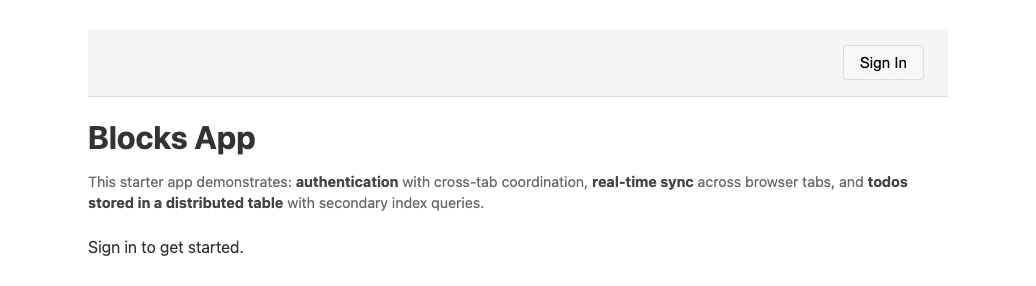
ブラウザで http://localhost:3000 を開くと、サインイン画面が表示されます。
「Sign In」からアカウントを作成してサインインすると、Todo の入力欄と一覧が表示されます。優先度(High / Medium / Low)を指定して Todo を追加し、チェックボックスで完了状態を切り替え、「Priority」ボタンで優先度順に並べ替えられます。
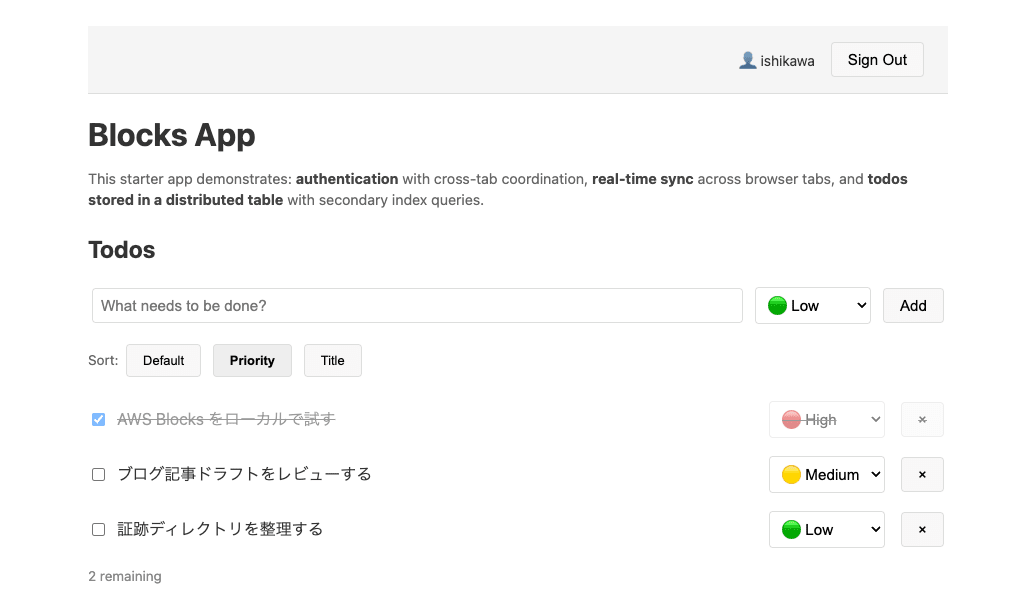
ここまで AWS アカウントなしで、認証・データ保存・並べ替えまで一通り動作しました。
バックエンドのコードを読む
バックエンドの定義は aws-blocks/index.ts の1ファイルに集約されています。認証・データモデル・リアルタイム・APIがすべてここで宣言されています。抜粋します。
import { ApiNamespace, Scope, AuthBasic, DistributedTable, Realtime } from '@aws-blocks/blocks';
import { z } from 'zod';

const scope = new Scope('my-app');

// ─── Auth ────────────────────────────────────────────────────────────────────
const auth = new AuthBasic(scope, 'auth', {
  passwordPolicy: { minLength: 8 },
  crossDomain: process.env.BLOCKS_SANDBOX === 'true',
});
export const authApi = auth.createApi();

// ─── Data ────────────────────────────────────────────────────────────────────
// Zod schema = runtime validation + TypeScript types + DynamoDB table shape.
const todoSchema = z.object({
  userId: z.string(),       // partition key — per-user isolation
  todoId: z.string(),       // sort key — unique within a user
  title: z.string(),
  completed: z.boolean(),
  priority: z.number(),     // 1=high, 2=medium, 3=low
  version: z.number(),      // optimistic locking — incremented on each update
  createdAt: z.number(),
});

const todos = new DistributedTable(scope, 'todos', {
  schema: todoSchema,
  key: { partitionKey: 'userId', sortKey: 'todoId' },
  indexes: {
    // Secondary indexes: query todos sorted by priority or title.
    // The partition key is always userId (per-user isolation), the sort key varies.
    byPriority: { partitionKey: 'userId', sortKey: 'priority' },
    byTitle: { partitionKey: 'userId', sortKey: 'title' },
  },
});

// ─── Realtime ────────────────────────────────────────────────────────────────
const rt = new Realtime(scope, 'live', {
  namespaces: {
    todos: Realtime.namespace(z.object({
      action: z.enum(['created', 'updated', 'deleted']),
      todoId: z.string(),
    })),
  },
});

// ─── API ─────────────────────────────────────────────────────────────────────
export const api = new ApiNamespace(scope, 'api', (context) => ({

  async subscribeTodos() {
    const user = await auth.requireAuth(context);
    return rt.getChannel('todos', user.username);
  },

  async createTodo(title: string, priority: number = 2) {
    const user = await auth.requireAuth(context);
    const todoId = `${Date.now().toString(36)}-${Math.random().toString(36).slice(2, 8)}`;
    const todo = {
      userId: user.username,
      todoId,
      title,
      completed: false,
      priority,
      version: 1,
      createdAt: Date.now(),
    };
    await todos.put(todo);
    await rt.publish('todos', user.username, { action: 'created' as const, todoId });
    return todo;
  },
  :
  :
  /**
   * Toggle todo completion with optimistic locking.
   * Uses `ifFieldEquals` to detect concurrent writes. On conflict,
   * throws ConditionalCheckFailedException — caller should re-read and retry.
   */
  async toggleTodo(todoId: string) {
    const user = await auth.requireAuth(context);
    const todo = await todos.get({ userId: user.username, todoId });
    if (!todo) throw new Error('Todo not found');
    await todos.put(
      { ...todo, completed: !todo.completed, version: todo.version + 1 },
      { ifFieldEquals: { version: todo.version } },
    );
    await rt.publish('todos', user.username, { action: 'updated' as const, todoId });
    return { success: true };
  },
  :
  :
}));
DistributedTable のスキーマは Zod で定義され、これがそのままランタイム検証・TypeScript の型・DynamoDB のテーブル形状を兼ねます。indexes に宣言した byPriority と byTitle は、後ほど AWS 側で DynamoDB のセカンダリインデックスとして作成されることを確認します。
API は ApiNamespace の中で宣言します。各メソッドは「認証 → 処理 → リアルタイム配信」というパターンで、toggleTodo では ifFieldEquals による楽観的ロックも実装されています。
小改造してホットリロードを確認する
バックエンドに「完了済みのTodoを一括削除する」API clearCompleted を追加してみます。aws-blocks/index.ts の ApiNamespace 内に以下を追記しました。
/** Delete all completed todos at once. Returns the number removed. */
async clearCompleted() {
  const user = await auth.requireAuth(context);
  const all = await Array.fromAsync(
    todos.query({ where: { userId: { equals: user.username } } })
  );
  const completed = all.filter((t) => t.completed);
  for (const t of completed) {
    await todos.delete({ userId: user.username, todoId: t.todoId });
    await rt.publish('todos', user.username, { action: 'deleted' as const, todoId: t.todoId });
  }
  return { removed: completed.length };
}
あわせてフロントエンド src/index.ts に「Clear completed」ボタンと、それを呼び出すハンドラを追加しました。型チェックを実行すると、追加したメソッドはフロントエンドから型安全に呼び出せており、エラーなく通過します。
% npm run typecheck

> my-todo-app@0.1.0 typecheck
> tsc --noEmit
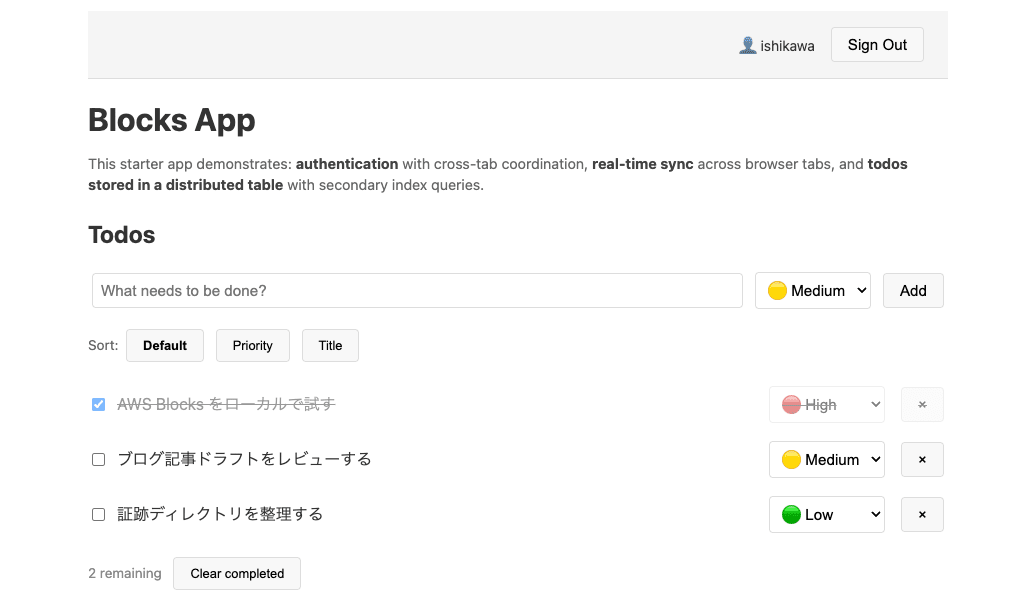
ブラウザを再読み込みすると、ホットリロードで「Clear completed」ボタンが表示され、クリックすると完了済みのTodoだけが削除されました。
AWS sandbox へデプロイする
ローカルで動いたものを、そのまま AWS にデプロイします。npm run sandbox は Lambda の hot-swap を使った一時的な検証環境を構築するコマンドです。
% npm run sandbox

> my-todo-app@0.1.0 sandbox
> tsx aws-blocks/scripts/sandbox.ts

🚀 Deploying to AWS...
   (This may take a few minutes on first deploy)
Bundling asset my-todo-app-stack-satoruishikawa-0hwgkl/Handler/Code/Stage...

  ...0747fa0accce45da63222b7fd286365049cf2eb4ac08b7-building/index.js  928.5kb

⚡ Done in 112ms

✨  Synthesis time: 1.68s

(node:9612) Warning: NodeVersionSupportWarning: The AWS SDK for JavaScript (v3)
versions published after the first week of January 2027
will require node >=22. You are running node v20.20.0.

To continue receiving updates to AWS services, bug fixes,
and security updates please upgrade to node >=22.

More information can be found at: https://a.co/c895JFp
(Use `node --trace-warnings ...` to show where the warning was created)
(node:9612) Warning: NodeVersionSupportWarning: The AWS SDK for JavaScript (v3)
versions published after the first week of January 2027
will require node >=22. You are running node v20.20.0.

To continue receiving updates to AWS services, bug fixes,
and security updates please upgrade to node >=22.

More information can be found at: https://a.co/c895JFp
my-todo-app-stack-satoruishikawa-0hwgkl: start: Building my-todo-app-stack-satoruishikawa-0hwgkl Template
my-todo-app-stack-satoruishikawa-0hwgkl: success: Built my-todo-app-stack-satoruishikawa-0hwgkl Template
(node:9612) Warning: NodeVersionSupportWarning: The AWS SDK for JavaScript (v3)
versions published after the first week of January 2027
will require node >=22. You are running node v20.20.0.

To continue receiving updates to AWS services, bug fixes,
and security updates please upgrade to node >=22.

More information can be found at: https://a.co/c895JFp
my-todo-app-stack-satoruishikawa-0hwgkl: start: Publishing my-todo-app-stack-satoruishikawa-0hwgkl Template (current_account-current_region-1ac4c392)
my-todo-app-stack-satoruishikawa-0hwgkl: success: Published my-todo-app-stack-satoruishikawa-0hwgkl Template (current_account-current_region-1ac4c392)
my-todo-app-stack-satoruishikawa-0hwgkl: creating CloudFormation changeset...
Changeset arn:aws:cloudformation:ap-northeast-1:123456789012:changeSet/cdk-deploy-change-set/789b1894-b7c6-44cf-aa5d-6e2c611c840c created and waiting in review for manual execution (--no-execute)
my-todo-app-stack-satoruishikawa-0hwgkl: deploying... [1/1]

 ✅  my-todo-app-stack-satoruishikawa-0hwgkl

✨  Deployment time: 149.97s

Outputs:
my-todo-app-stack-satoruishikawa-0hwgkl.APIEndpoint1793E782 = https://ot0i4m1yxe.execute-api.ap-northeast-1.amazonaws.com/prod/
my-todo-app-stack-satoruishikawa-0hwgkl.ApiUrl = https://ot0i4m1yxe.execute-api.ap-northeast-1.amazonaws.com/prod/aws-blocks/api
my-todo-app-stack-satoruishikawa-0hwgkl.RealtimeWsUrl = wss://dlv30yq2ee.execute-api.ap-northeast-1.amazonaws.com/rt
Stack ARN:
arn:aws:cloudformation:ap-northeast-1:123456789012:stack/my-todo-app-stack-satoruishikawa-0hwgkl/8d314bd0-6c8e-11f1-a765-06d2106e79fd

✨  Total time: 164.86s

✅ Sandbox deployed!
📡 API URL: https://ot0i4m1yxe.execute-api.ap-northeast-1.amazonaws.com/prod/aws-blocks/api
📝 Generating client code...
[Realtime] BLOCKS_RT_WS_URL not set — getChannel() will return incomplete descriptors
(node:10169) Warning: NodeVersionSupportWarning: The AWS SDK for JavaScript (v3)
versions published after the first week of January 2027
will require node >=22. You are running node v20.20.0.
:
:
CloudFormation スタックがデプロイされ、合計82個のリソースが作成されました。デプロイ時間は約155秒でした。npm run sandbox はデプロイ後もローカルでフロントエンドを配信し続け、フロントエンドからは AWS 上の API を呼び出す構成になります。
作成された AWS リソースを確認する
実際にどのようなリソースが作られたのかを確認します。
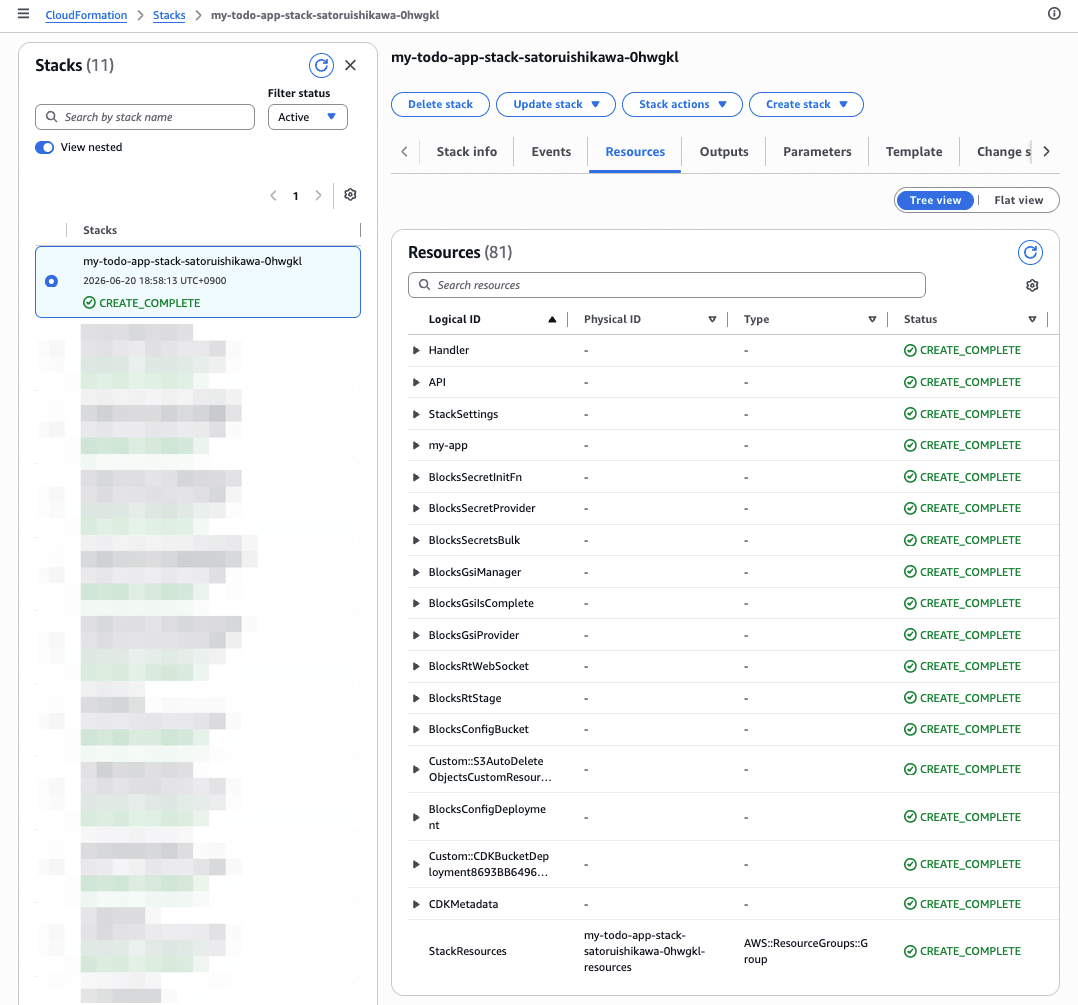
DynamoDB が4テーブル、Lambda が10関数、API Gateway は REST API(メインのAPI)と WebSocket 用の API Gateway V2 の両方が作成されています。DynamoDB のテーブル名を見ると、index.ts で定義した Block がそのまま AWS リソースに対応していることがわかります。
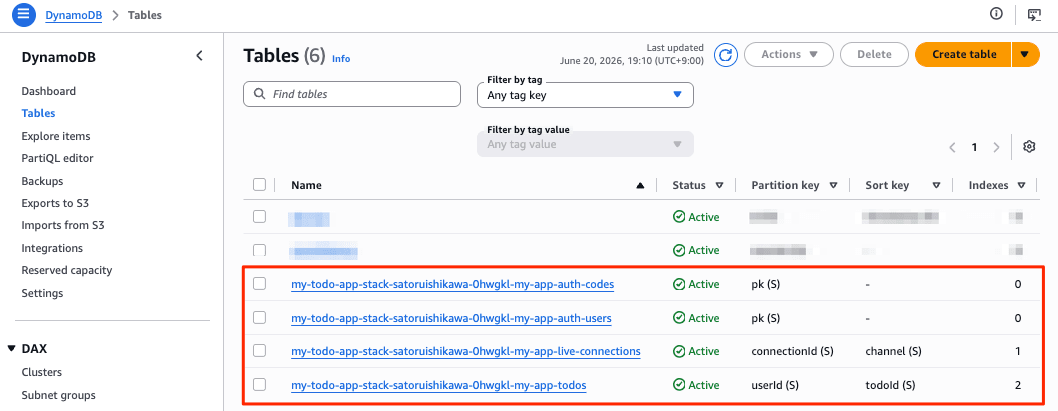
DistributedTable が DynamoDB のどのような設定にマップされるかも確認します。
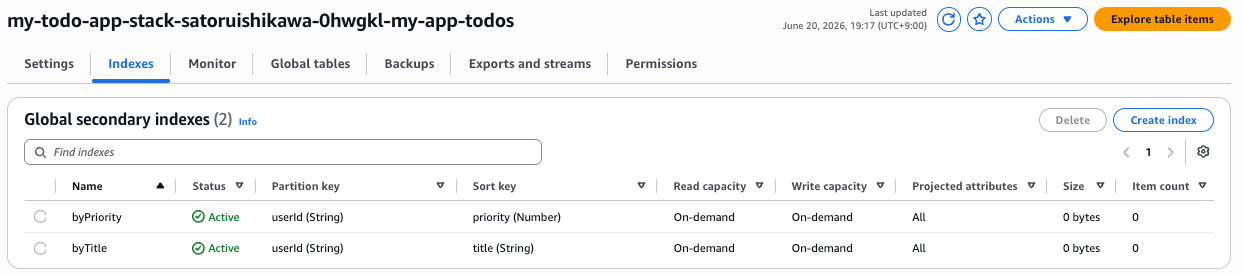
課金モードはオンデマンドで、index.ts の indexes に宣言した byPriority / byTitle が、そのまま DynamoDB のグローバルセカンダリインデックス(GSI)として作成されていました。
AWS 上で動作することを確認する
ローカルで動いていたものと同じフロントエンド(http://localhost:3000)が、今度は AWS 上の API を呼び出します。AWS 側の DynamoDB は新規なので、改めてサインアップして Todo を2件追加しました。
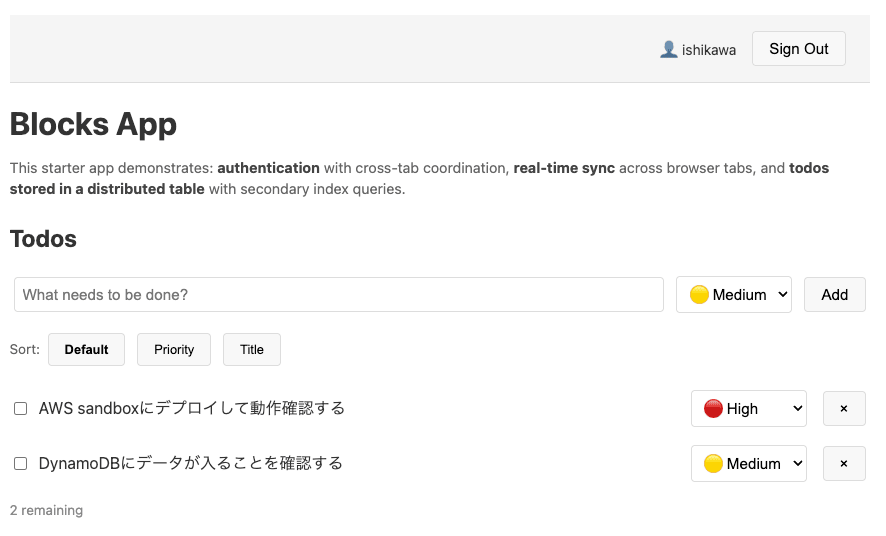
この操作が本当に実 DynamoDB に書き込まれたかを確認します。
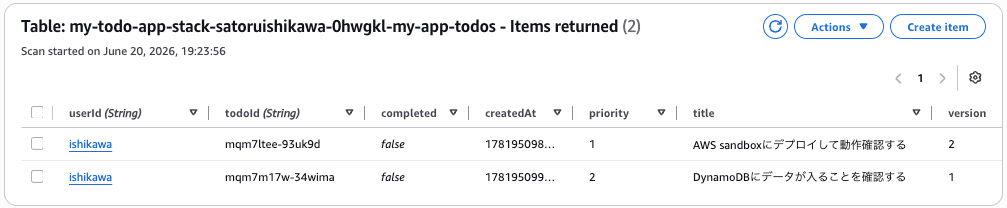
ブラウザで入力した文字列が、そのまま AWS の DynamoDB テーブルに格納されていることを確認できました。auth-users テーブルにもサインアップしたユーザーが1件登録されていました。ローカルで動いていたコードを、コードの変更なしで AWS 上で動かせることが確認できました。
AWS sandboxにデプロイ(npm run sandbox)すると、Webブラウザでアクセスするたびに、ターミナルに標準出力にログが表示されます。
クリーンアップ
検証が終わったら、Ctrl+Cを押すとサンドボックスの実行を終え、Webブラウザでアクセスもできなくなります。
^C
Shutting down...

Shutting down...

🛑 Stopping local processes...
   (AWS resources are still running)

   To destroy AWS resources, run: npm run sandbox:destroy

19:28:51 [tsx] Previous process hasn't exited yet. Force killing...
19:28:51 [tsx] Previous process hasn't exited yet. Force killing...
%
上記のメッセージにある通り、 npm run sandbox:destroy でリソースを削除(Delete Stack)します。
% npm run sandbox:destroy

> my-todo-app@0.1.0 sandbox:destroy
> tsx -C cdk aws-blocks/scripts/sandbox-destroy.ts

🗑️  Destroying sandbox...
my-todo-app-stack-satoruishikawa-0hwgkl: destroying... [1/1]
(node:16056) Warning: NodeVersionSupportWarning: The AWS SDK for JavaScript (v3)
versions published after the first week of January 2027
will require node >=22. You are running node v20.20.0.

To continue receiving updates to AWS services, bug fixes,
and security updates please upgrade to node >=22.
:
:
82個のリソースがすべて削除されました。念のためスタックの存在を確認すると、不存在エラーが返り、残存リソースがないことを確認できました。
なお sandbox モードでは、生成された index.cdk.ts の中で全リソースの削除ポリシーが削除可能(destroy)に設定され、RDS 等の削除保護も無効化されるため、スタックごとまとめて削除できる作りになっていました。本番向けの npm run deploy ではこの設定は適用されません。
考察
実際に試して整理できた点をまとめます。
- 同一の
aws-blocks/index.tsが、ブラウザ用のclient.js(JSON-RPCプロキシ)、index.cdk.ts(CDK合成)、index.handler.ts(Lambdaエントリ)という3つのラッパーと条件付きエクスポートによって、ローカル・CDK合成・Lambda実行の各コンテキストで使い分けられていました。Block の宣言が、ローカルではモック、AWS では DynamoDB や API Gateway として解決される仕組みが、コードと実リソースの両面で確認できました。 - フロントエンドはバックエンドの型を直接共有しており、バックエンドのシグネチャを変えるとフロントエンドが即コンパイルエラーになりました。RPC のトランスポート(JSON-RPC)は自動生成され、開発者からは見えない設計です。
DistributedTableのindexes宣言が DynamoDB の GSI に、Zod スキーマがテーブル形状にマップされるなど、宣言と生成物の対応が素直でした。DynamoDB はオンデマンド課金で作成されました。
Public Preview として試す際の注意点も挙げておきます。
- 検証したバージョンは 0.1.x 系で、
npm create ... @latestで取得されるバージョンは今後変わり得ます。再現性のため、実行日と生成された@aws-blocks/*のバージョンを記録しておくことをおすすめします。 - ローカルのデータ保持はモック実装に依存します。永続性を厳密に検証したい場合は AWS へのデプロイ、または
DatabaseBlock(PostgreSQL)の利用を検討する形になります。 AuthBasicはユーザー名/パスワードによる手軽な認証です。本番の要件によってはAuthCognitoやAuthOIDCといった Block を選ぶことになります。- 起動時に「匿名の利用データを収集する」旨の通知が表示されます。無効化したい場合は
AWS_BLOCKS_DISABLE_TELEMETRY=1などで無効化できます。 - ローカル検証はあくまでモックであり、IAM・ネットワーク・サービスクォータ・レイテンシといった AWS 固有の挙動はデプロイして確認する必要があります。
最後に
AWS Blocks を、ローカル起動・コードの小改造・型安全性の確認、そして AWS sandbox へのデプロイと実リソースへの書き込み確認まで一通り試してみました。AWS アカウントなしでバックエンドのプロトタイプを作り始められ、同じコードを AWS にデプロイできる体験は、フルスタックの開発をローカルファーストで進めたい方にとって試す価値があると感じました。
Public Preview のため、本記事の内容は検証時点(2026年6月20日、@aws-blocks/blocks 0.1.4)のものです。今後の変更や GA に向けたアップデートには引き続き注目していきたいと思います。AWS アカウントがなくてもローカルで試せるので、興味のある方はまず npm run dev まで動かしてみるのがおすすめです。