
I summarized how to check the conversation content between Amazon Connect customers and AI agents in text form

This page has been translated by machine translation. View original
Introduction
When testing inquiry handling with Amazon Connect Customer AI agents, you may want to check "what the customer and AI agent actually discussed" after a call ends.
For example, the following use cases apply:
- Checking the content of AI agent responses
- Investigating customer inquiry details and handling results
- Checking the processing performed by the AI agent
- Linking conversation content to external systems
- Checking the response accuracy of the AI agent
When researching how to check this, you will find ListMessages, ListSpans, CloudWatch Logs, Automated Interaction Log, and others.
However, the information available from each differs.
This article organizes the differences between each feature based on what was actually confirmed.
Note that this article does not cover the method of obtaining audio recording files and performing speech recognition. It introduces how to check conversation content as text using messages and logs contained in AI agent sessions.
Differences Between Checking Methods
Organized by what you want to check, the following applies:
| Purpose | Method |
|---|---|
| Retrieve conversation content via API | ListMessages |
| Investigate AI agent processing via API | ListSpans |
| Continuously analyze detailed events | CloudWatch Logs |
| Check automated interactions from the management console | Automated Interaction Log |
ListMessages
Retrieving Conversation Messages
ListMessages is an API that retrieves messages contained in an AI agent session.
The response mainly includes the following information:
| Item | Content |
|---|---|
messageId |
ID identifying the message |
participant |
Participants such as CUSTOMER, BOT, AGENT |
timestamp |
Message timestamp |
value |
Values such as the message body |
When the retrieved messages are arranged in chronological order, they can be displayed as follows:
CUSTOMER: I would like to check the delivery date and time
BOT: I will check the delivery date and time
CUSTOMER: Please make it between 6 PM and 8 PM
BOT: The delivery date and time has been changed
Within the scope confirmed this time, customer utterances were returned as CUSTOMER and AI agent responses as BOT.
When to Use ListMessages
With ListMessages, you can retrieve messages between customers and AI agents on a per-session basis. The retrieved messages can be displayed as conversation history or linked to external systems.
Execution requires an Assistant ID and Session ID. When starting from a Contact ID, extract the Assistant ID and Session ID from the Contact.WisdomInfo.SessionArn included in the DescribeContact response.
The procedure for retrieving conversations by specifying a Contact ID from AWS CloudShell is introduced in the following article:
Note that the retrieval target is messages within the AI agent session. It is not an API for retrieving transcripts of the entire voice contact including segments where the AI agent is not involved.
ListSpans
Checking AI Agent Processing
ListSpans is an API that retrieves execution traces of the AI agent.
While ListMessages allows you to check the conversation content, ListSpans allows you to check the processing performed by the AI agent.
For example, the following types of content:
- AI agent orchestration
- LLM (Large Language Model) invocations
- Tool selection
- Tool execution
- Errors that occurred during execution
- Timing of each process
For example, when a customer says "I want to change the delivery date and time," the items to check are divided as follows:
ListMessages
  → Check customer utterances
  → Check AI agent responses

ListSpans
  → Called the order information search tool
  → Checked available delivery time slots
  → Called the delivery date and time change tool
Use ListMessages to check conversation content, and ListSpans to investigate the processing performed by the AI agent.
CloudWatch Logs
Checking Detailed Events
There is also a method to deliver AI agent event logs to CloudWatch Logs.
With CloudWatch Logs, you can check not only conversations but also events related to AI agent processing.
For example, the following events:
- Customer messages
- AI agent responses
- Orchestration
- Tool invocations
- Tool execution results
- Guardrail evaluations
- AI agent traces
- Orchestration errors
Differences from ListSpans
Both ListSpans and CloudWatch Logs can be used to investigate AI agent processing, but their usage differs.
| Perspective | ListSpans |
CloudWatch Logs |
|---|---|---|
| Retrieval method | Execute API by specifying target session | Search delivered logs |
| Main use case | Investigating a specific session | Continuous analysis of multiple sessions |
| Prerequisites | API execution permissions, etc. | Log delivery settings to CloudWatch Logs |
Use ListSpans when you want to investigate a specific session on the spot, and CloudWatch Logs when you want to continuously monitor multiple sessions.
The following article is helpful for configuring output to CloudWatch Logs and checking the actual output logs:
The following article is also helpful for searching and investigating logs using CloudWatch Logs Insights:
Automated Interaction Log
Checking Automated Interactions from the Management Console
Automated Interaction Log is a feature that allows you to check the content of automated interactions from the Amazon Connect Customer management console.
Open the target contact in contact search, and from the contact detail screen you can check information such as the following:
- Automated interaction transcripts
- AI agent traces
- Flow execution content
- Amazon Lex bot execution content
- AI agent invocations
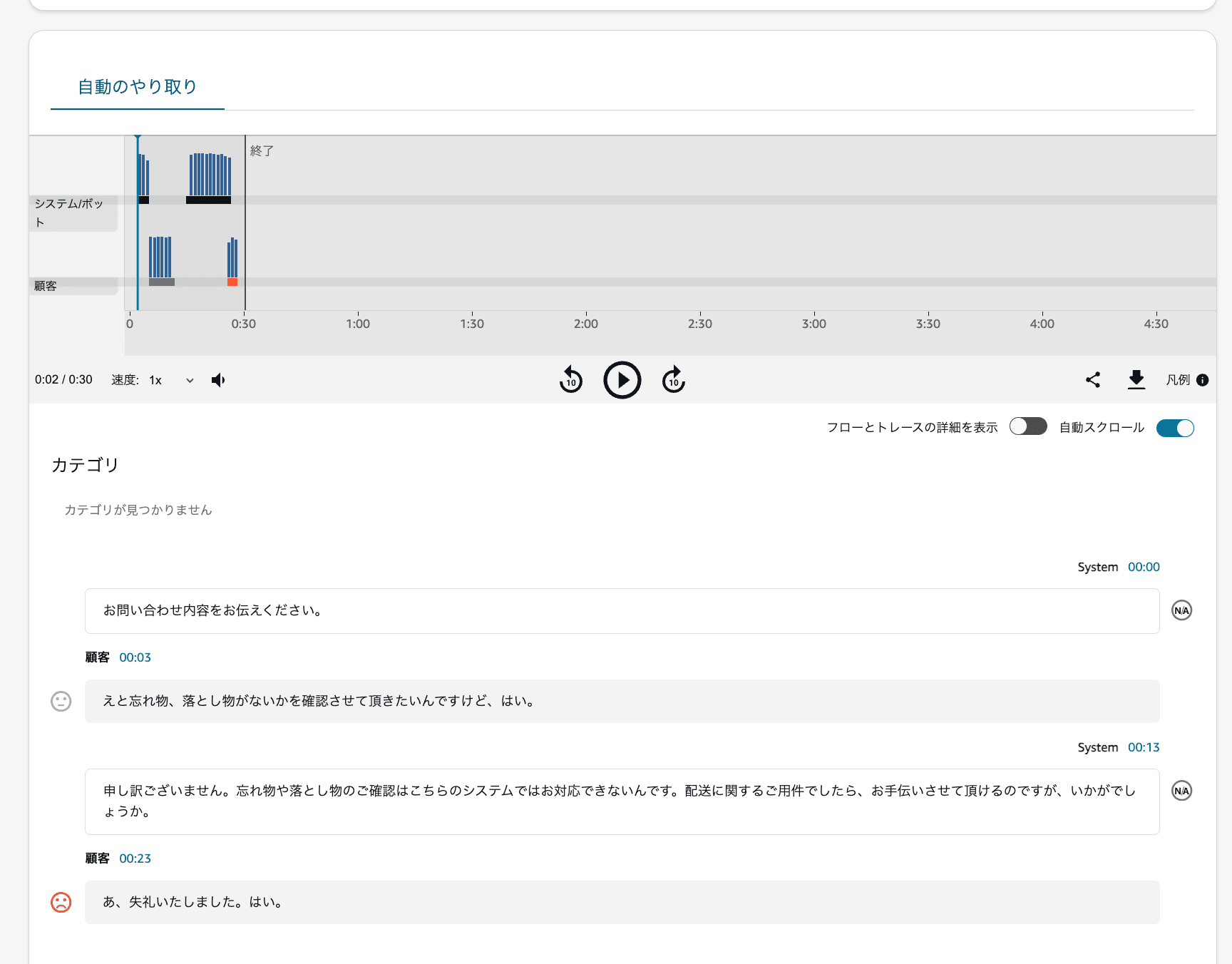
Screen showing the automated interaction transcript being checked on the contact detail screen
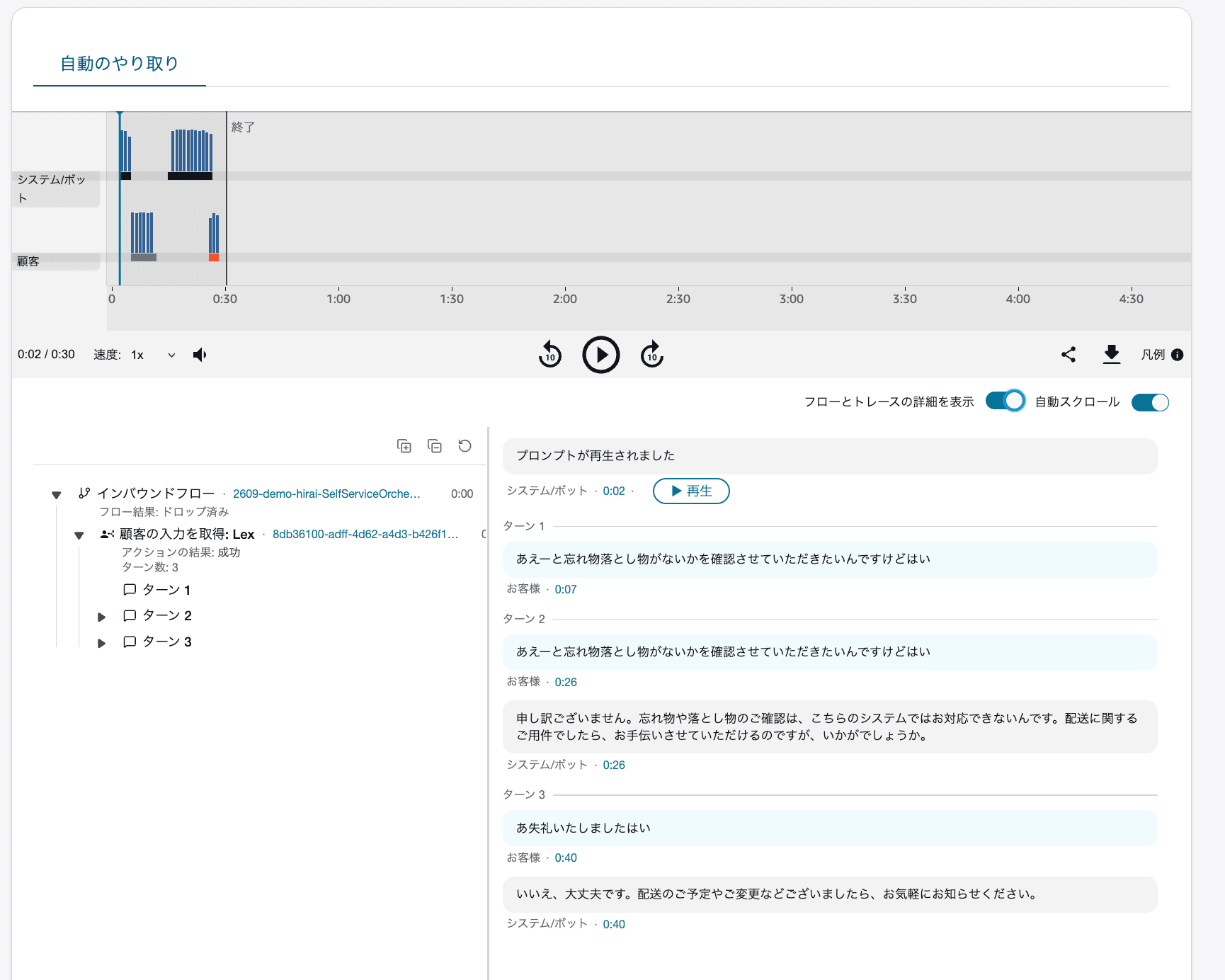
Screen showing the AI agent trace being checked on the contact detail screen
When to Use Automated Interaction Log
Automated Interaction Log is used when you want to investigate a specific inquiry from the management console.
For example, if a customer contacts you saying "the AI agent's response was strange," you can check the conversation and trace from the contact detail screen.
Its characteristic is that you can check individual contacts without executing APIs or searching logs.
The following article is helpful for verification of checking automated interaction recordings and transcripts:
Summary
The features used to check information about Amazon Connect Customer AI agents differ depending on what you want to check.
- Use
ListMessageswhen retrieving conversation content via API - Use
ListSpanswhen investigating AI agent processing - Use CloudWatch Logs when continuously analyzing events across multiple sessions
- Use Automated Interaction Log when checking individual contacts from the management console
As in this case, when you want to retrieve conversation content from an AI agent session via API rather than from audio recordings, use ListMessages.
