I checked whether there is a limit on the payload that can be inspected with AWS Network Firewall

This page has been translated by machine translation. View original
AWS WAF has a request body limit, but does AWS Network Firewall have a limit on inspectable payload size?
Hello, I'm Nonpi (@non____97).
Have you ever wondered whether AWS Network Firewall has a limit on inspectable payload size, even though AWS WAF has a request body limit? I have.
As introduced in the following article, AWS WAF has request body limits set depending on the associated service. The maximum limit is 64KB.
So what about AWS Network Firewall?
I searched the official AWS documentation but couldn't find any specific values.
However, as shown in the following document, there appears to be a limit on what can be inspected within a single network flow. If communication exceeds this network flow limit, rules may fail to match.
I have a rule that is intermittently not matching when I think it should
The AWS Network Firewall stateful rule engine has limits for traffic inspection parameters such as the maximum total size of all network packets it can inspect within a single network flow. If your traffic exceeds these limits, the stateful rule engine will not be able to match the rule. You can make use of keywords such as stream-event:reassembly_depth_reached; in your rules to handle these cases or to troubleshoot and diagnose when this happens. Example 1 shows how you might add an alert rule in a strict action order firewall policy to receive alert logs when the tcp reassembly depth limit is reached for a corresponding rule.
Example 1
# Rule 1 is intended to log when rule 2 cannot match due to hitting the TCP reassembly depth limit
alert tcp $HOME_NET any -> $EXTERNAL_NET 80 (flow:established,to_server; stream-event:reassembly_depth_reached; flowbits: set, stream_reassembly_depth_reached; classtype:protocol-command-decode; sid:1;)
# Rule 2
drop tcp $HOME_NET any -> $EXTERNAL_NET 80 (flow:established, to_server; sid:2;)
Troubleshooting rules in AWS Network Firewall - AWS Network Firewall
There was no mention of the specific inspection limit for a single network flow. Let me verify this in practice.
Summary upfront
- Depending on the rule used, detection may fail when the payload size is large
- When using only
content, detection is possible even with a payload size of 4GiB - When combining
http.response_body, strings within the response body can no longer be detected at over at least 104KiB
- When using only
- When the payload size is approximately 128KiB or more, the size limit for a single network flow is reached
- The MTU of AWS Network Firewall is 8,665
Tried it out
Verification environment
The verification environment is as follows.
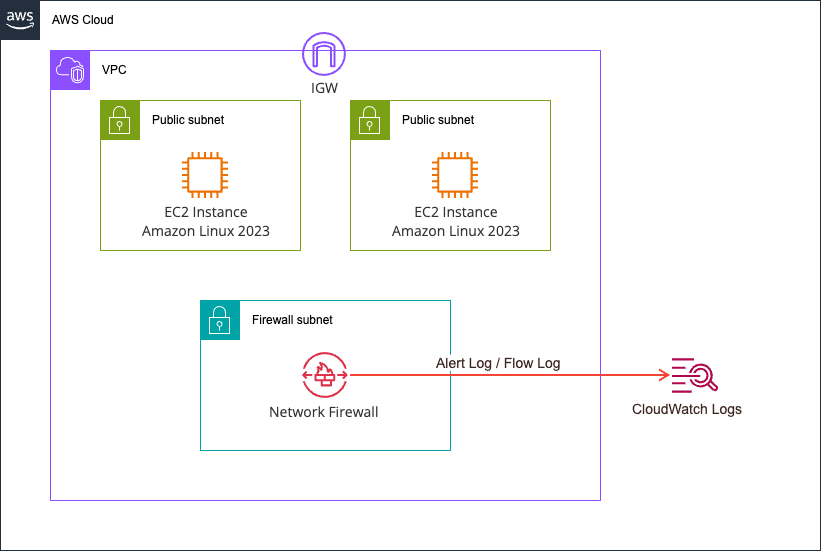
Two EC2 instances are prepared, and files of various sizes on the server are retrieved using curl.
Each file has the string PAYLOADCANARY appended at the end, as shown below.
sh-5.2$ ls -l /opt/payload/www/
total 136032
-rw-r--r--. 1 root root       30 Jun  8 03:47 baseline.txt
-rw-r--r--. 1 root root       37 Jun  8 03:47 blockme.txt
-rw-r--r--. 1 root root  1048576 Jun  8 03:47 payload_1048576.bin
-rw-r--r--. 1 root root   114688 Jun  8 04:37 payload_114688.bin
-rw-r--r--. 1 root root   131072 Jun  8 03:47 payload_131072.bin
-rw-r--r--. 1 root root  1572864 Jun  8 03:47 payload_1572864.bin
-rw-r--r--. 1 root root    16384 Jun  8 03:47 payload_16384.bin
-rw-r--r--. 1 root root 16777216 Jun  8 04:37 payload_16777216.bin
-rw-r--r--. 1 root root  2097152 Jun  8 03:47 payload_2097152.bin
-rw-r--r--. 1 root root   262144 Jun  8 03:47 payload_262144.bin
-rw-r--r--. 1 root root  3145728 Jun  8 03:47 payload_3145728.bin
-rw-r--r--. 1 root root    32768 Jun  8 03:47 payload_32768.bin
-rw-r--r--. 1 root root 33554432 Jun  8 04:37 payload_33554432.bin
-rw-r--r--. 1 root root  4194304 Jun  8 03:47 payload_4194304.bin
-rw-r--r--. 1 root root   524288 Jun  8 03:47 payload_524288.bin
-rw-r--r--. 1 root root    65536 Jun  8 03:47 payload_65536.bin
-rw-r--r--. 1 root root 67108864 Jun  8 04:37 payload_67108864.bin
-rw-r--r--. 1 root root    73728 Jun  8 04:37 payload_73728.bin
-rw-r--r--. 1 root root    81920 Jun  8 04:37 payload_81920.bin
-rw-r--r--. 1 root root  8388608 Jun  8 04:37 payload_8388608.bin
-rw-r--r--. 1 root root    98304 Jun  8 04:37 payload_98304.bin

$ tail /opt/payload/www/payload_16384.bin -c 30
AAAAAAAAAAAAAAAAAPAYLOADCANARY
The AWS Network Firewall rules are as follows.
alert tcp any any -> any any (msg:"CANARY-DETECTED"; flow:established; content:"PAYLOADCANARY"; sid:1000001; rev:1;)
drop tcp any any -> any any (msg:"BLOCKME-DROPPED"; flow:established; content:"BLOCKME"; sid:1000002; rev:1;)
alert tcp any any -> any any (msg:"REASSEMBLY-DEPTH-REACHED"; flow:established; stream-event:reassembly_depth_reached; sid:1000003; rev:1;)
An alert log is output when the string PAYLOADCANARY appears. Also, if the string BLOCKME is present, the communication is dropped.
In addition, an alert log is output when stream-event:reassembly_depth_reached and the size limit for a single network flow is reached.
The verification environment was entirely deployed with AWS CDK. The code used is stored in the following GitHub repository.
Operation verification
Let's try it out in practice.
Access the client EC2 instance and run the pre-prepared script as follows.
sh-5.2$ sudo su -
[root@ip-10-0-1-215 ~]# /opt/run-test.sh
target server: 10.0.2.103
N=16384 200 size=16384
N=32768 200 size=32768
N=65536 200 size=65536
N=131072        200 size=131072
N=262144        200 size=262144
N=524288        200 size=524288
N=1048576       200 size=1048576
N=1572864       200 size=1572864
N=2097152       200 size=2097152
N=3145728       200 size=3145728
N=4194304       200 size=4194304
We tested file sizes doubling from 16KB to 4MB, and HTTP status code 200 was returned in all cases.
Now let's check the trends from the logs.
> START_ISO=2026-06-08T04:09:00Z END_ISO=2026-06-08T04:11:00Z ./scripts/check-alerts.sh
2026-06-08T04:09:56.459207+0000  10.0.2.103:8080       -> 10.0.1.215:43742       SIZE=16384      WIRE=16907      HTTPLEN=16384     CANARY=yes  DEPTH=no
2026-06-08T04:09:59.474014+0000  10.0.2.103:8080       -> 10.0.1.215:43744       SIZE=32768      WIRE=33395      HTTPLEN=32768     CANARY=yes  DEPTH=no
2026-06-08T04:10:02.586904+0000  10.0.2.103:8080       -> 10.0.1.215:43758       SIZE=65536      WIRE=66371      HTTPLEN=65536     CANARY=yes  DEPTH=no
2026-06-08T04:10:05.606068+0000  10.0.2.103:8080       -> 10.0.1.215:43766       SIZE=131072     WIRE=132376     HTTPLEN=124935    CANARY=yes  DEPTH=yes
2026-06-08T04:10:08.619468+0000  10.0.2.103:8080       -> 10.0.1.215:49452       SIZE=262144     WIRE=264280     HTTPLEN=124935    CANARY=yes  DEPTH=yes
2026-06-08T04:10:11.632871+0000  10.0.2.103:8080       -> 10.0.1.215:49458       SIZE=524288     WIRE=528088     HTTPLEN=129276    CANARY=yes  DEPTH=yes
2026-06-08T04:10:14.649200+0000  10.0.2.103:8080       -> 10.0.1.215:49464       SIZE=1048576    WIRE=1055601    HTTPLEN=124935    CANARY=yes  DEPTH=yes
2026-06-08T04:10:17.664735+0000  10.0.2.103:8080       -> 10.0.1.215:52628       SIZE=1572864    WIRE=1583217    HTTPLEN=124935    CANARY=yes  DEPTH=yes
2026-06-08T04:10:20.681558+0000  10.0.2.103:8080       -> 10.0.1.215:52630       SIZE=2097152    WIRE=2110729    HTTPLEN=124935    CANARY=yes  DEPTH=yes
2026-06-08T04:10:23.698711+0000  10.0.2.103:8080       -> 10.0.1.215:52640       SIZE=3145728    WIRE=3165857    HTTPLEN=124935    CANARY=yes  DEPTH=yes
2026-06-08T04:10:26.719656+0000  10.0.2.103:8080       -> 10.0.1.215:46206       SIZE=4194304    WIRE=4220985    HTTPLEN=124935    CANARY=yes  DEPTH=yes
---- summary ----
flows                : 11
CANARY-DETECTED      : 11
REASSEMBLY-DEPTH     : 8
CANARY=yes represents communications where the string PAYLOADCANARY appeared, and DEPTH=yes represents communications where the size limit for a single network flow was reached.
The actual logs look like this.
{
    "firewall_name": "payload-inspection-fw",
    "availability_zone": "ap-northeast-1a",
    "event_timestamp": "1780891805",
    "event": {
        "tx_guessed": true,
        "aws_category": "",
        "tx_id": 0,
        "app_proto": "http",
        "src_ip": "10.0.2.103",
        "src_port": 8080,
        "event_type": "alert",
        "alert": {
            "severity": 3,
            "signature_id": 1000001,
            "rev": 1,
            "signature": "CANARY-DETECTED",
            "action": "allowed",
            "category": ""
        },
        "flow_id": 1458428759307611,
        "dest_ip": "10.0.1.215",
        "proto": "TCP",
        "verdict": {
            "action": "alert"
        },
        "http": {
            "hostname": "10.0.2.103",
            "http_port": 8080,
            "url": "/payload_131072.bin",
            "http_user_agent": "curl/8.17.0",
            "http_content_type": "application/octet-stream",
            "http_method": "GET",
            "protocol": "HTTP/1.1",
            "status": 200,
            "length": 124935
        },
        "dest_port": 43766,
        "pkt_src": "geneve encapsulation",
        "timestamp": "2026-06-08T04:10:05.606068+0000",
        "direction": "to_client"
    }
}
{
    "firewall_name": "payload-inspection-fw",
    "availability_zone": "ap-northeast-1a",
    "event_timestamp": "1780891805",
    "event": {
        "tx_guessed": true,
        "aws_category": "",
        "tx_id": 0,
        "app_proto": "http",
        "src_ip": "10.0.2.103",
        "src_port": 8080,
        "event_type": "alert",
        "alert": {
            "severity": 3,
            "signature_id": 1000003,
            "rev": 1,
            "signature": "REASSEMBLY-DEPTH-REACHED",
            "action": "allowed",
            "category": ""
        },
        "flow_id": 1458428759307611,
        "dest_ip": "10.0.1.215",
        "proto": "TCP",
        "verdict": {
            "action": "alert"
        },
        "http": {
            "hostname": "10.0.2.103",
            "http_port": 8080,
            "url": "/payload_131072.bin",
            "http_user_agent": "curl/8.17.0",
            "http_content_type": "application/octet-stream",
            "http_method": "GET",
            "protocol": "HTTP/1.1",
            "status": 200,
            "length": 124935
        },
        "dest_port": 43766,
        "pkt_src": "geneve encapsulation",
        "timestamp": "2026-06-08T04:10:05.606068+0000",
        "direction": "to_client"
    }
}
{
    "firewall_name": "payload-inspection-fw",
    "availability_zone": "ap-northeast-1a",
    "event_timestamp": "1780891866",
    "event": {
        "tcp": {
            "tcp_flags": "1b",
            "syn": true,
            "fin": true,
            "psh": true,
            "ack": true
        },
        "app_proto": "http",
        "src_ip": "10.0.1.215",
        "src_port": 43766,
        "netflow": {
            "pkts": 16,
            "bytes": 937,
            "start": "2026-06-08T04:10:05.601710+0000",
            "end": "2026-06-08T04:10:05.606882+0000",
            "age": 0,
            "min_ttl": 126,
            "max_ttl": 126,
            "state": "closed",
            "reason": "timeout",
            "alerted": true
        },
        "event_type": "netflow",
        "flow_id": 1458428759307611,
        "dest_ip": "10.0.2.103",
        "proto": "TCP",
        "dest_port": 8080,
        "timestamp": "2026-06-08T04:11:06.760496+0000"
    }
}
{
    "firewall_name": "payload-inspection-fw",
    "availability_zone": "ap-northeast-1a",
    "event_timestamp": "1780891866",
    "event": {
        "tcp": {
            "tcp_flags": "1b",
            "syn": true,
            "fin": true,
            "psh": true,
            "ack": true
        },
        "app_proto": "http",
        "src_ip": "10.0.2.103",
        "src_port": 8080,
        "netflow": {
            "pkts": 21,
            "bytes": 132376,
            "start": "2026-06-08T04:10:05.601710+0000",
            "end": "2026-06-08T04:10:05.606882+0000",
            "age": 0,
            "min_ttl": 126,
            "max_ttl": 126
        },
        "event_type": "netflow",
        "flow_id": 1458428759307611,
        "dest_ip": "10.0.1.215",
        "proto": "TCP",
        "dest_port": 43766,
        "timestamp": "2026-06-08T04:11:06.760522+0000"
    }
}
From this, we can see the following:
- AWS Network Firewall can inspect payloads up to 4MiB
- When accessing files of 128KiB or more, the size limit for a single network flow is reached
- There is a possibility that the size limit for a single network flow is 128KiB
- When accessing files of 128KiB or more, most values of
event.http.lengthare 124935
Modifying the Accessed Files and Verifying Again
Since we found that the size limit that can be handled in a single network flow might be 128KiB, we also try values between 64KiB and 128KiB to confirm that it is indeed approximately 128KiB.
We also try file sizes up to 64MiB instead of 4MiB.
First, we generate files on the server side as follows.
# Generate files from 64KiB to 128KiB
[root@ip-10-0-2-103 ~]# for N in 73728 81920 98304 114688; do /opt/payload/gen.sh $N; done
generated /opt/payload/www/payload_73728.bin size=73728 marker_at_tail
generated /opt/payload/www/payload_81920.bin size=81920 marker_at_tail
generated /opt/payload/www/payload_98304.bin size=98304 marker_at_tail
generated /opt/payload/www/payload_114688.bin size=114688 marker_at_tail

# Generate files from 4MiB to 64MiB
[root@ip-10-0-2-103 ~]# for N in 8388608 16777216 33554432 67108864; do /opt/payload/gen.sh $N; done
generated /opt/payload/www/payload_8388608.bin size=8388608 marker_at_tail
generated /opt/payload/www/payload_16777216.bin size=16777216 marker_at_tail
generated /opt/payload/www/payload_33554432.bin size=33554432 marker_at_tail
generated /opt/payload/www/payload_67108864.bin size=67108864 marker_at_tail
We access the generated files from the client side.
[root@ip-10-0-1-215 ~]# for N in 73728 81920 98304 114688; do
    curl -s -o /dev/null -w "N=$N %{http_code} size=%{size_download}\n" \
      "http://10.0.2.103:8080/payload_${N}.bin"
    sleep 3
  done
N=73728 200 size=73728
N=81920 200 size=81920
N=98304 200 size=98304
N=114688 200 size=114688

[root@ip-10-0-1-215 ~]# for N in 8388608 16777216 33554432 67108864; do
    curl -s -o /dev/null -w "N=$N %{http_code} size=%{size_download}\n" \
      "http://10.0.2.103:8080/payload_${N}.bin"
    sleep 3
  done
N=8388608 200 size=8388608
N=16777216 200 size=16777216
N=33554432 200 size=33554432
N=67108864 200 size=67108864
When we aggregate the AWS Network Firewall logs output at this time, the result is as follows.
> ./scripts/check-alerts.sh 30 8
2026-06-08T04:40:23.823156+0000  10.0.2.103:8080       -> 10.0.1.215:41272       SIZE=73728      WIRE=74615      HTTPLEN=73728     CANARY=yes  DEPTH=no
2026-06-08T04:40:26.835255+0000  10.0.2.103:8080       -> 10.0.1.215:46320       SIZE=81920      WIRE=82859      HTTPLEN=81920     CANARY=yes  DEPTH=no
2026-06-08T04:40:29.848050+0000  10.0.2.103:8080       -> 10.0.1.215:46328       SIZE=98304      WIRE=99399      HTTPLEN=98304     CANARY=yes  DEPTH=no
2026-06-08T04:40:32.860812+0000  10.0.2.103:8080       -> 10.0.1.215:46340       SIZE=114688     WIRE=115888     HTTPLEN=114688    CANARY=yes  DEPTH=no
2026-06-08T04:41:44.812127+0000  10.0.2.103:8080       -> 10.0.1.215:33830       SIZE=8388608    WIRE=8684598    HTTPLEN=124935    CANARY=yes  DEPTH=yes
2026-06-08T04:41:47.838895+0000  10.0.2.103:8080       -> 10.0.1.215:53800       SIZE=16777216   WIRE=16882522   HTTPLEN=124935    CANARY=yes  DEPTH=yes
2026-06-08T04:41:50.881535+0000  10.0.2.103:8080       -> 10.0.1.215:53814       SIZE=33554432   WIRE=33764466   HTTPLEN=124935    CANARY=yes  DEPTH=yes
2026-06-08T04:41:53.949490+0000  10.0.2.103:8080       -> 10.0.1.215:53826       SIZE=67108864   WIRE=67528562   HTTPLEN=124935    CANARY=yes  DEPTH=yes
---- summary ----
flows                : 8
CANARY-DETECTED      : 8
Since DEPTH=no up to 112KiB, we still think the upper limit of a single network flow is approximately 128KiB.
Also, regarding the file size limit, detection worked without issues even at 64MiB. As shown below, detection also worked fine when tested at 4GiB, so it seems there is no particular upper limit.
# Server
[root@ip-10-0-2-103 ~]# { head -c 4294967283 /dev/zero | tr '\0' 'A'; printf 'PAYLOADCANARY'; } > /opt/payload/www/payload_4294967296.bin
[root@ip-10-0-2-103 ~]# ls -l /opt/payload/www/payload_4294967296.bin
-rw-r--r--. 1 root root 4294967296 Jun  8 07:30 /opt/payload/www/payload_4294967296.bin

[root@ip-10-0-2-103 ~]# tail /opt/payload/www/payload_4294967296.bin -c 20
AAAAAAAPAYLOADCANARY

# Client
sh-5.2$ curl -s -o /dev/null -w "%{http_code} size=%{size_download} time=%{time_total}s\n" -m 300 "http://10.0.2.103:8080/payload_4294967296.bin"
200 size=4294967296 time=31.792743s

# Local terminal
> ./scripts/check-alerts.sh 5 8
2026-06-08T07:32:36.315022+0000  10.0.2.103:8080       -> 10.0.1.215:50698       SIZE=4294967296 WIRE=4322860320 HTTPLEN=129352    CANARY=yes  DEPTH=yes
---- summary ----
flows                : 1
CANARY-DETECTED      : 1
REASSEMBLY-DEPTH     : 1
By the way, the flow logs are as follows.
{
    "firewall_name": "payload-inspection-fw",
    "availability_zone": "ap-northeast-1a",
    "event_timestamp": "1780893770",
    "event": {
        "tcp": {
            "tcp_flags": "1b",
            "syn": true,
            "fin": true,
            "psh": true,
            "ack": true
        },
        "app_proto": "http",
        "src_ip": "10.0.2.103",
        "src_port": 8080,
        "netflow": {
            "pkts": 2021,
            "bytes": 16882522,
            "start": "2026-06-08T04:41:47.834975+0000",
            "end": "2026-06-08T04:41:47.870506+0000",
            "age": 0,
            "min_ttl": 126,
            "max_ttl": 126
        },
        "event_type": "netflow",
        "flow_id": 1052918645453111,
        "dest_ip": "10.0.1.215",
        "proto": "TCP",
        "dest_port": 53800,
        "timestamp": "2026-06-08T04:42:50.874210+0000"
    }
}

{
    "firewall_name": "payload-inspection-fw",
    "availability_zone": "ap-northeast-1a",
    "event_timestamp": "1780893773",
    "event": {
        "tcp": {
            "tcp_flags": "1b",
            "syn": true,
            "fin": true,
            "psh": true,
            "ack": true
        },
        "app_proto": "http",
        "src_ip": "10.0.2.103",
        "src_port": 8080,
        "netflow": {
            "pkts": 4035,
            "bytes": 33764466,
            "start": "2026-06-08T04:41:50.877823+0000",
            "end": "2026-06-08T04:41:50.937285+0000",
            "age": 0,
            "min_ttl": 126,
            "max_ttl": 126
        },
        "event_type": "netflow",
        "flow_id": 1799898488091967,
        "dest_ip": "10.0.1.215",
        "proto": "TCP",
        "dest_port": 53814,
        "timestamp": "2026-06-08T04:42:53.707971+0000"
    }
}

{
    "firewall_name": "payload-inspection-fw",
    "availability_zone": "ap-northeast-1a",
    "event_timestamp": "1780893776",
    "event": {
        "tcp": {
            "tcp_flags": "1b",
            "syn": true,
            "fin": true,
            "psh": true,
            "ack": true
        },
        "app_proto": "http",
        "src_ip": "10.0.2.103",
        "src_port": 8080,
        "netflow": {
            "pkts": 8067,
            "bytes": 67528562,
            "start": "2026-06-08T04:41:53.945234+0000",
            "end": "2026-06-08T04:41:54.068253+0000",
            "age": 1,
            "min_ttl": 126,
            "max_ttl": 126
        },
        "event_type": "netflow",
        "flow_id": 400576477526297,
        "dest_ip": "10.0.1.215",
        "proto": "TCP",
        "dest_port": 53826,
        "timestamp": "2026-06-08T04:42:56.791941+0000"
    }
}
When calculating event.netflow.bytes / event.netflow.pkts, the result is approximately 8,300 in all cases.
The MTU of Gateway Load Balancer is 8,500. So, does AWS Network Firewall also have an MTU of 8,500?
Network Maximum Transmission Unit (MTU)
The maximum transmission unit (MTU) is the maximum data packet size that can be sent over a network. The Gateway Load Balancer interface MTU supports packets of up to 8,500 bytes. If a packet larger than 8,500 bytes arrives at the Gateway Load Balancer interface, that packet is dropped.
Gateway Load Balancer encapsulates IP traffic with a GENEVE header and forwards it to the appliance. The GENEVE encapsulation process adds 68 bytes to the original packet. Therefore, to support packets of up to 8,500 bytes, ensure that the MTU setting of the appliance supports packets of at least 8,568 bytes.
Gateway Load Balancer does not support IP fragmentation. Also, Gateway Load Balancer does not generate ICMP "Destination Unreachable: Fragmentation Needed and Don't Fragment was Set" messages. For this reason, Path MTU Discovery (PMTUD) is not supported.
We send pings from the client EC2 instance to the server EC2 instance while changing the packet size.
sh-5.2$ ip link show
1: lo: <LOOPBACK,UP,LOWER_UP> mtu 65536 qdisc noqueue state UNKNOWN mode DEFAULT group default qlen 1000
    link/loopback 00:00:00:00:00:00 brd 00:00:00:00:00:00
2: ens5: <BROADCAST,MULTICAST,UP,LOWER_UP> mtu 9001 qdisc mq state UP mode DEFAULT group default qlen 1000
    link/ether 06:29:4a:7a:e8:73 brd ff:ff:ff:ff:ff:ff
    altname enp0s5
    altname eni-0606c80994bfe10d9
    altname device-number-0.0

# 8,000
sh-5.2$ sudo ping 10.0.2.103 -s 8000 -f -c 5
PING 10.0.2.103 (10.0.2.103) 8000(8028) bytes of data.

--- 10.0.2.103 ping statistics ---
5 packets transmitted, 5 received, 0% packet loss, time 8ms
rtt min/avg/max/mdev = 0.691/1.695/4.129/1.306 ms, ipg/ewma 2.036/1.778 ms

# 8,600
sh-5.2$ sudo ping 10.0.2.103 -s 8600 -f -c 5
PING 10.0.2.103 (10.0.2.103) 8600(8628) bytes of data.

--- 10.0.2.103 ping statistics ---
5 packets transmitted, 5 received, 0% packet loss, time 4ms
rtt min/avg/max/mdev = 0.563/0.770/1.489/0.360 ms, ipg/ewma 0.920/1.118 ms

# 9,000
sh-5.2$ sudo ping 10.0.2.103 -s 9000 -f -c 5
PING 10.0.2.103 (10.0.2.103) 9000(9028) bytes of data.
.....
--- 10.0.2.103 ping statistics ---
5 packets transmitted, 0 received, 100% packet loss, time 74ms

# 8,900
sh-5.2$ sudo ping 10.0.2.103 -s 8900 -f -c 5
PING 10.0.2.103 (10.0.2.103) 8900(8928) bytes of data.
.....
--- 10.0.2.103 ping statistics ---
5 packets transmitted, 0 received, 100% packet loss, time 79ms

# 8,700
sh-5.2$ sudo ping 10.0.2.103 -s 8700 -f -c 5
PING 10.0.2.103 (10.0.2.103) 8700(8728) bytes of data.
.....
--- 10.0.2.103 ping statistics ---
5 packets transmitted, 0 received, 100% packet loss, time 71ms

# 8,650
sh-5.2$ sudo ping 10.0.2.103 -s 8650 -f -c 5
PING 10.0.2.103 (10.0.2.103) 8650(8678) bytes of data.
.....
--- 10.0.2.103 ping statistics ---
5 packets transmitted, 0 received, 100% packet loss, time 81ms

# 8,620
sh-5.2$ sudo ping 10.0.2.103 -s 8620 -f -c 5
PING 10.0.2.103 (10.0.2.103) 8620(8648) bytes of data.

--- 10.0.2.103 ping statistics ---
5 packets transmitted, 5 received, 0% packet loss, time 5ms
rtt min/avg/max/mdev = 0.690/0.998/2.125/0.563 ms, ipg/ewma 1.165/1.542 ms

# 8,640
sh-5.2$ sudo ping 10.0.2.103 -s 8640 -f -c 5
PING 10.0.2.103 (10.0.2.103) 8640(8668) bytes of data.
.....
--- 10.0.2.103 ping statistics ---
5 packets transmitted, 0 received, 100% packet loss, time 71ms

# 8,630
sh-5.2$ sudo ping 10.0.2.103 -s 8630 -f -c 5
PING 10.0.2.103 (10.0.2.103) 8630(8658) bytes of data.

--- 10.0.2.103 ping statistics ---
5 packets transmitted, 5 received, 0% packet loss, time 5ms
rtt min/avg/max/mdev = 0.640/0.969/2.143/0.587 ms, ipg/ewma 1.140/1.534 ms

# 8,635
sh-5.2$ sudo ping 10.0.2.103 -s 8635 -f -c 5
PING 10.0.2.103 (10.0.2.103) 8635(8663) bytes of data.

--- 10.0.2.103 ping statistics ---
5 packets transmitted, 5 received, 0% packet loss, time 5ms
rtt min/avg/max/mdev = 0.880/1.168/2.089/0.464 ms, ipg/ewma 1.322/1.611 ms

# 8,638
sh-5.2$ sudo ping 10.0.2.103 -s 8638 -f -c 5
PING 10.0.2.103 (10.0.2.103) 8638(8666) bytes of data.
.....
--- 10.0.2.103 ping statistics ---
5 packets transmitted, 0 received, 100% packet loss, time 91ms

# 8,637
sh-5.2$ sudo ping 10.0.2.103 -s 8637 -f -c 5
PING 10.0.2.103 (10.0.2.103) 8637(8665) bytes of data.

--- 10.0.2.103 ping statistics ---
5 packets transmitted, 5 received, 0% packet loss, time 5ms
rtt min/avg/max/mdev = 0.719/0.967/1.840/0.436 ms, ipg/ewma 1.133/1.388 ms

sh-5.2$ sudo ping -M do -s 8637 -c 3 10.0.2.103 -c 1
PING 10.0.2.103 (10.0.2.103) 8637(8665) bytes of data.
8645 bytes from 10.0.2.103: icmp_seq=1 ttl=125 time=2.16 ms

--- 10.0.2.103 ping statistics ---
1 packets transmitted, 1 received, 0% packet loss, time 0ms
rtt min/avg/max/mdev = 2.164/2.164/2.164/0.000 ms
It appears that the MTU of AWS Network Firewall is 8,665.
When Combined with http.response_body
I became curious about how things would behave when using http.response_body combined with content to specify where to look.
I added a rule as shown below to output an alert log when the content contains a specific string in http.response_body.
alert tcp any any -> any any (msg:"CANARY-DETECTED"; flow:established; content:"PAYLOADCANARY"; sid:1000001; rev:1;)
drop tcp any any -> any any (msg:"BLOCKME-DROPPED"; flow:established; content:"BLOCKME"; sid:1000002; rev:1;)
alert tcp any any -> any any (msg:"REASSEMBLY-DEPTH-REACHED"; flow:established; stream-event:reassembly_depth_reached; sid:1000003; rev:1;)
alert http any any -> any any (msg:"CANARY-HTTP-BODY"; flow:established,to_client; http.response_body; content:"PAYLOADCANARY"; sid:1000004; rev:1;)
We generate files on the server side.
[root@ip-10-0-2-103 ~]#  for N in 73728 81920 90112 98304 106496 114688; do /opt/payload/gen.sh $N; done
generated /opt/payload/www/payload_73728.bin size=73728 marker_at_tail
generated /opt/payload/www/payload_81920.bin size=81920 marker_at_tail
generated /opt/payload/www/payload_90112.bin size=90112 marker_at_tail
generated /opt/payload/www/payload_98304.bin size=98304 marker_at_tail
generated /opt/payload/www/payload_106496.bin size=106496 marker_at_tail
generated /opt/payload/www/payload_114688.bin size=114688 marker_at_tail
On the client side, we send requests to the server as follows.
$ for N in 16384 65536 262144 1048576 8388608; do
    curl -s -o /dev/null "http://10.0.2.103:8080/payload_${N}.bin"; sleep 3
  done

$ for N in 73728 81920 90112 98304 106496 114688 131072; do
    curl -s -o /dev/null "http://10.0.2.103:8080/payload_${N}.bin"; sleep 3
  done
Analyzing the logs at this time gives the following results.
> ./scripts/check-alerts.sh 5 8
2026-06-08T07:51:22.582681+0000  10.0.2.103:8080       -> 10.0.1.215:42404       SIZE=16384      WIRE=16907      HTTPLEN=16384     CANARY(raw)=yes HTTPBODY=yes DEPTH=no
2026-06-08T07:51:25.593930+0000  10.0.2.103:8080       -> 10.0.1.215:42414       SIZE=65536      WIRE=66371      HTTPLEN=65536     CANARY(raw)=yes HTTPBODY=yes DEPTH=no
2026-06-08T07:51:28.606219+0000  10.0.2.103:8080       -> 10.0.1.215:53380       SIZE=262144     WIRE=264332     HTTPLEN=124935    CANARY(raw)=yes HTTPBODY=no  DEPTH=yes
2026-06-08T07:51:31.619444+0000  10.0.2.103:8080       -> 10.0.1.215:53382       SIZE=1048576    WIRE=1055653    HTTPLEN=124935    CANARY(raw)=yes HTTPBODY=no  DEPTH=yes
2026-06-08T07:51:34.634590+0000  10.0.2.103:8080       -> 10.0.1.215:53398       SIZE=8388608    WIRE=8442329    HTTPLEN=129352    CANARY(raw)=yes HTTPBODY=no  DEPTH=yes
---- summary ----
flows                : 5
CANARY-DETECTED      : 5
REASSEMBLY-DEPTH     : 3

> ./scripts/check-alerts.sh 10 10
2026-06-08T08:10:48.634444+0000  10.0.2.103:8080       -> 10.0.1.215:54626       SIZE=73728      WIRE=74615      HTTPLEN=73728     CANARY(raw)=yes HTTPBODY=yes DEPTH=no
2026-06-08T08:10:51.645419+0000  10.0.2.103:8080       -> 10.0.1.215:54636       SIZE=81920      WIRE=82911      HTTPLEN=81920     CANARY(raw)=yes HTTPBODY=yes DEPTH=no
2026-06-08T08:10:54.657246+0000  10.0.2.103:8080       -> 10.0.1.215:54648       SIZE=90112      WIRE=91155      HTTPLEN=90112     CANARY(raw)=yes HTTPBODY=yes DEPTH=no
2026-06-08T08:10:57.669630+0000  10.0.2.103:8080       -> 10.0.1.215:57014       SIZE=98304      WIRE=99399      HTTPLEN=98304     CANARY(raw)=yes HTTPBODY=yes DEPTH=no
2026-06-08T08:11:00.682428+0000  10.0.2.103:8080       -> 10.0.1.215:57020       SIZE=106496     WIRE=107644     HTTPLEN=106496    CANARY(raw)=yes HTTPBODY=no  DEPTH=no
2026-06-08T08:11:03.693559+0000  10.0.2.103:8080       -> 10.0.1.215:57034       SIZE=114688     WIRE=115888     HTTPLEN=114688    CANARY(raw)=yes HTTPBODY=no  DEPTH=no
2026-06-08T08:11:12.726607+0000  10.0.2.103:8080       -> 10.0.1.215:58658       SIZE=131072     WIRE=132324     HTTPLEN=124935    CANARY(raw)=yes HTTPBODY=no  DEPTH=yes
---- summary ----
flows                : 7
CANARY-DETECTED      : 7
REASSEMBLY-DEPTH     : 1
Surprisingly, when the size exceeded 104KiB, the rule that detects using http.response_body failed to detect it.
In other words, depending on the rule, large payloads may not be detected.
It's also tricky that this doesn't exactly correspond to REASSEMBLY-DEPTH-REACHED matches.
Large Payloads May Not Be Detected Depending on the Rule Used
We verified whether there is an upper limit to the payload that AWS Network Firewall can inspect.
In conclusion, depending on the rule used, large payloads may not be detected.
This is something that must be recognized as a risk when adopting AWS Network Firewall.
I hope this article helps someone.
That's all from nonPi (@non____97) of the Cloud Business Division, Consulting Department!
