I tried to mitigate SNI spoofing by combining Route 53 DNS Firewall with AWS Network Firewall without enabling TLS inspection

This page has been translated by machine translation. View original
I Want to Mitigate SNI Spoofing Threats Without Using TLS Inspection
Hello, I'm Nonpi (@non____97).
Have you ever felt the need to mitigate SNI spoofing threats without using TLS inspection while operating AWS Network Firewall? I have.
As introduced in the following article, Network Firewall without TLS inspection enabled is vulnerable to SNI spoofing.
Enabling TLS inspection is one countermeasure, but there are concerns about running costs and management operations such as distributing CA certificates to clients. Regarding running costs in particular, as introduced in the following articles, the fixed fees increase by approximately 2.7 times.
Network Firewall Proxy exists as a response to SNI spoofing and Host header spoofing, but as of 2026/6/11 it has not been GA'd.
The pricing has not been made public either.
So, at the time of writing this article, I will try to mitigate SNI spoofing using DNS stateful rules and DNS Firewall in AWS Network Firewall without enabling TLS inspection, by combining managed services.
Summary Up Front
- AWS Network Firewall without TLS inspection enabled is vulnerable to SNI spoofing and Host header spoofing because the SNI Server Name and Host header are self-reported values from the client, and they are trusted for allow decisions without being cross-referenced against the actual destination IP address
- To attempt mitigation without TLS inspection, combine Route 53 DNS Firewall and Network Firewall stateful rules
- Route 53 DNS Firewall: Restrict resolvable domains with an Allow List to prevent acquisition of unauthorized destination IP address information
- Network Firewall:
- Block name resolution to servers other than self-managed DNS servers, preventing circumvention of DNS Firewall via external DNS servers like
1.1.1.1 - Allow only SNI Server Name / Host headers belonging to permitted domains
- Without having permitted domain information on the Network Firewall side, direct IP address specification + arbitrary Host header values can easily bypass it
- Block name resolution to servers other than self-managed DNS servers, preventing circumvention of DNS Firewall via external DNS servers like
- Patterns that can and cannot be prevented with this configuration are as follows:
- Preventable: Access to domains not permitted for name resolution by Route 53 DNS Firewall
- Preventable: SNI spoofing / Host header spoofing using non-permitted domains
- Preventable: Direct IP address specification
- Because the SNI Server Name / Host header does not match a permitted domain
- Not preventable: Direct IP address specification + SNI Server Name / Host header spoofing a permitted domain
- The unpreventable pattern cannot be addressed without TLS inspection, since SNI Server Name and Host header are self-reported values
- The need to dual-manage permitted domains in both Network Firewall and DNS Firewall is a drawback
- To strictly cover all patterns, it would likely be worth considering adopting Network Firewall Proxy or an HTTP Proxy such as Squid
Tried It Out
Verification Environment
The verification environment is as follows.
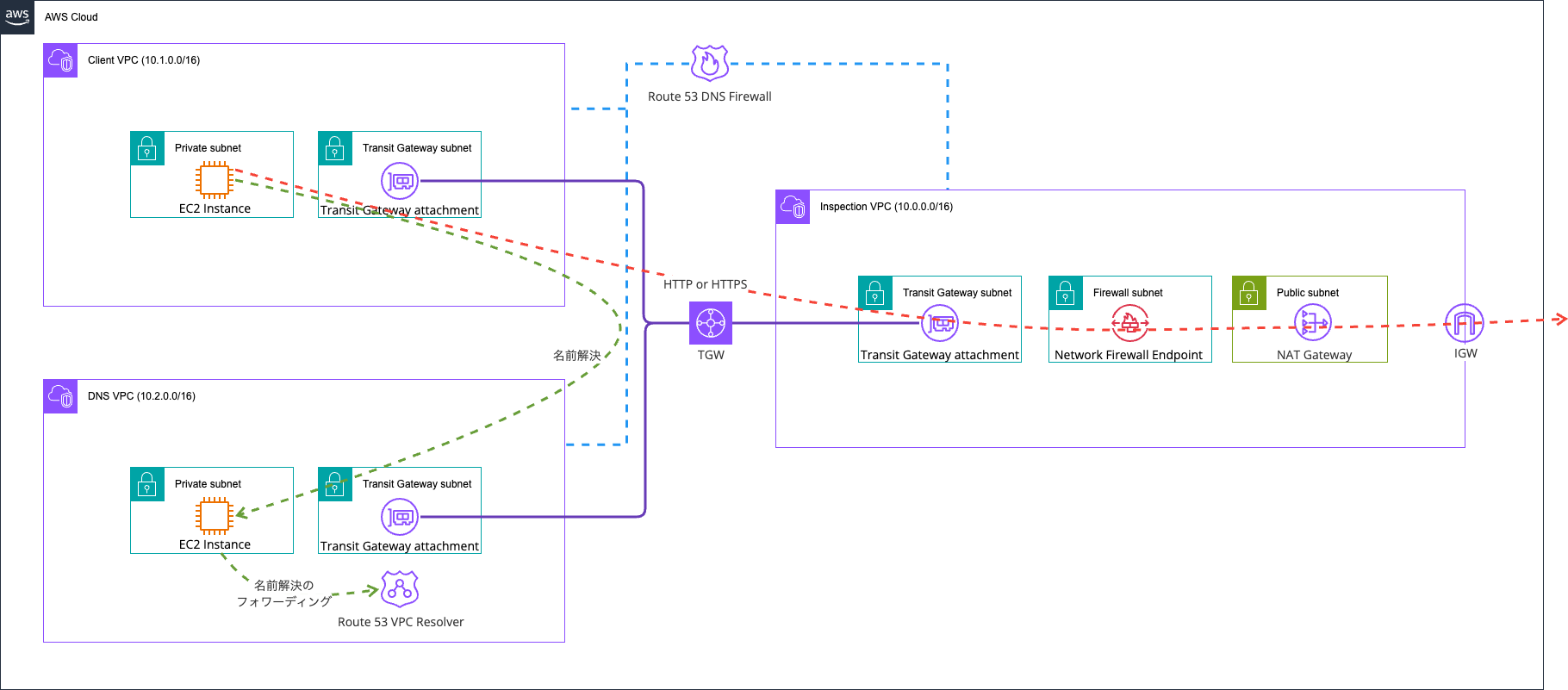
It is configured so that only communication to permitted domains is allowed through Network Firewall.
The key points are the following two:
- Control of resolvable domains via Route 53 DNS Firewall
- Control of name resolution via Route 53 VPC Resolver and specific DNS servers
First, the first key point: "Control of resolvable domains via Route 53 DNS Firewall." Please refer to the following article for information about Route 53 DNS Firewall.
Using this, we configure it to permit name resolution only for specified domains. In short, it's an Allow List.
The reason SNI spoofing and Host header spoofing are possible in Network Firewall is that "although the SNI Server Name, Host header, and destination IP address are all self-reported values from the client, Network Firewall trusts and makes allow decisions based on the SNI Server Name, Host header, and destination IP address without cross-referencing them."
This allows malicious domain IP addresses to be associated with permitted domains.
In response, the role of Route 53 DNS Firewall is to restrict the domains that clients can resolve, preventing the acquisition of unauthorized destination information. This time, we configured it to deny everything except *.amazonaws.com. and *.classmethod.jp. as follows.
> aws route53resolver list-firewall-rules --region ap-northeast-1 \
  --firewall-rule-group-id \
    "$(aws route53resolver \
      list-firewall-rule-groups \
      --query "FirewallRuleGroups[?Name=='AwsCdkNetworkFirewallDnsFirewallStack-DnsFirewallRu-XXx9CMLwWoAU'].Id | [0]" \
      --region ap-northeast-1 \
    --output text)"
{
    "FirewallRules": [
        {
            "FirewallRuleGroupId": "rslvr-frg-52bf8f7bd3ba4bfc",
            "FirewallDomainListId": "rslvr-fdl-c45c5485a24b4fc0",
            "Name": "rule-for-rslvr-fdl-c45c5485a24b4fc0",
            "Priority": 1,
            "Action": "ALLOW",
            "CreatorRequestId": "rslvr-frg-52bf8f7bd3ba4bfc:rslvr-fdl-c45c5485a24b4fc0",
            "CreationTime": "2026-06-11T04:03:14.283668630Z",
            "ModificationTime": "2026-06-11T04:03:14.283668630Z",
            "FirewallDomainRedirectionAction": "TRUST_REDIRECTION_DOMAIN"
        },
        {
            "FirewallRuleGroupId": "rslvr-frg-52bf8f7bd3ba4bfc",
            "FirewallDomainListId": "rslvr-fdl-36406c743e064542",
            "Name": "rule-for-rslvr-fdl-36406c743e064542",
            "Priority": 2,
            "Action": "BLOCK",
            "BlockResponse": "NXDOMAIN",
            "CreatorRequestId": "rslvr-frg-52bf8f7bd3ba4bfc:rslvr-fdl-36406c743e064542",
            "CreationTime": "2026-06-11T04:03:14.219470364Z",
            "ModificationTime": "2026-06-11T04:03:14.219470364Z",
            "FirewallDomainRedirectionAction": "INSPECT_REDIRECTION_DOMAIN"
        }
    ]
}

> aws route53resolver list-firewall-domains \
  --firewall-domain-list-id rslvr-fdl-c45c5485a24b4fc0 \
  --region ap-northeast-1
{
    "Domains": [
        "*.amazonaws.com.",
        "*.classmethod.jp."
    ]
}

> aws route53resolver list-firewall-domains \
  --firewall-domain-list-id rslvr-fdl-36406c743e064542 \
  --region ap-northeast-1
{
    "Domains": [
        "*."
    ]
}
On the other hand, personally, the drawback is that the permitted domain information must be managed redundantly in both Network Firewall and DNS Firewall. Without having the permitted domain information on the Network Firewall side, cases where name resolution is skipped and an IP address is specified directly with an arbitrary Host header value can easily bypass it.
Also, even going that far, if an IP address is specified directly and a domain registered in the Allow List is specified in the Host header or SNI Server Name, it can still be bypassed. In short, it is not effective when the permitted domains are known. We will verify this later.
Next, the second key point: "Control of name resolution via Route 53 VPC Resolver and specific DNS servers."
Route 53 DNS Firewall operates against the Route 53 VPC Resolver of a specified VPC. Therefore, it does not operate when name resolution is performed against an external DNS server such as 1.1.1.1. I'm an advocate for Route 53 VPC Resolver as introduced in the following article, but if an external DNS server is used, we cannot benefit from this.
As a countermeasure for this, Network Firewall controls name resolution using servers other than specific DNS servers. In short, this means preventing name resolution attempts using 1.1.1.1.
The actual Network Firewall rules are as follows.
# Allow only DNS from spoke to self-managed DNS server
pass dns $HOME_NET any -> $DNS_SERVER 53 (msg:"Allow DNS query to self-managed"; flow:to_server; sid:1000001;)

# Allow only HTTPS whose SNI is *.classmethod.jp (including apex)
pass tls $HOME_NET any -> $EXTERNAL_NET any (msg:"Allow SNI .classmethod.jp"; flow:to_server; ssl_state:client_hello; tls.sni; content:".classmethod.jp"; dotprefix; endswith; nocase; sid:1000002;)

# Allow only HTTP whose Host is *.classmethod.jp
pass http $HOME_NET any -> $EXTERNAL_NET any (msg:"Allow Host .classmethod.jp"; flow:to_server; http.host; content:".classmethod.jp"; dotprefix; endswith; sid:1000003;)

# Allow only HTTPS whose SNI is *.amazonaws.com
pass tls $HOME_NET any -> $EXTERNAL_NET any (msg:"Allow SNI .amazonaws.com"; flow:to_server; ssl_state:client_hello; tls.sni; content:".amazonaws.com"; dotprefix; endswith; nocase; sid:1000004;)

# Allow only HTTP whose Host is *.amazonaws.com
pass http $HOME_NET any -> $EXTERNAL_NET any (msg:"Allow Host .amazonaws.com"; flow:to_server; http.host; content:".amazonaws.com"; dotprefix; endswith; sid:1000005;)

# Allow zero-payload ACK (keep-alive/window update) from client to server direction (countermeasure for app-layer drop established)
pass tcp $HOME_NET any -> $EXTERNAL_NET any (msg:"Allow TCP keepalive/window to_server"; tcp.flags:A; dsize:0; flow:established,to_server; sid:1000006;)

# Allow zero-payload ACK (keep-alive/window update) from server to client direction
pass tcp $EXTERNAL_NET any -> $HOME_NET any (msg:"Allow TCP keepalive/window to_client"; tcp.flags:A; dsize:0; flow:established,to_client; sid:1000007;)

# Allow TCP RST (connection reset) from client to server direction (for normal disconnection)
pass tcp $HOME_NET any -> $EXTERNAL_NET any (msg:"Allow TCP reset to_server"; tcp.flags:+R; dsize:0; flow:established,to_server; sid:1000008;)

# Allow TCP RST (connection reset) from server to client direction
pass tcp $EXTERNAL_NET any -> $HOME_NET any (msg:"Allow TCP reset to_client"; tcp.flags:+R; dsize:0; flow:established,to_client; sid:1000009;)
The latter pass tcp rules were referenced from the following AWS official documentation.
The verification environment was basically deployed with AWS CDK. The code used is stored in the following GitHub repository.
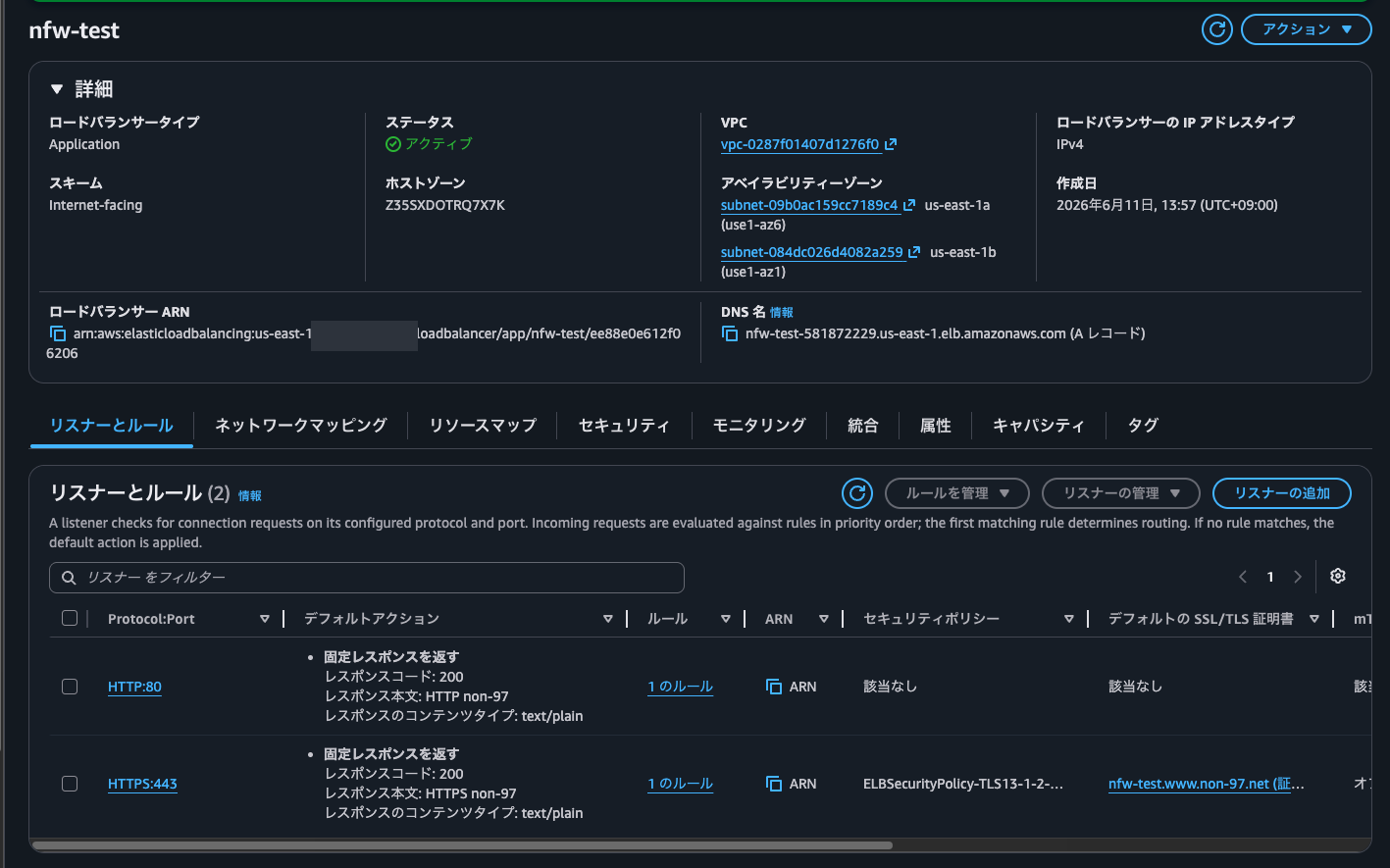
As a target for SNI spoofing, I prepared an ALB assigned the domain nfw-test.www.non-97.net. This ALB has HTTP and HTTPS listeners, and is configured to return a fixed HTTP 200 response for each.
Operation Verification
Normal HTTP and HTTPS
Now let's verify the operation.
I'll try from my local machine.
> curl http://nfw-test.www.non-97.net/ \
  -v \
  -s \
  -m 5
* Host nfw-test.www.non-97.net:80 was resolved.
* IPv6: (none)
* IPv4: 34.206.197.254, 52.20.29.1
*   Trying 34.206.197.254:80...
* Connected to nfw-test.www.non-97.net (34.206.197.254) port 80
> GET / HTTP/1.1
> Host: nfw-test.www.non-97.net
> User-Agent: curl/8.7.1
> Accept: */*
>
* Request completely sent off
< HTTP/1.1 200 OK
< Server: awselb/2.0
< Date: Thu, 11 Jun 2026 05:01:19 GMT
< Content-Type: text/plain; charset=utf-8
< Content-Length: 11
< Connection: keep-alive
< Cf-Team: 2f56a77af400013ea60b8cb400000001
<
* Connection #0 to host nfw-test.www.non-97.net left intact
HTTP non-97%

> curl https://nfw-test.www.non-97.net/ \
  -v \
  -s \
  -m 5
* Host nfw-test.www.non-97.net:443 was resolved.
* IPv6: (none)
* IPv4: 52.20.29.1, 34.206.197.254
*   Trying 52.20.29.1:443...
* Connected to nfw-test.www.non-97.net (52.20.29.1) port 443
* ALPN: curl offers h2,http/1.1
* (304) (OUT), TLS handshake, Client hello (1):
*  CAfile: /etc/ssl/cert.pem
*  CApath: none
* (304) (IN), TLS handshake, Server hello (2):
* (304) (IN), TLS handshake, Unknown (8):
* (304) (IN), TLS handshake, Certificate (11):
* (304) (IN), TLS handshake, CERT verify (15):
* (304) (IN), TLS handshake, Finished (20):
* (304) (OUT), TLS handshake, Finished (20):
* SSL connection using TLSv1.3 / AEAD-AES128-GCM-SHA256 / [blank] / UNDEF
* ALPN: server accepted h2
* Server certificate:
*  subject: CN=nfw-test.www.non-97.net
*  start date: Oct  3 00:00:00 2025 GMT
*  expire date: Nov  1 23:59:59 2026 GMT
*  subjectAltName: host "nfw-test.www.non-97.net" matched cert's "nfw-test.www.non-97.net"
*  issuer: C=US; O=Amazon; CN=Amazon RSA 2048 M04
*  SSL certificate verify ok.
* using HTTP/2
* [HTTP/2] [1] OPENED stream for https://nfw-test.www.non-97.net/
* [HTTP/2] [1] [:method: GET]
* [HTTP/2] [1] [:scheme: https]
* [HTTP/2] [1] [:authority: nfw-test.www.non-97.net]
* [HTTP/2] [1] [:path: /]
* [HTTP/2] [1] [user-agent: curl/8.7.1]
* [HTTP/2] [1] [accept: */*]
> GET / HTTP/2
> Host: nfw-test.www.non-97.net
> User-Agent: curl/8.7.1
> Accept: */*
>
* Request completely sent off
< HTTP/2 200
< server: awselb/2.0
< date: Thu, 11 Jun 2026 05:01:54 GMT
< content-type: text/plain; charset=utf-8
< content-length: 12
<
* Connection #0 to host nfw-test.www.non-97.net left intact
HTTPS non-97%
Both returned HTTP status code 200.
Now let's try accessing from the client EC2 instance.
$ hostname -I
10.1.0.100

$ curl http://nfw-test.www.non-97.net/ \
  -v \
  -s \
  -m 5
* Could not resolve host: nfw-test.www.non-97.net
* Store negative name resolve for nfw-test.www.non-97.net:80
* shutting down connection #0

$ curl https://nfw-test.www.non-97.net/ \
  -v \
  -s \
  -m 5
* Could not resolve host: nfw-test.www.non-97.net
* Store negative name resolve for nfw-test.www.non-97.net:443
* shutting down connection #0
$ curl http://dev.classmethod.jp/ -v \
  -s \
  2>&1 \
  | grep -Ev '(<.*>|bytes data]|\{.*\})'
* Host dev.classmethod.jp:80 was resolved.
* IPv6: 2600:9000:2352:800:14:e623:c740:93a1, 2600:9000:2352:5e00:14:e623:c740:93a1, 2600:9000:2224:2600:14:e623:c740:93a1, 2600:9000:2352:8800:14:e623:c740:93a1, 2600:9000:2352:3c00:14:e623:c740:93a1, 2600:9000:2352:2200:14:e623:c740:93a1, 2600:9000:2224:a800:14:e623:c740:93a1, 2600:9000:2224:3800:14:e623:c740:93a1
* IPv4: 18.65.214.101, 18.65.214.9, 18.65.214.54, 18.65.214.47
*   Trying [2600:9000:2352:800:14:e623:c740:93a1]:80...
* Immediate connect fail for 2600:9000:2352:800:14:e623:c740:93a1: Network is unreachable
*   Trying 18.65.214.101:80...
* Established connection to dev.classmethod.jp (18.65.214.101 port 80) from 10.1.0.100 port 49342
* using HTTP/1.x
> GET / HTTP/1.1
> Host: dev.classmethod.jp
> User-Agent: curl/8.17.0
> Accept: */*
>
* Request completely sent off
< HTTP/1.1 301 Moved Permanently
< Server: CloudFront
< Date: Thu, 11 Jun 2026 05:15:31 GMT
< Content-Type: text/html
< Content-Length: 167
< Connection: keep-alive
< Location: https://dev.classmethod.jp/
< X-Cache: Redirect from cloudfront
< Via: 1.1 c6a39a61a5883d63c301bf090ead6950.cloudfront.net (CloudFront)
< X-Amz-Cf-Pop: NRT57-P4
< Alt-Svc: h3=":443"; ma=86400
< X-Amz-Cf-Id: Xq2n8Os3c5tUBcHGWz4xN4_W3M1REHr7UJ3hB2syUyPOCcJdWwTGtA==
< Cache-Control: public, max-age=45, stale-if-error=21600
<
* Connection #0 to host dev.classmethod.jp:80 left intact

$ curl https://dev.classmethod.jp/ -v \
  -s \
  2>&1 \
  | grep -Ev '(<.*>|bytes data]|\{.*\})'
* Host dev.classmethod.jp:443 was resolved.
* IPv6: 2600:9000:2224:2600:14:e623:c740:93a1, 2600:9000:2352:8800:14:e623:c740:93a1, 2600:9000:2352:3c00:14:e623:c740:93a1, 2600:9000:2352:2200:14:e623:c740:93a1, 2600:9000:2224:a800:14:e623:c740:93a1, 2600:9000:2224:3800:14:e623:c740:93a1, 2600:9000:2352:800:14:e623:c740:93a1, 2600:9000:2352:5e00:14:e623:c740:93a1
* IPv4: 18.65.214.101, 18.65.214.9, 18.65.214.54, 18.65.214.47
*   Trying [2600:9000:2224:2600:14:e623:c740:93a1]:443...
* Immediate connect fail for 2600:9000:2224:2600:14:e623:c740:93a1: Network is unreachable
*   Trying 18.65.214.101:443...
* ALPN: curl offers h2,http/1.1
* TLSv1.3 (OUT), TLS handshake, Client hello (1):
* SSL Trust Anchors:
*   CAfile: /etc/pki/tls/certs/ca-bundle.crt
* TLSv1.3 (IN), TLS handshake, Server hello (2):
* TLSv1.3 (IN), TLS change cipher, Change cipher spec (1):
* TLSv1.3 (IN), TLS handshake, Encrypted Extensions (8):
* TLSv1.3 (IN), TLS handshake, Certificate (11):
* TLSv1.3 (IN), TLS handshake, CERT verify (15):
* TLSv1.3 (IN), TLS handshake, Finished (20):
* TLSv1.3 (OUT), TLS change cipher, Change cipher spec (1):
* TLSv1.3 (OUT), TLS handshake, Finished (20):
* SSL connection using TLSv1.3 / TLS_AES_128_GCM_SHA256 / x25519 / id-ecPublicKey
* ALPN: server accepted h2
* Server certificate:
*   subject: CN=*.classmethod.jp
*   start date: Mar 22 00:00:00 2026 GMT
*   expire date: Oct  5 23:59:59 2026 GMT
*   issuer: C=US; O=Amazon; CN=Amazon ECDSA 256 M04
*   Certificate level 0: Public key type EC/prime256v1 (256/128 Bits/secBits), signed using ecdsa-with-SHA256
*   Certificate level 1: Public key type EC/prime256v1 (256/128 Bits/secBits), signed using ecdsa-with-SHA256
*   Certificate level 2: Public key type EC/prime256v1 (256/128 Bits/secBits), signed using ecdsa-with-SHA256
*   subjectAltName: "dev.classmethod.jp" matches cert's "*.classmethod.jp"
* SSL certificate verified via OpenSSL.
* Established connection to dev.classmethod.jp (18.65.214.101 port 443) from 10.1.0.100 port 57758
* using HTTP/2
* [HTTP/2] [1] OPENED stream for https://dev.classmethod.jp/
* [HTTP/2] [1] [:method: GET]
* [HTTP/2] [1] [:scheme: https]
* [HTTP/2] [1] [:authority: dev.classmethod.jp]
* [HTTP/2] [1] [:path: /]
* [HTTP/2] [1] [user-agent: curl/8.17.0]
* [HTTP/2] [1] [accept: */*]
> GET / HTTP/2
> Host: dev.classmethod.jp
> User-Agent: curl/8.17.0
> Accept: */*
>
* Request completely sent off
* TLSv1.3 (IN), TLS handshake, Newsession Ticket (4):
< HTTP/2 200
< content-type: text/html; charset=utf-8
< date: Thu, 11 Jun 2026 05:16:10 GMT
< x-powered-by: Next.js
< cache-control: public, max-age=45, stale-if-error=21600
< x-custom-lang: ja
< x-middleware-rewrite: /ja
< vary: Accept-Encoding
< x-cache: Miss from cloudfront
< via: 1.1 541ec8013f12d2a9d4abdbdb1647af30.cloudfront.net (CloudFront)
< x-amz-cf-pop: NRT57-P4
< alt-svc: h3=":443"; ma=86400
< x-amz-cf-id: 0zvjLWp_OeGMA1fF1LSsk3gKtJH9-d15BlhpxboteRLVKNHF0z3ZFA==
< server-timing: cdn-upstream-layer;desc="REC",cdn-upstream-dns;dur=0,cdn-upstream-connect;dur=0,cdn-upstream-fbl;dur=27,cdn-cache-miss,cdn-pop;desc="NRT57-P4",cdn-rid;desc="0zvjLWp_OeGMA1fF1LSsk3gKtJH9-d15BlhpxboteRLVKNHF0z3ZFA==",cdn-downstream-fbl;dur=35
<
Domains not permitted by Route 53 DNS Firewall failed to resolve and could not be accessed, while permitted ones were successfully accessed.
SNI Spoofing and Host Header Spoofing Using Domains Not Included in Permitted Domains
Next, SNI spoofing and Host header spoofing using domains not included in the permitted domains.
I'll access from my local machine using www.amazon.co.jp, a non-permitted domain.
$ curl http://$(dig +short nfw-test.www.non-97.net | head -1)/ \
  -H "Host: www.amazon.co.jp" \
  -v \
  -s \
  -m 5
*   Trying 52.20.29.1:80...
* Connected to 52.20.29.1 (52.20.29.1) port 80
> GET / HTTP/1.1
> Host: www.amazon.co.jp
> User-Agent: curl/8.7.1
> Accept: */*
>
* Request completely sent off
< HTTP/1.1 200 OK
< Server: awselb/2.0
< Date: Thu, 11 Jun 2026 05:16:36 GMT
< Content-Type: text/plain; charset=utf-8
< Content-Length: 11
< Connection: keep-alive
< Cf-Team: 2f56b5772200013ea62861e400000001
<
* Connection #0 to host 52.20.29.1 left intact
HTTP non-97%

$ curl https://www.amazon.co.jp/ \
  --resolve www.amazon.co.jp:443:$(dig +short nfw-test.www.non-97.net | head -1) \
  -H "Host: nfw-test.www.non-97.net" \
  -k \
  -v \
  -s
* Added www.amazon.co.jp:443:52.20.29.1 to DNS cache
* Hostname www.amazon.co.jp was found in DNS cache
*   Trying 52.20.29.1:443...
* Connected to www.amazon.co.jp (52.20.29.1) port 443
* ALPN: curl offers h2,http/1.1
* (304) (OUT), TLS handshake, Client hello (1):
* (304) (IN), TLS handshake, Server hello (2):
* (304) (IN), TLS handshake, Unknown (8):
* (304) (IN), TLS handshake, Certificate (11):
* (304) (IN), TLS handshake, CERT verify (15):
* (304) (IN), TLS handshake, Finished (20):
* (304) (OUT), TLS handshake, Finished (20):
* SSL connection using TLSv1.3 / AEAD-AES128-GCM-SHA256 / [blank] / UNDEF
* ALPN: server accepted h2
* Server certificate:
*  subject: CN=nfw-test.www.non-97.net
*  start date: Oct  3 00:00:00 2025 GMT
*  expire date: Nov  1 23:59:59 2026 GMT
*  issuer: C=US; O=Amazon; CN=Amazon RSA 2048 M04
*  SSL certificate verify ok.
* using HTTP/2
* [HTTP/2] [1] OPENED stream for https://www.amazon.co.jp/
* [HTTP/2] [1] [:method: GET]
* [HTTP/2] [1] [:scheme: https]
* [HTTP/2] [1] [:authority: nfw-test.www.non-97.net]
* [HTTP/2] [1] [:path: /]
* [HTTP/2] [1] [user-agent: curl/8.7.1]
* [HTTP/2] [1] [accept: */*]
> GET / HTTP/2
> Host: nfw-test.www.non-97.net
> User-Agent: curl/8.7.1
> Accept: */*
>
* Request completely sent off
< HTTP/2 200
< server: awselb/2.0
< date: Thu, 11 Jun 2026 05:16:51 GMT
< content-type: text/plain; charset=utf-8
< content-length: 12
<
* Connection #0 to host www.amazon.co.jp left intact
HTTPS non-97%
Both returned HTTP status code 200, and the content of the name-resolved nfw-test.www.non-97.net was returned.
Now let's perform the same operation from the client EC2 instance.
$ curl http://$(dig +short nfw-test.www.non-97.net | head -1)/ \
  -H "Host: www.amazon.co.jp" \
  -v \
  -s \
  -m 5
* URL rejected: No host part in the URL
* closing connection #-1

$ curl https://www.amazon.co.jp/ \
  --resolve www.amazon.co.jp:443:$(dig +short nfw-test.www.non-97.net | head -1) \
  -H "Host: nfw-test.www.non-97.net" \
  -k \
  -v \
  -s
* Couldn't parse CURLOPT_RESOLVE entry 'www.amazon.co.jp:443:'
Yes, it failed because name resolution was not possible. Looking good.
SNI Spoofing and Host Header Forgery Using Allowed Domains
Next is SNI spoofing and Host header forgery using allowed domains.
First, let's try it from the local terminal.
> curl http://$(dig +short nfw-test.www.non-97.net | head -1)/ \
  -H "Host: dev.classmethod.jp" \
  -v \
  -s \
  -m 5
*   Trying 52.20.29.1:80...
* Connected to 52.20.29.1 (52.20.29.1) port 80
> GET / HTTP/1.1
> Host: dev.classmethod.jp
> User-Agent: curl/8.7.1
> Accept: */*
>
* Request completely sent off
< HTTP/1.1 200 OK
< Server: awselb/2.0
< Date: Thu, 11 Jun 2026 05:20:47 GMT
< Content-Type: text/plain; charset=utf-8
< Content-Length: 11
< Connection: keep-alive
< Cf-Team: 2f56b94ef700013ea630555400000001
<
* Connection #0 to host 52.20.29.1 left intact
HTTP non-97%

> curl https://dev.classmethod.jp/ \
  --resolve dev.classmethod.jp:443:$(dig +short nfw-test.www.non-97.net | head -1) \
  -H "Host: nfw-test.www.non-97.net" \
  -k \
  -v \
  -s
* Added dev.classmethod.jp:443:52.20.29.1 to DNS cache
* Hostname dev.classmethod.jp was found in DNS cache
*   Trying 52.20.29.1:443...
* Connected to dev.classmethod.jp (52.20.29.1) port 443
* ALPN: curl offers h2,http/1.1
* (304) (OUT), TLS handshake, Client hello (1):
* (304) (IN), TLS handshake, Server hello (2):
* (304) (IN), TLS handshake, Unknown (8):
* (304) (IN), TLS handshake, Certificate (11):
* (304) (IN), TLS handshake, CERT verify (15):
* (304) (IN), TLS handshake, Finished (20):
* (304) (OUT), TLS handshake, Finished (20):
* SSL connection using TLSv1.3 / AEAD-AES128-GCM-SHA256 / [blank] / UNDEF
* ALPN: server accepted h2
* Server certificate:
*  subject: CN=nfw-test.www.non-97.net
*  start date: Oct  3 00:00:00 2025 GMT
*  expire date: Nov  1 23:59:59 2026 GMT
*  issuer: C=US; O=Amazon; CN=Amazon RSA 2048 M04
*  SSL certificate verify ok.
* using HTTP/2
* [HTTP/2] [1] OPENED stream for https://dev.classmethod.jp/
* [HTTP/2] [1] [:method: GET]
* [HTTP/2] [1] [:scheme: https]
* [HTTP/2] [1] [:authority: nfw-test.www.non-97.net]
* [HTTP/2] [1] [:path: /]
* [HTTP/2] [1] [user-agent: curl/8.7.1]
* [HTTP/2] [1] [accept: */*]
> GET / HTTP/2
> Host: nfw-test.www.non-97.net
> User-Agent: curl/8.7.1
> Accept: */*
>
* Request completely sent off
< HTTP/2 200
< server: awselb/2.0
< date: Thu, 11 Jun 2026 05:21:09 GMT
< content-type: text/plain; charset=utf-8
< content-length: 12
<
* Connection #0 to host dev.classmethod.jp left intact
HTTPS non-97%
Both returned HTTP status code 200, and the content of the DNS-resolved nfw-test.www.non-97.net was returned.
Next, let's try from the client EC2 instance.
$ curl http://$(dig +short nfw-test.www.non-97.net | head -1)/ \
  -H "Host: dev.classmethod.jp" \
  -v \
  -s \
  -m 5
* URL rejected: No host part in the URL
* closing connection #-1

$ curl https://dev.classmethod.jp/ \
  --resolve dev.classmethod.jp:443:$(dig +short nfw-test.www.non-97.net | head -1) \
  -H "Host: nfw-test.www.non-97.net" \
  -k \
  -v \
  -s
* Couldn't parse CURLOPT_RESOLVE entry 'dev.classmethod.jp:443:'
Yes, it failed. This is expected since the domain cannot be resolved either.
Direct IP Address Specification
Next is the case where an IP address is specified directly.
Let's try from the local terminal.
> dig +short nfw-test.www.non-97.net | head -1
52.20.29.1

> curl http://52.20.29.1/ \
  -v \
  -s \
  -m 5
*   Trying 52.20.29.1:80...
* Connected to 52.20.29.1 (52.20.29.1) port 80
> GET / HTTP/1.1
> Host: 52.20.29.1
> User-Agent: curl/8.7.1
> Accept: */*
>
* Request completely sent off
< HTTP/1.1 200 OK
< Server: awselb/2.0
< Date: Thu, 11 Jun 2026 05:32:07 GMT
< Content-Type: text/plain; charset=utf-8
< Content-Length: 11
< Connection: keep-alive
< Cf-Team: 2f56c3ac4400013ea645f1e400000001
<
* Connection #0 to host 52.20.29.1 left intact
HTTP non-97%

> curl https://52.20.29.1/ \
  -v \
  -s \
  -k \
  -m 5
*   Trying 52.20.29.1:443...
* Connected to 52.20.29.1 (52.20.29.1) port 443
* ALPN: curl offers h2,http/1.1
* (304) (OUT), TLS handshake, Client hello (1):
* (304) (IN), TLS handshake, Server hello (2):
* (304) (IN), TLS handshake, Unknown (8):
* (304) (IN), TLS handshake, Certificate (11):
* (304) (IN), TLS handshake, CERT verify (15):
* (304) (IN), TLS handshake, Finished (20):
* (304) (OUT), TLS handshake, Finished (20):
* SSL connection using TLSv1.3 / AEAD-AES128-GCM-SHA256 / [blank] / UNDEF
* ALPN: server accepted h2
* Server certificate:
*  subject: CN=nfw-test.www.non-97.net
*  start date: Oct  3 00:00:00 2025 GMT
*  expire date: Nov  1 23:59:59 2026 GMT
*  issuer: C=US; O=Amazon; CN=Amazon RSA 2048 M04
*  SSL certificate verify ok.
* using HTTP/2
* [HTTP/2] [1] OPENED stream for https://52.20.29.1/
* [HTTP/2] [1] [:method: GET]
* [HTTP/2] [1] [:scheme: https]
* [HTTP/2] [1] [:authority: 52.20.29.1]
* [HTTP/2] [1] [:path: /]
* [HTTP/2] [1] [user-agent: curl/8.7.1]
* [HTTP/2] [1] [accept: */*]
> GET / HTTP/2
> Host: 52.20.29.1
> User-Agent: curl/8.7.1
> Accept: */*
>
* Request completely sent off
< HTTP/2 200
< server: awselb/2.0
< date: Thu, 11 Jun 2026 05:32:36 GMT
< content-type: text/plain; charset=utf-8
< content-length: 12
<
* Connection #0 to host 52.20.29.1 left intact
HTTPS non-97%
Both returned HTTP status code 200, and the content of the DNS-resolved nfw-test.www.non-97.net was returned.
Let's also try from the client EC2 instance.
$ curl http://52.20.29.1/ \
  -v \
  -s \
  -m 5
*   Trying 52.20.29.1:80...
* Established connection to 52.20.29.1 (52.20.29.1 port 80) from 10.1.0.100 port 52678
* using HTTP/1.x
> GET / HTTP/1.1
> Host: 52.20.29.1
> User-Agent: curl/8.17.0
> Accept: */*
>
* Request completely sent off
* Operation timed out after 5002 milliseconds with 0 bytes received
* closing connection #0

$ curl https://52.20.29.1/ \
  -v \
  -s \
  -k \
  -m 5
*   Trying 52.20.29.1:443...
* ALPN: curl offers h2,http/1.1
* TLSv1.3 (OUT), TLS handshake, Client hello (1):
* SSL Trust: peer verification disabled
* Connection timed out after 5002 milliseconds
* closing connection #0
Yes, it failed. This is because Network Firewall checks whether the Host header and SNI Server Name match.
Direct IP Address Specification + SNI Spoofing and Host Header Forgery Using Allowed Domains
Finally, here is the pattern of direct IP address specification + SNI spoofing and Host header forgery using allowed domains.
Let's try from the local terminal.
> curl http://52.20.29.1/ \
  -H "Host: dev.classmethod.jp" \
  -v \
  -s \
  -m 5
*   Trying 52.20.29.1:80...
* Connected to 52.20.29.1 (52.20.29.1) port 80
> GET / HTTP/1.1
> Host: dev.classmethod.jp
> User-Agent: curl/8.7.1
> Accept: */*
>
* Request completely sent off
< HTTP/1.1 200 OK
< Server: awselb/2.0
< Date: Thu, 11 Jun 2026 05:22:44 GMT
< Content-Type: text/plain; charset=utf-8
< Content-Length: 11
< Connection: keep-alive
< Cf-Team: 2f56bb170f00013ea633dd6400000001
<
* Connection #0 to host 52.20.29.1 left intact
HTTP non-97%

> curl https://dev.classmethod.jp/ \
  --resolve dev.classmethod.jp:443:52.20.29.1 \
  -H "Host: nfw-test.www.non-97.net" \
  -k \
  -v \
  -s
* Added dev.classmethod.jp:443:52.20.29.1 to DNS cache
* Hostname dev.classmethod.jp was found in DNS cache
*   Trying 52.20.29.1:443...
* Connected to dev.classmethod.jp (52.20.29.1) port 443
* ALPN: curl offers h2,http/1.1
* (304) (OUT), TLS handshake, Client hello (1):
* (304) (IN), TLS handshake, Server hello (2):
* (304) (IN), TLS handshake, Unknown (8):
* (304) (IN), TLS handshake, Certificate (11):
* (304) (IN), TLS handshake, CERT verify (15):
* (304) (IN), TLS handshake, Finished (20):
* (304) (OUT), TLS handshake, Finished (20):
* SSL connection using TLSv1.3 / AEAD-AES128-GCM-SHA256 / [blank] / UNDEF
* ALPN: server accepted h2
* Server certificate:
*  subject: CN=nfw-test.www.non-97.net
*  start date: Oct  3 00:00:00 2025 GMT
*  expire date: Nov  1 23:59:59 2026 GMT
*  issuer: C=US; O=Amazon; CN=Amazon RSA 2048 M04
*  SSL certificate verify ok.
* using HTTP/2
* [HTTP/2] [1] OPENED stream for https://dev.classmethod.jp/
* [HTTP/2] [1] [:method: GET]
* [HTTP/2] [1] [:scheme: https]
* [HTTP/2] [1] [:authority: nfw-test.www.non-97.net]
* [HTTP/2] [1] [:path: /]
* [HTTP/2] [1] [user-agent: curl/8.7.1]
* [HTTP/2] [1] [accept: */*]
> GET / HTTP/2
> Host: nfw-test.www.non-97.net
> User-Agent: curl/8.7.1
> Accept: */*
>
* Request completely sent off
< HTTP/2 200
< server: awselb/2.0
< date: Thu, 11 Jun 2026 05:23:28 GMT
< content-type: text/plain; charset=utf-8
< content-length: 12
<
* Connection #0 to host dev.classmethod.jp left intact
HTTPS non-97%
Both returned HTTP status code 200, and the content of the DNS-resolved nfw-test.www.non-97.net was returned.
Let's also try from the client EC2 instance.
$ curl http://52.20.29.1/ \
  -H "Host: dev.classmethod.jp" \
  -v \
  -s \
  -m 5
*   Trying 52.20.29.1:80...
* Established connection to 52.20.29.1 (52.20.29.1 port 80) from 10.1.0.100 port 38478
* using HTTP/1.x
> GET / HTTP/1.1
> Host: dev.classmethod.jp
> User-Agent: curl/8.17.0
> Accept: */*
>
* Request completely sent off
< HTTP/1.1 200 OK
< Server: awselb/2.0
< Date: Thu, 11 Jun 2026 05:24:41 GMT
< Content-Type: text/plain; charset=utf-8
< Content-Length: 11
< Connection: keep-alive
<
* Connection #0 to host 52.20.29.1:80 left intact
HTTP non-97

$ curl https://dev.classmethod.jp/ \
  --resolve dev.classmethod.jp:443:52.20.29.1 \
  -H "Host: nfw-test.www.non-97.net" \
  -k \
  -v \
  -s
* Added dev.classmethod.jp:443:52.20.29.1 to DNS cache
* Hostname dev.classmethod.jp was found in DNS cache
*   Trying 52.20.29.1:443...
* ALPN: curl offers h2,http/1.1
* TLSv1.3 (OUT), TLS handshake, Client hello (1):
* SSL Trust: peer verification disabled
* TLSv1.3 (IN), TLS handshake, Server hello (2):
* TLSv1.3 (IN), TLS change cipher, Change cipher spec (1):
* TLSv1.3 (IN), TLS handshake, Encrypted Extensions (8):
* TLSv1.3 (IN), TLS handshake, Certificate (11):
* TLSv1.3 (IN), TLS handshake, CERT verify (15):
* TLSv1.3 (IN), TLS handshake, Finished (20):
* TLSv1.3 (OUT), TLS change cipher, Change cipher spec (1):
* TLSv1.3 (OUT), TLS handshake, Finished (20):
* SSL connection using TLSv1.3 / TLS_AES_128_GCM_SHA256 / x25519 / RSASSA-PSS
* ALPN: server accepted h2
* Server certificate:
*   subject: CN=nfw-test.www.non-97.net
*   start date: Oct  3 00:00:00 2025 GMT
*   expire date: Nov  1 23:59:59 2026 GMT
*   issuer: C=US; O=Amazon; CN=Amazon RSA 2048 M04
*   Certificate level 0: Public key type RSA (2048/112 Bits/secBits), signed using sha256WithRSAEncryption
*   Certificate level 1: Public key type RSA (2048/112 Bits/secBits), signed using sha256WithRSAEncryption
*   Certificate level 2: Public key type RSA (2048/112 Bits/secBits), signed using sha256WithRSAEncryption
* SSL certificate OpenSSL verify result: unable to get local issuer certificate (20)
*  SSL certificate verification failed, continuing anyway!
* Established connection to dev.classmethod.jp (52.20.29.1 port 443) from 10.1.0.100 port 57238
* using HTTP/2
* [HTTP/2] [1] OPENED stream for https://dev.classmethod.jp/
* [HTTP/2] [1] [:method: GET]
* [HTTP/2] [1] [:scheme: https]
* [HTTP/2] [1] [:authority: nfw-test.www.non-97.net]
* [HTTP/2] [1] [:path: /]
* [HTTP/2] [1] [user-agent: curl/8.17.0]
* [HTTP/2] [1] [accept: */*]
> GET / HTTP/2
> Host: nfw-test.www.non-97.net
> User-Agent: curl/8.17.0
> Accept: */*
>
* Request completely sent off
* TLSv1.3 (IN), TLS handshake, Newsession Ticket (4):
< HTTP/2 200
< server: awselb/2.0
< date: Thu, 11 Jun 2026 05:24:57 GMT
< content-type: text/plain; charset=utf-8
< content-length: 12
<
* Connection #0 to host dev.classmethod.jp:443 left intact
HTTPS non-97
Yes, access succeeded here as well.
So, the scenario of direct IP address specification + SNI spoofing and Host header forgery using allowed domains is indeed vulnerable.
Addressing All Patterns Is Still Difficult
I tried to mitigate SNI spoofing using DNS stateful rules and DNS Firewall in AWS Network Firewall without enabling TLS inspection.
Addressing all patterns is indeed still difficult. If you want to handle it strictly, I believe you would need to adopt an HTTP proxy such as Network Firewall Proxy or Squid.
I hope this article helps someone.
That's all from Nonpi (@non____97) of the Cloud Business Division, Consulting Department!
