AWS Network FirewallでTLSインスペクションを有効化せずRoute 53 DNS Firewallと組み合わせてSNIスプーフィングを緩和しようとしてみた

TLSインスペクションを使用せずにSNIスプーフィングの脅威を緩和したい
こんにちは、のんピ(@non____97)です。
皆さんはAWS Network Firewallを運用する中で、TLSインスペクションを使用せずにSNIスプーフィングの脅威を緩和したいなと思ったことはありますか? 私はあります。
以下記事で紹介しているとおり、TLSインスペクションが有効化されていないNetwork FirewallはSNIスプーフィングに脆弱です。
対策としてTLSインスペクションの有効化がありますが、ランニングコストおよびクライアントへのCA証明書の配布といった管理運用に懸念があります。特にランニングコストについては以下記事で紹介しているとおり、固定料金が追加で2.7倍ほど増加します。
SNIスプーフィングやHostヘッダー詐称の対応としてNetwork Firewall Proxyがありますが、2026/6/11時点ではGAされていません。
料金もオープンになっていません。
ということで、記事執筆時点でのマネージドサービスを組み合わせてAWS Network FirewallでTLSインスペクションを有効化せずにDNSのステートフルルールやDNS Firewallを用いてSNIスプーフィングを緩和しようとしてみます。
いきなりまとめ
- TLSインスペクションを有効化していないAWS Network Firewallは、SNI Server NameやHostヘッダーがクライアントの自己申告値であり、実際の送信先IPアドレスと照合せず信用して許可判定するため、SNIスプーフィングやHostヘッダーの詐称に脆弱
- TLSインスペクションを使わずに緩和を試みるなら、Route 53 DNS FirewallとNetwork Firewallのステートフルルールを組み合わせる
- Route 53 DNS Firewall : 名前解決できるドメインをAllow Listで絞り、不正な接続先IPアドレスの情報取得を防ぐ
- Network Firewall :
- セルフマネージドのDNSサーバー以外への名前解決を遮断し、
1.1.1.1など外部DNSサーバーによるDNS Firewallの迂回を防ぐ - SNI Server Name / Hostヘッダーが許可ドメインのもののみ許可
- Network Firewall側に許可ドメインの情報を持たせないと、IPアドレスの直接指定 + Hostヘッダーに適当な値 で簡単に突破されるため
- セルフマネージドのDNSサーバー以外への名前解決を遮断し、
- この構成で防げるパターン / 防げないパターンは以下のとおり
- 防げる : Route 53 DNS Firewallによって名前解決が許可されていないドメインへのアクセス
- 防げる : 許可されていないドメインを使ったSNIスプーフィング / Hostヘッダーの詐称
- 防げる : IPアドレスの直接指定
- SNI Server Name / Hostヘッダーが許可ドメインと一致しないため
- 防げない : IPアドレスの直接指定 + 許可されているドメインを詐称したSNI Server Name / Hostヘッダー
- 防げないパターンは、SNI Server NameやHostヘッダーが自己申告値である以上、TLSインスペクション無しでは対処できない
- Network FirewallとDNS Firewallで許可するドメインを二重管理する必要がある点はネック
- 全てのパターンを厳密にケアするなら、Network Firewall ProxyやSquidなどのHTTP Proxyの採用を検討することになりそう
やってみた
検証環境
検証環境は以下のとおりです。
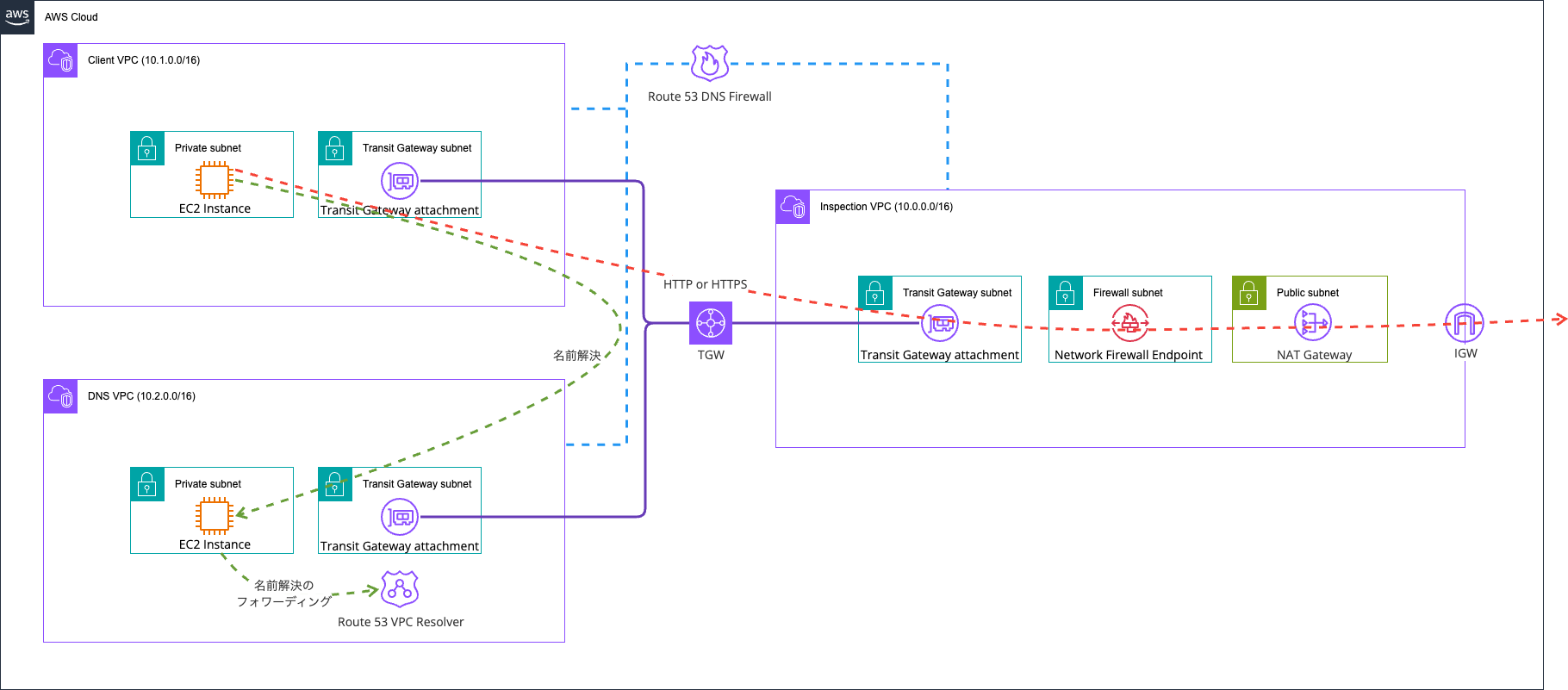
Network Firewallで許可されたドメインのみ通信できるようにしています。
ポイントは以下2点です。
- Route 53 DNS Firewallによる名前解決できるドメインのコントロール
- Route 53 VPC Resolverおよび特定のDNSサーバー以外への名前解決のコントロール
まず、1つ目のポイントの「Route 53 DNS Firewallによる名前解決できるドメインのコントロール」です。Route 53 DNS Firewallについては以下記事をご覧ください。
こちらを用いて、指定したドメインのみの名前解決を許可するように設定します。要するにAllow Listです。
Network FirewallでSNIスプーフィングやHostヘッダーの詐称が成り立つのは、「SNI Server NameやHostヘッダーおよび接続先のIPアドレスはクライアントが自己申告してきた値であるにも関わらず、Network FirewallはSNI Server NameやHostヘッダーおよび、送信先IPアドレスとの照合せず、信用して許可判定するため」です。
これにより、悪意あるドメインのIPアドレスと許可されているドメインを紐づけられてしまいます。
これに対して、Route 53 DNS Firewallの役回りとしては、クライアントが名前解決できるドメインを絞ることで不正な接続先の情報取得を防ぐことです。今回は以下のように*.amazonaws.com.と*.classmethod.jp.以外は拒否するようにしました。
> aws route53resolver list-firewall-rules --region ap-northeast-1 \
  --firewall-rule-group-id \
    "$(aws route53resolver \
      list-firewall-rule-groups \
      --query "FirewallRuleGroups[?Name=='AwsCdkNetworkFirewallDnsFirewallStack-DnsFirewallRu-XXx9CMLwWoAU'].Id | [0]" \
      --region ap-northeast-1 \
    --output text)"
{
    "FirewallRules": [
        {
            "FirewallRuleGroupId": "rslvr-frg-52bf8f7bd3ba4bfc",
            "FirewallDomainListId": "rslvr-fdl-c45c5485a24b4fc0",
            "Name": "rule-for-rslvr-fdl-c45c5485a24b4fc0",
            "Priority": 1,
            "Action": "ALLOW",
            "CreatorRequestId": "rslvr-frg-52bf8f7bd3ba4bfc:rslvr-fdl-c45c5485a24b4fc0",
            "CreationTime": "2026-06-11T04:03:14.283668630Z",
            "ModificationTime": "2026-06-11T04:03:14.283668630Z",
            "FirewallDomainRedirectionAction": "TRUST_REDIRECTION_DOMAIN"
        },
        {
            "FirewallRuleGroupId": "rslvr-frg-52bf8f7bd3ba4bfc",
            "FirewallDomainListId": "rslvr-fdl-36406c743e064542",
            "Name": "rule-for-rslvr-fdl-36406c743e064542",
            "Priority": 2,
            "Action": "BLOCK",
            "BlockResponse": "NXDOMAIN",
            "CreatorRequestId": "rslvr-frg-52bf8f7bd3ba4bfc:rslvr-fdl-36406c743e064542",
            "CreationTime": "2026-06-11T04:03:14.219470364Z",
            "ModificationTime": "2026-06-11T04:03:14.219470364Z",
            "FirewallDomainRedirectionAction": "INSPECT_REDIRECTION_DOMAIN"
        }
    ]
}

> aws route53resolver list-firewall-domains \
  --firewall-domain-list-id rslvr-fdl-c45c5485a24b4fc0 \
  --region ap-northeast-1
{
    "Domains": [
        "*.amazonaws.com.",
        "*.classmethod.jp."
    ]
}

> aws route53resolver list-firewall-domains \
  --firewall-domain-list-id rslvr-fdl-36406c743e064542 \
  --region ap-northeast-1
{
    "Domains": [
        "*."
    ]
}
一方で、個人的には、Network FirewallとDNS Firewallで許可するドメインの情報を二重で管理しなければならないのがネックです。Network Firewall側で許可するドメインの情報を持たなければ、名前解決を行わずにIPアドレスを直接指定 and Hostヘッダーには適当な値を入力される場合に簡単に突破されてしまいます。
また、そこまでしたとしてもIPアドレスを直接指定 and Allow Listに登録されているドメインをHostヘッダーやSNIのServer Nameに指定された場合は突破されてしまいます。要するに許可されているドメインが明らかになっている場合には効果的ではないです。これは後で確認します。
続いて、2つ目のポイントの「Route 53 VPC Resolverおよび特定のDNSサーバー以外への名前解決のコントロール」です。
Route 53 DNS Firewallは指定したVPCのRoute 53 VPC Resolverに対して動作します。そのため、1.1.1.1など外部のDNSサーバーに対して名前解決した場合は動作しません。私は以下記事で紹介しているようにRoute 53 VPC Resolver推しなのですが、外部のDNSサーバーを使用されてしまうとこの恩恵を受けることができません。
こちらの対処としてNetwork Firewallで特定のDNSサーバー以外を用いた名前解決をコントロールしています。要するに1.1.1.1で名前解決をしようとするのを防ぐということです。
実際のNetwork Firewallのルールは以下のとおりです。
# スポークからセルフマネージドの DNS サーバー宛ての DNS のみ許可
pass dns $HOME_NET any -> $DNS_SERVER 53 (msg:"Allow DNS query to self-managed"; flow:to_server; sid:1000001;)

# HTTPS の SNI が *.classmethod.jp(apex 含む)のもののみ許可
pass tls $HOME_NET any -> $EXTERNAL_NET any (msg:"Allow SNI .classmethod.jp"; flow:to_server; ssl_state:client_hello; tls.sni; content:".classmethod.jp"; dotprefix; endswith; nocase; sid:1000002;)

# HTTP の Host が *.classmethod.jp のもののみ許可
pass http $HOME_NET any -> $EXTERNAL_NET any (msg:"Allow Host .classmethod.jp"; flow:to_server; http.host; content:".classmethod.jp"; dotprefix; endswith; sid:1000003;)

# HTTPS の SNI が *.amazonaws.com のもののみ許可
pass tls $HOME_NET any -> $EXTERNAL_NET any (msg:"Allow SNI .amazonaws.com"; flow:to_server; ssl_state:client_hello; tls.sni; content:".amazonaws.com"; dotprefix; endswith; nocase; sid:1000004;)

# HTTP の Host が *.amazonaws.com のもののみ許可
pass http $HOME_NET any -> $EXTERNAL_NET any (msg:"Allow Host .amazonaws.com"; flow:to_server; http.host; content:".amazonaws.com"; dotprefix; endswith; sid:1000005;)

# ペイロード0の ACK(keep-alive/ウィンドウ更新)をクライアント→サーバー方向で許可(app-layer drop established 対策)
pass tcp $HOME_NET any -> $EXTERNAL_NET any (msg:"Allow TCP keepalive/window to_server"; tcp.flags:A; dsize:0; flow:established,to_server; sid:1000006;)

# ペイロード0の ACK(keep-alive/ウィンドウ更新)をサーバー→クライアント方向で許可
pass tcp $EXTERNAL_NET any -> $HOME_NET any (msg:"Allow TCP keepalive/window to_client"; tcp.flags:A; dsize:0; flow:established,to_client; sid:1000007;)

# TCP RST(コネクションリセット)をクライアント→サーバー方向で許可(正常な切断のため)
pass tcp $HOME_NET any -> $EXTERNAL_NET any (msg:"Allow TCP reset to_server"; tcp.flags:+R; dsize:0; flow:established,to_server; sid:1000008;)

# TCP RST(コネクションリセット)をサーバー→クライアント方向で許可
pass tcp $EXTERNAL_NET any -> $HOME_NET any (msg:"Allow TCP reset to_client"; tcp.flags:+R; dsize:0; flow:established,to_client; sid:1000009;)
後半のpass tcpのルールは以下AWS公式ドキュメントを参考にしました。
検証環境は基本的にAWS CDKでデプロイしました。使用したコードは以下GitHubのリポジトリに保存しています。
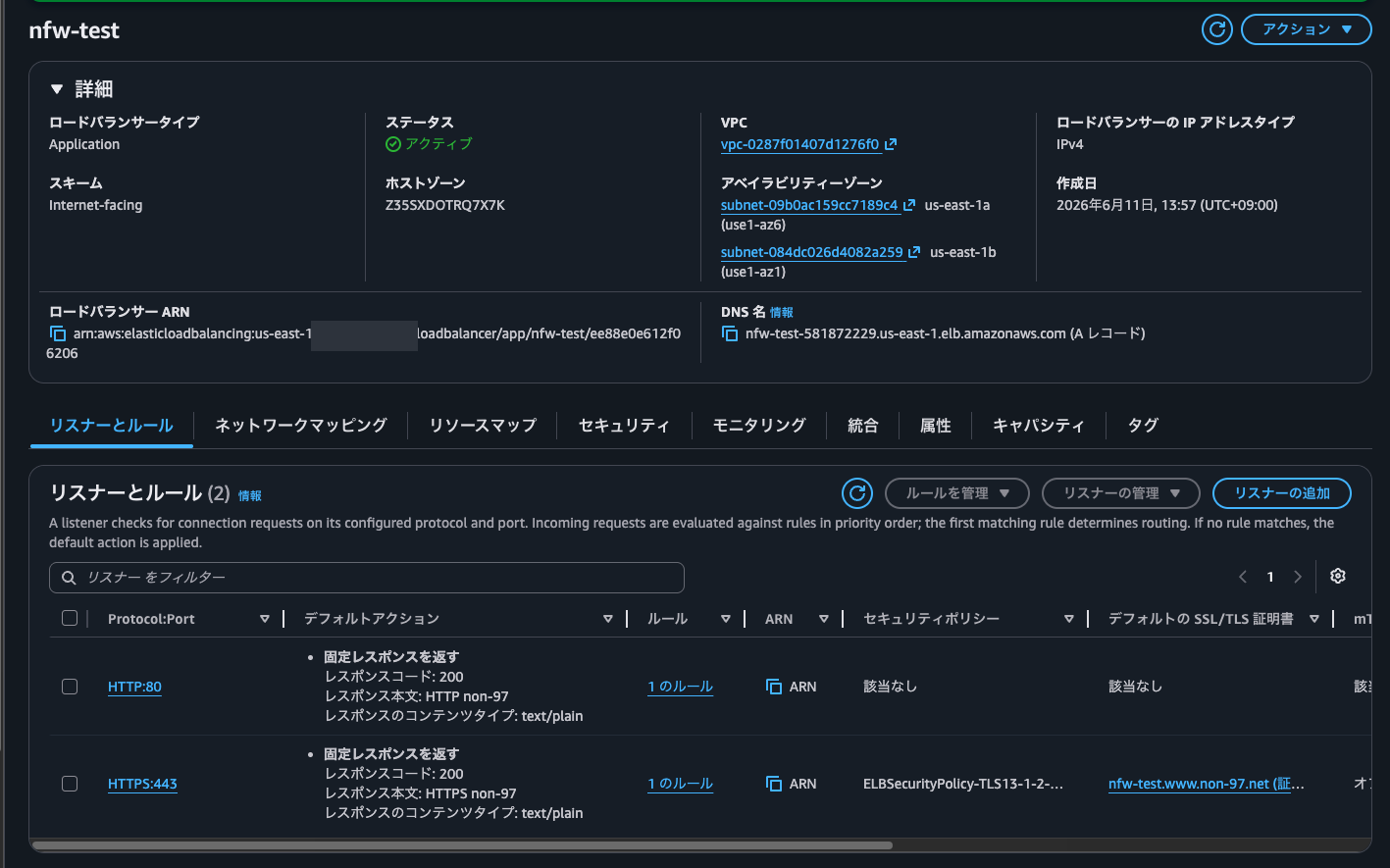
SNI スプーフィングする先として、nfw-test.www.non-97.netというドメインを割り当てた ALB を用意しました。こちらの ALB は HTTP と HTTPS のリスナーを持っており、それぞれ HTTP 200 の固定レスポンスを返すようにしています。
動作確認
通常のHTTPおよびHTTPS
それでは動作確認です。
手元の端末から試します。
> curl http://nfw-test.www.non-97.net/ \
  -v \
  -s \
  -m 5
* Host nfw-test.www.non-97.net:80 was resolved.
* IPv6: (none)
* IPv4: 34.206.197.254, 52.20.29.1
*   Trying 34.206.197.254:80...
* Connected to nfw-test.www.non-97.net (34.206.197.254) port 80
> GET / HTTP/1.1
> Host: nfw-test.www.non-97.net
> User-Agent: curl/8.7.1
> Accept: */*
>
* Request completely sent off
< HTTP/1.1 200 OK
< Server: awselb/2.0
< Date: Thu, 11 Jun 2026 05:01:19 GMT
< Content-Type: text/plain; charset=utf-8
< Content-Length: 11
< Connection: keep-alive
< Cf-Team: 2f56a77af400013ea60b8cb400000001
<
* Connection #0 to host nfw-test.www.non-97.net left intact
HTTP non-97%

> curl https://nfw-test.www.non-97.net/ \
  -v \
  -s \
  -m 5
* Host nfw-test.www.non-97.net:443 was resolved.
* IPv6: (none)
* IPv4: 52.20.29.1, 34.206.197.254
*   Trying 52.20.29.1:443...
* Connected to nfw-test.www.non-97.net (52.20.29.1) port 443
* ALPN: curl offers h2,http/1.1
* (304) (OUT), TLS handshake, Client hello (1):
*  CAfile: /etc/ssl/cert.pem
*  CApath: none
* (304) (IN), TLS handshake, Server hello (2):
* (304) (IN), TLS handshake, Unknown (8):
* (304) (IN), TLS handshake, Certificate (11):
* (304) (IN), TLS handshake, CERT verify (15):
* (304) (IN), TLS handshake, Finished (20):
* (304) (OUT), TLS handshake, Finished (20):
* SSL connection using TLSv1.3 / AEAD-AES128-GCM-SHA256 / [blank] / UNDEF
* ALPN: server accepted h2
* Server certificate:
*  subject: CN=nfw-test.www.non-97.net
*  start date: Oct  3 00:00:00 2025 GMT
*  expire date: Nov  1 23:59:59 2026 GMT
*  subjectAltName: host "nfw-test.www.non-97.net" matched cert's "nfw-test.www.non-97.net"
*  issuer: C=US; O=Amazon; CN=Amazon RSA 2048 M04
*  SSL certificate verify ok.
* using HTTP/2
* [HTTP/2] [1] OPENED stream for https://nfw-test.www.non-97.net/
* [HTTP/2] [1] [:method: GET]
* [HTTP/2] [1] [:scheme: https]
* [HTTP/2] [1] [:authority: nfw-test.www.non-97.net]
* [HTTP/2] [1] [:path: /]
* [HTTP/2] [1] [user-agent: curl/8.7.1]
* [HTTP/2] [1] [accept: */*]
> GET / HTTP/2
> Host: nfw-test.www.non-97.net
> User-Agent: curl/8.7.1
> Accept: */*
>
* Request completely sent off
< HTTP/2 200
< server: awselb/2.0
< date: Thu, 11 Jun 2026 05:01:54 GMT
< content-type: text/plain; charset=utf-8
< content-length: 12
<
* Connection #0 to host nfw-test.www.non-97.net left intact
HTTPS non-97%
いずれもHTTPステータスコード200が返ってきていますね。
では、クライアントのEC2インスタンスからアクセスしてみます。
$ hostname -I
10.1.0.100

$ curl http://nfw-test.www.non-97.net/ \
  -v \
  -s \
  -m 5
* Could not resolve host: nfw-test.www.non-97.net
* Store negative name resolve for nfw-test.www.non-97.net:80
* shutting down connection #0

$ curl https://nfw-test.www.non-97.net/ \
  -v \
  -s \
  -m 5
* Could not resolve host: nfw-test.www.non-97.net
* Store negative name resolve for nfw-test.www.non-97.net:443
* shutting down connection #0
$ curl http://dev.classmethod.jp/ -v \
  -s \
  2>&1 \
  | grep -Ev '(<.*>|bytes data]|\{.*\})'
* Host dev.classmethod.jp:80 was resolved.
* IPv6: 2600:9000:2352:800:14:e623:c740:93a1, 2600:9000:2352:5e00:14:e623:c740:93a1, 2600:9000:2224:2600:14:e623:c740:93a1, 2600:9000:2352:8800:14:e623:c740:93a1, 2600:9000:2352:3c00:14:e623:c740:93a1, 2600:9000:2352:2200:14:e623:c740:93a1, 2600:9000:2224:a800:14:e623:c740:93a1, 2600:9000:2224:3800:14:e623:c740:93a1
* IPv4: 18.65.214.101, 18.65.214.9, 18.65.214.54, 18.65.214.47
*   Trying [2600:9000:2352:800:14:e623:c740:93a1]:80...
* Immediate connect fail for 2600:9000:2352:800:14:e623:c740:93a1: Network is unreachable
*   Trying 18.65.214.101:80...
* Established connection to dev.classmethod.jp (18.65.214.101 port 80) from 10.1.0.100 port 49342
* using HTTP/1.x
> GET / HTTP/1.1
> Host: dev.classmethod.jp
> User-Agent: curl/8.17.0
> Accept: */*
>
* Request completely sent off
< HTTP/1.1 301 Moved Permanently
< Server: CloudFront
< Date: Thu, 11 Jun 2026 05:15:31 GMT
< Content-Type: text/html
< Content-Length: 167
< Connection: keep-alive
< Location: https://dev.classmethod.jp/
< X-Cache: Redirect from cloudfront
< Via: 1.1 c6a39a61a5883d63c301bf090ead6950.cloudfront.net (CloudFront)
< X-Amz-Cf-Pop: NRT57-P4
< Alt-Svc: h3=":443"; ma=86400
< X-Amz-Cf-Id: Xq2n8Os3c5tUBcHGWz4xN4_W3M1REHr7UJ3hB2syUyPOCcJdWwTGtA==
< Cache-Control: public, max-age=45, stale-if-error=21600
<
* Connection #0 to host dev.classmethod.jp:80 left intact

$ curl https://dev.classmethod.jp/ -v \
  -s \
  2>&1 \
  | grep -Ev '(<.*>|bytes data]|\{.*\})'
* Host dev.classmethod.jp:443 was resolved.
* IPv6: 2600:9000:2224:2600:14:e623:c740:93a1, 2600:9000:2352:8800:14:e623:c740:93a1, 2600:9000:2352:3c00:14:e623:c740:93a1, 2600:9000:2352:2200:14:e623:c740:93a1, 2600:9000:2224:a800:14:e623:c740:93a1, 2600:9000:2224:3800:14:e623:c740:93a1, 2600:9000:2352:800:14:e623:c740:93a1, 2600:9000:2352:5e00:14:e623:c740:93a1
* IPv4: 18.65.214.101, 18.65.214.9, 18.65.214.54, 18.65.214.47
*   Trying [2600:9000:2224:2600:14:e623:c740:93a1]:443...
* Immediate connect fail for 2600:9000:2224:2600:14:e623:c740:93a1: Network is unreachable
*   Trying 18.65.214.101:443...
* ALPN: curl offers h2,http/1.1
* TLSv1.3 (OUT), TLS handshake, Client hello (1):
* SSL Trust Anchors:
*   CAfile: /etc/pki/tls/certs/ca-bundle.crt
* TLSv1.3 (IN), TLS handshake, Server hello (2):
* TLSv1.3 (IN), TLS change cipher, Change cipher spec (1):
* TLSv1.3 (IN), TLS handshake, Encrypted Extensions (8):
* TLSv1.3 (IN), TLS handshake, Certificate (11):
* TLSv1.3 (IN), TLS handshake, CERT verify (15):
* TLSv1.3 (IN), TLS handshake, Finished (20):
* TLSv1.3 (OUT), TLS change cipher, Change cipher spec (1):
* TLSv1.3 (OUT), TLS handshake, Finished (20):
* SSL connection using TLSv1.3 / TLS_AES_128_GCM_SHA256 / x25519 / id-ecPublicKey
* ALPN: server accepted h2
* Server certificate:
*   subject: CN=*.classmethod.jp
*   start date: Mar 22 00:00:00 2026 GMT
*   expire date: Oct  5 23:59:59 2026 GMT
*   issuer: C=US; O=Amazon; CN=Amazon ECDSA 256 M04
*   Certificate level 0: Public key type EC/prime256v1 (256/128 Bits/secBits), signed using ecdsa-with-SHA256
*   Certificate level 1: Public key type EC/prime256v1 (256/128 Bits/secBits), signed using ecdsa-with-SHA256
*   Certificate level 2: Public key type EC/prime256v1 (256/128 Bits/secBits), signed using ecdsa-with-SHA256
*   subjectAltName: "dev.classmethod.jp" matches cert's "*.classmethod.jp"
* SSL certificate verified via OpenSSL.
* Established connection to dev.classmethod.jp (18.65.214.101 port 443) from 10.1.0.100 port 57758
* using HTTP/2
* [HTTP/2] [1] OPENED stream for https://dev.classmethod.jp/
* [HTTP/2] [1] [:method: GET]
* [HTTP/2] [1] [:scheme: https]
* [HTTP/2] [1] [:authority: dev.classmethod.jp]
* [HTTP/2] [1] [:path: /]
* [HTTP/2] [1] [user-agent: curl/8.17.0]
* [HTTP/2] [1] [accept: */*]
> GET / HTTP/2
> Host: dev.classmethod.jp
> User-Agent: curl/8.17.0
> Accept: */*
>
* Request completely sent off
* TLSv1.3 (IN), TLS handshake, Newsession Ticket (4):
< HTTP/2 200
< content-type: text/html; charset=utf-8
< date: Thu, 11 Jun 2026 05:16:10 GMT
< x-powered-by: Next.js
< cache-control: public, max-age=45, stale-if-error=21600
< x-custom-lang: ja
< x-middleware-rewrite: /ja
< vary: Accept-Encoding
< x-cache: Miss from cloudfront
< via: 1.1 541ec8013f12d2a9d4abdbdb1647af30.cloudfront.net (CloudFront)
< x-amz-cf-pop: NRT57-P4
< alt-svc: h3=":443"; ma=86400
< x-amz-cf-id: 0zvjLWp_OeGMA1fF1LSsk3gKtJH9-d15BlhpxboteRLVKNHF0z3ZFA==
< server-timing: cdn-upstream-layer;desc="REC",cdn-upstream-dns;dur=0,cdn-upstream-connect;dur=0,cdn-upstream-fbl;dur=27,cdn-cache-miss,cdn-pop;desc="NRT57-P4",cdn-rid;desc="0zvjLWp_OeGMA1fF1LSsk3gKtJH9-d15BlhpxboteRLVKNHF0z3ZFA==",cdn-downstream-fbl;dur=35
<
Route 53 DNS Firewallで許可されていないドメインは名前解決に失敗してアクセスできませんでしたが、許可されたものについては正常にアクセスできました。
許可されたドメインに含まれていないドメインを使ったSNIスプーフィングおよびHostヘッダーの詐称
続いて、許可されたドメインに含まれていないドメインを使ったSNIスプーフィングおよびHostヘッダーの詐称
手元の端末から許可されていないドメインであるwww.amazon.co.jpを用いてアクセスします。
$ curl http://$(dig +short nfw-test.www.non-97.net | head -1)/ \
  -H "Host: www.amazon.co.jp" \
  -v \
  -s \
  -m 5
*   Trying 52.20.29.1:80...
* Connected to 52.20.29.1 (52.20.29.1) port 80
> GET / HTTP/1.1
> Host: www.amazon.co.jp
> User-Agent: curl/8.7.1
> Accept: */*
>
* Request completely sent off
< HTTP/1.1 200 OK
< Server: awselb/2.0
< Date: Thu, 11 Jun 2026 05:16:36 GMT
< Content-Type: text/plain; charset=utf-8
< Content-Length: 11
< Connection: keep-alive
< Cf-Team: 2f56b5772200013ea62861e400000001
<
* Connection #0 to host 52.20.29.1 left intact
HTTP non-97%

$ curl https://www.amazon.co.jp/ \
  --resolve www.amazon.co.jp:443:$(dig +short nfw-test.www.non-97.net | head -1) \
  -H "Host: nfw-test.www.non-97.net" \
  -k \
  -v \
  -s
* Added www.amazon.co.jp:443:52.20.29.1 to DNS cache
* Hostname www.amazon.co.jp was found in DNS cache
*   Trying 52.20.29.1:443...
* Connected to www.amazon.co.jp (52.20.29.1) port 443
* ALPN: curl offers h2,http/1.1
* (304) (OUT), TLS handshake, Client hello (1):
* (304) (IN), TLS handshake, Server hello (2):
* (304) (IN), TLS handshake, Unknown (8):
* (304) (IN), TLS handshake, Certificate (11):
* (304) (IN), TLS handshake, CERT verify (15):
* (304) (IN), TLS handshake, Finished (20):
* (304) (OUT), TLS handshake, Finished (20):
* SSL connection using TLSv1.3 / AEAD-AES128-GCM-SHA256 / [blank] / UNDEF
* ALPN: server accepted h2
* Server certificate:
*  subject: CN=nfw-test.www.non-97.net
*  start date: Oct  3 00:00:00 2025 GMT
*  expire date: Nov  1 23:59:59 2026 GMT
*  issuer: C=US; O=Amazon; CN=Amazon RSA 2048 M04
*  SSL certificate verify ok.
* using HTTP/2
* [HTTP/2] [1] OPENED stream for https://www.amazon.co.jp/
* [HTTP/2] [1] [:method: GET]
* [HTTP/2] [1] [:scheme: https]
* [HTTP/2] [1] [:authority: nfw-test.www.non-97.net]
* [HTTP/2] [1] [:path: /]
* [HTTP/2] [1] [user-agent: curl/8.7.1]
* [HTTP/2] [1] [accept: */*]
> GET / HTTP/2
> Host: nfw-test.www.non-97.net
> User-Agent: curl/8.7.1
> Accept: */*
>
* Request completely sent off
< HTTP/2 200
< server: awselb/2.0
< date: Thu, 11 Jun 2026 05:16:51 GMT
< content-type: text/plain; charset=utf-8
< content-length: 12
<
* Connection #0 to host www.amazon.co.jp left intact
HTTPS non-97%
いずれもHTTPステータスコード200で、名前解決したnfw-test.www.non-97.netのコンテンツが返ってきていますね。
それでは、クライアントのEC2インスタンスから同様の操作を行います。
$ curl http://$(dig +short nfw-test.www.non-97.net | head -1)/ \
  -H "Host: www.amazon.co.jp" \
  -v \
  -s \
  -m 5
* URL rejected: No host part in the URL
* closing connection #-1

$ curl https://www.amazon.co.jp/ \
  --resolve www.amazon.co.jp:443:$(dig +short nfw-test.www.non-97.net | head -1) \
  -H "Host: nfw-test.www.non-97.net" \
  -k \
  -v \
  -s
* Couldn't parse CURLOPT_RESOLVE entry 'www.amazon.co.jp:443:'
はい、名前解決ができないため失敗しました。良い感じです。
許可されているドメインを使ったSNIスプーフィングおよびHostヘッダーの詐称
次に許可されているドメインを使ったSNIスプーフィングおよびHostヘッダーの詐称です。
ローカルの端末でまずは試します。
> curl http://$(dig +short nfw-test.www.non-97.net | head -1)/ \
  -H "Host: dev.classmethod.jp" \
  -v \
  -s \
  -m 5
*   Trying 52.20.29.1:80...
* Connected to 52.20.29.1 (52.20.29.1) port 80
> GET / HTTP/1.1
> Host: dev.classmethod.jp
> User-Agent: curl/8.7.1
> Accept: */*
>
* Request completely sent off
< HTTP/1.1 200 OK
< Server: awselb/2.0
< Date: Thu, 11 Jun 2026 05:20:47 GMT
< Content-Type: text/plain; charset=utf-8
< Content-Length: 11
< Connection: keep-alive
< Cf-Team: 2f56b94ef700013ea630555400000001
<
* Connection #0 to host 52.20.29.1 left intact
HTTP non-97%

> curl https://dev.classmethod.jp/ \
  --resolve dev.classmethod.jp:443:$(dig +short nfw-test.www.non-97.net | head -1) \
  -H "Host: nfw-test.www.non-97.net" \
  -k \
  -v \
  -s
* Added dev.classmethod.jp:443:52.20.29.1 to DNS cache
* Hostname dev.classmethod.jp was found in DNS cache
*   Trying 52.20.29.1:443...
* Connected to dev.classmethod.jp (52.20.29.1) port 443
* ALPN: curl offers h2,http/1.1
* (304) (OUT), TLS handshake, Client hello (1):
* (304) (IN), TLS handshake, Server hello (2):
* (304) (IN), TLS handshake, Unknown (8):
* (304) (IN), TLS handshake, Certificate (11):
* (304) (IN), TLS handshake, CERT verify (15):
* (304) (IN), TLS handshake, Finished (20):
* (304) (OUT), TLS handshake, Finished (20):
* SSL connection using TLSv1.3 / AEAD-AES128-GCM-SHA256 / [blank] / UNDEF
* ALPN: server accepted h2
* Server certificate:
*  subject: CN=nfw-test.www.non-97.net
*  start date: Oct  3 00:00:00 2025 GMT
*  expire date: Nov  1 23:59:59 2026 GMT
*  issuer: C=US; O=Amazon; CN=Amazon RSA 2048 M04
*  SSL certificate verify ok.
* using HTTP/2
* [HTTP/2] [1] OPENED stream for https://dev.classmethod.jp/
* [HTTP/2] [1] [:method: GET]
* [HTTP/2] [1] [:scheme: https]
* [HTTP/2] [1] [:authority: nfw-test.www.non-97.net]
* [HTTP/2] [1] [:path: /]
* [HTTP/2] [1] [user-agent: curl/8.7.1]
* [HTTP/2] [1] [accept: */*]
> GET / HTTP/2
> Host: nfw-test.www.non-97.net
> User-Agent: curl/8.7.1
> Accept: */*
>
* Request completely sent off
< HTTP/2 200
< server: awselb/2.0
< date: Thu, 11 Jun 2026 05:21:09 GMT
< content-type: text/plain; charset=utf-8
< content-length: 12
<
* Connection #0 to host dev.classmethod.jp left intact
HTTPS non-97%
いずれもHTTPステータスコード200で、名前解決したnfw-test.www.non-97.netのコンテンツが返ってきていますね。
続いて、クライアントのEC2インスタンスから試します。
$ curl http://$(dig +short nfw-test.www.non-97.net | head -1)/ \
  -H "Host: dev.classmethod.jp" \
  -v \
  -s \
  -m 5
* URL rejected: No host part in the URL
* closing connection #-1

$ curl https://dev.classmethod.jp/ \
  --resolve dev.classmethod.jp:443:$(dig +short nfw-test.www.non-97.net | head -1) \
  -H "Host: nfw-test.www.non-97.net" \
  -k \
  -v \
  -s
* Couldn't parse CURLOPT_RESOLVE entry 'dev.classmethod.jp:443:'
はい、失敗しました。こちらも名前解決できるドメインではないので当然です。
IPアドレス直接指定
次にIPアドレスを直接指定された場合です。
ローカルの端末から試します。
> dig +short nfw-test.www.non-97.net | head -1
52.20.29.1

> curl http://52.20.29.1/ \
  -v \
  -s \
  -m 5
*   Trying 52.20.29.1:80...
* Connected to 52.20.29.1 (52.20.29.1) port 80
> GET / HTTP/1.1
> Host: 52.20.29.1
> User-Agent: curl/8.7.1
> Accept: */*
>
* Request completely sent off
< HTTP/1.1 200 OK
< Server: awselb/2.0
< Date: Thu, 11 Jun 2026 05:32:07 GMT
< Content-Type: text/plain; charset=utf-8
< Content-Length: 11
< Connection: keep-alive
< Cf-Team: 2f56c3ac4400013ea645f1e400000001
<
* Connection #0 to host 52.20.29.1 left intact
HTTP non-97%

> curl https://52.20.29.1/ \
  -v \
  -s \
  -k \
  -m 5
*   Trying 52.20.29.1:443...
* Connected to 52.20.29.1 (52.20.29.1) port 443
* ALPN: curl offers h2,http/1.1
* (304) (OUT), TLS handshake, Client hello (1):
* (304) (IN), TLS handshake, Server hello (2):
* (304) (IN), TLS handshake, Unknown (8):
* (304) (IN), TLS handshake, Certificate (11):
* (304) (IN), TLS handshake, CERT verify (15):
* (304) (IN), TLS handshake, Finished (20):
* (304) (OUT), TLS handshake, Finished (20):
* SSL connection using TLSv1.3 / AEAD-AES128-GCM-SHA256 / [blank] / UNDEF
* ALPN: server accepted h2
* Server certificate:
*  subject: CN=nfw-test.www.non-97.net
*  start date: Oct  3 00:00:00 2025 GMT
*  expire date: Nov  1 23:59:59 2026 GMT
*  issuer: C=US; O=Amazon; CN=Amazon RSA 2048 M04
*  SSL certificate verify ok.
* using HTTP/2
* [HTTP/2] [1] OPENED stream for https://52.20.29.1/
* [HTTP/2] [1] [:method: GET]
* [HTTP/2] [1] [:scheme: https]
* [HTTP/2] [1] [:authority: 52.20.29.1]
* [HTTP/2] [1] [:path: /]
* [HTTP/2] [1] [user-agent: curl/8.7.1]
* [HTTP/2] [1] [accept: */*]
> GET / HTTP/2
> Host: 52.20.29.1
> User-Agent: curl/8.7.1
> Accept: */*
>
* Request completely sent off
< HTTP/2 200
< server: awselb/2.0
< date: Thu, 11 Jun 2026 05:32:36 GMT
< content-type: text/plain; charset=utf-8
< content-length: 12
<
* Connection #0 to host 52.20.29.1 left intact
HTTPS non-97%
いずれもHTTPステータスコード200で、名前解決したnfw-test.www.non-97.netのコンテンツが返ってきています。
クライアントのEC2インスタンスからも試します。
$ curl http://52.20.29.1/ \
  -v \
  -s \
  -m 5
*   Trying 52.20.29.1:80...
* Established connection to 52.20.29.1 (52.20.29.1 port 80) from 10.1.0.100 port 52678
* using HTTP/1.x
> GET / HTTP/1.1
> Host: 52.20.29.1
> User-Agent: curl/8.17.0
> Accept: */*
>
* Request completely sent off
* Operation timed out after 5002 milliseconds with 0 bytes received
* closing connection #0

$ curl https://52.20.29.1/ \
  -v \
  -s \
  -k \
  -m 5
*   Trying 52.20.29.1:443...
* ALPN: curl offers h2,http/1.1
* TLSv1.3 (OUT), TLS handshake, Client hello (1):
* SSL Trust: peer verification disabled
* Connection timed out after 5002 milliseconds
* closing connection #0
はい、失敗しました。これはNetwork FirewallでHostヘッダー、SNI Server Nameが一致しているかチェックしてくれているためです。
IPアドレス指定 + 許可されているドメインを使ったSNIスプーフィングおよびHostヘッダーの詐称
最後にIPアドレス指定 + 許可されているドメインを使ったSNIスプーフィングおよびHostヘッダーの詐称のパターンです。
ローカルの端末から試します。
> curl http://52.20.29.1/ \
  -H "Host: dev.classmethod.jp" \
  -v \
  -s \
  -m 5
*   Trying 52.20.29.1:80...
* Connected to 52.20.29.1 (52.20.29.1) port 80
> GET / HTTP/1.1
> Host: dev.classmethod.jp
> User-Agent: curl/8.7.1
> Accept: */*
>
* Request completely sent off
< HTTP/1.1 200 OK
< Server: awselb/2.0
< Date: Thu, 11 Jun 2026 05:22:44 GMT
< Content-Type: text/plain; charset=utf-8
< Content-Length: 11
< Connection: keep-alive
< Cf-Team: 2f56bb170f00013ea633dd6400000001
<
* Connection #0 to host 52.20.29.1 left intact
HTTP non-97%

> curl https://dev.classmethod.jp/ \
  --resolve dev.classmethod.jp:443:52.20.29.1 \
  -H "Host: nfw-test.www.non-97.net" \
  -k \
  -v \
  -s
* Added dev.classmethod.jp:443:52.20.29.1 to DNS cache
* Hostname dev.classmethod.jp was found in DNS cache
*   Trying 52.20.29.1:443...
* Connected to dev.classmethod.jp (52.20.29.1) port 443
* ALPN: curl offers h2,http/1.1
* (304) (OUT), TLS handshake, Client hello (1):
* (304) (IN), TLS handshake, Server hello (2):
* (304) (IN), TLS handshake, Unknown (8):
* (304) (IN), TLS handshake, Certificate (11):
* (304) (IN), TLS handshake, CERT verify (15):
* (304) (IN), TLS handshake, Finished (20):
* (304) (OUT), TLS handshake, Finished (20):
* SSL connection using TLSv1.3 / AEAD-AES128-GCM-SHA256 / [blank] / UNDEF
* ALPN: server accepted h2
* Server certificate:
*  subject: CN=nfw-test.www.non-97.net
*  start date: Oct  3 00:00:00 2025 GMT
*  expire date: Nov  1 23:59:59 2026 GMT
*  issuer: C=US; O=Amazon; CN=Amazon RSA 2048 M04
*  SSL certificate verify ok.
* using HTTP/2
* [HTTP/2] [1] OPENED stream for https://dev.classmethod.jp/
* [HTTP/2] [1] [:method: GET]
* [HTTP/2] [1] [:scheme: https]
* [HTTP/2] [1] [:authority: nfw-test.www.non-97.net]
* [HTTP/2] [1] [:path: /]
* [HTTP/2] [1] [user-agent: curl/8.7.1]
* [HTTP/2] [1] [accept: */*]
> GET / HTTP/2
> Host: nfw-test.www.non-97.net
> User-Agent: curl/8.7.1
> Accept: */*
>
* Request completely sent off
< HTTP/2 200
< server: awselb/2.0
< date: Thu, 11 Jun 2026 05:23:28 GMT
< content-type: text/plain; charset=utf-8
< content-length: 12
<
* Connection #0 to host dev.classmethod.jp left intact
HTTPS non-97%
いずれもHTTPステータスコード200で、名前解決したnfw-test.www.non-97.netのコンテンツが返ってきています。
クライアントのEC2インスタンスからも試します。
$ curl http://52.20.29.1/ \
  -H "Host: dev.classmethod.jp" \
  -v \
  -s \
  -m 5
*   Trying 52.20.29.1:80...
* Established connection to 52.20.29.1 (52.20.29.1 port 80) from 10.1.0.100 port 38478
* using HTTP/1.x
> GET / HTTP/1.1
> Host: dev.classmethod.jp
> User-Agent: curl/8.17.0
> Accept: */*
>
* Request completely sent off
< HTTP/1.1 200 OK
< Server: awselb/2.0
< Date: Thu, 11 Jun 2026 05:24:41 GMT
< Content-Type: text/plain; charset=utf-8
< Content-Length: 11
< Connection: keep-alive
<
* Connection #0 to host 52.20.29.1:80 left intact
HTTP non-97

$ curl https://dev.classmethod.jp/ \
  --resolve dev.classmethod.jp:443:52.20.29.1 \
  -H "Host: nfw-test.www.non-97.net" \
  -k \
  -v \
  -s
* Added dev.classmethod.jp:443:52.20.29.1 to DNS cache
* Hostname dev.classmethod.jp was found in DNS cache
*   Trying 52.20.29.1:443...
* ALPN: curl offers h2,http/1.1
* TLSv1.3 (OUT), TLS handshake, Client hello (1):
* SSL Trust: peer verification disabled
* TLSv1.3 (IN), TLS handshake, Server hello (2):
* TLSv1.3 (IN), TLS change cipher, Change cipher spec (1):
* TLSv1.3 (IN), TLS handshake, Encrypted Extensions (8):
* TLSv1.3 (IN), TLS handshake, Certificate (11):
* TLSv1.3 (IN), TLS handshake, CERT verify (15):
* TLSv1.3 (IN), TLS handshake, Finished (20):
* TLSv1.3 (OUT), TLS change cipher, Change cipher spec (1):
* TLSv1.3 (OUT), TLS handshake, Finished (20):
* SSL connection using TLSv1.3 / TLS_AES_128_GCM_SHA256 / x25519 / RSASSA-PSS
* ALPN: server accepted h2
* Server certificate:
*   subject: CN=nfw-test.www.non-97.net
*   start date: Oct  3 00:00:00 2025 GMT
*   expire date: Nov  1 23:59:59 2026 GMT
*   issuer: C=US; O=Amazon; CN=Amazon RSA 2048 M04
*   Certificate level 0: Public key type RSA (2048/112 Bits/secBits), signed using sha256WithRSAEncryption
*   Certificate level 1: Public key type RSA (2048/112 Bits/secBits), signed using sha256WithRSAEncryption
*   Certificate level 2: Public key type RSA (2048/112 Bits/secBits), signed using sha256WithRSAEncryption
* SSL certificate OpenSSL verify result: unable to get local issuer certificate (20)
*  SSL certificate verification failed, continuing anyway!
* Established connection to dev.classmethod.jp (52.20.29.1 port 443) from 10.1.0.100 port 57238
* using HTTP/2
* [HTTP/2] [1] OPENED stream for https://dev.classmethod.jp/
* [HTTP/2] [1] [:method: GET]
* [HTTP/2] [1] [:scheme: https]
* [HTTP/2] [1] [:authority: nfw-test.www.non-97.net]
* [HTTP/2] [1] [:path: /]
* [HTTP/2] [1] [user-agent: curl/8.17.0]
* [HTTP/2] [1] [accept: */*]
> GET / HTTP/2
> Host: nfw-test.www.non-97.net
> User-Agent: curl/8.17.0
> Accept: */*
>
* Request completely sent off
* TLSv1.3 (IN), TLS handshake, Newsession Ticket (4):
< HTTP/2 200
< server: awselb/2.0
< date: Thu, 11 Jun 2026 05:24:57 GMT
< content-type: text/plain; charset=utf-8
< content-length: 12
<
* Connection #0 to host dev.classmethod.jp:443 left intact
HTTPS non-97
はい、こちらも正常にアクセスできてしまいました。
ということで、IPアドレス指定 + 許可されているドメインを使ったSNIスプーフィングおよびHostヘッダーの詐称のシナリオには脆弱です。
全てのパターンについて対応することはやはり難しい
AWS Network FirewallでTLSインスペクションを有効化せずにDNSのステートフルルールやDNS Firewallを用いてSNIスプーフィングを緩和しようとしてみました。
全てのパターンについて対応することはやはり難しいですね。厳密にケアをしようとするならばNetwork Firewall ProxyやSquidなどのHTTP Proxyを採用することになると考えます。
この記事が誰かの助けになれば幸いです。
以上、クラウド事業本部 コンサルティング部の のんピ(@non____97)でした!