
I Tried Using Claude Desktop via Claude Platform on AWS

This page has been translated by machine translation. View original
Claude Platform on AWS is now generally available (GA). The previous articles verified setup, API calls, and SigV4 connection from Claude Code.
This time, I tried whether I could connect to Claude Platform on AWS using the third-party inference settings of Claude Desktop (macOS). This verification assumes a case where a team including non-engineers uses Claude Desktop while consolidating usage charges into the AWS bill.
For the initial setup of Claude Platform on AWS (creating a Workspace and generating an API key), please refer to the previous articles. Using Claude Desktop via Bedrock is covered in the following article.
Test Environment
| Item | Value |
|---|---|
| macOS | 26.4 (Darwin 25.4.0, Apple Silicon) |
| Claude Desktop | 1.66.08.2 (ebf1a1) |
| Test date | May 12, 2026 |
| Claude Platform on AWS | Workspace (ap-northeast-1) |
| Model used | claude-sonnet-4-6 |
Why the Gateway Setting?
Claude Desktop's third-party inference settings offer four connection types.
| Connection type | Description |
|---|---|
| Gateway (Anthropic-compatible) | Anthropic Messages API-compatible endpoint |
| Bedrock (AWS) | Via Amazon Bedrock |
| Vertex (Google Cloud) | Via Vertex AI |
| Foundry (Azure AI) | Via Azure AI Foundry |
Claude Platform on AWS provides the Anthropic Messages API (/v1/messages) as is, so the connection type to use is Gateway.
The "Gateway" here does not refer to AWS API Gateway; it is the name of a connection type in Claude Desktop's third-party inference settings. For a detailed comparison with going through Bedrock, see the previous article.
Setup Steps
From the Claude Desktop menu, select "Help → Troubleshooting → Enable Developer Mode", then open "Develop → Configure Third-Party Inference". The steps for enabling developer mode are described with screenshots in the article on using Bedrock.
In the Connection section, select Gateway (Anthropic-compatible) and configure the following.
Required Fields
| Field | Value | Notes |
|---|---|---|
| Gateway base URL | https://aws-external-anthropic.ap-northeast-1.api.aws |
Match the region to your Workspace |
| Gateway API key | The API key issued for testing | Enter the value generated in the AWS console as is. Delete it after verification |
| Gateway auth scheme | bearer |
Leave as the default |
Additional Headers (Gateway extra headers)
| Header name | Value | Notes |
|---|---|---|
anthropic-workspace-id |
wrkspc_xxxxx |
Required. The Workspace ID, which can be found in the AWS console |
Model list
Manually add the models to display in the model picker. The first entry becomes the default.
claude-sonnet-4-6claude-opus-4-7
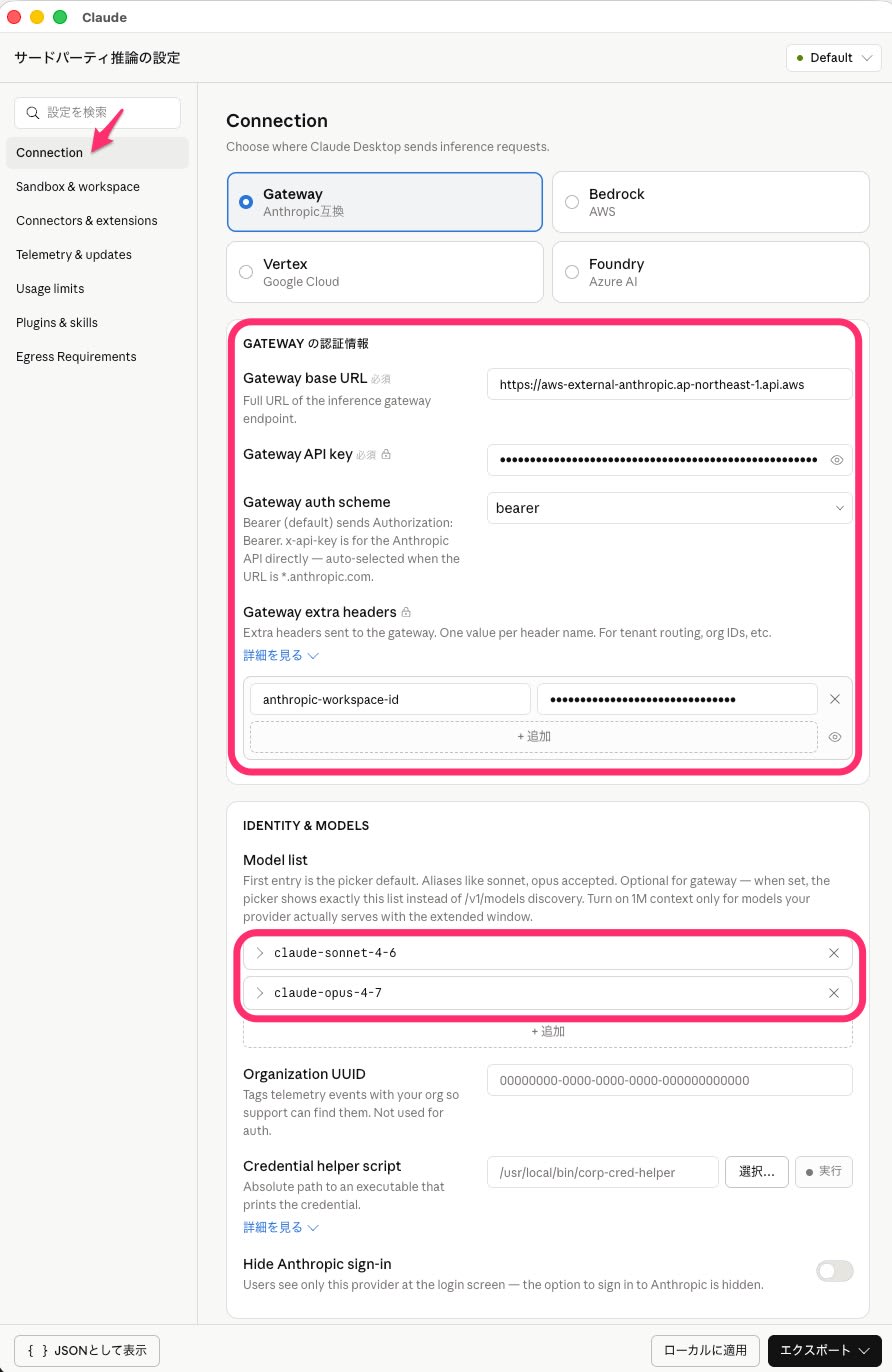
The configuration file is saved in the following location. It is a separate directory from the normal Claude Desktop settings (~/Library/Application Support/Claude/).
~/Library/Application Support/Claude-3p/configLibrary/
The settings made in the GUI are saved as JSON like the following.
{
  "inferenceProvider": "gateway",
  "inferenceGatewayBaseUrl": "https://aws-external-anthropic.ap-northeast-1.api.aws",
  "inferenceGatewayAuthScheme": "bearer",
  "inferenceGatewayApiKey": "xxxxx",
  "inferenceGatewayHeaders": {"anthropic-workspace-id": "wrkspc_xxxxx"},
  "inferenceModelList": ["claude-sonnet-4-6", "claude-opus-4-7"]
}
Verification (Chat)
After completing the setup, I sent a chat message in Claude Desktop. When I selected claude-sonnet-4-6 in the model picker and entered a normal prompt, a response came back. Switching the model to claude-opus-4-7 worked in the same way.
Verification (Cowork)
I checked whether Cowork (Claude Desktop's agent feature) works via Gateway. When I specified a file in a local folder and asked for a summary, file reading and summary generation worked correctly.
| Feature | Result | Notes |
|---|---|---|
| Cowork file reading and summarization | ✅ | Was able to read a local file and summarize it |
| Cowork web search | ⚠️ | Confirmed the tool call started. Did not confirm through to result retrieval |
| Agent Skills (PowerPoint generation, etc.) | Not tested | Out of scope this time due to Tier 1 rate limits |
Authentication Options
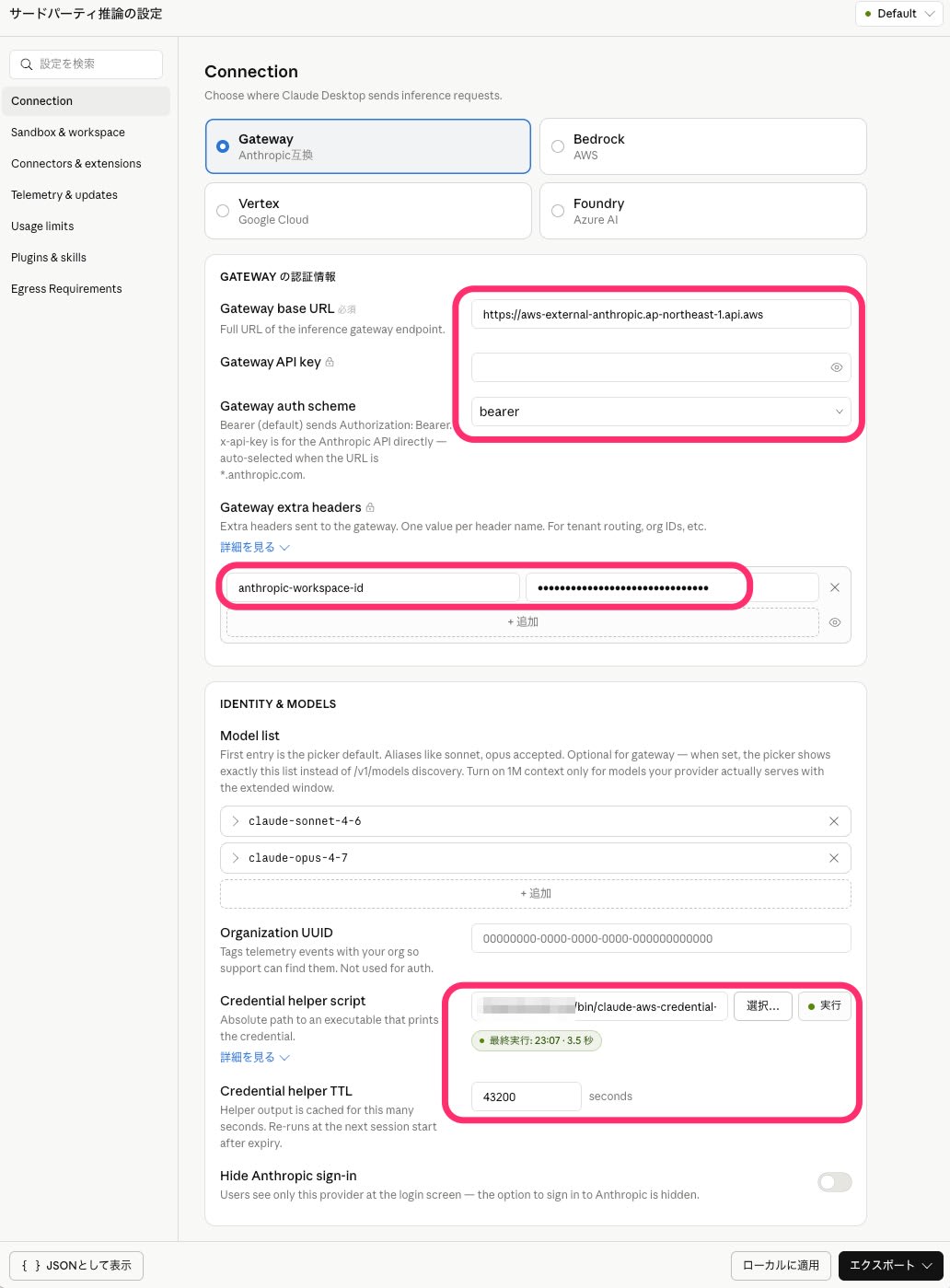
If you don't want to store a fixed API key in the configuration file, you can also try a setup that dynamically obtains a Short-term key with a Credential helper script. Claude Desktop calls the script at startup and uses the token returned on standard output for authentication. Setting the TTL to 43200 seconds (12 hours) aligns it with the Short-term key's expiration, so the helper is not re-invoked while the key is valid, making it less susceptible to AWS session expiry.
Credential Helper Configuration Example
Configuration file (JSON):
{
  "inferenceProvider": "gateway",
  "inferenceGatewayBaseUrl": "https://aws-external-anthropic.ap-northeast-1.api.aws",
  "inferenceGatewayAuthScheme": "bearer",
  "inferenceGatewayHeaders": {"anthropic-workspace-id": "wrkspc_xxxxx"},
  "inferenceCredentialHelper": "/Users/username/bin/claude-aws-credential-helper.sh",
  "inferenceCredentialHelperTtlSec": 43200
}
inferenceGatewayApiKey is not needed (the helper provides it instead).
Script example (Python version):
#!/bin/bash
eval "$(aws configure export-credentials --format env)"
python3 -c "from token_generator_for_aws_external_anthropic import TokenGenerator; print(TokenGenerator(region='ap-northeast-1').get_token())"
pip install token-generator-for-aws-external-anthropic is required beforehand.
Reference: token-generator-for-aws-external-anthropic-python
If You Don't Want to pip install on the Host (Podman Version)
This version completes both the pip install and execution inside a Podman container.
#!/bin/bash
export PATH="/usr/local/bin:/opt/podman/bin:$PATH"
eval "$(/usr/local/bin/aws configure export-credentials --format env)"
/opt/podman/bin/podman run --rm \
  -e AWS_ACCESS_KEY_ID -e AWS_SECRET_ACCESS_KEY -e AWS_SESSION_TOKEN \
  python:3.12-slim bash -c \
  'pip install -q token-generator-for-aws-external-anthropic 2>/dev/null; python3 -c "from token_generator_for_aws_external_anthropic import TokenGenerator; print(TokenGenerator(region=\"ap-northeast-1\").get_token())"'
Because pip install runs every time, responses are slower than with the Python version.
Note on Rate Limits
I observed the following rate limits from the response headers of claude-sonnet-4-6 (Tier 1). ITPM is Input Tokens Per Minute, OTPM is Output Tokens Per Minute, and RPM is Requests Per Minute.
| Item | Observed value |
|---|---|
| ITPM | 30,000 |
| OTPM | 8,000 |
| RPM | 50 |
| Total TPM | 38,000 |
I hit the ITPM limit when I tried web search + page summarization in Cowork. Claude Platform on AWS is currently fixed at Tier 1 (no automatic promotion). If an increase is needed, you will need to consult your Anthropic representative individually.
Summary
I verified how to connect to Claude Platform on AWS using Claude Desktop's third-party inference settings (Gateway).
At present, Claude Desktop does not have a connection type dedicated to Claude Platform on AWS; you connect using the Gateway setting plus an additional header. Because of the Tier 1 rate limits there are constraints for heavy use, but chat and lightweight Cowork tasks worked without problems. I think it is sufficient for PoCs and evaluation by a small number of people.
If you need larger-scale usage, I recommend either consulting about relaxing the Tier 1 rate limits of Claude Platform on AWS, or using a setup that raises the Bedrock service quotas.
Reference Links
- Claude Platform on AWS Is GA. I Tried Setup and API Calls
- I Tried Using Claude Code via Claude Platform on AWS (SigV4 Authentication)
- I Tried Using Claude Desktop (Cowork) via Amazon Bedrock
- Claude Platform on AWS Was Announced, So I Sorted Out the Differences from Bedrock
- Claude Platform on AWS Official Documentation
- token-generator-for-aws-external-anthropic-python
