
Try returning non-text (images, PDFs) with Claude's tool use

This page has been translated by machine translation. View original
This is Suenaga from the Retail App Co-Creation Division.
With Claude API's tool use, you can return images and files in tool execution results (tool_result). I've used this quite a bit myself, but I thought some people might have the impression that "tool_result only accepts strings," so I decided to organize what kinds of things can be returned and whether Claude can properly read the contents.
What tool_result Can Return
The tool use flow is: Claude returns a tool_use block → you execute the tool in your own code → return the result in a tool_result block.
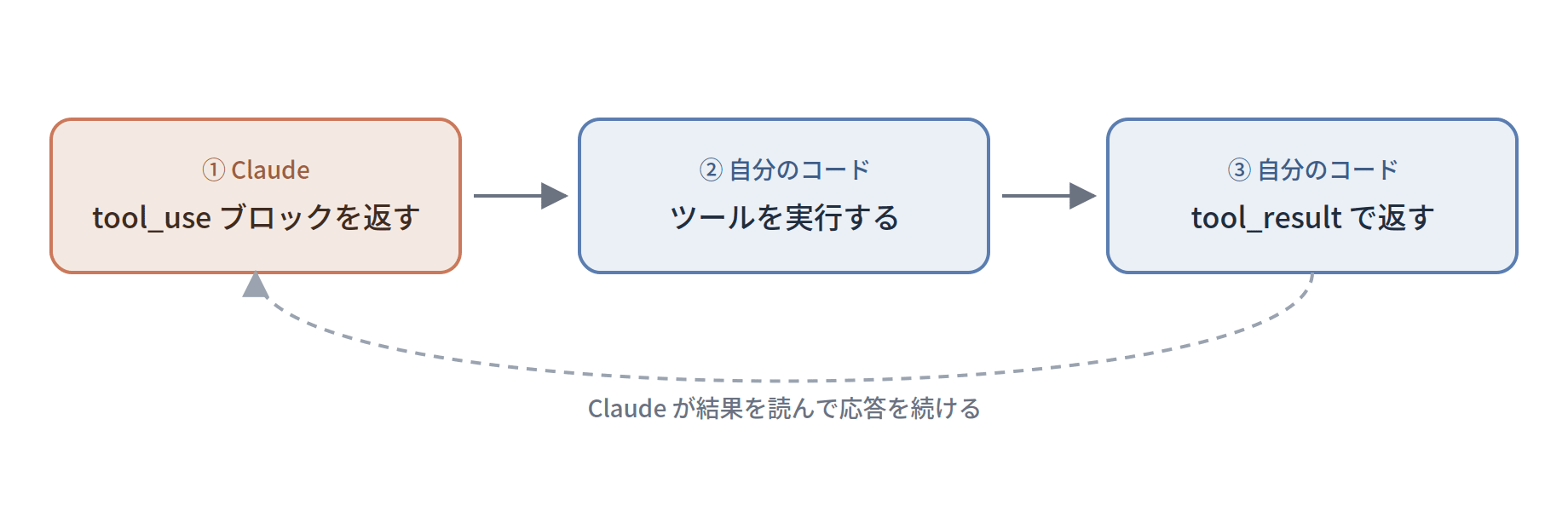
In addition to strings, content can also take an array of blocks, and those blocks support three types: text / image / document.
Here's a summary of what each image / document block accepts:
| Block | Accepted content | How to pass |
|---|---|---|
| image | PNG / JPEG / GIF / WebP images | base64 / URL |
| document | base64 / URL | |
| document | Plain text | text |
| document | text・image blocks | Nested (content) |
Image handling is explained on the Vision page, PDF on the PDF Support page, and plain text and custom content documents on the Citations Document Types page.
Trying It Out
For the subject matter, I reused "illustrations evoking countries" (3 images of Japan, America, and France) from a separate article. If Claude can correctly identify the country names when a tool returns images, that confirms the images are being conveyed.
Here are the 3 images actually used.

The verification approach was to force the tool to always be called, then swap only the return value and observe Claude's final response.
Returning a Single Image
Convert the image to base64 and return it in an image block.
const toolResult = {
  type: "tool_result",
  tool_use_id: toolUse.id,
  content: [
    {
      type: "image",
      source: { type: "base64", media_type: "image/png", data: pngBase64 },
    },
  ],
};
When I returned the France illustration, Claude's response was as follows:
- **French flag**: A tricolor flag in blue, white, and red is depicted on the left ✓
- **Eiffel Tower**: The iconic Parisian landmark towering in the center ✓
- **Paris cityscape**: A street lined with gray buildings ✓

The image perfectly matches France-related elements, and it can be unequivocally identified as France.
It read the image contents and answered "France."
Returning 2 Images + Mixed Text
Since content is an array, you can mix text and images together, or line up multiple images. Let me try returning the Japan and America images with descriptive text interspersed between them.
content: [
  { type: "text", text: "Image 1:" },
  { type: "image", source: { type: "base64", media_type: "image/png", data: japanPng } },
  { type: "text", text: "Image 2:" },
  { type: "image", source: { type: "base64", media_type: "image/png", data: usaPng } },
];
Here's the response:
**Image 1: Japan**
- Mount Fuji, a red tower, cherry blossom branches, and Tokyo Skytree — representative Japanese landmarks are depicted.

**Image 2: America**
- The American flag, the Statue of Liberty, the Washington Monument, the White House, and other representative American structures and symbols are depicted.
It correctly read each image separately while preserving the order.
Returning a PDF
PDFs can also be returned in a document block by converting to base64. I generated a PDF with an embedded passphrase (ALPACA-7788) and returned it to verify whether the body text could be read.
content: [
  {
    type: "document",
    source: { type: "base64", media_type: "application/pdf", data: pdfBase64 },
  },
];
The report PDF has been generated. The Passphrase written in the body of the PDF is "ALPACA-7788".
It properly read the PDF contents as well.
Even when mixing images, text, and documents all together in a single tool_result, Claude correctly retrieved and reported both the country names from the images and the passphrase from the attached memo.
Using file_id References in tool_result
Claude has a Files API that lets you upload files in advance and reference them by the obtained file_id from messages. (For an explanatory article on the Files API, see here.)
However, the official documentation only shows examples of file_id references within regular user messages — there were no examples of placing a file_id in tool_result content.
Since the type definitions appeared to accept it, I decided to test it out. Note that the beta header files-api-2025-04-14 is required when using file_id.
const uploaded = await client.beta.files.upload({
  file: await toFile(imageBytes, "usa.png", { type: "image/png" }),
  betas: ["files-api-2025-04-14"],
});

content: [
  { type: "image", source: { type: "file", file_id: uploaded.id } },
];
After uploading the America illustration and returning it via file_id, the contents were read without any issues.
This image depicts symbols representative of America, including the American flag, the Statue of Liberty, the White House, and the Washington Monument.

**United States**
Similarly, when placing a PDF in a document block using file_id, the passphrase was successfully read. It appears that file_id references work just the same when passed through tool_result.
One notable difference: the beta header is not required when directly embedding with base64, but files-api-2025-04-14 is required only when referencing by file_id. You can use them interchangeably — upload to the Files API and reference by file_id for files you pass repeatedly, or embed directly with base64 for one-off use cases.
Closing Thoughts
Images and PDFs can be returned directly in tool_result, and Claude will properly read their contents. As for use cases, I think this comes in handy for simple RAG (in a broad sense) where you pass retrieved documents or images directly, or for cases like returning a zoomed-in portion of an image for re-recognition. If you had the impression that tool_result only accepts strings, it might be worth keeping these options in mind🙄.
See you👋
