I Tried Building an Interactive Shell Environment for AgentCore Using Cognito and a VPC Origin

This page has been translated by machine translation. View original
Introduction
I introduced Cognito authentication and CloudFront signed cookie authorization to the Amazon Bedrock AgentCore Runtime interactive shell. I built a configuration with CDK that allows secure access from a web browser.
In three previous articles, I incrementally verified the AgentCore Runtime shell feature, the WebSocket protocol, and Kiro CLI integration. This article incorporates authentication and authorization into them and presents a configuration in which networking and delivery are all handled by AWS managed services. The communication path is as follows.
Browser → CloudFront → VPC Origin → Internal ALB → ECS Fargate (WebShell relay) → NAT GW → AgentCore Runtime Shell API
The features of this configuration are as follows.
- The externally exposed endpoint of the application itself is consolidated in CloudFront
- Cognito authentication → CloudFront signed cookies protect application requests, including WebSocket (except for authentication paths)
- Thanks to CloudFront VPC Origin WebSocket support (GA in May 2026), WSS connections from the browser are received by CloudFront and relayed to the Internal ALB
Architecture Diagram
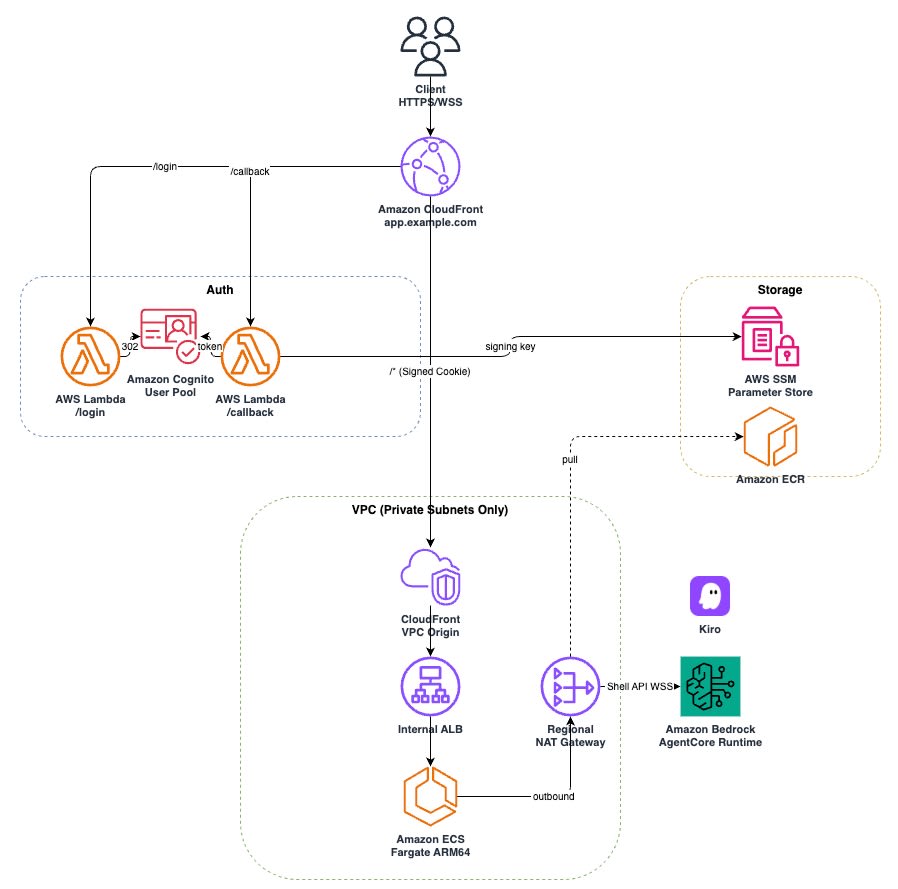
Architecture Highlights
AgentCore Runtime Interactive Shell
The AgentCore Runtime interactive shell is explained in detail in the previous articles. This article focuses on the configuration for "securely exposing this WebSocket-based shell via CloudFront."
Issuing CloudFront Signed Cookies with Cognito + Lambda
The CloudFront default behavior is protected with a Trusted Key Group so that only authenticated users can access it. Issuing signed cookies is achieved by combining a Cognito User Pool with Lambda function URLs.
The authentication flow works as follows.
- When the browser accesses
/login, Lambda issues a 302 redirect to the authorize endpoint of the Cognito Hosted UI - When the user logs in with Cognito, they are redirected to
/callback?code=xxx - The Callback Lambda exchanges the authorization code for tokens and issues CloudFront signed cookies (Policy/Signature/Key-Pair-Id)
- Subsequent requests are sent with the cookies and are verified by the CloudFront Trusted Key Group
With this approach, the authentication flow is completed using only regional Lambda functions, without Lambda@Edge.
I used a custom resource to manage the signing key pair. An RSA 2048-bit key pair is generated at deploy time. The private key is stored in SSM Parameter Store (SecureString), and the public key is registered as a CloudFront Public Key + Key Group.
// lambda-stack.ts — Signing key custom resource
const signingKeyResource = new cdk.CustomResource(this, 'SigningKey', {
  serviceToken: new cr.Provider(this, 'SigningKeyProvider', {
    onEventHandler: signingKeyFn,
  }).serviceToken,
  properties: {
    SsmParameterName: ssmPrivateKeyName,
    KeyName: 'agentcore-webshell-cf-key',
    SsmRegion: this.region,
  },
});

this.keyPairId = signingKeyResource.getAttString('PublicKeyId');
this.keyGroupId = signingKeyResource.getAttString('KeyGroupId');
The Callback Lambda retrieves the private key from SSM and generates signed cookies with @aws-sdk/cloudfront-signer.
// callback/index.mjs — Signed cookie issuance
const privateKey = await getPrivateKey();
const expires = new Date(Date.now() + 8 * 60 * 60 * 1000);
const policy = JSON.stringify({
  Statement: [{
    Resource: `https://${cookieDomain}/*`,
    Condition: { DateLessThan: { 'AWS:EpochTime': Math.floor(expires.getTime() / 1000) } },
  }],
});

const cookies = getSignedCookies({ policy, privateKey, keyPairId });

const cookieAttrs = `Domain=${cookieDomain}; Path=/; Secure; HttpOnly; SameSite=Lax`;
const setCookies = [
  `CloudFront-Policy=${cookies['CloudFront-Policy']}; ${cookieAttrs}`,
  `CloudFront-Signature=${cookies['CloudFront-Signature']}; ${cookieAttrs}`,
  `CloudFront-Key-Pair-Id=${cookies['CloudFront-Key-Pair-Id']}; ${cookieAttrs}`,
];
A wildcard (https://ドメイン/*) is specified in Resource with a custom policy. One set of cookies can cover all paths under / (including the WebSocket handshake).
Protecting Lambda Function URLs with OAC
The Lambda function URLs for /login and /callback are protected with CloudFront Origin Access Control (OAC), which became GA in April 2024.
When OAC is enabled, CloudFront adds a SigV4 signature to the request and sends it to the origin Lambda function URL. Because the Lambda side is configured with AuthType: AWS_IAM, requests without a valid SigV4 signature (such as simple direct access that does not go through CloudFront) are rejected.
In CDK, simply calling FunctionUrlOrigin.withOriginAccessControl() completes the OAC configuration and the granting of the resource-based policy.
// lambda-stack.ts — Set AuthType to AWS_IAM
this.loginFunctionUrl = this.loginFn.addFunctionUrl({
  authType: lambda.FunctionUrlAuthType.AWS_IAM,
});
// cloudfront-stack.ts — Origin with OAC
const loginOrigin = origins.FunctionUrlOrigin.withOriginAccessControl(props.loginFunctionUrl);
const callbackOrigin = origins.FunctionUrlOrigin.withOriginAccessControl(props.callbackFunctionUrl);
Note that trustedKeyGroups is not set on the /login and /callback behaviors. These are paths accessed before authentication, so they must accept requests without signed cookies.
CloudFront VPC Origin (WebSocket + Private Origin)
With CloudFront VPC Origin WebSocket support, which became GA in May 2026, the origin can be placed in a private subnet even for applications that use WebSocket.
In this configuration, the WebShell relay server on ECS Fargate is placed behind an Internal ALB and connected to CloudFront via VPC Origin. With VPC Origin, CloudFront creates managed ENIs in the VPC and accesses the ALB in the private subnet through those ENIs. No additional WebSocket-specific settings are needed on the CloudFront/VPC Origin side, which transparently relays HTTP Upgrade requests. WebSocket support on the ALB and backend side is required separately.
The default behavior settings are the key point.
// cloudfront-stack.ts — VPC Origin + default behavior
const vpcOrigin = origins.VpcOrigin.withApplicationLoadBalancer(props.alb, {
  httpPort: 80,
  protocolPolicy: cloudfront.OriginProtocolPolicy.HTTP_ONLY,
});

const distribution = new cloudfront.Distribution(this, 'Distribution', {
  defaultBehavior: {
    origin: vpcOrigin,
    viewerProtocolPolicy: cloudfront.ViewerProtocolPolicy.REDIRECT_TO_HTTPS,
    cachePolicy: cloudfront.CachePolicy.CACHING_DISABLED,
    originRequestPolicy: cloudfront.OriginRequestPolicy.ALL_VIEWER,
    allowedMethods: cloudfront.AllowedMethods.ALLOW_ALL,
    trustedKeyGroups: [keyGroup],
  },
});
In this configuration's default behavior, WebSocket and the application API are handled over the same path, so the following three settings are applied.
CachePolicy.CACHING_DISABLED— Because we do not want WebSocket handshakes or dynamic responses to be cached, caching is disabled and all requests are forwarded to the originOriginRequestPolicy.ALL_VIEWER— Forwards all cookies, headers, and query strings to the origin. This is used to forward the signed cookies and the headers the application needsAllowedMethods.ALLOW_ALL— Allows methods other than GET/HEAD (POST, PUT, DELETE, etc.). The WebSocket handshake is a GET, but this is necessary to pass API requests for the entire application
Public-Subnetless Configuration (Regional NAT Gateway)
The VPC in this configuration consists only of private subnets. For outbound communication from ECS tasks to the AgentCore Runtime Shell API and ECR, I used the Regional NAT Gateway, which became GA in November 2025.
The conventional public NAT Gateway for internet access had to be placed per subnet. The Regional NAT Gateway operates at the VPC level and does not require placement in a public subnet (specifying subnetId), as was previously necessary. Instead, you create it by specifying AZs and EIP allocations.
// network-stack.ts — VPC (private subnets only)
this.vpc = new ec2.Vpc(this, 'Vpc', {
  ipAddresses: ec2.IpAddresses.cidr('192.168.0.0/18'),
  maxAzs: 3,
  natGateways: 0, // Create Regional NAT GW manually
  subnetConfiguration: [
    {
      cidrMask: 20,
      name: 'Private',
      subnetType: ec2.SubnetType.PRIVATE_ISOLATED,
    },
  ],
});
// network-stack.ts — Regional NAT Gateway
const natGw = new ec2.CfnNatGateway(this, 'RegionalNatGw', {
  connectivityType: 'public',
  vpcId: this.vpc.vpcId,
  availabilityMode: 'regional',
  availabilityZoneAddresses: [{
    availabilityZone: 'ap-northeast-1a',
    allocationIds: [eip.attrAllocationId],
  }],
});
natGw.addDependency(igwAttach);
The CDK L2 Vpc construct does not support the Regional NAT Gateway, so I created it with CfnNatGateway (L1). The difference from the conventional zonal NAT Gateway is that subnetId is not needed and vpcId is specified directly.
A default route (0.0.0.0/0 → NAT Gateway) is added to the route table of each private subnet. This routes outbound traffic from the subnets through the Regional NAT Gateway. In CDK they are created as PRIVATE_ISOLATED, but after the route is added they behave as private subnets with an outbound path via NAT. This approach was adopted because the L2 construct does not support the Regional NAT Gateway.
Verification
I verified the behavior of the built environment.
Login
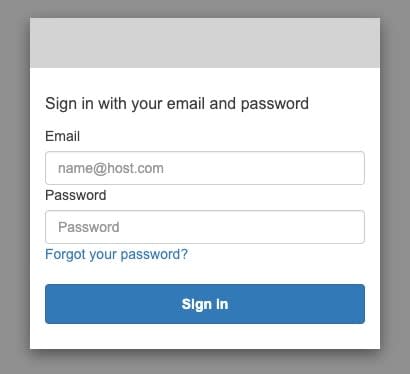
When I accessed https://ドメイン/login in the browser, I was redirected to the Cognito Hosted UI.
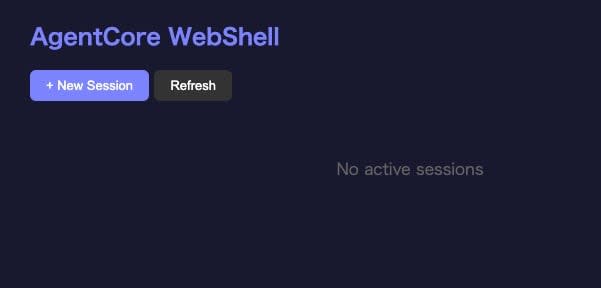
After a successful login, signed cookies were issued and I was redirected to the dashboard.
WebSocket Connection
From the dashboard, I created a new session with "New Session." The WebSocket connection was established via the path CloudFront → VPC Origin → Internal ALB → ECS → AgentCore Runtime Shell API.
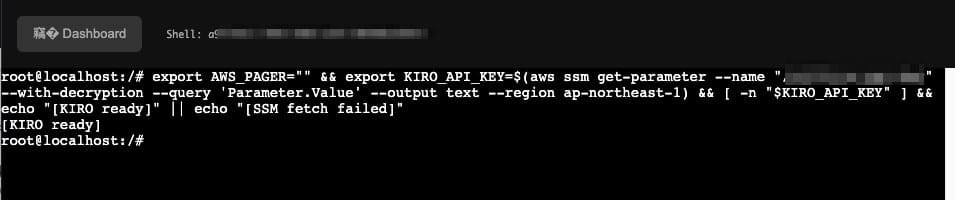
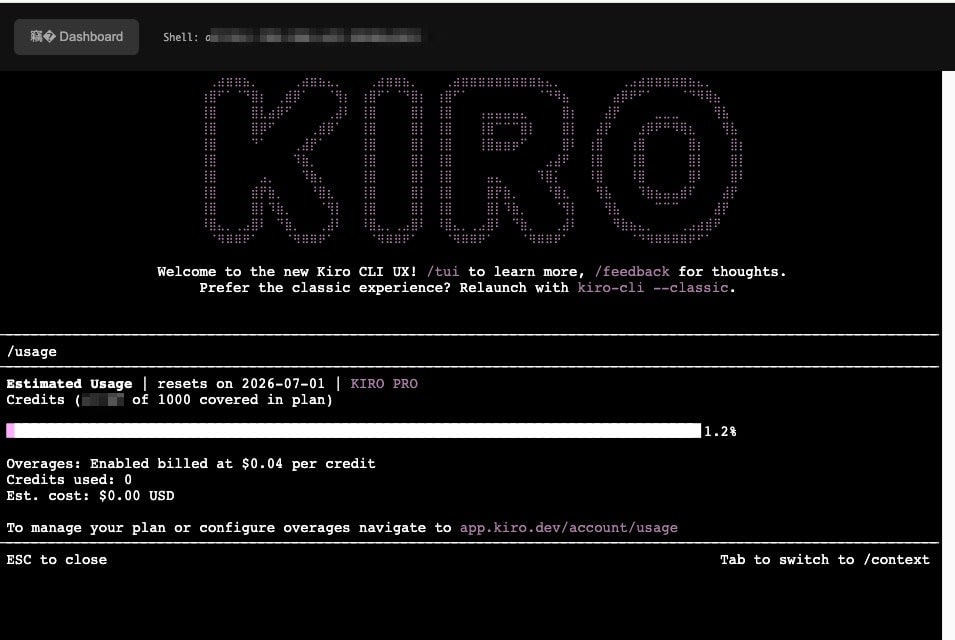
Running Kiro CLI
I ran Kiro CLI in the terminal. The AI agent runs correctly on the AgentCore Runtime microVM.
I also confirmed that CloudFront returns 403 when the dashboard or WebSocket endpoint is accessed without signed cookies. Access to paths protected by signed cookies (under the default behavior) is blocked unless the request goes through authentication.
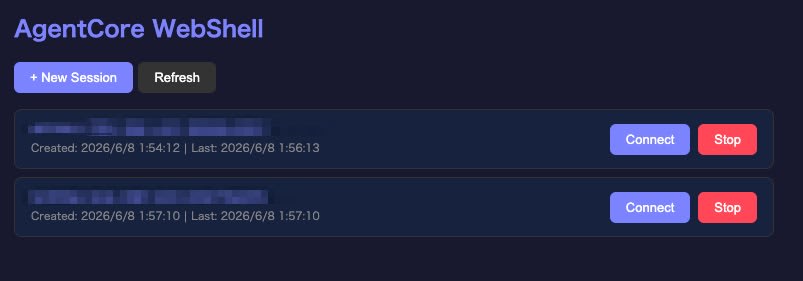
Reconnecting to a Session
In addition to relaying WebSocket to the AgentCore Runtime Shell API, the relay server on ECS Fargate has a simple dashboard and session management features added. The server side retains active sessions (shellId), and existing sessions can be reconnected from the list view via "Connect."
Summary
By combining Cognito authentication with CloudFront signed cookies, I restricted application requests, including WebSocket (except for authentication paths), to authenticated users only. Lambda function URLs are protected with OAC and AWS_IAM authentication, rejecting unsigned direct access that does not go through CloudFront. On the networking side, I made use of CloudFront VPC Origin WebSocket support and the Regional NAT Gateway. This is a configuration with a VPC that has no public subnets, with externally exposed endpoints consolidated in CloudFront.
