This page has been translated by machine translation. View original
Hello! I'm Yoshida from the Cloud Business Division.
When trying to design security services in an AWS multi-account environment, it can be difficult to grasp the overall picture.
While articles exist that explain the design of each security service in a multi-account environment, I have the impression that there aren't many articles that consolidate all of them together.
So this time, based on a multi-account environment using AWS Control Tower, I've organized the configuration of each security service from the perspective of organizational deployment.
Prerequisites
Target Audience
This article is intended for readers who have a basic understanding of Control Tower, AWS Organizations, and each security service.
Control Tower
We assume the use of Control Tower.
The landing zone version is 4.0.
Target Security Services
The 7 security services covered in this article are as follows.
CloudTrail
Config
Security Hub
GuardDuty
IAM Access Analyzer
Detective
Inspector
Since this article focuses on organizational deployment of security services, we will not cover detailed customization settings for each service.
Overall Architecture
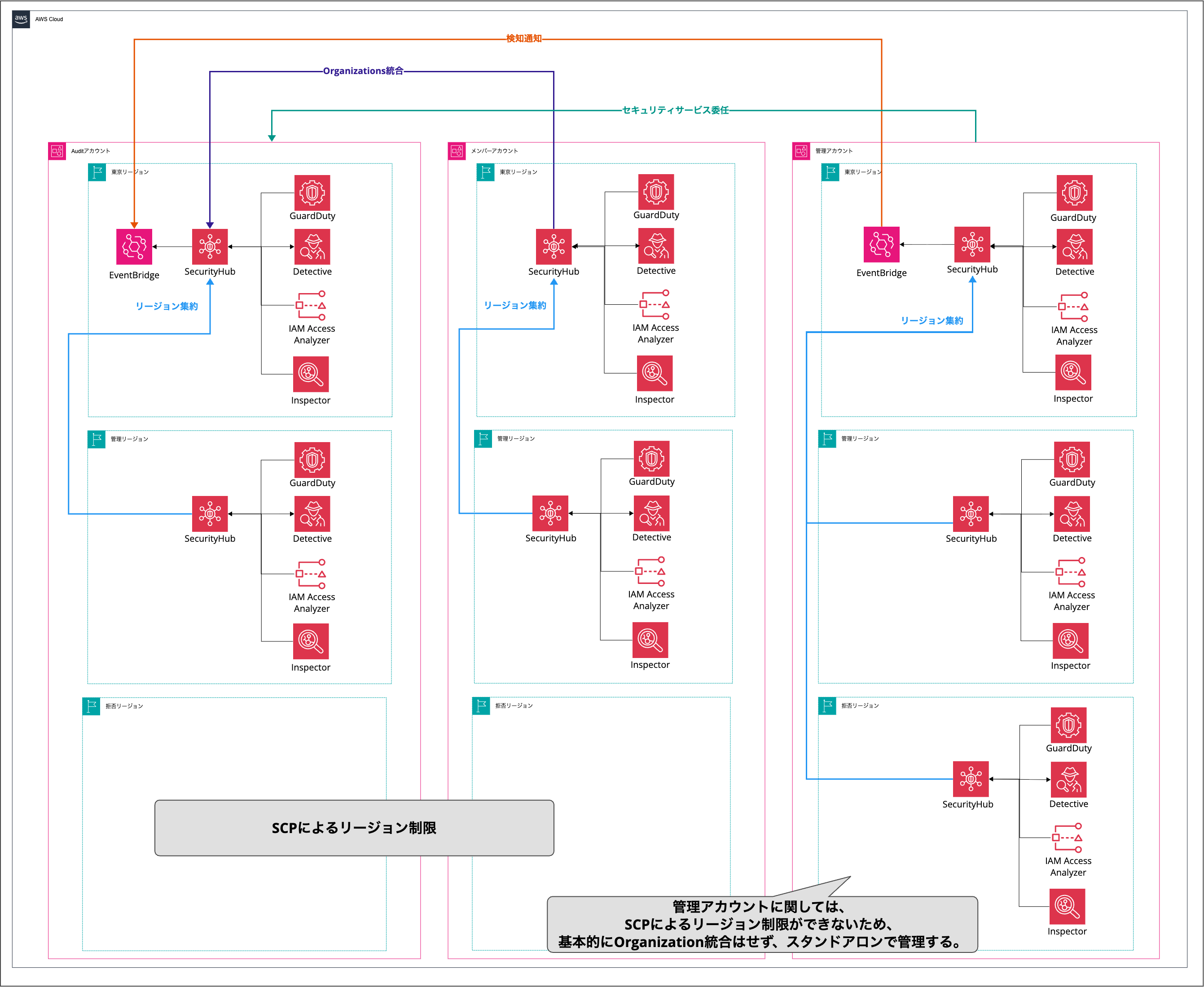
The basic policy when configuring security services in a multi-account environment is as follows.
Organizational deployment through Control Tower integration and Organization integration
CloudTrail and Config use Control Tower integration
Other security services use Organization integration
After configuring Control Tower's region deny control, enable security services only in managed regions
However, the management account enables all regions
Use the Audit account as the delegated administrator account for security services
Use Security Hub's region aggregation feature to consolidate detection results in the Tokyo region
Ultimately, detection results from all accounts are aggregated in the Tokyo region of the Audit account
Delegation to the Audit Account
For AWS services that allow setting a delegated administrator, it is best practice to configure a delegated management account.
It is also fine to create a new security service delegated management account,
but when using Control Tower, the standard approach is to set the Audit account as the delegated management account.
About Region Deny
In Control Tower, you can configure "region deny controls" that deny API actions outside of managed regions.
There are two types of region deny controls. ※1
Type
Scope
Features
Landing zone region deny control
Control Tower management account
Simple but cannot configure exceptions
OU region deny control
Per OU
Can configure exception APIs and exception IAM principals
As for which region deny control to adopt, we basically recommend using the OU region deny control.
For example, when using cross-region inference with Bedrock, it may route to regions not normally used, which can conflict with Control Tower's region deny control.
(I plan to write about this topic at a later date.)
To be able to handle such cases, we recommend using OU region deny controls, which allow you to set exception conditions and denied regions on a per-OU basis.
Differences Between Management Accounts and Member Accounts
SCPs cannot be applied to management accounts. ※2
Control Tower's region deny settings are not reflected, and API actions can be executed even in denied regions.
Also, integrating the management account as a member on the delegated management account (Audit account) causes problems.
In Security Hub's cross-region aggregation settings, it is not possible to link denied regions of the management account, making it impossible to monitor the security status of the management account's denied regions.
The following articles provide a clear summary of this issue.
It is necessary to consider which regions to monitor for the management account (whether to include denied regions in the monitoring targets).
In this article, the management account is organized with the following policy.
Do not integrate the management account as a member in the delegated management account (Audit account)
Enable security services standalone in all regions
IAM Access Analyzer and Detective are exceptions
For Inspector, enabling it is optional
Aggregate detection results in the Tokyo region using Security Hub CSPM's region aggregation feature
Forward aggregated detection results to EventBridge cross-account
From here, I will explain the settings for each service.
Settings for Each Service
CloudTrail
Through Control Tower integration, an organization trail is created.
The created trail is both an organization trail and a multi-region trail, so it can cover managed regions of member accounts and all regions of the management account.
Unlike other security services, no separate configuration is required in the management account.
Config
The configuration differs between member accounts and the management account.
Item
Member Account
Management Account
Enabled regions
Managed regions only
All regions
Automatic creation by Control Tower
Yes
No
Configuration changes
Not possible
Possible
For member accounts, Config recorders are created only in managed regions through Control Tower integration.
Since it becomes a Control Tower-managed resource, the recorded target resources and recording frequency basically cannot be changed.
For the management account, Control Tower-managed Config recorders are not created. Therefore, a separate recorder needs to be created.
The following article clearly summarizes what settings Control Tower handles for Config and what it doesn't.
It also introduces how to create recorders in all regions on the management account, so please give it a read.
A service-linked Config aggregator is automatically created by Control Tower in the Audit account, aggregating Config recorders from all accounts in the organization (including the management account).
Security Hub
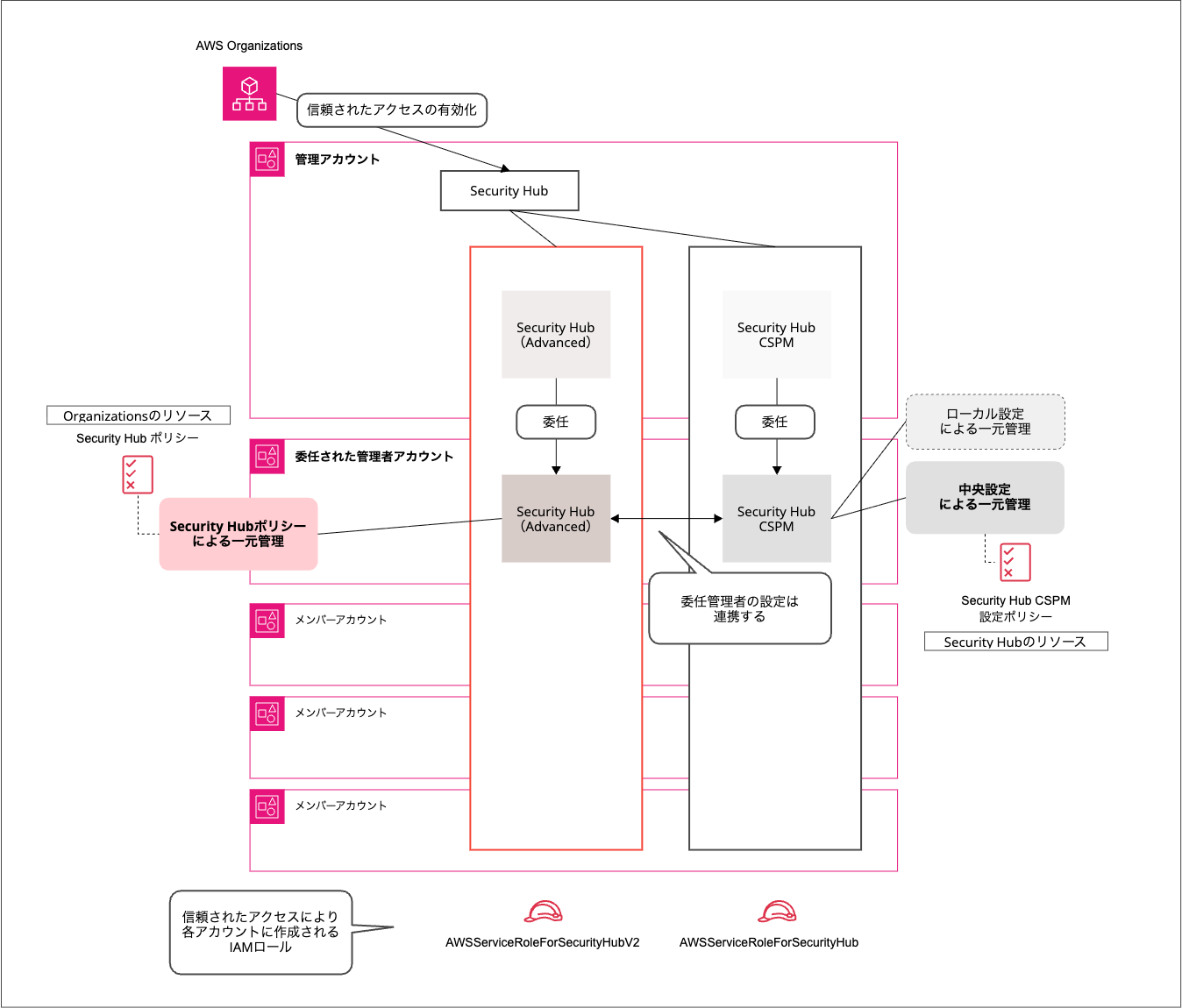
Security Hub has two features: CSPM and Advanced.
If you want to use both, separate configuration is required for each.
Security Hub CSPM is a feature independently extracted from the CSPM functionality of the traditional Security Hub.
For organizational deployment, "central configuration" is used, and the Security Hub CSPM configuration policy allows unified management of enabling/disabling security standards and controls, as well as the regions and accounts where policies are applied. ※4
Security Hub Advanced is a rebranded Security Hub as an integrated security solution.
For organizational deployment, AWS Organizations management policies (Security Hub policies) are used, allowing you to configure which regions to enable Advanced in. ※5
CSPM and Advanced share a delegated administrator.
When a delegated administrator is specified for one service, the same account becomes the delegated administrator for the other.
However, the enablement status is independent, and each feature must be enabled separately.
There is a blog that clearly organizes CSPM and Advanced from an AWS Organization perspective, so please give it a read.
From here, I will focus mainly on the organizational deployment of Security Hub CSPM.
Target
Deployment Method
Source Regions
Aggregation Destination
Member accounts
Central configuration on Audit account
Control Tower managed regions
Tokyo region
Management account
Enable standalone
All regions
Tokyo region
Central configuration for Security Hub CSPM is set up on the Audit account and deployed to member accounts.
However, as described in the "Differences Between Management Accounts and Member Accounts" section,
it is not possible to link denied regions of the management account in Security Hub's cross-region aggregation settings.
Exclude the management account from the Security Hub CSPM configuration policy's target accounts, and enable Security Hub CSPM standalone for the management account.
This means enabling it in all regions of the management account first, then configuring the region aggregation settings on the management account.
Detection results on member accounts managed by central configuration are aggregated in the Tokyo region of Security Hub CSPM on the Audit account through Organization integration.
Also, since detection results from security services other than Security Hub CSPM are aggregated in each account's Security Hub CSPM, the detection results from all security services across all accounts are ultimately aggregated in the Audit account.
Since the management account is managed standalone, it is necessary to forward detection results to the Audit account's Security Hub CSPM via EventBridge.
GuardDuty
On the Audit account, configure the organization-level auto-enablement settings excluding the management account. ※6
GuardDuty will be automatically enabled for new and existing member accounts, and detection results will be aggregated in the Audit account.
This organization-level auto-enablement setting needs to be configured for each region.
Since the management account is managed standalone with Security Hub, GuardDuty is also enabled standalone in all regions to match.
Detection results are integrated into Security Hub and aggregated in the Tokyo region through the region aggregation feature.
IAM Access Analyzer
IAM Access Analyzer has three types of analyzers.
External access detection: Detects resources accessible from outside the organization
Internal access detection: Detects resources accessible from other accounts within the organization
Unused access detection: Detects unused IAM roles and permissions
The internal access and unused access detection analyzers tend to be expensive because they are charged per analyzed resource. It is recommended to enable them only when necessary, such as during IAM role reviews.
This article focuses mainly on the external access detection analyzer.
Create an organization-level external access detection analyzer in the Audit account.
By setting the trust zone to "Organization," only access from outside the organization is targeted for detection.
With this configuration, there is no need to create analyzers or archive rules on member accounts.
However, if you want to detect access from another account within the organization, you need to create an analyzer with the trust zone set to "Account" for each account.
The following blog summarizes the advantages and disadvantages of each configuration.
Unless there are specific requirements, we recommend the configuration of creating an analyzer with the trust zone set to "Organization" on the Audit account.
When the trust zone is set to "Organization," all accounts within the organization, including the management account, are covered.
Therefore, for the management account, the configuration differs between managed regions and denied regions.
Region
Configuration
Managed regions
Analyzed by Audit account's analyzer (trust zone: "Organization")
Denied regions
Create an analyzer with trust zone set to "Account"
Creating an analyzer in managed regions would duplicate detection results with the Audit account's analyzer.
Therefore, analyzers are created on the management account only for denied regions.
Detective
On the Audit account, configure the organization-level auto-enablement settings. ※7
This needs to be configured for each region.
Even if you exclude the management account from member accounts in the organization-level settings, you cannot enable Detective on the management account.
Therefore, the management account uses the following configuration.
Region
Configuration
Managed regions
Add management account as a member on the Audit account
Denied regions
Enable standalone
Inspector
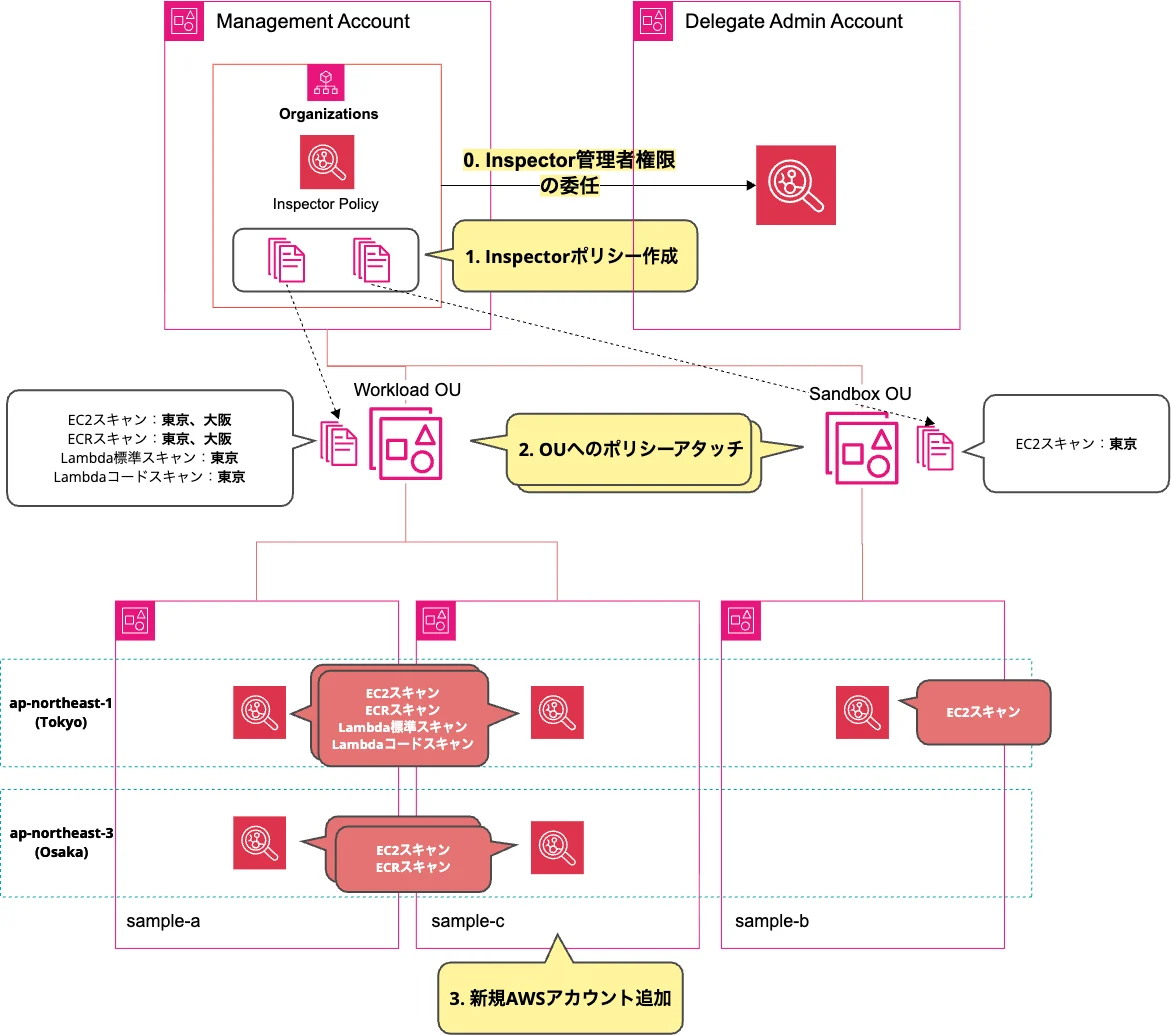
On the Audit account, create an Inspector policy, which is a management policy of AWS Organizations, and deploy it to the organization.
This Inspector policy allows flexible configuration such as which scan types to enable for Inspector and in which regions to enable those scan types.
Also, since this policy can be attached at the OU or account level, it is possible to adjust the scan types enabled for each account.
If you also want to enable Inspector on the management account, you would create an Inspector policy for the management account and attach it to the management account.
However, if workloads are not built in the management account following AWS best practices, Inspector scan targets (EC2, Lambda, ECR, code repositories) do not exist, so the need to enable it is low.
Detection Result Notification Infrastructure
Detection results aggregated in the Audit account's Security Hub CSPM can be notified through EventBridge and SNS.
The notification targets are as follows.
Security Hub CSPM: Control violations
GuardDuty: Threat detection
IAM Access Analyzer: External access detection
Inspector: Vulnerability detection
However, with just EventBridge and SNS, you cannot customize subject lines or route notifications to individual member accounts.
By inserting Step Functions before SNS, you can implement the above processing.
I plan to explain the notification infrastructure for security services in a multi-account environment in a separate article.
Conclusion
I've summarized the security service configuration in a multi-account environment.
In particular, handling the management account can be tricky.
This is merely the configuration I consider best, so please feel free to modify it as needed to suit your requirements.
I hope this article is helpful to someone.
That's all from Yoshida of the Cloud Business Division!