![A Japanese SME in Germany Tried Implementing Personio ― [Part 4] Organizational Permissions, Employee Data, and the Overall Back-Office Picture](https://images.ctfassets.net/ct0aopd36mqt/7M9tyes3mUlgjE24PyaWoS/a00f63aa4c51114ef87742264d100938/classmethod-europe.png?w=3840&fm=webp)
A Japanese SME in Germany Tried Implementing Personio ― [Part 4] Organizational Permissions, Employee Data, and the Overall Back-Office Picture

This page has been translated by machine translation. View original
This is Ito from Berlin.
Classmethod Europe (German entity) has switched its attendance and HR system from Timetac to Personio, marking the milestone of reaching 16 employees. In this series, we share insights gained from the implementation, introducing each feature as a "we tried it" post.
So far, we've looked at how we've improved operational efficiency using Personio's core features—attendance/leave, automation, and document creation.
- Part 1 - Background and DATEV Payroll Integration
- Part 2 - Attendance & Leave Management
- Part 3 - Approval Workflows, Automation & Document Management
In this final article, we first take a deep dive into the organizational structure & permissions (Permission Roles) and employee data that form the foundation of all these features, and briefly introduce functions such as On-/Offboarding, Salary & Compensation, and Analytics. We'll wrap up with an overview of the full stack we use to run our European back office.
Organization & Permissions
Supporting the "approval recipients" and "who can see which data" concepts introduced throughout this series is the design of organizational structure and permissions (Permission Roles).
- Departments segment the organization
- Each employee's Supervisor is configured to create a hierarchy
- Permissions are set per Role, and those Roles can be flexibly assigned to individual employees, departments, specific attributes, etc.
For each Role, you can control which section of which menu is accessible to whom, with granularity such as read-only / propose changes / full edit.
We create permission roles for general employees, HR, managers, external accounting firms, etc., and assign multiple roles to users in an additive fashion to flexibly design the scope of visibility.
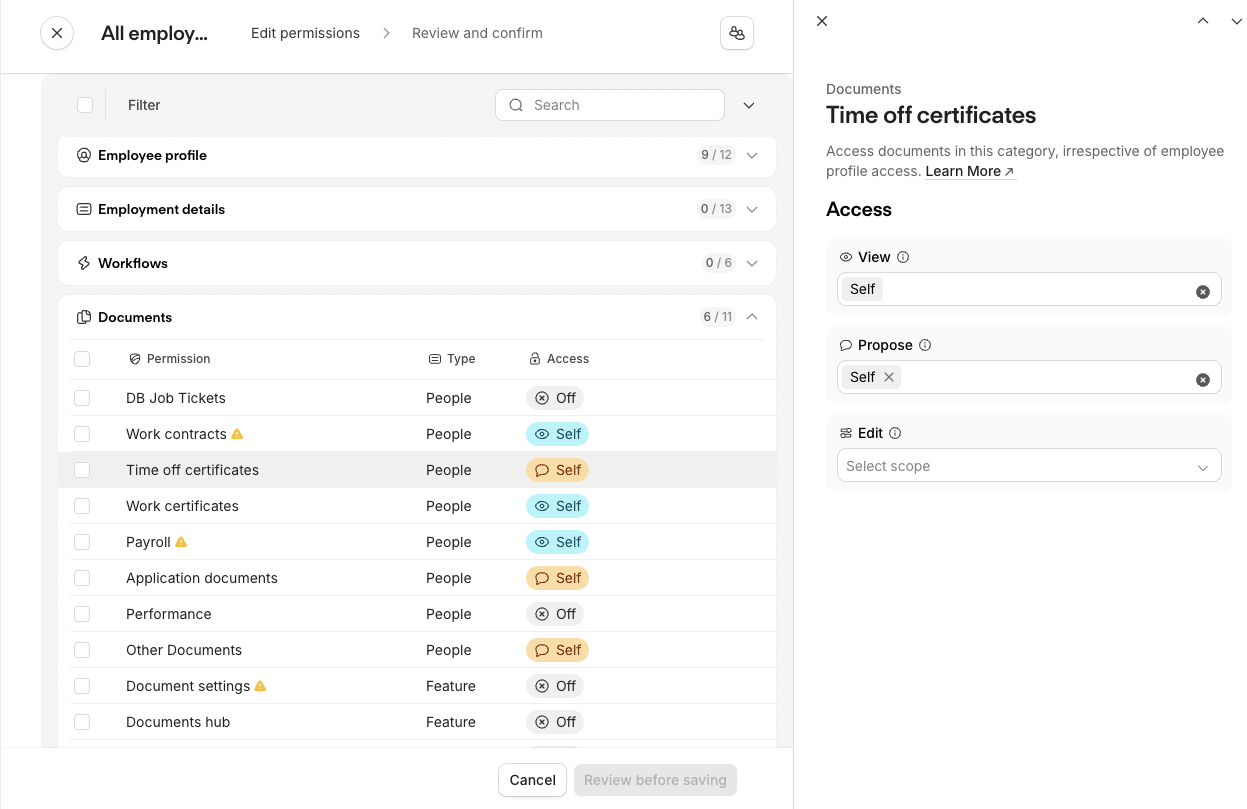
For example, permissions can be divided by employee data section as follows:
| Section | Items | All Employees | HR |
|---|---|---|---|
| Important Public Data | Name, email address, work location, working hours, etc. | Propose Self + View All → Can view and propose changes to own data, and view everyone's data |
Edit All → Can edit everyone's data |
| Optional Public Data | LinkedIn, languages, hobbies, etc. | Edit Self + View All → Can edit own data and view everyone's data |
No additional permissions |
| Important Private Data | Address, bank account, visa expiry, etc. | Propose Self → Can view and propose changes to own data |
Edit All → Can edit everyone's data |
💡 Proposed changes go through the approval flow introduced in Part 3.
While the configuration is considerably more granular than Timetac, the initial design and setup is somewhat laborious—but the more carefully you build this out, the more each Personio feature comes to life.
Employee Data
Structure and Management
Each employee has Personal Information, and in addition to attributes required by Personio's system defaults and those required for DATEV integration/payroll, you can manage employee data with freely added custom fields.
As mentioned, view/edit permissions can be separated by section, so fields and section divisions can be configured to match your use case.
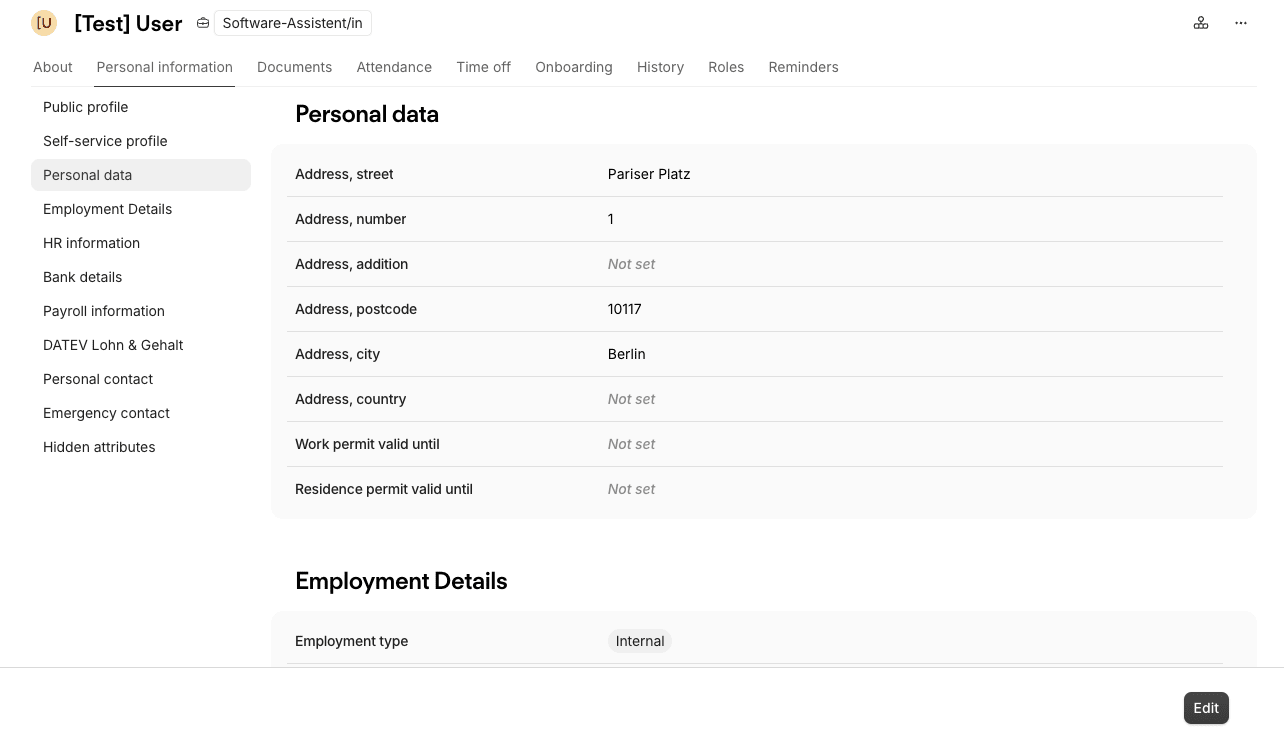
Every data change requires specifying an Effective date (the date the change takes effect), making it very practical that any field can have a future change scheduled—for example, when working hours change starting next month.
Historical data is fully logged in History with who changed what and when, which is reassuring from an audit perspective.
Integration with Other Features
The structured employee data can be connected to various Personio features, providing a strong foundation for consolidating HR operations.
We integrate it with other features as follows:
- Automations (Approval WF / automatic processing) → Part 3
- Creating reminders based on date data such as planned start dates
- Approval workflows and automatic notifications triggered by changes to specific data
- Automated processing filtered to employees with specific attributes such as country of residence
- Documents (HR documents) → Part 3
- Auto-populating data when generating documents from templates
- Payroll (payroll calculation report) → Part 1
- Sending required data to DATEV as a payroll report → changed data is automatically included in the payroll report
- Analytics (analysis) → described below
- Creating change history for specific fields
- Creating actual working hours reports grouped/filtered by employees with specific attributes such as department
Previously, we had to manually notify our external accountant every time something like a payroll bank account changed—that is no longer necessary.
Furthermore, data such as visa (work permit) expiry dates and emergency contacts can now be managed here, and we've even built an automatic notification to HR before a visa expires, all within Personio.
By consolidating everything in Personio with appropriately designed permissions—from sensitive confidential information to simple details—operational burden has been greatly reduced, and it also helps prevent mistakes such as missed tasks or data leaks.
Other Key Features
Below are brief introductions to features not yet covered.
On-/Offboarding
This is a task management feature for onboarding and offboarding checklists. Each list has steps with assigned responsible parties and deadlines based on the Hire date, and task items are created within each step.
We created an onboarding checklist like this:
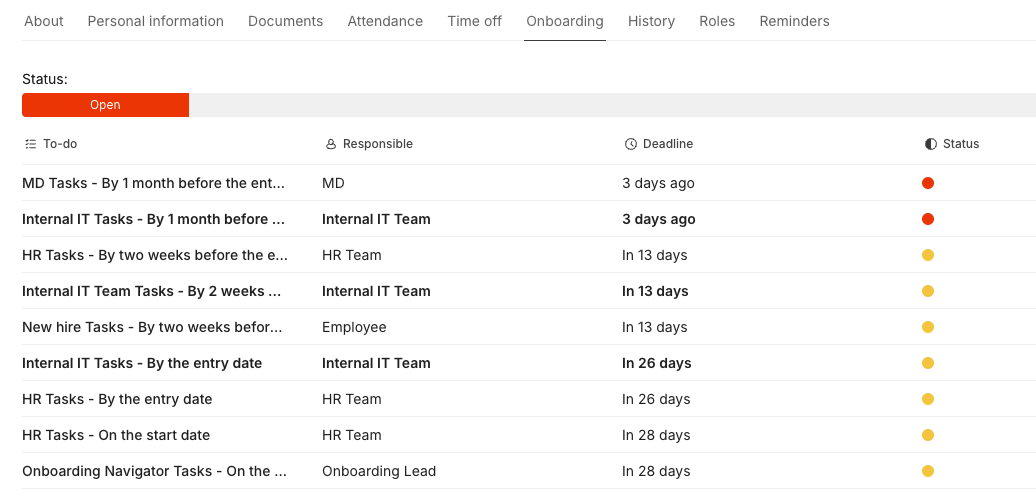
Checking off task items completed within each step is reflected in the progress status on the list screen.
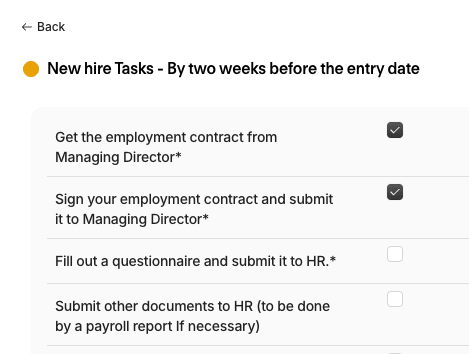
Multiple checklist templates can be created and different lists can be applied per employee.
As a task management tool, it may fall short of other dedicated tools in ease of use and interface polish, but being able to use the Hire date and responsible parties already managed in Personio directly, combined with automatic task assignment to responsible parties and automatic deadline reminders consolidated in Personio's notification box, is a significant advantage.
Salary & Compensation
Salary and compensation information can be managed with a full history, and changes such as raises and allowance adjustments are recorded. This also serves as master data passed to the external accounting firm's DATEV.
Additionally, a fixed monthly salary can be automatically recalculated in response to changes in weekly working hours.
Weekly working hours can be set, for example, as:
- A full-time employee reduces to 30 hours per week after parental leave → 30h/40h (75%)
- An employee reduces to 32 hours per week for company-supported training outside working hours without a pay cut → 32h/32h (100%)
Below is the salary screen for a test user with a fixed monthly salary of 5,000 at full-time, using the first example above.
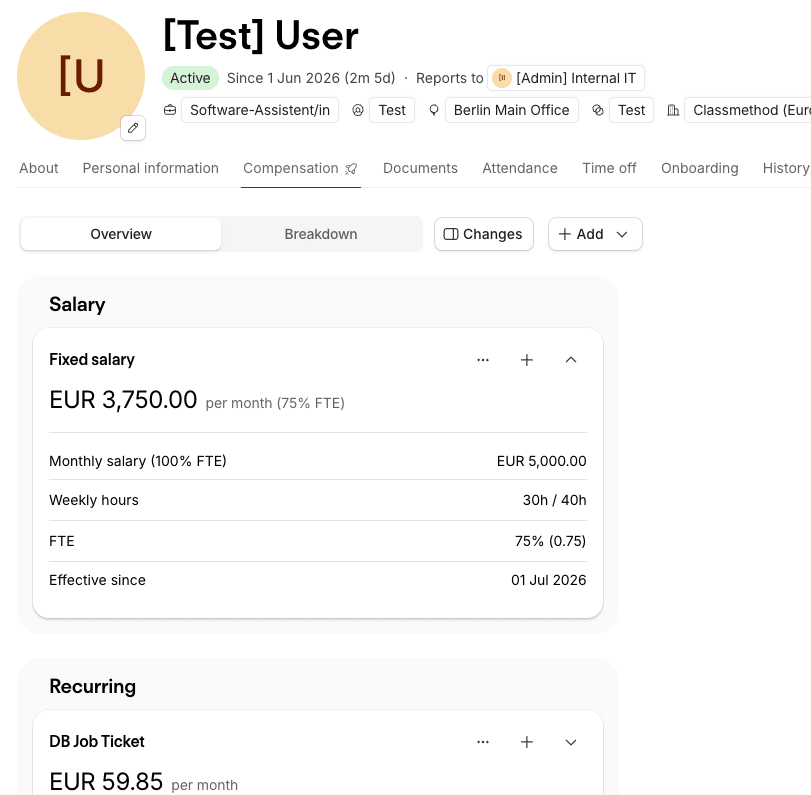
Manual calculation of important salary figures is no longer needed, and changes are directly reflected in the DATEV payroll report—a feature we actively use.
Analytics
Data managed in Personio—headcount, turnover, leave, attendance, etc.—can be visualized in reports.
At this point, advanced analysis such as adding custom calculated columns is not possible, and it is limited to displaying existing data. Even so, it is fully sufficient for aggregating working hour records for specific employees or exporting remaining paid leave days to submit to the accounting firm.
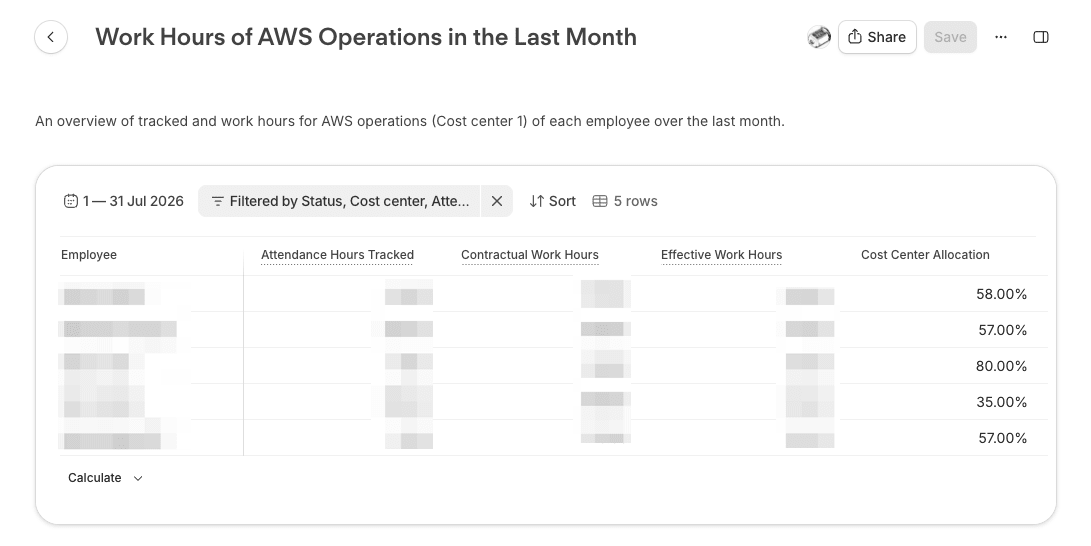
The screen above shows the ratio (%) of cost centers assigned to employees, along with the total contracted and actual working hours for that month, and is used as an internal report value.
💡 Viewable Data
Even if you have edit access to the Analytics feature, the data retrievable in reports depends on the permission settings for each data type. Also, when sharing a report created by another user, depending on the sharing settings, users who would not normally have access to that data can view the report content.
→ For example: general employees can freely create reports but cannot retrieve salary data; HR can create salary summary reports; general employees can view salary data through a report shared by HR—that is the underlying logic.
Personio Assistant
If you've read through the feature introductions so far and thought "this sounds too complex to actually operate..."—don't worry!
Personio has an AI assistant with quite high accuracy called Assistant, available right within the screen.
Personio already has excellent documentation. While reading the docs can be effective for deep-diving into specific features, the AI really shines for questions like:
- Can this feature be configured specifically to do ⚪︎⚪︎?
- Why is it not behaving as expected?
- Where and how should I configure things for our use case?
Since much of the accuracy comes from the publicly available documentation, external AI tools can serve as a substitute—but being able to ask questions right within the screen when stuck, being able to escalate directly to human support when the AI can't handle it, and even being able to create simple Analytics reports and retrieve data make it quite valuable.
On the screen, click "Assistant" in the left menu to open it.
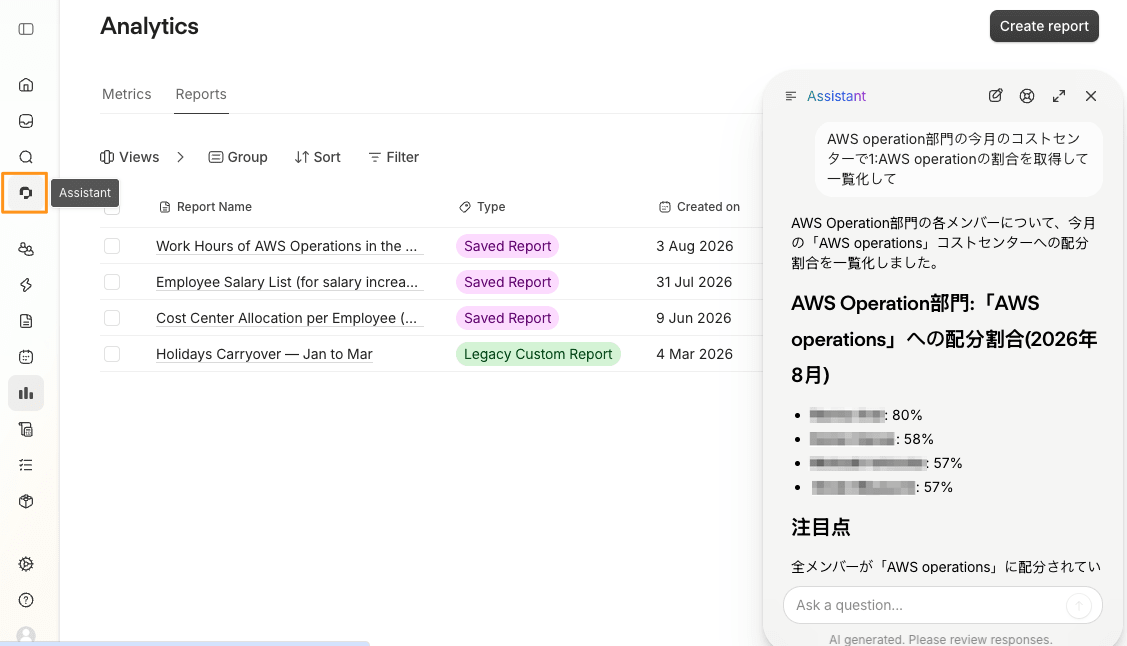
In this example, we had it ad-hoc list out employee data that would normally be created as an Analytics report.
Overview of Our Back Office Stack
Before adopting Personio, HR operations were spread across multiple tools or handled manually, becoming fragmented, person-dependent, and difficult to control as an organization.
We still use multiple tools in the back office today, but we aim to consolidate HR functions in Personio while separating out non-HR areas and using the best tool for each purpose.
| Area | Tool | Specific Role |
|---|---|---|
| Attendance, employee data, payroll reporting, HR documents | Personio | HR operations hub |
| Knowledge & procedures | Notion | Runbooks, documentation of operational workflows |
| Archive | SharePoint | Legally required retention & compliance document storage |
| Non-HR back office routine tasks | BO Outlook Calendar → Slack auto-notifications | Task management & automated notifications |
| Non-HR back office ad-hoc tasks | Notion (DB task list) | Task management & history summaries |
| Communication | Slack | Details and irregular notifications |
| Accounting & expenses | DATEV UO, Qonto, etc. | Invoice management & transaction integration |
Personio's Marketplace offers a rich selection of external integrations, so we plan to keep reviewing and improving our system setup whenever better integrations become available.
Closing
Even for small Japanese-affiliated offices, the right combination of tools can create operations that scale with a lean back-office team. Through adopting Personio, we were able to significantly improve our HR-related operations.
In this series, we've shared our insights from designing and operating Personio ourselves, covering Personio's features and the challenges we solved. We hope it serves as a useful reference for SMEs in similar situations.
Classmethod Europe supports European office back-office operations and system selection based on our own real-world operational experience. Feel free to reach out.