Summary of New Features and Changes Released in Snowflake in August 2026 #SnowflakeDB

This page has been translated by machine translation. View original
This is a summary of new features and changes released for Snowflake in August 2026.
Note: This article does not cover all information; it picks only the items I found noteworthy. It is based mainly on the following sources, so if you want to check all the latest information, please see the URLs below.
Aug 31, 2026: Snowflake-provided tags are in public preview
Snowflake-provided tags, which prepare tags for common governance use cases such as cost center and sensitivity level on the account side in advance, are now in public preview.
Previously, you had to create and manage tags such as cost center and data classification individually for each account, but now built-in tags are provided from the start under the SNOWFLAKE.TAGS schema.
For privileges, instead of granting object privileges on the tags directly, you use application roles provided by Snowflake.
SNOWFLAKE.OOB_TAG_READ: View tags (granted toPUBLICby default)SNOWFLAKE.OOB_TAG_APPLY: Apply tagsSNOWFLAKE.OOB_TAG_ADMIN: Change values, comments, and propagation settings
For details, see the following.
August 31, 2026: app.yml v2 for Snowflake App Runtime is in public preview
In Snowflake App Runtime, v2 of app.yml, which describes application deployment settings, is now in preview.
Previously, snowflake.yml and app.yml were used together, but with the new format, a single app.yml can describe both "deployment" and "remote build".
The changes are described here. Note that migrating from an existing snowflake.yml involves some behavior changes, such as deployment becoming declarative.
For details, see the following.
Aug 31, 2026: CoCo Desktop v1.21.0 to v1.21.2
In August, CoCo Desktop had three version updates (v1.21.0, v1.21.1, and v1.21.2).
v1.21.2 (Aug 31, 2026)
The main additions are as follows.
- New chart types:
table/data_frame(tabular output),horizontal_bar_chart(for rankings), andvega_lite_spec(extended charts such as heatmaps and box plots) - When creating an automation, you can now choose whether to create a local or cloud one
v1.21.1 (Aug 24, 2026)
The main additions are as follows.
- Added a monthly schedule to automation scheduling that runs on a specified day of the month (1 to 31)
- HTML reports can now be published natively without using the
cortexcommand-line tool
v1.21.0 (Aug 14, 2026)
The main additions are as follows.
- On managed macOS devices, the organization's MDM policies are now enforced at the app level
- In agent mode, files in
.pdf,.csv,.pptx,.docx,.html, and.ipynbformats can be previewed directly in the app
August 31, 2026: Second generation Openflow (public preview)
"Second generation Openflow (Gen 2)", which lets you handle Openflow deployments, runtimes, and connectors as Snowflake SQL objects, is now in public preview. It retains the same Openflow platform concepts as Gen 1, but differs notably in how objects are created, secured, and managed.
The main features are as follows.
- You can create, modify, and delete Gen 2 deployments, runtimes, and connectors using
CREATE/ALTER/DROP/SHOW/DESCRIBEcommands or the Openflow UI - By saving configuration as file-based entities (FBE), you can integrate it into CI/CD pipelines through Git workflows
- Runtimes and connectors can be managed under Snowflake RBAC
- Existing Gen 1 resources continue to work unchanged, and Gen 1 and Gen 2 can be used together in the same account
Currently, PostgreSQL CDC and MySQL/MariaDB CDC are supported. Migration from Gen 1 to Gen 2 also appears to be offered in private preview.
For details, see the following.
A quickstart is also available.
Aug 28, 2026: Announcement recommending migration from Cortex Analyst to Cortex Agents
Guidance recommending migration from Cortex Analyst to Cortex Agents has been announced.
At this point, it is not an announcement that the Cortex Analyst REST API or semantic views will be deprecated.
Previously, you chose between querying Cortex Analyst (REST API) directly based on a semantic view, or adding Analyst as a tool to a Cortex Agent to have it generate SQL. The April 2026 update changed the internal behavior of the latter.
Specifically, the Agent used to delegate SQL generation to the Cortex Analyst service as a separate step, but now the Agent itself generates SQL directly.
With this April change, the service type in usage views is now recorded as cortex_agents instead of cortex_analyst. This announcement can be seen as a call to move toward Agents, building on that April update.
The following do not need to change when migrating.
- Semantic views: Cortex Agents use the same semantic views for SQL generation, so there is no need to rebuild them
- Verified queries: What is stored in the semantic view (Verified Query Repository) applies as is
- Existing Cortex Analyst applications: They continue to work, including the REST API, so there is no need to switch in a hurry and you can migrate gradually
On the other hand, Cortex Agents offer features not available with the Cortex Analyst REST API alone, such as search over unstructured data using Cortex Search and tool calling. Although retirement of the Cortex Analyst service itself has not been stated at this point, considering that Agents are positioned as a superset of Analyst, it seems safest to choose Cortex Agents from the start, especially when calling from applications.
Aug 27, 2026: CoCo in the Snowflake Extension for Visual Studio Code (GA)
The ability to use CoCo (formerly Cortex Code) within the Snowflake extension for Visual Studio Code is now generally available.
Extension v1.39 or later is required.
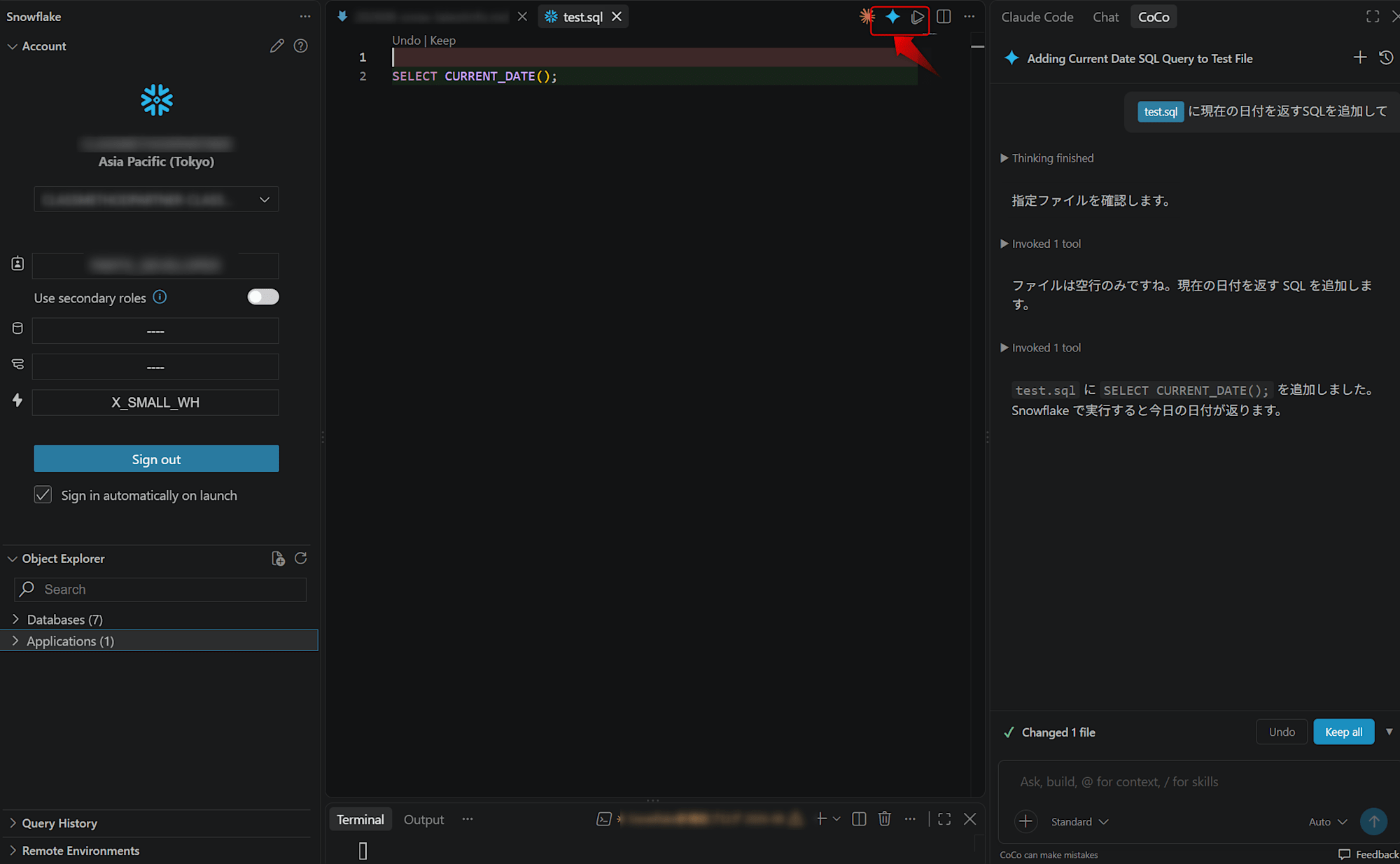
The extension includes the functionality needed to run CoCo, so no separate installation is needed. Selecting the CoCo icon in the editor toolbar opens a side panel where you can start a chat session.
For details, see the following.
Aug 27, 2026: Increased file count limit for dbt Projects on Snowflake
The file count limit for dbt Projects on Snowflake has been raised from 20,000 files to 100,000 files.
All files in the project directory and its subdirectories are counted, including generated folders such as target/, dbt_packages/, and logs/ in addition to the models/ folder. This update makes it easier to run larger dbt projects on Snowflake.
For details, see the following.
Aug 26, 2026: Cortex Extension references from Agent skills are GA
The ability to reference a Cortex Extension directly from Agent skills is now generally available.
Agent Skills is a mechanism that gives Cortex Agents modular, reusable "packages of instructions, scripts, and context" so they can perform specific repeatable tasks.
In addition, Skill and Plugin Sharing is provided as a feature to share, discover, and govern skills (Skills) and plugins (Plugins) created in CoCo across teams in an account. Skills and plugins shared with this feature are stored in the account as an object called CORTEX EXTENSION.
With this update, this CORTEX EXTENSION object can be referenced as is from Agent Skills in Cortex Agents.
Skills built for CoCo can now be reused on the Cortex Agents side, so once created, a skill can be reused in both CoCo and Cortex Agents.
Note that only the skills/ subdirectory within the Extension is reused. A plugin can include slash commands, hooks, MCP server settings, and so on besides skills/, but these are concepts specific to CoCo (CLI), so they are not brought over to Cortex Agents.
When configuring, specify name (the skill name) for each element of skills, set type of source to CORTEX_EXTENSION, and specify the fully qualified name of the Extension in path (for YAML-format agent specifications).
skills:
  - name: "<skill名>"
    source:
      type: "CORTEX_EXTENSION"
      path: "<db>.SKILL_SHARING.<skill>"
For details, see the following.
Aug 26, 2026: Cortex Agents Coding Agent (GA)
The Coding Agent, which lets you add code execution in a sandbox to a Cortex Agent, is now generally available.
It becomes available by adding the code_toolset_all tool type to a Cortex Agent.
{
  "tools": [
    {
      "tool_spec": {
        "type": "code_toolset_all",
        "name": "code_toolset_all"
      }
    }
  ]
}
It has the following characteristics.
- Snowflake automatically provisions and manages the sandbox (using the same runtime as Snowflake CoCo)
- A set of tools including bash, file read/write/edit, grep, glob, web search, SQL execution, and skill integration
- Snowflake also handles running the agent loop and streaming the results, so no implementation is needed on the user side
Note that code_toolset_all and code_execution (a single code execution tool for running Python in the sandbox) are mutually exclusive and cannot be used at the same time.
For details, see the following.
Aug 26, 2026: Organization user types (GA)
Organization user types, which let you distinguish organization users as human (PERSON) or service users (SERVICE), are now generally available.
This is quoted from the official documentation, but you can create an organization user for a service as follows. When an administrator imports the organization user group, the user is created in regular accounts as a SERVICE-type user.
CREATE ORGANIZATION USER etl_pipeline
   EMAIL = 'data-platform@example.com'
   TYPE = SERVICE;
For organization users, see the following.
Aug 25, 2026: Multi-value tags (GA)
Multi-value tags, which let you assign multiple values to a single tag, are now generally available.
By specifying MULTI_VALUE = TRUE when creating a tag, you can add and remove multiple values on a single tag. Previously, only one value could be set per tag, but with this update you can manage multiple classifications (such as data sources and compliance requirements) with one tag.
To check whether a tag contains a specific value, you can use SYSTEM$TAG_VALUE_CONTAINS.
As a constraint, a single multi-value tag can have up to 10 values by default.
For details, see the following.
Aug 25, 2026: Remote Development with the Snowflake Extension for Visual Studio Code (public preview)
Remote Development, which lets you connect remotely from the Snowflake extension for Visual Studio Code to Snowflake-managed compute resources for development, is now in public preview.
Via remote SSH, you can run notebooks, scripts, and terminals on the same Snowflake Kernel (Python + SQL) as Snowsight Workspaces. Snowflake Extension for Visual Studio Code v1.38 or later is required, and the feature can be disabled with the ENABLE_NOTEBOOK_SERVICE_REMOTE_VS_CODE_ACCESS parameter.
For details, see the following.
August 25, 2026: Stable egress IP addresses on Azure (public preview)
Stable egress IP addresses, which let you obtain Snowflake's egress IP addresses in CIDR format, are now in public preview on Microsoft Azure.
The feature, already generally available in AWS commercial regions, has been extended to Azure.
You can obtain IP ranges with expiration using SYSTEM$GET_SNOWFLAKE_EGRESS_IP_RANGES, so you can register these ranges in the allowlist on the external server side, for example for external access from UDFs and procedures.
For details, see the following.
Aug 21, 2026: Version targeting for Cortex Agent and Cortex Analyst evaluations (GA)
Version targeting, which lets you explicitly specify the versions used when running Cortex Agent and Cortex Analyst evaluations (Evaluations), is now generally available.
This addresses the need to ensure reproducibility of evaluation results. There are three types of versions you can specify, each provided as an independent setting.
- Agent version under evaluation
- By adding an
agent_versionkey toagent_paramsin the evaluation configuration YAML, you can run evaluations against a specific agent version, alias, or shortcut (such as LIVE). You can also select it from a dropdown in Snowsight or CoCo
- By adding an
- Judging version of system metrics
- All five system metrics (
answer_correctness,logical_consistency,tool_selection_accuracy,tool_execution_accuracy, andsql_correctness) now support aversionkey. By specifying the metric version (v1/v2/v3), the underlying judge model is selected automatically according to the models your account allows- In
v2andv3, GPT-family judge models are added alongside Claude-family models, and if your account does not allow Anthropic models, GPT-family models are used
- In
- All five system metrics (
- Judge model for custom metrics
- A
modelkey can now be added to custom metric definitions, letting you specify the LLM judge model for that metric individually. If omitted, the default isclaude-4-sonnet
For details, see the following.
Aug 21, 2026: CoCo automations in CLI and Snowsight (public preview)
The ability to configure scheduled automations (Automations) in CoCo CLI and CoCo in Snowsight is now in public preview.
Based on a prompt registered in advance, CoCo acts autonomously as an agent in a sandbox, making decisions and taking actions and returning results, and this whole process can run periodically on a schedule.
Automation tasks are stored as AGENT TASK in each user's personal database. As a result, CoCo runs follow the schedule, and you can later check results and continue working in CoCo.
They can be created and managed from both the CLI and Snowsight, and the EXECUTE AGENT TASK privilege is required for automations (granted to the PUBLIC role by default).
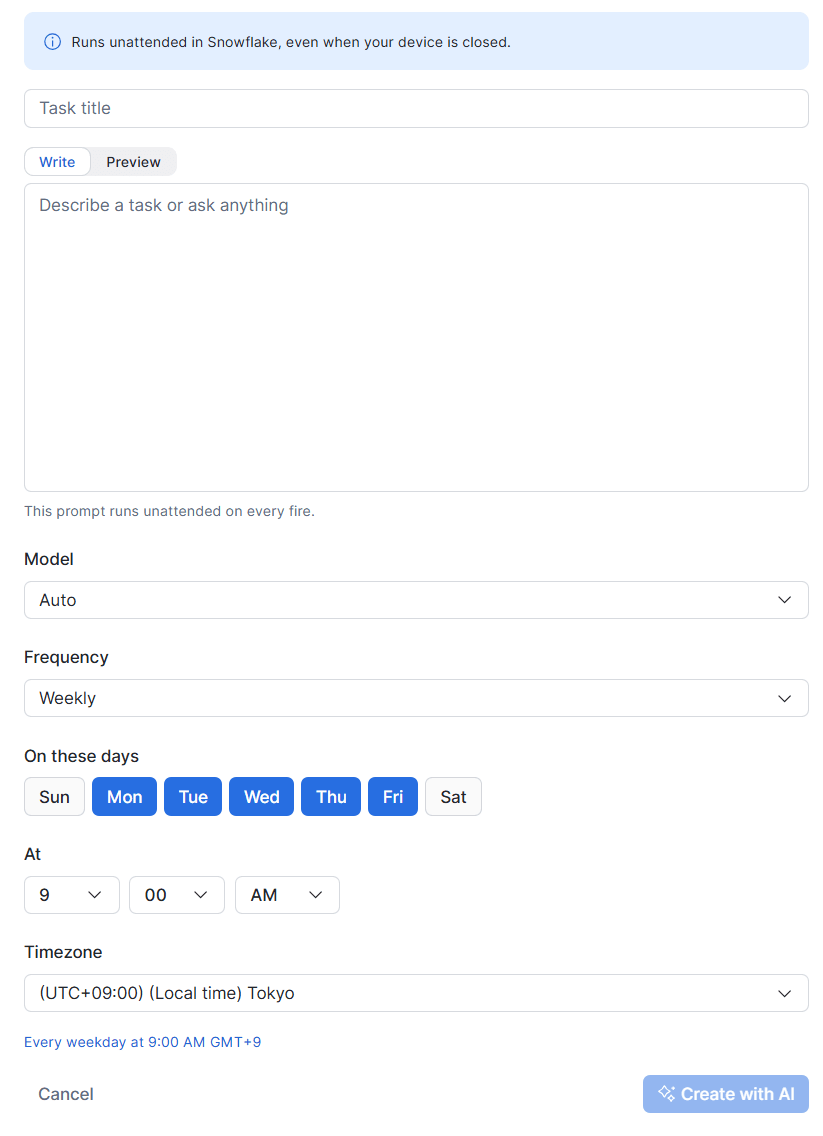
Agent task creation screen in Snowsight
For details, see the following.
August 20, 2026: Cortex Agent code execution tool (public preview)
You can now specify a Code execution tool, which generates and runs Python code in a sandbox environment, as a Cortex Agent tool.
An agent with this tool enabled can run Python code in a secure, isolated sandbox. In addition to the standard library, the sandbox comes preinstalled with data processing and analysis libraries such as numpy / pandas / scipy / pyarrow and visualization libraries such as matplotlib / plotly. You can also install additional PyPI packages through the Artifact Repository.
The sandbox does not query data directly; it is used to process and visualize results retrieved by the SQL tool. The execution scope is also limited to a single conversation thread.
For details, see the following.
10.29 Release Notes: Aug 15, 2026 - Aug 19, 2026
Per-user quotas are GA
By setting per-user quotas, you can now apply spending limits per user and prevent unnecessary costs incurred by individual users.
The main features are as follows.
- Supports both monthly and daily thresholds
- A new
ACCOUNT_USAGE.QUOTA_ACCESS_BLOCK_HISTORYview has been added, letting you check the history of blocked access - Target services (a single quota monitors either warehouses or the AI domain, and the two cannot be mixed)
- Monitoring: warehouses (compute) and AI-related features such as AI Functions, CoCo, Cortex Agents, and CoWork
- Automatic blocking: AI-related features only (warehouses cannot be blocked)
You configure this by creating a quota object.
For example, with the following settings you can set a quota for a user group identified by a specific tag.
-- Create the quota object
-- (No limits or notifications are set yet at this point)
CREATE SNOWFLAKE.CORE.QUOTA my_quota();

-- Set the tag scope on the quota
CALL my_quota!SET_INCLUDED_TAGS(
    ARRAY_CONSTRUCT(
        OBJECT_CONSTRUCT(
            'tag_name', 'cost_mgmt_db.quota_schema.team_tag',
            'tag_value', 'ai_heavy_users'
        )
    )
);

-- Set the monthly limit (e.g., 300 credits/month per user)
CALL my_quota!SET_PER_USER_LIMIT(300);

-- Add a daily limit (e.g., 20 credits/day per user)
CALL my_quota!SET_PER_USER_LIMIT(20, 'DAILY');
For details, see the following.
Anomaly monitors for cost anomalies (public preview)
Custom cost anomaly monitoring, whose scope can be narrowed by object tags and service types, is now in public preview.
Previously, detection of cost anomalies across the whole account or whole organization was provided.
The above covers the whole scope, so it was sometimes insufficient for catching sudden cost increases within a single team or project. With this release, you can define your own scope using object tags and service types, making it possible to monitor each target of interest.
Note that only resource-level object tags are monitored by this feature. That is, these are tags applied directly to resources such as warehouses, databases, and tables; user tags are not supported.
You can create up to 20 monitors per account, and you can choose to track either credits (traditional consumption such as virtual warehouses, serverless tasks, and Snowpipe) or AI credits (AI-related services such as Cortex Search, Cortex Agents, and AI features).
For details, see the following.
August 19, 2026: Data movement policies are GA
As a Snowflake data exfiltration protection feature, Data movement policies, which let you control with policies whether to allow, warn on, or block operations that move or export data externally, are now generally available.
Available in Enterprise edition and above, they can restrict, monitor, or block the following six types of data movement operations.
COPY_INTO_EXTERNAL_STAGE: Export to an external stageCOPY_INTO_INTERNAL_STAGE: Copy to a Snowflake-managed internal stageSNOWSIGHT_UI: Data access via SnowsightAGENT_ACCESS: Access via agents and MCP clientsUI_DOWNLOAD: Downloading query results in the Snowsight UIPROGRAMMATIC_FETCH: Programmatic data retrieval by drivers, connectors, SnowSQL, and so on
In addition to applying to the entire account, a policy can be attached to a tag so that it is automatically applied to objects with that tag.
When configuring a policy, you define the target movement type and the allowed number of rows in a DATA MOVEMENT RULE (0 blocks, a positive integer limits the number of rows, NULL is unlimited), then add that rule to a DATA MOVEMENT POLICY and attach it to a tag or the account to apply it.
-- Create a rule
-- Rule that blocks access by agents
CREATE OR REPLACE DATA MOVEMENT RULE hr_agent_block
    TYPE = 'AGENT_ACCESS'
    MAX_ROWS AS () RETURNS INTEGER -> (0);  -- Always block

-- Create a policy that bundles the rules
CREATE OR REPLACE DATA MOVEMENT POLICY hr_pii_policy
    ENFORCE_RULES = (hr_agent_block);

-- Create a tag
CREATE TAG IF NOT EXISTS my_db.my_schema.pii_tag;

-- Attach the policy to the tag
ALTER TAG my_db.my_schema.pii_tag
    SET DATA MOVEMENT POLICY hr_pii_policy;  -- ← Specify the policy name

-- The policy is applied automatically by tagging the target table
ALTER TABLE my_db.my_schema.hr_employees
    SET TAG my_db.my_schema.pii_tag = 'true';
For details, see the following.
August 18, 2026: Access to externally managed Apache Iceberg tables via the Horizon Catalog Iceberg REST Catalog API is in public preview
Apache Iceberg tables managed in external catalogs (such as AWS Glue and Snowflake Open Catalog) can now be accessed from external engines via the Iceberg REST Catalog (IRC) API of Snowflake Horizon Catalog.
As a result, not only existing Snowflake-managed Iceberg tables but also externally managed Iceberg tables accessible through catalog-linked databases can be used from the same Horizon IRC endpoint. By going through Horizon Catalog, Snowflake roles and authentication apply as is.
For details, see the following.
Aug 18, 2026: Uploading Power BI files to Semantic View Autopilot is GA
The feature that automatically converts a Power BI data model into a Snowflake semantic view by uploading an existing Power BI file (.pbit / .pbix) to Semantic View Autopilot is now generally available.
Business logic already built in Power BI (such as metric definitions, table relationships, and column descriptions) can be reused, for example, in natural language queries with Snowflake Cortex Analyst.
For details, see the following.
August 18, 2026: User skills in Snowflake CoWork (public preview)
The feature in Snowflake CoWork that lets users register and reuse their own business workflows as skills is now in public preview.
In addition to uploading a skill folder from "Capabilities > Skills", you can also create one in a chat format.
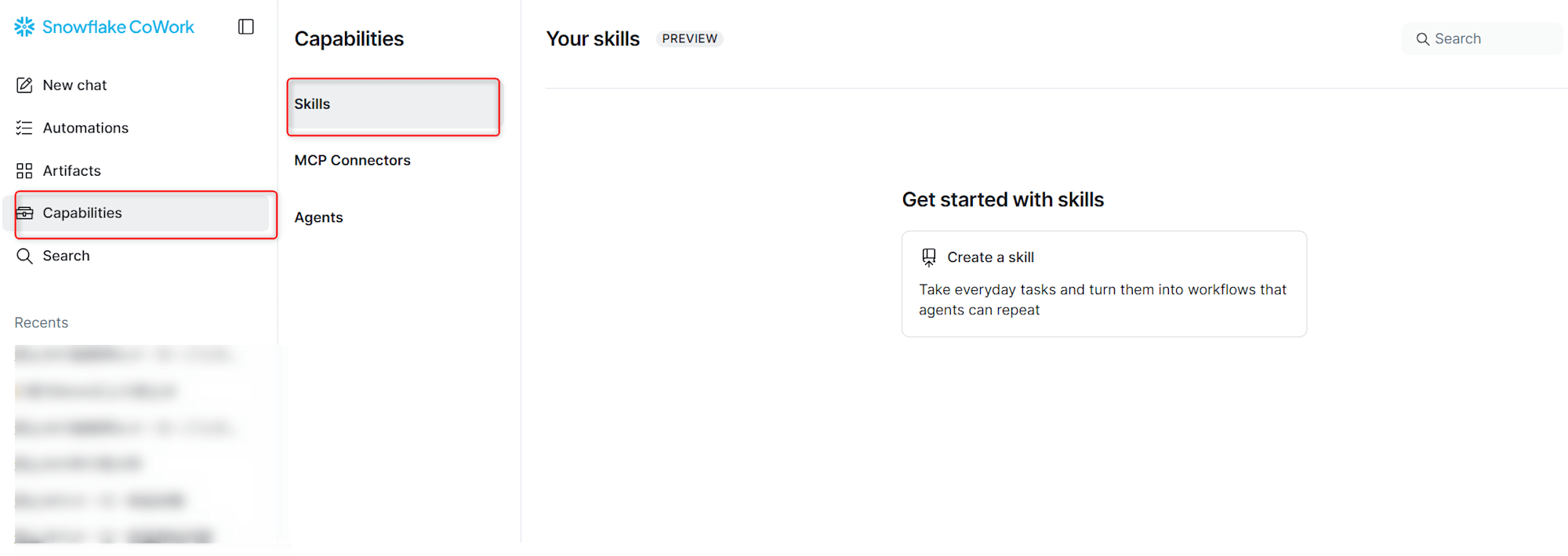
At run time, you can invoke a skill explicitly with the "/" command or the Skills menu, or have it run implicitly depending on the content of the conversation.
For details, see the following.
Aug 17, 2026: SNOWFLAKE_COCO_USAGE_HISTORY is GA
The SNOWFLAKE_COCO_USAGE_HISTORY view, which lets you view CoCo usage across CLI, Desktop, and Snowsight in one place, has been added to the ACCOUNT_USAGE and ORGANIZATION_USAGE schemas.
Each row corresponds to one request, and you can check aggregated token counts, credit counts, and so on. The INTERFACE column also identifies whether the request came from CLI, Desktop, or Snowsight.
Detailed usage history per interface can also be checked in dedicated views (CORTEX_CODE_CLI_USAGE_HISTORY, CORTEX_CODE_DESKTOP_USAGE_HISTORY, CORTEX_CODE_SNOWSIGHT_USAGE_HISTORY).
For details, see the following.
Aug 16, 2026: Feature policy rules are GA
Feature policy rules, which let you restrict object creation in specific contexts, are now generally available.
Previously, a feature called Feature Policy was provided mainly as a governance feature for Snowflake Native Apps.
With Automated Granting, a native app obtains privileges at install time to create warehouses, databases, compute pools, and so on. Once granted, the privileges cannot be revoked directly from the consumer side, so Feature Policy was used to prevent the app from actually creating objects.
In this case, Feature Policy blocked creation of supported objects such as agents, schemas, and tasks across the board, but the new Feature policy rules extend this.
Specifically, you can now add rules that run only when a specified SQL expression evaluates to true. Supported objects can now reference conditional creation rules, so you can describe governance at a finer granularity than the object type, for example "allow table creation itself but block creation of temporary tables" or "allow task creation but block creation of serverless tasks".
For details, see the following.
Aug 14, 2026: Automatic remediation of Trust Center violations is GA
The following two automatic remediation features for CIS Benchmarks violations detected by Trust Center are now generally available.
One-click remediation
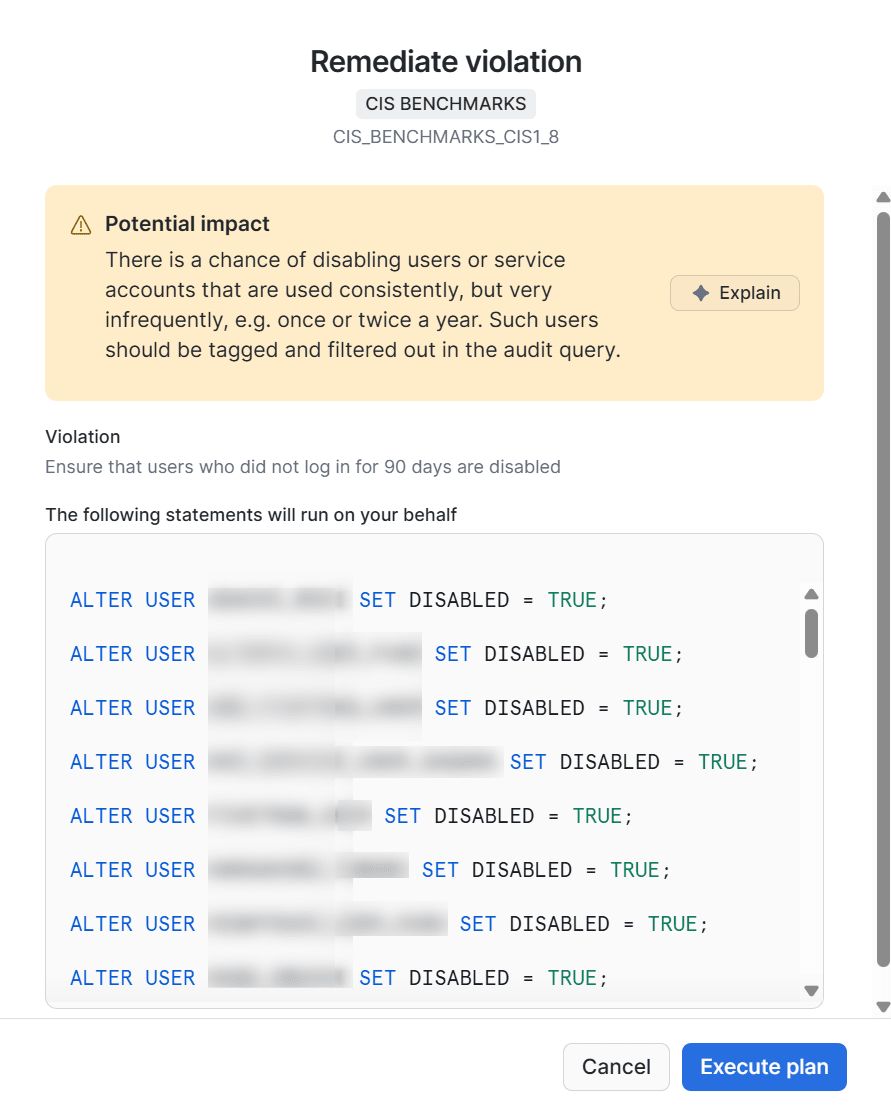
For findings from supported CIS Benchmarks scanners, Trust Center generates a SQL statement that remediates the violation finding, which you can run after approval.
Example: CIS_BENCHMARKS_CIS1_8 (User inactivity)
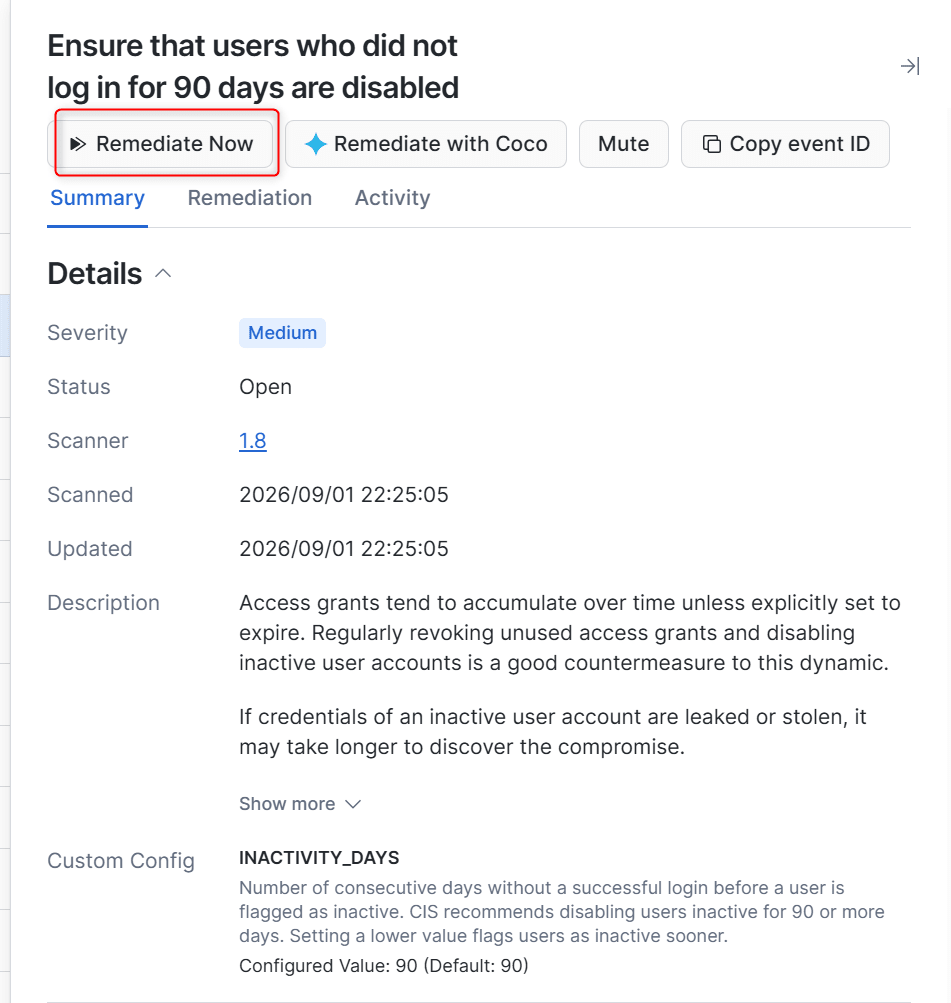
Selecting "Remediate Now" automatically creates a fix query
For details, see the following.
Remediation with CoCo
When you select "Remediate with CoCo" on a finding, CoCo opens a chat, explains the violation and recommends remediation steps tailored to your account's situation, and can carry out the remediation action after approval.
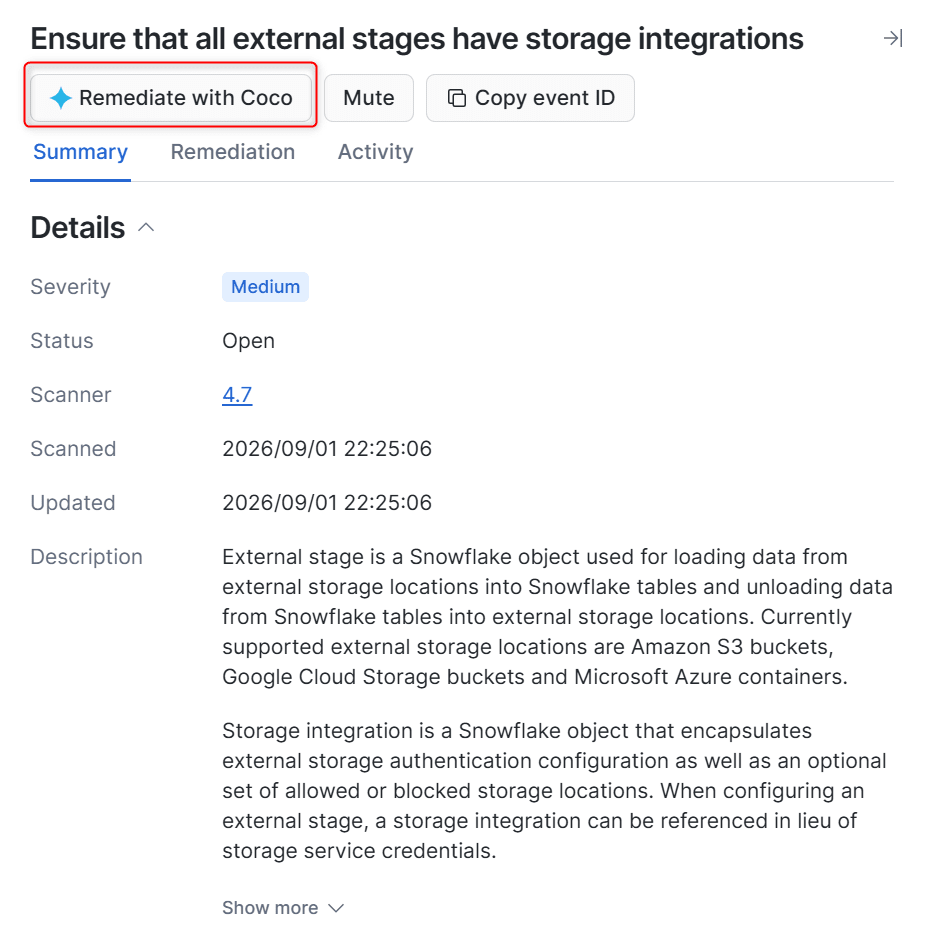
For details on this, see the following.
Aug 12, 2026: POSTGRES_COMPUTE_USAGE_HISTORY view
The POSTGRES_COMPUTE_USAGE_HISTORY view, which shows hourly compute credit consumption of Snowflake Postgres instances, has been added.
Provided in both the Account Usage and Organization Usage schemas, it lets you track and analyze the cost of Postgres workloads at the same granularity as warehouses and so on.
For details, see the following.
Aug 10, 2026: AI_MULTI_EMBED supports large video files (GA)
AI_MULTI_EMBED now supports large video files up to 6GB and is generally available.
With TwelveLabs' Marengo Embed 3.0 model, you can generate multimodal embeddings from video, audio, subtitles (transcripts), and so on.
This is quoted from the official documentation, but you can use it as follows.
SELECT AI_MULTI_EMBED('twelvelabs-marengo-embed-3-0',
        TO_FILE('@my_files', 'me-at-the-zoo.mp4'));
{
  "error": null,
  "value": [
    {
      "embedding": [-0.022094727, 0.0053710938, 0.024291992, ...],
      "embedding_option": "visual",
      "embedding_scope": "clip",
      "start_sec": 0,
      "end_sec": 4.5
    },
    {
      "embedding": [-0.048095703, -0.10449219, -0.033935547, ...],
      "embedding_option": "audio",
      "embedding_scope": "clip",
      "start_sec": 0,
      "end_sec": 4.5
    },
    {
      "embedding": [0.03515625, 0.10205078, -0.0043945312, ...],
      "embedding_option": "transcription",
      "embedding_scope": "clip",
      "start_sec": 0,
      "end_sec": 4.5
    }
  ]
}
The video is automatically split into "clips (scene segments)", and for each clip, separate embedding vectors are generated for different modalities: visual (video), audio (the audio track itself), and transcription (the result of transcribing the audio). This enables similarity search from different perspectives: appearance, sound, and spoken content.
With the optional embedding_scope, in addition to clip for per-clip embeddings, you can also specify asset, which returns a single embedding representing the whole video.
For details, see the following.
Aug 10, 2026: Amazon S3 Tables Iceberg REST catalog integration (GA)
You can now connect directly from Snowflake to the Iceberg REST endpoint of Amazon S3 Tables and create catalog-linked databases.
If you configure private connectivity, you can also access both the catalog and storage of S3 Tables via private endpoints.
For details, see the following.
Aug 10, 2026: Request Access in Workspaces is in public preview
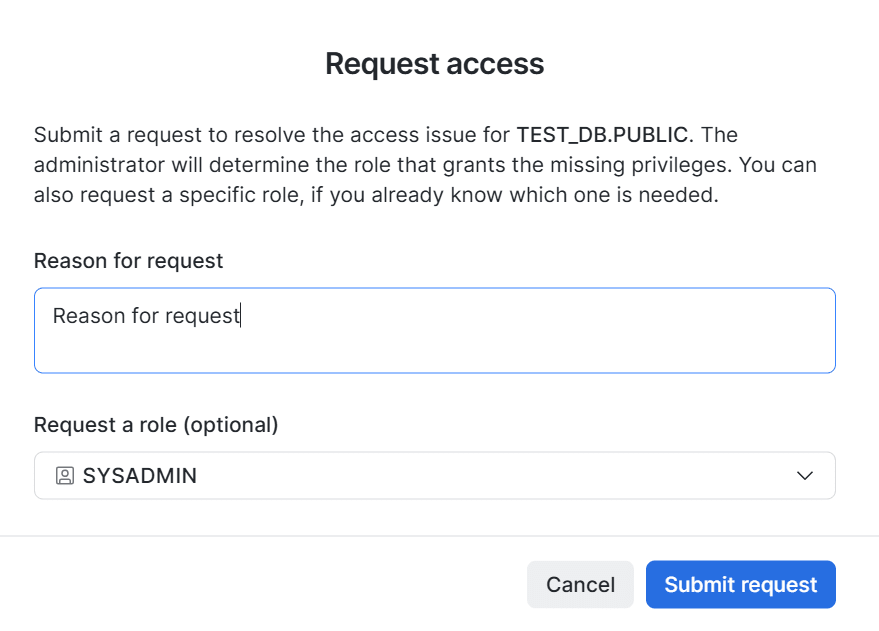
The feature that lets you request access on the spot from Snowsight when an insufficient-privileges error occurs while running a query in Workspaces is now in public preview.
Previously, when a query failed due to insufficient privileges, manual steps such as switching roles or contacting an administrator individually were needed.
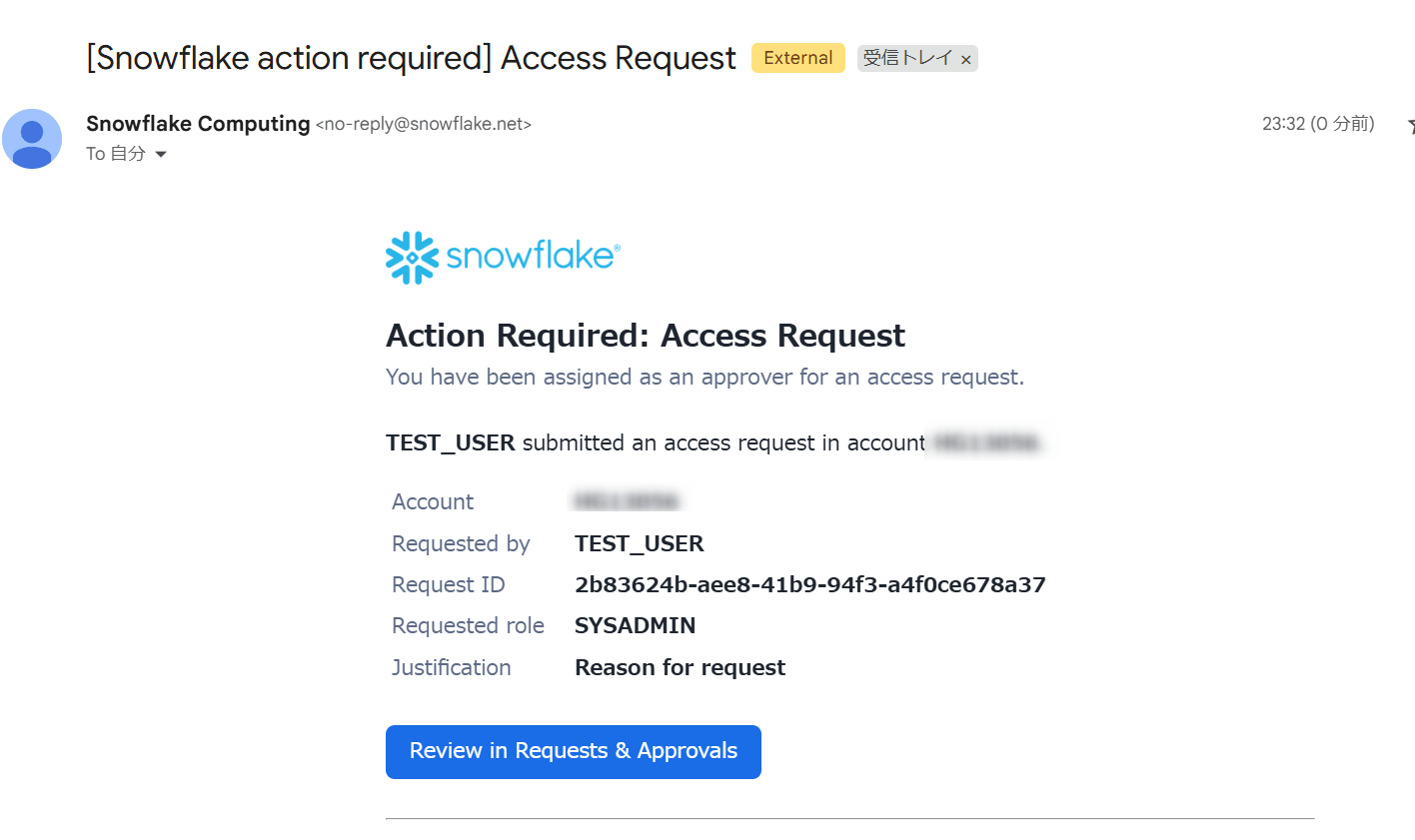
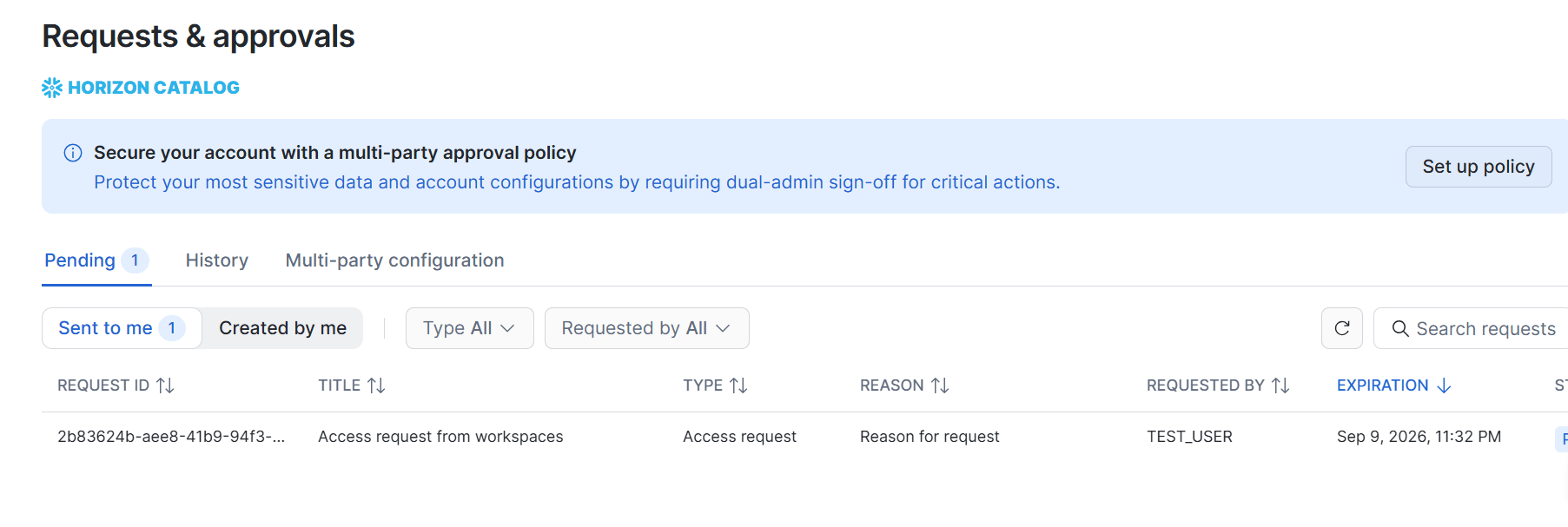
With this feature, when a user submits a request with a reason, administrators with the ACCOUNTADMIN or SECURITYADMIN role are notified and can approve or reject it from the "Requests & Approvals" page, or mark it as already approved externally. In addition to enabling the preview feature, the following parameter setting is required.
SHOW PARAMETERS LIKE 'FEATURE_ENABLE_REQUEST_ACCESS_FOR_WORKSPACES' IN ACCOUNT;
ALTER ACCOUNT SET FEATURE_ENABLE_REQUEST_ACCESS_FOR_WORKSPACES = 'ENABLED';
Results window when a query errors after enabling the parameter:
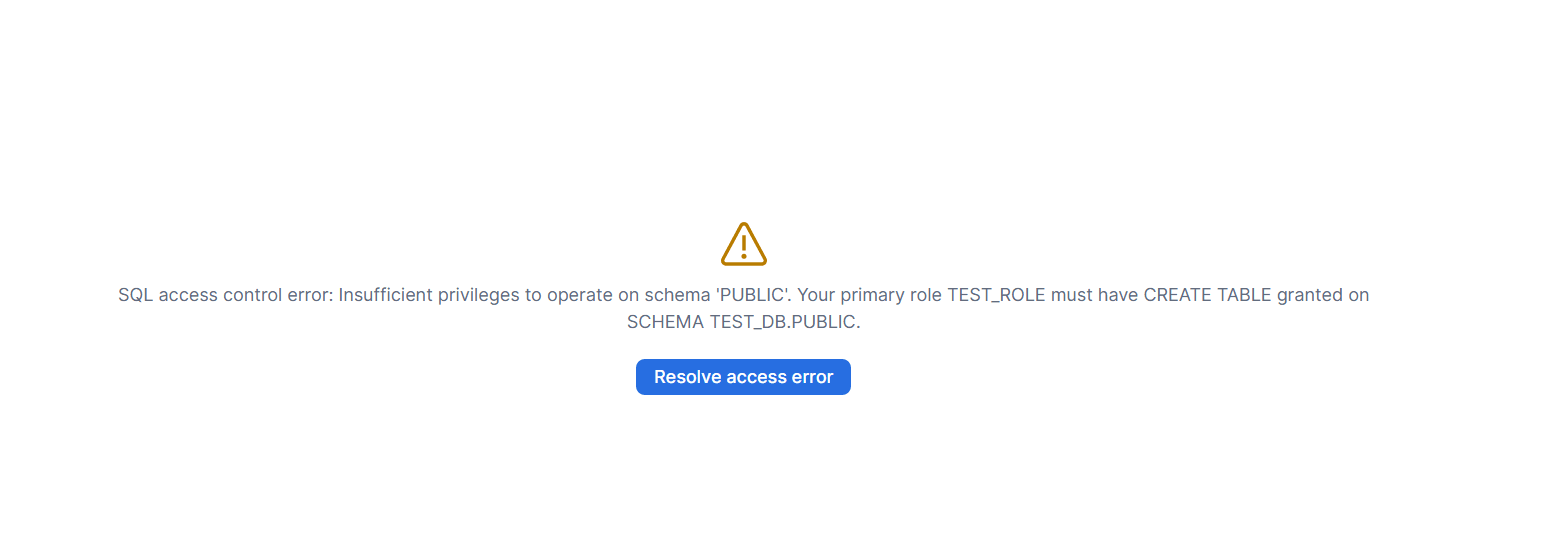
You can create a request from Resolve access error:
After the request is created, administrators receive an email like the one below:
Administrators can view requests in Snowsight under "Governance & security > Requests & approvals":
Request details:
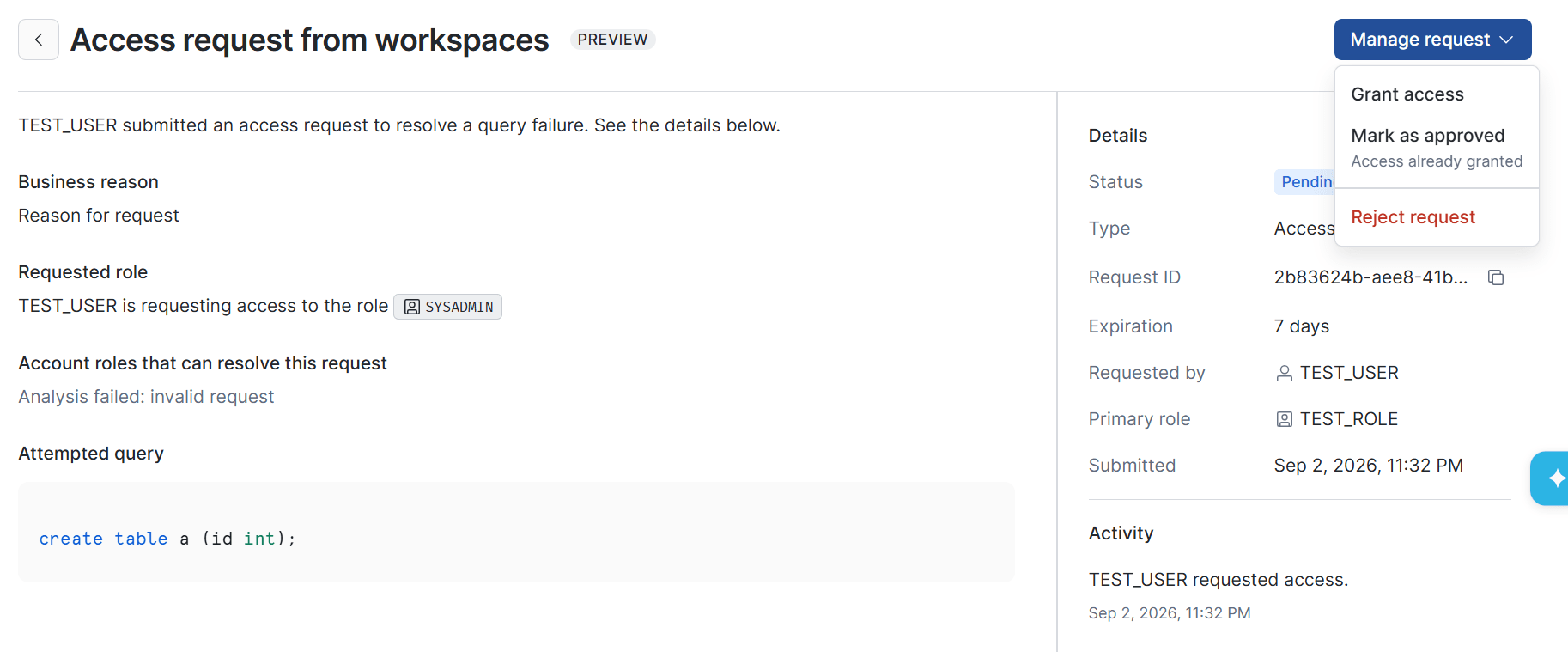
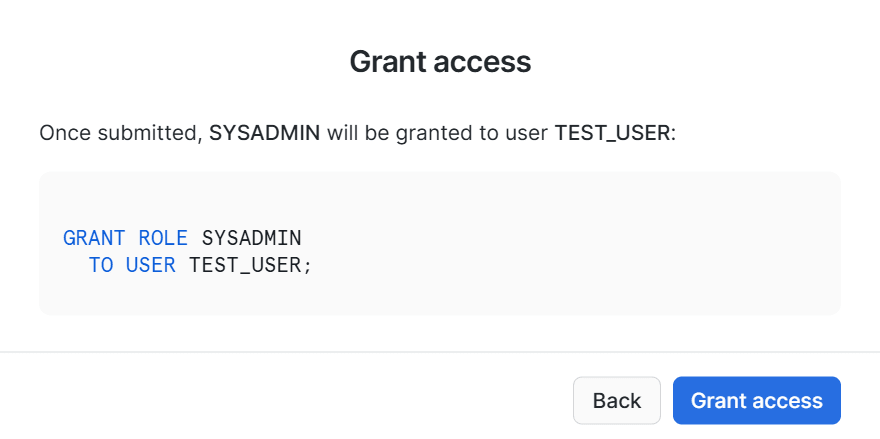
By specifying the privilege (role) to grant and the target user in "Grant access", SQL is generated and you can grant the privilege directly from the UI:
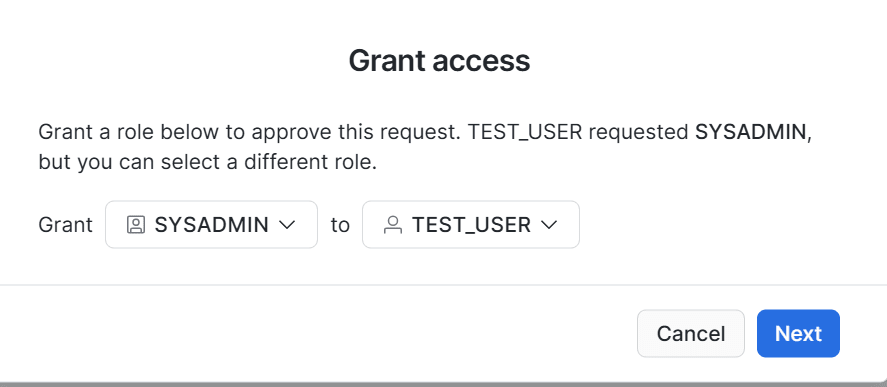
The SQL generated above:
For details, see the following.
August 7, 2026: DCM Projects are GA
DCM (Database Change Management) Projects, which let you manage Snowflake objects declaratively, are now generally available.
Configuration also supports deployment to multiple environments through Jinja templates (variables, loops, and conditionals), and the workflow is to review the changes with PLAN and then DEPLOY.
Whereas CREATE OR ALTER is an operation for a single object, DCM Projects are positioned as a mechanism to manage an entire project consisting of multiple objects as code.
For details, see the following.
Aug 7, 2026: Creating and publishing Cortex Agents and MCP servers in Snowflake Native Apps (GA)
The ability to create and publish Cortex Agents and MCP servers within a Snowflake Native App is now generally available.
Providers can define these in the app's setup script, enabling them to offer conversational AI experiences in consumer accounts.
For details, see the following.
Aug 6, 2026: Automations in Snowflake CoWork (public preview)
The feature that automatically re-runs queries (questions) made during a chat with Snowflake CoWork on a configured schedule and delivers the results by email is now generally available.
Its features are that a one-time report (one-time query) can be converted into a scheduled report, and that the report content is delivered automatically to the user's email address.
Schedules can be created conversationally through chat or manually from the Automations tab.
For details, see the following.
Aug 5, 2026: Openflow Connector for SQL Server (CDC) is GA
The Openflow Connector for SQL Server (CDC), which ingests data into Snowflake using Microsoft SQL Server change data capture (CDC), is now generally available.
Row-level changes on the SQL Server side are detected via CDC and can be replicated to Snowflake in near real time or on a schedule. The initial run loads all data via a snapshot load, and afterward only incremental data is synchronized. It also automatically follows schema changes on the source side.
For details, see the following.
Aug 4, 2026: Gateway Monitoring and A/B Testing are GA
Gateway Monitoring & A/B Testing, which lets you deploy ML models registered in the Model Registry as real-time inference services and continuously monitor and compare their quality, is now generally available.
Snowflake Gateway is an endpoint to real-time inference services and can distribute traffic across multiple model versions by percentage. With this release, Gateway Monitoring automatically collects inference logs through the gateway and periodically aggregates drift (shifts in prediction distribution), performance metrics (accuracy, RMSE, and so on), and statistical metrics.
Combined with the traffic splitting feature, you can route traffic to an existing model and a new model and safely run A/B tests comparing performance on actual user requests.
For details, see the following.
Aug 4, 2026: Multi-party Approval is GA
The feature that adds a mandatory multi-person approval step, so that critical operations in a Snowflake account cannot be performed by a single administrator alone, is now generally available.
When you create an MPA policy and apply it to the account, protected operations can no longer be executed by a single administrator alone, and approval by at least one additional approver becomes mandatory.
Protected operations fall into the following three categories.
- Administrator operations
- Changing MPA settings, disabling MFA, Tri-Secret Secure key management, granting/revoking administrative roles (ACCOUNTADMIN or SECURITYADMIN), managing Cortex AI guardrails, changing data retention settings, and so on
- Policy operations
- Changes to network policies, session policies, authentication policies, and password policies
- Security integration operations
- Changes to OAuth, External OAuth, and SCIM integrations
Its feature is that it lets you build an approval flow to mitigate the risk of unauthorized or mistaken operations by a single administrator.
For details, see the following.
Aug 3, 2026: agents_info column added to the ACCESS_HISTORY view
An agents_info column, which lets you track data access via agents, has been added to the ACCESS_HISTORY view in Account Usage and Organization Usage.
agents_info is an ordered JSON array that records the call hierarchy from the nearest agent to the top-level agent.
Each element has the following three attributes.
agentType: Agent type (CORTEX_AGENT/CORTEX_LITE_AGENT/EXTERNAL_AGENT)agentId: Agent identifier (NULL for external agents)agentName: Fully qualified name of the Cortex Agent (NULL for lite agents and external agents)
For access that involves no agent, the column value is NULL.
For details, see the following.
Aug 3, 2026: Inline Stored Procedures for hybrid tables are in public preview
Inline stored procedures for hybrid tables are now in public preview.
Unlike conventional stored procedures, the entire procedure body is pushed directly to the query processing layer and executed as a single atomic unit.
Because the per-statement call overhead is eliminated, they are well suited to low-latency OLTP processing on hybrid tables. They can be used on any virtual warehouse, but to maximize performance it is recommended to set ENABLE_USE_STABLE_PATH = TRUE on the warehouse.
When defining one, use CREATE INLINE PROCEDURE and enclose the body in BEGIN ATOMIC ... END.
CREATE OR REPLACE INLINE PROCEDURE place_order(
  order_id    NUMBER(18,0),
  customer_id NUMBER(18,0),
  product     VARCHAR,
  quantity    NUMBER(10,0)
)
RETURNS VARCHAR
LANGUAGE SQL
AS
$$
BEGIN ATOMIC
  INSERT INTO orders (order_id, customer_id, product, quantity, status)
    VALUES (:order_id, :customer_id, :product, :quantity, 'PENDING');
  RETURN 'OK';
END;
$$;
Currently, it is limited to hybrid tables and the supported syntax is restricted, for example to SELECT and INSERT only, but the documentation reports that in a benchmark (TPROC-C workload), a single XSMALL warehouse achieved over 7,000 TPM (transactions per minute), a more than 10x improvement over regular stored procedures.
For details, see the following.
Aug 3, 2026: Organization Hub is GA
The "Insights" page of Organization Hub, which lets you see organization-wide cost, security, and query health on one screen, is now generally available.
You can check the following three areas.
- Billing and cost: Cost by service type, total storage, and so on
- Security: Trust Center violation findings and scanner coverage, progress in adopting strong authentication, and trends in failed logins
- Query health: Investigation of failed queries and warehouse queuing load
Using it requires the GLOBALORGADMIN role and enabling ORGANIZATION_USAGE premium views.
For details, see the following.
Aug 03, 2026: AI Agents Inventory in the Trust Center AI Security tab (public preview)
An AI Agents Inventory, which lets you centrally manage the Cortex Agents in your account, has been added to the AI Security tab of Trust Center.
It lists the Cortex Agents in the account and lets you filter by multiple categories (no budget, web search, code execution, internal MCP, no instructions, external MCP).
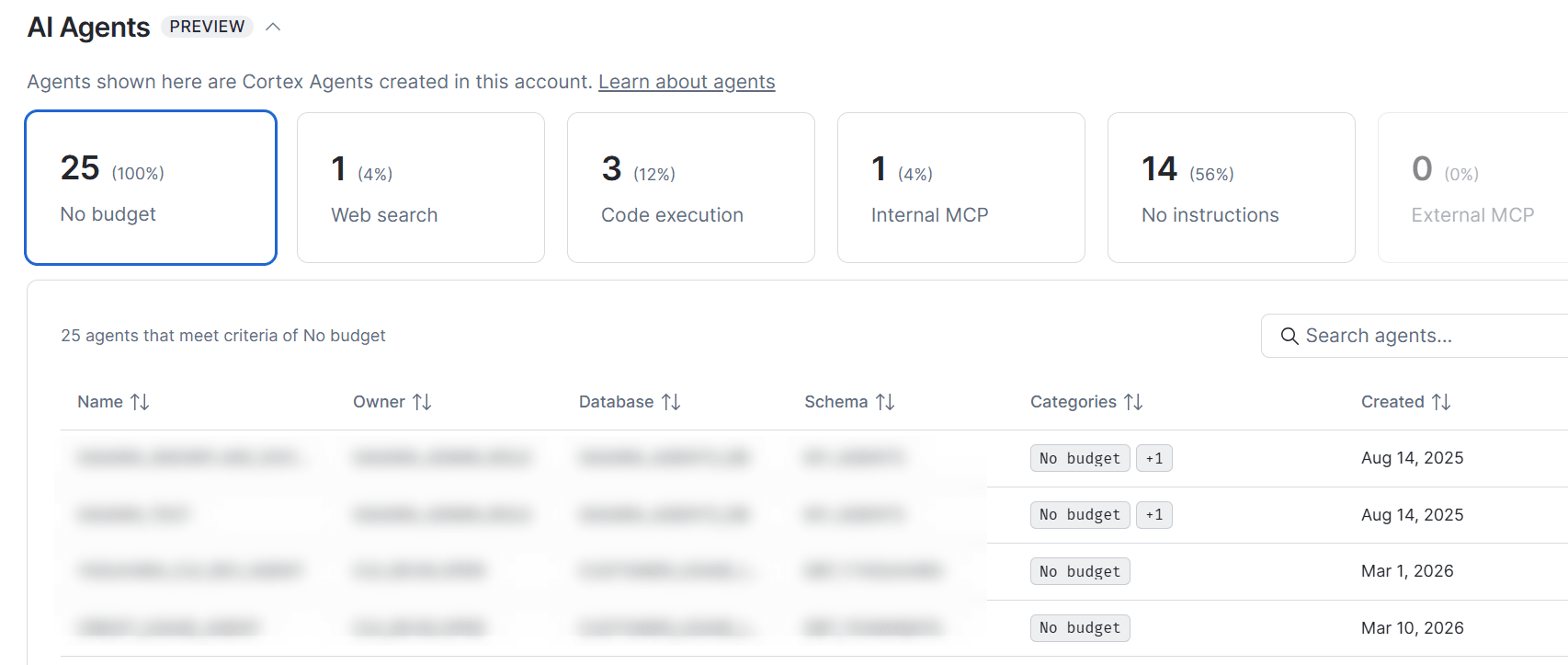
For details, see the following.
Aug 03, 2026: Trust Center AI Security scanner package and tab (GA)
The Trust Center AI Security tab and AI Security scanner package, which let you check the security posture of AI features such as Cortex Agents, Snowflake CoWork, and Cortex Code, are now generally available.
Currently, the AI Security scanner package evaluates the following four items.
- Cortex Search Service Privileged Roles
- Detects Cortex Search Services owned by ACCOUNTADMIN, SECURITYADMIN, or GLOBALORGADMIN
- A Cortex Search Service runs with owner's rights, so it inherits all privileges of the owning role
- Cortex Code CLI PAT Usage Without Role Restriction and Network Policy
- Detects PATs used for Cortex Code CLI authentication that lack either a role restriction or a network policy
- Sensitive Data Accessed by Agent
- Detects cases where agents (Cortex Code, Snowflake CoWork, Cortex Agents) access sensitive data (columns with system-defined classification tags such as SNOWFLAKE.CORE.PRIVACY_CATEGORY or SNOWFLAKE.CORE.SEMANTIC_CATEGORY) without any masking policy or row access policy applied
- Cortex AI Guardrails (Advanced Prompt Injection Guardrail) not enabled
- Detects when the advanced_prompt_injection guardrail is not enabled in the account parameter AI_SETTINGS
For details, see the following.
Behavior Change Log
2026_06 bundle now available * disabled by default
With 10.26 (released 2026/7/24 - 2026/7/31), the 2026_06 bundle became available. If you want to check the behavior in advance, you can manually enable the bundle and test it.
This bundle is scheduled to be enabled by default in a later release.
2026_05 bundle enabled by default
With 10.26 (released 2026/7/24 - 2026/7/31), the 2026_05 bundle was enabled by default.
In a later release, this bundle is scheduled to be generally enabled.
Latest information on the Modern Data Stack overall
Latest information on the Modern Data Stack overall, including Snowflake, is also regularly summarized and posted on the blog! Please take a look at these as well.