Summary of New Features and Changes Released in Snowflake in September 2026 #SnowflakeDB

This page has been translated by machine translation. View original
This article summarizes new features and changes in Snowflake released in September 2026.
Note: This article does not cover all information; it picks only the items I found noteworthy. It is mainly based on the sources below. To check all the latest information, please see the URLs below.
Also, Snowflake World Tour Tokyo 2026 was held on September 10 and 11, 2026.
Many new features and case studies were announced in areas such as Snowflake AI, data foundation, governance, and application development, and session reports by our team members have also been published. Please check them at the link below.
Sep 30, 2026: Semantic Studio is generally available
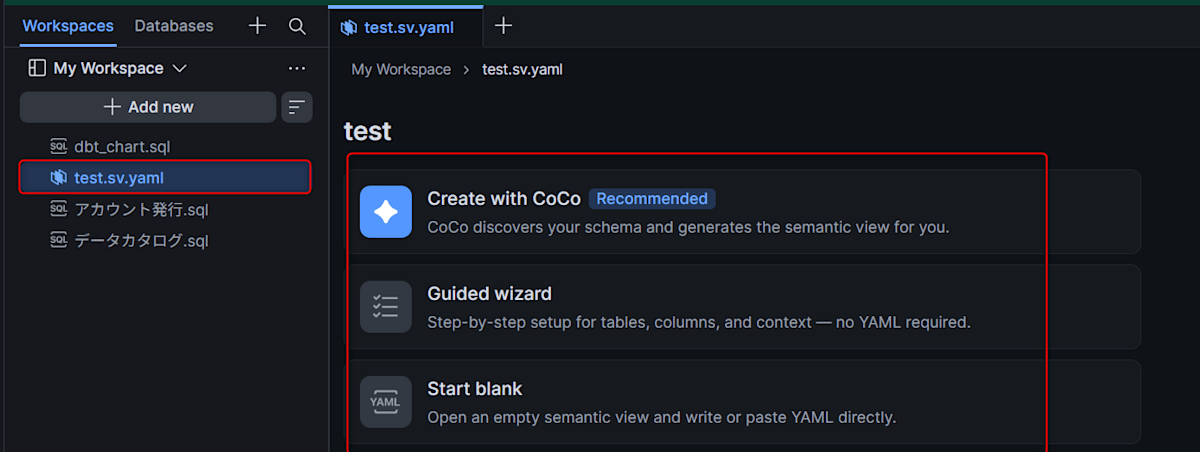
Semantic Studio, which entered public preview in August 2026, is now generally available. It is an authoring environment for creating semantic views within Workspaces.
You can combine authoring through conversation with CoCo, direct YAML editing, and deploying YAML files to Snowflake objects. With Git-integrated version control, you can co-edit semantic view definitions and track changes.
For details, see below.
Sep 24–30, 2026: DCM Projects feature updates
DCM Projects, which became generally available in August 2026, received several updates in September.
Generally available
- Declarative management of semantic views with
DEFINE SEMANTIC VIEW(covers tables, relationships, facts, dimensions, metrics, AI instructions, and verified queries) CREATE OR ALTER PIPE,CREATE OR ALTER STREAM,DEFINE PIPE,DEFINE SHARE,DEFINE STREAM- Inherited grants and container-level
MANAGE GRANTS
Preview
- Declarative assignment of masking policies to columns with
ATTACH MASKING POLICY(covers columns of tables, Iceberg tables, views, and dynamic tables) - Project assets that import source files from the DCM project manifest
- Declarative management of Code Bundles with
DEFINE CODE BUNDLE - Declarative management of Streamlit apps with
DEFINE STREAMLIT
For details, see below.
Sep 30, 2026: Optimized Refresh and RPO Assurance for failover groups are generally available
Two features for failover groups are now generally available.
- Optimized Refresh: Makes account replication refreshes more efficient. Refresh time scales with the amount of change rather than the number of objects. Enable it by setting
OPTIMIZED_REFRESH = TRUEon the primary failover group - RPO Assurance: Provides an RPO (Recovery Point Objective) target and continuously manages refreshes to keep the secondary account in sync with the primary. Enable it by setting
RPO_ASSURANCE = TRUE
Existing failover groups behave as "Replication Classic" by default, so an explicit opt-in is required. Billing is described separately.
Prerequisites and notes for enabling are as follows.
- Business Critical Edition or higher is required
- RPO Assurance cannot be used together with a manual replication schedule
- Enabling RPO Assurance automatically enables Optimized Refresh as well
- The RPO Assurance SLA has conditions such as supported region pairs. Cross-cloud pairs are not covered
- The first refresh after enabling Optimized Refresh takes about as long as Replication Classic
For details, see below.
Sep 30, 2026: Dynamic tables continue incremental refresh after failover (generally available)
Dynamic tables configured with the INCREMENTAL or ADAPTIVE refresh mode can continue incremental refresh even after a secondary is promoted to primary in a failover group.
For the eligibility conditions and a query to check them, see below.
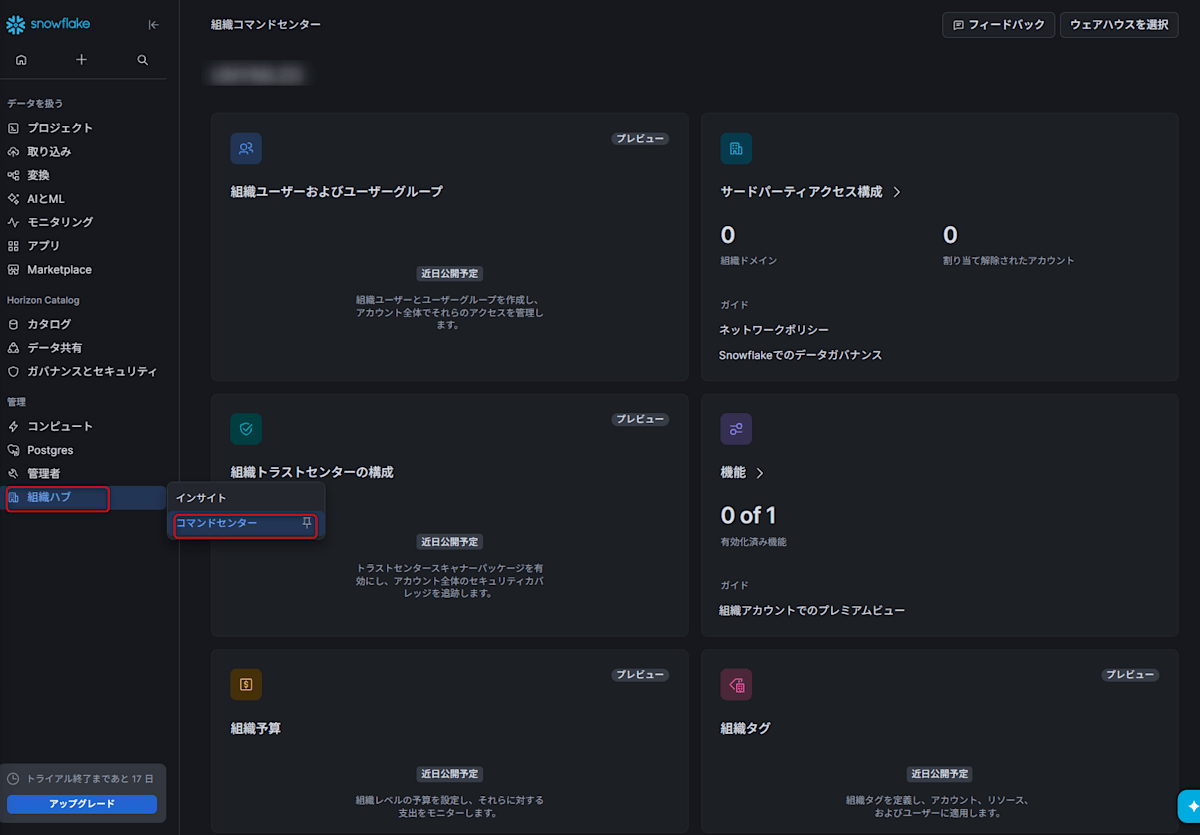
Sep 30, 2026: Organization Features and third-party access configuration in Organization Command Center are generally available
Two features in the "Command center" of Organization Hub are now generally available. Both Command Center screens require an organization account and are accessible only to users with the GLOBALORGADMIN role.
- Organization Features: Lets you see which features are enabled at the organization level. The main target is premium views for cross-account telemetry, which are enabled by default for organizations with a capacity contract. Contacting Snowflake Support is required to enable or disable them
- 3rd party access configuration: Classifies member accounts as internal / external and manages the default tenant type for new accounts and allowed email domains. Logins from domains not on the allow list may be detected as security violations in Trust Center. It can also be configured via SQL with
TENANT_TYPEinCREATE ACCOUNTandALTER ORGANIZATION, and the SQL can also be run from accounts with ORGADMIN enabled
For details, see below.
Sep 29, 2026: Response caching for Cortex AI Functions
Automatic response caching has been introduced for text calls of AI_COMPLETE. If the same call occurs multiple times within a single query, the cached result is returned without re-running inference.
Caching is applied on a best-effort basis within a single query and requires no configuration. Calls that hit the cache consume no tokens or credits, so cost and latency can be reduced for queries with many rows holding the same values.
For details, see below.
Sep 28, 2026: Inline Stored Procedures for hybrid tables are generally available
Inline Stored Procedures, which entered public preview in August 2026, are now generally available. The entire procedure body is pushed directly to the query processing layer and executed as a single atomic unit. Reduced per-statement overhead lowers latency for OLTP-style workloads on hybrid tables.
For details, see below.
Sep 24, 2026: Code Bundles in preview
Code Bundles is a mechanism for packaging non-SQL code and running it directly on Snowflake compute without wrapping it in a stored procedure. Two execution modes were added in preview this time.
- Specify
compute_type: warehouseto run a Python Code Bundle on a warehouse (in addition to the existing compute pool) - Specify
type: sparkto submit a Spark application (Scala / Java / Python) as a batch job. Existing Spark code runs on Snowflake via Snowpark Connect
Also, notebook scheduling on compute pools (formerly Notebook Projects) is now generally available.
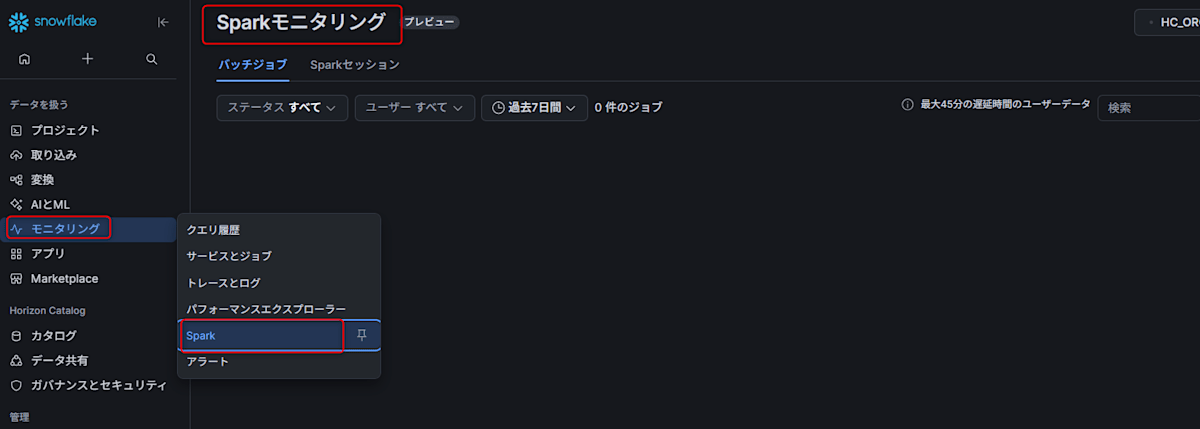
Additionally, the "Spark Monitoring UI" entered preview on September 30, 2026. It lets you monitor Snowpark Connect for Spark batch jobs and sessions in Snowsight. Runs via snowpark-submit and EXECUTE CODE BUNDLE appear under "Batch Jobs", and Snowpark Connect sessions appear under "Spark Sessions". Because it is being rolled out gradually, it may not yet be available in some accounts.
For details, see below.
Sep 24, 2026: Snowsight UI for Snowflake Data Clean Rooms is generally available
With the release of Clean Rooms API version 18.5, the Data Clean Rooms UI in Snowsight is now generally available. You can view, create, review, join, and manage collaborations within Snowsight.
The added screens are as follows.
- An Activity tab for checking the execution history of analysis templates
- A Get Started guide that walks through setting up a test collaboration
- A review and join screen for checking invitation contents before joining
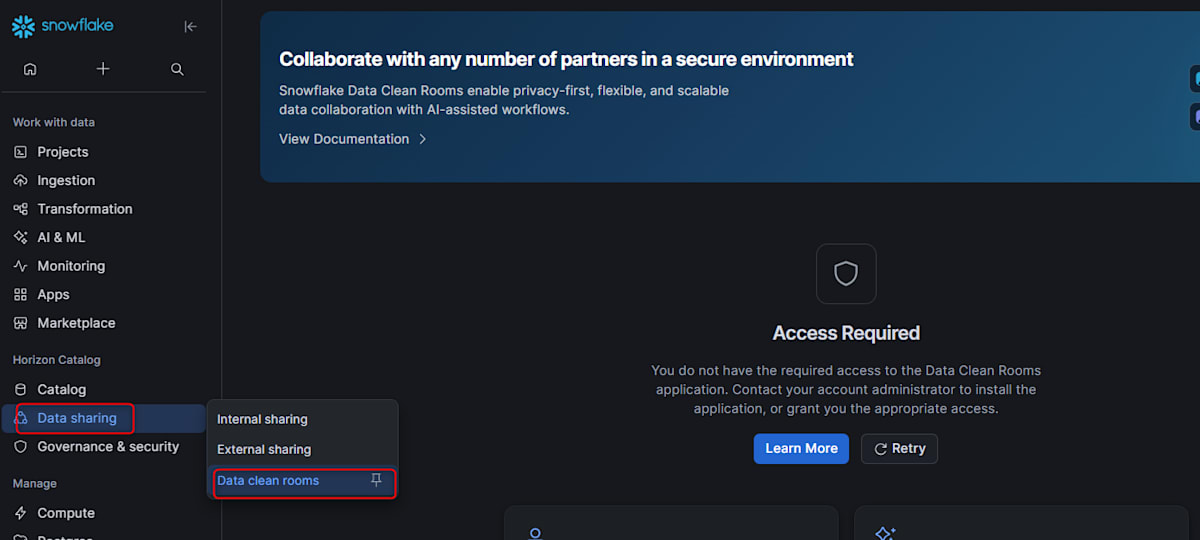
For details, see below.
Sep 24, 2026: CHECK constraints on hybrid tables are generally available
CHECK constraints are now supported on hybrid tables. Previously, only standard tables and Snowflake-managed Iceberg tables supported them.
CREATE HYBRID TABLE orders (
  order_id INTEGER PRIMARY KEY,
  quantity INTEGER CHECK (quantity > 0),
  list_price NUMBER(10,2),
  sale_price NUMBER(10,2),
  CONSTRAINT check_sale_price CHECK (sale_price <= list_price)
);
They are enforced on INSERT, UPDATE, MERGE, and CREATE HYBRID TABLE … AS SELECT, and a violating statement fails without writing any rows.
As limitations, they cannot be added afterward with ALTER TABLE ADD CONSTRAINT. Also, COPY INTO into a hybrid table with CHECK constraints is not possible, so use INSERT or CREATE HYBRID TABLE … AS SELECT.
For details, see below.
Sep 24, 2026: Monitoring Snowpipe Streaming with event tables
You can monitor Snowpipe Streaming ingestion status with event tables. Query row counts, server-side latency, errors, and channel activity with SQL, and build dashboards and alerts. Snowflake provides a default event table, so you don't need to create one.
It targets Snowpipe Streaming with the high-performance architecture. To use it, set LOG_EVENT_LEVEL to INFO on the schema of the target table. This is not needed if collection is already enabled by a setting inherited from a higher level. Querying requires privileges to reference the event table or its view.
There is no dedicated UI; you check via SQL against the event table. It is positioned as a complement to SDK client-side monitoring using Prometheus and logs.
For details, see below.
Sep 24, 2026: Snowpipe Streaming ingestion into partitioned Apache Iceberg tables is generally available
Ingestion from Snowpipe Streaming into partitioned Snowflake-managed Iceberg tables is now generally available. It supports both Iceberg v2 and v3 table formats and works with both Elastic Channels and Named Channels. New data is written according to the table's current partition spec.
Snowpipe Streaming Classic and externally managed Iceberg tables are not supported.
For details, see below.
Sep 24, 2026: Programmatic notifications for Trust Center findings in preview
You can automatically send Trust Center findings to external systems. When you configure a notification integration for a webhook or queue, findings that meet the specified severity threshold are delivered. Listed targets include PagerDuty, Slack, Microsoft Teams, Amazon SNS, Azure Event Grid, and Google Pub/Sub.
Calling SNOWFLAKE.TRUST_CENTER.SEND_TEST_NOTIFICATION_INTEGRATION lets you verify the integration works before receiving actual findings.
For details, see below.
Sep 24, 2026: VALUES clause supported in incremental refresh of dynamic tables (generally available)
The VALUES clause is now supported in incremental refresh of dynamic tables. Supported refresh modes are INCREMENTAL, AUTO, and ADAPTIVE. You can use VALUES in the FROM clause to supply a constant row set, such as a small lookup table joined with a base table.
For details, see below.
Sep 23, 2026: Non-deterministic aggregate functions supported in incremental refresh of dynamic tables (generally available)
APPROX_COUNT_DISTINCT, APPROX_PERCENTILE, and APPROX_TOP_K can now be used in incremental refresh of dynamic tables. Supported refresh modes are INCREMENTAL, AUTO, and ADAPTIVE.
In incremental refresh, these functions can be used only in the SELECT clause. They can be used both as aggregate functions with GROUP BY and as window functions, and results are approximate. ANY_VALUE is not covered.
For details, see below.
Sep 23, 2026: Container runtime for Streamlit apps in Snowflake Native Apps in preview
Native App providers can distribute Streamlit apps on the container runtime. The app runs as a Snowpark Container Services service on a compute pool created in the consumer account, rather than on a virtual warehouse.
You can install Python packages from external package indexes such as PyPI (requires an external access integration approved by the consumer). Newer versions of the Streamlit library are also supported. Queries against consumer data run with restricted caller's rights. When opening a container runtime Streamlit app, the warehouse selection prompt is no longer shown.
For details, see below.
Sep 23, 2026: Trust Center account posture report in preview
An "Account posture" section has been added to the Overview tab of Trust Center. It aggregates account-wide monitoring activity for the selected period and shows scan status, unresolved findings, and at-risk entities.
For the selected period, you can generate a PDF report summarizing scanner enablement status, configuration changes, and violation and detection activity.
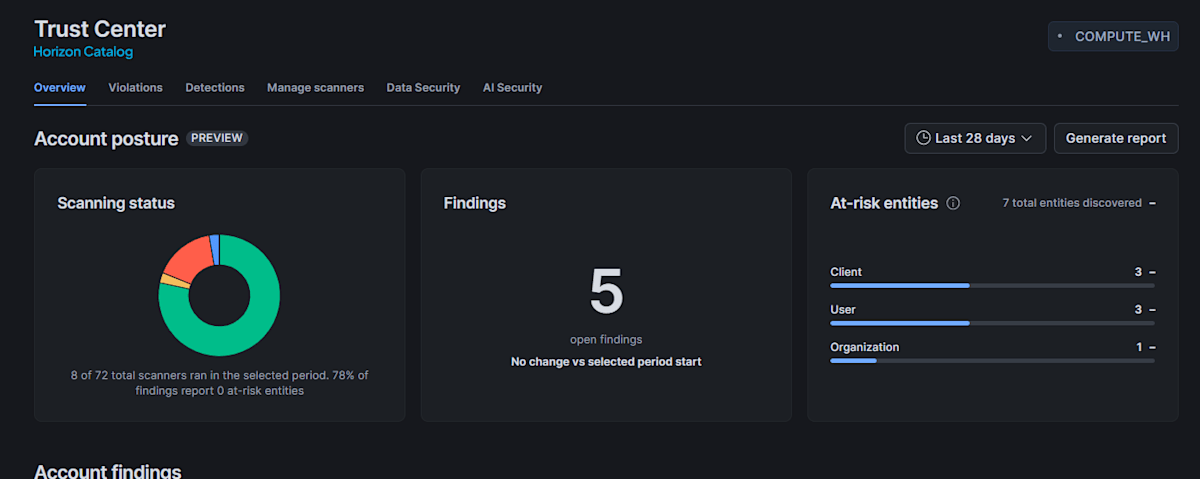
For details, see below.
Sep 22, 2026: Improved data freshness for some ORGANIZATION_USAGE history views
The normal data latency has been reduced for four of the premium views in the ORGANIZATION_USAGE schema. It was previously up to 3 hours, and is now under 15 minutes. The affected views are ACCESS_HISTORY, LOGIN_HISTORY, METERING_HISTORY, and QUERY_HISTORY.
For details, see below.
Sep 21, 2026: Cortex AI Function Evaluation and AI Function Optimization in public preview
Two features for measuring and optimizing the quality of custom AI Functions are now in public preview. Both can be configured directly in SQL or through the guided workflow in Cortex AI Function Studio.
- AI Function Evaluation (experiment type
AI_FUNCTION_EVALUATION): Uses a labeled dataset to measure output quality, cost, and token usage of AI Functions andAI_COMPLETEcalls. Supports rule-based metrics for classification,llm_judgefor free-form text, and custom metric UDFs - AI Function Optimization (experiment type
AI_FUNCTION_OPTIMIZATION): Automatically explores combinations of prompts and models and compares quality and estimated cost using the same dataset and metrics. The selected candidate can be materialized as a reusable AI Function withCREATE AI FUNCTION
For details, see below.
Sep 21, 2026: Cortex Agents Compact API in preview
The agent:compact endpoint summarizes a conversation, and you can pass its compact representation to subsequent agent:run requests. Compressing conversation history reduces token consumption and makes it easier to keep long conversations within the model's context window. It supports both inline transcripts and conversations stored in a Cortex Agent thread.
For details, see below.
Sep 21, 2026: Lineage retention through temporary tables and views is generally available
Data lineage through temporary tables and temporary views is retained even after they are dropped. When a temporary object serves as an intermediate step connecting an upstream source and a downstream table, object-level and column-level lineage are maintained. You can see it in both the Snowsight lineage graph and the GET_LINEAGE() function.
Enterprise Edition or higher is required.
For details, see below.
Sep 18, 2026: Database roles can now be included in backups
Database roles can be included in schema backups and database backups. Previously, backup creation failed if the backup scope included database roles, or objects whose OWNERSHIP was granted to database roles.
For details, see below.
Sep 18, 2026: Partition evolution for Apache Iceberg tables is generally available
Partition evolution is now generally available for Snowflake-managed Iceberg tables. After table creation, you can change the partition spec with ALTER ICEBERG TABLE … ADD | DROP | REPLACE PARTITION BY without rewriting existing data. New data written after the change uses the updated spec, and existing data remains as is. All partition transforms defined in Apache Iceberg spec version 2 are supported.
For details, see below.
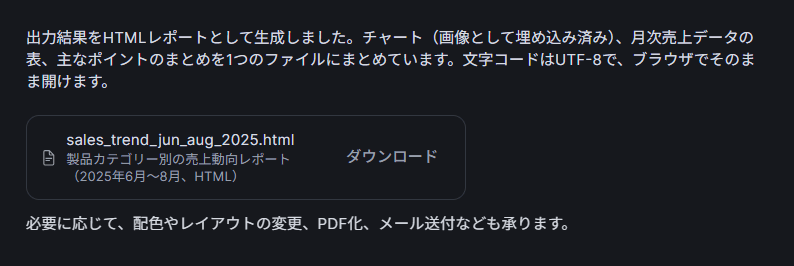
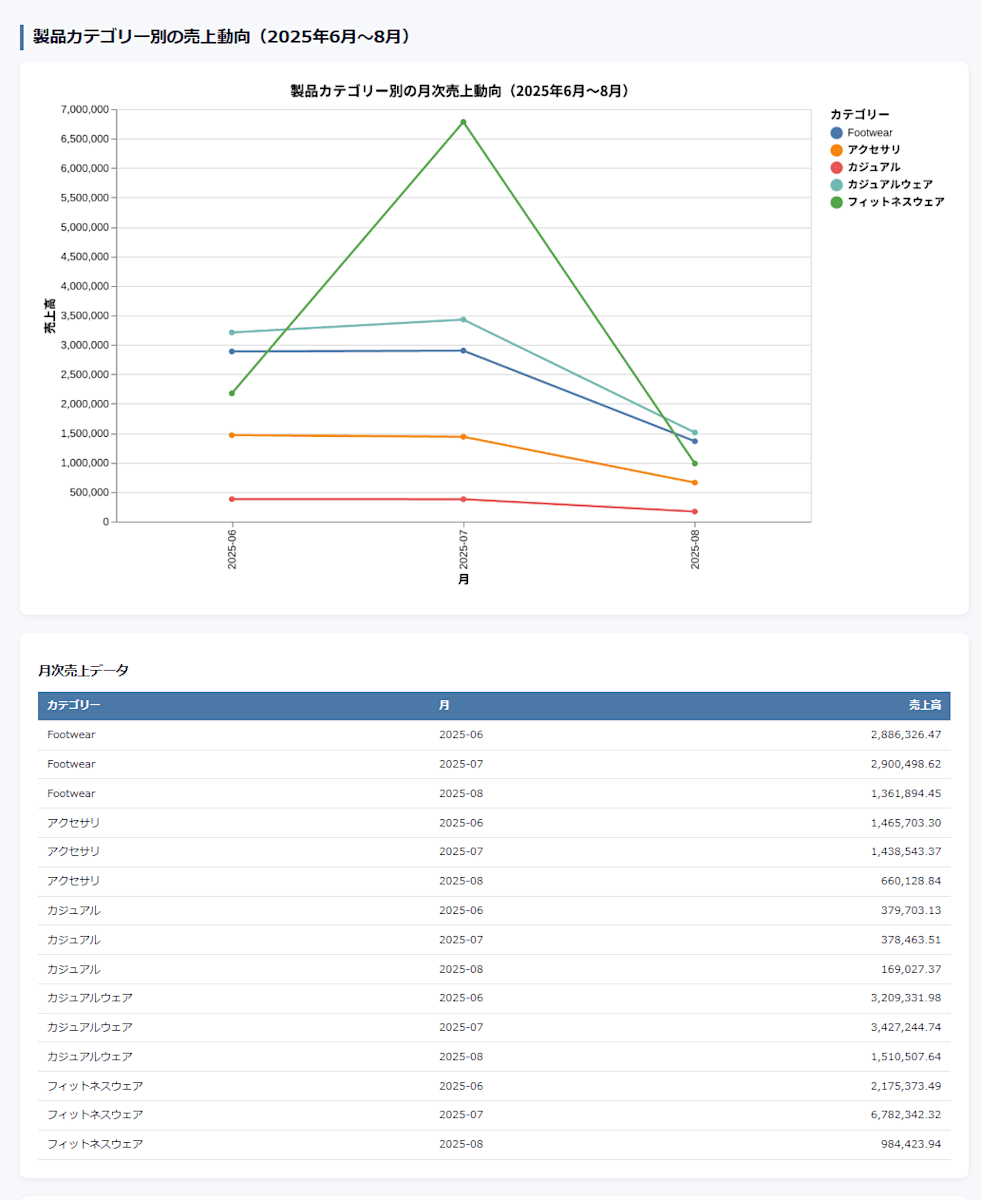
Sep 17, 2026: HTML generation in Snowflake CoWork in preview
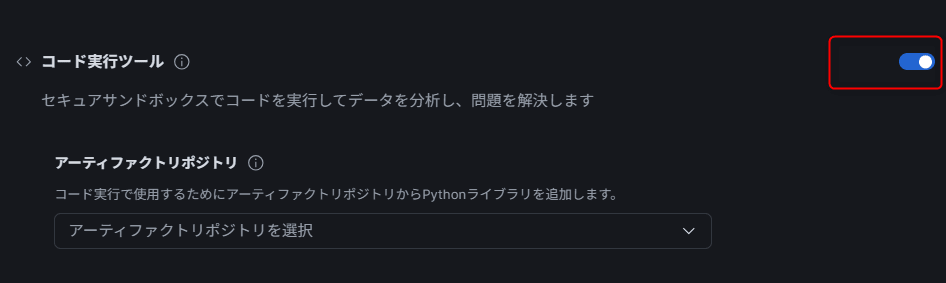
HTML generation has been added to the document generation feature of Snowflake CoWork. In the same way as PDF or PowerPoint generation, you can request an HTML file from analysis results. Generated files can be displayed inline within CoWork. The associated agent needs the Cortex Agent code execution tool.
The code execution tool must be enabled for generation
Converting to HTML
For details, see below.
Sep 17, 2026: Backup instance types for Snowpark Container Services are generally available
This feature, which entered public preview in July 2026, is now generally available. If you specify backup instance families on a compute pool, behavior changes when the primary instance type runs short of capacity. Instead of returning an insufficient capacity error, provisioning is retried using the backup families in the specified order.
ALTER COMPUTE POOL my_compute_pool SET BACKUP_INSTANCE_FAMILIES = ('GEN_X64_G2_8');
Once primary capacity recovers, provisioning of new nodes prefers the primary instance family again. The instance family actually in use can be checked with SHOW NODES IN COMPUTE POOL, and billing is based on the rate of the instance type actually used.
For details, see below.
Sep 16, 2026: Cortex Agents object enhancements are generally available
Four enhancements to Cortex Agents objects are now generally available.
- Temporary agents:
CREATE TEMPORARY AGENTcreates a session-scoped agent. Useful for testing and one-off workflows - Secure agents: Prevents roles that can call and modify an agent without enabling the owner role from retrieving the agent's specification via metadata
- COPY GRANTS:
CREATE OR REPLACE AGENT ... COPY GRANTScarries over explicit privileges other than OWNERSHIP when replacing an agent - Agents in a Personal Database: You can create and run agents in the
PUBLICschema of a user-specific Personal Database
For details, see below.
Sep 16, 2026: Weekly limits and user-name targeting for Per-user quotas are generally available
Two features were added to Per-user quotas, which became generally available in August 2026.
Weekly limits
In addition to the existing monthly / daily limits, you can set a weekly credit limit. Weeks follow the ISO week and reset at 00:00 UTC on Monday. Each cycle is independent, and a user who reaches any of the limits is blocked.
CALL my_quota!SET_PER_USER_LIMIT(500, 'WEEKLY');
Including / excluding by user name
In addition to tag-based scoping, you can include or exclude users by specifying user names directly. User name specification takes precedence over tag scope.
CALL my_quota!INCLUDE_USERS(['ALICE', 'BOB']);
CALL my_quota!EXCLUDE_USERS('USER', ['CAROL']);
For details, see below.
Sep 15, 2026: Cortex AI Gateway in preview
A control plane for governing model access from AI applications and third-party agents. One gateway object named SNOWFLAKE is provisioned per account. You can send inference to the gateway endpoint in OpenAI Chat Completions or Anthropic Messages API format.
- A per-gateway trace table tracks invoked models, duration, token counts, and errors
- An
AI_GATEWAY_USAGE_HISTORYview has been added to ACCOUNT_USAGE, recording gateway, user, model, and token consumption - Supports registration as a shared resource of a custom budget, and control through per-user quotas
Inference through the gateway also follows model access control, so privileges on the underlying model are required. The gateway's USAGE privilege is granted to PUBLIC by default.
For details, see below.
Sep 15, 2026: Predicting dynamic table refresh behavior with EXPLAIN CHANGES is generally available
The EXPLAIN CHANGES command lets you predict how a dynamic table will behave on a manual refresh or a refresh triggered by a DDL change, without actually executing the change. It returns the effective refresh action, including whether the table will be reinitialized, and gives the reason where applicable.
For details, see below.
Sep 15, 2026: Horizon Catalog Explorer UI in preview
The default UI for browsing objects in Snowsight is being replaced from Database Explorer with Horizon Catalog Explorer. You can navigate databases, schemas, and objects through a persistent navigation tree, breadcrumbs, and redesigned search results. Object details show descriptions, columns, tags, and contacts in a consistent layout, and you can preview data and check access rights without leaving the Explorer.
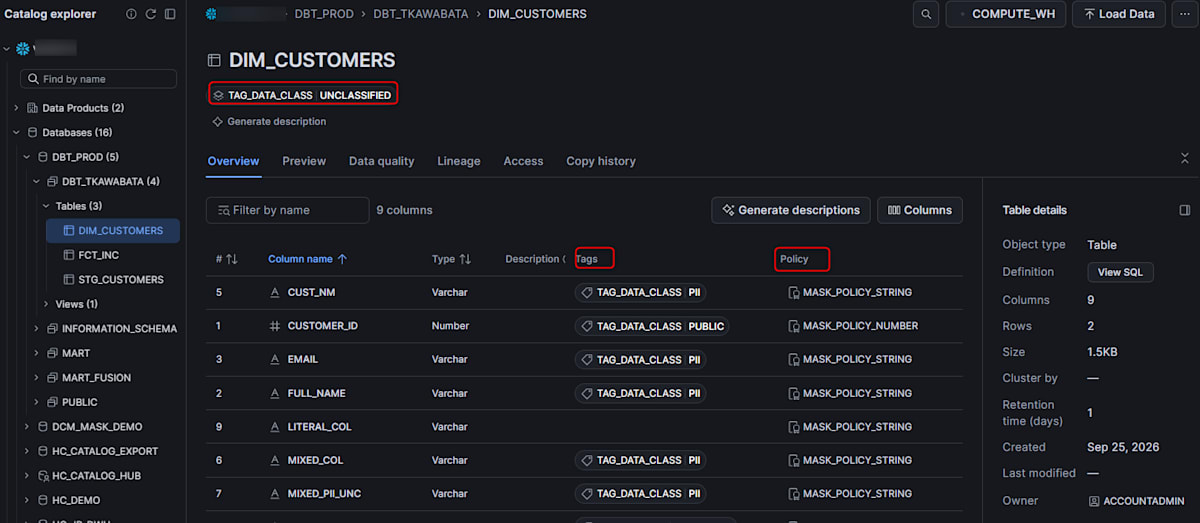
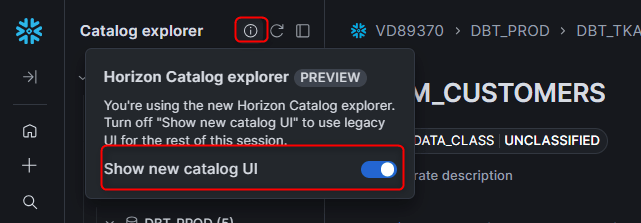
Access it from "Catalog » Explorer" in Snowsight. It is available in all AWS, Microsoft Azure, and Google Cloud regions, and you can return to the old UI by turning off "Show new catalog UI" from the info icon next to "Horizon Catalog".
For details, see below.
Sep 15, 2026: Embedding Streamlit in Snowflake apps in external pages is generally available
You can embed container runtime Streamlit in Snowflake apps in external web pages, such as customer portals and internal dashboards, using the <iframe> tag. There are two viewer models.
- For viewers without a Snowflake account: view data in the context of a service user
- For Snowflake users: view data according to their own privileges
An account administrator registers allowed domains, and the backend issues a short-lived embed URL through the REST API generate-embed-url endpoint. Issuing an embed URL requires a new EMBED privilege in addition to the USAGE privilege on the Streamlit app. EMBED is granted separately from USAGE with GRANT EMBED ON STREAMLIT and is not included in OWNERSHIP.
It is available in all commercial regions; government and China regions are not supported.
For details, see below.
Sep 15, 2026: Snowpipe Streaming Elastic Channels are generally available
Elastic Channels provide one implicit, server-side-scaled ingestion path per pipe. Multiple producers can stream directly into Snowflake tables and Snowflake-managed Iceberg tables without managing channel names, lifecycle, ordering, or offset tokens.
The GA version includes the following. Snowpipe Streaming SDK 1.8.0 or later is required.
- At-least-once ingestion with a durable ack per append
- Fire-and-forget and waitable append methods in the Java / Python / Node.js SDKs
- Success / error callbacks that reconcile results using caller-specified append tokens
If you need ordering guarantees, exactly-once, or integration with source offsets, using Named Channels is recommended.
For details, see below.
Sep 14, 2026: Multimodal AI_SUMMARIZE in public preview
AI_SUMMARIZE can now summarize multimodal content such as images and documents, in addition to text, directly within Snowflake. It identifies and summarizes key themes, facts, and relationships from diagrams, workflow charts, reports, papers, contracts, and more.
You can generate summaries with a single SQL function, without building custom prompts or document processing pipelines. A cited use case is applying it to a table with file references to summarize a document library in bulk.
For details, see below.
Sep 14, 2026: Catalog-linked databases support writes to nested namespaces
Catalog-linked databases now support creating tables and writing under nested namespaces. This requires a catalog integration for a catalog that supports nested namespaces.
To create nested namespaces, set NAMESPACE_MODE to FLATTEN_NESTED_NAMESPACE. Then run CREATE SCHEMA with a flat name using the delimiter specified by NAMESPACE_FLATTEN_DELIMITER. The parent namespace must already exist. An is_nested column has also been added to the SHOW SCHEMAS output.
For details, see below.
Sep 14, 2026: Zero-copy support for all table formats in Interactive Warehouses is generally available
You can query standard tables, dynamic tables, Iceberg tables, and hybrid tables directly from an interactive warehouse without copying or converting them to interactive tables. You can use the low-latency, high-concurrency performance characteristics of interactive warehouses on existing data.
For details, see below.
Sep 14, 2026: User-managed Restricted Session Scope in CoCo is generally available
User-managed Restricted Session Scope (RSS) is now generally available in CoCo CLI, CoCo Desktop, and CoCo in Snowsight. You can restrict an individual CoCo chat to read-only, or to only selected roles.
User-managed RSS can only narrow the privileges of the user's roles and the scope of any admin-managed RSS applied to the session; it cannot widen them. For admin-managed RSS, see "Sep 3, 2026: Restricted Session Scope for agents is generally available" below.
For details, see below.
Sep 11, 2026: Automations in Snowflake CoWork are generally available
Automations, which entered public preview in August 2026, are now generally available. It turns a one-off report into a recurring report: CoWork re-runs the question against the latest data on the chosen schedule and emails a summary and key metrics.
There are two ways to set it up: conversationally by chatting with CoWork, or from the Automations tab. Listing, rescheduling, pausing, resuming, and deleting can be done from either.
For details, see below.
Sep 8–11, 2026: Second-generation Openflow deployments and runtimes are generally available
Second-generation (gen 2) Openflow deployments and runtimes, which entered public preview in August 2026, became generally available on AWS and Azure on September 8. They also became available on Google Cloud on September 11.
You can manage gen 2 deployments / runtimes with CREATE, ALTER, DROP, SHOW, and DESCRIBE commands (via SQL or the Openflow UI). Standard Snowflake RBAC applies at the schema level. Gen 2 connector configuration remains in public preview.
Also, on September 9, creation of new first-generation (gen 1) Openflow deployments (both BYOC and Snowflake-hosted) ended. New deployments are created as gen 2. Existing gen 1 deployments continue to work, and you can still create new gen 1 runtimes on existing gen 1 deployments. The gen 1 to gen 2 migration was announced as generally available on October 1, 2026.
For details, see below.
Sep 10, 2026: Slim CI and defer to production in dbt Projects on Snowflake are generally available
In dbt Projects on Snowflake, Slim CI, defer to production, recovery from failed runs, and concurrent runs of the same dbt project object are now generally available.
- Slim CI: Pulls in dbt artifacts from the most recent successful production run and validates only changed resources and their downstream using
--stateand--select state:modified+ - Defer to production: In isolated dev and CI environments, resolves unbuilt upstream references to existing production relations, so unchanged models are not rebuilt
- Concurrent runs: The same deployed dbt project object can run concurrently at different frequencies. The
DEFAULT_WRITEBACKor per-runWRITEBACKsetting prevents simultaneous writes to shared target and log paths. You can also specify different--target-pathand--log-pathfor each run - Recovery from failures: Reuses artifacts of the failed run and re-runs errored resources and their downstream with selectors such as
result:error+
As a prerequisite, the dbt project object must use a single mutable live version (2026_06 behavior change bundle). Existing versioned objects can be migrated with SYSTEM$MIGRATE_DBT_PROJECT.
For details, see below.
Sep 10, 2026: External secret providers in preview
Snowflake reads secrets already stored in AWS Secrets Manager, Azure Key Vault, and Google Cloud Secret Manager at the time a query needs them. You no longer need to duplicate API keys or DB passwords as Snowflake secrets.
Snowflake authenticates to the secret manager using workload identity federation, so no cloud access keys or service account keys are stored in Snowflake. Create a security integration with TYPE = API_AUTHENTICATION and AUTH_TYPE = WORKLOAD_IDENTITY_FEDERATION, and configure the cloud side to trust that identity.
Note that a role with the USAGE privilege on the integration can read all secrets reachable by that integration's cloud identity. Per-secret privileges are not provided, so you need to narrow each integration's cloud-side permissions to the secrets that the Snowflake role should read.
For details, see below.
Sep 10, 2026: Horizon Catalog Iceberg Scan Plan API in public preview
The Horizon Catalog Iceberg Scan Plan API is now in public preview, allowing data protection policies to be enforced when external query engines read Iceberg tables.
For details, see below.
Sep 10, 2026: Inherited grants and container-level MANAGE GRANTS are generally available
- Inherited grants: Run a
GRANT INHERITEDstatement once on anACCOUNT,DATABASE, orSCHEMAcontainer. The privilege applies to all current and future objects of the specified object type in that container - Container-level MANAGE GRANTS: Lets you delegate privilege management for a specific database or schema to a specific role without granting account-wide management privileges
Both features require a per-account opt-in.
ALTER ACCOUNT SET FEATURE_RBAC_INHERITED_GRANTS = 'ENABLED';
For details, see below.
Sep 8, 2026: Online addition and removal of hybrid table constraints is generally available
You can add and drop UNIQUE and FOREIGN KEY constraints on existing hybrid tables with ALTER TABLE. Previously they could only be defined at table creation, and adding them later required recreating the table.
ALTER TABLE player ADD CONSTRAINT fk_player_team FOREIGN KEY (team_id) REFERENCES team (team_id);
The table remains available for SELECT and DML while the constraint's index is built in the background, and build progress can be tracked with SHOW INDEXES. If existing rows violate the constraint, it gets the BUILD VALIDATION FAILURE status, but the constraint is still enforced for writes of new data.
For details, see below.
Sep 8, 2026: Gateway shadow traffic in preview
You can use shadow traffic on Snowpark Container Services gateways. All production requests are sent to the primary service endpoint, while a set percentage of them is mirrored to one or more shadow endpoints. Responses from shadow endpoints are not returned to the client, so this can be used to evaluate alternative services with production traffic patterns.
We tested A/B testing, which became generally available in August 2026, in the article below.
For details, see below.
Sep 8, 2026: Trust Center scanner package enablement moves to a "secure by default" approach
This applies to accounts with Business Critical Edition or Virtual Private Snowflake (VPS) and a capacity contract. When AI feature usage is detected in an eligible account, Snowflake automatically enables the Trust Center AI Security scanner package.
Automatic enablement happens only if the package has never been explicitly disabled. Automatically enabled packages incur serverless compute costs just like manually enabled ones. The package can be disabled at any time, and Snowflake will not re-enable it after it is disabled.
For details, see below.
Sep 4, 2026: Prompt injection protection available in AWS_EU, AWS_JP, and AWS_APJ
Cortex AI Guardrails prompt injection protection is now available even when CORTEX_ENABLED_CROSS_REGION is set to AWS_EU, AWS_JP, or AWS_APJ. Previously, one of ANY_REGION, AWS_US, or AWS_GLOBAL was required.
For details, see below.
Sep 4, 2026: Migration from SAS to Snowflake in preview
Snowflake AIM Agent for Data Warehouses now supports migrating SAS workloads. It includes AI-assisted assessment of SAS codebases, AI-based code conversion from SAS programs to Snowflake SQL, and loading SAS dataset files (.sas7bdat) into Snowflake tables.
For details, see below.
Sep 3, 2026: External lineage is generally available
You can bring data sources and destinations outside Snowflake into Snowflake's native lineage. It conforms to the OpenLineage standard. Send OpenLineage events to the REST endpoint /api/v2/lineage/external-lineage from tools with OpenLineage integration such as dbt and Apache Airflow, or manually.
Lineage between external systems can also be recorded, and column-level lineage can be ingested via the columnLineage facet. In the Snowsight lineage graph, external objects appear as external nodes, and in SQL they can be referenced with the GET_LINEAGE() function.
Enterprise Edition or higher is required. Sending requires the INGEST LINEAGE privilege on the account, and deletion requires the DELETE LINEAGE privilege.
For details, see below.
Sep 3, 2026: Restricted Session Scope for agents is generally available
Restricted Session Scope (RSS) is now generally available. RSS is a privilege ceiling that limits the operations an agent can perform on behalf of a user, and it is evaluated as an intersection with RBAC. It never grants privileges that the user's role does not have.
Set AGENT_RESTRICTED_SESSION_SCOPE in a session policy and apply it by attaching the policy to an account or specific users. This property takes effect only while an agent is active. A scope can be specified in three ways: referencing a Snowflake-defined scope, creating a restricted session scope object, or writing YAML inline in the session policy.
For details, see below.
Sep 2, 2026: Cortex Agents and streams support data lineage
Cortex Agents
Lineage shows the data an agent can reach through the tools declared in the Cortex Agent specification. Semantic views referenced by Cortex Analyst tools and Cortex Search services referenced by Cortex Search tools appear upstream of the agent. Lineage is recorded when an agent is created or a new version is committed, so agents whose last version was committed before this change will not appear until a new version is committed.
Streams
Streams appear in the data lineage graph. In the object-level graph, a stream appears as a node. In the column-level graph, it appears not as a node but as an edge property (streamName) on the source-to-target relationship. Enterprise Edition or higher is required.
For details, see below.
Sep 2, 2026: Core flow of Openflow Connector for Jira Cloud is generally available
The Atlassian Jira Cloud (Core) flow of Openflow Connector for Jira Cloud is now generally available. It ingests Jira Cloud issues, projects, users, and related data into dedicated Snowflake tables with explicit schemas. It supports optional deletion tracking and parallel ingestion across projects. The Atlassian Jira Cloud (Agile) flow remains in public preview.
For details, see below.
Sep 1, 2026: Snowflake App Runtime is generally available
You can build and deploy Node.js web apps (mainly Next.js) directly on Snowflake using Cortex Code or the Snowflake CLI. Describe the app in natural language, test it locally, and deploy it to an SSO-protected URL. Python support is said to be planned.
The GA version includes the following.
- A single
app.ymlthat consolidates deployment and remote build settings - Snowflake query execution as a service or signed-in user
- SQL commands for Application Services and artifact repositories
It is available in commercial regions of AWS, Microsoft Azure, and Google Cloud. It is not available in government regions or trial accounts.
Also on the same day, sandbox tools (code_execution, code_toolset_all) can now be added to Cortex Agents created by Snowflake Native Apps. Restricted caller's rights apply across the entire sandbox lifecycle, and it never runs with the app's owner's rights.
For details, see below.
Behavior Change Log
2026_07 bundle now available *Disabled by default
In release 10.32 (September 5–9, 2026), the 2026_07 bundle became available. If you want to check the behavior in advance, you can manually enable the bundle and test it.
This bundle is scheduled to be enabled by default in a later release.
2026_06 bundle enabled by default
In release 10.32 (September 5–9, 2026), the 2026_06 bundle was enabled by default.
This bundle is scheduled to be generally enabled in a later release.
Latest information on the Modern Data Stack in general
We also regularly post blogs summarizing the latest information on the Modern Data Stack in general, including Snowflake. Please check them out too!