1PasswordのSSH Agentを使ってLinuxサーバーにログインしようとしたらToo many authentication failuresとエラーが出た

こんばんは、情報システム室の夏目です。
昨今のセキュリティ界隈の様々な情報を見て、個人的に使っているVPSなどのLinuxサーバーでソフトウェアのアップデートをしようと思いました。
これらのサーバーでSSHの公開鍵認証に使う秘密鍵を1Passwordで管理しています。
sshコマンドでは1PasswordのSSH Agentを使うことで、ローカルの端末に秘密鍵を保存しないという構成にしています。
アップデートのためにsshでログインしようとしたら Too many authentication failures とエラーがでました。
今回はこれにどう対処したかを書いていきます。
1Password SSH Agent
1Passwordに保存済みのSSHキーを利用してGitやSSHを使うことができるようにしてくれるものです。
これを使うことで秘密鍵をローカル端末に平文で保存しないでGitやSSHを使うことができます。
使い方としては1PasswordアプリでSSH Agentを有効化した後で ~/.ssh/config に次のように書きます。
 Host vps-ubuntu
   User ubuntu
   Hostname ubuntu.vps.example.app
-  IdentityFile ~/.ssh/vps-ubuntu.pem
+  IdentityAgent "~/Library/Group Containers/2BUA8C4S2C.com.1password/t/agent.sock"
今まで IdentityFile で秘密鍵のパスを渡していたのを、 IdentityAgent でSSH Agentのパスを渡すように変更します。
(ここに記載しているのはMacの場合のパスです)
あとは ~/.ssh/vps-ubuntu.pem に置いている秘密鍵を1Passwordに登録するだけでです。
そうすれば今までとほぼ同様にsshやgitが使えます。
使用する際に1Passwordアプリから生体認証やパスワードを求められますが。
(逆にそこを通さないと秘密鍵などを見ることはできないとも言えます)
なにが起きたのか
$ ssh vps-ubuntu
Received disconnect from UNKNOWN port 65535:2: Too many authentication failures
Disconnected from UNKNOWN port 65535
以前は問題なくsshで入れていたはずが、今回はエラーで入れませんでした。
Too many authentication failures というエラーは、認証の試行回数がサーバー側で設定した上限に到達したというエラーです。
デフォルトでは6回が上限になっていることが多いと思います。
-v オプションをつけて、何がおきているのかを見てみます。
 $ ssh -v vps-ubuntu
 debug1: OpenSSH_10.3p1, LibreSSL 3.3.6
 debug1: Reading configuration data /Users/natsume.yuta/.ssh/config
 debug1: /Users/natsume.yuta/.ssh/config line 17: Applying options for vps-ubuntu
 debug1: Reading configuration data /etc/ssh/ssh_config
 debug1: Reading configuration data /etc/ssh/ssh_config.d/100-macos.conf
 debug1: /etc/ssh/ssh_config.d/100-macos.conf line 1: Applying options for *
 debug1: Reading configuration data /etc/ssh/crypto.conf
 debug1: Authenticator provider $SSH_SK_PROVIDER did not resolve; disabling
 debug1: Executing proxy command: exec /opt/homebrew/bin/cloudflared access ssh --hostname ubuntu.vps.example.app
 debug1: no pubkey loaded from /Users/natsume.yuta/.ssh/id_rsa
 debug1: identity file /Users/natsume.yuta/.ssh/id_rsa type -1
 debug1: no identity pubkey loaded from /Users/natsume.yuta/.ssh/id_rsa
 debug1: no pubkey loaded from /Users/natsume.yuta/.ssh/id_ecdsa
 debug1: identity file /Users/natsume.yuta/.ssh/id_ecdsa type -1
 debug1: no identity pubkey loaded from /Users/natsume.yuta/.ssh/id_ecdsa
 debug1: no pubkey loaded from /Users/natsume.yuta/.ssh/id_ecdsa_sk
 debug1: identity file /Users/natsume.yuta/.ssh/id_ecdsa_sk type -1
 debug1: no identity pubkey loaded from /Users/natsume.yuta/.ssh/id_ecdsa_sk
 debug1: no pubkey loaded from /Users/natsume.yuta/.ssh/id_ed25519
 debug1: identity file /Users/natsume.yuta/.ssh/id_ed25519 type -1
 debug1: no identity pubkey loaded from /Users/natsume.yuta/.ssh/id_ed25519
 debug1: no pubkey loaded from /Users/natsume.yuta/.ssh/id_ed25519_sk
 debug1: identity file /Users/natsume.yuta/.ssh/id_ed25519_sk type -1
 debug1: no identity pubkey loaded from /Users/natsume.yuta/.ssh/id_ed25519_sk
 debug1: Local version string SSH-2.0-OpenSSH_10.3
 debug1: Remote protocol version 2.0, remote software version OpenSSH_9.6p1 Ubuntu-3ubuntu13.20
 debug1: compat_banner: match: OpenSSH_9.6p1 Ubuntu-3ubuntu13.20 pat OpenSSH* compat 0x04000000
 debug1: Authenticating to ubuntu.vps.example.app:22 as 'ubuntu'
 debug1: load_hostkeys: fopen /Users/natsume.yuta/.ssh/known_hosts2: No such file or directory
 debug1: load_hostkeys: fopen /etc/ssh/ssh_known_hosts: No such file or directory
 debug1: load_hostkeys: fopen /etc/ssh/ssh_known_hosts2: No such file or directory
 debug1: SSH2_MSG_KEXINIT sent
 debug1: SSH2_MSG_KEXINIT received
 debug1: kex: algorithm: ecdh-sha2-nistp256
 debug1: kex: host key algorithm: ssh-ed25519
 debug1: kex: server->client cipher: aes128-gcm@openssh.com MAC: <implicit> compression: none
 debug1: kex: client->server cipher: aes128-gcm@openssh.com MAC: <implicit> compression: none
 debug1: expecting SSH2_MSG_KEX_ECDH_REPLY
 debug1: SSH2_MSG_KEX_ECDH_REPLY received
 debug1: Server host key: ssh-ed25519 SHA256:qB9GS34XcFDuMs6luOQv8auWINAtpOBerlC6Rj+BA2I
 debug1: load_hostkeys: fopen /Users/natsume.yuta/.ssh/known_hosts2: No such file or directory
 debug1: load_hostkeys: fopen /etc/ssh/ssh_known_hosts: No such file or directory
 debug1: load_hostkeys: fopen /etc/ssh/ssh_known_hosts2: No such file or directory
 debug1: Host 'ubuntu.vps.example.app' is known and matches the ED25519 host key.
 debug1: Found key in /Users/natsume.yuta/.ssh/known_hosts:5
 debug1: ssh_packet_send2_wrapped: resetting send seqnr 3
 debug1: rekey out after 4294967296 blocks
 debug1: SSH2_MSG_NEWKEYS sent
 debug1: Sending SSH2_MSG_EXT_INFO
 debug1: expecting SSH2_MSG_NEWKEYS
 debug1: ssh_packet_read_poll2: resetting read seqnr 3
 debug1: SSH2_MSG_NEWKEYS received
 debug1: rekey in after 4294967296 blocks
 debug1: SSH2_MSG_EXT_INFO received
 debug1: kex_ext_info_client_parse: server-sig-algs=<ssh-ed25519,ecdsa-sha2-nistp256,ecdsa-sha2-nistp384,ecdsa-sha2-nistp521,sk-ssh-ed25519@openssh.com,sk-ecdsa-sha2-nistp256@openssh.com,rsa-sha2-512,rsa-sha2-256>
 debug1: kex_ext_info_check_ver: publickey-hostbound@openssh.com=<0>
 debug1: kex_ext_info_check_ver: ping@openssh.com=<0>
 debug1: SSH2_MSG_SERVICE_ACCEPT received
 debug1: SSH2_MSG_EXT_INFO received
 debug1: kex_ext_info_client_parse: server-sig-algs=<ssh-ed25519,ecdsa-sha2-nistp256,ecdsa-sha2-nistp384,ecdsa-sha2-nistp521,sk-ssh-ed25519@openssh.com,sk-ecdsa-sha2-nistp256@openssh.com,rsa-sha2-512,rsa-sha2-256>
 debug1: Authentications that can continue: publickey
 debug1: Next authentication method: publickey
 debug1: get_agent_identities: agent returned 7 keys
+debug1: Will attempt key: aws-ubuntu ED25519 SHA256:ZltJqgas2AomdS4AMfpFRSe84rAgrTB2t3jVtAcwbj0 agent
+debug1: Will attempt key: my-home ED25519 SHA256:MNkWIVb+gafN82qd/2qlQHdRUkS1F2a3QZ80jEcEbtc agent
+debug1: Will attempt key: conoha ED25519 SHA256:9BoUPcHYWMLgfI8o2NZ33Kuzwu7pwGsJAfV78c1Twp5 agent
+debug1: Will attempt key: gitlab ED25519 SHA256:PzOLOV+LyCXtnF6Zy29FY7kCoyrWZDhAz50xQgYpSD5 agent
+debug1: Will attempt key: home-router ED25519 SHA256:K1xp34utaLt2y5OOzmHo6kEtNts5gANl3wzPETRkbKE agent
+debug1: Will attempt key: GitHub ED25519 SHA256:qgBjGmG044Ulin6R2yzhpMX3b0dAL6j9ZGYdNiG/awY agent
+debug1: Will attempt key: vps-ubuntu-001 RSA SHA256:y0A77ZgnQJZmkTghr5x04yLwR8QBbM1quXyqRj706wC agent
 debug1: Will attempt key: /Users/natsume.yuta/.ssh/id_rsa
 debug1: Will attempt key: /Users/natsume.yuta/.ssh/id_ecdsa
 debug1: Will attempt key: /Users/natsume.yuta/.ssh/id_ecdsa_sk
 debug1: Will attempt key: /Users/natsume.yuta/.ssh/id_ed25519
 debug1: Will attempt key: /Users/natsume.yuta/.ssh/id_ed25519_sk
+debug1: Offering public key: aws-ubuntu ED25519 SHA256:ZltJqgas2AomdS4AMfpFRSe84rAgrTB2t3jVtAcwbj0 agent
 debug1: Authentications that can continue: publickey
+debug1: Offering public key: my-home ED25519 SHA256:MNkWIVb+gafN82qd/2qlQHdRUkS1F2a3QZ80jEcEbtc agent
 debug1: Authentications that can continue: publickey
+debug1: Offering public key: conoha ED25519 SHA256:9BoUPcHYWMLgfI8o2NZ33Kuzwu7pwGsJAfV78c1Twp5 agent
 debug1: Authentications that can continue: publickey
+debug1: Offering public key: gitlab ED25519 SHA256:PzOLOV+LyCXtnF6Zy29FY7kCoyrWZDhAz50xQgYpSD5 agent
 debug1: Authentications that can continue: publickey
+debug1: Offering public key: home-router ED25519 SHA256:K1xp34utaLt2y5OOzmHo6kEtNts5gANl3wzPETRkbKE agent
 debug1: Authentications that can continue: publickey
+debug1: Offering public key: GitHub ED25519 SHA256:qgBjGmG044Ulin6R2yzhpMX3b0dAL6j9ZGYdNiG/awY agent
 Received disconnect from UNKNOWN port 65535:2: Too many authentication failures
 Disconnected from UNKNOWN port 65535
7行連続でハイライトした部分と1行空けながら6行ハイライトした部分が重要です。
7行連続した部分で1Passwordに保存した秘密鍵7つを試すと宣言しています。
1行空けながら6行ハイライトした部分で認証を試行して、6回試して試行回数の上限に引っかかったという状況です。
対処法
~/.ssh/config を次のように変更します。
 Host vps-ubuntu
   User ubuntu
   Hostname ubuntu.vps.example.app
   IdentityAgent "~/Library/Group Containers/2BUA8C4S2C.com.1password/t/agent.sock"
+  IdentityFile ~/.ssh/vps-ubuntu.pem.pub
+  IdentitiesOnly yes
IdentityFile で公開鍵へのパスを指定し、 IdentitiesOnly を yes にしています。
IdentitiesOnly はデフォルト値が no で、このときにはSSH Agent (1Password) に登録されている他の鍵も認証に使用しようとします。
何度も認証を試して、試行回数の上限に引っかかってしまいました。
逆に yes と設定することで、明示的に指定した鍵のみを使用するようになります。
そして IdentityFile に公開鍵へのパスを書くことで、使用する鍵を明示的にしています。
これにより公開鍵に対応する秘密鍵でのみ認証を試行するので、認証試行回数の上限にひっかからないようになります。
試してみる
上記設定にした上で試してみます
 $ ssh -v vps-ubuntu
 debug1: OpenSSH_10.3p1, LibreSSL 3.3.6
 debug1: Reading configuration data /Users/natsume.yuta/.ssh/config
 debug1: /Users/natsume.yuta/.ssh/config line 17: Applying options for vps-ubuntu
 debug1: Reading configuration data /etc/ssh/ssh_config
 debug1: Reading configuration data /etc/ssh/ssh_config.d/100-macos.conf
 debug1: /etc/ssh/ssh_config.d/100-macos.conf line 1: Applying options for *
 debug1: Reading configuration data /etc/ssh/crypto.conf
 debug1: Authenticator provider $SSH_SK_PROVIDER did not resolve; disabling
 debug1: Executing proxy command: exec /opt/homebrew/bin/cloudflared access ssh --hostname ubuntu.vps.example.app
 debug1: loaded pubkey from /Users/natsume.yuta/.ssh/vps-ubuntu-001.pem.pub: RSA SHA256:y0A77ZgnQJZmkTghr5x04yLwR8QBbM1quXyqRj706wC
 debug1: identity file /Users/natsume.yuta/.ssh/vps-ubuntu-001.pem.pub type 0
 debug1: no identity pubkey loaded from /Users/natsume.yuta/.ssh/vps-ubuntu-001.pem.pub
 debug1: Local version string SSH-2.0-OpenSSH_10.3
 debug1: Remote protocol version 2.0, remote software version OpenSSH_9.6p1 Ubuntu-3ubuntu13.20
 debug1: compat_banner: match: OpenSSH_9.6p1 Ubuntu-3ubuntu13.20 pat OpenSSH* compat 0x04000000
 debug1: Authenticating to ubuntu.vps.example.app:22 as 'ubuntu'
 debug1: load_hostkeys: fopen /Users/natsume.yuta/.ssh/known_hosts2: No such file or directory
 debug1: load_hostkeys: fopen /etc/ssh/ssh_known_hosts: No such file or directory
 debug1: load_hostkeys: fopen /etc/ssh/ssh_known_hosts2: No such file or directory
 debug1: SSH2_MSG_KEXINIT sent
 debug1: SSH2_MSG_KEXINIT received
 debug1: kex: algorithm: ecdh-sha2-nistp256
 debug1: kex: host key algorithm: ssh-ed25519
 debug1: kex: server->client cipher: aes128-gcm@openssh.com MAC: <implicit> compression: none
 debug1: kex: client->server cipher: aes128-gcm@openssh.com MAC: <implicit> compression: none
 debug1: expecting SSH2_MSG_KEX_ECDH_REPLY
 debug1: SSH2_MSG_KEX_ECDH_REPLY received
 debug1: Server host key: ssh-ed25519 SHA256:qB9GS34XcFDuMs6luOQv8auWINAtpOBerlC6Rj+BA2I
 debug1: load_hostkeys: fopen /Users/natsume.yuta/.ssh/known_hosts2: No such file or directory
 debug1: load_hostkeys: fopen /etc/ssh/ssh_known_hosts: No such file or directory
 debug1: load_hostkeys: fopen /etc/ssh/ssh_known_hosts2: No such file or directory
 debug1: Host 'ubuntu.vps.example.app' is known and matches the ED25519 host key.
 debug1: Found key in /Users/natsume.yuta/.ssh/known_hosts:5
 debug1: ssh_packet_send2_wrapped: resetting send seqnr 3
 debug1: rekey out after 4294967296 blocks
 debug1: SSH2_MSG_NEWKEYS sent
 debug1: Sending SSH2_MSG_EXT_INFO
 debug1: expecting SSH2_MSG_NEWKEYS
 debug1: ssh_packet_read_poll2: resetting read seqnr 3
 debug1: SSH2_MSG_NEWKEYS received
 debug1: rekey in after 4294967296 blocks
 debug1: SSH2_MSG_EXT_INFO received
 debug1: kex_ext_info_client_parse: server-sig-algs=<ssh-ed25519,ecdsa-sha2-nistp256,ecdsa-sha2-nistp384,ecdsa-sha2-nistp521,sk-ssh-ed25519@openssh.com,sk-ecdsa-sha2-nistp256@openssh.com,rsa-sha2-512,rsa-sha2-256>
 debug1: kex_ext_info_check_ver: publickey-hostbound@openssh.com=<0>
 debug1: kex_ext_info_check_ver: ping@openssh.com=<0>
 debug1: SSH2_MSG_SERVICE_ACCEPT received
 debug1: SSH2_MSG_EXT_INFO received
 debug1: kex_ext_info_client_parse: server-sig-algs=<ssh-ed25519,ecdsa-sha2-nistp256,ecdsa-sha2-nistp384,ecdsa-sha2-nistp521,sk-ssh-ed25519@openssh.com,sk-ecdsa-sha2-nistp256@openssh.com,rsa-sha2-512,rsa-sha2-256>
 debug1: Authentications that can continue: publickey
 debug1: Next authentication method: publickey
 debug1: get_agent_identities: agent returned 7 keys
+debug1: Will attempt key: /Users/natsume.yuta/.ssh/vps-ubuntu-001.pem.pub RSA SHA256:y0A77ZgnQJZmkTghr5x04yLwR8QBbM1quXyqRj706wC explicit agent
+debug1: Offering public key: /Users/natsume.yuta/.ssh/vps-ubuntu-001.pem.pub RSA SHA256:y0A77ZgnQJZmkTghr5x04yLwR8QBbM1quXyqRj706wC explicit agent
 debug1: Server accepts key: /Users/natsume.yuta/.ssh/vps-ubuntu-001.pem.pub RSA SHA256:y0A77ZgnQJZmkTghr5x04yLwR8QBbM1quXyqRj706wC explicit agent
 Authenticated to ubuntu.vps.example.app (via proxy) using "publickey".
 debug1: channel 0: new session [client-session] (inactive timeout: 0)
 debug1: Requesting no-more-sessions@openssh.com
 debug1: Entering interactive session.
 debug1: pledge: filesystem
 debug1: client_input_global_request: rtype hostkeys-00@openssh.com want_reply 0
 debug1: client_input_hostkeys: searching /Users/natsume.yuta/.ssh/known_hosts for ubuntu.vps.example.app / (none)
 debug1: client_input_hostkeys: searching /Users/natsume.yuta/.ssh/known_hosts2 for ubuntu.vps.example.app / (none)
 debug1: client_input_hostkeys: hostkeys file /Users/natsume.yuta/.ssh/known_hosts2 does not exist
 debug1: client_input_hostkeys: no new or deprecated keys from server
 debug1: Remote: /home/ubuntu/.ssh/authorized_keys:1: key options: agent-forwarding port-forwarding pty user-rc x11-forwarding
 debug1: Remote: /home/ubuntu/.ssh/authorized_keys:1: key options: agent-forwarding port-forwarding pty user-rc x11-forwarding
 debug1: Sending environment.
 debug1: channel 0: setting env LANG = "en_US.UTF-8"
 debug1: pledge: fork

 Welcome to Ubuntu 24.04.5 LTS (GNU/Linux 6.8.0-147-generic x86_64)

  * Documentation:  https://help.ubuntu.com
  * Management:     https://landscape.canonical.com
  * Support:        https://ubuntu.com/pro

  System information as of Wed Oct 21 05:05:15 PM JST 2026
無事にsshで入ることができました
ハイライト部を見ると、試行しようとする鍵が一つだけになり、実際に一つしか試行していないことがわかります。
まとめ
以上、1PasswordのSSH Agentを使っていて Too many authentication failures が出た話でした。
1Passwordに秘密鍵を登録していればいいと思っていたら、急にエラーが出て驚きました。
何かのお役に立てたら幸いです。
おまけ
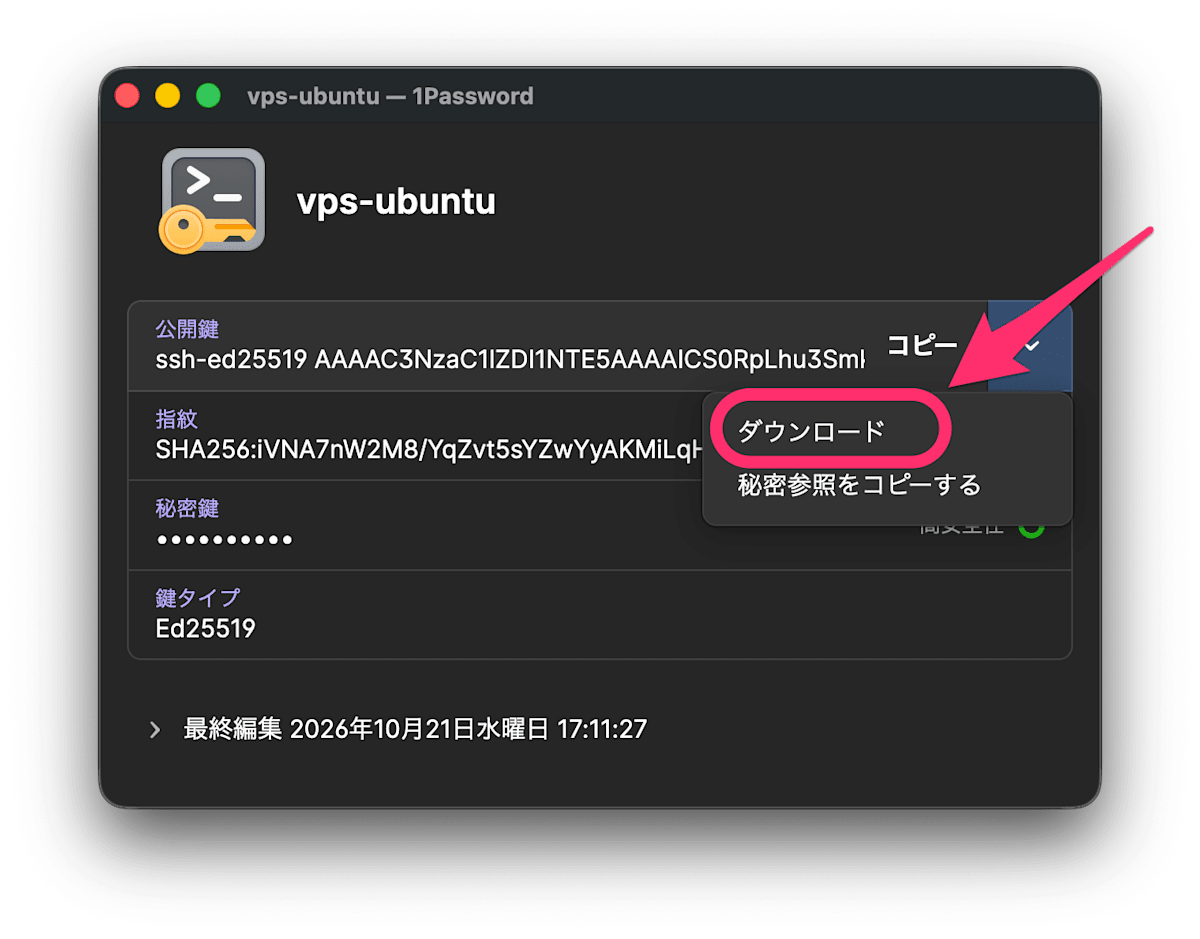
1Passwordに秘密鍵を保存はしているとき、公開鍵も生成してダウンロードすることができます。
(サーバーに設定した公開鍵はとっくの昔に消していたので、私はこれに助けられました)