【AWS CDK】 AWS Glue zero-ETLでDynamoDBデータをIceberg Tableにクロスアカウント連携してみた

はじめに
データ事業本部のkasamaです。
今回はDynamoDB から SageMaker Lakehouse へのクロスアカウント Zero-ETL 統合をCDKで実装してみたいと思います。
前提
本記事は前回ブログ(CLI 版)の構成を CDK 化したものです。Zero-ETL 統合の仕組みや背景については前回の記事を参照してください。
アーキテクチャ
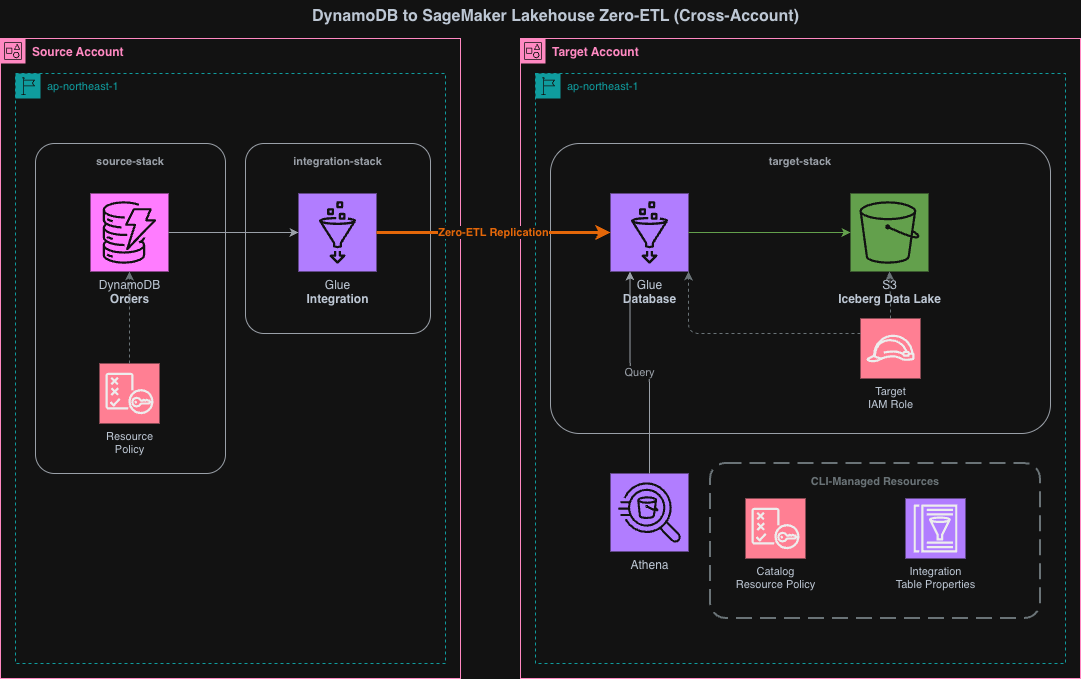
この CDK プロジェクトは3つのスタックで構成されています。
- source-stack(ソースアカウントにデプロイ): DynamoDB テーブルとリソースポリシー
- target-stack(ターゲットアカウントにデプロイ): S3、Glue Database、IAM Role、IntegrationResourceProperty
- integration-stack(ソースアカウントにデプロイ): Zero-ETL Integration
Integration Stack がターゲットアカウントではなくソースアカウントにデプロイされる点が重要です。DynamoDB のクロスアカウント Zero-ETL 統合では、統合リソースをソース側で作成する必要があります。
デプロイ順序は source-stack → target-stack → シェルスクリプト → integration-stack です。各ステップは前のステップの成果物に依存しています。
- source-stack → target-stack: target-stack の IntegrationResourceProperty はソース DynamoDB テーブルの存在を前提とする
- target-stack → シェルスクリプト: Glue カタログリソースポリシーと IntegrationTableProperties は、target-stack で作成した Glue データベースに対して設定する
- シェルスクリプト → integration-stack: Integration の作成時にクロスアカウントアクセス許可(カタログリソースポリシー)とテーブルマッピング設定(IntegrationTableProperties)が必要
実装
実装コードはGitHubに格納しています。
63_dynamodb_glue_zeroetl_cross_account/
├── cdk/
│   ├── bin/
│   │   └── app.ts
│   ├── lib/
│   │   ├── parameter.ts
│   │   ├── source-stack.ts
│   │   ├── target-stack.ts
│   │   └── integration-stack.ts
│   ├── package.json
│   ├── tsconfig.json
│   └── cdk.json
├── scripts/
│   ├── config.sh
│   ├── setup-glue-resource-policy.sh
│   └── setup-integration-table-properties.sh
└── README.md
CDK
import type { Environment } from "aws-cdk-lib";

export interface AppParameter {
  envName: string;
  projectName: string;
  refreshIntervalMinutes: number;
  sourceEnv: Required<Environment>;
  targetEnv: Required<Environment>;
}

export const devParameter: AppParameter = {
  envName: "dev",
  projectName: "cm-kasama-dynamodb-zeroetl",
  refreshIntervalMinutes: 15,
  sourceEnv: {
    account: "<SOURCE_ACCOUNT_ID>",
    region: "ap-northeast-1",
  },
  targetEnv: {
    account: "<TARGET_ACCOUNT_ID>",
    region: "ap-northeast-1",
  },
};
parameter.ts では、各スタックのデプロイ先を定義しています。sourceEnv と targetEnv に Required<Environment> を使用し、account と region を必須にしています。クロスアカウント構成では、各スタックが異なるアカウントにデプロイされるため、環境情報が明示的に必要です。refreshIntervalMinutes は Zero-ETL 統合の同期間隔(分)です。DynamoDB からの差分連携はこの間隔でターゲット側に反映されます。
#!/usr/bin/env node
import * as cdk from 'aws-cdk-lib';
import { SourceStack } from '../lib/source-stack';
import { TargetStack } from '../lib/target-stack';
import { IntegrationStack } from '../lib/integration-stack';
import { devParameter } from '../lib/parameter';

const app = new cdk.App();

const databaseName = `${devParameter.projectName.replace(/-/g, '_')}_${devParameter.envName}`;
const sourceTableArn = `arn:aws:dynamodb:${devParameter.sourceEnv.region}:${devParameter.sourceEnv.account}:table/Orders`;
const targetDatabaseArn = `arn:aws:glue:${devParameter.targetEnv.region}:${devParameter.targetEnv.account}:database/${databaseName}`;

new SourceStack(
  app,
  `${devParameter.projectName}-source-stack`,
  {
    env: devParameter.sourceEnv,
    description:
      'DynamoDB Zero-ETL Source Account: DynamoDB table with PITR and resource policy',
    parameter: devParameter,
  }
);

new TargetStack(app, `${devParameter.projectName}-target-stack`, {
  env: devParameter.targetEnv,
  description:
    'DynamoDB Zero-ETL Target Account: S3, Glue Database, IAM Role',
  parameter: devParameter,
});

new IntegrationStack(
  app,
  `${devParameter.projectName}-integration-stack`,
  {
    env: devParameter.sourceEnv,
    description: 'DynamoDB Zero-ETL Integration (deploy after scripts)',
    parameter: devParameter,
    sourceTableArn,
    targetDatabaseArn,
  }
);
app.ts では、3つのスタックのインスタンス化とデプロイ先を定義しています。SourceStack と IntegrationStack は devParameter.sourceEnv に、TargetStack は devParameter.targetEnv にデプロイされます。IntegrationStack がソースアカウントにデプロイされるのは、DynamoDB のクロスアカウント Zero-ETL では Integration リソースをソース側で作成する必要があるためです。sourceTableArn と targetDatabaseArn は app.ts で構築し、IntegrationStack に渡しています。
import * as cdk from 'aws-cdk-lib';
import * as dynamodb from 'aws-cdk-lib/aws-dynamodb';
import * as iam from 'aws-cdk-lib/aws-iam';
import type { Construct } from 'constructs';
import type { AppParameter } from './parameter';

interface SourceStackProps extends cdk.StackProps {
  parameter: AppParameter;
}

export class SourceStack extends cdk.Stack {
  public readonly table: dynamodb.TableV2;

  constructor(scope: Construct, id: string, props: SourceStackProps) {
    super(scope, id, props);

    const { parameter } = props;

    // ========================================
    // DynamoDB TableV2 with PITR
    // ========================================
    this.table = new dynamodb.TableV2(this, 'ZeroETLSourceTable', {
      tableName: 'Orders',
      partitionKey: { name: 'PK', type: dynamodb.AttributeType.STRING },
      sortKey: { name: 'SK', type: dynamodb.AttributeType.STRING },
      billing: dynamodb.Billing.onDemand(),
      pointInTimeRecoverySpecification: { pointInTimeRecoveryEnabled: true },
      removalPolicy: cdk.RemovalPolicy.DESTROY,
    });

    // ========================================
    // Resource Policy: Allow Glue service to export via Zero-ETL
    // Integration is created in the source account, so SourceAccount/SourceArn
    // reference this (source) account, not the target account.
    // ========================================
    this.table.addToResourcePolicy(
      new iam.PolicyStatement({
        sid: 'AllowGlueZeroETLExport',
        effect: iam.Effect.ALLOW,
        principals: [new iam.ServicePrincipal('glue.amazonaws.com')],
        actions: [
          'dynamodb:ExportTableToPointInTime',
          'dynamodb:DescribeTable',
          'dynamodb:DescribeExport',
        ],
        resources: ['*'],
        conditions: {
          StringEquals: {
            'aws:SourceAccount': parameter.sourceEnv.account,
          },
          ArnLike: {
            'aws:SourceArn': `arn:aws:glue:${parameter.sourceEnv.region}:${parameter.sourceEnv.account}:integration:*`,
          },
        },
      })
    );

    // ========================================
    // Outputs
    // ========================================
    new cdk.CfnOutput(this, 'TableArn', {
      value: this.table.tableArn,
      description: 'DynamoDB Table ARN (use in Target Stack)',
    });

    new cdk.CfnOutput(this, 'TableName', {
      value: this.table.tableName,
      description: 'DynamoDB Table Name',
    });
  }
}
source-stack.ts では、DynamoDB テーブルとリソースポリシーを定義しています。リソースポリシーの Condition に aws:SourceAccount と aws:SourceArn のAND条件を設定しています。Integration はソースアカウントに作成されるため、SourceAccount と SourceArn はどちらもソースアカウントを参照しています。ターゲットアカウントの情報は Condition に含まれません。pointInTimeRecoveryEnabled: true は Zero-ETL 統合の必須要件です。
import * as cdk from 'aws-cdk-lib';
import * as glue from 'aws-cdk-lib/aws-glue';
import * as iam from 'aws-cdk-lib/aws-iam';
import * as s3 from 'aws-cdk-lib/aws-s3';
import type { Construct } from 'constructs';
import type { AppParameter } from './parameter';

interface TargetStackProps extends cdk.StackProps {
  parameter: AppParameter;
}

export class TargetStack extends cdk.Stack {
  constructor(scope: Construct, id: string, props: TargetStackProps) {
    super(scope, id, props);

    const { parameter } = props;

    const databaseName = `${parameter.projectName.replace(/-/g, '_')}_${parameter.envName}`;

    // ========================================
    // 1. S3 Bucket for Iceberg data
    // ========================================
    const dataLakeBucket = new s3.Bucket(this, 'DataLakeBucket', {
      bucketName: `${parameter.projectName}-${parameter.envName}-datalake`,
      encryption: s3.BucketEncryption.S3_MANAGED,
      blockPublicAccess: s3.BlockPublicAccess.BLOCK_ALL,
      removalPolicy: cdk.RemovalPolicy.DESTROY,
      // Adds a Lambda-backed custom resource that empties the bucket on stack deletion,
      // so cdk destroy works even when Iceberg data exists in the bucket.
      autoDeleteObjects: true,
    });

    // ========================================
    // 2. Glue Database
    // ========================================
    const database = new glue.CfnDatabase(this, 'GlueDatabase', {
      catalogId: this.account,
      databaseInput: {
        name: databaseName,
        description: 'DynamoDB Zero-ETL target database (Iceberg)',
        locationUri: dataLakeBucket.s3UrlForObject(),
      },
    });

    const databaseArn = `arn:aws:glue:${this.region}:${this.account}:database/${databaseName}`;

    // ========================================
    // 3. Target IAM Role
    // ========================================
    const targetRole = new iam.Role(this, 'ZeroETLTargetRole', {
      roleName: `${parameter.projectName}-${parameter.envName}-target-role`,
      assumedBy: new iam.ServicePrincipal('glue.amazonaws.com'),
    });

    // S3 permissions
    dataLakeBucket.grantReadWrite(targetRole);

    // Glue Data Catalog permissions
    targetRole.addToPolicy(
      new iam.PolicyStatement({
        effect: iam.Effect.ALLOW,
        actions: [
          'glue:GetDatabase',
          'glue:GetDatabases',
          'glue:GetTable',
          'glue:GetTables',
          'glue:CreateTable',
          'glue:UpdateTable',
          'glue:DeleteTable',
          'glue:GetPartitions',
          'glue:BatchCreatePartition',
          'glue:BatchDeletePartition',
        ],
        resources: [
          `arn:aws:glue:${this.region}:${this.account}:catalog`,
          databaseArn,
          `arn:aws:glue:${this.region}:${this.account}:table/${databaseName}/*`,
        ],
      })
    );

    // CloudWatch Logs permissions
    targetRole.addToPolicy(
      new iam.PolicyStatement({
        effect: iam.Effect.ALLOW,
        actions: [
          'logs:CreateLogGroup',
          'logs:CreateLogStream',
          'logs:PutLogEvents',
        ],
        resources: [
          `arn:aws:logs:${this.region}:${this.account}:log-group:/aws-glue/*`,
          `arn:aws:logs:${this.region}:${this.account}:log-group:/aws-glue/*:*`,
        ],
      })
    );

    // ========================================
    // 4. Integration Resource Property (target only)
    // ========================================
    const targetResourceProperty = new glue.CfnIntegrationResourceProperty(
      this,
      'TargetResourceProperty',
      {
        resourceArn: databaseArn,
        targetProcessingProperties: {
          roleArn: targetRole.roleArn,
        },
      }
    );
    targetResourceProperty.node.addDependency(database);

    // ========================================
    // Outputs
    // ========================================
    new cdk.CfnOutput(this, 'TargetRoleArn', {
      value: targetRole.roleArn,
      description: 'Target Role ARN',
    });

    new cdk.CfnOutput(this, 'DataLakeBucketName', {
      value: dataLakeBucket.bucketName,
      description: 'S3 Data Lake Bucket Name',
    });

    new cdk.CfnOutput(this, 'DatabaseName', {
      value: databaseName,
      description: 'Glue Database Name',
    });
  }
}
target-stack.tsでは、Targetのスタックを定義しています。autoDeleteObjects: true を設定すると、CDK が Lambda ベースのカスタムリソースを追加し、スタック削除時にバケット内のオブジェクトを自動削除します。Zero-ETL 統合が Iceberg データをバケットに書き込むため、この設定がないと cdk destroy でバケット削除が失敗します。
import * as cdk from 'aws-cdk-lib';
import * as glue from 'aws-cdk-lib/aws-glue';
import type { Construct } from 'constructs';
import type { AppParameter } from './parameter';

interface IntegrationStackProps extends cdk.StackProps {
  parameter: AppParameter;
  sourceTableArn: string;
  targetDatabaseArn: string;
}

export class IntegrationStack extends cdk.Stack {
  constructor(scope: Construct, id: string, props: IntegrationStackProps) {
    super(scope, id, props);

    const { parameter, sourceTableArn, targetDatabaseArn } = props;

    // ========================================
    // Zero-ETL Integration
    // ========================================
    const zeroEtlIntegration = new glue.CfnIntegration(
      this,
      'ZeroETLIntegration',
      {
        integrationName: `${parameter.projectName}-${parameter.envName}-integration`,
        sourceArn: sourceTableArn,
        targetArn: targetDatabaseArn,
        description:
          'DynamoDB to SageMaker Lakehouse Zero-ETL Integration (Cross-Account)',
        integrationConfig: {
          refreshInterval: `${parameter.refreshIntervalMinutes}`,
        },
        tags: [
          { key: 'Environment', value: parameter.envName },
          { key: 'Project', value: parameter.projectName },
        ],
      }
    );

    // ========================================
    // Outputs
    // ========================================
    new cdk.CfnOutput(this, 'IntegrationArn', {
      value: zeroEtlIntegration.attrIntegrationArn,
      description: 'Zero-ETL Integration ARN',
    });
  }
}
integration-stack.ts では、Zero-ETL Integration 本体を定義しています。DynamoDB のクロスアカウント Zero-ETL では、Integration リソースの所有者がソースアカウントである必要があるため、app.ts で env: devParameter.sourceEnv を指定してソースアカウントにデプロイしています。sourceArn に DynamoDB テーブルの ARN、targetArn にターゲットアカウントの Glue データベース ARN を指定しています。integrationConfig.refreshInterval には差分同期の間隔を分単位の文字列で設定します。
シェルスクリプト
CDK 化できないリソースはシェルスクリプトで管理しています。
#!/bin/bash
# Configuration for DynamoDB Zero-ETL Cross-Account Integration
# Edit these values before deployment
# NOTE: Keep PROJECT_NAME, ENV_NAME, and account IDs in sync with cdk/lib/parameter.ts

PROJECT_NAME="cm-kasama-dynamodb-zeroetl"
ENV_NAME="dev"
SOURCE_ACCOUNT_ID="<SOURCE_ACCOUNT_ID>"
TARGET_ACCOUNT_ID="<TARGET_ACCOUNT_ID>"
UNNEST_SPEC="TOPLEVEL"
# REGION="us-east-1"  # Optional - defaults to AWS CLI region

# Derived values (do not edit)
DATABASE_NAME="${PROJECT_NAME//-/_}_${ENV_NAME}"
config.sh では、シェルスクリプト共通の設定値を定義しています。
#!/bin/bash
# Setup Glue Catalog Resource Policy (Target Account)
#
# Prerequisites:
#   - Target Stack must be deployed first (Glue database must exist)
#   - Run with Target Account credentials
# AWS::Glue::ResourcePolicy has no CloudFormation support, so this is handled via CLI.
set -e

SCRIPT_DIR="$(cd "$(dirname "$0")" && pwd)"
source "${SCRIPT_DIR}/config.sh"

# Use REGION from config.sh if set, otherwise use AWS CLI default
if [ -z "$REGION" ]; then
  REGION=$(aws configure get region)
fi

echo "=== Glue Catalog Resource Policy Setup ==="
echo "Target Account: ${TARGET_ACCOUNT_ID}"
echo "Source Account: ${SOURCE_ACCOUNT_ID}"
echo "Database:       ${DATABASE_NAME}"
echo "Region:         ${REGION}"
echo ""

CATALOG_ARN="arn:aws:glue:${REGION}:${TARGET_ACCOUNT_ID}:catalog"
DATABASE_ARN="arn:aws:glue:${REGION}:${TARGET_ACCOUNT_ID}:database/${DATABASE_NAME}"

POLICY_FILE=$(mktemp)
trap "rm -f ${POLICY_FILE}" EXIT

cat > "${POLICY_FILE}" << EOF
{
  "Version": "2012-10-17",
  "Statement": [
    {
      "Sid": "AllowGlueAuthorizeInboundIntegration",
      "Effect": "Allow",
      "Principal": { "Service": "glue.amazonaws.com" },
      "Action": "glue:AuthorizeInboundIntegration",
      "Resource": [
        "${CATALOG_ARN}",
        "${DATABASE_ARN}"
      ]
    },
    {
      "Sid": "AllowSourceAccountCreateInboundIntegration",
      "Effect": "Allow",
      "Principal": { "AWS": "arn:aws:iam::${SOURCE_ACCOUNT_ID}:root" },
      "Action": "glue:CreateInboundIntegration",
      "Resource": [
        "${CATALOG_ARN}",
        "${DATABASE_ARN}"
      ]
    }
  ]
}
EOF

echo "Applying Glue Catalog Resource Policy..."
aws glue put-resource-policy --policy-in-json "file://${POLICY_FILE}" --region "${REGION}"

echo ""
echo "Done. Verify with: aws glue get-resource-policy --region ${REGION}"
setup-glue-resource-policy.sh では、Glue カタログリソースポリシーを設定します。このスクリプトは2つのポリシーステートメントを設定します。
AllowGlueAuthorizeInboundIntegration: Glue サービスプリンシパルにglue:AuthorizeInboundIntegrationを許可。Zero-ETL 統合の受信側認証に使用されますAllowSourceAccountCreateInboundIntegration: ソースアカウントの root プリンシパルにglue:CreateInboundIntegrationを許可。ソースアカウントからのクロスアカウント統合作成を可能にします
どちらのステートメントも、ターゲットアカウントの Glue カタログとデータベースをリソースとして指定しています。
#!/bin/bash
# Setup Integration Table Properties (Target Account)
#
# Prerequisites:
#   - Target Stack must be deployed first (IntegrationResourceProperty must exist)
#   - Run with Target Account credentials
#   - Run BEFORE deploying the Integration Stack
# AWS::Glue::IntegrationTableProperties has no CloudFormation support, so this is handled via CLI.
set -e

SCRIPT_DIR="$(cd "$(dirname "$0")" && pwd)"
source "${SCRIPT_DIR}/config.sh"

# Use REGION from config.sh if set, otherwise use AWS CLI default
if [ -z "$REGION" ]; then
  REGION=$(aws configure get region)
fi

echo "=== Integration Table Properties Setup ==="
echo "Table Name:   Orders"
echo "UnnestSpec:   ${UNNEST_SPEC}"
echo "Database:     ${DATABASE_NAME}"
echo "Region:       ${REGION}"
echo ""

echo "Creating integration table properties..."
aws glue create-integration-table-properties \
  --resource-arn "arn:aws:glue:${REGION}:${TARGET_ACCOUNT_ID}:database/${DATABASE_NAME}" \
  --table-name "Orders" \
  --target-table-config "{\"UnnestSpec\":\"${UNNEST_SPEC}\"}" \
  --region "${REGION}"

echo ""
echo "=== Verifying integration table properties ==="
aws glue get-integration-table-properties \
  --resource-arn "arn:aws:glue:${REGION}:${TARGET_ACCOUNT_ID}:database/${DATABASE_NAME}" \
  --table-name "Orders" \
  --region "${REGION}"
setup-integration-table-properties.sh では、IntegrationTableProperties を設定します。UnnestSpec は DynamoDB のネスト構造(Map, List)を Glue テーブルでどのように表現するかを制御するパラメータです。
| 値 | 動作 |
|---|---|
| TOPLEVEL | トップレベルの Map キーのみカラムに展開 |
| FULL | すべてのネスト構造を再帰的に展開(デフォルト) |
| NOUNNEST | 非キー属性を単一の value カラムに格納 |
本構成では TOPLEVEL を使用しています。FULL は再帰展開によりカラム数が予測しにくくなる場合があり、NOUNNEST は個別カラムへのアクセスが不要な場合に適しています。なお、既存の統合に対して UnnestSpec で設定を変更するには、Glue テーブル、S3 の Iceberg データ、Zero-ETL Integration を削除してから再デプロイする必要があります。
デプロイ
CDK 依存関係のインストール
cd 63_dynamodb_glue_zeroetl_cross_account/cdk
pnpm install
ソーススタックのデプロイ(ソースアカウント)
DynamoDB テーブルとリソースポリシーをデプロイします。
pnpm run cdk deploy cm-kasama-dynamodb-zeroetl-source-stack \
  --profile SOURCE_ACCOUNT_PROFILE
ターゲットスタックのデプロイ(ターゲットアカウント)
S3 バケット、Glue データベース、IAM ロール、IntegrationResourceProperty をデプロイします。
pnpm run cdk deploy cm-kasama-dynamodb-zeroetl-target-stack \
  --profile TARGET_ACCOUNT_PROFILE
シェルスクリプトの実行(ターゲットアカウント)
Glue カタログリソースポリシーと IntegrationTableProperties を設定します。Integration Stack のデプロイ前に実行する必要があります。
cd ../scripts
AWS_PROFILE=TARGET_ACCOUNT_PROFILE ./setup-glue-resource-policy.sh
AWS_PROFILE=TARGET_ACCOUNT_PROFILE ./setup-integration-table-properties.sh
Integration スタックのデプロイ(ソースアカウント)
Zero-ETL Integration をデプロイします。
cd ../cdk
pnpm run cdk deploy cm-kasama-dynamodb-zeroetl-integration-stack \
  --profile SOURCE_ACCOUNT_PROFILE
デプロイ後確認
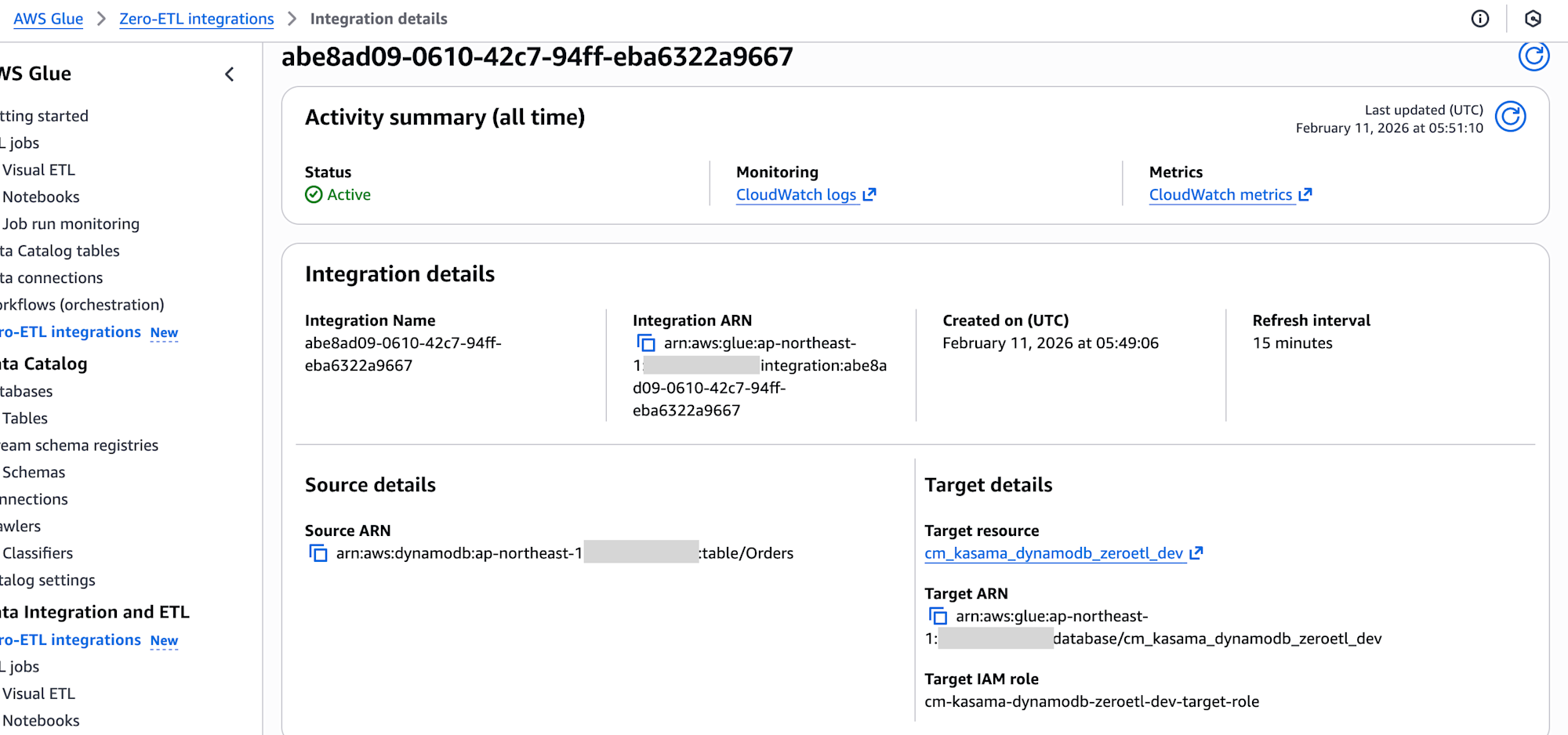
デプロイ完了後、ターゲットアカウントの AWS Glue コンソールで統合のステータスがActiveであることを確認しました。
テストデータの挿入
ソースアカウントの DynamoDB テーブルにテストデータを挿入します。Map 型と List 型のネスト構造を含むデータで、型保持の確認を行います。
aws dynamodb batch-write-item \
  --request-items '{
    "Orders": [
      {
        "PutRequest": {
          "Item": {
            "PK":{"S":"order-001"},
            "SK":{"S":"2024-01-01"},
            "amount":{"N":"1500"},
            "customer_name":{"S":"Tanaka"},
            "attributes":{"M":{
              "color":{"S":"red"},"size":{"S":"L"},"weight":{"N":"2.5"}
            }},
            "category_scores":{"M":{
              "quality":{"L":[{"N":"3"}]},
              "design":{"L":[{"N":"2"}]},
              "usability":{"L":[{"N":"2"}]},
              "features":{"L":[{"N":"1"},{"N":"2"},{"N":"3"}]}
            }}
          }
        }
      },
      {
        "PutRequest": {
          "Item": {
            "PK":{"S":"order-002"},
            "SK":{"S":"2024-01-02"},
            "amount":{"N":"3200"},
            "customer_name":{"S":"Suzuki"},
            "attributes":{"M":{
              "color":{"S":"blue"},"size":{"S":"M"},"weight":{"N":"1.8"}
            }},
            "category_scores":{"M":{
              "quality":{"L":[{"N":"1"},{"N":"4"}]},
              "design":{"L":[{"N":"5"}]},
              "usability":{"L":[{"N":"3"},{"N":"1"}]},
              "features":{"L":[{"N":"2"}]}
            }}
          }
        }
      }
    ]
  }' \
  --profile SOURCE_ACCOUNT_PROFILE

Athena クエリでデータ確認
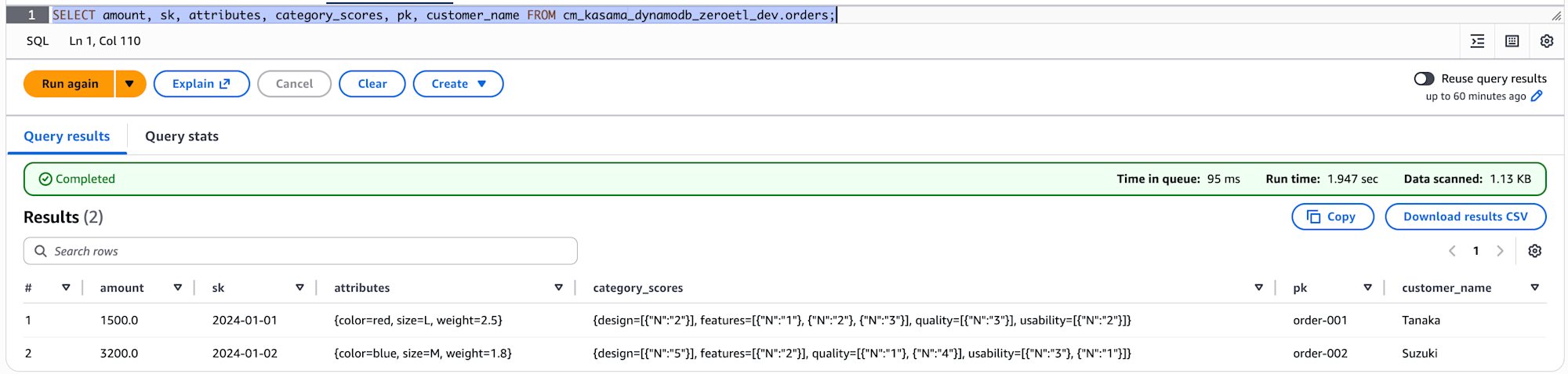
初回同期後にターゲットアカウントで、Athena を使用してデータを確認します。
-- 全カラムの確認
SELECT amount, sk, attributes, category_scores, pk, customer_name FROM cm_kasama_dynamodb_zeroetl_dev.orders;
カラム名、カラム数はDynamoDBと同じです。
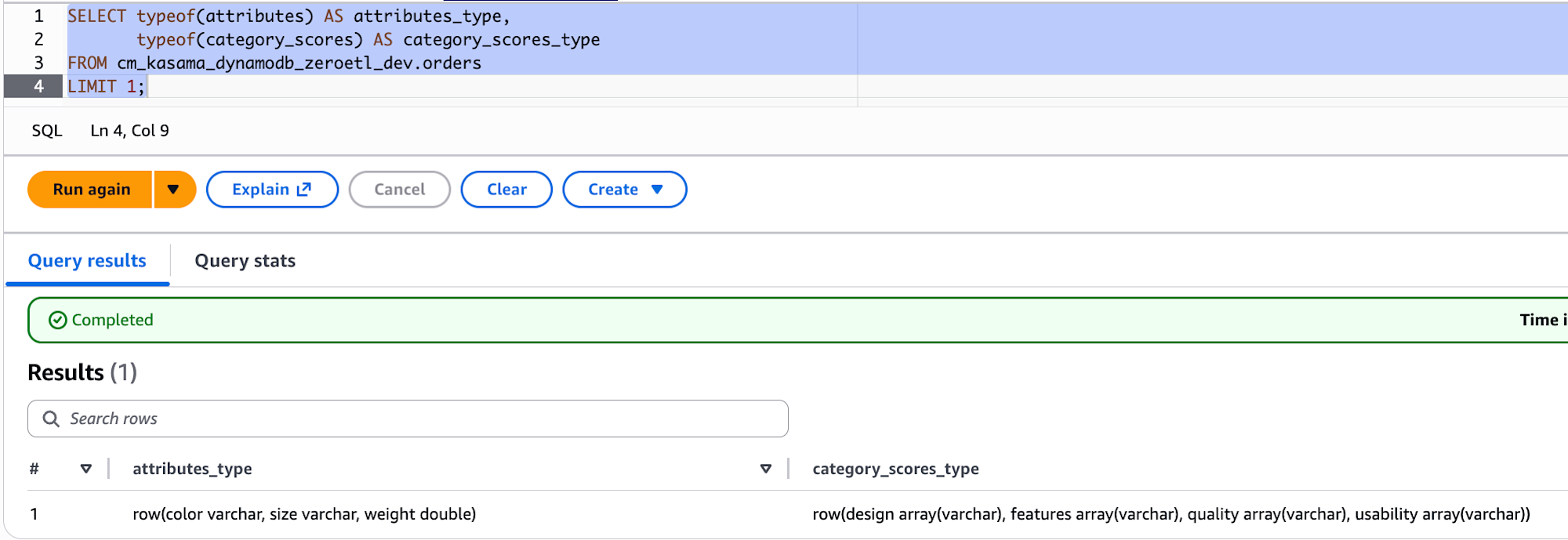
-- 実際の型を確認
SELECT typeof(attributes) AS attributes_type,
       typeof(category_scores) AS category_scores_type
FROM cm_kasama_dynamodb_zeroetl_dev.orders
LIMIT 1;
typeof() でデータ型を確認すると、attributes は row(color varchar, size varchar, weight double) となっており、DynamoDB の Map 内のスカラー値は元の型が保持されています(S→varchar、N→double)。一方、category_scores はList 型内でNumber であっても全て varchar に統一されていました。
最後に
DynamoDB から SageMaker Lakehouse へのクロスアカウント Zero-ETL 統合を CDK で実装しました。前回の CLI ベースの構成と比較すると、CDK 対応により Zero-ETL 統合の大部分を IaC で管理できるようになった点が大きいです。Glue カタログリソースポリシーと IntegrationTableProperties は引き続き CLI が必要ですが、シェルスクリプトにまとめることで運用上の手間は最小限に抑えられます。参考になれば幸いです。