เจาะลึกเบื้องหลัง Amazon EKS: ออกแบบสถาปัตยกรรมเพื่อ Scale และ Performance (AWS Summit Bangkok)

บทนำ (Introduction)
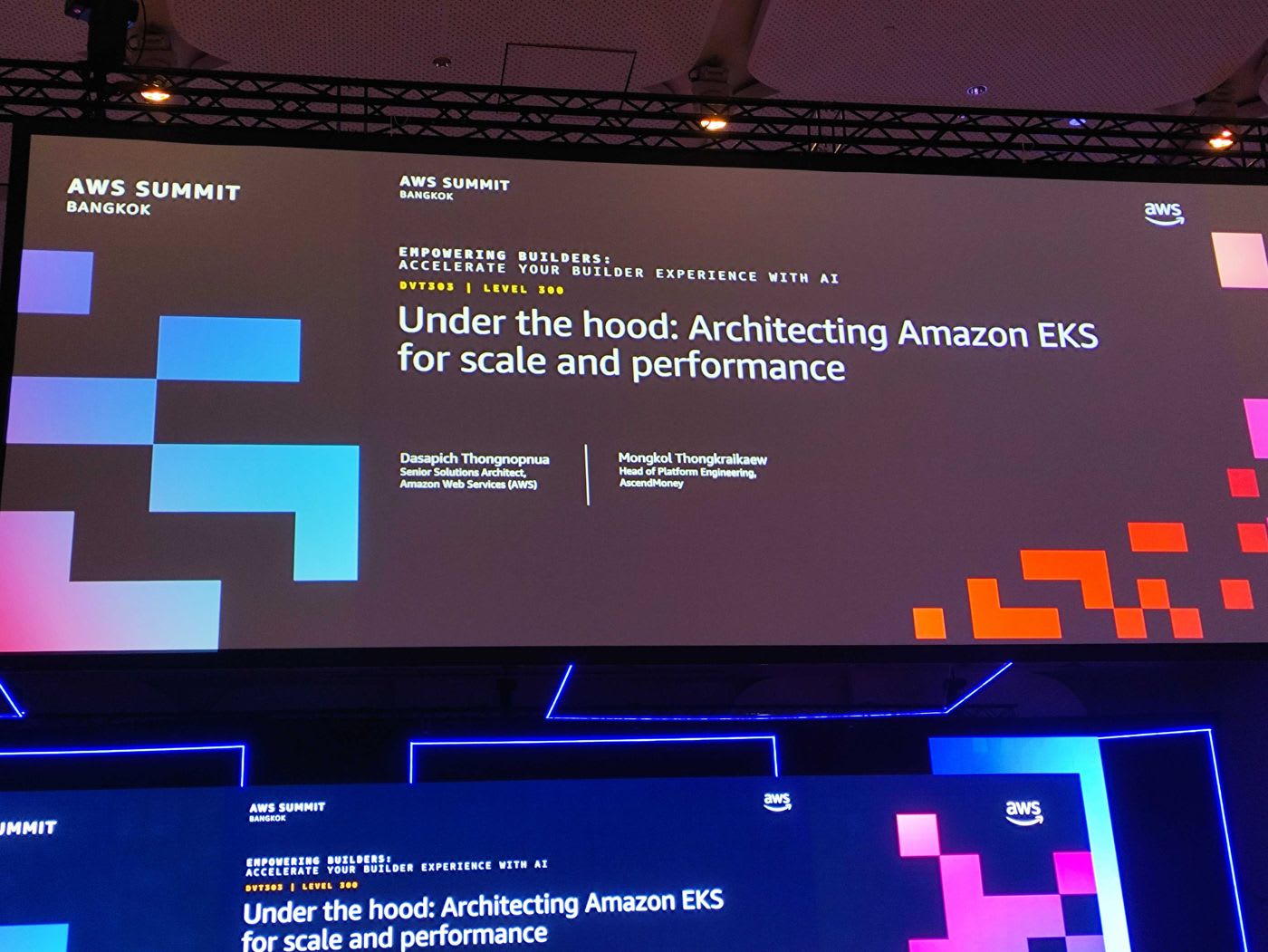
ในงาน AWS Summit Bangkok session รหัส DVT303 (Level 300) หัวข้อ "Under the hood: Architecting Amazon EKS for scale and performance" พาเราไปดูเบื้องหลังการทำงานของ Amazon EKS (Elastic Kubernetes Service) ว่า AWS ออกแบบบริการนี้อย่างไรจึงรองรับ workload ขนาดมหาศาลได้ บรรยายโดยคุณ Dasapich Thongnopnua (Senior Solutions Architect, AWS) และได้รับเกียรติจากคุณ Mongkol Thongkraikaew (Head of Platform Engineering, Ascend Money) มาแชร์ประสบการณ์การใช้งานจริงตลอด 7 ปี
ทำไม Kubernetes ถึงยังสำคัญในยุคของ AI? จากการสำรวจของ CNCF พบว่ากว่า 93% ขององค์กรมีการใช้งาน Kubernetes แล้ว และราว 80% ใช้ใน production จริง ที่น่าสนใจกว่านั้นคือเทรนด์ฝั่ง AI ที่กำลังโตอย่างก้าวกระโดด
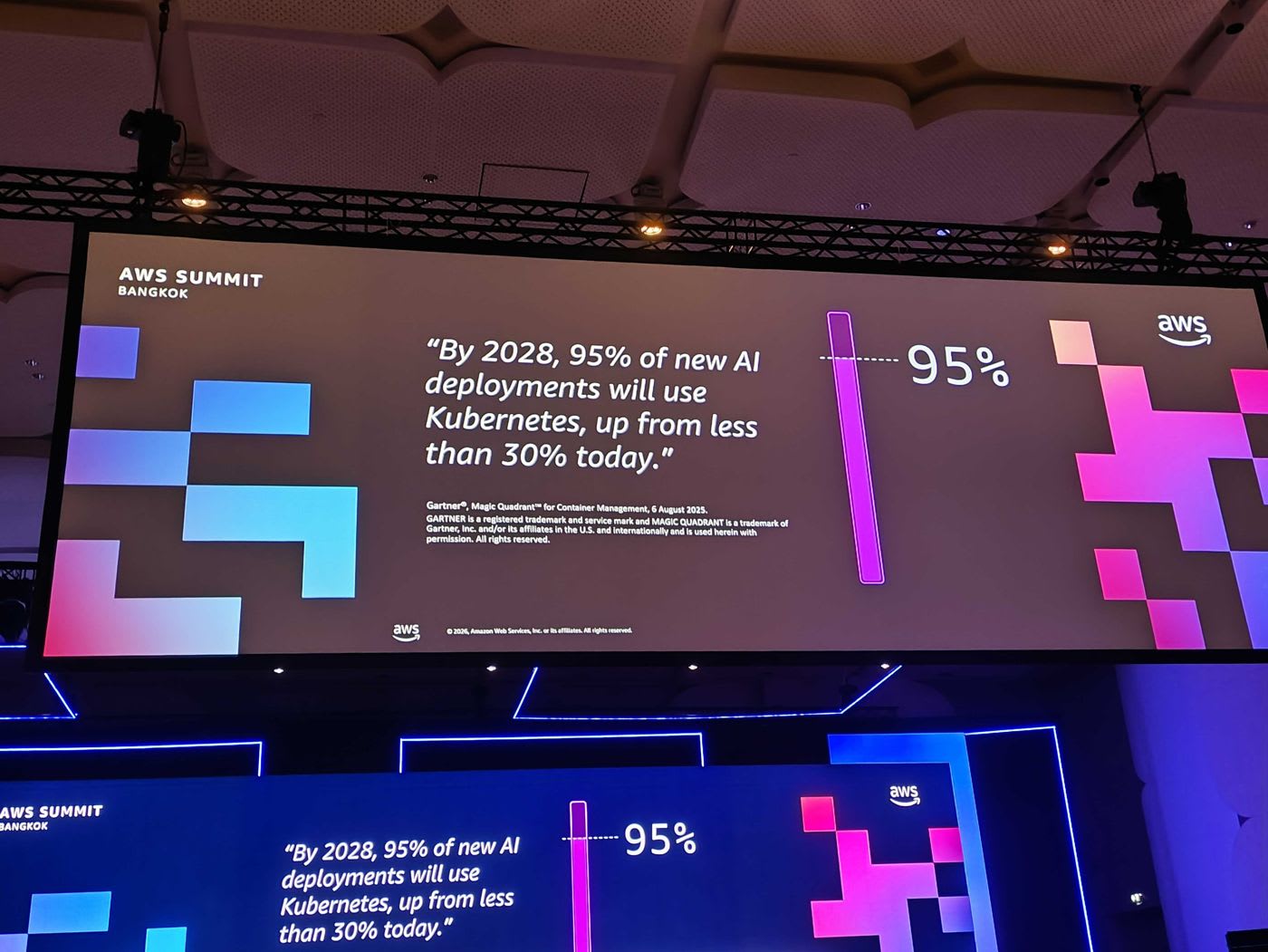
Gartner คาดการณ์ว่า ภายในปี 2028 ราว 95% ของ AI deployment ใหม่จะรันบน Kubernetes เพิ่มขึ้นจากไม่ถึง 30% ในวันนี้ นั่นแปลว่ารากฐานของแพลตฟอร์มที่จะรองรับ AI workload จำเป็นต้องสเกลได้จริง และนี่คือสิ่งที่ EKS ถูกออกแบบมาเพื่อตอบโจทย์
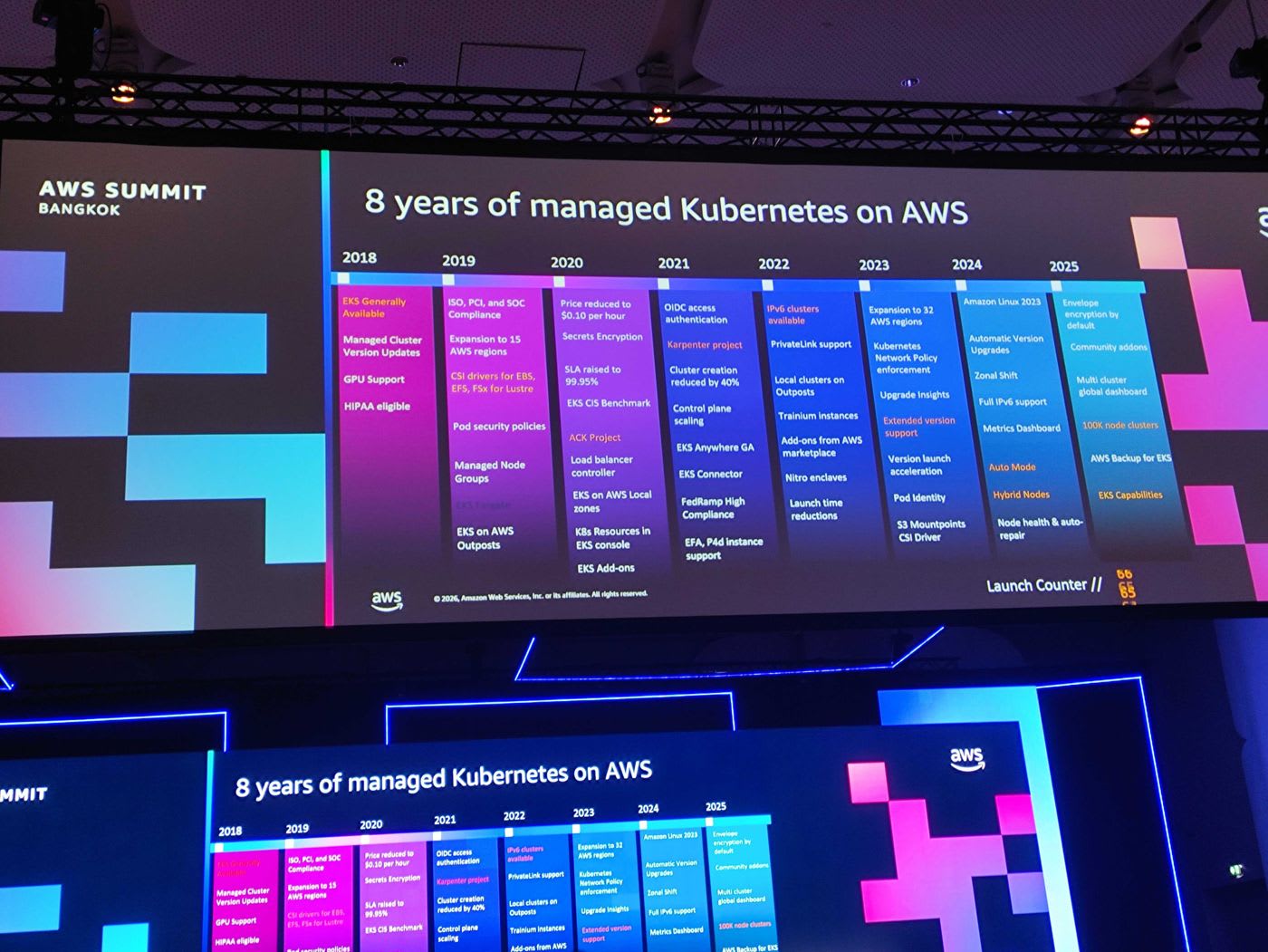
Amazon EKS เปิดตัวตั้งแต่ปี 2018 และพัฒนาต่อเนื่องตลอด 8 ปี ไม่ว่าจะเป็น Managed Node Groups, การบริจาคโปรเจกต์ Karpenter ให้ชุมชนในปี 2021, การเปิดตัว EKS Auto Mode ในปี 2024 ไปจนถึงความสามารถระดับ Ultra-Scale ในปี 2025 ปัจจุบันลูกค้าของ AWS รันคลัสเตอร์ EKS รวมกว่า 10 ล้านคลัสเตอร์
เนื้อหาหลัก (Main Content)
Amazon EKS Control Plane Architecture
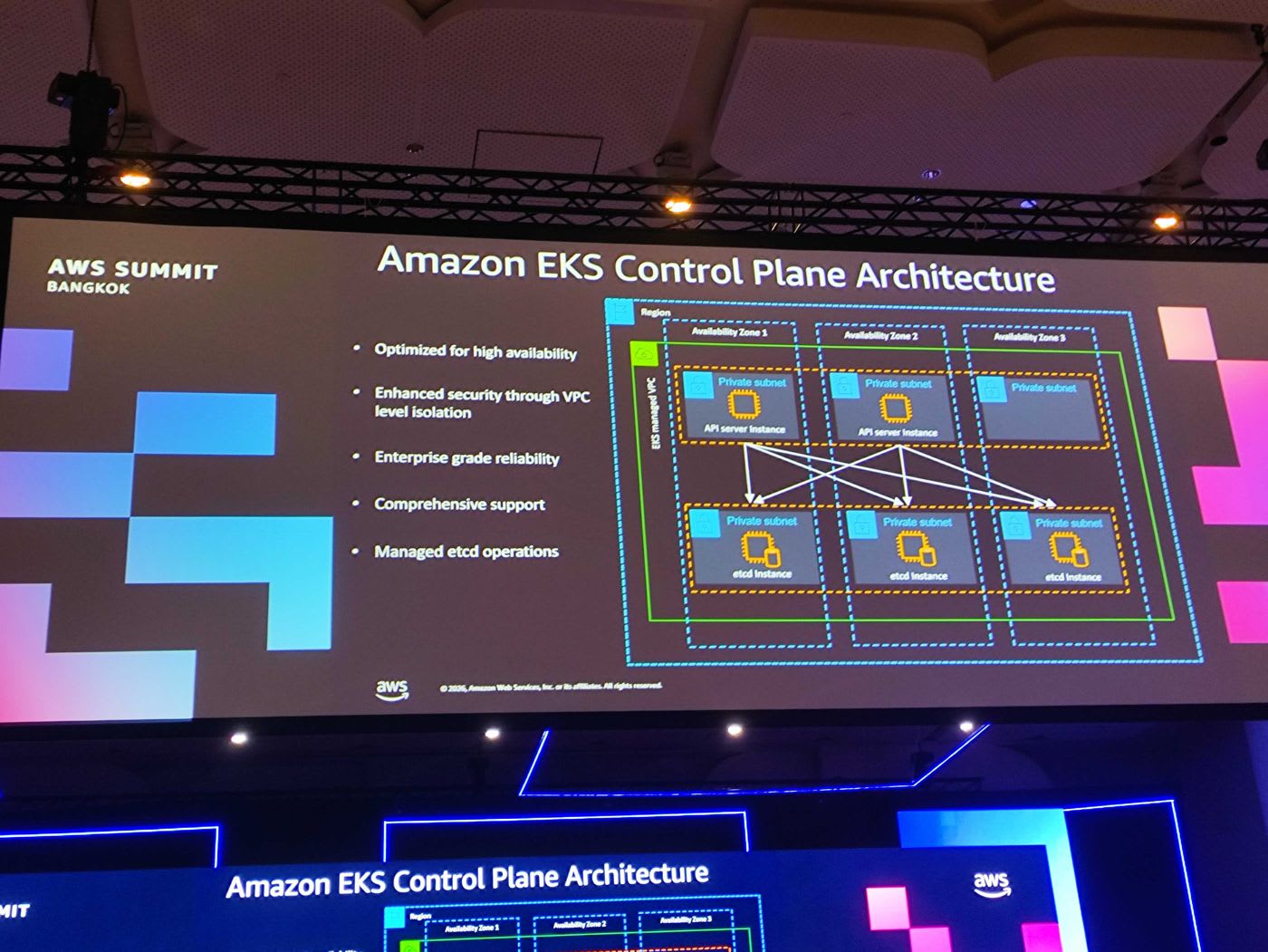
เมื่อลูกค้าสร้างคลัสเตอร์ EKS ทาง EKS service จะสร้าง Control Plane ขึ้นมาในบัญชีที่ AWS บริหารจัดการให้ (EKS managed VPC) โดยมี API server และ etcd กระจายอยู่ในหลาย Availability Zone (AZ) เพื่อความ high availability ทั้งหมดถูก isolate อยู่ใน private VPC ที่เฉพาะเจาะจงสำหรับแต่ละคลัสเตอร์ จุดเด่นของ managed control plane คือ:
- Optimized for high availability
- Enhanced security ผ่าน VPC level isolation
- Enterprise grade reliability พร้อม support ครบวงจร
- Managed etcd operations — AWS ดูแล etcd ให้ทั้งหมด
📎 Amazon EKS Clusters — Official Docs
หัวใจของ Control Plane: etcd
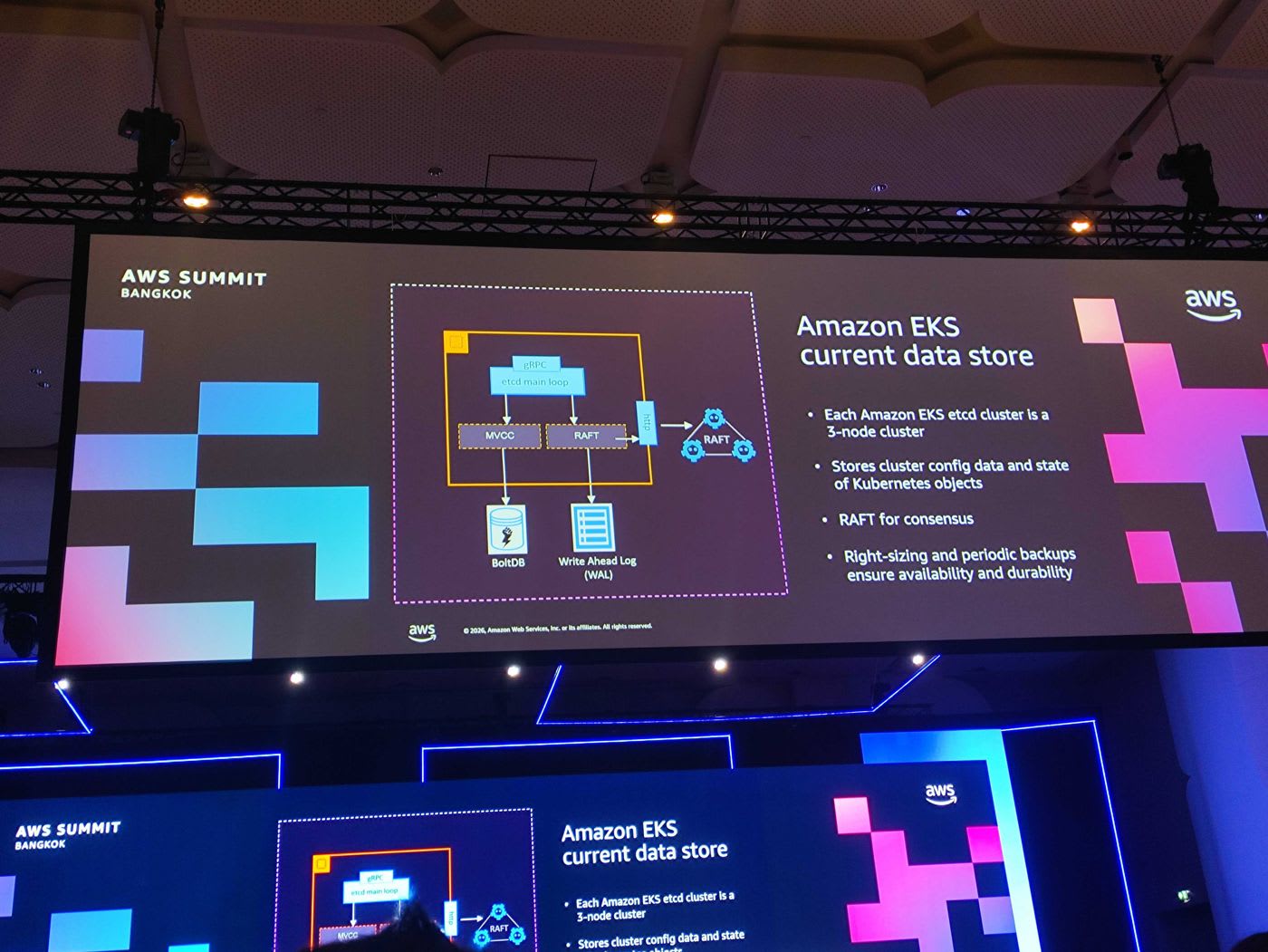
etcd คือฐานข้อมูลที่เก็บ config และ state ของ Kubernetes objects ทั้งหมด แต่ละ EKS cluster ใช้ etcd แบบ 3-node cluster และใช้อัลกอริทึม RAFT ในการทำ consensus โดยมี BoltDB และ Write Ahead Log (WAL) อยู่เบื้องหลัง AWS ทำ right-sizing และ periodic backup เพื่อรับประกัน availability และ durability
ความท้าทายคือ etcd เป็นฐานข้อมูลแบบ monolithic — ทุก key อยู่ใน keyspace เดียวกัน เมื่อคลัสเตอร์เติบโตและ launch pod จำนวนมากอย่างรวดเร็ว key บางประเภท (เช่น Pods หรือ Events) จะถูกใช้งานหนักเป็นพิเศษ AWS จึงแก้ด้วยการ partition key เหล่านี้ออกไป ทำให้สเกล etcd ได้มากขึ้น โดยยังคงความ compatible กับ Kubernetes แบบ native
📎 Kubernetes Control Plane Scaling — EKS Best Practices
Control Plane Resiliency: ตอบสนองต่อ AZ failure อย่างไร
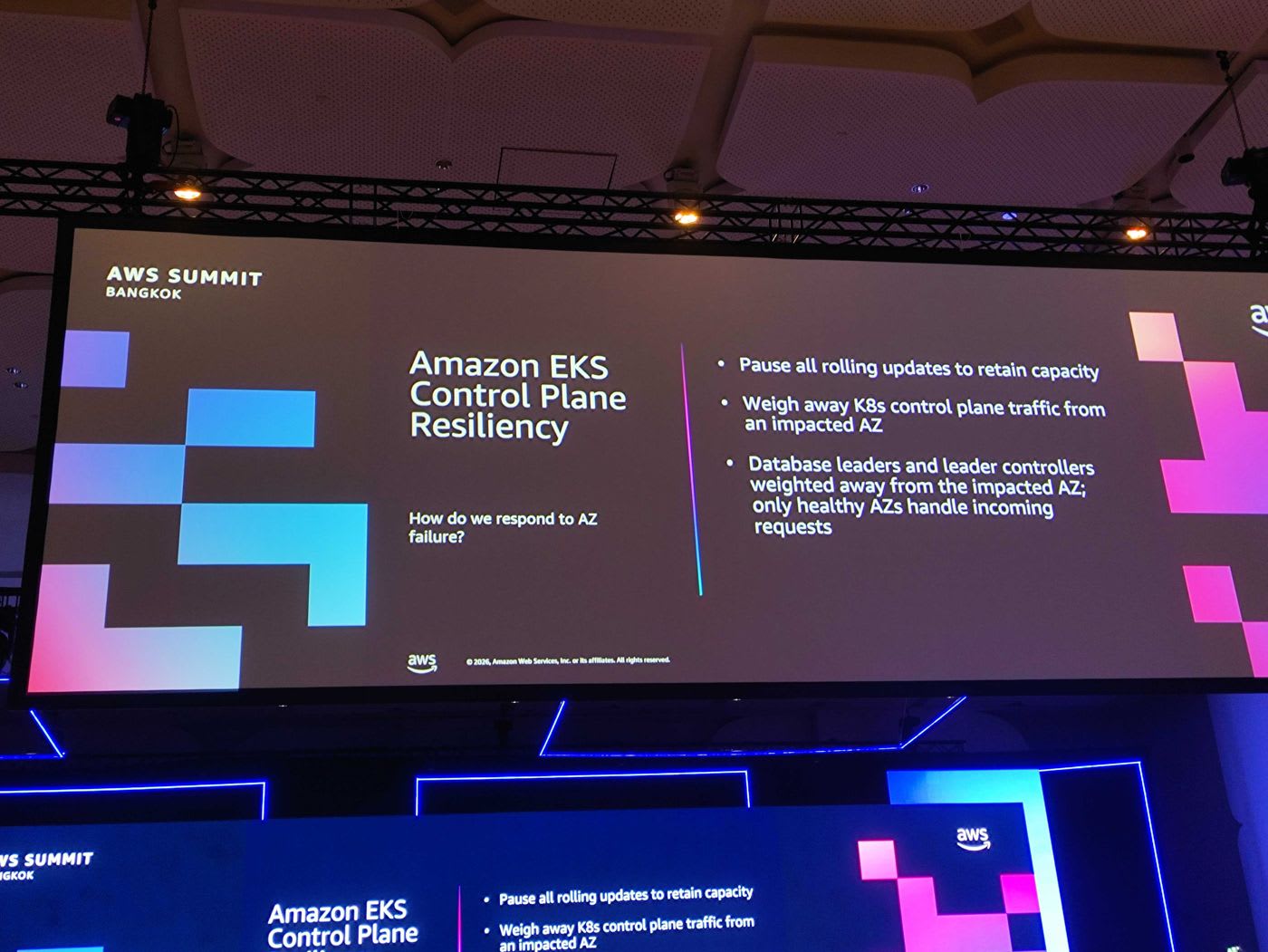
เมื่อเกิดปัญหาในระดับ Availability Zone EKS จะตอบสนองด้วยกลไกหลายชั้น:
- Pause all rolling updates เพื่อรักษา capacity ที่มีอยู่
- Weigh away traffic ของ Kubernetes control plane ออกจาก AZ ที่มีปัญหา
- ย้าย database leaders และ leader controllers ออกจาก AZ ที่ได้รับผลกระทบ ให้เฉพาะ AZ ที่ healthy เท่านั้นรับ incoming request
EKS สเกล Control Plane อย่างไร
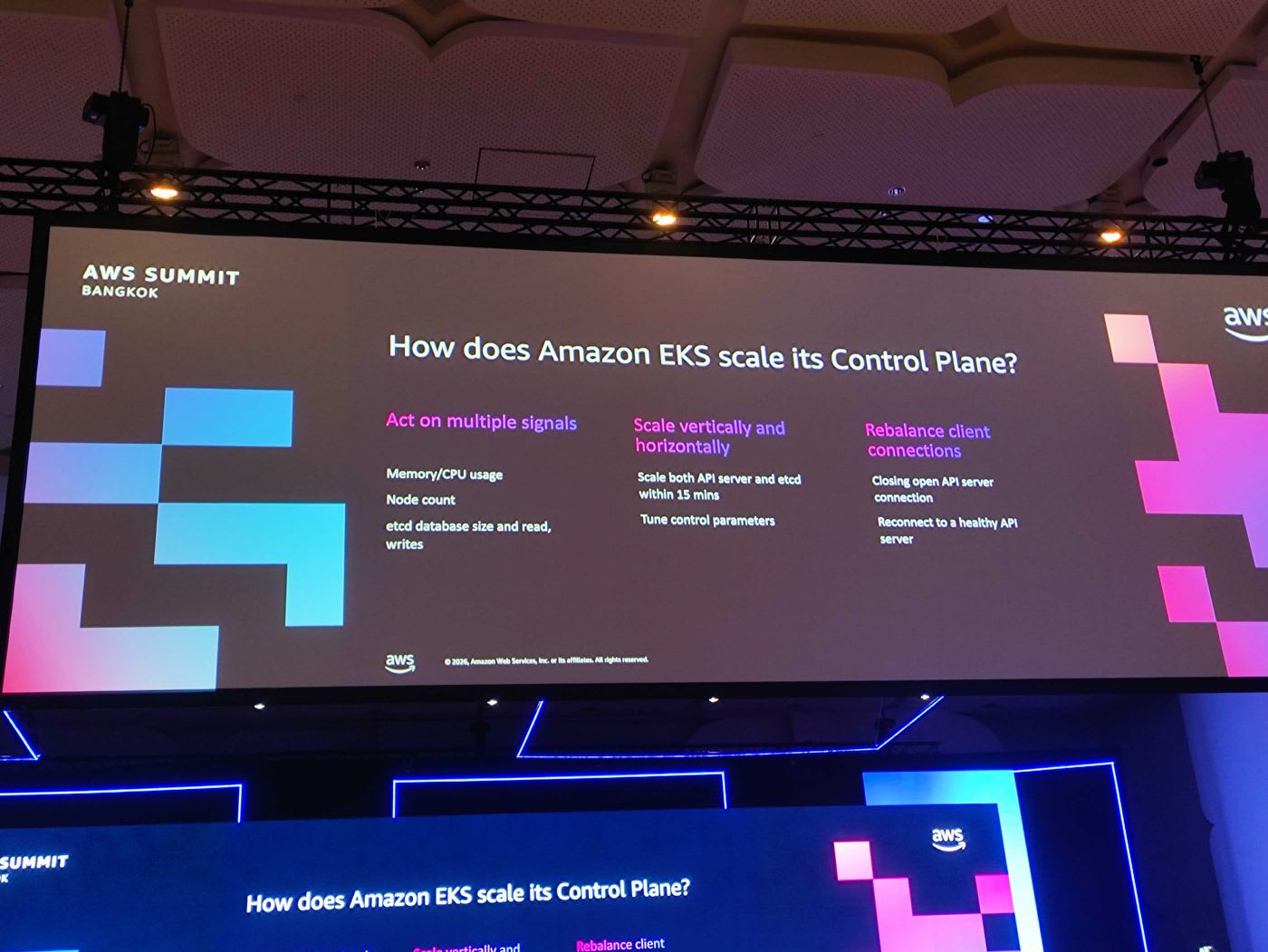
EKS สเกล control plane โดยอัตโนมัติด้วยการพิจารณาหลายสัญญาณพร้อมกัน:
- Act on multiple signals — ดู Memory/CPU usage, Node count, รวมถึง etcd database size และ read/write
- Scale vertically and horizontally — สามารถสเกลทั้ง API server และ etcd ภายในเวลาประมาณ 15 นาที พร้อม tune control parameters
- Rebalance client connections — ปิด connection เดิมที่เปิดค้างกับ API server แล้วให้ client reconnect ไปยัง API server ที่ healthy
Amazon EKS Data Plane Architecture
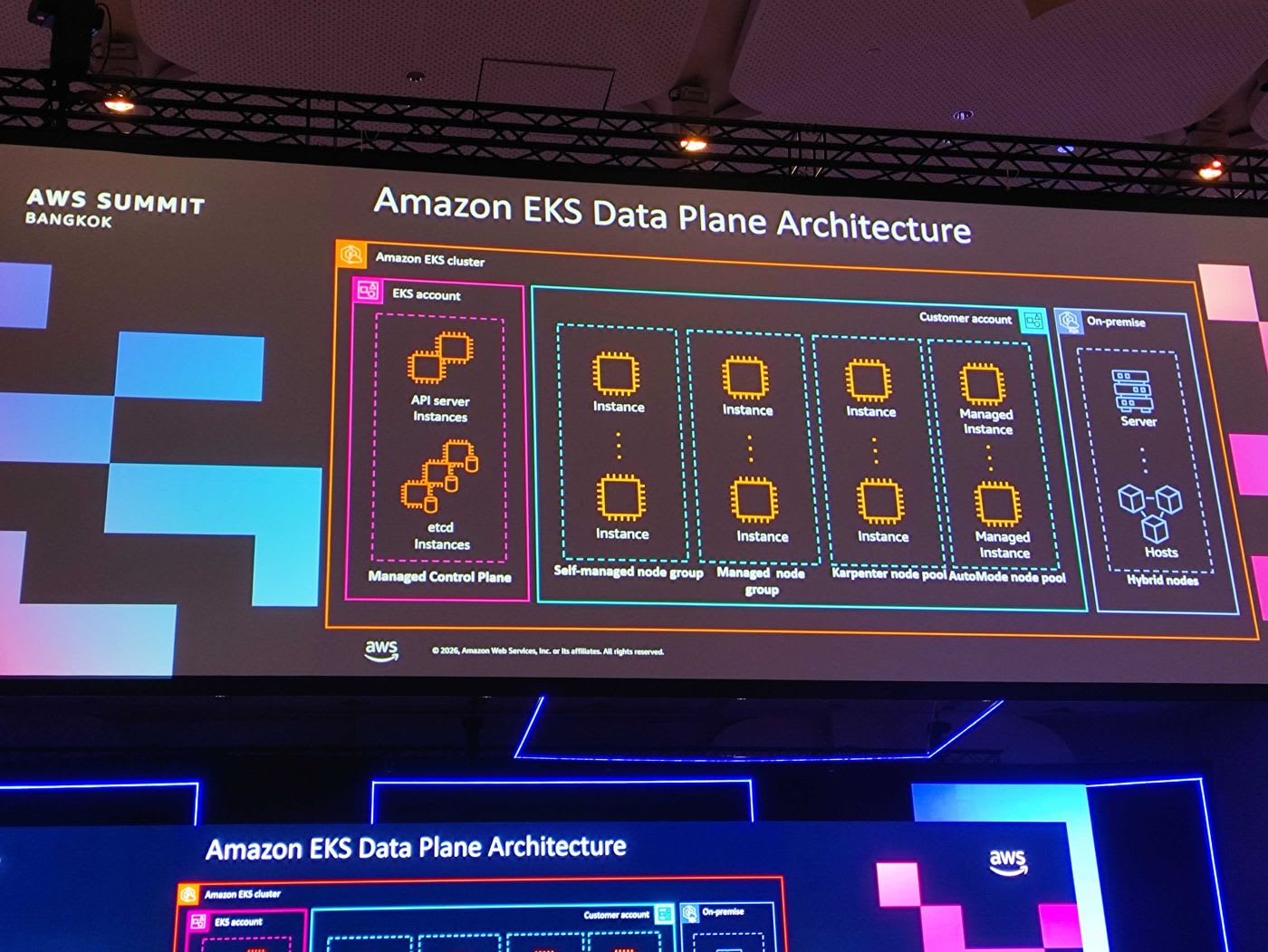
ในฝั่ง Data Plane EKS ให้ความยืดหยุ่นในการเลือกรูปแบบ node ได้หลากหลายภายในคลัสเตอร์เดียว ตั้งแต่ Self-managed node group, Managed node group, Karpenter node pool, Auto Mode node pool ไปจนถึง Hybrid Nodes ที่รัน workload บน on-premise ได้
📎 EKS Data Plane — Best Practices · 📎 EKS Auto Mode — Best Practices
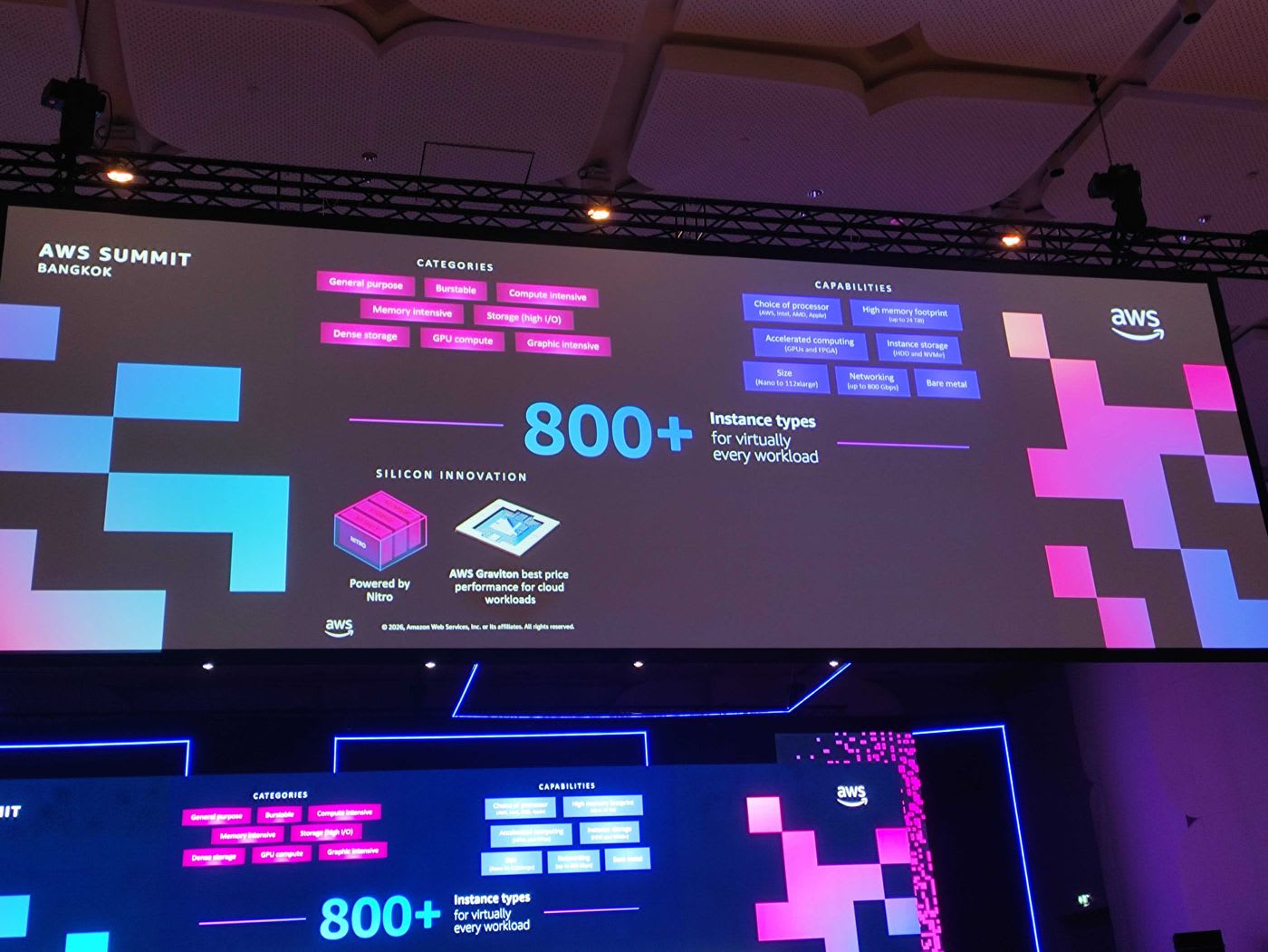
จุดแข็งสำคัญคือ EC2 มี instance types มากกว่า 800 แบบ ครอบคลุมแทบทุก workload ตั้งแต่ General purpose, Compute/Memory intensive ไปจนถึง GPU compute เสริมด้วย silicon innovation อย่าง AWS Nitro System และ AWS Graviton ที่ให้ price-performance ดีที่สุดสำหรับ cloud workload
📎 AWS Graviton — Official Page
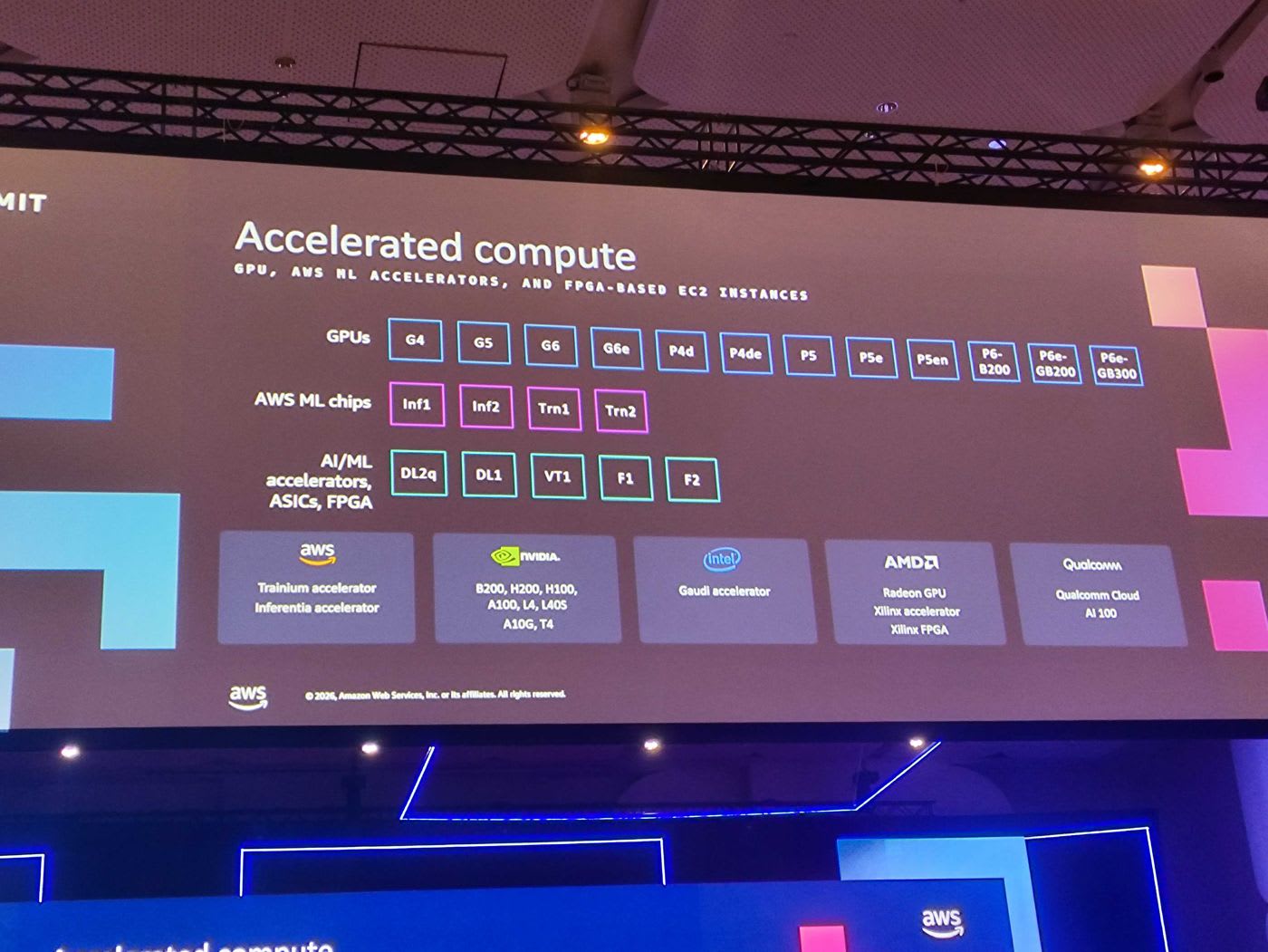
สำหรับ AI/ML โดยเฉพาะ EKS รองรับ accelerated compute หลากหลาย ทั้ง GPU (ตระกูล G, P รวมถึง P6e-GB200/GB300), ชิป ML ของ AWS อย่าง Trainium และ Inferentia ตลอดจน accelerator จาก NVIDIA, Intel Gaudi, AMD และ Qualcomm
Boosting Application Performance & Resiliency (Data Plane Innovation)
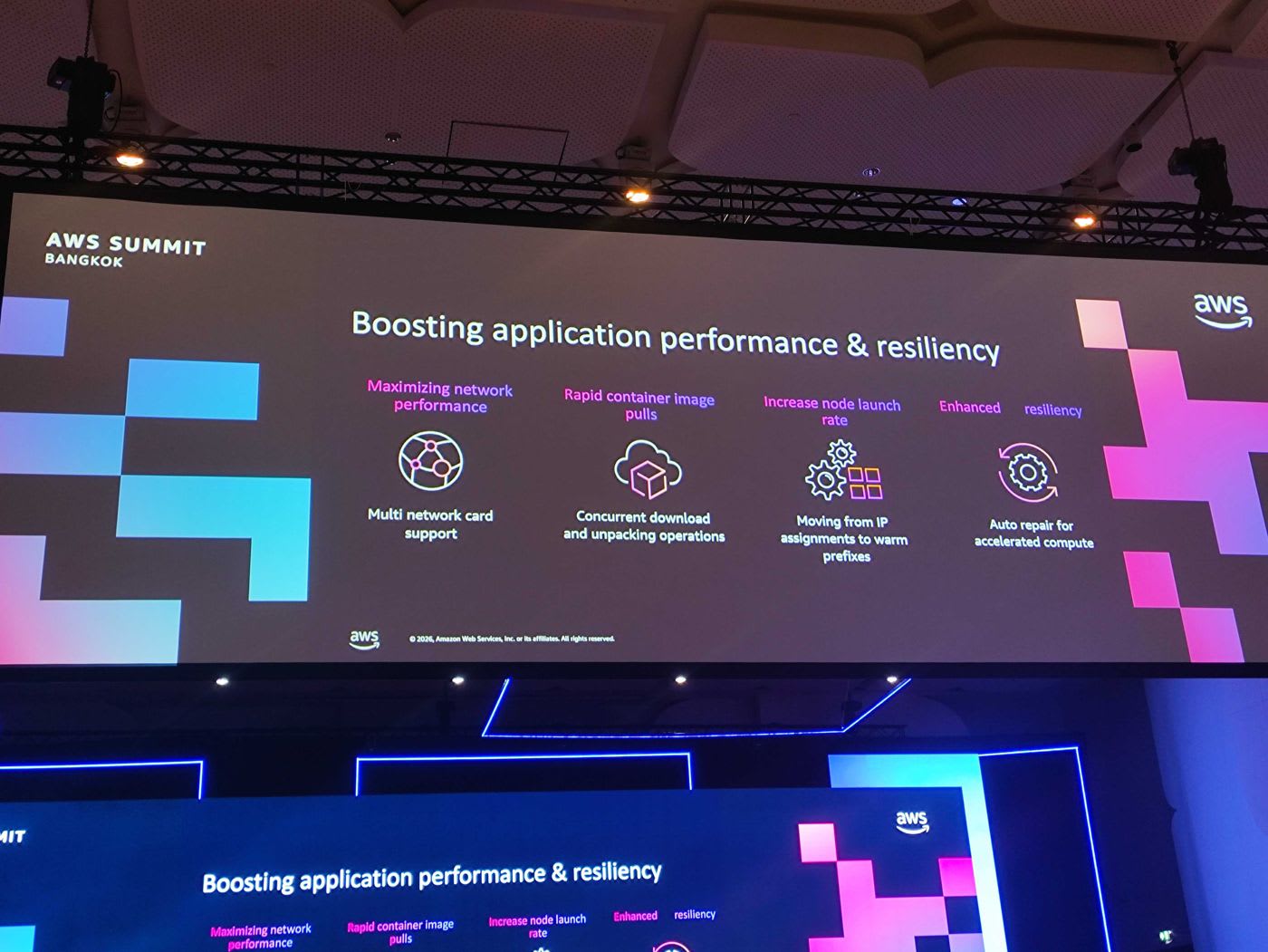
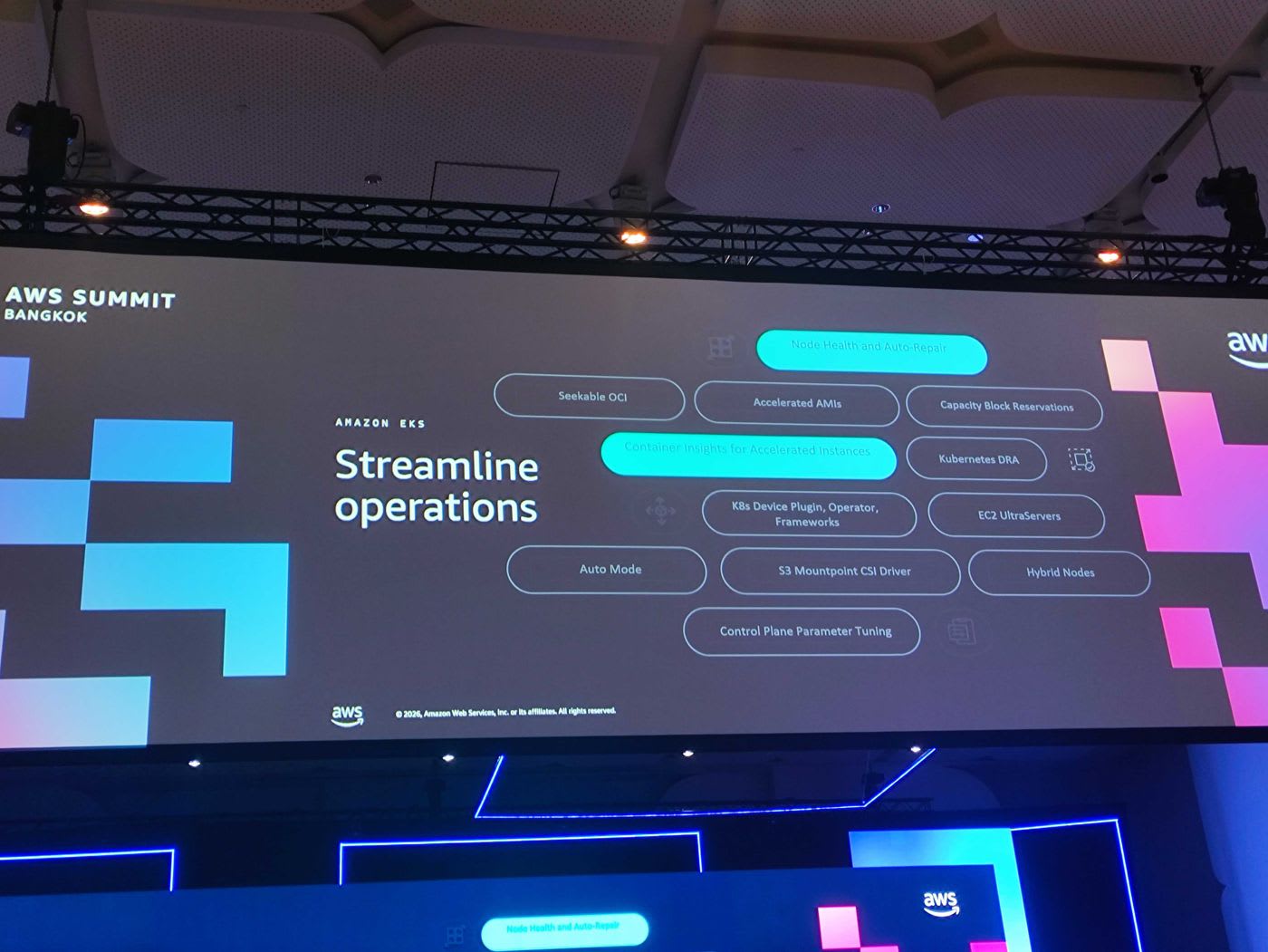
AWS นำ innovation มาเสริม data plane เพื่อให้ launch node และ pod ได้เร็วขึ้น:
- Maximizing network performance ด้วย multi network card support เพื่อดึงข้อมูลจาก Amazon S3 ได้เร็วขึ้น
- Rapid container image pulls ด้วย concurrent download/unpacking และเทคนิค lazy loading container image (Seekable OCI) ทำให้ pull image ขนาดใหญ่ได้รวดเร็ว
- Increase node launch rate ด้วยการเปลี่ยนจากการ assign IP ทีละตัวมาเป็น warm prefixes
- Enhanced resiliency ด้วย auto repair สำหรับ accelerated compute
จุดสำคัญคือ innovation เหล่านี้ไม่ได้จำกัดเฉพาะ ultra-scale cluster แต่ถูกนำกลับมาให้ลูกค้า EKS ทุกคนได้ใช้ตั้งแต่ปีที่ผ่านมา
📎 VPC CNI — EKS Best Practices
Amazon EKS Ultra-Scale Clusters
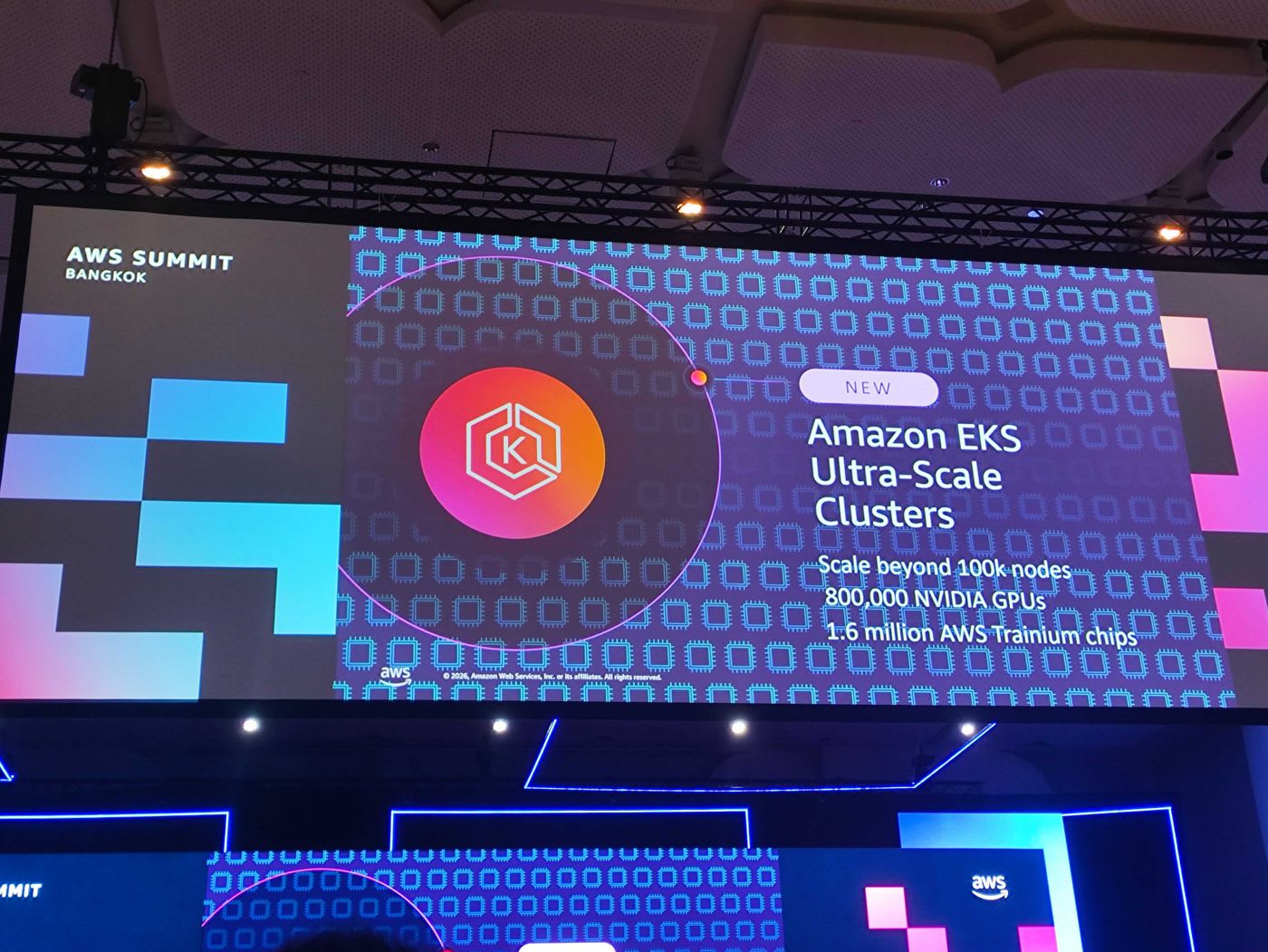
ไฮไลต์สำคัญคือ Amazon EKS Ultra-Scale Clusters ที่รองรับได้ เกิน 100,000 nodes ต่อคลัสเตอร์ ซึ่งเทียบเท่ากับ 800,000 NVIDIA GPUs หรือ 1.6 ล้าน AWS Trainium chips ในคลัสเตอร์เดียว เปิดทางให้ลูกค้าฝึกโมเดลระดับ trillion-parameter ได้
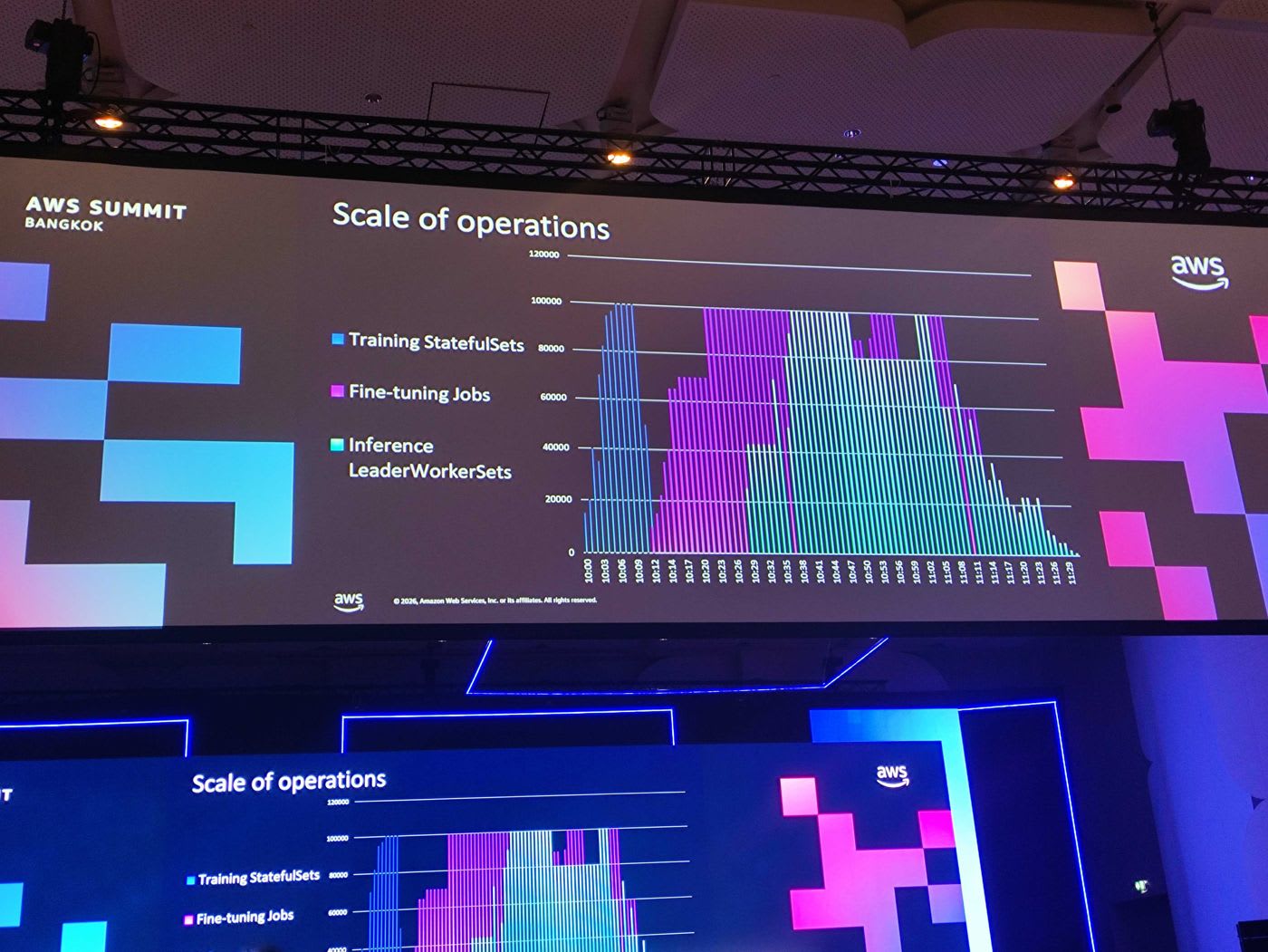
จากกราฟ scale of operations จะเห็นว่า workload หลายประเภท ทั้ง training, fine-tuning และ inference สามารถรันรวมกันในคลัสเตอร์เดียวที่ระดับหลักแสน pod ได้
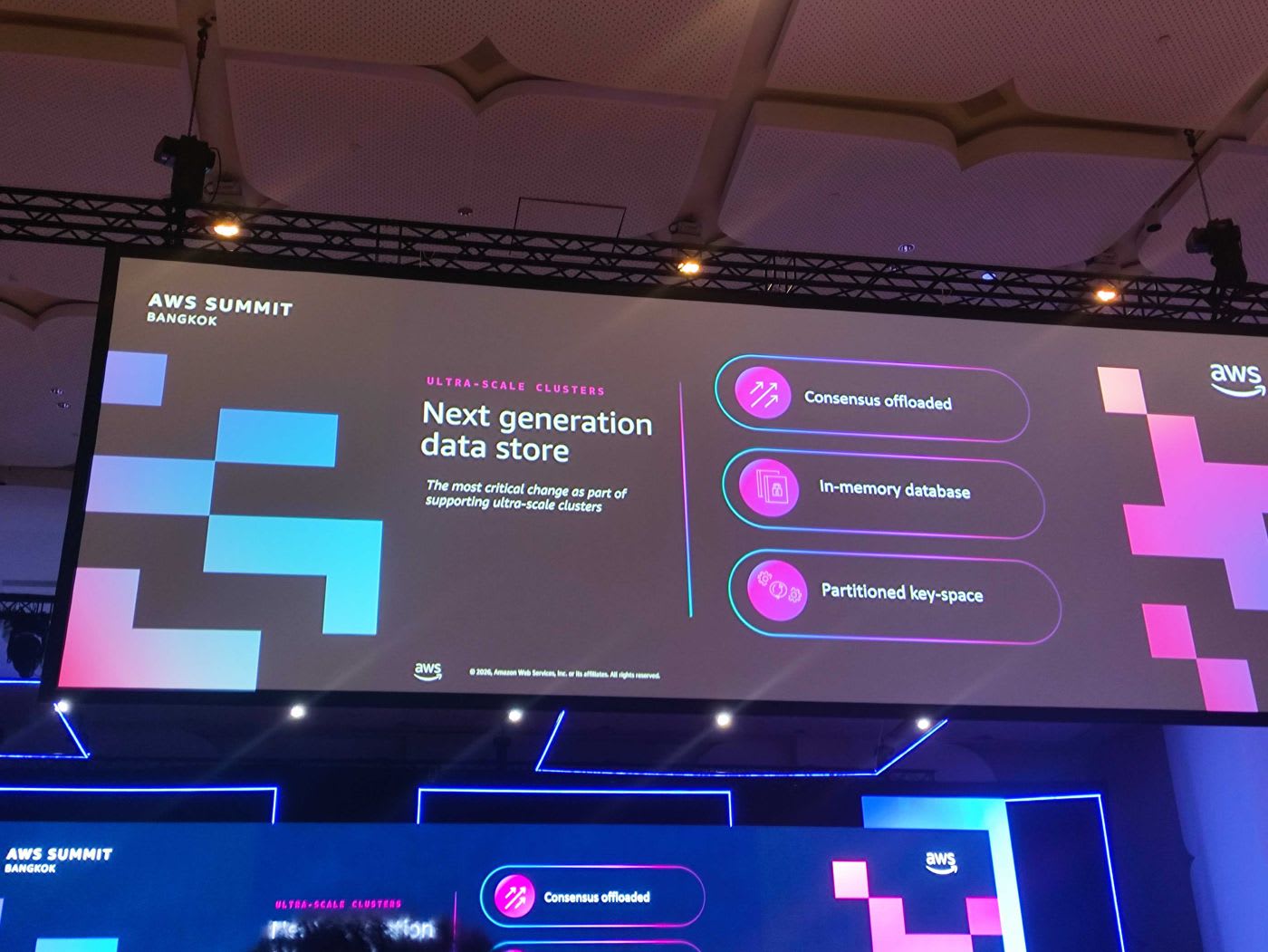
หัวใจที่ทำให้สเกลได้ระดับนี้คือการออกแบบ next generation data store ใหม่ ซึ่งเป็นการเปลี่ยนแปลงที่สำคัญที่สุด 3 ข้อ:
- Consensus offloaded — ย้าย consensus ของ etcd ออกไปใช้ multi-AZ journal system ของ AWS
- In-memory database — เพิ่มความเร็วในการเข้าถึงข้อมูล
- Partitioned key-space — แยก key ที่ใช้งานหนักออกจากกัน
ทั้งหมดนี้ทำให้ได้ performance ดีขึ้นแบบ order-of-magnitude โดยยังคง full Kubernetes conformance
📎 Amazon EKS enables ultra scale AI/ML workloads with support for 100K nodes per cluster — AWS Blog · 📎 Under the hood: Amazon EKS ultra scale clusters — AWS Blog
Amazon EKS Provisioned Control Plane
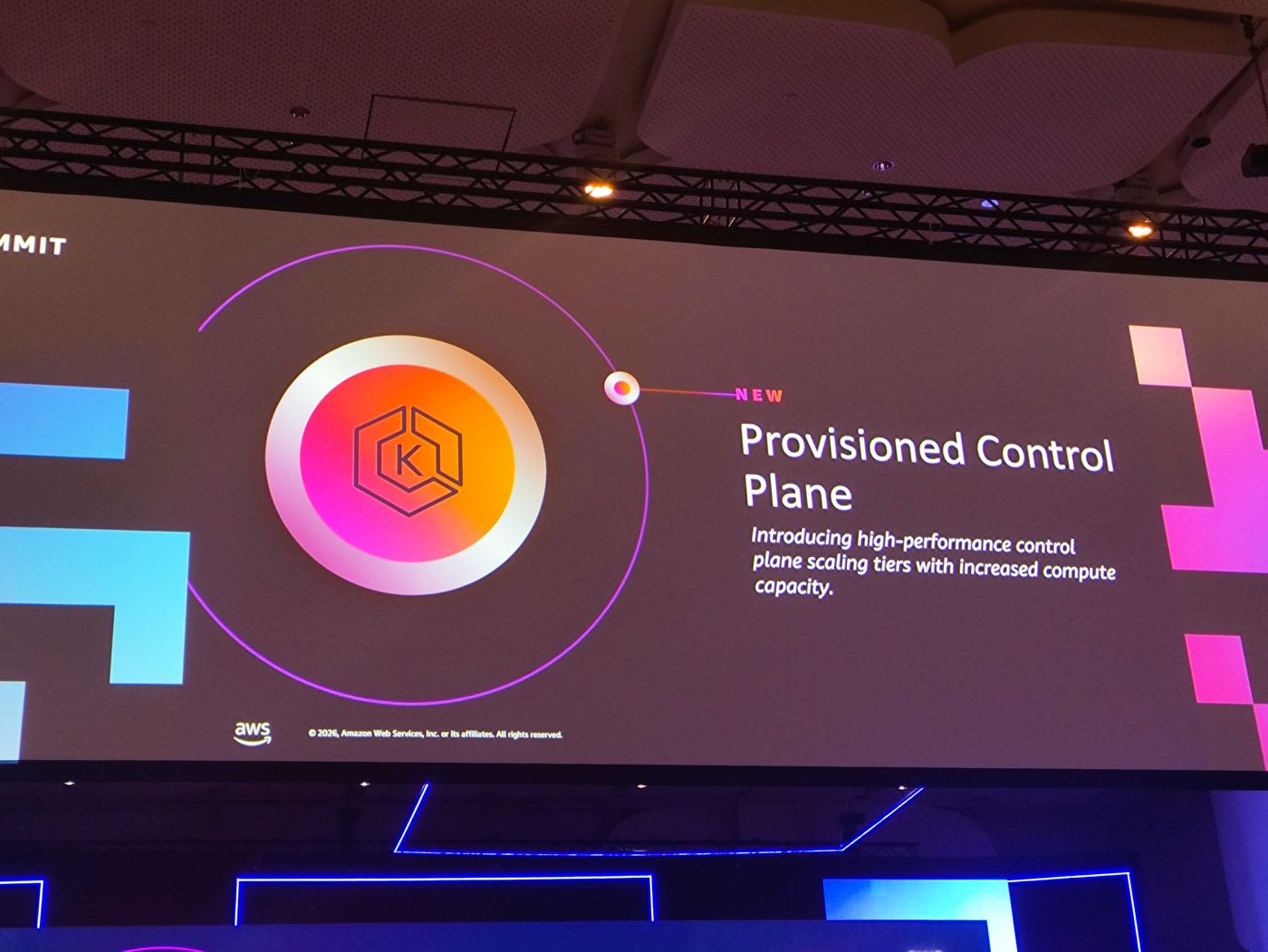
ลูกค้าหลายรายได้ประโยชน์จาก innovation ฝั่ง data plane แล้ว แต่ก็อยากได้ performance ที่คาดเดาได้ในฝั่ง control plane ด้วย AWS จึงนำองค์ความรู้จากการสร้าง ultra-scale cluster กลับมาเป็นฟีเจอร์ใหม่ชื่อ EKS Provisioned Control Plane ที่ให้ลูกค้า pre-allocate capacity ของ control plane เพื่อ performance ที่สูงและคาดเดาได้
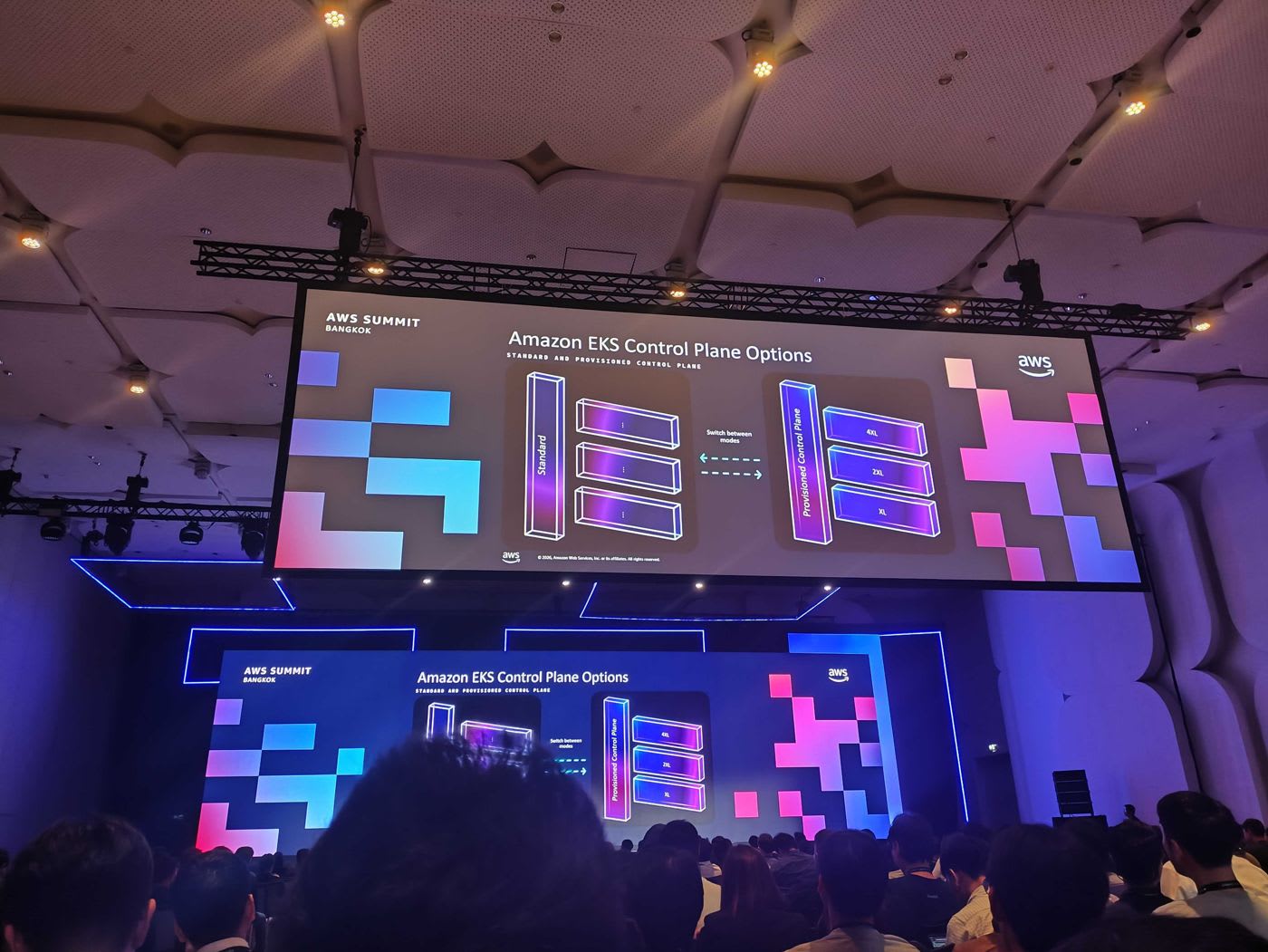
มีจุดที่ควรเข้าใจคือ:
- Standard Control Plane จะ auto-scale ขึ้นลงตาม size และ demand ของระบบ เหมาะกับการใช้งานทั่วไปและเป็นตัวเลือกที่ลูกค้าส่วนใหญ่ควรใช้
- Provisioned Control Plane ให้เลือก tier ได้ (เริ่มต้น XL, 2XL, 4XL) เหมาะกับกรณีที่รู้ล่วงหน้าว่าจะมี event ใหญ่ เช่น launch แคมเปญที่คาดว่าจะมี traffic เข้ามาเยอะ เลือกได้ด้วยการ update cluster เพียง parameter เดียวที่กำหนด size
- ทั้งสองโหมด สลับไป-กลับได้ (scale up เป็น provisioned แล้ว scale down กลับมาเป็น standard ได้)
Provisioned Control Plane ช่วยเพิ่ม concurrent request ไปยัง etcd, ทำให้ pod scheduling rate เร็วขึ้น และรองรับ etcd database size ที่ใหญ่ขึ้น
📎 Amazon EKS introduces Provisioned Control Plane — AWS Blog · 📎 Provisioned Control Plane — Official Docs
บทเรียนจากการใช้งานจริง: EKS at Ascend Money (TrueMoney)
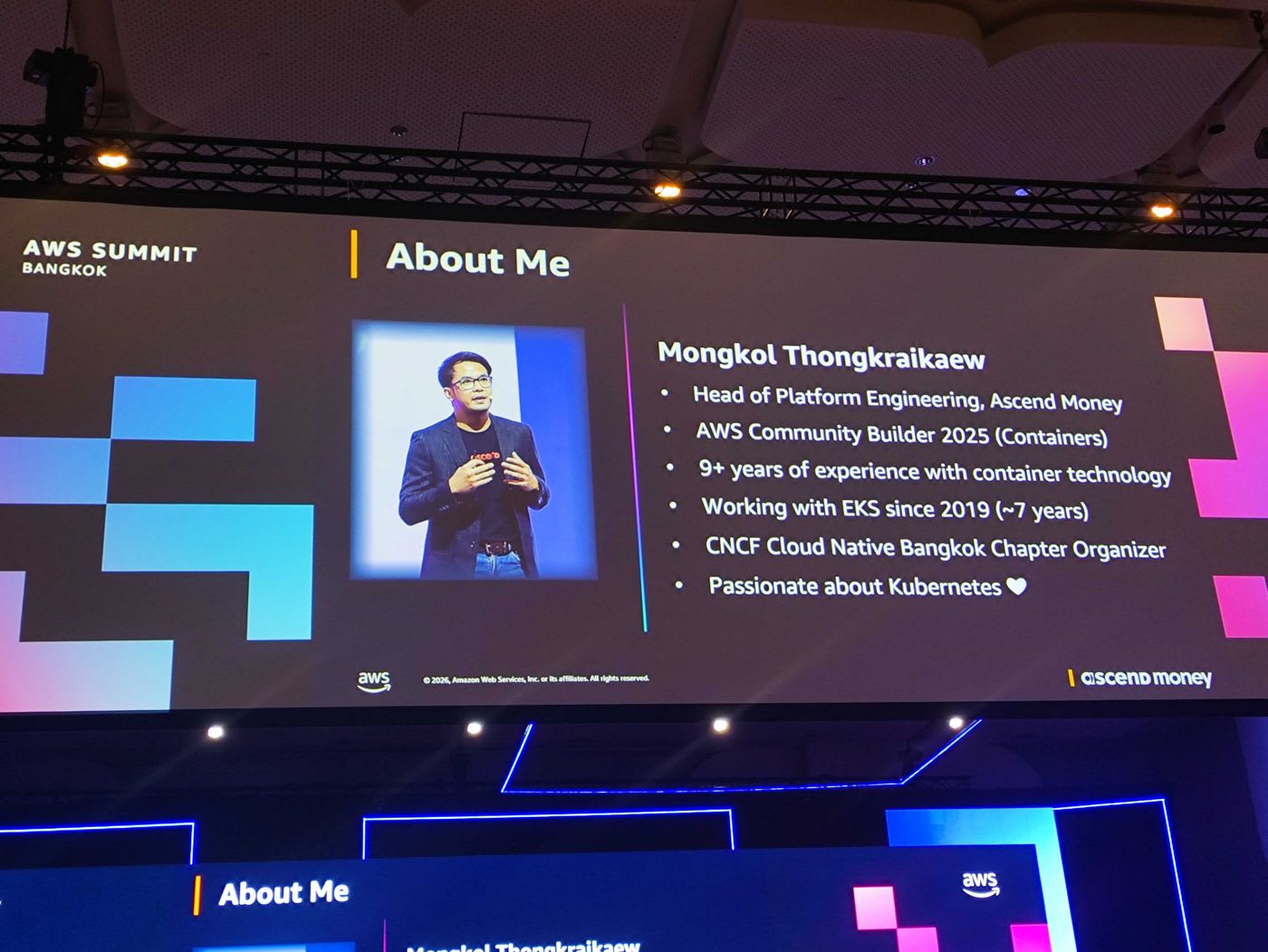
คุณ Mongkol Thongkraikaew หัวหน้าทีม Platform Engineering ของ Ascend Money ผู้พัฒนาแอป TrueMoney Wallet มาแชร์ประสบการณ์การใช้ EKS มาตั้งแต่ปี 2019 (ราว 7 ปี) Ascend Money ให้บริการ financial services หลากหลาย ทั้งการลงทุน การกู้ยืม และการชำระเงิน โดยเบื้องหลังเกือบทั้งหมดรันอยู่บน EKS
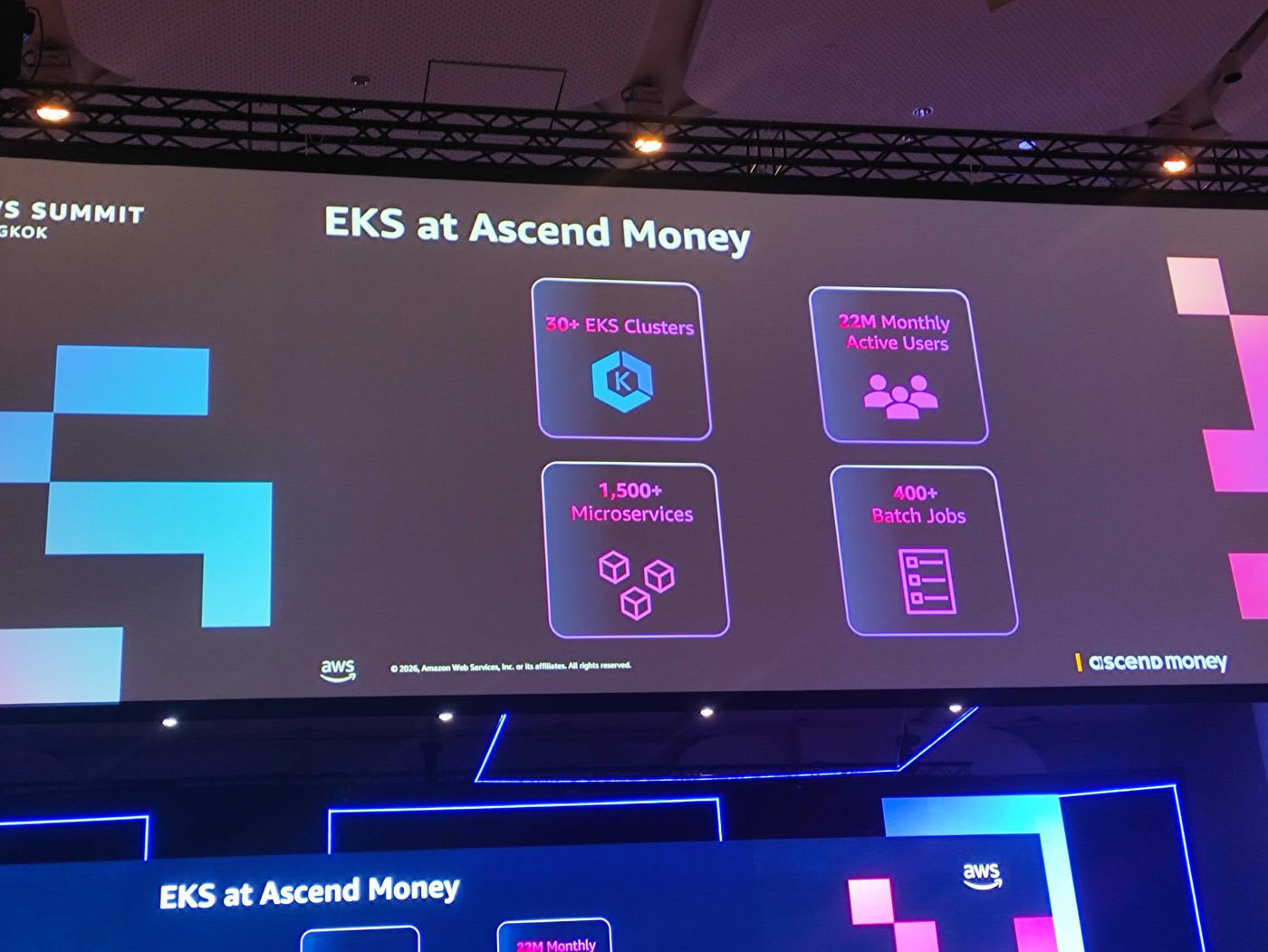
ตัวเลขที่สะท้อนสเกลของ Ascend Money:
- 30+ EKS clusters กระจายอยู่ 13 region (บาง region เป็น active-active)
- 1,500+ microservices
- 400+ batch jobs
- ให้บริการผู้ใช้ 22–23 ล้านคนต่อเดือน
ที่สเกลระดับนี้ ทีมพบว่า default setting หลายอย่างของ Kubernetes จะกลายเป็นคอขวด คุณ Mongkol หยิบมา 4 เรื่องที่ส่งผลกระทบต่อการใช้งาน EKS โดยตรง
บทเรียนที่ 1: CoreDNS
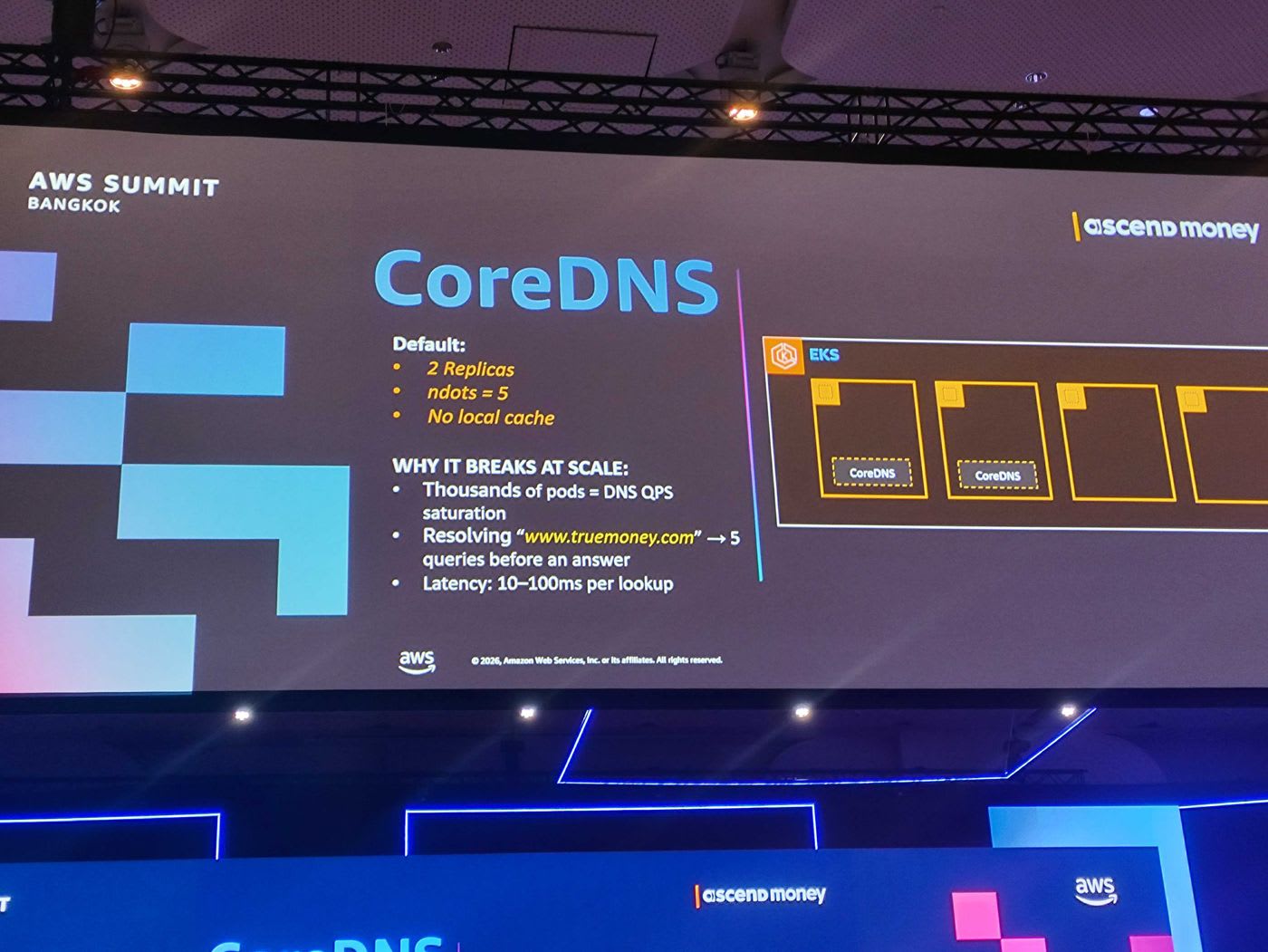
โดย default CoreDNS จะถูกติดตั้งมาเพียง 2 replicas, ตั้งค่า ndots = 5 และไม่มี local cache เมื่อมี pod จำนวนมาก ปัญหาที่เกิดคือ:
- Thousands of pods = DNS QPS saturation — pod จำนวนมหาศาลยิง query ไปที่ CoreDNS เพียงไม่กี่ตัว
- ค่า
ndots = 5ทำให้การ resolve ชื่อโดเมน เช่นwww.truemoney.comต้อง query อย่างน้อย 5 ครั้งก่อนได้คำตอบ ดัน query rate สูงขึ้นมาก - Latency อยู่ที่ราว 10–100ms ต่อ lookup
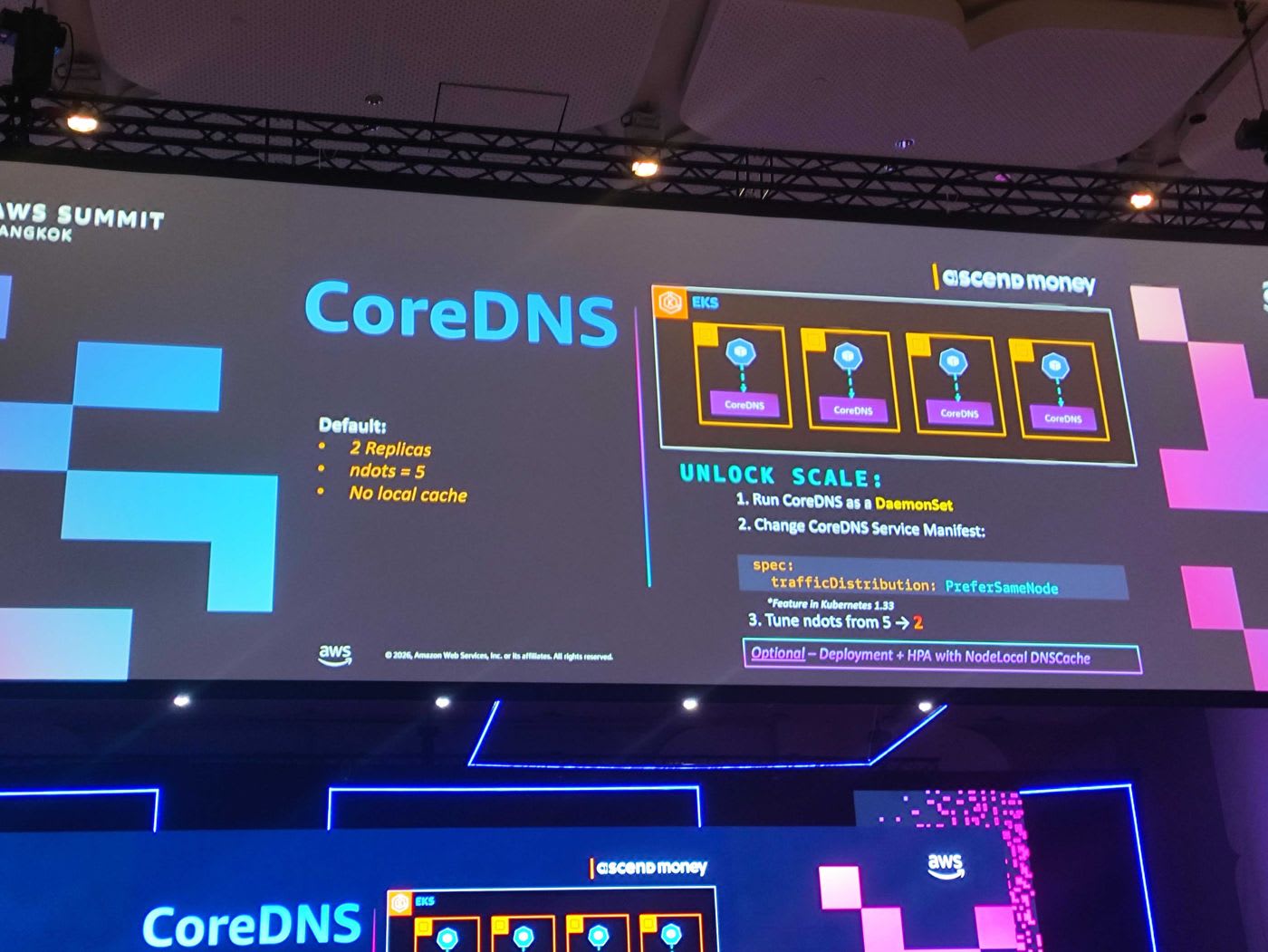
วิธีแก้ของทีม Ascend Money:
- รัน CoreDNS เป็น DaemonSet เพื่อกระจายให้มีอยู่ในทุก worker node
- ปรับ CoreDNS Service Manifest ให้ pod ถาม CoreDNS ที่อยู่ node เดียวกันก่อน
- ปรับ
ndotsจาก 5 → 2 ตามคำแนะนำของ Kubernetes
apiVersion: v1
kind: Service
metadata:
  name: kube-dns
  namespace: kube-system
spec:
  trafficDistribution: PreferSameNode   # Feature ใน Kubernetes 1.33+
ทางเลือกเสริม (Optional): ใช้ Deployment + HPA ร่วมกับ NodeLocal DNSCache ก็ช่วยลด DNS lookup failure และ latency ได้เช่นกัน
📎 Scale Cluster Services (CoreDNS / kube-proxy) — EKS Best Practices · 📎 Manage CoreDNS for DNS in Amazon EKS — Official Docs
บทเรียนที่ 2: kube-proxy
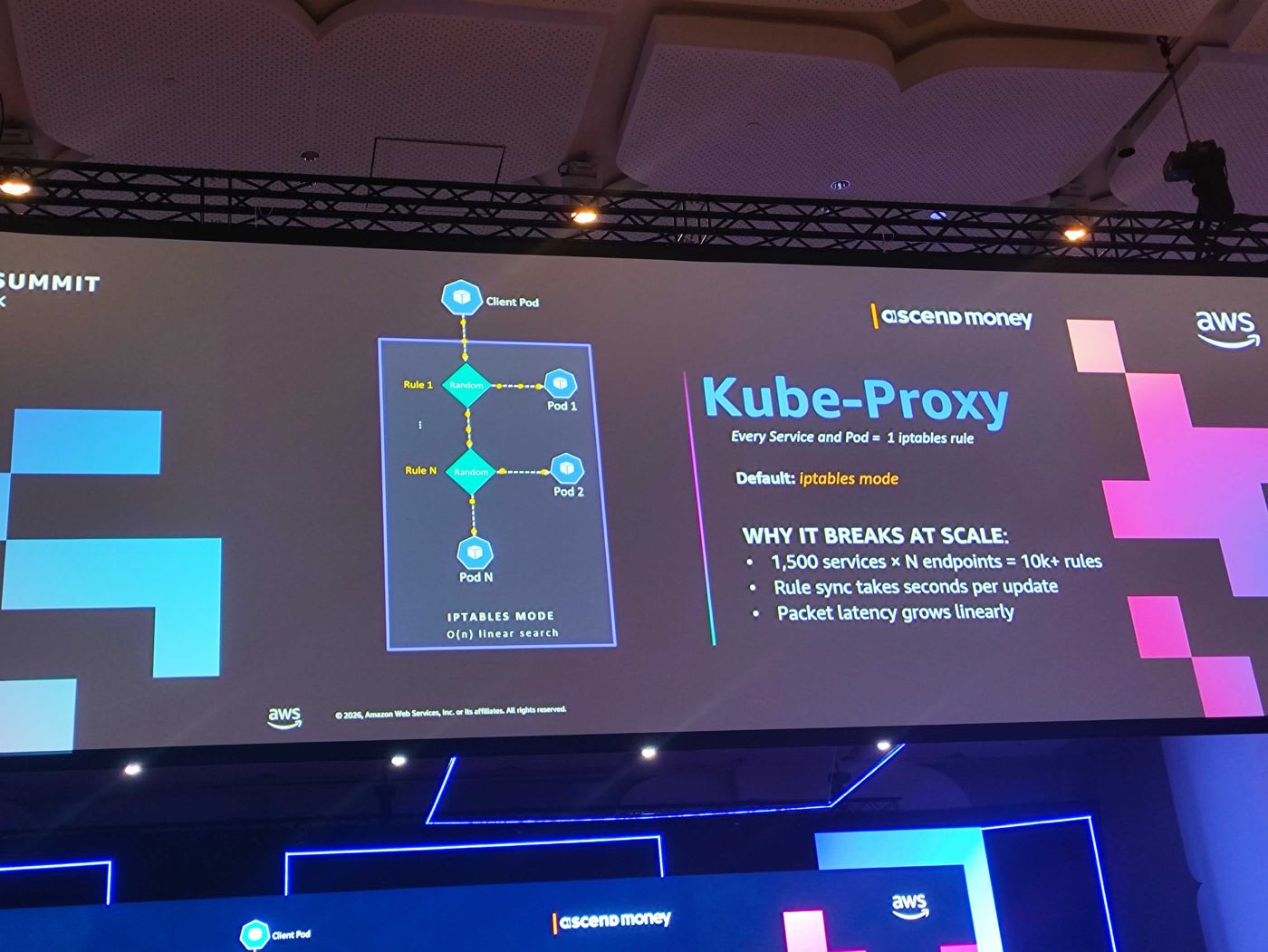
โดย default kube-proxy ที่ติดตั้งมากับ EKS จะใช้ iptables mode หลักการคือทุก service และ endpoint จะกลายเป็น iptables rule เมื่อ client เรียกไปหา service มันต้อง traverse ผ่าน rule เหล่านี้แบบ O(n) linear search ปัญหาที่ตามมาเมื่อสเกล:
- 1,500 services × N endpoints = rule มากกว่า 10,000 ข้อ
- Rule sync ใช้เวลาเป็นวินาทีต่อการ update หนึ่งครั้ง
- Packet latency โตขึ้นแบบเชิงเส้น
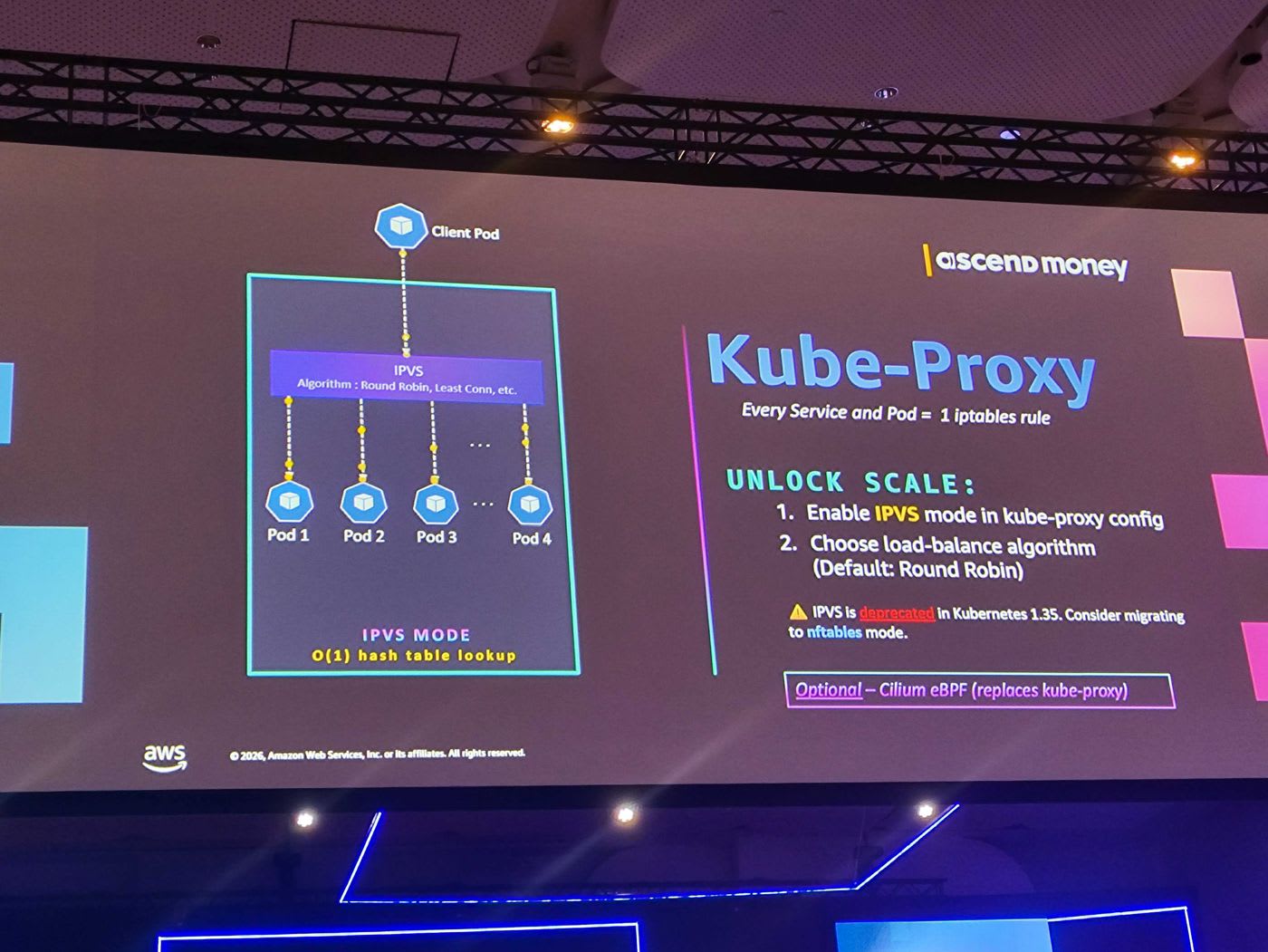
ทีมเปลี่ยนไปใช้ IPVS mode ซึ่งใช้เทคนิค hash table lookup แบบ O(1) ไม่ว่าจะมี service หรือ endpoint เยอะแค่ไหนก็ค้นหาได้เร็วคงที่:
- เปิด IPVS mode ใน kube-proxy config
- เลือก load-balance algorithm (default คือ Round Robin)
apiVersion: kube-proxy.config.k8s.io/v1alpha1
kind: KubeProxyConfiguration
mode: "ipvs"
ipvs:
  scheduler: "rr"   # round robin, least connection ฯลฯ
⚠️ ข้อควรระวัง: IPVS mode จะถูก deprecate ใน Kubernetes 1.35 หากเป็นไปได้ให้พิจารณาย้ายไปใช้ nftables mode แทน หรือทางเลือกอื่นอย่าง Cilium eBPF ที่ทำงานแทน kube-proxy ได้
📎 Running kube-proxy in IPVS Mode — EKS Best Practices · 📎 Manage kube-proxy in Amazon EKS — Official Docs
บทเรียนที่ 3: Subnet Design — การตัดสินใจ Day-1 ที่ย้อนกลับไม่ได้
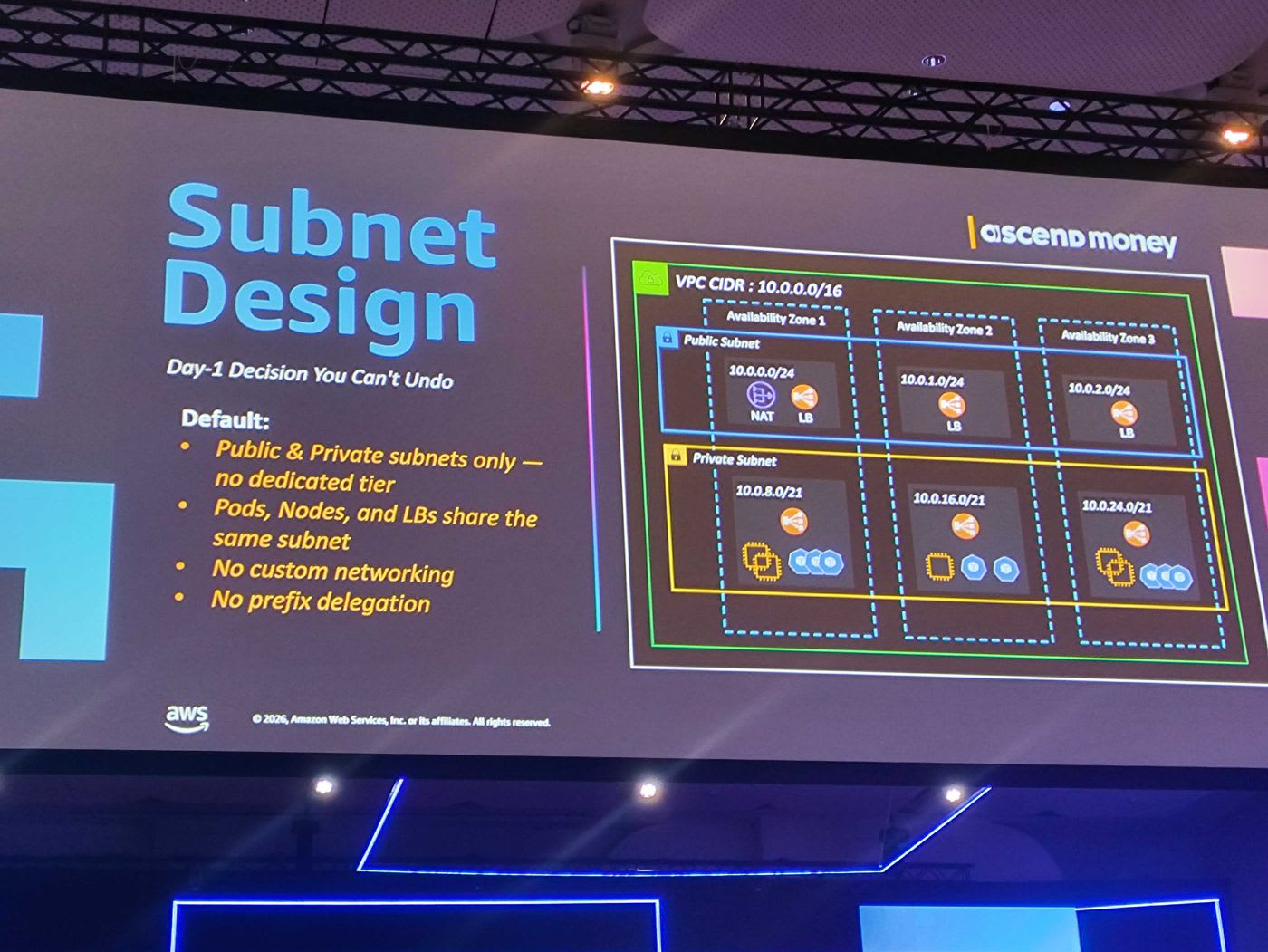
เรื่องนี้ไม่ได้อยู่ใน EKS documentation พื้นฐาน แต่เป็นบทเรียนจากประสบการณ์จริง 7 ปีของทีมที่เจอปัญหา IP exhaustion บ่อยมาก คำแนะนำในการออกแบบ subnet:
- Estimate ก่อนเสมอ — คุยกันให้ชัดว่าคลัสเตอร์จะโตประมาณไหน และแต่ละ subnet จะให้ IP เท่าไร
- แบ่ง subnet ให้ชัดเจน — มี public subnet สำหรับ public load balancer และ private subnet สำหรับ worker / private load balancer
- แยก IP ของ Pod ด้วย secondary CIDR — เพราะ pod ใช้ IP ค่อนข้างเยอะ การแยก range ออกมาช่วยลดปัญหา IP เต็ม
- Reserve CIDR ไว้ล่วงหน้าหนึ่งชุด — เผื่อไว้ใช้ในอนาคต วันที่ IP เต็มจริงจะได้หยิบชุด reserve มาขยายต่อได้ โดยไม่ต้องสร้างคลัสเตอร์ใหม่
💡 เสริม: VPC CNI รองรับ prefix delegation และ custom networking ที่ช่วยเพิ่มจำนวน IP ต่อ node และดึง IP จาก secondary CIDR ได้ การใช้ VPC subnet CIDR reservation ยังช่วยลด fragmentation เพื่อให้ allocate prefix แบบ contiguous ได้
📎 Custom Networking — EKS Best Practices · 📎 Optimizing IP Address Utilization — EKS Best Practices
บทเรียนที่ 4: API Priority & Fairness (APF)
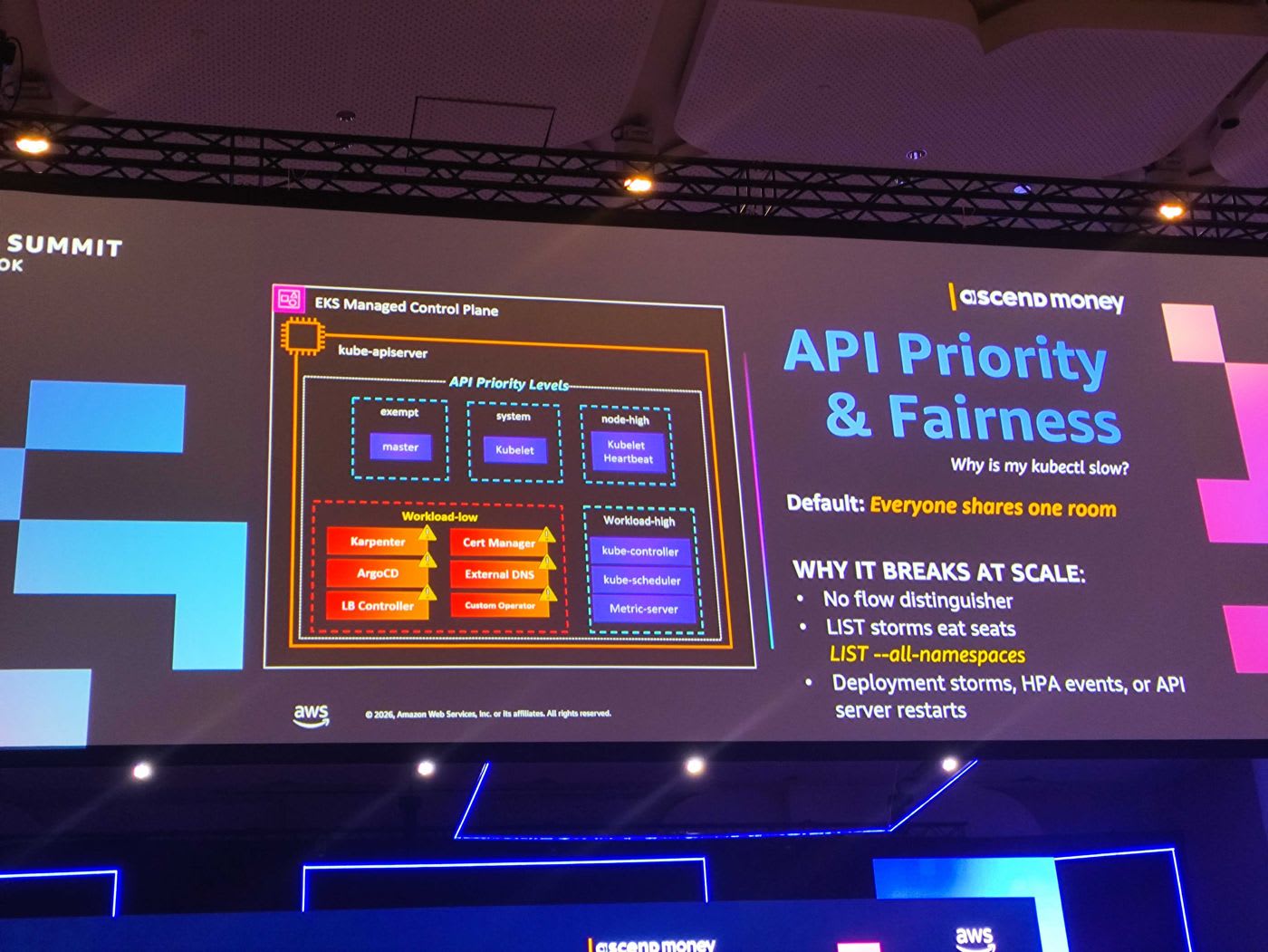
เรื่องนี้มักเจอเมื่อคลัสเตอร์ใหญ่จริง อาการคือ "ทำไม kubectl ช้าจัง" หรือเวลา worker scale ขึ้น การ update IP ใน load balancer ช้าผิดปกติ ต้นเหตุคือ default แล้ว API server มองว่าทุก controller (Karpenter, CSI, Load Balancer Controller, ArgoCD, External DNS ฯลฯ) มี priority เท่ากัน — เปรียบเหมือนทุกคนแชร์ห้องเดียวกัน ปัญหาเมื่อสเกล:
- No flow distinguisher — ไม่มีตัวแยกลำดับความสำคัญของ request
- LIST storms eat seats — คำสั่งประเภท
LIST --all-namespacesกิน capacity - Deployment storms, HPA events หรือการ restart ของ API server ก็ทำให้แย่งคิวกัน
วิธีแก้:
- ระบุ workload ที่เป็น critical (เช่น การสร้างคลัสเตอร์, refresh storage, update IP ของ load balancer)
- สร้าง PriorityLevelConfiguration และผูกกับ controller ด้วย FlowSchema เพื่อบอก API server ว่า controller นี้ให้เป็น priority แรก ไม่ต้องต่อคิว
- ทำ monitoring และตั้ง alert ให้ API server เพื่อจับปัญหาได้ทัน
apiVersion: flowcontrol.apiserver.k8s.io/v1
kind: PriorityLevelConfiguration
metadata:
  name: critical-controllers
spec:
  type: Limited
  limited:
    nominalConcurrencyShares: 50
    limitResponse:
      type: Queue
---
apiVersion: flowcontrol.apiserver.k8s.io/v1
kind: FlowSchema
metadata:
  name: critical-controllers
spec:
  priorityLevelConfiguration:
    name: critical-controllers
  rules:
    - subjects:
        - kind: ServiceAccount
          serviceAccount:
            name: karpenter
            namespace: karpenter
      resourceRules:
        - verbs: ["*"]
          apiGroups: ["*"]
          resources: ["*"]
📎 Kubernetes Control Plane — EKS Best Practices
More Tips: Scaling & Cost Optimization
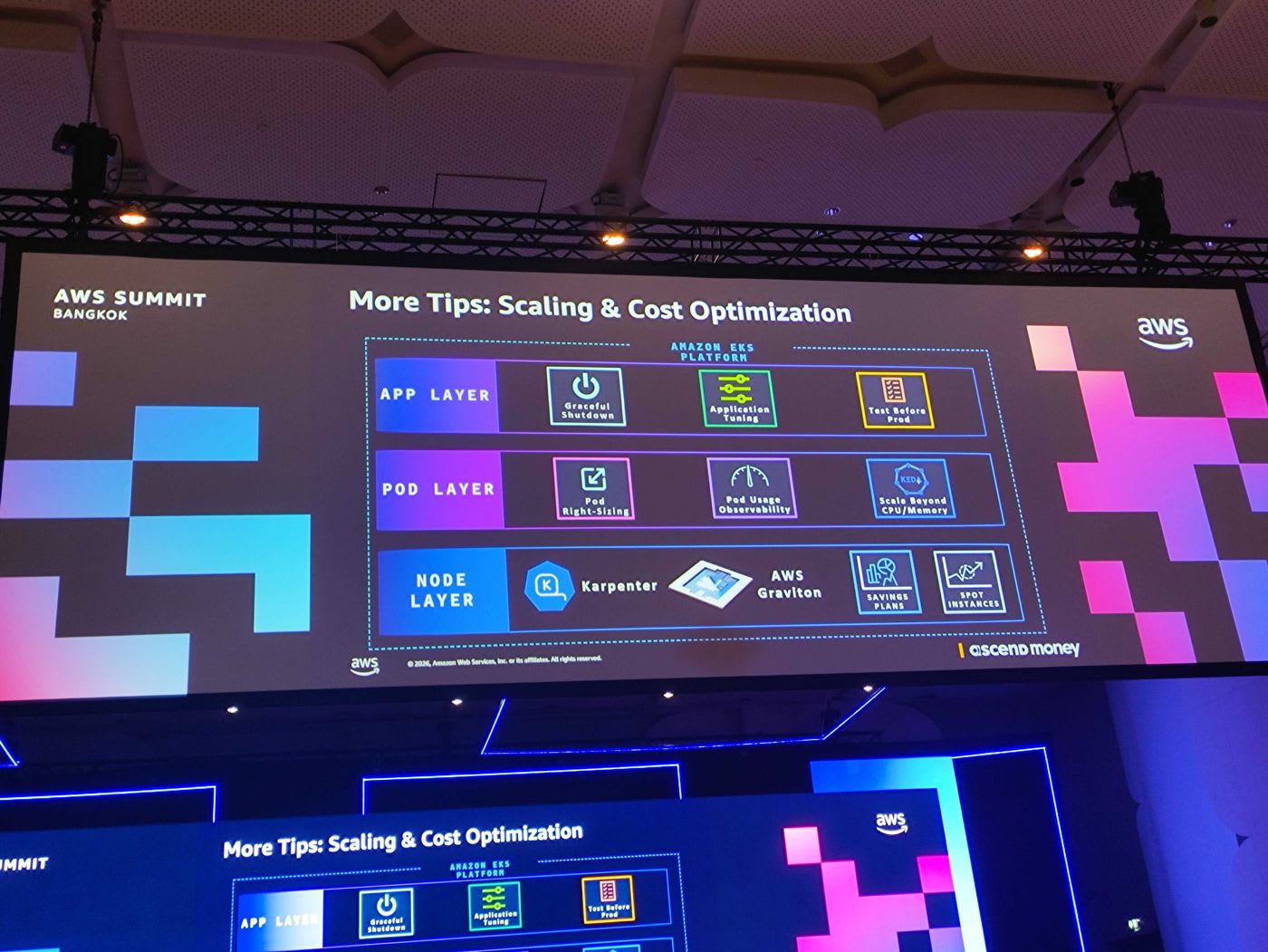
คุณ Mongkol สรุป best practice เรื่องการสเกลและ cost optimization ออกเป็น 3 layer:
Node Layer
- ใช้ Karpenter ในการ scale, consolidate และเลือก instance ให้เหมาะกับ workload
- ย้าย workload ประเภท batch ไปรันบน Spot Instances เพื่อประหยัด cost
- พิจารณา AWS Graviton และ Savings Plans
Pod Layer
- ทำ right-sizing — เคยเจอปัญหา developer ขอ CPU/Memory เยอะหรือน้อยเกินไป วิธีแก้คือทำ report/dashboard แล้วเอาข้อมูลกลับไปคุยกับ developer
- ทำ pod usage observability และ scale ด้วยกลไกอื่นนอกเหนือจาก CPU/Memory เมื่อเหมาะสม
Application Layer
- แอปต้องเป็น cloud-native ทนต่อการ scale ขึ้น-ลงและ restart บ่อย ๆ
- ทำ graceful shutdown ให้ดี
- Test before prod ก่อนเสมอ
📎 Introducing Karpenter — AWS News Blog · 📎 Amazon EC2 Spot Instances · 📎 AWS Savings Plans
อนาคต: Ascend Money Internal AI Platform
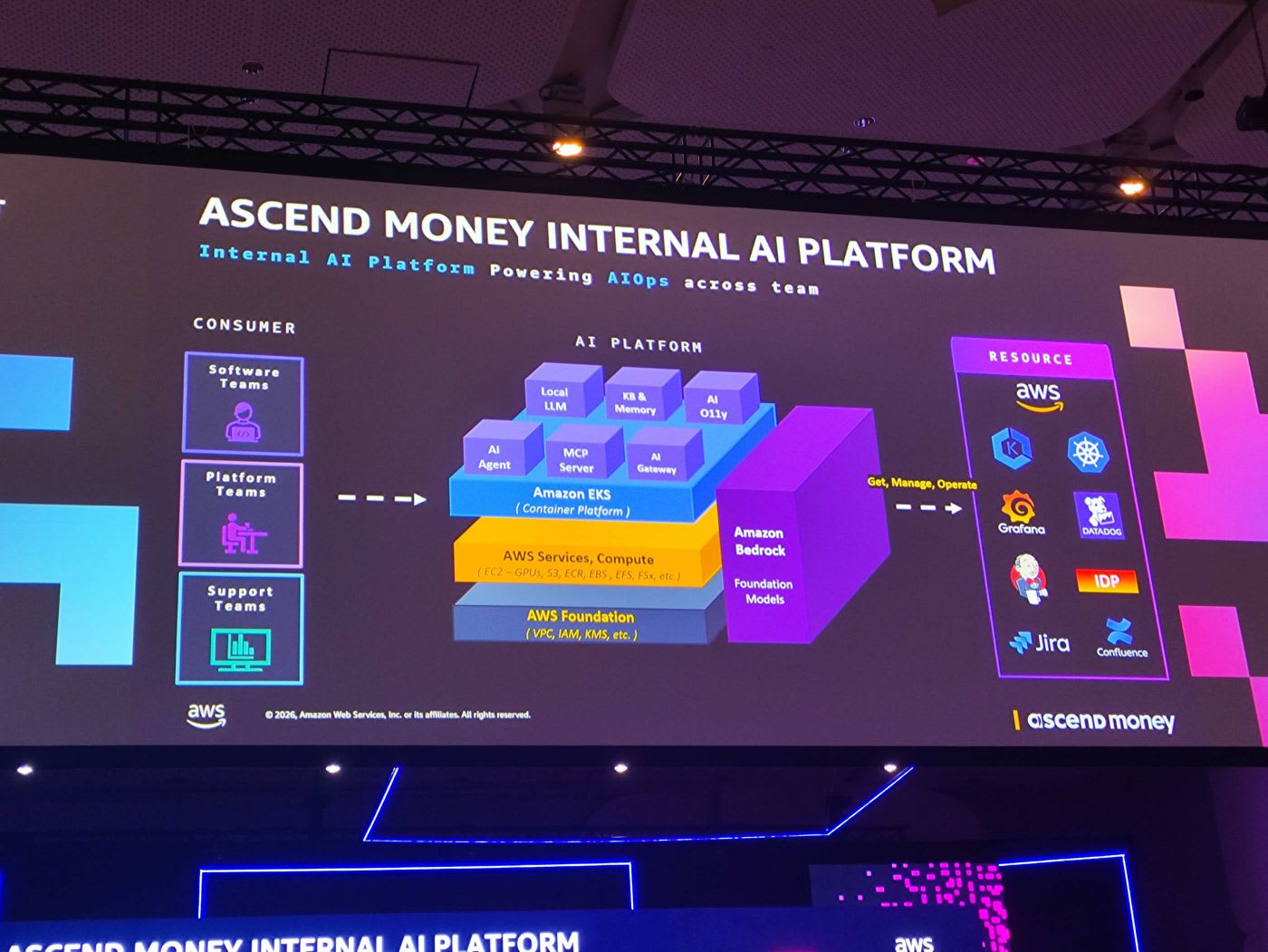
ทีม Ascend Money กำลังพัฒนา Internal AI Platform เพื่อขับเคลื่อน AIOps ทั่วทั้งองค์กร โดยเปลี่ยนจากแพลตฟอร์มแบบ self-service เดิม มาเป็นแพลตฟอร์มที่ขับเคลื่อนด้วย AI โครงสร้างประกอบด้วย AI Agent, MCP Server, AI Gateway, Local LLM, Knowledge Base & Memory รันบน Amazon EKS เป็น container platform ร่วมกับ Amazon Bedrock เป็น foundation model และเชื่อมต่อไปยัง resource ต่าง ๆ เช่น Grafana, Datadog, Jira และ Confluence เพื่อ get, manage และ operate ได้อัตโนมัติ
📎 Amazon Bedrock — Official Page
สรุป (Conclusion)
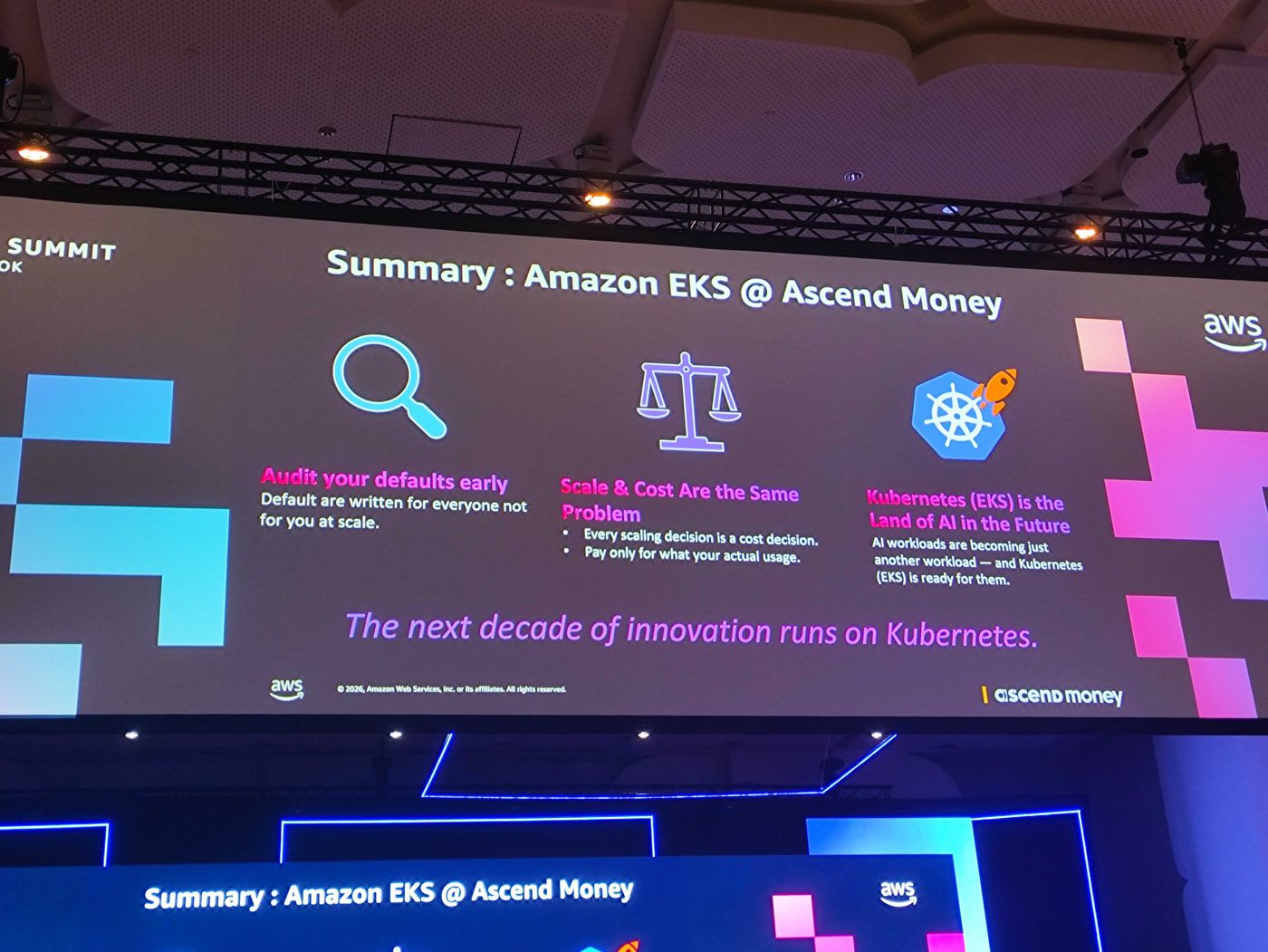
Session นี้พาเราไปดูทั้งเบื้องหลังการออกแบบ EKS ของ AWS — ตั้งแต่ Control Plane, etcd, Ultra-Scale Clusters ไปจนถึง Provisioned Control Plane ใหม่ — และบทเรียนจากการใช้งานจริงที่สเกลของ Ascend Money โดยมี 3 ข้อคิดสำคัญที่ฝากไว้:
- Audit your defaults early — ค่า default ถูกออกแบบมาเพื่อทุกคน ไม่ใช่เพื่อคุณที่ระดับ scale ดังนั้นต้องทบทวนและปรับให้เข้ากับการใช้งานจริง
- Scale & Cost Are the Same Problem — ทุกการตัดสินใจเรื่องการสเกลคือการตัดสินใจเรื่อง cost จ่ายเฉพาะเท่าที่ใช้งานจริง
- Kubernetes (EKS) is the Land of AI in the Future — AI workload กำลังกลายเป็นเพียง workload อีกประเภทหนึ่ง และ EKS พร้อมรองรับแล้ว
ปิดท้ายด้วยประโยคที่สรุปทั้ง session ได้ดี: "The next decade of innovation runs on Kubernetes."
สำหรับใครที่ใช้งาน EKS อยู่ ทักษะการดูแล workload ปัจจุบันยังใช้ได้กับ AI workload แต่ควรเสริมความรู้เพิ่มเรื่อง resource scheduling สำหรับ AI และ AI agent เพื่อให้แพลตฟอร์มทำงานได้อย่างมั่นคง
อ้างอิง (References)
- Amazon EKS — Official Page
- Amazon EKS Clusters — Official Docs
- Kubernetes Control Plane Scaling — EKS Best Practices
- EKS Data Plane — Best Practices
- EKS Auto Mode — Best Practices
- AWS Graviton — Official Page
- Amazon VPC CNI — EKS Best Practices
- Amazon EKS enables ultra scale AI/ML workloads with support for 100K nodes per cluster — AWS Blog
- Under the hood: Amazon EKS ultra scale clusters — AWS Blog
- Amazon EKS now supports up to 100,000 worker nodes per cluster — AWS What's New
- Amazon EKS introduces Provisioned Control Plane — AWS Blog
- Amazon EKS Provisioned Control Plane — Official Docs
- Scale Cluster Services (CoreDNS / kube-proxy) — EKS Best Practices
- Manage CoreDNS for DNS in Amazon EKS — Official Docs
- Running kube-proxy in IPVS Mode — EKS Best Practices
- Manage kube-proxy in Amazon EKS — Official Docs
- Custom Networking — EKS Best Practices
- Optimizing IP Address Utilization — EKS Best Practices
- EKS Scalability Best Practices
- Introducing Karpenter — AWS News Blog
- Amazon EC2 Spot Instances
- AWS Savings Plans
- Amazon Bedrock — Official Page