AWS MCP ServerのAgent SOP Toolsを利用して既存のCDKコードがWell-Architectedフレームワークに準拠しているかをレビューさせてみた #AWSreInvent

リテールアプリ共創部のるおんです。先日リリースされた AWS MCP Server を使って、既存のCDKコードが AWS Well-Architected Framework に準拠しているかをAIにレビューさせてみました。
Agent SOP(Standard Operating Procedure)Toolsは、AWSベストプラクティスに従った段階的なワークフローを提供する新機能です。詳しくは以下のブログをご確認ください。
今回はこのAWS MCP Serverを活用することで、これまで作成してきたCDKコードがWell-Architectedフレームワークに準拠しているかをAIにレビューさせることができるのでは?と思い、実際に試してみました!
今回はAPI GatewayとLambdaを構築するためのCDKコンストラクトを対象に、AWS MCP Serverのツールがどのように活用されるのかを確認していきます。
実際に打ち込んだプロンプト
AWS MCP ServerのAgent SOP Toolsを利用して、 api-construct.ts がWell Architected に準拠しているかをレビューして点数をつけて
結果はこの後紹介します。
やりたいこと
- 既存のCDKコードがWell-Architectedに準拠しているかをAIにレビューさせたい
- AWS MCP Serverのツールがどのように活用されるのかを確認したい
- レビュー結果から改善点を把握したい
AWS Well-Architected Frameworkとは
AWS Well-Architected Frameworkは、AWSがクラウドアーキテクチャのベストプラクティスをまとめたフレームワークで、以下の6つの柱で構成されています。
今回は、これらの観点でCDKコードが準拠しているかをAIにレビューさせてみます。
| 柱 | 説明 |
|---|---|
| 運用上の優秀性 | 継続的な改善、モニタリング、インフラのコード化 |
| セキュリティ | アクセス制御、データ保護、暗号化 |
| 信頼性 | 障害からの復旧、可用性の維持 |
| パフォーマンス効率 | リソース使用の最適化、レイテンシの最小化 |
| コスト最適化 | 効率的なリソース利用、コスト効率の高い設計 |
| 持続可能性 | エネルギー効率、環境負荷の低減 |
これらの柱に沿ってアーキテクチャを評価することで、改善点を明確にすることができます。
レビュー対象のコード
今回レビューしたのは、API GatewayとLambdaを構築するためのCDKコンストラクトです。以下のような構成になっています。
export type ApiConstructProps = {
  lambdaEnv: { [key: string]: string };
  dynamoDbTables: aws_dynamodb.Table[];
  notificationSnsAction: aws_cloudwatch_actions.SnsAction;
  allowOrigins: string;
  hostedZoneId: string;
  apiDomainName: string;
  apiCertificateArn: string;
  openApiFileName: string;
  wafLogBucketName: string;
  wafBlockNotificationSnsAction: aws_cloudwatch_actions.SnsAction;
  emailIdentity: aws_ses.EmailIdentity;
  sesConfigurationSet: aws_ses.ConfigurationSet;
  stageName: StageName;
};

export class ApiConstruct extends Construct {
  constructor(scope: Construct, id: string, props: ApiConstructProps) {
    super(scope, id);

    /**
     * API Gatewayで使用するLambda
     */
    const apiLambda = new LambdaConstruct(this, `ApiLambda`, {
      entry: "../server/src/handler/api/entrypoint/lambda/handler.ts",
      environment: props.lambdaEnv,
      bundling: {
        commandHooks: {
          beforeBundling(_inputDir: string, _outputDir: string): string[] {
            return [];
          },
          beforeInstall(_inputDir: string, _outputDir: string) {
            return [];
          },
          afterBundling(_inputDir: string, outputDir: string): string[] {
            return [
              `cp ./${props.openApiFileName} ${join(
                outputDir,
                props.openApiFileName,
              )}`,
            ]; // express-openapi-validatorのため
          },
        },
      },
      notificationSnsAction: props.notificationSnsAction,
      stageName: props.stageName,
    });

    // Lambda -> DynamoDBの権限付与
    props.dynamoDbTables.forEach((table) => {
      table.grantReadWriteData(apiLambda.function);
    });

    // Lambda -> SESの権限付与
    props.emailIdentity.grantSendEmail(apiLambda.function);
    apiLambda.function.role?.addToPrincipalPolicy(
      new aws_iam.PolicyStatement({
        actions: ["ses:SendEmail"],
        resources: [
          `arn:aws:ses:${Stack.of(this).region}:${Stack.of(this).account}:configuration-set/${props.sesConfigurationSet.configurationSetName}`,
          `arn:aws:ses:${Stack.of(this).region}:${Stack.of(this).account}:identity/*`,
        ],
      }),
    );

    /**
     * API Gateway
     */
    const apiStageName = "api";

    // ACM
    const apiCert = aws_certificatemanager.Certificate.fromCertificateArn(
      this,
      "ApiCustomDomainCertificate",
      props.apiCertificateArn,
    );

    // APIGatewayの定義
    const api = new aws_apigateway.RestApi(this, "Default", {
      domainName: {
        domainName: props.apiDomainName,
        certificate: apiCert,
      },
      deployOptions: {
        stageName: apiStageName,
        tracingEnabled: true,
        loggingLevel: aws_apigateway.MethodLoggingLevel.INFO,
      },
      defaultCorsPreflightOptions: {
        allowOrigins:
          props.allowOrigins !== ""
            ? props.allowOrigins.split(",")
            : aws_apigateway.Cors.ALL_ORIGINS,
        allowMethods: aws_apigateway.Cors.ALL_METHODS,
        allowHeaders: aws_apigateway.Cors.DEFAULT_HEADERS,
      },
      restApiName: formatResourceName({
        construct: scope,
        stageName: props.stageName,
        name: "Api",
        includeDeveloperId: true,
      }),
      cloudWatchRole: true,
      defaultIntegration: new aws_apigateway.MockIntegration({
        requestTemplates: {
          "application/json": '{ "statusCode": 404 }',
        },
        integrationResponses: [
          {
            statusCode: "404",
            responseTemplates: {
              "application/json": JSON.stringify({
                name: "NOT_FOUND",
                message: "Not Found",
              }),
            },
          },
        ],
        passthroughBehavior: aws_apigateway.PassthroughBehavior.NEVER,
      }),
      defaultMethodOptions: {
        methodResponses: [
          {
            statusCode: "404",
          },
        ],
      },
    });

    // Lambdaの紐付け
    api.root.addProxy({
      defaultIntegration: new aws_apigateway.LambdaIntegration(
        apiLambda.function,
      ),
    });

    // カスタムドメイン設定
    const apiHostedZone = aws_route53.HostedZone.fromHostedZoneAttributes(
      scope,
      "HostedZone",
      {
        zoneName: props.apiDomainName,
        hostedZoneId: props.hostedZoneId,
      },
    );
    new aws_route53.ARecord(scope, "CustomDomainAliasRecord", {
      zone: apiHostedZone,
      target: aws_route53.RecordTarget.fromAlias(
        new aws_route53_targets.ApiGateway(api),
      ),
    });

    // 開発環境のコスト削減のため、各開発者の個人環境にはWAFを適用しない
    if (!isInDevelopersStack(scope)) {
      /**
       * API Gatewayの前に置くWAF
       */
      const apiWaf = new WafConstruct(this, "ApiWebAcl", {
        wafName: "ApiWebAcl",
        webAclScope: "REGIONAL",
        webAclRules: webAclRulesForRestApi,
        wafLogBucketName: props.wafLogBucketName,
        notificationSnsAction: props.wafBlockNotificationSnsAction,
        stageName: props.stageName,
      });

      // WebACLとAPI Gatewayの紐付け
      new aws_wafv2.CfnWebACLAssociation(this, "ApiWebAclAssociation", {
        resourceArn: api.deploymentStage.stageArn,
        webAclArn: apiWaf.webAcl.attrArn,
      });
    }

    /**
     * API Gateway のメトリクス監視
     */
    new ApiGatewayMetricsMonitoringConstruct(
      this,
      "ApiGatewayMetricsMonitoring",
      {
        notificationSnsAction: props.notificationSnsAction,
        restApiList: [api],
        stageName: props.stageName,
      },
    );
  }
}
このコンストラクトは以下の機能を持っています:
- Lambda関数の作成とDynamoDB/SESへの権限付与
- API Gatewayの構築(カスタムドメイン、CORS、X-Rayトレーシング)
- WAFによる保護(開発環境を除く)
- CloudWatchメトリクス監視
内部で使用している他のコンストラクト
`lambda-construct.ts`
export type LambdaConstructProps = {
  notificationSnsAction: cloudwatch_actions.SnsAction;
  stageName: StageName;
} & nodejs.NodejsFunctionProps;

export class LambdaConstruct extends Construct {
  readonly function: nodejs.NodejsFunction;

  constructor(scope: Construct, id: string, props: LambdaConstructProps) {
    super(scope, id);

    const { bundling, ...rest } = props;
    const defaultBundlingOptions = {
      sourceMap: true,
    };
    const functionName = formatResourceName({
      construct: scope,
      stageName: props.stageName,
      name: id,
      includeDeveloperId: true,
    });
    this.function = new nodejs.NodejsFunction(this, "Resource", {
      functionName,
      handler: "handler",
      tracing: lambda.Tracing.ACTIVE,
      runtime: lambda.Runtime.NODEJS_22_X,
      timeout: Duration.seconds(5),
      // MEMO: デフォルトでは 1769MB(1vCPU相当) を割り当てる
      // @see https://docs.aws.amazon.com/ja_jp/lambda/latest/dg/configuration-function-common.html#configuration-memory-console
      memorySize: 1769,
      logGroup: new aws_logs.LogGroup(this, "LogGroup", {
        logGroupName: `/aws/lambda/${functionName}`,
        removalPolicy: RemovalPolicy.DESTROY, // TODO: 必要に応じて RETAIN に変更
        retention: aws_logs.RetentionDays.SIX_MONTHS, // TODO: 要件に合わせて変更
      }),
      bundling: {
        ...bundling,
        ...defaultBundlingOptions,
      },
      architecture: lambda.Architecture.ARM_64,
      ...rest,
    });

    new LambdaApplicationLogMonitoringConstruct(
      this,
      `${functionName}MetricsMonitoring`,
      {
        notificationSnsAction: props.notificationSnsAction,
        lambdaFunction: this.function,
        functionId: id,
        logLevelErrorProps: {
          threshold: 1,
          evaluationPeriods: 1,
        },
        timeoutErrorProps: {
          threshold: 3,
          evaluationPeriods: 5,
        },
        stageName: props.stageName,
      },
    );
  }
}
`waf-construct.ts`
import { StageName } from "@classmethod/aws-util";
import { aws_wafv2, aws_s3, aws_cloudwatch_actions } from "aws-cdk-lib";
import { Construct } from "constructs";
import { formatResourceName } from "../util/cdk";
import { WafMetricsMonitoringConstruct } from "./monitoring/waf-metrics";

type WafConstructProps = {
  wafName: string;
  webAclScope: "REGIONAL" | "CLOUDFRONT";
  webAclRules: aws_wafv2.CfnWebACL.RuleProperty[];
  wafLogBucketName: string;
  notificationSnsAction: aws_cloudwatch_actions.SnsAction;
  stageName: StageName;
};

export class WafConstruct extends Construct {
  public readonly webAcl: aws_wafv2.CfnWebACL;

  constructor(scope: Construct, id: string, props: WafConstructProps) {
    super(scope, id);

    const { webAclScope, webAclRules } = props;

    const webAcl = new aws_wafv2.CfnWebACL(this, "WebAcl", {
      name: formatResourceName({
        construct: scope,
        stageName: props.stageName,
        name: props.wafName,
        includeDeveloperId: true,
      }),
      defaultAction: { allow: {} },
      scope: webAclScope,
      visibilityConfig: {
        cloudWatchMetricsEnabled: true,
        sampledRequestsEnabled: true,
        metricName: "WebAcl",
      },
      /**
       * Web ACL に適用するルールリストの設定。以下理由により別ファイルでの管理としています:
       *
       * - Web ACL の適用対象のリソース種類や機能によって、適したルールを選択可能とするため
       * - ルールは継続的な変更が発生する可能性があり、他の WAF に関する実装とライフサイクルを分けるため
       */
      rules: webAclRules,
    });
    this.webAcl = webAcl;

    /**
     * WAF ログはコストを考慮しS3へ保存
     */
    const wafBucket = new aws_s3.Bucket(this, "WafLogBucket", {
      bucketName: formatResourceName({
        construct: scope,
        stageName: props.stageName,
        name: props.wafLogBucketName,
        includeDeveloperId: true,
        useSuffixStyle: true,
      }),
      accessControl: aws_s3.BucketAccessControl.PRIVATE,
      versioned: true,
      publicReadAccess: false,
      blockPublicAccess: aws_s3.BlockPublicAccess.BLOCK_ALL,
    });
    /**
     * WAF ログ出力設定
     */
    new aws_wafv2.CfnLoggingConfiguration(this, "WafLoggingConfiguration", {
      logDestinationConfigs: [wafBucket.bucketArn],
      resourceArn: webAcl.attrArn,
      loggingFilter: {
        Filters: [
          {
            Behavior: "KEEP",
            Requirement: "MEETS_ANY",
            Conditions: [
              {
                ActionCondition: {
                  Action: "BLOCK",
                },
              },
              {
                ActionCondition: {
                  Action: "COUNT",
                },
              },
              {
                ActionCondition: {
                  Action: "EXCLUDED_AS_COUNT",
                },
              },
            ],
          },
        ],
        DefaultBehavior: "DROP",
      },
    });

    new WafMetricsMonitoringConstruct(this, "WafMetricsMonitoring", {
      notificationSnsAction: props.notificationSnsAction,
      webAclList: [webAcl],
    });
  }
}
`api-gateway-metrics.ts`
type ApiGatewayMetricsMonitoringConstructConstructProps = {
  /**
   * アラート通知先の SNS アクション。
   */
  readonly notificationSnsAction: aws_cloudwatch_actions.SnsAction;
  /**
   * 監視対象の REST API のリスト
   */
  readonly restApiList: aws_apigateway.RestApi[];

  /**
   * ステージ名
   */
  readonly stageName: StageName;
};

export class ApiGatewayMetricsMonitoringConstruct extends Construct {
  readonly stageName: StageName;

  constructor(
    scope: Construct,
    id: string,
    props: ApiGatewayMetricsMonitoringConstructConstructProps,
  ) {
    super(scope, id);

    const { notificationSnsAction, restApiList } = props;
    this.stageName = props.stageName;

    // 各 REST API の監視アラームを作成
    restApiList.forEach((restApi) => {
      this.createAlarm(scope, restApi, notificationSnsAction);
    });
  }

  /**
   * REST API の監視アラームを作成
   * @param scope
   * @param restApi
   * @param notificationSnsAction
   */
  private createAlarm = (
    scope: Construct,
    restApi: aws_apigateway.RestApi,
    notificationSnsAction: aws_cloudwatch_actions.SnsAction,
  ) => {
    const restApiConstructId = getConstructId(restApi);

    /**
     * サーバーエラーの監視
     * @see https://docs.aws.amazon.com/ja_jp/apigateway/latest/developerguide/api-gateway-metrics-and-dimensions.html
     */
    const errorAlarm = new aws_cloudwatch.Alarm(
      this,
      `${restApiConstructId}5XXErrorAlarm`,
      {
        alarmName: formatResourceName({
          construct: scope,
          stageName: this.stageName,
          name: `ApiGateway${restApiConstructId}5XXError`,
          includeDeveloperId: true,
        }),
        metric: new aws_cloudwatch.Metric({
          namespace: "AWS/ApiGateway",
          metricName: "5XXError",
          dimensionsMap: {
            ApiName: restApi.restApiName,
          },
          period: Duration.seconds(30),
          statistic: aws_cloudwatch.Stats.SUM,
        }),
        threshold: 10, // TODO: 必要に応じて調整する
        evaluationPeriods: 1,
        treatMissingData: aws_cloudwatch.TreatMissingData.NOT_BREACHING,
      },
    );
    errorAlarm.addAlarmAction(notificationSnsAction);
    errorAlarm.addOkAction(notificationSnsAction);
  };
}
やってみる!
Cursorで以下のようにプロンプトを入力してレビューを依頼しました。
AWS MCP ServerのAgent SOP Toolsを利用して、api-construct.ts がWell Architected に準拠しているかをレビューして点数をつけて
すると、AIはまず対象ファイルと関連するファイルを読み込み始め、自動的に複数のMCPツールを呼び出してレビューを開始しました。
MCPツールの発火
まず、Agent SOP Tools のaws___retrieve_agent_sopと、AWS Knowledge Tools のaws___search_documentationが呼び出されているのが確認できました。
この二つのツールにより、Lambda + API Gatewayの構成に関するSOPと、Well-Architectedのベストプラクティスに関するドキュメントが取得されました。
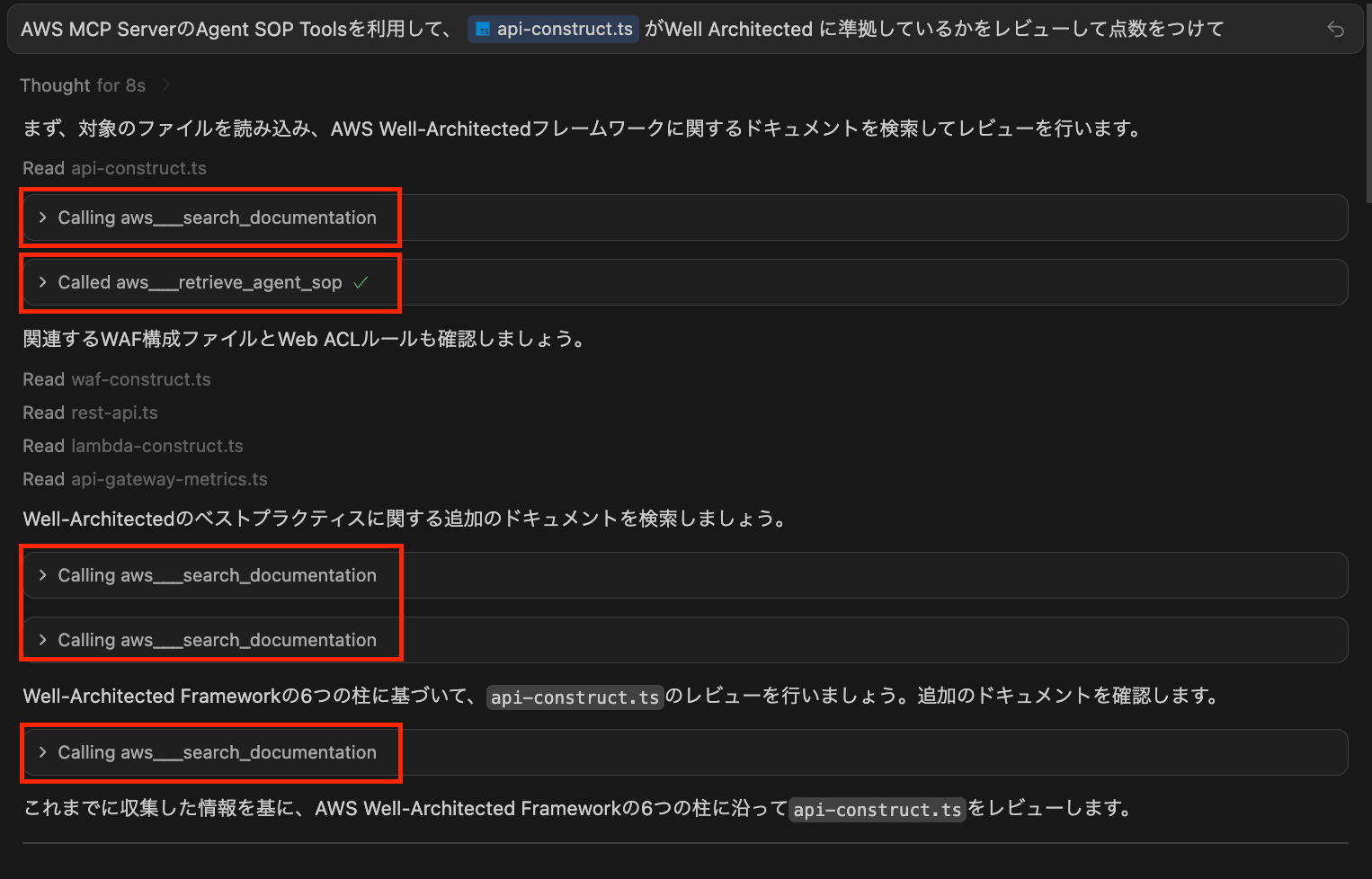
これにより、AIに評価軸となる情報を適切に渡すことができました。
AIによるレビュー結果
MCPツールから取得した情報を基に、該当ファイルを読み込み、AIがWell-Architectedの6つの柱に沿ってレビューを実施し、点数をつけてくれました。
総合評価:82/100点

| 柱 | 点数 | 主な評価ポイント |
|---|---|---|
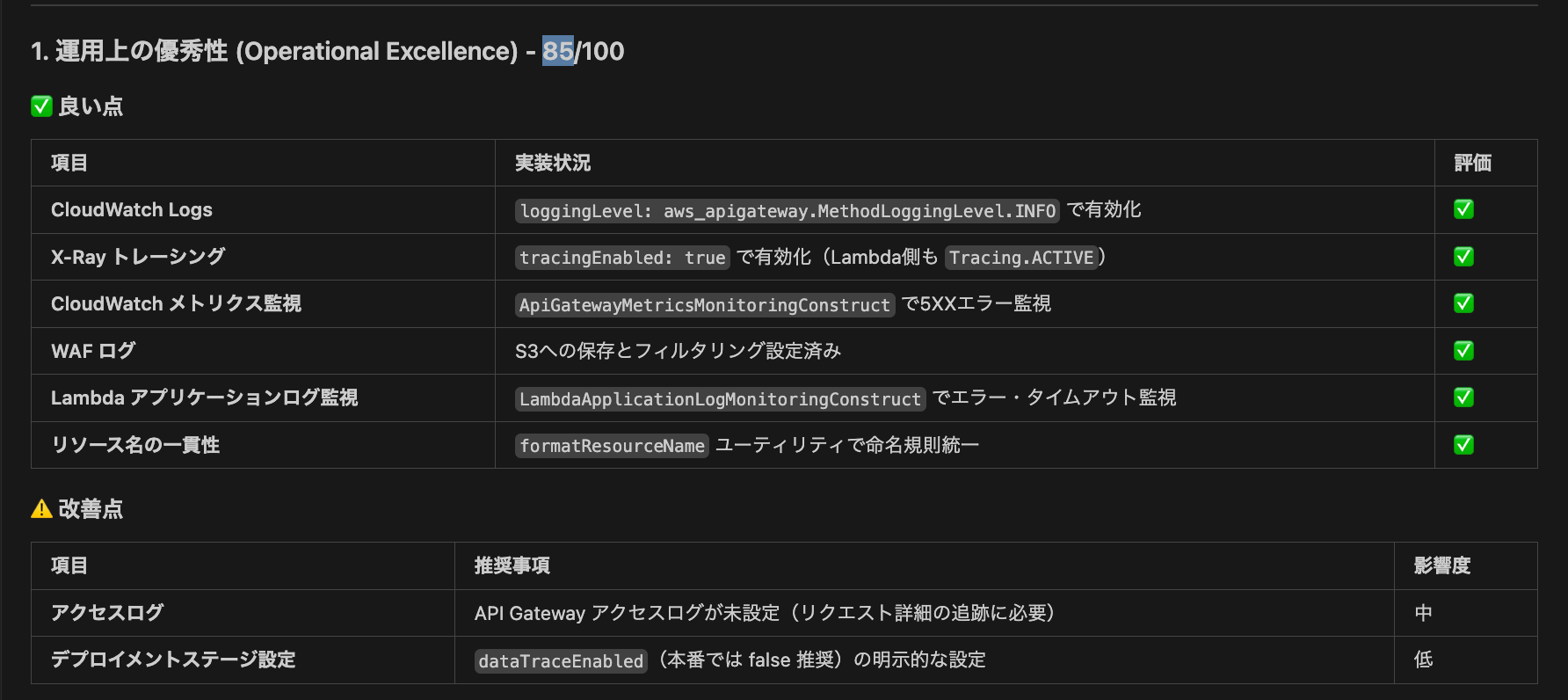
| 運用上の優秀性 | 85/100 | X-Ray/CloudWatch Logs有効、メトリクス監視設定済み |
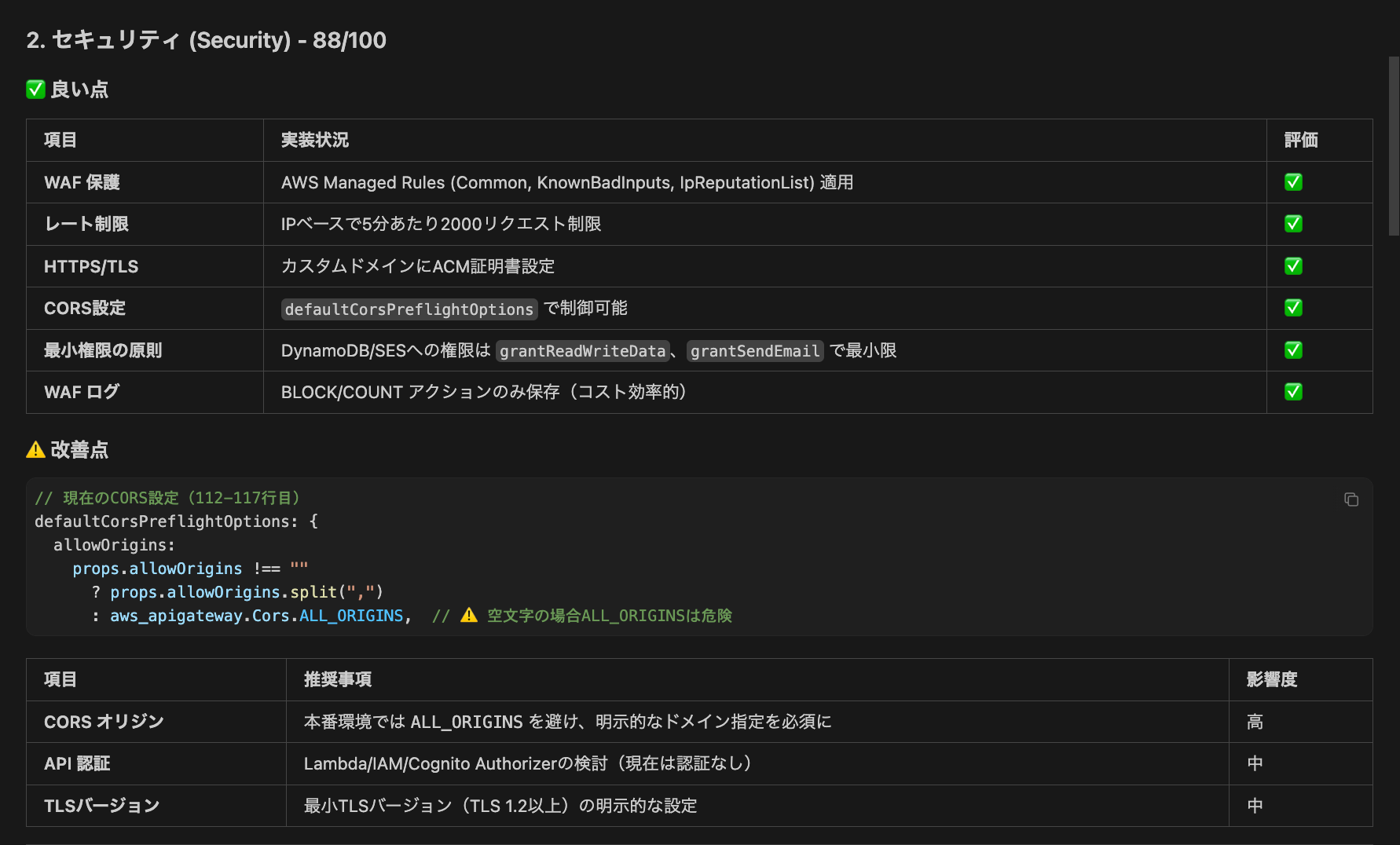
| セキュリティ | 88/100 | WAF適用、レート制限、HTTPS/TLS、最小権限の原則 |
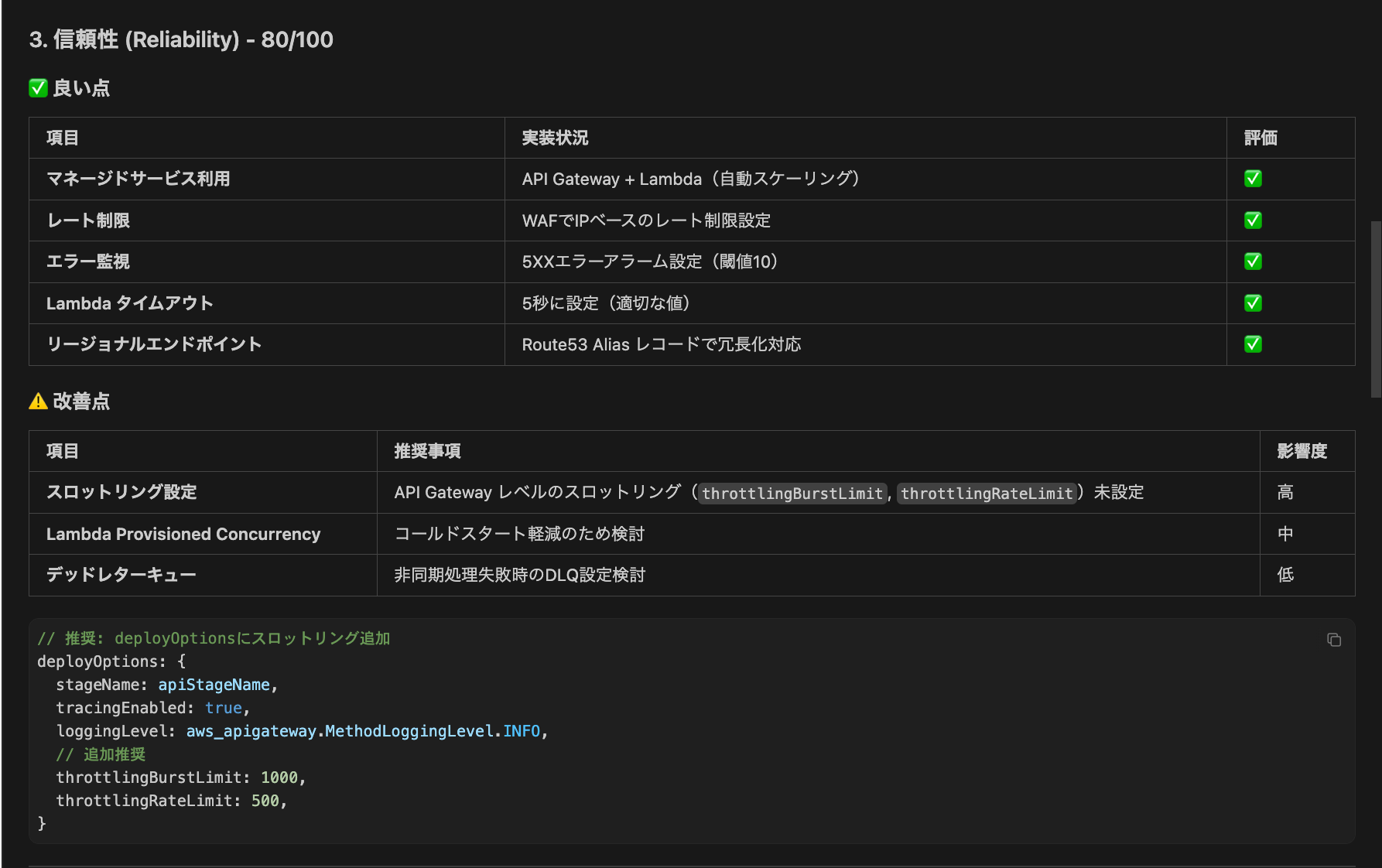
| 信頼性 | 80/100 | マネージドサービス利用、エラー監視。スロットリング未設定 |
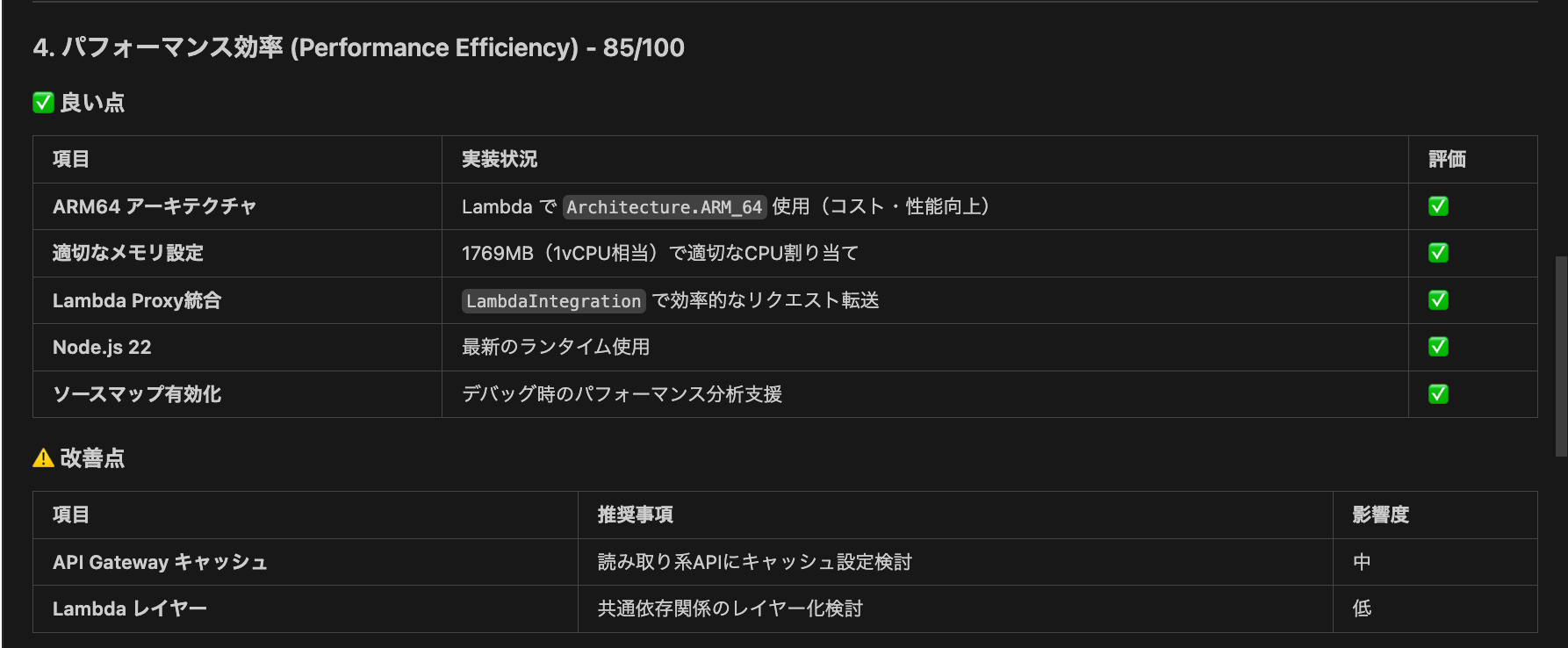
| パフォーマンス効率 | 85/100 | ARM64使用、適切なメモリ設定、最新ランタイム |
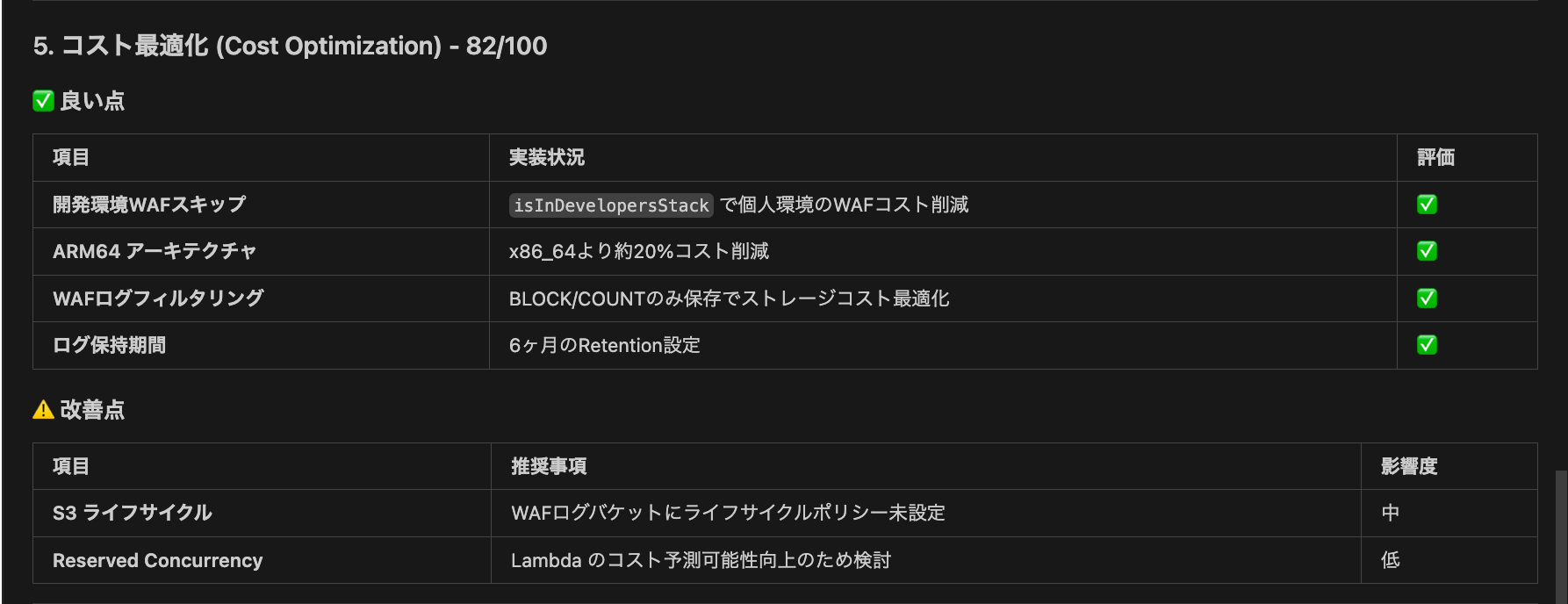
| コスト最適化 | 82/100 | 開発環境WAFスキップ、ARM64、ログフィルタリング |
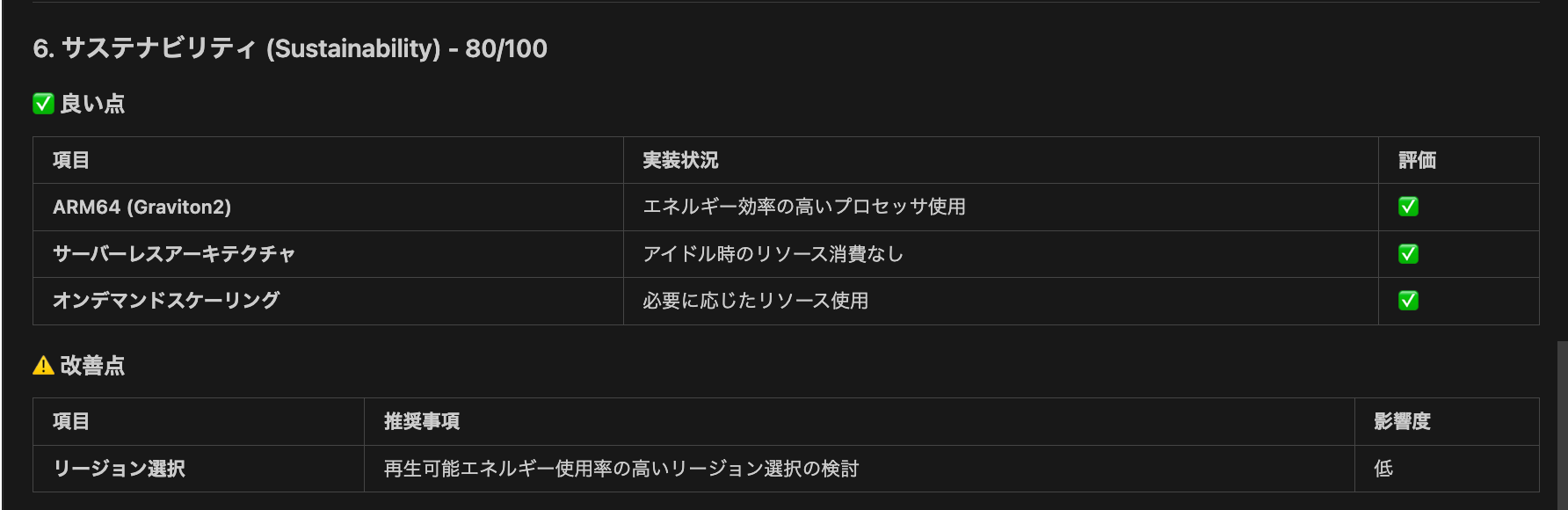
| 持続可能性 | 80/100 | Graviton2、サーバーレス、オンデマンドスケーリング |
各セクション
運用上の優秀性: 85点
セキュリティ: 88点
信頼性: 80点
パフォーマンス効率: 85点
コスト最適化: 82点
持続可能性: 80点
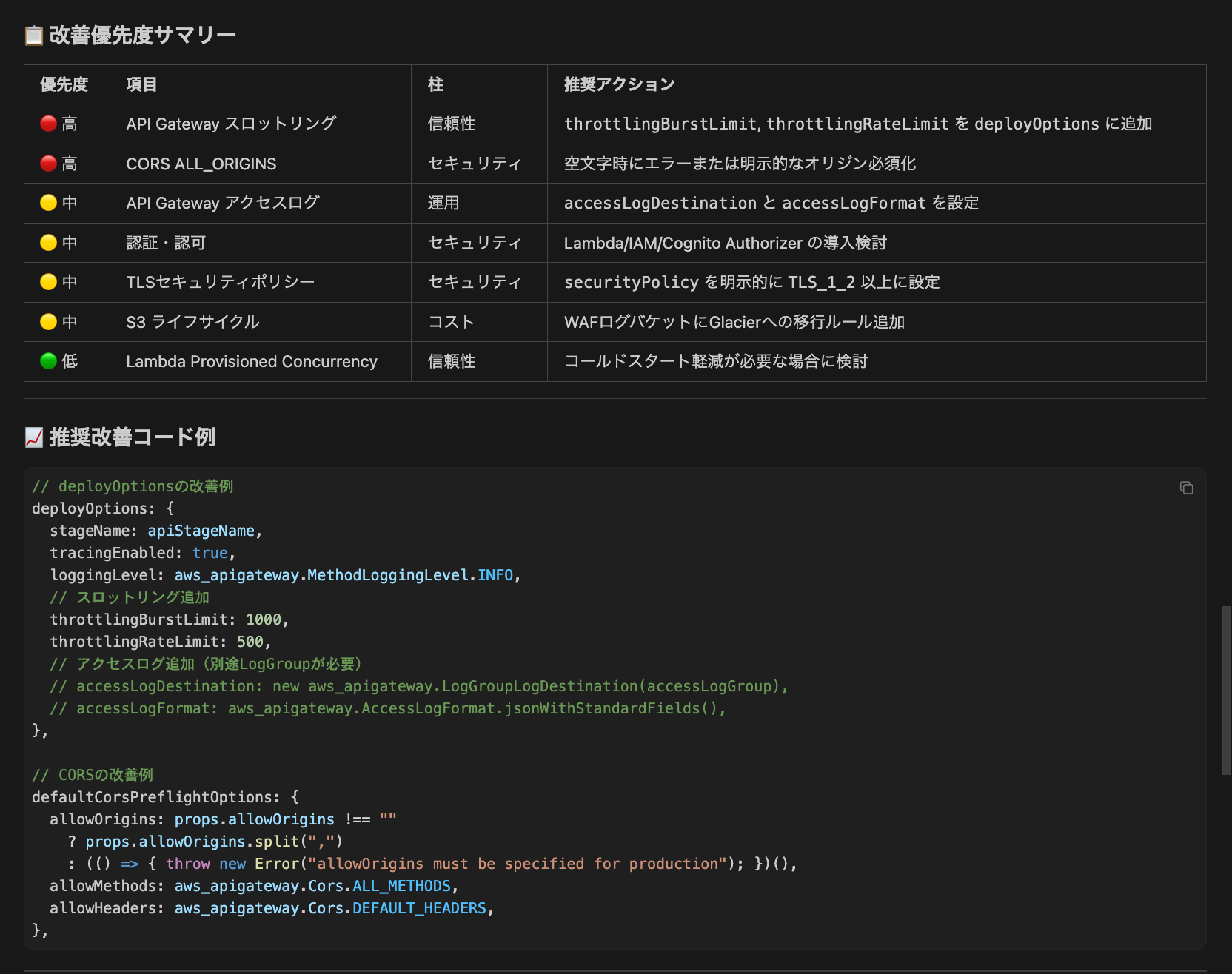
改善点
これらを元に、改善点のサマリーとその実装例を提示してくれました。
総括
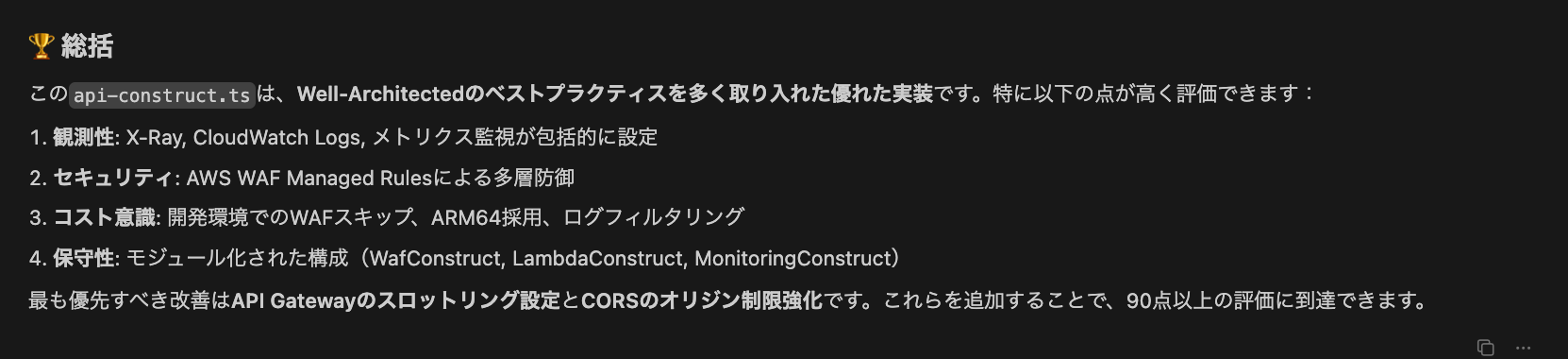
最後に、これまでの評価を踏まえた総括を出力してくれました。総合的にWell-Architectedのベストプラクティスに準拠しているコードが書けていることがわかりよかったです!
感想
実際にAWS MCP Serverを使ってCDKコードのWell-Architectedレビューを行ってみましたが、想像以上に実用的でした。
新機能である Agent SOP Tools ツールによってAWSのベストプラクティスに従った段階的なワークフローをAIに提供できたのは非常に便利でした。曖昧なAIの学習データに頼るのではなく、最新のベストプラクティスを参照することで、より正確な情報に基づいたレビューが可能になったと感じました。また、AWS Knowledge Tools ツールによってAWSが推奨する構成パターンをより厳密に参照できたのも良かったです。
点数だけでなく具体的なコード改善案まで提示してくれるため、すぐにアクションに移せるのが便利でした。
スロットリング設定やCORSの改善案など、実際にコードに反映できる内容が多かったです。
Well-Architectedの6つの柱それぞれについて評価されるため、普段見落としがちな持続可能性などの観点も含めて網羅的にレビューできたのも良かったです。
おわりに
AWS MCP Serverを活用することで、既存のCDKコードをWell-Architected Frameworkの観点から効率的にレビューできることが確認できました。
特に、AWS Knowledge Tools による最新ドキュメントの検索と、Agent SOP Tools のSOPの参照により、汎用モデルのAIだけでは難しかった正確で最新の情報に基づいたレビューが可能になっています。
今回のレビュー結果を受けて、スロットリング設定の追加やCORSの厳格化など、いくつかの改善を実施していきたいと思います。
既存のインフラコードの品質を向上させたい方は、ぜひAWS MCP Serverを活用したレビューを試してみてください。
参考になれば幸いです。
参考