AWS Private CA でプライベート IP アドレス用の TLS 証明書を作成してみた

はじめに
Common Name (CN) は RFC 5280 では定義されていますが、2017 年頃から段階的に、主要なブラウザ (Chrome、Firefox、Safari) は CN による検証を廃止しました。
現在は Subject Alternative Name (SAN) を利用する必要があります。
IP アドレスベースの証明書は、プライベートネットワーク内のサーバーや内部システムなど、DNS 名を持たないリソースに対して TLS 通信を行う際に必要となります。
ですが、パブリック CA では CAB Forum の規定により内部 IP アドレスの証明書を発行できません。
CAs SHALL NOT issue Certificates containing Internal Names or Reserved IP Addresses...
[意訳] CA は、内部名または予約済み IP アドレスを含む証明書を発行してはならない。
というわけで、(自己署名証明書でも可能ですが) AWS Private CA を使用して検証してみました。
IP アドレス証明書の要件
IP アドレスベースの証明書を発行するには、以下の要件を満たす必要があります。
SAN (Subject Alternative Name) の使用が必須
RFC 9525 では、TLS におけるサービス識別は SAN にある識別子だけを使用すると規定されています。
Common Name (CN) は RFC 5280 では定義されていますが、主要なブラウザは CN による検証を廃止しています。
IP アドレスで識別する場合も、SAN で設定する必要があります。
IP アドレスの指定方法
RFC 5280 によると、IP アドレスの表現形式には以下の制約があります。
- IPv4 の場合は 4 オクテット、IPv6 の場合は 16 オクテットで個別に指定
- 複数の IP アドレスを証明書に含める場合は、それぞれ個別のエントリとして追加
つまり、CIDR 表記 (例: 192.168.0.0/24) は使用不可ということになります。
これらの要件を踏まえて、OpenSSL と AWS Private CA で証明書を作成していきます。
SAN 設定ファイルの作成
OpenSSL コマンドで SAN が付いた CSR を作成する場合、設定ファイルを用意するのが最も簡単です。
今回は以下のように設定してみました。
[req]
distinguished_name = req_distinguished_name
req_extensions = v3_req
prompt = no
default_bits = 2048

[req_distinguished_name]
C = US
ST = WA
L = Seattle
O = Example Corp
OU = Sale
CN = example.com

[v3_req]
basicConstraints = CA:FALSE
keyUsage = digitalSignature, keyEncipherment
extendedKeyUsage = serverAuth
subjectAltName = @alt_names

[alt_names]
DNS.1 = example.com
DNS.2 = *.example.com
IP.1 = 192.168.0.10
ポイントは [alt_names] で、ここにサーバ識別子となる情報を記載していきます。
複数の値を指定することも可能です。
秘密鍵と CSR を作成
openssl コマンドでは -config オプションで設定ファイルを指定します。
$ openssl req -new -newkey rsa:2048 -noenc \
    -keyout private-key.pem \
    -out csr.pem \
    -config request-template.cnf
作成した CSR を検証
念のため、作成した CSR を検証してみましょう。
$ openssl req -in csr.pem -text -noout
Certificate Request:
    Data:
        Version: 1 (0x0)
        Subject: C=US, ST=WA, L=Seattle, O=Example Corp, OU=Sale, CN=example.com
        Subject Public Key Info:
            Public Key Algorithm: rsaEncryption
                Public-Key: (2048 bit)
                Modulus:
					(省略)
                Exponent: 65537 (0x10001)
        Attributes:
            Requested Extensions:
                X509v3 Basic Constraints:
                    CA:FALSE
                X509v3 Key Usage:
                    Digital Signature, Key Encipherment
                X509v3 Extended Key Usage:
                    TLS Web Server Authentication
                X509v3 Subject Alternative Name:
                    DNS:example.com, DNS:*.example.com, IP Address:192.168.0.10
	(省略)
最後の行の X509v3 Subject Alternative Name に今回指定したサーバ識別子が設定されていることを確認できました。
CSR から証明書を作成
CA は以下のようなものを用意しておきました。
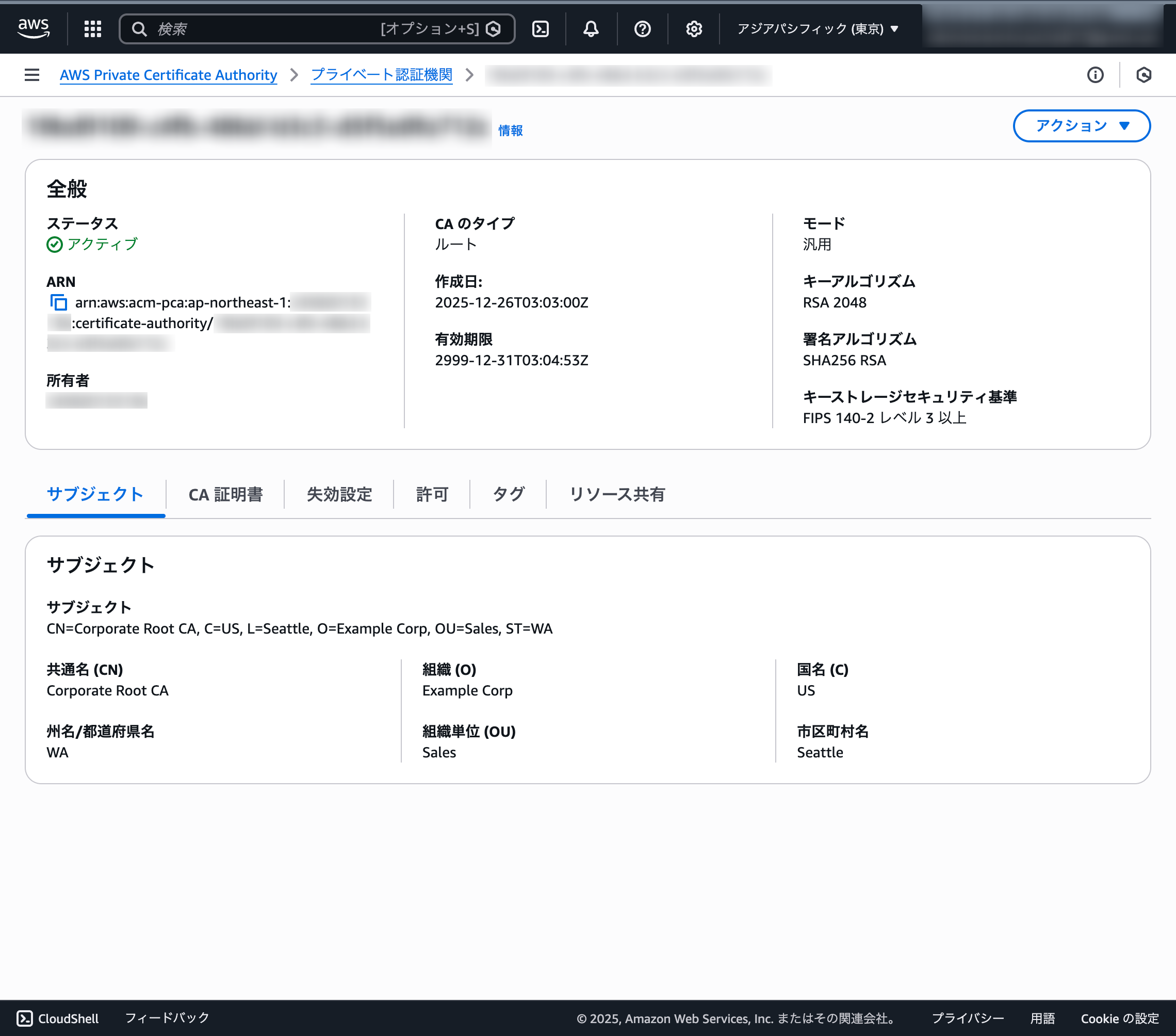
作成した CSR を上記の CA に送信して、証明書を発行します。
# エンドエンティティ証明書の発行
$ aws acm-pca issue-certificate \
    --certificate-authority-arn arn:aws:acm-pca:ap-northeast-1:555555555555:certificate-authority/foo \
    --csr fileb://csr.pem \
    --signing-algorithm "SHA256WITHRSA" \
    --validity Value=3650,Type="DAYS" \
    --template-arn arn:aws:acm-pca:::template/EndEntityCertificate_CSRPassthrough/V1
{
    "CertificateArn": "arn:aws:acm-pca:ap-northeast-1:555555555555:certificate-authority/foo/certificate/bar"
}

# エンドエンティティ証明書の取得
$ aws acm-pca get-certificate \
      --certificate-arn arn:aws:acm-pca:ap-northeast-1:555555555555:certificate-authority/foo/certificate/bar \
      --certificate-authority-arn arn:aws:acm-pca:ap-northeast-1:555555555555:certificate-authority/foo \
      | jq -r '.Certificate, .CertificateChain' > server.crt

# CA 証明書の取得
$ aws acm-pca get-certificate-authority-certificate \
      --certificate-authority-arn arn:aws:acm-pca:ap-northeast-1:555555555555:certificate-authority/foo \
      | jq -r '.Certificate' > ca.crt
確認してみましょう。
# 証明書チェーンの検証
$ openssl verify -CAfile ca.crt server.crt
server.crt: OK

# 基本情報の確認
$ openssl x509 -in server.crt -subject -issuer -dates -noout
subject=C=US, ST=WA, L=Seattle, O=Example Corp, OU=Sale, CN=example.com
issuer=C=US, O=Example Corp, OU=Sales, ST=WA, CN=Corporate Root CA, L=Seattle
notBefore=Dec 27 22:23:03 2025 GMT
notAfter=Dec 25 23:23:03 2035 GMT

# SAN の確認
$ openssl x509 -in server.crt -text -noout | grep -A 1 "Subject Alternative Name"
            X509v3 Subject Alternative Name:
                DNS:example.com, DNS:*.example.com, IP Address:192.168.0.10
SAN に IP Address:192.168.0.10 が設定されていることが確認できました。良い感じです。
検証してみる
簡単に検証してみましょう。
毎度おなじみですが、Python で HTTP サーバを起動します。
import http.server
import ssl

context = ssl.SSLContext(ssl.PROTOCOL_TLS_SERVER)
context.load_cert_chain("server.crt", "private-key.pem")

server = http.server.HTTPServer(('127.0.0.1', 8443), http.server.SimpleHTTPRequestHandler)
server.socket = context.wrap_socket(server.socket, server_side=True)

print("TLS server running on https://localhost:8443")
server.serve_forever()
上記のサーバに対して、リクエストを送ってみます。
$ curl -Iv --cacert ca.crt --resolve 192.168.0.10:8443:127.0.0.1 https://192.168.0.10:8443/
* Added 192.168.0.10:8443:127.0.0.1 to DNS cache
* Hostname 192.168.0.10 was found in DNS cache
*   Trying 127.0.0.1:8443...
* Connected to 192.168.0.10 (127.0.0.1) port 8443
* ALPN: curl offers h2,http/1.1
* (304) (OUT), TLS handshake, Client hello (1):
*  CAfile: ca.crt
*  CApath: none
* (304) (IN), TLS handshake, Server hello (2):
* (304) (IN), TLS handshake, Unknown (8):
* (304) (IN), TLS handshake, Certificate (11):
* (304) (IN), TLS handshake, CERT verify (15):
* (304) (IN), TLS handshake, Finished (20):
* (304) (OUT), TLS handshake, Finished (20):
* SSL connection using TLSv1.3 / AEAD-AES256-GCM-SHA384 / [blank] / UNDEF
* ALPN: server did not agree on a protocol. Uses default.
* Server certificate:
*  subject: C=US; ST=WA; L=Seattle; O=Example Corp; OU=Sale; CN=example.com
*  start date: Dec 27 22:23:03 2025 GMT
*  expire date: Dec 25 23:23:03 2035 GMT
*  subjectAltName: host "192.168.0.10" matched cert's IP address!
*  issuer: C=US; O=Example Corp; OU=Sales; ST=WA; CN=Corporate Root CA; L=Seattle
*  SSL certificate verify ok.
* using HTTP/1.x
> HEAD / HTTP/1.1
> Host: 192.168.0.10:8443
> User-Agent: curl/8.7.1
> Accept: */*
>
* Request completely sent off
* HTTP 1.0, assume close after body
< HTTP/1.0 200 OK
HTTP/1.0 200 OK
< Server: SimpleHTTP/0.6 Python/3.12.7
Server: SimpleHTTP/0.6 Python/3.12.7
< Date: Sat, 27 Dec 2025 23:42:32 GMT
Date: Sat, 27 Dec 2025 23:42:32 GMT
< Content-type: text/html; charset=utf-8
Content-type: text/html; charset=utf-8
< Content-Length: 367
Content-Length: 367
<

* Closing connection
成功しました!
subjectAltName: host "192.168.0.10" matched cert's IP address! と出力されていますね。
続いて、リクエスト時の IP アドレスを変えてエラーになるかどうかを検証してみましょう。
$ curl -Iv --cacert ca.crt --resolve 192.168.0.11:8443:127.0.0.1 https://192.168.0.11:8443/
* Added 192.168.0.11:8443:127.0.0.1 to DNS cache
* Hostname 192.168.0.11 was found in DNS cache
*   Trying 127.0.0.1:8443...
* Connected to 192.168.0.11 (127.0.0.1) port 8443
* ALPN: curl offers h2,http/1.1
* (304) (OUT), TLS handshake, Client hello (1):
*  CAfile: ca.crt
*  CApath: none
* (304) (IN), TLS handshake, Server hello (2):
* (304) (IN), TLS handshake, Unknown (8):
* (304) (IN), TLS handshake, Certificate (11):
* (304) (IN), TLS handshake, CERT verify (15):
* (304) (IN), TLS handshake, Finished (20):
* (304) (OUT), TLS handshake, Finished (20):
* SSL connection using TLSv1.3 / AEAD-AES256-GCM-SHA384 / [blank] / UNDEF
* ALPN: server did not agree on a protocol. Uses default.
* Server certificate:
*  subject: C=US; ST=WA; L=Seattle; O=Example Corp; OU=Sale; CN=example.com
*  start date: Dec 27 22:23:03 2025 GMT
*  expire date: Dec 25 23:23:03 2035 GMT
*  subjectAltName does not match ipv4 address 192.168.0.11
* SSL: no alternative certificate subject name matches target ipv4 address '192.168.0.11'
* Closing connection
curl: (60) SSL: no alternative certificate subject name matches target ipv4 address '192.168.0.11'
More details here: https://curl.se/docs/sslcerts.html

curl failed to verify the legitimacy of the server and therefore could not
establish a secure connection to it. To learn more about this situation and
how to fix it, please visit the web page mentioned above.
subjectAltName does not match ipv4 address 192.168.0.11 というように出力され、ちゃんとエラーになりました。
おわりに
Private CA を運用していて、プライベート IP アドレスなどで TLS 通信したい、というユースケースでこの記事がお役に立てれば幸いです。