Microsoft Sentinel に AWS Security Hub CSPM の Findings を転送してみた

Microsoft Sentinel には AWS Security Hub CSPM 向けのソリューションが提供されており、ソリューションに含まれるデータコネクタを利用して Findings を転送できます。本ブログでは、ソリューションに含まれるデータコネクタを設定し、Findings を Log Analytics ワークスペースで確認できるところまで試してみました。
次の順番で設定しました。
- Microsoft Sentinel にソリューションをインストール
- AWS Security Hub CSPM に Sentinel 連携用リソースをデプロイ
- Microsoft Sentinel のデータコネクタを設定
1. Microsoft Sentinel にソリューションをインストール
今回は Microsoft Defender ポータルを利用して設定します。
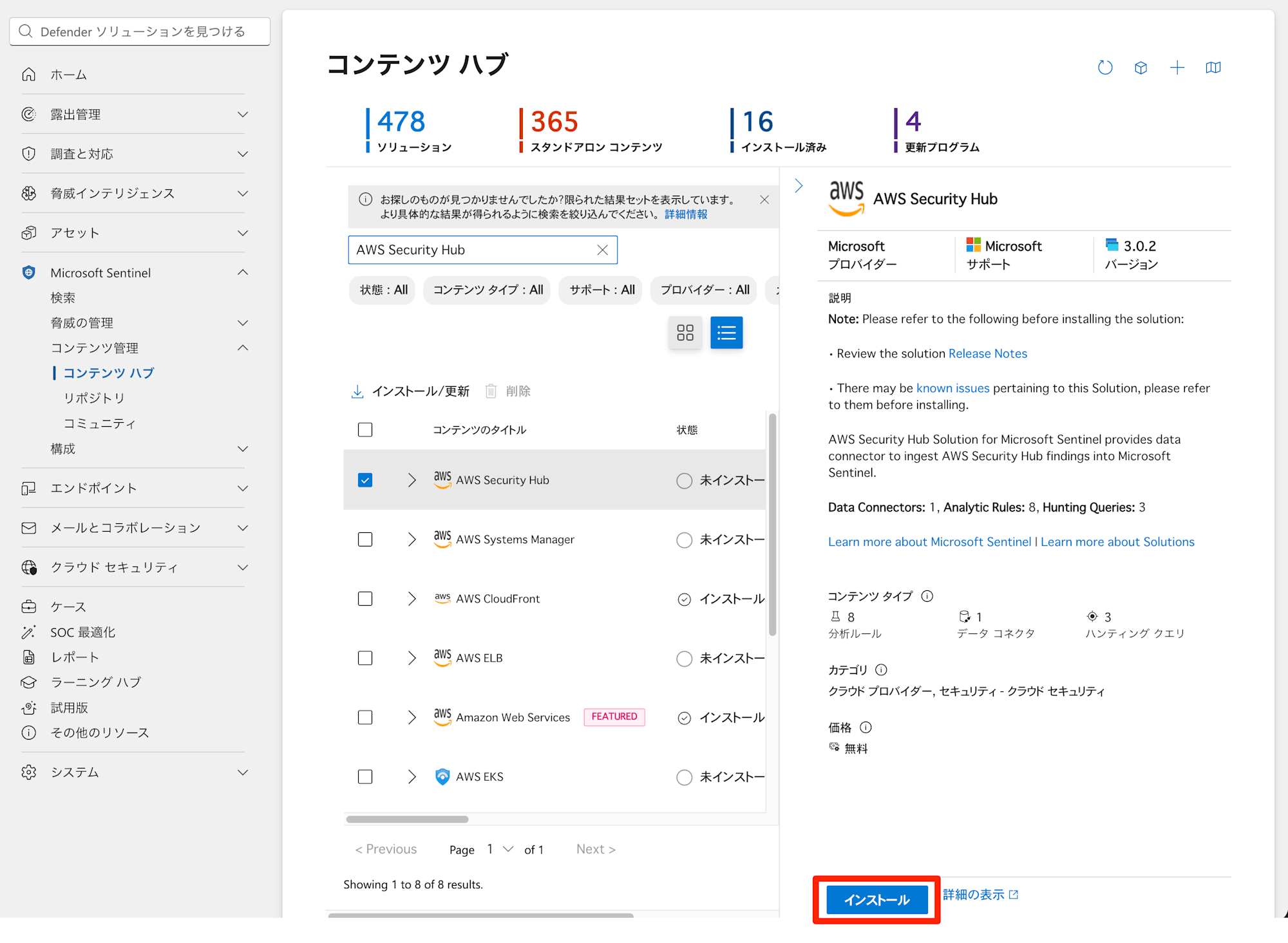
[Microsoft Sentinel] > [コンテンツ管理] > [コンテンツハブ] から「AWS Security Hub」を検索してインストールします。
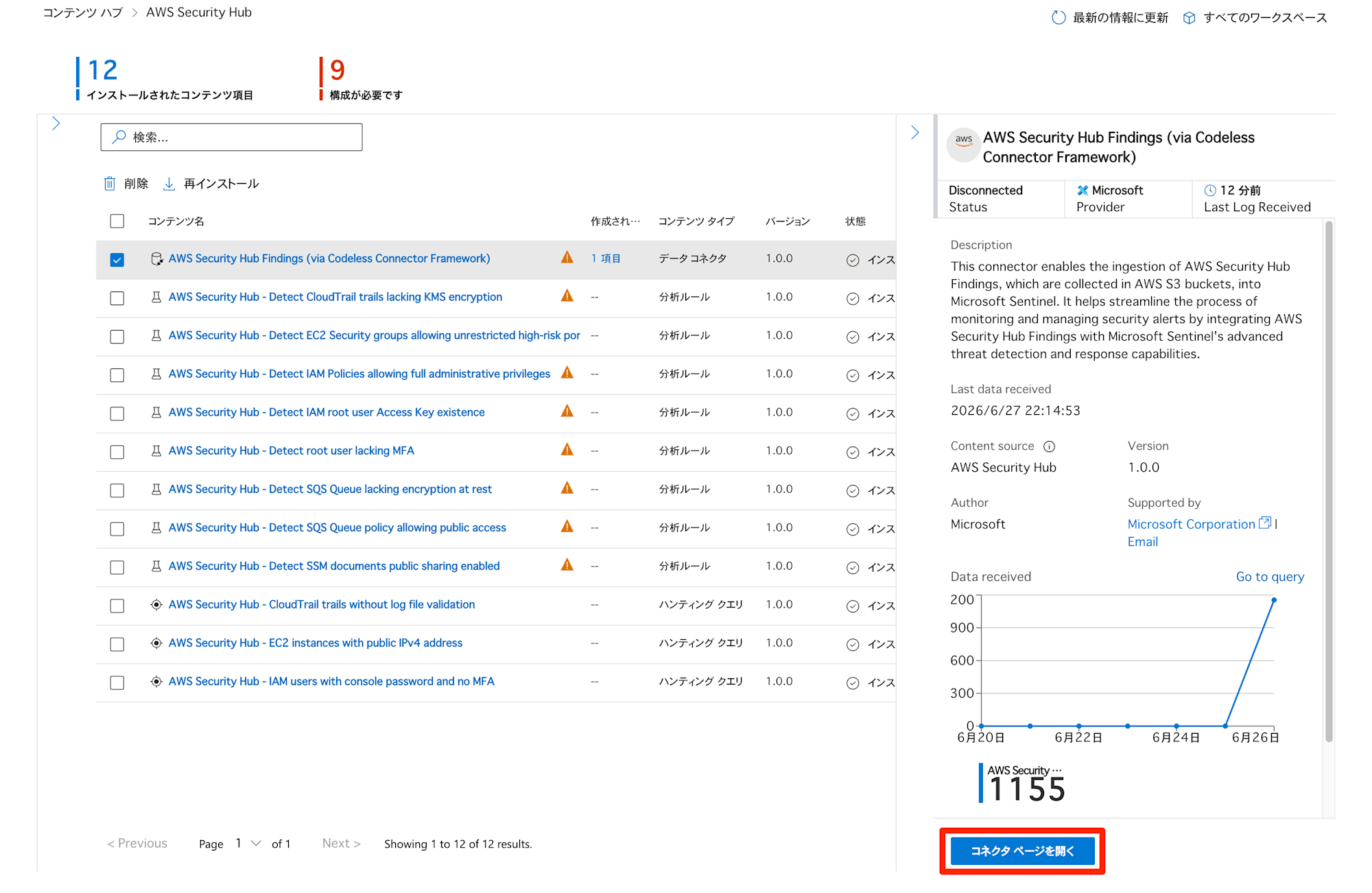
インストール後に、ソリューションに含まれるデータコネクタ「AWS Security Hub Findings (via Codeless Connector Framework)」を選択してコネクタページを開きます(事前にな何度かテストしている関係で過去にデータが転送された状態になっていますが、Disconnected 状態です)。
AWS Security Hub CSPM から Findings を転送するために必要な AWS 側のリソースを構築する CloudFormation テンプレートをダウンロードできるため、2 つともダウンロードします。
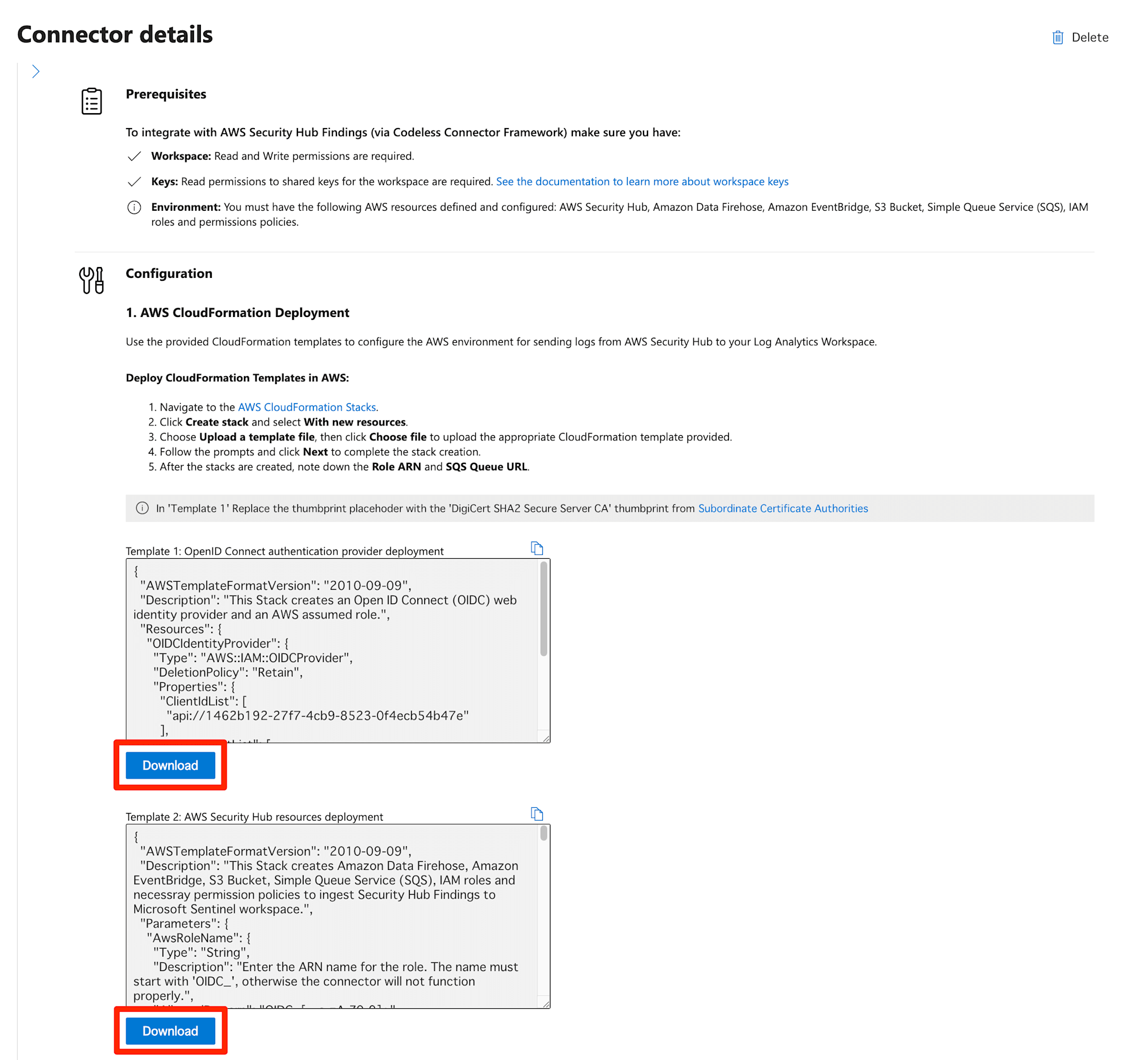
執筆時点では下記のファイル名でした。
- Template 1_ OpenID Connect authentication provider deployment.json
- Template 2_ AWS Security Hub resources deployment.json
説明文にあるとおり、Template 1 には DigiCert SHA2 Secure Server CA の thumbprint を置換する必要があります。下記の Microsoft ページから「DigiCert SHA2 Secure Server CA」の thumbprint の値を確認します。日本語ページの場合は「DigiCert SHA2 Secure Server CA」が翻訳されて「DigiCert SHA2 セキュア サーバー CA」との記載になっているため注意が必要です。
Template 1 の中身です。
{
  "AWSTemplateFormatVersion": "2010-09-09",
  "Description": "This Stack creates an Open ID Connect (OIDC) web identity provider and an AWS assumed role.",
  "Resources": {
    "OIDCIdentityProvider": {
      "Type": "AWS::IAM::OIDCProvider",
      "DeletionPolicy": "Retain",
      "Properties": {
        "ClientIdList": [
          "api://1462b192-27f7-4cb9-8523-0f4ecb54b47e"
        ],
        "ThumbprintList": [
          "<Thumbprint placeholder>"
        ],
        "Url": "https://sts.windows.net/33e01921-4d64-4f8c-a055-5bdaffd5e33d/"
      }
    }
  }
}
<Thumbprint placeholder> 部分を下記の文字例(「DigiCert SHA2 Secure Server CA」の thumbprint)に置換します。
626D44E704D1CEABE3BF0D53397464AC8080142C
Template 2 の中身です。長いので折りたたんでいます。Template 2 のデプロイ時に指定するパラメータにおいて、Microsoft Sentinel の対象となっている Log Analytics ワークスペースの ID が必要となるため、メモしておきます。
Template 2
{
"AWSTemplateFormatVersion": "2010-09-09",
"Description": "This Stack creates Amazon Data Firehose, Amazon EventBridge, S3 Bucket, Simple Queue Service (SQS), IAM roles and necessray permission policies to ingest Security Hub Findings to Microsoft Sentinel workspace.",
"Parameters": {
"AwsRoleName": {
"Type": "String",
"Description": "Enter the ARN name for the role. The name must start with 'OIDC_', otherwise the connector will not function properly.",
"AllowedPattern": "OIDC_[-_a-zA-Z0-9]+",
"Default": "OIDC_MicrosoftSentinelRoleSecurityHub"
},
"BucketName": {
"Type": "String",
"AllowedPattern": "^[a-z0-9][a-z0-9-.]{1,61}[a-z0-9]$",
"Description": "Enter the name of the S3 bucket. Bucket name must be unique within the global namespace and follow the bucket naming rules.",
"Default": "microsoft-sentinel-securityhub-s3-bucket"
},
"SentinelSQSQueueName": {
"Default": "MicrosoftSentinelSecurityHubSqs",
"Type": "String",
"Description": "Enter the name for the SQS Queue."
},
"SentinelWorkspaceId": {
"Type": "String",
"Description": "Enter the Microsoft Sentinel Workspace ID"
},
"CreateNewBucket": {
"AllowedValues": [
true,
false
],
"Default": true,
"Description": "Set to false to have Amazon S3 use an existing S3 Bucket.",
"Type": "String"
}
},
"Conditions": {
"CreateNewBucketCondition": {
"Fn::Equals": [
{
"Ref": "CreateNewBucket"
},
true
]
}
},
"Resources": {
"SentinelWebIdentityBasedRole": {
"Type": "AWS::IAM::Role",
"Properties": {
"RoleName": {
"Ref": "AwsRoleName"
},
"Description": "Role to provide Microsoft Sentinel access to Security Hub Findings.",
"Path": "/",
"ManagedPolicyArns": [
"arn:aws:iam::aws:policy/AWSSecurityHubReadOnlyAccess"
],
"AssumeRolePolicyDocument": {
"Fn::Sub": "{\"Version\": \"2012-10-17\",\"Statement\": [{\"Effect\": \"Allow\",\"Principal\": {\"Federated\": \"arn:aws:iam::${AWS::AccountId}:oidc-provider/sts.windows.net/33e01921-4d64-4f8c-a055-5bdaffd5e33d/\"},\"Action\": \"sts:AssumeRoleWithWebIdentity\",\"Condition\": {\"StringEquals\": {\"sts.windows.net/33e01921-4d64-4f8c-a055-5bdaffd5e33d/:aud\": \"api://1462b192-27f7-4cb9-8523-0f4ecb54b47e\",\"sts:RoleSessionName\": \"MicrosoftSentinel_${SentinelWorkspaceId}\"}}}]}"
},
"Policies": [
{
"PolicyName": "AWSSecurityHubLoggingPolicy",
"PolicyDocument": {
"Version": "2012-10-17",
"Statement": [
{
"Sid": "AWSSecurityHubReadOnlyAccess",
"Effect": "Allow",
"Action": [
"securityhub:Get*",
"securityhub:List*",
"securityhub:BatchGet*",
"securityhub:Describe*"
],
"Resource": "*"
}
]
}
}
]
}
},
"S3Bucket": {
"Type": "AWS::S3::Bucket",
"Condition": "CreateNewBucketCondition",
"DeletionPolicy": "Delete",
"Properties": {
"BucketName": {
"Ref": "BucketName"
},
"OwnershipControls": {
"Rules": [
{
"ObjectOwnership": "BucketOwnerEnforced"
}
]
},
"VersioningConfiguration": {
"Status": "Enabled"
},
"NotificationConfiguration": {
"QueueConfigurations": [
{
"Queue": {
"Fn::GetAtt": [
"SentinelSQSQueue",
"Arn"
]
},
"Event": "s3:ObjectCreated:*",
"Filter": {
"S3Key": {
"Rules": [
{
"Name": "prefix",
"Value": {
"Fn::Sub": "AWSLogs/${AWS::AccountId}/SecurityHubFindings/"
}
},
{
"Name": "suffix",
"Value": ".gz"
}
]
}
}
}
]
}
}
},
"S3BucketPolicy": {
"Type": "AWS::S3::BucketPolicy",
"DeletionPolicy": "Delete",
"Properties": {
"Bucket": {
"Ref": "BucketName"
},
"PolicyDocument": {
"Version": "2012-10-17",
"Statement": [
{
"Sid": "Allow Arn read access to S3 bucket.",
"Effect": "Allow",
"Principal": {
"AWS": {
"Fn::GetAtt": [
"SentinelWebIdentityBasedRole",
"Arn"
]
}
},
"Action": "s3:GetObject",
"Resource": {
"Fn::Join": [
"",
[
{
"Fn::GetAtt": [
"S3Bucket",
"Arn"
]
},
"/*"
]
]
}
}
]
}
}
},
"FirehoseDeliveryStreamRole": {
"Type": "AWS::IAM::Role",
"DeletionPolicy": "Delete",
"Properties": {
"RoleName": "MSSentinelFirehoseDeliveryStreamRole",
"AssumeRolePolicyDocument": {
"Version": "2012-10-17",
"Statement": [
{
"Sid": "TrustDataFirehoseService",
"Effect": "Allow",
"Principal": {
"Service": "firehose.amazonaws.com"
},
"Action": "sts:AssumeRole"
}
]
},
"Policies": [
{
"PolicyName": "MSSentinelFirehoseDeliveryStreamPolicy",
"PolicyDocument": {
"Version": "2012-10-17",
"Statement": [
{
"Effect": "Allow",
"Action": [
"s3:AbortMultipartUpload",
"s3:GetBucketLocation",
"s3:GetObject",
"s3:ListBucket",
"s3:ListBucketMultipartUploads",
"s3:PutObject"
],
"Resource": [
{
"Fn::GetAtt": [
"S3Bucket",
"Arn"
]
},
{
"Fn::Join": [
"",
[
{
"Fn::GetAtt": [
"S3Bucket",
"Arn"
]
},
"/*"
]
]
}
]
}
]
}
}
]
}
},
"SecurityHubDeliveryStream": {
"Type": "AWS::KinesisFirehose::DeliveryStream",
"DeletionPolicy": "Delete",
"Properties": {
"DeliveryStreamName": "MSSentinel-SecurityHub-FirehoseDeliveryStream",
"DeliveryStreamType": "DirectPut",
"DeliveryStreamEncryptionConfigurationInput": {
"KeyType": "AWS_OWNED_CMK"
},
"ExtendedS3DestinationConfiguration": {
"BucketARN": {
"Fn::GetAtt": [
"S3Bucket",
"Arn"
]
},
"BufferingHints": {
"SizeInMBs": 128,
"IntervalInSeconds": 300
},
"CompressionFormat": "GZIP",
"FileExtension": ".gz",
"Prefix": {
"Fn::Sub": "AWSLogs/${AWS::AccountId}/SecurityHubFindings/"
},
"ProcessingConfiguration": {
"Enabled": true,
"Processors": [
{
"Type": "AppendDelimiterToRecord",
"Parameters": [
{
"ParameterName": "Delimiter",
"ParameterValue": "\\n"
}
]
}
]
},
"RoleARN": {
"Fn::GetAtt": [
"FirehoseDeliveryStreamRole",
"Arn"
]
}
}
}
},
"EventBridgeInvokeFirehoseRole": {
"Type": "AWS::IAM::Role",
"DeletionPolicy": "Delete",
"Properties": {
"RoleName": "MSSentinelSecurityHubEventBridgeRole",
"AssumeRolePolicyDocument": {
"Version": "2012-10-17",
"Statement": [
{
"Sid": "TrustEventBridgeService",
"Effect": "Allow",
"Principal": {
"Service": "events.amazonaws.com"
},
"Action": "sts:AssumeRole",
"Condition": {
"StringEquals": {
"aws:SourceAccount": {
"Fn::Sub": "${AWS::AccountId}"
}
}
}
}
]
},
"Policies": [
{
"PolicyName": "MSSentinelSecurityHubEventBridgePolicy",
"PolicyDocument": {
"Version": "2012-10-17",
"Statement": [
{
"Sid": "ActionsForFirehose",
"Effect": "Allow",
"Action": [
"firehose:PutRecord",
"firehose:PutRecordBatch"
],
"Resource": [
{
"Fn::GetAtt": [
"SecurityHubDeliveryStream",
"Arn"
]
}
]
}
]
}
}
]
}
},
"EventBridgeInvokeFirehoseRule": {
"Type": "AWS::Events::Rule",
"DeletionPolicy": "Delete",
"Properties": {
"Name": "securityhub-findings-to-s3-bucket",
"Description": "Rule to invoke Data Firehose delivery stream to send Security Hub findings to S3 bucket.",
"EventBusName": "default",
"EventPattern": {
"source": [
"aws.securityhub"
],
"detail-type": [
"Security Hub Findings - Imported"
]
},
"State": "ENABLED",
"Targets": [
{
"Arn": {
"Fn::GetAtt": [
"SecurityHubDeliveryStream",
"Arn"
]
},
"Id": "SecurityHubFindingsToFirehose",
"RoleArn": {
"Fn::GetAtt": [
"EventBridgeInvokeFirehoseRole",
"Arn"
]
}
}
]
}
},
"SentinelSQSQueue": {
"Type": "AWS::SQS::Queue",
"DeletionPolicy": "Delete",
"Properties": {
"QueueName": {
"Ref": "SentinelSQSQueueName"
},
"Tags": [
{
"Key": "Bucket",
"Value": {
"Ref": "BucketName"
}
}
]
}
},
"SentinelSQSQueuePolicyForS3": {
"Type": "AWS::SQS::QueuePolicy",
"Properties": {
"PolicyDocument": {
"Statement": [
{
"Sid": "Allow S3 to send notification messages to SQS queue",
"Action": [
"SQS:SendMessage"
],
"Effect": "Allow",
"Resource": [
{
"Fn::GetAtt": [
"SentinelSQSQueue",
"Arn"
]
}
],
"Principal": {
"Service": "s3.amazonaws.com"
},
"Condition": {
"StringEquals": {
"aws:SourceAccount": {
"Fn::Sub": "${AWS::AccountId}"
}
},
"ArnLike": {
"aws:SourceArn": {
"Fn::Sub": "arn:${AWS::Partition}:s3:*:*:${BucketName}"
}
}
}
},
{
"Sid": "Allow Assumed role to read/delete/change visibility of SQS messages and get queue url.",
"Action": [
"SQS:ChangeMessageVisibility",
"SQS:DeleteMessage",
"SQS:ReceiveMessage",
"SQS:GetQueueUrl"
],
"Effect": "Allow",
"Resource": [
{
"Fn::GetAtt": [
"SentinelSQSQueue",
"Arn"
]
}
],
"Principal": {
"AWS": [
{
"Fn::GetAtt": [
"SentinelWebIdentityBasedRole",
"Arn"
]
}
]
}
}
]
},
"Queues": [
{
"Ref": "SentinelSQSQueue"
}
]
}
}
},
"Outputs": {
"SentinelRoleArn": {
"Value": {
"Fn::GetAtt": [
"SentinelWebIdentityBasedRole",
"Arn"
]
},
"Description": "Role ARN for Sentinel Role that is inserted into Amazon Web Service S3 Connector in the Sentinel Data Connectors portal."
},
"SentinelSQSQueueURL": {
"Description": "AWS SQS Queue URL that is inserted into Amazon Web Service S3 Connector in the Sentinel Data Connectors portal.",
"Value": {
"Ref": "SentinelSQSQueue"
}
},
"SentinelSQSQueueArn": {
"Description": "Log destination ARN to be used when setting up other accounts to exports logs",
"Value": {
"Fn::GetAtt": [
"SentinelSQSQueue",
"Arn"
]
}
},
"SentinelSQSQueueName": {
"Description": "SQS Name",
"Value": {
"Fn::GetAtt": [
"SentinelSQSQueue",
"QueueName"
]
}
}
}
}
なお、テンプレートは変更されることもあるので、最新版をダウンロードして利用した方がよいです。
2. AWS Security Hub CSPM に Sentinel 連携用リソースをデプロイ
Template 1 と Template 2 を用いて、AWS 側に AWS Security Hub CSPM から Microsoft Sentinel へ Findings を転送するためのリソースをデプロイします。
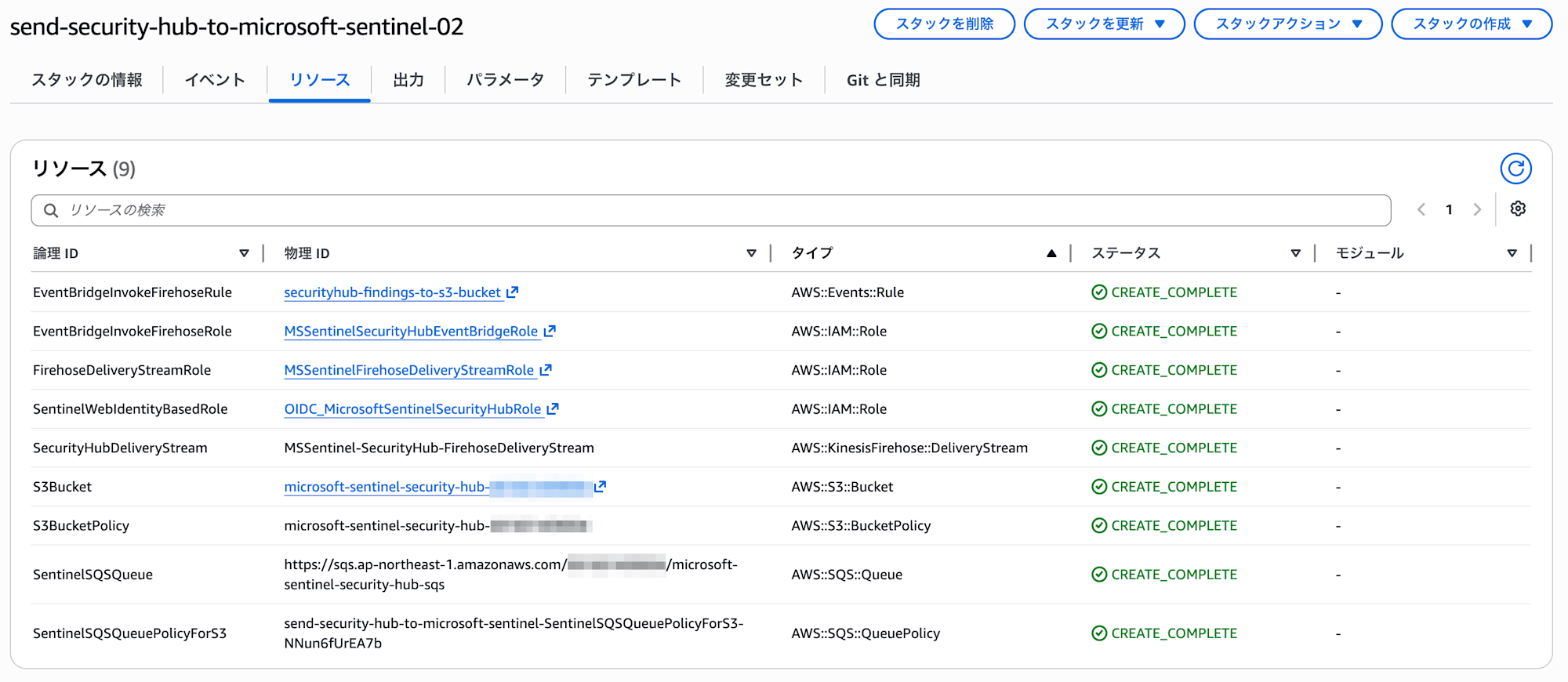
Template 1 と Template 2 で作成される主なリソースは下記です。
| # | テンプレート | 論理ID | リソースタイプ | 説明 |
|---|---|---|---|---|
| 1 | Template 1 | OIDCIdentityProvider | AWS::IAM::OIDCProvider | Entra ID の OIDC IDプロバイダー |
| 2 | Template 2 | SentinelWebIdentityBasedRole | AWS::IAM::Role | OIDCIdentityProvider を信頼した IAM ロール(Security Hub 読み取り権限) |
| 3 | Template 2 | EventBridgeInvokeFirehoseRole | AWS::IAM::Role | EventBridge 用サービスロール(Firehose PutRecord 権限など) |
| 4 | Template 2 | FirehoseDeliveryStreamRole | AWS::IAM::Role | Firehose 用サービスロール(S3 PutObject 権限など) |
| 5 | Template 2 | S3Bucket | AWS::S3::Bucket | Security Hub CSPM の Findings 保存用 S3 バケット |
| 6 | Template 2 | S3BucketPolicy | AWS::S3::BucketPolicy | Security Hub CSPM の Findings 保存用 S3 バケットのバケットポリシー |
| 7 | Template 2 | EventBridgeInvokeFirehoseRule | AWS::Events::Rule | Security Hub CSPM の Findings を Firehose ストリームに転送するルール |
| 8 | Template 2 | SecurityHubDeliveryStream | AWS::KinesisFirehose::DeliveryStream | Findings を圧縮して S3 に配信するストリーム |
| 9 | Template 2 | SentinelSQSQueue | AWS::SQS::Queue | Sentinel がポーリングする SQS キュー |
| 10 | Template 2 | SentinelSQSQueuePolicyForS3 | AWS::SQS::QueuePolicy | Sentinel がポーリングする SQS キューのキューポリシー |
ざっくりした Findings のデータの流れは下記のイメージです。
EventBridge ルールのイベントパターンは下記のように Security Hub CSPM のすべての Findings が対象となっており、ターゲットが Firehose ストリームに設定されています。
{
  "detail-type": ["Security Hub Findings - Imported"],
  "source": ["aws.securityhub"]
}
S3 バケットはすべてのオブジェクト作成イベント(s3:ObjectCreated:*)を契機に SQS キューに通知を送信するイベント通知設定が有効になっています。Microsoft Sentinel 側ではこのキューを確認していると思われます。
Template 1 と Template 2 を AWS 側にデプロイしてみます。
今回の環境は AWS Organizations 統合機能により組織内の CSPM の Findings を 1 つのアカウントに集約しているため、集約先の CSPM の管理アカウントのみにデプロイします。組織全体の Findings を Microsoft Sentinel に転送できます。
[AWS CloudFormation] > [スタック] > [新しいリソースを使用 (標準) ]から展開します。

Template 1 は、テンプレートファイルをアップロードしてスタック名を入力する以外は、そのまま「次へ」と進んでいくだけでデプロイできます。AWS IAM の ID プロバイダのみが作成されます。
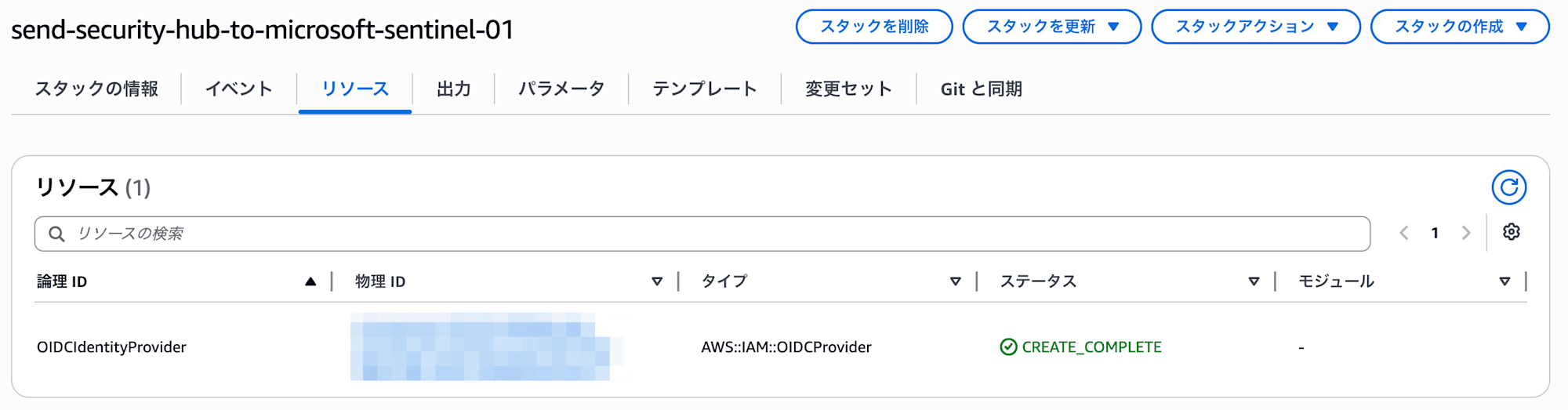
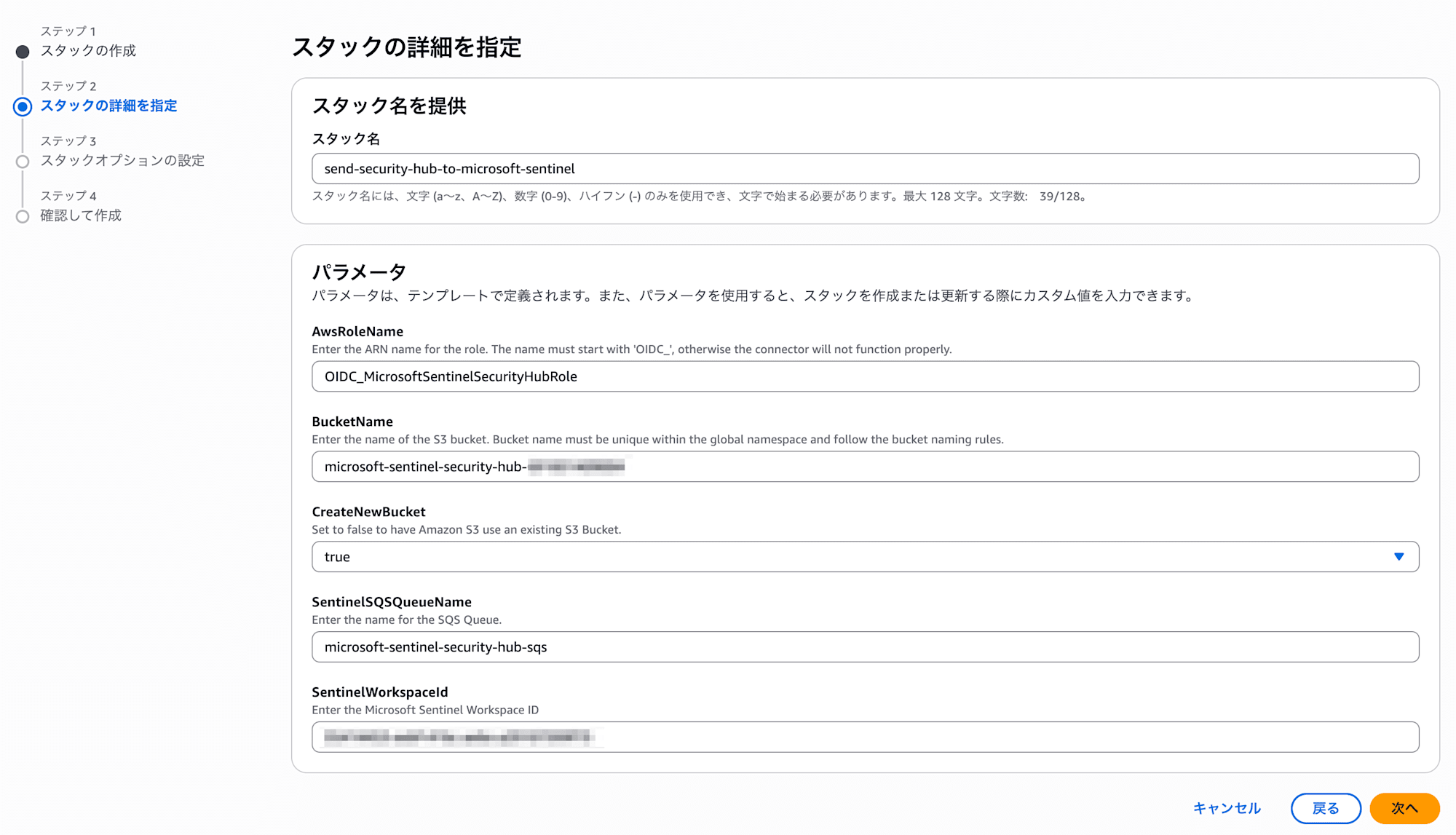
Template 2 では、テンプレートファイルをアップロードしてスタック名を入力する以外に、パラメータの指定が必要となります。パラメータには Microsoft Sentinel で利用している Log Analytics ワークスペース ID を入力する必要があります。他には、S3 バケットを作成するか既存を利用するかのパラメータとリソース名指定のパラメータがあります。今回は新規バケット作成を指定し、リソース名も個人的に分かりやすい内容にデフォルト値から変更してデプロイします。
作成されたリソースの画面です。
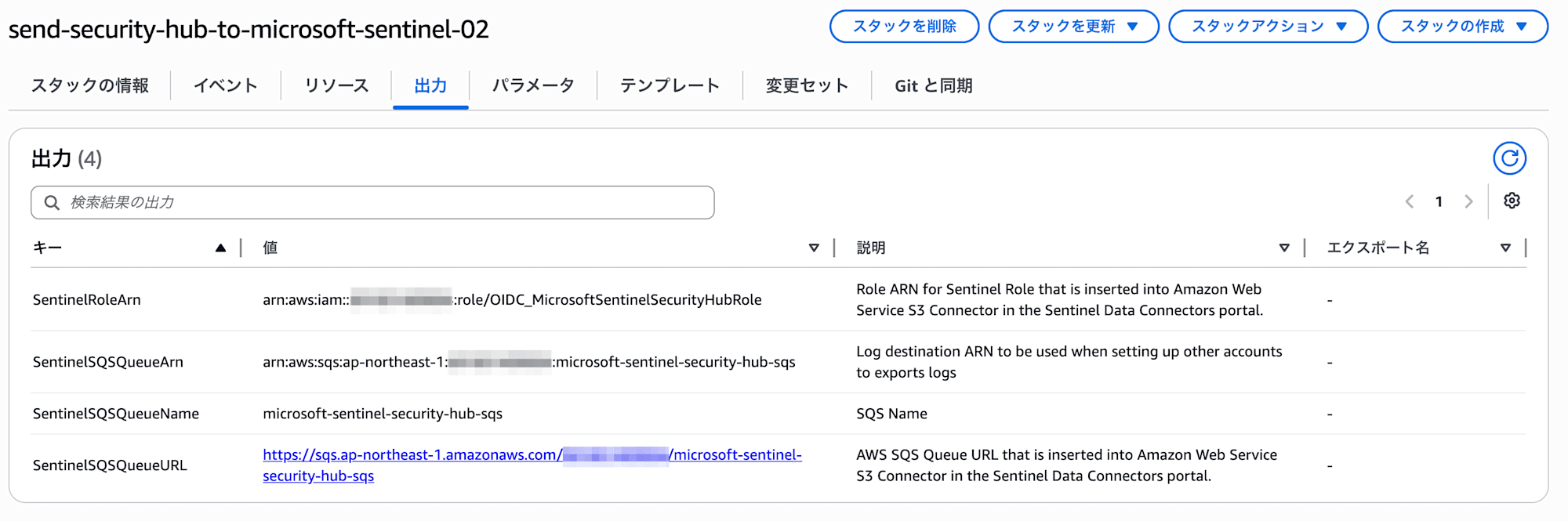
デプロイ完了時に出力タブにある次の値をメモしておきます。Microsoft Sentinel 側の設定で利用します。
- SentinelRoleArn の値
- SentinelSQSQueueURL の値
3. Microsoft Sentinel のデータコネクタを設定
Microsoft Sentinel におけるデータのコネクタ「AWS Security Hub Findings (via Codeless Connector Framework)」画面に戻ります。
[Add new collector] において、AWS 側でデプロイした SentinelRoleArn の値を Role ARN に、SentinelSQSQueueURL の値を Queue URL に入力し、Connect を実行します。
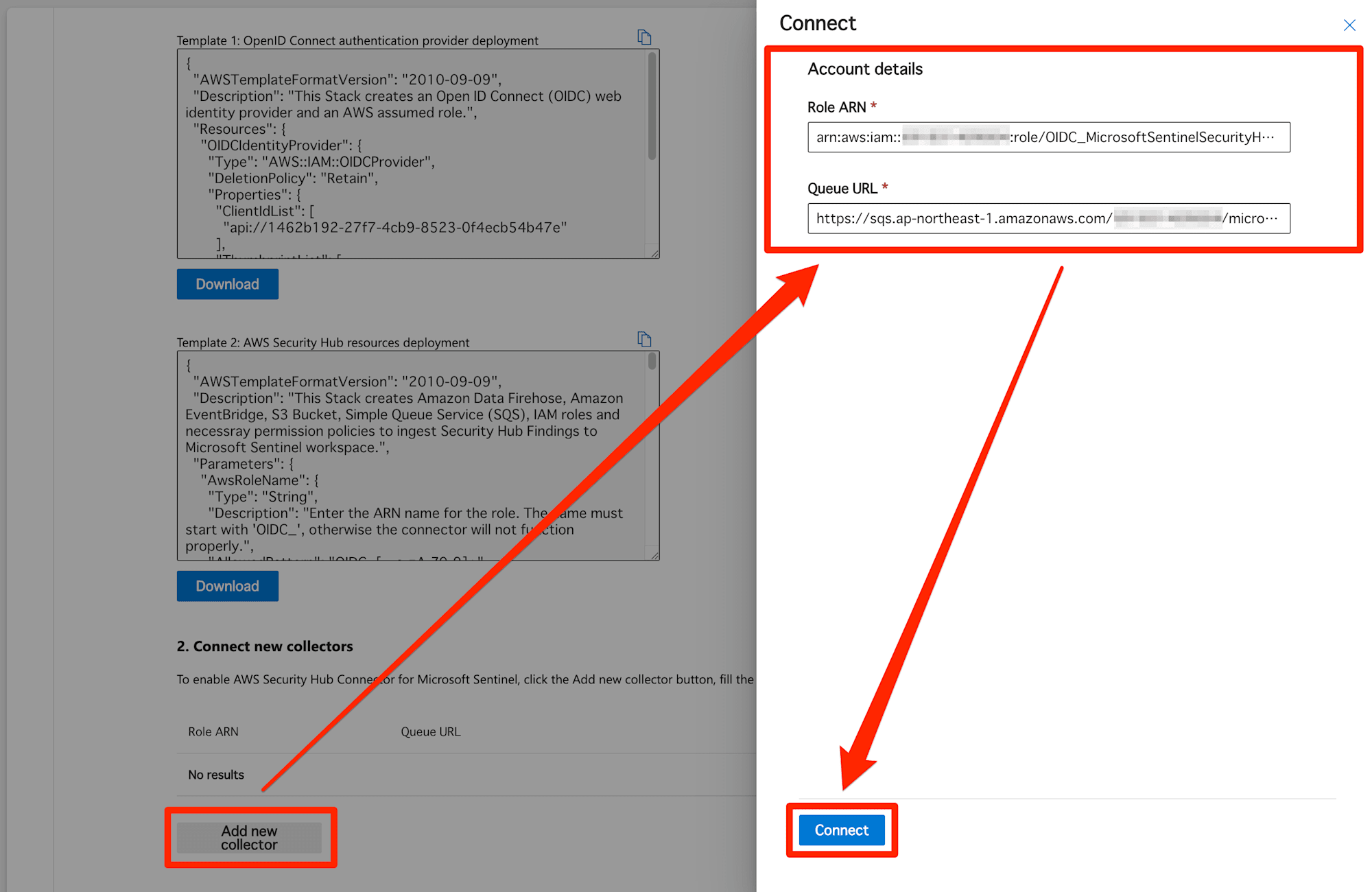
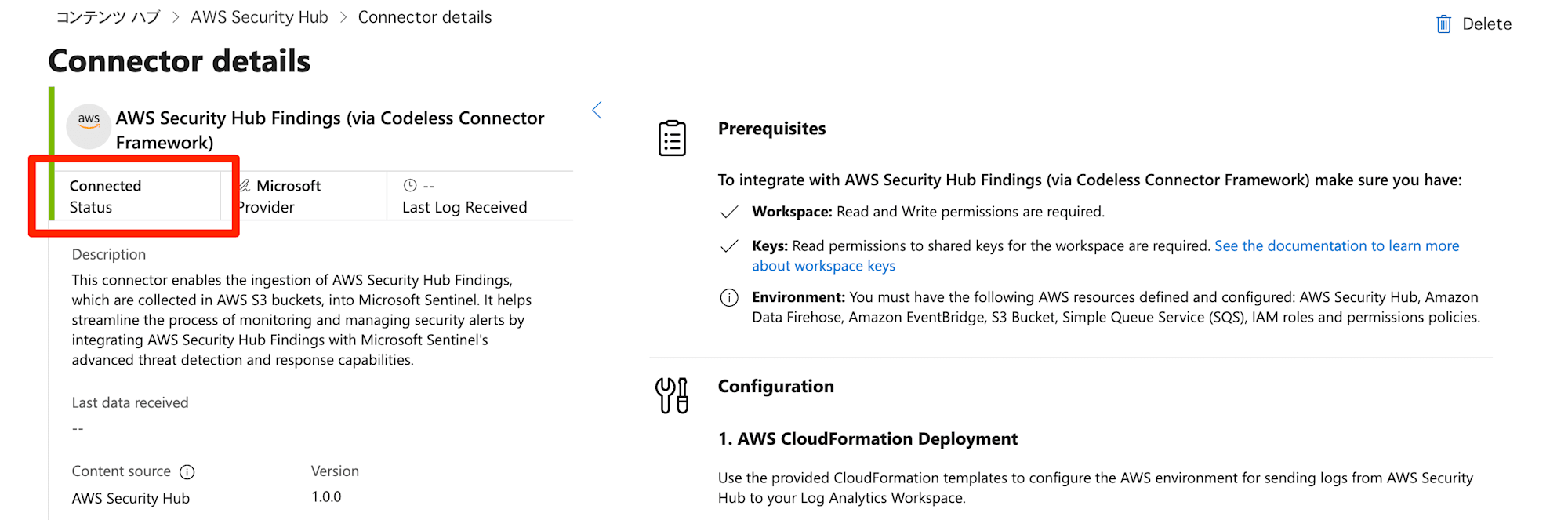
正常に完了した後、しばらく待つと Status が Connected になりました。
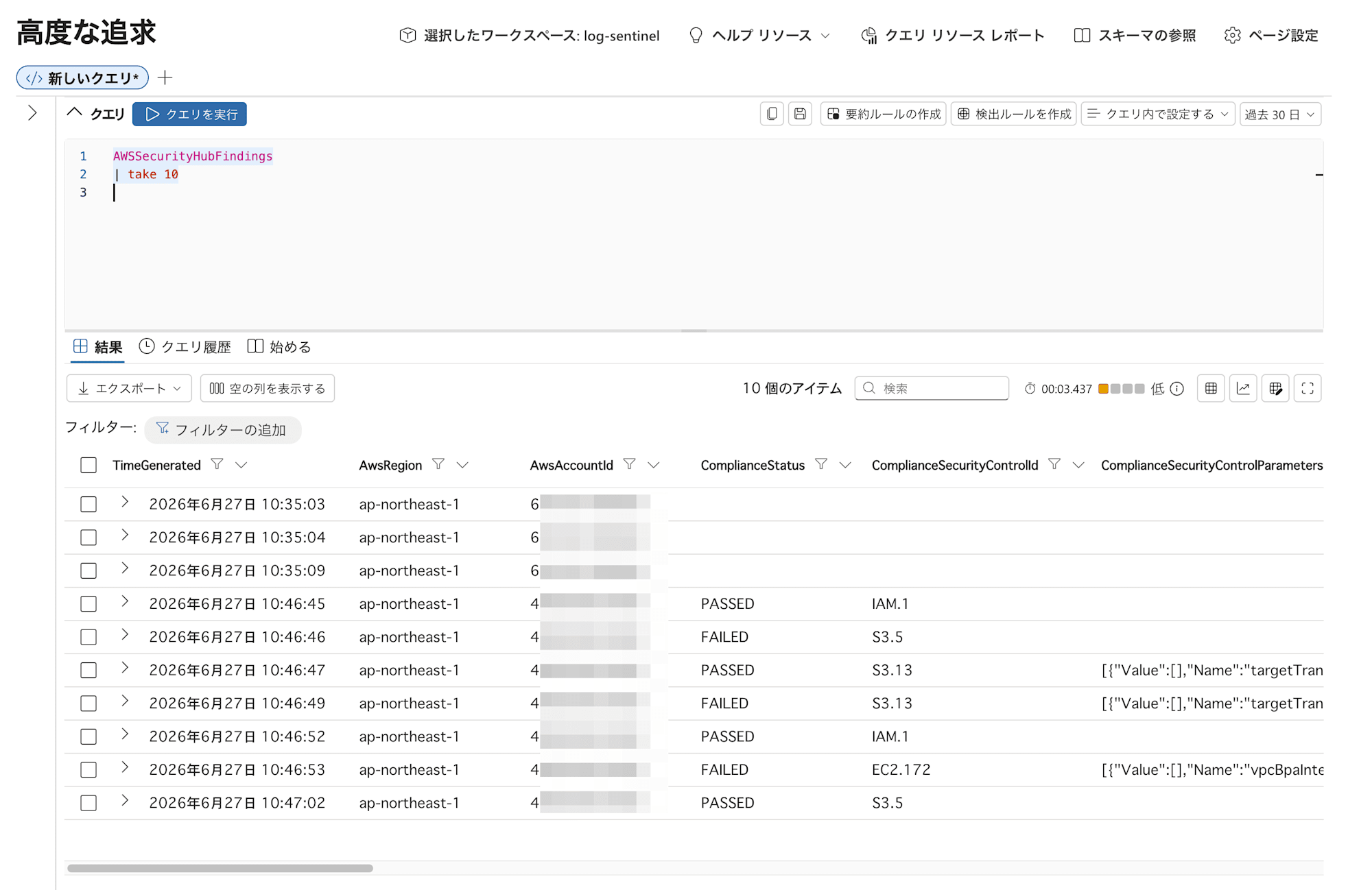
Findings は AWSSecurityHubFindings テーブルに格納されます。KQL クエリを実行して格納されていることを確認してみます。
AWSSecurityHubFindings
| take 10
さいごに
AWS Security Hub CSPM の Findings を Microsoft Sentinel に転送してみました。Microsoft Sentinel が提供する CloudFormation をデプロイすることで、接続が簡単にできました。今回は設定しませんでしたが、Microsoft Sentinel における AWSSecurityHubFindings テーブルの保管期間を変更することも検討が必要となります。
Microsoft Sentinel が提供しているテンプレートでは、すべてのサービスの Findings が対象になっているため、コスト削減のため EventBridge ルールで Microsoft Sentinel に転送するサービスを絞る検討をしてもよさそうです。また、S3 バケットのライフサイクルルールも必要に応じて追加を検討してもよいと思います。まずは、最低限の設定を試してみました。
以上、このブログがどなたかのご参考になれば幸いです。