Amazon EBS スナップショットのパブリック共有があるか AWS CLI で確認してみた

AWS Security Hub CSPM の [EC2.182] Amazon EBS Snapshots should not be publicly accessible に対応するためには、EBS スナップショットのすべてのパブリック共有をブロックする設定にする必要があります。
既に運用中の AWS アカウントにおいて、すべてのパブリック共有をブロックする前にパブリックに共有している EBS スナップショットが既存でないかを確認したい状況もあると思います。本ブログでは、そのような状況で役立つ、全てのリージョンでEBS スナップショットのパブリック共有がないか確認するコマンドを紹介します。また、全てのリージョンに対して一括でパブリック共有をブロックする設定に変更するコマンドも紹介します。
EBS スナップショットの公開共有を確認する
次のコマンドで、全てのリージョンでパブリック共有をしている EBS スナップショットがないか確認できます。最初の while 文でリージョン毎に実行し、二つ目の while 文で EBS スナップショット毎にアクセス権限の設定を確認しています。
aws ec2 describe-regions --query "Regions[].[RegionName]" --output text \
| while read region; do
  echo "### Describe public snapshots in ${region}"
  aws ec2 describe-snapshots --owner-ids self --query 'Snapshots[*].[SnapshotId]' --region ${region} --output text \
  | while read snapshot; do
    aws ec2 describe-snapshot-attribute \
      --attribute createVolumePermission \
      --snapshot-id ${snapshot} \
      --region ${region} \
      --output json | jq -r 'if .CreateVolumePermissions[].Group == "all" then . else empty end'
  done
done
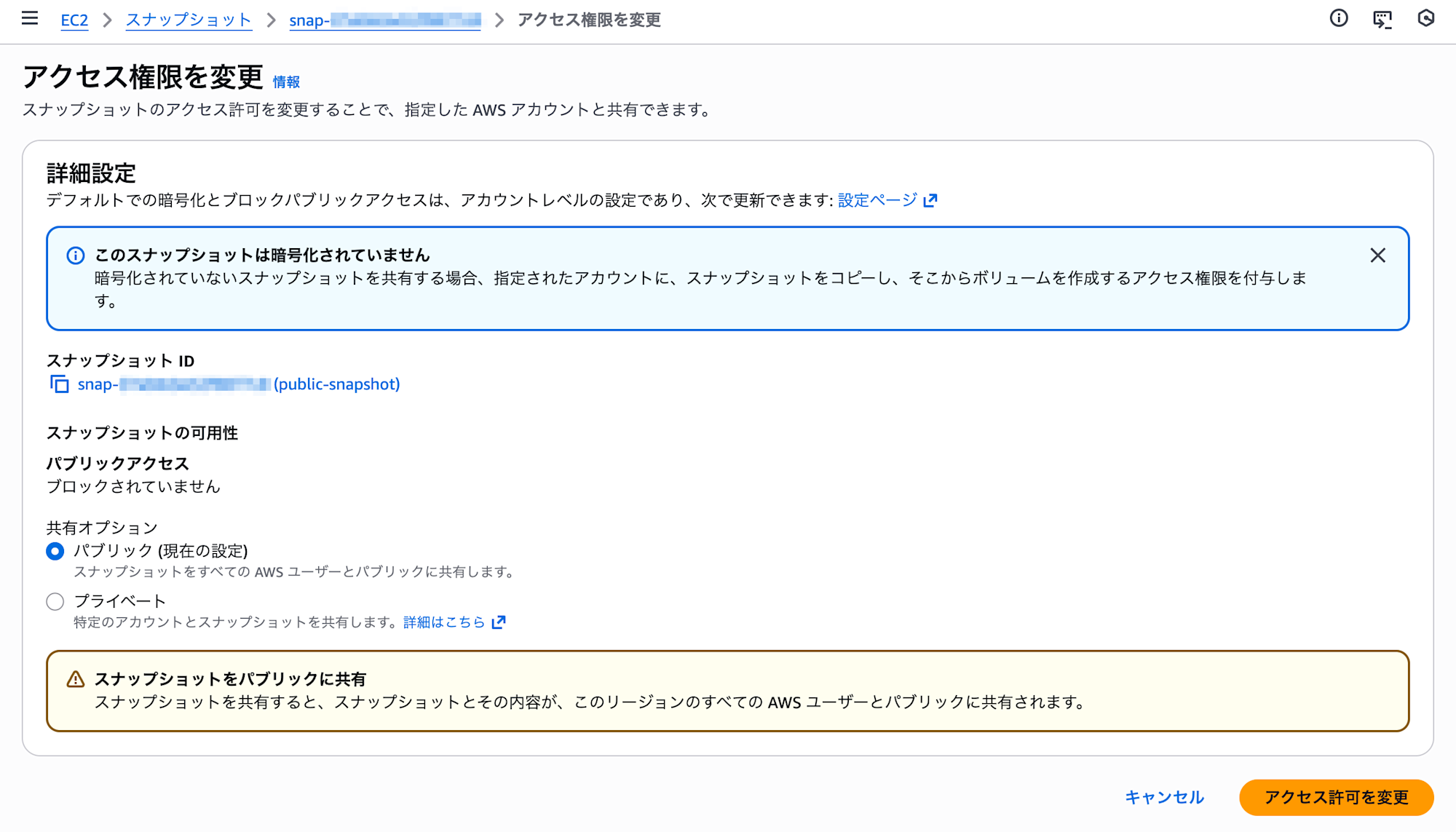
実行結果例です。東京リージョンにパブリック共有の EBS スナップショットが存在する出力例です。CreateVolumePermissions が "Group": "all" である状態がパブリック共有となります。
$ aws ec2 describe-regions --query "Regions[].[RegionName]" --output text \
> | while read region; do
>   echo "### Describe public snapshots in ${region}"
>   aws ec2 describe-snapshots --owner-ids self --query 'Snapshots[*].[SnapshotId]' --region ${region} --output text \
>   | while read snapshot; do
>     aws ec2 describe-snapshot-attribute \
>       --attribute createVolumePermission \
>       --snapshot-id ${snapshot} \
>       --region ${region} \
>       --output json | jq -r 'if .CreateVolumePermissions[].Group == "all" then . else empty end'
>   done
> done
### Describe public snapshots in ap-south-1
### Describe public snapshots in eu-north-1
### Describe public snapshots in eu-west-3
### Describe public snapshots in eu-west-2
### Describe public snapshots in eu-west-1
### Describe public snapshots in ap-northeast-3
### Describe public snapshots in ap-northeast-2
### Describe public snapshots in ap-northeast-1
{
  "SnapshotId": "snap-07a0dcbe52f8877c8",
  "CreateVolumePermissions": [
    {
      "Group": "all"
    }
  ]
}
### Describe public snapshots in ca-central-1
### Describe public snapshots in sa-east-1
### Describe public snapshots in ap-southeast-1
### Describe public snapshots in ap-southeast-2
### Describe public snapshots in eu-central-1
### Describe public snapshots in us-east-1
### Describe public snapshots in us-east-2
### Describe public snapshots in us-west-1
### Describe public snapshots in us-west-2
本コマンドで出力されている EBS スナップショットのは、マネジメントコンソールでは下記画像のアクセス権限設定をしているスナップショットとなります。
EBS スナップショットの公開共有をブロックする
「EBS スナップショットのパブリックアクセスをブロック」設定を「すべての公開共有をブロック」に変更するコマンド例も記載します
aws ec2 describe-regions --query "Regions[].[RegionName]" --output text \
| while read region; do
  echo "### Enable snapshot block public access in ${region}"
  aws ec2 enable-snapshot-block-public-access \
    --region ${region} \
    --state block-all-sharing
done
本コマンドで変更後の設定は、マネジメントコンソールでは下記画像の設定に該当します。

実行結果例です。
$ aws ec2 describe-regions --query "Regions[].[RegionName]" --output text \
> | while read region; do
>   echo "### Enable snapshot block public access in ${region}"
>   aws ec2 enable-snapshot-block-public-access \
>     --region ${region} \
>     --state block-all-sharing
> done
### Enable snapshot block public access in ap-south-1
{
    "State": "block-all-sharing"
}
### Enable snapshot block public access in eu-north-1
{
    "State": "block-all-sharing"
}
### Enable snapshot block public access in eu-west-3
{
    "State": "block-all-sharing"
}
### Enable snapshot block public access in eu-west-2
{
    "State": "block-all-sharing"
}
### Enable snapshot block public access in eu-west-1
{
    "State": "block-all-sharing"
}
### Enable snapshot block public access in ap-northeast-3
{
    "State": "block-all-sharing"
}
### Enable snapshot block public access in ap-northeast-2
{
    "State": "block-all-sharing"
}
### Enable snapshot block public access in ap-northeast-1
{
    "State": "block-all-sharing"
}
### Enable snapshot block public access in ca-central-1
{
    "State": "block-all-sharing"
}
### Enable snapshot block public access in sa-east-1
{
    "State": "block-all-sharing"
}
### Enable snapshot block public access in ap-southeast-1
{
    "State": "block-all-sharing"
}
### Enable snapshot block public access in ap-southeast-2
{
    "State": "block-all-sharing"
}
### Enable snapshot block public access in eu-central-1
{
    "State": "block-all-sharing"
}
### Enable snapshot block public access in us-east-1
{
    "State": "block-all-sharing"
}
### Enable snapshot block public access in us-east-2
{
    "State": "block-all-sharing"
}
### Enable snapshot block public access in us-west-1
{
    "State": "block-all-sharing"
}
### Enable snapshot block public access in us-west-2
{
    "State": "block-all-sharing"
}
設定変更後に、現在の「EBS スナップショットのパブリックアクセスをブロック」の設定内容を確認するコマンド例も紹介します。
aws ec2 describe-regions --query "Regions[].[RegionName]" --output text \
| while read region; do
  echo "### Get snapshot block public access in ${region}"
  aws ec2 get-snapshot-block-public-access-state \
    --region ${region}
done
実行結果例です。State": "block-all-sharing" であれば、「すべての公開共有をブロック」設定になっています。
$ aws ec2 describe-regions --query "Regions[].[RegionName]" --output text \
> | while read region; do
>   echo "### Get snapshot block public access in ${region}"
>   aws ec2 get-snapshot-block-public-access-state \
>     --region ${region}
> done
### Get snapshot block public access in ap-south-1
{
    "State": "block-all-sharing",
    "ManagedBy": "account"
}
### Get snapshot block public access in eu-north-1
{
    "State": "block-all-sharing",
    "ManagedBy": "account"
}
### Get snapshot block public access in eu-west-3
{
    "State": "block-all-sharing",
    "ManagedBy": "account"
}
### Get snapshot block public access in eu-west-2
{
    "State": "block-all-sharing",
    "ManagedBy": "account"
}
### Get snapshot block public access in eu-west-1
{
    "State": "block-all-sharing",
    "ManagedBy": "account"
}
### Get snapshot block public access in ap-northeast-3
{
    "State": "block-all-sharing",
    "ManagedBy": "account"
}
### Get snapshot block public access in ap-northeast-2
{
    "State": "block-all-sharing",
    "ManagedBy": "account"
}
### Get snapshot block public access in ap-northeast-1
{
    "State": "block-all-sharing",
    "ManagedBy": "account"
}
### Get snapshot block public access in ca-central-1
{
    "State": "block-all-sharing",
    "ManagedBy": "account"
}
### Get snapshot block public access in sa-east-1
{
    "State": "block-all-sharing",
    "ManagedBy": "account"
}
### Get snapshot block public access in ap-southeast-1
{
    "State": "block-all-sharing",
    "ManagedBy": "account"
}
### Get snapshot block public access in ap-southeast-2
{
    "State": "block-all-sharing",
    "ManagedBy": "account"
}
### Get snapshot block public access in eu-central-1
{
    "State": "block-all-sharing",
    "ManagedBy": "account"
}
### Get snapshot block public access in us-east-1
{
    "State": "block-all-sharing",
    "ManagedBy": "account"
}
### Get snapshot block public access in us-east-2
{
    "State": "block-all-sharing",
    "ManagedBy": "account"
}
### Get snapshot block public access in us-west-1
{
    "State": "block-all-sharing",
    "ManagedBy": "account"
}
### Get snapshot block public access in us-west-2
{
    "State": "block-all-sharing",
    "ManagedBy": "account"
}
さいごに
AWS Security Hub CSPM のコントロールである「[EC2.182] Amazon EBS Snapshots should not be publicly accessible」の対応をしており、パブリック共有している EBS スナップショットがないか確認したく、コマンドを検討して試してみました。AWS CLI で全てのリージョンを一括で確認できます。また、パブリック共有をブロックする設定への変更方法も紹介しました。
以上、このブログがどなたかのご参考になれば幸いです。