
Claude Desktopに組み込まれたMCPサーバー用Node.jsランタイムを確認してみた

MCPサーバーをパッケージ化して簡単にインストールできるようにする仕組みとして、MCPB(MCP Bundle)があります。MCPサーバーのコード・依存関係・マニフェストファイルを1つのファイルにまとめた形式です。
Claude Desktopでは、このMCPB形式のファイルをデスクトップ拡張機能としてインストールできます。
さらにClaude Desktopの場合、Node.jsのランタイムがデスクトップアプリに組み込まれています。ヘルプセンターの開発者FAQにも、次のように書かれています。
デスクトップ拡張機能は、Node.js、Python、およびバイナリMCPサーバーをサポートしています。Claude Desktopには組み込みのNode.js環境が含まれているため、Node.jsのインストールは不要です。
これはMCPサーバー専用のNode.jsを別途同梱しているわけではなく、Claude Desktop自体がElectron製のアプリであり、Electronがもともと持っているNode.jsランタイムをMCPサーバーの実行にも使っているためです。
この組み込みランタイムを実際に確認してみましょう。
Node.jsランタイムの組み込みとシステムの切り替え
設定→拡張機能→詳細設定を開くと、次のような表示があります。
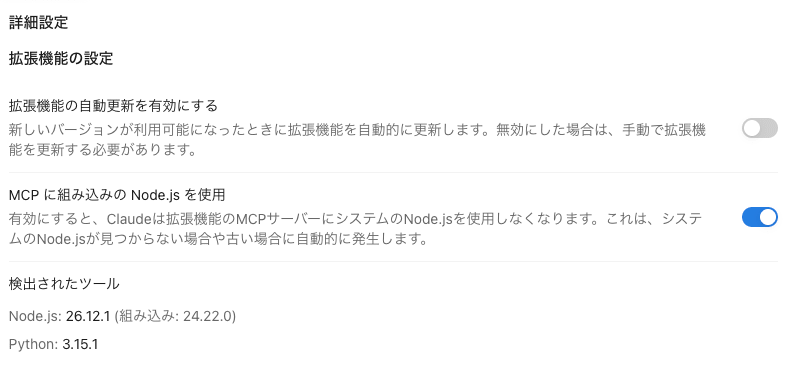
- 「MCPに組み込みのNode.jsを使用」がオン
- 検出されたツールに
Node.js: 26.12.1 (組み込み: 24.22.0)
ローカルにインストールされているNode.jsやPythonなどのランタイムとは別に、組み込みのNode.jsも用意されていることが読み取れます。
この組み込みバージョンをMCP経由で確認してみましょう。
MCPサーバーを作成する
MCPサーバーを実行しているプロセスのランタイム情報をそのまま返す get_node_runtime_info というツールを1つだけ持つMCPサーバーを実装します。
import { McpServer } from "@modelcontextprotocol/server";
import { StdioServerTransport } from "@modelcontextprotocol/server/stdio";

const server = new McpServer({ name: "hello-mcpb-node", version: "1.0.0" });

server.registerTool(
  "get_node_runtime_info",
  { description: "Return Node.js runtime info of the process running this MCP server." },
  async () => {
    const { node, v8, modules, electron = null } = process.versions;
    const info = {
      execPath: process.execPath,
      node,
      v8,
      modules,
      electron,
      processType: process.type ?? null,
    };
    return { content: [{ type: "text", text: JSON.stringify(info, null, 2) }] };
  },
);

await server.connect(new StdioServerTransport());
各値の意味は次のとおりです。
| 項目 | 意味 |
|---|---|
execPath |
使用中のNode.js実行ファイルの絶対パス |
node |
このMCPサーバープロセスを実行中のNode.jsバージョン |
v8 |
Node.jsに組み込まれたV8のバージョン |
modules |
ネイティブNode.jsモジュールのABI番号 |
electron |
Electronプロセスならバージョン、それ以外はnull |
processType |
Electronが付与するプロセス種別。utilityなど。Electron外ではnull |
MCPB形式でインストール
このMCPサーバーをMCPBにまとめて、Claude Desktopにインストールします。
依存関係をインストールする
以降のコマンドは、すべてプロジェクトのルート(manifest.jsonとpackage.jsonがある場所)で実行します。
.
├── manifest.json
├── package.json
└── server/
    └── index.js
manifest.json
{
  "manifest_version": "0.4",
  "name": "hello-mcpb-node",
  "version": "1.0.0",
  "description": "get runtime info of node.js",
  "author": {
    "name": "Jane Doe"
  },
  "server": {
    "type": "node",
    "entry_point": "server/index.js",
    "mcp_config": {
      "command": "node",
      "args": [
        "${__dirname}/server/index.js"
      ]
    }
  },
  "compatibility": {
    "runtimes": {
      "node": ">=22.0.0"
    }
  }
}
package.json
{
  "name": "hello-mcpb-node",
  "version": "1.0.0",
  "description": "MCPB node runtimeの疎通確認用MCPサーバー",
  "type": "module",
  "main": "server/index.js",
  "dependencies": {
    "@modelcontextprotocol/server": "^2.0.0"
  }
}
依存は@modelcontextprotocol/serverだけです。MCPBのnode型は依存関係をnode_modulesごとパッケージに含めるため、mcpb packの前に必ずインストールしておきます。
bun install
ローカルで疎通確認する
Claude Desktopへインストールする前に、MCPの公式デバッグツールMCP Inspectorでツールが動くか確認します。
bunx @modelcontextprotocol/inspector \
  --cli node server/index.js \
  --method tools/call \
  --tool-name get_node_runtime_info

{
  "content": [
    {
      "type": "text",
      "text": "{\n  \"execPath\": \"/opt/homebrew/Cellar/node/26.12.1_1/bin/node\",\n  \"node\": \"26.12.1\",\n  \"v8\": \"14.6.202.34-node.40\",\n  \"modules\": \"147\",\n  \"electron\": null,\n  \"processType\": null\n}"
    }
  ]
}
核心部分をjqで読みやすく出力させます。
bunx @modelcontextprotocol/inspector \
  --cli node server/index.js \
  --method tools/call \
  --tool-name get_node_runtime_info \
  | jq '.content[0].text | fromjson'

{
  "execPath": "/opt/homebrew/Cellar/node/26.12.1_1/bin/node",
  "node": "26.12.1",
  "v8": "14.6.202.34-node.40",
  "modules": "147",
  "electron": null,
  "processType": null
}
MCPBファイルにパッケージングする
Claude Desktopにインストールできる形にするため、manifest.json・server/・node_modules/を1つの.mcpbファイルにまとめます。
$ bunx @anthropic-ai/mcpb pack . dist/claude-desktop-node-runtime-info.mcpb
Validating manifest...
Manifest schema validation passes!
...

Archive Details
name: hello-mcpb-node
version: 1.0.0
filename: hello-mcpb-node-1.0.0.mcpb
package size: 2.4MB
unpacked size: 9.2MB
shasum: ffc3547071df8d9f83096ce16d0d6f26867b792c
total files: 800
ignored (.mcpbignore) files: 171

Output: /Users/jsmith/test/dist/claude-desktop-node-runtime-info.mcpb
mcpb packはmanifestを検証したうえで、MCPBをZIP形式のパッケージにまとめます。
Claude Desktopにインストールする
生成されたdist/claude-desktop-node-runtime-info.mcpbをダブルクリックするか、Claude Desktopの設定画面へドラッグしてインストールします。
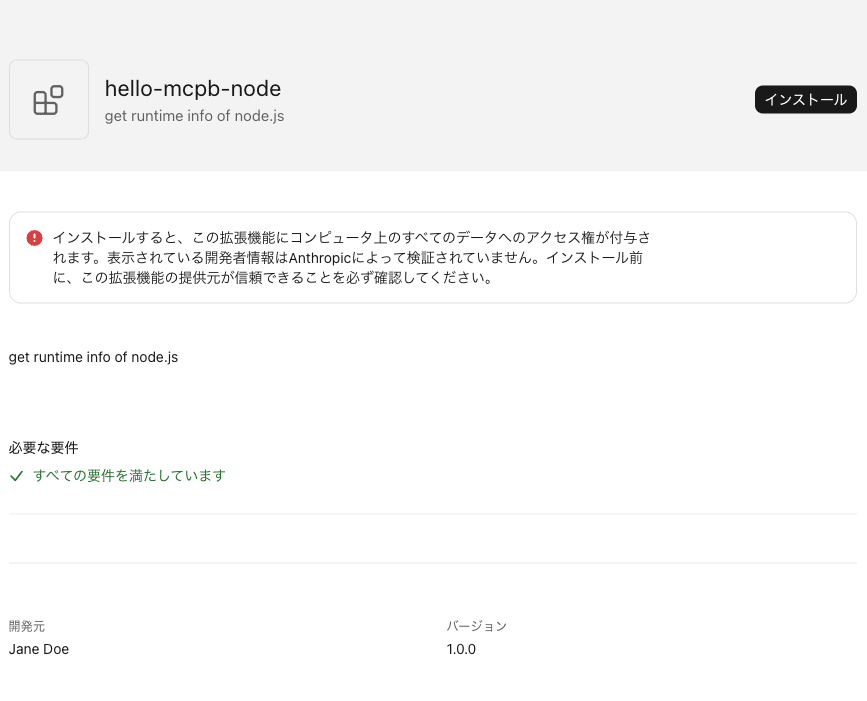
組み込みのNode.jsランタイムを確認
インストールしたMCPサーバーのget_node_runtime_infoを、Claude Desktopから呼び出します。
get_node_runtime_info を実行し、結果のJSONをそのまま貼ってください。
macOS版Claude Desktopで実行した結果は次のとおりでした。
{
  "execPath": "/Applications/Claude.app/Contents/Frameworks/Claude Helper (Plugin).app/Contents/MacOS/Claude Helper (Plugin)",
  "node": "24.22.0",
  "v8": "15.2.124.43-electron.0",
  "modules": "149",
  "electron": "44.9.3",
  "processType": "utility"
}
ポイントは、組み込みNode.jsランタイムの実体がElectron内蔵のNode.jsだということです。
execPathはアプリ内のヘルパープロセスClaude Helper (Plugin)を指し、electronには44.9.3が入っています。v8の末尾も-electron.0です。processTypeもutilityで、MCPサーバーはElectronのutility processとして起動されています。
ローカルで疎通確認したときの値と並べると、違いがはっきりします。
| 項目 | ローカル実行 | Claude Desktop |
|---|---|---|
execPath |
/opt/homebrew/Cellar/node/26.12.1_1/bin/node |
.../Claude.app/.../Claude Helper (Plugin) |
node |
26.12.1 |
24.22.0 |
v8 |
14.6.202.34-node.40 |
15.2.124.43-electron.0 |
modules |
147 |
149 |
electron |
null |
44.9.3 |
processType |
null |
utility |
manifestには"command": "node"と書いていますが、Claude Desktopはこの指定を、PATH上のnodeではなく自前のElectron内蔵ランタイムに差し替えて実行しています。
Node.jsランタイムの組み込みとシステムの使い分け
MCPサーバーのNode.jsランタイムは、デスクトップアプリ組み込みとシステムから選べます。
ネイティブモジュールを含む場合は注意が必要です。組み込みのNode.jsはElectron内蔵でABIが異なるため、システムのNode.js向けにビルドしたバイナリは動作しません。組み込まれているElectronのバージョンに向けて再ビルドすれば動きます。
bunx @electron/rebuild -v 44.9.3