SSM Automation に WarningMessage フィールドが追加されたので警告表示を確認してみた

はじめに
2026-07-21 に、AWS Systems Manager Automation の API へ WarningMessage フィールドが追加されました。Automation 実行中の非致命的な問題を AWS が警告として通知する仕組みです。
AWS CLI v2.36.5 の CHANGELOG には以下のように記載されています。
api-change:
ssm: Added a WarningMessage field to Automation along with corresponding public documentation.
https://raw.githubusercontent.com/aws/aws-cli/v2/CHANGELOG.rst
本記事では、非推奨ランタイム python3.6 を指定した Automation ドキュメントを実行し、マネジメントコンソールの実行詳細画面に表示される警告バナーを確認しました。
検証内容
WarningMessage とは
AWS CLI のヘルプによると、WarningMessage は以下のように定義されています。
Automation 実行レベル:
A message that describes a non-critical issue that occurred during the automation execution.
ステップレベル:
A message that describes a non-critical issue that occurred during the step execution. Present only if the step status includes a warning.
このフィールドは以下の API メソッドのレスポンスに追加されています。
| API メソッド | フィールドパス |
|---|---|
DescribeAutomationExecutions |
AutomationExecutionMetadataList[].WarningMessage |
DescribeAutomationStepExecutions |
StepExecutions[].WarningMessage |
GetAutomationExecution |
AutomationExecution.WarningMessage / AutomationExecution.StepExecutions[].WarningMessage |
検証環境
| 項目 | 値 |
|---|---|
| リージョン | ap-northeast-1 |
| AWS CLI | 2.36.5 |
| 検証日 | 2026-07-22 |
Automation ドキュメントの作成
警告を発生させるため、非推奨ランタイム python3.6 を指定した aws:executeScript の Hello World ドキュメントを作成しました。
schemaVersion: "0.3"
description: "Test with deprecated runtime"
mainSteps:
  - name: HelloWorld
    action: aws:executeScript
    inputs:
      Runtime: python3.6
      Handler: handler
      Script: |
        def handler(event, context):
          print("Hello, World!")
          return {"message": "Hello, World!"}
    outputs:
      - Name: message
        Selector: $.Payload.message
        Type: String
aws ssm create-document \
  --name "HelloWorld-DeprecatedRuntime" \
  --document-type "Automation" \
  --document-format "YAML" \
  --content file://document.yaml
python3.6 を指定してもドキュメント作成は拒否されませんでした。
実行と結果確認
aws ssm start-automation-execution \
  --document-name "HelloWorld-DeprecatedRuntime"
get-automation-execution で実行結果を確認します。
aws ssm get-automation-execution \
  --automation-execution-id <実行ID>
実行ステータスは Success となり、処理自体は正常に完了しました。ただしステップの出力では IsRuntimeAutoUpgraded が true、ExecutedRuntime が python3.11 となっており、指定した python3.6 から自動アップグレードされたことがわかります。
ステップ実行結果(全文)
{
    "StepName": "HelloWorld",
    "Action": "aws:executeScript",
    "StepStatus": "Success",
    "Inputs": {
        "Runtime": "\"python3.6\""
    },
    "Outputs": {
        "ExecutedRuntime": ["python3.11"],
        "IsRuntimeAutoUpgraded": ["true"],
        "OutputPayload": ["{\"ExecutionLog\":\"Hello, World!\\n\",\"Payload\":{\"message\":\"Hello, World!\"}}"],
        "message": ["Hello, World!"]
    }
}
マネジメントコンソールでの警告表示
マネジメントコンソールの Automation 実行詳細画面を開くと、画面上部に黄色い警告バナーが表示されていました。
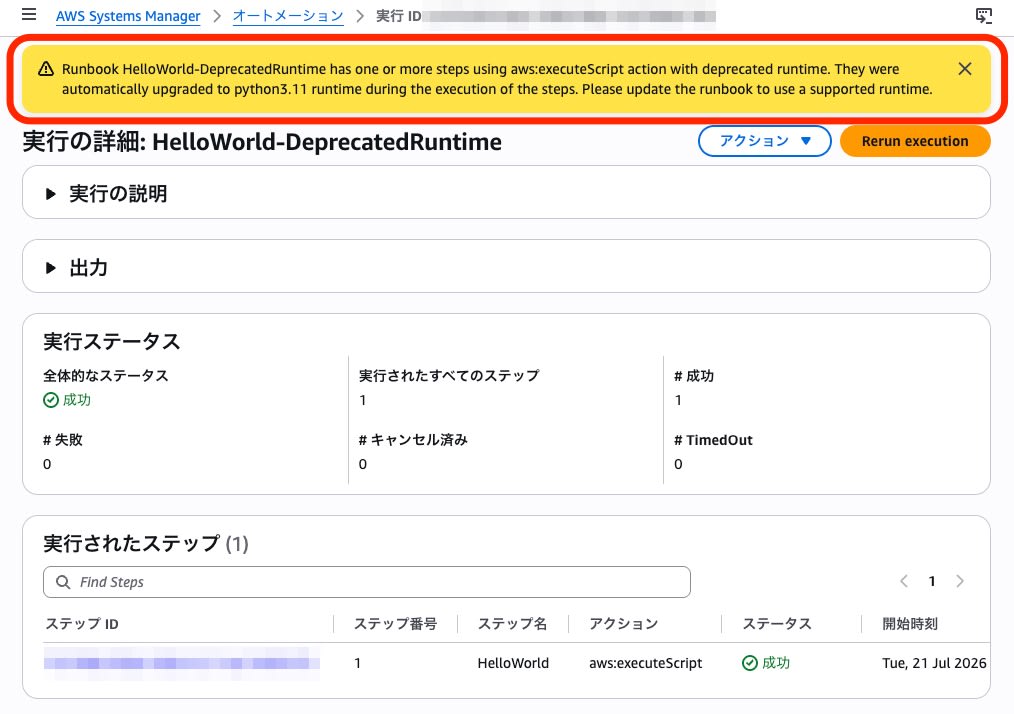
表示されたメッセージの全文は以下でした。
Runbook HelloWorld-DeprecatedRuntime has one or more steps using aws:executeScript action with deprecated runtime. They were automatically upgraded to python3.11 runtime during the execution of the steps. Please update the runbook to use a supported runtime.
まとめ
WarningMessage フィールドの追加により、実行が成功していても対処が望ましい事項を AWS 側から通知できるようになりました。マネジメントコンソールで警告バナーを見かけたときは、非推奨ランタイムの利用など是正が必要な点がないか確認する手がかりになります。