Terraform の plan/apply 時におけるtfstateファイルの処理の流れを整理してみた

はじめに
クラウド事業本部、あきやまです。
普段、Terraformを使ってAWSの管理を行っています。
今回は、IAM Userの作成の処理を通して、Terraformがどのようにコードや、tfstateを処理しているのか自分の理解のため少し整理してみました。
環境
| 項目 | 値 |
|---|---|
| OS | macOS 27.2.1 |
| Terraform | 1.14.6 |
| AWS CLI | 2.32.32 |
| AWS Provider | 6.74.0 |
| リージョン | ap-northeast-1 |
| tfstate | ローカル(terraform.tfstate) |
IAM のユーザー自体はグローバルなリソースです。
tfstate はローカルの terraform.tfstate で管理しています。
provider のリージョンは ap-northeast-1 にしています。
以降のログは、terraform apply を tfa として実行したものです。
結論
state に残っているリソースだけが refresh され、コードとの差で create か destroy が決まります。
state に無い実在ユーザーへ create すると、今回は 409 で失敗しました。
| 操作 | plan | apply |
|---|---|---|
| 新規に3人 | a、b、c を create | 3人を作成。id はユーザー名 |
| a をコードから消す | a を destroy | AWS と state から a が消える |
| b をコンソールから消す | b を create | 同名で作り直す。unique_id は変わる |
| c を tfstate から消す | c を create | 新規作成をするように処理されるが、同一名の IAM ユーザーがあるため拒否される |
三つの状態
desiredは、tf ファイルに書いた、こうあってほしいリソースの定義です。
currentは、Terraform が把握している状態です。
実行を始めるときはローカルの terraform.tfstate をオンメモリに読んだもので、refresh すると real に合わせて更新されます。
realは、AWS 上に実際にあるリソースです。
plan は、real を反映したあとの current と、desired を比べます。
apply は、その差分で real を変え、current を合わせてから terraform.tfstate へ書き戻します。
plan の動き
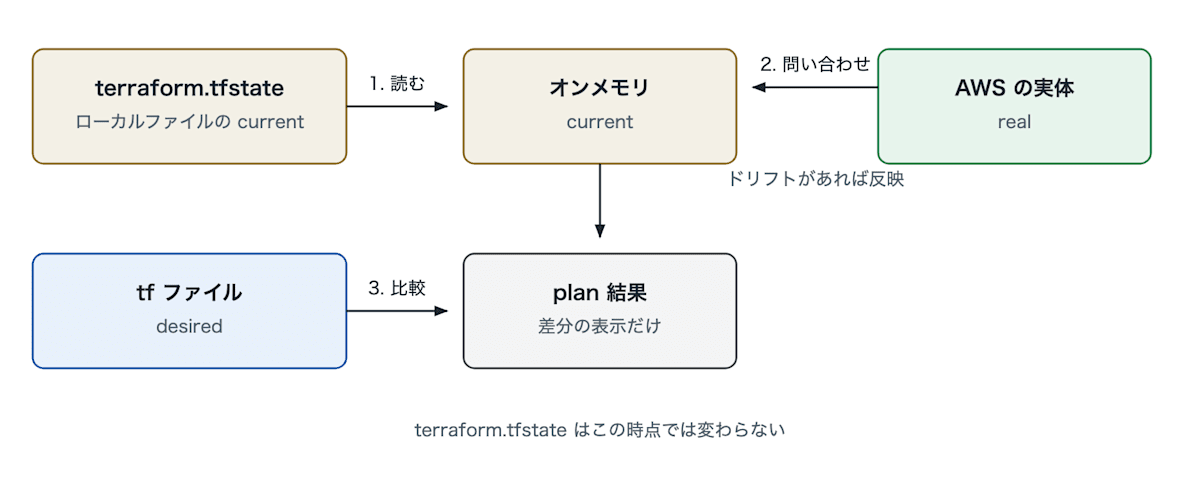
plan は差分を出すところまでです。
AWS も、ローカルの tfstate も、この時点では変えません。
1. tfstate ファイルの取得
ローカルの terraform.tfstate を読み、オンメモリ上に展開します。
このオンメモリ上の状態が current です。
2. 実体の参照
tfstate に記録されたリソースをもとに、実際の AWS へ API で問い合わせ、現在の状態を取得します。
マネジメントコンソールや AWS CLI など、Terraform 以外の経路で変更があると、ドリフトとして検知されます。
検知した内容で、オンメモリの状態を最新にリフレッシュします。
この AWS 側が real です。
3. desired との比較
tf ファイルで定義したリソースが desired です。
desired と、リフレッシュ後のオンメモリ上の状態を比較し、差分を plan 結果として出力します。
比較はオンメモリ上で完結します。
ローカルの tfstate ファイルそのものは変化しません。
apply の動き
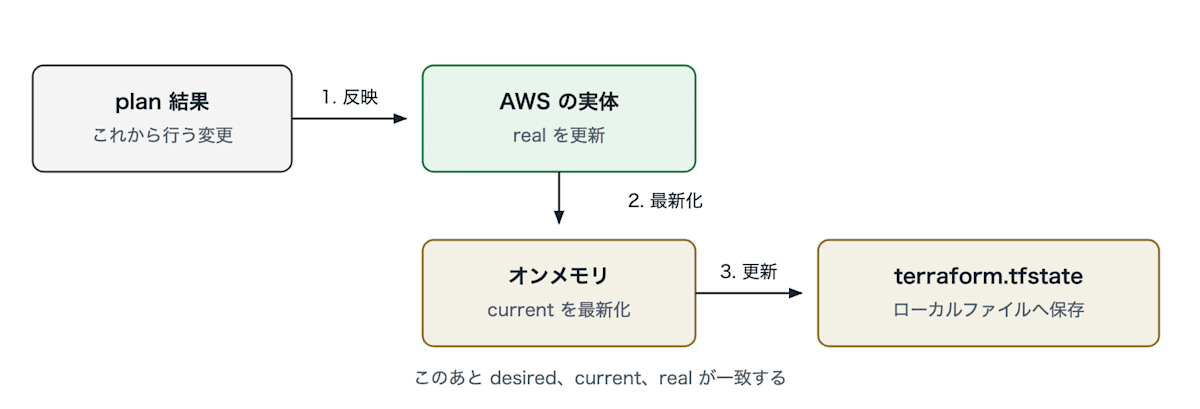
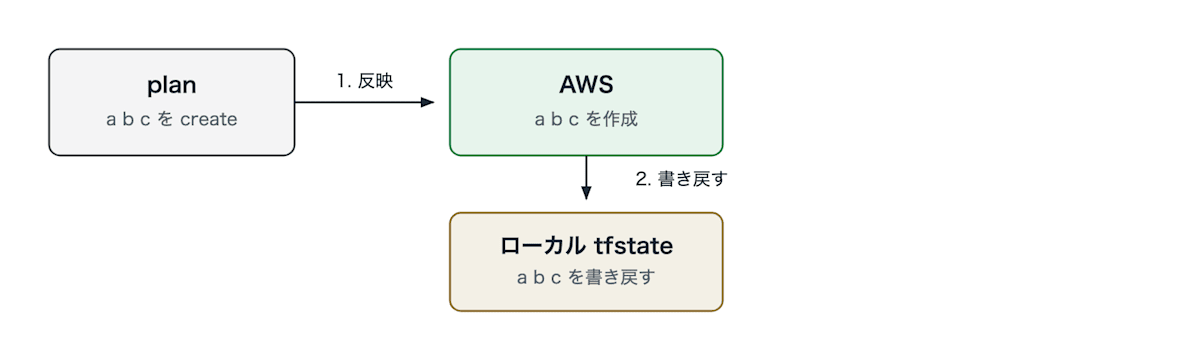
apply は、plan の結果を real と current に反映します。
1. plan 結果の反映
plan の結果に従い、desired どおりに AWS リソースを変更します。
real の更新です。
たとえば、ECR のタグ名を変える、といった変更です。
2. オンメモリの更新
変更後の状態を、オンメモリ上で最新化します。
current に desired を反映した状態です。
3. tfstate ファイルの更新
desired を反映した最新の状態を、ローカルの terraform.tfstate へ書き戻します。
current の保存です。
これにより、desired、current、real の3者が一致します。
やってみた
Step 1: 3ユーザーの作成
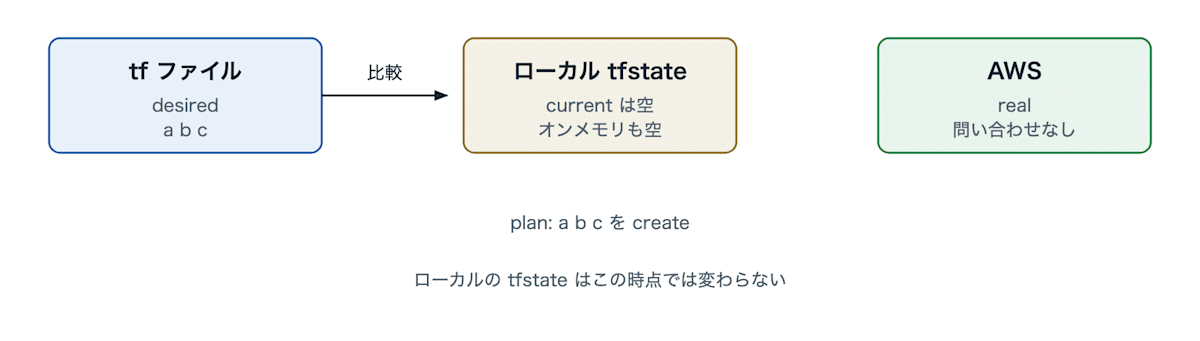
空の state に対して、a、b、c を plan して apply します。
plan の時点ではユーザーは作られていません。
resource "aws_iam_user" "a" {
  name = "lab-thinking-plan-a"

  tags = {
    lab  = "thinking-plan-apply"
    case = "code"
  }
}

resource "aws_iam_user" "b" {
  name = "lab-thinking-plan-b"

  tags = {
    lab  = "thinking-plan-apply"
    case = "gui"
  }
}

resource "aws_iam_user" "c" {
  name = "lab-thinking-plan-c"

  tags = {
    lab  = "thinking-plan-apply"
    case = "state"
  }
}
terraform plan は 3 create でした。
id と unique_id は (known after apply) です。
force_destroy は false です。
この plan ではユーザーは作られていません。
plan の実行結果
Terraform used the selected providers to generate the following execution plan. Resource actions are indicated with the following symbols:
  + create

Terraform will perform the following actions:

  # aws_iam_user.a will be created
  + resource "aws_iam_user" "a" {
      + arn           = (known after apply)
      + force_destroy = false
      + id            = (known after apply)
      + name          = "lab-thinking-plan-a"
      + path          = "/"
      + tags          = {
          + "case" = "code"
          + "lab"  = "thinking-plan-apply"
        }
      + tags_all      = {
          + "case" = "code"
          + "lab"  = "thinking-plan-apply"
        }
      + unique_id     = (known after apply)
    }

  # aws_iam_user.b will be created
  + resource "aws_iam_user" "b" {
      + arn           = (known after apply)
      + force_destroy = false
      + id            = (known after apply)
      + name          = "lab-thinking-plan-b"
      + path          = "/"
      + tags          = {
          + "case" = "gui"
          + "lab"  = "thinking-plan-apply"
        }
      + tags_all      = {
          + "case" = "gui"
          + "lab"  = "thinking-plan-apply"
        }
      + unique_id     = (known after apply)
    }

  # aws_iam_user.c will be created
  + resource "aws_iam_user" "c" {
      + arn           = (known after apply)
      + force_destroy = false
      + id            = (known after apply)
      + name          = "lab-thinking-plan-c"
      + path          = "/"
      + tags          = {
          + "case" = "state"
          + "lab"  = "thinking-plan-apply"
        }
      + tags_all      = {
          + "case" = "state"
          + "lab"  = "thinking-plan-apply"
        }
      + unique_id     = (known after apply)
    }

Plan: 3 to add, 0 to change, 0 to destroy.
terraform apply は、その場で plan を出し直して yes を待ちます。
承認後の作成は並行で、完了ログの id はユーザー名です。
apply の実行結果
Terraform used the selected providers to generate the following execution plan. Resource actions are indicated with the following symbols:
  + create

Terraform will perform the following actions:

  # aws_iam_user.a will be created
  + resource "aws_iam_user" "a" {
      + arn           = (known after apply)
      + force_destroy = false
      + id            = (known after apply)
      + name          = "lab-thinking-plan-a"
      + path          = "/"
      + tags          = {
          + "case" = "code"
          + "lab"  = "thinking-plan-apply"
        }
      + tags_all      = {
          + "case" = "code"
          + "lab"  = "thinking-plan-apply"
        }
      + unique_id     = (known after apply)
    }

  # aws_iam_user.b will be created
  + resource "aws_iam_user" "b" {
      + arn           = (known after apply)
      + force_destroy = false
      + id            = (known after apply)
      + name          = "lab-thinking-plan-b"
      + path          = "/"
      + tags          = {
          + "case" = "gui"
          + "lab"  = "thinking-plan-apply"
        }
      + tags_all      = {
          + "case" = "gui"
          + "lab"  = "thinking-plan-apply"
        }
      + unique_id     = (known after apply)
    }

  # aws_iam_user.c will be created
  + resource "aws_iam_user" "c" {
      + arn           = (known after apply)
      + force_destroy = false
      + id            = (known after apply)
      + name          = "lab-thinking-plan-c"
      + path          = "/"
      + tags          = {
          + "case" = "state"
          + "lab"  = "thinking-plan-apply"
        }
      + tags_all      = {
          + "case" = "state"
          + "lab"  = "thinking-plan-apply"
        }
      + unique_id     = (known after apply)
    }

Plan: 3 to add, 0 to change, 0 to destroy.

Do you want to perform these actions?
  Terraform will perform the actions described above.
  Only 'yes' will be accepted to approve.

  Enter a value: yes

aws_iam_user.c: Creating...
aws_iam_user.a: Creating...
aws_iam_user.b: Creating...
aws_iam_user.a: Creation complete after 1s [id=lab-thinking-plan-a]
aws_iam_user.c: Creation complete after 1s [id=lab-thinking-plan-c]
aws_iam_user.b: Creation complete after 2s [id=lab-thinking-plan-b]

Apply complete! Resources: 3 added, 0 changed, 0 destroyed.
apply のログには unique_id が出ません。
state に残った値は次のとおりです。
| user | name | unique_id |
|---|---|---|
| a | lab-thinking-plan-a | AIDAWIM4DH5ZF2PDNYFLF |
| b | lab-thinking-plan-b | AIDAWIM4DH5ZKAKJHHDJ5 |
| c | lab-thinking-plan-c | AIDAWIM4DH5ZMUFZKMNT3 |
Step 2: コードからの削除
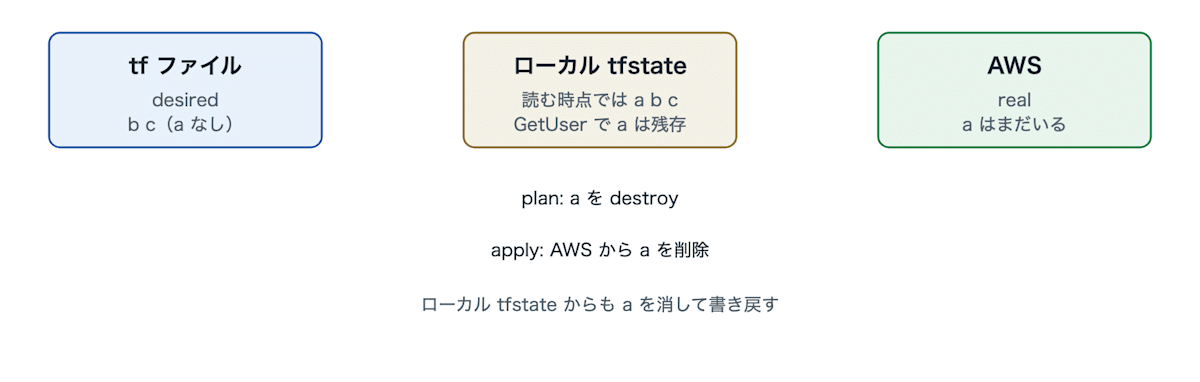
user.tf から aws_iam_user.a を消し、b と c だけを残して apply します。
refresh は a を含め3件とも成功していて、この時点の AWS には a が残っていました。
plan は a の destroy だけです。
理由の行がそのまま出ます。
b と c は差分に出ていません。
yes のあと、destroy は 2 秒で完了しました。
アカウント ID はマスクしています。
apply の実行結果
aws_iam_user.a: Refreshing state... [id=lab-thinking-plan-a]
aws_iam_user.c: Refreshing state... [id=lab-thinking-plan-c]
aws_iam_user.b: Refreshing state... [id=lab-thinking-plan-b]

Terraform used the selected providers to generate the following execution plan. Resource actions are indicated with the following symbols:
  - destroy

Terraform will perform the following actions:

  # aws_iam_user.a will be destroyed
  # (because aws_iam_user.a is not in configuration)
  - resource "aws_iam_user" "a" {
      - arn                  = "arn:aws:iam::xxxxxxxxxxxx:user/lab-thinking-plan-a" -> null
      - force_destroy        = false -> null
      - id                   = "lab-thinking-plan-a" -> null
      - name                 = "lab-thinking-plan-a" -> null
      - path                 = "/" -> null
      - tags                 = {
          - "case" = "code"
          - "lab"  = "thinking-plan-apply"
        } -> null
      - tags_all             = {
          - "case" = "code"
          - "lab"  = "thinking-plan-apply"
        } -> null
      - unique_id            = "AIDAWIM4DH5ZF2PDNYFLF" -> null
        # (1 unchanged attribute hidden)
    }

Plan: 0 to add, 0 to change, 1 to destroy.

Do you want to perform these actions?
  Terraform will perform the actions described above.
  Only 'yes' will be accepted to approve.

  Enter a value: yes

aws_iam_user.a: Destroying... [id=lab-thinking-plan-a]
aws_iam_user.a: Destruction complete after 2s

Apply complete! Resources: 0 added, 0 changed, 1 destroyed.
force_destroy は false のままです。
アクセスキーもインラインポリシーも無いユーザーだったので、削除できました。
Step 3: コンソールからの削除
IAM コンソールで lab-thinking-plan-b を削除します。
Terraform はこの操作に関与していません。
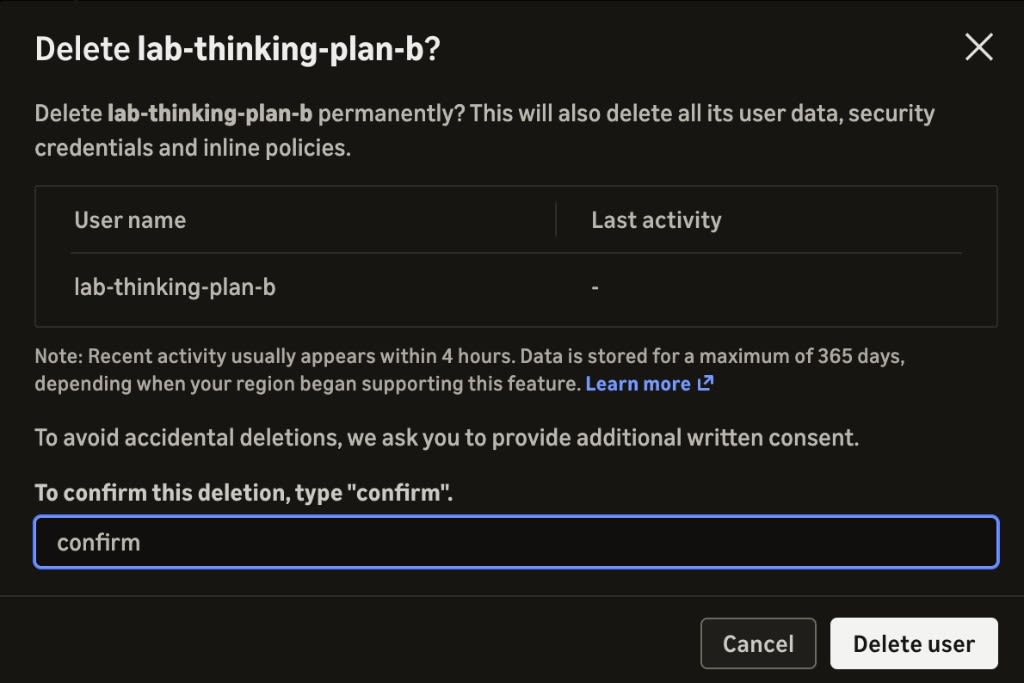
削除前の unique_id は AIDAWIM4DH5ZKAKJHHDJ5 です。
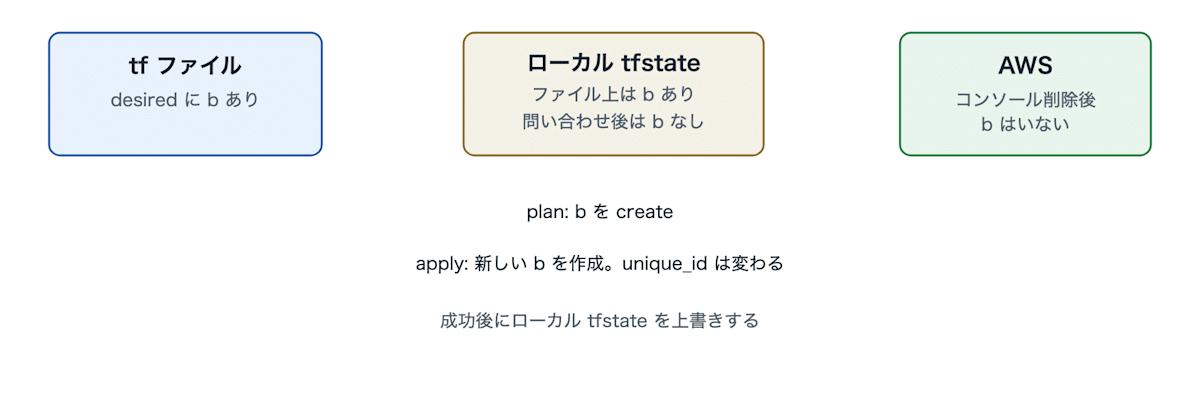
この直後、コードと state ファイルには b が残っています。
続けて apply します。
refresh のログは、消えたあとも state 上の id を表示しています。
c は差分に出ていません。
今回のログには、コンソールで消した旨の注記はありませんでした。
id も unique_id も、再び (known after apply) です。
yes のあと、作成は 2 秒で完了しています。
完了ログの id は、削除前と同じ lab-thinking-plan-b です。
apply の実行結果
aws_iam_user.b: Refreshing state... [id=lab-thinking-plan-b]
aws_iam_user.c: Refreshing state... [id=lab-thinking-plan-c]

Terraform used the selected providers to generate the following execution plan. Resource actions are indicated with the following symbols:
  + create

Terraform will perform the following actions:

  # aws_iam_user.b will be created
  + resource "aws_iam_user" "b" {
      + arn           = (known after apply)
      + force_destroy = false
      + id            = (known after apply)
      + name          = "lab-thinking-plan-b"
      + path          = "/"
      + tags          = {
          + "case" = "gui"
          + "lab"  = "thinking-plan-apply"
        }
      + tags_all      = {
          + "case" = "gui"
          + "lab"  = "thinking-plan-apply"
        }
      + unique_id     = (known after apply)
    }

Plan: 1 to add, 0 to change, 0 to destroy.

Do you want to perform these actions?
  Terraform will perform the actions described above.
  Only 'yes' will be accepted to approve.

  Enter a value: yes

aws_iam_user.b: Creating...
aws_iam_user.b: Creation complete after 2s [id=lab-thinking-plan-b]

Apply complete! Resources: 1 added, 0 changed, 0 destroyed.
state を読み直すと、名前は同じで unique_id だけ変わっていました。
c は作成時の値のままです。
| user | unique_id | 前回比 |
|---|---|---|
| b | AIDAWIM4DH5ZMH2EZBHYB | AIDAWIM4DH5ZKAKJHHDJ5 から変わった |
| c | AIDAWIM4DH5ZMUFZKMNT3 | 同じ |
aws_iam_user の id はユーザー名です。
ログの id が同じでも、unique_id が違えば別のユーザーです。
Step 4: tfstate からの削除
terraform.tfstate の resources から、"name": "c" のオブジェクトを手で消します。
直前の要素である b の閉じ括弧に付いていたカンマも外します。
カンマを残すと JSON が壊れます。
version、serial、lineage は触っていません。
この編集は state ファイルだけです。
AWS の lab-thinking-plan-c は残ります。
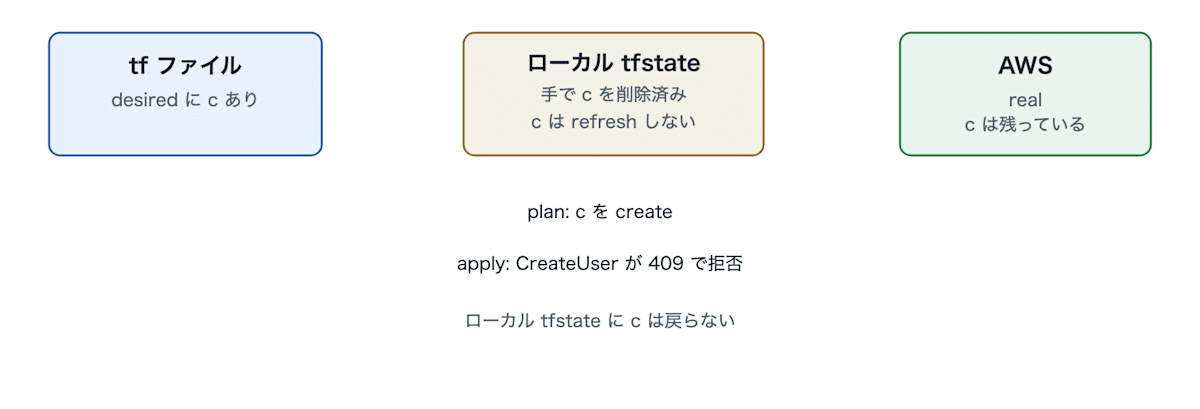
user.tf にも c が残っています。
a を消したあとのファイルでは、c の resource は 10 行目です。
apply すると、refresh のログに出たのは b だけです。
plan は c の create です。
yes のあと、CreateUser は同名の IAM ユーザーが既にあるため 409 で拒否されました。
Request ID はマスクしています。
apply の実行結果
aws_iam_user.b: Refreshing state... [id=lab-thinking-plan-b]

Terraform used the selected providers to generate the following execution plan. Resource actions are indicated with the following symbols:
  + create

Terraform will perform the following actions:

  # aws_iam_user.c will be created
  + resource "aws_iam_user" "c" {
      + arn           = (known after apply)
      + force_destroy = false
      + id            = (known after apply)
      + name          = "lab-thinking-plan-c"
      + path          = "/"
      + tags          = {
          + "case" = "state"
          + "lab"  = "thinking-plan-apply"
        }
      + tags_all      = {
          + "case" = "state"
          + "lab"  = "thinking-plan-apply"
        }
      + unique_id     = (known after apply)
    }

Plan: 1 to add, 0 to change, 0 to destroy.

Do you want to perform these actions?
  Terraform will perform the actions described above.
  Only 'yes' will be accepted to approve.

  Enter a value: yes

aws_iam_user.c: Creating...
╷
│ Error: creating IAM User (lab-thinking-plan-c): operation error IAM: CreateUser, https response error StatusCode: 409, RequestID: xxxxxxxx-xxxx-xxxx-xxxx-xxxxxxxxxxxx, EntityAlreadyExists: User with name lab-thinking-plan-c already exists.
│
│   with aws_iam_user.c,
│   on user.tf line 10, in resource "aws_iam_user" "c":
│   10: resource "aws_iam_user" "c" {
│
╵
失敗後の state に c は戻っていません。
serial は 8 のままでした。
同じことをコマンドでやるなら、次です。
terraform state rm aws_iam_user.c
注意点・制約
空の IAM ユーザーは、force_destroy = false のまま削除できました。
アクセスキーやログインプロファイルが付いたユーザーは、今回は試していません。