AWS IoT Core Fleet Provisioning でデバイス自動登録をやってみた

歴史シミュレーションゲーム好きのくろすけです!
AWS IoT Core (以降、IoT Core) には Fleet Provisioning という機能があり、デバイスを工場出荷時に設定した証明書を使って自動的に AWS IoT に登録することができます。
また Fleet Provisioning には、「クレーム」と「信頼されたユーザー」によるプロビジョニングの2種類の方法があります。
本記事では、「Fleet Provisioning の クレーム」を使ったデバイスの自動登録を実際に試してみた手順をご紹介します。
概要
IoT デバイスを大量に展開する場合、1台ずつ手動で証明書を発行・設定するのは非常に手間がかかります。
IoT Core の Fleet Provisioning を利用すると、デバイスが初回接続時に自動でプロビジョニングされ、固有のデバイス証明書とポリシーが払い出されます。
手順としては下記の記事が詳しいのですが、CLIは個人的にイメージしにくい部分もあったため、今回は主にコンソールからやってみた内容を記載します。
構成
今回はローカル環境をIoTデバイスに見立てて検証を行っています。
やってみた
処理のフローとしては、下記の図がわかりやすいです。
※Fleet Provisioning のクレームでは CSR を使用する方法もありますが、今回は秘密鍵をデバイス側に事前に保存しておく方法でやってみました。
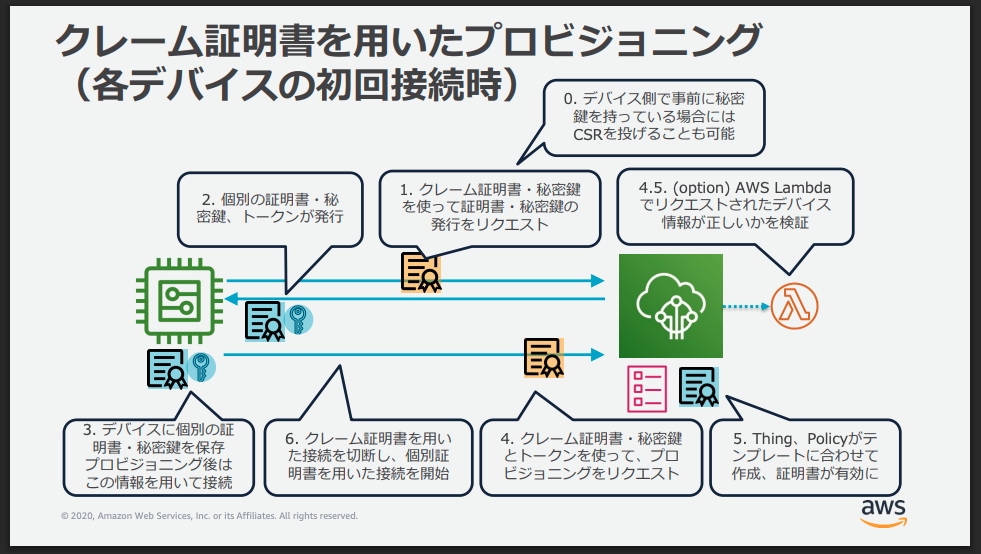
出典:https://pages.awscloud.com/rs/112-TZM-766/images/EV_iot-deepdive-aws2_Sep-2020.pdf
0. 前提
記載のファイルやスクリプトは、下記の前提で記述しております。
論理デバイスも想定して、命名規則に ${DATA_TYPE} を含めています。
クライアントID(=モノの名称)
命名規則:${DEVICE_NAME}-${S/N}_${DATA_TYPE}
例:dv-ABC1234567_TEMP1
トピック
トピックの設計については、下記参考に記載のホワイトペーパーを参考にしております。
命名規則:${TOPIC_TYPE}/${PRODUCT_NAME}/${LOCATION1}/.../${LOCATION3}/${CLIENT_ID}
例:
- dt/smpl-krsk/tokyo/hibiya/lab/device-ABC1234567_TEMP1
- cmd/smpl-krsk/tokyo/hibiya/cafe/device-ABC1234567_TEMP1
参考:
1. プロビジョニングテンプレートの準備
-
IoT Core コンソール > セキュリティ > ポリシーにて、クレーム証明書用の IoT ポリシーを作成します。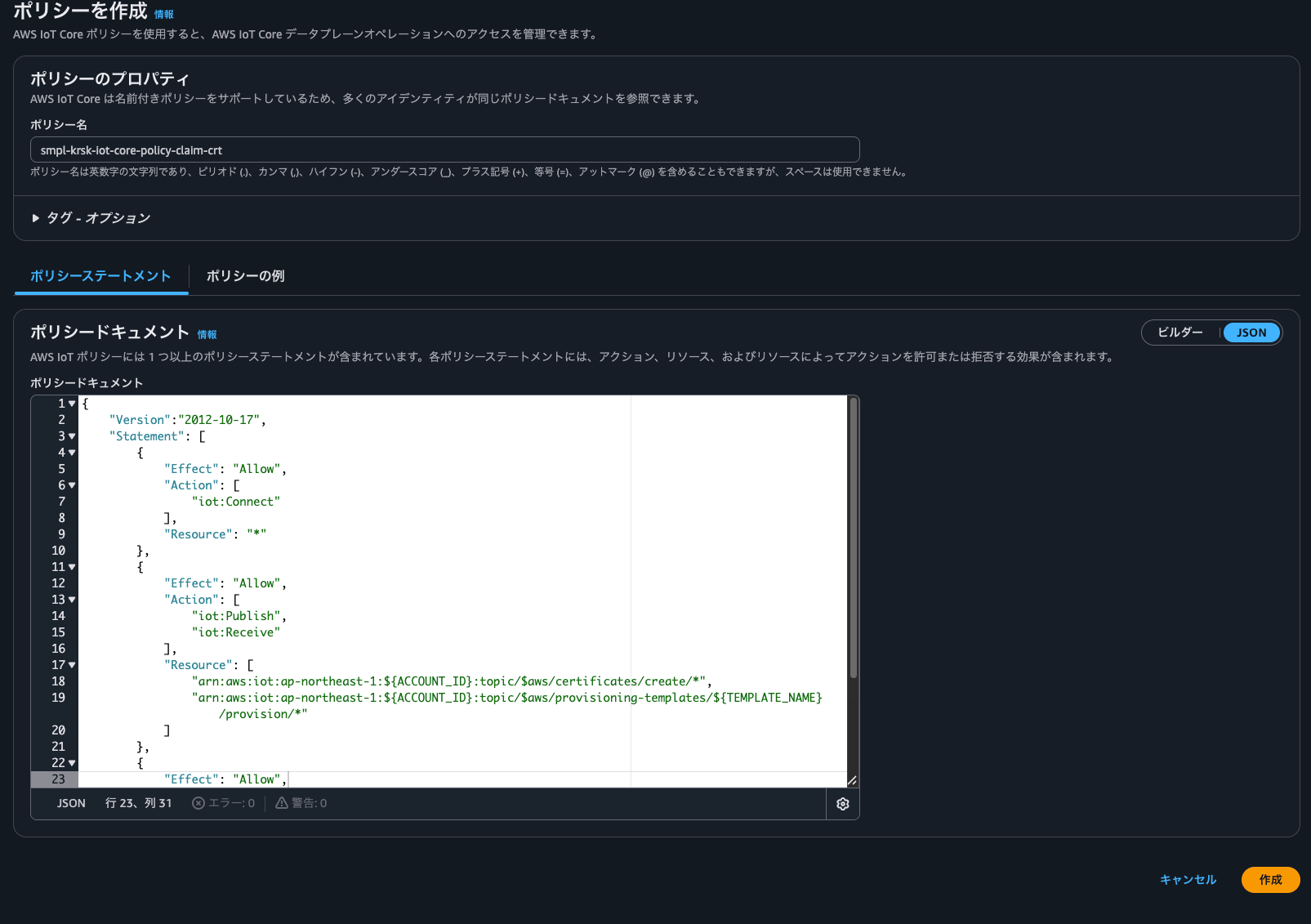
ポリシーの詳細は下記になっており、ベースはAWSの開発者ガイド(下記の出典を参照のこと)になっております。
ベースとなるポリシーからiot:ConnectのResourceだけ値を変更しています。
iot:Connectのアクションリソースは、clientのみですので実質的にはベースとなったポリシーと同じ内容です。
(下記の参考にポリシーアクションとアクションリソースの詳細リンクを記載しております。)クレーム証明書用IoTポリシー
{
    "Version":"2012-10-17",
    "Statement": [
        {
            "Effect": "Allow",
            "Action": [
                "iot:Connect"
            ],
            "Resource": "arn:aws:iot:ap-northeast-1:${ACCOUNT_ID}:client/*"
        },
        {
            "Effect": "Allow",
            "Action": [
                "iot:Publish",
                "iot:Receive"
            ],
            "Resource": [
                "arn:aws:iot:ap-northeast-1:${ACCOUNT_ID}:topic/$aws/certificates/create/*",
                "arn:aws:iot:ap-northeast-1:${ACCOUNT_ID}:topic/$aws/provisioning-templates/${TEMPLATE_NAME}/provision/*"
            ]
        },
        {
            "Effect": "Allow",
            "Action": "iot:Subscribe",
            "Resource": [
                "arn:aws:iot:ap-northeast-1:${ACCOUNT_ID}:topicfilter/$aws/certificates/create/*",
                "arn:aws:iot:ap-northeast-1:${ACCOUNT_ID}:topicfilter/$aws/provisioning-templates/${TEMPLATE_NAME}/provision/*"
            ]
        }
    ]
}
出典:
https://docs.aws.amazon.com/iot/latest/developerguide/provision-wo-cert.html#claim-based参考:
https://docs.aws.amazon.com/ja_jp/iot/latest/developerguide/iot-policy-actions.html
https://docs.aws.amazon.com/ja_jp/iot/latest/developerguide/iot-action-resources.html -
IoT Core コンソール > セキュリティ > 証明書にて、クレーム証明書を作成します。デバイス証明書と全く同じ作成手順です。
クレーム証明書は、実態としてはデバイス証明書と同じもののようで、実質は用途が異なるのみです。
作成後、最低でもデバイス証明書とプライベートキーファイルはダウンロードしてください。(本番環境向けの構築であれば、パブリックキーも保存を推奨します。)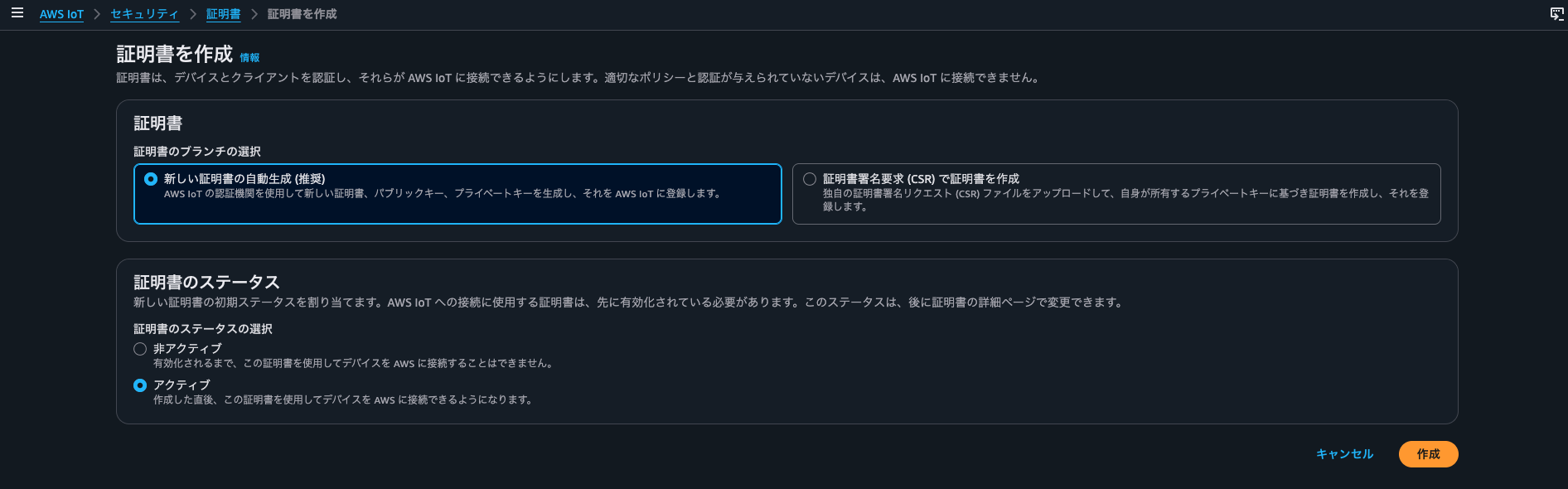
-
IoT Core コンソール > セキュリティ > ポリシーにて、デバイス用の IoT ポリシーを作成します。これはデバイスへ付与される権限です。
iot:Connectについて、今回はクライアントIDをモノの名称と一致させているので、${iot:Connection.Thing.ThingName}を使用しています。
下記は比較的しっかり権限を絞ったポリシーにしています。デバイス用IoTポリシー
{ "Version":"2012-10-17", "Statement": [ { "Effect": "Allow", "Action": [ "iot:Connect" ], "Resource": "arn:aws:iot:ap-northeast-1:${ACCOUNT_ID}:client/${iot:Connection.Thing.ThingName}" }, { "Effect": "Allow", "Action": [ "iot:Publish" ], "Resource": [ "arn:aws:iot:ap-northeast-1:${ACCOUNT_ID}:topic/dt/${PRODUCT_NAME}/*/${iot:Connection.Thing.ThingName}" ] }, { "Effect": "Allow", "Action": [ "iot:Receive" ], "Resource": [ "arn:aws:iot:ap-northeast-1:${ACCOUNT_ID}:topic/cmd/${PRODUCT_NAME}/*/${iot:Connection.Thing.ThingName}" ] }, { "Effect": "Allow", "Action": "iot:Subscribe", "Resource": [ "arn:aws:iot:ap-northeast-1:${ACCOUNT_ID}:topicfilter/cmd/${PRODUCT_NAME}/*/${iot:Connection.Thing.ThingName}" ] } ] } -
IoT Core コンソール > 複数のデバイスを接続 > プロビジョニングテンプレートにて、プロビジョニングテンプレートを作成します。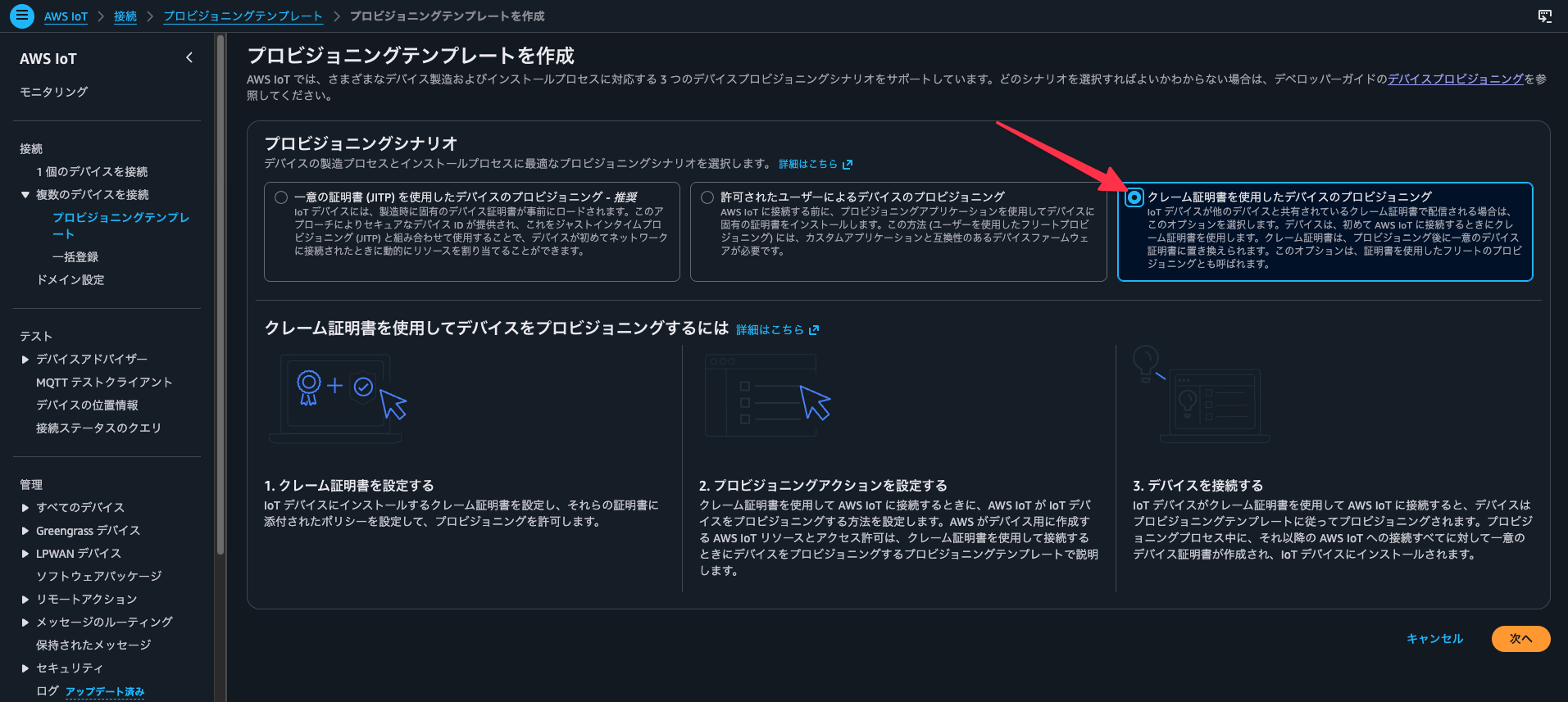
プロビジョニングロール
AWS側で良きにやってくれているので、初回は「新規作成」でおまかせして良いと思います。
構築されるIAMロールの設定は下記になります。許可ポリシー:AWSIoTThingsRegistration(AWSマネージドポリシー)
信頼ポリシー
{
    "Version": "2012-10-17",
    "Statement": [
        {
            "Effect": "Allow",
            "Principal": {
                "Service": "iot.amazonaws.com"
            },
            "Action": "sts:AssumeRole"
        }
    ]
}
クレーム証明書ポリシー および クレーム証明書
こちらは手順1-1,1-2で作成したリソースを選択します。
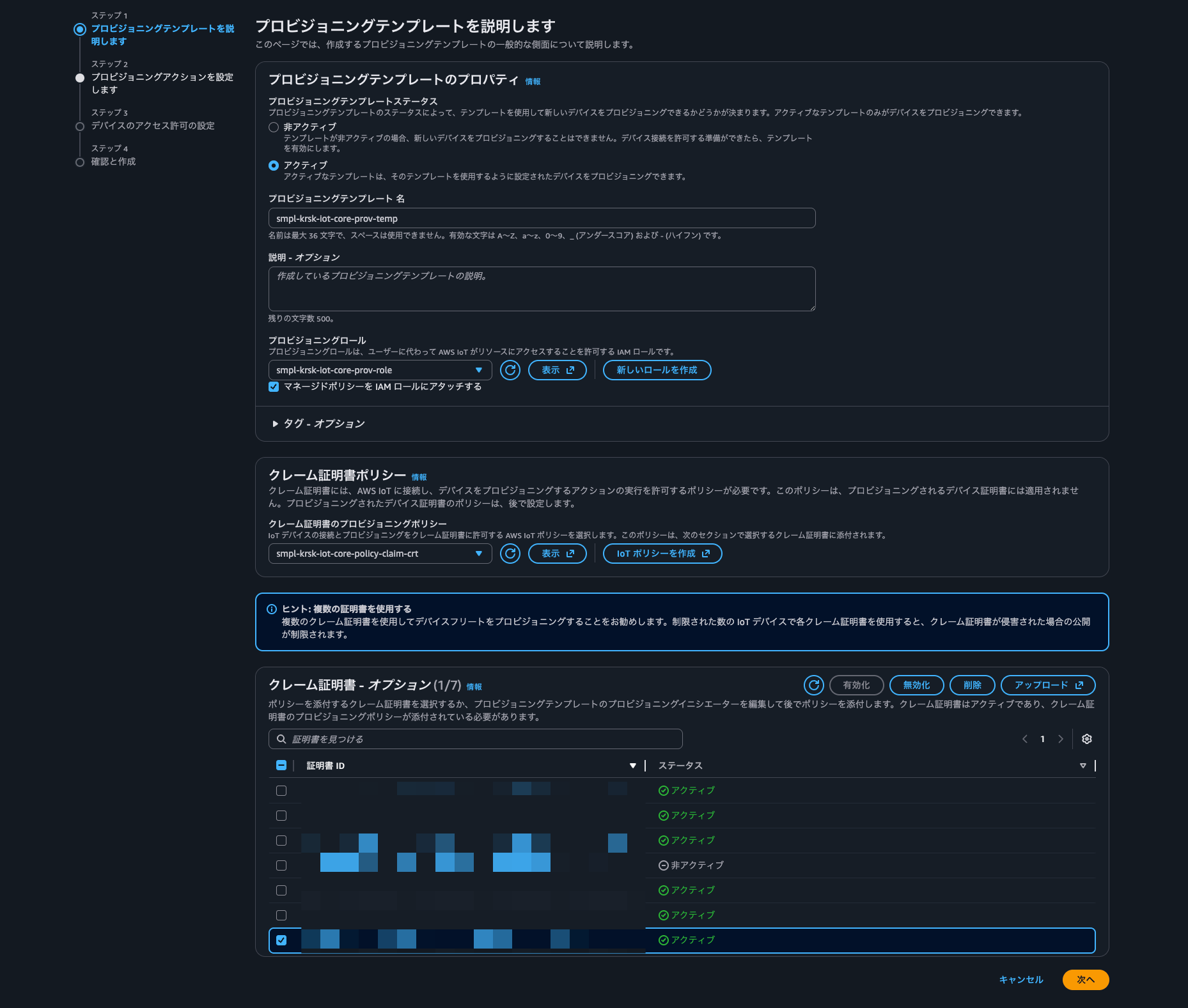
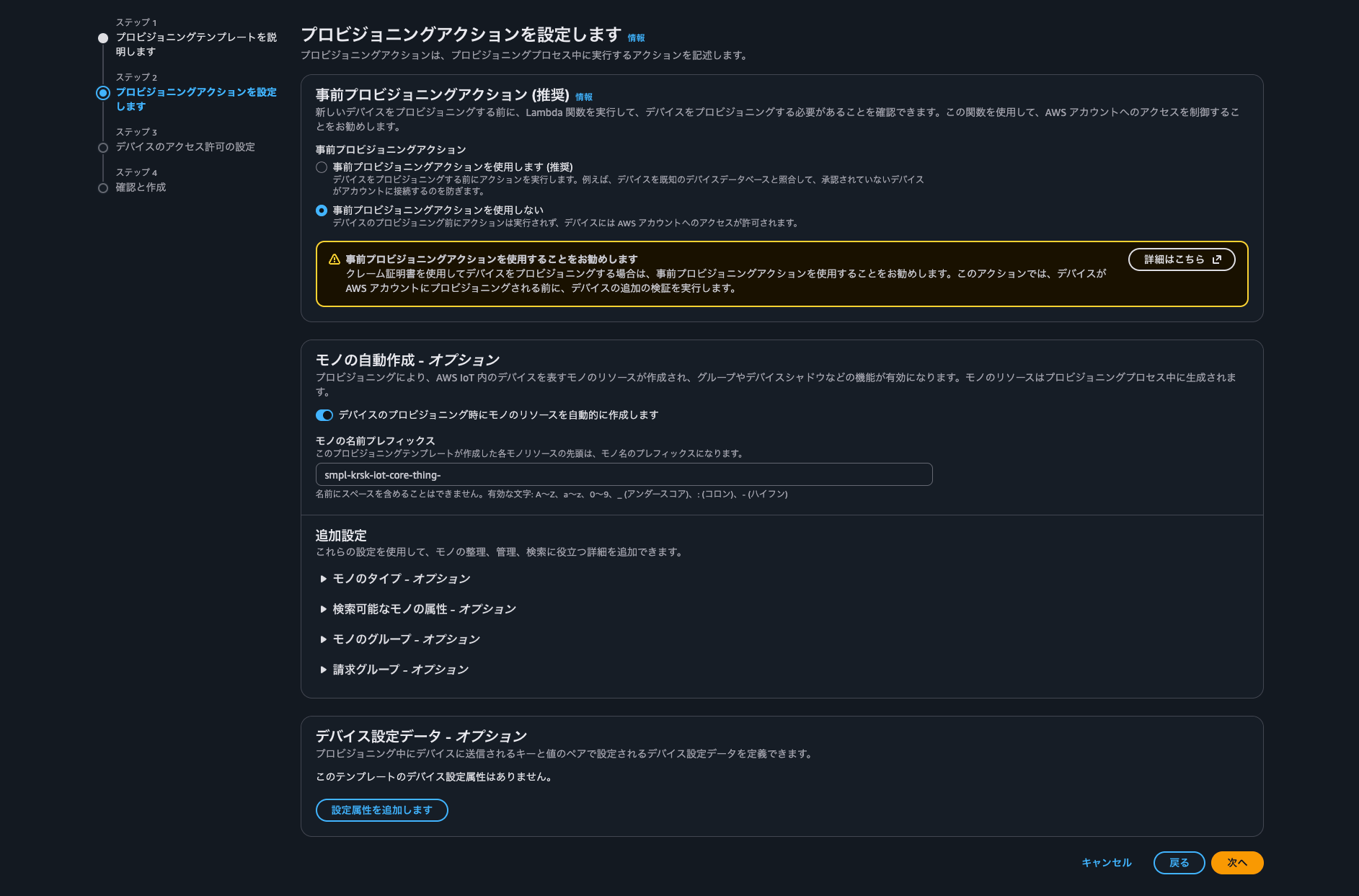
事前プロビジョニングアクション
新しいデバイスが本当に登録・認証して良いデバイスか判定する処理を組み込めるようです。
今回は設定しません。追加設定やデバイス設定データも今回は設定しません。
-
プロビジョニングテンプレートの修正
デバイス登録時にエラーが発生したため、プロビジョニングテンプレートを修正しました。
流れ的にはここで対応するのがスムーズなので、差し込んでおきます。具体的には、モノ自動作成における名称の指定がエラー原因でした。
コンソールから設定できる名称は、プレフィックスを固定でシリアルナンバーをパラメータとしてデバイスから受け取って繋げる(例:device-${S/N})イメージです。今回は論理デバイスも想定してシリアルナンバーの次に
${DATA_TYPE}を使用している(前提のクライアントID参照)都合上、完全なモノの名称をデバイスから渡すようにしていました。
ので、この想定を満たすように修正しています。修正後のプロビジョニングテンプレート
{
  "Parameters": {
    "ThingName": {
      "Type": "String"
    },
    "AWS::IoT::Certificate::Id": {
      "Type": "String"
    }
  },
  "Resources": {
    "policy_smpl-krsk-iot-core-policy-devices": {
      "Type": "AWS::IoT::Policy",
      "Properties": {
        "PolicyName": "smpl-krsk-iot-core-policy-devices"
      }
    },
    "certificate": {
      "Type": "AWS::IoT::Certificate",
      "Properties": {
        "CertificateId": {
          "Ref": "AWS::IoT::Certificate::Id"
        },
        "Status": "Active"
      }
    },
    "thing": {
      "Type": "AWS::IoT::Thing",
      "OverrideSettings": {
        "AttributePayload": "MERGE",
        "ThingGroups": "DO_NOTHING",
        "ThingTypeName": "REPLACE"
      },
      "Properties": {
        "AttributePayload": {},
        "ThingGroups": [],
        "ThingName": {
          "Ref": "ThingName"
        }
      }
    }
  }
}
2. デバイス自動登録
-
下記のスクリプトを実行して、自動登録を行います。
下記の記事のスクリプトをベースに、複数デバイスを一括登録できるように変更を加えています。
https://dev.classmethod.jp/articles/aws-iot-core-fleet-provisioning-cloudshell-implementation/デバイスの設定値など、登録に必要なパラメータは、
devices.jsonに記述するようにしています。
(このdevices.jsonはこの後の動作確認のスクリプトと共用となっています。)main.py
import argparse
import json
import os
import threading
import time
import uuid

from awscrt import mqtt
from awsiot import iotidentity, mqtt_connection_builder


def load_config(config_path):
    """
    JSON 設定ファイルを読み込み、デバイスごとの設定リストを返す。

    JSON フォーマット:
    - トップレベル共通パラメータ: endpoint, claim_cert, claim_key, root_ca, template_name, output_dir
    - "devices": 配列。各要素は任意で client_id を持つ(省略時は device-{UUID v4} を自動生成)

    Returns
    -------
    list of dict
        各 dict は: client_id, endpoint, claim_cert, claim_key, root_ca, template_name, output_dir
    """
    with open(config_path, "r", encoding="utf-8") as f:
        raw = json.load(f)

    base_dir = os.path.dirname(os.path.abspath(config_path))

    def resolve_path(p):
        if p is None:
            return None
        if os.path.isabs(p):
            return p
        return os.path.normpath(os.path.join(base_dir, p))

    endpoint = raw.get("endpoint")
    if not endpoint:
        raise ValueError("設定ファイルに 'endpoint' が必要です")

    claim_cert = resolve_path(raw.get("claim_cert"))
    claim_key = resolve_path(raw.get("claim_key"))
    root_ca = resolve_path(raw.get("root_ca"))
    template_name = raw.get("template_name", "MyDeviceTemplate")
    output_dir = resolve_path(raw.get("output_dir", "./certs"))

    if not claim_cert or not claim_key:
        raise ValueError("設定ファイルに 'claim_cert' と 'claim_key' が必要です")

    devices = raw.get("devices")
    if not devices:
        raise ValueError("設定ファイルに 'devices' 配列が必要です")

    configs = []
    for dev in devices:
        client_id = dev.get("client_id") or f"device-{str(uuid.uuid4())}"
        configs.append(
            {
                "client_id": client_id,
                "endpoint": dev.get("endpoint") or endpoint,
                "claim_cert": resolve_path(dev.get("claim_cert")) or claim_cert,
                "claim_key": resolve_path(dev.get("claim_key")) or claim_key,
                "root_ca": resolve_path(dev.get("root_ca")) or root_ca,
                "template_name": dev.get("template_name") or template_name,
                "output_dir": resolve_path(dev.get("output_dir")) or output_dir,
            }
        )
    return configs


class FleetProvisioningClient:
    def __init__(
        self,
        endpoint,
        cert_path,
        key_path,
        ca_path,
        template_name="MyDeviceTemplate",
        region="ap-northeast-1",
        client_id=None,
        output_dir="./certs",
    ):
        self.endpoint = endpoint
        self.region = region
        self.cert_path = cert_path
        self.key_path = key_path
        self.ca_path = ca_path
        self.template_name = template_name
        self.client_id = client_id or f"device-{str(uuid.uuid4())}"
        self.output_dir = output_dir

        # レスポンス格納用
        self.create_keys_response = None
        self.register_thing_response = None
        self.is_sample_done = threading.Event()
        self.mqtt_connection = None
        self.identity_client = None

        # ルートCA証明書が存在しない場合はダウンロード
        if not os.path.exists(ca_path):
            self._download_root_ca()

    def _download_root_ca(self):
        """AWS IoT CoreのルートCA証明書をダウンロード"""
        import urllib.request

        try:
            urllib.request.urlretrieve(
                "https://www.amazontrust.com/repository/AmazonRootCA1.pem", self.ca_path
            )
            print(f"ルートCA証明書をダウンロードしました: {self.ca_path}")
        except Exception as e:
            print(f"ルートCA証明書のダウンロードに失敗しました: {e}")

    def _on_connection_interrupted(self, connection, error, **kwargs):
        print(f"[{self.client_id}] 接続が中断されました。エラー: {error}")

    def _on_connection_resumed(self, connection, return_code, session_present, **kwargs):
        print(
            f"[{self.client_id}] 接続が復旧しました。"
            f"return_code: {return_code} session_present: {session_present}"
        )

    def _on_disconnected(self, disconnect_future):
        print(f"[{self.client_id}] 切断されました。")
        self.is_sample_done.set()

    def _create_keys_accepted(self, response):
        """CreateKeysAndCertificate成功時のコールバック"""
        try:
            self.create_keys_response = response
            print(f"[{self.client_id}] 新しい証明書とキーが正常に作成されました!")
            print(f"[{self.client_id}] 証明書ID: {response.certificate_id}")
        except Exception as e:
            print(f"[{self.client_id}] CreateKeysAndCertificate応答処理エラー: {e}")

    def _create_keys_rejected(self, rejected):
        """CreateKeysAndCertificate拒否時のコールバック"""
        print(f"[{self.client_id}] CreateKeysAndCertificate要求が拒否されました。")
        print(f"[{self.client_id}] エラーコード: {rejected.error_code}")
        print(f"[{self.client_id}] エラーメッセージ: {rejected.error_message}")
        print(f"[{self.client_id}] ステータスコード: {rejected.status_code}")

    def _register_thing_accepted(self, response):
        """RegisterThing成功時のコールバック"""
        try:
            self.register_thing_response = response
            print(f"[{self.client_id}] デバイス登録が正常に完了しました!")
            print(f"[{self.client_id}] Thing名: {response.thing_name}")
        except Exception as e:
            print(f"[{self.client_id}] RegisterThing応答処理エラー: {e}")

    def _register_thing_rejected(self, rejected):
        """RegisterThing拒否時のコールバック"""
        print(f"[{self.client_id}] RegisterThing要求が拒否されました。")
        print(f"[{self.client_id}] エラーコード: {rejected.error_code}")
        print(f"[{self.client_id}] エラーメッセージ: {rejected.error_message}")
        print(f"[{self.client_id}] ステータスコード: {rejected.status_code}")

    def provision_device(self):
        """デバイスのプロビジョニングを実行"""
        print(f"[{self.client_id}] プロビジョニングを開始します")

        try:
            print(f"[{self.client_id}] MQTT接続を作成中...")
            self.mqtt_connection = mqtt_connection_builder.mtls_from_path(
                endpoint=self.endpoint,
                port=8883,
                cert_filepath=self.cert_path,
                pri_key_filepath=self.key_path,
                ca_filepath=self.ca_path,
                on_connection_interrupted=self._on_connection_interrupted,
                on_connection_resumed=self._on_connection_resumed,
                client_id=self.client_id,
                clean_session=False,
                keep_alive_secs=30,
            )

            print(
                f"[{self.client_id}] エンドポイント {self.endpoint} に"
                f"クライアントID '{self.client_id}' で接続中..."
            )
            connected_future = self.mqtt_connection.connect()

            self.identity_client = iotidentity.IotIdentityClient(self.mqtt_connection)

            connected_future.result()
            print(f"[{self.client_id}] 接続成功!")

            # 第1段階: CreateKeysAndCertificate のサブスクリプション
            print(f"[{self.client_id}] CreateKeysAndCertificate トピックにサブスクライブ中...")

            create_keys_subscription_request = (
                iotidentity.CreateKeysAndCertificateSubscriptionRequest()
            )

            create_keys_accepted_future, _ = (
                self.identity_client.subscribe_to_create_keys_and_certificate_accepted(
                    request=create_keys_subscription_request,
                    qos=mqtt.QoS.AT_LEAST_ONCE,
                    callback=self._create_keys_accepted,
                )
            )
            create_keys_accepted_future.result()

            create_keys_rejected_future, _ = (
                self.identity_client.subscribe_to_create_keys_and_certificate_rejected(
                    request=create_keys_subscription_request,
                    qos=mqtt.QoS.AT_LEAST_ONCE,
                    callback=self._create_keys_rejected,
                )
            )
            create_keys_rejected_future.result()

            print(f"[{self.client_id}] CreateKeysAndCertificate 要求を送信中...")
            publish_future = self.identity_client.publish_create_keys_and_certificate(
                request=iotidentity.CreateKeysAndCertificateRequest(), qos=mqtt.QoS.AT_LEAST_ONCE
            )
            publish_future.result()
            print(f"[{self.client_id}] CreateKeysAndCertificate 要求を送信しました")

            self._wait_for_create_keys_response()

            if self.create_keys_response is None:
                raise Exception("CreateKeysAndCertificate APIが成功しませんでした")

            # 第2段階: RegisterThing のサブスクリプション
            print(f"[{self.client_id}] RegisterThing トピックにサブスクライブ中...")

            register_thing_subscription_request = iotidentity.RegisterThingSubscriptionRequest(
                template_name=self.template_name
            )

            register_thing_accepted_future, _ = (
                self.identity_client.subscribe_to_register_thing_accepted(
                    request=register_thing_subscription_request,
                    qos=mqtt.QoS.AT_LEAST_ONCE,
                    callback=self._register_thing_accepted,
                )
            )
            register_thing_accepted_future.result()

            register_thing_rejected_future, _ = (
                self.identity_client.subscribe_to_register_thing_rejected(
                    request=register_thing_subscription_request,
                    qos=mqtt.QoS.AT_LEAST_ONCE,
                    callback=self._register_thing_rejected,
                )
            )
            register_thing_rejected_future.result()

            print(f"[{self.client_id}] RegisterThing 要求を送信中...")
            register_thing_request = iotidentity.RegisterThingRequest(
                template_name=self.template_name,
                certificate_ownership_token=self.create_keys_response.certificate_ownership_token,
                parameters={"ThingName": self.client_id},
            )

            register_thing_future = self.identity_client.publish_register_thing(
                register_thing_request, mqtt.QoS.AT_LEAST_ONCE
            )
            register_thing_future.result()
            print(f"[{self.client_id}] RegisterThing 要求を送信しました")

            self._wait_for_register_thing_response()

            if self.register_thing_response is None:
                raise Exception("RegisterThing APIが成功しませんでした")

            return {"certificate": self.create_keys_response, "thing": self.register_thing_response}

        finally:
            if self.mqtt_connection:
                print(f"[{self.client_id}] 接続を切断中...")
                disconnect_future = self.mqtt_connection.disconnect()
                disconnect_future.add_done_callback(self._on_disconnected)
                self.is_sample_done.wait()

    def save_credentials(self, response):
        """プロビジョニング結果の証明書・秘密鍵をデバイスごとのディレクトリに保存"""
        device_dir = os.path.join(self.output_dir, self.client_id)
        os.makedirs(device_dir, exist_ok=True)

        cert_file = os.path.join(device_dir, "device-cert.pem")
        key_file = os.path.join(device_dir, "device-private.key")

        if response["certificate"].certificate_pem:
            with open(cert_file, "w") as f:
                f.write(response["certificate"].certificate_pem)
            print(f"[{self.client_id}] デバイス証明書を {cert_file} に保存しました")

        if response["certificate"].private_key:
            with open(key_file, "w") as f:
                f.write(response["certificate"].private_key)
            print(f"[{self.client_id}] プライベートキーを {key_file} に保存しました")

    def _wait_for_create_keys_response(self):
        """CreateKeysAndCertificate応答を待機"""
        loop_count = 0
        while loop_count < 10 and self.create_keys_response is None:
            if self.create_keys_response is not None:
                break
            print(f"[{self.client_id}] CreateKeysAndCertificate応答を待機中...")
            loop_count += 1
            time.sleep(1)

    def _wait_for_register_thing_response(self):
        """RegisterThing応答を待機"""
        loop_count = 0
        while loop_count < 20 and self.register_thing_response is None:
            if self.register_thing_response is not None:
                break
            print(f"[{self.client_id}] RegisterThing応答を待機中...")
            loop_count += 1
            time.sleep(1)


def provision_single(device_config):
    """1デバイスのプロビジョニングを実行し、結果を返す(並列実行用)"""
    client = FleetProvisioningClient(
        endpoint=device_config["endpoint"],
        cert_path=device_config["claim_cert"],
        key_path=device_config["claim_key"],
        ca_path=device_config["root_ca"],
        template_name=device_config["template_name"],
        client_id=device_config["client_id"],
        output_dir=device_config["output_dir"],
    )
    response = client.provision_device()
    client.save_credentials(response)
    return {
        "client_id": client.client_id,
        "certificate_id": response["certificate"].certificate_id,
        "thing_name": response["thing"].thing_name,
    }


def main():
    parser = argparse.ArgumentParser(description="AWS IoT Core Fleet Provisioning スクリプト")
    parser.add_argument(
        "--config",
        default="./devices.json",
        help="デバイス設定 JSON ファイルのパス(デフォルト: ./devices.json)",
    )
    args = parser.parse_args()

    print(f"設定ファイルを読み込み中: {args.config}")
    device_configs = load_config(args.config)
    print(f"{len(device_configs)} 台のデバイスをプロビジョニングします")

    results = []
    errors = []

    for cfg in device_configs:
        try:
            result = provision_single(cfg)
            results.append(result)
        except Exception as e:
            print(f"[{cfg['client_id']}] エラーが発生しました: {e}")
            errors.append({"client_id": cfg["client_id"], "error": str(e)})

    print("\n===== プロビジョニング結果サマリー =====")
    print(f"成功: {len(results)} 台 / 失敗: {len(errors)} 台")
    for r in results:
        print(
            f"  [成功] client_id={r['client_id']}  thing={r['thing_name']}  cert={r['certificate_id']}"
        )
    for e in errors:
        print(f"  [失敗] client_id={e['client_id']}  error={e['error']}")


if __name__ == "__main__":
    main()
requirements.txt
awscrt==0.31.2
awsiotsdk==1.28.1
devices.json
{ "endpoint": "XXXXXXXX-ats.iot.ap-northeast-1.amazonaws.com", "claim_cert": "./claim-cert.pem", "claim_key": "./claim-private.key", "root_ca": "./root-ca.pem", "template_name": "smpl-krsk-iot-core-prov-temp", "output_dir": "./certs", "verbosity": "NoLogs", "devices": [ { "client_id": "device-001_TEMP1", "topic": "dt/smpl-krsk/tokyo/hibiya/lab/device-001_TEMP1" }, { "client_id": "device-001_RH1", "topic": "dt/smpl-krsk/tokyo/hibiya/lab/device-001_RH1" }, { "client_id": "device-001_AP1", "topic": "dt/smpl-krsk/tokyo/hibiya/lab/device-001_AP1" }, { "client_id": "device-002_TEMP1", "topic": "dt/smpl-krsk/tokyo/hibiya/cafe/device-002_TEMP1" }, { "client_id": "device-002_TEMP2", "topic": "dt/smpl-krsk/tokyo/hibiya/cafe/device-002_TEMP2" }, { "client_id": "device-002_RH1", "topic": "dt/smpl-krsk/tokyo/hibiya/cafe/device-002_RH1" }, { "client_id": "device-002_RH2", "topic": "dt/smpl-krsk/tokyo/hibiya/cafe/device-002_RH2" } ] } -
実行結果
デバイスの一括登録ができました!
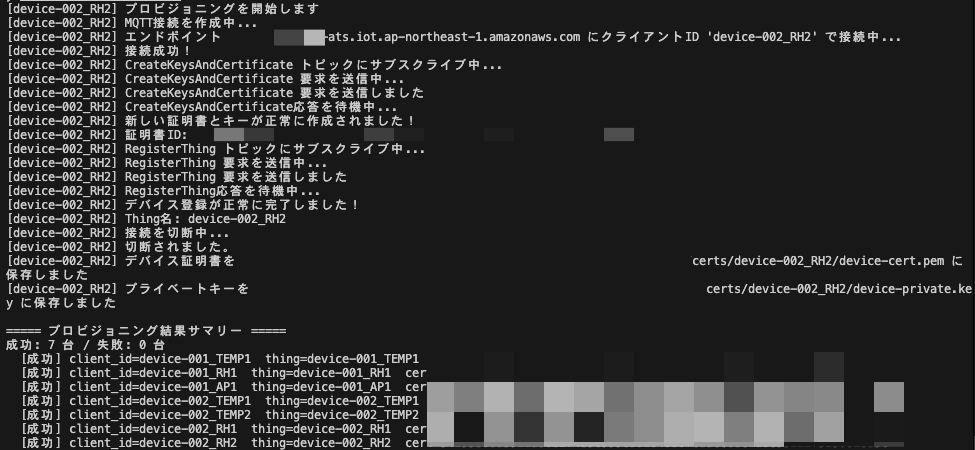
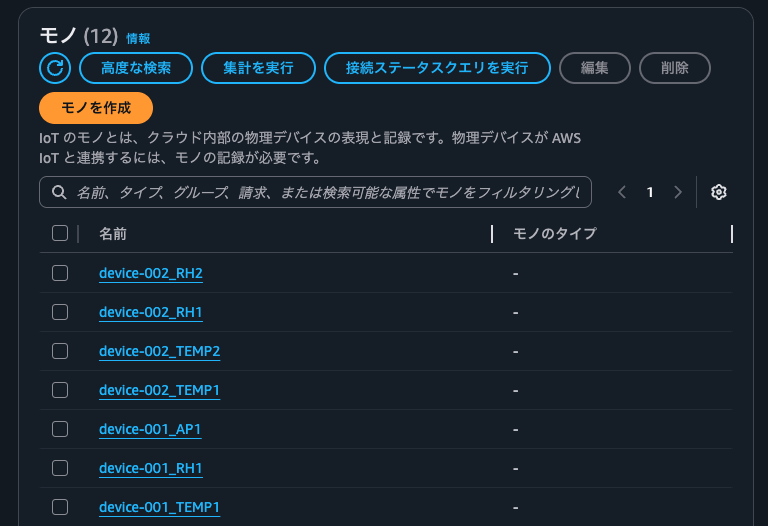
※今回作成した以外のモノがあるため、コンソールのリソース数の表示は無視してください。
3. パブリッシュしてみる
-
下記のスクリプトを実行して、パブリッシュしてみます。
前回ご紹介した下記のスクリプトを修正して、デバイス自動登録のスクリプトと設定ファイル(
devices.json)を共用するようにしています。
(ので、devices.jsonとrequirements.txtは共通です。)https://dev.classmethod.jp/articles/aws-iot-core-multiple-device-simulation/
dummy-devices.py
from __future__ import absolute_import, print_function import argparse import json import logging import multiprocessing import os import random import signal import sys import time import traceback from datetime import datetime from awscrt import io, mqtt from awsiot import mqtt_connection_builder DEFAULT_TOPIC_PREFIX = "data/" DEFAULT_WAIT_TIME = 5 SHADOW_WAIT_TIME_KEY = "wait_time" KEEP_ALIVE = 300 mqtt_connection = None shadow_client = None wait_time = DEFAULT_WAIT_TIME device_name = None logger = logging.getLogger() handler = logging.StreamHandler(sys.stdout) logger.addHandler(handler) logger.setLevel(logging.INFO) logging.basicConfig() def parse_args(): """ Parse command-line arguments (config file path and optional verbosity). """ parser = argparse.ArgumentParser( description="Run one or more dummy IoT devices from a JSON config file." ) parser.add_argument( "--config", default="./devices.json", help="Path to JSON config file defining devices (see devices.json.example)", ) parser.add_argument( "--verbosity", choices=[x.name for x in io.LogLevel], default=io.LogLevel.NoLogs.name, help="Logging level", ) return parser.parse_args() def load_config(config_path, verbosity_override=None): """ Load device list from JSON config and return a list of per-device config dicts. JSON format: - Top-level defaults: endpoint, root_ca, output_dir, verbosity - "devices": array of objects. Each must have: client_id. Optional per-device: endpoint, root_ca, output_dir, topic 証明書は {output_dir}/{client_id}/device-cert.pem および device-private.key を参照する。 Returns ------- list of dict Each dict has: client_id, endpoint, certs [root_ca, private_key, cert], verbosity, topic """ with open(config_path, "r", encoding="utf-8") as f: raw = json.load(f) if not raw.get("devices"): raise ValueError("Config must contain a non-empty 'devices' array") base_dir = os.path.dirname(os.path.abspath(config_path)) def resolve_path(p): if p is None: return None if os.path.isabs(p): return p return os.path.normpath(os.path.join(base_dir, p)) default_endpoint = raw.get("endpoint") default_root_ca = resolve_path(raw.get("root_ca")) default_output_dir = resolve_path(raw.get("output_dir", "./certs")) default_verbosity = verbosity_override or raw.get("verbosity", io.LogLevel.NoLogs.name) if not default_endpoint: raise ValueError("設定ファイルに 'endpoint' が必要です") configs = [] for i, dev in enumerate(raw["devices"]): client_id = dev.get("client_id") if not client_id: raise ValueError("devices[{}] must have 'client_id'".format(i)) endpoint = dev.get("endpoint") or default_endpoint root_ca = resolve_path(dev.get("root_ca")) or default_root_ca output_dir = resolve_path(dev.get("output_dir")) or default_output_dir device_dir = os.path.join(output_dir, client_id) cert = os.path.join(device_dir, "device-cert.pem") private = os.path.join(device_dir, "device-private.key") if not root_ca: root_ca = find_certs_file()[0] if not os.path.isabs(root_ca): root_ca = os.path.normpath(os.path.join(os.getcwd(), root_ca)) cert_list = [root_ca, private, cert] file_exist_check(cert_list) topic = dev.get("topic") or (DEFAULT_TOPIC_PREFIX + client_id) configs.append( { "client_id": client_id, "endpoint": endpoint, "certs": cert_list, "verbosity": default_verbosity, "topic": topic, } ) return configs def arg_check(): """ Legacy: kept for any caller that expects a single init_dict. Use load_config() + device_main(init_dict) instead. """ args = parse_args() configs = load_config(args.config, verbosity_override=args.verbosity) if len(configs) != 1: raise RuntimeError("arg_check expects exactly one device; use --config with one device") return configs[0] def file_exist_check(cert_list): """ Check the files exists all certs must placed in ./certs directory Parameters ---------- cert_list: Array """ for file in cert_list: if not os.path.exists(file): # if file not found, raise logger.error("cert file not found:%s", file) raise RuntimeError("file_not_exists") def find_certs_file(): """ Find the certificates file from ./certs directory Returns ---------- file_list: Array 0: Root CA Cert, 1: private key, 2: certificate """ certs_dir = "./certs" file_list = ["AmazonRootCA1.pem", "private.pem", "certificate.crt"] for _, _, names in os.walk(certs_dir): for file in names: if "AmazonRootCA1.pem" in file: file_list[0] = certs_dir + "/" + file elif "private" in file: file_list[1] = certs_dir + "/" + file elif "certificate" in file: file_list[2] = certs_dir + "/" + file return file_list def device_main(init_dict): """ Run a single dummy device: connect, publish telemetry loop. Parameters ---------- init_dict : dict Must have: client_id, endpoint, certs [root_ca, private_key, cert], verbosity, topic """ global device_name, mqtt_connection # global shadow_client # Device Shadow コメントアウトのため不要 device_name = init_dict["client_id"] iot_endpoint = init_dict["endpoint"] rootca_file = init_dict["certs"][0] private_key_file = init_dict["certs"][1] certificate_file = init_dict["certs"][2] verbosity_name = init_dict.get("verbosity", io.LogLevel.NoLogs.name) log_level = getattr(io.LogLevel, verbosity_name, io.LogLevel.NoLogs) io.init_logging(log_level, "stderr") logger.setLevel(logging.DEBUG if verbosity_name in ("Debug", "Trace") else logging.INFO) logging.basicConfig() logger.info("client_id: %s", device_name) logger.info("endpoint: %s", iot_endpoint) logger.info("rootca cert: %s", rootca_file) logger.info("private key: %s", private_key_file) logger.info("certificate: %s", certificate_file) # Spin up resources event_loop_group = io.EventLoopGroup(1) host_resolver = io.DefaultHostResolver(event_loop_group) client_bootstrap = io.ClientBootstrap(event_loop_group, host_resolver) mqtt_connection = mqtt_connection_builder.mtls_from_path( endpoint=iot_endpoint, cert_filepath=certificate_file, pri_key_filepath=private_key_file, client_bootstrap=client_bootstrap, ca_filepath=rootca_file, client_id=device_name, clean_session=False, keep_alive_secs=KEEP_ALIVE, ) connected_future = mqtt_connection.connect() connected_future.result() # Start sending dummy data topic = init_dict["topic"] logging.info("topic: %s", topic) while True: now = datetime.now().strftime("%Y-%m-%dT%H:%M:%S") tmp = 20 + random.randint(-5, 5) hum = 50 + random.randint(-10, 10) payload = { "CLIENT_ID": device_name, "TIMESTAMP": now, "TEMPERATURE": tmp, "HUMIDITY": hum, } logger.info(" payload: %s", payload) mqtt_connection.publish( topic=topic, payload=json.dumps(payload), qos=mqtt.QoS.AT_LEAST_ONCE ) time.sleep(wait_time) def exit_sample(msg_or_exception): """ Exit sample with cleaning Parameters ---------- msg_or_exception: str or Exception """ if isinstance(msg_or_exception, Exception): logger.error("Exiting sample due to exception.") traceback.print_exception(msg_or_exception.__class__, msg_or_exception, sys.exc_info()[2]) else: logger.info("Exiting: %s", msg_or_exception) if not mqtt_connection: logger.info("Disconnecting...") mqtt_connection.disconnect() sys.exit(0) def exit_handler(_signal, frame): """ Exit sample """ exit_sample(" Key abort") if __name__ == "__main__": signal.signal(signal.SIGINT, exit_handler) args = parse_args() try: configs = load_config(args.config, verbosity_override=args.verbosity) except Exception as e: logger.error("Failed to load config: %s", e) sys.exit(1) if len(configs) == 1: device_main(configs[0]) else: processes = [] for init_dict in configs: p = multiprocessing.Process(target=device_main, args=(init_dict,)) p.start() processes.append(p) try: for p in processes: p.join() except KeyboardInterrupt: for p in processes: p.terminate() for p in processes: p.join() -
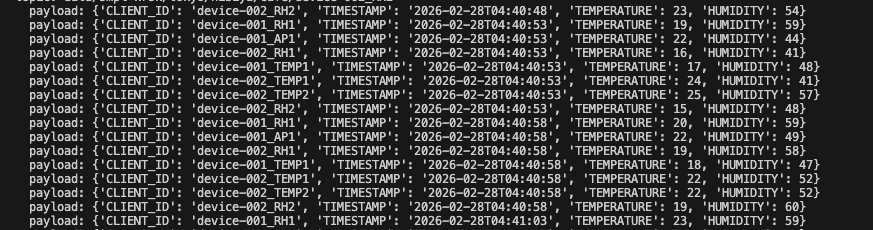
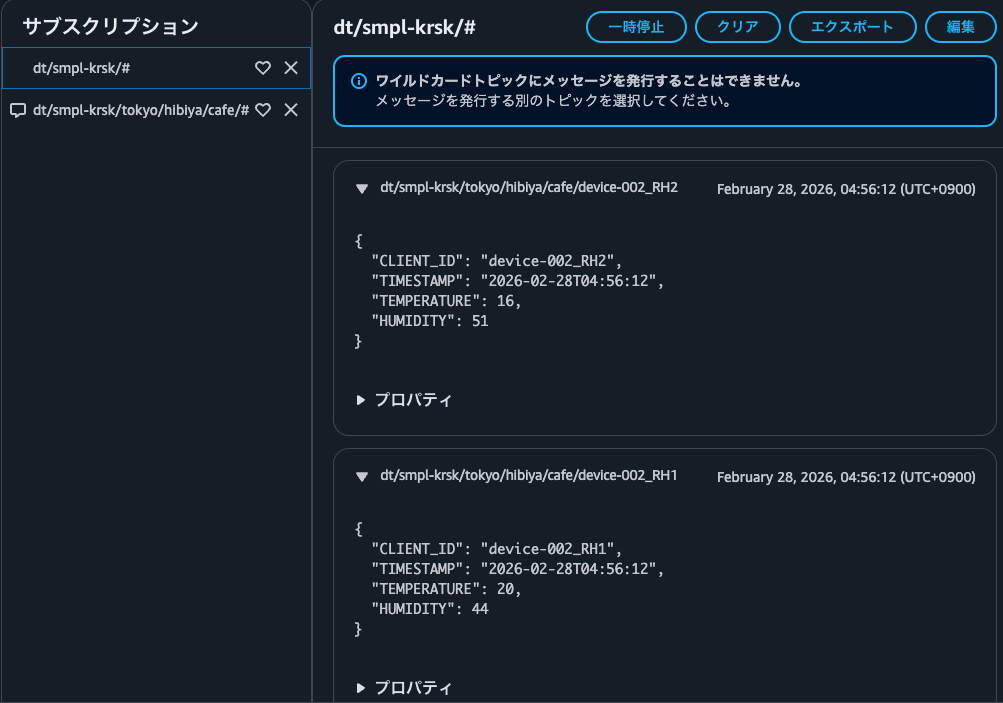
実行結果
問題なくパブリッシュできました!
まとめ
想定していたよりも簡単にデバイスを自動登録することができました。
ただし、クレーム証明書はデバイス共通で使用できる分、漏洩には十分注意する必要があります。
デバイスの権限もできるだけ絞っておくことを推奨します。
また、今回は論理デバイスを想定して ${DATA_TYPE} をトピックの命名規則に含めていましたが、これは1つの階層として扱う方がフィルタが活用できるため、適切だと考えます。
ただし、そうなるとトピック的には下記いずれかを選択する必要があります。
${CLIENT_ID}と${DATA_TYPE}で情報の重複を許容する${CLIENT_ID}とモノの名称の不一致を許容する- 物理デバイス = モノ という対応関係にする
- クライアントID(=モノの名称)命名規則:
${DEVICE_NAME}-${S/N}_${DATA_TYPE} - トピック命名規則:
${TOPIC_TYPE}/${PRODUCT_NAME}/${LOCATION1}/.../${LOCATION3}/${CLIENT_ID}/${DATA_TYPE}
(クライアントIDは同一リージョン内で一意である必要があるので、論理デバイスの場合はどうしても ${DATA_TYPE} を含めたい...)
蛇足
まだ検討の余地がありますが、個人的には2に可能性を感じています。
IoT ポリシーで ${iot:Connection.Thing.ThingName} が使用しづらくなると考えていましたが、${iot:Connection.Thing.ThingName}* と書けば ${iot:Connection.Thing.ThingName}_${DATA_TYPE} (クライアントID) を表現できるため、思ったよりもデメリットにならないかも?
(最後にジャストアイデアで筆を走らせてしまったので、こちらについては別途検証してみようと思います。)
あとがき
今回は Fleet Provisioning をやってみました!
IoT開発ではスクリプトを書く機会が多いため、モジュール化するなどしてもうちょっと環境を整えたいと思います。
以上、くろすけでした!