When I tried to make Google Chat Bot responses rich text, I ended up having to deal with the HTML restrictions of Cards V2

This page has been translated by machine translation. View original
Introduction
In Part 1, I built a Google Chat Bot with Cloud Functions + Python + uv. In Part 2, I implemented a progressive update UX with cardsV2. In Part 3, I integrated knowledge base search using Vertex AI RAG Engine.
With the RAG pipeline up and running, the bot became capable of returning reasonably accurate answers to user questions. However, there was one thing that bothered me.
All responses were plain text and hard to read.
Gemini's generated responses included bullet points and bold text, but when passed directly to the Cards V2 textParagraph widget, the Markdown symbols were displayed as-is. **bold** wouldn't become bold, and - list item would just be a hyphenated text.
I started investigating thinking "Does Cards V2 not support styling...?" — and that's what this article is about.
HTML Tags Supported by Cards V2 textParagraph
Upon investigation, I found that Google Chat's textParagraph widget supports a restricted HTML subset, not Markdown.
List of Supported Tags
| Tag | Purpose |
|---|---|
<b> |
Bold |
<i> |
Italic |
<u> |
Underline |
<s> |
Strikethrough |
<font color="..."> |
Text color |
<a href="..."> |
Link |
<br> |
Line break |
<code> |
Inline code |
<pre> |
Code block |
<ul>, <ol>, <li> |
Lists |
<time> |
Time display |
Unsupported Tags (displayed as literal strings if used)
<h1>through<h6>— No headings<strong>,<em>— Must use<b>,<i>instead<img>— Cannot embed images<table>— No tables<blockquote>— No quote blocks<div>,<span>— No generic containers- CSS — Cannot be used at all
In other words, HTML can be used, but the available tags are quite limited. No headings, no tables. Even <strong> won't work — you must use <b>. These are surprisingly quirky constraints.
Conversion Strategy: LLM → Markdown → Restricted HTML
This is where a design decision was needed.
Option A: Have the LLM output restricted HTML directly
Option B: Have the LLM output Markdown, and convert to restricted HTML with a conversion engine
Option A looks simple at first, but has problems. Having the LLM directly generate <b> or <font color> is token-inefficient, and you'd need to include the list of supported tags in the system prompt, consuming context that should be used for actual answer quality.
I chose Option B. Reasons:
- Markdown is token-efficient —
**bold**is shorter than<b>bold</b> - LLMs are good at Markdown — They've learned vast amounts of Markdown during pre-training
- Conversion logic can be separated — The LLM prompt focuses on "what to answer," while "how to display" is absorbed by the conversion layer
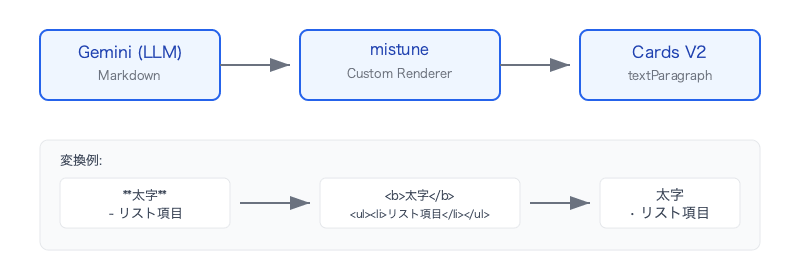
Conversion Engine Implementation: mistune Custom Renderer
I chose mistune 3.x for the conversion engine. mistune allows you to fully customize rendering simply by subclassing HTMLRenderer, which was a perfect fit for the requirement of "converting to a restricted HTML subset rather than standard HTML."
Tag Mapping
First, map each Markdown element to Cards V2-compatible tags.
class _ChatHTMLRenderer(mistune.HTMLRenderer):
    # Headings → <b> (since <h1>–<h6> are not supported)
    def heading(self, text, level, **attrs):
        return f"{_BLOCK_SEP}<b>{text}</b>\n"

    # Emphasis → <i> (<em> is not supported)
    def emphasis(self, text):
        return f"<i>{text}</i>"

    # Bold → <b> (<strong> is not supported)
    def strong(self, text):
        return f"<b>{text}</b>"

    # Image → <a> link (<img> is not supported)
    def image(self, text, url, title=None):
        label = text or "image"
        return f'<a href="{url}">{label}</a>'

    # Blockquote → <i> (<blockquote> is not supported)
    def block_quote(self, text):
        inner = text.replace(_BLOCK_SEP, "").strip()
        return f"{_BLOCK_SEP}<i>▎ {inner}</i>\n"
The key is substituting unsupported Cards V2 tags with supported ones. <b> instead of <h1>, <i> + visual indicator ▎ instead of <blockquote>. It's not perfect, but far more readable than plain text.
Block Splitting: The \x00 Sentinel Pattern
The part I thought about the most in the conversion engine design was block splitting.
In Cards V2, the response text is split into multiple textParagraph widgets. Previously I was splitting with answer.split("\n\n"), but this caused lists and code blocks to be cut in the middle.
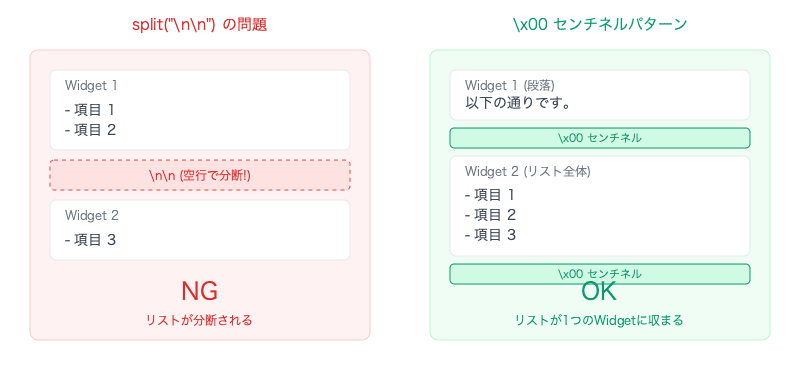
As a solution, I adopted the pattern of inserting a \x00 (NULL character) sentinel into the output of each block-level element in the renderer, and then splitting by this sentinel at the end.
_BLOCK_SEP = "\x00"  # Does not appear in actual content

class _ChatHTMLRenderer(mistune.HTMLRenderer):
    def paragraph(self, text):
        return f"{_BLOCK_SEP}{text}\n"  # Sentinel at the start of each paragraph

    def list(self, text, ordered, **attrs):
        tag = "ol" if ordered else "ul"
        inner = text.replace(_BLOCK_SEP, "")  # Remove sentinels from nested lists
        return f"{_BLOCK_SEP}<{tag}>\n{inner}</{tag}>\n"  # One sentinel for the whole list

    def block_code(self, code, info=None):
        escaped = mistune.escape(code)
        return f"{_BLOCK_SEP}<pre><code>{escaped}</code></pre>\n"  # One sentinel for the whole code block
def markdown_to_chat_html(text: str) -> list[str]:
    raw: str = _markdown(text)
    return [s.strip() for s in raw.split(_BLOCK_SEP) if s.strip()]
This way, the entire <ul> fits into a single widget, and code blocks are not split either. Paragraphs are naturally divided.
Security: Escaping Raw HTML
mistune's default renderer outputs raw HTML as-is in block_html and inline_html. Since LLM output may contain user input directly, I added processing to escape these.
def block_html(self, html):
    return f"{_BLOCK_SEP}{mistune.escape(html)}\n"

def inline_html(self, html):
    return mistune.escape(html)
HTML inside code blocks is also escaped similarly. Input like <script>alert('xss')</script> is converted to <script> and displayed safely.
Controlling LLM Output via System Prompt
The conversion engine alone is not enough. If the LLM uses Markdown syntax not supported by Cards V2, the converted output will look poor.
For example, if the LLM uses ## Heading, the converted result will be <b>Heading</b>. This works on its own, but layout can break, such as missing line breaks after headings. Table syntax | A | B | is not handled by the conversion engine, so the pipe characters will appear as-is.
So I added a ## Response Format section to the system prompt to control LLM output.
## Response Format
- Answer in Markdown
- Use numbered lists (1. 2. 3.) when explaining steps
- Use bullet points (- ) when listing multiple parallel items
- Bold (**bold**) important keywords, button names, and menu names
- Wrap commands and path names in `inline code` (but not URLs)
- Write URLs as Markdown links `[display text](URL)` instead of `inline code`
- Don't use headings (##); use bold (**heading**) instead
- Don't use table syntax (use bullet points instead)
- Structure responses as: short intro → main body (list/steps) → supplementary notes
The key is the prohibition rules. Headings and tables are prohibited, with explicit alternatives provided. Just telling the LLM "don't use this" can cause other problems, so the trick is to also specify "use this instead."
Color-Coded Status UI: Using <font color>
While implementing the conversion engine, I noticed that the <font color> tag is supported. Leveraging this, I added color-coded display to the status line of the progressive card.
status_label = state.current_step_description

if state.status == PipelineStatus.COMPLETED:
    status_text = f'<font color="#188038"><b>✅ {status_label}</b></font>'
elif state.status == PipelineStatus.FAILED:
    status_text = f'<font color="#d93025"><b>❌ {status_label}</b></font>'
else:
    status_text = f'<font color="#1a73e8"><b>⏳ {status_label}</b></font>'
| Status | Color | Display |
|---|---|---|
| Processing | Blue #1a73e8 |
⏳ Generating response |
| Complete | Green #188038 |
✅ 4 steps completed |
| Failed | Red #d93025 |
❌ An error occurred |
The colors are chosen from Google's Material Design palette. The combination of <font color> + <b> + emoji makes the status line instantly distinguishable from plain text at a glance.
Testing: Detecting Unsupported Tag Leaks
In the conversion engine tests, in addition to individual conversion tests, I wrote tests to verify that unsupported tags don't leak into the output.
class TestNoUnsupportedTags:
def test_full_document(self):
md = """# Title
Some **bold** and *italic* text.
## Section
1. First step
2. Second step
- Bullet one
- Bullet two
> A quote
¥`¥`¥`python
print("hello")
¥`¥`¥`

---
End.
"""
result = markdown_to_chat_html(md)
full = " ".join(result)
for tag in [
"<h1", "<h2", "<h3", "<h4", "<h5", "<h6",
"<p>", "<p ", "<strong>", "<em>", "<del>",
"<blockquote>", "<img", "<hr", "<table",
"<div", "<span",
]:
assert tag not in full, f"Unsupported tag {tag} found in output"
I convert a document containing all kinds of Markdown elements and verify that not a single unsupported Cards V2 tag appears in the output. This test also serves as a safety net when adding support for new Markdown syntax.
Pitfalls Discovered in Production
After launching in production, two issues were found that weren't noticed during testing. Neither caused errors — they only broke the display — which is why they took time to discover.
Pitfall 1: Nested Lists Splitting Widgets
There were cases where the bot returned a numbered list like this (with some sub-lists) in response to a user's question.
1. Click the **Google Drive icon**.
   - If you can't find the icon, click the "∧" mark
2. Click the **gear icon** (Settings).
3. Click **Quit** to close the app.
The expected behavior was for the numbered list to render as a single block, but in reality items 2 and 3 jumped out of the list and were displayed as plain text without numbers.
The cause was that _BLOCK_SEP from the sentinel pattern was also being inserted inside nested lists. Tracing mistune's rendering flow:
- The inner
list()is called for item 1's sub-list- If you can't find... - The inner
list()also inserts_BLOCK_SEPat the beginning - The outer
list()joins alllist_items and wraps them in<ol> - When
split(_BLOCK_SEP)is finally applied, it splits in the middle of the outer list
Segment 0: <ol><li>Item 1 text...    ← <ol> is not closed
Segment 1: <ul><li>Sub-item</li></ul></li><li>Item 2</li><li>Item 3</li></ol>
                                            ↑ Ends up outside <ol>
Since each segment becomes a separate textParagraph widget, segment 1 loses the <ol> context, causing items 2 and 3 to display without numbers.
The fix is the same pattern as block_quote — simply remove nested sentinels inside list().
def list(self, text, ordered, **attrs):
    tag = "ol" if ordered else "ul"
    inner = text.replace(_BLOCK_SEP, "")  # Remove sentinels from nested lists
    return f"{_BLOCK_SEP}<{tag}>\n{inner}</{tag}>\n"
I had already included this processing in block_quote() from the start, but I overlooked it in list(). The rule of always removing inner _BLOCK_SEP in methods where block-level elements can be nested should have been strictly followed.
Pitfall 2: URLs Displayed as Code Blocks Instead of Links
When the knowledge base articles contain URLs, those URLs can appear in the bot's responses. However, displayed URLs were showing up as non-clickable code blocks.
There were two causes.
Cause A: The system prompt instructions were ambiguous
- Wrap commands and path names in `inline code`
Receiving this instruction, the LLM interpreted URLs as "path names" and wrapped them in backticks like `https://example.com/...`. The conversion engine faithfully converted this to <code>https://example.com/...</code>, displaying it as a non-clickable code block.
As a fix, I added an instruction to explicitly exclude URLs and use Markdown link syntax.
- Wrap commands and path names in `inline code` (but not URLs)
- Write URLs as Markdown links `[display text](URL)` instead of `inline code`
Cause B: Bare URLs were not auto-linked
Even after fixing the prompt, there are cases where the LLM outputs bare URLs without using Markdown link syntax. By default, mistune outputs bare URLs as plain text, making them non-clickable.
By enabling mistune's url plugin, bare URLs are automatically wrapped in <a> tags.
_markdown = mistune.create_markdown(
    renderer=_ChatHTMLRenderer(),
    plugins=["strikethrough", "url"],  # Add url plugin
)
With a dual approach of prompt correction (fixing LLM output) and auto-linking (conversion engine fallback), URLs are now reliably displayed as clickable links.
Summary
Google Chat Cards V2's textParagraph has the constraint of limited HTML tags, but with some ingenuity, quite rich displays can be achieved.
Summarizing what I learned:
- Cards V2 uses restricted HTML, not Markdown — Understanding the supported tags and inserting a conversion layer is the practical approach
- LLM → Markdown → Restricted HTML pipeline — Have the LLM output token-efficient Markdown, and delegate display responsibility to the conversion engine
- Use the sentinel pattern for block splitting —
split("\n\n")breaks lists and code blocks. Explicitly marking block boundaries inside the renderer is reliable - Remove inner sentinels for nestable block elements — Methods that can contain block elements, like
list()andblock_quote(), must remove_BLOCK_SEP. Forgetting this causes widget splitting - Prohibit unsupported syntax in the system prompt — Don't just say "don't use this"; also specify "use this instead." For cases like URLs that resemble path names but are different, exclude them explicitly
<font color>is surprisingly useful — Significantly improves the visibility of status displays- Display breakage doesn't cause errors — No errors appear in logs; you won't notice without looking at the actual screen. Regular visual inspection of response displays in production is important
The HTML constraints of Cards V2 seem strict at first glance, but conversely, with fewer supported tags, the conversion engine logic can be kept simple. About 80 lines for the mistune custom renderer, under 200 lines including tests. I think the return on investment is high.
References
- Google Chat cards v2 — Text formatting | Google for Developers
- mistune — A fast yet powerful Python Markdown parser
- Part 1: Building a Google Chat Bot with Cloud Functions + Python + uv in minimal configuration
- Part 2: The story of hitting walls while implementing progressive UX with cardsV2 in Google Chat Bot
- Part 3: The story of connecting Vertex AI RAG Engine to Google Chat Bot to implement knowledge base search