
I organized the configuration patterns when combining NAT Gateway and AWS Network Firewall for aggregating outbound internet traffic

This page has been translated by machine translation. View original
If there is a NAT Gateway for aggregating internet outbound traffic, how should AWS Network Firewall be placed?
Hello, I'm Nonpi (@non____97).
Have you ever wondered how to place AWS Network Firewall when there is a NAT Gateway for aggregating internet outbound traffic? I have.
In 2025, new features have emerged such as the AWS Network Firewall and AWS Transit Gateway integration and Regional NAT Gateway.
Along with this, I feel that the configurations for aggregating outbound traffic to the internet and controlling traffic using Network Firewall have changed.
Let me organize what configuration patterns currently exist and when each should be used.
Summary Up Front
- There are broadly two placement patterns for NAT Gateway and AWS Network Firewall when aggregating internet outbound traffic
- Create NAT Gateway and Network Firewall within the same VPC
- Place NAT Gateway and Network Firewall in separate VPCs
- The former is recommended
- The latter is mainly chosen when you want to use Regional NAT Gateway
- Regional NAT Gateway can be adopted even in the same VPC, but it requires mapping each subnet's CIDR with the Firewall Endpoint in the same AZ, resulting in high operational overhead and is not recommended
- Regional NAT Gateway is not compatible with Cloud WAN (as of 2026/6/30, only Transit Gateway is supported). If aggregating with Cloud WAN, the latter option cannot be chosen
- A hybrid approach separating Network Firewall for East-West and North-South doubles the Network Firewall costs and is impractical
- Availability needs to be considered separately
- Even if Regional NAT Gateway can be used with a separate VPC, the Network Firewall in between only has AZ-level redundancy, so AZ failures cannot be completely ignored
- Failover when a Firewall Endpoint becomes unhealthy is not automatic — detection and switching must be implemented manually
- Simply deploying Firewall Endpoints in Multi-AZ is not sufficient
- On the other hand, AZ failures affecting only Transit Gateway or Cloud WAN are basically not a concern thanks to Hyperplane
- Previously, when appliance mode was enabled, which AZ's Transit Gateway attachment ENI the traffic would exit from was random, but it has been updated to consider the source and destination AZ of the traffic
Pattern Overview
Create NAT Gateway and Network Firewall within the same VPC
The first pattern is "Create NAT Gateway and Network Firewall within the same VPC."
Illustrated, it looks like this.
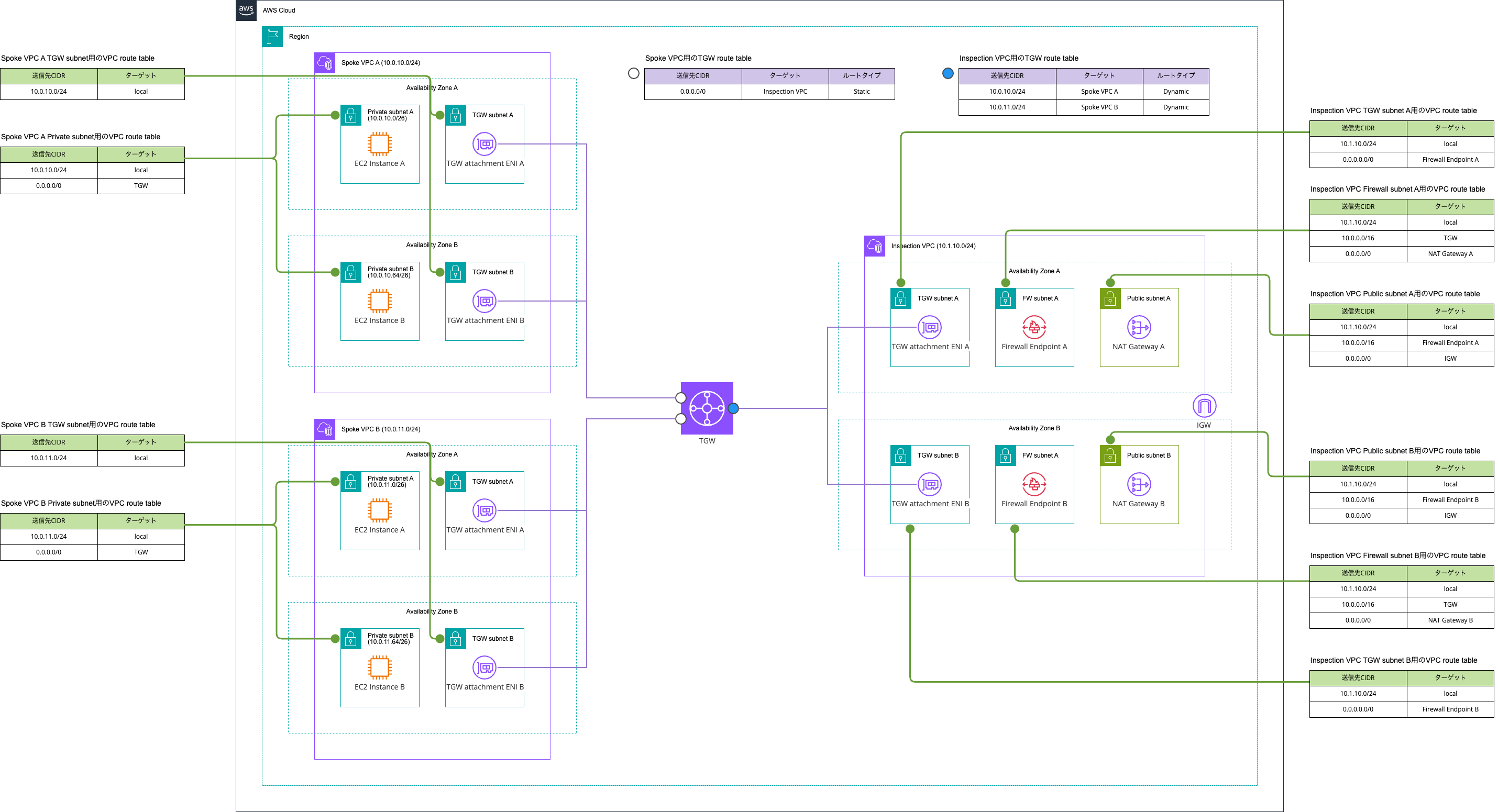
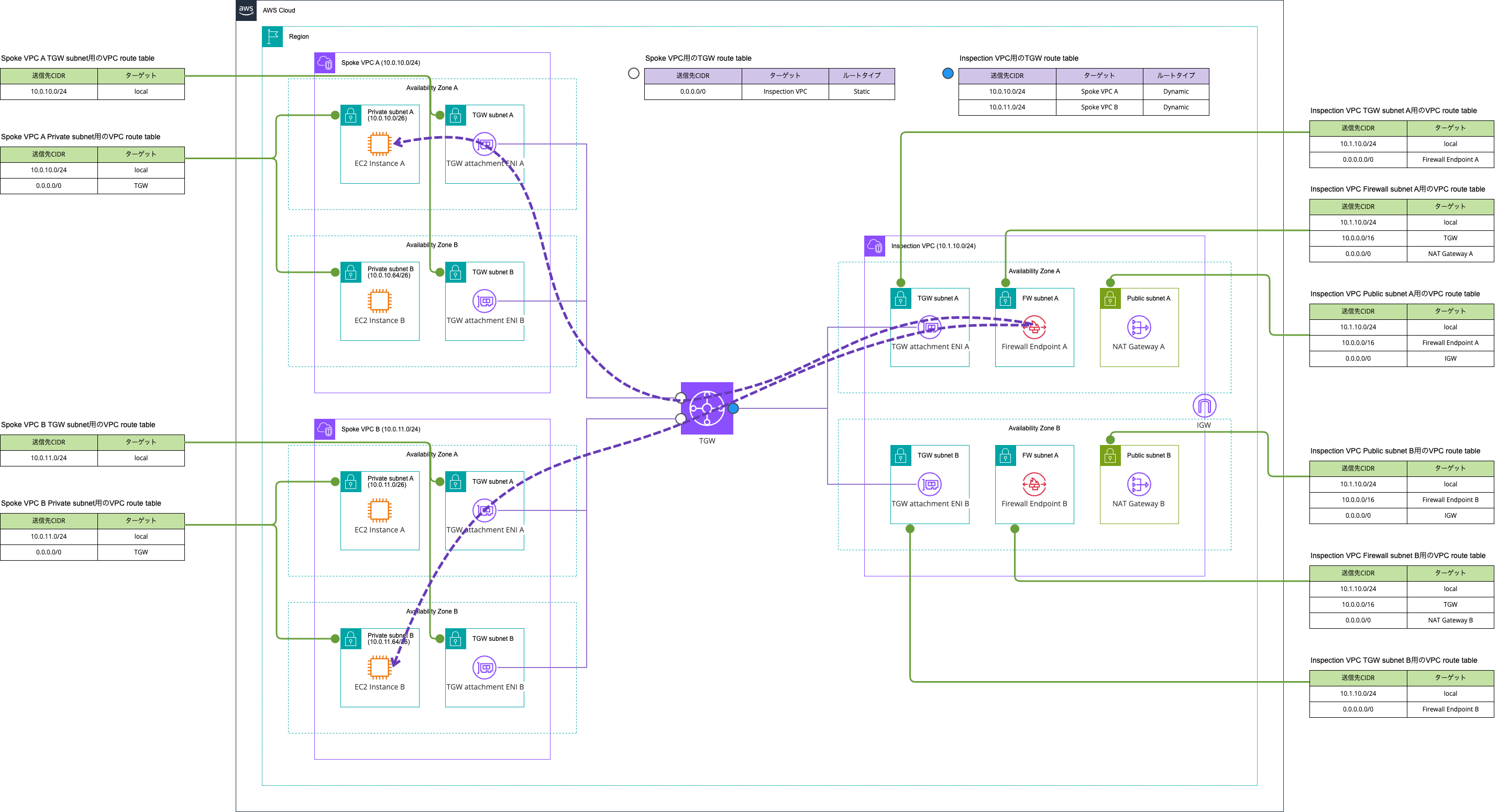
The traffic paths are as follows.
East-West traffic
North-South traffic
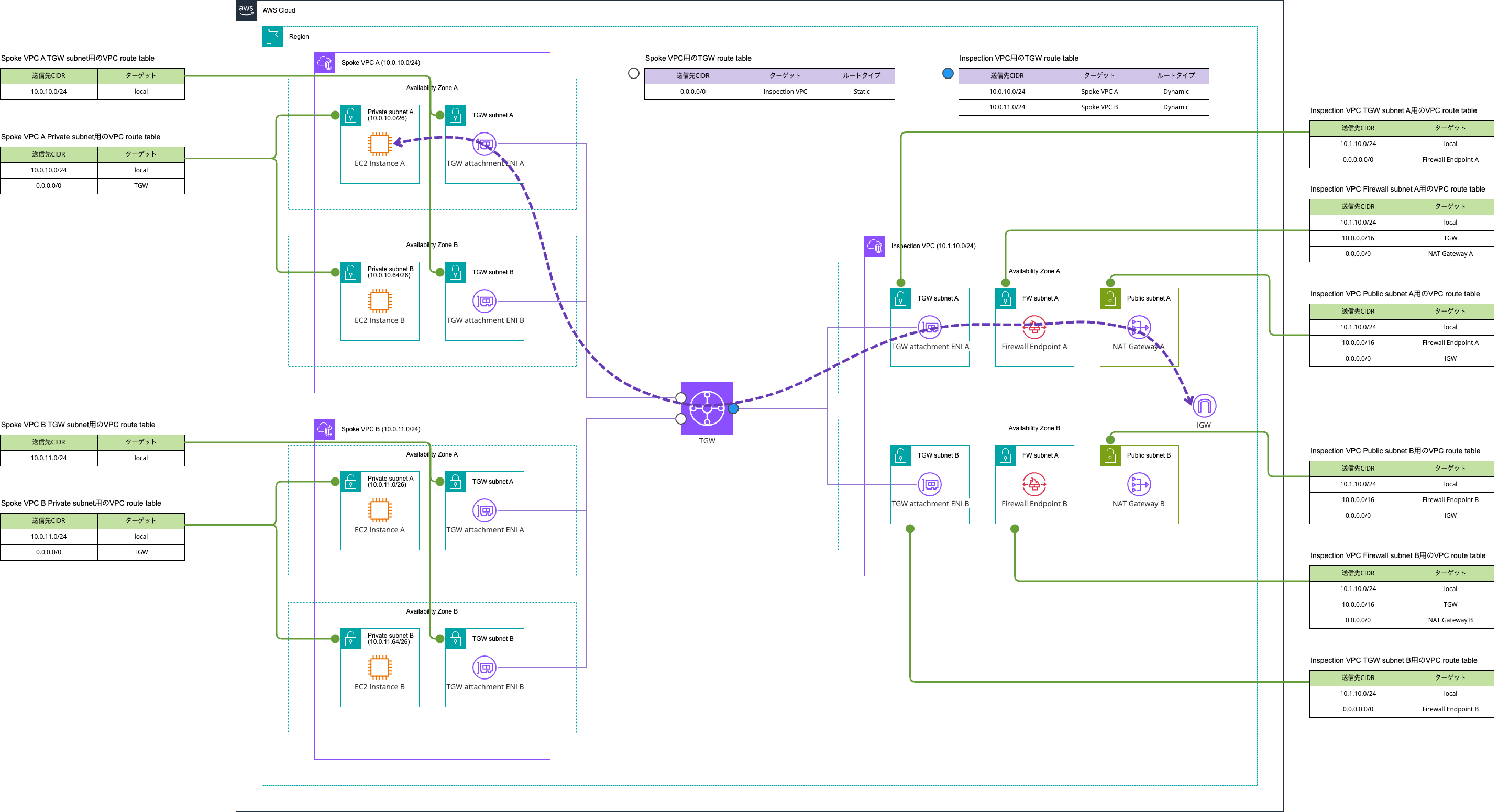
Currently East-West traffic is also enabled, but if you do not want East-West traffic, you can address this by adding Blackhole routes as follows.
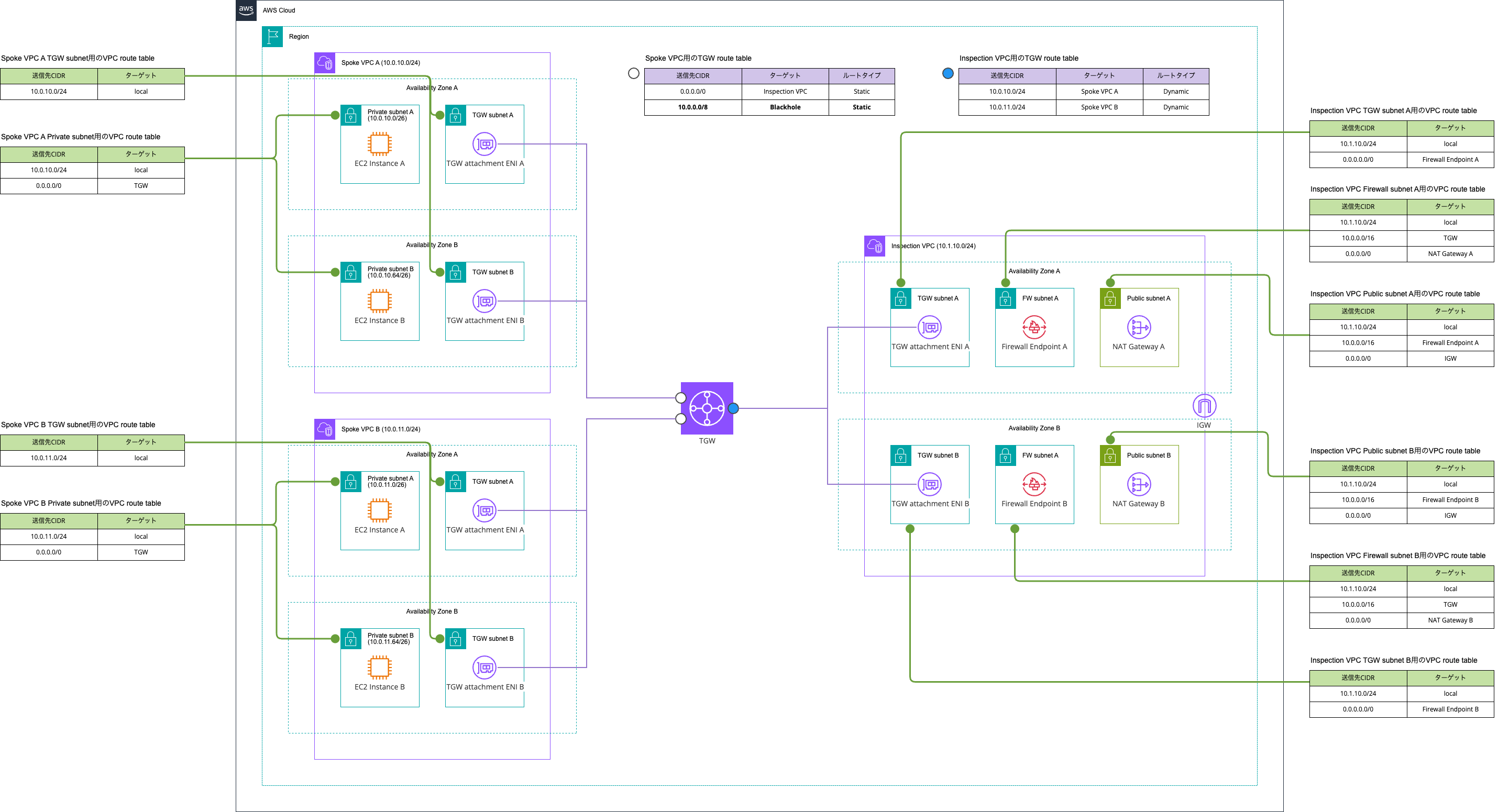
For details, please refer to the following articles.
The components are consolidated and very simple. Personally, I would like to recommend this approach.
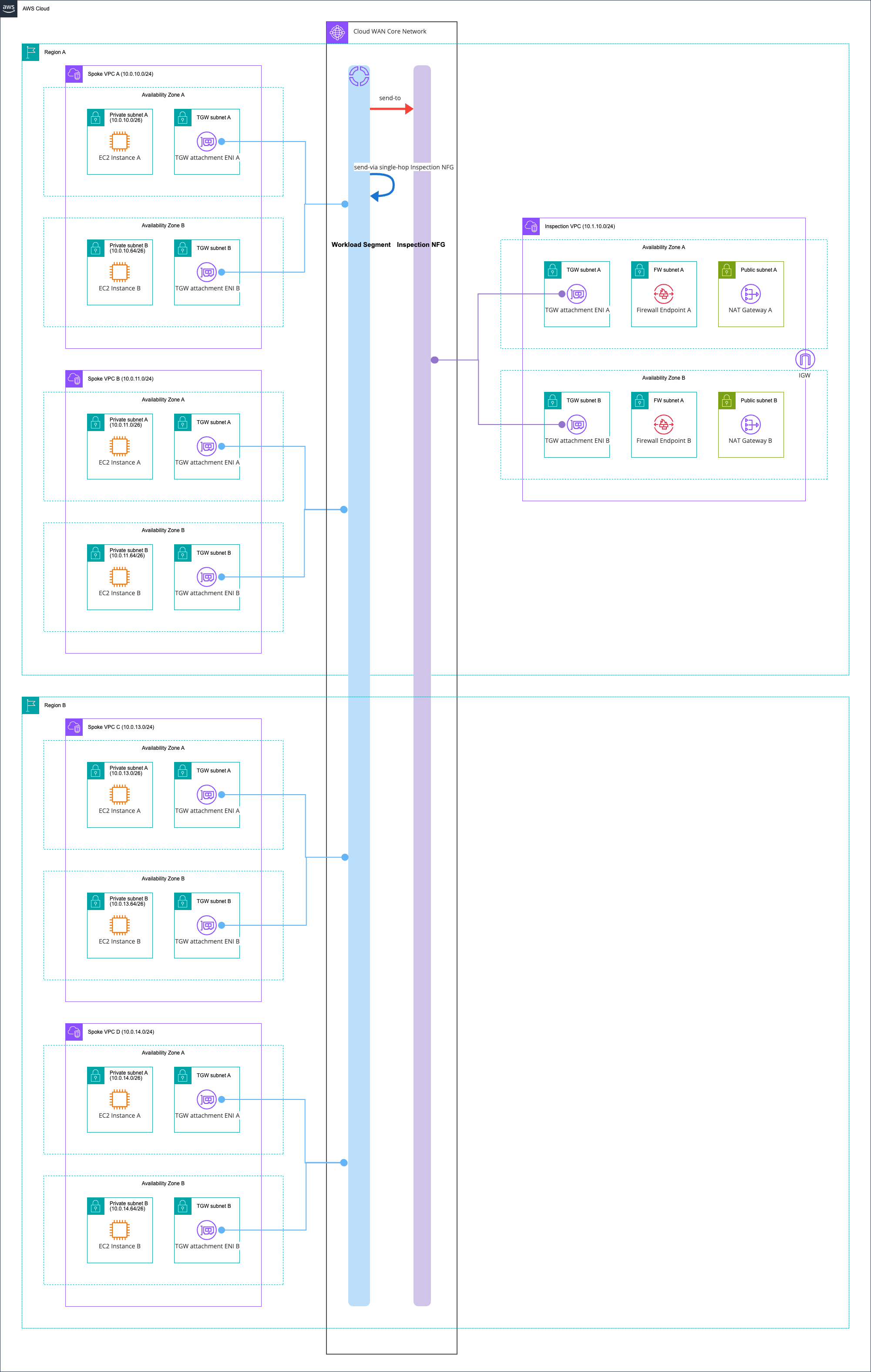
The same configuration applies for Cloud WAN.
Some of you may be thinking, "What about Regional NAT Gateway? You used to recommend it." The painful part of this configuration is that adopting Regional NAT Gateway is difficult.
When adopting Regional NAT Gateway, you need to configure routes per AZ as shown below.
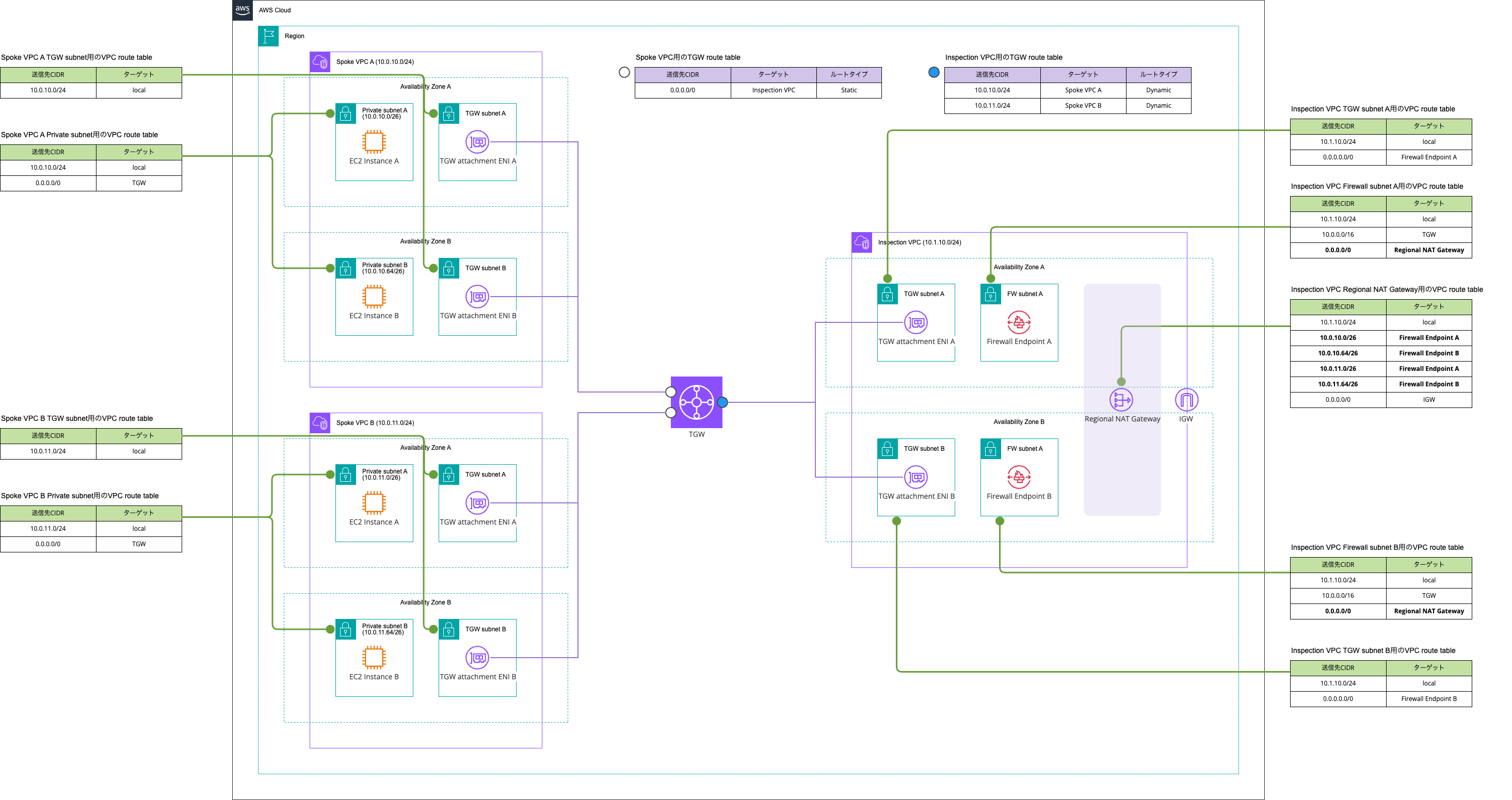
This is because Network Firewall endpoints exist per AZ, not as a single endpoint within the VPC where Network Firewall resides. In other words, there is no region-level availability.
As a result, you need to organize all subnet CIDR blocks of all VPCs aggregating outbound traffic by AZ, and for each organized subnet CIDR block, specify the Firewall Endpoint in the same AZ as the subnet. Without this handling, asymmetric routing will occur in the return traffic from Regional NAT Gateway.
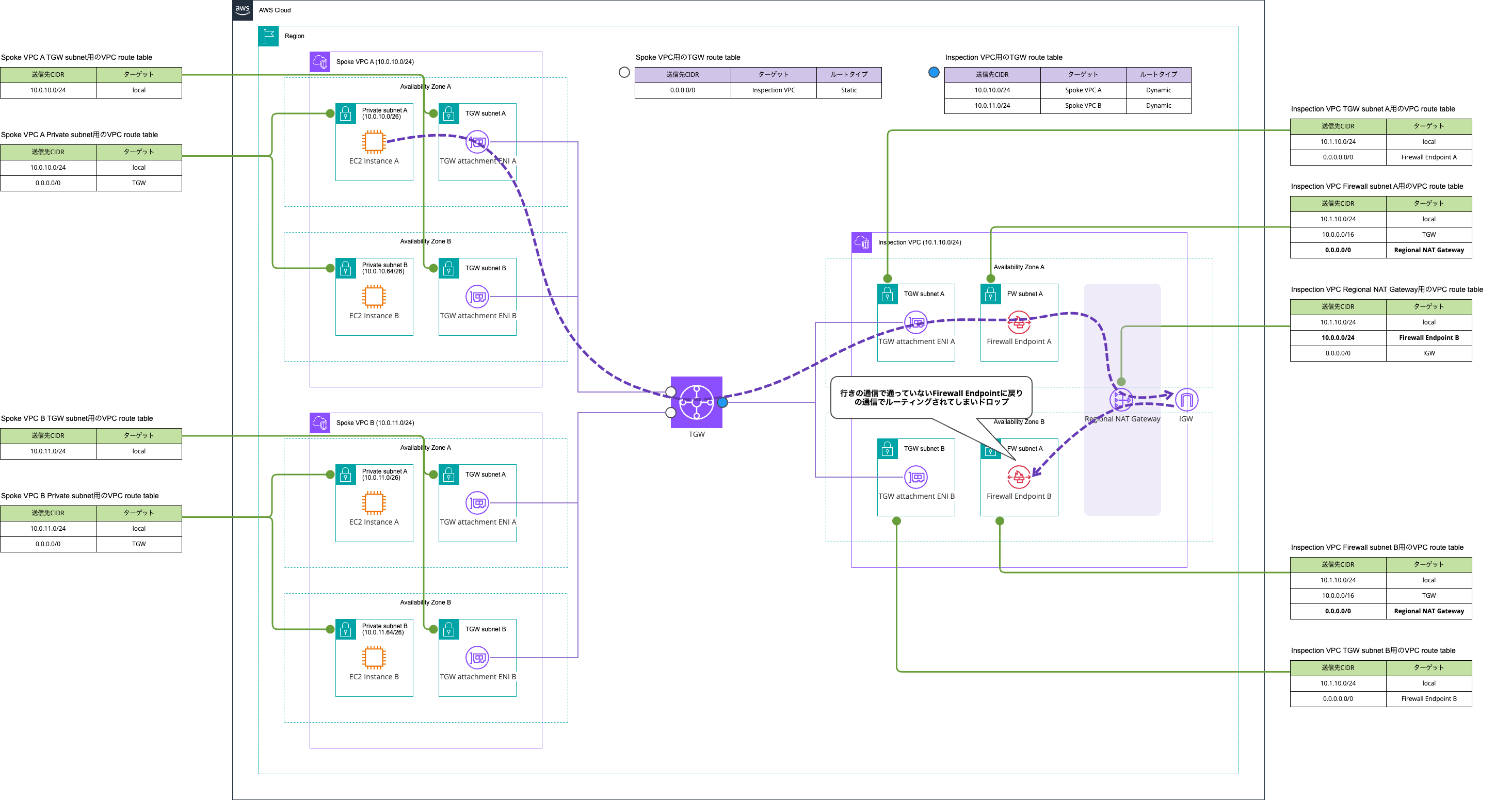
When there are many subnets, this would be an extremely operationally burdensome task even with prefix lists. Personally, I do not recommend it at all.
Also, the more perceptive among you may be thinking, "Didn't you write a blog post saying that when enabling appliance mode in an Inspection VPC, you can't tell which AZ's Firewall Endpoint the traffic will be routed to within the Inspection VPC? Wouldn't that cause asymmetric routing in the return traffic from NAT Gateway within the Inspection VPC?"
This has been resolved as described in the following article posted on AWS Blogs.
Previously, when appliance mode was enabled on a VPC attachment, symmetric routing in Transit Gateway and AWS Cloud WAN CNE determined the traffic AZ based on a flow hash algorithm. This algorithm was based on the 4-tuple of IP packets and did not consider the source and destination AZ of the traffic flow, which could result in traffic taking a roundabout path through different AZs.
To address this issue, the new AZ-awareness enhancement allows Transit Gateway and AWS Cloud WAN CNE to consider both the source and destination AZ of a traffic flow when selecting the traffic path. When the source and destination of a flow are in the same AZ, traffic will remain within the same AZ even when passing through an inspection VPC. This results in more efficient routing and may reduce latency.
AWS Transit Gateway および AWS Cloud WAN におけるパフォーマンスとメトリクスに関する機能強化 | Amazon Web Services ブログ
In other words, for the initial traffic of a flow, the behavior was previously random in determining which AZ's Transit Gateway attachment ENI the traffic entering Transit Gateway would exit from, but it has been updated to consider the source and destination AZ.
Let's actually try this. I'll create the same configuration as in the previously mentioned article.

The AZ per NAT Gateway is as follows.
> aws ec2 describe-nat-gateways \
  --query 'NatGateways[].{NatGatewayPublicIp : NatGatewayAddresses[].PublicIp, SubnetId : SubnetId}'
[
    {
        "NatGatewayPublicIp": [
            "52.207.102.10"
        ],
        "SubnetId": "subnet-0ccb75936488ee920"
    },
    {
        "NatGatewayPublicIp": [
            "32.198.209.252"
        ],
        "SubnetId": "subnet-0844604ef66dae435"
    }
]

> aws ec2 describe-subnets \
  --subnet-ids subnet-0ccb75936488ee920 subnet-0844604ef66dae435 \
  --query 'Subnets[].{AvailabilityZone : AvailabilityZone, SubnetId : SubnetId}'
[
    {
        "AvailabilityZone": "us-east-1a",
        "SubnetId": "subnet-0844604ef66dae435"
    },
    {
        "AvailabilityZone": "us-east-1b",
        "SubnetId": "subnet-0ccb75936488ee920"
    }
]
At this point, I access http://checkip.amazonaws.com/ from EC2 instances in each AZ.
$ for i in {0..15}; do
    curl http://checkip.amazonaws.com/
  done
32.198.209.252
32.198.209.252
32.198.209.252
32.198.209.252
32.198.209.252
32.198.209.252
32.198.209.252
32.198.209.252
32.198.209.252
32.198.209.252
32.198.209.252
32.198.209.252
32.198.209.252
32.198.209.252
32.198.209.252
32.198.209.252
$ for i in {0..15}; do
    curl http://checkip.amazonaws.com/
  done
52.207.102.10
52.207.102.10
52.207.102.10
52.207.102.10
52.207.102.10
52.207.102.10
52.207.102.10
52.207.102.10
52.207.102.10
52.207.102.10
52.207.102.10
52.207.102.10
52.207.102.10
52.207.102.10
52.207.102.10
52.207.102.10
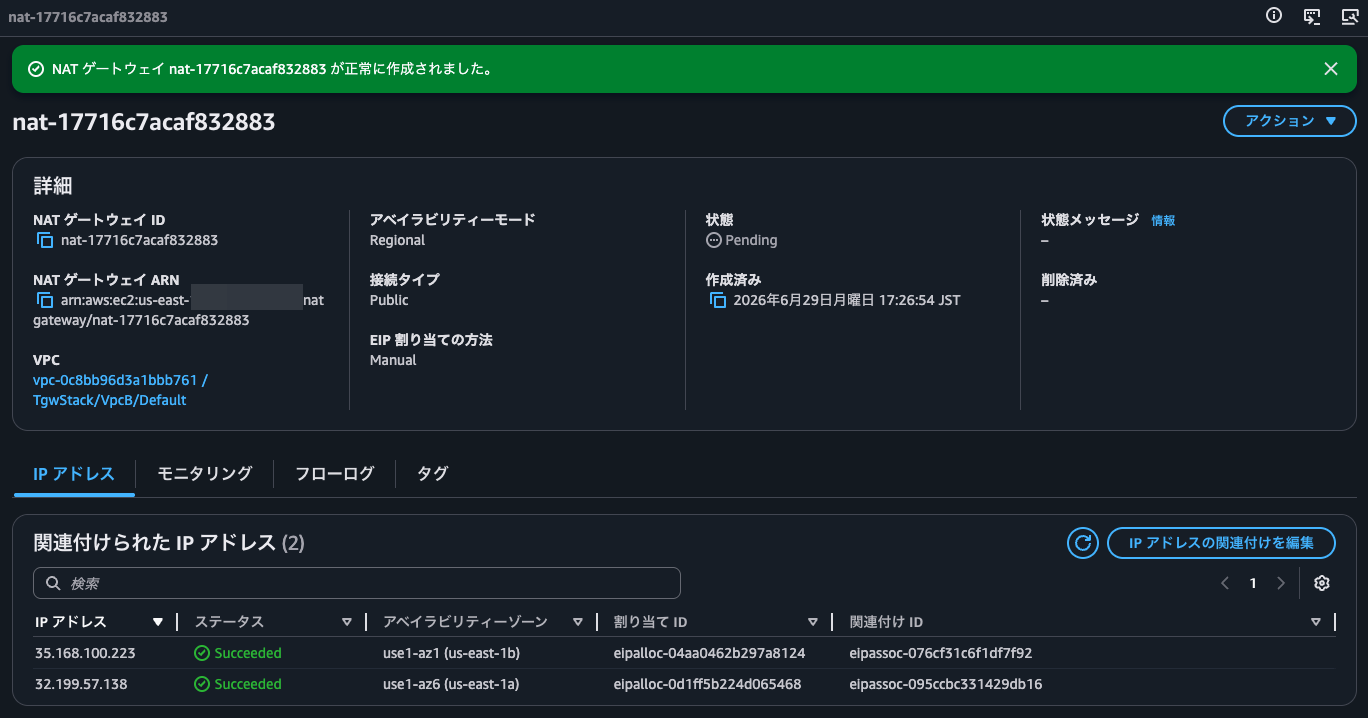
Yes, only the EIP associated with the NAT Gateway in the same AZ as the source EC2 instance was returned. After waiting several tens of minutes and trying again, and also testing with Regional NAT Gateway in addition to Zonal NAT Gateway, the same results were obtained.
The verification results when confirmed with Regional NAT Gateway are as follows.
$ for i in {0..15}; do
    curl http://checkip.amazonaws.com/
  done
32.199.57.138
32.199.57.138
32.199.57.138
32.199.57.138
32.199.57.138
32.199.57.138
32.199.57.138
32.199.57.138
32.199.57.138
32.199.57.138
32.199.57.138
32.199.57.138
32.199.57.138
32.199.57.138
32.199.57.138
32.199.57.138
$ for i in {0..15}; do
    curl http://checkip.amazonaws.com/
  done
35.168.100.223
35.168.100.223
35.168.100.223
35.168.100.223
35.168.100.223
35.168.100.223
35.168.100.223
35.168.100.223
35.168.100.223
35.168.100.223
35.168.100.223
35.168.100.223
35.168.100.223
35.168.100.223
35.168.100.223
35.168.100.223
Therefore, there is no need to worry about side effects from enabling appliance mode.
Place NAT Gateway and Network Firewall in separate VPCs
Next is the pattern of placing NAT Gateway and Network Firewall in separate VPCs.
Illustrated, it looks like this.
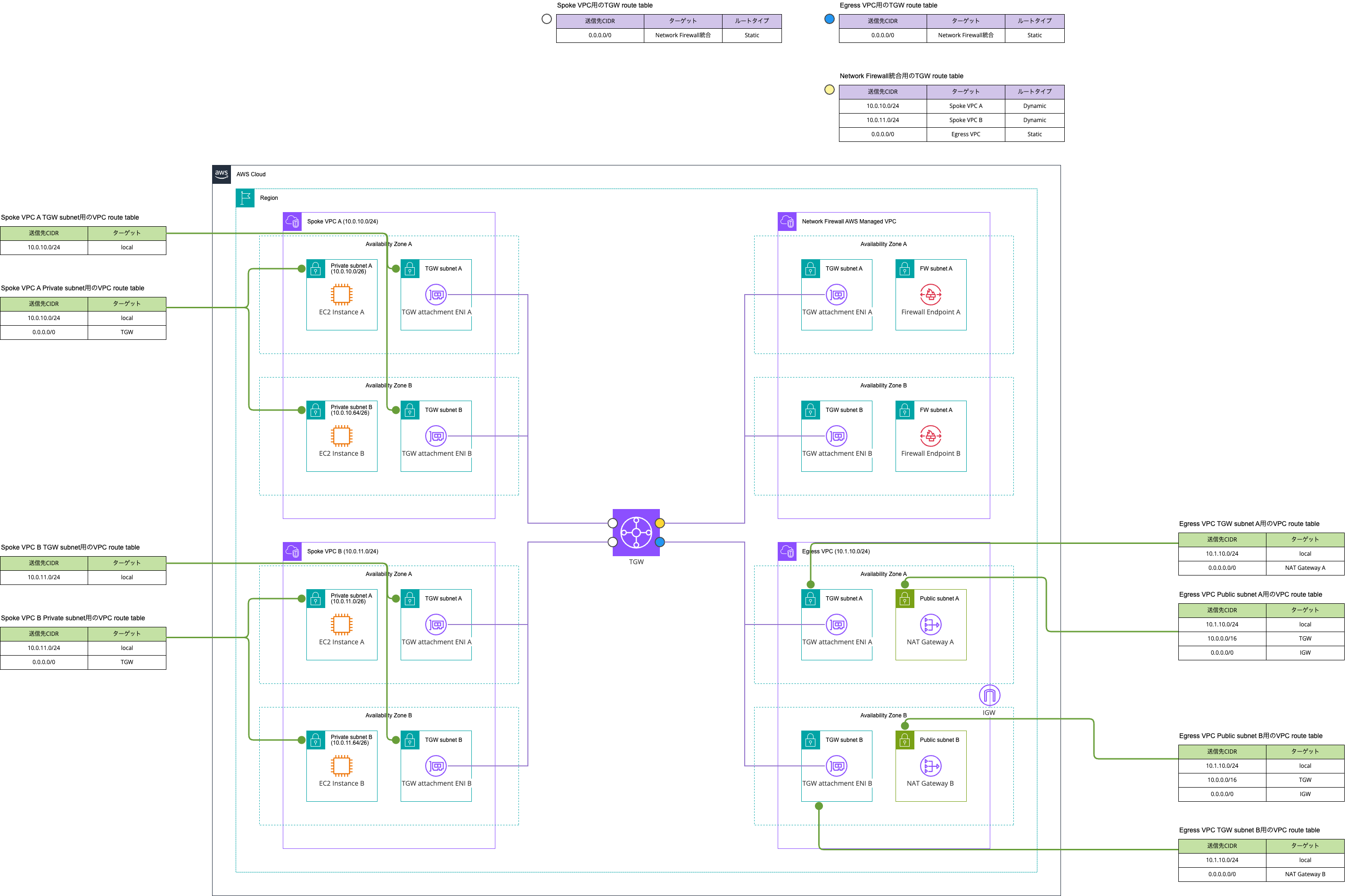
The traffic paths are as follows.
East-West traffic
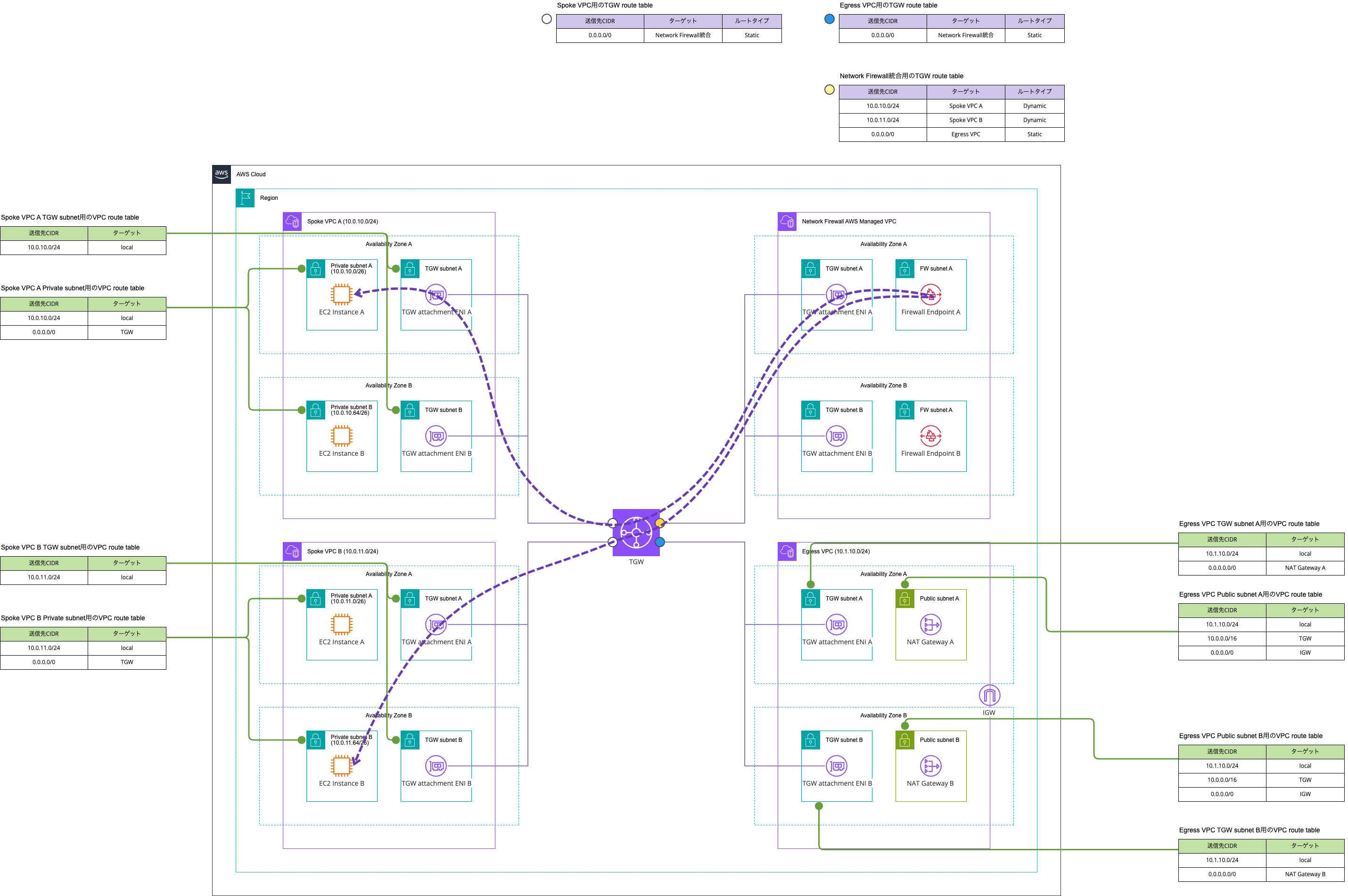
North-South traffic
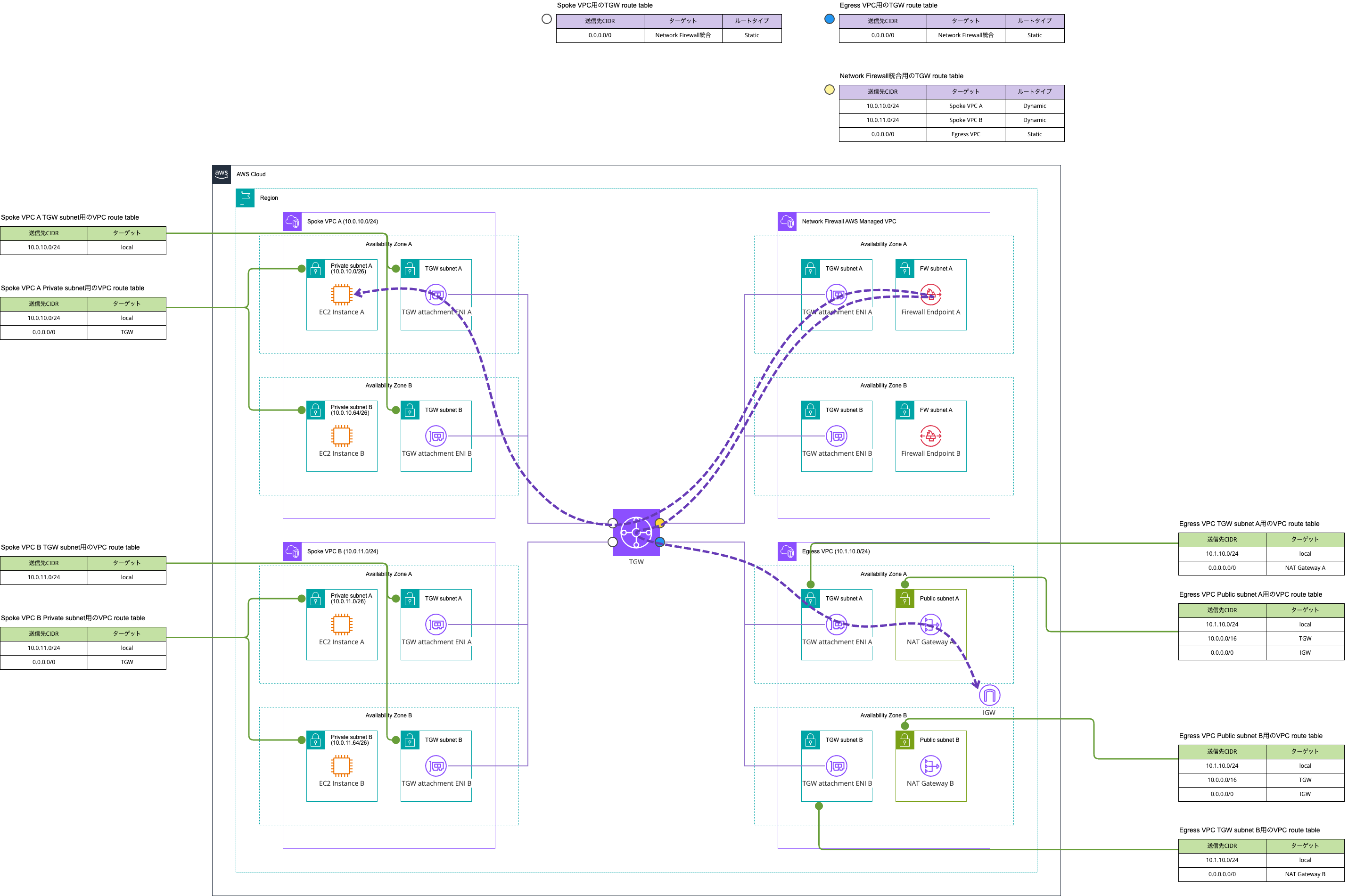
A nice benefit is the reduced VPC management cost through the Transit Gateway and Network Firewall integration.
Also, with this configuration, you can choose Regional NAT Gateway instead of Zonal NAT Gateway in the Egress VPC.
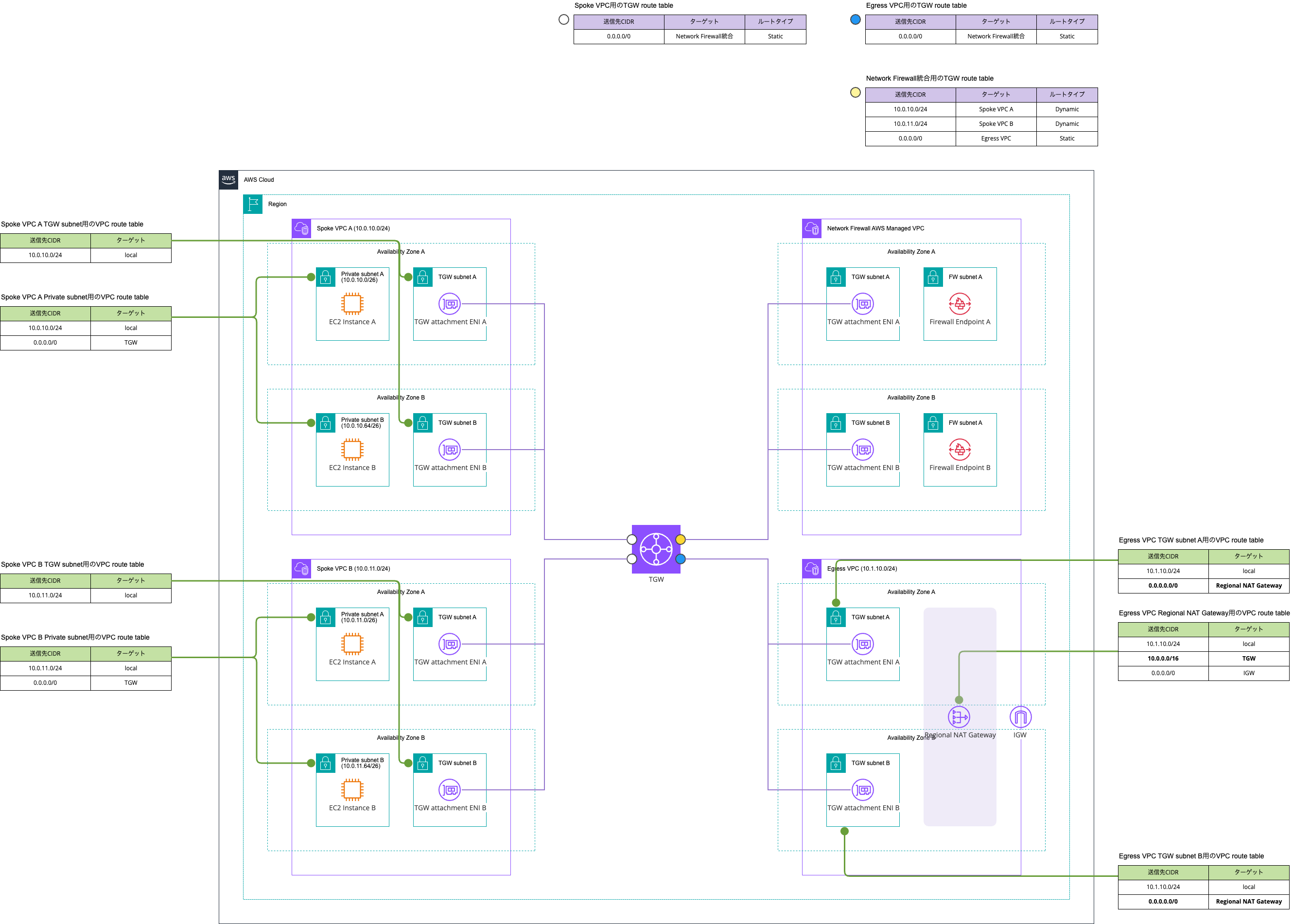
In fact, this configuration is adopted primarily for the purpose of wanting to use Regional NAT Gateway.
However, it can be said that Regional NAT Gateway and Cloud WAN are not a good fit. The following update added support for Regional NAT Gateway and Transit Gateway integration, but as of 2026/6/29, integration with Cloud WAN is not available.
As mentioned earlier, when Network Firewall and Regional NAT Gateway are in the same VPC, the operational overhead becomes very high. Therefore, when aggregating internet outbound traffic using Cloud WAN rather than Transit Gateway, adopting Regional NAT Gateway is not practical.
Speaking of Cloud WAN, you cannot use send-to after send-via, and vice versa. Attempting this would require the Inspection VPC and Egress VPC to belong to different NFGs, but it is not possible to route through multiple NFGs within a single traffic flow.
You can configure multiple NFGs in the same core network. However, you cannot insert multiple NFGs into the same segment or segment pair.
AWS Cloud WAN Service Insertion を使用したグローバルセキュリティ検査の簡素化 | Amazon Web Services ブログ
You might think, "Can't we use send-via to pass through the Inspection VPC with Network Firewall, then use a static route to route to the Egress VPC with NAT Gateway?" However, this is not possible due to the constraints that "send-via passes through only the NFG, not a segment" and "static routes cannot be defined from an NFG."
create-routeparameters. If the action iscreate-route, the following are the required and optional parameters.
segment— The name of the segment created in thesegmentssection, which must be a static route. If you need to duplicate the static route in multiple segments, use multiplecreate-routestatements.destination-cidr-blocks— The static route to create. A segment should have the same routing behavior for a certain destination. This means if one Region has a route to a destination, other Regions should also have that route, but with potentially different paths. You can define the IPv4 and IPv6 CIDR notation for each AWS Region. For example,10.1.0.0/16or2001:db8::/56. This is an array of CIDR notation strings.destinations— Defines the list of attachments to send the traffic to, with up to oneattachment-idper Region. Because a segment is a global object, you should design your routing so that every AWS Region has an attachment in the destinations list. Regions that do not have attachments in this list will receive a propagated version of this route through cross-Region peering connections, and will use the static route of another Region. This is the same case for multiple attachments that are defined across multiple remote Regions. Instead of an array of attachments, you can also provide ablackhole, which drops all traffic to thedestination-cidr-blocks.
This means that for traffic going to the internet via NAT Gateway, if you want to route it through Network Firewall in a separate VPC without using send-via or send-to, you end up with an operation of continuously adding static routes manually.
To make route management easier, you would end up placing two Network Firewalls: one in the Inspection VPC for East-West inspection between VPCs, and one in the Egress VPC for North-South inspection between VPCs and the internet. This would result in increased costs.
Pros/Cons Summary
Let's organize the Pros/Cons for each pattern.
Note that while I introduced a hybrid approach separating Network Firewall for East-West and North-South, the cost of double Network Firewall charges makes it impractical, so here I will mainly summarize the Pros/Cons for the two options: "same VPC" and "separate VPC."
The summary is as follows.
| Aspect | Same VPC | Separate VPC |
|---|---|---|
| Configuration simplicity | ○ Components consolidated into one VPC | ○ Inspection VPC management not required by using the integration feature |
| Cost | ○ Fewer Transit Gateway traversals, reducing data processing costs | △ More Transit Gateway traversals mean Transit Gateway data processing charges for internet traffic are double compared to the same VPC pattern |
| Regional NAT Gateway | × High operational overhead, not recommended | ○ Can be adopted |
| Combination with Cloud WAN | ○ Reduce route management burden using Service Insertion | × Regional NAT Gateway integration (the main advantage) is unsupported, and the difficulty of route management increases due to inability to effectively use send-via and send-to |
| East-West / North-South | ○ Supported | ○ Supported |
Personally, I think it's best to first consider the same VPC pattern. I believe it is well-balanced in terms of both cost and operational overhead.
Conversely, I think the separate VPC pattern is chosen in the following situations.
- When high availability through Regional NAT Gateway is important
- When you want to use Regional NAT Gateway's auto-scaling feature
- = When you want to dynamically change assigned EIPs according to the number of simultaneous connections
- IPAM care is needed to persist IP addresses once assigned
On the other hand, even though the separate VPC pattern can use Regional NAT Gateway, it's important to understand that having Network Firewall in between — which only has AZ-level redundancy — doesn't mean you no longer need to worry about AZ-level failures in the network topology at all. It's also worth noting that the SLA remains at 99.9% as of 2026/6/30, even though some time has passed since Regional NAT Gateway was introduced.
Regarding the mechanism for routing to a healthy Firewall Endpoint when a Firewall Endpoint becomes unhealthy: currently there is no automatic failover feature, and there are no CloudWatch metrics well-suited for health checks, so you need to establish a custom detection and response process. For example, you could attempt TCP connections to several trusted resources at 1-minute intervals, and if multiple failures occur to all destinations, switch the default route target in the route table of the subnet where the Transit Gateway attachment or Cloud WAN attachment exists.
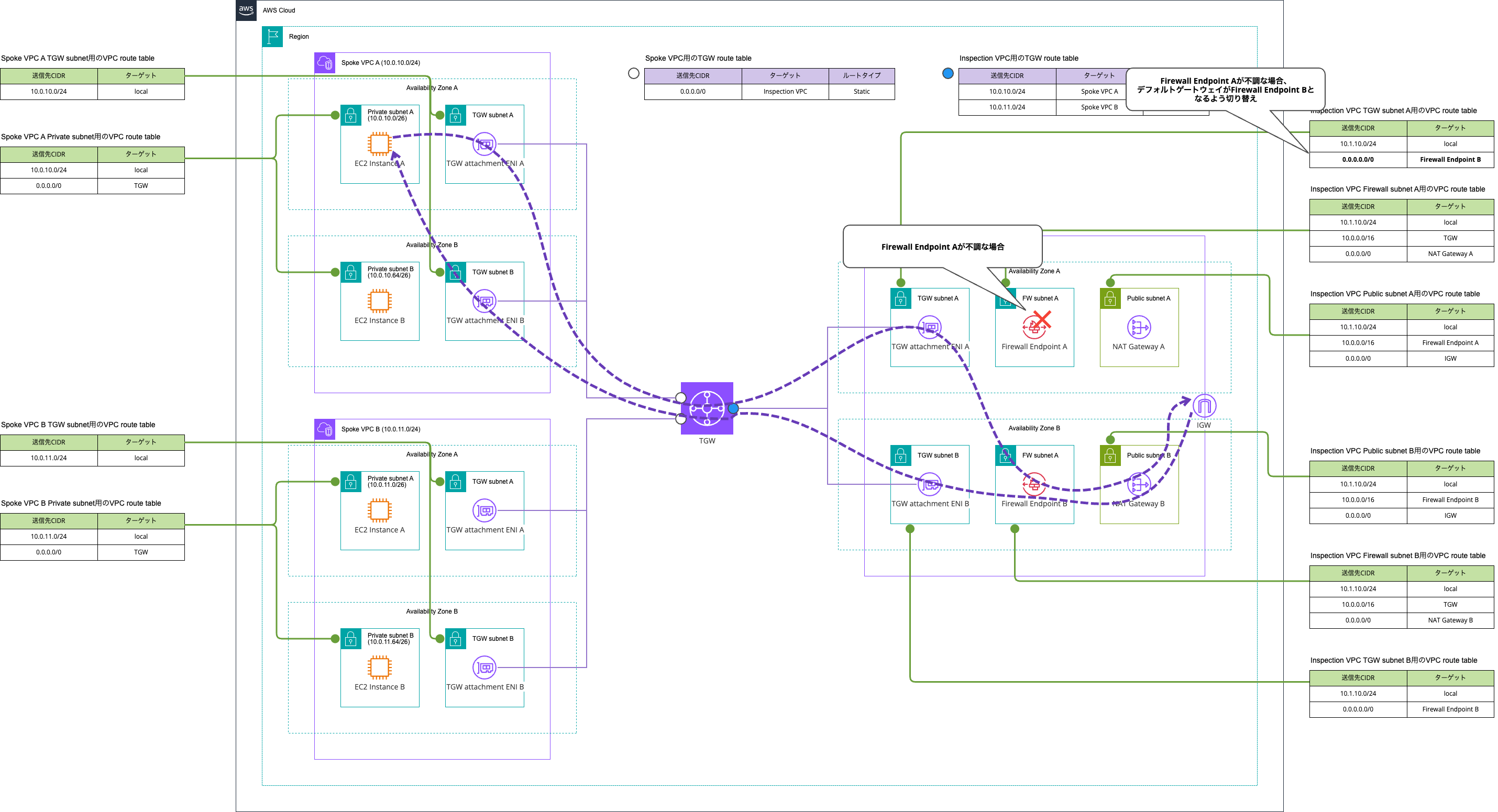
In other words, simply deploying Firewall Endpoints in Multi-AZ is not sufficient as a mechanism to achieve high availability.
The same process applies when a Zonal NAT Gateway becomes unhealthy. For NAT Gateway, including the PacketsDropCount metric as an additional indicator will improve accuracy.
It is not recommended to trigger a response based on the ErrorPortAllocation metric, which indicates the number of times a source port could not be allocated. This condition is caused by the NAT Gateway handling a large number of connections, so if you redirect traffic to concentrate on one AZ's NAT Gateway, you risk disrupting communications that were previously working normally.
When an AZ failure occurs that only affects Transit Gateway or Cloud WAN
"What happens if an AZ failure occurs that only affects Transit Gateway or Cloud WAN?" is also a concern, but this is basically something you don't need to think about.
Transit Gateway uses Hyperplane, and users are told they do not need to worry about the availability of Transit Gateway itself.
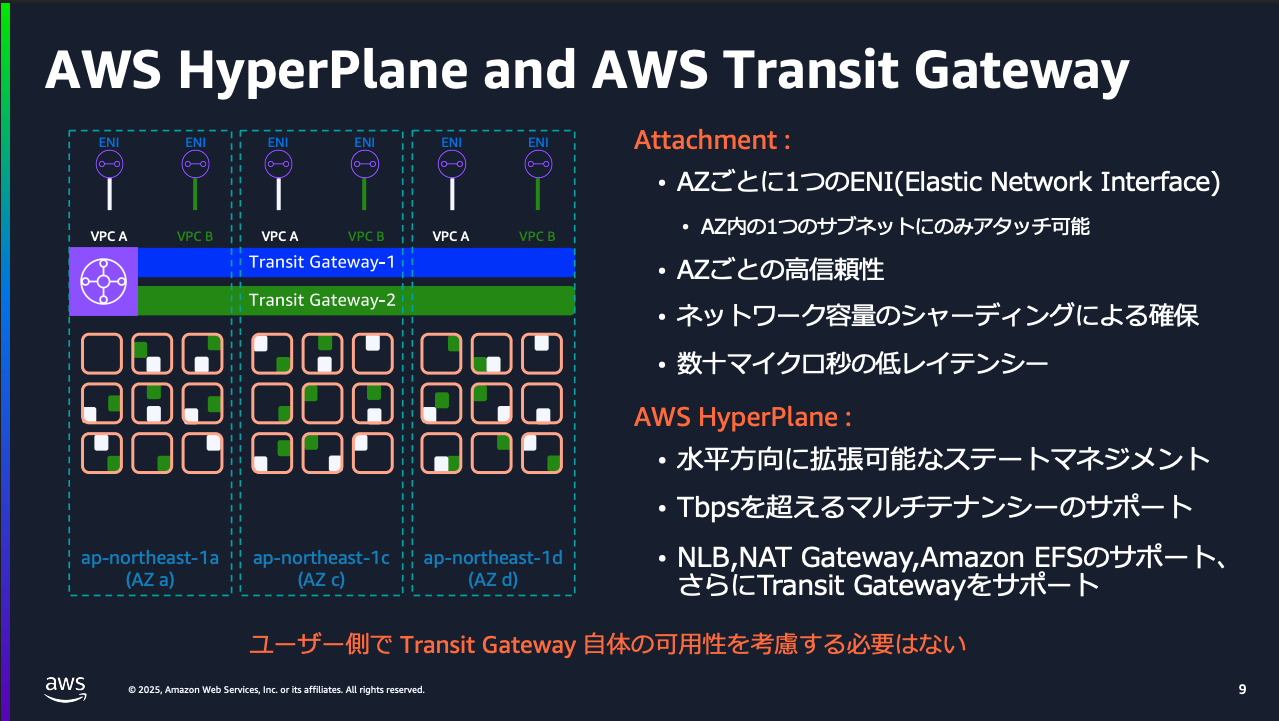
Excerpt: AWS Transit Gateway deep dive | AWS Black Belt Online Seminar
First, because Transit Gateway is managed by AWS, customers can focus solely on configuring traffic routing to endpoints without worrying about the operating system, infrastructure, or platform. Transit Gateway also has redundancy within a region.
To explain customer responsibilities, let's consider a sample scenario. Suppose you have a VPC with 3 AZs and several EC2 instances that need to access an application in another VPC and you want to perform routing between VPCs. You deploy a Transit Gateway and attach it to subnets. By attaching it to each active AZ, resources in other AZs can still access the Transit Gateway even if an abnormal event occurs.
A common question is "Do I need to deploy multiple Transit Gateways to improve resiliency?" The answer is no. This is because Transit Gateway is built on Hyperplane, which provides high availability within an AZ and improves fault tolerance and reliability within a region. This means you don't need to deploy multiple Transit Gateways to improve data plane resiliency — a single Transit Gateway is sufficient.
Cloud WAN also uses Hyperplane.
Although the Cloud WAN Core Network Edge (CNE) is represented by a single endpoint per subnet/Availability Zone (AZ) in our diagrams, it is highly available and based on AWS Hyperplane. The same is true for the Transit Gateway.
I believe it is unlikely to have a scenario where only Transit Gateway or Cloud WAN goes down at the AZ level, and that in an AZ failure of that magnitude, the source/destination resources themselves would also be down.
In the hypothetical case where only the ENIs of Transit Gateway or Cloud WAN in some AZs are unhealthy, the behavior of routing traffic to healthy ENIs as shown below would not occur.
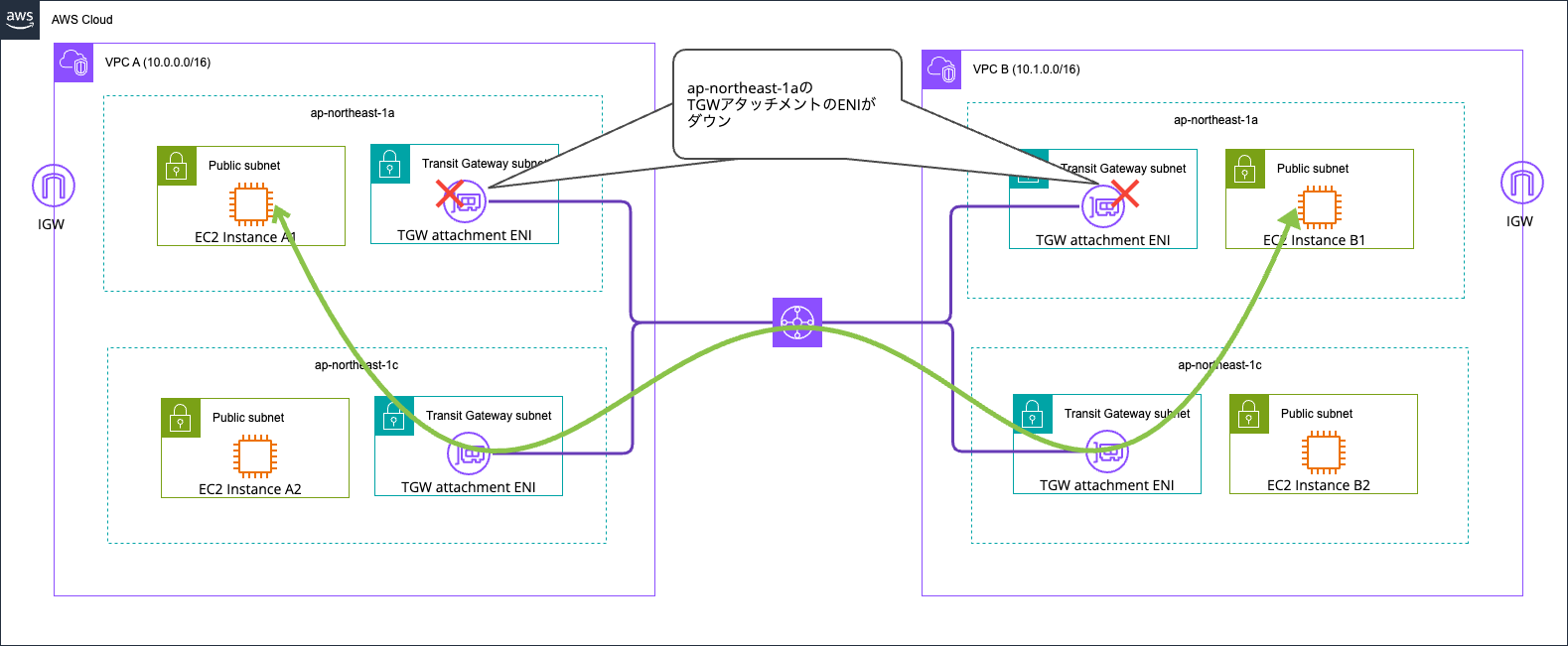
If countermeasures against this scenario are necessary, you would need to make the source and destination pairs themselves redundant at the AZ level, with a mechanism to retry on another AZ's pair if communication fails on one AZ's pair.
This is extremely difficult.
For architectures that can operate in Active/Active mode,
- Failed processes are retried from another node
- Even if one side goes down, the required performance can still be met
- The same information is always sent in duplicate and reconciled in the background
it is more manageable, but for Active/Standby, there are many considerations such as failover conditions and how to handle processes that failed before failover completion.
If you forcibly redirect traffic by detaching a faulty ENI, you will be completely unable to reach Transit Gateway in the first place due to the following prerequisite.
Resources in an Availability Zone where the Transit Gateway attachment does not exist cannot reach the Transit Gateway, even if the VPC is attached to the Transit Gateway.
As a result, it becomes necessary to make the source and destination pairs themselves redundant at the AZ level.
If you don't absolutely need Regional NAT Gateway, start by considering a configuration with Network Firewall and NAT Gateway in the same VPC
I've organized the configuration patterns for combining NAT Gateway for aggregating internet outbound traffic with AWS Network Firewall.
If you don't absolutely need Regional NAT Gateway, start by considering a configuration with Network Firewall and NAT Gateway in the same VPC.
Personally, I'm hoping that Network Firewall will become a service with region-level availability like Regional NAT Gateway. If that happens, the compatibility issues with Regional NAT Gateway should also be resolved.
I hope this article is helpful to someone.
That's all from Nonpi (@non____97) of the Cloud Business Division, Consulting Department!
