AWS Cloud WANのService InsertionにおいてどのリージョンのNFGアタッチメントにルーティングするのか整理してみた

どういう場面でどのリージョンのNFGアタッチメントにルーティングしてくれるのか
こんにちは、のんピ(@non____97)です。
皆さんはAWS Cloud WANのService Insertionをしていて、どういう場面でどのリージョンのNFG(Network Function Group)アタッチメントにルーティングしてくれるのか? 私はあります。
以下記事にて、AWS Cloud WANのService Insertionを用いることでインターネットへのアウトバウンド通信について、
- 送信元VPCと同一リージョンのNFGアタッチメントにルーティングされること
- 同一リージョンのNFGアタッチメントが存在していない場合、存在している別リージョンのNFGアタッチメントにルーティングされること
を確認しました。
「使用している全リージョンにNFGアタッチメントを作成する必要はない」ということはコストの削減につながりますし、「複数リージョンにNFGアタッチメントがあった場合には同一リージョンのNFGアタッチメントに自動的にルーティングされる」ということはレイテンシーやルートテーブルの運用管理負荷低減につながります。
これらに関連する挙動としてAWS公式ドキュメントでは以下のような記載があります。
By default, Cloud WAN will select an attachment in one of the two Regions used for the network function. For example, if the network function is steering traffic to an Inspection VPC, and that Inspection VPC exists in only one Region, Cloud WAN uses the Region where the Inspection VPC resides to steer all cross-Region traffic. If the Inspection VPC exists in both Regions, service insertion will deterministically choose which Region to use based on the default Region priority list. However, when setting the segment actions, you can choose the Region priority order as well as choose the preferred Region to use. If the Inspection VPC doesn't exist in either Region, Cloud WAN uses the fallback Region specified in the segment policy. You can only specific a single fallback Region per segment policy.
viaparameters describe the network function groups and any edge overrides associated with the
network-function-groups— The network function group to use for the service insertion action.with-edge-overridesparameters describe any edge overrides and the preferred edge to use.
edge-sets— The list of edges associated with the network function group.use-edge— The preferred edge to use.Core network policy version parameters in AWS Cloud WAN - AWS Network Manager
整理すると以下が記載されています。
- Inspection VPC が通信の送信元/送信先のいずれか片方のリージョンにしか無い場合:
- すべての通信をInspection VPC が存在するリージョンのNFGアタッチメントにルーティングする
- Inspection VPC が通信の送信元/送信先の両方のリージョンに存在する場合:
- default Region priority list の順序に基づいて、使用するリージョンを選択する
- ただし segment actions の設定で、リージョンの優先順位や優先リージョンを自分で指定可能
- Inspection VPC がどちらのリージョンにも存在しない場合:
- segment policy で指定したフォールバックリージョンを使う
- フォールバックリージョンは segment policy ごとに 1 つだけ指定できる
with-edge-overridesedge-sets:use-edge-locationにルーティングしたいエッジ = リージョン のリストuse-edge-location: ルーティング先のエッジ
ただし、個人的にService Insertionについて以下が気になります。
- リージョンごとの優先度はあるか
- 送信元および送信先のリージョンと同一リージョンのNFGアタッチメントが存在しない場合はどのような挙動をするのか
- NFGアタッチメントが存在しないリージョンを
with-edge-overridesのuse-edge-locationで指定した場合の挙動 - NFGアタッチメントが存在するリージョンを
with-edge-overridesのuse-edge-locationで指定した場合の挙動
以降、これらについて確認したい背景について整理した上で、検証をします。
いきなりまとめ
- AWS Cloud WANのService Insertionで、どのリージョンのNFGアタッチメント (Inspection VPC) にルーティングされるかは、おおむね以下のルールで決まる
- 送信元/送信先の両方のリージョンにNFGアタッチメントがある場合:
- NFGアタッチメントが存在している default Region priority listの上位 (us-east-1が最優先) のリージョン
- send-via single-hopであっても行きと戻りで経由先が変わる非対称ルーティングにはならない
- 片方のリージョンだけにNFGアタッチメントがある場合:
- NFGアタッチメントがあるリージョン
- どちらのリージョンにもNFGアタッチメントがない場合:
- NFGアタッチメントが存在している default Region priority listの上位 のリージョン
- 地理的な近さではなくリストの順序で選択されるため、上位のリージョンとNFGアタッチメントがないリージョンとの距離が離れている場合は、NFGアタッチメントが存在するより近いリージョンを
with-edge-overridesのuse-edge-locationで選択する
- 送信元/送信先の両方のリージョンにNFGアタッチメントがある場合:
- NFGアタッチメントをデタッチすると、NFGアタッチメントが存在しないリージョンにおいては、ネクストホップがデタッチしたNFGアタッチメントだったルートはブラックホールになり、別リージョンへの自動フォールバックは行われない
- 一方、NFGアタッチメントが存在するリージョンでは、ネクストホップがデタッチしたNFGアタッチメントから自リージョンのNFGアタッチメントとなる
- ルートを再評価させて復旧するには、Core Network Policyの再適用が必要
- 同一内容のポリシーで可
- メンテナンス等でデタッチする場合は、事前に
with-edge-overridesのuse-edge-locationで生きているリージョンを指定する必要がある
with-edge-overridesのuse-edge-locationが作用するのは、デフォルトルート と、自リージョンからプロパゲーションされるルートのみ- ペア側のリージョンにNFGアタッチメントがある場合、
edge-setsで指定したリージョンの方が優先度の高いリージョンが高くなる組み合わせの場合には作用しない use-edge-locationに NFGアタッチメントが存在しないリージョンを指定すると、対象のルートはブラックホールになり、通信できなくなるuse-edge-locationは default Region priority listよりも優先度が低い- ペア側のリージョンにNFGアタッチメントが無い場合は、
use-edge-locationではなくpriority listの上位リージョンが選択される
- ペア側のリージョンにNFGアタッチメントが無い場合は、
- ペア側のリージョンにNFGアタッチメントがある場合、
背景の整理
1. リージョンごとの優先度はあるか
「1. リージョンごとの優先度はあるか」については、default Region priority listとデフォルト優先リージョンリストのリンクがありますが、これを辿った先は以下のようにただリージョンの一覧が記載があるだけで特に優先度についての言及はありませんでした。
Region availability
AWS Cloud WAN is available in the following AWS Regions:
AWS Region Description us-east-1 US East (N. Virginia) us-east-2 US East (Ohio) us-west-1 US West (N. California) us-west-2 US West (Oregon) af-south-1 Africa (Cape Town) ap-east-2 Asia Pacific (Taipei) ap-northeast-1 Asia Pacific (Tokyo) ap-northeast-2 Asia Pacific (Seoul) ap-northeast-3 Asia Pacific (Osaka) ap-south-1 Asia Pacific (Mumbai) ap-south-2 Asia Pacific (Hyderabad) ap-southeast-1 Asia Pacific (Singapore) ap-southeast-2 Asia Pacific (Sydney) ap-southeast-3 Asia Pacific (Jakarta) ap-southeast-4 Asia Pacific (Melbourne) ap-southeast-5 Asia Pacific (Malaysia) ap-southeast-6 Asia Pacific (New Zealand) ap-southeast-7 Asia Pacific (Thailand) ca-central-1 Canada (Central) ca-west-1 Canada West (Calgary) eu-central-1 Europe (Frankfurt) eu-central-2 Europe (Zurich) eu-north-1 Europe (Stockholm) eu-west-1 Europe (Ireland) eu-west-2 Europe (London) eu-west-3 Europe (Paris) eu-south-1 Europe (Milan) eu-south-2 Europe (Spain) il-central-1 Israel (Tel Aviv) me-central-1 Middle East (UAE) me-south-1 Middle East (Bahrain)
もしかすると、優先度が高い順番(us-east-1が最も優先度が高い)に並んでいるのでしょうか。
もし、そうなのであれば、以下シナリオの場合では、地理的に最も近いap-northeast-3にルーティングされるのではなく、us-east-1にルーティングされてしまいます。
- 送信元VPCリージョン : ap-northeast-1
- 送信先VPCリージョン : ap-northeast-1
- NFGアタッチメントがあるリージョン : us-east-1、ap-northeast-3
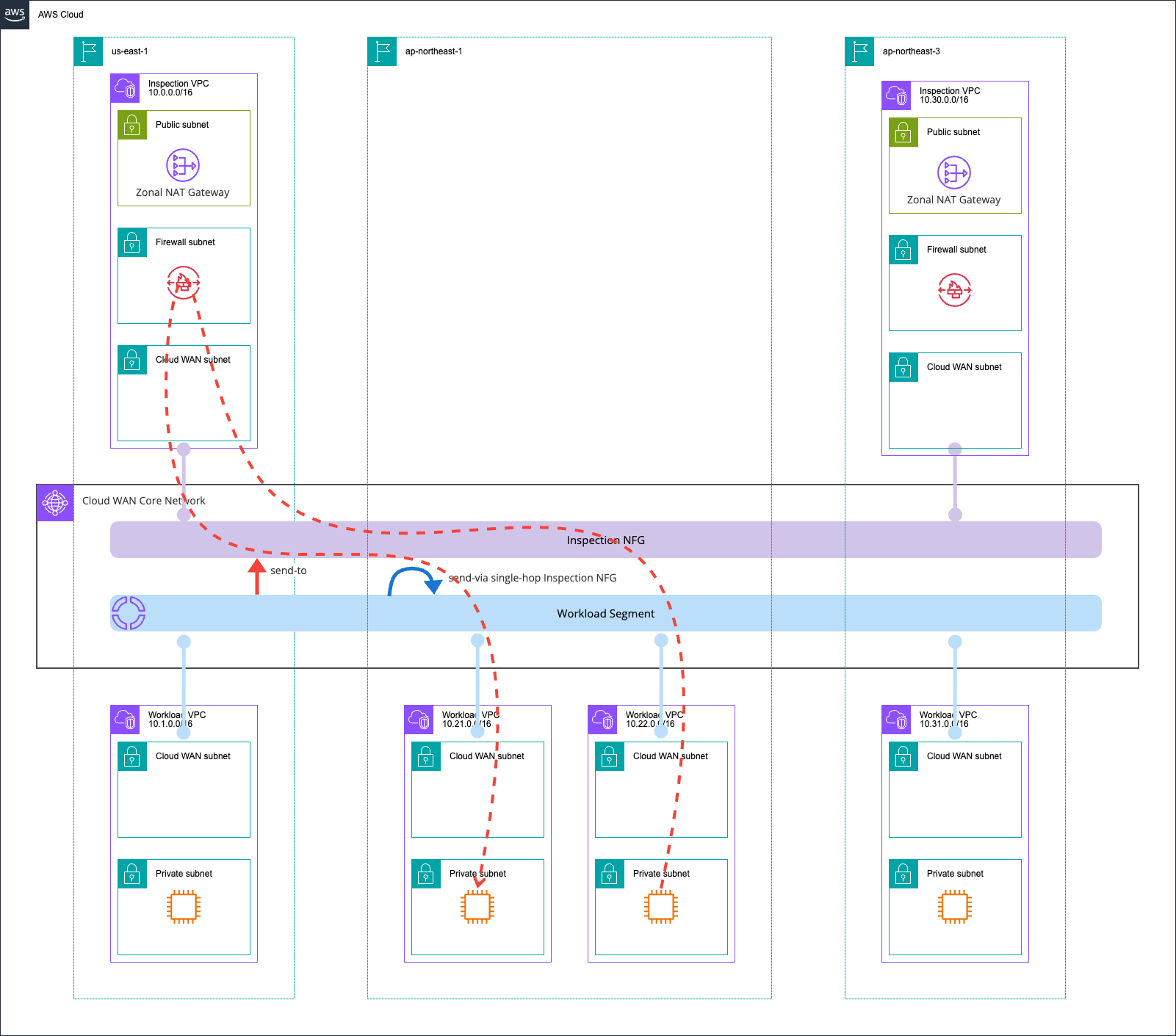
日本国内のリージョンで本来は完結させたいところ、アメリカまで都度ルーティングされては、これでは非常にレイテンシーが大きくなってしまいます。
また、以下のシナリオの場合はus-east-1にルーティングされることになります。
- 送信元VPCリージョン : ap-northeast-1
- 送信先VPCリージョン : us-east-1
- NFGアタッチメントがあるリージョン : us-east-1、ap-northeast-1
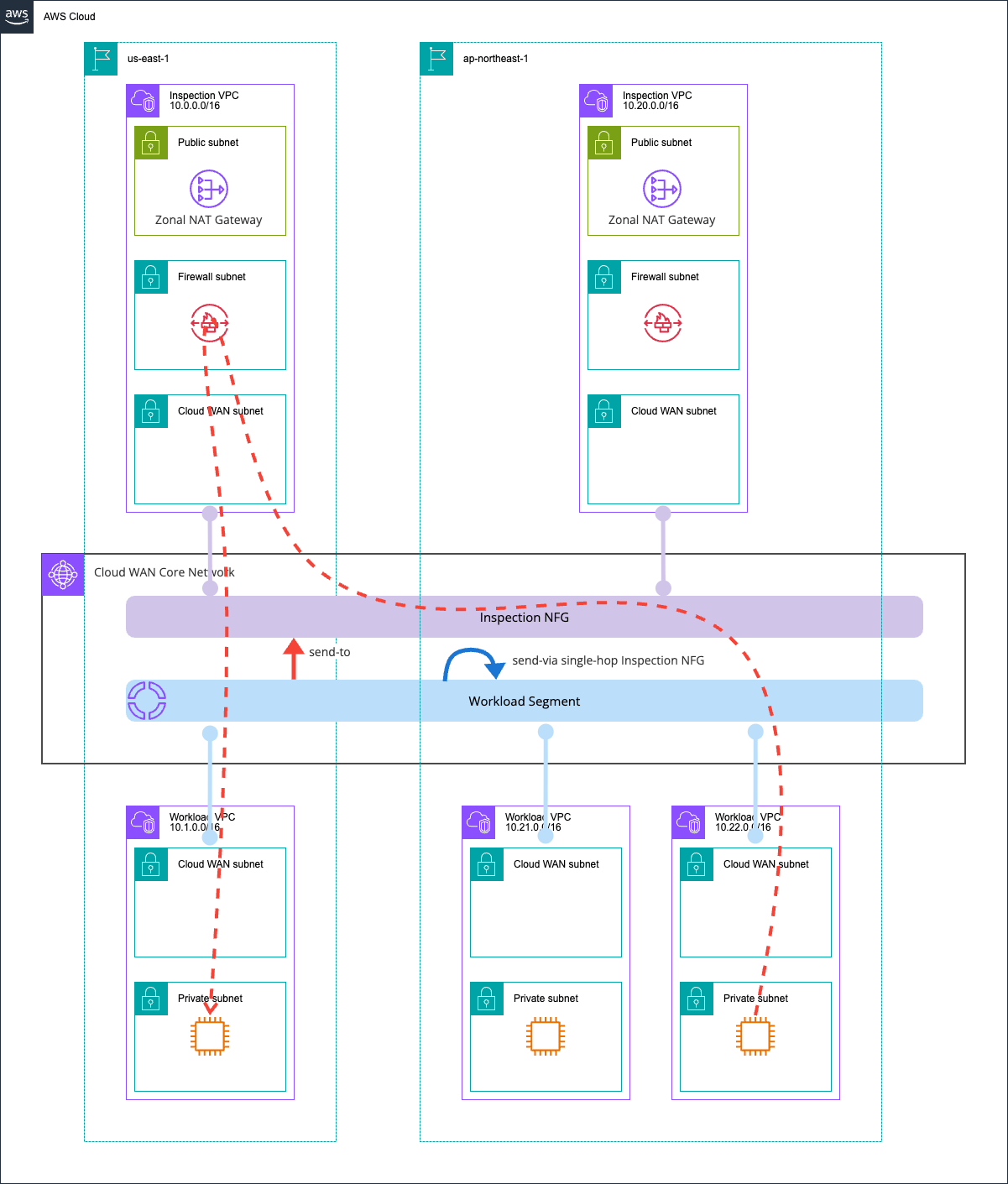
つまりは、NFGアタッチメント内のNetwork Firewallで通信制御をする際にap-northeast-1ではなく、us-east-1のものを変更することになります。
2. 送信元および送信先のリージョンと同一リージョンのNFGアタッチメントが存在しない場合はどのような挙動をするのか
「2. 送信元および送信先のリージョンと同一リージョンのNFGアタッチメントが存在しない場合はどのような挙動をするのか」については、以下記載をしました。
- segment policy で指定したフォールバックリージョンを使う
- フォールバックリージョンは segment policy ごとに 1 つだけ指定できる
しかし、AWS公式ドキュメントにてCore Network Policyの各種パラメータを確認しても、segments というキーにフォールバックリージョンなる設定はありませんでした。これは何を言いたいのでしょうか。
segment policyをCore Network Policyのこととして捉え、フォールバックリージョンを指定するという点に注目するのであれば、with-edge-overridesのuse-edge-locationを用いてルーティング先のリージョンを指定することをこの文言は指しているのでしょうか。
一方で、with-edge-overridesのuse-edge-locationで明示的に特定のリージョンを指定することはフォールバックリージョンを指定という表現とはミスマッチのように感じます。
私の感覚では "フォールバック" では、"縮退" や "予備" というニュアンスの単語です。
with-edge-overridesのuse-edge-locationで明示的に特定のリージョンを指定する際に、「複数のリージョンを指定することができる」かつ「その際にプライマリのリージョンとセカンダリのリージョンを選択できる」のであれば、セカンダリリージョンはフォールバックリージョンとして腹落ちできます。
しかし、use-edge-locationは現状一つのリージョンしか指定できず、常にそこで指定したリージョンが採用されるのであればフォールバックリージョンという表現に違和感を感じてしまします。
加えて、segment policyをCore Network Policyのこととして捉え、「フォールバックリージョンは Core Network Policy ごとに 1 つだけ指定できる」と読み取った場合も違和感があります。なぜならwith-edge-overridesは各segment actionごとに任意のリージョンのグループ単位で指定可能だからです。
具体的には以下のように指定が可能です。
{
  "segment-actions": [
    {
      "segment": "prod",
      "action": "send-to",
      "via": {
        "network-function-groups": [
          "inspection-vpc"
        ],
        "with-edge-overrides": [
          {
            "edge-sets ": [
              [
                "us-east-1",
                "us-west-2"
              ]
            ],
            "use-edge-location": "us-east-1"
          },
          {
            "edge-sets ": [
              [
                "ap-northeast-1",
                "ap-northeast-3"
              ]
            ],
            "use-edge-location": "ap-northeast-1"
          },
          {
            "edge-sets ": [
              [
                "eu-west-1",
                "eu-central-1"
              ]
            ],
            "use-edge-location": "eu-west-1"
          }
        ]
      }
    },
    {
      "segment": "prod",
      "action": "send-via",
      "mode": "single-hop",
      "when-sent-to": {
        "segments ": [
          "prod"
        ]
      },
      "via": {
        "network-function-groups": [
          "inspection-vpc"
        ],
        "with-edge-overrides": [
          {
            "edge-sets ": [
              [
                "us-east-1",
                "us-west-2"
              ]
            ],
            "use-edge-location": "us-east-1"
          },
          {
            "edge-sets ": [
              [
                "ap-northeast-1",
                "ap-northeast-3"
              ]
            ],
            "use-edge-location": "ap-northeast-1"
          },
          {
            "edge-sets ": [
              [
                "eu-west-1",
                "eu-central-1"
              ]
            ],
            "use-edge-location": "eu-west-1"
          }
        ]
      }
    }
  ]
}
つまりは、記事執筆時点のAWS公式ドキュメントでは、送信元および送信先のリージョンと同一リージョンのNFGアタッチメントが存在しない場合の挙動について、整合性が取れている記載がありません。
もしかして、default Region priority listに従って優先度の高いリージョンのNFGアタッチメントにルーティングしてくれるのでしょうか。
それとも地理的に近しいリージョンにルーティングしてくれるのでしょうか。
3. NFGアタッチメントが存在しないリージョンを with-edge-overrides の use-edge-location で指定した場合の挙動
「3. NFGアタッチメントが存在しないリージョンをwith-edge-overridesのuse-edge-locationで指定した場合の挙動」は、何らかの理由によってNFGアタッチメントが切断された場合を想定しています。
先述の通り、use-edge-locationは現状一つのリージョンしか指定できません。そのため、use-edge-locationで指定したリージョンがダウンした場合にCloud WANが自動的にdefault Region priority listなどに基づいて別のリージョンのNFGアタッチメントにルーティングしてくれなければ、存在しないリージョンにルーティングし続ける = 普通になってしまいます。
もし、そのような挙動を取るのであれば、特定リージョンへのNFGアタッチメントへのルーティングが正常に行われるのか定期的に動作確認を行い、もし、意図しない挙動をしていれば、use-edge-locationの値を書き換えるといった処理を自作する必要があります。
4. NFGアタッチメントが存在するリージョンを with-edge-overrides の use-edge-location で指定した場合の挙動
「4. NFGアタッチメントが存在するリージョンをwith-edge-overridesのuse-edge-locationで指定した場合の挙動」はシンプルに挙動の確認です。常にそのリージョンにルーティングされることを確認します。
検証環境
検証環境は以下のとおりです。
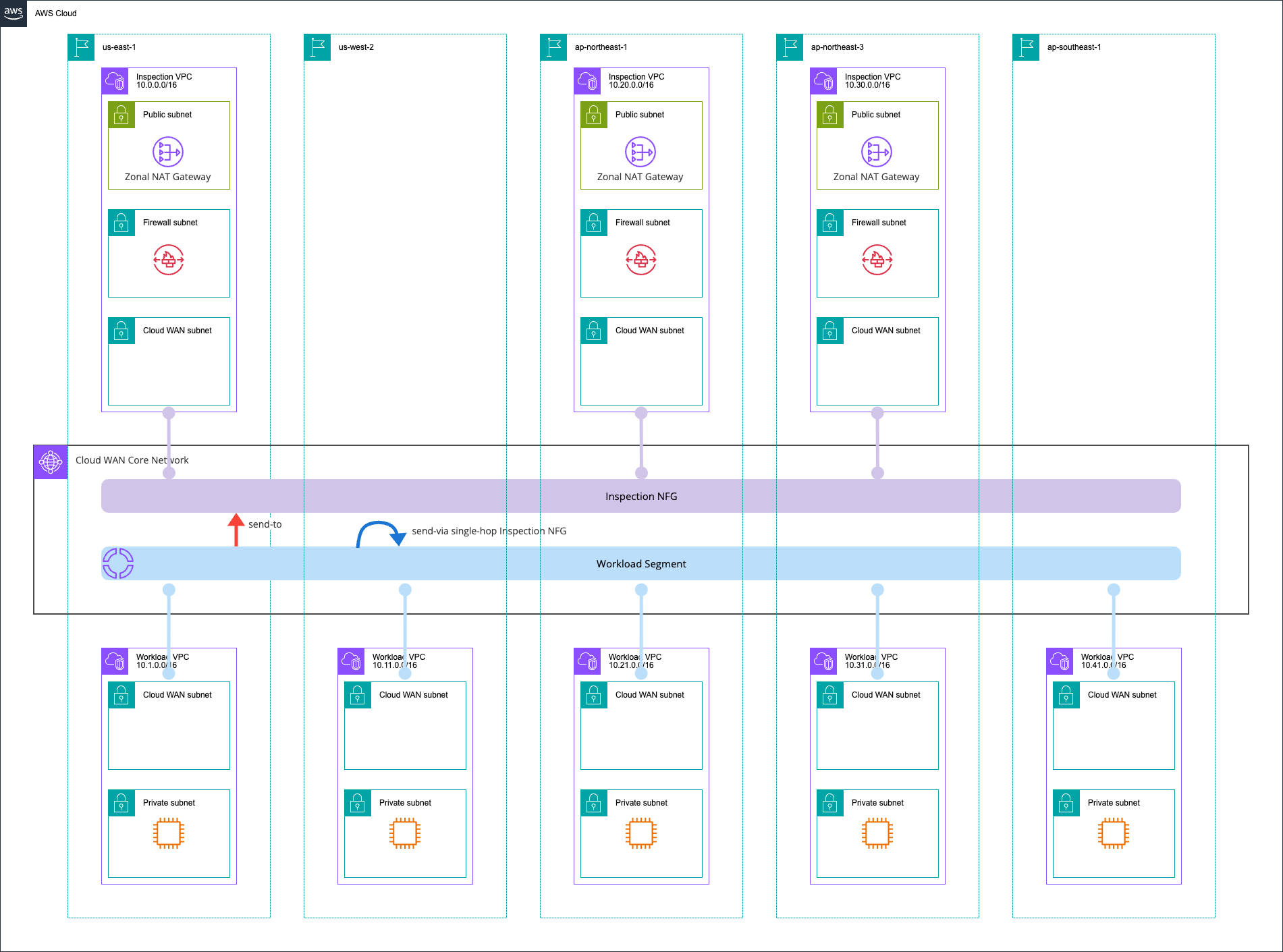
以下リージョンを使用しています。
- us-east-1
- us-west-2
- ap-northeast-1
- ap-northeast-3
- ap-southeast-1
一部リージョンではInspection NFG用のInspection VPCを用意し、Network FirewallおよびNAT Gatewayを動作させます。
インターネットに抜ける場合、およびVPC間の通信はInspection NFGにルーティングをして、Network Firewallで検査するようにします。
検証環境は全てAWS CDKで構築しました。使用したコードは以下GitHubリポジトリに保存しています。
cdk deploy --all --concurrency 6 --require-approval neverでデプロイできます。
1. リージョンごとの優先度を確認
それでは、検証をしていきます。
以下リージョンについて、送信元と送信先のリージョンペアを入れ替えて通信を行い、どのリージョンのInspection VPCのNetwork Firewallを通るか確認をします。
- us-east-1 - ap-northeast-1
- ap-northeast-1 - ap-northeast-3
- us-east-1 - ap-northeast-3
常にdefault Region priority list の順序の上位のリージョンのInspection VPCにルーティングされるかどうかを期待しています。
現在のCore Network Policyは以下のとおりです。
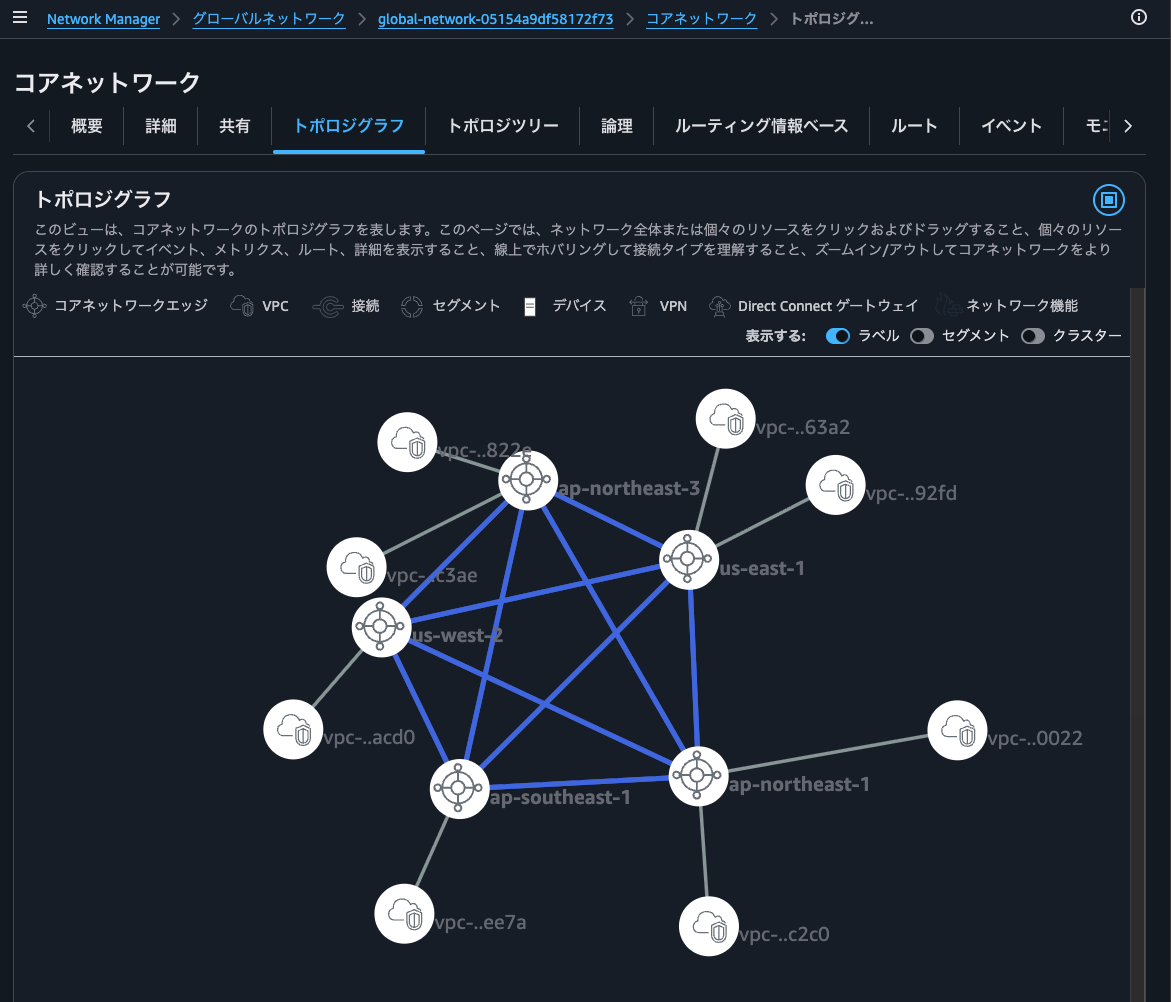
また、トポロジグラフは以下のようになっています。
ルートテーブルの確認
構築したCloud WANのCore Networkのルートテーブルを確認します。
マネジメントコンソールから確認すると、以下のようになります。
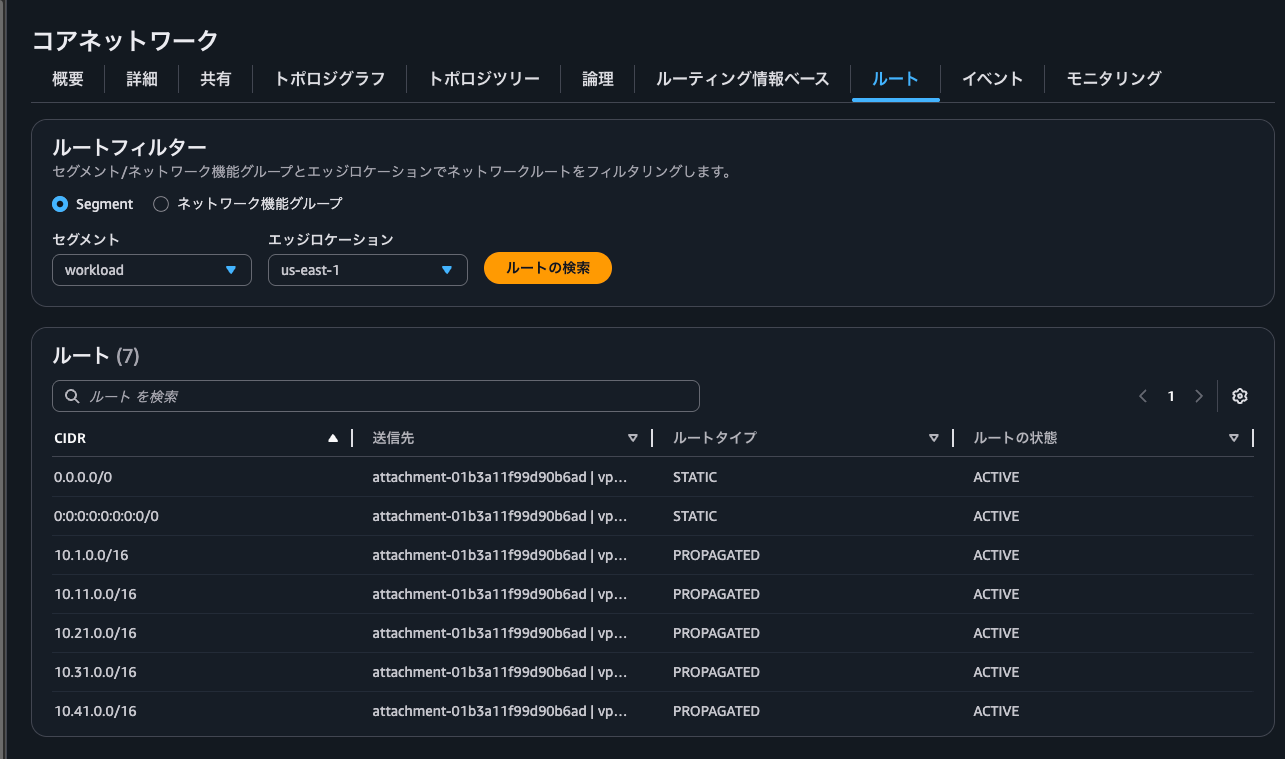
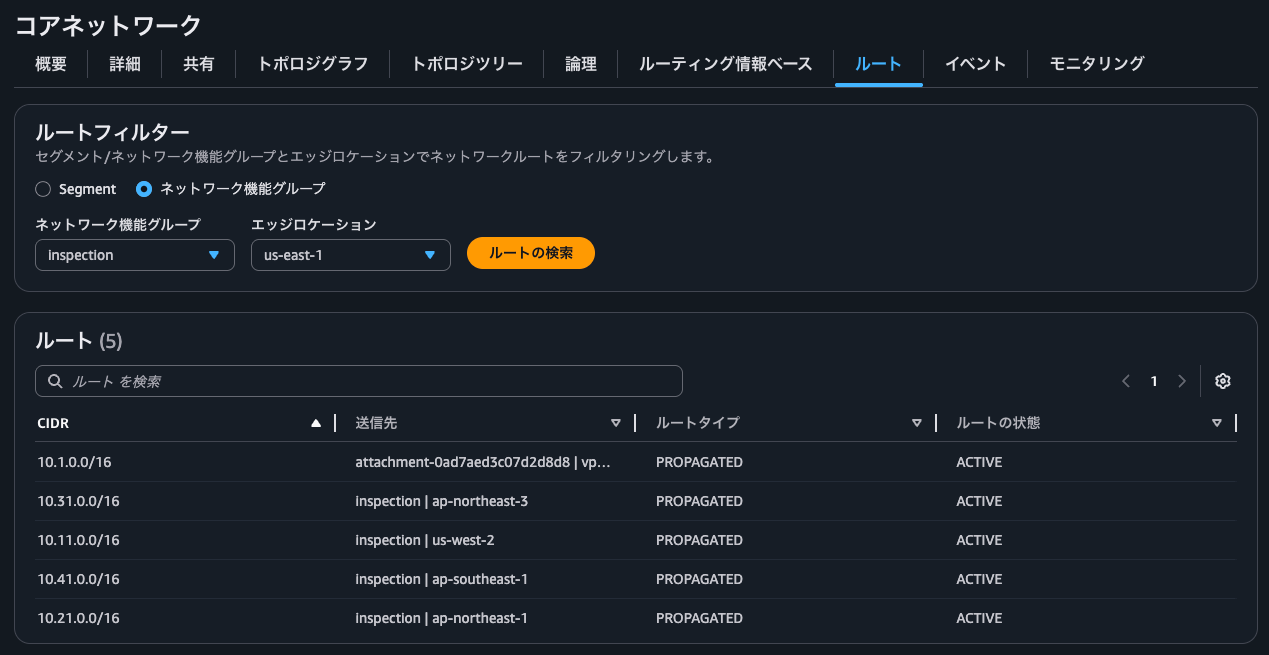
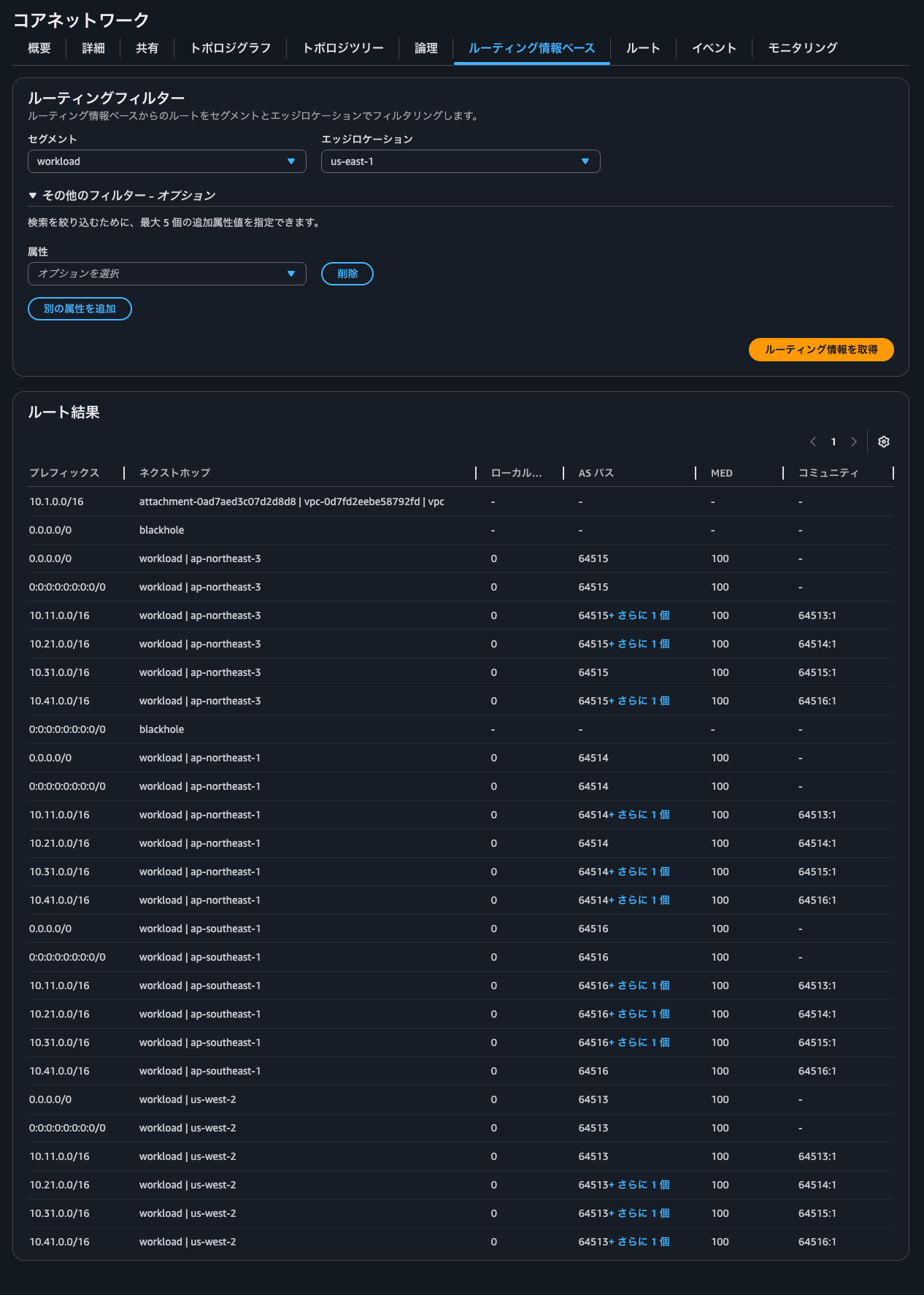
セグメントおよびNFGごとに全リージョンのルートテーブルをマネジメントコンソールから都度確認するのはなかなか骨が折れます。
ということで、スクリプトを用意しました。実行すると以下のようになります。
さらに分かりやすくするためにリージョンのペアとネクストホップのNFGアタッチメントのリージョンをテーブル形式で表現すると以下のようになります。
| リージョンA | リージョンB | NFGアタッチメントリージョン |
|---|---|---|
| us-east-1 | us-west-2 | us-east-1 |
| us-east-1 | ap-northeast-1 | us-east-1 |
| us-east-1 | ap-northeast-3 | us-east-1 |
| us-east-1 | ap-southeast-1 | us-east-1 |
| us-west-2 | ap-northeast-1 | ap-northeast-1 |
| us-west-2 | ap-northeast-3 | ap-northeast-3 |
| us-west-2 | ap-southeast-1 | us-east-1 |
| ap-northeast-1 | ap-northeast-3 | ap-northeast-1 |
| ap-northeast-1 | ap-southeast-1 | ap-northeast-1 |
| ap-northeast-3 | ap-southeast-1 | ap-northeast-3 |
この結果から以下が分かります。
- 送信元/送信先の両リージョンにNFGアタッチメントが存在している場合は、default Region priority list 上位のリージョンのNFGアタッチメントがネクストホップに選択される
- 例
- us-east-1 (優先度1位) - ap-northeast-1 (優先度7位) = us-east-1
- us-east-1 (優先度1位) - ap-northeast-3 (優先度9位) = us-east-1
- ap-northeast-1 (優先度7位) - ap-northeast-3 (優先度9位) = ap-northeast-1
- send-via single-hopであるため、優先度の低いリージョンからのリクエストおよびレスポンスの通信も優先度の高いリージョンのNFGアタッチメントがネクストホップに選択される = 行きと戻りで経由するNFGアタッチメントが異なる非対称ルーティングにならない
- 例
- ap-northeast-1 (優先度7位) to us-east-1 (優先度1位) = us-east-1
- ap-northeast-3 (優先度9位) to us-east-1 (優先度1位) = us-east-1
- 例
- 例
- 送信元/送信先のいずれかのリージョンにNFGアタッチメントが存在している場合は、そのリージョンのNFGアタッチメントがネクストホップに選択される
- 例
- us-east-1 (NFGアタッチメントあり) - us-west-2 (NFGアタッチメントなし) = us-east-1
- us-east-1 (NFGアタッチメントあり) - ap-southeast-1 (NFGアタッチメントなし) = us-east-1
- 例
- 送信元/送信先のいずれかのリージョンにもNFGアタッチメントが存在していない場合は、そのリージョンのNFGアタッチメントがネクストホップに選択される
- 例
- us-west-2 - ap-southeast-3 = us-east-1 (優先度1位)
- 例
- NFGアタッチメントが存在しているリージョンではデフォルトゲートウェイは、そのリージョンのNFGアタッチメントとなる
- 例
- us-east-1 からインターネット = us-east-1
- ap-northeast-1 からインターネット = ap-northeast-1
- ap-northeast-3 からインターネット = ap-northeast-3
- 例
- NFGアタッチメントが存在していないリージョンではデフォルトゲートウェイは、default Region priority list 上位のリージョンのNFGアタッチメントとなる
- 例
- us-west-2 からインターネット = us-east-1 (優先度1位)
- ap-southeast-1 からインターネット = us-east-1 (優先度1位)
- 例
結構な内容が分かりますね。
us-east-1 - ap-northeast-1
実際に疎通確認をしてみましょう。まずは us-east-1 - ap-northeast-1 のペアです。
$ hostname -i
10.1.0.14

$ ping 10.21.0.130 -c 4
PING 10.21.0.130 (10.21.0.130) 56(84) bytes of data.
64 bytes from 10.21.0.130: icmp_seq=1 ttl=122 time=161 ms
64 bytes from 10.21.0.130: icmp_seq=2 ttl=122 time=158 ms
64 bytes from 10.21.0.130: icmp_seq=3 ttl=122 time=158 ms
64 bytes from 10.21.0.130: icmp_seq=4 ttl=122 time=158 ms

--- 10.21.0.130 ping statistics ---
4 packets transmitted, 4 received, 0% packet loss, time 3003ms
rtt min/avg/max/mdev = 157.901/158.725/161.104/1.373 ms
$ hostname -i
10.1.0.14

$ hostname -i
10.21.0.130

$ ping 10.1.0.14 -c 4
PING 10.1.0.14 (10.1.0.14) 56(84) bytes of data.
64 bytes from 10.1.0.14: icmp_seq=1 ttl=122 time=161 ms
64 bytes from 10.1.0.14: icmp_seq=2 ttl=122 time=158 ms
64 bytes from 10.1.0.14: icmp_seq=3 ttl=122 time=158 ms
64 bytes from 10.1.0.14: icmp_seq=4 ttl=122 time=158 ms

--- 10.1.0.14 ping statistics ---
4 packets transmitted, 4 received, 0% packet loss, time 3003ms
rtt min/avg/max/mdev = 157.852/158.723/161.142/1.397 ms
Network Firewallのログはus-east-1のみ記録されていました。
{
    "firewall_name": "ServnVpc38817496-Nfw",
    "availability_zone": "us-east-1a",
    "event_timestamp": "1781487326",
    "event": {
        "icmp_type": 8,
        "aws_category": "",
        "src_ip": "10.1.0.14",
        "src_port": 0,
        "event_type": "alert",
        "alert": {
            "severity": 3,
            "signature_id": 2000001,
            "rev": 1,
            "signature": "INSPECTED at us-east-1 - ICMP",
            "action": "allowed",
            "category": ""
        },
        "flow_id": 1770630066093431,
        "dest_ip": "10.21.0.130",
        "proto": "ICMP",
        "verdict": {
            "action": "alert"
        },
        "icmp_code": 0,
        "dest_port": 0,
        "pkt_src": "geneve encapsulation",
        "timestamp": "2026-06-15T01:35:26.346720+0000",
        "direction": "to_server"
    }
}

{
    "firewall_name": "ServnVpc38817496-Nfw",
    "availability_zone": "us-east-1a",
    "event_timestamp": "1781487455",
    "event": {
        "icmp_type": 8,
        "aws_category": "",
        "src_ip": "10.21.0.130",
        "src_port": 0,
        "event_type": "alert",
        "alert": {
            "severity": 3,
            "signature_id": 2000001,
            "rev": 1,
            "signature": "INSPECTED at us-east-1 - ICMP",
            "action": "allowed",
            "category": ""
        },
        "flow_id": 2204606446583159,
        "dest_ip": "10.1.0.14",
        "proto": "ICMP",
        "verdict": {
            "action": "alert"
        },
        "icmp_code": 0,
        "dest_port": 0,
        "pkt_src": "geneve encapsulation",
        "timestamp": "2026-06-15T01:37:35.775443+0000",
        "direction": "to_server"
    }
}
us-east-1 - ap-northeast-3
次に us-east-1 - ap-northeast-3 のペアです。
$ hostname -i
10.1.0.14

$ ping 10.31.0.252 -c 4
PING 10.31.0.252 (10.31.0.252) 56(84) bytes of data.
64 bytes from 10.31.0.252: icmp_seq=1 ttl=122 time=161 ms
64 bytes from 10.31.0.252: icmp_seq=2 ttl=122 time=158 ms
64 bytes from 10.31.0.252: icmp_seq=3 ttl=122 time=158 ms
64 bytes from 10.31.0.252: icmp_seq=4 ttl=122 time=158 ms

--- 10.31.0.252 ping statistics ---
4 packets transmitted, 4 received, 0% packet loss, time 3005ms
rtt min/avg/max/mdev = 157.737/158.467/160.520/1.185 ms
$ hostname -i
10.31.0.252

$ ping 10.1.0.14 -c 4
PING 10.1.0.14 (10.1.0.14) 56(84) bytes of data.
64 bytes from 10.1.0.14: icmp_seq=1 ttl=122 time=160 ms
64 bytes from 10.1.0.14: icmp_seq=2 ttl=122 time=158 ms
64 bytes from 10.1.0.14: icmp_seq=3 ttl=122 time=158 ms
64 bytes from 10.1.0.14: icmp_seq=4 ttl=122 time=158 ms

--- 10.1.0.14 ping statistics ---
4 packets transmitted, 4 received, 0% packet loss, time 3005ms
rtt min/avg/max/mdev = 157.725/158.274/159.827/0.896 ms
Network Firewallのログはus-east-1のみ記録されていました。
{
    "firewall_name": "ServnVpc38817496-Nfw",
    "availability_zone": "us-east-1a",
    "event_timestamp": "1781487764",
    "event": {
        "icmp_type": 8,
        "aws_category": "",
        "src_ip": "10.1.0.14",
        "src_port": 0,
        "event_type": "alert",
        "alert": {
            "severity": 3,
            "signature_id": 2000001,
            "rev": 1,
            "signature": "INSPECTED at us-east-1 - ICMP",
            "action": "allowed",
            "category": ""
        },
        "flow_id": 1287595336719061,
        "dest_ip": "10.31.0.252",
        "proto": "ICMP",
        "verdict": {
            "action": "alert"
        },
        "icmp_code": 0,
        "dest_port": 0,
        "pkt_src": "geneve encapsulation",
        "timestamp": "2026-06-15T01:42:44.693007+0000",
        "direction": "to_server"
    }
}

{
    "firewall_name": "ServnVpc38817496-Nfw",
    "availability_zone": "us-east-1a",
    "event_timestamp": "1781487831",
    "event": {
        "icmp_type": 8,
        "aws_category": "",
        "src_ip": "10.31.0.252",
        "src_port": 0,
        "event_type": "alert",
        "alert": {
            "severity": 3,
            "signature_id": 2000001,
            "rev": 1,
            "signature": "INSPECTED at us-east-1 - ICMP",
            "action": "allowed",
            "category": ""
        },
        "flow_id": 2245570612222677,
        "dest_ip": "10.1.0.14",
        "proto": "ICMP",
        "verdict": {
            "action": "alert"
        },
        "icmp_code": 0,
        "dest_port": 0,
        "pkt_src": "geneve encapsulation",
        "timestamp": "2026-06-15T01:43:51.391765+0000",
        "direction": "to_server"
    }
}
ap-northeast-1 - ap-northeast-3
次に ap-northeast-1 - ap-northeast-3 のペアです。
$ hostname -i
10.21.0.130

$ ping 10.31.0.252 -c 4
PING 10.31.0.252 (10.31.0.252) 56(84) bytes of data.
64 bytes from 10.31.0.252: icmp_seq=1 ttl=122 time=12.0 ms
64 bytes from 10.31.0.252: icmp_seq=2 ttl=122 time=9.83 ms
64 bytes from 10.31.0.252: icmp_seq=3 ttl=122 time=9.80 ms
64 bytes from 10.31.0.252: icmp_seq=4 ttl=122 time=9.81 ms

--- 10.31.0.252 ping statistics ---
4 packets transmitted, 4 received, 0% packet loss, time 3005ms
rtt min/avg/max/mdev = 9.796/10.358/12.005/0.950 ms
$ hostname -i
10.31.0.252

$ ping 10.21.0.130 -c 4
PING 10.21.0.130 (10.21.0.130) 56(84) bytes of data.
64 bytes from 10.21.0.130: icmp_seq=1 ttl=122 time=13.4 ms
64 bytes from 10.21.0.130: icmp_seq=2 ttl=122 time=11.2 ms
64 bytes from 10.21.0.130: icmp_seq=3 ttl=122 time=11.5 ms
64 bytes from 10.21.0.130: icmp_seq=4 ttl=122 time=11.2 ms

--- 10.21.0.130 ping statistics ---
4 packets transmitted, 4 received, 0% packet loss, time 3005ms
rtt min/avg/max/mdev = 11.176/11.808/13.380/0.914 ms
Network Firewallのログはap-northeast-1のみ記録されていました。
{
    "firewall_name": "ServnVpc24285F49-Nfw",
    "availability_zone": "ap-northeast-1a",
    "event_timestamp": "1781487942",
    "event": {
        "icmp_type": 8,
        "aws_category": "",
        "src_ip": "10.21.0.130",
        "src_port": 0,
        "event_type": "alert",
        "alert": {
            "severity": 3,
            "signature_id": 2000001,
            "rev": 1,
            "signature": "INSPECTED at ap-northeast-1 - ICMP",
            "action": "allowed",
            "category": ""
        },
        "flow_id": 1784878362057617,
        "dest_ip": "10.31.0.252",
        "proto": "ICMP",
        "verdict": {
            "action": "alert"
        },
        "icmp_code": 0,
        "dest_port": 0,
        "pkt_src": "geneve encapsulation",
        "timestamp": "2026-06-15T01:45:42.677718+0000",
        "direction": "to_server"
    }
}

{
    "firewall_name": "ServnVpc24285F49-Nfw",
    "availability_zone": "ap-northeast-1a",
    "event_timestamp": "1781487980",
    "event": {
        "icmp_type": 8,
        "aws_category": "",
        "src_ip": "10.31.0.252",
        "src_port": 0,
        "event_type": "alert",
        "alert": {
            "severity": 3,
            "signature_id": 2000001,
            "rev": 1,
            "signature": "INSPECTED at ap-northeast-1 - ICMP",
            "action": "allowed",
            "category": ""
        },
        "flow_id": 1193388705425578,
        "dest_ip": "10.21.0.130",
        "proto": "ICMP",
        "verdict": {
            "action": "alert"
        },
        "icmp_code": 0,
        "dest_port": 0,
        "pkt_src": "geneve encapsulation",
        "timestamp": "2026-06-15T01:46:20.081249+0000",
        "direction": "to_server"
    }
}
2. 送信元および送信先のリージョンと同一リージョンのNFGアタッチメントが存在しない場合の挙動
それでは、送信元および送信先のリージョンと同一リージョンのNFGアタッチメントが存在しない場合の挙動についても確認をします。
us-west-2 VPCからインターネットへの通信
まずは、us-west-2 VPCからインターネットへの通信です。
$ hostname -i
10.11.0.26

$ curl https://checkip.amazonaws.com
52.206.140.168

$ sudo traceroute -T -p 443 checkip.amazonaws.com
traceroute to checkip.amazonaws.com (100.57.221.210), 30 hops max, 60 byte packets
 1  * * *
 2  * * *
 3  * * *
 4  * * *
 5  ip-10-0-2-13.us-west-2.compute.internal (10.0.2.13)  60.764 ms  63.252 ms  62.327 ms
 6  * * *
 7  ec2-100-57-221-210.compute-1.amazonaws.com (100.57.221.210)  61.163 ms  67.818 ms  63.798 ms
https://checkip.amazonaws.comにアクセスした際に返ってきたIPアドレスはus-east-1のInspection VPC上のNAT Gatewayに関連付けられているEIPです。
比較用にus-east-1からも同様の操作をしてみます。
$ hostname -i
10.1.0.14

$ curl https://checkip.amazonaws.com
52.206.140.168

$ sudo traceroute -T -p 443 checkip.amazonaws.com
traceroute to checkip.amazonaws.com (100.58.132.38), 30 hops max, 60 byte packets
 1  * * *
 2  * * *
 3  * * *
 4  ip-10-0-2-13.ec2.internal (10.0.2.13)  2.932 ms  3.247 ms  2.856 ms
 5  * * *
 6  ec2-100-58-132-38.compute-1.amazonaws.com (100.58.132.38)  4.353 ms  4.325 ms  5.319 ms
同じIPアドレスが返ってきましたね。
また、us-east-1とus-west-2のtradcerouteの実行結果からus-west-2の方がホップ数が1つ多いことが分かります。レイテンシーも増大していますね。
ap-southeast-1 VPCからインターネットへの通信
次に、ap-southeast-1 VPCからインターネットへの通信です。
$ hostname -i
10.41.0.118

$ curl https://checkip.amazonaws.com
52.206.140.168

$ sudo traceroute -T -p 443 checkip.amazonaws.com
traceroute to checkip.amazonaws.com (52.77.188.175), 30 hops max, 60 byte packets
 1  * * *
 2  * * *
 3  * * *
 4  * * *
 5  ip-10-0-2-13.ap-southeast-1.compute.internal (10.0.2.13)  225.034 ms  222.958 ms  211.272 ms
 6  * * *
 7  * 240.6.88.32 (240.6.88.32)  232.084 ms 240.3.12.97 (240.3.12.97)  232.937 ms
 8  242.8.90.19 (242.8.90.19)  231.843 ms 242.21.84.147 (242.21.84.147)  214.219 ms 242.19.39.197 (242.19.39.197)  231.316 ms
 9  240.1.168.15 (240.1.168.15)  440.660 ms 240.1.168.14 (240.1.168.14)  437.275 ms 240.1.172.15 (240.1.172.15)  454.901 ms
10  242.4.77.25 (242.4.77.25)  446.716 ms 241.0.4.68 (241.0.4.68)  220.101 ms 242.4.76.153 (242.4.76.153)  436.555 ms
11  240.3.60.1 (240.3.60.1)  448.762 ms 240.3.60.0 (240.3.60.0)  452.859 ms 240.3.60.2 (240.3.60.2)  440.922 ms
12  242.1.214.165 (242.1.214.165)  229.263 ms 241.0.13.75 (241.0.13.75)  437.179 ms 241.0.13.69 (241.0.13.69)  440.291 ms
13  * * *
14  * * *
15  * * *
16  * * *
17  ec2-52-77-188-175.ap-southeast-1.compute.amazonaws.com (52.77.188.175)  435.318 ms  448.245 ms  432.893 ms
返ってきたIPアドレスからus-east-1を通ったことが分かります。
また、ホップ数は非常に多くなっていますね。これは先ほどの結果と名前解決の結果が異なるためです。おそらく名前解決をしたap-southeast-1近辺のエリアで使用されているIPアドレスなのでしょう。
us-west-2 VPCとap-southeast-1 VPCとの通信
次に、us-west-2 VPCとap-southeast-1 VPCとの通信です。
$ hostname -i
10.11.0.26

$ ping 10.41.0.118 -c 4
PING 10.41.0.118 (10.41.0.118) 56(84) bytes of data.
64 bytes from 10.41.0.118: icmp_seq=1 ttl=121 time=281 ms
64 bytes from 10.41.0.118: icmp_seq=2 ttl=121 time=278 ms
64 bytes from 10.41.0.118: icmp_seq=3 ttl=121 time=278 ms
64 bytes from 10.41.0.118: icmp_seq=4 ttl=121 time=278 ms

--- 10.41.0.118 ping statistics ---
4 packets transmitted, 4 received, 0% packet loss, time 3003ms
rtt min/avg/max/mdev = 278.167/278.992/281.308/1.337 ms
$ hostname -i
10.41.0.118

$ ping 10.11.0.26 -c 4
PING 10.11.0.26 (10.11.0.26) 56(84) bytes of data.
64 bytes from 10.11.0.26: icmp_seq=1 ttl=121 time=280 ms
64 bytes from 10.11.0.26: icmp_seq=2 ttl=121 time=278 ms
64 bytes from 10.11.0.26: icmp_seq=3 ttl=121 time=278 ms
64 bytes from 10.11.0.26: icmp_seq=4 ttl=121 time=281 ms

--- 10.11.0.26 ping statistics ---
4 packets transmitted, 4 received, 0% packet loss, time 3003ms
rtt min/avg/max/mdev = 278.175/279.324/280.622/1.098 ms
Network Firewallのログはus-east-1にて記録されていました。
{
    "firewall_name": "ServnVpc38817496-Nfw",
    "availability_zone": "us-east-1a",
    "event_timestamp": "1781489426",
    "event": {
        "icmp_type": 8,
        "aws_category": "",
        "src_ip": "10.11.0.26",
        "src_port": 0,
        "event_type": "alert",
        "alert": {
            "severity": 3,
            "signature_id": 2000001,
            "rev": 1,
            "signature": "INSPECTED at us-east-1 - ICMP",
            "action": "allowed",
            "category": ""
        },
        "flow_id": 687848285936856,
        "dest_ip": "10.41.0.118",
        "proto": "ICMP",
        "verdict": {
            "action": "alert"
        },
        "icmp_code": 0,
        "dest_port": 0,
        "pkt_src": "geneve encapsulation",
        "timestamp": "2026-06-15T02:10:26.618904+0000",
        "direction": "to_server"
    }
}

{
    "firewall_name": "ServnVpc38817496-Nfw",
    "availability_zone": "us-east-1a",
    "event_timestamp": "1781489464",
    "event": {
        "icmp_type": 8,
        "aws_category": "",
        "src_ip": "10.41.0.118",
        "src_port": 0,
        "event_type": "alert",
        "alert": {
            "severity": 3,
            "signature_id": 2000001,
            "rev": 1,
            "signature": "INSPECTED at us-east-1 - ICMP",
            "action": "allowed",
            "category": ""
        },
        "flow_id": 200236353854680,
        "dest_ip": "10.11.0.26",
        "proto": "ICMP",
        "verdict": {
            "action": "alert"
        },
        "icmp_code": 0,
        "dest_port": 0,
        "pkt_src": "geneve encapsulation",
        "timestamp": "2026-06-15T02:11:04.898589+0000",
        "direction": "to_server"
    }
}
us-east-1 の Inspection VPCをデタッチ
一番優先度の高い us-east-1 の Inspection VPCをデタッチして、次に優先度の高い ap-northeast-1 のInspection VPCがネクストホップになるか確認をします。
以下のようにAWS CDKでデタッチします。その際、並行してus-west-2からインターネットに対して0.2秒間隔でpingを打ち、経路切り替え時の影響を調査します。
> cdk diff --no-change-set
Stack ServiceInsertionCoreStack
There were no differences

Stack ServiceInsertionRegionStack-us-east-1
Resources
[-] AWS::NetworkManager::VpcAttachment InspectionVpc/CloudWanAttachment InspectionVpcCloudWanAttachment56DF0FB9 destroy
[-] AWS::EC2::Route InspectionVpc/FwSubnetInternalRoute InspectionVpcFwSubnetInternalRouteB2E83FC5 destroy


Stack ServiceInsertionRegionStack-us-west-2
There were no differences

Stack ServiceInsertionRegionStack-ap-northeast-1
There were no differences

Stack ServiceInsertionRegionStack-ap-northeast-3
There were no differences

Stack ServiceInsertionRegionStack-ap-southeast-1
There were no differences


✨  Number of stacks with differences: 1

> cdk deploy ServiceInsertionRegionStack-us-east-1
Including dependency stacks: ServiceInsertionCoreStack
.
.
(中略)
.
.
Stack ARN:
arn:aws:cloudformation:us-east-1:<AWSアカウントID>:stack/ServiceInsertionRegionStack-us-east-1/67c92e30-6856-11f1-b45b-0ecc02602c95

✨  Total time: 143.94s
$ hostname -i
10.11.0.26

$ stdbuf -oL ping ec2.us-east-1.amazonaws.com -i 0.2 |
  while IFS= read -r line; do
    printf '%s %s\n' "$(date '+%Y-%m-%d %H:%M:%S.%3N')" "$line"
  done
2026-06-15 04:45:02.383 PING ec2.us-east-1.amazonaws.com (209.54.181.169) 56(84) bytes of data.
2026-06-15 04:45:02.471 64 bytes from 209.54.181.169 (209.54.181.169): icmp_seq=1 ttl=241 time=62.6 ms
2026-06-15 04:45:02.644 64 bytes from 209.54.181.169 (209.54.181.169): icmp_seq=2 ttl=241 time=59.2 ms
2026-06-15 04:45:02.845 64 bytes from 209.54.181.169 (209.54.181.169): icmp_seq=3 ttl=241 time=59.2 ms
.
.
(以下略)
.
.
デプロイが進むと以下のように途中からpingが通らなくなりました。
2026-06-15 04:45:46.222 64 bytes from 209.54.181.169 (209.54.181.169): icmp_seq=219 ttl=241 time=59.3 ms
2026-06-15 04:45:46.424 64 bytes from 209.54.181.169 (209.54.181.169): icmp_seq=220 ttl=241 time=59.3 ms
2026-06-15 04:45:46.623 64 bytes from 209.54.181.169 (209.54.181.169): icmp_seq=221 ttl=241 time=59.3 ms
.
.
(以降途切れる)
.
.
Core Networkのルートを確認します。
なんと、ap-northeast-1やap-northeast-3などNFGアタッチメントが存在するリージョンでは、ネクストホップが自リージョンのNFGアタッチメントになっていますが、us-west-2やap-southeast-1などNFGアタッチメントが存在しないリージョンにおいて、ネクストホップがデタッチしたNFGアタッチメントだったルートはブラックホールになっているではないですか。さらにus-east-1のworkload セグメントに属するVPCへのルートも削除されてしまっています。
反映待ちかと思い、20分ほど待ちましたが、結果は特に変わりません。
CloudWatch Logsに出力されたイベントを見てもus-east-1のInspection VPCのデタッチがなされたあとはルートの削除がされただけです。
ポリシーバージョンのステータスもExecution succeededのままで、何かしらの仕掛かり中ではないようです。
個人的には別リージョンにフォールバックしないのは意図しない挙動は想定外でした。一度学習したルートがブラックホールで残り続けてしまうのは非常に困りますね。メンテナンスなどでNFGアタッチメントのデタッチを行う場合は、事前にwith-edge-overridesのuse-edge-locationでNFGアタッチメントが生きているリージョンを指定してあげなければならなさそうです。
試しに現在動作しているポリシーバージョンと全く同じバージョンのポリシーを作成して、適用してみます。
Policy version - 4というポリシーバージョン名でCore Network Policyを作成しました。
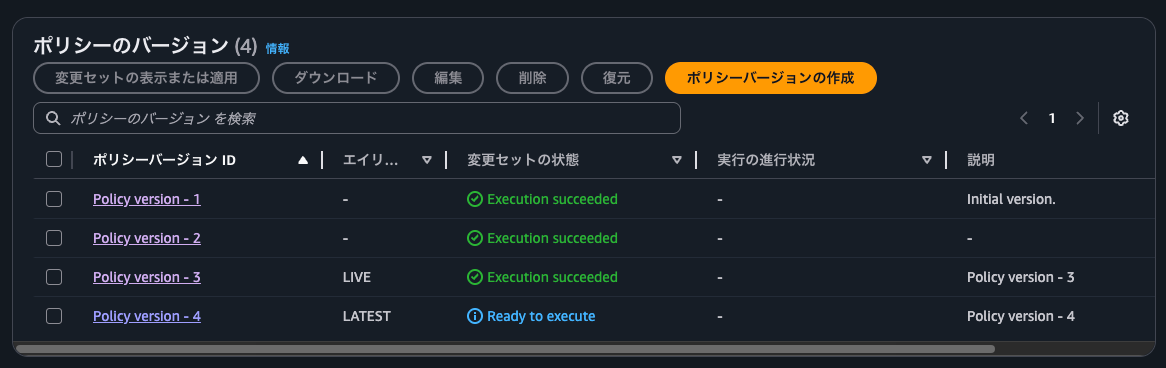
現在動作しているPolicy version - 3との差分はないことを確認して、適用します。
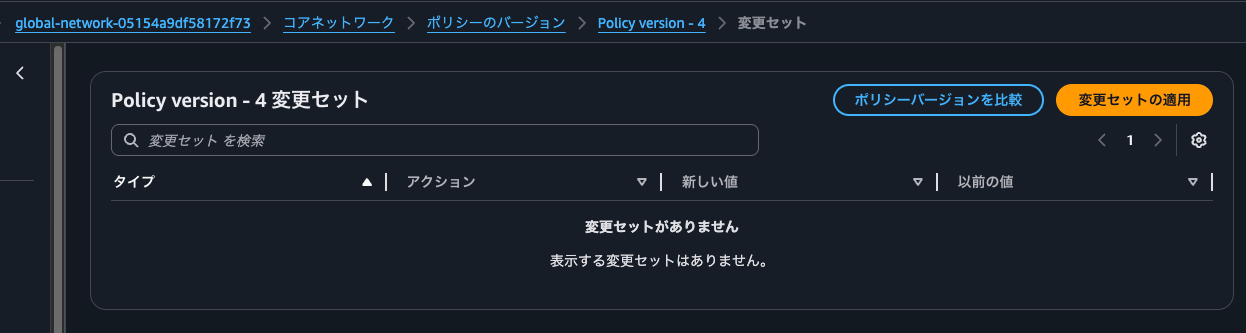
10分弱ほどでポリシー適用が完了しました。
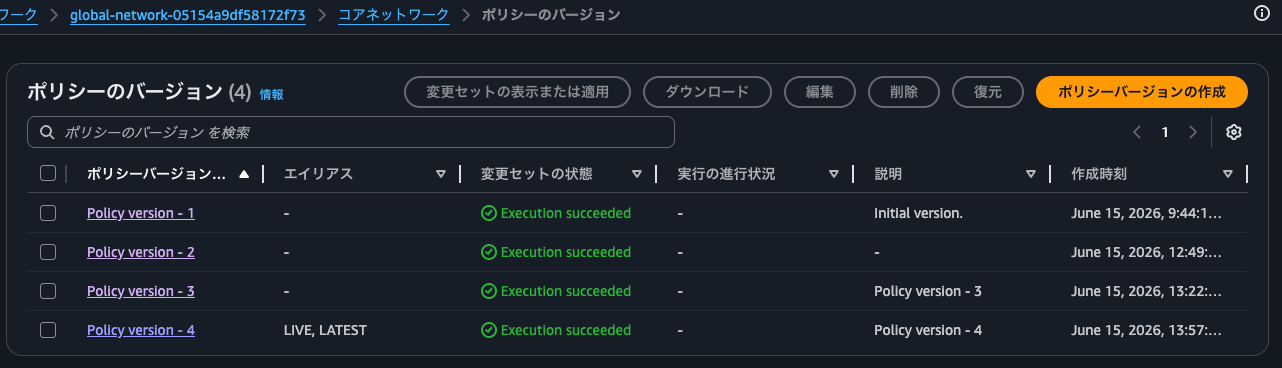
ルートを確認します。
この検証で確認した通信に該当するルートのネクストホップがいずれもap-northeast-1 のInspection VPCになりましたね。見立て通り、常にリストの上位のリージョンのInspection VPCにルーティングされそうです。
ということで、NFGアタッチメントをデタッチしたことに伴うルートの再評価をするためにはCore Network Policyを更新する手間がかかることが分かりました。
us-west-2 VPCからインターネットへの通信 (us-east-1 の Inspection VPCをデタッチ後)
実際に疎通確認をしてみます。
us-west-2 VPCからインターネットへの通信です。
$ hostname -i
10.11.0.26

$ curl https://checkip.amazonaws.com
13.192.143.132

$ sudo traceroute -T -p 443 checkip.amazonaws.com
traceroute to checkip.amazonaws.com (107.21.231.29), 30 hops max, 60 byte packets
 1  * * *
 2  * * *
 3  * * *
 4  * * *
 5  ip-10-20-2-217.us-west-2.compute.internal (10.20.2.217)  100.092 ms  99.822 ms  101.244 ms
 6  * * *
 7  240.1.52.41 (240.1.52.41)  101.209 ms 240.3.112.2 (240.3.112.2)  102.815 ms 240.3.112.1 (240.3.112.1)  100.922 ms
 8  242.3.88.213 (242.3.88.213)  102.336 ms 242.8.187.21 (242.8.187.21)  102.124 ms *
 9  240.0.236.32 (240.0.236.32)  249.533 ms 240.0.184.33 (240.0.184.33)  251.746 ms 240.0.236.34 (240.0.236.34)  247.174 ms
10  242.3.84.177 (242.3.84.177)  247.161 ms  251.333 ms 242.2.212.49 (242.2.212.49)  249.895 ms
11  240.3.76.97 (240.3.76.97)  247.122 ms 240.3.76.100 (240.3.76.100)  244.420 ms 240.3.76.68 (240.3.76.68)  254.176 ms
12  * * *
13  ec2-107-21-231-29.compute-1.amazonaws.com (107.21.231.29)  255.190 ms  250.567 ms  253.185 ms
ap-northeast-1のInspection VPCのNAT Gatewayに関連づけられているEIPが返ってきました。
ap-southeast-1 VPCからインターネットへの通信 (us-east-1 の Inspection VPCをデタッチ後)
ap-southeast-1 VPCからインターネットへの通信です。
$ hostname -i
10.41.0.118

$ curl https://checkip.amazonaws.com
13.192.143.132

$ sudo traceroute -T -p 443 checkip.amazonaws.com
traceroute to checkip.amazonaws.com (54.251.49.168), 30 hops max, 60 byte packets
 1  * * *
 2  * * *
 3  * * *
 4  * * *
 5  ip-10-20-2-217.ap-southeast-1.compute.internal (10.20.2.217)  71.060 ms  70.925 ms  72.702 ms
 6  * * *
 7  240.1.52.43 (240.1.52.43)  73.609 ms 240.3.112.11 (240.3.112.11)  70.183 ms 240.3.112.10 (240.3.112.10)  71.339 ms
 8  240.1.168.14 (240.1.168.14)  139.937 ms 240.1.168.12 (240.1.168.12)  138.478 ms  139.628 ms
 9  242.24.160.145 (242.24.160.145)  138.246 ms 242.4.85.25 (242.4.85.25)  141.009 ms 242.4.85.153 (242.4.85.153)  139.043 ms
10  240.6.20.3 (240.6.20.3)  139.394 ms 240.6.20.2 (240.6.20.2)  138.326 ms 240.3.56.0 (240.3.56.0)  140.767 ms
11  * 241.0.13.12 (241.0.13.12)  142.786 ms *
12  ec2-54-251-49-168.ap-southeast-1.compute.amazonaws.com (54.251.49.168)  140.681 ms  139.407 ms  137.431 ms
こちらもap-northeast-1のInspection VPCのNAT Gatewayに関連づけられているEIPが返ってきました。
us-west-2 VPCとap-southeast-1 VPCとの通信 (us-east-1 の Inspection VPCをデタッチ後)
us-west-2 VPCとap-southeast-1 VPCとの通信です。
$ hostname -i
10.11.0.26

$ ping 10.41.0.118 -c 4
PING 10.41.0.118 (10.41.0.118) 56(84) bytes of data.
64 bytes from 10.41.0.118: icmp_seq=1 ttl=121 time=172 ms
64 bytes from 10.41.0.118: icmp_seq=2 ttl=121 time=169 ms
64 bytes from 10.41.0.118: icmp_seq=3 ttl=121 time=169 ms
64 bytes from 10.41.0.118: icmp_seq=4 ttl=121 time=169 ms

--- 10.41.0.118 ping statistics ---
4 packets transmitted, 4 received, 0% packet loss, time 3005ms
rtt min/avg/max/mdev = 168.544/169.314/171.509/1.268 ms
$ hostname -i
10.41.0.118

$ ping 10.11.0.26 -c 4
PING 10.11.0.26 (10.11.0.26) 56(84) bytes of data.
64 bytes from 10.11.0.26: icmp_seq=1 ttl=121 time=172 ms
64 bytes from 10.11.0.26: icmp_seq=2 ttl=121 time=169 ms
64 bytes from 10.11.0.26: icmp_seq=3 ttl=121 time=169 ms
64 bytes from 10.11.0.26: icmp_seq=4 ttl=121 time=169 ms

--- 10.11.0.26 ping statistics ---
4 packets transmitted, 4 received, 0% packet loss, time 3004ms
rtt min/avg/max/mdev = 169.296/170.006/172.107/1.212 ms
こちらの通信はap-northeast-1のNetwork Firewallでログ記録されていました。
{
    "firewall_name": "ServnVpc24285F49-Nfw",
    "availability_zone": "ap-northeast-1a",
    "event_timestamp": "1781500542",
    "event": {
        "icmp_type": 8,
        "aws_category": "",
        "src_ip": "10.11.0.26",
        "src_port": 0,
        "event_type": "alert",
        "alert": {
            "severity": 3,
            "signature_id": 2000001,
            "rev": 1,
            "signature": "INSPECTED at ap-northeast-1 - ICMP",
            "action": "allowed",
            "category": ""
        },
        "flow_id": 1833463483798186,
        "dest_ip": "10.41.0.118",
        "proto": "ICMP",
        "verdict": {
            "action": "alert"
        },
        "icmp_code": 0,
        "dest_port": 0,
        "pkt_src": "geneve encapsulation",
        "timestamp": "2026-06-15T05:15:42.754566+0000",
        "direction": "to_server"
    }
}

{
    "firewall_name": "ServnVpc24285F49-Nfw",
    "availability_zone": "ap-northeast-1a",
    "event_timestamp": "1781500595",
    "event": {
        "icmp_type": 8,
        "aws_category": "",
        "src_ip": "10.41.0.118",
        "src_port": 0,
        "event_type": "alert",
        "alert": {
            "severity": 3,
            "signature_id": 2000001,
            "rev": 1,
            "signature": "INSPECTED at ap-northeast-1 - ICMP",
            "action": "allowed",
            "category": ""
        },
        "flow_id": 979439301759658,
        "dest_ip": "10.11.0.26",
        "proto": "ICMP",
        "verdict": {
            "action": "alert"
        },
        "icmp_code": 0,
        "dest_port": 0,
        "pkt_src": "geneve encapsulation",
        "timestamp": "2026-06-15T05:16:35.752331+0000",
        "direction": "to_server"
    }
}
3. NFGアタッチメントが存在しないリージョンを with-edge-overrides の use-edge-location で指定した場合の挙動
use-edge-location の設定
続けて、NFGアタッチメントが存在しないリージョンを with-edge-overridesのuse-edge-locationで指定した場合の挙動を確認します。
具体的には今回はap-northeast-1の通信はus-west-2にルーティングするようにします。
AWS CDKでデプロイします。
> cdk diff --no-change-set
Stack ServiceInsertionCoreStack
Resources
[~] AWS::NetworkManager::CoreNetwork CoreNetwork CoreNetwork
 └─ [~] PolicyDocument
     └─ [~] .segment-actions:
         └─ @@ -5,6 +5,16 @@
            [ ]   "via": {
            [ ]     "network-function-groups": [
            [ ]       "inspection"
            [+]     ],
            [+]     "with-edge-overrides": [
            [+]       {
            [+]         "edge-sets": [
            [+]           [
            [+]             "ap-northeast-1"
            [+]           ]
            [+]         ],
            [+]         "use-edge-location": "us-west-2"
            [+]       }
            [ ]     ]
            [ ]   }
            [ ] },
            @@ -20,6 +30,16 @@
            [ ]   "via": {
            [ ]     "network-function-groups": [
            [ ]       "inspection"
            [+]     ],
            [+]     "with-edge-overrides": [
            [+]       {
            [+]         "edge-sets": [
            [+]           [
            [+]             "ap-northeast-1"
            [+]           ]
            [+]         ],
            [+]         "use-edge-location": "us-west-2"
            [+]       }
            [ ]     ]
            [ ]   }
            [ ] }


Stack ServiceInsertionRegionStack-us-east-1
Resources
[+] AWS::NetworkManager::VpcAttachment InspectionVpc/CloudWanAttachment InspectionVpcCloudWanAttachment56DF0FB9
[+] AWS::EC2::Route InspectionVpc/FwSubnetInternalRoute InspectionVpcFwSubnetInternalRouteB2E83FC5


Stack ServiceInsertionRegionStack-us-west-2
There were no differences

Stack ServiceInsertionRegionStack-ap-northeast-1
There were no differences

Stack ServiceInsertionRegionStack-ap-northeast-3
There were no differences

Stack ServiceInsertionRegionStack-ap-southeast-1
There were no differences


✨  Number of stacks with differences: 2

> cdk deploy ServiceInsertionCoreStack ServiceInsertionRegionStack-us-east-1
.
.
(中略)
.
.
Stack ARN:
arn:aws:cloudformation:us-east-1:<AWSアカウントID>:stack/ServiceInsertionRegionStack-us-east-1/67c92e30-6856-11f1-b45b-0ecc02602c95

✨  Total time: 372.68s
更新後のポリシーは以下のとおりです。
ルートテーブルの確認
ルートテーブルの確認をします。
ap-northeast-1のルートは全てブラックホールになるのかなと思ったのですが、違いました。
もう一度同一ポリシーで更新してみます。
ポリシー更新後のルート情報は以下のとおりです。
us-east-1へ通信する際にus-east-1のInspection VPCを使うようになったぐらいですね。
ブラックホールルートになっているのはデフォルトルートおよび、自リージョン(ap-northeast-1)からプロパゲーションされているルートのみのようです。デフォルトルートについてはsend-toなので理解しやすいですね。一方、それを除くとsend-viaで設定される10.21.0.0/16へのルートのみブラックホールルートであることから、use-edge-locationが影響を与えるのはそのルートのみであることが分かります。
us-west-2やap-southeast-1などペア側のリージョンににNFGアタッチメントがない、またはap-northeast-3 と ap-northeast-1 のように、edge-setsで指定したリージョンの方が優先度の高いリージョンが高い組み合わせは引き続き ap-northeast-1 のNFGアタッチメントがネクストホップとなっています。
4. NFGアタッチメントが存在するリージョンを with-edge-overrides の use-edge-location で指定した場合の挙動
use-edge-location の設定
最後に、NFGアタッチメントが存在するリージョンをwith-edge-overridesのuse-edge-locationで指定した場合の挙動を確認します。
> cdk diff --no-change-set
Stack ServiceInsertionCoreStack
Resources
[~] AWS::NetworkManager::CoreNetwork CoreNetwork CoreNetwork
 └─ [~] PolicyDocument
     └─ [~] .segment-actions:
         └─ @@ -10,10 +10,10 @@
            [ ]     {
            [ ]       "edge-sets": [
            [ ]         [
            [-]           "ap-northeast-1"
            [+]           "us-west-2"
            [ ]         ]
            [ ]       ],
            [-]       "use-edge-location": "us-west-2"
            [+]       "use-edge-location": "ap-northeast-1"
            [ ]     }
            [ ]   ]
            [ ] }
            @@ -35,10 +35,10 @@
            [ ]     {
            [ ]       "edge-sets": [
            [ ]         [
            [-]           "ap-northeast-1"
            [+]           "us-west-2"
            [ ]         ]
            [ ]       ],
            [-]       "use-edge-location": "us-west-2"
            [+]       "use-edge-location": "ap-northeast-1"
            [ ]     }
            [ ]   ]
            [ ] }


Stack ServiceInsertionRegionStack-us-east-1
There were no differences

Stack ServiceInsertionRegionStack-us-west-2
There were no differences

Stack ServiceInsertionRegionStack-ap-northeast-1
There were no differences

Stack ServiceInsertionRegionStack-ap-northeast-3
There were no differences

Stack ServiceInsertionRegionStack-ap-southeast-1
There were no differences


✨  Number of stacks with differences: 1


> cdk deploy ServiceInsertionCoreStack

✨  Synthesis time: 7.93s

ServiceInsertionCoreStack: start: Building ServiceInsertionCoreStack Template
ServiceInsertionCoreStack: success: Built ServiceInsertionCoreStack Template
ServiceInsertionCoreStack: start: Publishing ServiceInsertionCoreStack Template (<AWSアカウントID>-ap-northeast-1-d1fe46c9)
ServiceInsertionCoreStack: success: Published ServiceInsertionCoreStack Template (<AWSアカウントID>-ap-northeast-1-d1fe46c9)
ServiceInsertionCoreStack: creating CloudFormation changeset...
Changeset arn:aws:cloudformation:ap-northeast-1:<AWSアカウントID>:changeSet/cdk-deploy-change-set/7684caeb-f4bf-497f-af3c-708db87c212a created and waiting in review for manual execution (--no-execute)
ServiceInsertionCoreStack: deploying... [1/1]

 ✅  ServiceInsertionCoreStack

✨  Deployment time: 370.64s

Outputs:
ServiceInsertionCoreStack.ExportsOutputFnGetAttCoreNetworkCoreNetworkArnF79E344C = arn:aws:networkmanager::<AWSアカウントID>:core-network/core-network-03d07918f18f4ef31
ServiceInsertionCoreStack.ExportsOutputFnGetAttCoreNetworkCoreNetworkId8444010F = core-network-03d07918f18f4ef31
Stack ARN:
arn:aws:cloudformation:ap-northeast-1:<AWSアカウントID>:stack/ServiceInsertionCoreStack/4d47a030-6853-11f1-9a52-0e3fbad6b3bb

✨  Total time: 378.57s
デプロイ後のCore Network Policyは以下のとおりです。
ルートテーブルの確認
ルートテーブルの確認を行います。
やはりデフォルトルートおよび、自リージョンからプロパゲーションされているルートのみに作用しているようですね。
もう少し整理すると、以下のとおりです。
- ap-northeast-3からアドバタイズされるプレフィックスである
10.31.0.0/16のネクストホップがap-northeast-3のNFGアタッチメントであることから、ペアとなるリージョン側にNFGアタッチメントがある場合はそのリージョンのNFGアタッチメントがネクストホップ - ap-southeast-1からアドバタイズされるプレフィックスである
10.41.0.0/16のネクストホップがus-east-1のNFGアタッチメントであることから、ペアとなるリージョン側にNFGアタッチメントがない場合は、default Region priority listで優先度の高いリージョンのNFGアタッチメントがネクストホップ
特に後者について、use-edge-locationで指定しても、edge-setsで送信元/送信先の片方のリージョンでしか指定しなければ、default Region priority listよりも優先度が低くなるとは思いませんでした。これは注意した方が良さそうです。
Service Insertionによるルーティング、完全に理解した
AWS Cloud WANのService InsertionにおいてどのリージョンのNFGアタッチメントにルーティングするのか整理してみました。
設計をする際にはこの検証で判明したことを頭に入れておきたいですね。
なお、個人的にはuse-edge-locationは積極的に利用しなくとも良いかなと感じました。
現状ではNFGアタッチメントをデタッチした時の挙動が怪しいのでフェアではないのですが、use-edge-locationで指定したリージョンがダウンした場合の挙動がやはり気になります。
使用するシチュエーションでは以下でしょうか。
- 地理的に近いNFGアタッチメントにルーティングをしてレイテンシーを抑えたい
- 従属するメインのリージョンが停止した場合は別リージョンにルーティングすることなく、一緒に停止しても良い
- 業務上重要度の高い処理を行っていないリージョンで、普段あまり金銭的 / 運用維持管理コストをかけたくない
レイテンシーの観点で言うと、以下のようにランニングコストおよび管理削減のため(NFG)と記載があるリージョンでのみNetwork FirewallとNAT Gatewayを配置したInspection VPCを配置するのであれば、with-edge-overridesのedge-setsでグルーピングをして、use-edge-locationを(NFG)と記載があるリージョンと指定します。
- アメリカ
- us-east-1 (NFG)
- us-west-1
- us-west-2
- アジア
- ap-northeast-1 (NFG)
- ap-northeast-3
- ap-southeast-1
- ヨーロッパ
- eu-west-1 (NFG)
- eu-central-1
この記事が誰かの助けになれば幸いです。
以上、クラウド事業本部 コンサルティング部の のんピ(@non____97)でした!