ALBのリスナールールごとに認証セッションを分離できるか試してみた

はじめに
クラウド事業統括本部の浅野です。
Application Load Balancer(ALB)のリスナールールには、authenticate-cognitoとauthenticate-oidcという2種類の認証アクションを設定できます。どちらもルールごとに個別に設定できるため、1つのALBの中に「Cognitoで認証する経路」と「Cognito以外のOIDC IdPで認証する経路」を混在させることも、さらに複数の異なるOIDC IdPをそれぞれ別の経路に割り当てることもできます。
業務用アプリケーションでは、社内向けの認証画面と社外パートナー向けの認証画面のように要求される認証方式が異なる複数の窓口を分離する要件があり、この機能を利用すればALBを分けずに1台に集約できます。
実際にこれをTerraformでどう設定し、結果をALB側・アプリ側・ブラウザ側でそれぞれどう見えるのかを、Cognito経由の経路とGoogle直結の経路という組み合わせで紹介します。
実現したいこと
同一のALBに、ホストヘッダーが異なる2つのリスナールールを設定します。
cognito-auth.<ドメイン>→authenticate-cognito(Amazon Cognito経由)google-auth.<ドメイン>→authenticate-oidc(Google直結、Cognitoを経由しない)
この設定内容と、実際にアクセスしたときの画面・Cookieの見え方を紹介します。
なお、複数の外部IdPを使い分けたい場合、今回のようにALBの経路ごとに直接認証方式を割り当てる以外に、Cognito User Pool側に複数の外部IdPをフェデレーションし、認証窓口自体は1つに集約する構成も考えられます。この2つのアプローチの使い分けについては「最後に」で触れます。
構成
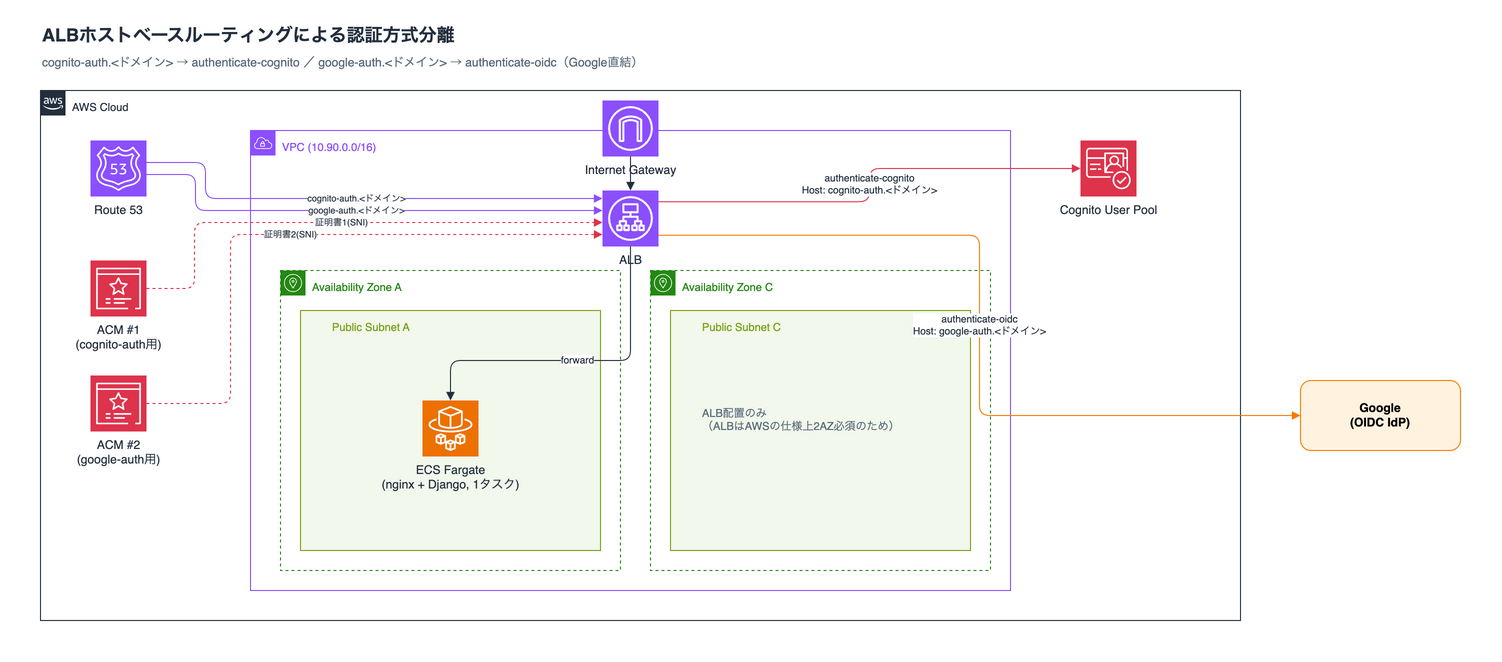
ドメインはcognito-auth.<ドメイン>とgoogle-auth.<ドメイン>の2つをRoute 53に登録し、ACM証明書もドメインごとに個別に2枚取得します。同一ALBのHTTPSリスナーに、SNI(Server Name Indication)で2枚とも紐付けます。ターゲットグループ・ECS Fargateタスクは経路によらず1つだけ共有しており、アプリ側(Django)はIdPを一切意識せず、ALBが付与したx-amzn-oidc-identityヘッダーとアクセスしたホスト名を表示するだけの実装です。
cognito-auth.<ドメイン>の認証フロー
google-auth.<ドメイン>の認証フロー
Terraform
全リソースを1つのmain.tfに集約しています。全文は折りたたんでいるので、必要であれば展開してください。
main.tf(クリックで展開)
##############################################
# 検証: ALBのリスナールールごとに異なる認証方式(Cognito / Google直結OIDC)を
# 割り当てた場合、認証セッションが経路ごとに独立するかを確認する。
##############################################

terraform {
  required_version = ">= 1.9"

  required_providers {
    aws = {
      source  = "hashicorp/aws"
      version = "~> 5.0"
    }
    random = {
      source  = "hashicorp/random"
      version = "~> 3.6"
    }
    null = {
      source  = "hashicorp/null"
      version = "~> 3.2"
    }
  }
}

provider "aws" {
  region = var.aws_region

  default_tags {
    tags = {
      Project   = "alb-cognito-route-auth-separation-poc"
      ManagedBy = "terraform"
    }
  }
}

##############################################
# variables
##############################################

variable "aws_region" {
  description = "検証環境をデプロイするリージョン"
  type        = string
  default     = "ap-northeast-1"
}

variable "root_domain" {
  description = "Route53ホストゾーンのドメイン名(既存ゾーンを利用)"
  type        = string
  default     = "<ドメイン>"
}

variable "google_client_id" {
  description = "Googleを直接OIDC IdPとして使うためのOAuthクライアントID(Google Cloud Consoleで事前作成)"
  type        = string
  sensitive   = true
}

variable "google_client_secret" {
  description = "GoogleのOAuthクライアントシークレット"
  type        = string
  sensitive   = true
}

##############################################
# data sources
##############################################

data "aws_caller_identity" "current" {}

data "aws_availability_zones" "available" {
  state = "available"
}

data "aws_route53_zone" "root" {
  name = var.root_domain
}

locals {
  name = "route-auth-poc"
  # 経路ごとに別ドメインを割り当てる(ホストヘッダーでリスナールールを振り分けるため)
  cognito_domain_name = "cognito-auth.${var.root_domain}"
  google_domain_name  = "google-auth.${var.root_domain}"
  azs                 = slice(data.aws_availability_zones.available.names, 0, 2)
  ecr_registry  = "${data.aws_caller_identity.current.account_id}.dkr.ecr.${var.aws_region}.amazonaws.com"
  app_source_hash = sha1(join("", [
    for f in sort(fileset("${path.module}/../django", "**")) : filesha1("${path.module}/../django/${f}")
  ]))
  nginx_source_hash = sha1(join("", [
    for f in sort(fileset("${path.module}/../nginx", "**")) : filesha1("${path.module}/../nginx/${f}")
  ]))
}

##############################################
# VPC(Public subnet x2のみ。NAT Gateway不要 = ECS Execution時のECR/CloudWatch通信は
# assign_public_ip=trueでインターネットゲートウェイ経由に任せる)
##############################################

resource "aws_vpc" "this" {
  cidr_block           = "10.90.0.0/16"
  enable_dns_support   = true
  enable_dns_hostnames = true
  tags = { Name = "${local.name}-vpc" }
}

resource "aws_internet_gateway" "this" {
  vpc_id = aws_vpc.this.id
  tags   = { Name = "${local.name}-igw" }
}

resource "aws_subnet" "public" {
  count                   = 2
  vpc_id                  = aws_vpc.this.id
  cidr_block              = "10.90.${count.index}.0/24"
  availability_zone       = local.azs[count.index]
  map_public_ip_on_launch = true
  tags                    = { Name = "${local.name}-public-${count.index}" }
}

resource "aws_route_table" "public" {
  vpc_id = aws_vpc.this.id
  route {
    cidr_block = "0.0.0.0/0"
    gateway_id = aws_internet_gateway.this.id
  }
  tags = { Name = "${local.name}-public-rt" }
}

resource "aws_route_table_association" "public" {
  count          = 2
  subnet_id      = aws_subnet.public[count.index].id
  route_table_id = aws_route_table.public.id
}

##############################################
# Security Groups
##############################################

resource "aws_security_group" "alb" {
  name   = "${local.name}-alb-sg"
  vpc_id = aws_vpc.this.id
}

resource "aws_vpc_security_group_ingress_rule" "alb_https" {
  security_group_id = aws_security_group.alb.id
  cidr_ipv4          = "0.0.0.0/0"
  from_port           = 443
  to_port             = 443
  ip_protocol         = "tcp"
}

resource "aws_vpc_security_group_ingress_rule" "alb_http" {
  security_group_id = aws_security_group.alb.id
  cidr_ipv4          = "0.0.0.0/0"
  from_port           = 80
  to_port             = 80
  ip_protocol         = "tcp"
}

resource "aws_vpc_security_group_egress_rule" "alb_all" {
  security_group_id = aws_security_group.alb.id
  cidr_ipv4          = "0.0.0.0/0"
  ip_protocol         = "-1"
}

resource "aws_security_group" "ecs" {
  name   = "${local.name}-ecs-sg"
  vpc_id = aws_vpc.this.id
}

resource "aws_vpc_security_group_ingress_rule" "ecs_from_alb" {
  security_group_id           = aws_security_group.ecs.id
  referenced_security_group_id = aws_security_group.alb.id
  from_port                    = 80
  to_port                      = 80
  ip_protocol                  = "tcp"
}

resource "aws_vpc_security_group_egress_rule" "ecs_all" {
  security_group_id = aws_security_group.ecs.id
  cidr_ipv4          = "0.0.0.0/0"
  ip_protocol         = "-1"
}

##############################################
# ACM + Route53
# 経路(cognito-auth / google-auth)ごとに個別のACM証明書とAレコードを用意する。
# 同一ALBのHTTPSリスナーにSNIで2枚とも紐付ける(aws_lb_listener_certificateで追加分をアタッチ)。
##############################################

resource "aws_acm_certificate" "cognito" {
  domain_name       = local.cognito_domain_name
  validation_method = "DNS"
  lifecycle { create_before_destroy = true }
}

resource "aws_route53_record" "cognito_cert_validation" {
  for_each = {
    for dvo in aws_acm_certificate.cognito.domain_validation_options : dvo.domain_name => {
      name  = dvo.resource_record_name
      type  = dvo.resource_record_type
      value = dvo.resource_record_value
    }
  }
  zone_id = data.aws_route53_zone.root.zone_id
  name    = each.value.name
  type    = each.value.type
  records = [each.value.value]
  ttl     = 60
}

resource "aws_acm_certificate_validation" "cognito" {
  certificate_arn         = aws_acm_certificate.cognito.arn
  validation_record_fqdns = [for r in aws_route53_record.cognito_cert_validation : r.fqdn]
}

resource "aws_route53_record" "cognito_alias" {
  zone_id = data.aws_route53_zone.root.zone_id
  name    = local.cognito_domain_name
  type    = "A"
  alias {
    name                   = aws_lb.this.dns_name
    zone_id                = aws_lb.this.zone_id
    evaluate_target_health = true
  }
}

resource "aws_acm_certificate" "google" {
  domain_name       = local.google_domain_name
  validation_method = "DNS"
  lifecycle { create_before_destroy = true }
}

resource "aws_route53_record" "google_cert_validation" {
  for_each = {
    for dvo in aws_acm_certificate.google.domain_validation_options : dvo.domain_name => {
      name  = dvo.resource_record_name
      type  = dvo.resource_record_type
      value = dvo.resource_record_value
    }
  }
  zone_id = data.aws_route53_zone.root.zone_id
  name    = each.value.name
  type    = each.value.type
  records = [each.value.value]
  ttl     = 60
}

resource "aws_acm_certificate_validation" "google" {
  certificate_arn         = aws_acm_certificate.google.arn
  validation_record_fqdns = [for r in aws_route53_record.google_cert_validation : r.fqdn]
}

resource "aws_route53_record" "google_alias" {
  zone_id = data.aws_route53_zone.root.zone_id
  name    = local.google_domain_name
  type    = "A"
  alias {
    name                   = aws_lb.this.dns_name
    zone_id                = aws_lb.this.zone_id
    evaluate_target_health = true
  }
}

##############################################
# ECR + イメージビルド(既存alb-cognito-django-pocと同一パターン)
##############################################

resource "aws_ecr_repository" "app" {
  name         = "${local.name}-app"
  force_delete = true
}

resource "aws_ecr_repository" "nginx" {
  name         = "${local.name}-nginx"
  force_delete = true
}

resource "null_resource" "build_setup" {
  triggers = { always_run = timestamp() }

  provisioner "local-exec" {
    interpreter = ["bash", "-c"]
    command     = <<-EOT
      set -euo pipefail
      docker info > /dev/null 2>&1 || { echo "Dockerデーモンに接続できません。Rancher Desktopが起動しているか確認してください。" >&2; exit 1; }
      docker buildx inspect route-auth-poc-builder > /dev/null 2>&1 || docker buildx create --name route-auth-poc-builder --use --bootstrap
      docker buildx use route-auth-poc-builder
      aws ecr get-login-password --region ${var.aws_region} \
        | docker login --username AWS --password-stdin ${local.ecr_registry}
    EOT
  }
}

resource "null_resource" "build_push_app" {
  triggers = {
    source_hash       = local.app_source_hash
    build_script_hash = filesha1("${path.module}/main.tf")
  }
  provisioner "local-exec" {
    interpreter = ["bash", "-c"]
    command     = "docker buildx build --platform linux/arm64 -t ${aws_ecr_repository.app.repository_url}:${local.app_source_hash} --push ${path.module}/../django"
  }
  depends_on = [null_resource.build_setup, aws_ecr_repository.app]
}

resource "null_resource" "build_push_nginx" {
  triggers = {
    source_hash       = local.nginx_source_hash
    build_script_hash = filesha1("${path.module}/main.tf")
  }
  provisioner "local-exec" {
    interpreter = ["bash", "-c"]
    command     = "docker buildx build --platform linux/arm64 -t ${aws_ecr_repository.nginx.repository_url}:${local.nginx_source_hash} --push ${path.module}/../nginx"
  }
  depends_on = [null_resource.build_setup, aws_ecr_repository.nginx]
}

##############################################
# ECS
##############################################

resource "aws_ecs_cluster" "this" {
  name = local.name
  setting {
    name  = "containerInsights"
    value = "enabled"
  }
}

resource "aws_cloudwatch_log_group" "app" {
  name              = "/ecs/${local.name}/app"
  retention_in_days = 7
}

resource "aws_cloudwatch_log_group" "nginx" {
  name              = "/ecs/${local.name}/nginx"
  retention_in_days = 7
}

resource "aws_iam_role" "execution" {
  name = "${local.name}-execution-role"
  assume_role_policy = jsonencode({
    Version = "2012-10-17"
    Statement = [{
      Effect    = "Allow"
      Principal = { Service = "ecs-tasks.amazonaws.com" }
      Action    = "sts:AssumeRole"
    }]
  })
}

resource "aws_iam_role_policy_attachment" "execution" {
  role       = aws_iam_role.execution.name
  policy_arn = "arn:aws:iam::aws:policy/service-role/AmazonECSTaskExecutionRolePolicy"
}

resource "aws_ecs_task_definition" "app" {
  family                   = "${local.name}-task"
  requires_compatibilities = ["FARGATE"]
  network_mode             = "awsvpc"
  cpu                      = "256"
  memory                   = "512"
  execution_role_arn       = aws_iam_role.execution.arn

  runtime_platform {
    cpu_architecture        = "ARM64"
    operating_system_family = "LINUX"
  }

  container_definitions = jsonencode([
    {
      name      = "nginx"
      image     = "${aws_ecr_repository.nginx.repository_url}:${local.nginx_source_hash}"
      essential = true
      portMappings = [{ containerPort = 80, protocol = "tcp" }]
      dependsOn = [{ containerName = "app", condition = "START" }]
      logConfiguration = {
        logDriver = "awslogs"
        options = {
          "awslogs-group"         = aws_cloudwatch_log_group.nginx.name
          "awslogs-region"        = var.aws_region
          "awslogs-stream-prefix" = "nginx"
        }
      }
    },
    {
      name      = "app"
      image     = "${aws_ecr_repository.app.repository_url}:${local.app_source_hash}"
      essential = true
      portMappings = [{ containerPort = 8000, protocol = "tcp" }]
      environment = [
        { name = "ALLOWED_HOSTS", value = "*" },
      ]
      logConfiguration = {
        logDriver = "awslogs"
        options = {
          "awslogs-group"         = aws_cloudwatch_log_group.app.name
          "awslogs-region"        = var.aws_region
          "awslogs-stream-prefix" = "app"
        }
      }
    }
  ])

  depends_on = [null_resource.build_push_app, null_resource.build_push_nginx]
}

resource "aws_ecs_service" "this" {
  name            = "${local.name}-svc"
  cluster         = aws_ecs_cluster.this.id
  task_definition = aws_ecs_task_definition.app.arn
  desired_count   = 1
  launch_type     = "FARGATE"

  network_configuration {
    subnets          = aws_subnet.public[*].id
    security_groups  = [aws_security_group.ecs.id]
    assign_public_ip = true
  }

  load_balancer {
    target_group_arn = aws_lb_target_group.app.arn
    container_name   = "nginx"
    container_port   = 80
  }

  depends_on = [aws_lb_listener.https]
}

##############################################
# Cognito(cognito-auth.<ドメイン> 用)
##############################################

resource "random_string" "domain_suffix" {
  length  = 6
  special = false
  upper   = false
}

resource "aws_cognito_user_pool" "this" {
  name = "${local.name}-pool"
  auto_verified_attributes = ["email"]
  username_attributes       = ["email"]
}

resource "aws_cognito_user_pool_domain" "this" {
  domain       = "route-auth-poc-${random_string.domain_suffix.result}"
  user_pool_id = aws_cognito_user_pool.this.id
}

resource "aws_cognito_user_pool_client" "alb" {
  name         = "${local.name}-alb-client"
  user_pool_id = aws_cognito_user_pool.this.id

  generate_secret                     = true
  allowed_oauth_flows_user_pool_client = true
  allowed_oauth_flows                  = ["code"]
  allowed_oauth_scopes                 = ["openid", "email"]
  callback_urls                        = ["https://${local.cognito_domain_name}/oauth2/idpresponse"]
  supported_identity_providers         = ["COGNITO"]
}

##############################################
# ALB
##############################################

resource "aws_lb" "this" {
  name               = local.name
  load_balancer_type = "application"
  internal           = false
  security_groups    = [aws_security_group.alb.id]
  subnets            = aws_subnet.public[*].id
}

resource "aws_lb_target_group" "app" {
  name        = local.name
  port        = 80
  protocol    = "HTTP"
  vpc_id      = aws_vpc.this.id
  target_type = "ip"
  stickiness {
    type    = "lb_cookie"
    enabled = false
  }
  health_check {
    path = "/"
  }
}

resource "aws_lb_listener" "http_redirect" {
  load_balancer_arn = aws_lb.this.arn
  port              = 80
  protocol          = "HTTP"
  default_action {
    type = "redirect"
    redirect {
      port        = "443"
      protocol    = "HTTPS"
      status_code = "HTTP_301"
    }
  }
}

resource "aws_lb_listener" "https" {
  load_balancer_arn = aws_lb.this.arn
  port              = 443
  protocol          = "HTTPS"
  ssl_policy        = "ELBSecurityPolicy-TLS13-1-2-2021-06"
  # デフォルト証明書はcognito-auth用。google-auth用はaws_lb_listener_certificateでSNI追加する。
  certificate_arn = aws_acm_certificate_validation.cognito.certificate_arn

  # どちらのホストヘッダーにも一致しないリクエスト向けの応答(通常到達しない)
  default_action {
    type = "fixed-response"
    fixed_response {
      content_type = "text/plain"
      message_body = "Not Found"
      status_code  = "404"
    }
  }
}

resource "aws_lb_listener_certificate" "google" {
  listener_arn    = aws_lb_listener.https.arn
  certificate_arn = aws_acm_certificate_validation.google.certificate_arn
}

# 経路A: cognito-auth.<ドメイン> → authenticate-cognito
resource "aws_lb_listener_rule" "cognito_route" {
  listener_arn = aws_lb_listener.https.arn
  priority     = 10

  condition {
    host_header { values = [local.cognito_domain_name] }
  }

  action {
    type  = "authenticate-cognito"
    order = 1
    authenticate_cognito {
      user_pool_arn              = aws_cognito_user_pool.this.arn
      user_pool_client_id        = aws_cognito_user_pool_client.alb.id
      user_pool_domain           = aws_cognito_user_pool_domain.this.domain
      session_cookie_name        = "AuthCognitoRoute"
      on_unauthenticated_request = "authenticate"
    }
  }

  action {
    type             = "forward"
    order            = 2
    target_group_arn = aws_lb_target_group.app.arn
  }
}

# 経路B: google-auth.<ドメイン> → authenticate-oidc(Google直結、Cognito非経由)
resource "aws_lb_listener_rule" "google_route" {
  listener_arn = aws_lb_listener.https.arn
  priority     = 20

  condition {
    host_header { values = [local.google_domain_name] }
  }

  action {
    type  = "authenticate-oidc"
    order = 1
    authenticate_oidc {
      issuer                 = "https://accounts.google.com"
      authorization_endpoint  = "https://accounts.google.com/o/oauth2/v2/auth"
      token_endpoint          = "https://oauth2.googleapis.com/token"
      user_info_endpoint      = "https://openidconnect.googleapis.com/v1/userinfo"
      client_id               = var.google_client_id
      client_secret            = var.google_client_secret
      session_cookie_name      = "AuthGoogleRoute"
      scope                    = "openid email"
      on_unauthenticated_request = "authenticate"
    }
  }

  action {
    type             = "forward"
    order            = 2
    target_group_arn = aws_lb_target_group.app.arn
  }
}

##############################################
# outputs
##############################################

output "cognito_route_url" {
  value = "https://${local.cognito_domain_name}/"
}

output "google_route_url" {
  value = "https://${local.google_domain_name}/"
}

output "google_oauth_redirect_uri_to_register" {
  description = "Google Cloud ConsoleのOAuthクライアントに登録する承認済みリダイレクトURI"
  value       = "https://${local.google_domain_name}/oauth2/idpresponse"
}
キモになるのはCognitoとALBの設定なので、そこだけ抜粋して説明します。
Cognito
resource "aws_cognito_user_pool" "this" {
  name                      = "${local.name}-pool"
  auto_verified_attributes = ["email"]
  username_attributes       = ["email"]
}

resource "aws_cognito_user_pool_domain" "this" {
  domain       = "route-auth-poc-${random_string.domain_suffix.result}"
  user_pool_id = aws_cognito_user_pool.this.id
}

resource "aws_cognito_user_pool_client" "alb" {
  name         = "${local.name}-alb-client"
  user_pool_id = aws_cognito_user_pool.this.id

  generate_secret                      = true
  allowed_oauth_flows_user_pool_client = true
  allowed_oauth_flows                  = ["code"]
  allowed_oauth_scopes                 = ["openid", "email"]
  callback_urls                        = ["https://${local.cognito_domain_name}/oauth2/idpresponse"]
  supported_identity_providers         = ["COGNITO"]
}
aws_cognito_user_pool: ユーザーディレクトリの本体aws_cognito_user_pool_domain: Hosted UI(ログイン画面)を配信するドメイン。設定するだけでログイン・サインアップ等の画面が使える状態になるaws_cognito_user_pool_client: ALBのauthenticate-cognitoアクションから参照するApp Client。ALBと連携する要件として、クライアントシークレットの生成(generate_secret = true)と認可コードフロー(allowed_oauth_flows = ["code"])が必要で、コールバックURLは固定の/oauth2/idpresponseを指定する
ALB
デフォルトアクションはどちらのホストにも一致しなかった場合の404固定レスポンスにし、ホストヘッダーの条件に一致したリクエストだけがそれぞれの認証アクションを通るようにしています。
resource "aws_lb_listener" "https" {
  load_balancer_arn = aws_lb.this.arn
  port              = 443
  protocol          = "HTTPS"
  certificate_arn   = aws_acm_certificate_validation.cognito.certificate_arn

  default_action {
    type = "fixed-response"
    fixed_response {
      content_type = "text/plain"
      message_body = "Not Found"
      status_code  = "404"
    }
  }
}

resource "aws_lb_listener_certificate" "google" {
  listener_arn    = aws_lb_listener.https.arn
  certificate_arn = aws_acm_certificate_validation.google.certificate_arn
}

resource "aws_lb_listener_rule" "cognito_route" {
  listener_arn = aws_lb_listener.https.arn
  priority     = 10

  condition {
    host_header { values = ["cognito-auth.${var.root_domain}"] }
  }

  action {
    type  = "authenticate-cognito"
    order = 1
    authenticate_cognito {
      user_pool_arn        = aws_cognito_user_pool.this.arn
      user_pool_client_id  = aws_cognito_user_pool_client.alb.id
      user_pool_domain     = aws_cognito_user_pool_domain.this.domain
      session_cookie_name  = "AuthCognitoRoute"
    }
  }

  action {
    type             = "forward"
    order            = 2
    target_group_arn = aws_lb_target_group.app.arn
  }
}

resource "aws_lb_listener_rule" "google_route" {
  listener_arn = aws_lb_listener.https.arn
  priority     = 20

  condition {
    host_header { values = ["google-auth.${var.root_domain}"] }
  }

  action {
    type  = "authenticate-oidc"
    order = 1
    authenticate_oidc {
      issuer                = "https://accounts.google.com"
      authorization_endpoint = "https://accounts.google.com/o/oauth2/v2/auth"
      token_endpoint          = "https://oauth2.googleapis.com/token"
      user_info_endpoint      = "https://openidconnect.googleapis.com/v1/userinfo"
      client_id               = var.google_client_id
      client_secret           = var.google_client_secret
      session_cookie_name     = "AuthGoogleRoute"
      scope                   = "openid email"
    }
  }

  action {
    type             = "forward"
    order            = 2
    target_group_arn = aws_lb_target_group.app.arn
  }
}
2つのルールに割り当てているsession_cookie_name(AuthCognitoRouteとAuthGoogleRoute)が今回のポイントです。[ALB公式ドキュメント](Authenticate users using an Application Load Balancer - Elastic Load Balancing)には独立した認証が必要な複数アプリを1台のALBでまかなう場合、認証アクションを持つリスナールールごとに一意のCookie名を付けるべきという旨が記載されています。
やってみた
1. Google Cloud ConsoleでのOAuthクライアント作成
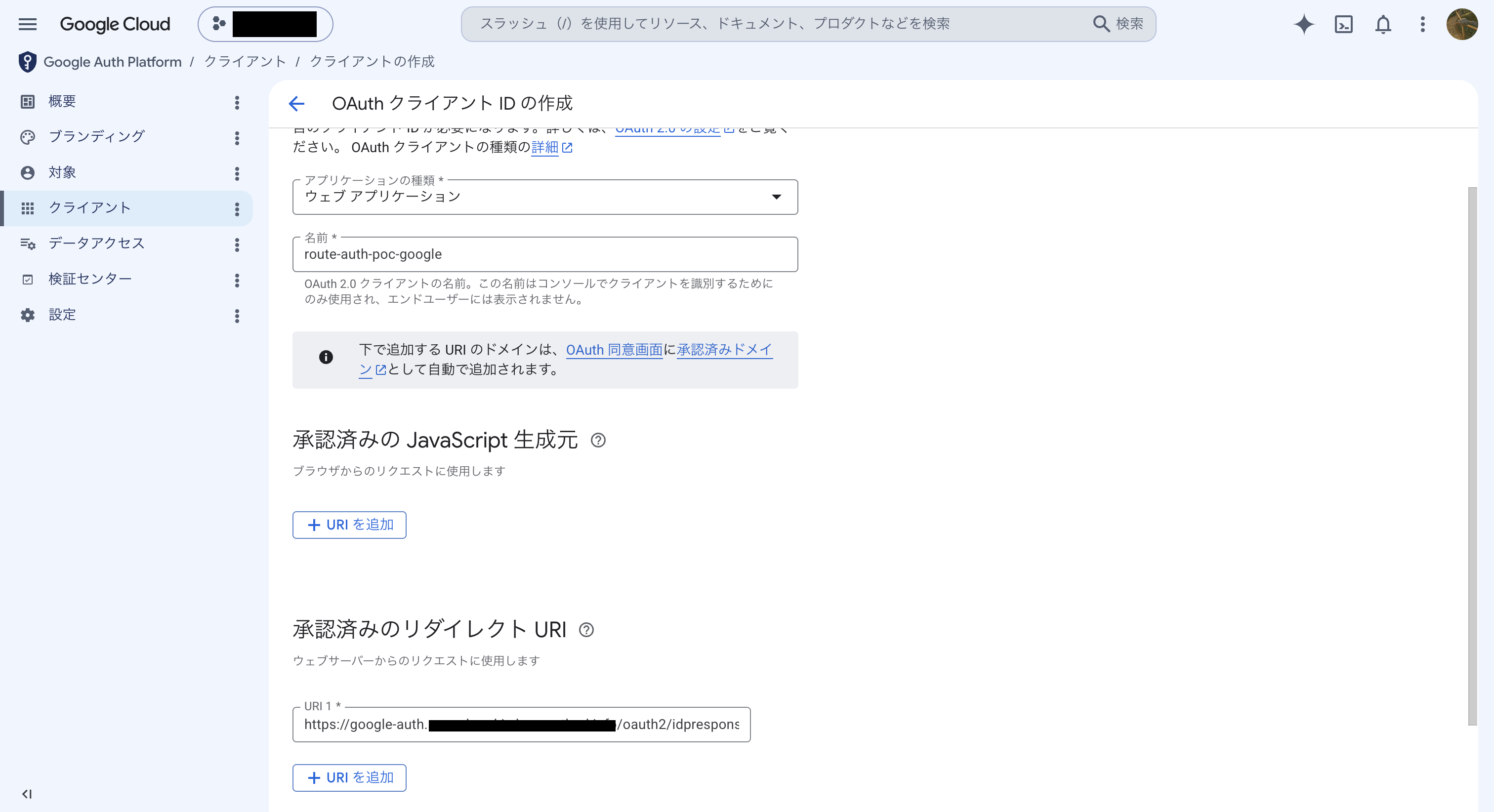
google-auth.<ドメイン>はTerraformの変数から一意に決まるため、Terraform適用前にリダイレクトURI(https://google-auth.<ドメイン>/oauth2/idpresponse)を確定させて登録できます。
/oauth2/idpresponseという固定パスはALB自身の認証処理専用に予約されたコールバックパスです。IdPから認可コードを受け取ってアクセストークンと交換する処理はアプリではなくALBが内部で行うため、開発者が任意のパスを選べるわけではなく、この固定パスをIdP側の許可リストに登録する必要があります。
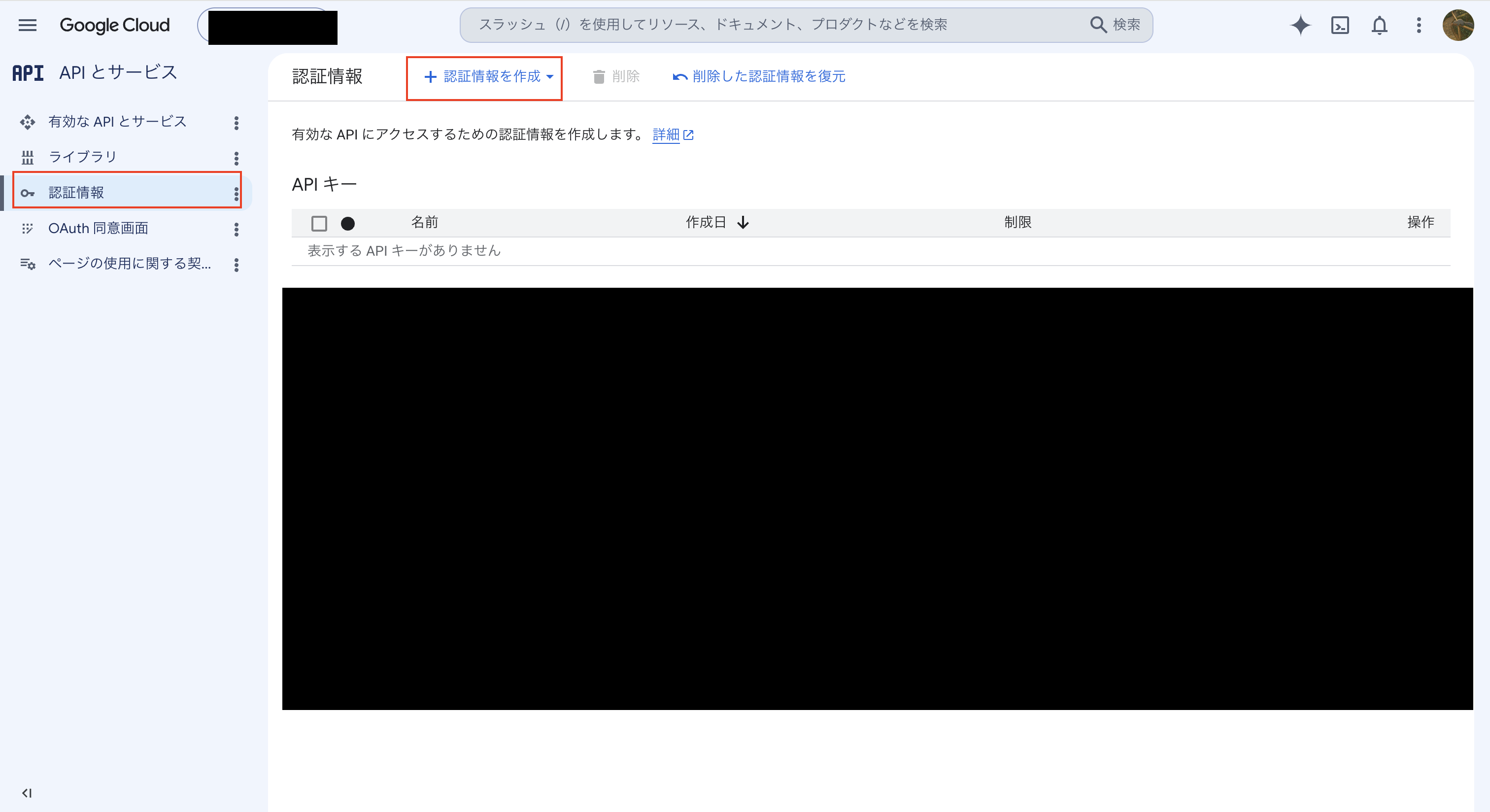
「OAuthクライアントID」を新規作成し、アプリケーションの種類はウェブアプリケーション、承認済みのリダイレクトURIに上記のURLを入力します。
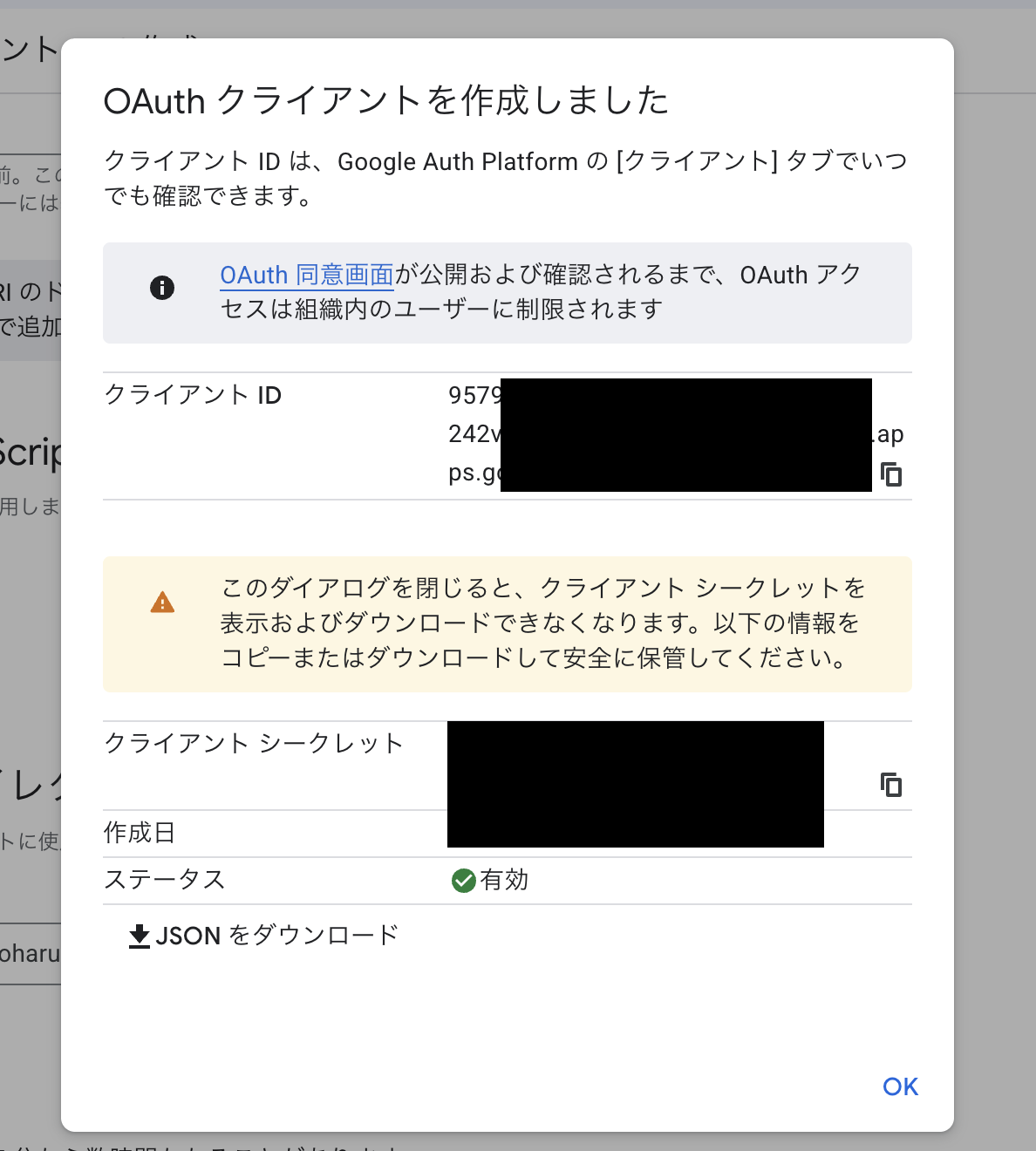
作成完了後、クライアントIDとクライアントシークレットが発行されます。
2. Terraformでの環境構築
発行されたクライアントID・シークレットを変数に渡してapplyします。
cd terraform
terraform init
terraform apply \
  -var="google_client_id=<取得した値>" \
  -var="google_client_secret=<取得した値>"
apply後、意図した通りにリスナールールが設定されているかをCLIで確認しておきます。
aws elbv2 describe-rules --listener-arn <HTTPS_LISTENER_ARN>
{
  "Rules": [
    {
      "Priority": "10",
      "Conditions": [
        { "Field": "host-header", "Values": ["cognito-auth.<ドメイン>"] }
      ],
      "Actions": [
        {
          "Type": "authenticate-cognito",
          "AuthenticateCognitoConfig": {
            "UserPoolArn": "arn:aws:cognito-idp:ap-northeast-1:<AWS_ACCOUNT_ID>:userpool/<USER_POOL_ID>",
            "SessionCookieName": "AuthCognitoRoute",
            "OnUnauthenticatedRequest": "authenticate"
          },
          "Order": 1
        },
        { "Type": "forward", "Order": 2 }
      ]
    },
    {
      "Priority": "20",
      "Conditions": [
        { "Field": "host-header", "Values": ["google-auth.<ドメイン>"] }
      ],
      "Actions": [
        {
          "Type": "authenticate-oidc",
          "AuthenticateOidcConfig": {
            "Issuer": "https://accounts.google.com",
            "SessionCookieName": "AuthGoogleRoute",
            "OnUnauthenticatedRequest": "authenticate"
          },
          "Order": 1
        },
        { "Type": "forward", "Order": 2 }
      ]
    },
    {
      "Priority": "default",
      "Actions": [{ "Type": "fixed-response" }],
      "IsDefault": true
    }
  ]
}
host-headerの条件、SessionCookieName、優先順位(Priority)とも、Terraformで書いた内容がそのまま実機に反映されていることが確認できます。
証明書がSNIで2枚とも正しくアタッチされているかも確認します。
aws elbv2 describe-listener-certificates --listener-arn <HTTPS_LISTENER_ARN>
{
  "Certificates": [
    {
      "CertificateArn": "arn:aws:acm:ap-northeast-1:<AWS_ACCOUNT_ID>:certificate/<GOOGLE_CERT_ID>",
      "IsDefault": false
    },
    {
      "CertificateArn": "arn:aws:acm:ap-northeast-1:<AWS_ACCOUNT_ID>:certificate/<COGNITO_CERT_ID>",
      "IsDefault": true
    }
  ]
}
デフォルト証明書(cognito-auth用)に加えて、Google用の証明書がSNI用の追加証明書としてアタッチされていることが確認できます。
3. 実際にアクセスしてみる
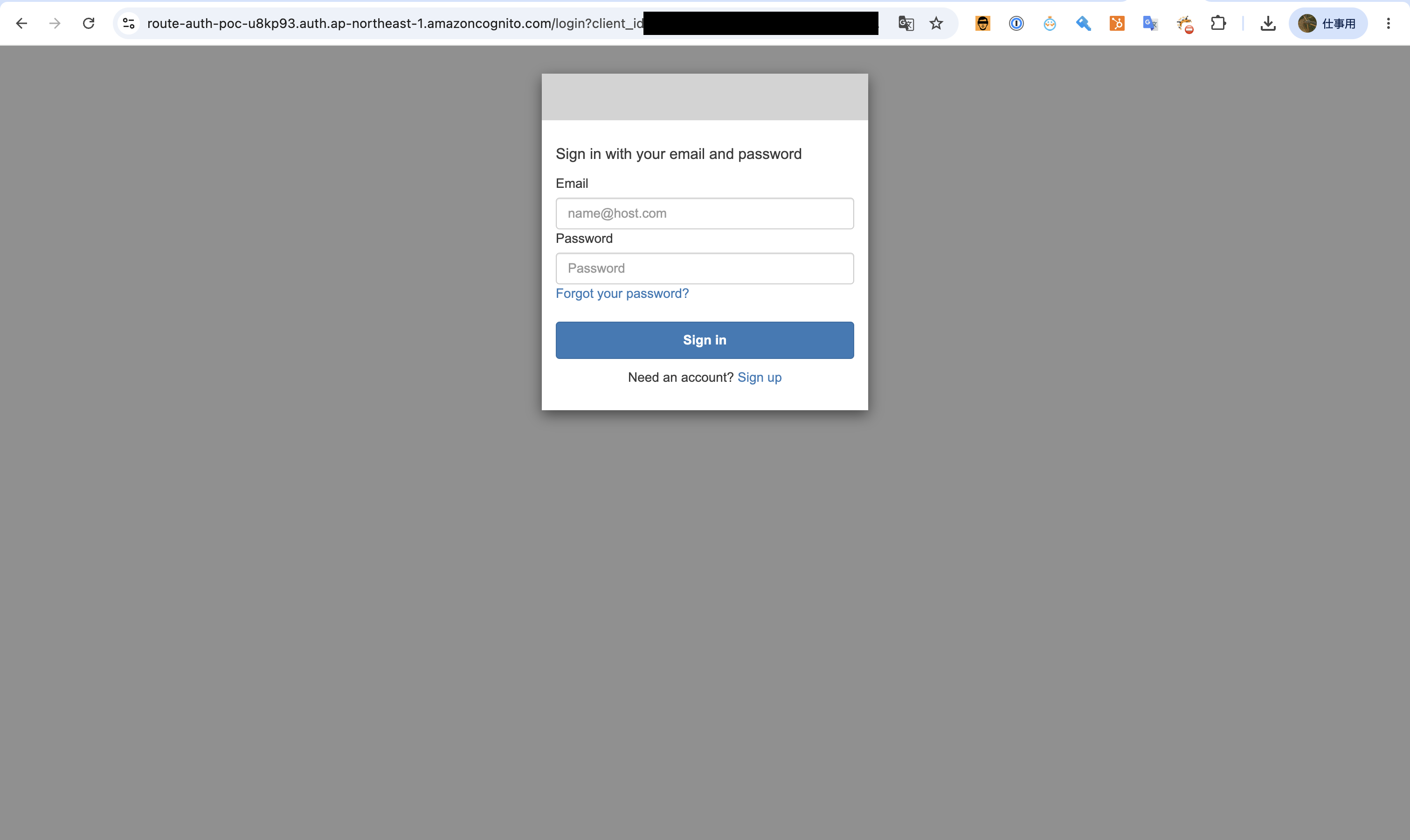
cognito_route_urlにアクセスすると、Cognitoのログイン画面にリダイレクトされました。
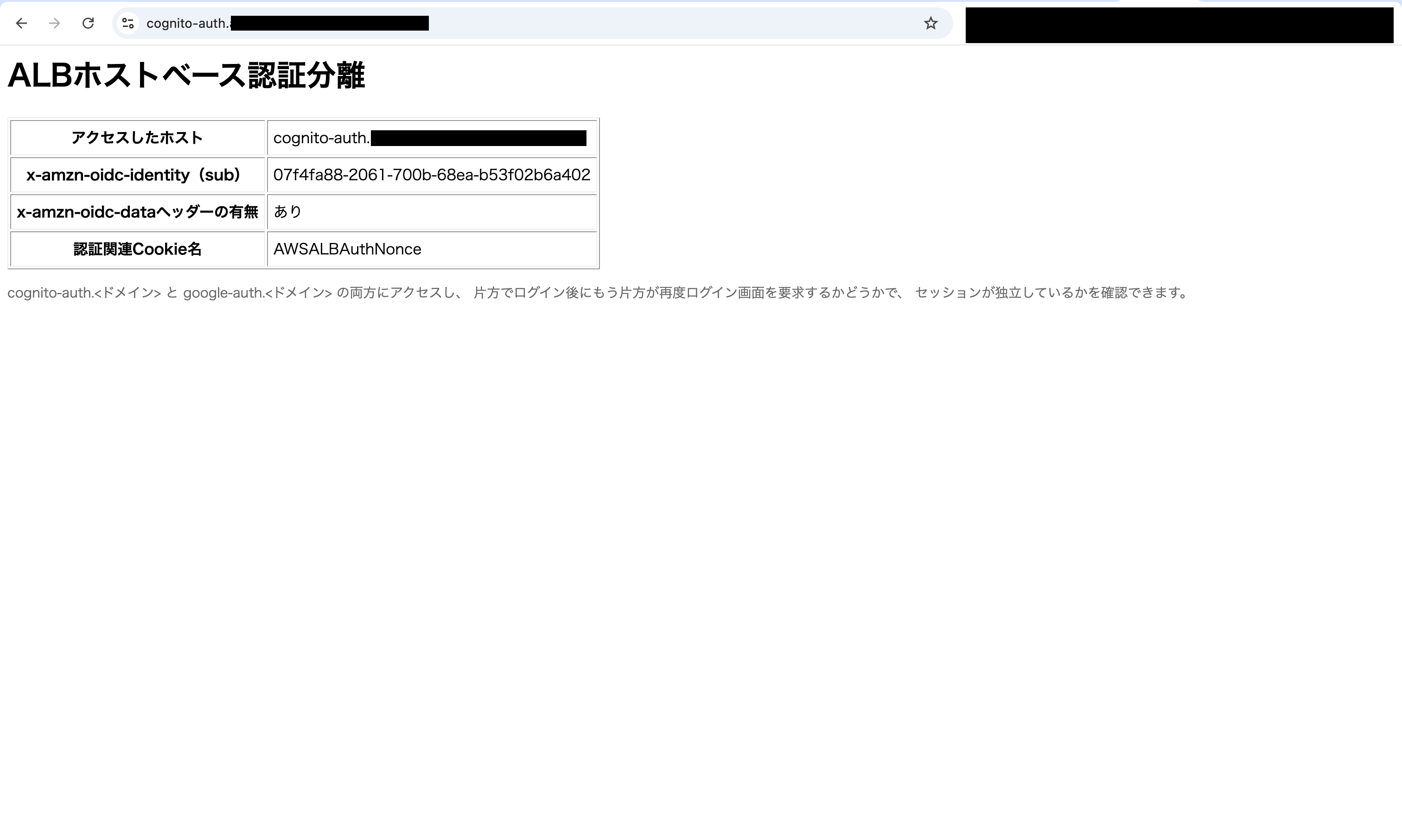
サインアップ・ログインを完了すると、x-amzn-oidc-identityヘッダーの値が表示されたページに到達しました。
開発者ツールで確認すると、cognito-auth.<ドメイン>側にAuthCognitoRoute-0・AuthCognitoRoute-1という名前でCookieが発行されていました。
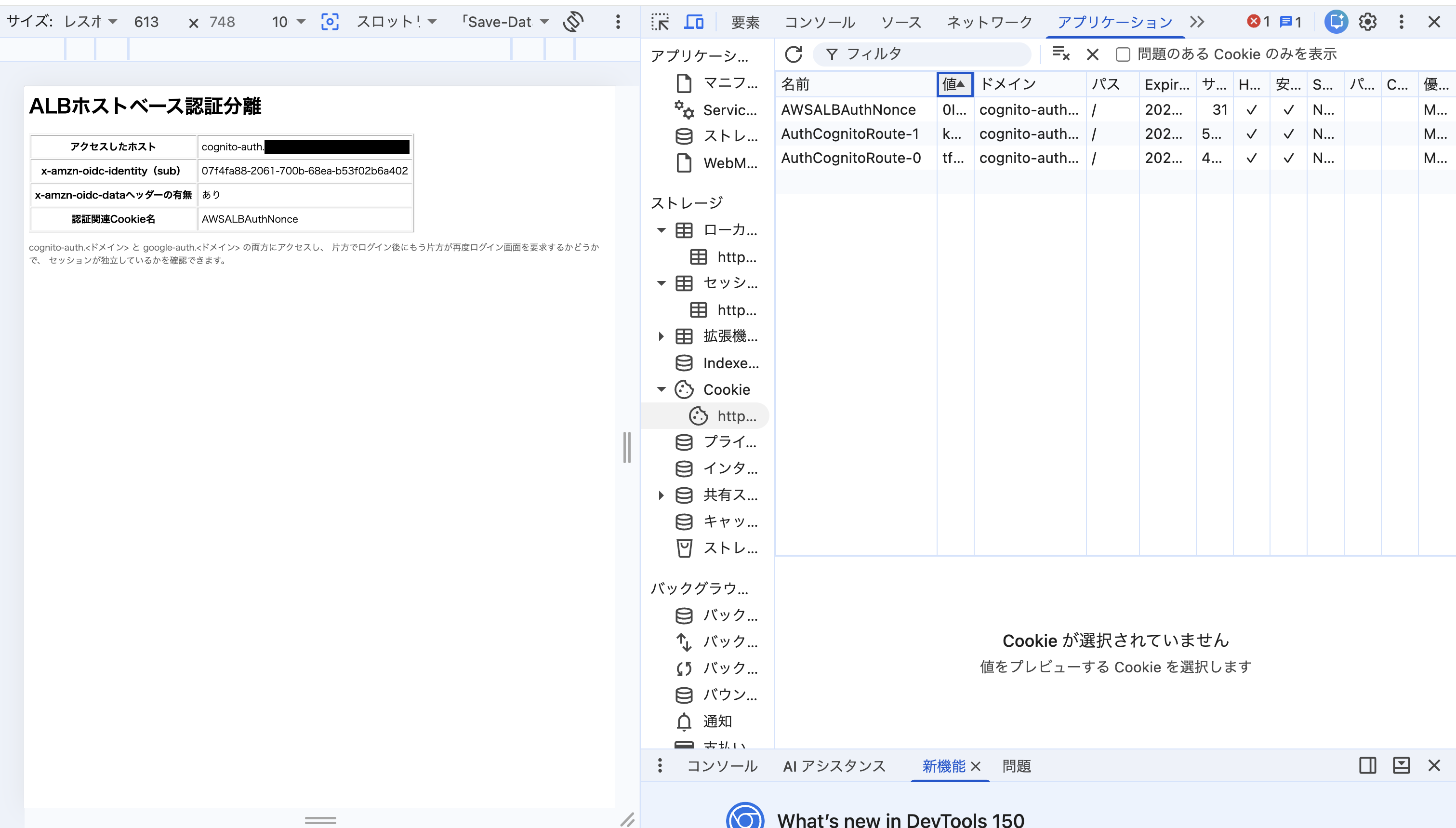
-0・-1という連番が付いているのは、ブラウザのCookieサイズ上限(4KB)に収まらない場合、ALBがセッションCookieを最大4つ(-0〜-3)に分割して発行する仕様のためです。ALB公式ドキュメントにも明記されています。
Because most browsers limit the cookie size to 4K, the load balancer shards a cookie that is greater than 4K in size into multiple cookies.
ログイン直後のこのページでは、「認証関連Cookie名」の欄にAuthCognitoRouteではなくAWSALBAuthNonceという別のCookie名だけが表示されています。
nonce(number used once)は、リプレイ攻撃やなりすましを防ぐために使う使い捨ての値です。AWSALBAuthNonceは、ALBがIdPとのやり取りの正当性を確認するために使うCookieで、認証完了直後に付与されます。
このCookieだけがアプリ側にも見えるのは、ALBがセッションCookie自体はアプリに渡さず、復号済みのユーザー情報をx-amzn-oidc-*ヘッダーとしてのみ渡す仕様のためです。つまり、AuthCognitoRouteが実際に発行されているかどうかは、アプリの画面ではなくブラウザの開発者ツールで確認する必要があります。
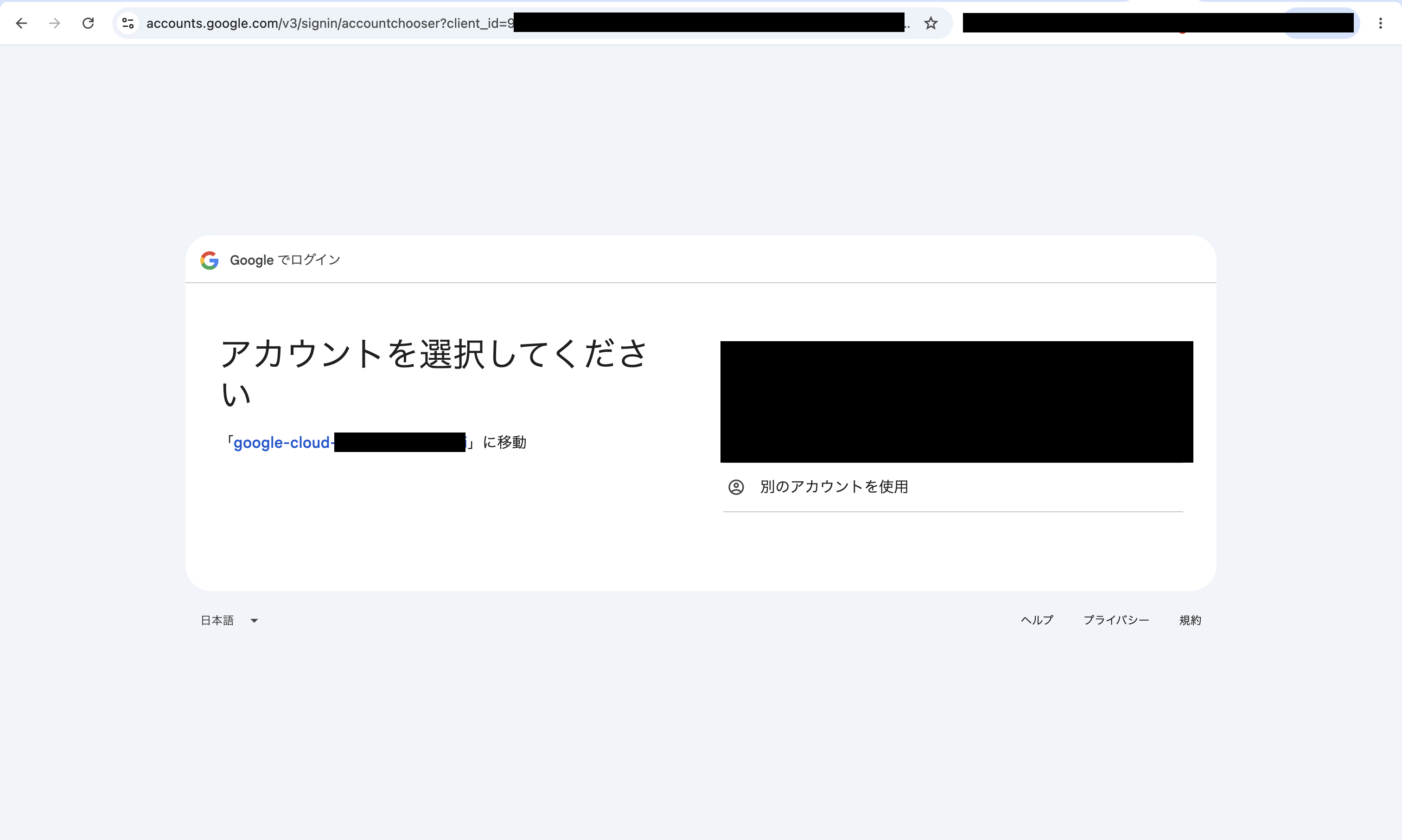
同じブラウザのままgoogle_route_urlにアクセスすると、Cognito側のログイン状態は引き継がれず、Googleのログイン画面が表示されました。ドメインが異なるため当然の挙動ですが、設定した2つのリスナールールがそれぞれ独立した認証アクションとして動いていることが画面上でも確認できます。
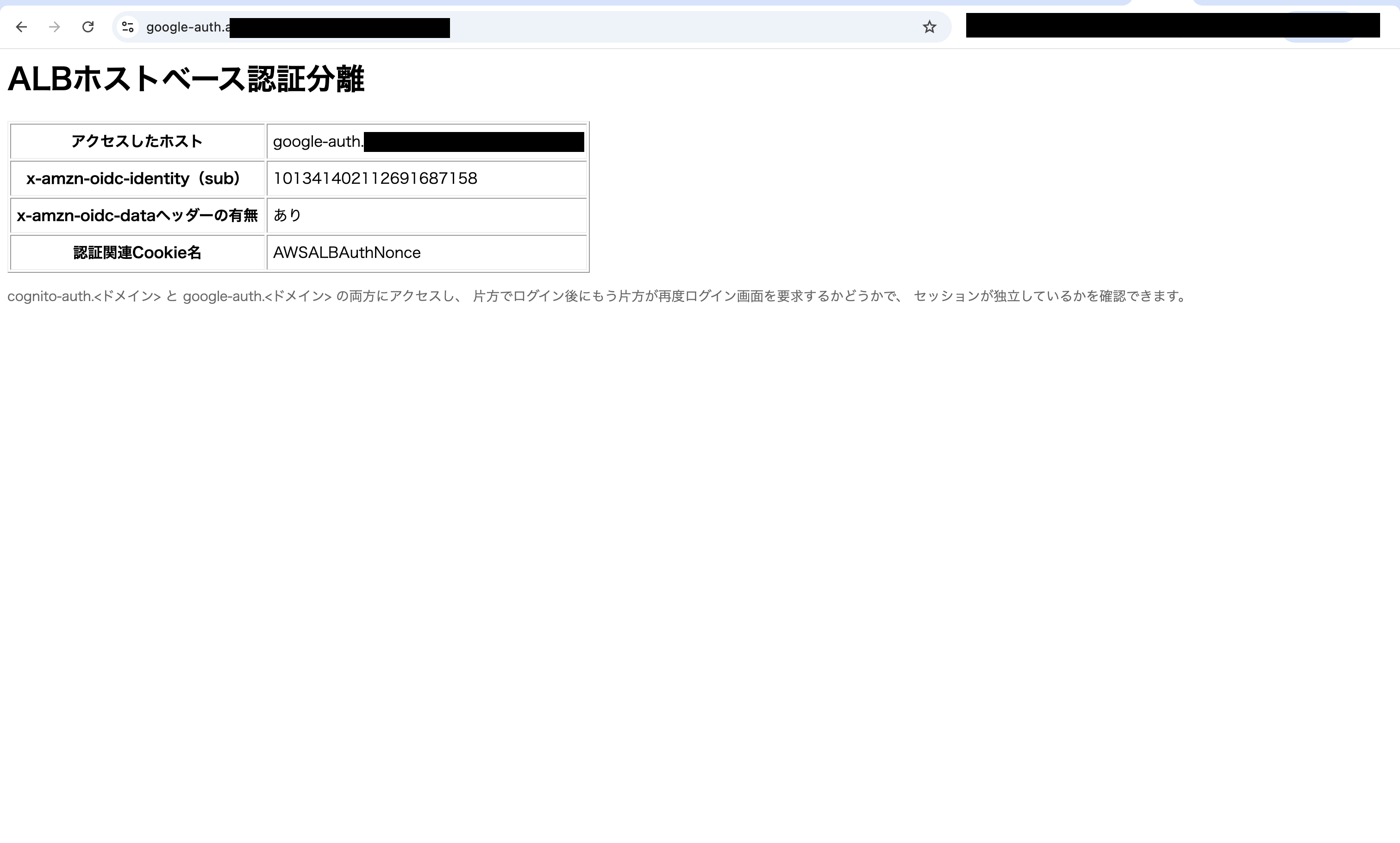
Googleアカウントでログインすると、google-auth.<ドメイン>側のページに到達しました。
開発者ツールで確認すると、google-auth.<ドメイン>側には下図の通りAuthGoogleRoute-0というCookieが発行されており、cognito-auth.<ドメイン>側のAuthCognitoRoute-*とは別ドメイン・別オリジンのため、完全に別のストレージに保存されていました。こちらは4KB以内に収まったため、シャーディングされず-0の1つだけで済んでいます。
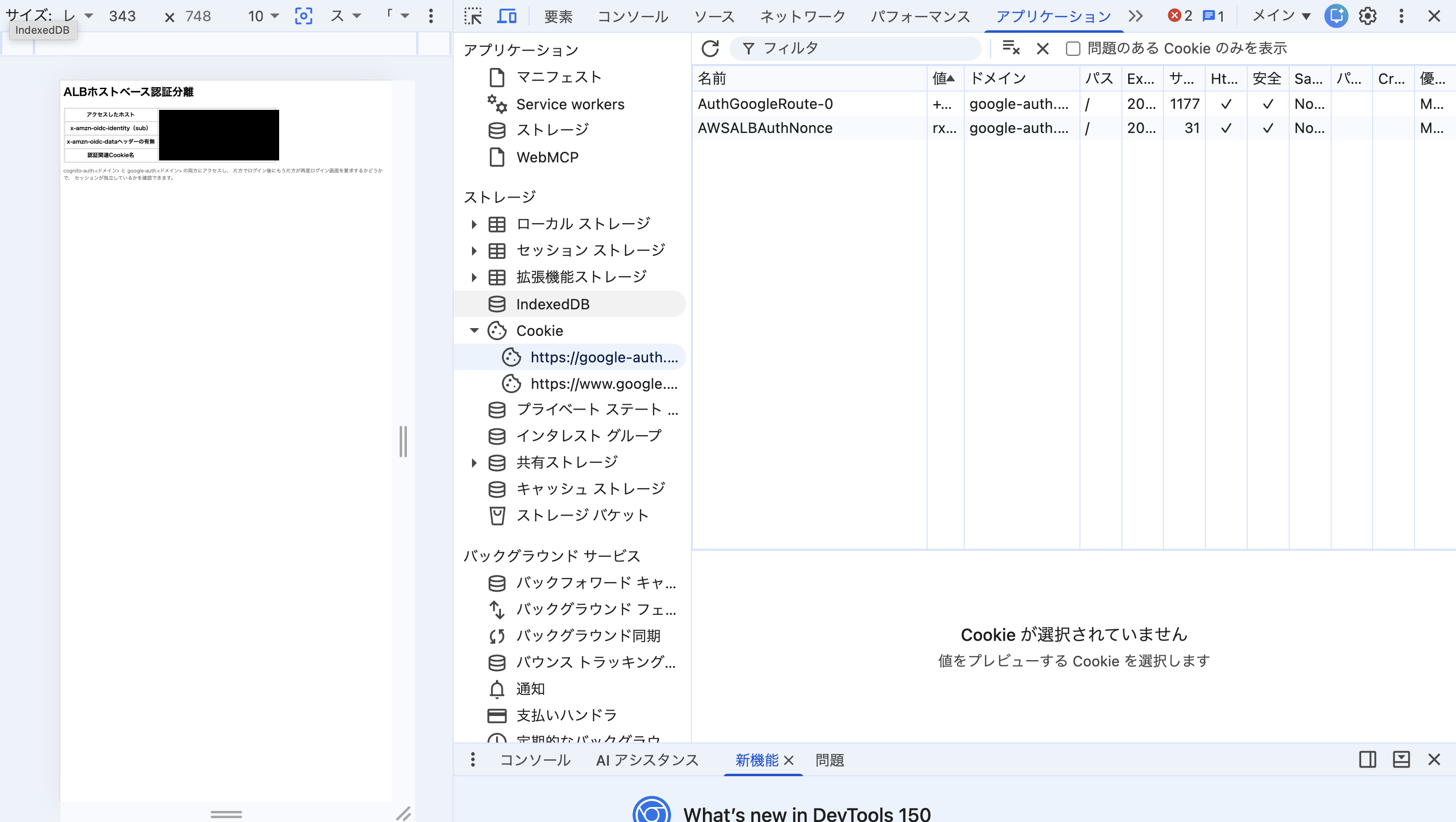
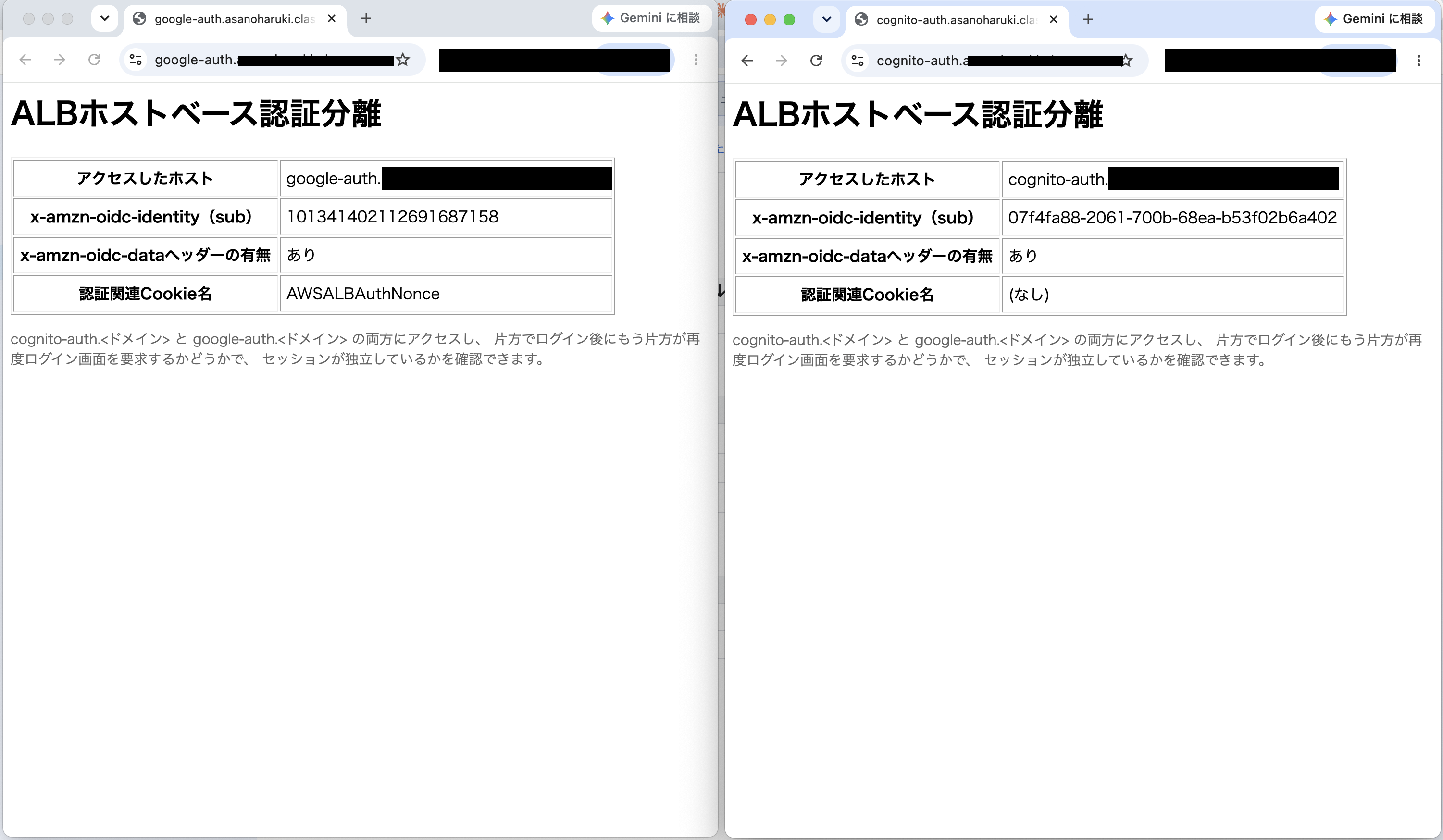
同じブラウザで2つのウィンドウを並べると、cognito-auth.<ドメイン>側・google-auth.<ドメイン>側それぞれで、別々のsub値のままログイン状態が維持されていることが確認できました。
ログアウトについて
ここまででログインの経路が正しく設定できていることを確認しました。運用を考えるうえでもう1つ重要なのが、ログアウトです。ALBのauthenticate-cognito/authenticate-oidcアクションはログイン処理を肩代わりしてくれますが、ログアウトのためのアクションは用意されていません。ユーザーを実際にログアウトさせる処理は、アプリ側で自前実装する必要があります。
具体的な手順はALB公式ドキュメントに示されています。アプリはログアウト用のエンドポイントで、ALBが発行したセッションCookieの有効期限を-1にして失効させたうえで、IdP側にログアウトエンドポイントがあれば、そこへリダイレクトする、という流れです。
今回のようにIdPを経路ごとに使い分けていると、この実装が経路によって対応方法が変わります。今回の場合だと次のように整理できます。
| cognito-authルート | google-authルート | |
|---|---|---|
| ALB発行Cookieの失効 | できる | できる |
| 次回アクセス時の挙動 | CognitoのLOGOUTエンドポイントにリダイレクトすることで、Cognito側のセッションも終了できる。次回は改めてID/PWの入力が必要になる | Google側では、アプリからの要求でIdP側のセッションを終了させる仕組みを提供しない仕様になっているため、ALBからGoogle側のセッションを強制終了させる手段がない。ブラウザのGoogleセッション有効期限が生きている間は、次回もID/PWの再入力なしでそのまま再認証される |
つまり、ログアウト後の挙動がIdPによって変わります。ALB側のCookieはどちらの経路でも確実に消せますが、Google側はIdPとしてのセッションを終了させる仕組み自体を提供していないため、ブラウザのGoogleログイン状態は残り続けます。これはALBやアプリの不具合ではなく、GoogleのSSO実装がそういう仕様であるというだけで、SSOの挙動としてはむしろ自然です。直結構成を採用する際は、この「IdPによってログアウト後の挙動が変わる」という仕様差を運用上許容できるかどうかを、対象IdPがサポートする範囲を事前に確認したうえで検討する必要があります。
最後に
社内向けの認証はCognito、社外パートナー向けの認証は別のIdP、という想定で、ALBのリスナールールごとに認証方式を使い分けられるかを検証し、実際の設定内容と見え方を紹介しました。
一方で、経路ごとに認証方式を分けると、その数だけ運用コストも増えます。
- ユーザーの一覧・権限が複数のシステムに分散し、「誰がアクセスできるか」を一元的に把握できない
- 退職・異動時のアクセス削除を経路の数だけ個別に行う必要がある
- 監査ログの取得元も分かれる
- 前述の通り、ログアウトの実装も経路(IdP)ごとに非対称になる
長期運用を前提にするなら、今回のようにIdPをALBの経路ごとに完全に分離するのではなく、Cognito User Pool側に複数の外部IdPをフェデレーションし、認証窓口(Hosted UI・App Client)は1つに集約する構成の方が良い場合があります。ユーザー一覧・オフボーディング・ログアウトをCognito側の仕組みに一本化できるためです。
一方で、あえて今回のような直結構成を選ぶ合理性もあります。Amazon CognitoはOIDC/SAML federationでサインインしたMAUを独立した課金項目として計上するため、外部ユーザーをCognitoにフェデレーションさせずALBで直結すれば、その人数分の課金は発生しません。また、Cognito側の設定ミスや障害が全経路に波及するか経路ごとに閉じるかという影響範囲の違いや、「外部の認証情報は自社の内部ID基盤に一切触れていない」と言い切れる構成にできる点も、直結構成ならではの利点です。
運用の一元化を取るか、コストと影響範囲の分離を取るか。どちらが正解ということはなく、外部ユーザーの規模や組織のセキュリティ境界に対する考え方次第で選択が変わります。今回は以上です。