
Cognitoの同一ユーザープールで複数アプリケーションにシングルサインオンしてみた

はじめに
こんにちは、クラウド事業統括本部の浅野です。
Amazon Cognitoのユーザープールは、1つのユーザープールに複数のApp Clientを作成できます。公式ドキュメントでは、1つのユーザープールを複数のアプリケーションで共有し、アプリケーションごとにApp Clientを分ける「App-client multi-tenancy」という設計パターンが紹介されています。
このパターンを使うと、同じユーザープールを共有する複数のアプリケーション間で、1回のログインだけでアクセスできるシングルサインオン(SSO)が成立します。
実運用で複数のアプリケーションを構築する場合、可用性・セキュリティの観点から、アプリケーションごとに独立したVPC・ALBを用意するのがベターです。
今回の検証では構築の手間を省くため、1つのVPC・ALBの中にApp1・App2という2つの独立したアプリケーション(別ECSサービス・別ターゲットグループ・別App Client)をまとめて用意していますが、ALBを分けて2つの独立したVPC・ALB構成にした場合でも、双方のALBが同じCognitoユーザープールを参照してさえいれば同様にSSOが成立します。この点を踏まえたうえで、実際にTerraformで構築して挙動を確認しました。
検証すること
- 同一ユーザープール内にApp1用・App2用の2つのApp Clientを作成し、App1でログインした状態のままApp2にアクセスすると、再ログインなしでアクセスできるか
- ログインがSSOで伝播するなら、ログアウトも同様に他のアプリへ伝播するのか
構成
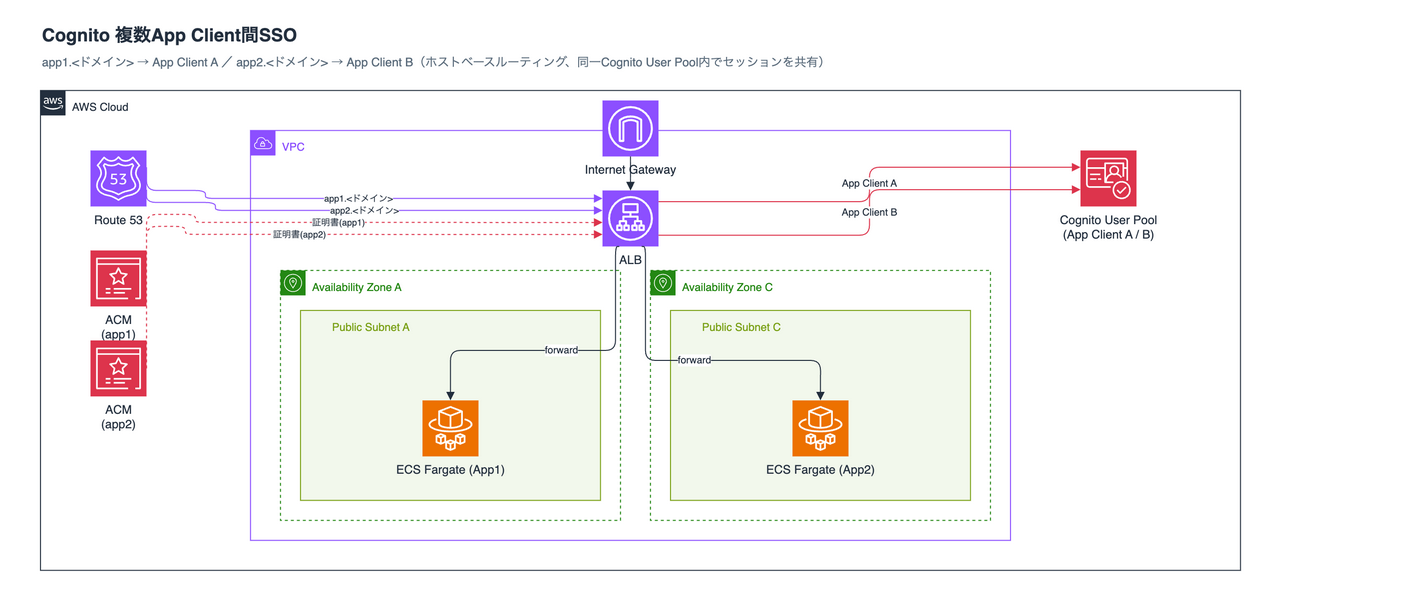
VPCはPublic Subnetのみの2AZ構成です。ALBは1台のみで、ホストヘッダーによってApp1・App2の2つのECS Fargateサービスに振り分けます(App1・App2は同一のDockerイメージを使い、環境変数で表示だけを分岐させた最小限のDjangoアプリです)。
| App1 | App2 | |
|---|---|---|
| ホスト名 | app1.<domain> |
app2.<domain> |
| App Client | App Client A | App Client B |
| ALBのセッションCookie名 | AuthApp1 |
AuthApp2 |
App1・App2それぞれのALBリスナールールに設定したauthenticate-cognitoアクションは、どちらも同じユーザープール・同じCognitoドメイン(Hosted UI)を参照しています。ログイン画面自体は両アプリで完全に共通です。
ログイン状態を保持する2つのCookie
ALBのauthenticate-cognitoは、ALB自身がユーザーを認証するのではなく、認証をCognitoに任せ、その結果を受け取ってリクエストを通すかどうかを判断します。役割が2つに分かれているため、「ログイン済みかどうか」を記憶するCookieも、CognitoとALBがそれぞれ別に発行します。
| 発行するのは | Cookieが保存されるドメイン | 何を記憶しているか | 有効期限 | |
|---|---|---|---|---|
cognito |
Cognito | ユーザープールのドメイン | このブラウザがCognitoにログイン済みであること | 1時間で固定(変更不可) |
AuthApp1 / AuthApp2 |
ALB | 各アプリのドメイン | このブラウザがそのApp Clientでの認証フローを完了済みであること | session_timeout(デフォルト7日間) |
ポイントは、この2つが保存されるドメインも、参照されるタイミングも違うという点です。
cognitoCookieは、ユーザープールのドメイン(<プレフィックス>.auth.<リージョン>.amazoncognito.com)に対して保存されます。App Client単位ではなくドメイン単位で保存されるため、App1経由のログインで作られたCookieが、App2の認証フローでもそのまま送られます。これがSSOを成立させている部分です。
一方AuthApp1/AuthApp2は、それぞれapp1.<domain>・app2.<domain>に対して保存されます。ALBはこのCookieを持つリクエストについては、Cognitoに問い合わせ直すことなくCookie自身の検証だけでターゲットへ転送します。つまりCognitoが参照されるのは、アクセス先のALB Cookieが存在しないときだけです。
1時間という有効期限が効いてくる場面
cognitoCookieの有効期限1時間は、ID/パスワードを入力したログインを起点とする固定値です。Cookieによる認証では延長されません。
Authentication with the session cookie doesn't reset the cookie duration to an additional hour. Users must sign in again if they attempt to access your sign-in pages more than an hour after their most recent successful interactive authentication.
注意したいのは、1時間経過したからといって利用中のアプリからログアウトされるわけではない点です。すでにALBのセッションCookieを持っているアプリは、そのCookieが有効な間(デフォルト7日間)そもそもCognitoへリダイレクトされないため、影響を受けません。
1時間の制限がかかるのは、まだALBのセッションCookieを持っていないアプリに初めてアクセスしたときです。このときCognitoへリダイレクトされますが、cognitoCookieが失効していれば改めてログインを求められます。つまりSSOによって「ログイン済みの状態を他のアプリへ持ち込める」のはログインから1時間以内で、それを過ぎてから別のアプリを開くと、そのアプリでは再度ログインが必要になります。
実際のリクエストの流れは次のようになります。
App2への初回アクセス時も、ALBは通常どおりCognitoへリダイレクトしています。ログイン画面が出ないのは、リダイレクト先のCognitoが有効なcognitoCookieを受け取り、認証済みとして即座に認可コードを返しているためです。
この2つのCookieの違いが、後述するログアウトの挙動に直結します。
Terraformについて
全リソースを1つのmain.tfに集約しています。全文は折りたたんでいるので、必要であれば展開してください。
main.tf(クリックで展開)
##############################################
# 検証: 同一Cognitoユーザープール内で、App Clientを分けた2つの別アプリ(ECSサービス)を用意し、
# 一方でログインした状態でもう一方に再ログインなしでアクセスできるか(SSO)を確認する。
##############################################

terraform {
  required_version = ">= 1.9"

  required_providers {
    aws = {
      source  = "hashicorp/aws"
      version = "~> 5.0"
    }
    random = {
      source  = "hashicorp/random"
      version = "~> 3.6"
    }
    null = {
      source  = "hashicorp/null"
      version = "~> 3.2"
    }
  }
}

provider "aws" {
  region = var.aws_region

  default_tags {
    tags = {
      Project   = "cognito-multi-app-sso-poc"
      ManagedBy = "terraform"
    }
  }
}

##############################################
# variables
##############################################

variable "aws_region" {
  description = "検証環境をデプロイするリージョン"
  type        = string
  default     = "ap-northeast-1"
}

variable "root_domain" {
  description = "Route53ホストゾーンのドメイン名(既存ゾーンを利用)"
  type        = string
  default     = "<ドメイン>"
}

variable "subdomain" {
  description = "ALBに割り当てるサブドメインのラベル部分"
  type        = string
  default     = "multi-app-sso-poc"
}

##############################################
# data sources
##############################################

data "aws_caller_identity" "current" {}

data "aws_availability_zones" "available" {
  state = "available"
}

data "aws_route53_zone" "root" {
  name = var.root_domain
}

locals {
  name         = "multi-app-sso-poc"
  domain_name  = "${var.subdomain}.${var.root_domain}"
  azs          = slice(data.aws_availability_zones.available.names, 0, 2)
  ecr_registry = "${data.aws_caller_identity.current.account_id}.dkr.ecr.${var.aws_region}.amazonaws.com"
  app_source_hash = sha1(join("", [
    for f in sort(fileset("${path.module}/../django", "**")) : filesha1("${path.module}/../django/${f}")
  ]))
  nginx_source_hash = sha1(join("", [
    for f in sort(fileset("${path.module}/../nginx", "**")) : filesha1("${path.module}/../nginx/${f}")
  ]))
}

##############################################
# VPC(Public subnet x2のみ)
##############################################

resource "aws_vpc" "this" {
  cidr_block           = "10.91.0.0/16"
  enable_dns_support   = true
  enable_dns_hostnames = true
  tags = { Name = "${local.name}-vpc" }
}

resource "aws_internet_gateway" "this" {
  vpc_id = aws_vpc.this.id
  tags   = { Name = "${local.name}-igw" }
}

resource "aws_subnet" "public" {
  count                   = 2
  vpc_id                  = aws_vpc.this.id
  cidr_block              = "10.91.${count.index}.0/24"
  availability_zone       = local.azs[count.index]
  map_public_ip_on_launch = true
  tags                    = { Name = "${local.name}-public-${count.index}" }
}

resource "aws_route_table" "public" {
  vpc_id = aws_vpc.this.id
  route {
    cidr_block = "0.0.0.0/0"
    gateway_id = aws_internet_gateway.this.id
  }
  tags = { Name = "${local.name}-public-rt" }
}

resource "aws_route_table_association" "public" {
  count          = 2
  subnet_id      = aws_subnet.public[count.index].id
  route_table_id = aws_route_table.public.id
}

##############################################
# Security Groups
##############################################

resource "aws_security_group" "alb" {
  name   = "${local.name}-alb-sg"
  vpc_id = aws_vpc.this.id
}

resource "aws_vpc_security_group_ingress_rule" "alb_https" {
  security_group_id = aws_security_group.alb.id
  cidr_ipv4          = "0.0.0.0/0"
  from_port           = 443
  to_port             = 443
  ip_protocol         = "tcp"
}

resource "aws_vpc_security_group_ingress_rule" "alb_http" {
  security_group_id = aws_security_group.alb.id
  cidr_ipv4          = "0.0.0.0/0"
  from_port           = 80
  to_port             = 80
  ip_protocol         = "tcp"
}

resource "aws_vpc_security_group_egress_rule" "alb_all" {
  security_group_id = aws_security_group.alb.id
  cidr_ipv4          = "0.0.0.0/0"
  ip_protocol         = "-1"
}

resource "aws_security_group" "ecs" {
  name   = "${local.name}-ecs-sg"
  vpc_id = aws_vpc.this.id
}

resource "aws_vpc_security_group_ingress_rule" "ecs_from_alb" {
  security_group_id           = aws_security_group.ecs.id
  referenced_security_group_id = aws_security_group.alb.id
  from_port                    = 80
  to_port                      = 80
  ip_protocol                  = "tcp"
}

resource "aws_vpc_security_group_egress_rule" "ecs_all" {
  security_group_id = aws_security_group.ecs.id
  cidr_ipv4          = "0.0.0.0/0"
  ip_protocol         = "-1"
}

##############################################
# ACM + Route53
##############################################

resource "aws_acm_certificate" "app" {
  for_each = toset(["app1", "app2"])

  domain_name       = "${each.key}.${local.domain_name}"
  validation_method = "DNS"
  lifecycle { create_before_destroy = true }
}

resource "aws_route53_record" "cert_validation" {
  for_each = {
    for dvo in flatten([
      for cert in aws_acm_certificate.app : cert.domain_validation_options
    ]) : dvo.domain_name => {
      name  = dvo.resource_record_name
      type  = dvo.resource_record_type
      value = dvo.resource_record_value
    }
  }
  zone_id = data.aws_route53_zone.root.zone_id
  name    = each.value.name
  type    = each.value.type
  records = [each.value.value]
  ttl     = 60
}

resource "aws_acm_certificate_validation" "app" {
  for_each = aws_acm_certificate.app

  certificate_arn = each.value.arn
  validation_record_fqdns = [
    for dvo in each.value.domain_validation_options : aws_route53_record.cert_validation[dvo.domain_name].fqdn
  ]
}

resource "aws_route53_record" "alb_alias" {
  for_each = toset(["app1", "app2"])

  zone_id = data.aws_route53_zone.root.zone_id
  name    = "${each.key}.${local.domain_name}"
  type    = "A"
  alias {
    name                   = aws_lb.this.dns_name
    zone_id                = aws_lb.this.zone_id
    evaluate_target_health = true
  }
}

##############################################
# ECR + イメージビルド(App1/App2共通の同一イメージ。表示だけ環境変数APP_LABELで分岐)
##############################################

resource "aws_ecr_repository" "app" {
  name         = "${local.name}-app"
  force_delete = true
}

resource "aws_ecr_repository" "nginx" {
  name         = "${local.name}-nginx"
  force_delete = true
}

resource "null_resource" "build_setup" {
  triggers = { always_run = timestamp() }

  provisioner "local-exec" {
    interpreter = ["bash", "-c"]
    command     = <<-EOT
      set -euo pipefail
      docker info > /dev/null 2>&1 || { echo "Dockerデーモンに接続できません。Rancher Desktopが起動しているか確認してください。" >&2; exit 1; }
      docker buildx inspect multi-app-sso-poc-builder > /dev/null 2>&1 || docker buildx create --name multi-app-sso-poc-builder --use --bootstrap
      docker buildx use multi-app-sso-poc-builder
      aws ecr get-login-password --region ${var.aws_region} \
        | docker login --username AWS --password-stdin ${local.ecr_registry}
    EOT
  }
}

resource "null_resource" "build_push_app" {
  triggers = {
    source_hash       = local.app_source_hash
    build_script_hash = filesha1("${path.module}/main.tf")
  }
  provisioner "local-exec" {
    interpreter = ["bash", "-c"]
    command     = "docker buildx build --platform linux/arm64 -t ${aws_ecr_repository.app.repository_url}:${local.app_source_hash} --push ${path.module}/../django"
  }
  depends_on = [null_resource.build_setup, aws_ecr_repository.app]
}

resource "null_resource" "build_push_nginx" {
  triggers = {
    source_hash       = local.nginx_source_hash
    build_script_hash = filesha1("${path.module}/main.tf")
  }
  provisioner "local-exec" {
    interpreter = ["bash", "-c"]
    command     = "docker buildx build --platform linux/arm64 -t ${aws_ecr_repository.nginx.repository_url}:${local.nginx_source_hash} --push ${path.module}/../nginx"
  }
  depends_on = [null_resource.build_setup, aws_ecr_repository.nginx]
}

##############################################
# ECS(App1 / App2 の2サービス。同一イメージ、環境変数APP_LABELのみ違う)
##############################################

resource "aws_ecs_cluster" "this" {
  name = local.name
  setting {
    name  = "containerInsights"
    value = "enabled"
  }
}

resource "aws_iam_role" "execution" {
  name = "${local.name}-execution-role"
  assume_role_policy = jsonencode({
    Version = "2012-10-17"
    Statement = [{
      Effect    = "Allow"
      Principal = { Service = "ecs-tasks.amazonaws.com" }
      Action    = "sts:AssumeRole"
    }]
  })
}

resource "aws_iam_role_policy_attachment" "execution" {
  role       = aws_iam_role.execution.name
  policy_arn = "arn:aws:iam::aws:policy/service-role/AmazonECSTaskExecutionRolePolicy"
}

resource "aws_cloudwatch_log_group" "app" {
  for_each          = toset(["app1", "app2"])
  name              = "/ecs/${local.name}/${each.key}"
  retention_in_days = 7
}

resource "aws_ecs_task_definition" "app" {
  for_each = { app1 = "App1", app2 = "App2" }

  family                   = "${local.name}-${each.key}-task"
  requires_compatibilities = ["FARGATE"]
  network_mode             = "awsvpc"
  cpu                      = "256"
  memory                   = "512"
  execution_role_arn       = aws_iam_role.execution.arn

  runtime_platform {
    cpu_architecture        = "ARM64"
    operating_system_family = "LINUX"
  }

  container_definitions = jsonencode([
    {
      name      = "nginx"
      image     = "${aws_ecr_repository.nginx.repository_url}:${local.nginx_source_hash}"
      essential = true
      portMappings = [{ containerPort = 80, protocol = "tcp" }]
      dependsOn = [{ containerName = "app", condition = "START" }]
      logConfiguration = {
        logDriver = "awslogs"
        options = {
          "awslogs-group"         = aws_cloudwatch_log_group.app[each.key].name
          "awslogs-region"        = var.aws_region
          "awslogs-stream-prefix" = "nginx"
        }
      }
    },
    {
      name      = "app"
      image     = "${aws_ecr_repository.app.repository_url}:${local.app_source_hash}"
      essential = true
      portMappings = [{ containerPort = 8000, protocol = "tcp" }]
      environment = [
        { name = "ALLOWED_HOSTS", value = "*" },
        { name = "APP_LABEL", value = each.value },
        { name = "COGNITO_DOMAIN", value = "${aws_cognito_user_pool_domain.this.domain}.auth.${var.aws_region}.amazoncognito.com" },
        { name = "COGNITO_CLIENT_ID", value = aws_cognito_user_pool_client.app[each.key].id },
        { name = "APP_URL", value = "https://${each.key}.${local.domain_name}/" },
        { name = "ALB_COOKIE_NAME", value = "Auth${each.value}" },
      ]
      logConfiguration = {
        logDriver = "awslogs"
        options = {
          "awslogs-group"         = aws_cloudwatch_log_group.app[each.key].name
          "awslogs-region"        = var.aws_region
          "awslogs-stream-prefix" = "app"
        }
      }
    }
  ])

  depends_on = [null_resource.build_push_app, null_resource.build_push_nginx]
}

resource "aws_ecs_service" "app" {
  for_each = { app1 = 1, app2 = 2 }

  name            = "${local.name}-${each.key}-svc"
  cluster         = aws_ecs_cluster.this.id
  task_definition = aws_ecs_task_definition.app[each.key].arn
  desired_count   = 1
  launch_type     = "FARGATE"

  network_configuration {
    subnets          = aws_subnet.public[*].id
    security_groups  = [aws_security_group.ecs.id]
    assign_public_ip = true
  }

  load_balancer {
    target_group_arn = aws_lb_target_group.app[each.key].arn
    container_name   = "nginx"
    container_port   = 80
  }

  depends_on = [aws_lb_listener.https]
}

##############################################
# Cognito(同一User Pool、App1/App2それぞれ専用のApp Client)
##############################################

resource "random_string" "domain_suffix" {
  length  = 6
  special = false
  upper   = false
}

resource "aws_cognito_user_pool" "this" {
  name                      = "${local.name}-pool"
  auto_verified_attributes = ["email"]
  username_attributes       = ["email"]
}

resource "aws_cognito_user_pool_domain" "this" {
  domain       = "multi-app-sso-poc-${random_string.domain_suffix.result}"
  user_pool_id = aws_cognito_user_pool.this.id
}

resource "aws_cognito_user_pool_client" "app" {
  for_each = toset(["app1", "app2"])

  name         = "${local.name}-${each.key}-client"
  user_pool_id = aws_cognito_user_pool.this.id

  generate_secret                      = true
  allowed_oauth_flows_user_pool_client = true
  allowed_oauth_flows                  = ["code"]
  allowed_oauth_scopes                 = ["openid", "email"]
  callback_urls                        = ["https://${each.key}.${local.domain_name}/oauth2/idpresponse"]
  logout_urls                          = ["https://${each.key}.${local.domain_name}/"]
  supported_identity_providers         = ["COGNITO"]
}

##############################################
# ALB(1台、サブドメイン(ホストベース)で2アプリに分岐。App Client・Cookie名をアプリごとに分離)
##############################################

resource "aws_lb" "this" {
  name               = local.name
  load_balancer_type = "application"
  internal           = false
  security_groups    = [aws_security_group.alb.id]
  subnets            = aws_subnet.public[*].id
}

resource "aws_lb_target_group" "app" {
  for_each = toset(["app1", "app2"])

  name        = "${local.name}-${each.key}"
  port        = 80
  protocol    = "HTTP"
  vpc_id      = aws_vpc.this.id
  target_type = "ip"
  stickiness {
    type    = "lb_cookie"
    enabled = false
  }
  health_check {
    path = "/"
  }
}

resource "aws_lb_listener" "http_redirect" {
  load_balancer_arn = aws_lb.this.arn
  port              = 80
  protocol          = "HTTP"
  default_action {
    type = "redirect"
    redirect {
      port        = "443"
      protocol    = "HTTPS"
      status_code = "HTTP_301"
    }
  }
}

resource "aws_lb_listener" "https" {
  load_balancer_arn = aws_lb.this.arn
  port              = 443
  protocol          = "HTTPS"
  ssl_policy        = "ELBSecurityPolicy-TLS13-1-2-2021-06"
  certificate_arn   = aws_acm_certificate_validation.app["app1"].certificate_arn

  default_action {
    type = "fixed-response"
    fixed_response {
      content_type = "text/plain"
      status_code  = "404"
    }
  }
}

# app2用証明書はSNIで追加登録(ALBのHTTPSリスナーはデフォルト証明書1枚+SNI追加証明書の構成)
resource "aws_lb_listener_certificate" "app2" {
  listener_arn    = aws_lb_listener.https.arn
  certificate_arn = aws_acm_certificate_validation.app["app2"].certificate_arn
}

resource "aws_lb_listener_rule" "app1" {
  listener_arn = aws_lb_listener.https.arn
  priority     = 10

  condition {
    host_header { values = ["app1.${local.domain_name}"] }
  }

  action {
    type  = "authenticate-cognito"
    order = 1
    authenticate_cognito {
      user_pool_arn              = aws_cognito_user_pool.this.arn
      user_pool_client_id        = aws_cognito_user_pool_client.app["app1"].id
      user_pool_domain           = aws_cognito_user_pool_domain.this.domain
      session_cookie_name        = "AuthApp1"
      on_unauthenticated_request = "authenticate"
    }
  }

  action {
    type             = "forward"
    order            = 2
    target_group_arn = aws_lb_target_group.app["app1"].arn
  }
}

resource "aws_lb_listener_rule" "app2" {
  listener_arn = aws_lb_listener.https.arn
  priority     = 20

  condition {
    host_header { values = ["app2.${local.domain_name}"] }
  }

  action {
    type  = "authenticate-cognito"
    order = 1
    authenticate_cognito {
      user_pool_arn              = aws_cognito_user_pool.this.arn
      user_pool_client_id        = aws_cognito_user_pool_client.app["app2"].id
      user_pool_domain           = aws_cognito_user_pool_domain.this.domain
      session_cookie_name        = "AuthApp2"
      on_unauthenticated_request = "authenticate"
    }
  }

  action {
    type             = "forward"
    order            = 2
    target_group_arn = aws_lb_target_group.app["app2"].arn
  }
}

##############################################
# outputs
##############################################

output "app1_url" {
  value = "https://app1.${local.domain_name}/"
}

output "app2_url" {
  value = "https://app2.${local.domain_name}/"
}

output "cognito_hosted_ui_domain" {
  value = "${aws_cognito_user_pool_domain.this.domain}.auth.${var.aws_region}.amazoncognito.com"
}
キモになるのはALBとCognitoの設定なので、そこだけ抜粋して説明します。
ALB: ホストヘッダーで2つのApp Clientに振り分け
ALB本体は1台だけ作成し、ターゲットグループはApp1・App2用にfor_eachで2つ作成しています。
証明書については、1台のALBでapp1.<domain>・app2.<domain>という2つのドメインを扱うため、ACM証明書もドメインごとに2枚発行しています。ALBのHTTPSリスナーはaws_lb_listenerのcertificate_arnに1枚しか指定できず、2枚目以降はaws_lb_listener_certificateで追加する形になります。そのためapp1側をaws_lb_listenerに、app2側をaws_lb_listener_certificateに割り当てました。リクエストごとにどちらの証明書を使うかはSNI(Server Name Indication)でホスト名から自動的に選択されるため、app1とapp2のどちらをどちらに割り当てても挙動は変わりません。
resource "aws_lb" "this" {
  name               = local.name
  load_balancer_type = "application"
  internal           = false
  security_groups    = [aws_security_group.alb.id]
  subnets            = aws_subnet.public[*].id
}

resource "aws_lb_target_group" "app" {
  for_each = toset(["app1", "app2"])

  name        = "${local.name}-${each.key}"
  port        = 80
  protocol    = "HTTP"
  vpc_id      = aws_vpc.this.id
  target_type = "ip"
  stickiness {
    type    = "lb_cookie"
    enabled = false
  }
  health_check {
    path = "/"
  }
}

resource "aws_lb_listener" "https" {
  load_balancer_arn = aws_lb.this.arn
  port              = 443
  protocol          = "HTTPS"
  ssl_policy        = "ELBSecurityPolicy-TLS13-1-2-2021-06"
  certificate_arn   = aws_acm_certificate_validation.app["app1"].certificate_arn

  default_action {
    type = "fixed-response"
    fixed_response {
      content_type = "text/plain"
      status_code  = "404"
    }
  }
}

resource "aws_lb_listener_certificate" "app2" {
  listener_arn    = aws_lb_listener.https.arn
  certificate_arn = aws_acm_certificate_validation.app["app2"].certificate_arn
}
このHTTPSリスナーに対して、aws_lb_listener_ruleをApp1・App2それぞれに1本ずつ作成します。ホストヘッダー条件でApp1・App2を判別し、authenticate-cognitoアクション(order 1)で認証、forwardアクション(order 2)で対応するターゲットグループへ転送します。2つのルールはuser_pool_arn・user_pool_domainが共通で、user_pool_client_id・session_cookie_name・転送先ターゲットグループだけがアプリごとに異なります。
resource "aws_lb_listener_rule" "app1" {
  listener_arn = aws_lb_listener.https.arn
  priority     = 10

  condition {
    host_header { values = ["app1.${local.domain_name}"] }
  }

  action {
    type  = "authenticate-cognito"
    order = 1
    authenticate_cognito {
      user_pool_arn              = aws_cognito_user_pool.this.arn
      user_pool_client_id        = aws_cognito_user_pool_client.app["app1"].id
      user_pool_domain           = aws_cognito_user_pool_domain.this.domain
      session_cookie_name        = "AuthApp1"
      on_unauthenticated_request = "authenticate"
    }
  }

  action {
    type             = "forward"
    order            = 2
    target_group_arn = aws_lb_target_group.app["app1"].arn
  }
}

resource "aws_lb_listener_rule" "app2" {
  listener_arn = aws_lb_listener.https.arn
  priority     = 20

  condition {
    host_header { values = ["app2.${local.domain_name}"] }
  }

  action {
    type  = "authenticate-cognito"
    order = 1
    authenticate_cognito {
      user_pool_arn              = aws_cognito_user_pool.this.arn
      user_pool_client_id        = aws_cognito_user_pool_client.app["app2"].id
      user_pool_domain           = aws_cognito_user_pool_domain.this.domain
      session_cookie_name        = "AuthApp2"
      on_unauthenticated_request = "authenticate"
    }
  }

  action {
    type             = "forward"
    order            = 2
    target_group_arn = aws_lb_target_group.app["app2"].arn
  }
}
Cognito: 同一ユーザープール + App Clientを2つ
ユーザープール・Hosted UIドメインは1つだけ作成し、App Clientをfor_eachで2つ作成しています。
resource "aws_cognito_user_pool" "this" {
  name                      = "${local.name}-pool"
  auto_verified_attributes = ["email"]
  username_attributes       = ["email"]
}

resource "aws_cognito_user_pool_domain" "this" {
  domain       = "multi-app-sso-poc-${random_string.domain_suffix.result}"
  user_pool_id = aws_cognito_user_pool.this.id
}

resource "aws_cognito_user_pool_client" "app" {
  for_each = toset(["app1", "app2"])

  name         = "${local.name}-${each.key}-client"
  user_pool_id = aws_cognito_user_pool.this.id

  generate_secret                      = true
  allowed_oauth_flows_user_pool_client = true
  allowed_oauth_flows                  = ["code"]
  allowed_oauth_scopes                 = ["openid", "email"]
  callback_urls                        = ["https://${each.key}.${local.domain_name}/oauth2/idpresponse"]
  logout_urls                          = ["https://${each.key}.${local.domain_name}/"]
  supported_identity_providers         = ["COGNITO"]
}
App Client自体はApp1・App2で別リソースですが、参照しているuser_pool_idは同じです。
デプロイ後のリスナールールを確認する
terraform apply後、ALBのリスナールールが意図通りに構成されているかをdescribe-rulesで確認しました。
LISTENER_ARN=$(aws elbv2 describe-listeners \
  --load-balancer-arn $(aws elbv2 describe-load-balancers \
    --names multi-app-sso-poc --query 'LoadBalancers[0].LoadBalancerArn' --output text) \
  --query 'Listeners[?Port==`443`].ListenerArn' --output text)

aws elbv2 describe-rules --listener-arn "$LISTENER_ARN" \
  --query 'Rules[?Priority!=`default`].{Priority:Priority,Host:Conditions[0].HostHeaderConfig.Values[0],Auth:Actions[?Type==`authenticate-cognito`].AuthenticateCognitoConfig|[0]}'
[
    {
        "Priority": "10",
        "Host": "app1.<ドメイン>",
        "Auth": {
            "UserPoolArn": "arn:aws:cognito-idp:ap-northeast-1:<AWS_ACCOUNT_ID>:userpool/<USER_POOL_ID>",
            "UserPoolClientId": "<APP1_CLIENT_ID>",
            "UserPoolDomain": "<ユーザープールのドメインプレフィックス>",
            "SessionCookieName": "AuthApp1",
            "Scope": "openid",
            "SessionTimeout": 604800,
            "OnUnauthenticatedRequest": "authenticate"
        }
    },
    {
        "Priority": "20",
        "Host": "app2.<ドメイン>",
        "Auth": {
            "UserPoolArn": "arn:aws:cognito-idp:ap-northeast-1:<AWS_ACCOUNT_ID>:userpool/<USER_POOL_ID>",
            "UserPoolClientId": "<APP2_CLIENT_ID>",
            "UserPoolDomain": "<ユーザープールのドメインプレフィックス>",
            "SessionCookieName": "AuthApp2",
            "Scope": "openid",
            "SessionTimeout": 604800,
            "OnUnauthenticatedRequest": "authenticate"
        }
    }
]
2本のルールでUserPoolArn・UserPoolDomainが一致しており、UserPoolClientIdとSessionCookieNameだけが分かれていることを確認できました。SessionTimeoutはTerraformで明示していないため、デフォルトの604800秒(7日間)が入っています。
やってみた
App1でログインし、App2にアクセスする
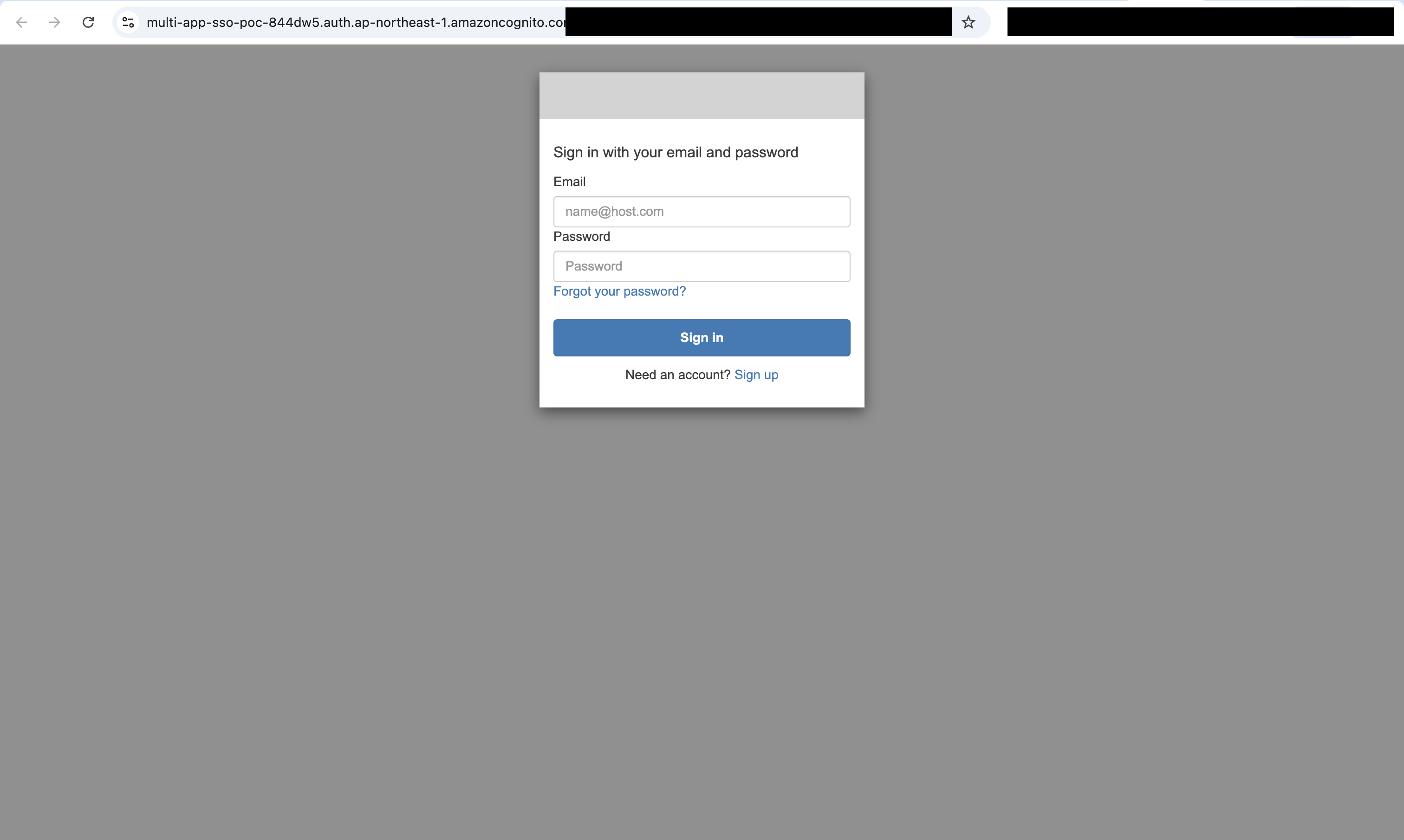
app1.<domain>に未ログインの状態でアクセスすると、Cognitoのログイン画面にリダイレクトされました。
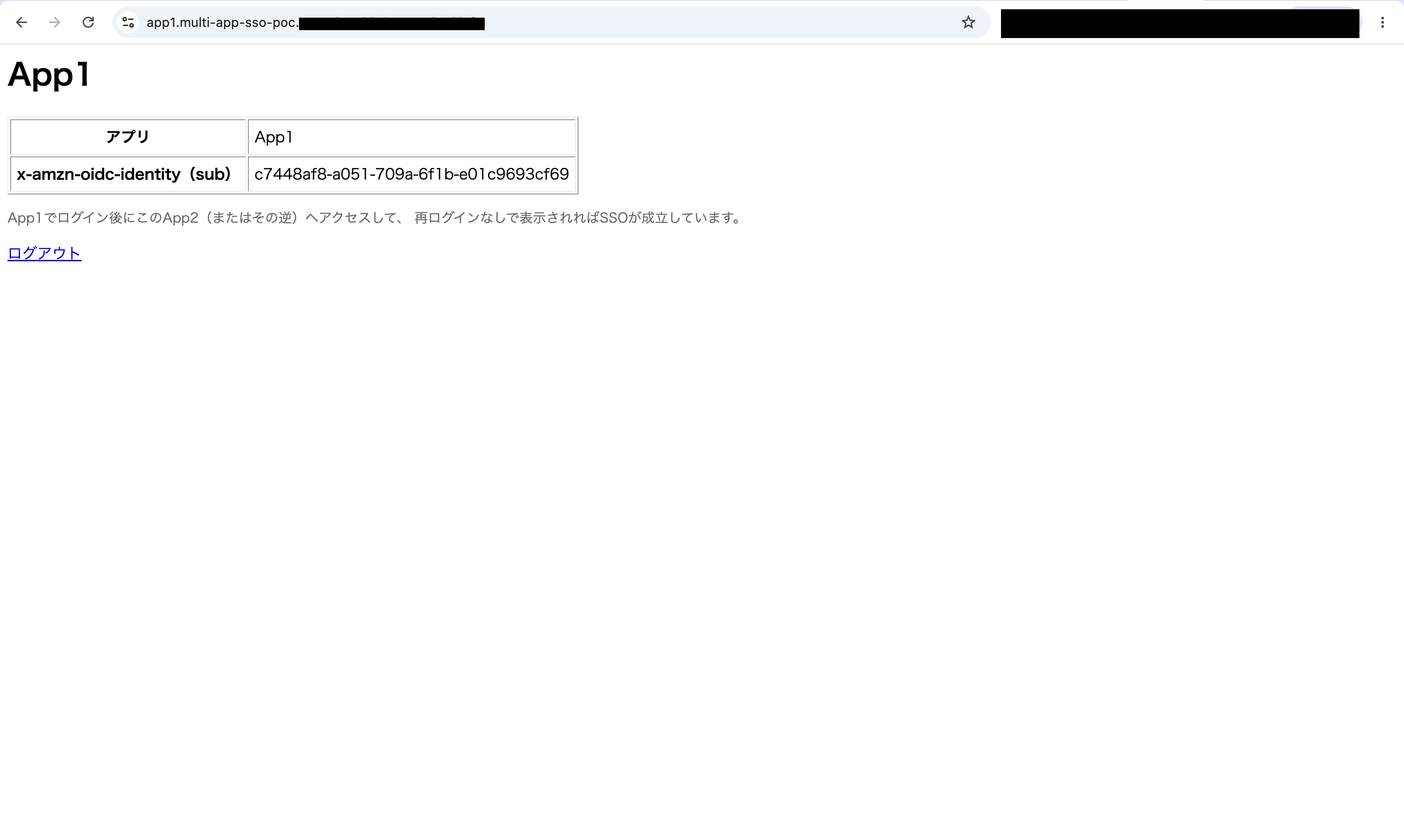
ログインすると、App1の認証後ページが表示されました。x-amzn-oidc-identityヘッダーの値(Cognitoが発行したユーザー識別子sub)も表示するようにしています。
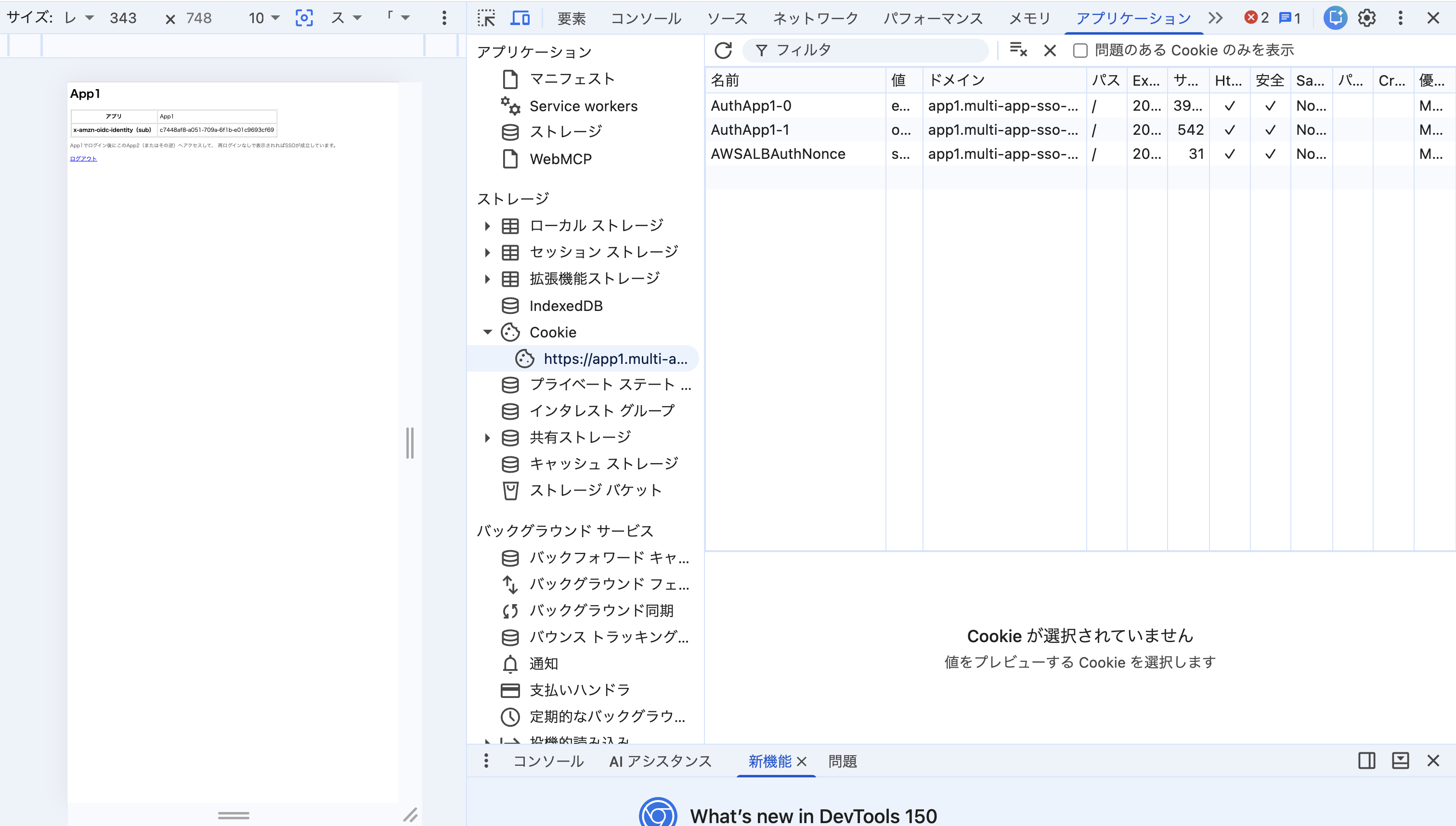
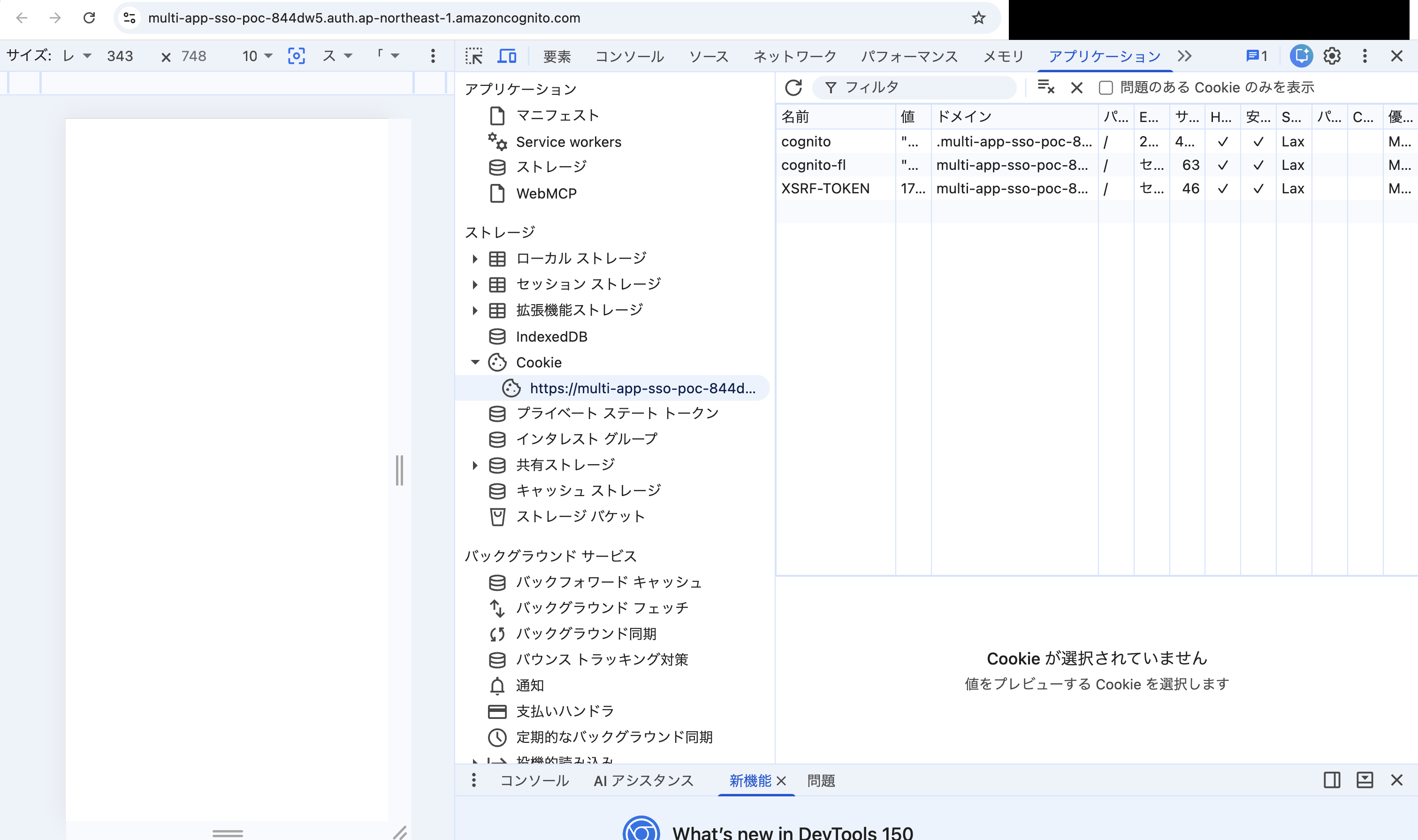
開発者ツールで確認すると、app1.<domain>に対してAuthApp1というALBのセッションCookieが発行されていました(4KBを超えるCookieはALBによって自動的に分割されるため、AuthApp1-0・AuthApp1-1という2つのCookieに分かれています)。
Cognitoのドメインに直接アクセスして確認すると、CognitoのHosted UIが発行するcognitoという名前のセッションCookieが存在していました。前述の通りこのCookieはApp Clientごとではなくユーザープールのドメインに対して発行されます。ALBがどのApp ClientのIDで/oauth2/authorizeへリダイレクトしても、宛先ドメインが同じであればブラウザはこのCookieを送出するため、Cognitoは認証済みのセッションとして扱い、ログイン画面を表示せずに認可コードを発行します。
同じブラウザのまま、別ホストであるapp2.<domain>にアクセスしました。ログイン画面を経由せず、即座にApp2の認証後ページが表示されました。
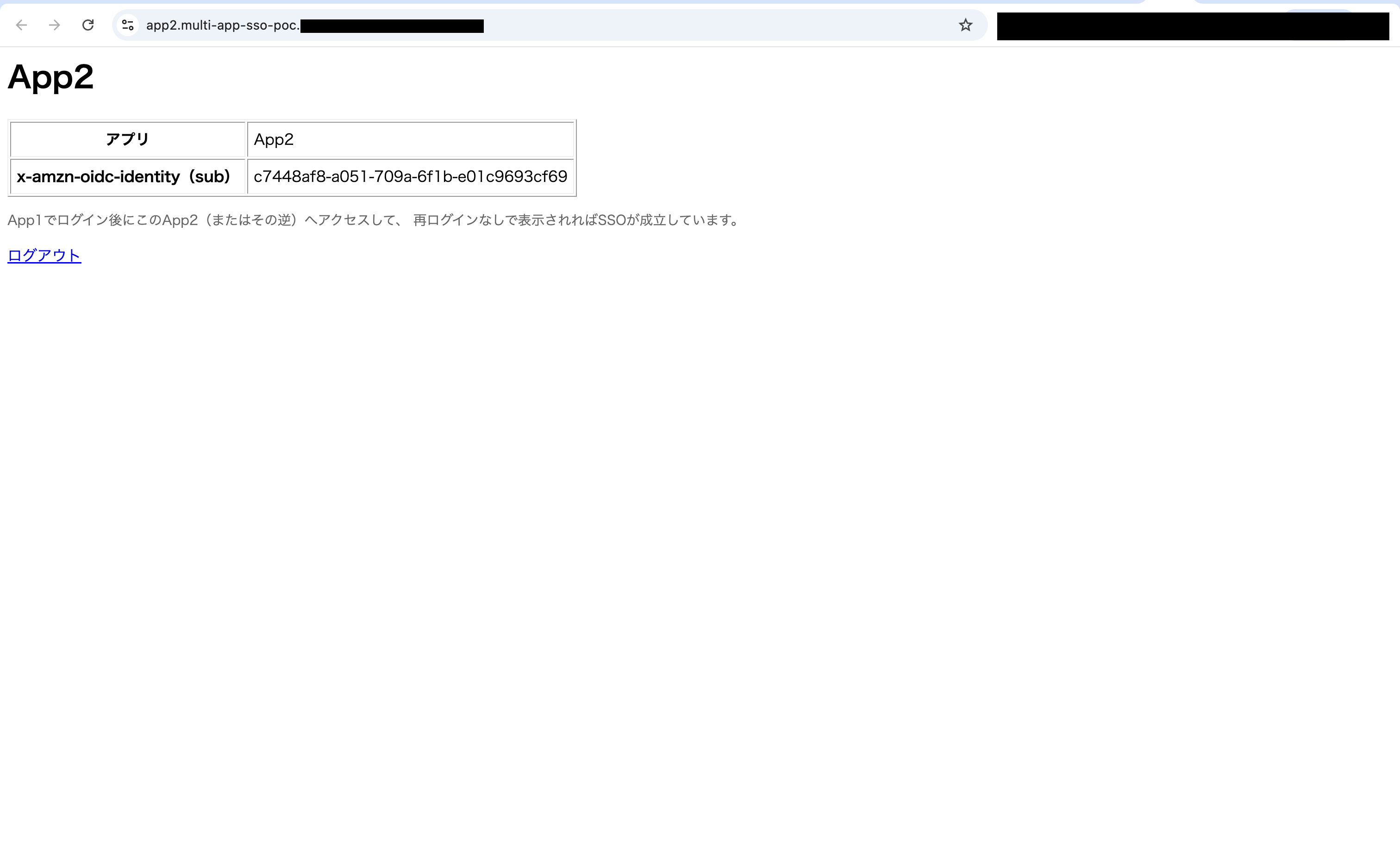
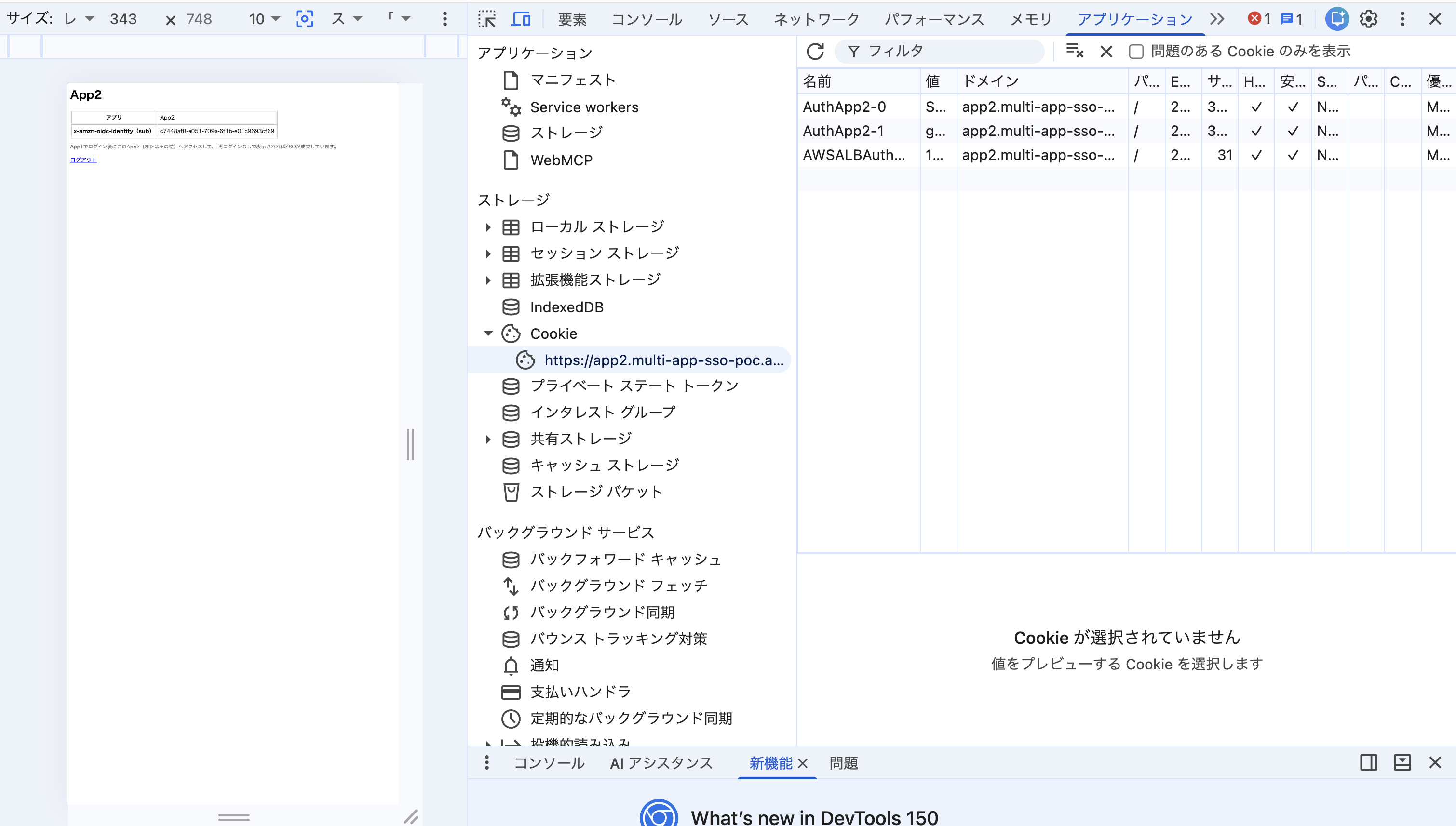
x-amzn-oidc-identityの値はApp1のときと完全に一致しており、同一ユーザーとして認識されていることが確認できました。開発者ツールでは、App2側にもAuthApp2という、App1とは別名・別値のALBセッションCookieが新たに発行されていました。
App1・App2は別のECSサービス・別のApp Client・別のALBセッションCookieを持つ、完全に独立したアプリケーションです。それでも、同一ユーザープールを共有しているだけで1回のログインだけで両方にアクセスできることが確認できました。
App1をログアウトする
ALBの認証Cookie(AuthApp1/AuthApp2)は、一度検証されるとsession_timeout(デフォルト7日間、今回のTerraformでは明示的に指定していないためデフォルトのまま)の間、Cognitoに毎回問い合わせることなく、Cookie自身の検証だけでリクエストを通します。
アプリからのログアウト処理で操作できるのは、自ドメインのCookieとCognitoのセッションCookieの2つです。AuthApp1はapp1.<domain>に対して発行されたCookieのため、App1のレスポンスから失効させられます。一方AuthApp2はapp2.<domain>に対して発行されており、ブラウザのオリジン制約によりApp1のレスポンスからは操作できません。CognitoのLOGOUTエンドポイントへのリダイレクトで消えるのは、CognitoドメインのcognitoセッションCookieです。
つまりApp1のログアウト後に残るのはAuthApp2だけですが、ALBはこのCookieが有効期限内であればCognitoに問い合わせずリクエストを通すため、App2へのアクセスは継続します。ログイン時はCookieが無いためCognitoへリダイレクトされてcognitoセッションCookieが評価されるのに対し、ログアウト後はCookieが残っているためCognitoへの問い合わせ自体が発生しない、という非対称性です。
実機で確認します。App1の認証後ページに「ログアウト」ボタンを実装し、クリックするとALBのセッションCookie(AuthApp1)を失効させたうえでCognitoのLOGOUTエンドポイントへリダイレクトする実装にしています。
def logout(request):
    cognito_domain = os.environ["COGNITO_DOMAIN"]
    client_id = os.environ["COGNITO_CLIENT_ID"]
    app_url = os.environ["APP_URL"]
    alb_cookie_name = os.environ["ALB_COOKIE_NAME"]

    logout_url = (
        f"https://{cognito_domain}/logout"
        f"?client_id={client_id}&logout_uri={app_url}"
    )
    response = HttpResponseRedirect(logout_url)
    # ALBは4KBを超えるCookieを最大4つに分割(-0〜-3)して送るため、素の名前だけでなく分割後の名前も消す
    response.delete_cookie(alb_cookie_name, path="/")
    for i in range(4):
        response.delete_cookie(f"{alb_cookie_name}-{i}", path="/")
    return response
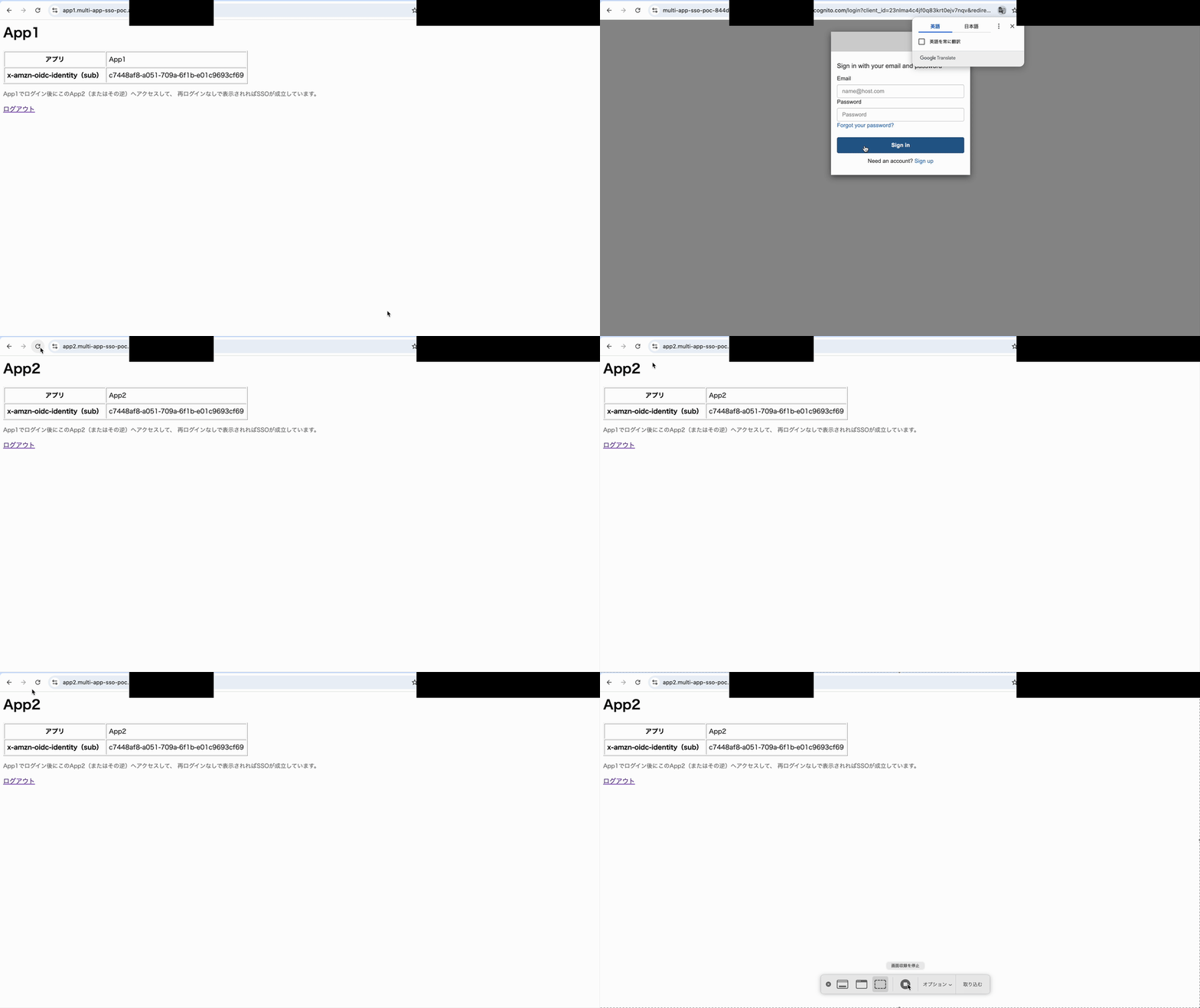
App1でこのログアウトボタンを押すと、App1は再ログインを要求されました。同じブラウザのままapp2.<domain>にアクセスしたところ、想定通りログイン画面を経由せずApp2にアクセスできました。
VPC・ALBを分離しても同じ結論になる
今回はTerraformでの構築を簡単にするため、1つのVPC・1つのALBの中にApp1・App2をまとめていますが、「1アプリ=1VPC・1ALB」のように完全に分離した構成にしても、同じ結論になります。
設定の肝は、各アプリのALBのauthenticate-cognitoアクションが、同じuser_pool_arn・user_pool_domainを参照していることだけです。アプリをまたいだログイン状態を保持するcognitoセッションCookieは、ALBやVPCではなくCognitoのHosted UIドメインに対して発行されるため、App1・App2がどのVPC・ALBに存在していても関係ありません。VPC同士を接続する必要もなく、それぞれのALBが独立して同じユーザープールを参照してさえいれば、SSOは成立します。
まとめ
- 同一Cognitoユーザープール内に複数のApp Clientを作成すれば、別々に構築された独立アプリケーション間でも、1回のログインだけでSSOが成立する
- VPC・ALBが分かれていても、各ALBが同じユーザープールを参照してさえいれば同様に成立する
- ただし、SSOで伝播するのはログインだけで、ログアウトは自動的には伝播しない。あるアプリでログアウトしても、他のアプリのALBセッションCookieがまだ有効な間はそのままアクセスできてしまう
最後に
同一Cognitoユーザープール内でApp Clientを分けた2つのアプリケーション間で、シングルサインオンが成立するかを検証しました。App1でログインした状態からApp2へアクセスすると、ログイン画面を経由せず、同じsubのユーザーとしてアクセスできることを確認できました。
この構成を採用する際に押さえておきたいのは、ログイン状態がCognitoとALBの2箇所で別々に保持されている点です。ユーザープールのドメインに保存されるcognitoCookieがアプリをまたいだログイン状態を持ち、各アプリのドメインに保存されるALBのセッションCookieがアプリ個別のセッションを持ちます。ログインが伝播してログアウトが伝播しないという非対称な挙動も、この2つのCookieのスコープと参照タイミングの違いから説明できます。
複数のアプリケーションでユーザーを共通化したい場合、ユーザープールを分けずにApp Clientで分ける構成は選択肢になります。一方で、アプリごとに完全に認証を独立させたい場合は、ユーザープール自体を分ける設計も検討することになります。どちらを選ぶかは、アプリケーション間でユーザーを行き来させたいかどうか次第です。認証をインフラ層に寄せる構成を複数アプリケーションに広げる際の参考になれば幸いです。今回は以上です。