GenU (Generative AI Use Cases JP) v5.4 とS3 VectorsでサーバレスRAGを構築する

クラウド事業本部コンサルティング部の石川です。 先日、構築したGenU (Generative AI Use Cases JP) のv5.4 環境にS3 Vectorsで、圧倒的にランニングコストを抑えたサーバレスRAGの構築が可能です。昨年末、GAになったばかりのS3 VectorsとAgentCoreをGenUから利用できる方法をご紹介します。
前提条件
- ベクトルストアは、Amazon S3 Vectors
- RAGは、Amazon Bedrock Knowledge Base
- S3 Vectors と Bedrock Knowledge Base は、東京リージョン (ap-northeast-1)
- Embedding モデルは、Amazon Titan Text Embeddings V2
- Amazon Bedrock Knowledge Baseを呼び出すAmazon Bedrock AgentCoreを作成してデプロイ
- Amazon Bedrock Knowledge Baseを呼び出すGenU (Generative AI Use Cases JP) をデプロイ
リソース構成
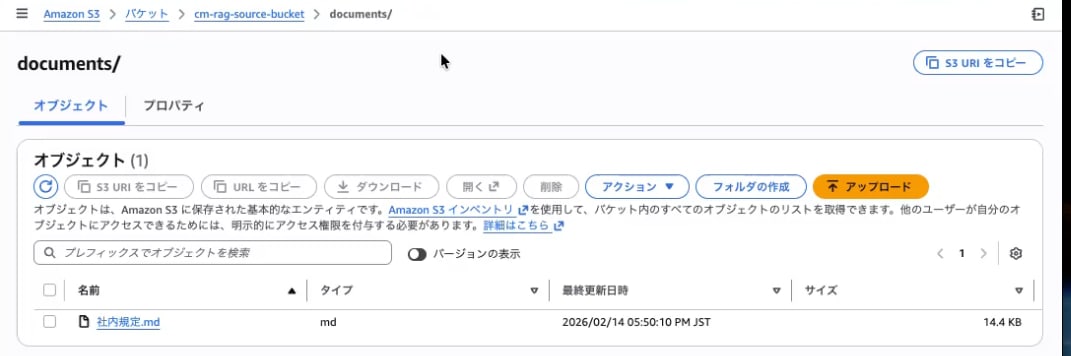
S3 ソースバケットの準備
RAG(Amazon S3 Vectors)に格納する元となるドキュメントをS3 バケットに配置します。
S3 Vector Bucket の作成
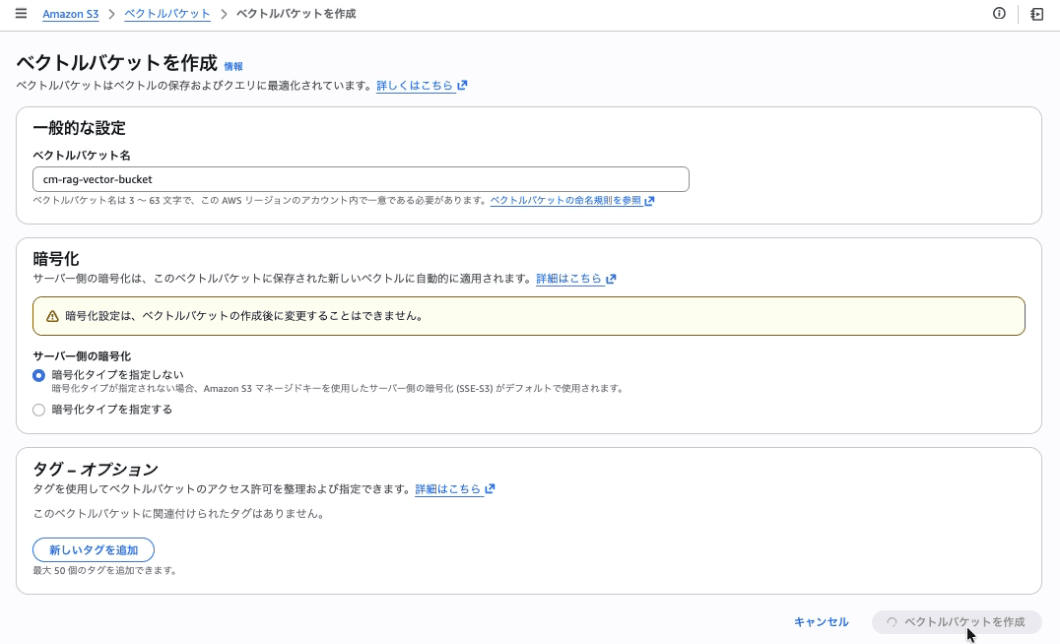
ベクトルデータを格納する Vector Bucket を作成します。
| 設定項目 | 値 |
|---|---|
| Vector bucket name | cm-rag-vector-bucket |
| Encryption | SSE-S3 (デフォルト) |
S3 Vector Index の作成
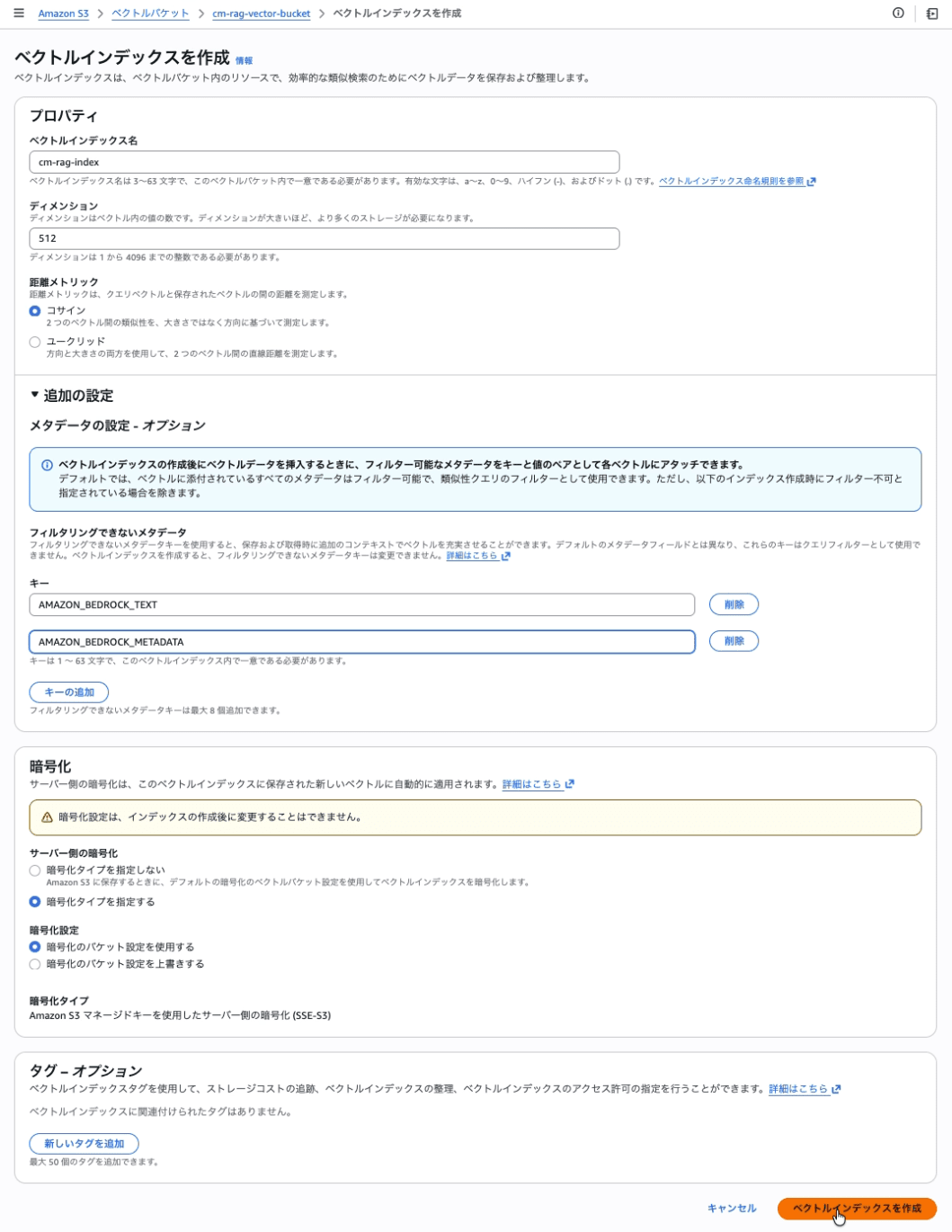
Vector Bucket 内にベクトルインデックスを作成する。
| 設定項目 | 値 |
|---|---|
| Vector index name | cm-rag-index |
| Dimension | 512 |
| Distance metric | コサイン |
| Non-filterable metadata keys | AMAZON_BEDROCK_TEXT, AMAZON_BEDROCK_METADATA |
IAM サービスロールの作成
Bedrock Knowledge Base が各リソースにアクセスするためのサービスロール(cm-japanese-rag-kb-role)を作成する。
4-1. 信頼ポリシーの設定
信頼されたエンティティタイプ: カスタム信頼ポリシー を選択します。
{
  "Version": "2012-10-17",
  "Statement": [
    {
      "Effect": "Allow",
      "Principal": {
        "Service": "bedrock.amazonaws.com"
      },
      "Action": "sts:AssumeRole",
      "Condition": {
        "StringEquals": {
          "aws:SourceAccount": "<アカウントID>"
        },
        "ArnLike": {
          "aws:SourceArn": "arn:aws:bedrock:<リージョン>:<アカウントID>:knowledge-base/*"
        }
      }
    }
  ]
}
4-2. 許可ポリシーの作成とアタッチ
下記のインラインポリシー(cm-japanese-rag-kb-policy)を作成してアタッチします。
{
  "Version": "2012-10-17",
  "Statement": [
    {
      "Sid": "S3SourceReadAccess",
      "Effect": "Allow",
      "Action": [
        "s3:GetObject",
        "s3:ListBucket"
      ],
      "Resource": [
        "arn:aws:s3:::cm-rag-source-bucket",
        "arn:aws:s3:::cm-rag-source-bucket/*"
      ]
    },
    {
      "Sid": "S3VectorsAccess",
      "Effect": "Allow",
      "Action": [
        "s3vectors:PutVectors",
        "s3vectors:GetVectors",
        "s3vectors:DeleteVectors",
        "s3vectors:QueryVectors",
        "s3vectors:GetIndex"
      ],
      "Resource": "arn:aws:s3vectors:<リージョン>:<アカウントID>:bucket/cm-rag-vector-bucket/index/cm-rag-index"
    },
    {
      "Sid": "BedrockModelInvocation",
      "Effect": "Allow",
      "Action": "bedrock:InvokeModel",
      "Resource": "arn:aws:bedrock:<リージョン>::foundation-model/amazon.titan-embed-text-v2:0"
    }
  ]
}
Amazon Bedrock Knowledge Base + Data Source の作成
ここでは、Amazon Bedrock Knowledge Baseを作成します。
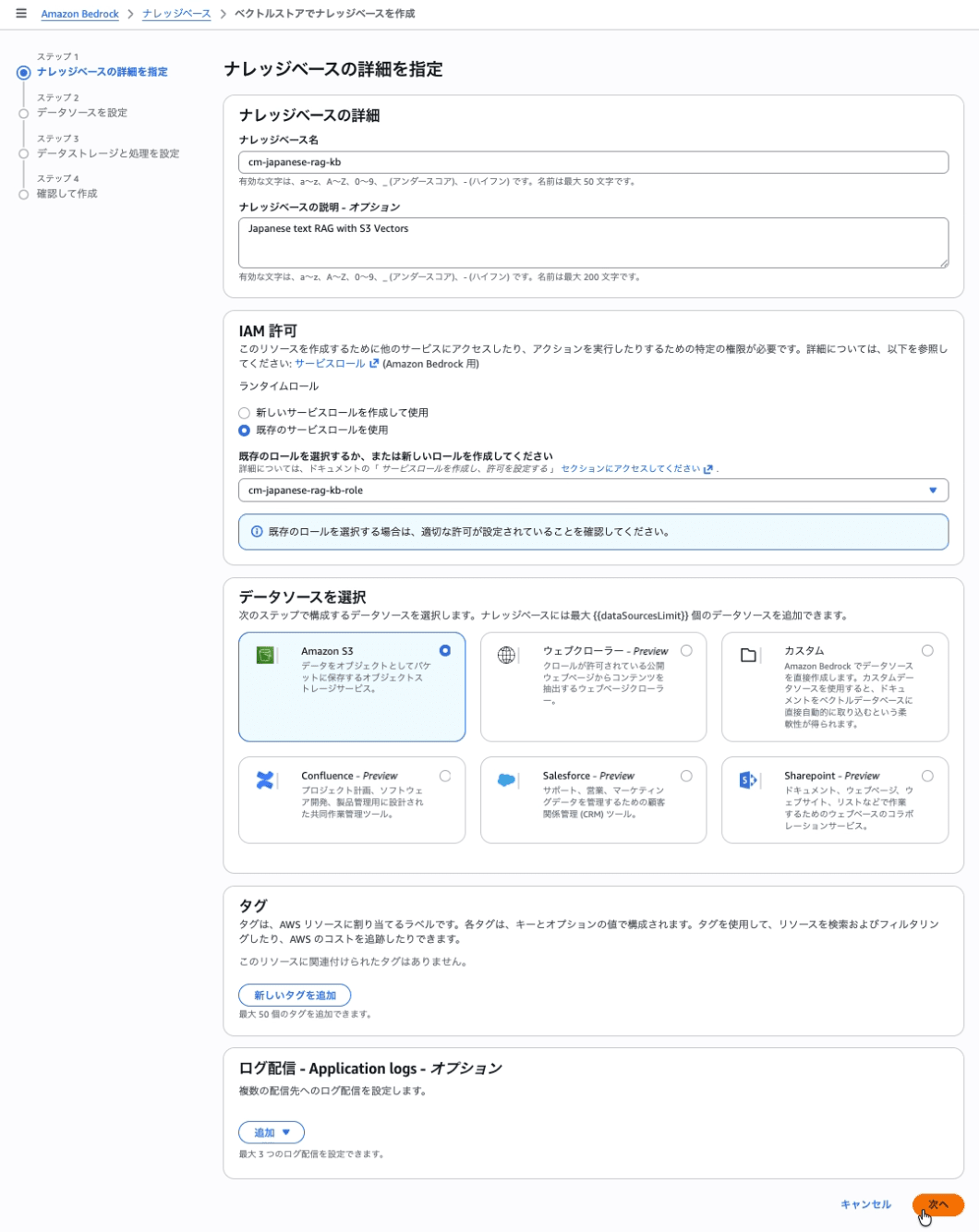
Step 1: Knowledge Base の詳細
Amazon Bedrock Knowledge Base とデータソースを作成します。
| 設定項目 | 値 |
|---|---|
| Knowledge base name | cm-japanese-rag-kb |
| Knowledge base description | Japanese text RAG with S3 Vectors |
| IAM permissions | cm-japanese-rag-kb-role |
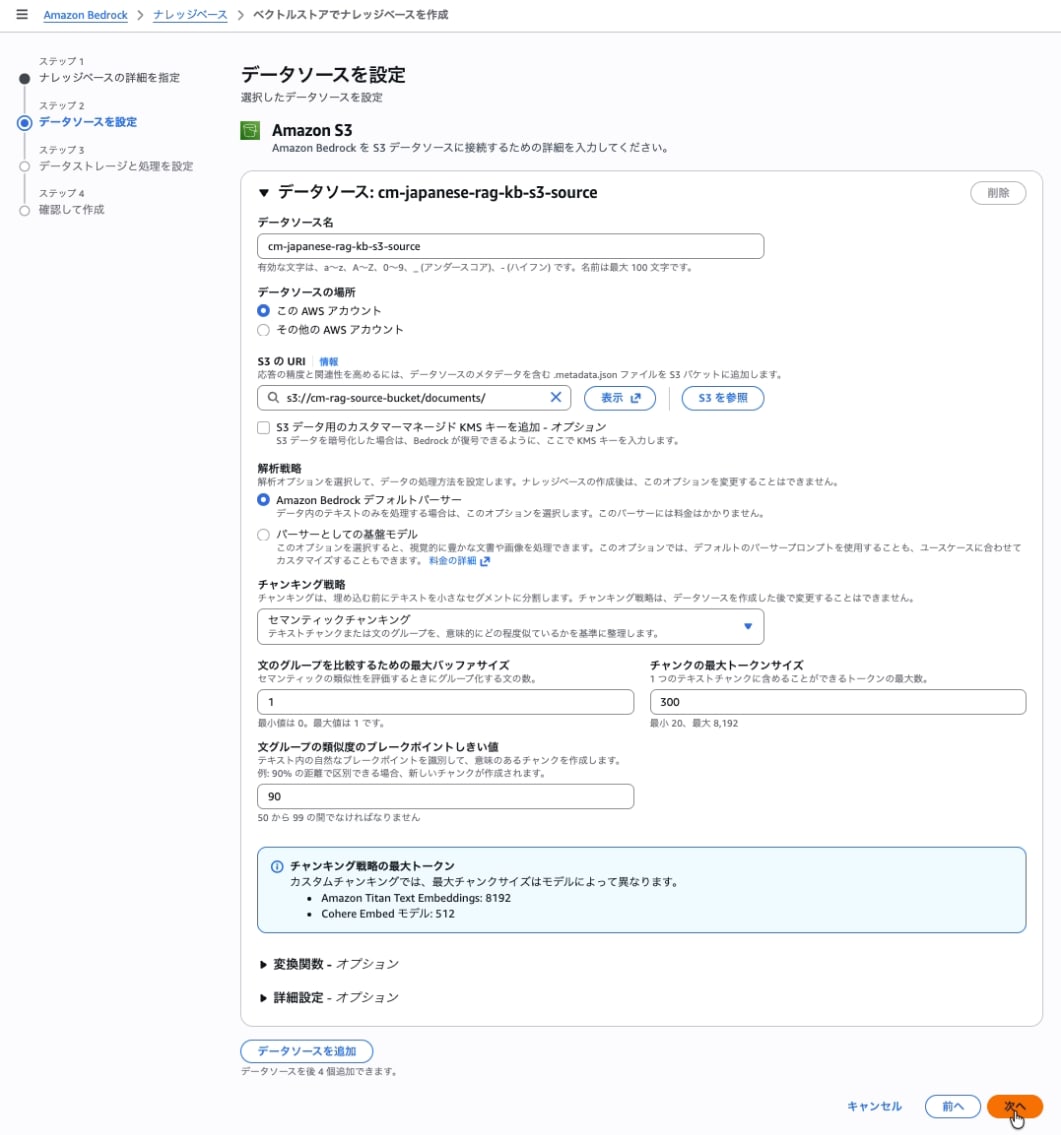
Step 2: データソースとチャンキング戦略の設定
データソースとチャンキング戦略を設定します。文の境界を考慮しつつ、意味のまとまりを維持した分割が可能です。ただし、処理の際に追加のモデル呼び出しが発生するため、データ取り込み時(インジェクション時)に別途コストがかかります。
セマンティックチャンキングは、単に文字数で区切るのではなく、文章の意味のつながりを判断して分割位置を決定します。この判断のために、モデル(埋め込みモデル)が呼び出されます。
| 設定項目 | 値 |
|---|---|
| Data source name | cm-japanese-rag-kb-s3-source |
| S3 URI | s3://cm-rag-source-bucket/documents/ |
チャンキング戦略 で セマンティックチャンキング を選択します。
| 設定項目 | 値 |
|---|---|
| 文のグループを比較するための最大バッファサイズ | 1 |
| チャンクの最大トークンサイズ | 15 |
| 文グループの類似度のブレークポイントしきい値 | 90 |
推奨値は AWS 公式ブログ に基づき、ドキュメントの種類に応じて調整してください。
Step 3: Embedding モデルとベクトルストアの設定
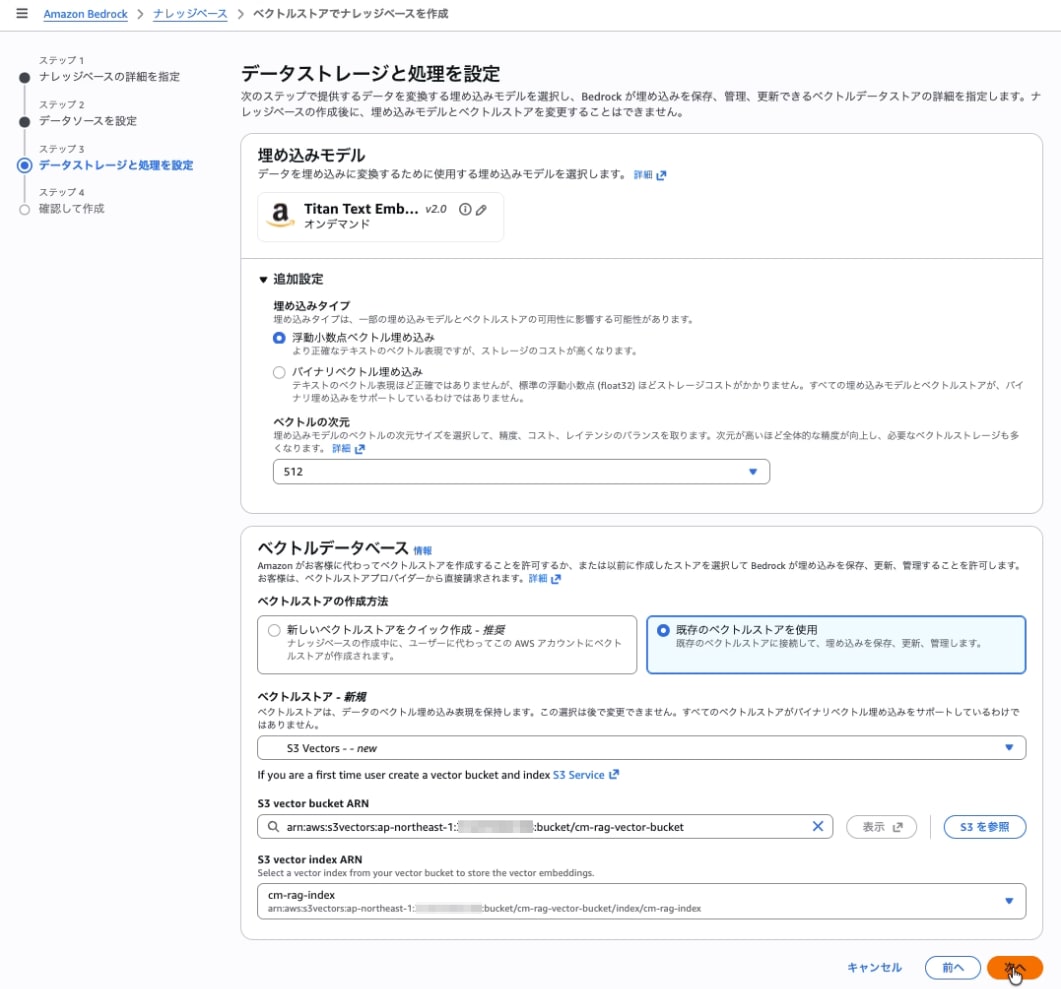
埋め込みモデル
| 設定項目 | 値 |
|---|---|
| Embeddings model | Amazon Titan Text Embeddings V2 |
| Vector dimensions | 512 |
注意: Titan v2 のデフォルト次元数は 1024 のため、必ず 512 を明示選択する。Vector Index の次元数 (512) と一致しないと "Query vector contains invalid values or is invalid for this index" エラーが発生する。
ベクトルデータベース
| 設定項目 | 値 |
|---|---|
| ベクトルストアの作成方法 | 既存のベクトルストアを作成 |
| ベクトルストア | S3 Vectors |
| S3 Vector bucket | cm-rag-vector-bucket を選択 |
| S3 Vector index | cm-rag-index を選択 |
Step 4: 確認と作成
設定内容を確認し、ナレッジベースを作成 をクリック。
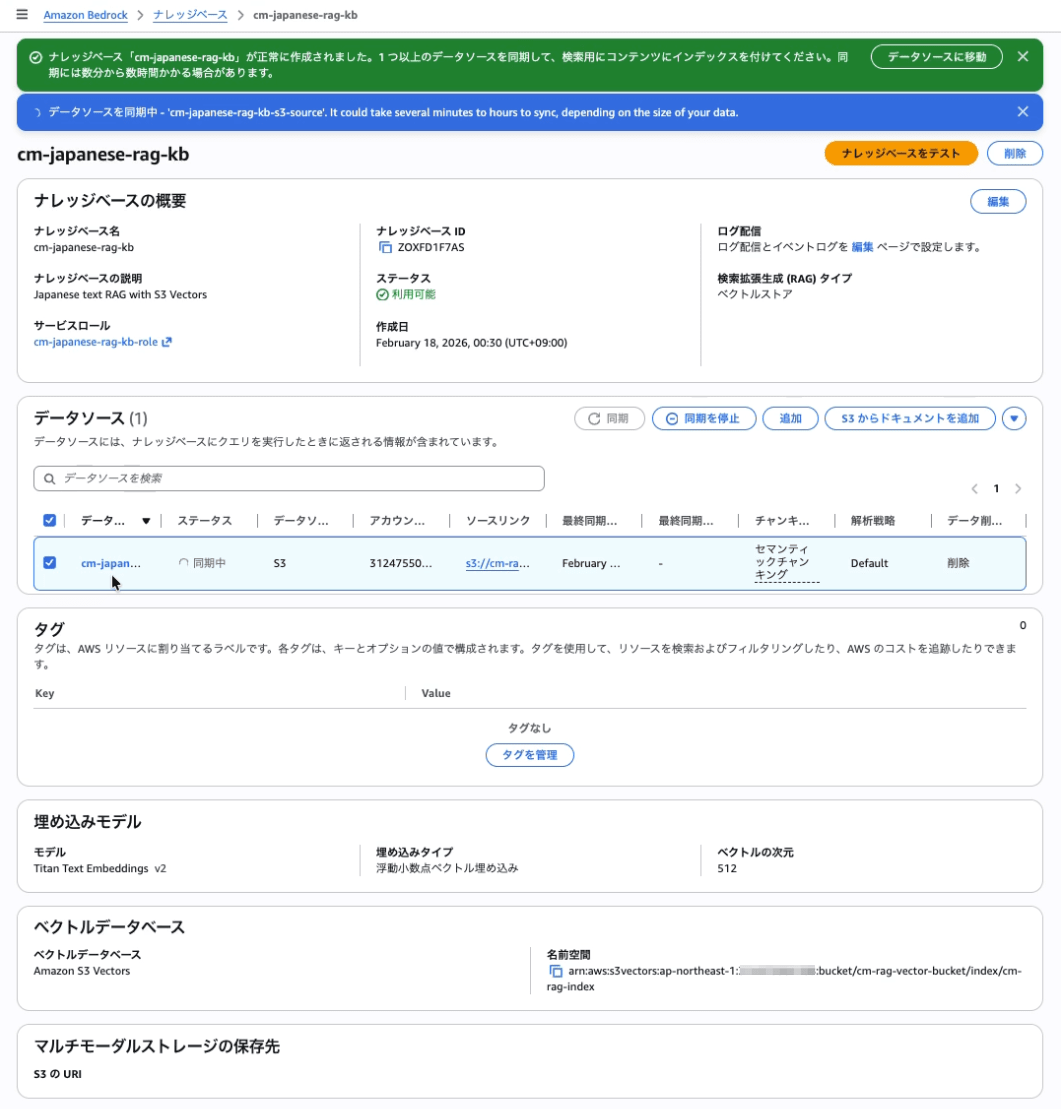
データソースの同期 (インジェション)
- データソース セクションで
cm-japanese-rag-kb-s3-sourceを選択 - 同期 をクリック
- ステータスが 利用可能 になるまで待機
Amazon Bedrock Knowledge Base の動作確認
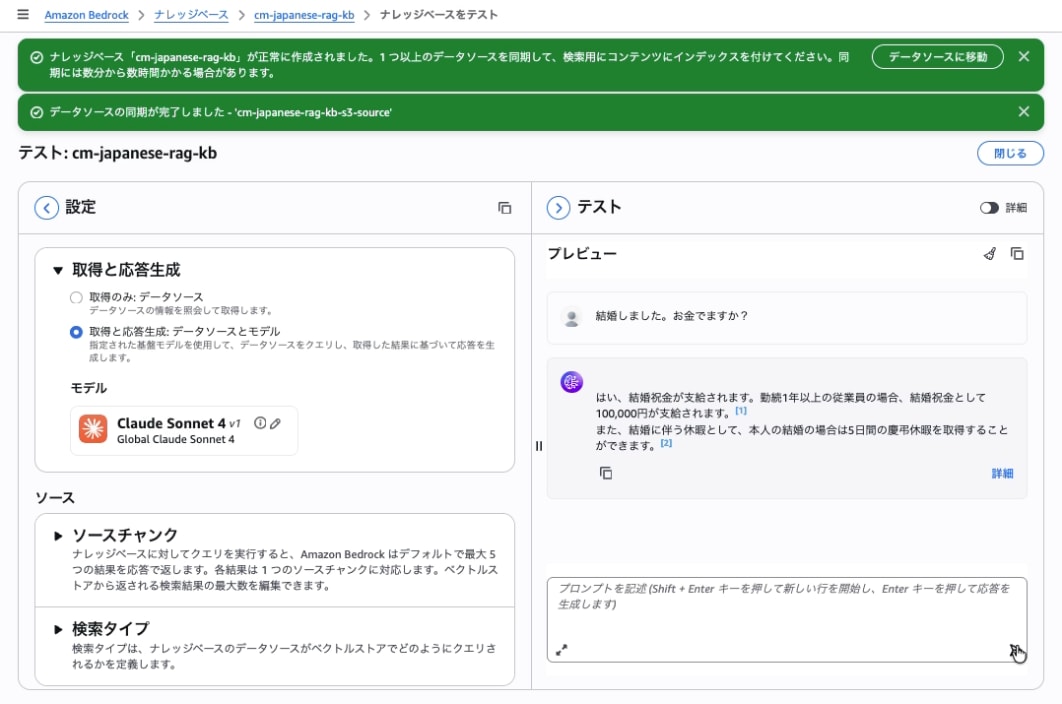
ナレッジベース(cm-japanese-rag-kb)を選択して、ナレッジベースのテストを開き、モデルを指定、プロンプトを入力して、回答が返ってくることを確認して完了です。
S3 VectorsによるRAGができたので、GenUに組み込みます。
Amazon Bedrock AgentCore の作成とデプロイ
Amazon Bedrock Knowledge Baseを呼び出すAmazon Bedrock AgentCoreを作成してデプロイします。
AgentCoreのプログラムの準備
ここでは、先程作成したKnowlge Baseを呼び出すstrands agentを作成します。このエージェントは、
agentcore_s3vectorsディレクトリの下にagent.pyを作成してください。agent.pyの「社内規定」の情報を取得するRAGエージェントです。KNOWLEDGE_BASE_IDは、先程作成したIDに置き換えてください。
補足: strands agentやAgentCoreについても解説したいですが、解説が長くなってしまうので割愛します。
agentcore_s3vectors/agent.py
import os
import boto3
from botocore.config import Config
from strands import Agent, tool
from strands.models import BedrockModel
from bedrock_agentcore.runtime import BedrockAgentCoreApp

# Knowledge Base設定
KNOWLEDGE_BASE_ID = os.getenv("KNOWLEDGE_BASE_ID", "<上記のKNOWLEDGE_BASE_IDを入力>")
KNOWLEDGE_BASE_REGION = os.getenv("KNOWLEDGE_BASE_REGION", "ap-northeast-1")

model_id = os.getenv("BEDROCK_MODEL_ID", "global.anthropic.claude-haiku-4-5-20251001-v1:0")
model = BedrockModel(
    model_id=model_id,
    max_tokens=4096,
    temperature=0.1,
    region_name="ap-northeast-1"
)

app = BedrockAgentCoreApp()

@tool
def get_rag(query: str, number_of_results: int = 5) -> str:
    """
    社内の各種規定、就業規則、福利厚生、手続きガイドラインに関する情報を検索します。
    社員から「休暇制度」「経費精算」「服務」「育児・介護休業等」「慶弔見舞金」「賃金」「旅費交通費」「慶弔休暇」など、
    社内のルールや公的な制度に関する質問があった場合に必ずこの関数を呼び出してください。
    検索された情報に基づき、正確な社内規定を回答として提示します。

    Args:
        query: 検索クエリ(ユーザーの質問や検索したい内容)
        number_of_results: 取得する結果の最大数(デフォルト: 5)

    Returns:
        検索結果のテキスト
    """
    client = boto3.client(
        "bedrock-agent-runtime",
        region_name=KNOWLEDGE_BASE_REGION,
        config=Config(retries={"mode": "standard", "total_max_attempts": 3})
    )

    try:
        response = client.retrieve(
            knowledgeBaseId=KNOWLEDGE_BASE_ID,
            retrievalQuery={'text': query},
            retrievalConfiguration={
                'vectorSearchConfiguration': {
                    'numberOfResults': number_of_results
                }
            }
        )

        results = response.get('retrievalResults', [])
        if not results:
            return "関連する情報が見つかりませんでした。"

        # 結果をフォーマット
        output_lines = []
        for i, result in enumerate(results, 1):
            text = result.get('content', {}).get('text', '')
            score = result.get('score', 0.0)
            source = result.get('location', {}).get('s3Location', {}).get('uri', 'Unknown')
            output_lines.append(f"--- 結果 {i} (スコア: {score:.2f}) ---")
            output_lines.append(f"ソース: {source}")
            output_lines.append(text)
            output_lines.append("")

        return "\n".join(output_lines)

    except Exception as e:
        return f"Knowledge Baseからの検索に失敗しました: {str(e)}"

@app.entrypoint
async def entrypoint(payload):
    agent = Agent(model=model, tools=[get_rag])
    message = payload.get("prompt", "")
    # return {"result": agent(message).message}
    stream_messages = agent.stream_async(message)
    async for message in stream_messages:
        if "event" in message:
            yield message

if __name__ == "__main__":
    app.run()
依存関係のあるモジュールのインストール
agentcore_s3vectorsディレクトリの下にrequirements.txtを作成してください。
agentcore_s3vectors/requirements.txt
strands-agents
strands-agents-tools
bedrock-agentcore
bedrock-agentcore-starter-toolkit
必要なモジュールをインストールします。
pip install -r requirements.txt
エージェントのデプロイ用の設定
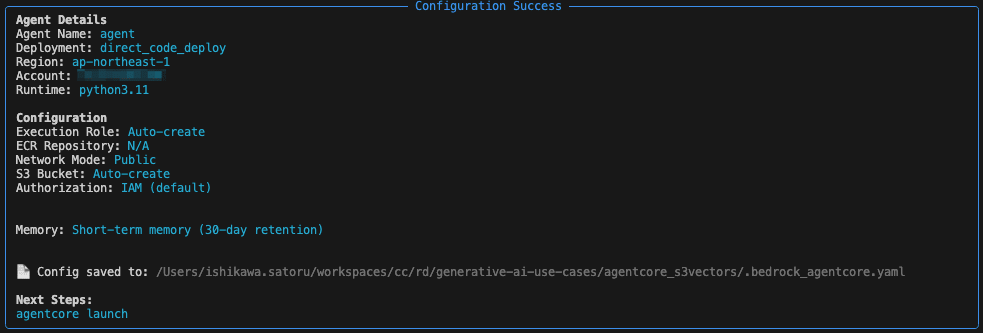
agentcore configure --entrypoint agent.pyを実行して、設定ファイル(agentcore_s3vectors/bedrock_agentcore/agent/.bedrock_agentcore.yaml)を作成します。今回はデフォルトの設定で自動作成しました。
agentcore_s3vectors % agentcore configure --entrypoint agent.py
Configuring Bedrock AgentCore...
✓ Using file: agent.py

🏷️  Inferred agent name: agent
Press Enter to use this name, or type a different one (alphanumeric without '-')
Agent name [agent]:
✓ Using agent name: agent

🔍 Detected dependency file: requirements.txt
Press Enter to use this file, or type a different path (use Tab for autocomplete):
Path or Press Enter to use detected dependency file: requirements.txt
✓ Using requirements file: requirements.txt

🚀 Deployment Configuration
Select deployment type:
  1. Direct Code Deploy (recommended) - Python only, no Docker required
  2. Container - For custom runtimes or complex dependencies
Choice [1]: 1

Select Python runtime version:
  1. PYTHON_3_10
  2. PYTHON_3_11
  3. PYTHON_3_12
  4. PYTHON_3_13
Note: Current Python 3.14 not supported, using python3.11
Choice [2]: 2
✓ Deployment type: Direct Code Deploy (python.3.11)

🔐 Execution Role
Press Enter to auto-create execution role, or provide execution role ARN/name to use existing
Execution role ARN/name (or press Enter to auto-create):
✓ Will auto-create execution role

🏗️  S3 Bucket
Press Enter to auto-create S3 bucket, or provide S3 URI/path to use existing
S3 URI/path (or press Enter to auto-create):
✓ Will auto-create S3 bucket

🔐 Authorization Configuration
By default, Bedrock AgentCore uses IAM authorization.
Configure OAuth authorizer instead? (yes/no) [no]:
✓ Using default IAM authorization

🔒 Request Header Allowlist
Configure which request headers are allowed to pass through to your agent.
Common headers: Authorization, X-Amzn-Bedrock-AgentCore-Runtime-Custom-*
Configure request header allowlist? (yes/no) [no]:
✓ Using default request header configuration
Configuring BedrockAgentCore agent: agent

Memory Configuration
Tip: Use --disable-memory flag to skip memory entirely

✅ MemoryManager initialized for region: ap-northeast-1
No existing memory resources found in your account

Options:
  • Press Enter to create new memory
  • Type 's' to skip memory setup

Your choice:
✓ Short-term memory will be enabled (default)
  • Stores conversations within sessions
  • Provides immediate context recall

Optional: Long-term memory
  • Extracts user preferences across sessions
  • Remembers facts and patterns
  • Creates session summaries
  • Note: Takes 120-180 seconds to process

Enable long-term memory? (yes/no) [no]:
✓ Using short-term memory only
Will create new memory with mode: STM_ONLY
Memory configuration: Short-term memory only
Network mode: PUBLIC
Setting 'agent' as default agent
エージェントをAgentCoreにデプロイ
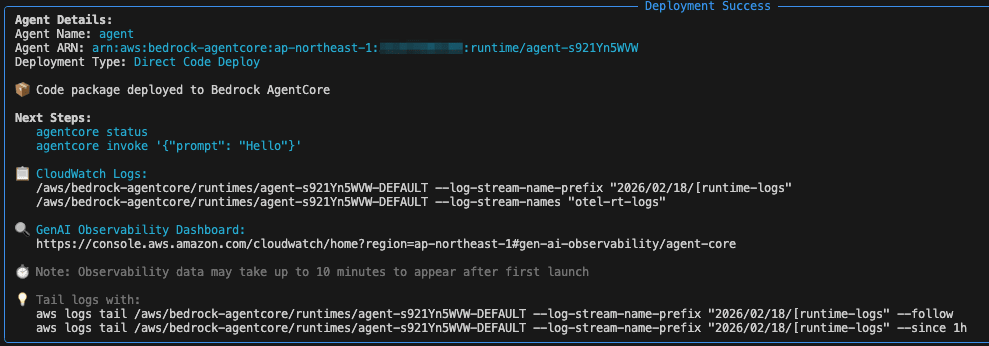
agentcore launchを実行して、エージェントをAgentCoreにデプロイします。
agentcore_s3vectors % agentcore launch
🚀 Launching Bedrock AgentCore (cloud mode - RECOMMENDED)...
   • Deploy Python code directly to runtime
   • No Docker required (DEFAULT behavior)
   • Production-ready deployment

💡 Deployment options:
   • agentcore deploy                → Cloud (current)
   • agentcore deploy --local        → Local development

Launching with direct_code_deploy deployment for agent 'agent'
Creating memory resource for agent: agent
✅ MemoryManager initialized for region: ap-northeast-1
⠸ Launching Bedrock AgentCore...Creating new STM-only memory...
⏳ Creating memory resource (this may take 30-180 seconds)...
⠇ Launching Bedrock AgentCore...Created memory: agent_mem-Jh9uGT50Zu
Created memory agent_mem-Jh9uGT50Zu, waiting for ACTIVE status...
Waiting for memory agent_mem-Jh9uGT50Zu to return to ACTIVE state and strategies to reach terminal states...
⠋ Launching Bedrock AgentCore...[23:31:07]    ⏳ Memory: CREATING (10s elapsed)                                                                                                                                            manager.py:1029
⠏ Launching Bedrock AgentCore...[23:31:17]    ⏳ Memory: CREATING (20s elapsed)                                                                                                                                            manager.py:1029
:                                                                                   :                                                                                   :

⠹ Launching Bedrock AgentCore...[23:33:21]    ⏳ Memory: CREATING (144s elapsed)                                                                                                                                           manager.py:1029
⠙ Launching Bedrock AgentCore...[23:33:32]    ⏳ Memory: CREATING (155s elapsed)                                                                                                                                           manager.py:1029
⠦ Launching Bedrock AgentCore...Memory agent_mem-Jh9uGT50Zu is ACTIVE and all strategies are in terminal states (took 160 seconds)
[23:33:37]    ✅ Memory is ACTIVE (took 160s)                                                                                                                                              manager.py:1043
⠇ Launching Bedrock AgentCore...ObservabilityDeliveryManager initialized for region: ap-northeast-1, account: 123456789012
⠋ Launching Bedrock AgentCore...Created log group: /aws/vendedlogs/bedrock-agentcore/memory/APPLICATION_LOGS/agent_mem-Jh9uGT50Zu
⠋ Launching Bedrock AgentCore...✅ Logs delivery enabled for memory/agent_mem-Jh9uGT50Zu
⠧ Launching Bedrock AgentCore...Failed to enable observability for memory/agent_mem-Jh9uGT50Zu: ValidationException - X-Ray Delivery Destination is supported with CloudWatch Logs as a Trace Segment Destination. Please enable the CloudWatch Logs destination for your traces using the UpdateTraceSegmentDestination API (https://docs.aws.amazon.com/xray/latest/api/API_UpdateTraceSegmentDestination.html)
⚠️ Failed to enable observability: ValidationException: X-Ray Delivery Destination is supported with CloudWatch Logs as a Trace Segment Destination. Please enable the CloudWatch Logs destination for your
traces using the UpdateTraceSegmentDestination API (https://docs.aws.amazon.com/xray/latest/api/API_UpdateTraceSegmentDestination.html)
Memory created and active: agent_mem-Jh9uGT50Zu
Ensuring execution role...
Getting or creating execution role for agent: agent
Using AWS region: ap-northeast-1, account ID: 123456789012
Role name: AmazonBedrockAgentCoreSDKRuntime-ap-northeast-1-d4f0bc5a29
⠏ Launching Bedrock AgentCore...Role doesn't exist, creating new execution role: AmazonBedrockAgentCoreSDKRuntime-ap-northeast-1-d4f0bc5a29
Starting execution role creation process for agent: agent
✓ Role creating: AmazonBedrockAgentCoreSDKRuntime-ap-northeast-1-d4f0bc5a29
Creating IAM role: AmazonBedrockAgentCoreSDKRuntime-ap-northeast-1-d4f0bc5a29
⠹ Launching Bedrock AgentCore...✓ Role created: arn:aws:iam::123456789012:role/AmazonBedrockAgentCoreSDKRuntime-ap-northeast-1-d4f0bc5a29
⠴ Launching Bedrock AgentCore...✓ Execution policy attached: BedrockAgentCoreRuntimeExecutionPolicy-agent
Role creation complete and ready for use with Bedrock AgentCore
Execution role available: arn:aws:iam::123456789012:role/AmazonBedrockAgentCoreSDKRuntime-ap-northeast-1-d4f0bc5a29
Using entrypoint: agent.py (relative to /Users/ishikawa.satoru/workspaces/cc/rd/generative-ai-use-cases/agentcore_s3vectors)
Creating deployment package...
📦 No cached dependencies found, will build
Building dependencies (this may take a minute)...
Building dependencies for Linux ARM64 Runtime (manylinux2014_aarch64)
Installing dependencies with uv for aarch64-manylinux2014 (cross-compiling for Linux ARM64)...
⠴ Launching Bedrock AgentCore...✓ Dependencies installed with uv
Creating dependencies.zip...
⠏ Launching Bedrock AgentCore...✓ Dependencies cached
Packaging source code...
⠋ Launching Bedrock AgentCore...Creating deployment package...
⠋ Launching Bedrock AgentCore...✓ Deployment package ready: 44.26 MB
Getting or creating S3 bucket for agent: agent
Bucket doesn't exist, creating new S3 bucket: bedrock-agentcore-codebuild-sources-123456789012-ap-northeast-1
✅ Created S3 bucket: bedrock-agentcore-codebuild-sources-123456789012-ap-northeast-1
⠏ Launching Bedrock AgentCore...S3 bucket available: s3://bedrock-agentcore-codebuild-sources-123456789012-ap-northeast-1
Uploading deployment package to S3...
Uploading to s3://bedrock-agentcore-codebuild-sources-123456789012-ap-northeast-1/agent/deployment.zip...
⠴ Launching Bedrock AgentCore...✓ Deployment package uploaded: s3://bedrock-agentcore-codebuild-sources-123456789012-ap-northeast-1/agent/deployment.zip
Deploying to Bedrock AgentCore Runtime...
⠸ Launching Bedrock AgentCore...✅ Agent created/updated: arn:aws:bedrock-agentcore:ap-northeast-1:123456789012:runtime/agent-s921Yn5WVW
Waiting for agent endpoint to be ready...
⠏ Launching Bedrock AgentCore...Enabling observability...
⠹ Launching Bedrock AgentCore...Created/updated CloudWatch Logs resource policy
⠼ Launching Bedrock AgentCore...Configured X-Ray trace segment destination to CloudWatch Logs
X-Ray indexing rule already configured
Transaction Search configured: resource_policy, trace_destination
🔍 GenAI Observability Dashboard: https://console.aws.amazon.com/cloudwatch/home?region=ap-northeast-1#gen-ai-observability/agent-core
✅ Deployment completed successfully - Agent: arn:aws:bedrock-agentcore:ap-northeast-1:123456789012:runtime/agent-s921Yn5WVW
GenU から Amazon Bedrock AgentCore を呼び出す
parameter.ts の編集
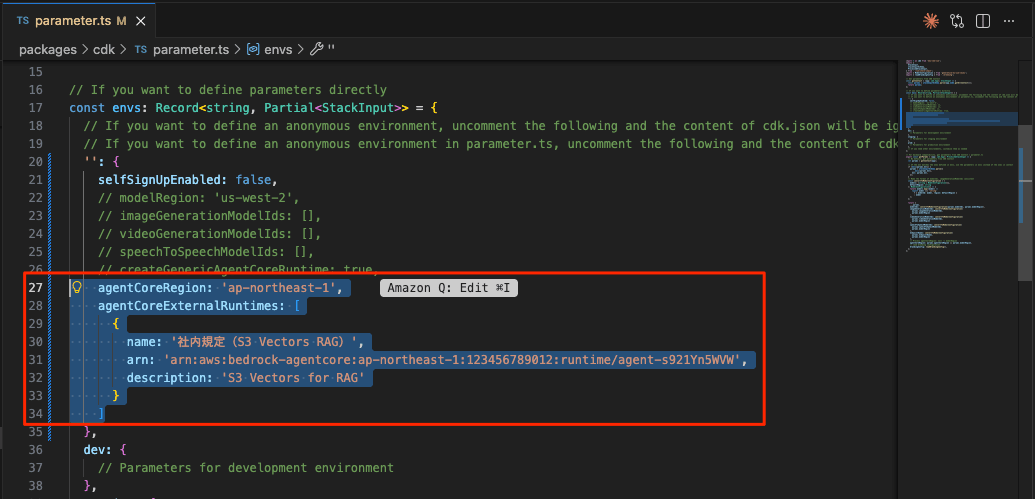
generative-ai-use-cases/packages/cdk/parameter.tsのenvs で、agentCoreRegionとagentCoreExternalRuntimesを追加&オーバーライドして、GenU から Amazon Bedrock AgentCore を呼び出すように設定します。AgentCoreのARNは、AgentCoreをデプロイした最後の行に表示されているARNに置き換えます。
✅ Deployment completed successfully - Agent: arn:aws:bedrock-agentcore:ap-northeast-1:123456789012:runtime/agent-s921Yn5WVW
  '': {
    selfSignUpEnabled: false,
    agentCoreRegion: 'ap-northeast-1',
    agentCoreExternalRuntimes: [
      {
        name: '社内規定(S3 Vectors RAG)',
        arn: '<AgentCoreのARNに置き換える>',
        description: 'S3 Vectors for RAG'
      }
  },
設定したら、再びデプロイしてください。
npm run cdk:deploy
動作確認
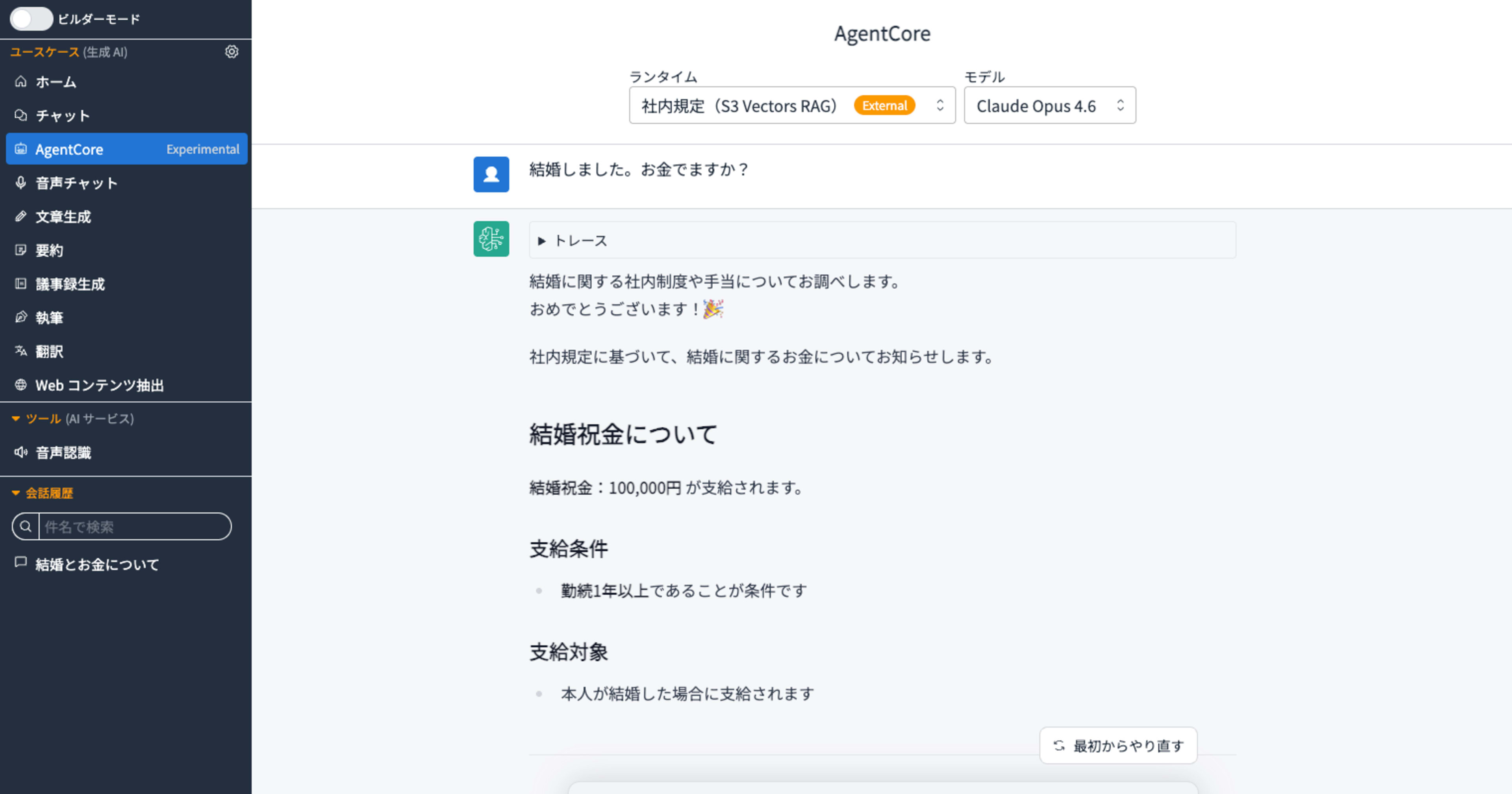
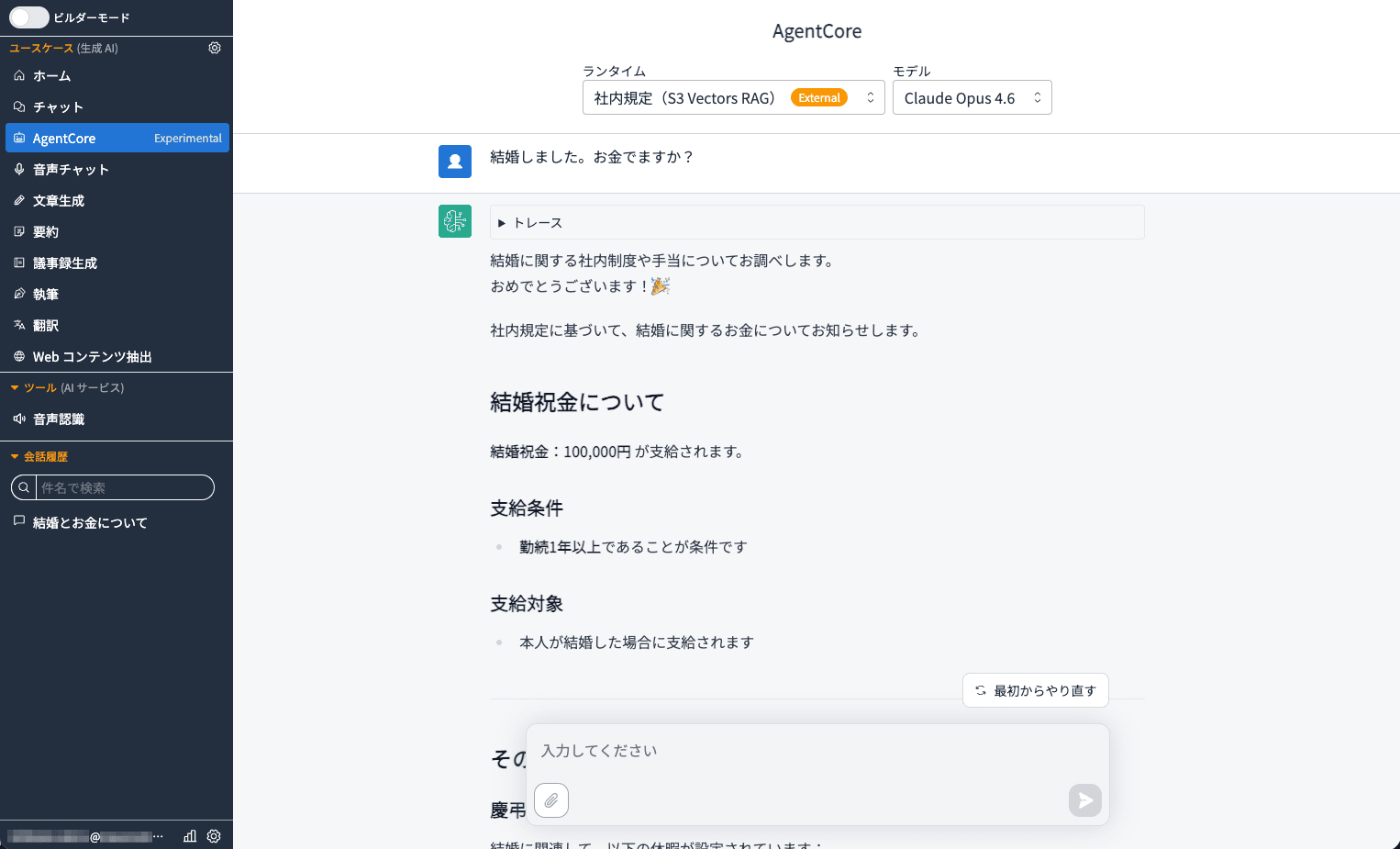
左のナビゲーションに[AgentCore Exprimental]が追加されています。これをクリックすると「社内規定(S3 Vectors RAG)」が確認できます。
「結婚しました。お金でますか」というキーワード一致が困難なプロンプトに対して、セマンティック検索によって、社内情報をもとに回答が生成されています。
最後に
今回は、GenU v5.4 と Amazon S3 Vectors を組み合わせ、サーバーレス構成でコスト効率の高いRAGを構築する方法をご紹介しました。
従来のベクトルストアとして利用されてきた Amazon Kendra や OpenSearch Serverless と比べ、S3 Vectors はサーバーレスかつシンプルな構成でベクトル検索を実現できるため、ランニングコストを大幅に抑えられる点が魅力です。また、Amazon Bedrock AgentCore を介することで、Bedrock Knowledge Base を GenU からシームレスに呼び出せる点も、実用的な観点から非常に有用だと感じました。
「結婚しました。お金でますか」のようなキーワード一致が困難なクエリに対しても、セマンティック検索によって適切な回答を返せている点は、RAGの実力を実感できる場面でした。社内規定や FAQ など、日常業務に直結したユースケースへ活用していただけたら幸いです。