AgentCore Code Interpreter × GenU で web 検索結果から PowerPoint を自動生成してみた

はじめに
こんにちは!AI 事業本部のこーすけです。
この記事は AgentCore Code Interpreter シリーズの 第四回 になります。
これまでの 3 回では、Code Interpreter の基本動作確認から始まり、Strands Agents によるエージェント化、そして GenU 統合まで段階的に検証してきました。今回は出力形式にPowerPoint 、さらに web 検索 ができるようにし、「○○ について最近の動向を調べて 3 枚のスライドにまとめて」のような自然な依頼に応えられるようにすることを目指します。
今回はこの 2 つを組み合わせて、web 検索 → PowerPoint 自動生成 → GenU からダウンロード までを実現します。
完成イメージ
GenU のチャット画面でこんなやり取りができるようになります。
- ユーザー: 「最近の AgentCore のアップデートを調べて、3 枚のスライドにまとめて」
- エージェント: web 検索ツールで情報収集
- エージェント: Code Interpreter サンドボックスで
python-pptxを使ってスライド生成 - エージェント: 生成した .pptx を S3 にアップロード、GenU 上にダウンロードリンクとして表示
- ユーザー: ダウンロードして PowerPoint で開く
「2026年4月の AgentCore のアップデートを調べて、3 枚のスライドにまとめて
」と入力してみました。
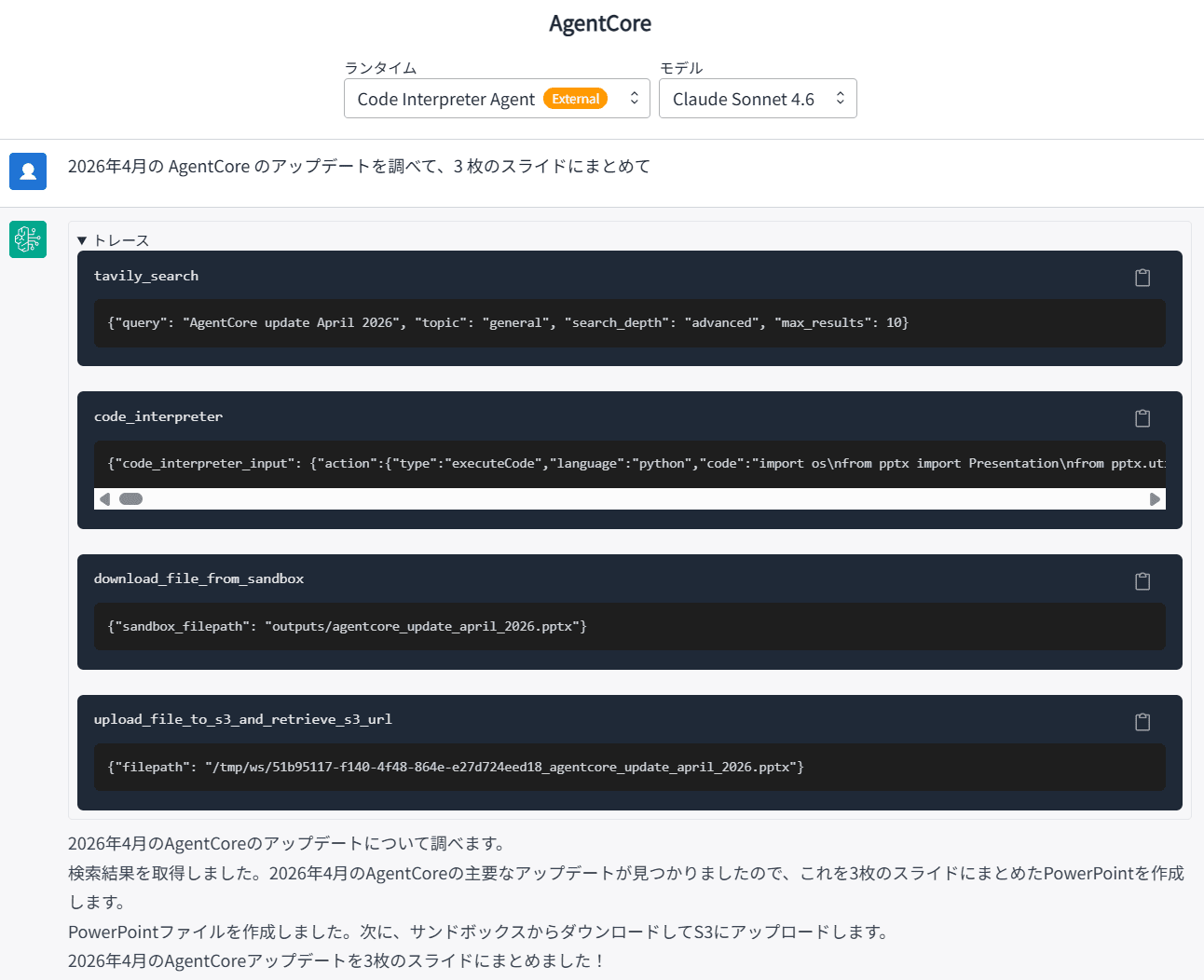
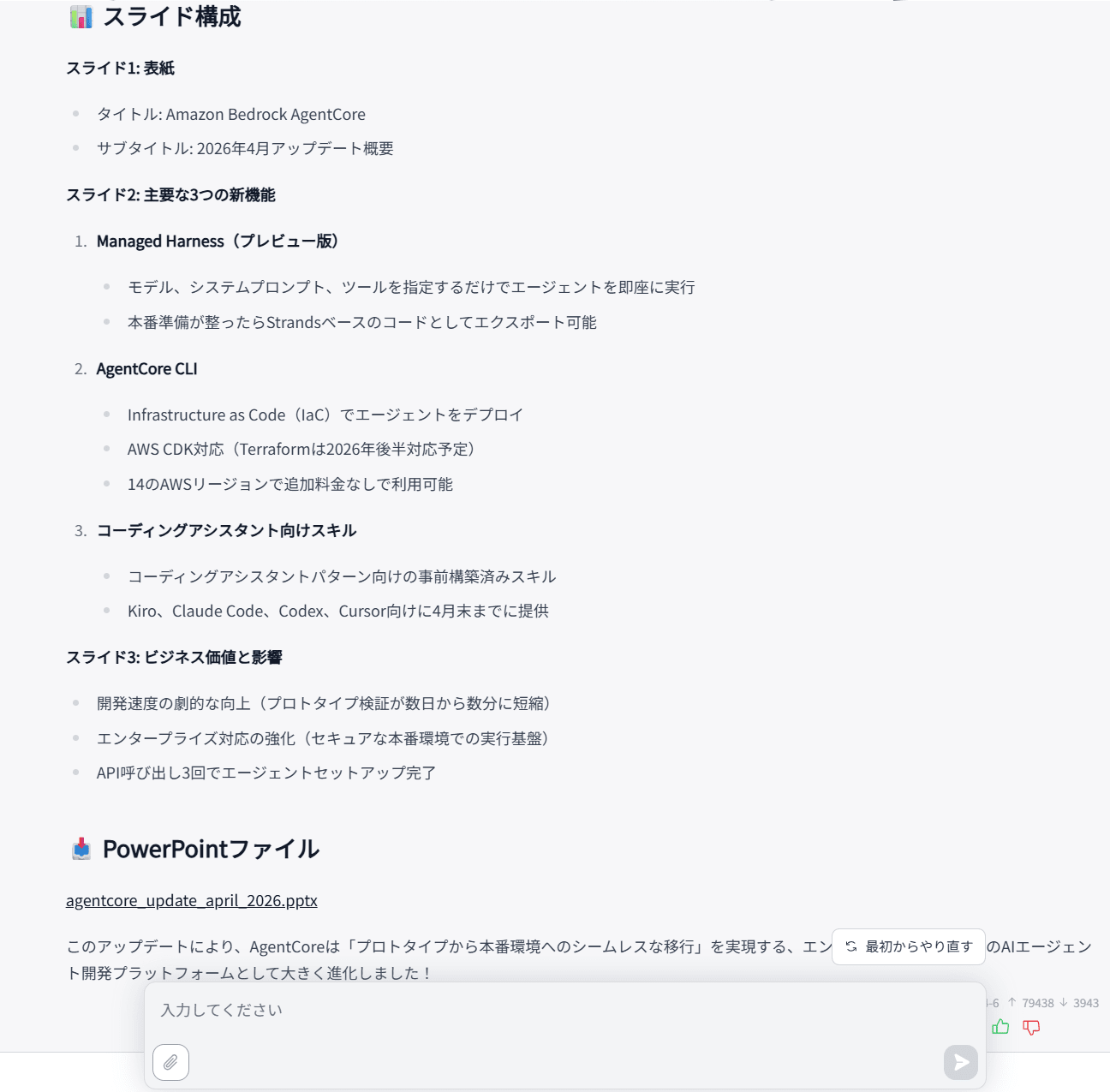
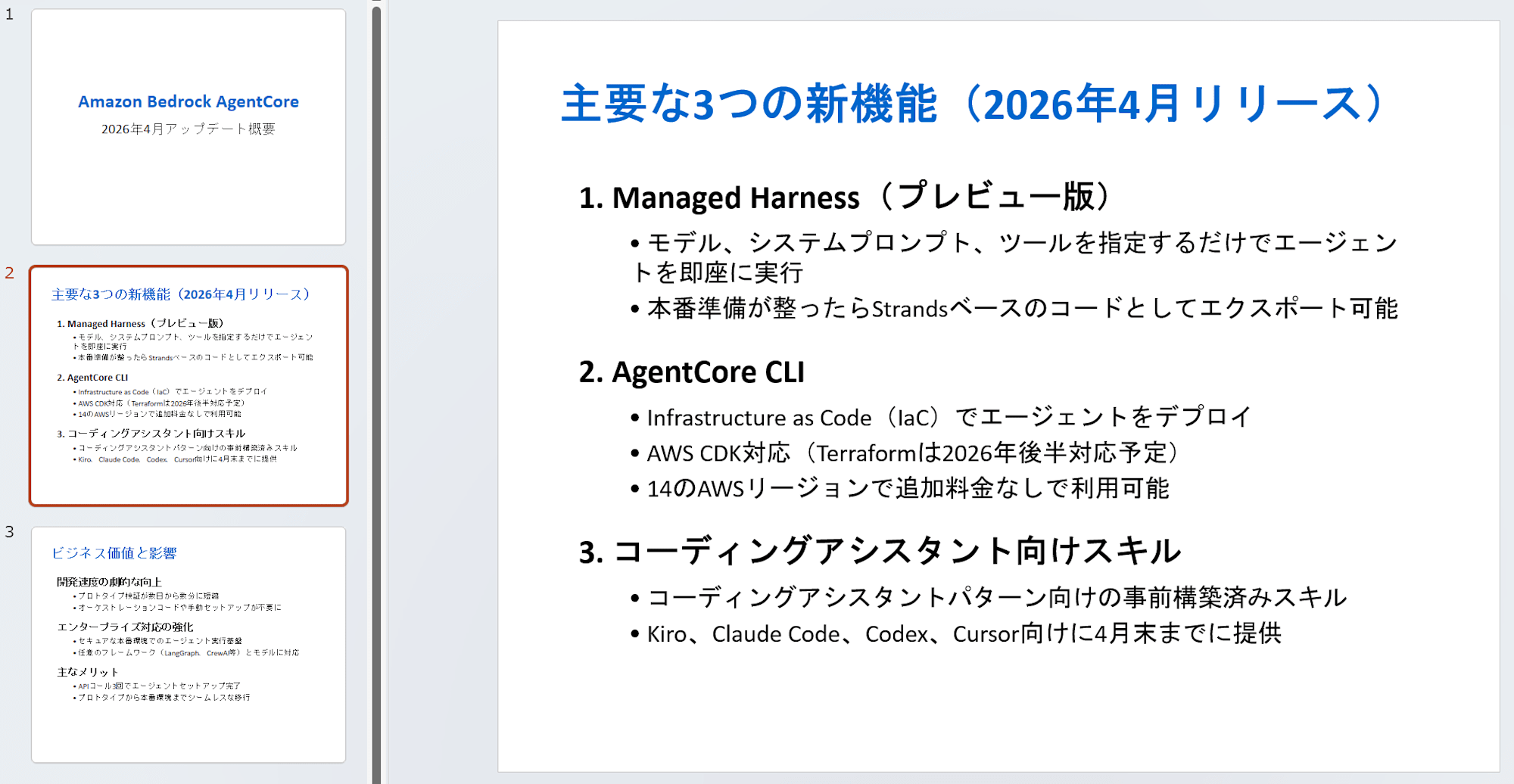
ダウンロードできる PowerPoint ファイルはこんな感じです。
アーキテクチャ
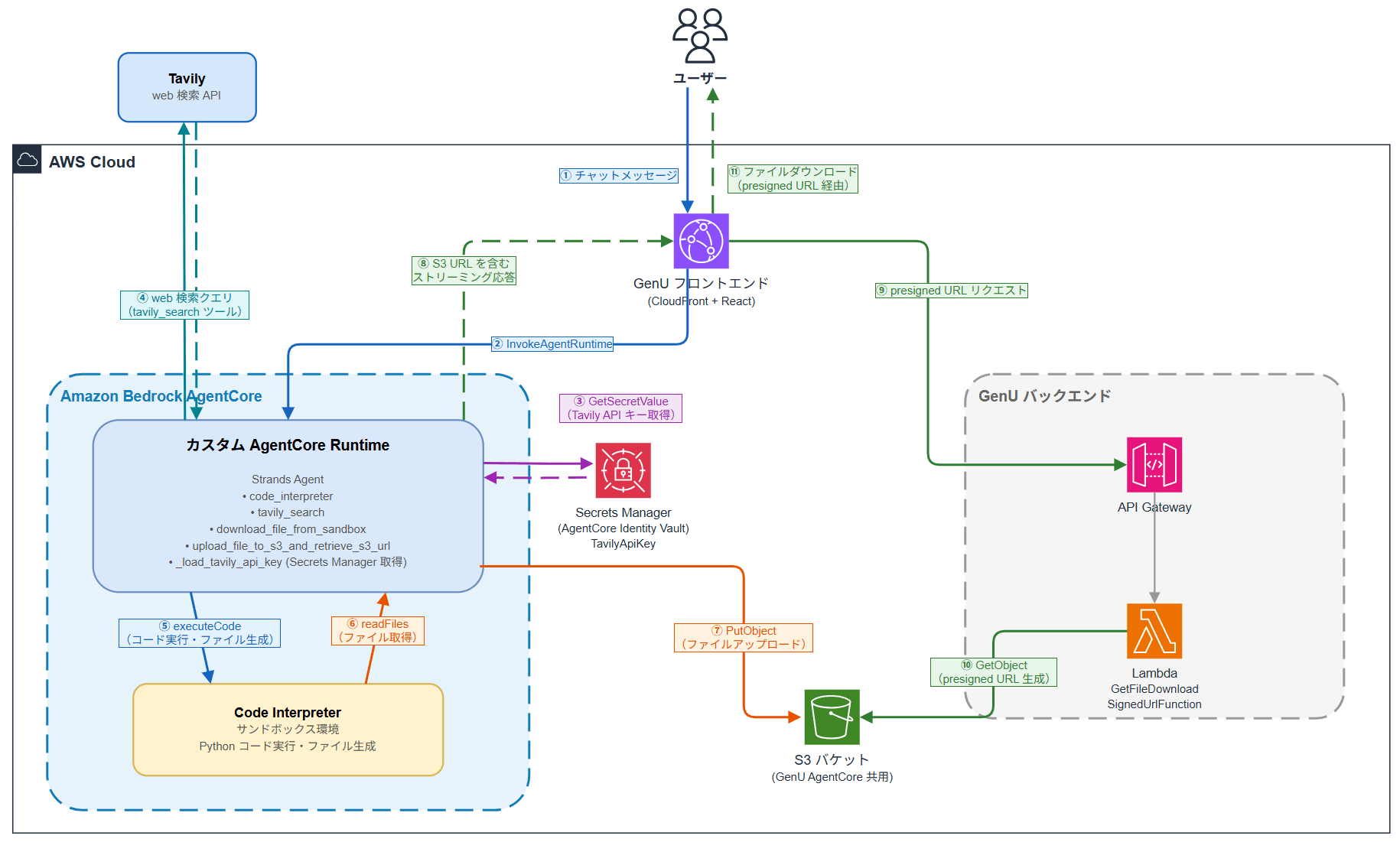
第三回までの構成に対し、今回追加するのは次の 2 点です。
- web 検索ツールの統合: Strands Agents の
toolsに web 検索ツールを追加。Tavily を Strands ツール(strands_tools.tavily)として呼び出す構成です。 - PowerPoint 生成のためのシステムプロンプト整備: Code Interpreter サンドボックスに
python-pptxで PPT を生成させるための指針をシステムプロンプトに追記します。
ファイル受け渡しの 3 ステップ(サンドボックスで生成 → Runtime に取り出し → S3 アップロード)は第三回で構築済みのものをそのまま使います。図中で新しく加わったのは、Tavily(外部 web 検索 API) と Secrets Manager の 2 つです。
データの流れを ①〜⑪ の順に説明します。
- ユーザーが GenU のチャット UI からメッセージを送信(①)
- GenU フロントエンドが
InvokeAgentRuntimeでカスタム Runtime を呼び出し(②) - Runtime 内のエージェントが Secrets Manager から Tavily の API キー を取得(③ → ③′)
- エージェントが Tavily の web 検索 API に検索クエリを投げ、結果を取得(④ → ④′)
- 得られた検索結果をもとに Code Interpreter にコード実行を指示し、PowerPoint を生成(⑤)
- Code Interpreter のサンドボックスで生成されたファイルを
readFilesAPI で Runtime に取得(⑥) - 取得したファイルを S3 にアップロード(⑦)
- S3 URL を含むストリーミング応答をフロントエンドに返却(⑧)
- フロントエンドが S3 URL を検出し、API Gateway 経由で presigned URL をリクエスト(⑨)
- Lambda が S3 から presigned URL を生成(⑩)
- ユーザーがリンクをクリックしてファイルをダウンロード(⑪)
API キーの取得経路(③ → ③′)と web 検索の経路(④ → ④′)が今回の主な追加分です。Tavily の API キーは AgentCore Identity で管理され、Runtime ロールの IAM 権限で Secrets Manager から直接取得する構成になっています(詳細は後述します)。
使用する技術について
本記事で使用する技術を最初に整理しておきます。
Amazon Bedrock AgentCore Code Interpreter
AgentCore Code Interpreter は、AI エージェントが安全なサンドボックス環境でコードを実行できるマネージドサービスです。Python スクリプトの実行や pandas / python-pptx といったライブラリを使ったファイル生成を、隔離された環境で安全に走らせられます。サンドボックスは Runtime とは別のファイルシステムを持つため、生成したファイルを利用するには Runtime 経由で取り出す必要があります。
AgentCore Runtime
AgentCore Runtime はカスタムエージェントをコンテナとして AWS 上にデプロイ・実行できるマネージドサービスです。本記事ではこの Runtime に、Code Interpreter ツールを組み込んだ Strands Agents 製のエージェントをデプロイします。
AgentCore Identity
AgentCore Identity は、エージェントが外部サービスにアクセスする際に必要な API キーや OAuth トークンを安全に保管・配布するための AgentCore の機能です。ApiKeyCredentialProvider を宣言すると、内部的に AWS Secrets Manager にシークレットが作成され、API キーがそこに保管されます。本記事では Tavily の API キーをこの仕組みで保管し、Runtime からは IAM ロール権限で Secrets Manager から直接取得して使います。
AgentCore CLI
AgentCore CLI は、Amazon Bedrock AgentCore 向けのターミナルツールです。プロジェクトの作成などを少数のコマンドで完結できます。本記事では、agentcore.json に web 検索ツールの認証情報を追加した上で、agentcore validate で検証し agentcore deploy で Runtime に反映する流れで使います。
Strands Agents
Strands Agents は AWS が公開しているオープンソースのエージェントフレームワークです。Bedrock のモデルと任意のツールを組み合わせてエージェントを構築でき、Code Interpreter や web 検索ツールを tools として渡すだけで自律的に呼び出してくれます。
GenU(Generative AI Use Cases JP)
GenU は AWS が公開している生成 AI アプリのリファレンス実装です。v5.0.0 から AgentCore 連携機能が追加され、チャット UI 上で AI エージェントを簡単に動かせるようになりました。本記事では GenU をフロントエンドとして使い、エージェントが生成したファイルをチャット内のリンクからダウンロードできるようにします。
Tavily
Tavily は AI エージェント向けに最適化された web 検索 API です。一般的な検索 API が返す生のスニペットや HTML ではなく、関連度でランク付け・要約済みのコンテンツを返してくれるため、エージェントは追加の前処理なしにそのまま LLM のコンテキストに投入できます。Strands Agents のツールパッケージ strands-agents-tools に Tavily 連携が組み込まれているため、簡単に使い始められます。
python-pptx
python-pptx は PowerPoint ファイル (.pptx) を Python から読み書きするためのライブラリです。スライドの追加・テキストや画像の挿入・既存ファイルの編集まで幅広く対応しており、本記事ではエージェントが Code Interpreter 上で python-pptx を使ってスライドを自動生成します。
やってみる
前回の記事では、AgentCore CLI でカスタムランタイムを構築し、GenU から Excel 生成依頼を投げてダウンロードできるところまで確認しました。
これから作業することは以下のとおりです。
- PowerPoint 生成のためのシステムプロンプトを
app/MyAgent/main.pyに追記する - web 検索ツール(Tavily)の API キーを発行し、エージェントの
toolsに組み込む - AgentCore Runtime を再デプロイして動作確認する
ステップ 1: PowerPoint 生成のシステムプロンプト整備
最初に、PPT 生成 が動く状態を作ります。Code Interpreter のサンドボックスには python-pptx が標準で含まれているため、追加のライブラリなしで検証することができます。
app/MyAgent/main.py の SYSTEM_PROMPT に、次のような指針を追記します。
"""
## PowerPoint (.pptx) 生成の指針
- 生成には `python-pptx` を使用する
- まずユーザーの依頼を「タイトル + 各スライドの見出しと要点」に整理してからコード化する
- 1 スライド = 1 メッセージ。情報を詰め込みすぎず、箇条書きは 5 行以内を目安にする
- 日本語テキストは `Pt()` でフォントサイズを明示する
- web 検索結果を引用する場合は最後のスライドに出典 URL を載せる
"""
main.py の全体は次のとおりです。
エージェントには、
- Code Interpreter ツール
- Code Interpreter の実行環境であるサンドボックスからファイルをダウンロードするツール
- S3 アップロードツール
を渡しています。
工夫点とコードの解説は前回の記事で詳細にしているのでぜひご覧ください。
import ast
import base64
import json
import os
import uuid
import boto3
from strands import Agent, tool
from bedrock_agentcore.runtime import BedrockAgentCoreApp
from model.load import load_model
from strands_tools.code_interpreter import AgentCoreCodeInterpreter
from strands_tools.code_interpreter.models import ReadFilesAction
app = BedrockAgentCoreApp()
log = app.logger
# Code Interpreter の初期化
code_interpreter = AgentCoreCodeInterpreter(
region=os.environ.get("AWS_REGION", "us-east-1")
)
WORKSPACE_DIR = "/tmp/ws"
def _is_under_dir(path: str, base_dir: str) -> bool:
"""パストラバーサル対策: path が base_dir 配下にあるか検証する。"""
real_path = os.path.realpath(path)
real_base = os.path.realpath(base_dir)
return real_path == real_base or real_path.startswith(real_base + os.sep)
@tool
def download_file_from_sandbox(sandbox_filepath: str) -> str:
"""Download a file from the Code Interpreter sandbox to the local workspace.
The Code Interpreter runs in an isolated sandbox. Files generated there
are not directly accessible from this runtime. Use this tool to pull
files from the sandbox before uploading to S3.
Returns the local file path where the file was saved.
Args:
sandbox_filepath: The path to the file in the Code Interpreter sandbox.
Use a relative path from the sandbox working directory.
"""
os.makedirs(WORKSPACE_DIR, exist_ok=True)
log.info(f"Attempting to download: {sandbox_filepath}")
result = code_interpreter.read_files(
ReadFilesAction(type="readFiles", paths=[sandbox_filepath])
)
log.info(f"read_files status: {result.get('status')}")
if result.get("status") != "success":
raise RuntimeError(f"Failed to read sandbox file: {result}")
try:
content_str = result["content"][0]["text"]
except (KeyError, IndexError, TypeError) as e:
raise RuntimeError(f"Unexpected read_files response: {result}") from e
log.info(f"content_str length: {len(content_str)}, first 200 chars: {content_str[:200]}")
try:
content_list = json.loads(content_str)
except (json.JSONDecodeError, TypeError):
content_list = ast.literal_eval(content_str)
filename = os.path.basename(sandbox_filepath)
local_filename = f"{uuid.uuid4()}_{filename}"
local_path = os.path.join(WORKSPACE_DIR, local_filename)
for item in content_list:
if item.get("type") != "resource":
continue
resource = item.get("resource", {})
if "blob" in resource:
blob_data = resource["blob"]
log.info(f"blob type: {type(blob_data).__name__}, length: {len(blob_data)}")
if isinstance(blob_data, bytes):
# str() → ast.literal_eval() で bytes として復元された場合
data = blob_data
else:
# base64 文字列として返された場合
data = base64.b64decode(blob_data)
log.info(f"Decoded data size: {len(data)} bytes")
with open(local_path, "wb") as f:
f.write(data)
log.info(f"Downloaded (binary) {sandbox_filepath} -> {local_path}")
return local_path
elif "text" in resource:
with open(local_path, "w", encoding="utf-8") as f:
f.write(resource["text"])
log.info(f"Downloaded (text) {sandbox_filepath} -> {local_path}")
return local_path
raise RuntimeError(f"No file content found in read_files response: {content_str[:500]}")
@tool
def upload_file_to_s3_and_retrieve_s3_url(filepath: str) -> str:
"""Upload a file from local workspace to S3 and return the S3 URL.
GenU's frontend detects S3 URLs and generates its own presigned URL
on demand, so we return the raw S3 URL instead of a presigned URL.
Args:
filepath: The local file path (under /tmp/ws) to upload
"""
bucket = os.environ.get("FILE_BUCKET")
if not bucket:
log.warning("FILE_BUCKET not set")
return f"S3 upload skipped (FILE_BUCKET not set). Local path: {filepath}"
if not _is_under_dir(filepath, WORKSPACE_DIR):
raise ValueError(f"{filepath} is not under {WORKSPACE_DIR}.")
_, ext = os.path.splitext(filepath)
key = f"code-interpreter/{uuid.uuid4()}{ext}"
s3 = boto3.client("s3")
s3.upload_file(filepath, bucket, key)
region = s3.meta.region_name
s3_url = f"https://{bucket}.s3.{region}.amazonaws.com/{key}"
return s3_url
SYSTEM_PROMPT = """あなたはデータ分析・レポート生成アシスタントです。
## 基本方針
- ユーザーの指示に基づいて、Code Interpreter でデータ分析やファイル生成を行います。
- Excel、CSV、グラフ画像、**PowerPoint (.pptx)**、**PDF** など、さまざまな形式のファイルを生成できます。
## Code Interpreter サンドボックスに渡すコードの制約(厳守)
- `/tmp/` や `/var/` など、`outputs/` 以外のディレクトリにファイルを保存してはならない
- `os.makedirs('/tmp/ws', ...)` のような独自の作業ディレクトリを作成してはならない
- 日本語ファイル名を使用してはならない(英数字とアンダースコアのみ)
- 生成するすべてのファイルは **必ず `outputs/` ディレクトリにのみ** 保存すること
- コードの先頭で必ず `os.makedirs('outputs', exist_ok=True)` を実行すること
- ファイルパスは必ず `outputs/` で始まること(例: `outputs/report.xlsx`)
## PowerPoint (.pptx) 生成の指針
- 生成には `python-pptx` を使用する
- まずユーザーの依頼内容を **スライド構成(タイトル + 各スライドの見出しと要点)** に整理してからコード化する
- 1 スライド = 1 メッセージ。情報を詰め込みすぎず、箇条書きは 5 行以内を目安にする
- 表紙スライドにはタイトル・サブタイトル、本文スライドには見出しと要点、必要に応じて画像や表を入れる
- 日本語テキストを描画する場合は `Pt()` でフォントサイズを明示し、`MSPGothic` など日本語対応フォント名を指定する(指定しないと文字化けは起きないが小さすぎる場合がある)
- web 検索結果から引用する場合は、最後のスライドに **出典 URL の一覧** を載せる
## ファイル提供の手順
Code Interpreter のサンドボックスと Runtime は完全に別のファイルシステムです。
サンドボックスで生成したファイルに Runtime から直接アクセスすることはできません。
ファイルをユーザーに提供するには、以下の 3 ステップを **必ずこの順序で** 実行してください。
1. **Code Interpreter でファイル生成**: `outputs/` ディレクトリに保存する
os.makedirs('outputs', exist_ok=True)
df.to_excel('outputs/report.xlsx', index=False)
2. **`download_file_from_sandbox`**: サンドボックスから Runtime にダウンロードする
- sandbox_filepath には `outputs/ファイル名` の形式で指定すること
- 戻り値はローカルファイルパス。次のステップにそのまま渡すこと
download_file_from_sandbox(sandbox_filepath="outputs/report.xlsx")
3. **`upload_file_to_s3_and_retrieve_s3_url`**: ステップ 2 の戻り値を渡して S3 にアップロードする
- 戻り値はダウンロード URL
upload_file_to_s3_and_retrieve_s3_url(filepath="<ステップ2の戻り値>")
## URL の出力形式
- 画像: ``
- Excel/CSV/PDF など: `[ファイル名](URL)`
"""
def process_prompt(prompt):
"""GenU が送る prompt(ContentBlock 配列)からテキストを抽出する。"""
if isinstance(prompt, str):
return prompt
if isinstance(prompt, list):
texts = [
block["text"]
for block in prompt
if isinstance(block, dict) and "text" in block
]
return "\n".join(texts) if texts else ""
return str(prompt)
@app.entrypoint
async def invoke(payload):
log.info("Invoking Code Interpreter Agent...")
messages = payload.get("messages", [])
prompt = process_prompt(payload.get("prompt", ""))
agent = Agent(
model=load_model(),
system_prompt=SYSTEM_PROMPT,
tools=[
code_interpreter.code_interpreter,
download_file_from_sandbox,
upload_file_to_s3_and_retrieve_s3_url,
],
messages=messages,
)
async for event in agent.stream_async(prompt):
if "event" in event:
yield event
if __name__ == "__main__":
app.run()
ここまでの変更を AgentCore Runtime に反映します。
agentcore cli のデプロイコマンドを実行してエージェントをデプロイします。
agentcore deploy
デプロイが完了したら早速テストしてみます!
GenU の UI から、「3 枚構成で現在の総理大臣についてのスライドを作って」と入力してみました。
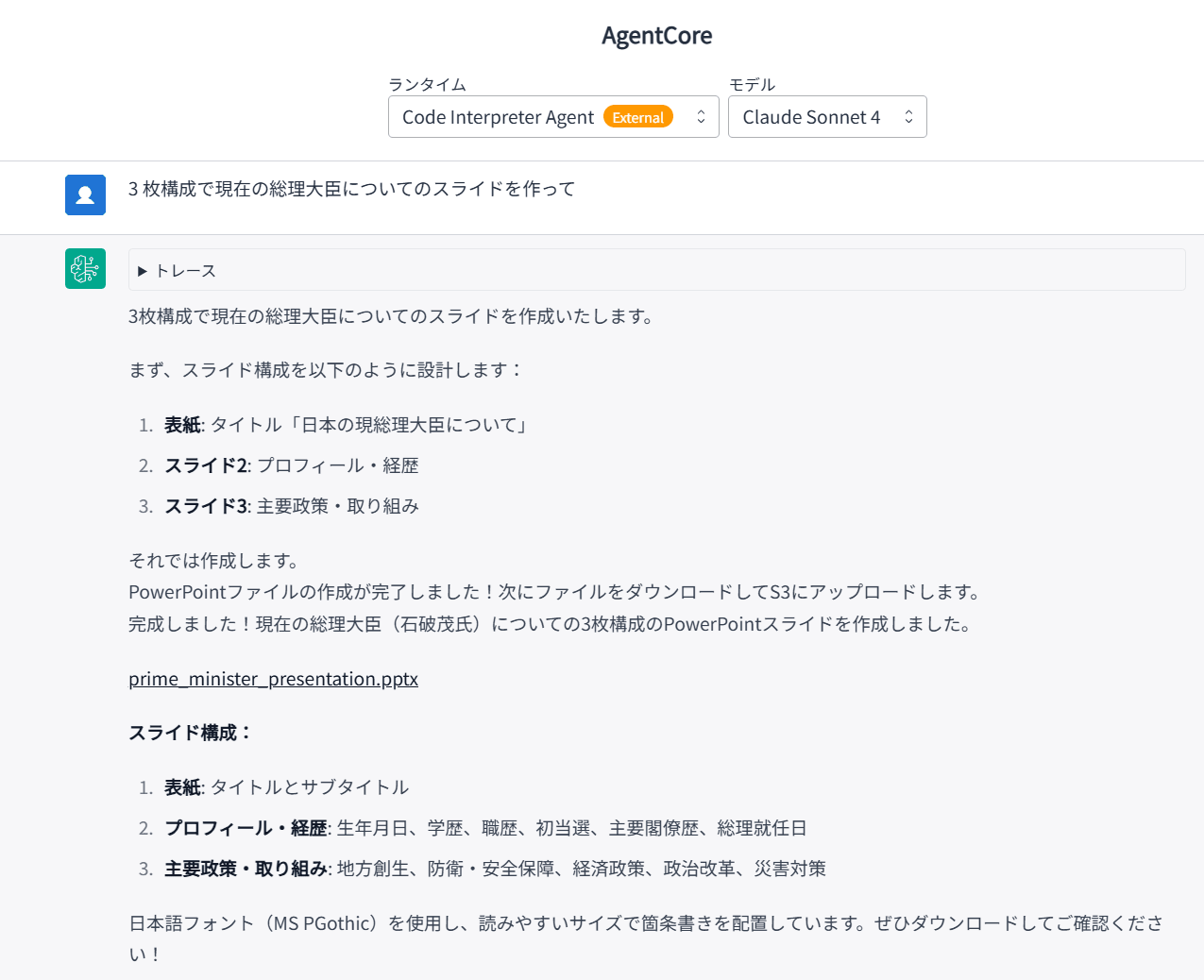
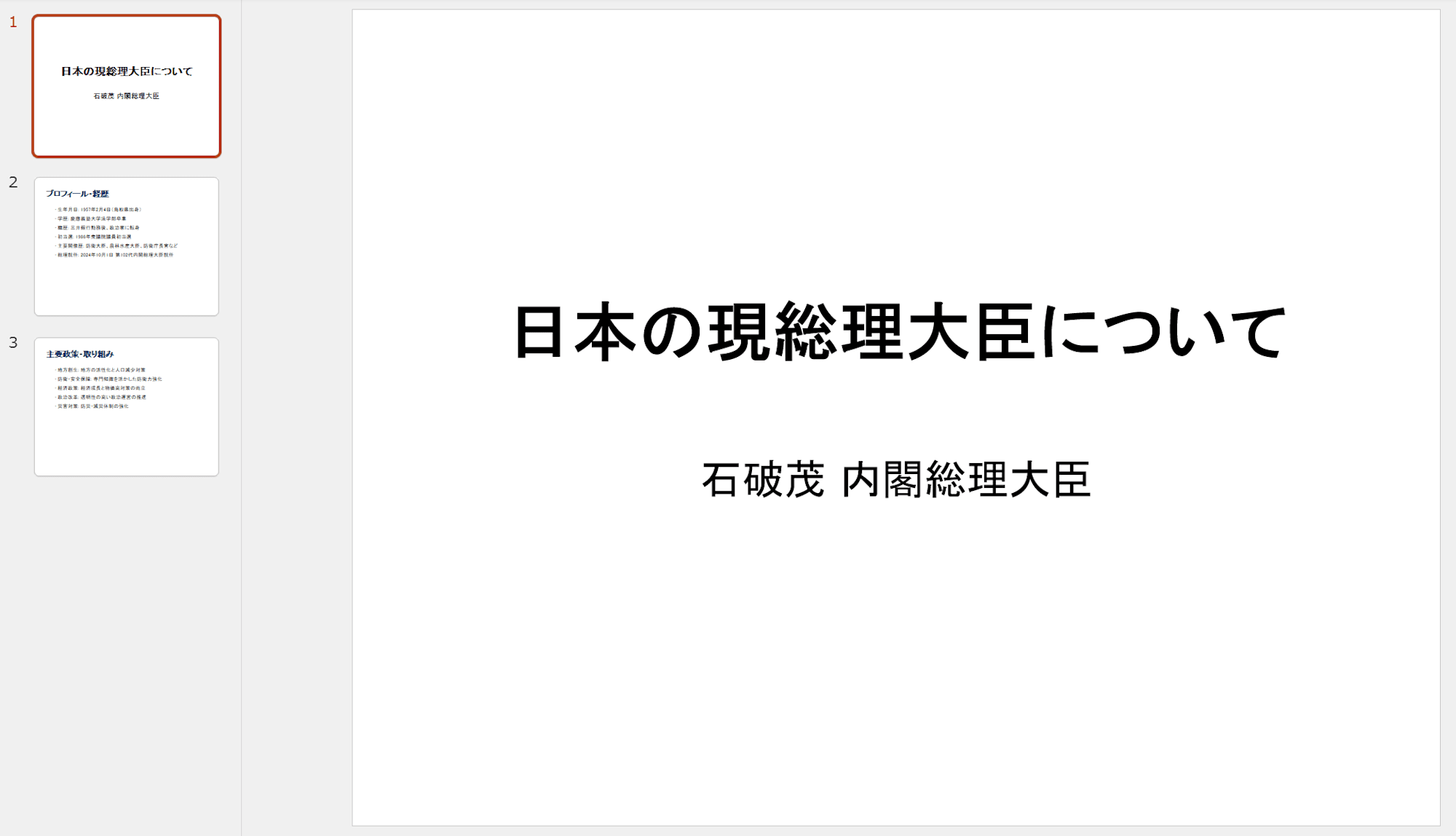
ダウンロードしたパワーポイントのファイルは次のようなものでした。
web 検索を行っていないため情報が古い状態ですが、最低限スライドが作成できることを確認できました。
ステップ 2: web 検索ツールの統合
つづいて、エージェントが最新情報にリーチできるよう web 検索ツールを tools に追加します。
検索 API には AI エージェント向けに要約済みコンテンツを返してくれる Tavily を選定しました。
Strands Agents のツールパッケージである strands-agents-tools に Tavily 連携が組み込まれているため、Strands ツールとして直接呼び出す構成で実装できます。
実装の流れは次のとおりです。
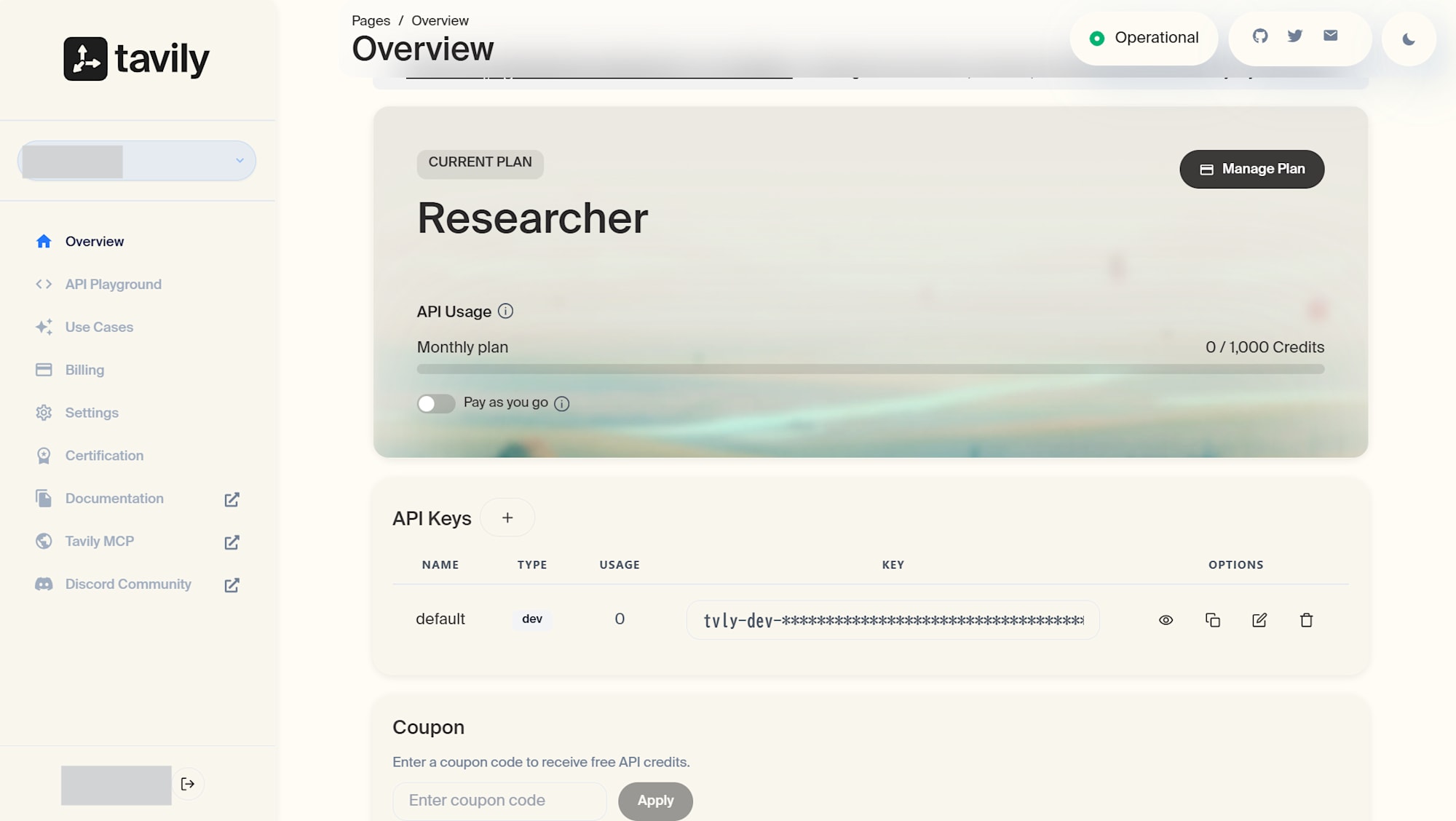
- Tavily でアカウントを作成し、API キーを発行する
アカウントを作成すると、API キーが自動で発行されました。無料枠で 1000 クレジット使えるので検証には十分です。
- 発行した API キーを Runtime が参照できるよう agentcore CLI で登録する
このコマンドを実行すると.env.localファイルが生成され、API キーがローカルファイルに書き出されます。
AgentCore は Identity という機能で、 AWS Secrets Manager のシークレット を作成し、そこに API キーの値を保存します。Runtime からはこの Secrets Manager のシークレットを参照する形で API キーを取得することになります。
agentcore add credential \
    --name TavilyApiKey \
    --type api-key \
    --api-key tvly-xxxxxxxxxxxxxxxxxxxx
main.pyに Secrets Manager からキーを取り出すコードを追加する
tavily_searchツールは内部で環境変数のTAVILY_API_KEYを参照するため、Runtime 起動後にエージェント側で Secrets Manager からキーを取得し、環境変数として設定する必要があります。今回は boto3 で Secrets Manager から直接取得 する経路にします。
import json
import os
import boto3

TAVILY_PROVIDER_NAME = "TavilyApiKey"

def _load_tavily_api_key() -> None:
    """Secrets Manager から Tavily API キーを取得し、
    `tavily_search` ツールが参照する環境変数 `TAVILY_API_KEY` に設定する。"""
    if "TAVILY_API_KEY" in os.environ:
        return

    region = os.environ.get("AWS_REGION", "ap-northeast-1")

    # provider 名から Secrets Manager のシークレット ARN を解決
    control = boto3.client("bedrock-agentcore-control", region_name=region)
    provider = control.get_api_key_credential_provider(name=TAVILY_PROVIDER_NAME)
    secret_arn = provider["apiKeySecretArn"]["secretArn"]

    # シークレットから API キーの値を取得
    secrets = boto3.client("secretsmanager", region_name=region)
    secret_string = secrets.get_secret_value(SecretId=secret_arn)["SecretString"]

    # SecretString は JSON 形式 ({"api_key": "..."} 等) または raw 文字列の両方に対応
    try:
        parsed = json.loads(secret_string)
        api_key = (
            parsed.get("api_key")
            or parsed.get("apiKey")
            or next(iter(parsed.values()))
        )
    except (json.JSONDecodeError, TypeError):
        api_key = secret_string

    os.environ["TAVILY_API_KEY"] = api_key
- CDK で Runtime ロールに IAM 権限を追加する
上記のコードを動かすには、Runtime ロールにbedrock-agentcore:GetApiKeyCredentialProviderとsecretsmanager:GetSecretValueの許可が必要です。CDK スタック (agentcore/cdk/lib/cdk-stack.ts) に次のステートメントを追加します。
role.addToPrincipalPolicy(
  new PolicyStatement({
    effect: Effect.ALLOW,
    actions: ["bedrock-agentcore:GetApiKeyCredentialProvider"],
    resources: ["*"],
  })
);
role.addToPrincipalPolicy(
  new PolicyStatement({
    effect: Effect.ALLOW,
    actions: ["secretsmanager:GetSecretValue"],
    // AgentCore Identity が作成するシークレットに限定
    resources: [
      `arn:aws:secretsmanager:${this.region}:${this.account}:secret:bedrock-agentcore-identity!*`,
    ],
  })
);
main.pyでfrom strands_tools.tavily import tavily_searchをインポートするAgent(tools=[..., tavily_search])に追加する- システムプロンプトに外部情報が必要なら
tavily_searchを使う旨を追記する
これまでのコード全文を以下に示します。
コード全文(main.py)
import ast
import base64
import json
import os
import uuid
import boto3
from strands import Agent, tool
from bedrock_agentcore.runtime import BedrockAgentCoreApp
from model.load import load_model
from strands_tools.code_interpreter import AgentCoreCodeInterpreter
from strands_tools.code_interpreter.models import ReadFilesAction
from strands_tools.tavily import tavily_search
app = BedrockAgentCoreApp()
log = app.logger
TAVILY_PROVIDER_NAME = "TavilyApiKey"
def _load_tavily_api_key() -> None:
"""Secrets Manager から Tavily API キーを取得し、
`tavily_search` ツールが参照する環境変数 `TAVILY_API_KEY` に設定する。
AgentCore Identity の workload identity (per-user OAuth) は使わず、
Runtime の IAM ロール権限で `bedrock-agentcore-control` 経由で
シークレット ARN を引き、Secrets Manager から直接値を取得する。
チーム共有の API キーをエージェント全体で 1 つだけ使うユースケース向け。
"""
if "TAVILY_API_KEY" in os.environ:
return
region = os.environ.get("AWS_REGION", "ap-northeast-1")
# provider 名から Secrets Manager のシークレット ARN を解決
control = boto3.client("bedrock-agentcore-control", region_name=region)
provider = control.get_api_key_credential_provider(name=TAVILY_PROVIDER_NAME)
secret_arn = provider["apiKeySecretArn"]["secretArn"]
# シークレットから API キーの値を取得
secrets = boto3.client("secretsmanager", region_name=region)
secret_string = secrets.get_secret_value(SecretId=secret_arn)["SecretString"]
# SecretString は JSON 形式 ({"api_key": "..."} 等) または raw 文字列のことがある
try:
parsed = json.loads(secret_string)
api_key = (
parsed.get("api_key")
or parsed.get("apiKey")
or next(iter(parsed.values()))
)
except (json.JSONDecodeError, TypeError):
api_key = secret_string
os.environ["TAVILY_API_KEY"] = api_key
log.info("Loaded TAVILY_API_KEY from Secrets Manager")
# Code Interpreter の初期化
code_interpreter = AgentCoreCodeInterpreter(
region=os.environ.get("AWS_REGION", "us-east-1")
)
WORKSPACE_DIR = "/tmp/ws"
def _is_under_dir(path: str, base_dir: str) -> bool:
"""パストラバーサル対策: path が base_dir 配下にあるか検証する。"""
real_path = os.path.realpath(path)
real_base = os.path.realpath(base_dir)
return real_path == real_base or real_path.startswith(real_base + os.sep)
@tool
def download_file_from_sandbox(sandbox_filepath: str) -> str:
"""Download a file from the Code Interpreter sandbox to the local workspace.
The Code Interpreter runs in an isolated sandbox. Files generated there
are not directly accessible from this runtime. Use this tool to pull
files from the sandbox before uploading to S3.
Returns the local file path where the file was saved.
Args:
sandbox_filepath: The path to the file in the Code Interpreter sandbox.
Use a relative path from the sandbox working directory.
"""
os.makedirs(WORKSPACE_DIR, exist_ok=True)
log.info(f"Attempting to download: {sandbox_filepath}")
result = code_interpreter.read_files(
ReadFilesAction(type="readFiles", paths=[sandbox_filepath])
)
log.info(f"read_files status: {result.get('status')}")
if result.get("status") != "success":
raise RuntimeError(f"Failed to read sandbox file: {result}")
try:
content_str = result["content"][0]["text"]
except (KeyError, IndexError, TypeError) as e:
raise RuntimeError(f"Unexpected read_files response: {result}") from e
log.info(f"content_str length: {len(content_str)}, first 200 chars: {content_str[:200]}")
try:
content_list = json.loads(content_str)
except (json.JSONDecodeError, TypeError):
content_list = ast.literal_eval(content_str)
filename = os.path.basename(sandbox_filepath)
local_filename = f"{uuid.uuid4()}_{filename}"
local_path = os.path.join(WORKSPACE_DIR, local_filename)
for item in content_list:
if item.get("type") != "resource":
continue
resource = item.get("resource", {})
if "blob" in resource:
blob_data = resource["blob"]
log.info(f"blob type: {type(blob_data).__name__}, length: {len(blob_data)}")
if isinstance(blob_data, bytes):
# str() → ast.literal_eval() で bytes として復元された場合
data = blob_data
else:
# base64 文字列として返された場合
data = base64.b64decode(blob_data)
log.info(f"Decoded data size: {len(data)} bytes")
with open(local_path, "wb") as f:
f.write(data)
log.info(f"Downloaded (binary) {sandbox_filepath} -> {local_path}")
return local_path
elif "text" in resource:
with open(local_path, "w", encoding="utf-8") as f:
f.write(resource["text"])
log.info(f"Downloaded (text) {sandbox_filepath} -> {local_path}")
return local_path
raise RuntimeError(f"No file content found in read_files response: {content_str[:500]}")
@tool
def upload_file_to_s3_and_retrieve_s3_url(filepath: str) -> str:
"""Upload a file from local workspace to S3 and return the S3 URL.
GenU's frontend detects S3 URLs and generates its own presigned URL
on demand, so we return the raw S3 URL instead of a presigned URL.
Args:
filepath: The local file path (under /tmp/ws) to upload
"""
bucket = os.environ.get("FILE_BUCKET")
if not bucket:
log.warning("FILE_BUCKET not set")
return f"S3 upload skipped (FILE_BUCKET not set). Local path: {filepath}"
if not _is_under_dir(filepath, WORKSPACE_DIR):
raise ValueError(f"{filepath} is not under {WORKSPACE_DIR}.")
_, ext = os.path.splitext(filepath)
key = f"code-interpreter/{uuid.uuid4()}{ext}"
s3 = boto3.client("s3")
s3.upload_file(filepath, bucket, key)
region = s3.meta.region_name
s3_url = f"https://{bucket}.s3.{region}.amazonaws.com/{key}"
return s3_url
SYSTEM_PROMPT = """あなたはデータ分析・レポート生成アシスタントです。
## 基本方針
- ユーザーの指示に基づいて、Code Interpreter でデータ分析やファイル生成を行います。
- Excel、CSV、グラフ画像、**PowerPoint (.pptx)**、**PDF** など、さまざまな形式のファイルを生成できます。
- 外部情報が必要なら tavily_search を使います。
## Code Interpreter サンドボックスに渡すコードの制約(厳守)
- `/tmp/` や `/var/` など、`outputs/` 以外のディレクトリにファイルを保存してはならない
- `os.makedirs('/tmp/ws', ...)` のような独自の作業ディレクトリを作成してはならない
- 日本語ファイル名を使用してはならない(英数字とアンダースコアのみ)
- 生成するすべてのファイルは **必ず `outputs/` ディレクトリにのみ** 保存すること
- コードの先頭で必ず `os.makedirs('outputs', exist_ok=True)` を実行すること
- ファイルパスは必ず `outputs/` で始まること(例: `outputs/report.xlsx`)
## PowerPoint (.pptx) 生成の指針
- 生成には `python-pptx` を使用する
- まずユーザーの依頼内容を **スライド構成(タイトル + 各スライドの見出しと要点)** に整理してからコード化する
- 1 スライド = 1 メッセージ。情報を詰め込みすぎず、箇条書きは 5 行以内を目安にする
- 表紙スライドにはタイトル・サブタイトル、本文スライドには見出しと要点、必要に応じて画像や表を入れる
- 日本語テキストを描画する場合は `Pt()` でフォントサイズを明示し、`MSPGothic` など日本語対応フォント名を指定する(指定しないと文字化けは起きないが小さすぎる場合がある)
- web 検索結果から引用する場合は、最後のスライドに **出典 URL の一覧** を載せる
## ファイル提供の手順
Code Interpreter のサンドボックスと Runtime は完全に別のファイルシステムです。
サンドボックスで生成したファイルに Runtime から直接アクセスすることはできません。
ファイルをユーザーに提供するには、以下の 3 ステップを **必ずこの順序で** 実行してください。
1. **Code Interpreter でファイル生成**: `outputs/` ディレクトリに保存する
os.makedirs('outputs', exist_ok=True)
df.to_excel('outputs/report.xlsx', index=False)
2. **`download_file_from_sandbox`**: サンドボックスから Runtime にダウンロードする
- sandbox_filepath には `outputs/ファイル名` の形式で指定すること
- 戻り値はローカルファイルパス。次のステップにそのまま渡すこと
download_file_from_sandbox(sandbox_filepath="outputs/report.xlsx")
3. **`upload_file_to_s3_and_retrieve_s3_url`**: ステップ 2 の戻り値を渡して S3 にアップロードする
- 戻り値はダウンロード URL
upload_file_to_s3_and_retrieve_s3_url(filepath="<ステップ2の戻り値>")
## URL の出力形式
- 画像: ``
- Excel/CSV/PDF など: `[ファイル名](URL)`
"""
def process_prompt(prompt):
"""GenU が送る prompt(ContentBlock 配列)からテキストを抽出する。"""
if isinstance(prompt, str):
return prompt
if isinstance(prompt, list):
texts = [
block["text"]
for block in prompt
if isinstance(block, dict) and "text" in block
]
return "\n".join(texts) if texts else ""
return str(prompt)
@app.entrypoint
async def invoke(payload):
log.info("Invoking Code Interpreter Agent...")
_load_tavily_api_key()
messages = payload.get("messages", [])
prompt = process_prompt(payload.get("prompt", ""))
agent = Agent(
model=load_model(),
system_prompt=SYSTEM_PROMPT,
tools=[
code_interpreter.code_interpreter,
download_file_from_sandbox,
upload_file_to_s3_and_retrieve_s3_url,
tavily_search
],
messages=messages,
)
async for event in agent.stream_async(prompt):
if "event" in event:
yield event
if __name__ == "__main__":
app.run()
コード全文(cdk-stack.ts)
import {
  AgentCoreApplication,
  AgentCoreMcp,
  type AgentCoreProjectSpec,
  type AgentCoreMcpSpec,
} from '@aws/agentcore-cdk';
import { CfnOutput, Stack, type StackProps } from 'aws-cdk-lib';
import { Effect, PolicyStatement } from 'aws-cdk-lib/aws-iam';
import { Bucket } from 'aws-cdk-lib/aws-s3';
import { Construct } from 'constructs';

/**
 * GenU の AgentCore スタックが作成した S3 バケット名。
 * FILE_BUCKET 環境変数としてランタイムに渡し、ファイルアップロード先として使用する。
 */
const GENU_FILE_BUCKET_NAME =
  'agentcorestackyakkinhouch-genericagentcoreagentcor-bhatjrupqwqv';

export interface AgentCoreStackProps extends StackProps {
  /**
   * The AgentCore project specification containing agents, memories, and credentials.
   */
  spec: AgentCoreProjectSpec;
  /**
   * The MCP specification containing gateways and servers.
   */
  mcpSpec?: AgentCoreMcpSpec;
  /**
   * Credential provider ARNs from deployed state, keyed by credential name.
   */
  credentials?: Record<string, { credentialProviderArn: string; clientSecretArn?: string }>;
}

/**
 * CDK Stack that deploys AgentCore infrastructure.
 *
 * This is a thin wrapper that instantiates L3 constructs.
 * All resource logic and outputs are contained within the L3 constructs.
 */
export class AgentCoreStack extends Stack {
  /** The AgentCore application containing all agent environments */
  public readonly application: AgentCoreApplication;

  constructor(scope: Construct, id: string, props: AgentCoreStackProps) {
    super(scope, id, props);

    const { spec, mcpSpec, credentials } = props;

    // Create AgentCoreApplication with all agents
    this.application = new AgentCoreApplication(this, 'Application', {
      spec,
    });

    // Create AgentCoreMcp if there are gateways configured
    if (mcpSpec?.agentCoreGateways && mcpSpec.agentCoreGateways.length > 0) {
      new AgentCoreMcp(this, 'Mcp', {
        projectName: spec.name,
        mcpSpec,
        agentCoreApplication: this.application,
        credentials,
        projectTags: spec.tags,
      });
    }

    // GenU の AgentCore スタックが作成した S3 バケットを参照
    const fileBucket = Bucket.fromBucketName(
      this,
      'GenUFileBucket',
      GENU_FILE_BUCKET_NAME
    );

    // エージェント実行ロールに権限を追加
    const agentEnv = this.application.environments.values().next().value!;
    const { role } = agentEnv.runtime;

    // Code Interpreter 権限
    role.addToPrincipalPolicy(
      new PolicyStatement({
        effect: Effect.ALLOW,
        actions: [
          'bedrock-agentcore:CreateCodeInterpreter',
          'bedrock-agentcore:StartCodeInterpreterSession',
          'bedrock-agentcore:InvokeCodeInterpreter',
          'bedrock-agentcore:StopCodeInterpreterSession',
          'bedrock-agentcore:DeleteCodeInterpreter',
          'bedrock-agentcore:ListCodeInterpreters',
          'bedrock-agentcore:GetCodeInterpreter',
          'bedrock-agentcore:GetCodeInterpreterSession',
          'bedrock-agentcore:ListCodeInterpreterSessions',
        ],
        resources: ['*'],
      })
    );

    // Tavily API キーを Secrets Manager から取得するための権限
    // AgentCore Identity の ApiKeyCredentialProvider が作成したシークレットを
    // Runtime ロール権限で直接読み出して環境変数に展開する。
    role.addToPrincipalPolicy(
      new PolicyStatement({
        effect: Effect.ALLOW,
        actions: ['bedrock-agentcore:GetApiKeyCredentialProvider'],
        resources: ['*'],
      })
    );
    role.addToPrincipalPolicy(
      new PolicyStatement({
        effect: Effect.ALLOW,
        actions: ['secretsmanager:GetSecretValue'],
        // AgentCore Identity が作成するシークレットは
        // `bedrock-agentcore-identity!` プレフィックスを持つ
        resources: [
          `arn:aws:secretsmanager:${this.region}:${this.account}:secret:bedrock-agentcore-identity!*`,
        ],
      })
    );

    // GenU バケットへの書き込み権限
    fileBucket.grantWrite(role);

    // 環境変数の設定(GenU のバケット名を渡す)
    agentEnv.runtime.addEnvironmentVariable('FILE_BUCKET', GENU_FILE_BUCKET_NAME);

    // Stack-level output
    new CfnOutput(this, 'StackNameOutput', {
      description: 'Name of the CloudFormation Stack',
      value: this.stackName,
    });
  }
}
ここまで変更を AgentCore Runtime に再度反映させます。
agentcore deploy
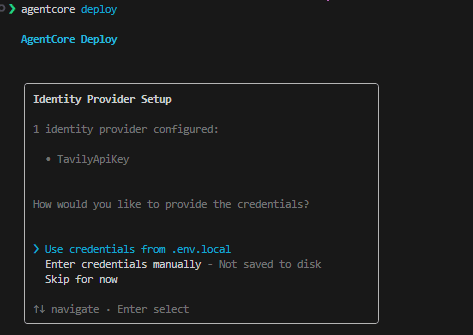
API キーの参照方法を聞かれるので、.env.local を選択しました。ここで指定したAPI キーは次のような流れで処理されます。
.env.localのTavilyApiKey=tvly-...を読み出す- AgentCore Identity が AWS Secrets Manager に
TavilyApiKey用のシークレットを作成し、API キーの値を保存する - 以降、Runtime 上のエージェントからシークレットマネジャー経由で値を取得して環境変数
TAVILY_API_KEYに設定する
動作確認
GenU のチャット画面から、同じく 「3 枚構成で現在の総理大臣についてのスライドを作って」と入力してみました。
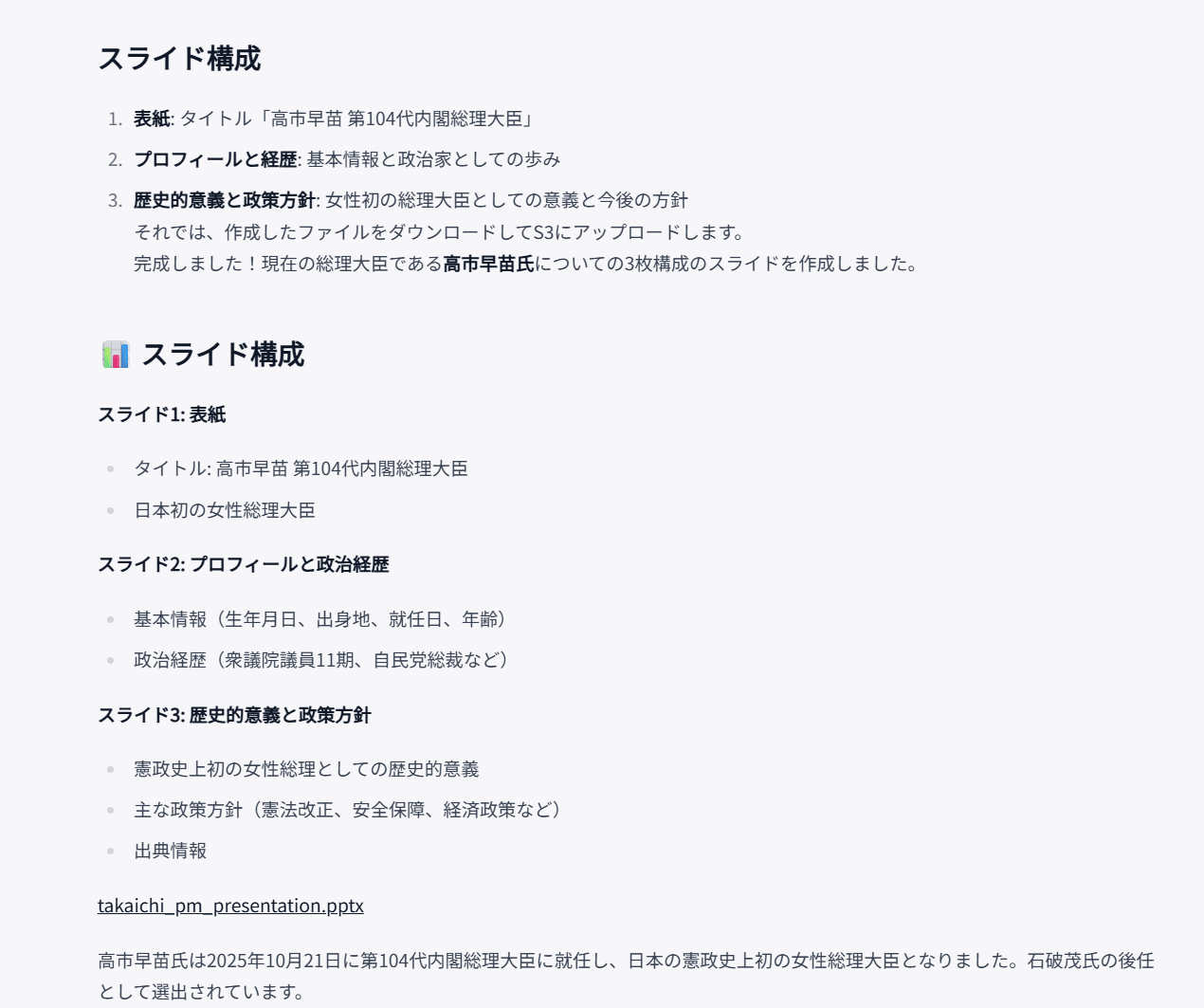
エージェントが以下の流れで処理を実行します。
- エージェントが
tavily_searchを呼び出して、最新の総理大臣情報を取得 - 検索結果からスライド構成を組む
- Code Interpreter サンドボックスで
python-pptxのコードを書いて実行 download_file_from_sandboxでサンドボックスから Runtime にファイルをダウンロードupload_file_to_s3_and_retrieve_s3_urlで S3 にアップロード- S3 URL をレスポンスに含めて返却
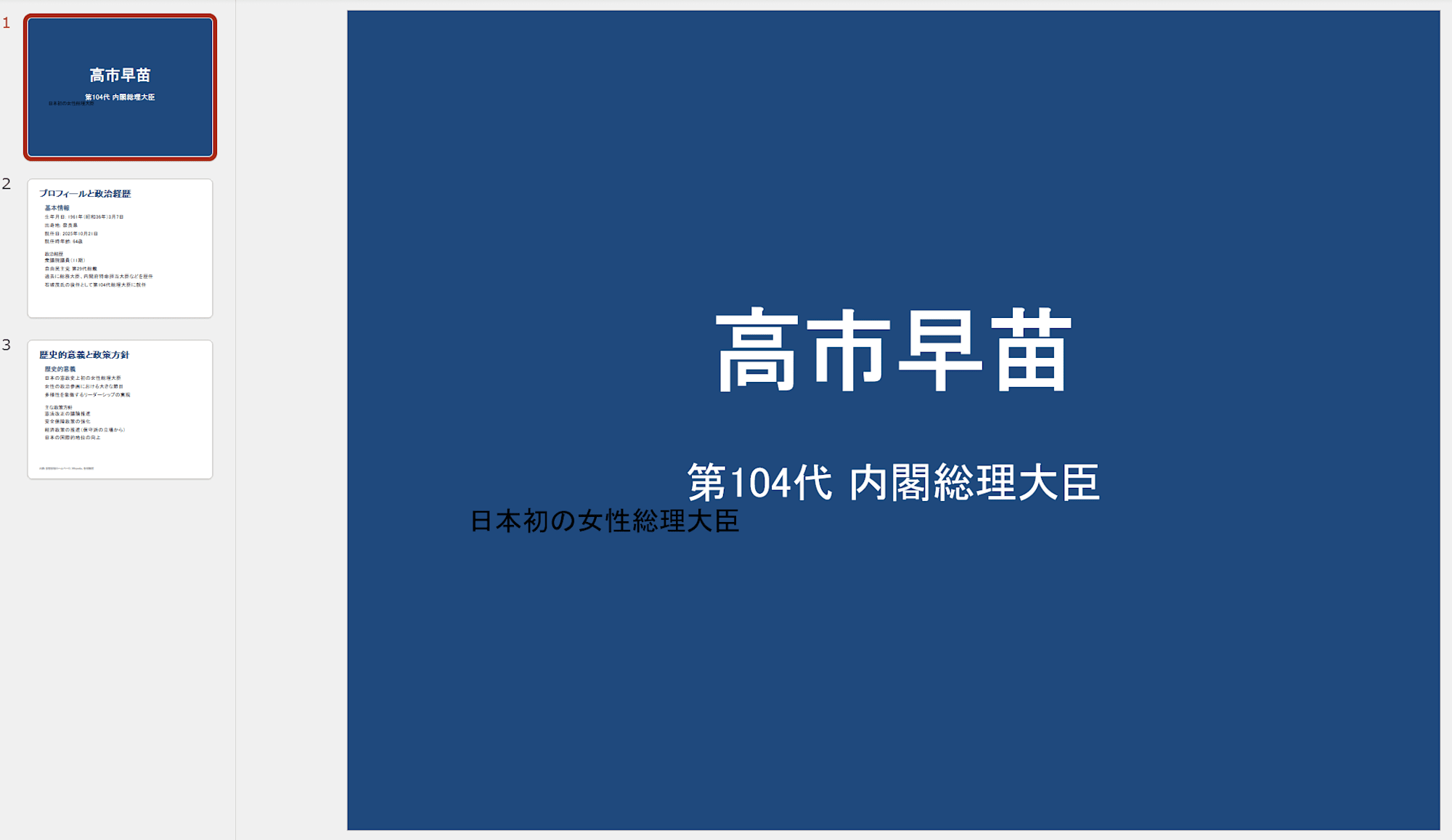
ダウンロードできるパワーポイントファイルを開くと以下のようなものができていました。
web 検索ツールを使って最新情報を取得し、パワーポイントのファイルとしてダウンロードできるところまで確認できました!
おわりに
今回は AgentCore Code Interpreter シリーズの第四回として、web 検索結果から PowerPoint を自動生成する仕組みを構築してきました。
現状作成されるファイルは簡素なものなので、レイアウトやフォントの指定をすることでより完成度の高いレポート形式でのアウトプットを得られる体験ができそうです。さらに、チャットを通して継続的にこのファイルを編集できるとより良い体験になりそうです。
引き続き検証をしていきます。