AgentCore Code Interpreter × Strands Agents × GenU でファイル生成→ダウンロードまでを構築して得られた知見まとめ

はじめに
こんにちは!AI 事業本部のこーすけです。
この記事は、Code Interpreter シリーズの第三回になります。
第一回では boto3 で Code Interpreter を直接操作し、第二回では Strands Agents を使って自然言語の指示だけでファイル生成までを行いました。
今回のゴールは、「チャットで指示するだけで Excel レポートやグラフ画像を生成し、ブラウザからダウンロードできる」 という体験を、Web アプリとして実現することです。
これを実現するために、Code Interpreter を組み込んだAgentCore Runtime を作成して AWS にデプロイし、GenU(AWS 公式の生成 AI リファレンスアプリ)のチャット UI から利用できるようにします。GenU はすでに認証・チャット履歴管理を備えているため、フロントエンドを一切実装することなく、バックエンドのエージェント実装だけで上記の体験を構築できるのが大きなメリットです。
第一回
第二回
完成イメージ
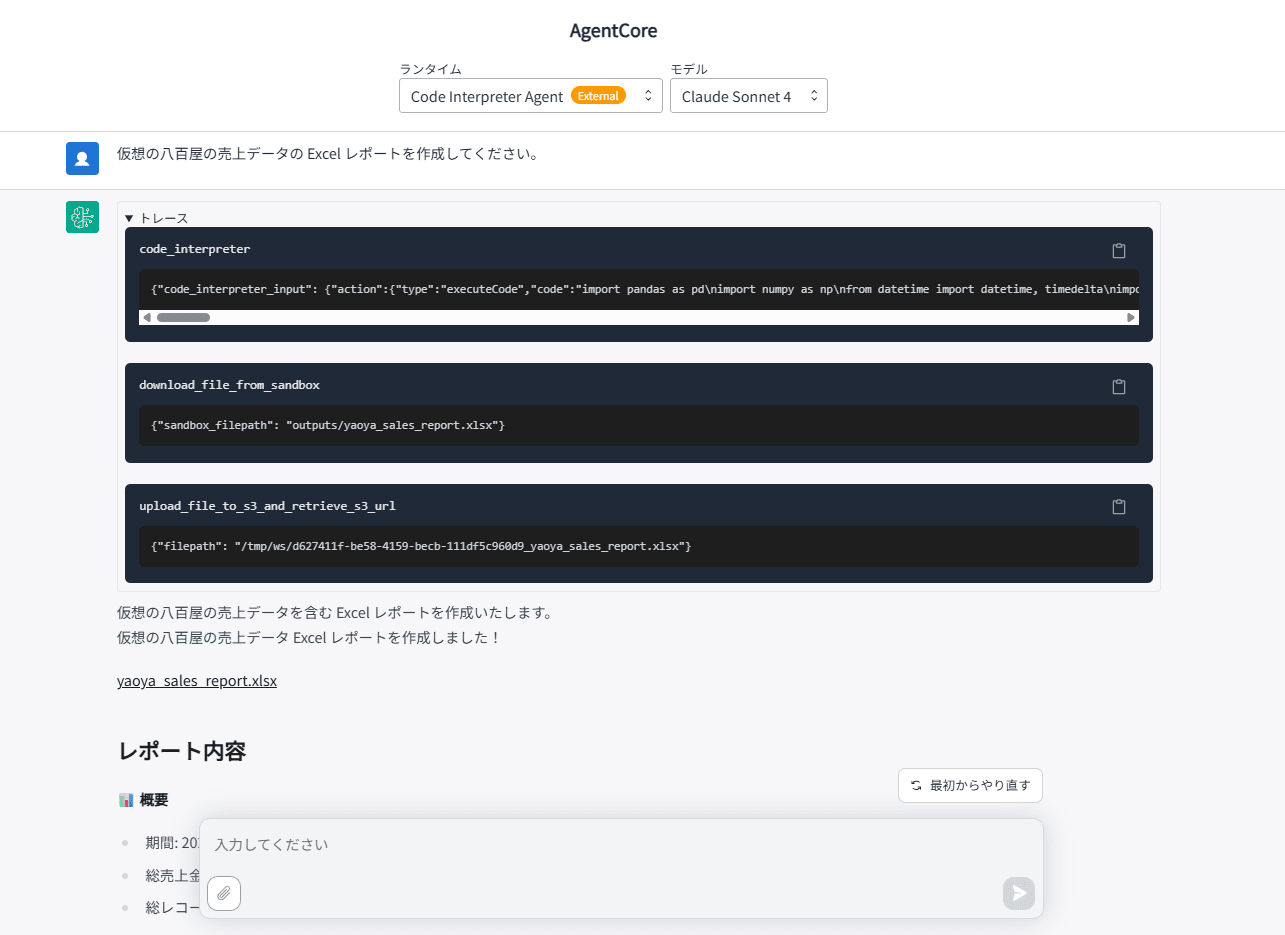
GenU のチャット UI から「Excel レポートを作成して」と指示すると、エージェントが Code Interpreter でファイルを生成し、ダウンロードリンク付きで応答します。
アーキテクチャ
今回実装するアーキテクチャ図になります。既存の GenU に追加して、AgentCore のリソースを構築しました。
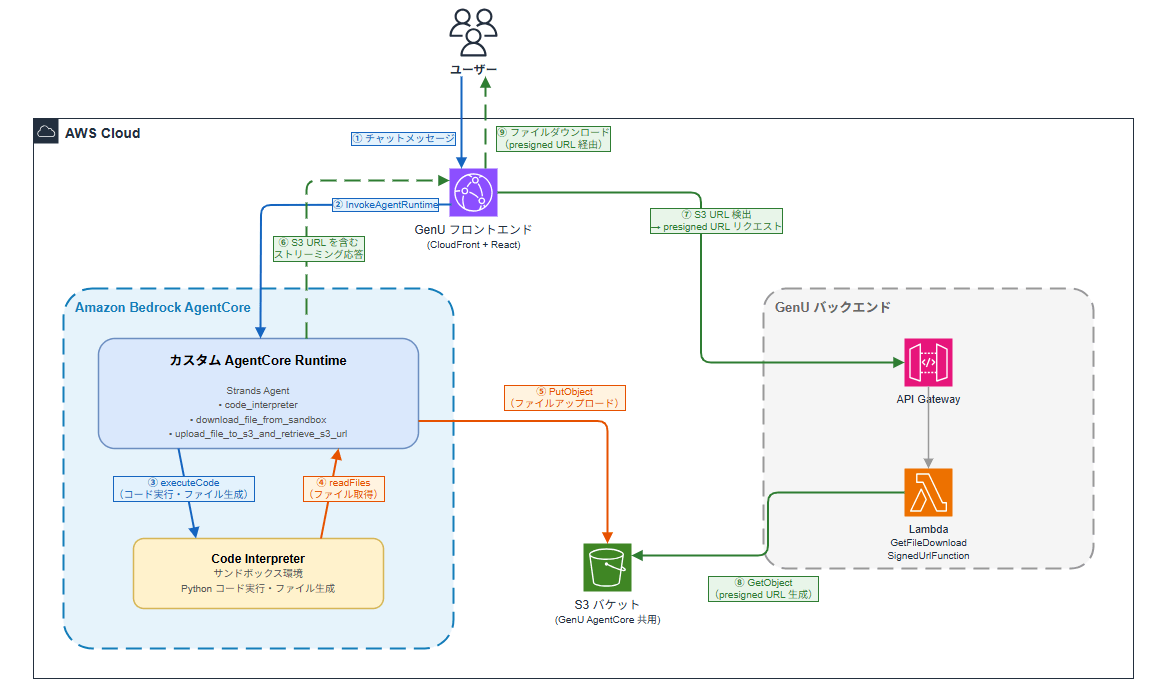
データの流れを ①〜⑨ の順に説明します。
- ユーザーが GenU のチャット UI からメッセージを送信(①)
- GenU フロントエンドが
InvokeAgentRuntimeでカスタム Runtime を呼び出し(②) - Runtime 内のエージェント(Strands Agents で実装)が Code Interpreter にコード実行を指示(③)
- Code Interpreter のサンドボックスで生成されたファイルを
readFilesAPI で Runtime に取得(④) - 取得したファイルを S3 にアップロード(⑤)
- S3 URL を含むストリーミング応答をフロントエンドに返却(⑥)
- フロントエンドが S3 URL を検出し、API Gateway 経由で presigned URL をリクエスト(⑦)
- Lambda が S3 から presigned URL を生成(⑧)
- ユーザーがリンクをクリックしてファイルをダウンロード(⑨)
GenU(Generative AI Use Cases JP)とは
GenU は AWS が公開している生成 AI アプリのリファレンス実装です。v5.0.0 から AgentCore 連携機能が追加され、チャット UI 上で AI エージェントを簡単に動かせるようになりました。
GenU の AgentCore ユースケースを有効化すると、サイドメニューに「AgentCore」ページが追加され、現在時刻の取得、AWS ドキュメント検索、アーキテクチャ図の生成など、デフォルトで 7 つの MCP サーバーが使えるエージェントチャットが使用できるようになります。
こちらのブログで、AgentCore を有効化し GenU をデプロイする手順を説明していますのでご覧ください。
AgentCore Code Interpreter とは
AgentCore Code Interpreter は、AI エージェントが 安全なサンドボックス環境でコードを実行できるマネージドサービスです。
AgentCore 内のコンテナ化された環境で実行されるため、隔離された環境でコードの実行を行うことができます。エージェントが生成したコードを実行しても、ホスト環境やほかのセッションに影響を与えることがないため、セキュリティを損なうことなく、複雑なワークフローやデータ分析を遂行するエージェントの開発に集中できます。
詳しくは第一回の記事で解説していますので、そちらをご覧ください。
AgentCore CLI とは
AgentCore CLI は、Amazon Bedrock AgentCore 向けのターミナルツールです。エージェントの作成からデプロイまでを 4 つのコマンドで完結できます。
agentcore create   # プロジェクト作成
agentcore dev      # ローカル開発サーバー起動
agentcore deploy   # AWS へデプロイ
agentcore invoke   # デプロイ済みエージェントの実行
インストールは npm で行います。今回は 0.9.1 を使用しています。
npm install -g @aws/agentcore
やってみる
今回はあらかじめ AgentCore が有効化された GenU がデプロイ済みであるという前提で作業を始めます。
今回やることは次のとおりです。
- AgentCore CLI でプロジェクト作成
- 依存関係の追加
- エージェントの実装
- CDK のカスタマイズ(Code Interpreter 権限・S3 バケット設定)
- AWS にデプロイ
- GenU の parameter.ts にカスタムランタイムを登録
- GenU を再デプロイして動作確認
ステップ 1: AgentCore CLI でプロジェクト作成
まずは、AgentCore CLI を使ってプロジェクトのひな型を作成します。
agentcore create を実行すると、対話形式でプロジェクトの設定を選択できます。
agentcore create
今回は以下の設定で作成しました。
Name:       CodeInterpreterAgent
Language:   Python
Build:      Container
Protocol:   HTTP
Framework:  Strands
Model:      Bedrock
Memory:     None
Network:    PUBLIC
プロジェクトディレクトリに移動します。
cd CodeInterpreterAgent
以下のようなプロジェクトのひな型が作成されるので、適宜修正していきます。
CodeInterpreterAgent/
├── agentcore/
│   ├── agentcore.json          # リソース設定
│   ├── aws-targets.json        # デプロイ先設定
│   └── cdk/                    # CDK インフラ
│       └── lib/
│           └── cdk-stack.ts    # CDK スタック定義
└── app/
    └── MyAgent/
        ├── main.py             # エージェントのコード
        ├── model/
        │   └── load.py         # モデルロード
        ├── mcp_client/         # MCP クライアント
        ├── pyproject.toml      # Python 依存関係
        └── Dockerfile          # コンテナビルド
ステップ 2: 依存関係の追加
app/MyAgent/pyproject.toml に Code Interpreter と boto3 の依存関係を追加します。
[project]
name = "MyAgent"
version = "0.1.0"
description = "Code Interpreter AgentCore Runtime"
requires-python = ">=3.10"
dependencies = [
    "aws-opentelemetry-distro",
    "bedrock-agentcore >= 1.0.3",
    "botocore[crt] >= 1.35.0",
    "strands-agents >= 1.13.0",
    "strands-agents-tools[agent_core_code_interpreter]",
    "boto3",
]
追加したのは以下の 2 つです。
| パッケージ | 役割 |
|---|---|
strands-agents-tools[agent_core_code_interpreter] |
Code Interpreter ツール |
boto3 |
S3 アップロード用 |
pyproject.toml を変更した後は、uv.lock を更新しておきます。agentcore deploy 時に Docker ビルドが走りますが、その中で uv.lock を参照するためです。
cd app/MyAgent
uv lock
ステップ 3: エージェントの実装
app/MyAgent/main.py を以下のように書き換えました。今回特に苦労したポイントなので、丁寧に解説していきます。
import ast
import base64
import json
import os
import uuid
import boto3
from strands import Agent, tool
from bedrock_agentcore.runtime import BedrockAgentCoreApp
from model.load import load_model
from strands_tools.code_interpreter import AgentCoreCodeInterpreter
from strands_tools.code_interpreter.models import ReadFilesAction
app = BedrockAgentCoreApp()
log = app.logger
# Code Interpreter の初期化
code_interpreter = AgentCoreCodeInterpreter(
region=os.environ.get("AWS_REGION", "us-east-1")
)
WORKSPACE_DIR = "/tmp/ws"
def _is_under_dir(path: str, base_dir: str) -> bool:
"""パストラバーサル対策: path が base_dir 配下にあるか検証する。"""
real_path = os.path.realpath(path)
real_base = os.path.realpath(base_dir)
return real_path == real_base or real_path.startswith(real_base + os.sep)
@tool
def download_file_from_sandbox(sandbox_filepath: str) -> str:
"""Download a file from the Code Interpreter sandbox to the local workspace.
The Code Interpreter runs in an isolated sandbox. Files generated there
are not directly accessible from this runtime. Use this tool to pull
files from the sandbox before uploading to S3.
Returns the local file path where the file was saved.
Args:
sandbox_filepath: The path to the file in the Code Interpreter sandbox.
Use a relative path from the sandbox working directory.
"""
os.makedirs(WORKSPACE_DIR, exist_ok=True)
result = code_interpreter.read_files(
ReadFilesAction(type="readFiles", paths=[sandbox_filepath])
)
if result.get("status") != "success":
raise RuntimeError(f"Failed to read sandbox file: {result}")
# read_files() は _create_tool_result() で content を str() 化するため、
# json.loads / ast.literal_eval でパースして blob / text を取り出す
try:
content_str = result["content"][0]["text"]
except (KeyError, IndexError, TypeError) as e:
raise RuntimeError(f"Unexpected read_files response: {result}") from e
try:
content_list = json.loads(content_str)
except (json.JSONDecodeError, TypeError):
content_list = ast.literal_eval(content_str)
filename = os.path.basename(sandbox_filepath)
local_filename = f"{uuid.uuid4()}_{filename}"
local_path = os.path.join(WORKSPACE_DIR, local_filename)
for item in content_list:
if item.get("type") != "resource":
continue
resource = item.get("resource", {})
if "blob" in resource:
blob_data = resource["blob"]
if isinstance(blob_data, bytes):
# str() → ast.literal_eval() で bytes として復元された場合
data = blob_data
else:
# base64 文字列として返された場合
data = base64.b64decode(blob_data)
with open(local_path, "wb") as f:
f.write(data)
return local_path
elif "text" in resource:
with open(local_path, "w", encoding="utf-8") as f:
f.write(resource["text"])
return local_path
raise RuntimeError("No file content found in read_files response")
@tool
def upload_file_to_s3_and_retrieve_s3_url(filepath: str) -> str:
"""Upload a file from local workspace to S3 and return the S3 URL.
GenU's frontend detects S3 URLs and generates its own presigned URL
on demand, so we return the raw S3 URL instead of a presigned URL.
Args:
filepath: The local file path (under /tmp/ws) to upload
"""
bucket = os.environ.get("FILE_BUCKET")
if not bucket:
return f"S3 upload skipped (FILE_BUCKET not set). Local path: {filepath}"
if not _is_under_dir(filepath, WORKSPACE_DIR):
raise ValueError(f"{filepath} is not under {WORKSPACE_DIR}.")
_, ext = os.path.splitext(filepath)
key = f"code-interpreter/{uuid.uuid4()}{ext}"
s3 = boto3.client("s3")
s3.upload_file(filepath, bucket, key)
region = s3.meta.region_name
s3_url = f"https://{bucket}.s3.{region}.amazonaws.com/{key}"
return s3_url
SYSTEM_PROMPT = """あなたはデータ分析・レポート生成アシスタントです。
## 基本方針
- ユーザーの指示に基づいて、Code Interpreter でデータ分析やファイル生成を行います。
- Excel、CSV、グラフ画像など、さまざまな形式のファイルを生成できます。
## Code Interpreter サンドボックスに渡すコードの制約(厳守)
- `/tmp/` や `/var/` など、`outputs/` 以外のディレクトリにファイルを保存してはならない
- `os.makedirs('/tmp/ws', ...)` のような独自の作業ディレクトリを作成してはならない
- 日本語ファイル名を使用してはならない(英数字とアンダースコアのみ)
- 生成するすべてのファイルは **必ず `outputs/` ディレクトリにのみ** 保存すること
- コードの先頭で必ず `os.makedirs('outputs', exist_ok=True)` を実行すること
- ファイルパスは必ず `outputs/` で始まること(例: `outputs/report.xlsx`)
## ファイル提供の手順
Code Interpreter のサンドボックスと Runtime は完全に別のファイルシステムです。
サンドボックスで生成したファイルに Runtime から直接アクセスすることはできません。
ファイルをユーザーに提供するには、以下の 3 ステップを **必ずこの順序で** 実行してください。
1. **Code Interpreter でファイル生成**: `outputs/` ディレクトリに保存する
```python
os.makedirs('outputs', exist_ok=True)
df.to_excel('outputs/report.xlsx', index=False)
```
2. **`download_file_from_sandbox`**: サンドボックスから Runtime にダウンロードする
- sandbox_filepath には `outputs/ファイル名` の形式で指定すること
- 戻り値はローカルファイルパス。次のステップにそのまま渡すこと
```
download_file_from_sandbox(sandbox_filepath="outputs/report.xlsx")
```
3. **`upload_file_to_s3_and_retrieve_s3_url`**: ステップ 2 の戻り値を渡して S3 にアップロードする
- 戻り値はダウンロード URL
```
upload_file_to_s3_and_retrieve_s3_url(filepath="<ステップ2の戻り値>")
```
## URL の出力形式
- 画像: ``
- Excel/CSV/PDF など: `[ファイル名](URL)`
"""
def process_prompt(prompt):
"""GenU が送る prompt(ContentBlock 配列)からテキストを抽出する。"""
if isinstance(prompt, str):
return prompt
if isinstance(prompt, list):
texts = [
block["text"]
for block in prompt
if isinstance(block, dict) and "text" in block
]
return "\n".join(texts) if texts else ""
return str(prompt)
@app.entrypoint
async def invoke(payload):
log.info("Invoking Code Interpreter Agent...")
messages = payload.get("messages", [])
prompt = process_prompt(payload.get("prompt", ""))
agent = Agent(
model=load_model(),
system_prompt=SYSTEM_PROMPT,
tools=[
code_interpreter.code_interpreter,
download_file_from_sandbox,
upload_file_to_s3_and_retrieve_s3_url,
],
messages=messages,
)
async for event in agent.stream_async(prompt):
if "event" in event:
yield event
if __name__ == "__main__":
app.run()
ポイントを解説します。
Code Interpreter ツール
from strands_tools.code_interpreter import AgentCoreCodeInterpreter

code_interpreter = AgentCoreCodeInterpreter(
    region=os.environ.get("AWS_REGION", "us-east-1")
)
第二回の記事で使った AgentCoreCodeInterpreter と同じクラスです。code_interpreter.code_interpreter メソッドを Agent の tools に渡すことで、エージェントが自律的にコードを生成・実行できるようになります。
サンドボックスダウンロードツール
@tool
def download_file_from_sandbox(sandbox_filepath: str) -> str:
    """Download a file from the Code Interpreter sandbox to the local workspace."""
Code Interpreter のサンドボックスは Runtime とは隔離された環境で動作するため、サンドボックス内で生成されたファイルに Runtime から直接アクセスすることはできません。
このツールは AgentCoreCodeInterpreter の read_files() メソッドを使ってサンドボックスからファイルの内容を読み取り、Runtime の /tmp/ws に保存します。バイナリファイル(Excel、画像など)はレスポンスの blob フィールドから base64 デコードして書き込みます。
第一回の記事で使った readFiles API と同じ仕組みですが、Strands Agents のメソッド経由で呼び出しています。
S3 アップロードツール
@tool
def upload_file_to_s3_and_retrieve_s3_url(filepath: str) -> str:
    """Upload a file from local workspace to S3 and return the S3 URL."""
/tmp/ws 配下のファイルを S3 にアップロードし、S3 URL(https://bucket.s3.region.amazonaws.com/key)を返します。
ここで presigned URL ではなく生の S3 URL を返すのがポイントです。GenU のフロントエンドには出力中に S3 URL を検出すると、クリック時にバックエンドの Lambda 経由で presigned URL を自動生成してくれる機能があるのでそちらを利用する必要があります。
システムプロンプトの工夫
今回のシステムプロンプトは何度かデプロイと動作確認を繰り返し、エージェントの挙動を観察しながら調整しました。最終形に至るまでに直面した課題と、それを解決するためにプロンプトに組み込んだ工夫を紹介します。
- サンドボックスと Runtime のファイルシステム分離の明示
Code Interpreter のサンドボックスと Runtime は完全に別のファイルシステムです。
サンドボックスで生成したファイルに Runtime から直接アクセスすることはできません。
この記述がないと、エージェントは Code Interpreter でファイルを生成した後、そのパスを直接 S3 アップロードツールに渡そうとします。しかし Code Interpreter のサンドボックスと Runtime コンテナは完全に別のファイルシステムで動作しているため、サンドボックス内で生成したファイルに Runtime 側から直接アクセスすることはできません。この前提を明記することで、エージェントが 3 ステップの手順(生成 → ダウンロード → アップロード)を省略せずに実行するようになりました。
- 「サンドボックスに渡すコードの制約」としての明示
## Code Interpreter サンドボックスに渡すコードの制約(厳守)
- `/tmp/` や `/var/` など、`outputs/` 以外のディレクトリにファイルを保存してはならない
- `os.makedirs('/tmp/ws', ...)` のような独自の作業ディレクトリを作成してはならない
当初は「ファイル出力ルール」というセクション名で outputs/ への保存を指示していましたが、エージェントがサンドボックス内で os.makedirs('/tmp/ws', exist_ok=True) のような独自ディレクトリを作成してしまう問題が解消されませんでした。
エージェントにとって「ファイル出力ルール」は Runtime 側のルールとも解釈でき、サンドボックスに渡すコードに対する制約だと認識されていないようでした。セクション名を「Code Interpreter サンドボックスに渡すコードの制約」と変更し、制約対象がサンドボックスで実行するコードであることを明確にしたところ、問題が解消されました。
- 出力先ディレクトリの固定
- 生成するすべてのファイルは **必ず `outputs/` ディレクトリにのみ** 保存すること
エージェントは指示がないとサンドボックス内で os.makedirs('/tmp/ws', exist_ok=True) のように独自の作業ディレクトリを勝手に作成することがあり、ファイルの所在が不定になります。outputs/ への保存を強制することで、download_file_from_sandbox に渡すパスが常に outputs/ファイル名 で統一されます。
- 日本語ファイル名の禁止
- 日本語ファイル名を使用してはならない(英数字とアンダースコアのみ)
エージェントに「八百屋の売上レポートを作って」と指示すると、八百屋売上レポート.xlsx のような日本語ファイル名を生成することがあります。日本語ファイル名はサンドボックス → Runtime 間のファイル転送や S3 のキー名でエンコーディング問題を引き起こす可能性があるため、英数字のみを使うよう制約を加えました。
- 戻り値の受け渡しの明示
各ステップの 具体的なコード例と戻り値の受け渡し方法を明示しました。特に、download_file_from_sandbox の戻り値(UUID 付きのローカルパス)をそのまま次のステップに渡す点を強調することで、エージェントが自分でパスを推測せず、ツールの出力を正しく連携させるようになりました。
今回のケースでは、インフラ構成に起因する制約をシステムプロンプトに明記することと、その制約がCode Interpreter のサンドボックスに渡すコードに対するものであることを明確にすることで、エージェントが安定して動作するようになった印象です。
ストリーミング形式
async for event in agent.stream_async(prompt):
    if "event" in event:
        yield event
以前の記事の「AgentCore CLI で自作した AI エージェントを GenU に統合してみた」と同じく、GenU のフロントエンドが期待するストリーム形式に合わせています。
ステップ 4: CDK のカスタマイズ
AgentCore CLI が生成する CDK スタックは、デフォルトでは Code Interpreter の IAM 権限を含んでいません。自動生成されるagentcore/cdk/lib/cdk-stack.ts を直接編集しました。
ファイルのアップロード先には、GenU の AgentCore スタックが作成済みの S3 バケットを共用します。GenU はこのバケットに対して presigned URL を生成する権限を既に持っているため、カスタムランタイム側で新たにバケットを作成したり GenU の CDK を変更したりする必要がありません。
GenU の AgentCore バケット名は、CloudFormation の出力から確認できます。
aws cloudformation describe-stacks \
  --stack-name AgentCoreStack \
  --query "Stacks[0].Outputs[?OutputKey=='FileBucketName'].OutputValue" \
  --output text
import {
  AgentCoreApplication,
  AgentCoreMcp,
  type AgentCoreProjectSpec,
  type AgentCoreMcpSpec,
} from '@aws/agentcore-cdk';
import { CfnOutput, Stack, type StackProps } from 'aws-cdk-lib';
import { Effect, PolicyStatement } from 'aws-cdk-lib/aws-iam';
import { Bucket } from 'aws-cdk-lib/aws-s3';
import { Construct } from 'constructs';

// GenU の AgentCore スタックが作成した S3 バケット名
const GENU_FILE_BUCKET_NAME =
  'agentcorestack-genericagentcoreagentcorefilebucket-xxxxxxxxxx';

export interface AgentCoreStackProps extends StackProps {
  spec: AgentCoreProjectSpec;
  mcpSpec?: AgentCoreMcpSpec;
  credentials?: Record<string, { credentialProviderArn: string; clientSecretArn?: string }>;
}

export class AgentCoreStack extends Stack {
  public readonly application: AgentCoreApplication;

  constructor(scope: Construct, id: string, props: AgentCoreStackProps) {
    super(scope, id, props);

    const { spec, mcpSpec, credentials } = props;

    this.application = new AgentCoreApplication(this, 'Application', {
      spec,
    });

    if (mcpSpec?.agentCoreGateways && mcpSpec.agentCoreGateways.length > 0) {
      new AgentCoreMcp(this, 'Mcp', {
        projectName: spec.name,
        mcpSpec,
        agentCoreApplication: this.application,
        credentials,
        projectTags: spec.tags,
      });
    }

    // GenU の AgentCore スタックが作成した S3 バケットを参照
    const fileBucket = Bucket.fromBucketName(
      this,
      'GenUFileBucket',
      GENU_FILE_BUCKET_NAME
    );

    // エージェント実行ロールに権限を付与
    const agentEnv = this.application.environments.values().next().value!;
    const { role } = agentEnv.runtime;

    // Code Interpreter 権限
    role.addToPrincipalPolicy(
      new PolicyStatement({
        effect: Effect.ALLOW,
        actions: [
          'bedrock-agentcore:CreateCodeInterpreter',
          'bedrock-agentcore:StartCodeInterpreterSession',
          'bedrock-agentcore:InvokeCodeInterpreter',
          'bedrock-agentcore:StopCodeInterpreterSession',
          'bedrock-agentcore:DeleteCodeInterpreter',
          'bedrock-agentcore:ListCodeInterpreters',
          'bedrock-agentcore:GetCodeInterpreter',
          'bedrock-agentcore:GetCodeInterpreterSession',
          'bedrock-agentcore:ListCodeInterpreterSessions',
        ],
        resources: ['*'],
      })
    );

    // GenU バケットへの書き込み権限
    fileBucket.grantWrite(role);

    // 環境変数の設定(GenU のバケット名を渡す)
    agentEnv.runtime.addEnvironmentVariable('FILE_BUCKET', GENU_FILE_BUCKET_NAME);

    new CfnOutput(this, 'StackNameOutput', {
      description: 'Name of the CloudFormation Stack',
      value: this.stackName,
    });
  }
}
追加・変更したポイントは以下の 3 点です。
| 追加項目 | 説明 |
|---|---|
| GenU バケットの参照 | Bucket.fromBucketName() で GenU の既存バケットを参照。 |
| Runtime 実行ロール | Runtime の実行ロールに Code Interpreter の各操作権限と GenU バケットへの書き込み権限を付与。 |
| 環境変数 | GENU_FILE_BUCKET_NAME に GenU のバケット名を設定。エージェントのコードから参照する |
ステップ 5: デプロイ
デプロイを実行します。
agentcore deploy
デプロイが完了したら、ステータスを確認します。
agentcore status
表示された Runtime ARN を控えておきます。GenU への統合で使います。
arn:aws:bedrock-agentcore:ap-northeast-1:123456789012:runtime/xxxxxxxx
ステップ 6: parameter.ts の編集
GenU の packages/cdk/parameter.ts に、デプロイした Runtime の ARN を agentCoreExternalRuntimes として追加します。
const envs: Record<string, Partial<StackInput>> = {
  myenv: {
    modelRegion: 'us-east-1',
    agentCoreRegion: 'ap-northeast-1',
    createGenericAgentCoreRuntime: true,
    agentBuilderEnabled: true,
    agentCoreExternalRuntimes: [
      {
        name: 'Code Interpreter Agent',
        arn: 'arn:aws:bedrock-agentcore:ap-northeast-1:123456789012:runtime/xxxxxxxx',
        description: 'Code Interpreter でデータ分析・レポート生成を行うエージェント',
      },
    ],
  },
};
agentCoreRegion は AgentCore のリソース(Generic Runtime、カスタムランタイム、MCP サーバーなど)をデプロイするリージョンです。modelRegion とは独立して設定でき、省略すると modelRegion と同じリージョンが使われます。
ステップ 7: GenU を再デプロイ
npm run cdk:deploy
動作確認
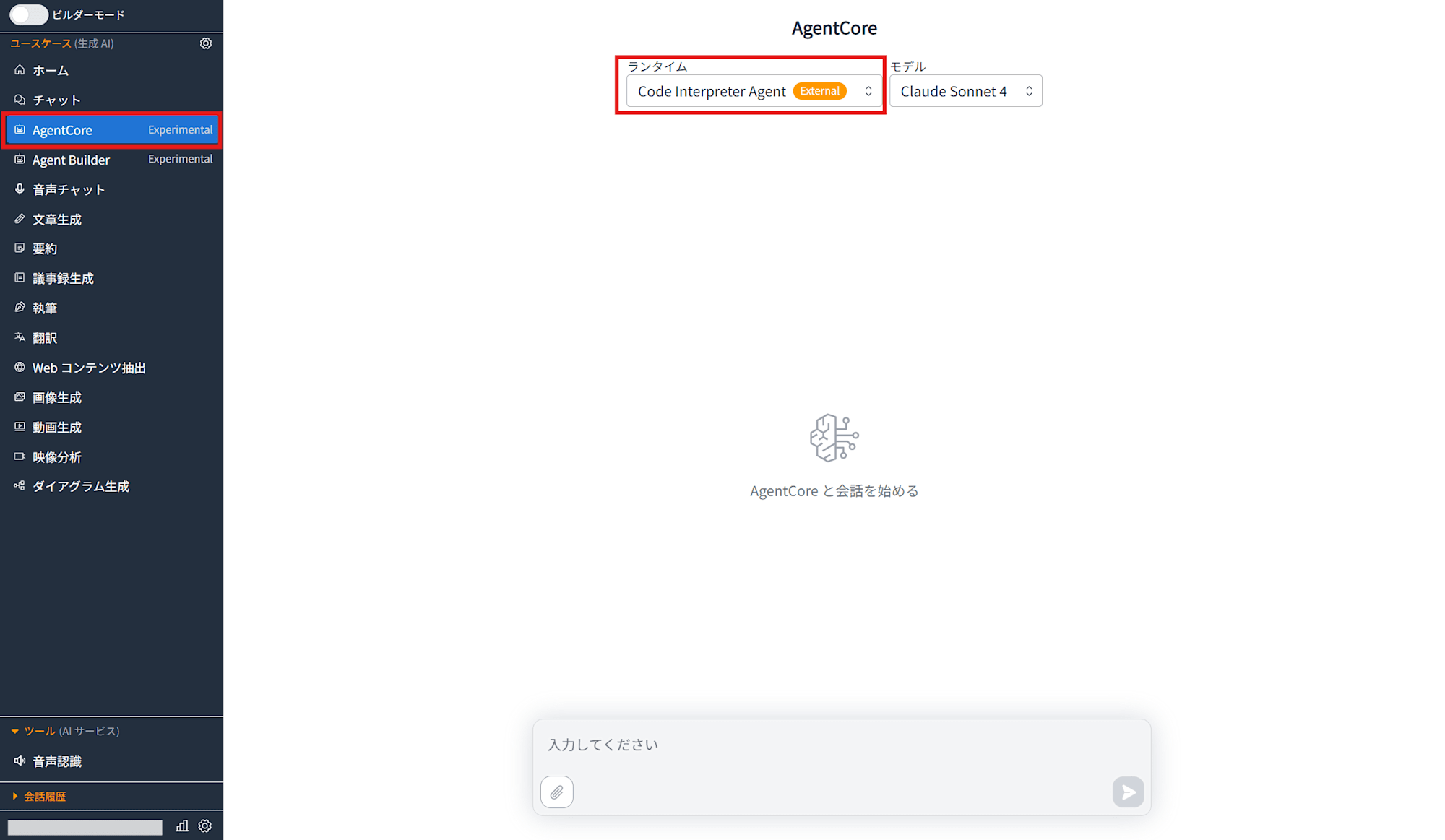
GenU の AgentCore ページを開くと、ランタイム選択のドロップダウンに Code Interpreter Agent が 表示されます。今回作成したランタイムを選択します。
Excel レポート生成
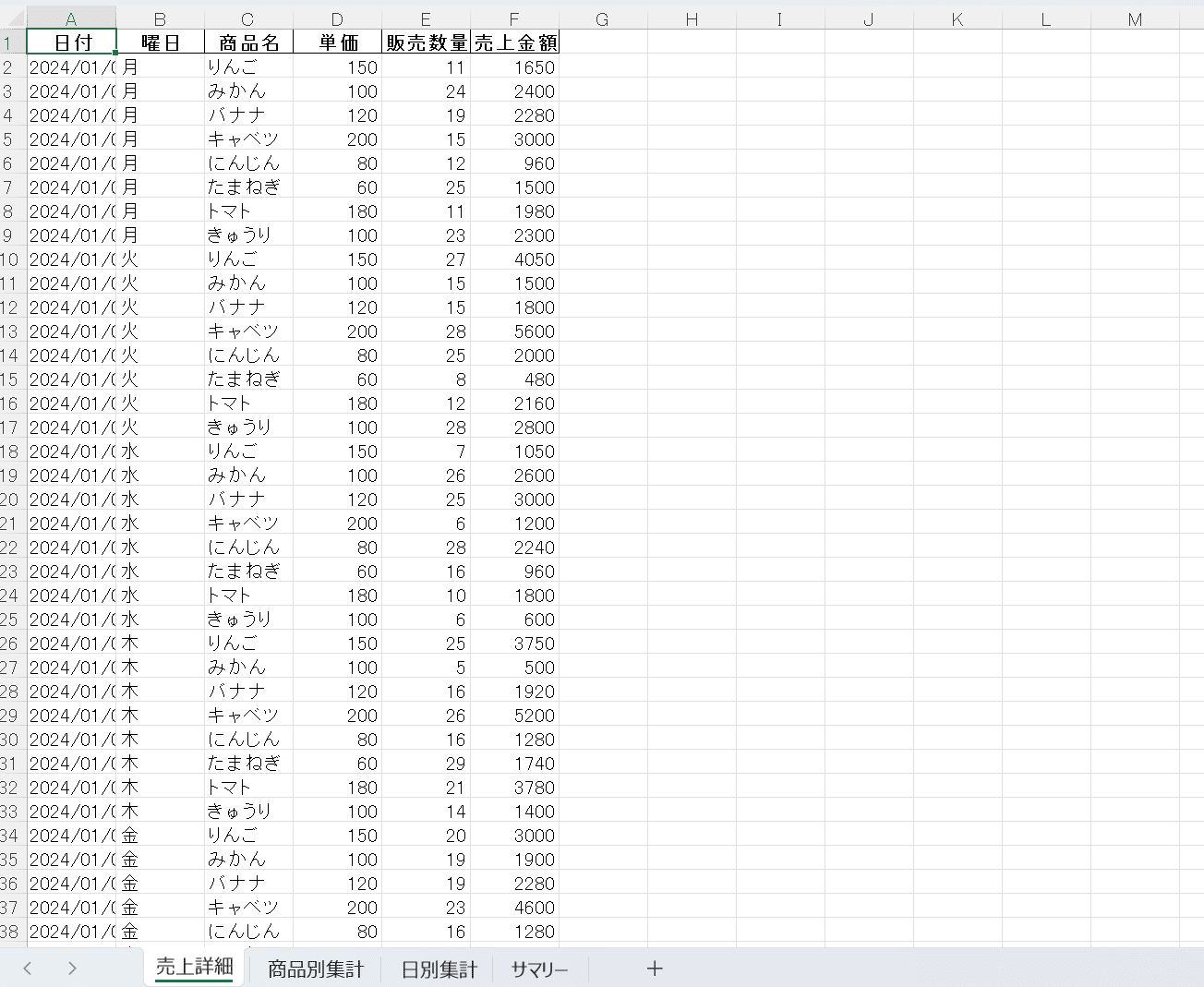
「仮想の八百屋の売上データの Excel レポートを作成してください」と入力してみました。
エージェントが以下の流れで処理を実行します。
- Code Interpreter でサンプル売上データを作成
- Excel ファイルを生成し、サンドボックスの
outputs/ディレクトリに保存 download_file_from_sandboxでサンドボックスから Runtime にファイルをダウンロードupload_file_to_s3_and_retrieve_s3_urlで S3 にアップロード- S3 URL をレスポンスに含めて返却
GenU のフロントエンドが S3 URL を検出し、クリックすると presigned URL を自動生成してファイルをダウンロードできます。
振り返り
ここまで Code Interpreter で生成したファイルをユーザーに届けるまでの実装を見てきました。読者の方に改めてお伝えしたいのは、次の 3 点です。
- サンドボックスと Runtime のファイルシステム分離: Code Interpreter のサンドボックスは Runtime と完全に隔離されているため、生成したファイルを直接参照することはできません。
readFilesAPI でファイルをいったん Runtime に取り出してから S3 にアップロードする、という橋渡しの実装が必要になります。 - GenU の S3 URL 検出機能の活用: Runtime は presigned URL を生成せず、生の S3 URL を返すだけで十分です。GenU フロントエンドが S3 URL を検出してクリック時に presigned URL を取得してくれるため、ファイルダウンロードのインフラを別途用意する必要がありません。S3 バケットも GenU の AgentCore スタックが作成済みのものを共用することで、新規バケットの作成や権限設定を省けます。
- システムプロンプトでの制約明記: ファイルシステム分離やパスの制約はコードでは強制できないため、システムプロンプトに 「Code Interpreter サンドボックスに渡すコードの制約」 として明記する必要があります。制約の対象がサンドボックスで実行されるコードであることを明確にしないと、エージェントが独自の作業ディレクトリを勝手に作成してしまうなど、安定動作を妨げる挙動が発生しました。
また、今回の実装ではファイル生成からダウンロードまでの 3 ステップ(生成 → サンドボックスから取り出し → S3 アップロード)をエージェントの自律的なツール選択に委ねていますが、エージェントフレームワークを介した制御は今回のようにプロンプトでの調整が必要になり難しい側面もあります。処理フローが固定で予測可能なユースケースであれば、エージェントに任せず AgentCore SDK bedrock-agentcore クライアントから Code Interpreter を直接呼び出す 構成も検討する価値があります。フローが決まっているなら確実に動作させやすいアプローチです。エージェントによる実行の柔軟性が必要かどうかをユースケースに応じて見極めるのが良さそうです。
最後にファイルのアップロードについて触れておきます。今回の実装ではユーザーからの入力はテキストのみで、CSV や Excel のアップロードには対応していません。手元のデータをアップロードし、エージェントに分析させ、そのレポートを得る、という需要はあるので、実装可否を簡単に整理しておきます。サンドボックスへのファイル投入自体は 第一回の記事で writeFiles API を使って検証済みです。あとは GenU から送られてくるペイロードに含まれるファイルを writeFiles に渡すだけです。こちらは「ステップ3: エージェントの実装」にて使用されている app/MyAgent/main.py 中の process_prompt を拡張すれば対応可能なはずです。
おわりに
3 回の記事を通して、AgentCore Code Interpreter を以下のように段階的に検証してきました。
- 第一回: boto3 で API を直接操作して基本動作を理解
- 第二回: Strands Agents でエージェントに自律的にファイル生成させる
- 第三回(本記事): カスタムランタイムとして AWS にデプロイし、GenU から利用
カスタムランタイムにすることで、用途に特化したエージェントを GenU の UI からシームレスに利用できるようになりました。一方で、振り返りでも触れたとおり、エージェントフレームワーク経由の制御はプロンプト調整の難しさが伴います。処理フローが固定なら AgentCore SDK で Code Interpreter を直接呼び出す構成も含めて、ユースケースに応じて適切なアプローチを選択していきたいです。