![[アップデート] Amazon Bedrock AgentCore Gatewayがプライベート認証局(CA)の証明書に対応したので、VPC内のMCPサーバーに接続してみた](https://devio2024-media.developers.io/image/upload/f_auto,q_auto,w_3840/f_auto,q_auto/v1790875048/eyecatch/edq4dfptctqlcwjhffhs.png)
[アップデート] Amazon Bedrock AgentCore Gatewayがプライベート認証局(CA)の証明書に対応したので、VPC内のMCPサーバーに接続してみた

はじめに
こんにちは、チーズナンが好きなコンサル部の神野です。
2026年10月2日のアップデートで、Amazon Bedrock AgentCore Gatewayがプライベート認証局(CA)で署名されたTLS証明書に対応しました!(少し前のアップデートですが・・・)
対象となるのは、VPC Latticeのプライベートエンドポイントを経由するMCPサーバー、OpenAPI、HTTPプロキシの各ターゲットです。今回はVPC内に配置したMCPサーバーを使って試してみます!
何が嬉しいか
これまではプライベートCAの証明書を使うサーバーに接続する場合、公開ドメインとACMのパブリック証明書を用意した上で、前段に内部ALBを挟む構成をとる必要がありました。
今回のアップデートにより、CA証明書のPEMをS3かSecrets Managerに配置してターゲットに指定すれば、VPC Lattice経由で直接接続できるようになりました!
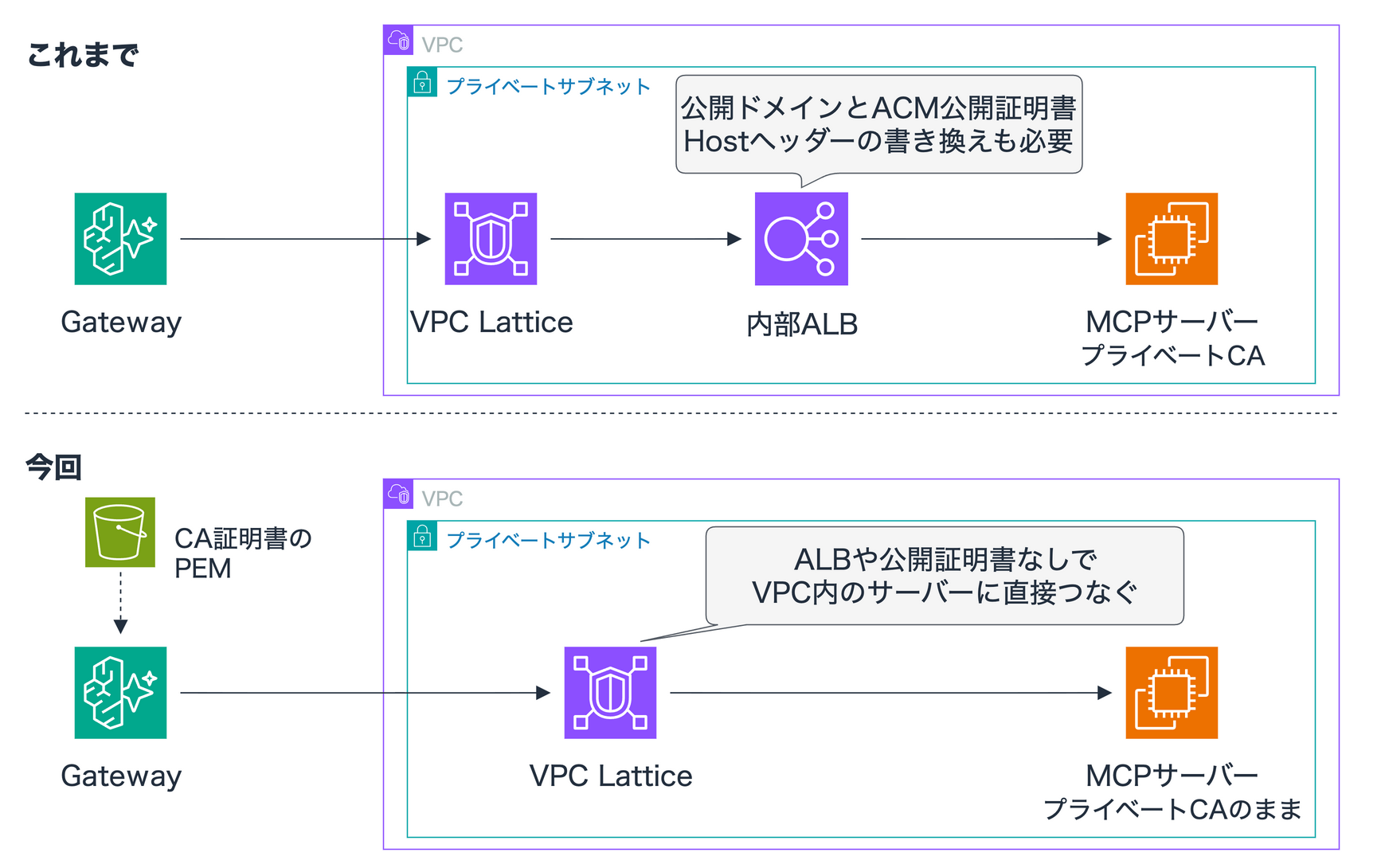
ちょっとニッチではありますが、接続構成の選択肢が広がった形ですね!
例えば、次のような環境では扱いやすくなるはずです。
- プライベートCAで証明書を一元発行しており、VPC内のMCPサーバーやAPIもその証明書で運用している
- 閉域ネットワーク環境のため、公開ドメインの取得やACMのDNS検証を進めづらい
- GatewayとのTLS接続を成立させる目的で内部ALBを配置していたため、余分なリソースを減らして構成をシンプルにしたい
今回試す構成
プライベートサブネットに配置したEC2上でMCPサーバーをHTTPS起動し、プライベートCAで署名した証明書を割り当てます。ドメインの mcp.internal.example.com はRoute 53のプライベートホストゾーンを使ってVPC内から名前解決できるようにしています。
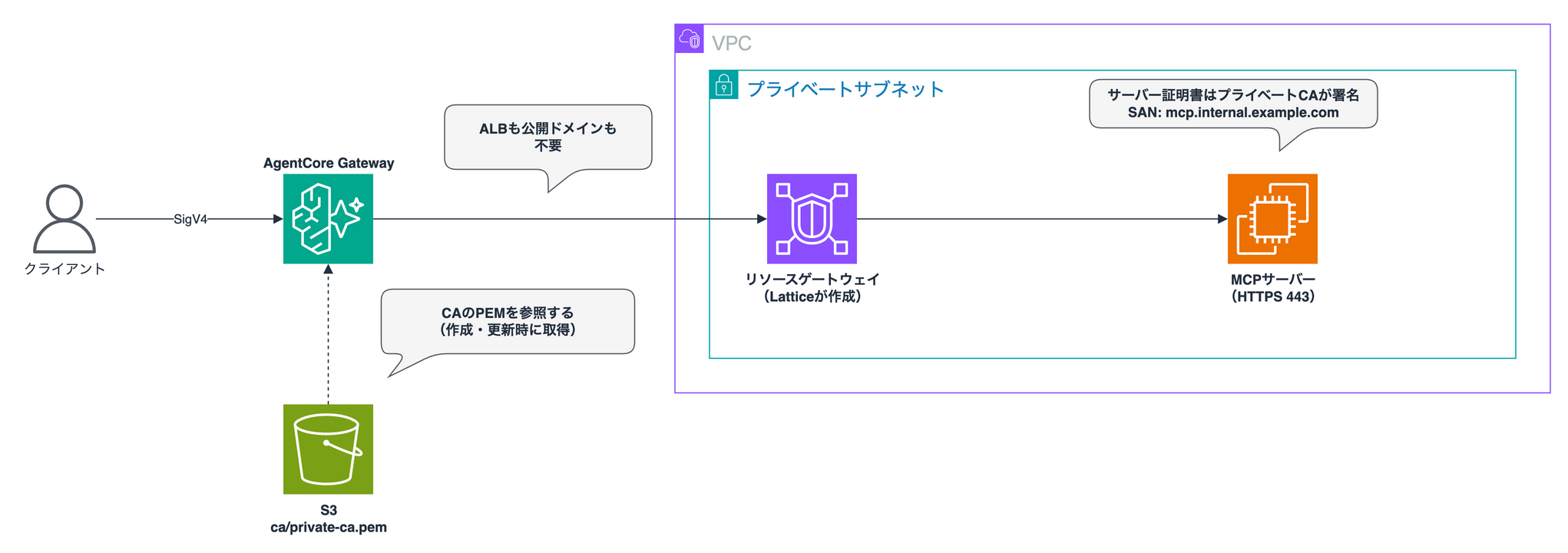
今回は手軽にEC2で検証していますが、VPCからアクセスできるHTTPSエンドポイントであれば他のリソースでも問題ありません。公式ブログでは、GatewayからプライベートなAPI Gatewayへつなぐ構成も紹介されています。
API Gatewayならターゲット機能で直接指定できそうに思えますよね。GatewayにはAPI Gatewayターゲットが用意されており、REST APIのステージを指定すればそのままツールとして組み込めます。
ただ、API Gatewayターゲットはパブリック(リージョン)エンドポイントを前提にしており、プライベートAPIには対応していません。
そのため、VPC内から呼び出すプライベートAPIを使う場合は、OpenAPIターゲットとプライベートエンドポイントを組み合わせることになります。プライベートCAの証明書を独自ドメインに当てて運用しているAPIであれば、今回のアップデートがそのまま役立ちます!
さらにTransit Gatewayを挟んだマルチVPCやハイブリッド構成にも対応しているとのことなので、ECSやEKSで動かしているサーバーでも、VPC経由で届くエンドポイントがあれば同じように連携できるはずです。
前提
下記前提で進めていきます!
| 項目 | 内容 |
|---|---|
| リージョン | ap-northeast-1 |
| MCPサーバー | Python 3.14 + mcp 1.30.0(EC2 t4g.small、Amazon Linux 2023) |
| 証明書の作成 | OpenSSL 3.6.3(macOS) |
| 環境の構築 | AWS CDK(aws-cdk-lib 2.273.0、TypeScript、Node.js 26 + pnpm) |
| ターゲットの登録 | AWS CLI 2.37.13 |
| ツールの呼び出し | curl 8.7.1(--aws-sigv4) |
| 接続モード | managed Lattice(managedVpcResource) |
検証に使用したコードは、以下のリポジトリにまとめています。
一から構築する場合は、作業用ディレクトリを作成したうえで cdk/ 配下にCDKアプリを初期化します。
mkdir agentcore-gateway-tls && cd agentcore-gateway-tls
mkdir cdk && cd cdk && pnpm dlx aws-cdk@latest init app --language typescript --generate-only
pnpm install && cd ..
証明書を作る
検証で使う証明書を作成します。プライベートCAを立てて、そのCAで署名したサーバー証明書を用意する構成です。
CA証明書にはCAであることを示す CA:TRUE が必須で、サーバー証明書のSAN(Subject Alternative Name)にはGatewayの接続先ホスト名を設定します。
# プライベートCA
openssl req -x509 -new -key ca.key -sha256 -days 3650 \
  -subj "/CN=Demo Private CA" \
  -addext "basicConstraints=critical,CA:TRUE" \
  -addext "keyUsage=critical,keyCertSign,cRLSign" \
  -out ca.pem

# サーバー証明書(SANに接続先のホスト名を入れる)
openssl x509 -req -in server.csr -CA ca.pem -CAkey ca.key -CAcreateserial \
  -days 365 -sha256 \
  -extfile <(printf "subjectAltName=DNS:%s\nbasicConstraints=CA:FALSE\nextendedKeyUsage=serverAuth\n" "$HOST") \
  -out server.pem
certs.sh(全体)
#!/usr/bin/env bash
# 検証用の証明書を certs/ に作る(OpenSSL 3.x)
set -euo pipefail
HOST=mcp.internal.example.com
mkdir -p certs && cd certs

# プライベートCA:basicConstraintsをCA:TRUEにして自己署名する
openssl genrsa -out ca.key 2048
openssl req -x509 -new -key ca.key -sha256 -days 3650 \
  -subj "/CN=Demo Private CA" \
  -addext "basicConstraints=critical,CA:TRUE" \
  -addext "keyUsage=critical,keyCertSign,cRLSign" \
  -out ca.pem

# サーバー証明書:SANに接続先ホスト名を入れ、CAで署名する
openssl genrsa -out server.key 2048
openssl req -new -key server.key -subj "/CN=$HOST" -out server.csr
openssl x509 -req -in server.csr -CA ca.pem -CAkey ca.key -CAcreateserial \
  -days 365 -sha256 \
  -extfile <(printf "subjectAltName=DNS:%s\nbasicConstraints=CA:FALSE\nextendedKeyUsage=serverAuth\n" "$HOST") \
  -out server.pem

# ---- おまけ:プライベートAPI Gatewayのカスタムドメイン用 ----
API_HOST=api.internal.example.com
openssl genrsa -out api.key 2048
openssl req -new -key api.key -subj "/CN=$API_HOST" -out api.csr
openssl x509 -req -in api.csr -CA ca.pem -CAkey ca.key -CAcreateserial \
  -days 365 -sha256 \
  -extfile <(printf "subjectAltName=DNS:%s\nbasicConstraints=CA:FALSE\nextendedKeyUsage=serverAuth\nkeyUsage=critical,digitalSignature,keyEncipherment\n" "$API_HOST") \
  -out api.pem
スクリプトを実行して、作成された証明書の中身を確認します。
chmod +x certs.sh && ./certs.sh
openssl x509 -in certs/ca.pem -noout -subject -ext basicConstraints
openssl x509 -in certs/server.pem -noout -subject -issuer -ext subjectAltName
openssl verify -CAfile certs/ca.pem certs/server.pem
subject=CN=Demo Private CA
X509v3 Basic Constraints: critical
    CA:TRUE
subject=CN=mcp.internal.example.com
issuer=CN=Demo Private CA
X509v3 Subject Alternative Name:
    DNS:mcp.internal.example.com
certs/server.pem: OK
問題なく作成できましたね!
続いてAWS側のリソースを作っていきましょう。
環境を用意する
証明書の準備ができたので、ここからは実際に動かす環境を作っていきます。
MCPサーバー本体のコード(server.py)と、VPCやEC2、プライベートホストゾーン、GatewayをまとめたCDKスタック(cdk/lib/ec2-stack.ts)を用意しました。
server.py
# /// script
# requires-python = ">=3.14,<3.15"
# dependencies = ["mcp==1.30.0"]
# ///
import os
import socket

import uvicorn
from mcp.server.fastmcp import FastMCP

# 0.0.0.0 を指定すると、Hostヘッダーの制限(DNSリバインディング対策)が自動では有効にならない
mcp = FastMCP("private-tls-demo", host="0.0.0.0", stateless_http=True, json_response=True)

@mcp.tool()
def whoami() -> str:
    """このMCPサーバーが動いているホスト名を返す"""
    return f"hello from {socket.gethostname()}"

if __name__ == "__main__":
    uvicorn.run(
        mcp.streamable_http_app(),
        host="0.0.0.0",
        port=int(os.environ.get("PORT", "443")),
        ssl_certfile=os.environ.get("CERT", "server.pem"),
        ssl_keyfile=os.environ.get("KEY", "server.key"),
    )
cdk/lib/ec2-stack.ts
import * as fs from 'fs';
import * as path from 'path';
import * as cdk from 'aws-cdk-lib/core';
import * as ec2 from 'aws-cdk-lib/aws-ec2';
import * as agentcore from 'aws-cdk-lib/aws-bedrockagentcore';
import * as iam from 'aws-cdk-lib/aws-iam';
import * as route53 from 'aws-cdk-lib/aws-route53';
import * as s3 from 'aws-cdk-lib/aws-s3';
import * as s3deploy from 'aws-cdk-lib/aws-s3-deployment';
import { Construct } from 'constructs';

const CERTS = path.join(__dirname, '../../certs');
const read = (name: string) => fs.readFileSync(path.join(CERTS, name), 'utf8');

export class Ec2Stack extends cdk.Stack {
  constructor(scope: Construct, id: string, props?: cdk.StackProps) {
    super(scope, id, props);

    // パブリックサブネット(NAT用)と、MCPサーバーを置くプライベートサブネット
    const vpc = new ec2.Vpc(this, 'Vpc', {
      ipAddresses: ec2.IpAddresses.cidr('10.0.0.0/16'),
      maxAzs: 2,
      natGateways: 1,
      subnetConfiguration: [
        { name: 'public', subnetType: ec2.SubnetType.PUBLIC, cidrMask: 24 },
        { name: 'private', subnetType: ec2.SubnetType.PRIVATE_WITH_EGRESS, cidrMask: 24 },
      ],
    });

    // Gateway(VPC Lattice)が作るENIに付けるSG
    const latticeSg = new ec2.SecurityGroup(this, 'LatticeSg', { vpc, allowAllOutbound: true });

    // MCPサーバーは、リソースゲートウェイのENIからの443だけを受け付ける
    const serverSg = new ec2.SecurityGroup(this, 'ServerSg', { vpc, allowAllOutbound: true });
    serverSg.addIngressRule(latticeSg, ec2.Port.tcp(443));

    // サーバー証明書・MCPサーバーのコードと、Gatewayが参照するCA証明書のPEM
    const bucket = new s3.Bucket(this, 'Bucket', {
      blockPublicAccess: s3.BlockPublicAccess.BLOCK_ALL,
      enforceSSL: true,
      removalPolicy: cdk.RemovalPolicy.DESTROY,
      autoDeleteObjects: true,
    });
    const serverFiles = new s3deploy.BucketDeployment(this, 'ServerFiles', {
      destinationBucket: bucket,
      destinationKeyPrefix: 'server',
      sources: [
        s3deploy.Source.data('server.pem', read('server.pem')),
        s3deploy.Source.data('server.key', read('server.key')),
        s3deploy.Source.asset(path.join(__dirname, '../..'), { exclude: ['*', '!server.py'] }),
      ],
    });
    // Gatewayが参照するCA証明書のPEM
    new s3deploy.BucketDeployment(this, 'CaFiles', {
      destinationBucket: bucket,
      destinationKeyPrefix: 'ca',
      sources: [s3deploy.Source.data('private-ca.pem', read('ca.pem'))],
    });

    // MCPサーバー(起動時にS3から証明書とコードを取得し、systemdで起動する)
    const role = new iam.Role(this, 'ServerRole', {
      assumedBy: new iam.ServicePrincipal('ec2.amazonaws.com'),
      managedPolicies: [iam.ManagedPolicy.fromAwsManagedPolicyName('AmazonSSMManagedInstanceCore')],
    });
    bucket.grantRead(role, 'server/*');
    const userData = ec2.UserData.forLinux();
    userData.addCommands(
      'set -euxo pipefail',
      'mkdir -p /opt/mcp && cd /opt/mcp',
      `aws s3 cp s3://${bucket.bucketName}/server/ . --recursive`,
      'chmod 600 server.key',
      'export HOME=/root',
      'curl -LsSf https://astral.sh/uv/0.9.26/install.sh | sh',
      `cat > /etc/systemd/system/mcp.service <<'UNIT'
[Unit]
Description=Private MCP server
After=network-online.target
[Service]
WorkingDirectory=/opt/mcp
Environment=HOME=/root
ExecStart=/root/.local/bin/uv run server.py
Restart=always
RestartSec=5
[Install]
WantedBy=multi-user.target
UNIT`,
      'systemctl daemon-reload',
      'systemctl enable --now mcp',
    );
    const server = new ec2.Instance(this, 'Server', {
      vpc,
      vpcSubnets: { subnetType: ec2.SubnetType.PRIVATE_WITH_EGRESS, availabilityZones: [vpc.availabilityZones[0]] },
      instanceType: new ec2.InstanceType('t4g.small'),
      machineImage: ec2.MachineImage.latestAmazonLinux2023({ cpuType: ec2.AmazonLinuxCpuType.ARM_64 }),
      securityGroup: serverSg,
      role,
      userData,
    });
    server.node.addDependency(serverFiles);

    // VPC内だけで名前解決できるドメイン
    const zone = new route53.PrivateHostedZone(this, 'Zone', { zoneName: 'internal.example.com', vpc });
    new route53.ARecord(this, 'McpRecord', {
      zone,
      recordName: 'mcp',
      target: route53.RecordTarget.fromIpAddresses(server.instancePrivateIp),
      ttl: cdk.Duration.seconds(60),
    });

    // Gatewayのサービスロール(CA証明書の読み取り)
    const gatewayRole = new iam.Role(this, 'GatewayRole', {
      assumedBy: new iam.ServicePrincipal('bedrock-agentcore.amazonaws.com', {
        conditions: {
          StringEquals: { 'aws:SourceAccount': this.account },
          ArnLike: { 'aws:SourceArn': `arn:aws:bedrock-agentcore:${this.region}:${this.account}:gateway/*` },
        },
      }),
    });
    bucket.grantRead(gatewayRole, 'ca/*');
    gatewayRole.addToPolicy(
      new iam.PolicyStatement({
        actions: ['secretsmanager:GetSecretValue'],
        resources: [`arn:aws:secretsmanager:${this.region}:${this.account}:secret:gw-tls-demo-ca-*`],
      }),
    );

    // IAM認証のMCPゲートウェイ(ターゲットはCLIで登録する)
    const gateway = new agentcore.CfnGateway(this, 'Gateway', {
      name: 'private-tls-demo',
      protocolType: 'MCP',
      authorizerType: 'AWS_IAM',
      roleArn: gatewayRole.roleArn,
    });

    // ターゲット登録時に --private-endpoint へそのまま渡すJSON
    const privateEndpoint = {
      managedVpcResource: {
        vpcIdentifier: vpc.vpcId,
        subnetIds: vpc.privateSubnets.map((s) => s.subnetId),
        endpointIpAddressType: 'IPV4',
        securityGroupIds: [latticeSg.securityGroupId],
      },
    };

    new cdk.CfnOutput(this, 'GatewayId', { value: gateway.attrGatewayIdentifier });
    new cdk.CfnOutput(this, 'GatewayUrl', { value: gateway.attrGatewayUrl });
    new cdk.CfnOutput(this, 'PrivateEndpoint', { value: this.toJsonString(privateEndpoint) });
    new cdk.CfnOutput(this, 'BucketName', { value: bucket.bucketName });
    new cdk.CfnOutput(this, 'ServerInstanceId', { value: server.instanceId });
  }
}
cdk/bin/app.ts
#!/usr/bin/env node
import * as cdk from 'aws-cdk-lib/core';
import { Ec2Stack } from '../lib/ec2-stack';
import { ApigwStack } from '../lib/apigw-stack';

const app = new cdk.App();
const env = { account: process.env.CDK_DEFAULT_ACCOUNT, region: 'ap-northeast-1' };

// 本編:プライベートCAの証明書を使うMCPサーバー(EC2)
new Ec2Stack(app, 'GwTlsEc2', { env });

// おまけ:プライベートCAの証明書を付けたプライベートAPI Gateway
// ACMにインポートした証明書のARNを渡したときだけ作る(cdk deploy GwTlsApigw -c certificateArn=...)
const certificateArn = app.node.tryGetContext('certificateArn');
if (certificateArn) {
  new ApigwStack(app, 'GwTlsApigw', { env, certificateArn });
}
MCPサーバー側のセキュリティグループでは、Lattice用SGからの443番ポートへの通信を許可しています。また、GatewayのサービスロールにはS3の ca/ 配下にあるCA証明書を読み取る権限を付けておきます。Gateway自体もCDKで作成し、後のターゲット登録で使う設定値をスタックの出力に含めました。
// MCPサーバーは、リソースゲートウェイのENIからの443だけを受け付ける
serverSg.addIngressRule(latticeSg, ec2.Port.tcp(443));
bucket.grantRead(gatewayRole, 'ca/*');

// IAM認証のMCPゲートウェイ(ターゲットはCLIで登録する)
const gateway = new agentcore.CfnGateway(this, 'Gateway', {
  name: 'private-tls-demo',
  protocolType: 'MCP',
  authorizerType: 'AWS_IAM',
  roleArn: gatewayRole.roleArn,
});
サーバー証明書と server.py はCDKによってS3へ配置され、EC2の起動時に server/ 配下のファイルを取得してsystemdでMCPサーバーが立ち上がる仕組みです。スタックをデプロイしたら、後続のコマンドで利用する各パラメータを変数に読み込んでおきます。
(cd cdk && pnpm cdk deploy GwTlsEc2)

out() { aws cloudformation describe-stacks --region ap-northeast-1 --stack-name GwTlsEc2 \
  --query "Stacks[0].Outputs[?OutputKey=='$1'].OutputValue" --output text; }
GW_ID=$(out GatewayId)        # GatewayのID
GW_URL=$(out GatewayUrl)      # GatewayのURL
PE=$(out PrivateEndpoint)     # --private-endpoint に渡すJSON(VPC・サブネット・SG)
B=$(out BucketName)
ACCOUNT=$(aws sts get-caller-identity --query Account --output text)
ターゲットを登録する
ターゲットの登録にはAWS CLIを使います。執筆時点ではCloudFormation(CDK)のターゲットリソースが certificateConfigurations に対応していなかったためです。
アップデートで追加された --certificate-configurations オプションに、CA証明書を配置したS3 URIを指定します。
aws bedrock-agentcore-control create-gateway-target --region ap-northeast-1 \
  --gateway-identifier "$GW_ID" \
  --name with-ca \
  --target-configuration '{"mcp": {"mcpServer": {"endpoint": "https://mcp.internal.example.com/mcp"}}}' \
  --private-endpoint "$PE" \
  --certificate-configurations "[{\"s3\": {\"uri\": \"s3://$B/ca/private-ca.pem\", \"bucketOwnerAccountId\": \"$ACCOUNT\"}}]"
証明書の指定先には s3 または secretsManager を選べます。今回は s3 を指定しました。
作成直後のステータスは CREATING です。進捗は get-gateway-target で確認できます。
aws bedrock-agentcore-control get-gateway-target --region ap-northeast-1 \
  --gateway-identifier "$GW_ID" --target-id <ターゲットID>
約3分半待つと READY になりました!
{
  "status": "READY",
  "name": "with-ca",
  "privateEndpointManagedResources": [
    {
      "domain": "mcp.internal.example.com",
      "resourceGatewayArn": "arn:aws:vpc-lattice:ap-northeast-1:<アカウントID>:resourcegateway/rgw-0bd23d3dff8cd1f64"
    }
  ],
  "certificateConfigurations": [
    {
      "s3": {
        "uri": "s3://agentcore-gw-tls-<アカウントID>/ca/private-ca.pem",
        "bucketOwnerAccountId": "<アカウントID>"
      }
    }
  ]
}
CA証明書のPEMを指定して、VPC内のMCPサーバーをターゲットとして無事に登録できました。
続いてツールを実行してみます。
ツールを呼び出す
ターゲットが利用可能になったので、実際にツールを呼び出してみます。curlの --aws-sigv4 オプションでSigV4署名を付与して、MCPのJSON-RPCリクエストを直接送信します。
eval "$(aws configure export-credentials --format env)"

curl -s "$GW_URL" \
  --aws-sigv4 "aws:amz:ap-northeast-1:bedrock-agentcore" \
  --user "$AWS_ACCESS_KEY_ID:$AWS_SECRET_ACCESS_KEY" \
  -H "x-amz-security-token: $AWS_SESSION_TOKEN" \
  -H "Content-Type: application/json" \
  -d '{"jsonrpc": "2.0", "id": 1, "method": "tools/call", "params": {"name": "with-ca___whoami", "arguments": {}}}'
{
  "result": {
    "content": [
      {"type": "text", "text": "hello from ip-x-xx-xxx-xxx.ap-northeast-1.compute.internal"}
    ],
    "isError": false
  }
}
EC2のホスト名が無事返ってきました!ツールの呼び出しにも成功し、ALBなしでVPC内のサーバーへしっかりつながっていることが確認できましたね。
CA証明書を指定しないとどうなるか
正常に動くことが確認できたので、続けてCA証明書を指定しなかった場合の挙動も試してみます。
--certificate-configurations を省いて no-ca という名前でターゲットを作成します。
aws bedrock-agentcore-control create-gateway-target --region ap-northeast-1 \
  --gateway-identifier "$GW_ID" \
  --name no-ca \
  --target-configuration '{"mcp": {"mcpServer": {"endpoint": "https://mcp.internal.example.com/mcp"}}}' \
  --private-endpoint "$PE"
実行から約4分後、ステータスが FAILED になりました。
{
  "status": "FAILED",
  "statusReasons": [
    "Failed to connect and fetch tools from the provided MCP target server. Error - (certificate_unknown) PKIX path building failed: sun.security.provider.certpath.SunCertPathBuilderException: unable to find valid certification path to requested target"
  ]
}
デフォルトでは公開CAしか信頼しないので、プライベートCAの証明書は検証エラーになります。
当たり前ですが失敗しますね。
うまくいかないパターン
ほかにも、うまくいかないパターンをいくつか試したので結果をまとめておきます。
| 試したこと | 結果 |
|---|---|
| CAではない証明書(サーバー証明書)を指定 | FAILED(Certificate is not a CA certificate) |
| 期限切れのCAを指定 | FAILED(Certificate has expired) |
| S3にないオブジェクトを指定 | FAILED(Unable to access S3 object) |
| 別のCAを指定 | FAILED(no-ca と同じPKIXのエラー) |
| SANと合わないホスト名で接続 | READY になるが、ツールの呼び出しでエラー(Hostname verification failed) |
| 動作中のターゲットを期限切れのCAに更新 | UPDATE_UNSUCCESSFUL。元の証明書のまま動き続けた |
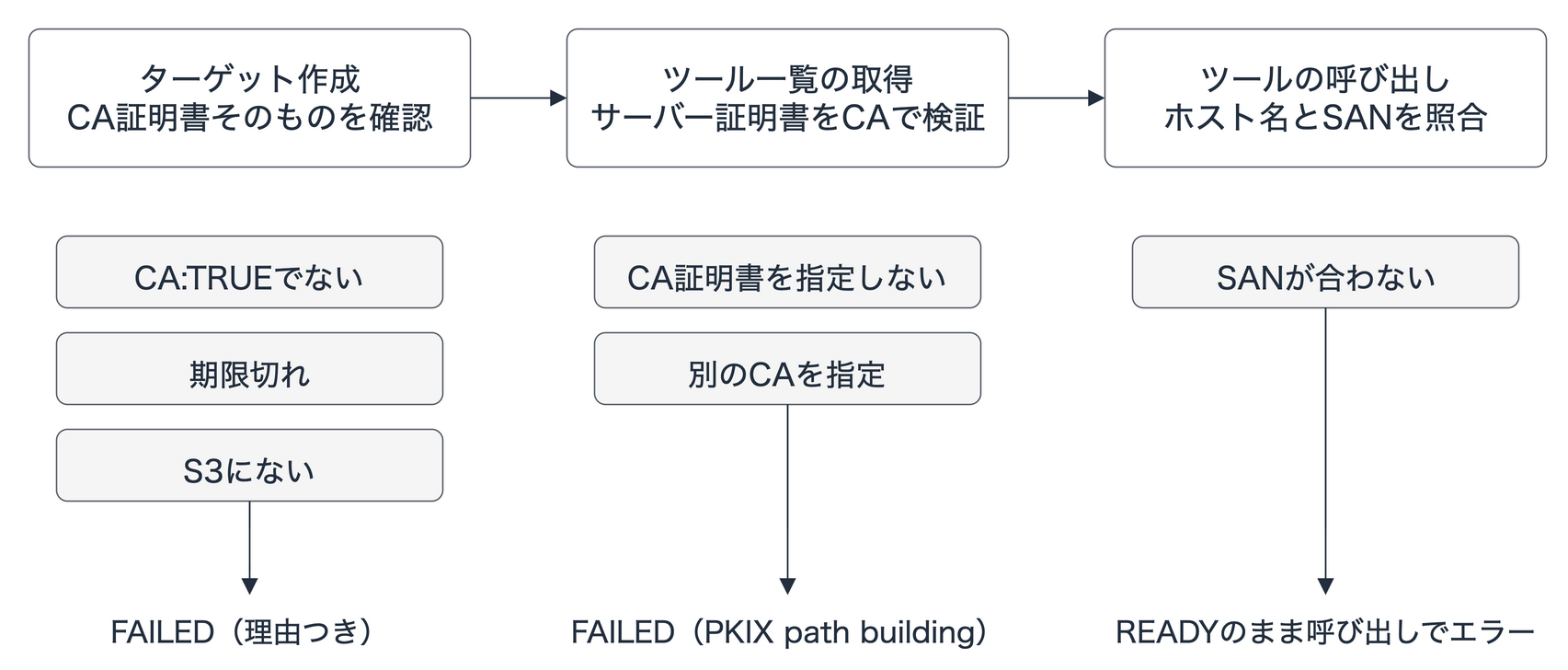
CA証明書そのものの問題は、作成時に理由つきで返ってくるので分かりやすいですね。気をつけたいのはSANの不一致で、READY になってもツールを呼び出すまで気づけません。作成後に一度ツールを呼び出して確認しておくのが安全です。
Secrets Managerに置いたCA証明書を参照する
ここまではS3を使ってきましたが、CA証明書はSecrets Managerにも配置できます。PEM形式のテキストをそのままシークレットに保存して、ターゲット側の設定で secretsManager にシークレットのARNを指定する形です。
SECRET_ARN=$(aws secretsmanager create-secret --region ap-northeast-1 \
  --name gw-tls-demo-ca --secret-string file://certs/ca.pem --query ARN --output text)

aws bedrock-agentcore-control create-gateway-target --region ap-northeast-1 \
  --gateway-identifier "$GW_ID" \
  --name with-secret \
  --target-configuration '{"mcp": {"mcpServer": {"endpoint": "https://mcp.internal.example.com/mcp"}}}' \
  --private-endpoint "$PE" \
  --certificate-configurations "[{\"secretsManager\": {\"secretArn\": \"$SECRET_ARN\"}}]"
この構成でもターゲットのステータスは READY に遷移し、ツールの呼び出しまで無事に成功しました。
証明書の期限をCloudWatchで確認する
運用面で気にしておきたいのが証明書の有効期限ですが、CA証明書の残り日数は、CloudWatchメトリクスの EarliestCertificateDaysToExpiry(名前空間は AWS/Bedrock-AgentCore)に出力されます。(用意されているんですね・・・)
ツールを呼び出して数分待つとメトリクスが確認できるようになりました。
aws cloudwatch get-metric-statistics --region ap-northeast-1 \
  --namespace AWS/Bedrock-AgentCore --metric-name EarliestCertificateDaysToExpiry \
  --dimensions Name=Resource,Value=<GatewayのARN> Name=Operation,Value=InvokeGateway \
               Name=Method,Value=tools/call Name=Protocol,Value=MCP Name=Name,Value=with-ca___whoami \
  --start-time <開始時刻> --end-time <終了時刻> --period 60 --statistics Minimum
Minimum: 3649.0
有効期間10年のCA証明書を当日に作成したため、値は3649日になっています。期限が切れるとツールの呼び出しに失敗するため、残り日数が少なくなったら通知するCloudWatchアラームを設定しておくと安心ですね。
後片付け
Gatewayはターゲットが残っている状態では削除できないため、ターゲットを先にすべて削除してからCDKのスタックを削除します。
for t in $(aws bedrock-agentcore-control list-gateway-targets --region ap-northeast-1 \
    --gateway-identifier "$GW_ID" --query 'items[].targetId' --output text); do
  aws bedrock-agentcore-control delete-gateway-target --region ap-northeast-1 \
    --gateway-identifier "$GW_ID" --target-id "$t"
  sleep 5  # まとめて消すとスロットリングされることがあった
done
aws secretsmanager delete-secret --region ap-northeast-1 --secret-id gw-tls-demo-ca --force-delete-without-recovery
(cd cdk && pnpm cdk destroy GwTlsEc2)
ターゲットがなくなると、VPC LatticeのリソースゲートウェイもGateway側で自動的に削除されます。
プライベートなAPI Gatewayでも試してみた
冒頭で触れたプライベートなAPI Gatewayでも試してみました。
想定するのは、APIをVPC内から呼び出す構成にしていて、独自ドメイン api.internal.example.com をプライベートCAの証明書で設定しているケースです。プライベートなAPIにはAPI Gatewayターゲットが使えないため、OpenAPIターゲットとして登録します。デフォルトのエンドポイント(execute-api)を使う構成であればAWSの公開証明書が適用されるので、CA証明書の指定は不要です!
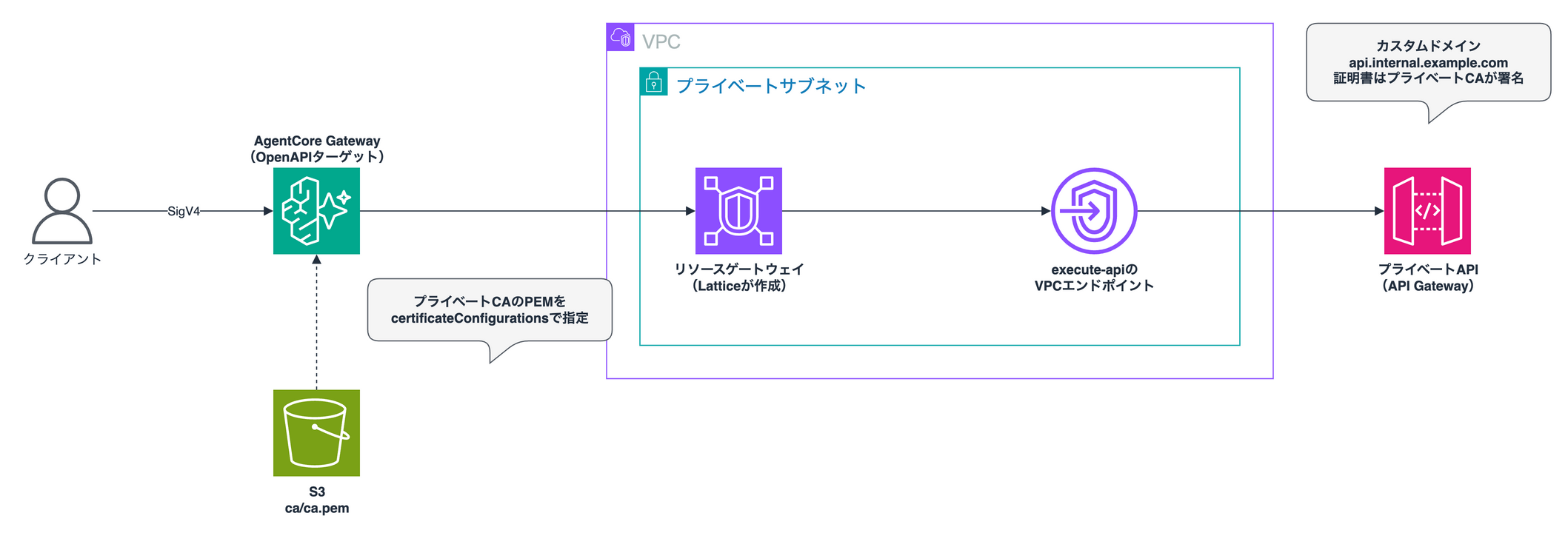
APIはMock統合でJSONを返す構成とし、VPC、VPCエンドポイント、API、Gatewayは本編と同様にCDKで構築しました。ACMにインポートしたプライベートCA署名の証明書を、プライベートなカスタムドメインに紐付けています。
cdk/lib/apigw-stack.ts
import * as path from 'path';
import * as cdk from 'aws-cdk-lib/core';
import * as ec2 from 'aws-cdk-lib/aws-ec2';
import * as apigw from 'aws-cdk-lib/aws-apigateway';
import * as agentcore from 'aws-cdk-lib/aws-bedrockagentcore';
import * as iam from 'aws-cdk-lib/aws-iam';
import * as route53 from 'aws-cdk-lib/aws-route53';
import * as targets from 'aws-cdk-lib/aws-route53-targets';
import * as s3 from 'aws-cdk-lib/aws-s3';
import * as s3deploy from 'aws-cdk-lib/aws-s3-deployment';
import { Construct } from 'constructs';

export interface ApigwStackProps extends cdk.StackProps {
  certificateArn: string;
}

const DOMAIN = 'api.internal.example.com';

export class ApigwStack extends cdk.Stack {
  constructor(scope: Construct, id: string, props: ApigwStackProps) {
    super(scope, id, props);

    // NATなしのプライベートサブネットだけのVPC
    const vpc = new ec2.Vpc(this, 'Vpc', {
      ipAddresses: ec2.IpAddresses.cidr('10.1.0.0/16'),
      maxAzs: 2,
      natGateways: 0,
      subnetConfiguration: [{ name: 'private', subnetType: ec2.SubnetType.PRIVATE_ISOLATED }],
    });

    // Gateway(VPC Lattice)が作るENIに付けるSG
    const latticeSg = new ec2.SecurityGroup(this, 'LatticeSg', { vpc, allowAllOutbound: true });

    // execute-apiのVPCエンドポイントは、リソースゲートウェイのENIからの443だけを受け付ける
    const vpceSg = new ec2.SecurityGroup(this, 'VpceSg', { vpc, allowAllOutbound: false });
    vpceSg.addIngressRule(latticeSg, ec2.Port.tcp(443));
    const vpce = vpc.addInterfaceEndpoint('ExecuteApi', {
      service: ec2.InterfaceVpcEndpointAwsService.APIGATEWAY,
      privateDnsEnabled: false,
      securityGroups: [vpceSg],
      open: false,
    });

    // VPCエンドポイント経由の呼び出しだけを許可するポリシー
    const fromVpce = new iam.PolicyDocument({
      statements: [
        new iam.PolicyStatement({
          principals: [new iam.AnyPrincipal()],
          actions: ['execute-api:Invoke'],
          resources: ['execute-api:/*'],
          conditions: { StringEquals: { 'aws:SourceVpce': vpce.vpcEndpointId } },
        }),
      ],
    });

    // Mock統合でJSONを返すだけのプライベートAPI
    const api = new apigw.RestApi(this, 'Api', {
      restApiName: 'gw-tls-private-api',
      endpointTypes: [apigw.EndpointType.PRIVATE],
      policy: fromVpce,
      deployOptions: { stageName: 'prod' },
    });
    api.root.addResource('hello').addMethod(
      'GET',
      new apigw.MockIntegration({
        requestTemplates: { 'application/json': '{"statusCode": 200}' },
        integrationResponses: [
          {
            statusCode: '200',
            responseTemplates: { 'application/json': '{"message": "hello from private API Gateway"}' },
          },
        ],
      }),
      { methodResponses: [{ statusCode: '200' }] },
    );

    // プライベートCAで署名した証明書を付けたプライベートなカスタムドメイン
    const domain = new apigw.CfnDomainNameV2(this, 'PrivateDomain', {
      domainName: DOMAIN,
      certificateArn: props.certificateArn,
      endpointConfiguration: { types: ['PRIVATE'] },
      securityPolicy: 'TLS_1_2',
      policy: fromVpce.toJSON(),
    });
    new apigw.CfnBasePathMappingV2(this, 'Mapping', {
      domainNameArn: domain.attrDomainNameArn,
      restApiId: api.restApiId,
      stage: api.deploymentStage.stageName,
    });
    new apigw.CfnDomainNameAccessAssociation(this, 'AccessAssociation', {
      domainNameArn: domain.attrDomainNameArn,
      accessAssociationSource: vpce.vpcEndpointId,
      accessAssociationSourceType: 'VPCE',
    });

    // VPC内だけで名前解決できるドメインを、VPCエンドポイントに向ける
    const zone = new route53.PrivateHostedZone(this, 'Zone', { zoneName: 'internal.example.com', vpc });
    new route53.ARecord(this, 'ApiRecord', {
      zone,
      recordName: DOMAIN,
      target: route53.RecordTarget.fromAlias(new targets.InterfaceVpcEndpointTarget(vpce)),
    });

    // Gatewayが参照するCA証明書のPEM
    const bucket = new s3.Bucket(this, 'CaBucket', {
      blockPublicAccess: s3.BlockPublicAccess.BLOCK_ALL,
      enforceSSL: true,
      removalPolicy: cdk.RemovalPolicy.DESTROY,
      autoDeleteObjects: true,
    });
    new s3deploy.BucketDeployment(this, 'CaPem', {
      destinationBucket: bucket,
      destinationKeyPrefix: 'ca',
      sources: [s3deploy.Source.asset(path.join(__dirname, '../../certs'), { exclude: ['*', '!ca.pem'] })],
    });
    // OpenAPIターゲットに渡すAPIの定義(serversにカスタムドメインを書く)
    new s3deploy.BucketDeployment(this, 'OpenApi', {
      destinationBucket: bucket,
      destinationKeyPrefix: 'openapi',
      sources: [s3deploy.Source.asset(path.join(__dirname, '../../openapi'))],
    });

    // Gatewayのサービスロール(CA証明書とOpenAPI定義の読み取り)
    const gatewayRole = new iam.Role(this, 'GatewayRole', {
      assumedBy: new iam.ServicePrincipal('bedrock-agentcore.amazonaws.com', {
        conditions: {
          StringEquals: { 'aws:SourceAccount': this.account },
          ArnLike: { 'aws:SourceArn': `arn:aws:bedrock-agentcore:${this.region}:${this.account}:gateway/*` },
        },
      }),
    });
    bucket.grantRead(gatewayRole, 'ca/*');
    bucket.grantRead(gatewayRole, 'openapi/*');

    // IAM認証のMCPゲートウェイ(ターゲットはCLIで登録する)
    const gateway = new agentcore.CfnGateway(this, 'Gateway', {
      name: 'private-tls-apigw',
      protocolType: 'MCP',
      authorizerType: 'AWS_IAM',
      roleArn: gatewayRole.roleArn,
    });

    // ターゲット登録時に --private-endpoint へそのまま渡すJSON
    const privateEndpoint = {
      managedVpcResource: {
        vpcIdentifier: vpc.vpcId,
        subnetIds: vpc.isolatedSubnets.map((s) => s.subnetId),
        endpointIpAddressType: 'IPV4',
        securityGroupIds: [latticeSg.securityGroupId],
      },
    };

    new cdk.CfnOutput(this, 'GatewayId', { value: gateway.attrGatewayIdentifier });
    new cdk.CfnOutput(this, 'GatewayUrl', { value: gateway.attrGatewayUrl });
    new cdk.CfnOutput(this, 'PrivateEndpoint', { value: this.toJsonString(privateEndpoint) });
    new cdk.CfnOutput(this, 'BucketName', { value: bucket.bucketName });
  }
}
// プライベートCAで署名した証明書を付けたプライベートなカスタムドメイン
const domain = new apigw.CfnDomainNameV2(this, 'PrivateDomain', {
  domainName: 'api.internal.example.com',
  certificateArn: props.certificateArn,
  endpointConfiguration: { types: ['PRIVATE'] },
  securityPolicy: 'TLS_1_2',
  policy: fromVpce.toJSON(),
});
証明書は、本編で使ったプライベートCAで api.internal.example.com 用のサーバー証明書を作成し(certs.sh の末尾)、ACMへインポートしています。インポートした証明書のARNをパラメータに渡してスタックをデプロイします。
CERT_ARN=$(aws acm import-certificate --region ap-northeast-1 \
  --certificate fileb://certs/api.pem --private-key fileb://certs/api.key \
  --certificate-chain fileb://certs/ca.pem --query CertificateArn --output text)
(cd cdk && pnpm cdk deploy GwTlsApigw -c certificateArn=$CERT_ARN)

out() { aws cloudformation describe-stacks --region ap-northeast-1 --stack-name GwTlsApigw \
  --query "Stacks[0].Outputs[?OutputKey=='$1'].OutputValue" --output text; }
GW_ID=$(out GatewayId); GW_URL=$(out GatewayUrl); PE=$(out PrivateEndpoint); B=$(out BucketName)
ACCOUNT=$(aws sts get-caller-identity --query Account --output text)
OpenAPIの定義ファイルでは servers にカスタムドメインを指定し、CDK経由でS3へアップロードしています。
{
  "openapi": "3.0.1",
  "info": {"title": "private-api", "version": "1.0"},
  "servers": [{"url": "https://api.internal.example.com"}],
  "paths": {
    "/hello": {
      "get": {
        "operationId": "getHello",
        "description": "プライベートAPI Gatewayからあいさつを返す",
        "responses": {"200": {"description": "OK"}}
      }
    }
  }
}
ターゲットの登録は本編と同様にCLIから実行します。--target-configuration にOpenAPI定義のS3 URIを指定します。
aws bedrock-agentcore-control create-gateway-target --region ap-northeast-1 \
  --gateway-identifier "$GW_ID" \
  --name with-ca \
  --target-configuration "{\"mcp\": {\"openApiSchema\": {\"s3\": {\"uri\": \"s3://$B/openapi/private-api.json\"}}}}" \
  --private-endpoint "$PE" \
  --certificate-configurations "[{\"s3\": {\"uri\": \"s3://$B/ca/ca.pem\", \"bucketOwnerAccountId\": \"$ACCOUNT\"}}]"
およそ4分でステータスが READY に変わりました。本編と同じcurlコマンドで with-ca___getHello を呼び出すと、APIからの応答がしっかり返ってきました!
{
  "result": {
    "isError": false,
    "content": [
      {"type": "text", "text": "{\"message\":\"hello from private API Gateway\"}"}
    ]
  }
}
CA証明書を指定しないターゲット(no-ca)も作成して比較してみました。こちらもターゲット自体は READY に遷移しますが、ツールを実行した段階でエラーが返されます。
{
  "result": {
    "isError": true,
    "content": [
      {"type": "text", "text": "An internal error occurred. Please retry later."}
    ]
  }
}
MCPサーバーターゲットの場合は登録処理の中でツール一覧を取りに行くため、CAの検証に通らないと作成時点で FAILED になります。一方、OpenAPIターゲットは定義ファイルからツール一覧を生成する仕組みなので、作成段階では実際のバックエンドへ疎通を確認していないようです。
エラーメッセージにも証明書に関する具体的な記述が出ないため、原因の切り分けで迷いやすいポイントなため、OpenAPIターゲットを使用する際も、作成を終えたら一度ツールを呼び出して疎通を確かめておくのが安心かと思います!
おわりに
CA証明書のPEMを指定し、プライベートCAの証明書を使うMCPサーバーにALBなしでつながりました!少しニッチなアップデートですがターゲットの幅が広がり、使えるケースもあるのではないでしょうか!
本記事が少しでも参考になりましたら幸いです。最後までご覧いただきありがとうございました!