
Amazon Bedrock AgentCore EvaluationsのOn-demand evaluationをStarter Toolkitで試してみた

はじめに
こんにちは、スーパーマーケットが好きなコンサルティング部の神野です!
先日、Amazon Bedrock AgentCore Evaluationsがプレビューリリースされましたー!!
このEvaluations機能ですが、2種類のタイミングで評価が可能です。
- Online evaluation
- リアルタイムで継続的に評価可能(若干のラグはあり)
- Gen AI Observabilityダッシュボードで結果を確認可能
- コンソール上から設定可能
- On-demand evaluation
- 特定のセッションIDやトレースIDを指定して、ターゲットを絞った評価を実行可能
- AWS CLIや、Starter Toolkitなどから実行可能
今回はこのOn-demand evaluationを試してみようと思ったのですが、コンソール上からは実施できず、Starter Toolkitから実施できそうだったので、早速試してみました!
On-demand evaluationとは
On-demand evaluationは、特定の会話をターゲットにして評価を行う機能です。Online evaluationが運用中のエージェントを継続的に監視するのに対し、On-demand evaluationは選択した会話をいつでも評価できます。
主なユースケースとしては以下のようなものが考えられます。
- 特定の顧客の1セッションを確認
- 報告された問題の修正検証
セッションIDやトレースIDを指定することで、評価対象を特定できるのが特徴ですね。
On-demand evaluation is a flexible method offered by Amazon Bedrock AgentCore to assess specific agent interactions by analyzing chosen sets of spans.
利用可能な Built-in Evaluators 一覧
ビルトインで提供されている評価指標が存在します。
On-demand evaluationを試す前に、利用可能なBuilt-in Evaluators(ビルトインの評価指標)を確認しておきましょう。評価レベル(Session/Trace/Tool)によって、評価対象の粒度が異なります。
Session-level Evaluators(セッション全体を評価)
セッションのすべてのやり取りから評価します。同一セッションIDでやり取りしていれば評価対象に含まれます。
| Evaluator ID | 評価内容 |
|---|---|
Builtin.GoalSuccessRate |
ユーザーの目標が達成されたか |
Trace-level Evaluators(各ターンを評価)
ターン = 1回のチャットと捉えてもらえるとわかりやすいです。
| Evaluator ID | 評価内容 |
|---|---|
Builtin.Helpfulness |
ユーザーにとって役立つ回答か |
Builtin.Coherence |
論理的一貫性・整合性があるか |
Builtin.Conciseness |
簡潔な回答か |
Builtin.ContextRelevance |
コンテキストが質問に関連しているか |
Builtin.Correctness |
回答が正確か |
Builtin.Faithfulness |
会話履歴と矛盾していないか |
Builtin.Harmfulness |
有害な内容が含まれていないか |
Builtin.InstructionFollowing |
指示に従っているか |
Builtin.Refusal |
不適切な拒否をしていないか |
Builtin.ResponseRelevance |
回答が質問に関連しているか |
Builtin.Stereotyping |
ステレオタイプを回避しているか |
Tool-level Evaluators(ツール呼び出しを評価)
各ツールの呼び出しごとに評価されます。
| Evaluator ID | 評価内容 |
|---|---|
Builtin.ToolSelectionAccuracy |
適切なツールを選択したか |
Builtin.ToolParameterAccuracy |
ツールのパラメータが正確か |
Built-in Evaluatorを使用する際は、Builtin.EvaluatorName の形式で指定します(例:Builtin.Helpfulness)。
前提条件
本記事の手順を実行するにあたり、以下の環境を使用しました。
| 項目 | バージョン・設定 |
|---|---|
| Python | 3.13.6 |
| uv | インストール済み(インストール方法) |
| AWS アカウント | AgentCore Runtime および Bedrock モデルを使用するための適切な IAM 権限 |
| リージョン | us-west-2(オレゴン) |
| 使用モデル | Claude Haiku 4.5(us.anthropic.claude-haiku-4-5-20251001-v1:0) |
また、CloudWatch の トランザクション検索 が有効になっている必要があります。
AgentCore Evaluations は、トレースデータを CloudWatch から取得するためです。
実際にやってみる
それでは、実際にOn-demand evaluationを試していきます!
プロジェクトのセットアップ
まずは、uv を使ってプロジェクトを作成し、必要なパッケージをインストールします。
# プロジェクトの作成と初期化
uv init strands-eval-on-demand
cd strands-eval-on-demand

# 必要なパッケージのインストール
uv add bedrock-agentcore strands-agents bedrock-agentcore-starter-toolkit aws-opentelemetry-distro
サンプルエージェントの作成
評価用の簡単なエージェントを作成します。天気取得、計算、ナレッジ検索の3つのツールを持つエージェントです。
sample_eval_test.py というファイル名で以下の内容を作成します。
from bedrock_agentcore import BedrockAgentCoreApp
from strands import Agent, tool

app = BedrockAgentCoreApp()

# ツールの定義
@tool
def calculator(operation: str, a: float, b: float) -> str:
    """
    基本的な計算を実行する電卓ツール

    Args:
        operation: 実行する演算 (add, subtract, multiply, divide)
        a: 最初の数値
        b: 2番目の数値

    Returns:
        計算結果
    """
    operations = {
        "add": lambda x, y: x + y,
        "subtract": lambda x, y: x - y,
        "multiply": lambda x, y: x * y,
        "divide": lambda x, y: x / y if y != 0 else "Error: Division by zero",
    }

    if operation not in operations:
        return f"Error: Unknown operation '{operation}'. Use: add, subtract, multiply, divide"

    result = operations[operation](a, b)
    return f"{a} {operation} {b} = {result}"

@tool
def get_weather(city: str) -> str:
    """
    指定された都市の天気情報を取得する(デモ用のモックデータ)

    Args:
        city: 都市名

    Returns:
        天気情報
    """
    weather_data = {
        "tokyo": {"temp": 15, "condition": "Sunny", "humidity": 45},
        "osaka": {"temp": 17, "condition": "Cloudy", "humidity": 60},
        "new york": {"temp": 8, "condition": "Rainy", "humidity": 80},
        "london": {"temp": 10, "condition": "Cloudy", "humidity": 75},
    }

    city_lower = city.lower()
    if city_lower in weather_data:
        data = weather_data[city_lower]
        return f"Weather in {city}: {data['condition']}, Temperature: {data['temp']}C, Humidity: {data['humidity']}%"
    else:
        return f"Weather information for {city} is not available"

@tool
def search_knowledge(query: str) -> str:
    """
    ナレッジベースを検索する(デモ用のモックデータ)

    Args:
        query: 検索クエリ

    Returns:
        検索結果
    """
    knowledge_base = {
        "python": "Python is a versatile high-level programming language known for readability and simplicity.",
        "aws": "Amazon Web Services (AWS) is a cloud computing platform.",
        "ai": "Artificial Intelligence (AI) enables machines to perform human-like intelligent tasks.",
        "bedrock": "Amazon Bedrock is a fully managed service for building generative AI applications.",
    }

    query_lower = query.lower()
    results = []
    for key, value in knowledge_base.items():
        if key in query_lower or query_lower in key:
            results.append(value)

    if results:
        return "\n".join(results)
    else:
        return f"No information found for '{query}'"

# エージェントの作成
agent = Agent(
    system_prompt="""You are a helpful AI assistant.
Use the available tools to provide accurate and useful responses.

Available tools:
- calculator: Perform mathematical calculations
- get_weather: Get weather information for a city
- search_knowledge: Search the knowledge base for information

Respond clearly and concisely.""",
    tools=[calculator, get_weather, search_knowledge],
)

@app.entrypoint
def invoke(payload):
    """AgentCore Runtime entrypoint"""
    user_message = payload.get("prompt", "Hello! How can I help you?")
    result = agent(user_message)
    return {"result": result.message}

if __name__ == "__main__":
    app.run()
実装できたので、デプロイを進めていきます!
AgentCore Runtime へのデプロイ
次はAgentCore Runtimeにデプロイします。
デプロイには、セットアップ時にインストールした Amazon Bedrock AgentCore Starter Toolkit を使用します。
設定
まず、デプロイの設定を行います。
uv run agentcore configure -e sample_eval_test.py
このコマンドを実行すると、対話形式でいくつかの質問に回答します。
基本的にはデフォルト値で問題ありません。設定情報は .bedrock_agentcore.yaml に保存されます。
デプロイ
次に、デプロイを実行します。
uv run agentcore launch
デプロイが完了したら、早速試してみましょう!
動作確認(セッションIDを記録)
On-demand evaluationでは、評価対象のセッションIDを指定する必要があります。
そのため、UUIDを作成してそのUUIDをセッションIDに指定してリクエストを送ります。
# UUIDを作成(後で評価に使用するので記録しておく)
SESSION_ID=$(uuidgen)
echo "セッションID: $SESSION_ID"
このセッションIDを使って、複数のリクエストを送信します。
# リクエスト1: 東京の天気を質問
uv run agentcore invoke '{"prompt": "Tokyoの天気をおしえて"}' --session-id $SESSION_ID
Response:
{"result": {"role": "assistant", "content": [{"text": "東京の天気情報をお知らせします:\n\n- **天候**:晴れ\n- **気温**:15℃\n- **湿度**:45%\n\n今日は晴天で、気温も15℃と過ごしやすい陽気ですね。湿度も45%と適度な水準です。"}]}}
# リクエスト2: 淀屋橋(大阪)の天気を質問
uv run agentcore invoke '{"prompt": "淀屋橋の天気をおしえて"}' --session-id $SESSION_ID
Response:
{"result": {"role": "assistant", "content": [{"text": "淀屋橋がある大阪の天気情報をお知らせします:\n\n- **天候**:曇り\n- **気温**:17℃\n- **湿度**:60%\n\n淀屋橋周辺(大阪市内)は曇り空で、気温は17℃、湿度は60%となっています。東京より少し暖かく、湿度もやや高めですね。"}]}}
# リクエスト3: 福岡の天気を質問(モックデータに存在しない都市)
uv run agentcore invoke '{"prompt": "福岡の天気をおしえて"}' --session-id $SESSION_ID
Response:
{"result": {"role": "assistant", "content": [{"text": "申し訳ございませんが、福岡の天気情報は現在取得できませんでした。このデモ用の天気システムでは、福岡のデータが登録されていないようです。\n\n実際のシステムであれば、主要都市の天気情報が広くカバーされていると思いますが、このデモ環境では限定的なデータのみが利用可能のようです。"}]}}
これでランダムで作ったセッションIDで一連の会話を実施しました。
3回の質問のうち、福岡の天気はモックデータに存在しないため、エージェントが適切にエラーハンドリングしています。
On-demand evaluationの実行
それでは、このセッションIDを指定してOn-demand evaluationを実行してみます!
Starter Toolkit では eval コマンドで評価可能です。以下のように実行します。
uv run agentcore eval run --session-id $SESSION_ID \
  --evaluator "Builtin.Helpfulness" \
  --evaluator "Builtin.GoalSuccessRate" \
  --evaluator "Builtin.Coherence" \
  --evaluator "Builtin.Faithfulness" \
  --evaluator "Builtin.ToolSelectionAccuracy"
--evaluator オプションで、使用する評価指標を指定します。今回は5つのBuilt-in Evaluatorを指定しました。
評価結果
評価を実行すると、以下のような結果が出力されます。一部抜粋して紹介します。
GoalSuccessRate(セッションレベル)
╭───────────────────────────────────────────────────────────────────────────────────────────────────────────────────────────────────────────╮
│  Evaluator: Builtin.GoalSuccessRate                                                                                                       │
│                                                                                                                                           │
│  Score: 1.00                                                                                                                              │
│  Label: Yes                                                                                                                               │
│                                                                                                                                           │
│  Explanation:                                                                                                                             │
│  The conversation contains three user requests:                                                                                           │
│                                                                                                                                           │
│  1. **Tokyo weather request**: User asked for Tokyo's weather in Japanese. The assistant correctly used the get_weather tool with         │
│  'Tokyo' as parameter, received weather data (Sunny, 15C, 45% humidity), and provided an accurate, well-formatted response in Japanese.  │
│  Goal achieved.                                                                                                                           │
│                                                                                                                                           │
│  2. **Yodoyabashi weather request**: User asked for Yodoyabashi's weather. The assistant attempted to get weather for '淀屋橋' (failed),  │
│  then '大阪' (failed), then 'Osaka' (succeeded). It received weather data (Cloudy, 17C, 60% humidity) and provided a response stating    │
│  this was Osaka's weather where Yodoyabashi is located. The assistant provided weather information and explained the context             │
│  appropriately. Goal achieved.                                                                                                            │
│                                                                                                                                           │
│  3. **Fukuoka weather request**: User asked for Fukuoka's weather. The assistant tried both '福岡' and 'Fukuoka' parameters, but both    │
│  returned 'Weather information not available'. The assistant correctly informed the user that the weather information could not be       │
│  retrieved and explained it was a limitation of the demo system. While the user didn't get the weather data, the assistant properly      │
│  communicated the unavailability. Goal achieved - the assistant did what was possible given the tool limitations.                        │
╰───────────────────────────────────────────────────────────────────────────────────────────────────────────────────────────────────────────╯
GoalSuccessRateはセッション全体で目標が達成されたかを評価します。スコアは1.00で、3つの質問すべてに対して適切に対応できていると判定されています。福岡の天気が取得できなかったケースも、システムの制限を適切に説明したとして「Goal achieved」と判定されているんですね。個人的には満点ではないのかなと思ったので少しギャップがありました。
Helpfulness(トレースレベル)
Helpfulnessはトレース(各ターン)単位で評価されます。3回の質問があったので、3つの評価結果が出力されます。
東京の天気(スコア: 0.83 - Very Helpful)
╭───────────────────────────────────────────────────────────────────────────────────────────────────────────────────────────────────────────╮
│  Evaluator: Builtin.Helpfulness                                                                                                           │
│                                                                                                                                           │
│  Score: 0.83                                                                                                                              │
│  Label: Very Helpful                                                                                                                      │
│                                                                                                                                           │
│  Explanation:                                                                                                                             │
│  The user's goal is clear: they want to know the weather in Tokyo. The assistant successfully retrieved weather data through a tool      │
│  call and received: Sunny, 15°C, 45% humidity.                                                                                            │
│                                                                                                                                           │
│  The assistant's response directly addresses the user's request by:                                                                       │
│  1. Presenting the weather information in Japanese (matching the user's language preference)                                              │
│  2. Clearly formatting the data with bullet points for easy reading                                                                       │
│  3. Translating all key information accurately                                                                                            │
│  4. Adding a brief contextual comment about the pleasant weather conditions                                                               │
╰───────────────────────────────────────────────────────────────────────────────────────────────────────────────────────────────────────────╯
福岡の天気(スコア: 0.33 - Somewhat Unhelpful)
╭───────────────────────────────────────────────────────────────────────────────────────────────────────────────────────────────────────────╮
│  Evaluator: Builtin.Helpfulness                                                                                                           │
│                                                                                                                                           │
│  Score: 0.33                                                                                                                              │
│  Label: Somewhat Unhelpful                                                                                                                │
│                                                                                                                                           │
│  Explanation:                                                                                                                             │
│  The user's goal is clear: they want to know the weather in Fukuoka. The assistant attempted to retrieve this information by calling     │
│  the weather tool twice (with both Japanese '福岡' and English 'Fukuoka' parameters), but both attempts returned that the information    │
│  is not available.                                                                                                                        │
│                                                                                                                                           │
│  From the user's perspective, this response does NOT achieve their goal of getting Fukuoka's weather. However, it does provide a         │
│  clear, honest explanation of why the information cannot be provided.                                                                     │
╰───────────────────────────────────────────────────────────────────────────────────────────────────────────────────────────────────────────╯
福岡の天気は回答ができていないので、0.33と低い値で表示されていますね。ユーザーの目的を達成できなかった点が正しく評価に反映されています。
Coherence(トレースレベル)
╭───────────────────────────────────────────────────────────────────────────────────────────────────────────────────────────────────────────╮
│  Evaluator: Builtin.Coherence                                                                                                             │
│                                                                                                                                           │
│  Score: 1.00                                                                                                                              │
│  Label: Completely Yes                                                                                                                    │
│                                                                                                                                           │
│  Explanation:                                                                                                                             │
│  The assistant's response demonstrates sound logical reasoning throughout. When asked about the weather in 淀屋橋 (Yodoyabashi), the     │
│  system attempted multiple tool calls: first trying '淀屋橋' directly, then '大阪' (Osaka in Japanese), and finally 'Osaka' in English.  │
│  The first two attempts returned no data, but the third succeeded.                                                                        │
│                                                                                                                                           │
│  The assistant correctly reasoned that:                                                                                                   │
│  1. Yodoyabashi is a location within Osaka city                                                                                           │
│  2. Since specific weather data for Yodoyabashi wasn't available, using Osaka's weather data is appropriate                               │
│  3. The response explicitly states '淀屋橋がある大阪' (Osaka where Yodoyabashi is located), clearly establishing the logical connection  │
╰───────────────────────────────────────────────────────────────────────────────────────────────────────────────────────────────────────────╯
Coherenceは論理的一貫性を評価します。淀屋橋→大阪への推論が適切に行われていることが評価されています。
どうやってAIが評価をしたのか確認して見てみるのはやっぱり面白いですね。
トレースIDを指定して評価する方法
Starter Toolkit CLIでは現時点でセッションID単位での評価が基本ですが、
AWS SDKを使用すれば特定のトレースIDやスパンIDを指定して評価することも可能です。
トレースIDの取得
評価結果の spanContext に含まれる traceId を確認できます。また、CloudWatchのGenAI ObservabilityダッシュボードからもトレースIDを確認可能です。
AWS SDKでトレースIDを指定して評価
特定のトレースのみを評価したい場合は、evaluationTarget パラメータで traceIds を指定します。
import boto3

# クライアントの初期化
client = boto3.client('agentcore-evaluation-dataplane', region_name='us-west-2')

# トレースIDを指定して評価(Trace-level Evaluatorの場合)
response = client.evaluate(
    evaluatorId="Builtin.Helpfulness",
    evaluationInput={"sessionSpans": session_span_logs},
    evaluationTarget={"traceIds": ["trace-id-1", "trace-id-2"]}
)

print(response["evaluationResults"])
スパンIDを指定して評価(Tool-level Evaluator)
ツールレベルの評価で特定のツール呼び出しのみを評価したい場合は、spanIds を指定します。
# スパンIDを指定して評価(Tool-level Evaluatorの場合)
response = client.evaluate(
    evaluatorId="Builtin.ToolSelectionAccuracy",
    evaluationInput={"sessionSpans": session_span_logs},
    evaluationTarget={"spanIds": ["span-id-1", "span-id-2"]}
)

print(response["evaluationResults"])
評価対象の指定ルール
評価対象の指定方法は、Evaluatorのレベルによって異なります。
| Evaluatorレベル | 指定パラメータ | 説明 |
|---|---|---|
| Session-level | 指定不要 | セッション全体が評価対象(1セッションのみサポート) |
| Trace-level | traceIds |
特定のトレース(ターン)のみを評価 |
| Tool-level | spanIds |
特定のツール呼び出しのみを評価 |
セッション全体を評価する場合は、evaluationTarget パラメータを省略すればOKです。
評価結果について
- Custom Evaluator も混在可能です(
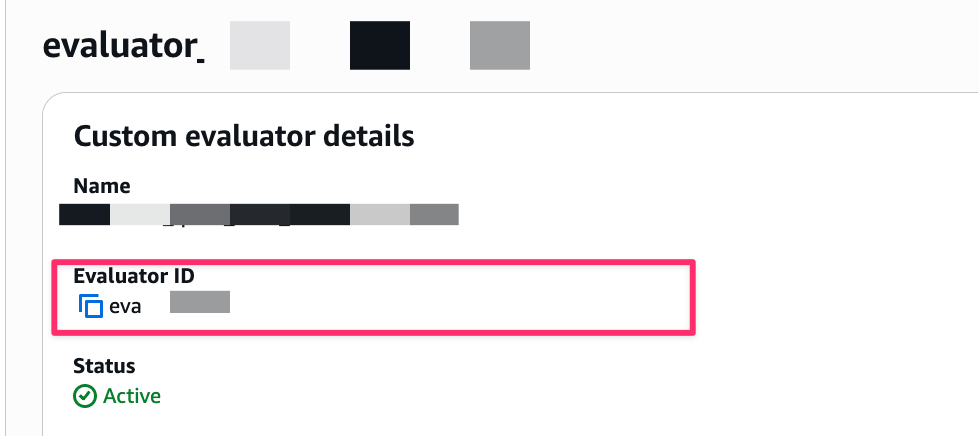
Builtin.xxxと自作のものを組み合わせ可能)- Custom Evaluatorを使用する場合はEvaluator IDを指定すれば使用できます
- Custom Evaluatorを使用する場合はEvaluator IDを指定すれば使用できます
- Session-levelの評価はセッション全体で1つ、Trace-levelの評価はターン数分の結果が出力されます
おわりに
今回は、Amazon Bedrock AgentCore EvaluationsのOn-demand evaluationをStarter Toolkitを使って試してみました!
Online evaluationは運用中のエージェントの継続的な品質監視に、On-demand evaluationは特定のインタラクションの詳細分析やテストに、という使い分けができそうです。
開発中で特定の質問をして、評価を見てみるのが良さそうに感じました!
また評価の点数だけではなく、どういった基準で評価してそうなったかなど目視で確認してAIでの評価が妥当かどうか見直すのも大事だなと思いました。
本記事が少しでも参考になりましたら幸いです。最後までご覧いただきありがとうございましたー!!
補足
On-demand evaluationやBuilt-in Evaluatorsの詳細については、以下の公式ドキュメントを参照してください。
- Evaluate agent performance with Amazon Bedrock AgentCore Evaluations - AgentCore Evaluationsの概要
- On-demand evaluation - On-demand evaluationの詳細
- Getting started with on-demand evaluation - On-demand evaluationのチュートリアル
- Built-in evaluators - Built-in Evaluatorsの概要
- Prompt templates - 各Evaluatorのプロンプトテンプレート詳細