![[アップデート] ECS Managed Instanceがスポットインスタンスをサポートしました](https://images.ctfassets.net/ct0aopd36mqt/wp-thumbnail-6d4fdf3578638cab4e6e4655b3d692aa/15a803840d72679e6593006354d5766b/amazon-elastic-container-service?w=3840&fm=webp)
[アップデート] ECS Managed Instanceがスポットインスタンスをサポートしました

ECS Managed Instanceをスポットインスタンスで起動したい
こんにちは、のんピ(@non____97)です。
皆さんはECS Managed Instanceをスポットインスタンスで起動したいしたいなと思ったことはありますか? 私はあります。
ECS Managed Instanceは通常のオンデマンド料金とは別に追加料金が発生します。
The ECS Managed Instances prices below are in addition to the Amazon EC2 instance price, which covers the EC2 instances themselves.
いくつか東京リージョンのEC2インスタンスのインスタンスタイプについて、オンデマンド料金とECS Managed Instanceの追加コストをリストアップしてみました。
| インスタンスタイプ | オンデマンド料金 ※1 | ECS Managed Instanceの追加料金 ※2 | ※2/※1 |
|---|---|---|---|
| c8g.medium | 0.05003 | 0.00600 | 11.99% |
| c8g.large | 0.10006 | 0.01201 | 12.00% |
| c8g.xlarge | 0.20012 | 0.02401 | 12.00% |
| m8g.large | 0.11594 | 0.01391 | 12.00% |
| m8g.xlarge | 0.23188 | 0.02783 | 12.00% |
| c7i.large | 0.11235 | 0.01349 | 12.01% |
| c7i.xlarge | 0.2247 | 0.02696 | 12.00% |
| m7i.large | 0.1302 | 0.01562 | 12.00% |
| m7i.xlarge | 0.2604 | 0.03125 | 12.00% |
参考
おおよそオンデマンド料金の12%ほどの料金が追加されます。
ECS Managed Instanceを採用することによって運用コストが減ったとしても、直接的な金銭コストが増えるのは気になる方もいるのではないのでしょうか。
コスト削減のためにスポットインスタンスを活用したいところですが、ECS Managed Instance GA時はスポットインスタンスをサポートしていませんでした。
今回、アップデートによりECS Managed Instanceがスポットインスタンスをサポートしました。
これにより元々スポットインスタンスやFargate Spotを使っていたワークロードや、ユースケースによってはECS Managed Instanceを採用しやすくなったのではないでしょうか。
実際に試してみました。
いきなりまとめ
- ECS Managed Instanceをスポットインスタンスとして起動できるようになった
- 既存のキャパシティプロバイダーを更新して、オンデマンド <-> スポット とプロビジョニングモデルを変更することはできない
- 新規でキャパシティプロバイダーを作成する必要がある
- ECS Managed Instanceの追加料金はスポットインスタンスでも変わらず発生する
- ECS Express ModeでECS Managed Instanceを使用することも可能
やってみた
検証環境
実際に試してみます。
検証環境は以下のとおりです。
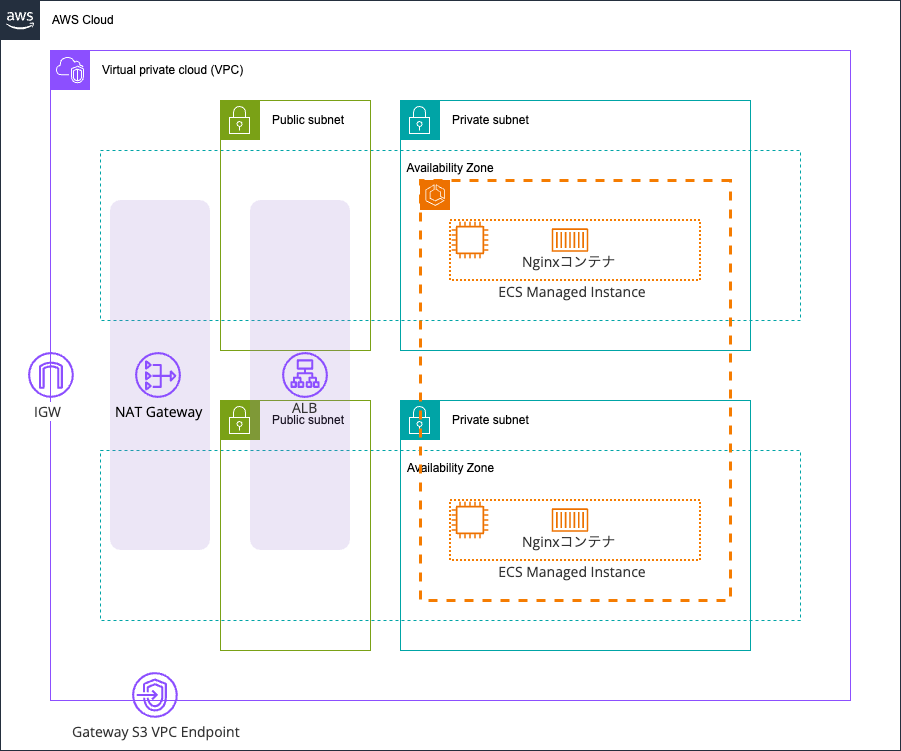
VPCの作成
VPCの作成からします。
というのも、VPC作成ウィザードからリージョナルNAT Gatewayの作成もできるようになったのを見てもらいたかったからです。
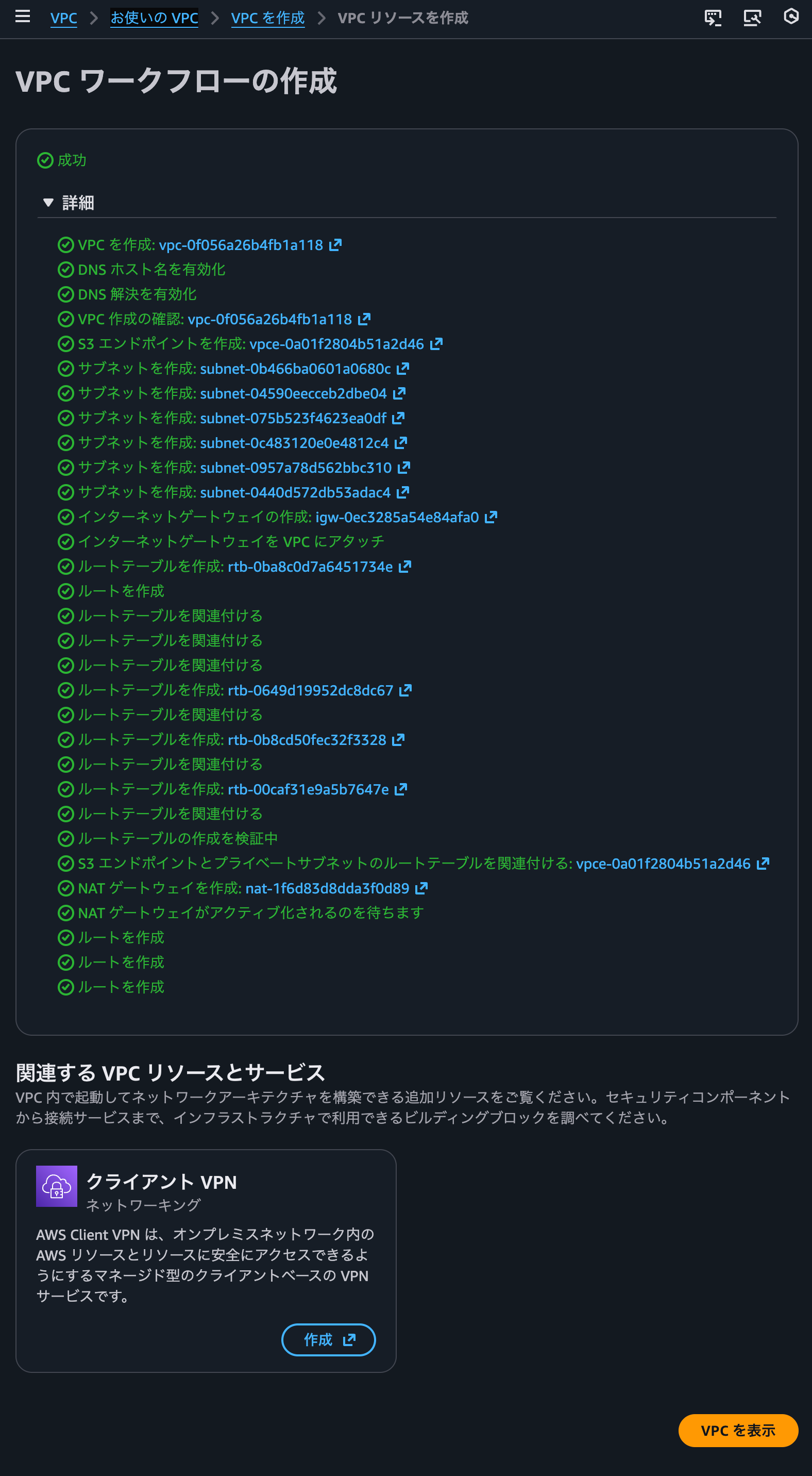
ウィザードでVPCの各種リソースを作成します。
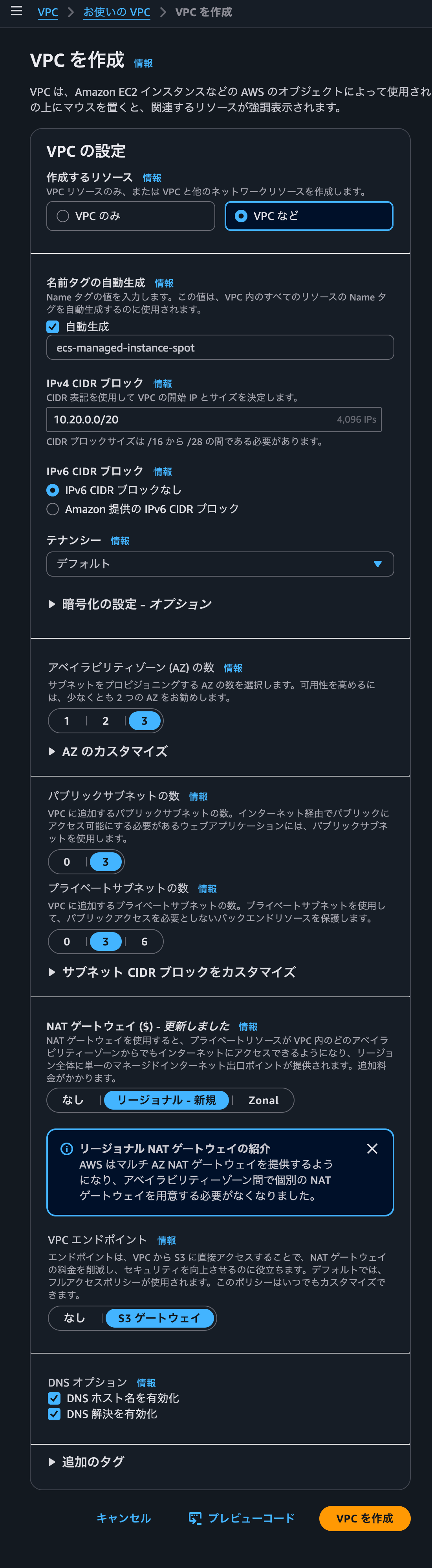
作成完了すると以下のようになります。
ECSクラスターの作成
ECSクラスターの作成をします。
ECSクラスター作成時にマネージドインスタンスのキャパシティプロバイダーを作成します。なお、このタイミングではオンデマンドかスポットかを選択する設定はありませんでした。
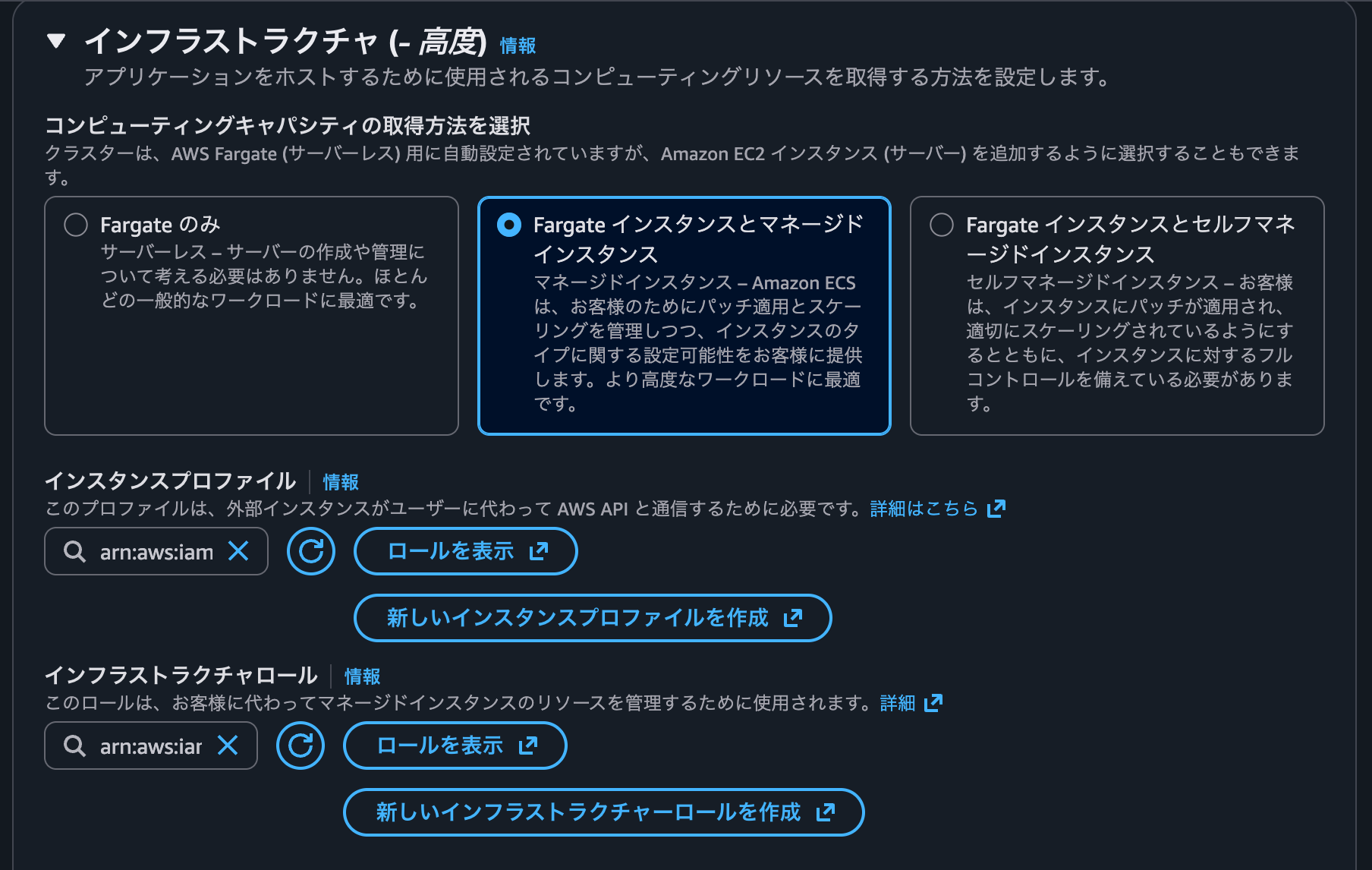
インスタンスプロファイルのecsInstanceRoleはAmazonECSInstanceRolePolicyForManagedInstancesのAWSマネージドポリシーをアタッチしています。
信頼ポリシーは以下のとおりです。
{
    "Version": "2012-10-17",
    "Statement": [
        {
            "Sid": "",
            "Effect": "Allow",
            "Principal": {
                "Service": "ec2.amazonaws.com"
            },
            "Action": "sts:AssumeRole"
        }
    ]
}
インフラストラクチャロールのecsInfrastructureRoleForManagedInstancesはAmazonECSInfrastructureRolePolicyForManagedInstancesのAWSマネージドポリシーをアタッチしています。
信頼ポリシーは以下のとおりです。
{
    "Version": "2012-10-17",
    "Statement": [
        {
            "Sid": "AllowAccessToECSForInfrastructureManagement",
            "Effect": "Allow",
            "Principal": {
                "Service": "ecs.amazonaws.com"
            },
            "Action": "sts:AssumeRole"
        }
    ]
}
その他の設定は特に面白いものは設定していません。Container Insights with enhanced observability(オブザーバビリティが強化された Container Insights)を指定した程度です。詳細は以下記事をご覧ください。
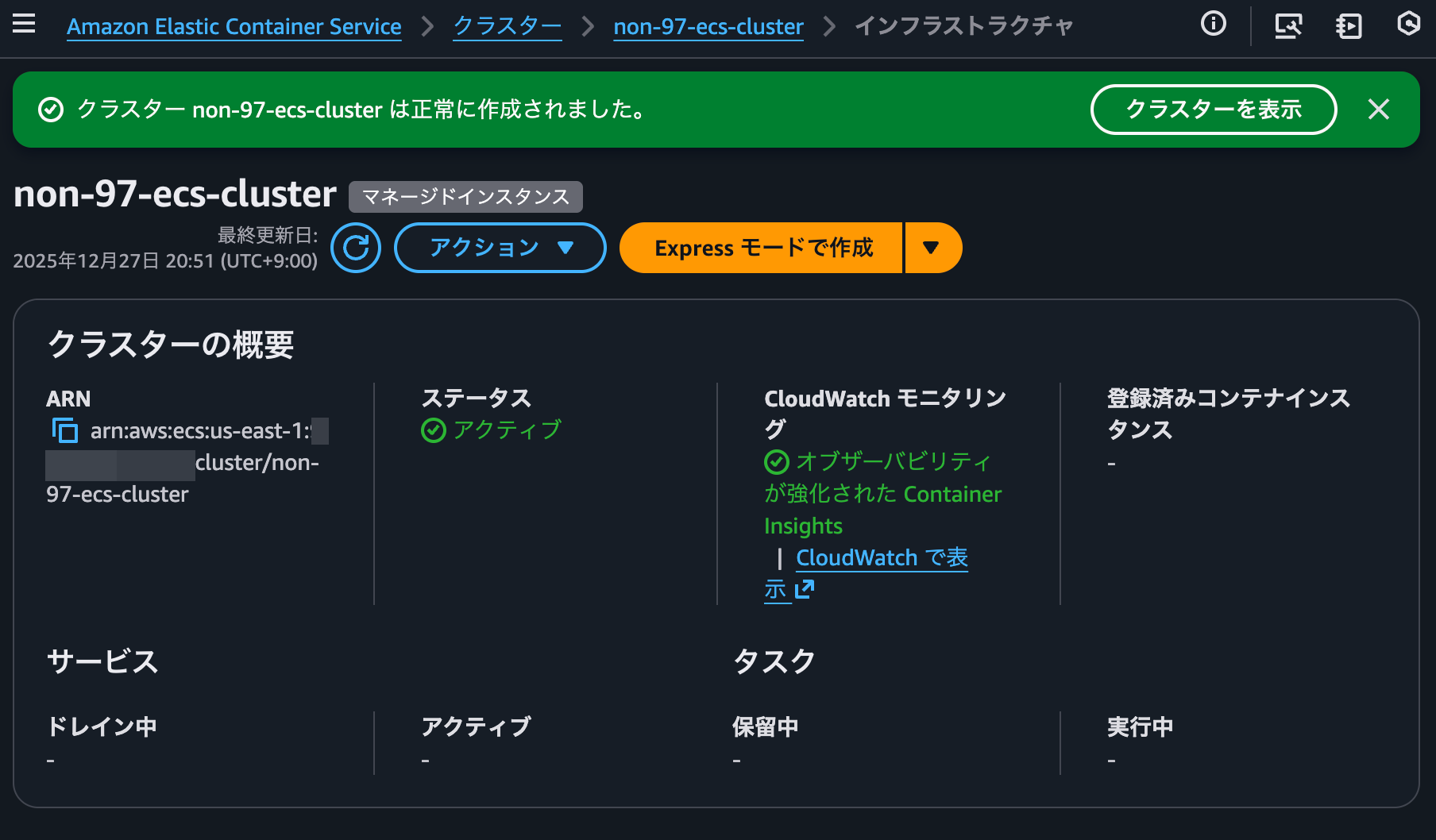
ECSクラスターの作成が完了すると以下のようになります。
キャパシティプロバイダーの作成
続いてキャパシティプロバイダーの設定です。
デフォルトで作成されるキャパシティプロバイダーで起動するEC2インスタンスはオンデマンドインスタンスです。
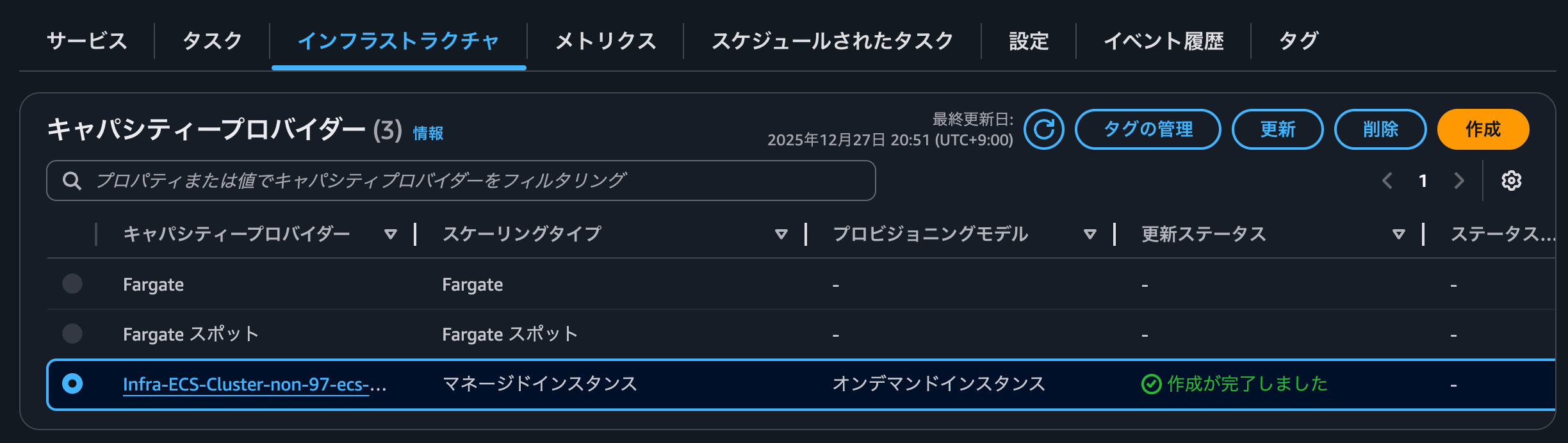
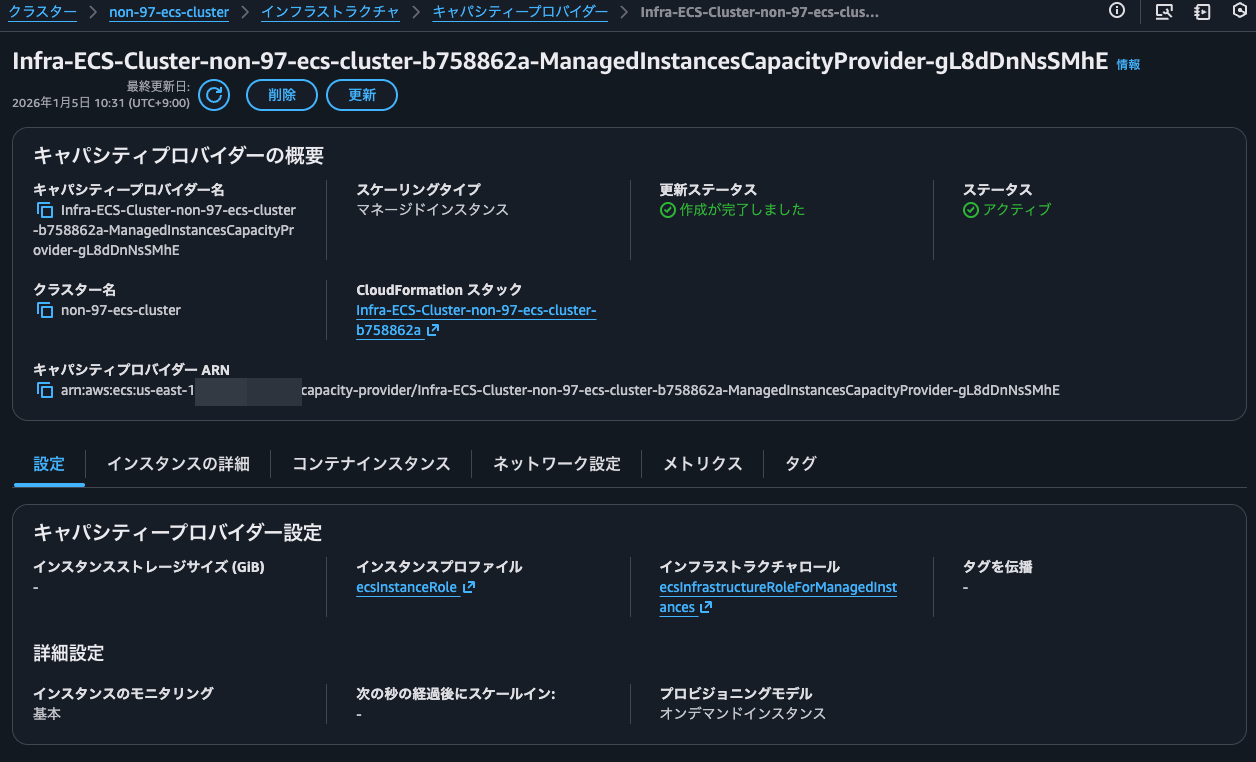
キャパシティープロバイダーを更新する際にオンデマンドかスポットかを指定することはできません。UpdateCapacityProviderのリクエストシンタックスを見ても、プロビジョニングモデルを指定するようなプロバティはありませんでした。
{
   "autoScalingGroupProvider": {
      "managedDraining": "string",
      "managedScaling": {
         "instanceWarmupPeriod": number,
         "maximumScalingStepSize": number,
         "minimumScalingStepSize": number,
         "status": "string",
         "targetCapacity": number
      },
      "managedTerminationProtection": "string"
   },
   "cluster": "string",
   "managedInstancesProvider": {
      "infrastructureOptimization": {
         "scaleInAfter": number
      },
      "infrastructureRoleArn": "string",
      "instanceLaunchTemplate": {
         "ec2InstanceProfileArn": "string",
         "instanceRequirements": {
            "acceleratorCount": {
               "max": number,
               "min": number
            },
            "acceleratorManufacturers": [ "string" ],
            "acceleratorNames": [ "string" ],
            "acceleratorTotalMemoryMiB": {
               "max": number,
               "min": number
            },
            "acceleratorTypes": [ "string" ],
            "allowedInstanceTypes": [ "string" ],
            "bareMetal": "string",
            "baselineEbsBandwidthMbps": {
               "max": number,
               "min": number
            },
            "burstablePerformance": "string",
            "cpuManufacturers": [ "string" ],
            "excludedInstanceTypes": [ "string" ],
            "instanceGenerations": [ "string" ],
            "localStorage": "string",
            "localStorageTypes": [ "string" ],
            "maxSpotPriceAsPercentageOfOptimalOnDemandPrice": number,
            "memoryGiBPerVCpu": {
               "max": number,
               "min": number
            },
            "memoryMiB": {
               "max": number,
               "min": number
            },
            "networkBandwidthGbps": {
               "max": number,
               "min": number
            },
            "networkInterfaceCount": {
               "max": number,
               "min": number
            },
            "onDemandMaxPricePercentageOverLowestPrice": number,
            "requireHibernateSupport": boolean,
            "spotMaxPricePercentageOverLowestPrice": number,
            "totalLocalStorageGB": {
               "max": number,
               "min": number
            },
            "vCpuCount": {
               "max": number,
               "min": number
            }
         },
         "monitoring": "string",
         "networkConfiguration": {
            "securityGroups": [ "string" ],
            "subnets": [ "string" ]
         },
         "storageConfiguration": {
            "storageSizeGiB": number
         }
      },
      "propagateTags": "string"
   },
   "name": "string"
}
抜粋 : UpdateCapacityProvider - Amazon Elastic Container Service
そのためスポットインスタンスとして起動する場合は新規でキャパシティプロバイダーを作成する必要があります。
プロビジョニングモデルをスポットで指定してキャパシティプロバイダーを作成します。
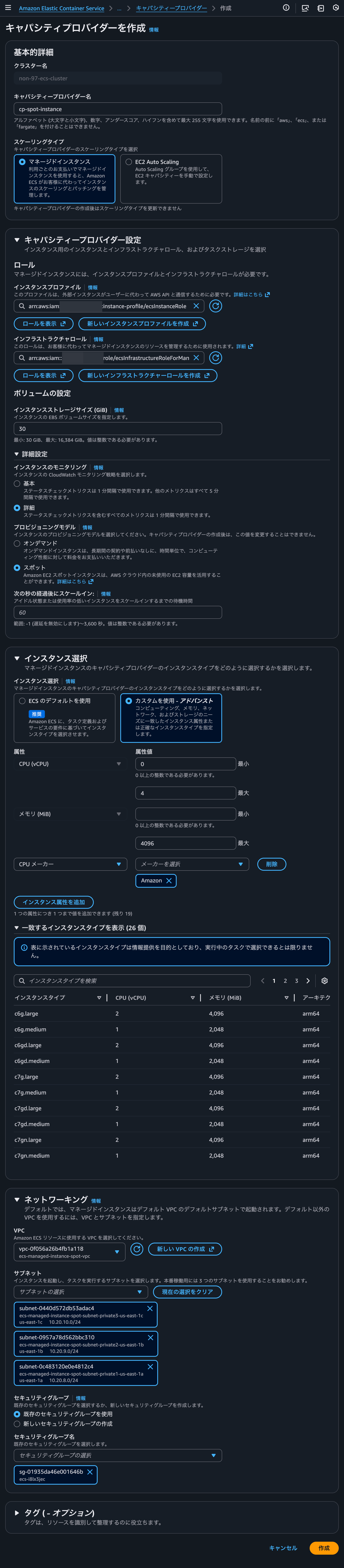
API ReferenceではこちらのプロパティはcapacityOptionTypeとして定義されています。
capacityOptionType
The capacity option type. This determines whether Amazon ECS launches On-Demand or Spot Instances for your managed instance capacity provider.
Valid values are:
- ON_DEMAND - Launches standard On-Demand Instances. On-Demand Instances provide predictable pricing and availability.
- SPOT - Launches Spot Instances that use spare Amazon EC2 capacity at reduced cost. Spot Instances can be interrupted by Amazon EC2 with a two-minute notification when the capacity is needed back.
The default is On-Demand
For more information about Amazon EC2 capacity options, see Instance purchasing options in the Amazon EC2 User Guide.
Type: String
Valid Values: ON_DEMAND | SPOT
Required: No
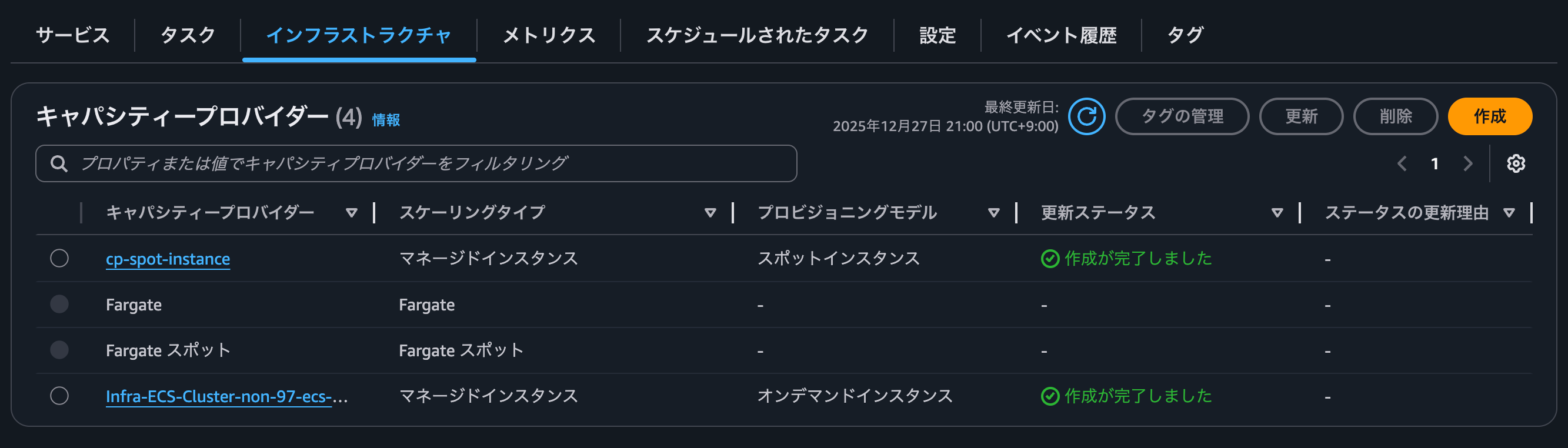
キャパシティプロバイダーが作成完了すると以下のようになります。
タスク定義の作成
タスク定義の作成をします。
今回はNginxのパブリックイメージのコンテナを起動するようにタスク定義をしました。
{
    "compatibilities": [
        "EC2",
        "MANAGED_INSTANCES",
        "FARGATE"
    ],
    "containerDefinitions": [
        {
            "cpu": 0,
            "environment": [],
            "environmentFiles": [],
            "essential": true,
            "image": "public.ecr.aws/nginx/nginx:stable-alpine",
            "logConfiguration": {
                "logDriver": "awslogs",
                "options": {
                    "awslogs-group": "/ecs/nginx",
                    "awslogs-create-group": "true",
                    "awslogs-region": "us-east-1",
                    "awslogs-stream-prefix": "ecs"
                },
                "secretOptions": []
            },
            "mountPoints": [],
            "name": "nginx",
            "portMappings": [
                {
                    "appProtocol": "http",
                    "containerPort": 80,
                    "hostPort": 80,
                    "name": "nginx",
                    "protocol": "tcp"
                }
            ],
            "systemControls": [],
            "ulimits": [],
            "volumesFrom": []
        }
    ],
    "cpu": "512",
    "enableFaultInjection": false,
    "executionRoleArn": "arn:aws:iam::<AWSアカウントID>:role/service-role/ecsTaskExecutionRole",
    "family": "nginx",
    "memory": "1024",
    "networkMode": "awsvpc",
    "placementConstraints": [],
    "registeredAt": "2025-12-27T13:20:48.128Z",
    "registeredBy": "arn:aws:sts::<AWSアカウントID>:assumed-role/cm-yamamoto.ryota/cm-yamamoto.ryota",
    "requiresAttributes": [
        {
            "name": "com.amazonaws.ecs.capability.logging-driver.awslogs"
        },
        {
            "name": "ecs.capability.execution-role-awslogs"
        },
        {
            "name": "com.amazonaws.ecs.capability.docker-remote-api.1.19"
        },
        {
            "name": "com.amazonaws.ecs.capability.docker-remote-api.1.18"
        },
        {
            "name": "ecs.capability.task-eni"
        },
        {
            "name": "com.amazonaws.ecs.capability.docker-remote-api.1.29"
        }
    ],
    "requiresCompatibilities": [
        "MANAGED_INSTANCES"
    ],
    "revision": 1,
    "runtimePlatform": {
        "cpuArchitecture": "ARM64",
        "operatingSystemFamily": "LINUX"
    },
    "status": "ACTIVE",
    "taskDefinitionArn": "arn:aws:ecs:us-east-1:<AWSアカウントID>:task-definition/nginx:1",
    "volumes": [],
    "tags": []
}
ECSサービスの作成
ECSサービスの作成をします。
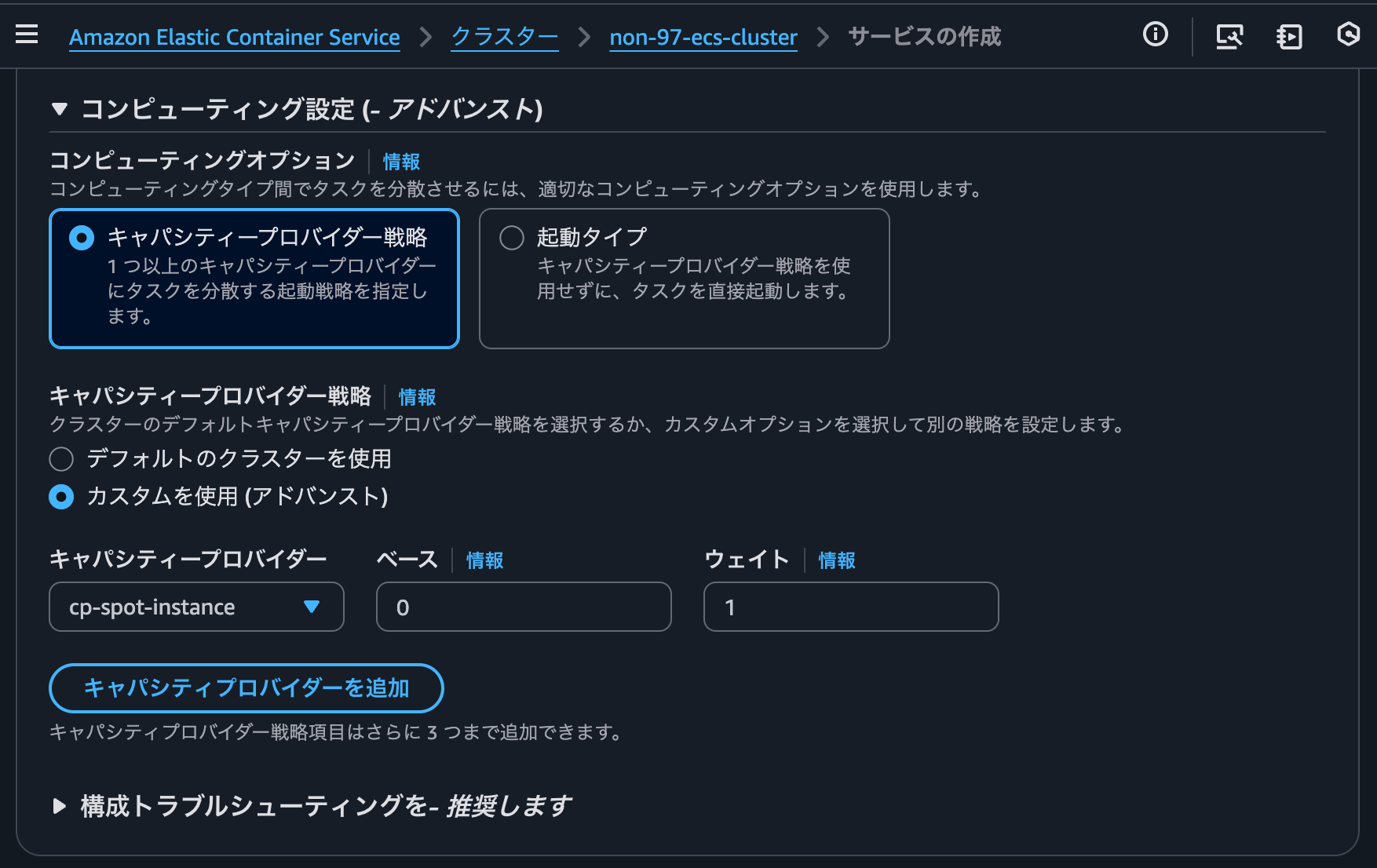
キャパシティプロバイダー戦略で先ほど作成したキャパシティプロバイダーを制定します。
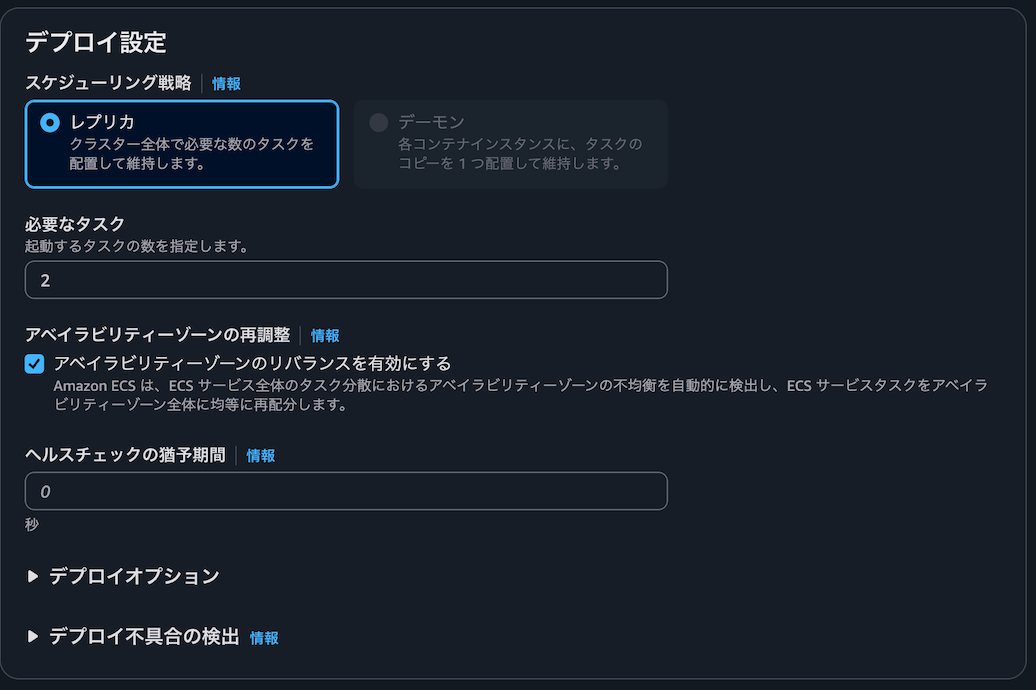
タスク数は2つです。
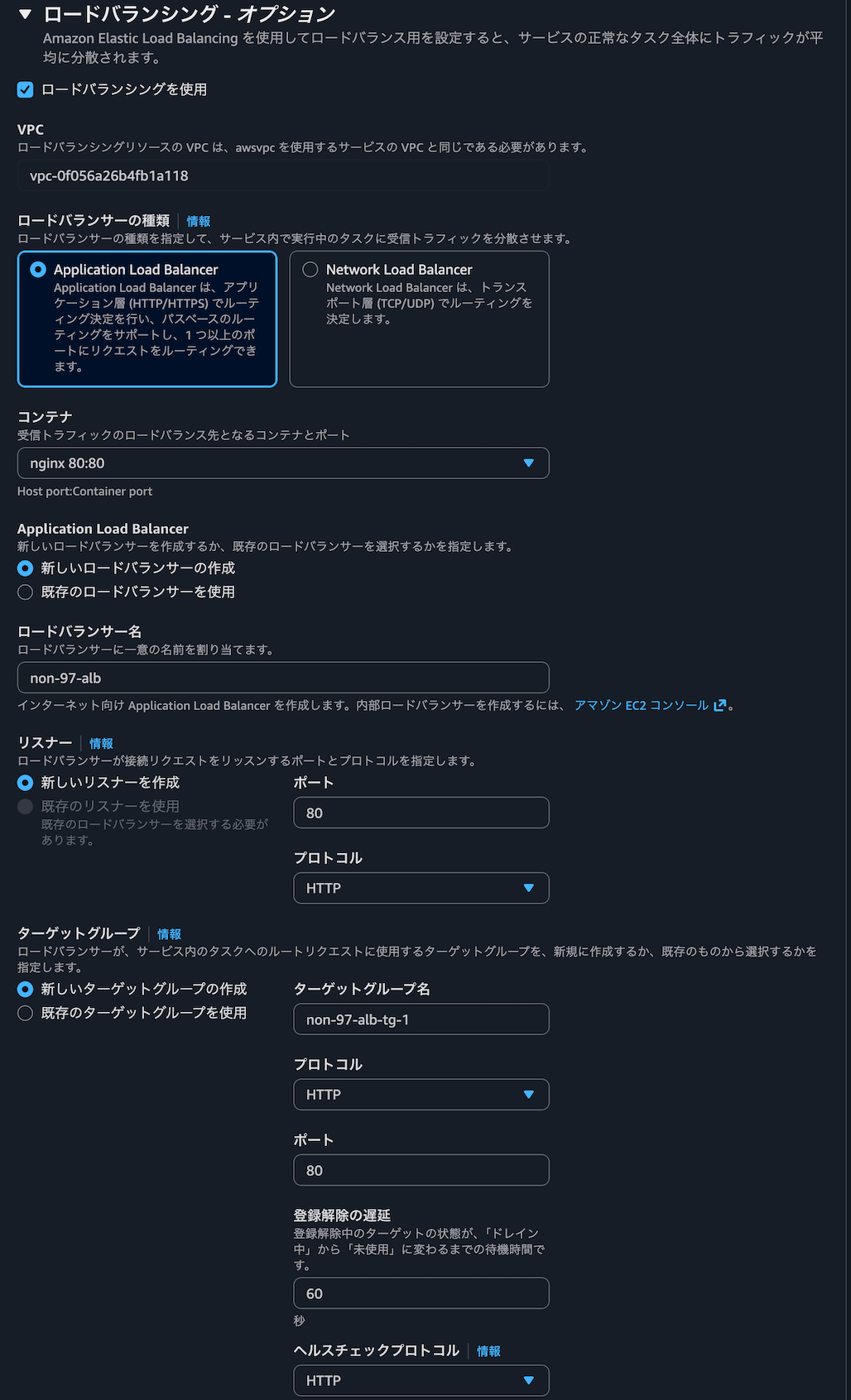
ALBも一緒に作成します。
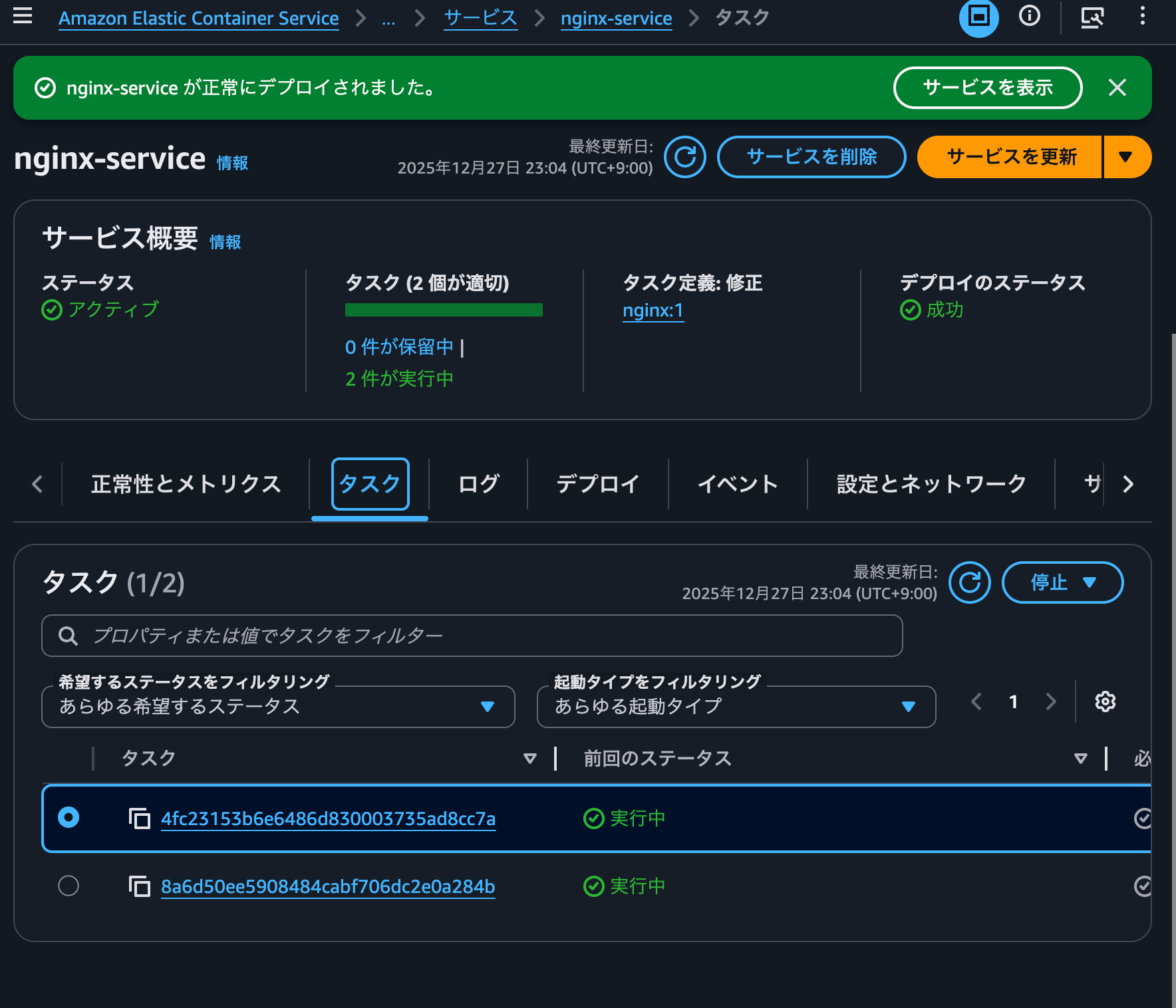
ECSサービスの作成が完了すると以下のようになります。
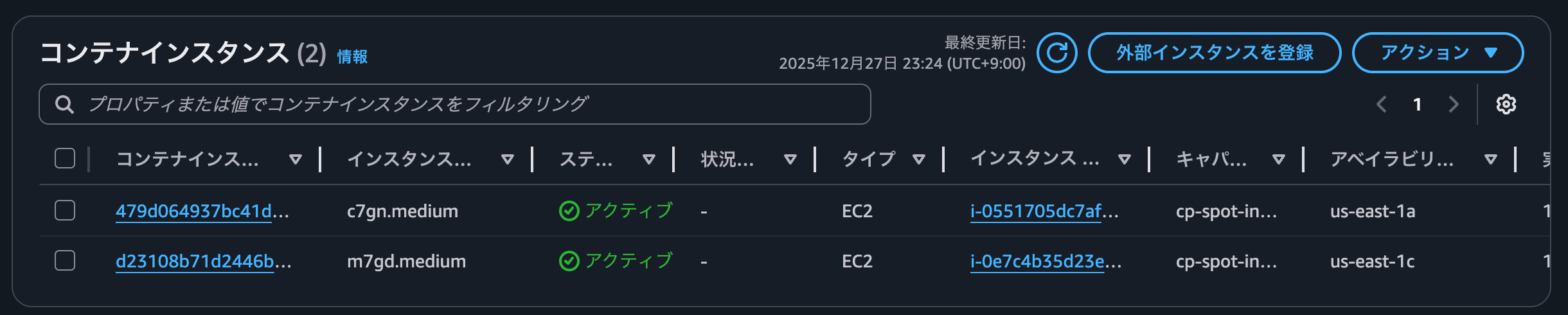
コンテナインスタンスが2つ作成されていることを確認します。
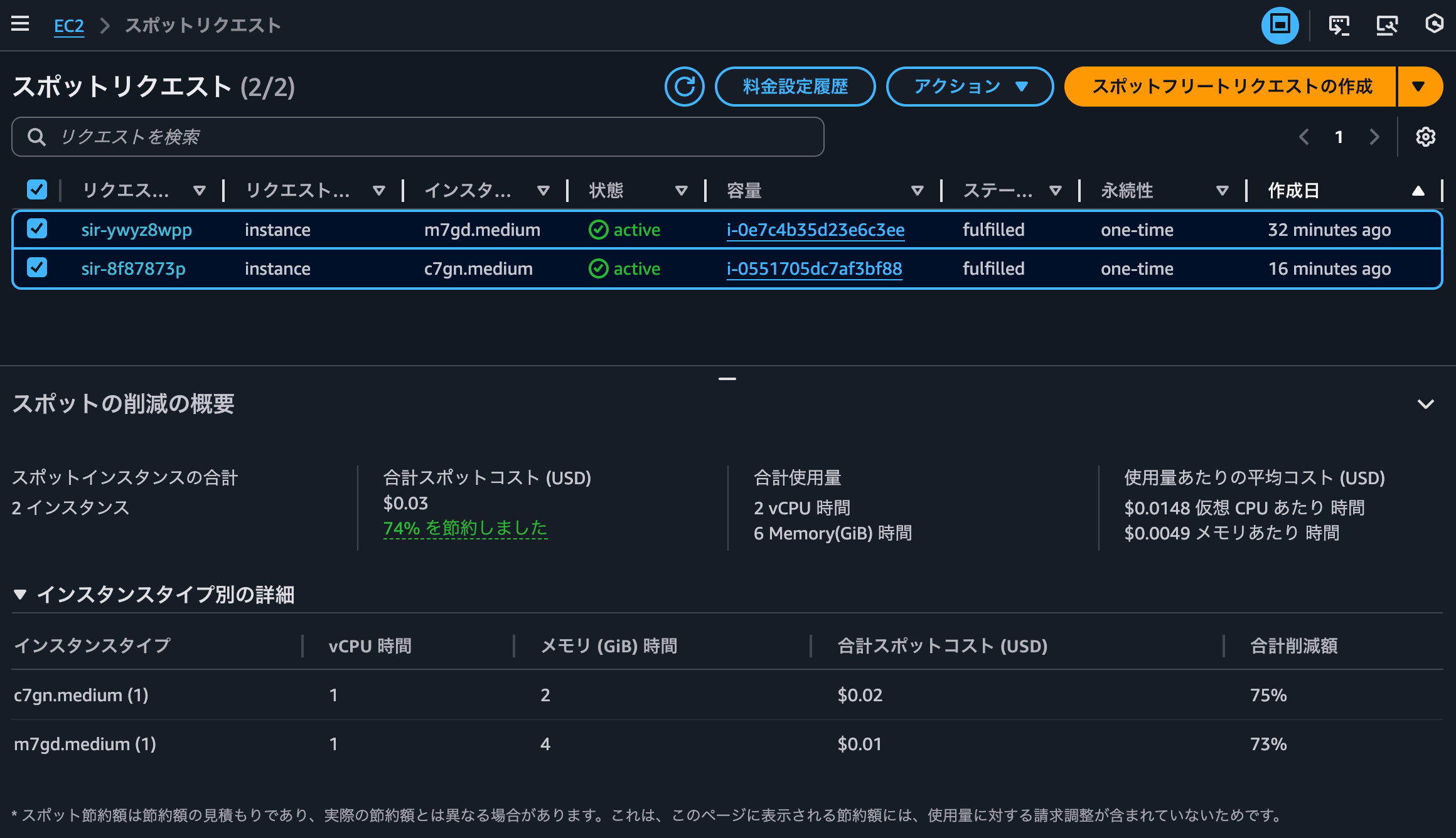
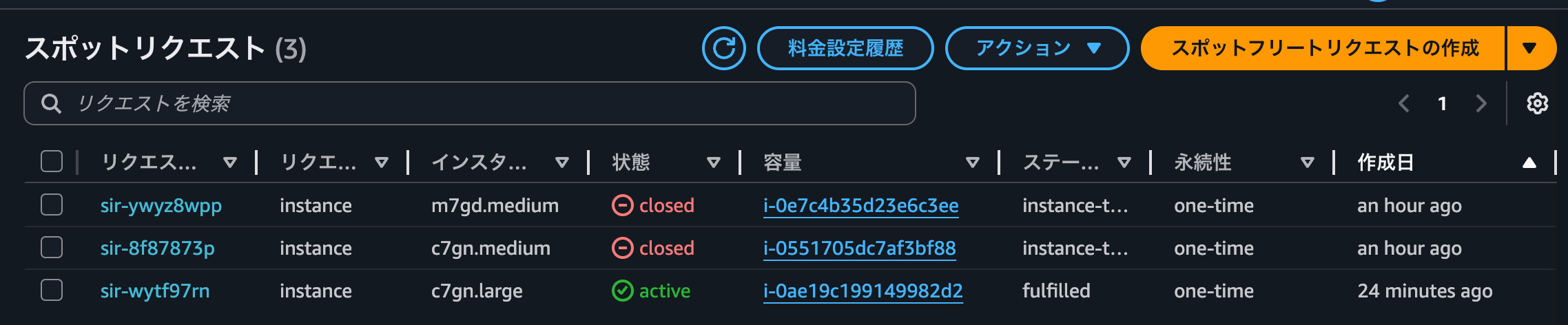
スポットリクエスト一覧でこちらのコンテナインスタンスのインスタンスIDを確認すると、確かにスポットインスタンスとして起動していることが分かりました。削減額75%は大きいですね。
正常にアクセスできることも確認しておきます。
> curl http://non-97-alb-958785695.us-east-1.elb.amazonaws.com -Iv
* Host non-97-alb-958785695.us-east-1.elb.amazonaws.com:80 was resolved.
* IPv6: (none)
* IPv4: 3.220.181.0, 184.72.147.180
*   Trying 3.220.181.0:80...
* Connected to non-97-alb-958785695.us-east-1.elb.amazonaws.com (3.220.181.0) port 80
> HEAD / HTTP/1.1
> Host: non-97-alb-958785695.us-east-1.elb.amazonaws.com
> User-Agent: curl/8.7.1
> Accept: */*
>
* Request completely sent off
< HTTP/1.1 200 OK
HTTP/1.1 200 OK
< Date: Sat, 27 Dec 2025 14:11:51 GMT
Date: Sat, 27 Dec 2025 14:11:51 GMT
< Content-Type: text/html
Content-Type: text/html
< Content-Length: 615
Content-Length: 615
< Connection: keep-alive
Connection: keep-alive
< Server: nginx/1.28.1
Server: nginx/1.28.1
< Last-Modified: Tue, 23 Dec 2025 19:30:33 GMT
Last-Modified: Tue, 23 Dec 2025 19:30:33 GMT
< ETag: "694aedd9-267"
ETag: "694aedd9-267"
< Accept-Ranges: bytes
Accept-Ranges: bytes
< Cf-Team: 2c01bfd92500018b9937611400000001
Cf-Team: 2c01bfd92500018b9937611400000001
<

* Connection #0 to host non-97-alb-958785695.us-east-1.elb.amazonaws.com left intact
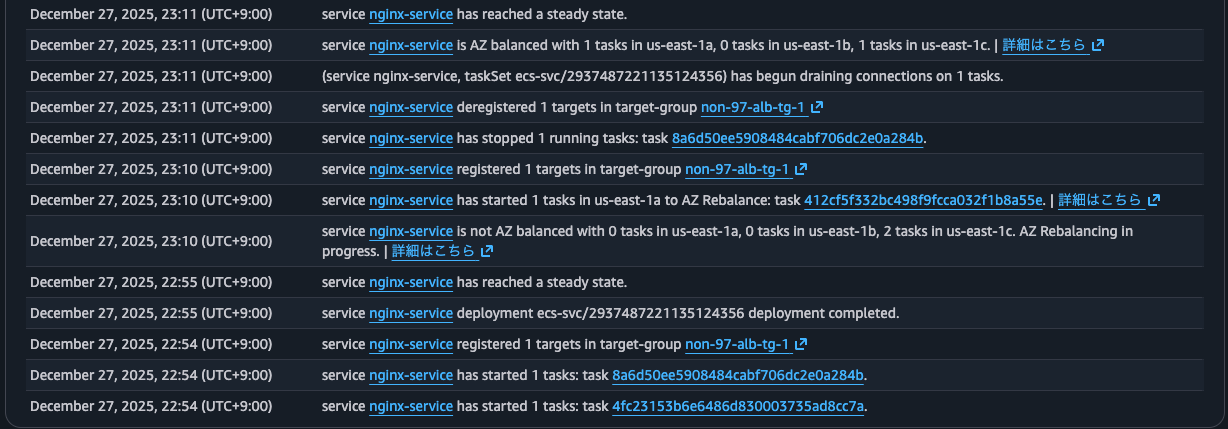
ちなみに、ECSサービスのイベントを確認すると、service nginx-service is not AZ balanced with 0 tasks in us-east-1a, 0 tasks in us-east-1b, 2 tasks in us-east-1c. AZ Rebalancing in progress.やservice nginx-service is AZ balanced with 1 tasks in us-east-1a, 0 tasks in us-east-1b, 1 tasks in us-east-1cとあることから、AZ間での不均衡をリバランシングによって解消をしたことが分かります。
Blue/Greenデプロイ
ついでにBlue/Greenデプロイをしてみます。
ECSサービスを更新して、必要なタスク数を2から3に変更します。

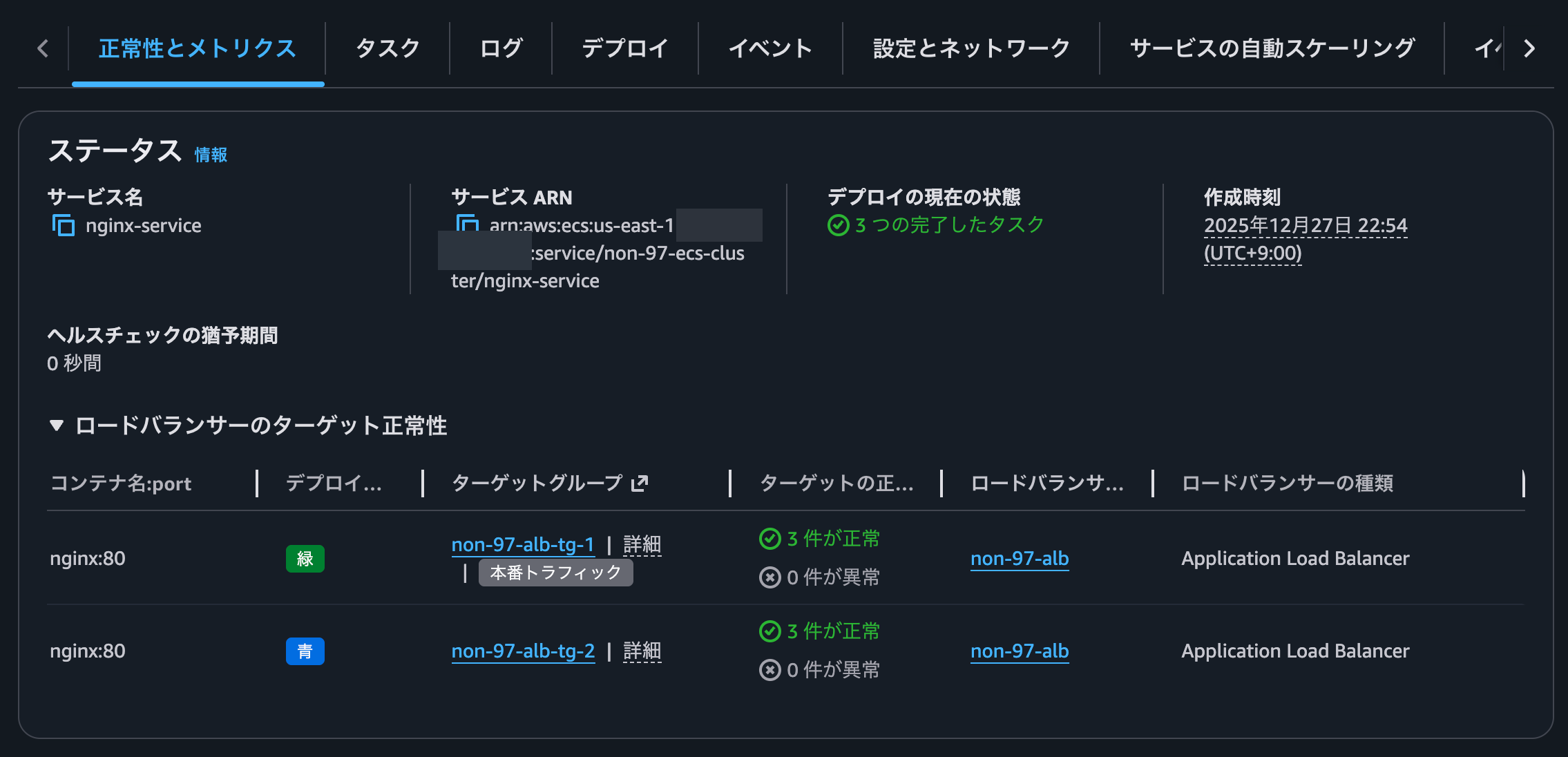
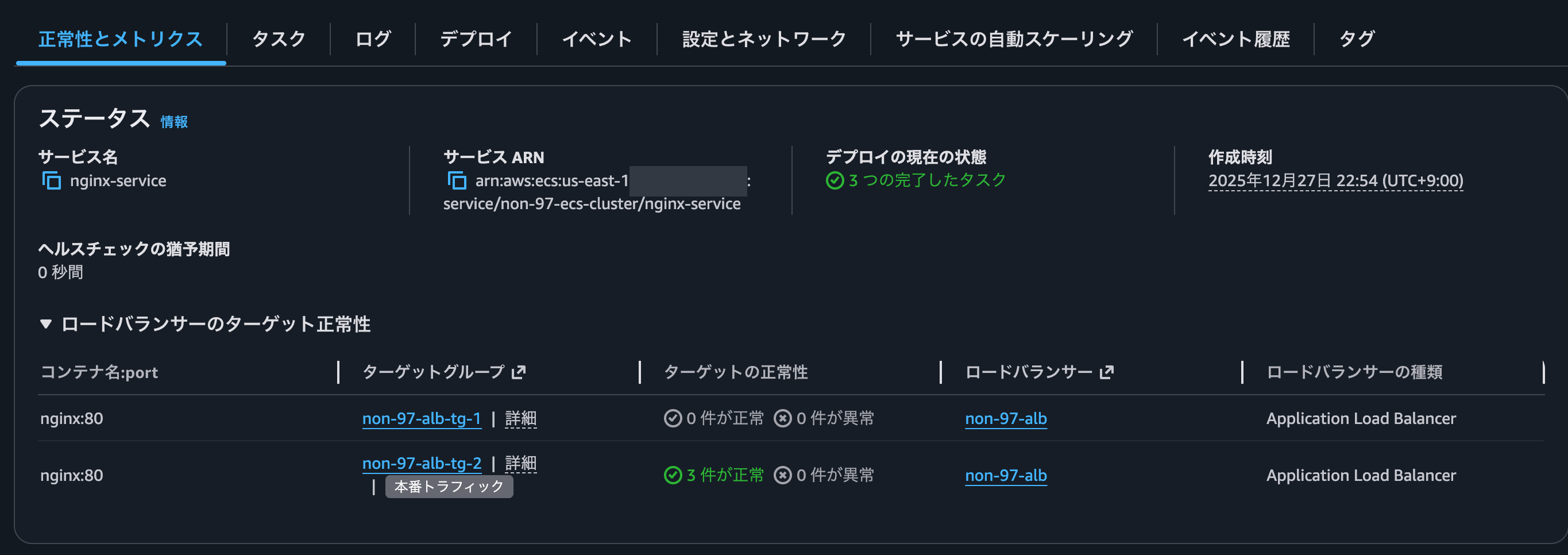
デプロイが進むとBlueとGreenそれぞれに3つのターゲットが存在している状態になりました。
コンテナインスタンスを確認すると、インスタンスが一台増えていました。
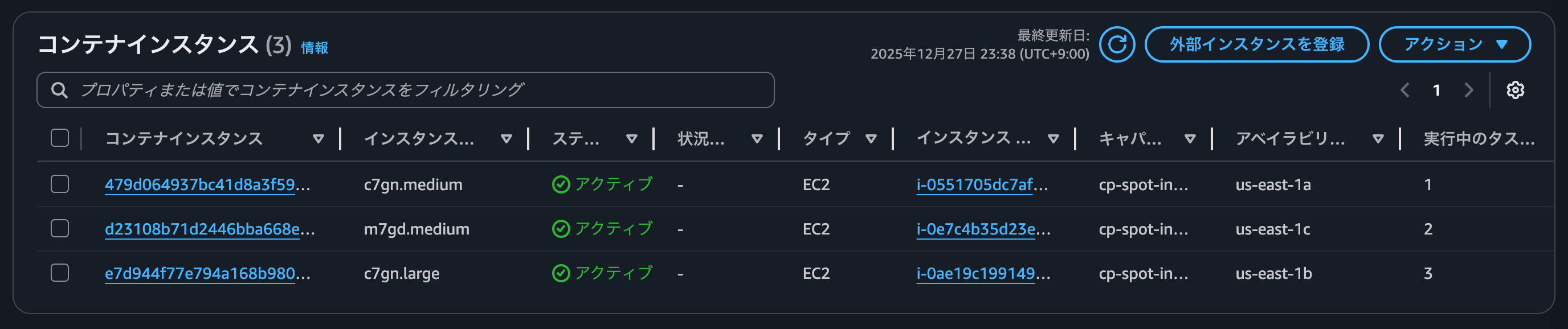
いずれのインスタンスもスポットインスタンスであることを確認します。
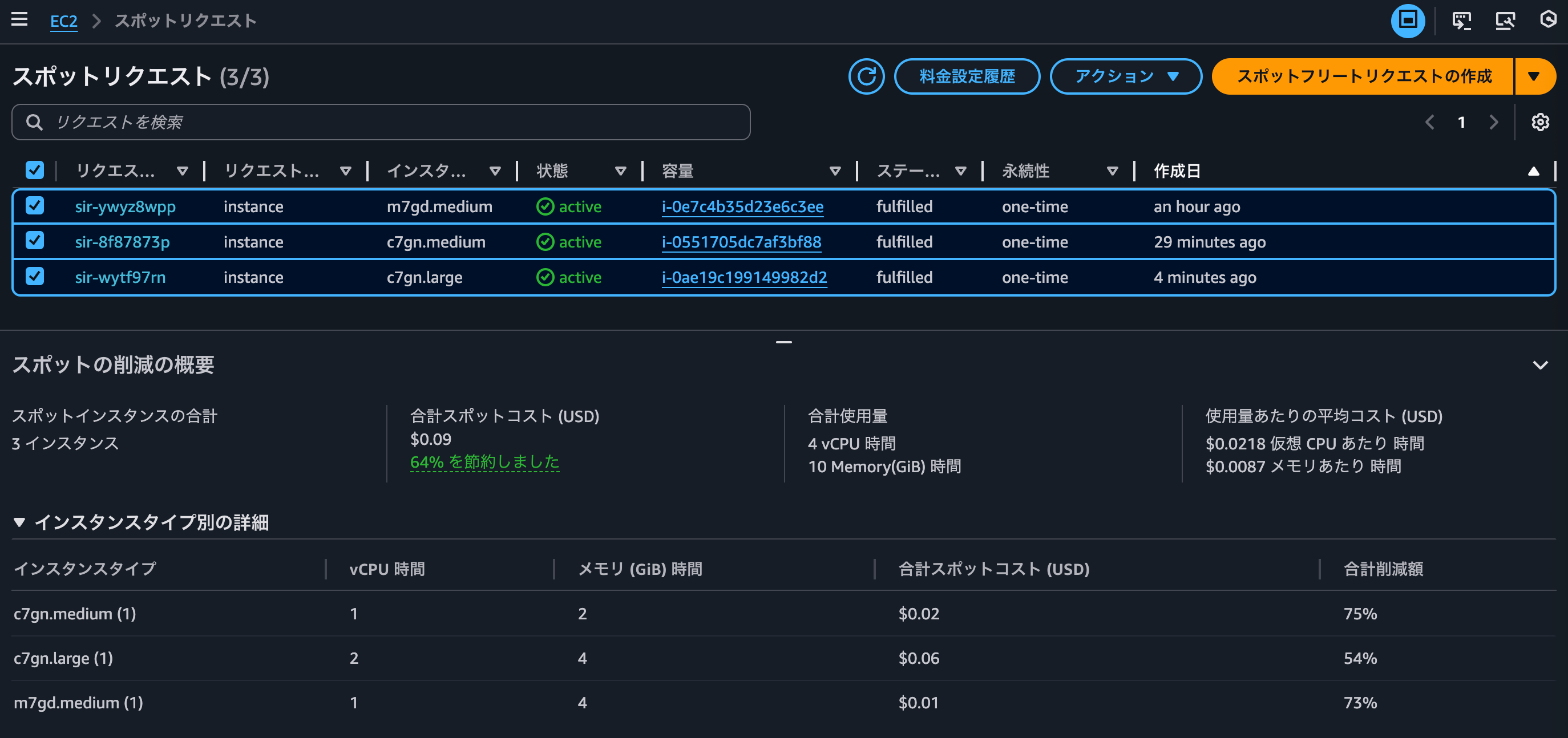
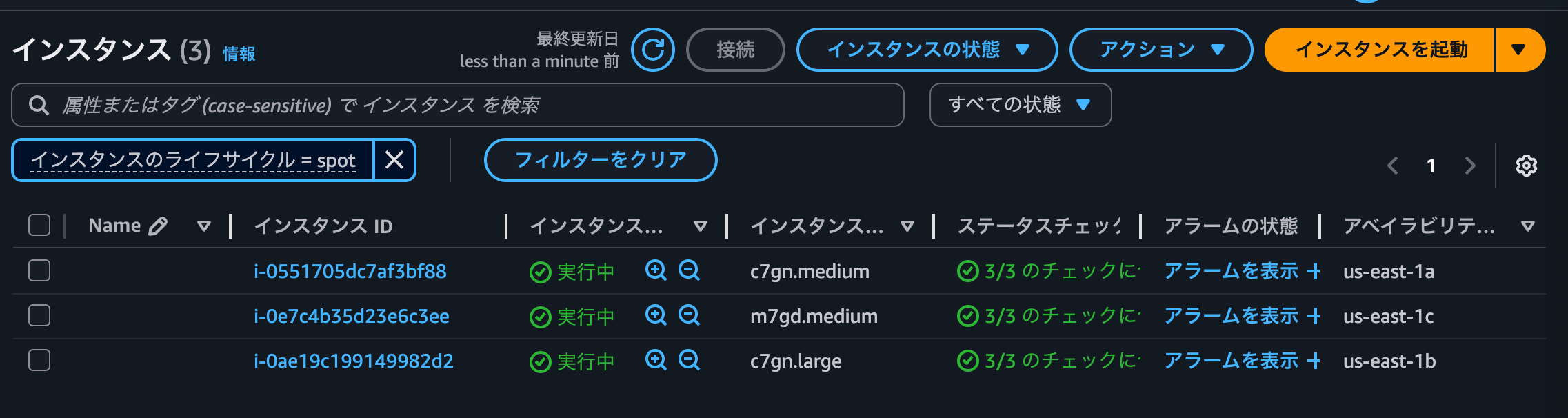
デプロイが完了すると以下のようになります。
コンテナインスタンスを確認すると、一台のみになってなっていました。

アベイラビリティゾーンのリバランシングを有効にするで有効にしているので、後ほどリバランシングでコンテナインスタンスはもう一台起動してくるでしょう。
コンテナ自体は何も変えていないので変化はないですが、継続して正常にアクセスできることを確認しておきます。
> curl http://non-97-alb-958785695.us-east-1.elb.amazonaws.com:10080 -Iv
* Host non-97-alb-958785695.us-east-1.elb.amazonaws.com:10080 was resolved.
* IPv6: (none)
* IPv4: 184.72.147.180, 3.220.181.0, 52.6.23.119
*   Trying 184.72.147.180:10080...
* Connected to non-97-alb-958785695.us-east-1.elb.amazonaws.com (184.72.147.180) port 10080
> HEAD / HTTP/1.1
> Host: non-97-alb-958785695.us-east-1.elb.amazonaws.com:10080
> User-Agent: curl/8.7.1
> Accept: */*
>
* Request completely sent off
< HTTP/1.1 200 OK
HTTP/1.1 200 OK
< Date: Sat, 27 Dec 2025 14:45:53 GMT
Date: Sat, 27 Dec 2025 14:45:53 GMT
< Content-Type: text/html
Content-Type: text/html
< Content-Length: 615
Content-Length: 615
< Connection: keep-alive
Connection: keep-alive
< Server: nginx/1.28.1
Server: nginx/1.28.1
< Last-Modified: Tue, 23 Dec 2025 19:30:33 GMT
Last-Modified: Tue, 23 Dec 2025 19:30:33 GMT
< ETag: "694aedd9-267"
ETag: "694aedd9-267"
< Accept-Ranges: bytes
Accept-Ranges: bytes
<

* Connection #0 to host non-97-alb-958785695.us-east-1.elb.amazonaws.com left intact
ExpressサービスでECS Managed Instanceを使用する
インターネット上で公開されているECS Express Modeの紹介記事でECS Managed Instanceと組み合わせているものを見つけられなかったので、ECS Express ModeでECS Managed Instanceを使用できるかも確認します。
ECS Express Modeの詳細は以下記事をご覧ください。
Expressサービスを作成します。
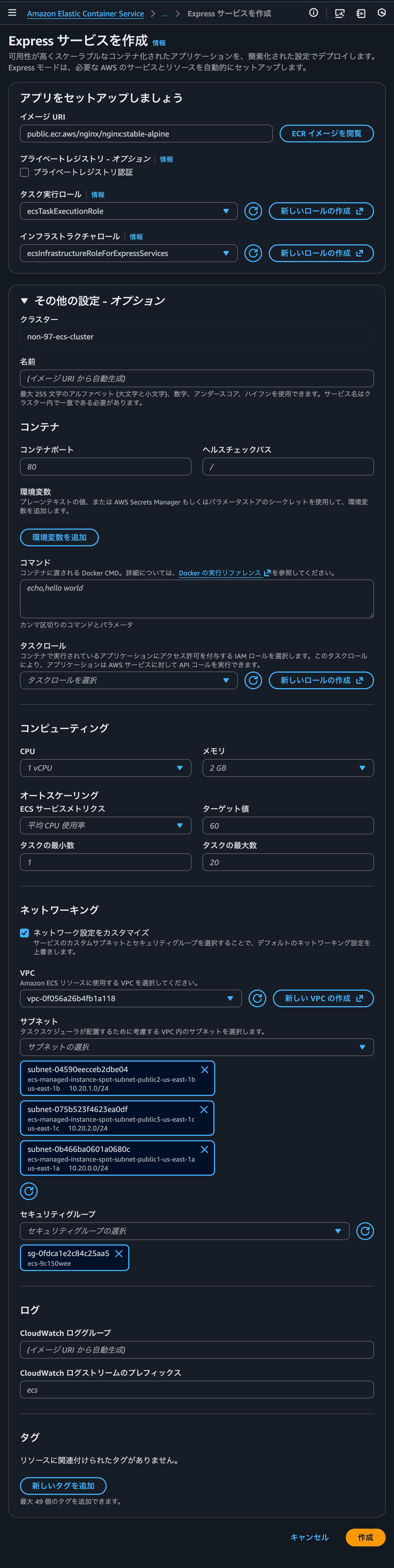
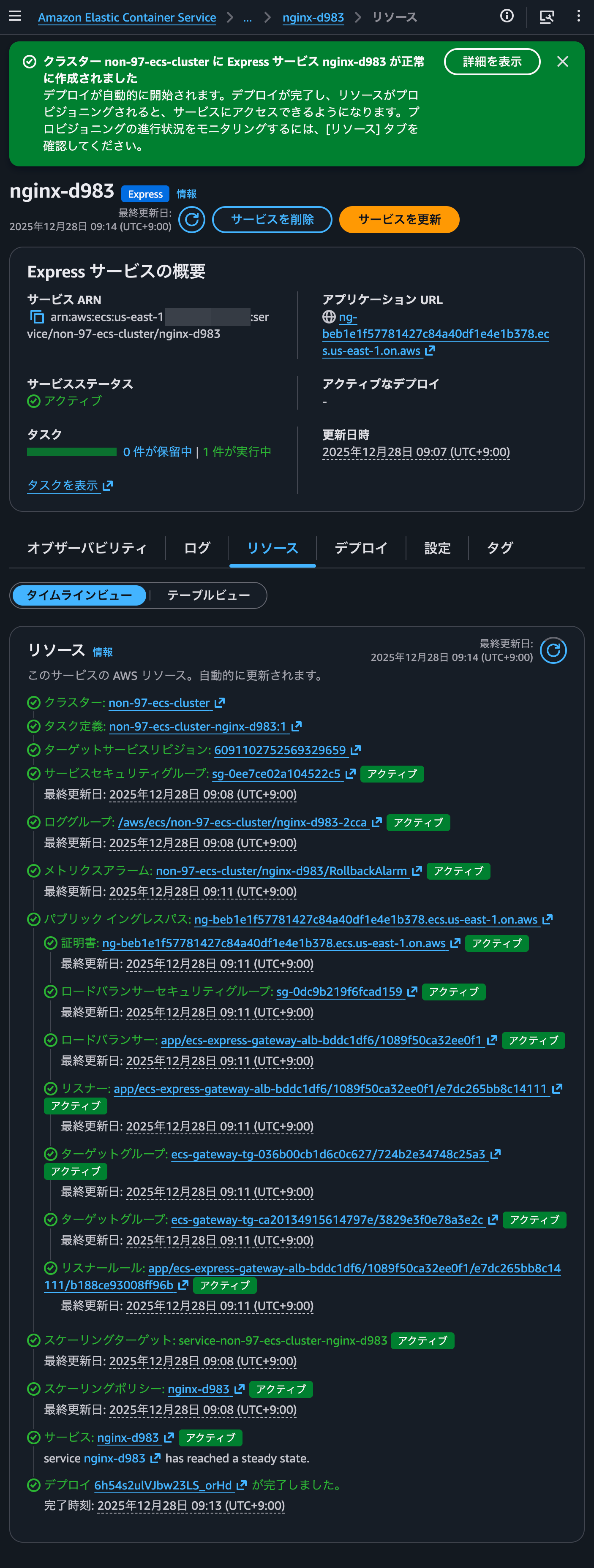
6分ほどでデプロイが完了しました。
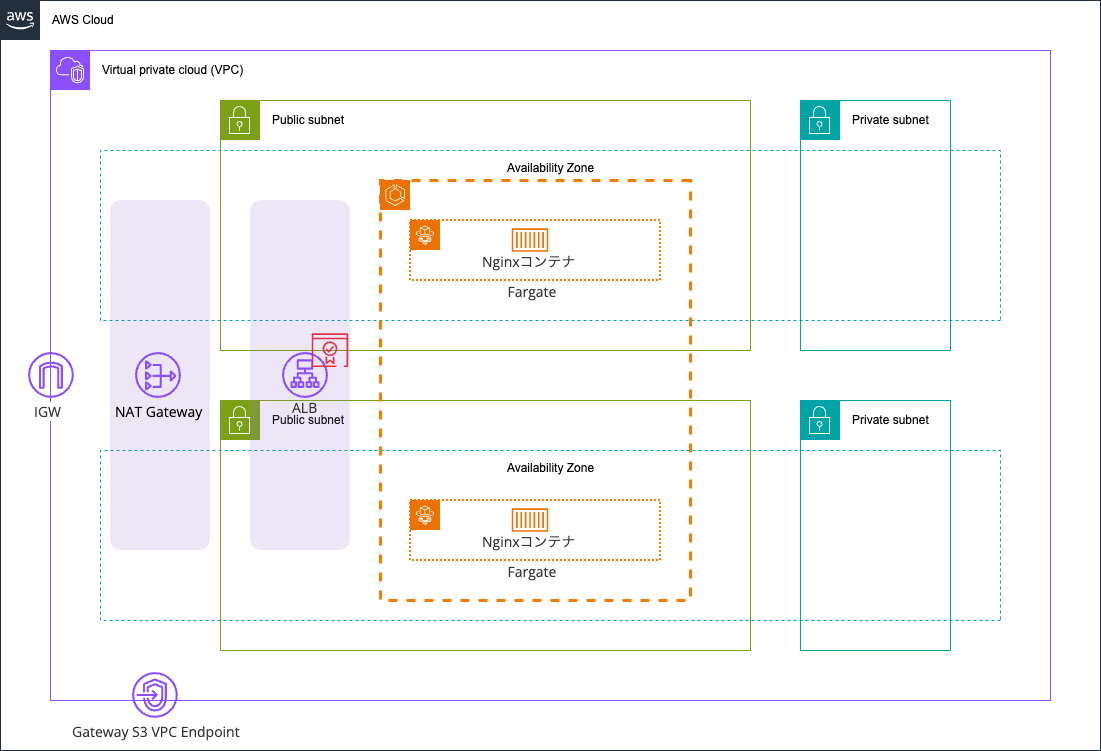
構成図にすると以下のとおりです。
正常にアクセスできることを確認します。
> curl https://ng-beb1e1f57781427c84a40df1e4e1b378.ecs.us-east-1.on.aws/ -Iv
* Host ng-beb1e1f57781427c84a40df1e4e1b378.ecs.us-east-1.on.aws:443 was resolved.
* IPv6: (none)
* IPv4: 54.85.241.103, 34.235.82.220, 100.27.160.87
*   Trying 54.85.241.103:443...
* Connected to ng-beb1e1f57781427c84a40df1e4e1b378.ecs.us-east-1.on.aws (54.85.241.103) port 443
* ALPN: curl offers h2,http/1.1
* (304) (OUT), TLS handshake, Client hello (1):
*  CAfile: /etc/ssl/cert.pem
*  CApath: none
* (304) (IN), TLS handshake, Server hello (2):
* TLSv1.2 (IN), TLS handshake, Certificate (11):
* TLSv1.2 (IN), TLS handshake, Server key exchange (12):
* TLSv1.2 (IN), TLS handshake, Server finished (14):
* TLSv1.2 (OUT), TLS handshake, Client key exchange (16):
* TLSv1.2 (OUT), TLS change cipher, Change cipher spec (1):
* TLSv1.2 (OUT), TLS handshake, Finished (20):
* TLSv1.2 (IN), TLS change cipher, Change cipher spec (1):
* TLSv1.2 (IN), TLS handshake, Finished (20):
* SSL connection using TLSv1.2 / ECDHE-RSA-AES128-GCM-SHA256 / [blank] / UNDEF
* ALPN: server accepted h2
* Server certificate:
*  subject: CN=ng-beb1e1f57781427c84a40df1e4e1b378.ecs.us-east-1.on.aws
*  start date: Dec 28 00:00:00 2025 GMT
*  expire date: Jan 26 23:59:59 2027 GMT
*  subjectAltName: host "ng-beb1e1f57781427c84a40df1e4e1b378.ecs.us-east-1.on.aws" matched cert's "ng-beb1e1f57781427c84a40df1e4e1b378.ecs.us-east-1.on.aws"
*  issuer: C=US; O=Amazon; CN=Amazon RSA 2048 M01
*  SSL certificate verify ok.
* using HTTP/2
* [HTTP/2] [1] OPENED stream for https://ng-beb1e1f57781427c84a40df1e4e1b378.ecs.us-east-1.on.aws/
* [HTTP/2] [1] [:method: HEAD]
* [HTTP/2] [1] [:scheme: https]
* [HTTP/2] [1] [:authority: ng-beb1e1f57781427c84a40df1e4e1b378.ecs.us-east-1.on.aws]
* [HTTP/2] [1] [:path: /]
* [HTTP/2] [1] [user-agent: curl/8.7.1]
* [HTTP/2] [1] [accept: */*]
> HEAD / HTTP/2
> Host: ng-beb1e1f57781427c84a40df1e4e1b378.ecs.us-east-1.on.aws
> User-Agent: curl/8.7.1
> Accept: */*
>
* Request completely sent off
< HTTP/2 200
HTTP/2 200
< date: Sun, 28 Dec 2025 00:14:56 GMT
date: Sun, 28 Dec 2025 00:14:56 GMT
< content-type: text/html
content-type: text/html
< content-length: 615
content-length: 615
< server: nginx/1.28.1
server: nginx/1.28.1
< last-modified: Tue, 23 Dec 2025 19:30:33 GMT
last-modified: Tue, 23 Dec 2025 19:30:33 GMT
< etag: "694aedd9-267"
etag: "694aedd9-267"
< accept-ranges: bytes
accept-ranges: bytes
<

* Connection #0 to host ng-beb1e1f57781427c84a40df1e4e1b378.ecs.us-east-1.on.aws left intact
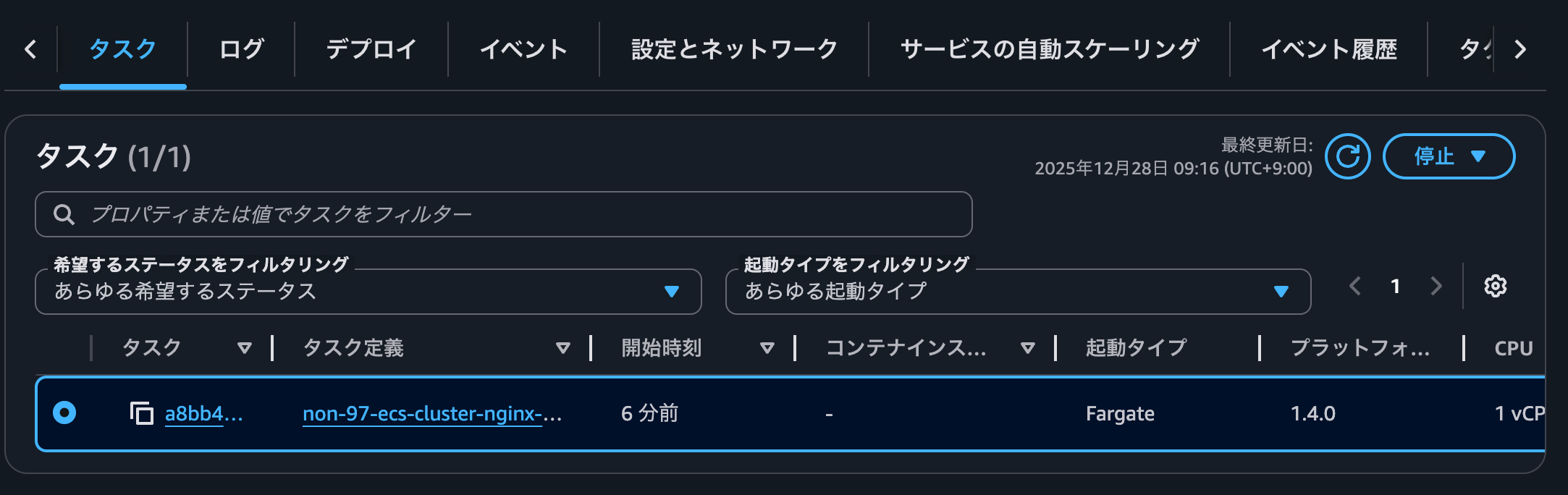
タスクを確認すると起動タイプはFargateです。2025/1/5時点のECS Express Modeではキャパシティプロバイダーを指定することはできないので当然と言えば当然です。
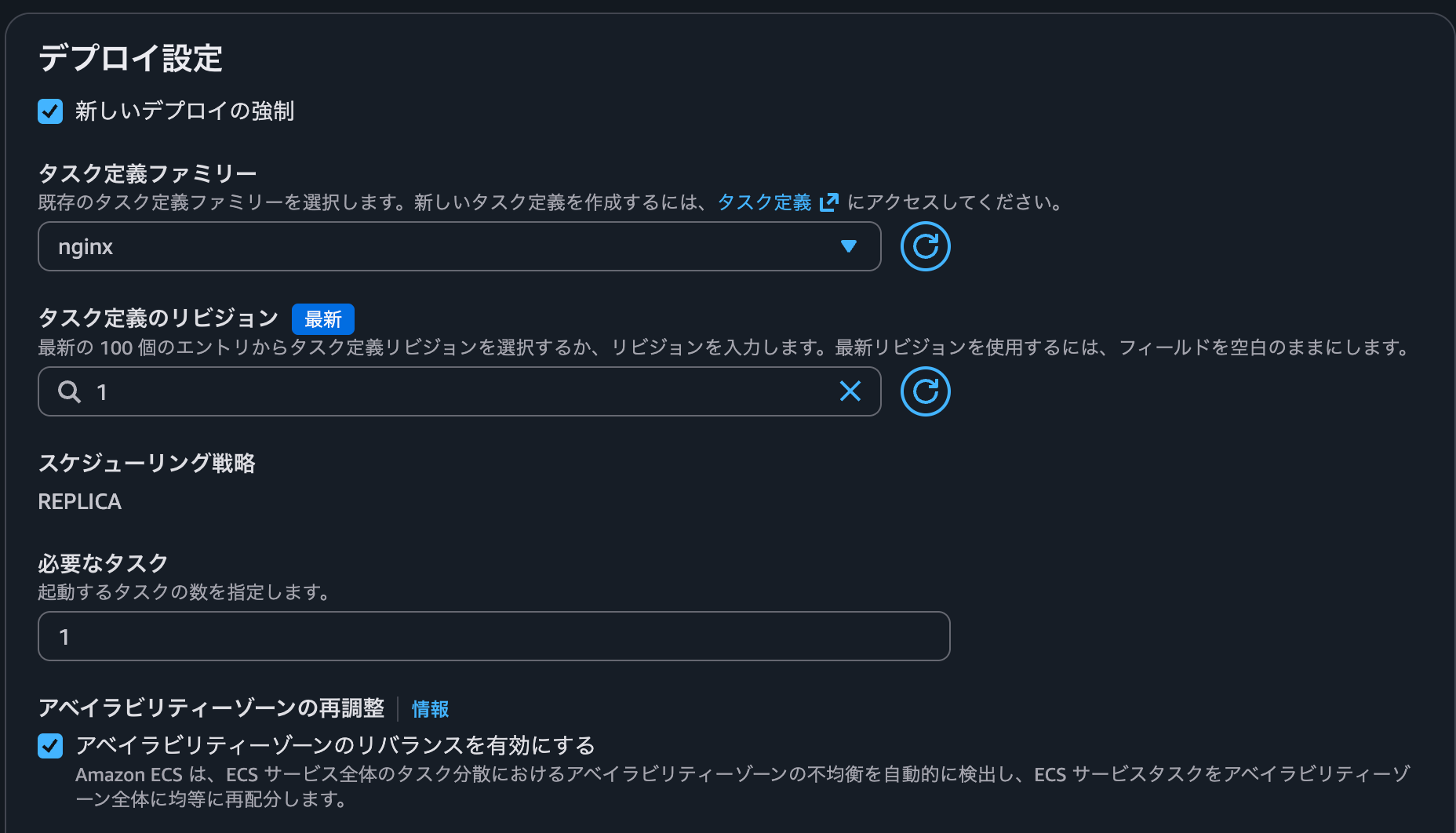
キャパシティプロバイダーを指定するために、Expressサービスで作成されたECSサービスの更新を行います。
タスク定義は先ほどの検証で作成したECSサービスで使用したものと同じものを使用します。
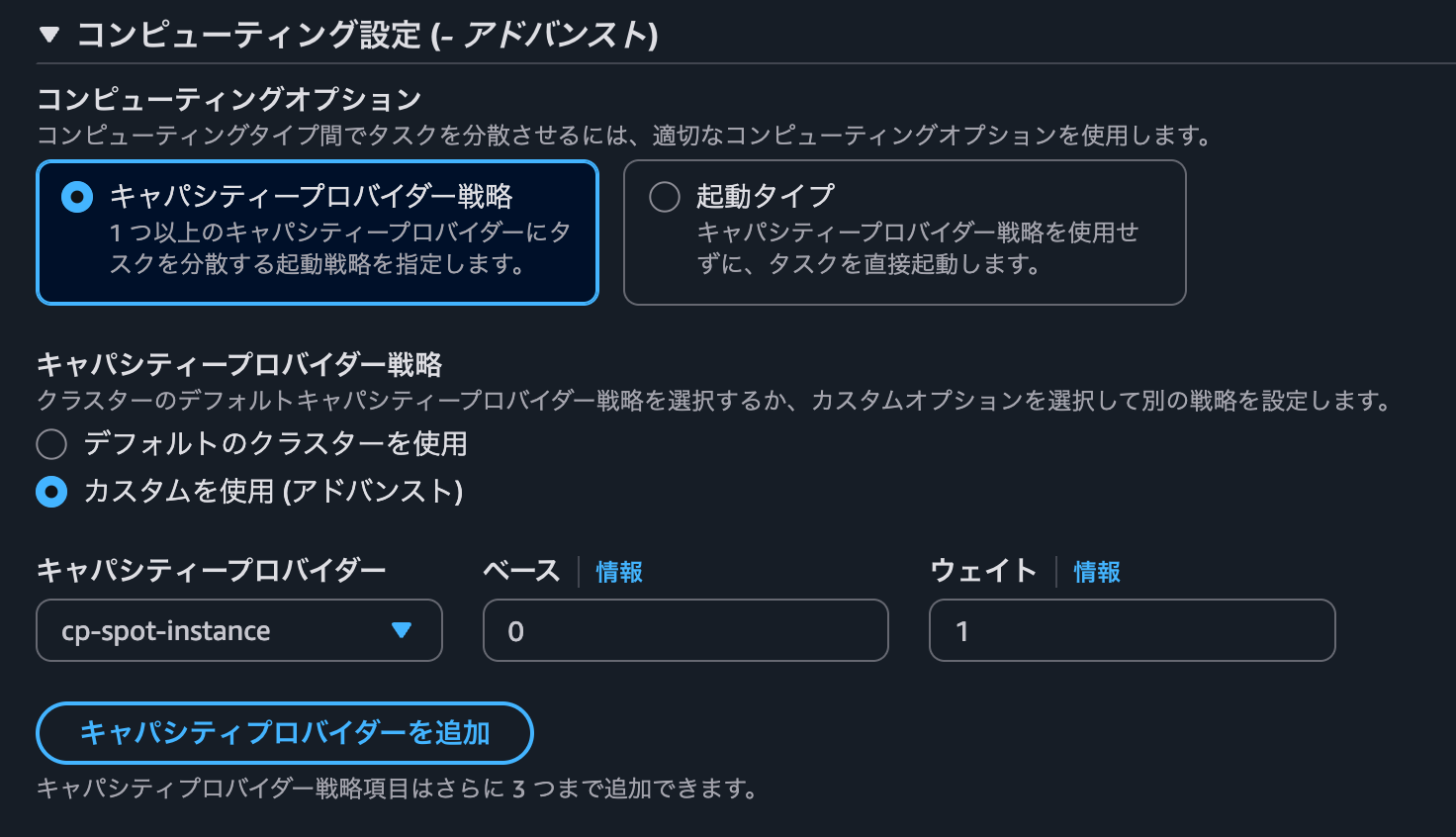
プロビジョニングモデルがスポットのECS Managed Instanceを使用するキャパシティプロバイダーを指定します。
こちらでECSサービスを更新します。
しばらくすると、サービスの更新がロールバックをしていました。
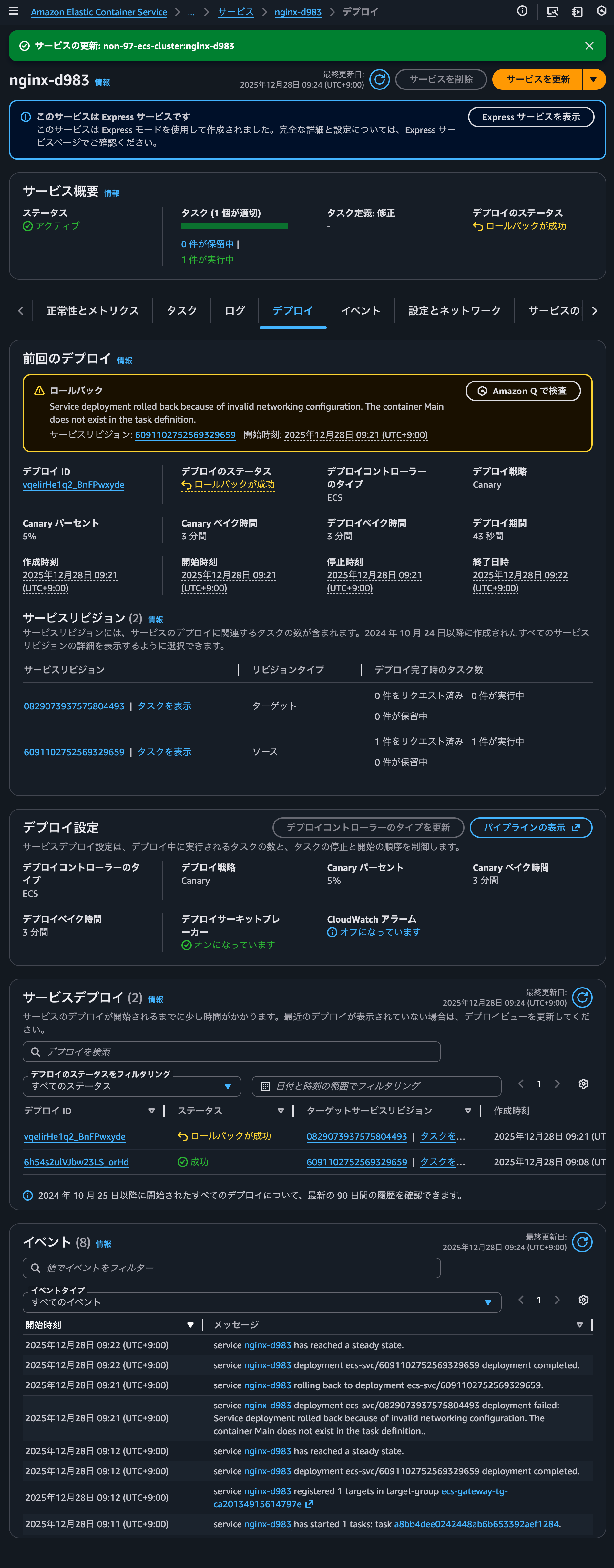
service nginx-d983 deployment ecs-svc/0829073937575804493 deployment failed: Service deployment rolled back because of invalid networking configuration. The container Main does not exist in the task definition..とイベントメッセージに記録されていますね。
これは以下記事で紹介されているようにタスク定義のコンテナ名が変わっているためです。
今回はタスク定義でコンテナ名をnginxからMainに変更します。
ECSサービス更新時にコンテナ名をMainに変更したタスク定義のリビジョンを指定します。
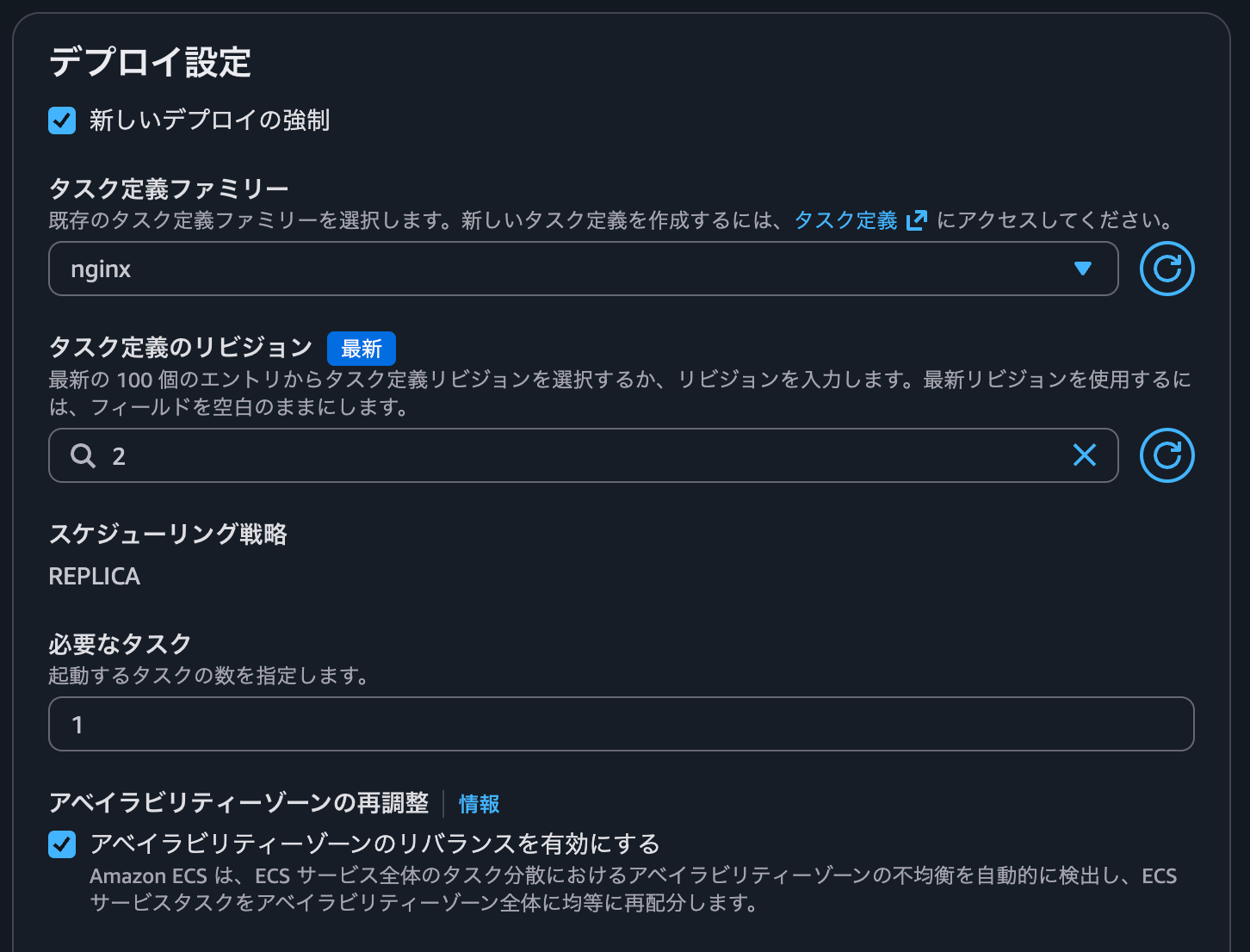
ECSサービスとタスク定義のリビジョンのdiffは以下のとおりです。
{
- "clusterArn": "arn:aws:ecs:us-east-1:<AWSアカウントID>:cluster/non-97-ecs-cluster",
- "containerImages": [
+ "capacityProviderStrategy": [
    {
-     "containerName": "Main",
-     "image": "public.ecr.aws/nginx/nginx:stable-alpine",
-     "imageDigest": "sha256:8bd9bde209af709e4cf19bc452db971513ac6c45bce489e3333ee73eca3d29c7"
+     "base": 0,
+     "capacityProvider": "cp-spot-instance",
+     "weight": 1
    }
  ],
- "createdAt": "2025-12-28T01:30:36.947Z",
+ "clusterArn": "arn:aws:ecs:us-east-1:<AWSアカウントID>:cluster/non-97-ecs-cluster",
+ "createdAt": "2025-12-28T01:36:05.827Z",
  "ecsManagedResources": {
    "autoScaling": {
      "applicationAutoScalingPolicies": [
        {
          "arn": "arn:aws:autoscaling:us-east-1:<AWSアカウントID>:scalingPolicy:06a9cf41-e2a8-49ef-abf8-5544668786ec:resource/ecs/service/non-97-ecs-cluster/nginx-6dc9:policyName/ecs-express-gateway-autoscaling-policy-for_arn:aws:ecs:us-east-1:<AWSアカウントID>:service/non-97-ecs-cluster/nginx-6dc9",
          "metric": "AVERAGE_CPU",
          "policyType": "TargetTrackingScaling",
          "status": "ACTIVE",
          "targetValue": 60,
-         "updatedAt": "2025-12-28T01:31:05.000Z"
+         "updatedAt": "2025-12-28T01:36:23.000Z"
        }
      ],
      "scalableTarget": {
        "arn": "arn:aws:application-autoscaling:::scalable-target/service-non-97-ecs-cluster-nginx-6dc9",
        "maxCapacity": 20,
        "minCapacity": 1,
        "status": "ACTIVE",
-       "updatedAt": "2025-12-28T01:31:05.000Z"
+       "updatedAt": "2025-12-28T01:36:23.000Z"
      }
    },
    "ingressPaths": [
      {
        "accessType": "PUBLIC",
        "certificate": {
          "arn": "arn:aws:acm:us-east-1:<AWSアカウントID>:certificate/6352b86f-a2b4-45a0-86d3-2685c8ee4783",
          "domainName": "ng-98bc3cebdadf4b85bebb372ec361ae01.ecs.us-east-1.on.aws",
          "status": "ACTIVE",
-         "updatedAt": "2025-12-28T01:31:18.357Z"
+         "updatedAt": "2025-12-28T01:36:24.145Z"
        },
        "endpoint": "ng-98bc3cebdadf4b85bebb372ec361ae01.ecs.us-east-1.on.aws",
        "listener": {
          "arn": "arn:aws:elasticloadbalancing:us-east-1:<AWSアカウントID>:listener/app/ecs-express-gateway-alb-bddc1df6/1089f50ca32ee0f1/6deea8b8c47a9224",
          "status": "ACTIVE",
-         "updatedAt": "2025-12-28T01:31:18.360Z"
+         "updatedAt": "2025-12-28T01:36:24.148Z"
        },
        "loadBalancer": {
          "arn": "arn:aws:elasticloadbalancing:us-east-1:<AWSアカウントID>:loadbalancer/app/ecs-express-gateway-alb-bddc1df6/1089f50ca32ee0f1",
          "scheme": "PUBLIC",
          "status": "ACTIVE",
          "subnetIds": [
            "subnet-04590eecceb2dbe04",
            "subnet-075b523f4623ea0df",
            "subnet-0b466ba0601a0680c"
          ],
-         "updatedAt": "2025-12-28T01:31:18.348Z"
+         "updatedAt": "2025-12-28T01:36:24.138Z"
        },
        "loadBalancerSecurityGroups": [
          {
            "arn": "arn:aws:ec2:us-east-1:<AWSアカウントID>:security-group/sg-0dc9b219f6fcad159",
            "status": "ACTIVE",
-           "updatedAt": "2025-12-28T01:31:18.371Z"
+           "updatedAt": "2025-12-28T01:36:24.157Z"
          }
        ],
        "rule": {
          "arn": "arn:aws:elasticloadbalancing:us-east-1:<AWSアカウントID>:listener-rule/app/ecs-express-gateway-alb-bddc1df6/1089f50ca32ee0f1/6deea8b8c47a9224/2efc7336c4418aa6",
          "status": "ACTIVE",
-         "updatedAt": "2025-12-28T01:31:18.360Z"
+         "updatedAt": "2025-12-28T01:36:24.148Z"
        },
        "targetGroups": [
          {
            "arn": "arn:aws:elasticloadbalancing:us-east-1:<AWSアカウントID>:targetgroup/ecs-gateway-tg-5fb3f50e27e99a67a/e67baac56932aefd",
            "healthCheckPath": "/",
            "healthCheckPort": 80,
            "port": 80,
            "status": "ACTIVE",
-           "updatedAt": "2025-12-28T01:31:18.365Z"
+           "updatedAt": "2025-12-28T01:36:24.152Z"
          },
          {
            "arn": "arn:aws:elasticloadbalancing:us-east-1:<AWSアカウントID>:targetgroup/ecs-gateway-tg-3b066c086b625573b/ccc970ba3272590c",
            "healthCheckPath": "/",
            "healthCheckPort": 80,
            "port": 0,
            "status": "ACTIVE",
-           "updatedAt": "2025-12-28T01:31:18.368Z"
+           "updatedAt": "2025-12-28T01:36:24.154Z"
          }
        ]
      }
    ],
    "logGroups": [
      {
        "arn": "arn:aws:logs:us-east-1:<AWSアカウントID>:log-group:/aws/ecs/non-97-ecs-cluster/nginx-6dc9-bec7",
        "logGroupName": "/aws/ecs/non-97-ecs-cluster/nginx-6dc9-bec7",
        "status": "ACTIVE",
-       "updatedAt": "2025-12-28T01:30:56.000Z"
+       "updatedAt": "2025-12-28T01:36:24.000Z"
      }
    ],
    "metricAlarms": [
      {
        "arn": "arn:aws:cloudwatch:us-east-1:<AWSアカウントID>:alarm:non-97-ecs-cluster/nginx-6dc9/RollbackAlarm",
        "status": "ACTIVE",
-       "updatedAt": "2025-12-28T01:31:27.000Z"
+       "updatedAt": "2025-12-28T01:36:24.000Z"
      }
    ],
    "serviceSecurityGroups": [
      {
        "arn": "arn:aws:ec2:us-east-1:<AWSアカウントID>:security-group/sg-05b120fda3802496a",
        "status": "ACTIVE",
-       "updatedAt": "2025-12-28T01:31:06.000Z"
+       "updatedAt": "2025-12-28T01:36:53.000Z"
      }
    ]
  },
  "guardDutyEnabled": false,
- "launchType": "FARGATE",
  "loadBalancers": [
    {
      "advancedConfiguration": {
        "alternateTargetGroupArn": "arn:aws:elasticloadbalancing:us-east-1:<AWSアカウントID>:targetgroup/ecs-gateway-tg-3b066c086b625573b/ccc970ba3272590c",
        "productionListenerRule": "arn:aws:elasticloadbalancing:us-east-1:<AWSアカウントID>:listener-rule/app/ecs-express-gateway-alb-bddc1df6/1089f50ca32ee0f1/6deea8b8c47a9224/2efc7336c4418aa6",
        "roleArn": "arn:aws:iam::<AWSアカウントID>:role/service-role/ecsInfrastructureRoleForExpressServices"
      },
      "containerName": "Main",
      "containerPort": 80,
      "targetGroupArn": "arn:aws:elasticloadbalancing:us-east-1:<AWSアカウントID>:targetgroup/ecs-gateway-tg-5fb3f50e27e99a67a/e67baac56932aefd"
    }
  ],
  "networkConfiguration": {
    "awsvpcConfiguration": {
      "assignPublicIp": "ENABLED",
      "securityGroups": [
        "sg-0fdca1e2c84c25aa5"
      ],
      "subnets": [
        "subnet-04590eecceb2dbe04",
        "subnet-075b523f4623ea0df",
        "subnet-0b466ba0601a0680c"
      ]
    }
  },
- "platformFamily": "Linux",
- "platformVersion": "1.4.0",
  "resolvedConfiguration": {
    "loadBalancers": [
      {
        "productionListenerRule": "arn:aws:elasticloadbalancing:us-east-1:<AWSアカウントID>:listener-rule/app/ecs-express-gateway-alb-bddc1df6/1089f50ca32ee0f1/6deea8b8c47a9224/2efc7336c4418aa6",
-       "targetGroupArn": "arn:aws:elasticloadbalancing:us-east-1:<AWSアカウントID>:targetgroup/ecs-gateway-tg-3b066c086b625573b/ccc970ba3272590c"
+       "targetGroupArn": "arn:aws:elasticloadbalancing:us-east-1:<AWSアカウントID>:targetgroup/ecs-gateway-tg-5fb3f50e27e99a67a/e67baac56932aefd"
      }
    ]
  },
  "serviceArn": "arn:aws:ecs:us-east-1:<AWSアカウントID>:service/non-97-ecs-cluster/nginx-6dc9",
- "serviceRevisionArn": "arn:aws:ecs:us-east-1:<AWSアカウントID>:service-revision/non-97-ecs-cluster/nginx-6dc9/0904900067707692140",
- "taskDefinition": "arn:aws:ecs:us-east-1:<AWSアカウントID>:task-definition/non-97-ecs-cluster-nginx-6dc9:1"
+ "serviceRegistries": [],
+ "serviceRevisionArn": "arn:aws:ecs:us-east-1:<AWSアカウントID>:service-revision/non-97-ecs-cluster/nginx-6dc9/7808455160060618699",
+ "taskDefinition": "arn:aws:ecs:us-east-1:<AWSアカウントID>:task-definition/nginx:2"
}
{
  "compatibilities": [
    "EC2",
-   "FARGATE",
-   "MANAGED_INSTANCES"
+   "MANAGED_INSTANCES",
+   "FARGATE"
  ],
  "containerDefinitions": [
    {
-     "cpu": 1024,
+     "cpu": 0,
      "environment": [],
+     "environmentFiles": [],
      "essential": true,
      "image": "public.ecr.aws/nginx/nginx:stable-alpine",
      "logConfiguration": {
        "logDriver": "awslogs",
        "options": {
-         "awslogs-group": "/aws/ecs/non-97-ecs-cluster/nginx-6dc9-bec7",
+         "awslogs-group": "/ecs/nginx",
+         "awslogs-create-group": "true",
          "awslogs-region": "us-east-1",
          "awslogs-stream-prefix": "ecs"
-       }
+       },
+       "secretOptions": []
      },
-     "memoryReservation": 2048,
      "mountPoints": [],
      "name": "Main",
      "portMappings": [
        {
+         "appProtocol": "http",
          "containerPort": 80,
          "hostPort": 80,
+         "name": "nginx",
          "protocol": "tcp"
        }
      ],
-     "secrets": [],
+     "systemControls": [],
+     "ulimits": [],
      "volumesFrom": []
    }
  ],
- "cpu": "1024",
+ "cpu": "512",
  "enableFaultInjection": false,
  "executionRoleArn": "arn:aws:iam::<AWSアカウントID>:role/service-role/ecsTaskExecutionRole",
- "family": "non-97-ecs-cluster-nginx-6dc9",
- "memory": "2048",
+ "family": "nginx",
+ "memory": "1024",
  "networkMode": "awsvpc",
  "placementConstraints": [],
- "registeredAt": "2025-12-28T01:30:35.750Z",
+ "registeredAt": "2025-12-28T00:36:16.711Z",
+ "registeredBy": "arn:aws:sts::<AWSアカウントID>:assumed-role/cm-yamamoto.ryota/cm-yamamoto.ryota",
  "requiresAttributes": [
    {
      "name": "com.amazonaws.ecs.capability.logging-driver.awslogs"
    },
    {
      "name": "ecs.capability.execution-role-awslogs"
    },
    {
      "name": "com.amazonaws.ecs.capability.docker-remote-api.1.19"
    },
    {
-     "name": "com.amazonaws.ecs.capability.docker-remote-api.1.21"
-   },
-   {
      "name": "com.amazonaws.ecs.capability.docker-remote-api.1.18"
    },
    {
      "name": "ecs.capability.task-eni"
+   },
+   {
+     "name": "com.amazonaws.ecs.capability.docker-remote-api.1.29"
    }
  ],
  "requiresCompatibilities": [
-   "FARGATE"
+   "MANAGED_INSTANCES"
  ],
- "revision": 1,
+ "revision": 2,
  "runtimePlatform": {
-   "cpuArchitecture": "X86_64",
+   "cpuArchitecture": "ARM64",
    "operatingSystemFamily": "LINUX"
  },
  "status": "ACTIVE",
- "taskDefinitionArn": "arn:aws:ecs:us-east-1:<AWSアカウントID>:task-definition/non-97-ecs-cluster-nginx-6dc9:1",
+ "taskDefinitionArn": "arn:aws:ecs:us-east-1:<AWSアカウントID>:task-definition/nginx:2",
  "volumes": []
}
しばらく待つと、今度はservice nginx-6dc9 was unable to place a task. Reason: Assign public IP is not supported for this launch typeとイベントメッセージが出力されていました。
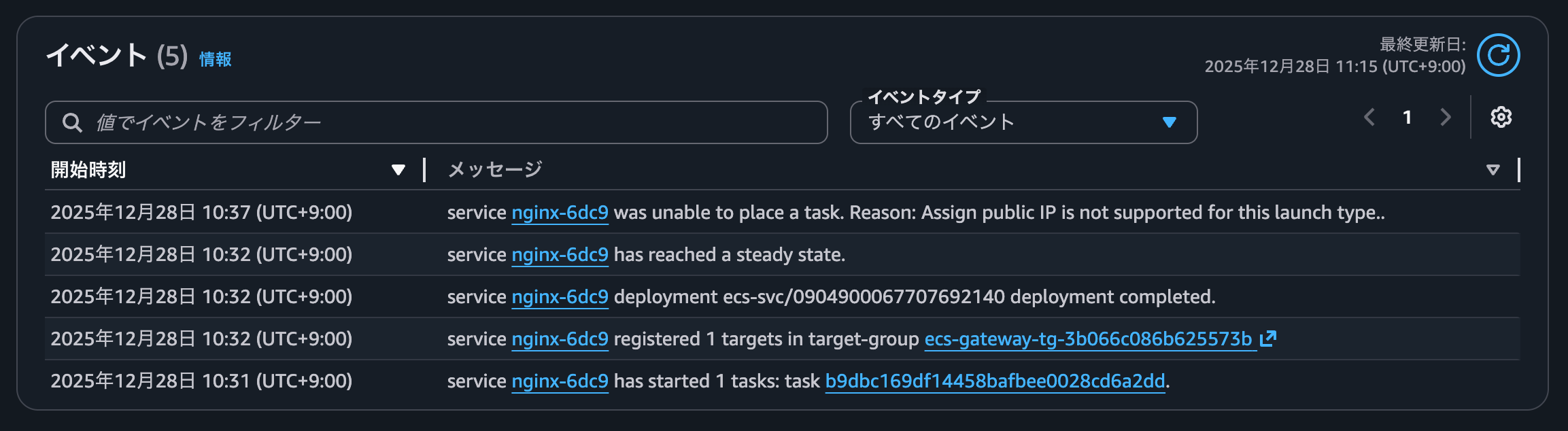
これはawsvpcモードの場合はassignPublicIpによるタスクENIへのパブリックIPアドレス割り当てがサポートされないというECS Managed Instanceの制約があるためです。
スタンドアロンタスク (RunTask) の実行時、またはサービス (CreateService/UpdateService) の作成または更新時の、assignPublicIp を使用したタスク ENI へのパブリック IP アドレス割り当てはサポート対象外です。
Amazon ECS マネージドインスタンスタスクにネットワークインターフェイスを割り当てる - Amazon Elastic Container Service
確かにassignPublicIpが有効になっています。
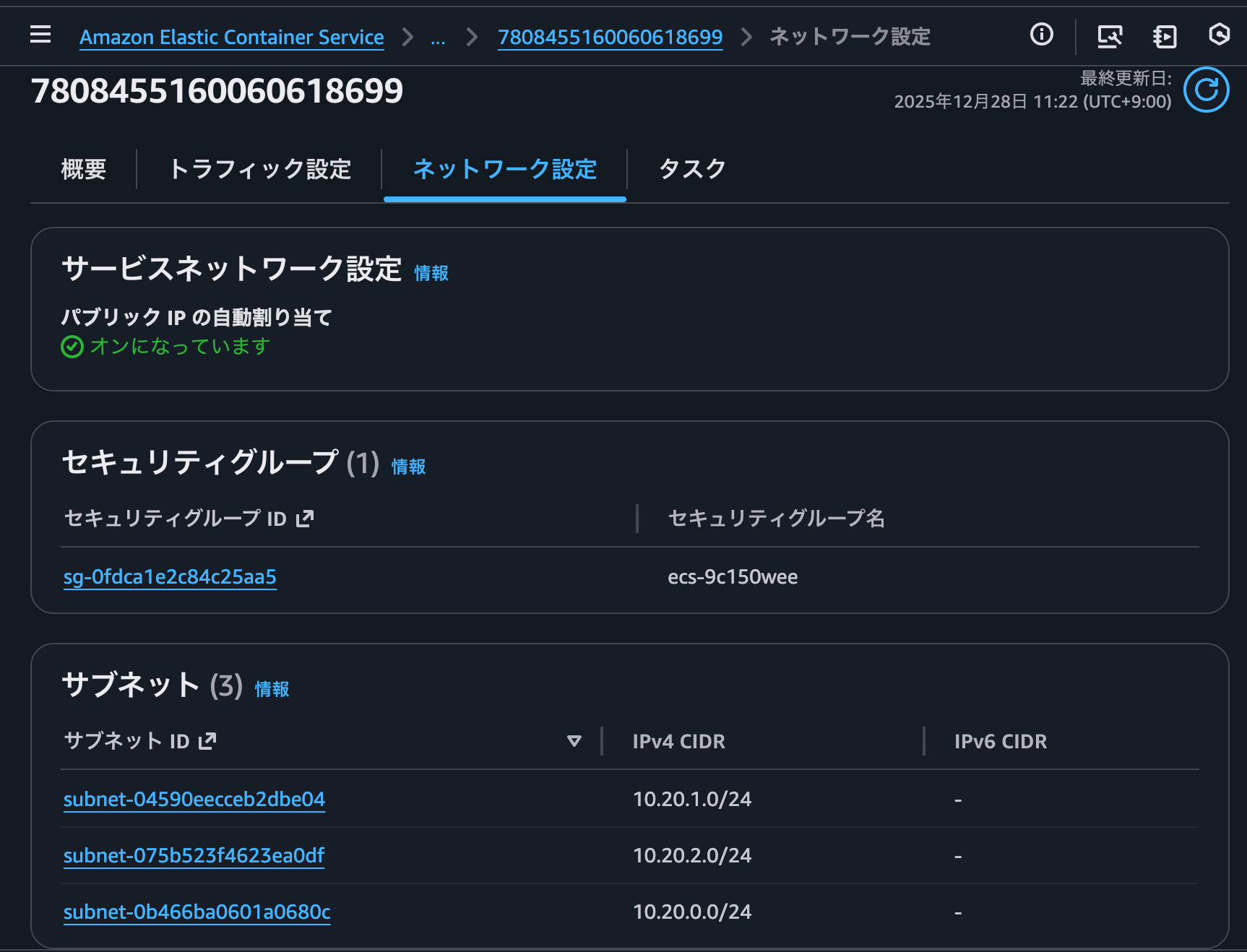
対応としてECSタスクが起動するサブネットをプライベートサブネットに変更します。
この時のECSサービスのリビジョンのdiffは以下のとおりです。
{
+ "capacityProviderStrategy": [
+   {
+     "base": 0,
+     "capacityProvider": "cp-spot-instance",
+     "weight": 1
+   }
+ ],
  "clusterArn": "arn:aws:ecs:us-east-1:<AWSアカウントID>:cluster/non-97-ecs-cluster",
  "containerImages": [
    {
      "containerName": "Main",
      "image": "public.ecr.aws/nginx/nginx:stable-alpine",
      "imageDigest": "sha256:8bd9bde209af709e4cf19bc452db971513ac6c45bce489e3333ee73eca3d29c7"
    }
  ],
- "createdAt": "2025-12-28T01:30:36.947Z",
+ "createdAt": "2025-12-28T02:16:33.720Z",
  "ecsManagedResources": {
    "autoScaling": {
      "applicationAutoScalingPolicies": [
        {
+         "arn": "arn:aws:autoscaling:us-east-1:<AWSアカウントID>:scalingPolicy:06a9cf41-e2a8-49ef-abf8-5544668786ec:resource/ecs/service/non-97-ecs-cluster/nginx-6dc9:policyName/ecs-express-gateway-autoscaling-policy-for_arn:aws:ecs:us-east-1:<AWSアカウントID>:service/non-97-ecs-cluster/nginx-6dc9",
          "metric": "AVERAGE_CPU",
          "policyType": "TargetTrackingScaling",
-         "status": "DELETED",
+         "status": "ACTIVE",
          "targetValue": 60,
-         "updatedAt": "2025-12-28T02:27:05.000Z"
+         "updatedAt": "2025-12-28T02:16:57.000Z"
        }
      ],
      "scalableTarget": {
+       "arn": "arn:aws:application-autoscaling:::scalable-target/service-non-97-ecs-cluster-nginx-6dc9",
        "maxCapacity": 20,
        "minCapacity": 1,
-       "status": "DELETED",
-       "updatedAt": "2025-12-28T02:27:05.000Z"
+       "status": "ACTIVE",
+       "updatedAt": "2025-12-28T02:16:57.000Z"
      }
    },
    "ingressPaths": [
      {
        "accessType": "PUBLIC",
        "certificate": {
          "arn": "arn:aws:acm:us-east-1:<AWSアカウントID>:certificate/6352b86f-a2b4-45a0-86d3-2685c8ee4783",
          "domainName": "ng-98bc3cebdadf4b85bebb372ec361ae01.ecs.us-east-1.on.aws",
          "status": "ACTIVE",
-         "updatedAt": "2025-12-28T02:27:04.966Z"
+         "updatedAt": "2025-12-28T02:16:55.865Z"
        },
        "endpoint": "ng-98bc3cebdadf4b85bebb372ec361ae01.ecs.us-east-1.on.aws",
        "listener": {
          "arn": "arn:aws:elasticloadbalancing:us-east-1:<AWSアカウントID>:listener/app/ecs-express-gateway-alb-bddc1df6/1089f50ca32ee0f1/6deea8b8c47a9224",
          "status": "ACTIVE",
-         "updatedAt": "2025-12-28T02:27:04.968Z"
+         "updatedAt": "2025-12-28T02:16:55.866Z"
        },
        "loadBalancer": {
          "arn": "arn:aws:elasticloadbalancing:us-east-1:<AWSアカウントID>:loadbalancer/app/ecs-express-gateway-alb-bddc1df6/1089f50ca32ee0f1",
          "scheme": "PUBLIC",
          "status": "ACTIVE",
          "subnetIds": [
            "subnet-04590eecceb2dbe04",
            "subnet-075b523f4623ea0df",
            "subnet-0b466ba0601a0680c"
          ],
-         "updatedAt": "2025-12-28T02:27:04.958Z"
+         "updatedAt": "2025-12-28T02:16:55.858Z"
        },
        "loadBalancerSecurityGroups": [
          {
            "arn": "arn:aws:ec2:us-east-1:<AWSアカウントID>:security-group/sg-0dc9b219f6fcad159",
            "status": "ACTIVE",
-           "updatedAt": "2025-12-28T02:27:04.973Z"
+           "updatedAt": "2025-12-28T02:16:55.874Z"
          }
        ],
        "rule": {
          "arn": "arn:aws:elasticloadbalancing:us-east-1:<AWSアカウントID>:listener-rule/app/ecs-express-gateway-alb-bddc1df6/1089f50ca32ee0f1/6deea8b8c47a9224/2efc7336c4418aa6",
          "status": "ACTIVE",
-         "updatedAt": "2025-12-28T02:27:04.968Z"
+         "updatedAt": "2025-12-28T02:16:55.866Z"
        },
        "targetGroups": [
          {
            "arn": "arn:aws:elasticloadbalancing:us-east-1:<AWSアカウントID>:targetgroup/ecs-gateway-tg-5fb3f50e27e99a67a/e67baac56932aefd",
            "healthCheckPath": "/",
            "healthCheckPort": 80,
            "port": 80,
            "status": "ACTIVE",
-           "updatedAt": "2025-12-28T02:27:04.972Z"
+           "updatedAt": "2025-12-28T02:16:55.871Z"
          },
          {
            "arn": "arn:aws:elasticloadbalancing:us-east-1:<AWSアカウントID>:targetgroup/ecs-gateway-tg-3b066c086b625573b/ccc970ba3272590c",
            "healthCheckPath": "/",
            "healthCheckPort": 80,
            "port": 0,
            "status": "ACTIVE",
-           "updatedAt": "2025-12-28T02:27:04.973Z"
+           "updatedAt": "2025-12-28T02:16:55.872Z"
          }
        ]
      }
    ],
    "logGroups": [
      {
        "arn": "arn:aws:logs:us-east-1:<AWSアカウントID>:log-group:/aws/ecs/non-97-ecs-cluster/nginx-6dc9-bec7",
        "logGroupName": "/aws/ecs/non-97-ecs-cluster/nginx-6dc9-bec7",
        "status": "ACTIVE",
-       "updatedAt": "2025-12-28T01:30:56.000Z"
+       "updatedAt": "2025-12-28T02:16:56.000Z"
      }
    ],
    "metricAlarms": [
      {
        "arn": "arn:aws:cloudwatch:us-east-1:<AWSアカウントID>:alarm:non-97-ecs-cluster/nginx-6dc9/RollbackAlarm",
        "status": "ACTIVE",
-       "updatedAt": "2025-12-28T02:27:04.000Z"
+       "updatedAt": "2025-12-28T02:17:25.000Z"
      }
    ],
    "serviceSecurityGroups": [
      {
        "arn": "arn:aws:ec2:us-east-1:<AWSアカウントID>:security-group/sg-05b120fda3802496a",
-       "status": "DELETED",
-       "updatedAt": "2025-12-28T02:27:05.000Z"
+       "status": "ACTIVE",
+       "updatedAt": "2025-12-28T02:16:57.000Z"
      }
    ]
  },
  "guardDutyEnabled": false,
- "launchType": "FARGATE",
  "loadBalancers": [
    {
      "advancedConfiguration": {
        "alternateTargetGroupArn": "arn:aws:elasticloadbalancing:us-east-1:<AWSアカウントID>:targetgroup/ecs-gateway-tg-3b066c086b625573b/ccc970ba3272590c",
        "productionListenerRule": "arn:aws:elasticloadbalancing:us-east-1:<AWSアカウントID>:listener-rule/app/ecs-express-gateway-alb-bddc1df6/1089f50ca32ee0f1/6deea8b8c47a9224/2efc7336c4418aa6",
        "roleArn": "arn:aws:iam::<AWSアカウントID>:role/service-role/ecsInfrastructureRoleForExpressServices"
      },
      "containerName": "Main",
      "containerPort": 80,
      "targetGroupArn": "arn:aws:elasticloadbalancing:us-east-1:<AWSアカウントID>:targetgroup/ecs-gateway-tg-5fb3f50e27e99a67a/e67baac56932aefd"
    }
  ],
  "networkConfiguration": {
    "awsvpcConfiguration": {
-     "assignPublicIp": "ENABLED",
      "securityGroups": [
        "sg-0fdca1e2c84c25aa5"
      ],
      "subnets": [
-       "subnet-04590eecceb2dbe04",
-       "subnet-075b523f4623ea0df",
-       "subnet-0b466ba0601a0680c"
+       "subnet-0440d572db53adac4",
+       "subnet-0957a78d562bbc310",
+       "subnet-0c483120e0e4812c4"
      ]
    }
  },
- "platformFamily": "Linux",
- "platformVersion": "1.4.0",
+ "resolvedConfiguration": {
+   "loadBalancers": [
+     {
+       "productionListenerRule": "arn:aws:elasticloadbalancing:us-east-1:<AWSアカウントID>:listener-rule/app/ecs-express-gateway-alb-bddc1df6/1089f50ca32ee0f1/6deea8b8c47a9224/2efc7336c4418aa6",
+       "targetGroupArn": "arn:aws:elasticloadbalancing:us-east-1:<AWSアカウントID>:targetgroup/ecs-gateway-tg-5fb3f50e27e99a67a/e67baac56932aefd"
+     }
+   ]
+ },
  "serviceArn": "arn:aws:ecs:us-east-1:<AWSアカウントID>:service/non-97-ecs-cluster/nginx-6dc9",
- "serviceRevisionArn": "arn:aws:ecs:us-east-1:<AWSアカウントID>:service-revision/non-97-ecs-cluster/nginx-6dc9/0904900067707692140",
- "taskDefinition": "arn:aws:ecs:us-east-1:<AWSアカウントID>:task-definition/non-97-ecs-cluster-nginx-6dc9:1"
+ "serviceRegistries": [],
+ "serviceRevisionArn": "arn:aws:ecs:us-east-1:<AWSアカウントID>:service-revision/non-97-ecs-cluster/nginx-6dc9/7481603989619148439",
+ "taskDefinition": "arn:aws:ecs:us-east-1:<AWSアカウントID>:task-definition/nginx:2"
}
すると、正常にデプロイが進み始めました。
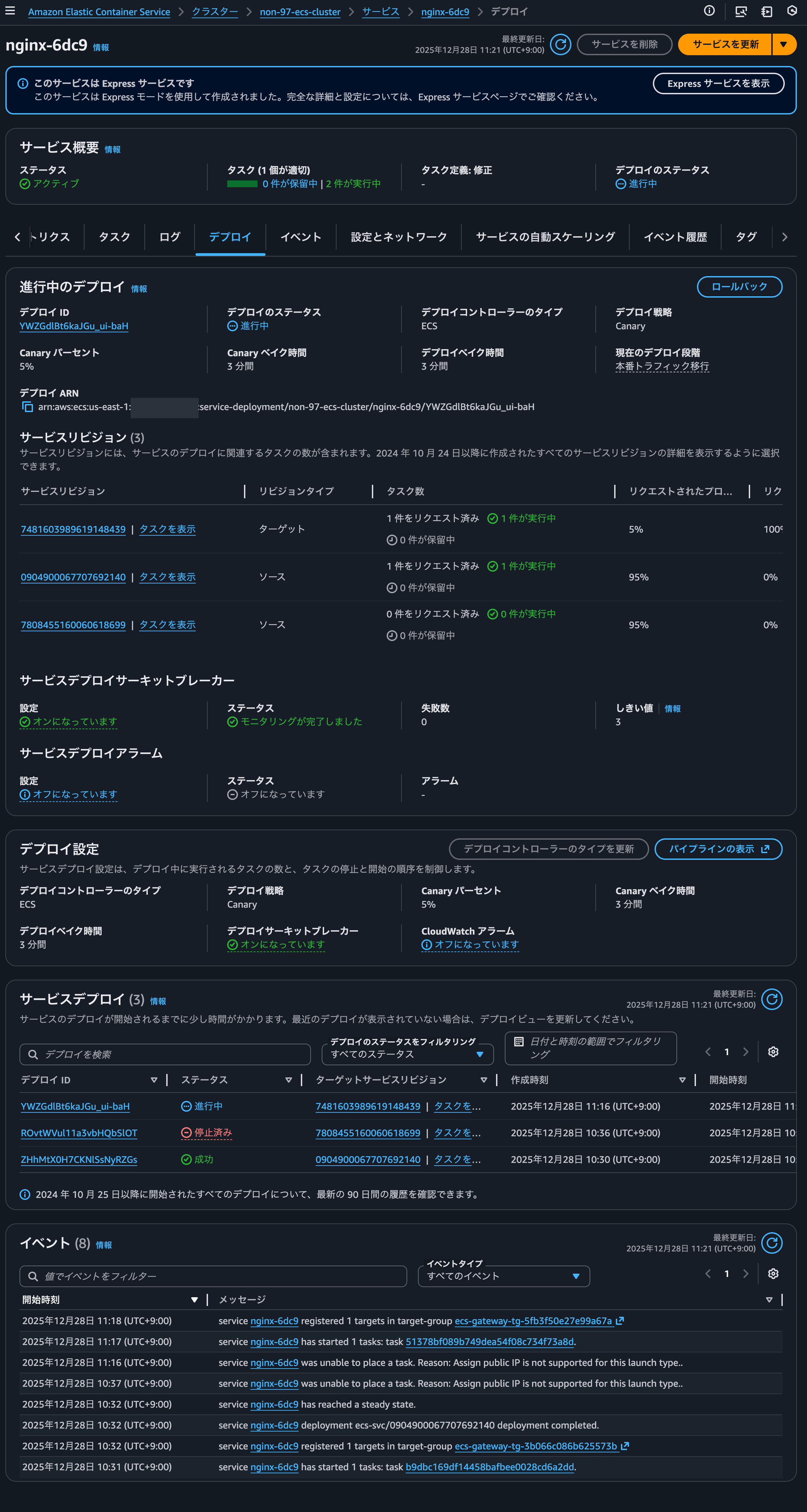
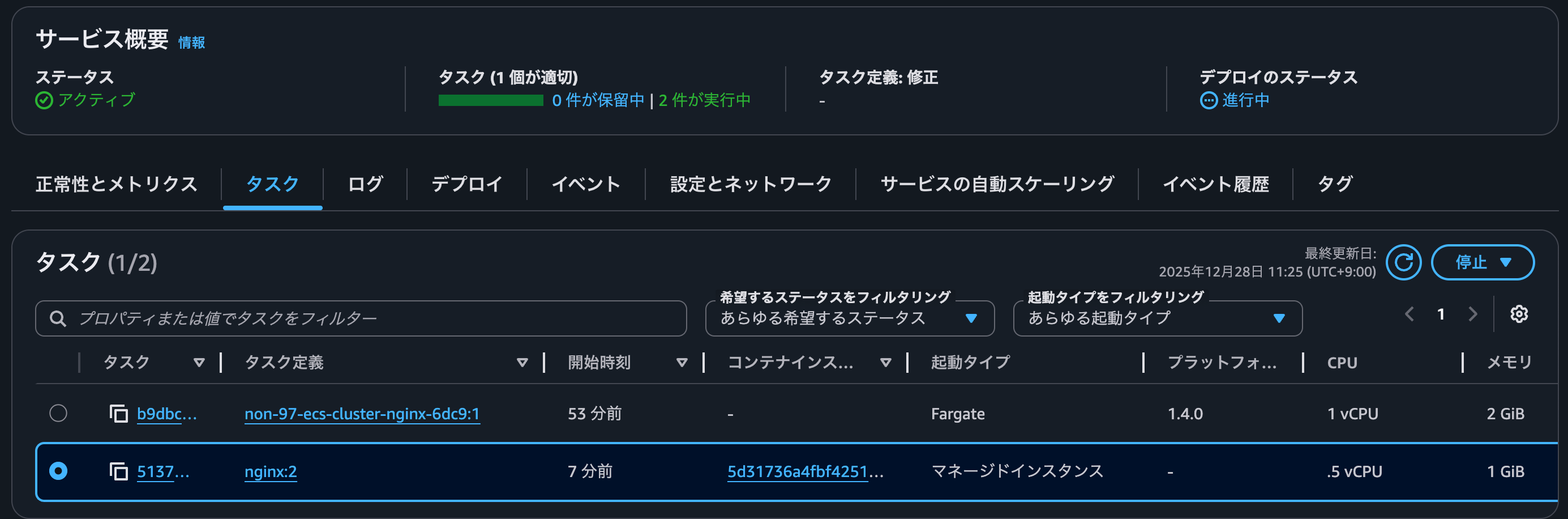
タスクを確認すると、起動タイプがマネージドインスタンスになっています。
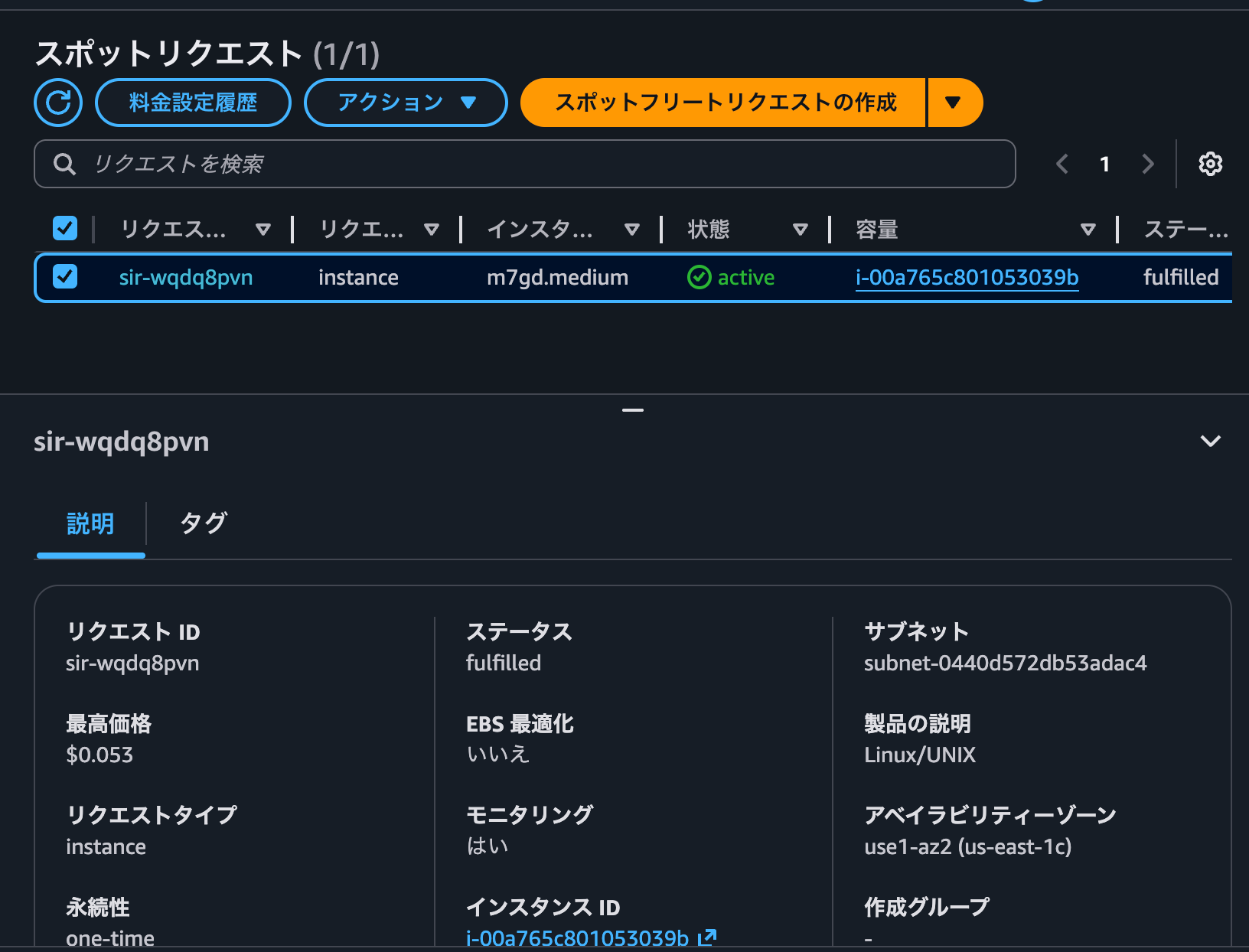
スポットリクエストを確認すると、タスクが起動しているコンテナインスタンスのEC2インスタンスがスポットインスタンスとして起動していることを確認できました。
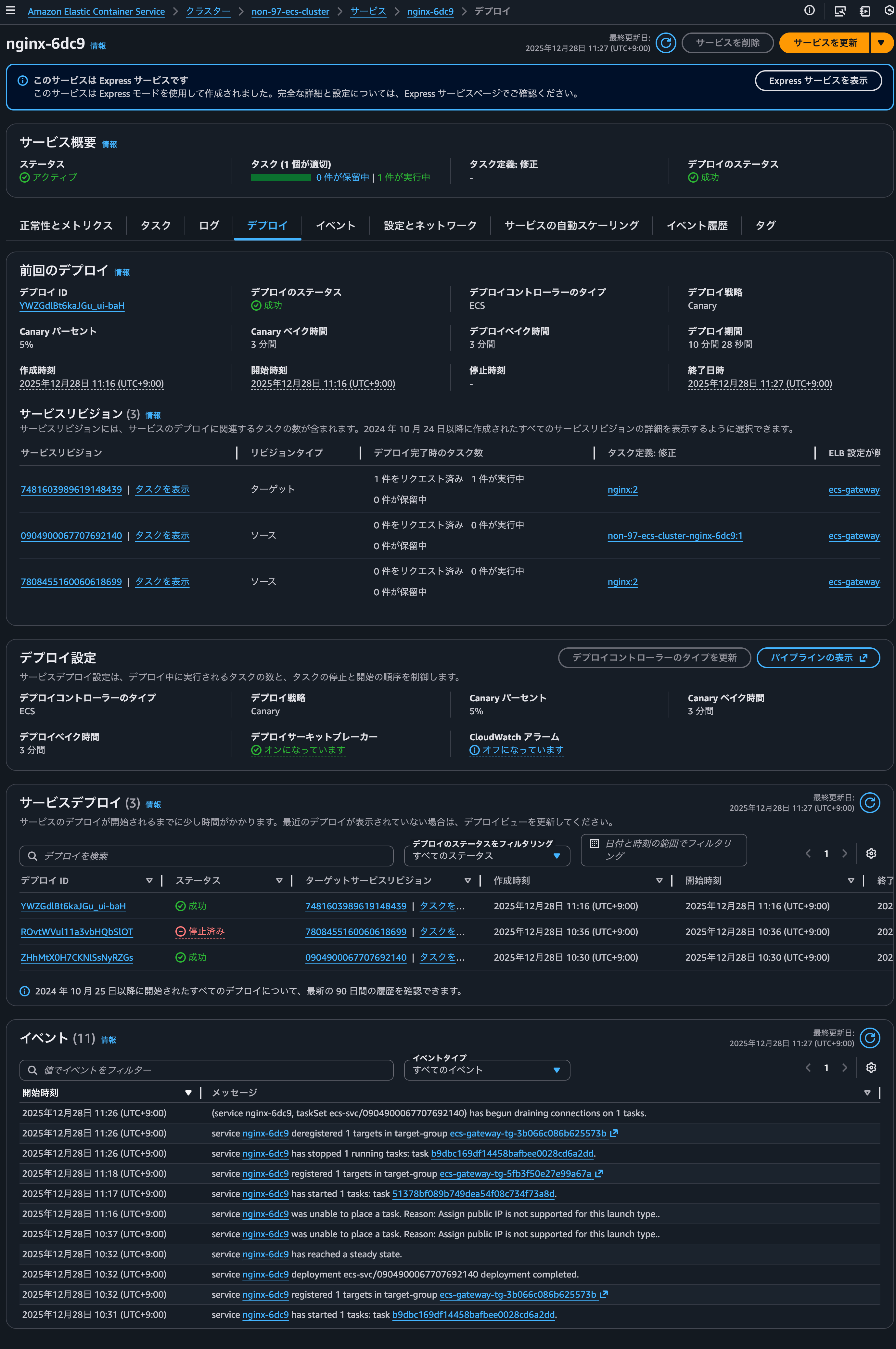
その後8分ほど待つとデプロイが正常に完了しました。
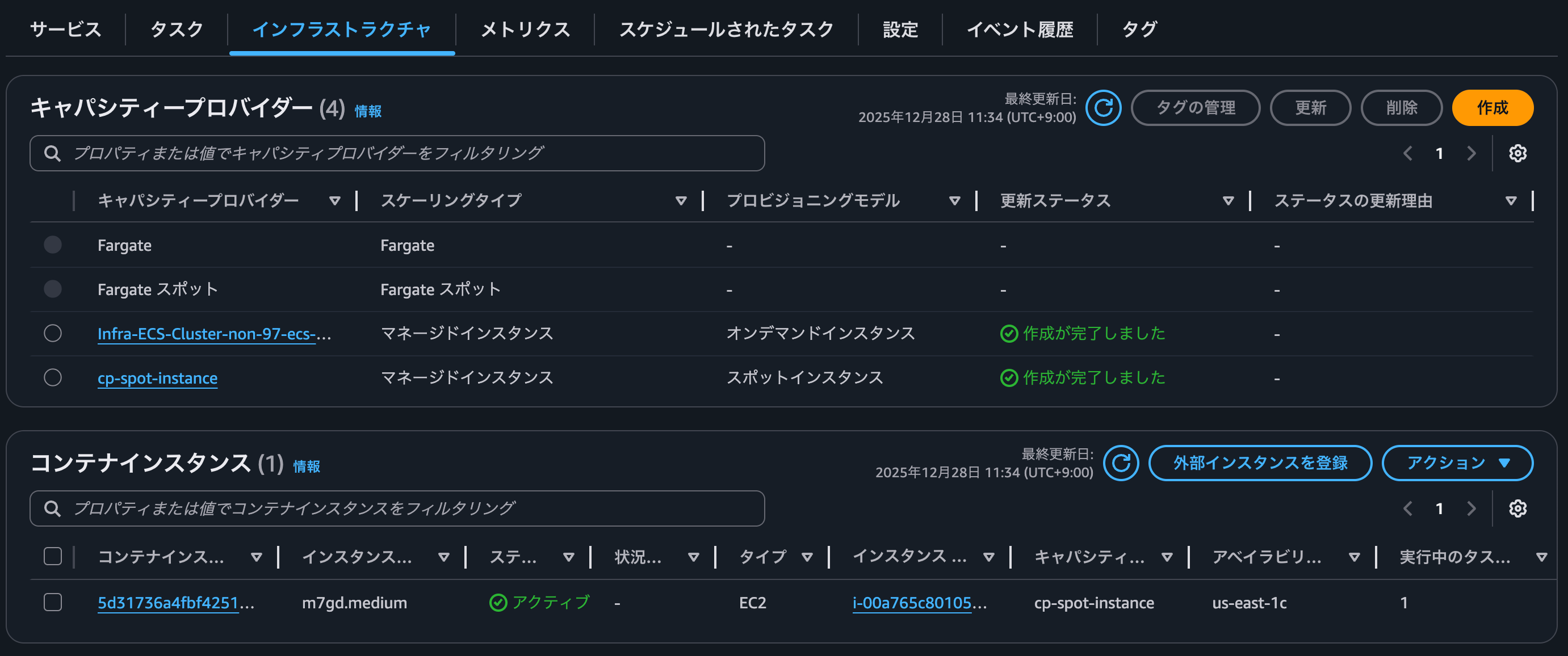
コンテナインスタンスは変わらずスポットインスタンスとして起動しているECS Managed Instanceです。

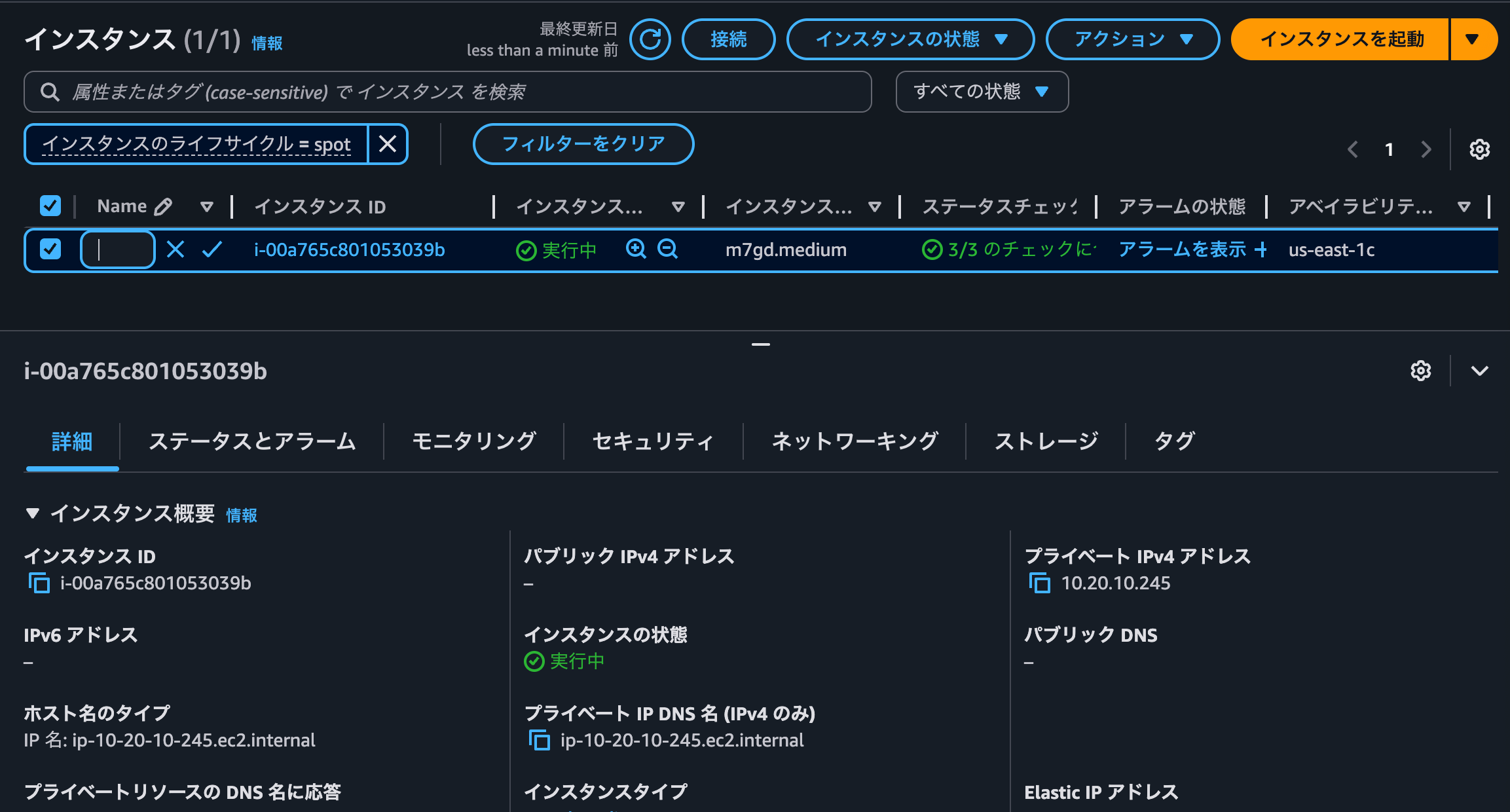
正常にアクセスできることも確認できました。
> curl https://ng-98bc3cebdadf4b85bebb372ec361ae01.ecs.us-east-1.on.aws/ -Iv
* Host ng-98bc3cebdadf4b85bebb372ec361ae01.ecs.us-east-1.on.aws:443 was resolved.
* IPv6: (none)
* IPv4: 44.206.115.69, 52.21.1.109, 44.195.225.201
*   Trying 44.206.115.69:443...
* Connected to ng-98bc3cebdadf4b85bebb372ec361ae01.ecs.us-east-1.on.aws (44.206.115.69) port 443
* ALPN: curl offers h2,http/1.1
* (304) (OUT), TLS handshake, Client hello (1):
*  CAfile: /etc/ssl/cert.pem
*  CApath: none
* (304) (IN), TLS handshake, Server hello (2):
* TLSv1.2 (IN), TLS handshake, Certificate (11):
* TLSv1.2 (IN), TLS handshake, Server key exchange (12):
* TLSv1.2 (IN), TLS handshake, Server finished (14):
* TLSv1.2 (OUT), TLS handshake, Client key exchange (16):
* TLSv1.2 (OUT), TLS change cipher, Change cipher spec (1):
* TLSv1.2 (OUT), TLS handshake, Finished (20):
* TLSv1.2 (IN), TLS change cipher, Change cipher spec (1):
* TLSv1.2 (IN), TLS handshake, Finished (20):
* SSL connection using TLSv1.2 / ECDHE-RSA-AES128-GCM-SHA256 / [blank] / UNDEF
* ALPN: server accepted h2
* Server certificate:
*  subject: CN=ng-98bc3cebdadf4b85bebb372ec361ae01.ecs.us-east-1.on.aws
*  start date: Dec 28 00:00:00 2025 GMT
*  expire date: Jan 26 23:59:59 2027 GMT
*  subjectAltName: host "ng-98bc3cebdadf4b85bebb372ec361ae01.ecs.us-east-1.on.aws" matched cert's "ng-98bc3cebdadf4b85bebb372ec361ae01.ecs.us-east-1.on.aws"
*  issuer: C=US; O=Amazon; CN=Amazon RSA 2048 M04
*  SSL certificate verify ok.
* using HTTP/2
* [HTTP/2] [1] OPENED stream for https://ng-98bc3cebdadf4b85bebb372ec361ae01.ecs.us-east-1.on.aws/
* [HTTP/2] [1] [:method: HEAD]
* [HTTP/2] [1] [:scheme: https]
* [HTTP/2] [1] [:authority: ng-98bc3cebdadf4b85bebb372ec361ae01.ecs.us-east-1.on.aws]
* [HTTP/2] [1] [:path: /]
* [HTTP/2] [1] [user-agent: curl/8.7.1]
* [HTTP/2] [1] [accept: */*]
> HEAD / HTTP/2
> Host: ng-98bc3cebdadf4b85bebb372ec361ae01.ecs.us-east-1.on.aws
> User-Agent: curl/8.7.1
> Accept: */*
>
* Request completely sent off
< HTTP/2 200
HTTP/2 200
< date: Sun, 28 Dec 2025 02:36:08 GMT
date: Sun, 28 Dec 2025 02:36:08 GMT
< content-type: text/html
content-type: text/html
< content-length: 615
content-length: 615
< server: nginx/1.28.1
server: nginx/1.28.1
< last-modified: Tue, 23 Dec 2025 19:30:33 GMT
last-modified: Tue, 23 Dec 2025 19:30:33 GMT
< etag: "694aedd9-267"
etag: "694aedd9-267"
< accept-ranges: bytes
accept-ranges: bytes
<

* Connection #0 to host ng-98bc3cebdadf4b85bebb372ec361ae01.ecs.us-east-1.on.aws left intact
ということで、ECS Express ModeでもECS Managed Instanceを使用できることを確認できました。
スポットインスタンスとして動作している時のECS Managed Instanceの追加料金
スポットインスタンスとして動作している時のECS Managed Instanceの追加料金はかかるのでしょうか。
Cost ExplorerでECS関連の料金を確認すると、スポットインスタンスとして起動したECS Managed Instanceだからと言って特別な使用タイプは記録されていませんでした。
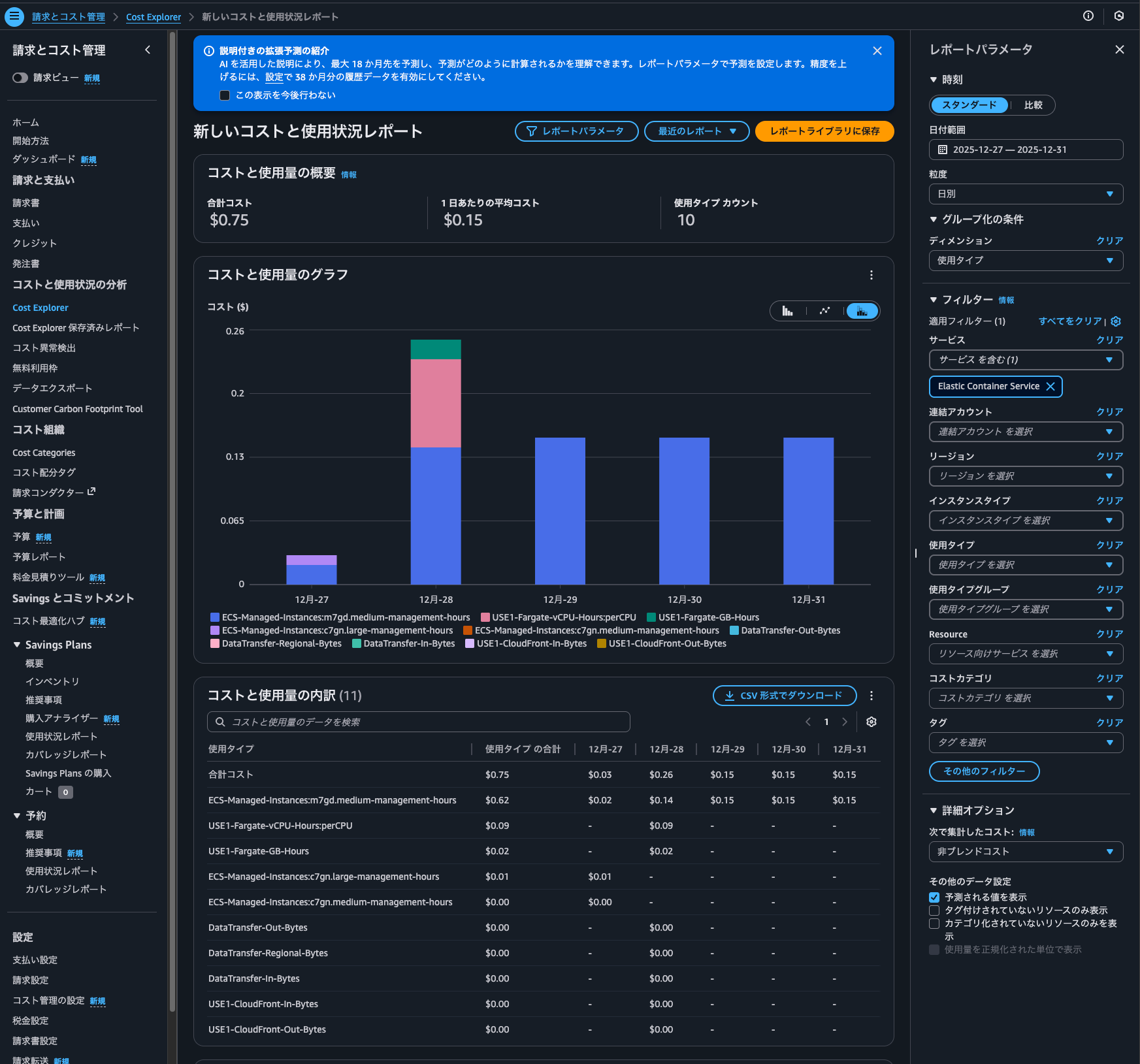
つまりはスポットインスタンスであってもオンデマンドインスタンスであっても、ECS Managed Instanceの追加料金は変わらず発生します。
スポットインスタンスの相性が良いワークロードに
ECS Managed Instanceがスポットインスタンスをサポートしたアップデートを紹介しました。
スポットインスタンスの相性が良いワークロードでは積極的に使用していきたいですね。
この記事が誰かの助けになれば幸いです。
以上、クラウド事業本部 コンサルティング部の のんピ(@non____97)でした!