![[アップデート] Amazon Lightsail で Ruby on Rails などの新しいタイプのブループリントが提供されるようになり、新しいブループリントで IMDSv2 がデフォルトで適用されるようになりました](https://images.ctfassets.net/ct0aopd36mqt/wp-thumbnail-fa410506a858dc9244cc2631570b82d3/bbcb1ae519d46d2d304f32e4c77a763e/amazon-lightsail?w=3840&fm=webp)
[アップデート] Amazon Lightsail で Ruby on Rails などの新しいタイプのブループリントが提供されるようになり、新しいブループリントで IMDSv2 がデフォルトで適用されるようになりました

いわさです。
Amazon Lightsail では事前に AWS より提供されているブループリント(設計図)を選択することで、必要なミドルウェアなどがセットアップ済みの仮想サーバーを構築することが出来ます。
先日のアップデートで Amazon Lightsail にいくつかの新しいブループリントが追加されました。
まず、このアップデートで Ruby on Rails などの新しいアプリケーションスタックを選択することが出来るようになっています。
また、Lightsail では Bitnami を使ったインスタンスが多かったのですが、今回追加されたブループリントではどうやら Bitnami が使われていないようで、また IMDSv2 がデフォルトで適用されるようになっています。
ブループリントの確認
まず Lightsail コンソールからブループリントの確認をしてみます。
今回のアップデートで LAMP、Node.js、Ruby on Rails が追加&更新されています。
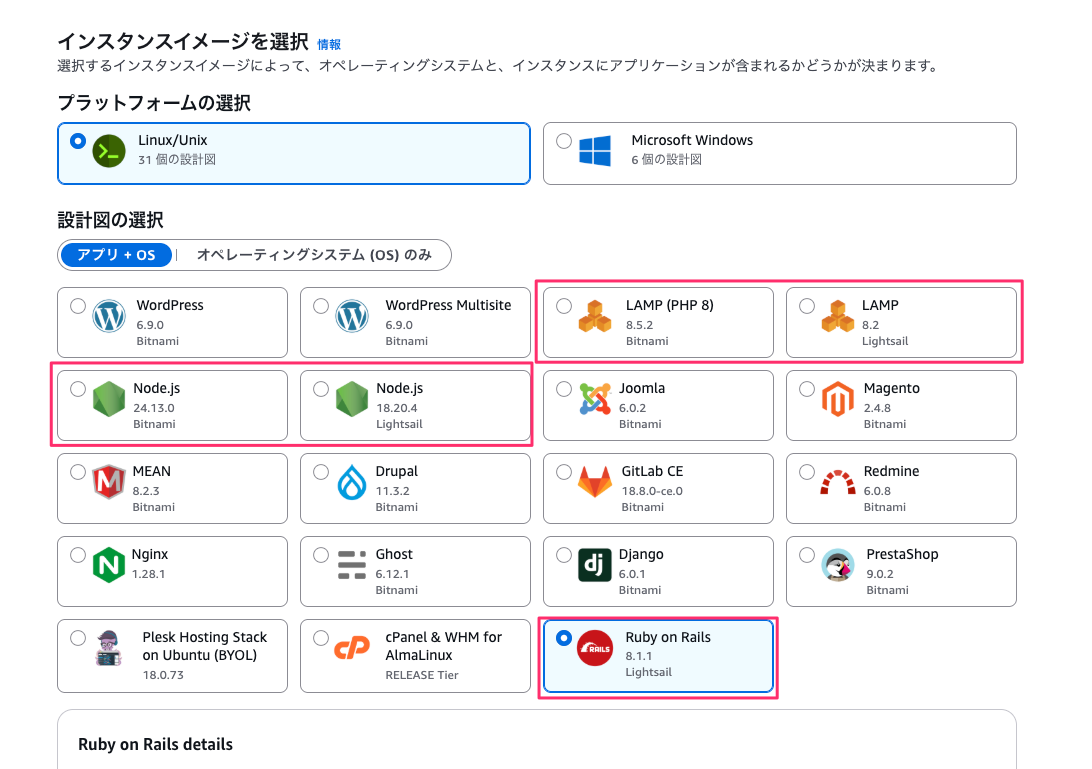
まず、Ruby on Rails については今回はじめて追加されたタイプのブループリントだと思います。
そして、LAMP や Node.js については以前からも存在していましたが、今回更新された形です。しかしコンソール上2つ表示されていますね。
従来は Bitnami 版、今回のは AWS 標準版っぽい
Lightsail では多くのブループリントを Bitnami によって提供しています。
Bitnamiは、オープンソースアプリケーションを簡単にインストール・デプロイできるようにパッケージ化されたライブラリです。Broadcom (旧 VMware)に買収されています。
先程のコンソールだと、「LAMP(PHP 8)」は Bitnami で元から提供されているもので、「LAMP」は AWS によって新しく作成されたものです。
同様に Node.js は「24.x」が Bitnami で元から提供されているもので、「18.x」が AWS によって新しく作成されたものです。「え、18.x !?」って思いましたけども。
AWS CLI でブループリント情報を取得してみるとこんな感じです。
Bitnami 版はproductUrlがマーケットプレイスになっています。brueprintIdにlsが含まれているものが今回追加されたものかな。
% aws lightsail get-blueprints
{
    "blueprints": [

:

        {
            "blueprintId": "lamp_8_bitnami",
            "name": "LAMP (PHP 8)",
            "group": "lamp_8_bitnami",
            "type": "app",
            "description": "LAMP with PHP 8.X packaged by Bitnami enables you to quickly start building your websites and applications by providing a coding framework. As a developer, it provides standalone project directories to store your applications. This blueprint is configured for production environments. It includes SSL auto-configuration with Let's Encrypt certificates, and the latest releases of PHP, Apache, and MariaDB on Linux. This application also includes phpMyAdmin, PHP main modules and Composer.",
            "isActive": true,
            "minPower": 0,
            "version": "8.5.2",
            "versionCode": "1",
            "productUrl": "https://aws.amazon.com/marketplace/pp/prodview-6g3gzfcih6dvu",
            "licenseUrl": "https://aws.amazon.com/marketplace/pp/prodview-6g3gzfcih6dvu#pdp-usage",
            "platform": "LINUX_UNIX"
        },
        {
            "blueprintId": "lamp_ls_1_0",
            "name": "LAMP",
            "group": "lamp_ls",
            "type": "app",
            "description": "The LAMP blueprint provides a complete production environment with PHP, Apache, and MariaDB on Linux. This blueprint also includes phpMyAdmin, PHP core modules, and Composer.",
            "isActive": true,
            "minPower": 0,
            "version": "8.2",
            "versionCode": "1",
            "productUrl": "https://aws.amazon.com/lightsail/features/#topic-0",
            "licenseUrl": "https://d25b4yjpexuuj4.cloudfront.net/eula/product/lightsail/lightsail-eula.txt",
            "platform": "LINUX_UNIX"
        },

:


        {
            "blueprintId": "nodejs",
            "name": "Node.js",
            "group": "node",
            "type": "app",
            "description": "Node.js packaged by Bitnami is a pre-configured, ready to run image for Node.js on Amazon EC2. It includes the latest version of Node.js, Apache, Python and Redis. The image supports multiple Node.js applications, each with its own virtual host and project directory. It is configured for production use and is secure by default, as all ports except HTTP, HTTPS and SSH ports are closed. Let's Encrypt SSL certificates are supported through an auto-configuration script. Developers benefit from instant access to a secure, update and consistent Node.js environment without having to manually install and configure multiple components and libraries.",
            "isActive": true,
            "minPower": 0,
            "version": "24.13.0",
            "versionCode": "1",
            "productUrl": "https://aws.amazon.com/marketplace/pp/B00NNZUAKO",
            "licenseUrl": "https://aws.amazon.com/marketplace/pp/B00NNZUAKO#pdp-usage",
            "platform": "LINUX_UNIX"
        },
        {
            "blueprintId": "node_ls_1_0",
            "name": "Node.js",
            "group": "node_ls",
            "type": "app",
            "description": "The Node.js blueprint provides a complete production environment with MariaDB and Node.js.",
            "isActive": true,
            "minPower": 0,
            "version": "18.20.4",
            "versionCode": "1",
            "productUrl": "https://aws.amazon.com/lightsail/features/#topic-0",
            "licenseUrl": "https://d25b4yjpexuuj4.cloudfront.net/eula/product/lightsail/lightsail-eula.txt",
            "platform": "LINUX_UNIX"
        },

:

        {
            "blueprintId": "ruby_on_rails_ls_1_0",
            "name": "Ruby on Rails",
            "group": "ruby_on_rails_ls",
            "type": "app",
            "description": "The Ruby on Rails blueprint comes pre-configured with Rails on Amazon Linux 2023, eliminating the need for manual framework installation and setup. The Ruby on Rails blueprint enables you to deploy a robust, scalable, and cost-effective solution for building modern web applications on Lightsail.",
            "isActive": true,
            "minPower": 0,
            "version": "8.1.1",
            "versionCode": "1",
            "productUrl": "https://aws.amazon.com/lightsail/features/#topic-0",
            "licenseUrl": "https://d25b4yjpexuuj4.cloudfront.net/eula/product/lightsail/lightsail-eula.txt",
            "platform": "LINUX_UNIX"
        }
    ]
}
ちなみにget-blueprintsで--include-inactiveオプションを使うと、古いブループリントを確認することが出来ます。
軽く見た感じだと Ruby on Rails のブループリントはこれまで提供されていませんでした。
また、LAMP と Node.js のブループリントはこれまでは Bitnami 提供のもののみでした。
非アクティブな設計書を確認したい方は以下のブログを見てください。
IMDSv2 適用状況
今回追加された Lightsail 標準で用意されている設計図は IMDSv2 が強制適用されています。
Lightsail と IMDSv2 の関係についは以下の記事を参考にしてください。
要は IMDS には v1 と v2 があって、v1 はちょっとセキュリティ的に問題があります。
そのため IMDSv2 を強制適用することが望ましいです。(既存ワークロードの場合は影響が出ないことに注意する必要あり)
次のように従来の設計図で作成したインスタンスと、今回追加された設計図で作成したインスタンスを用意しました。
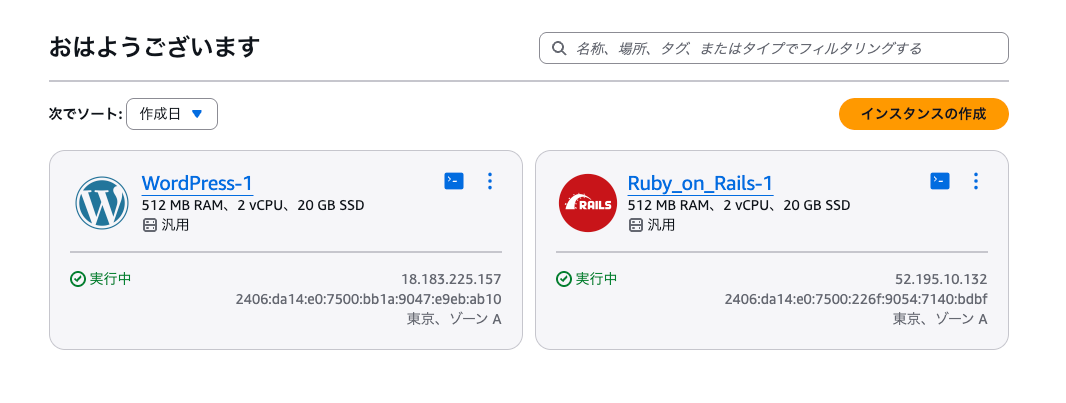
WordPress インスタンスのメタデータ設定確認結果は次の通りです。
% aws lightsail get-instance --instance-name WordPress-1
{
    "instance": {
        "name": "WordPress-1",
        "arn": "arn:aws:lightsail:ap-northeast-1:123456789012:Instance/aa31b0b2-cd98-40d8-b3fd-62c5232ad882",
        "supportCode": "173033923990/i-01b46079348101138",
        "createdAt": "2026-01-28T06:03:54.942000+09:00",
        "location": {
            "availabilityZone": "ap-northeast-1a",
            "regionName": "ap-northeast-1"
        },
        "resourceType": "Instance",
        "tags": [],
        "blueprintId": "wordpress",
        "blueprintName": "WordPress",

:

        "username": "bitnami",
        "sshKeyName": "LightsailDefaultKeyPair",
        "metadataOptions": {
            "state": "applied",
            "httpTokens": "optional",
            "httpEndpoint": "enabled",
            "httpPutResponseHopLimit": 1,
            "httpProtocolIpv6": "disabled"
        }
    }
}
IMDSv1 と v2 どちらの設定になっているかはget-instanceコマンドのmetadataOptions.httpTokensを確認すれば良いです。
今回はhttpTokensがoptionalです。
ここがoptionalの場合はトークンなしで認証情報が取得できます。ここがrequiredの場合は署名付きトークンヘッダが必須になるので v2 を利用していることになります。
Ruby on Rails インスタンスの場合は次の通りです。
% aws lightsail get-instance --instance-name Ruby_on_Rails-1
{
    "instance": {
        "name": "Ruby_on_Rails-1",
        "arn": "arn:aws:lightsail:ap-northeast-1:123456789012:Instance/df7839c7-0235-4cdb-b504-f1934aeb1a80",
        "supportCode": "173033923990/i-021d15734cc0e8ab6",
        "createdAt": "2026-01-28T06:03:23.355000+09:00",
        "location": {
            "availabilityZone": "ap-northeast-1a",
            "regionName": "ap-northeast-1"
        },
        "resourceType": "Instance",
        "tags": [],
        "blueprintId": "ruby_on_rails_ls_1_0",
        "blueprintName": "Ruby on Rails",

:

        "username": "ec2-user",
        "sshKeyName": "LightsailDefaultKeyPair",
        "metadataOptions": {
            "state": "applied",
            "httpTokens": "required",
            "httpEndpoint": "enabled",
            "httpPutResponseHopLimit": 2,
            "httpProtocolIpv6": "disabled"
        }
    }
}
httpTokensがrequiredですね。良いですね。
また、どちらの場合でもhttpEndpointはenabledなので IMDS エンドポイント自体はどちらの場合でも使えます。
もし IMDS 自体を無効化したい場合は、先程のブログに記載があるのですがupdate-instance-metadata-optionsコマンドで無効化してあげてください。
公式ドキュメントでの IMDSv2 記述
ちなみに IMDSv2 に関しては以下のインスタンスイメージを説明するドキュメントでも一部言及されています。
IMDSv2 デフォルト適用が言及されているのは以下です。
- LAMP(Bitnamiじゃないほう)
- Node.js
- Nginx
どうやら Nginx も対象みたいですね。逆に Ruby on Rails では特に明記されていない。
作成したインスタンスを確認してみると、確かに Nginx でも強制適用が有効化されていました。
% aws lightsail get-instance --instance-name Nginx-1
{
    "instance": {
        "name": "Nginx-1",
        "arn": "arn:aws:lightsail:ap-northeast-1:123456789012:Instance/efecaea4-4264-4b88-bf78-570544ba1329",
        "supportCode": "173033923990/i-0b3af88f31a0a20fa",
        "createdAt": "2026-01-28T06:20:15.498000+09:00",
        "location": {
            "availabilityZone": "ap-northeast-1a",
            "regionName": "ap-northeast-1"
        },
        "resourceType": "Instance",
        "tags": [],
        "blueprintId": "nginx_ls_1_0",
        "blueprintName": "Nginx",

:

        "username": "admin",
        "sshKeyName": "LightsailDefaultKeyPair",
        "metadataOptions": {
            "state": "applied",
            "httpTokens": "required",
            "httpEndpoint": "enabled",
            "httpPutResponseHopLimit": 2,
            "httpProtocolIpv6": "disabled"
        }
    }
}
さいごに
本日は Amazon Lightsail で Ruby on Rails などの新しいタイプのブループリントが提供されるようになり、新しいブループリントで IMDSv2 がデフォルトで適用されるようになったので確認してみました。
脱 Bitnami の流れなのかよくわからないですが、Lightsail 標準イメージが提供されるようになっていますね。
また、それらでは IMDSv2 が強制適用されるようになっておりデフォルトのセキュリティが向上しています。
Node.js はなぜ 18.x で出したのだろう。24.x もそのうち出るのですかね。