Amazon Q in ConnectとServiceNowの統合時、AWS Step Functionsで定期的にナレッジをタグ付けしてみた

はじめに
Amazon Q in Connectでは、同期されたナレッジごとにタグ付けを行うことで、問い合わせに関連するドキュメントだけを絞り込める「コンテンツセグメンテーション」という機能があります。これにより、以下のメリットが得られます。
- 回答精度の向上 : 関連性の高い情報だけを検索対象にするため、より正確な回答が可能
- 応答時間の短縮 : 検索対象が減ることで、必要な情報へ迅速にアクセス
- 顧客満足度の向上 : 的確でスピーディーな回答により、顧客の課題を早期に解決
以前、ServiceNowをナレッジベースのソースとして、コンテンツセグメンテーションを試しました。
運用を考えると、ServiceNowでナレッジ記事を新規作成した際に、Amazon Q in Connect側へ同期後、タグ付けを定期的に行う仕組みが必要です。
ServiceNowでは、ナレッジベースという単位で、ナレッジ記事を分けて作成することができます。
今回は、特定のServiceNowナレッジベースを対象に、AWS Step Functionsで定期的にタグ付けする方法を紹介します。
前提条件
- ServiceNowのナレッジ記事作成済み
- Amazon Q in Connect有効化済み
構成
以下の構成です。
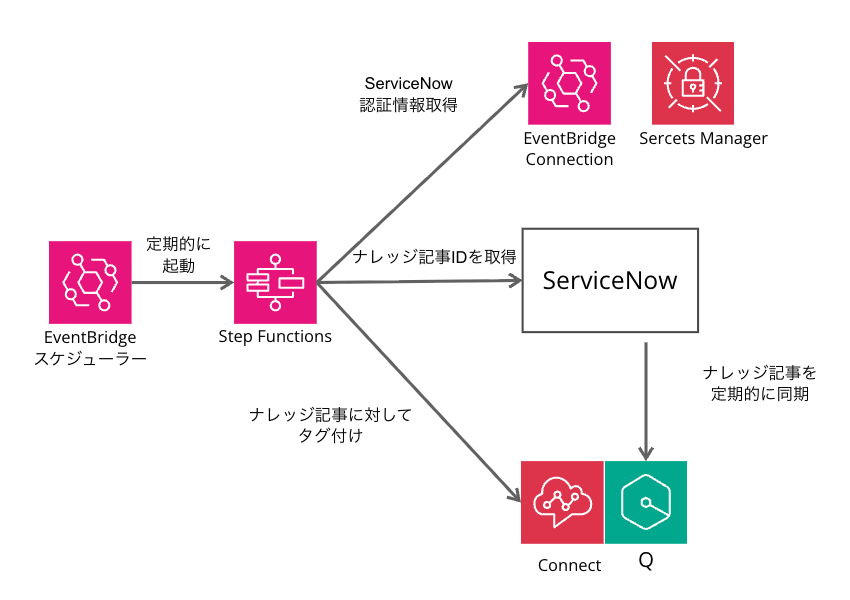
処理の流れは以下のとおりです。
- EventBridge Schedulerが定期的にStep Functionsのステートマシンを起動
- Step FunctionsがEventBridge接続を使用してServiceNow APIを呼び出し、特定のナレッジベース内の公開済み記事を全て取得
- Step FunctionsがAmazon Q in ConnectのAPIを呼び出し、同期済みのコンテンツ一覧を取得
- ServiceNowの記事番号とQ in Connectのコンテンツを照合し、一致するコンテンツにタグを付与
EventBridge接続
以下の設定で、EventBridge接続を作成します。
- APIタイプ:パブリック
- 認証タイプ:基本
- ServiceNowのユーザー名とパスワードを設定
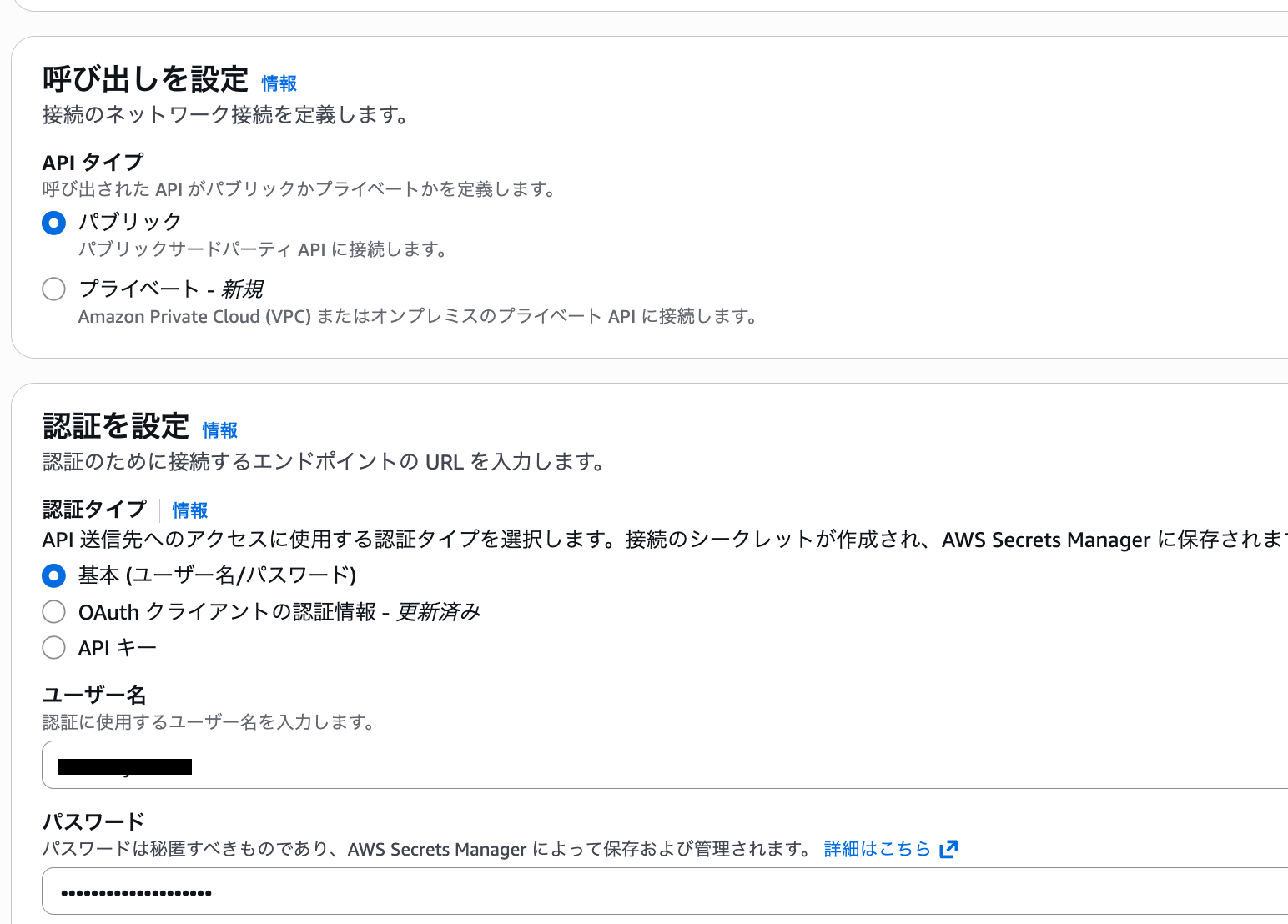
- ServiceNowのユーザー名とパスワードを設定
ServiceNowのナレッジベースIDを取得
ServiceNowのインスタンス名、Admin権限を持つユーザー名とパスワードを使用し、以下のコマンドを実行することで、各ナレッジベースのID(sys_id)を取得できます。
今回はAWS CloudShellで実行しました。ナレッジベース名「cm-hirai」内のナレッジ記事のみをタグ付けするため、対応するsys_idをコピーしておきます。
$ curl -X GET \
   "https://インスタンス名.service-now.com/api/now/table/kb_knowledge_base?sysparm_fields=sys_id,title,description" \
   -H "Accept: application/json" \
   -H "Content-Type: application/json" \
   --user 'ユーザー名:パスワード' \
   | jq .
  % Total    % Received % Xferd  Average Speed   Time    Time     Time  Current
                                 Dload  Upload   Total   Spent    Left  Speed
100   688    0   688    0     0   1128      0 --:--:-- --:--:-- --:--:--  1127
{
  "result": [
    {
      "sys_id": "0aa3ffa7db7c030064dd36cb7c96197f",
      "description": "KCS Demo KB",
      "title": "KCS Knowledge Base (demo data)"
    },
    {
      "sys_id": "203c024fc32032107f159b377d0131bb",
      "description": "",
      "title": "cm-hirai"
    },
Amazon Q in ConnectのナレッジベースIDを取得
Amazon Q in ConnectのナレッジベースIDを取得します。マネジメントコンソールから統合名(ナレッジベース名)を確認できます。knowledgeBaseIdをコピーしておきます。
$ aws qconnect list-knowledge-bases
{
    "knowledgeBaseSummaries": [
        {
            "knowledgeBaseId": "0f961e7e-e9f3-45d2-8d47-86b82c87ab90",
            "knowledgeBaseArn": "arn:aws:wisdom:ap-northeast-1:111111111111:knowledge-base/0f961e7e-e9f3-45d2-8d47-86b82c87ab90",
            "name": "servicenow",
            "knowledgeBaseType": "EXTERNAL",
            "status": "ACTIVE",
            "sourceConfiguration": {
                "appIntegrations": {
                    "appIntegrationArn": "arn:aws:app-integrations:ap-northeast-1:111111111111:data-integration/05d7ca59-60eb-4efc-bacb-654946123bb2",
                    "objectFields": [
                        "number",
                        "workflow_state",
                        "active",
                        "short_description",
                        "sys_mod_count",
                        "text",
                        "wiki",
                        "sys_updated_on",
                        "sys_id"
                    ]
                }
            },
            "renderingConfiguration": {
                "templateUri": "https://インスタンス名.service-now.com/nav_to.do?uri=/kb_view.do?sysparm_article=${number}"
            },
            "serverSideEncryptionConfiguration": {
                "kmsKeyId": "arn:aws:kms:ap-northeast-1:111111111111:key/c3d2b7d5-23cb-4900-b42f-973eba07d86d"
            },
            "tags": {
                "AmazonConnectEnabled": "True"
            }
        }
    ]
}
Step Functions
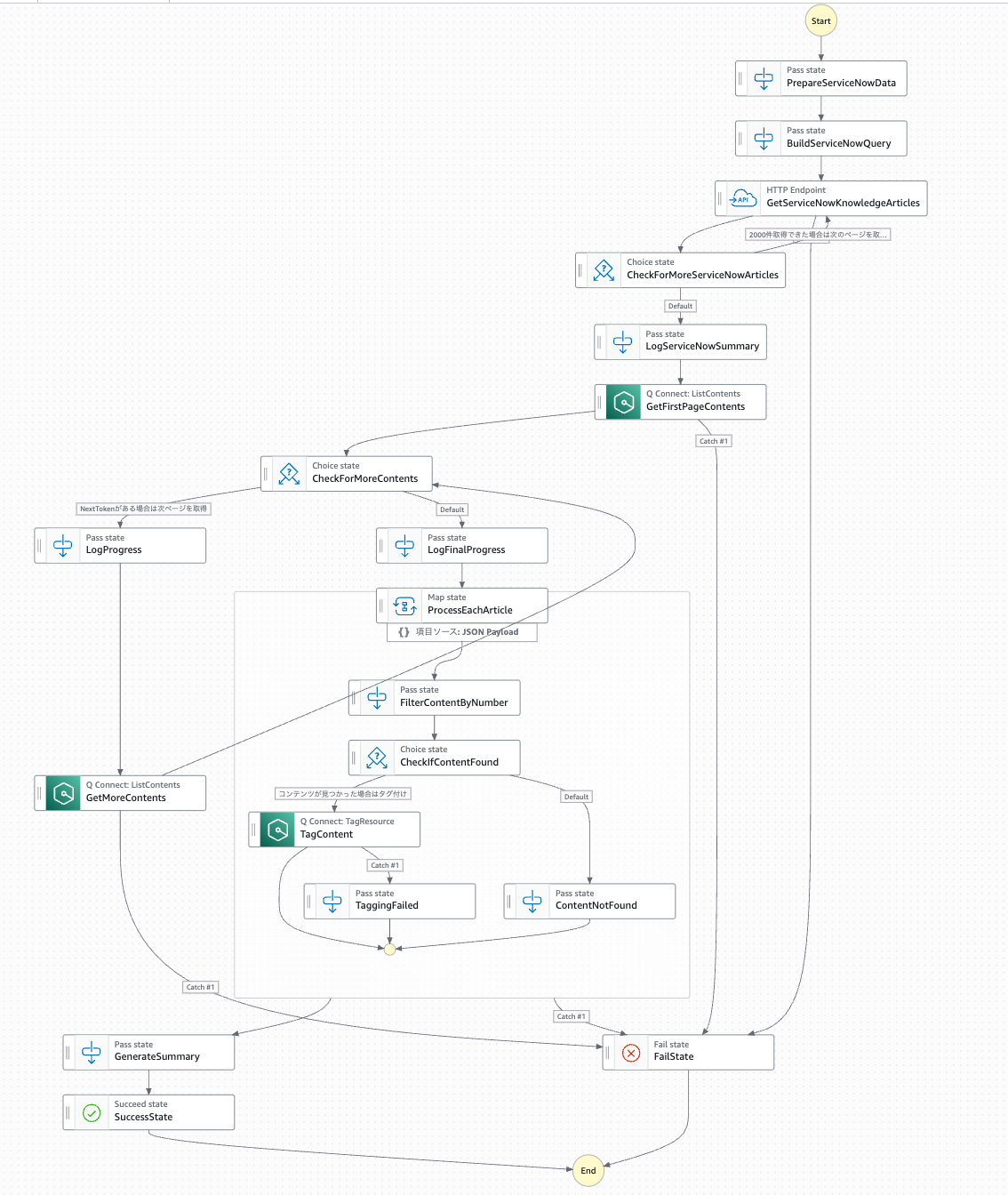
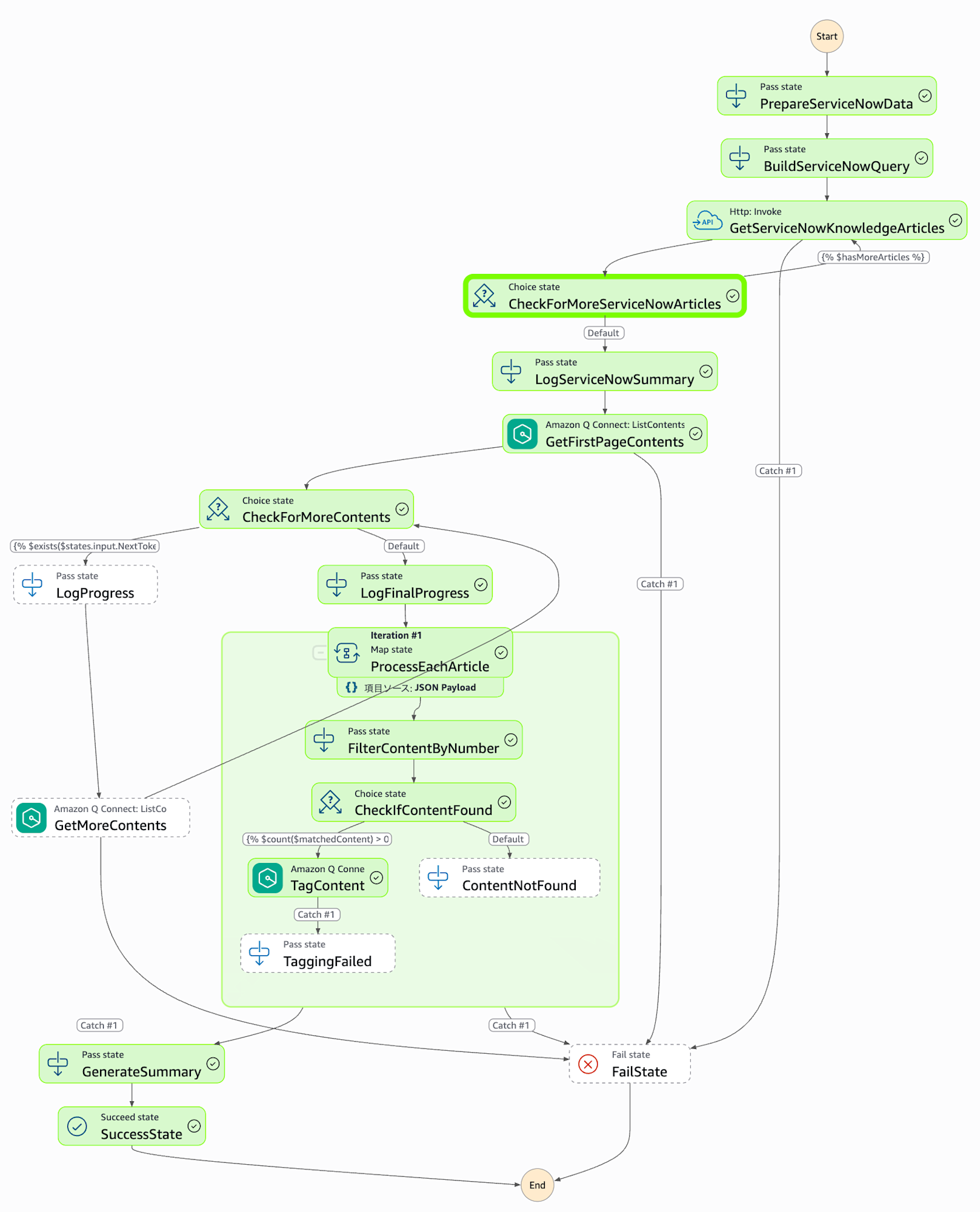
ステートマシンの全体像は以下のとおりです。
{
  "Comment": "ServiceNowのナレッジ記事をAmazon Q in Connectにタグ付けするワークフロー",
  "QueryLanguage": "JSONata",
  "StartAt": "PrepareServiceNowData",
  "States": {
    "PrepareServiceNowData": {
      "Comment": "【初期設定】接続情報とパラメータを変数として定義",
      "Type": "Pass",
      "Assign": {
        "serviceNowInstanceName": "インスタンス名",
        "serviceNowConnectionArn": "arn:aws:events:ap-northeast-1:111111111111:connection/servicenow/c699d735-03ea-45ff-bb15-da4de8be92ce",
        "serviceNowKnowledgeBaseId": "203c024fc32032107f159b377d0131bb",
        "serviceNowWorkflowState": "published",
        "serviceNowQueryFields": "number",
        "serviceNowLimit": 2000,
        "qconnectKnowledgeBaseId": "0f961e7e-e9f3-45d2-8d47-86b82c87ab90",
        "qconnectMaxResults": 100,
        "maxConcurrency": 10,
        "tags": {
          "category": "japan"
        },
        "allContentList": [],
        "articleNumbers": [],
        "serviceNowOffset": 0
      },
      "Next": "BuildServiceNowQuery"
    },
    "BuildServiceNowQuery": {
      "Comment": "【クエリ構築】ServiceNow API用の検索条件を作成",
      "Type": "Pass",
      "Assign": {
        "serviceNowQuery": "{% 'kb_knowledge_base=' & $serviceNowKnowledgeBaseId & '^workflow_state=' & $serviceNowWorkflowState %}"
      },
      "Next": "GetServiceNowKnowledgeArticles"
    },
    "GetServiceNowKnowledgeArticles": {
      "Comment": "【記事取得】ServiceNowから公開済みナレッジ記事の番号を取得(ページネーション対応)",
      "Type": "Task",
      "Resource": "arn:aws:states:::http:invoke",
      "Arguments": {
        "ApiEndpoint": "{% 'https://' & $serviceNowInstanceName & '.service-now.com/api/now/table/kb_knowledge' %}",
        "Method": "GET",
        "Headers": {
          "Content-Type": "application/json",
          "Accept": "application/json"
        },
        "Authentication": {
          "ConnectionArn": "{% $serviceNowConnectionArn %}"
        },
        "QueryParameters": {
          "sysparm_query": "{% $serviceNowQuery %}",
          "sysparm_fields": "{% $serviceNowQueryFields %}",
          "sysparm_limit": "{% $string($serviceNowLimit) %}",
          "sysparm_offset": "{% $string($serviceNowOffset) %}"
        }
      },
      "Retry": [
        {
          "ErrorEquals": [
            "States.Timeout",
            "States.TaskFailed"
          ],
          "IntervalSeconds": 2,
          "MaxAttempts": 3,
          "BackoffRate": 2,
          "Comment": "タイムアウトやAPI障害時は最大3回リトライ"
        }
      ],
      "Assign": {
        "articleNumbers": "{% $append($articleNumbers, $states.result.ResponseBody.result.number) %}",
        "serviceNowOffset": "{% $serviceNowOffset + $serviceNowLimit %}",
        "hasMoreArticles": "{% $count($states.result.ResponseBody.result) = $serviceNowLimit %}"
      },
      "Next": "CheckForMoreServiceNowArticles",
      "Catch": [
        {
          "ErrorEquals": [
            "States.ALL"
          ],
          "Next": "FailState"
        }
      ]
    },
    "CheckForMoreServiceNowArticles": {
      "Comment": "【ページング判定】さらに取得すべき記事があるか確認",
      "Type": "Choice",
      "Choices": [
        {
          "Condition": "{% $hasMoreArticles %}",
          "Next": "GetServiceNowKnowledgeArticles",
          "Comment": "2000件取得できた場合は次のページを取得"
        }
      ],
      "Default": "LogServiceNowSummary"
    },
    "LogServiceNowSummary": {
      "Comment": "【進捗ログ】ServiceNowから取得した記事数を記録",
      "Type": "Pass",
      "Output": {
        "message": "{% 'Retrieved ' & $string($count($articleNumbers)) & ' articles from ServiceNow' %}",
        "articleCount": "{% $count($articleNumbers) %}"
      },
      "Next": "GetFirstPageContents"
    },
    "GetFirstPageContents": {
      "Comment": "【コンテンツ取得】Q Connectから全コンテンツ情報を取得(1回目)",
      "Type": "Task",
      "Resource": "arn:aws:states:::aws-sdk:qconnect:listContents",
      "Arguments": {
        "KnowledgeBaseId": "{% $qconnectKnowledgeBaseId %}",
        "MaxResults": "{% $qconnectMaxResults %}"
      },
      "Retry": [
        {
          "ErrorEquals": [
            "QConnect.ThrottlingException"
          ],
          "IntervalSeconds": 2,
          "MaxAttempts": 5,
          "BackoffRate": 2,
          "Comment": "レート制限時は最大5回リトライ(指数バックオフ)"
        },
        {
          "ErrorEquals": [
            "States.TaskFailed"
          ],
          "IntervalSeconds": 1,
          "MaxAttempts": 2,
          "BackoffRate": 1.5
        }
      ],
      "Assign": {
        "allContentList": "{% $states.result.ContentSummaries.{'ContentArn': ContentArn, 'Number': Metadata.number} %}"
      },
      "Output": "{% $states.result %}",
      "Next": "CheckForMoreContents",
      "Catch": [
        {
          "ErrorEquals": [
            "States.ALL"
          ],
          "Next": "FailState"
        }
      ]
    },
    "CheckForMoreContents": {
      "Comment": "【ページング判定】Q Connectにさらに取得すべきコンテンツがあるか確認",
      "Type": "Choice",
      "Choices": [
        {
          "Condition": "{% $exists($states.input.NextToken) %}",
          "Next": "LogProgress",
          "Comment": "NextTokenがある場合は次ページを取得"
        }
      ],
      "Default": "LogFinalProgress"
    },
    "LogProgress": {
      "Comment": "【進捗ログ】現在までに取得したコンテンツ数を記録",
      "Type": "Pass",
      "Output": {
        "message": "{% 'Loaded ' & $string($count($allContentList)) & ' contents so far' %}",
        "contentCount": "{% $count($allContentList) %}",
        "NextToken": "{% $states.input.NextToken %}"
      },
      "Next": "GetMoreContents"
    },
    "GetMoreContents": {
      "Comment": "【コンテンツ取得】Q Connectから追加のコンテンツ情報を取得(2回目以降)",
      "Type": "Task",
      "Resource": "arn:aws:states:::aws-sdk:qconnect:listContents",
      "Arguments": {
        "KnowledgeBaseId": "{% $qconnectKnowledgeBaseId %}",
        "MaxResults": "{% $qconnectMaxResults %}",
        "NextToken": "{% $states.input.NextToken %}"
      },
      "Retry": [
        {
          "ErrorEquals": [
            "QConnect.ThrottlingException"
          ],
          "IntervalSeconds": 2,
          "MaxAttempts": 5,
          "BackoffRate": 2
        },
        {
          "ErrorEquals": [
            "States.TaskFailed"
          ],
          "IntervalSeconds": 1,
          "MaxAttempts": 2,
          "BackoffRate": 1.5
        }
      ],
      "Assign": {
        "allContentList": "{% $append($allContentList, $states.result.ContentSummaries.{'ContentArn': ContentArn, 'Number': Metadata.number}) %}"
      },
      "Output": "{% $states.result %}",
      "Next": "CheckForMoreContents",
      "Catch": [
        {
          "ErrorEquals": [
            "States.ALL"
          ],
          "Next": "FailState"
        }
      ]
    },
    "LogFinalProgress": {
      "Comment": "【進捗ログ】全コンテンツの取得完了を記録",
      "Type": "Pass",
      "Output": {
        "message": "{% 'Total contents loaded: ' & $string($count($allContentList)) %}",
        "totalContents": "{% $count($allContentList) %}",
        "totalArticles": "{% $count($articleNumbers) %}"
      },
      "Next": "ProcessEachArticle"
    },
    "ProcessEachArticle": {
      "Comment": "【タグ付け処理】各記事に対してタグを付与(最大10並列)",
      "Type": "Map",
      "Items": "{% $articleNumbers %}",
      "MaxConcurrency": "{% $maxConcurrency %}",
      "Next": "GenerateSummary",
      "Catch": [
        {
          "ErrorEquals": [
            "States.ALL"
          ],
          "Next": "FailState"
        }
      ],
      "ItemProcessor": {
        "ProcessorConfig": {
          "Mode": "INLINE"
        },
        "StartAt": "FilterContentByNumber",
        "States": {
          "FilterContentByNumber": {
            "Comment": "【照合】記事番号に対応するQ Connectコンテンツを検索",
            "Type": "Pass",
            "Assign": {
              "currentArticleNumber": "{% $states.input %}",
              "matchedContent": "{% $allContentList[Number = $states.input] %}"
            },
            "Next": "CheckIfContentFound"
          },
          "CheckIfContentFound": {
            "Comment": "【存在確認】対応するコンテンツが見つかったか判定",
            "Type": "Choice",
            "Choices": [
              {
                "Condition": "{% $count($matchedContent) > 0 %}",
                "Next": "TagContent",
                "Comment": "コンテンツが見つかった場合はタグ付け"
              }
            ],
            "Default": "ContentNotFound"
          },
          "TagContent": {
            "Comment": "【タグ付与】コンテンツにタグを追加(既存タグは上書き)",
            "Type": "Task",
            "Resource": "arn:aws:states:::aws-sdk:qconnect:tagResource",
            "Arguments": {
              "ResourceArn": "{% $matchedContent[0].ContentArn %}",
              "Tags": "{% $tags %}"
            },
            "Retry": [
              {
                "ErrorEquals": [
                  "QConnect.ThrottlingException"
                ],
                "IntervalSeconds": 1,
                "MaxAttempts": 3,
                "BackoffRate": 2,
                "Comment": "レート制限時は最大3回リトライ"
              },
              {
                "ErrorEquals": [
                  "States.TaskFailed"
                ],
                "IntervalSeconds": 1,
                "MaxAttempts": 2,
                "BackoffRate": 1.5
              }
            ],
            "Output": {
              "articleNumber": "{% $currentArticleNumber %}",
              "status": "success",
              "contentArn": "{% $matchedContent[0].ContentArn %}"
            },
            "End": true,
            "Catch": [
              {
                "ErrorEquals": [
                  "States.ALL"
                ],
                "Output": {
                  "articleNumber": "{% $currentArticleNumber %}",
                  "status": "failed",
                  "error": "{% $states.errorOutput.Error %}",
                  "cause": "{% $states.errorOutput.Cause %}"
                },
                "Next": "TaggingFailed"
              }
            ]
          },
          "ContentNotFound": {
            "Comment": "【未発見】Q Connectに対応するコンテンツが存在しない",
            "Type": "Pass",
            "Output": {
              "articleNumber": "{% $currentArticleNumber %}",
              "status": "not_found"
            },
            "End": true
          },
          "TaggingFailed": {
            "Comment": "【失敗記録】タグ付けに失敗した記事を記録",
            "Type": "Pass",
            "End": true
          }
        }
      }
    },
    "GenerateSummary": {
      "Comment": "【実行サマリー】実行結果の統計情報を生成",
      "Type": "Pass",
      "Output": {
        "executionSummary": {
          "executionId": "{% $states.context.Execution.Id %}",
          "executionName": "{% $states.context.Execution.Name %}",
          "startTime": "{% $states.context.Execution.StartTime %}",
          "configuration": {
            "serviceNowInstanceName": "{% $serviceNowInstanceName %}",
            "serviceNowKnowledgeBaseId": "{% $serviceNowKnowledgeBaseId %}",
            "qconnectKnowledgeBaseId": "{% $qconnectKnowledgeBaseId %}",
            "maxConcurrency": "{% $maxConcurrency %}"
          },
          "totalArticles": "{% $count($articleNumbers) %}",
          "totalContents": "{% $count($allContentList) %}",
          "appliedTags": "{% $tags %}",
          "results": {
            "successCount": "{% $count($states.input[status='success']) %}",
            "notFoundCount": "{% $count($states.input[status='not_found']) %}",
            "failedCount": "{% $count($states.input[status='failed']) %}",
            "totalProcessed": "{% $count($states.input) %}"
          },
          "issues": {
            "notFoundArticles": "{% $count($states.input[status='not_found']) > 0 ? $states.input[status='not_found'].articleNumber : [] %}",
            "failedArticles": "{% $count($states.input[status='failed']) > 0 ? $states.input[status='failed'].{'articleNumber': articleNumber, 'error': error} : [] %}"
          },
          "note": "詳細な実行履歴はStep Functionsの実行履歴で確認できます"
        }
      },
      "Next": "SuccessState"
    },
    "SuccessState": {
      "Comment": "【正常終了】ワークフロー完了",
      "Type": "Succeed"
    },
    "FailState": {
      "Comment": "【異常終了】ワークフロー失敗",
      "Type": "Fail",
      "Error": "WorkflowFailed",
      "Cause": "ワークフロー実行中にエラーが発生しました"
    }
  }
}
PrepareServiceNowDataステートでは、以下のパラメータを環境に合わせて変更してください。
- serviceNowInstanceName:ServiceNowのインスタンス名
- serviceNowConnectionArn:EventBridge接続のARN
- serviceNowKnowledgeBaseId:ServiceNowのナレッジベースID
- qconnectKnowledgeBaseId:Q in ConnectのナレッジベースID
処理の概要
このステートマシンは、以下の手順で処理を実行します。
- 初期設定:接続情報とパラメータを定義
- ServiceNow記事の取得:特定のナレッジベース内の公開済み記事番号を取得(ページネーション対応)
- Q in Connectコンテンツの取得:同期済みコンテンツの一覧を取得(ページネーション対応)
- タグ付け処理:ServiceNowの記事番号とQ in Connectのコンテンツを照合し、一致するコンテンツに対してタグを付与(最大10並列処理)
- 実行結果の生成:タグ付けの成功数、失敗数などの統計情報を出力
serviceNowLimitを2000に設定している理由は、ServiceNow APIのタイムアウトを防ぎ、安定してデータを取得するためです。一度に大量のデータ(例:デフォルト上限の1万件など)を要求すると、ServiceNow側の処理に時間がかかりすぎてレスポンスが返ってこなくなるリスクがあるため、2000件程度に制限しています。
qconnectMaxResultsを100に設定している理由は、ListContentAPIのMaxResultsの仕様上の上限が100件だからです。
MaxResults (integer) --
The maximum number of results to return per page.
Valid Range: Minimum value of 1. Maximum value of 100.
https://docs.aws.amazon.com/amazon-q-connect/latest/APIReference/API_ListContents.html
IAMポリシー
マネジメントコンソールでステートマシンを作成する際、実行ロールに以下のポリシーを手動で追加してください。
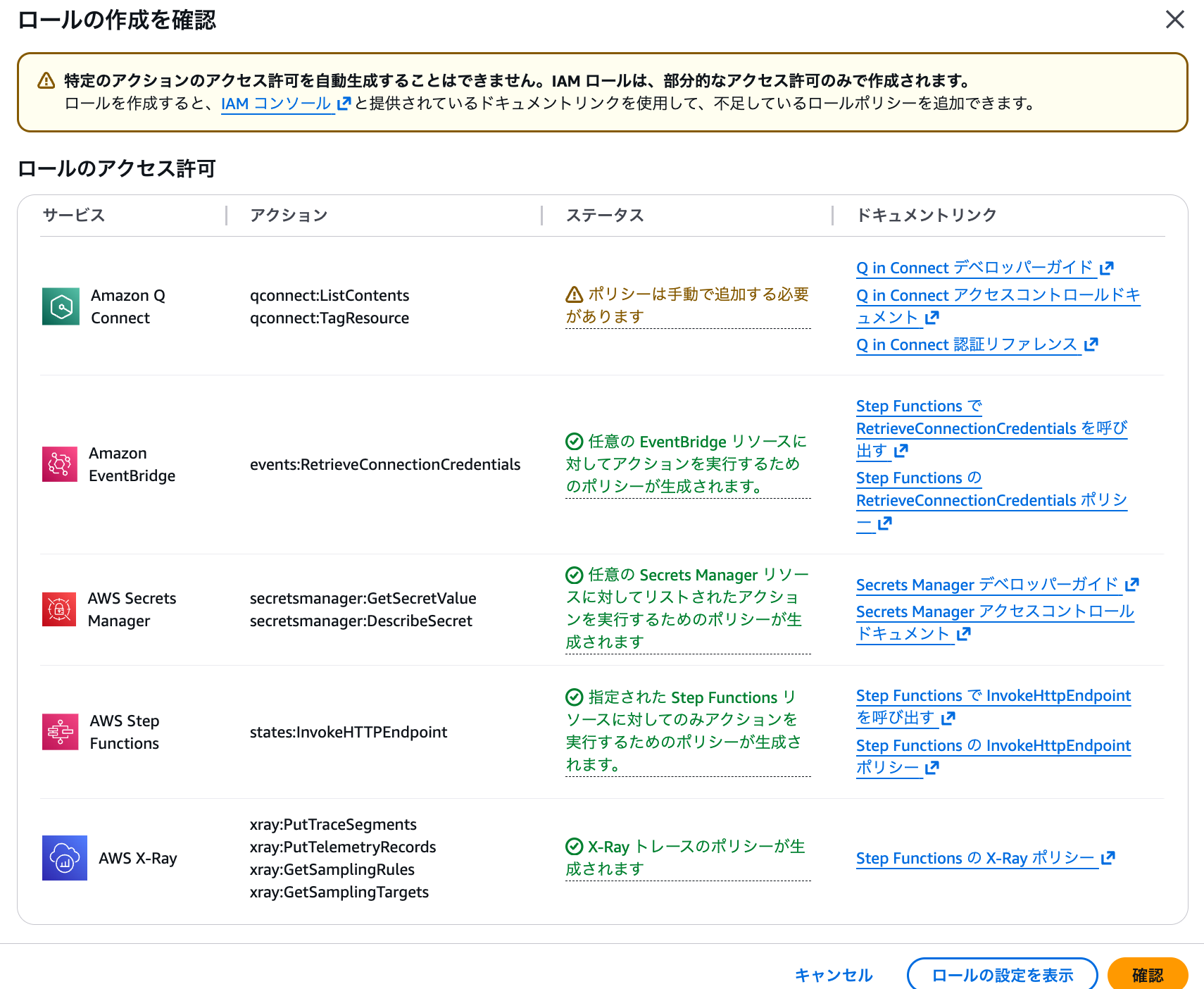
以下のポリシーを追加してください。
{
    "Version": "2012-10-17",
    "Statement": [
        {
            "Effect": "Allow",
            "Action": [
                "wisdom:TagResource",
                "wisdom:ListContents"
            ],
            "Resource": "*"
        }
    ]
}
EventBridge Scheduler
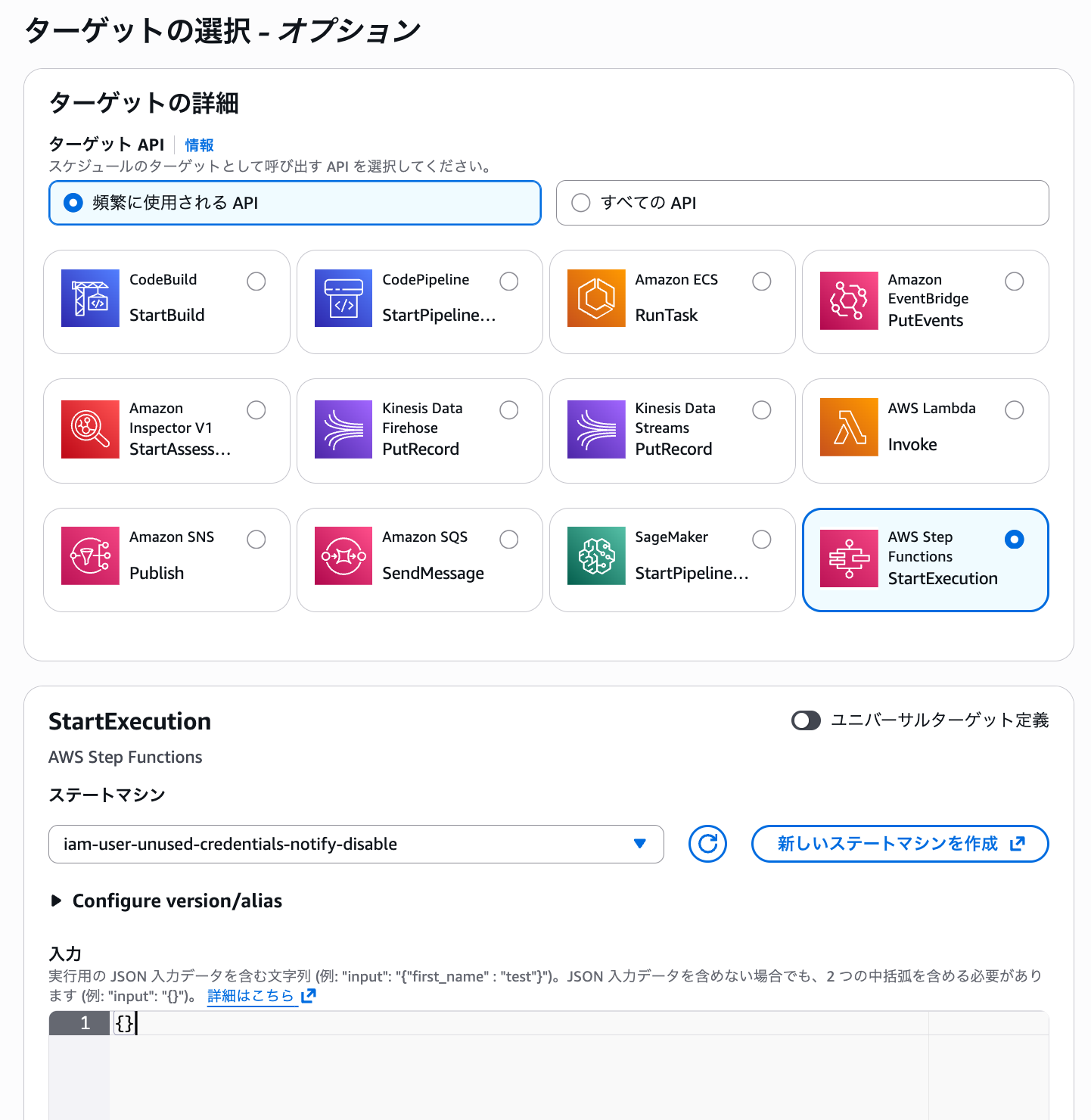
EventBridge Schedulerを作成し、定期的にステートマシンを実行します。
ターゲットAPIは「StartExecution」を選択し、先ほど作成したステートマシンを設定します。
注意点
ナレッジ記事が多い場合、Step Functionsのステート間で受け渡せるデータサイズ(ペイロードサイズ)の上限である256KBを超えてエラーになる可能性があります。
今回のステートマシンでは、allContentListにQ in Connectの全コンテンツ情報を、articleNumbersにServiceNowの記事番号を格納し、これらの変数をステート間で受け渡しています。ナレッジ記事が数万件ある場合、これらの配列サイズが256KBを超える可能性があります。
その場合は、AWS Lambdaを利用して処理を分割する、DynamoDBなどの外部ストレージに一時データを保存するなど方法を別途検討してください。
また、ServiceNowからQ in Connectへのナレッジ記事の同期は1時間に1回実行されます。
さらにタグ付けも定期的に行う場合、ナレッジ記事が同期されてからタグ付けされるまでにタイムラグが発生します。定期的にStep Functionsを実行するタイミングは、同期スケジュールを考慮して検討する必要があります。
動作確認
問題なくステートマシンが実行されました。
SuccessStateステートでは、実行結果を確認できました。
2つの記事がタグ付けされたことが分かります。
{
  "name": "SuccessState",
  "output": {
    "executionSummary": {
      "executionId": "arn:aws:states:ap-northeast-1:111111111111:execution:servicenow-qconnect-tagadd:867cf59c-f735-4ea4-af45-9debcee49905",
      "executionName": "867cf59c-f735-4ea4-af45-9debcee49905",
      "startTime": "2025-11-14T05:23:59.082Z",
      "configuration": {
        "serviceNowInstanceName": "dev193429",
        "serviceNowKnowledgeBaseId": "203c024fc32032107f159b377d0131bb",
        "qconnectKnowledgeBaseId": "0f961e7e-e9f3-45d2-8d47-86b82c87ab90",
        "maxConcurrency": 10
      },
      "totalArticles": 2,
      "totalContents": 45,
      "appliedTags": {
        "category": "japan"
      },
      "results": {
        "successCount": 2,
        "notFoundCount": 0,
        "failedCount": 0,
        "totalProcessed": 2
      },
      "issues": {
        "notFoundArticles": [],
        "failedArticles": []
      },
      "note": "Full details available in Step Functions execution history"
    }
  },
  省略
実行結果のtotalContents: 45は、Q in Connectのナレッジベースに同期されている全コンテンツ数を表しています。これはServiceNowの全ナレッジベースから同期されたコンテンツの合計です。一方、totalArticles: 2は、今回タグ付け対象としたServiceNowの特定ナレッジベース(cm-hirai)内の公開済み記事数です。今回タグ付けされた2つの記事は、この45件の中に含まれています。

ServiceNowのナレッジベース一覧
なお、タグ付け対象のナレッジ記事番号をServiceNowのコンソールから確認し、コンテンツがタグ付けされているかをCLIで確認できました(例:KB0010006)。番号ではなく、ナレッジのタイトルなどでも確認可能です。
$ aws qconnect list-contents --knowledge-base 0f961e7e-e9f3-45d2-8d47-86b82c87ab90 --query "contentSummaries[?metadata.number=='KB0010006']"

[
        {
            "contentArn": "arn:aws:wisdom:ap-northeast-1:111111111111:content/0f961e7e-e9f3-45d2-8d47-86b82c87ab90/96067a16-e3dc-4a18-82be-c76470e9d758",
            "contentId": "96067a16-e3dc-4a18-82be-c76470e9d758",
            "knowledgeBaseArn": "arn:aws:wisdom:ap-northeast-1:111111111111:knowledge-base/0f961e7e-e9f3-45d2-8d47-86b82c87ab90",
            "knowledgeBaseId": "0f961e7e-e9f3-45d2-8d47-86b82c87ab90",
            "name": "KB0010004",
            "revisionId": "OWQwNzllNWE4ZTU2OGExZWIyYTE2OGY3NWFjMjg4ZDMwZWYzMjJkZDJiNDZmN2ZjYWY2NTI3ZDhlMDFkNWU5ZA==",
            "title": "オフィス情報",
            "contentType": "application/x.wisdom-json;source=servicenow",
            "status": "ACTIVE",
            "metadata": {
                "active": "true",
                "aws:wisdom:externalVersion": "4",
                "number": "KB0010004",
                "short_description": "オフィス情報",
                "sys_mod_count": "4",
                "workflow_state": "Published"
            },
            "tags": {
                "category": "japan"
            }
        }
]
特定のナレッジ記事のタグの内容のみを確認することも可能です。
$ aws qconnect list-tags-for-resource \
--resource-arn "arn:aws:wisdom:ap-northeast-1:111111111111:content/bbe5faac-a562-41ee-b50b-b53716fbc54c/95786efd-0a48-4956-b8ff-377bc67d8e0a"

{
    "tags": {
        "category": "japan"
    }
}
実際に通話中にタグ付けしたコンテンツのみから検索させるには、ConnectフローからLambdaを呼び出す必要があります。設定方法は以下の記事をご参照ください。
最後に
Amazon Q in ConnectとServiceNowを統合する際、ナレッジ記事に定期的にタグ付けを行う仕組みをStep Functionsで構築しました。
EventBridge Schedulerによる定期実行により、新規作成されたナレッジ記事にも自動的にタグが付与されます。
これにより、コンテンツセグメンテーション機能を活用した効率的な運用が可能になり、回答精度の向上や応答時間の短縮が実現できます。