
MediaLiveでSingle classのSRT Listener inputが作成できないことを確認してみた

はじめに
清水です。先日以下のエントリにてAWS Elemental MediaLiveがInputとOutputの双方でSRT Listener Modeに対応したアップデートをお届けしました。
さて、上記エントリ執筆時の検証において、SRT Listener ModeのInputは Standard input class、SRT Listener ModeのOutputを持つChannelでは Single pipelineを選択しました。動作検証が目的とだったためInput、Channelの双方でSingle構成でよいかと考えていたのですが、SRT listenerを選択したAWSマネジメントコンソールのCreate Input画面でInput classの指定箇所がなくSingle input classが選択できずに、そのまま作成してStandard Input classになった、という流れでした。
この際、SRT Listener Mode自体がまだ新機能であるためマネジメントコンソールではSingle input classでの作成に対応していない状況であり、AWS CLIなど別の手段であればSingle classなSRT Listener ModeのInputが作成できるのではないかな、などと予想をしていました。本ブログエントリでは、これを受け改めてSingle classなSRT Listener ModeのInputがAWS CLIで作成できるかを確認してみました。
確認の結果、どうやらAWS CLIでも、また仕様的にも現段階ではSingle classなSRT Listener ModeのInputは作成できなさそう、というのが筆者の現時点での見解です。これを踏まえ、このSRT Listener ModeのようなStandard classのInputをSingle pipelineのChannelにアタッチした際にどのような挙動となるのかも確認してみました。InputのみStandard、ChannelはSingleという構成の場合、Inputの片方のパイプラインは問題なく動作しますが、もう一方のパイプラインは無効化されているという挙動でした。
なお、本ブログエントリでは以下AWS CLIの環境で動作を確認しています。
 % aws --version
aws-cli/2.35.11 Python/3.14.5 Darwin/24.6.0 exe/arm64
MediaLiveでAWS CLIを使い既存Inputの情報から新規にInput作成を試みる
まずはAWS CLIでMediaLiveのInputリソースを作成する方法についておさらいしておきましょう。
create-inputサブコマンドを利用します。指定するオプションがなかなか多いので、個人的にはあらかじめ設定項目をJSONデータのファイルでまとめ--cli-input-jsonオプションで指定する方法が好みです。これはMediaLive ChannelリソースをAWS CLIで作成するときにも使える手段ですね。
% aws medialive create-input --cli-input-json file://input-file.json
さてこの--cli-input-jsonオプションで指定するファイル(ここではinput-file.json)については、describe-inputサブコマンドで取得できるJSON形式のデータを活用すると容易に作成できるかと思います。こちらもChannelリソースに同じくです。ということで、ちょうど先日のブログエントリで作成したものと同等のInputリソースがあったので、こちらをdescribe-inputして情報を取得しましょう。
 % aws medialive describe-input --input-id 1XXX5 --output json
{
    "Arn": "arn:aws:medialive:ap-northeast-1:123456789012:input:1XXX5",
    "AttachedChannels": [
        "2XXXXX4"
    ],
    "Destinations": [
        {
            "Ip": "35.XXX.XXX.201",
            "Port": "5050",
            "Url": "srt://35.XXX.XXX.201:5050",
            "NetworkRoutes": []
        },
        {
            "Ip": "13.XXX.XXX.212",
            "Port": "5050",
            "Url": "srt://13.XXX.XXX.212:5050",
            "NetworkRoutes": []
        }
    ],
    "Id": "1XXX5",
    "InputClass": "STANDARD",
    "InputDevices": [],
    "InputPartnerIds": [],
    "InputSourceType": "STATIC",
    "MediaConnectFlows": [],
    "Name": "medialive-srt-listener-input",
    "SecurityGroups": [
        "5XXXXX2"
    ],
    "Sources": [],
    "State": "ATTACHED",
    "Tags": {},
    "Type": "SRT_LISTENER",
    "SrtSettings": {
        "SrtCallerSources": [],
        "SrtListenerSettings": {
            "Decryption": {
                "Algorithm": "AES256",
                "PassphraseSecretArn": "arn:aws:secretsmanager:ap-northeast-1:123456789012:secret:MediaLive/SRTEncryptionPassphrase/medialive-srt-listener-PXXXXL"
            },
            "MinimumLatency": 2000
        }
    },
    "InputNetworkLocation": "AWS",
    "Smpte2110ReceiverGroupSettings": {
        "Smpte2110ReceiverGroups": []
    }
}
ここからリソース固有の情報を省いたJSONデータを作成すればcreate-inputの入力用JSONとして使えるはず、と思い込み、JSONデータを作成してみます。ひとまず以下のデータを作成しました。本当は"InputClass": "STANDARD"を"InputClass": "SINGLE"などとすればSingle classなSRT Listener Mode Inputになると思ったのですがなぜか?うまくいかず、ひとまずはStandard classで作成を試みました。
 % cat input-json-from-describe.json
{
    "InputClass": "STANDARD",
    "Name": "srt-listener-input-by-awscli",
    "SecurityGroups": [
        "5XXXXX2"
    ],
    "Type": "SRT_LISTENER",
    "SrtSettings": {
        "SrtCallerSources": [],
        "SrtListenerSettings": {
            "Decryption": {
                "Algorithm": "AES256",
                "PassphraseSecretArn": "arn:aws:secretsmanager:ap-northeast-1:123456789012:secret:MediaLive/SRTEncryptionPassphrase/medialive-srt-listener-PXXXXL"
            },
            "MinimumLatency": 2000
        }
    },
    "InputNetworkLocation": "AWS"
}
 % aws medialive create-input --cli-input-json file://input-json-from-describe.json

aws: [ERROR]: An error occurred (ParamValidation): Parameter validation failed:
Unknown parameter in input: "InputClass", must be one of: Destinations, InputDevices, InputSecurityGroups, MediaConnectFlows, Name, RequestId, RoleArn, Sources, Tags, Type, Vpc, SrtSettings, InputNetworkLocation, MulticastSettings, Smpte2110ReceiverGroupSettings, SdiSources, RouterSettings
Unknown parameter in input: "SecurityGroups", must be one of: Destinations, InputDevices, InputSecurityGroups, MediaConnectFlows, Name, RequestId, RoleArn, Sources, Tags, Type, Vpc, SrtSettings, InputNetworkLocation, MulticastSettings, Smpte2110ReceiverGroupSettings, SdiSources, RouterSettings
InputClassとSecurityGroupsが存在しないパラメータということでエラーとなってしまいました。パラメータ指定方法が間違っているということですね。
気を取り直し、いったんcreate-inputサブコマンドの--generate-cli-skeletonオプションでテンプレートとなるJSONを確認してみましょう。
 % aws medialive create-input --generate-cli-skeleton
{
    "Destinations": [
        {
            "StreamName": "",
            "Network": "",
            "NetworkRoutes": [
                {
                    "Cidr": "",
                    "Gateway": ""
                }
            ],
            "StaticIpAddress": ""
        }
    ],
    "InputDevices": [
        {
            "Id": ""
        }
    ],
    "InputSecurityGroups": [
        ""
    ],
    "MediaConnectFlows": [
        {
            "FlowArn": ""
        }
    ],
    "Name": "",
    "RequestId": "",
    "RoleArn": "",
    "Sources": [
        {
            "PasswordParam": "",
            "Url": "",
            "Username": ""
        }
    ],
    "Tags": {
        "KeyName": ""
    },
    "Type": "UDP_PUSH",
    "Vpc": {
        "SecurityGroupIds": [
            ""
        ],
        "SubnetIds": [
            ""
        ]
    },
    "SrtSettings": {
        "SrtCallerSources": [
            {
                "Decryption": {
                    "Algorithm": "AES128",
                    "PassphraseSecretArn": ""
                },
                "MinimumLatency": 0,
                "SrtListenerAddress": "",
                "SrtListenerPort": "",
                "StreamId": ""
            }
        ],
        "SrtListenerSettings": {
            "Decryption": {
                "Algorithm": "AES128",
                "PassphraseSecretArn": ""
            },
            "MinimumLatency": 0,
            "StreamId": ""
        }
    },
    "InputNetworkLocation": "AWS",
    "MulticastSettings": {
        "Sources": [
            {
                "SourceIp": "",
                "Url": ""
            }
        ]
    },
    "Smpte2110ReceiverGroupSettings": {
        "Smpte2110ReceiverGroups": [
            {
                "SdpSettings": {
                    "AncillarySdps": [
                        {
                            "MediaIndex": 0,
                            "SdpUrl": ""
                        }
                    ],
                    "AudioSdps": [
                        {
                            "MediaIndex": 0,
                            "SdpUrl": ""
                        }
                    ],
                    "VideoSdp": {
                        "MediaIndex": 0,
                        "SdpUrl": ""
                    }
                }
            }
        ]
    },
    "SdiSources": [
        ""
    ],
    "RouterSettings": {
        "Destinations": [
            {
                "AvailabilityZoneName": ""
            }
        ],
        "EncryptionType": "AUTOMATIC",
        "SecretArn": ""
    }
}
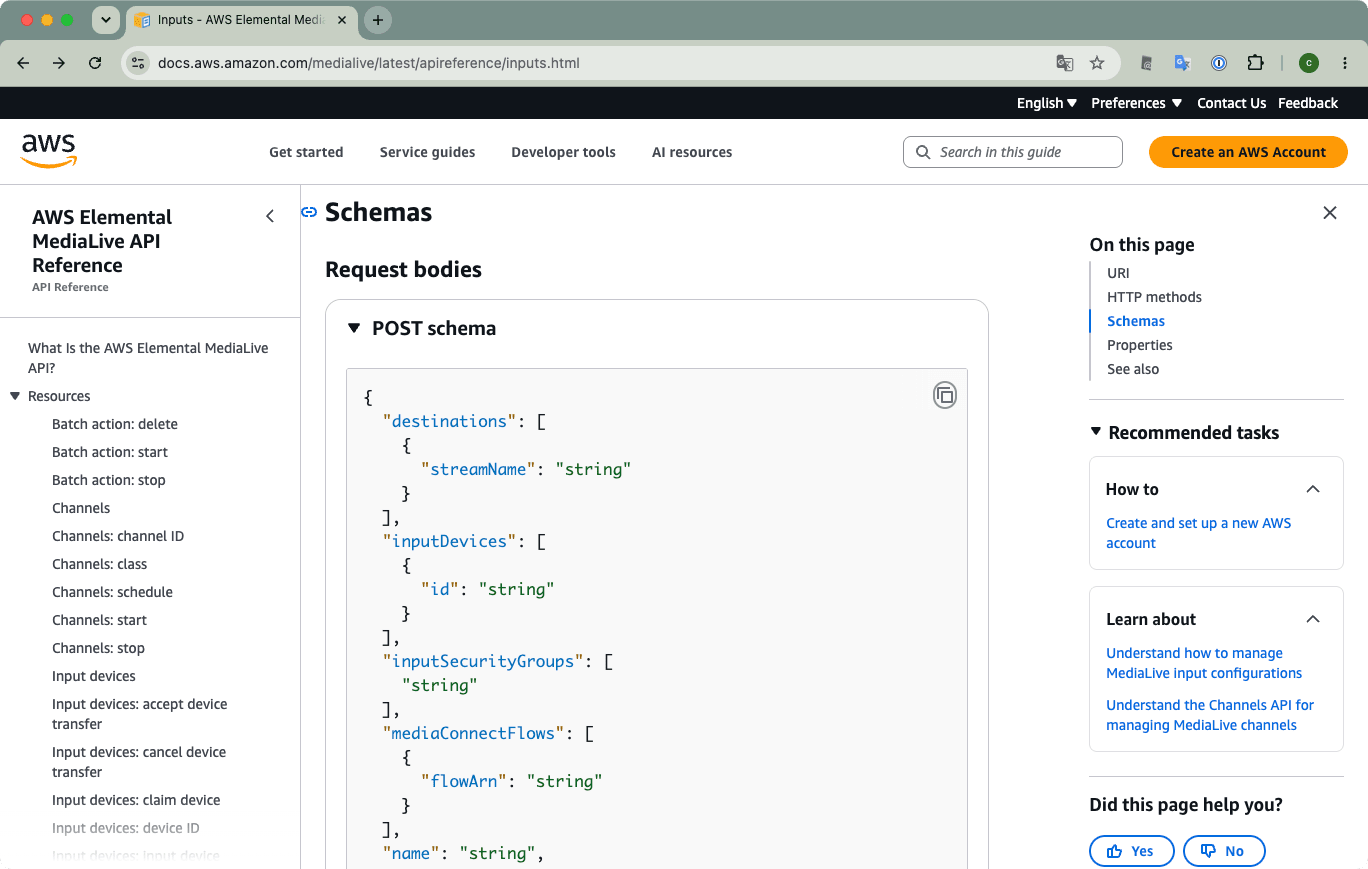
SecurityGroupsについてはInputSecurityGroupsとして指定すればよさそうですね。ただし、InputClassに該当する設定項目はなさそうです。ほかに指定できる項目はあるのでしょうか、、。(アマゾンの奥地、もとい)API Referenceまで辿ってみましたが、Post schemaの箇所にもそれらしき項目はありませんでした。
RTMP pushをベースにSingleまたはStandardのInput作成例を確認する
AWS CLIでMediaLive Input作成時にInputClassをどう指定したらよいか、ということで、ここは(個人的な)基本に立ち返り、RTMP (push)なInputを作成するケースを確認してみます。まずはrtmp-push-singleならびにrtmp-push-standardという名称でSingle class、Standard classのRTMP (push) Inputをマネージメントコンソールからそれぞれ作成します。その後、AWS CLIのdescribe-inputサブコマンドで情報を取得、確認しました。以下にはAWS ClIで得られた情報を記載します。
 % aws medialive describe-input --input-id 3XXX98 --output json
{
    "Arn": "arn:aws:medialive:ap-northeast-1:123456789012:input:3XXX98",
    "AttachedChannels": [],
    "Destinations": [
        {
            "Ip": "54.XXX.XXX.181",
            "Port": "1935",
            "Url": "rtmp://54.XXX.XXX.181:1935/app1/inst1",
            "NetworkRoutes": []
        }
    ],
    "Id": "3XXX98",
    "InputClass": "SINGLE_PIPELINE",
    "InputDevices": [],
    "InputPartnerIds": [],
    "InputSourceType": "STATIC",
    "MediaConnectFlows": [],
    "Name": "rtmp-push-single",
    "SecurityGroups": [
        "5XXXXX2"
    ],
    "Sources": [],
    "State": "DETACHED",
    "Tags": {},
    "Type": "RTMP_PUSH",
    "InputNetworkLocation": "AWS",
    "Smpte2110ReceiverGroupSettings": {
        "Smpte2110ReceiverGroups": []
    }
}
 % aws medialive describe-input --input-id 4XXXXX7 --output json
{
    "Arn": "arn:aws:medialive:ap-northeast-1:123456789012:input:4XXXXX7",
    "AttachedChannels": [],
    "Destinations": [
        {
            "Ip": "54.XXX.XXX.72",
            "Port": "1935",
            "Url": "rtmp://54.XXX.XXX.72:1935/app1/inst1",
            "NetworkRoutes": []
        },
        {
            "Ip": "18.XXX.XXX.34",
            "Port": "1935",
            "Url": "rtmp://18.XXX.XXX.34:1935/app2/inst2",
            "NetworkRoutes": []
        }
    ],
    "Id": "4XXXXX7",
    "InputClass": "STANDARD",
    "InputDevices": [],
    "InputPartnerIds": [],
    "InputSourceType": "STATIC",
    "MediaConnectFlows": [],
    "Name": "rtmp-push-standard",
    "SecurityGroups": [
        "5XXXXX2"
    ],
    "Sources": [],
    "State": "DETACHED",
    "Tags": {},
    "Type": "RTMP_PUSH",
    "InputNetworkLocation": "AWS",
    "Smpte2110ReceiverGroupSettings": {
        "Smpte2110ReceiverGroups": []
    }
}
どうしてもInputClassがSINGLE_PIPELINEかSTANDARDかの違いに目が行きそうなのですが、そのほかの違いとしてはDestinationsの要素数でしょうか。Single classであれば1つですが、Standard classであれば2つの要素が含まれていますね。ここまできて、そういえばDestinationsの数の違いでSingle classかStandard classか変わったよな、という昔の記憶が蘇ってきました。(とはいえ、ドキュメントなどのでの明確な記載は確認できなかったのですが。)
ひとまず昔の記憶も頼りに試行錯誤の結果、RTMP pushのSingle classとStandard classは以下のJSONデータをcreate-channel実行時に渡すファイルとして指定することで作成ができました。ポイントはやはりDestinationsのところなのですが、UrlではなくStreamNameで指定することろがポイントです。(IPアドレスはリソース作成時にはきまっていませんからね。)
 % cat rtmp-push-single-input.json
{
    "Destinations": [
        {
            "StreamName": "app1/inst1"
        }
    ],
    "Name": "rtmp-push-single-by-awscli",
    "InputSecurityGroups": [
        "5XXXXX2"
    ],
    "Type": "RTMP_PUSH",
    "InputNetworkLocation": "AWS"
}

 % aws medialive create-input --cli-input-json file://rtmp-push-single-input.json
{
    "Input": {
        "Arn": "arn:aws:medialive:ap-northeast-1:123456789012:input:7XXXXX3",
        "AttachedChannels": [],
        "Destinations": [
            {
                "Ip": "13.XXX.XXX.15",
                "Port": "1935",
                "Url": "rtmp://13.XXX.XXX.15:1935/app1/inst1",
                "NetworkRoutes": []
            }
        ],
        "Id": "7XXXXX3",
        "InputClass": "SINGLE_PIPELINE",
        "InputDevices": [],
        "InputPartnerIds": [],
        "InputSourceType": "STATIC",
        "MediaConnectFlows": [],
        "Name": "rtmp-push-single-by-awscli",
        "SecurityGroups": [
            "5XXXXX2"
        ],
        "Sources": [],
        "State": "DETACHED",
        "Tags": {},
        "Type": "RTMP_PUSH",
        "InputNetworkLocation": "AWS",
        "Smpte2110ReceiverGroupSettings": {
            "Smpte2110ReceiverGroups": []
        }
    }
}
 % cat rtmp-push-standard-input.json
{
    "Destinations": [
        {
            "StreamName": "app1/inst1"
        },
        {
            "StreamName": "app2/inst2"
        }
    ],
    "Name": "rtmp-push-standard",
    "InputSecurityGroups": [
        "5XXXXX2"
    ],
    "Type": "RTMP_PUSH",
    "InputNetworkLocation": "AWS"
}

 % aws medialive create-input --cli-input-json file://rtmp-push-standard-input.json
{
    "Input": {
        "Arn": "arn:aws:medialive:ap-northeast-1:123456789012:input:5XXXXX3",
        "AttachedChannels": [],
        "Destinations": [
            {
                "Ip": "54.XXX.XXX.221",
                "Port": "1935",
                "Url": "rtmp://54.XXX.XXX.221:1935/app1/inst1",
                "NetworkRoutes": []
            },
            {
                "Ip": "35.XXX.XXX.226",
                "Port": "1935",
                "Url": "rtmp://35.XXX.XXX.226:1935/app2/inst2",
                "NetworkRoutes": []
            }
        ],
        "Id": "5XXXXX3",
        "InputClass": "STANDARD",
        "InputDevices": [],
        "InputPartnerIds": [],
        "InputSourceType": "STATIC",
        "MediaConnectFlows": [],
        "Name": "rtmp-push-standard",
        "SecurityGroups": [
            "5XXXXX2"
        ],
        "Sources": [],
        "State": "DETACHED",
        "Tags": {},
        "Type": "RTMP_PUSH",
        "InputNetworkLocation": "AWS",
        "Smpte2110ReceiverGroupSettings": {
            "Smpte2110ReceiverGroups": []
        }
    }
}
改めてSRT Listener Inputで作成しようと試みるも
RTMP pushなInputの作成方法の確認を経て、Destinationsに指定する要素の数でSingle classないしStandard classなInputとなることが確認できました。同様の手順で改めて、SRT ListenerなInputの作成を試みます。
さて、Destinationsの部分は何を指定すればよいでしょうか。冒頭のdescribe-inputサブコマンドの結果では以下のように、Ip, Port, Url, NetworkRoutesの項目がInputの情報として返ってきていました。
    "Destinations": [
        {
            "Ip": "35.XXX.XXX.201",
            "Port": "5050",
            "Url": "srt://35.XXX.XXX.201:5050",
            "NetworkRoutes": []
        },
        {
            "Ip": "13.XXX.XXX.212",
            "Port": "5050",
            "Url": "srt://13.XXX.XXX.212:5050",
            "NetworkRoutes": []
        }
    ],
IpとUrlについてはInputリソース作成後に決まりますよね。それではPortの指定で行けないかな、さらにはマネジメントコンソールでのリソース作成時にはPort指定ができず5050固定だったのが、AWS CLI経由のリソース作成では別ポート番号も指定できると嬉しいよな、などと思いながら、create-inputサブコマンドを試してみます。
 % cat srt-listener-standard-input.json
{
    "Destinations": [
        {
            "Port": "5051"
        },
        {
            "Port": "5052"
        }
    ],
    "Name": "srt-listener-standard-input-by-awscli",
    "InputSecurityGroups": [
        "5XXXXX2"
    ],
    "Type": "SRT_LISTENER",
    "SrtSettings": {
        "SrtCallerSources": [],
        "SrtListenerSettings": {
            "Decryption": {
                "Algorithm": "AES256",
                "PassphraseSecretArn": "arn:aws:secretsmanager:ap-northeast-1:123456789012:secret:MediaLive/SRTEncryptionPassphrase/medialive-srt-listener-PXXXXL"
            },
            "MinimumLatency": 2000
        }
    },
    "InputNetworkLocation": "AWS"
}

 % aws medialive create-input --cli-input-json file://srt-listener-standard-input.json

aws: [ERROR]: An error occurred (ParamValidation): Parameter validation failed:
Unknown parameter in Destinations[0]: "Port", must be one of: StreamName, Network, NetworkRoutes, StaticIpAddress
Unknown parameter in Destinations[1]: "Port", must be one of: StreamName, Network, NetworkRoutes, StaticIpAddress
ポート番号を指定したかった、という淡い期待はいったんおいておき、改めて5050番ポート固定でもやってみます。しかし、同様のエラーとなってしした。
 % cat srt-listener-standard-input.json
{
    "Destinations": [
        {
            "Port": "5050"
        },
        {
            "Port": "5050"
        }
    ],
    "Name": "srt-listener-standard-input-by-awscli",
    "InputSecurityGroups": [
        "5XXXXX2"
    ],
    "Type": "SRT_LISTENER",
    "SrtSettings": {
        "SrtCallerSources": [],
        "SrtListenerSettings": {
            "Decryption": {
                "Algorithm": "AES256",
                "PassphraseSecretArn": "arn:aws:secretsmanager:ap-northeast-1:123456789012:secret:MediaLive/SRTEncryptionPassphrase/medialive-srt-listener-PXXXXL"
            },
            "MinimumLatency": 2000
        }
    },
    "InputNetworkLocation": "AWS"
}

 % aws medialive create-input --cli-input-json file://srt-listener-standard-input.json

aws: [ERROR]: An error occurred (ParamValidation): Parameter validation failed:
Unknown parameter in Destinations[0]: "Port", must be one of: StreamName, Network, NetworkRoutes, StaticIpAddress
Unknown parameter in Destinations[1]: "Port", must be one of: StreamName, Network, NetworkRoutes, StaticIpAddress
create-inputの--generate-cli-skeletonオプションで確認した通りですが、StreamName, Network, NetworkRoutes, StaticIpAddressのいずれかのみ指定ができる、という制限のようです。
それでは、ということでダメ元ではありますが、Destinationsの要素でStreamNameを指定してみましょう。ポート番号のほか、RTMP (push)と同じ形式でも試してみます。
 % cat srt-listener-single-input.json
{
    "Destinations": [
        {
            "StreamName": "5050"
        }
    ],
    "Name": "srt-listener-single-input-by-awscli",
    "InputSecurityGroups": [
        "5XXXXX2"
    ],
    "Type": "SRT_LISTENER",
    "SrtSettings": {
        "SrtCallerSources": [],
        "SrtListenerSettings": {
            "Decryption": {
                "Algorithm": "AES256",
                "PassphraseSecretArn": "arn:aws:secretsmanager:ap-northeast-1:123456789012:secret:MediaLive/SRTEncryptionPassphrase/medialive-srt-listener-PXXXXL"
            },
            "MinimumLatency": 2000
        }
    },
    "InputNetworkLocation": "AWS"
}

 % aws medialive create-input --cli-input-json file://srt-listener-single-input.json

aws: [ERROR]: An error occurred (BadRequestException) when calling the CreateInput operation: Must not specify input destinations for SRT Listener type inputs unless using ON_PREMISES network location.
 % cat srt-listener-single-input.json
{
    "Destinations": [
        {
            "StreamName": "app1/inst1"
        }
    ],
    "Name": "srt-listener-single-input-by-awscli",
    "InputSecurityGroups": [
        "5XXXXX2"
    ],
    "Type": "SRT_LISTENER",
    "SrtSettings": {
        "SrtCallerSources": [],
        "SrtListenerSettings": {
            "Decryption": {
                "Algorithm": "AES256",
                "PassphraseSecretArn": "arn:aws:secretsmanager:ap-northeast-1:123456789012:secret:MediaLive/SRTEncryptionPassphrase/medialive-srt-listener-PXXXXL"
            },
            "MinimumLatency": 2000
        }
    },
    "InputNetworkLocation": "AWS"
}

 % aws medialive create-input --cli-input-json file://srt-listener-single-input.json

aws: [ERROR]: An error occurred (BadRequestException) when calling the CreateInput operation: Must not specify input destinations for SRT Listener type inputs unless using ON_PREMISES network location.
SRT ListenerではDestinationsを指定できない、ということでエラーになってしまいました。(例外としてはON_PREMISESネットワークローケーションの場合、とのことですが、これはMediaLive Anywhere利用時と理解しています。)
Standard classかSingle classかの指定にDestinationの要素の数を用いる、しかしそのDestinatisonsで指定する項目がSRT Listener Modeではない、ということです。これを踏まえると、現状ではSRT Listener ModeでのSingle classなinputは作成ができない、というふうに理解しました。
なお、SRT Listener ModeなInputをAWS CLIのcreate-inputサブコマンドで作成できたケースとしては以下のようなものでした。Destinationsを指定せず、そのためStandard classになる、というところはマネージメントコンソールでの作成例と同じですね。
 % cat srt-listener-standard-input.json
{
    "Name": "srt-listener-standard-input-by-awscli",
    "InputSecurityGroups": [
        "5XXXXX2"
    ],
    "Type": "SRT_LISTENER",
    "SrtSettings": {
        "SrtCallerSources": [],
        "SrtListenerSettings": {
            "Decryption": {
                "Algorithm": "AES256",
                "PassphraseSecretArn": "arn:aws:secretsmanager:ap-northeast-1:123456789012:secret:MediaLive/SRTEncryptionPassphrase/medialive-srt-listener-PXXXXL"
            },
            "MinimumLatency": 2000
        }
    },
    "InputNetworkLocation": "AWS"
}

 % aws medialive create-input --cli-input-json file://srt-listener-standard-input.json
{
    "Input": {
        "Arn": "arn:aws:medialive:ap-northeast-1:123456789012:input:6XXXXX3",
        "AttachedChannels": [],
        "Destinations": [
            {
                "Ip": "35.XXX.XXX.135",
                "Port": "5050",
                "Url": "srt://35.XXX.XXX.135:5050",
                "NetworkRoutes": []
            },
            {
                "Ip": "54XXX.XXX.226",
                "Port": "5050",
                "Url": "srt://54XXX.XXX.226:5050",
                "NetworkRoutes": []
            }
        ],
        "Id": "6XXXXX3",
        "InputClass": "STANDARD",
        "InputDevices": [],
        "InputPartnerIds": [],
        "InputSourceType": "STATIC",
        "MediaConnectFlows": [],
        "Name": "srt-listener-standard-input-by-awscli",
        "SecurityGroups": [
            "5XXXXX2"
        ],
        "Sources": [],
        "State": "DETACHED",
        "Tags": {},
        "Type": "SRT_LISTENER",
        "SrtSettings": {
            "SrtCallerSources": [],
            "SrtListenerSettings": {
                "Decryption": {
                    "Algorithm": "AES256",
                    "PassphraseSecretArn": "arn:aws:secretsmanager:ap-northeast-1:123456789012:secret:MediaLive/SRTEncryptionPassphrase/medialive-srt-listener-PXXXXL"
                },
                "MinimumLatency": 2000
            }
        },
        "InputNetworkLocation": "AWS",
        "Smpte2110ReceiverGroupSettings": {
            "Smpte2110ReceiverGroups": []
        }
    }
}
Standard classなInputをSingle pipeline Channelにアタッチするケースの挙動を押さえる
AWSマネジメントコンソール、またAWS CLIを使ってもSRT Listener ModeなInputはStandard classでのみしか現状は作成ができなさそう、ということを確認してきました。
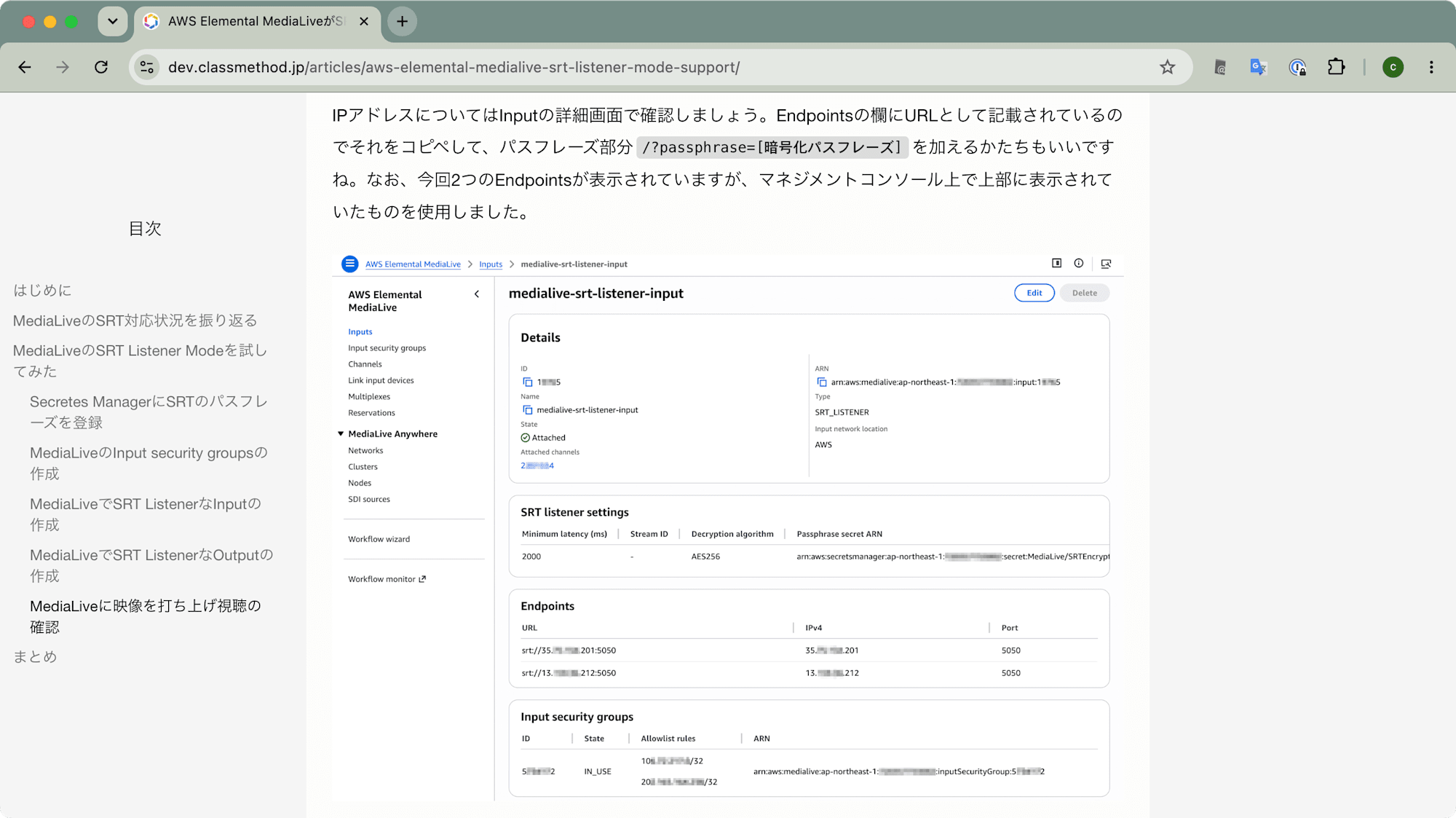
さて、先日のアップデートブログで確認した通りこのStandard classのSRT Listener Mode InputをSingle pipelineのChannelにアタッチしても動作検証自体は行えました。具体的には、AWSマネジメントコンソールのInputリソース詳細画面、Endpionts一覧で1つ目に表示されている(35ではじまる)IPアドレスに向けて映像をOBS Studioから映像を打ち上げることで、MediaLive以降で映像視聴を確認しました。
引用元: AWS Elemental MediaLiveがSRT Listener Modeをサポートしていました!![Inputも] [Outputも] | DevelopersIO
今回も同様の手順でChannelを作成、先ほどAWS CLIで作成したInputをアタッチします。ChannelをStartさせ、OBS Studioから映像を打ち上げます。打ち上げ先として、先日のアップデートブログ同様、Inputリソース詳細画面のEndpionts一覧で1つ目に表示されている(今回も35ではじまる)IPアドレスに向けて打ち上げた場合は、やはり問題なくMediaLive以降に映像が届きます。
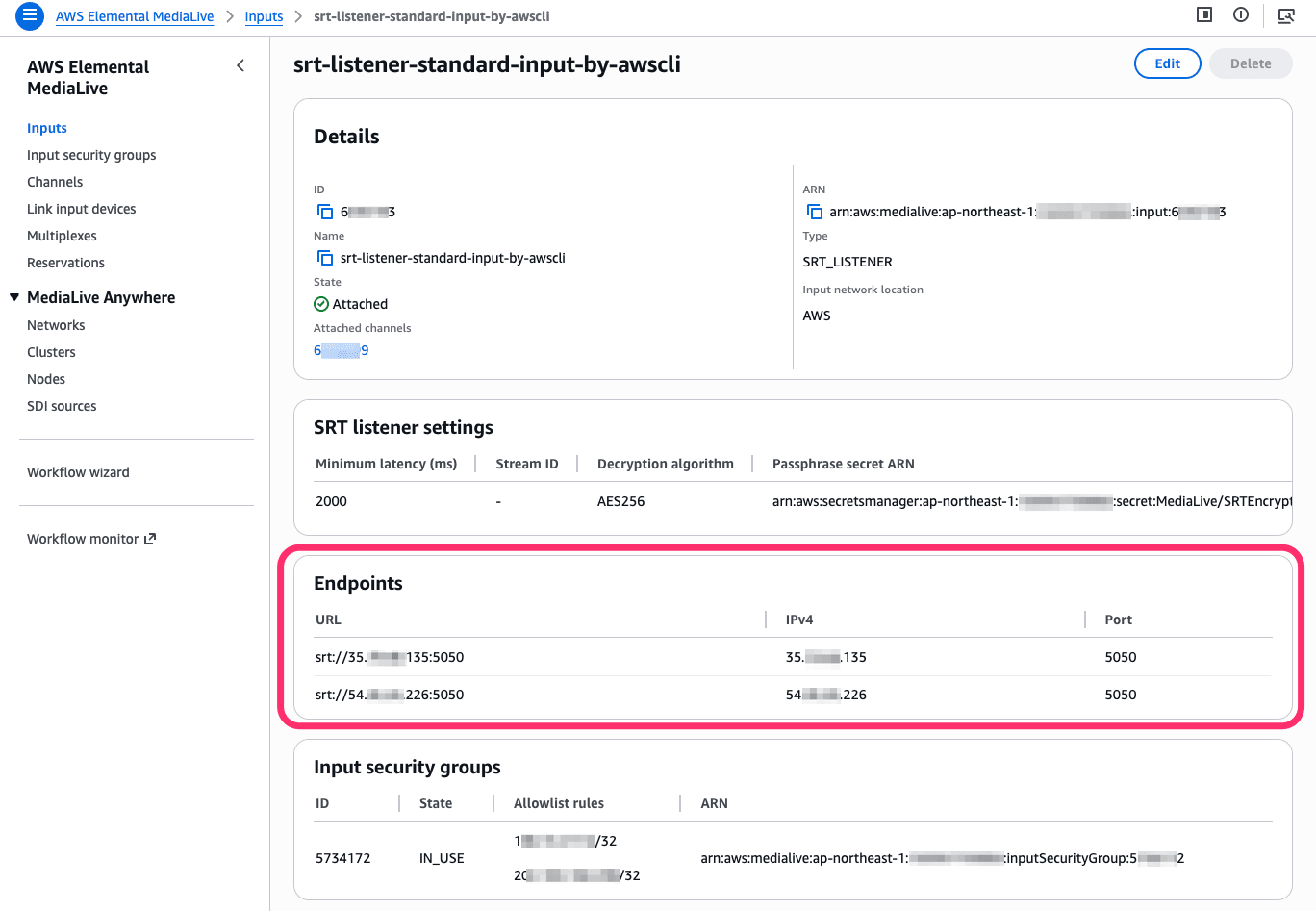
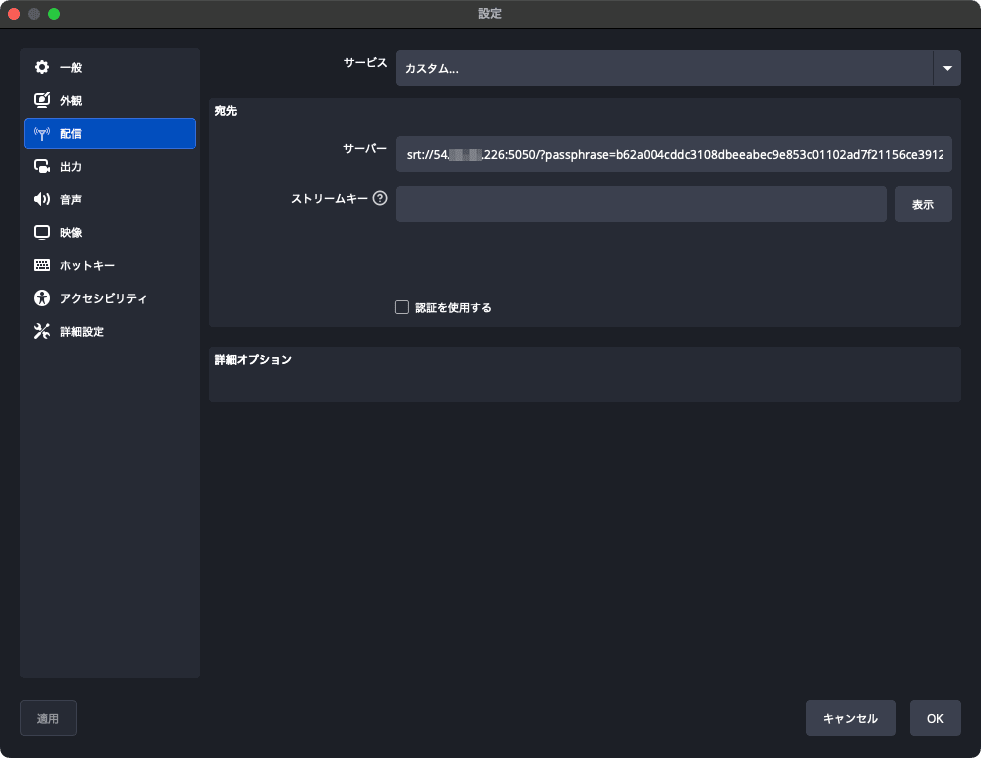
さてここで、Inputリソース詳細画面のEndpionts一覧で2つ目に表示されている(54ではじまる)IPアドレスにを利用しようとするとどうなるでしょうか。先日のブログでは確認していなかったのですが、OBS Studioの配信先サーバを変更していざ確認してみると、OBS Studioで「サーバーへの接続に失敗しました」となる挙動となりました。
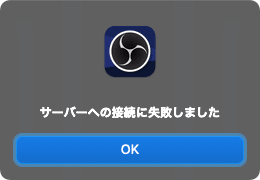
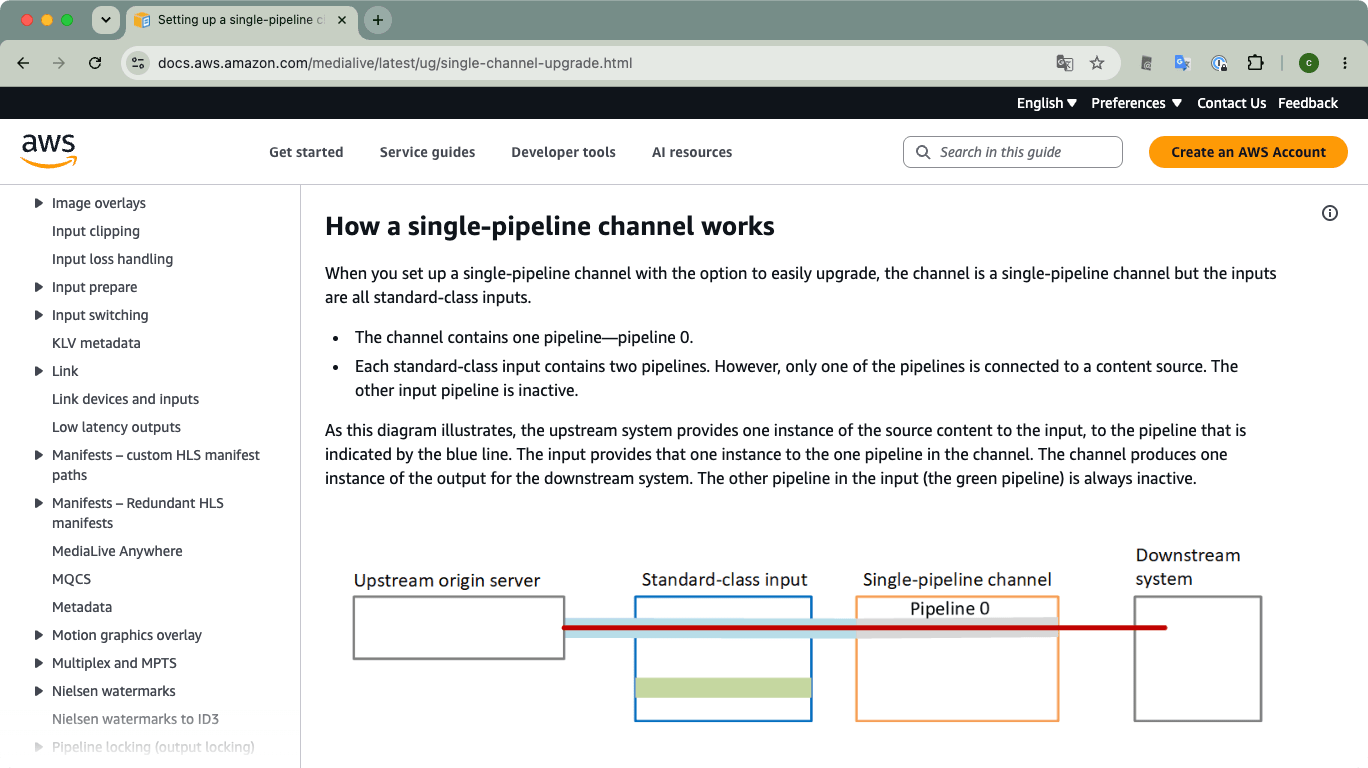
この動作については、MediaLive User Guideの「Implementing pipeline redundancy」(日本語では「パイプラインの冗長性を実装する」)の章に記載がありました。Standard input classとStandard pipeline channelの構成やSingle input classとSingle pipeline channelの構成については想像どおりです。
今回のようなStandard input classにSignle pipeline channelを組み合わせた構成については、以下ページ「Setting up a single-pipeline channel with upgrade options」(日本語では「アップグレードオプション付きの単一パイプラインチャンネルのセットアップ」に記載があります。ポイントとしては、Standard input classのパイプラインのうち1つだけがChannel側パイプラインに接続されており、もう一方は無効化されている、ということです。(続く章、「Setting up a single-pipeline channel without upgrade potential 」にも関連する記載がありますが、ここで確認したいポイントとしては同様の趣旨と理解しています。)
引用元: Setting up a single-pipeline channel with upgrade options - MediaLive
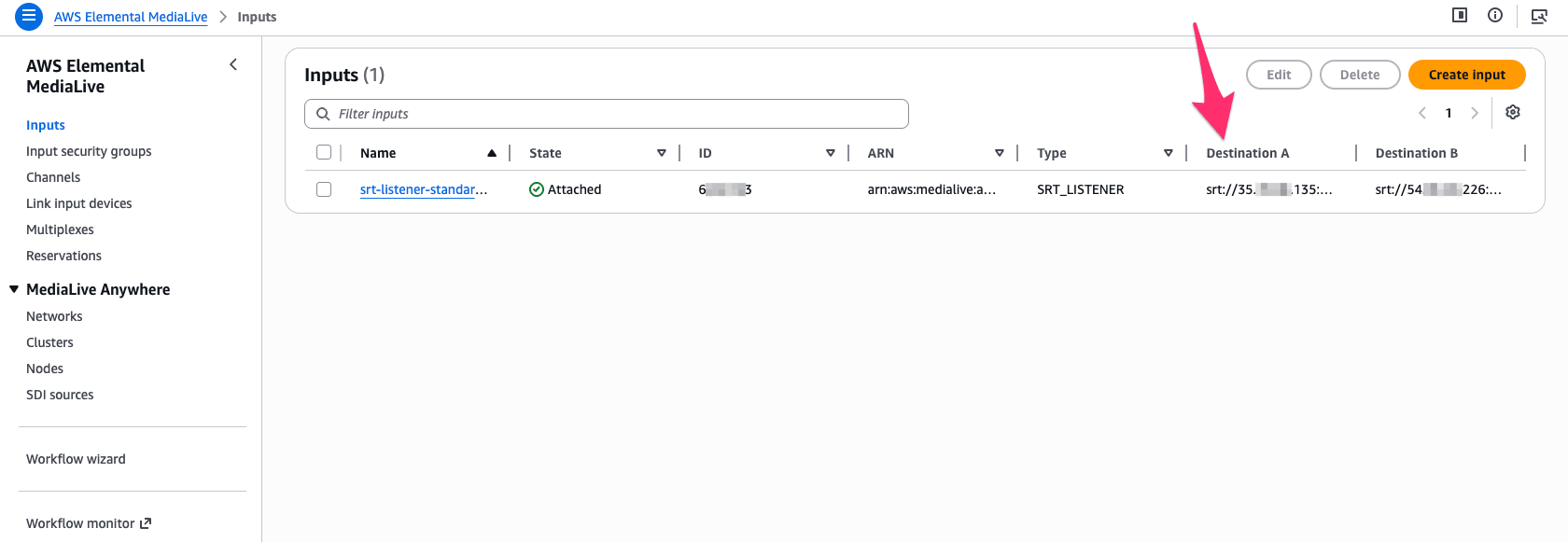
なお、この構成でStandard input classのどちらのパイプラインがSingle pipeline channelのパイプラインに接続されているかですが、マネジメントコンソールのInput詳細画面でいえば1つ目に表示されているIPアドレス、という判断でよさそうです。Input一覧画面でいえばDestination Aになりますね。またAWS CLIでInputリソース情報を取得した場合は1つ目のDestinations要素のIPアドレス、と判断しています。
        "Destinations": [
            {
                "Ip": "35.XXX.XXX.135",
                "Port": "5050",
                "Url": "srt://35.XXX.XXX.135:5050",
                "NetworkRoutes": []
            },
            {
                "Ip": "54XXX.XXX.226",
                "Port": "5050",
                "Url": "srt://54XXX.XXX.226:5050",
                "NetworkRoutes": []
            }
        ],
まとめ
先日のMediaLiveのSRT Listener Modeサポートのアップデートで確認できていなかった、Single classのSRT Listener Inputの作成可否、ならびにStandard classなInputをSingle pipelineのChannelにアタッチした場合の挙動について確認してみました。
SRT Listener ModeのInputについて、現段階で筆者の確認した限りではSingle classでの作成は難しいようです。(たしかに、MediaLive User GuideにもStandard classでのみ作成可能なinput typeがあることは記載されていますね。)またSRT Lintener ModeのようにStandard classのInputをSingle pipeline Channelにアタッチした際、Inputの片方のパイプラインのみが稼働し、もう一方は無効化されることを確認しました。実際にOBS Studioで無効化されたInputのIPアドレス向けに映像を配信しようとしても接続できないという結果になりました。冗長性を考慮してSRT Listener ModeのInputをStandard pipelineのChannelにアタッチする際には特に気にすることはありませんが、事情によりSingle pipeline channelにアタッチするケースではこれらの点を留意しておきましょう。