AWS IAM Identity CenterにXX日以上ログインしていないユーザーをQuick Suiteで可視化してみる

こんにちは。クラウド事業本部の木村です。
先日以下のようにAthenaを利用して、XX日以上ログインしていないユーザーを確認する方法をご紹介しました。
今回はこちらの方法を自動化して、Quick Suiteから可視化できる仕組みを構築したいと思います。
前提
今回も前回の記事と同様で以下の前提で構築していきます。
- CloudTrail の証跡が有効
- AWS Organizations 利用中
- IAM Identity Center のアイデンティティソース:Identity Center Directory(AWS IAM Identity Center 提供の独自 ID ストア)
- AWS Control Tower を使用
仕組み
今回は以下のような仕組みでQuick Suiteにて可視化を行います。
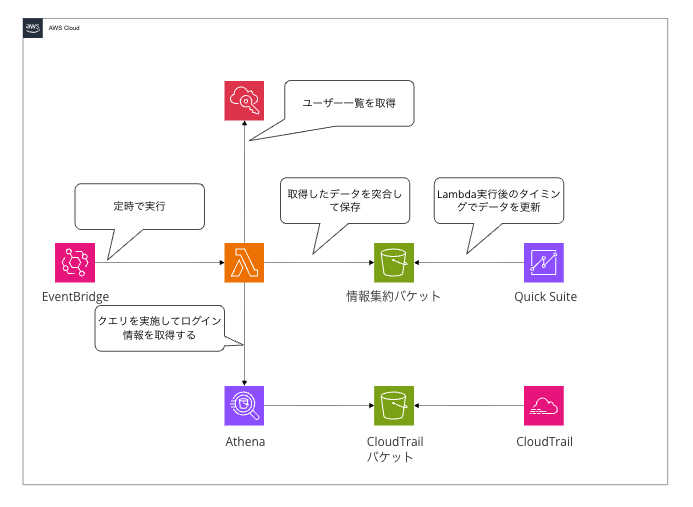
LambdaにてAthenaのクエリの実施とIAM Identity Centerのユーザーの一覧を取得して突合を行いデータの加工をすることで、Quick Suiteではダッシュボードを作成すれば良いだけにしています。
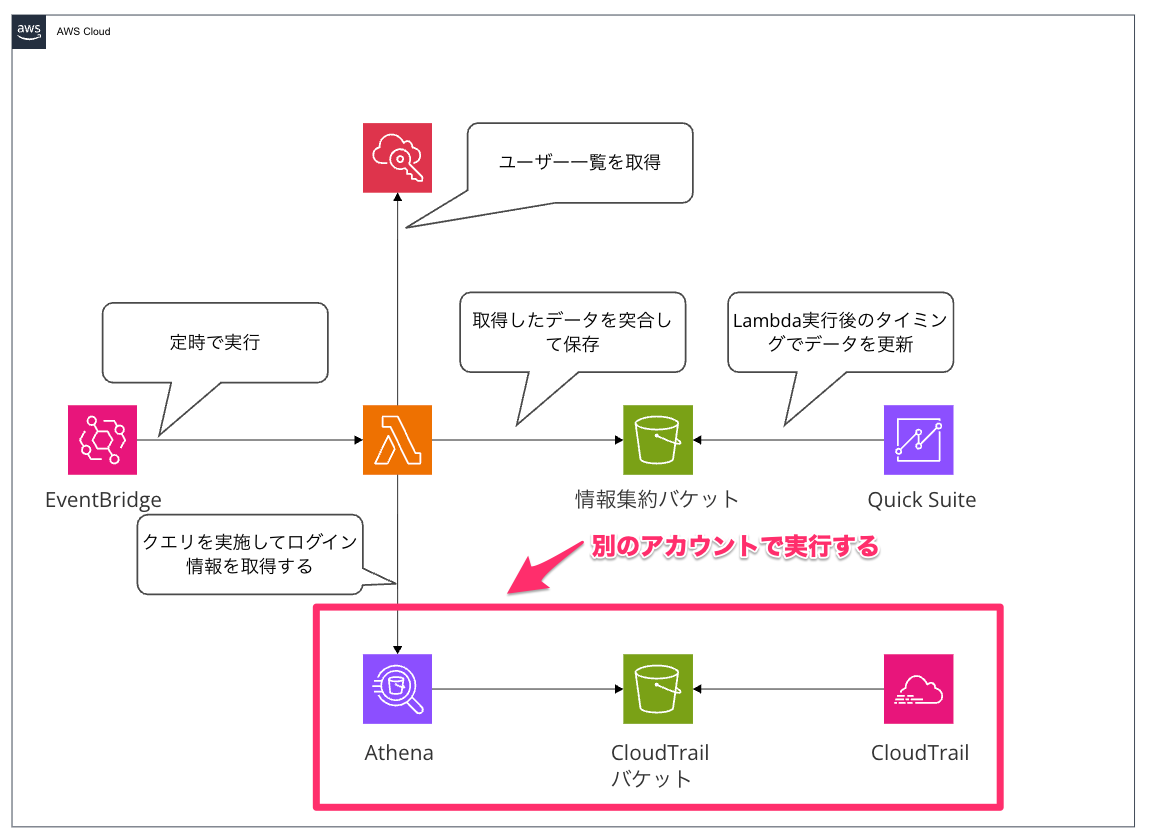
IAM Identity Centerを委任しているアカウントとCloudTrailを集約しているアカウントは別であることが多いかと思います。今回はIAM Identity Centerを委任しているアカウントでLambdaを実行しています。
やってみる
では実際に構築していきます。
以下のように、ユーザー全員の情報、XX日以内にログインしていないユーザー数、XX日以内にログインしていないユーザー一覧を表示するように作成していきます。
![FireShot Capture 034 - IdC棚卸しダッシュボード - [ap-northeast-1.quicksight.aws.amazon.com]](https://devio2024-media.developers.io/image/upload/v1767152508/2025/12/31/mtqmmzujomb4k0lglyp7.png)
CloudTrailアカウントにLambdaが引き受けるロールを作成する(CloudTrailアカウントでの作業)
AthenaでのクエリをCloudTrailアカウントで実行するので、Lambdaが引き受けるためのロールの作成が必要になります。
必要な権限は以下になります。
{
    "Version": "2012-10-17",
    "Statement": [
        {
            "Sid": "AthenaQueryExecution",
            "Effect": "Allow",
            "Action": [
                "athena:StartQueryExecution",
                "athena:GetQueryExecution",
                "athena:GetQueryResults",
                "athena:StopQueryExecution",
                "athena:GetWorkGroup"
            ],
            "Resource": [
                "arn:aws:athena:ap-northeast-1:XXXXXXXXXXXX:workgroup/primary",
                "arn:aws:athena:ap-northeast-1:XXXXXXXXXXXX:workgroup/*"
            ]
        },
        {
            "Sid": "GlueCatalogAccess",
            "Effect": "Allow",
            "Action": [
                "glue:GetDatabase",
                "glue:GetTable",
                "glue:GetPartitions"
            ],
            "Resource": [
                "arn:aws:glue:ap-northeast-1:XXXXXXXXXXXX:catalog",
                "arn:aws:glue:ap-northeast-1:XXXXXXXXXXXX:database/default",
                "arn:aws:glue:ap-northeast-1:XXXXXXXXXXXX:table/default/cloudtrail_idc"
            ]
        },
        {
            "Sid": "S3CloudTrailReadAccess",
            "Effect": "Allow",
            "Action": [
                "s3:GetObject",
                "s3:ListBucket"
            ],
            "Resource": [
                "arn:aws:s3:::{CloudTrail保管先バケット}",
                "arn:aws:s3:::{CloudTrail保管先バケット}/*"
            ]
        },
        {
            "Sid": "S3AthenaOutputAccess",
            "Effect": "Allow",
            "Action": [
                "s3:GetBucketLocation",
                "s3:GetObject",
                "s3:ListBucket",
                "s3:PutObject"
            ],
            "Resource": [
                "arn:aws:s3:::{Athena結果保存用バケット}",
                "arn:aws:s3:::{Athena結果保存用バケット}/*"
            ]
        }
    ]
}
{CloudTrail保管先バケット}と{Athena結果保存用バケット}部分およびXXXXXXXXXXXXにしている箇所はそれぞれの値に置き換えてください。
Athenaテーブルを作成する(CloudTrailアカウントでの作業)
こちらは前回ご紹介した内容と同様になります。
Athenaでクエリする前段の作業として、テーブルを作成が必要になります。こちらは初回のみ実施すれば問題ないです。
以下のDDLにて、テーブルを作成してください。
CREATE EXTERNAL TABLE `cloudtrail_idc`(
  `eventversion` string,
  `useridentity` string,
  `eventtime` string,
  `eventsource` string,
  `eventname` string,
  `awsregion` string,
  `sourceipaddress` string,
  `useragent` string,
  `errorcode` string,
  `errormessage` string,
  `requestparameters` string,
  `responseelements` string,
  `additionaleventdata` string,
  `requestid` string,
  `eventid` string,
  `resources` string,
  `eventtype` string,
  `apiversion` string,
  `readonly` string,
  `recipientaccountid` string,
  `serviceeventdetails` string,
  `sharedeventid` string,
  `vpcendpointid` string
)
PARTITIONED BY (
  `region` string,
  `date` string
)
ROW FORMAT SERDE
  'org.openx.data.jsonserde.JsonSerDe'
WITH SERDEPROPERTIES (
  'serialization.format' = '1',
  'ignore.malformed.json' = 'true'
)
STORED AS INPUTFORMAT
  'com.amazon.emr.cloudtrail.CloudTrailInputFormat'
OUTPUTFORMAT
  'org.apache.hadoop.hive.ql.io.HiveIgnoreKeyTextOutputFormat'
LOCATION
  '{CloudTrailログを格納しているS3 URI}'
TBLPROPERTIES (
  'classification'='cloudtrail',
  'compressionType'='gzip',
  'projection.date.format'='yyyy/MM/dd',
  'projection.date.interval'='1',
  'projection.date.interval.unit'='DAYS',
  'projection.date.range'='NOW-1YEARS,NOW',
  'projection.date.type'='date',
  'projection.enabled'='true',
  'projection.region.type'='enum',
  'projection.region.values'='us-east-1,us-east-2,us-west-1,us-west-2,af-south-1,ap-east-1,ap-south-1,ap-northeast-2,ap-southeast-1,ap-southeast-2,ap-northeast-1,ca-central-1,eu-central-1,eu-west-1,eu-west-2,eu-south-1,eu-west-3,eu-north-1,me-south-1,sa-east-1',
  'storage.location.template'='{CloudTrailログを格納しているS3 URI}/${region}/${date}'
);
{CloudTrailログを格納しているS3 URI}としている部分については、それぞれの環境のS3 URIに置き換えてクエリを実行してください。
Lambdaを作成する
ここからはIAM Identity Centerを委任しているアカウントで作業を行います。
以下のようなコードで作成します。
import boto3
import datetime
import csv
import io
import time
import os
from botocore.exceptions import ClientError

def assume_cross_account_role(role_arn, session_name):
    """
    Assume cross-account role and create a session

    Args:
        role_arn: ARN of the role to assume
        session_name: Role session name

    Returns:
        boto3.Session: Session with temporary credentials
    """
    try:
        sts_client = boto3.client('sts')

        print(f"Assuming role: {role_arn}")
        assumed_role = sts_client.assume_role(
            RoleArn=role_arn,
            RoleSessionName=session_name,
            DurationSeconds=3600
        )

        session = boto3.Session(
            aws_access_key_id=assumed_role['Credentials']['AccessKeyId'],
            aws_secret_access_key=assumed_role['Credentials']['SecretAccessKey'],
            aws_session_token=assumed_role['Credentials']['SessionToken']
        )

        print("Successfully assumed role")
        return session

    except ClientError as e:
        print(f"Failed to assume role: {e.response['Error']['Message']}")
        raise
    except Exception as e:
        print(f"Unexpected error assuming role: {str(e)}")
        raise

def get_identity_center_users(identity_store_client, identity_store_id):
    """
    Retrieve user list from IAM Identity Center

    Args:
        identity_store_client: Identity Store API client
        identity_store_id: Identity Store ID

    Returns:
        list: List of user information
    """
    users = []

    try:
        print("Fetching IAM Identity Center users...")

        paginator = identity_store_client.get_paginator('list_users')
        page_iterator = paginator.paginate(IdentityStoreId=identity_store_id)

        for page in page_iterator:
            for user in page['Users']:
                user_id = user['UserId']
                user_name = user['UserName']
                display_name = user.get('DisplayName', '')

                emails = user.get('Emails', [])
                primary_email = ''
                if emails:
                    for email in emails:
                        if email.get('Primary', False):
                            primary_email = email.get('Value', '')
                            break
                    if not primary_email:
                        primary_email = emails[0].get('Value', '')

                users.append({
                    'UserId': user_id,
                    'UserName': user_name,
                    'DisplayName': display_name,
                    'Email': primary_email,
                    'UserStatus': 'Enabled',
                    'Identifiers': {user_name, user_id, primary_email}
                })

        print(f"Retrieved {len(users)} users from IAM Identity Center")
        return users

    except ClientError as e:
        print(f"Error retrieving IAM Identity Center users: {e.response['Error']['Message']}")
        raise
    except Exception as e:
        print(f"Unexpected error retrieving users: {str(e)}")
        raise

def execute_athena_query(athena_client, query, database, output_location, max_wait_seconds=300):
    """
    Execute Athena query and retrieve results

    Args:
        athena_client: Athena API client
        query: SQL query to execute
        database: Database name
        output_location: S3 path for query results
        max_wait_seconds: Maximum wait time in seconds

    Returns:
        list: List of query result rows (excluding header)
    """
    try:
        print("Executing Athena query...")

        response = athena_client.start_query_execution(
            QueryString=query,
            QueryExecutionContext={'Database': database},
            ResultConfiguration={'OutputLocation': output_location}
        )

        query_execution_id = response['QueryExecutionId']
        print(f"Query execution ID: {query_execution_id}")

        max_attempts = max_wait_seconds // 5
        for attempt in range(max_attempts):
            response = athena_client.get_query_execution(QueryExecutionId=query_execution_id)
            status = response['QueryExecution']['Status']['State']

            if status == 'SUCCEEDED':
                print("Query completed successfully")
                break
            elif status in ['FAILED', 'CANCELLED']:
                error_msg = response['QueryExecution']['Status'].get('StateChangeReason', 'Unknown error')
                print(f"Query failed: {error_msg}")
                raise Exception(f"Athena query failed: {error_msg}")

            time.sleep(5)
        else:
            raise Exception(f"Query timeout after {max_wait_seconds} seconds")

        results = []
        paginator = athena_client.get_paginator('get_query_results')
        page_iterator = paginator.paginate(QueryExecutionId=query_execution_id)

        for page_num, page in enumerate(page_iterator):
            rows = page['ResultSet']['Rows']

            if page_num == 0:
                rows = rows[1:]

            for row in rows:
                data = [col.get('VarCharValue', '') for col in row['Data']]
                results.append(data)

        return results

    except ClientError as e:
        print(f"Error executing Athena query: {e.response['Error']['Message']}")
        raise
    except Exception as e:
        print(f"Unexpected error executing query: {str(e)}")
        raise

def get_federated_users_last_n_days(athena_session, database, table, output_location, days=90):
    """
    Retrieve users who logged in within the last N days from CloudTrail

    Args:
        athena_session: Cross-account session
        database: Athena database name
        table: CloudTrail table name
        output_location: S3 path for Athena results
        days: Number of days to search

    Returns:
        set: Set of user identifiers who logged in
    """
    try:
        print(f"Querying CloudTrail for user logins in the last {days} days...")
        print(f"Athena database: {database}")
        print(f"CloudTrail table: {table}")
        print(f"Athena output location: {output_location}")

        athena_client = athena_session.client('athena', region_name='ap-northeast-1')

        now = datetime.datetime.now()
        start_date = (now - datetime.timedelta(days=days)).strftime('%Y/%m/%d')
        end_date = now.strftime('%Y/%m/%d')

        query = f"""
        SELECT DISTINCT
            json_extract_scalar(useridentity, '$.onbehalfof.userid') as userId,
            json_extract_scalar(additionaleventdata, '$.UserName') as userName
        FROM "{database}"."{table}"
        WHERE eventname = 'Federate'
            AND region = 'ap-northeast-1'
            AND json_extract_scalar(useridentity, '$.type') = 'IdentityCenterUser'
            AND date BETWEEN '{start_date}' AND '{end_date}'
        """

        results = execute_athena_query(
            athena_client=athena_client,
            query=query,
            database=database,
            output_location=output_location
        )

        logged_in_users = set()
        for row in results:
            if row and len(row) >= 2:
                if row[0]:
                    logged_in_users.add(row[0])
                if row[1]:
                    logged_in_users.add(row[1])

        print(f"Found {len(logged_in_users)} unique user identifiers who logged in within the last {days} days")
        return logged_in_users

    except Exception as e:
        print(f"Error querying CloudTrail: {str(e)}")
        return set()

def save_to_s3(s3_client, bucket, key, content):
    """
    Save content to S3

    Args:
        s3_client: S3 API client
        bucket: Bucket name
        key: Object key
        content: Content to save
    """
    try:
        s3_client.put_object(
            Bucket=bucket,
            Key=key,
            Body=content,
            ContentType='text/csv'
        )
        print(f"Saved to s3://{bucket}/{key}")
    except ClientError as e:
        print(f"Error saving to S3: {e.response['Error']['Message']}")
        raise

def lambda_handler(event, context):
    """
    Lambda function main handler
    Perform IAM Identity Center user inventory
    """
    start_time = time.time()

    identity_store_id = os.environ['IDENTITY_STORE_ID']
    cloudtrail_role_arn = os.environ['CLOUDTRAIL_ROLE_ARN']
    athena_database = os.environ.get('ATHENA_DATABASE', 'default')
    athena_table = os.environ.get('ATHENA_TABLE', 'cloudtrail_idc')
    athena_output_location = os.environ['ATHENA_OUTPUT_LOCATION']
    output_bucket = os.environ['OUTPUT_BUCKET']
    output_prefix = os.environ.get('OUTPUT_PREFIX', 'idc-users')
    check_period_days = int(os.environ.get('CHECK_PERIOD_DAYS', '90'))

    now = datetime.datetime.now()
    year = now.strftime('%Y')
    month = now.strftime('%m')
    day = now.strftime('%d')

    latest_key = f"{output_prefix}/latest.csv"
    archive_key = f"{output_prefix}/archives/year={year}/month={month}/day={day}/data.csv"

    print("=" * 60)
    print("IAM Identity Center User Inventory")
    print("=" * 60)

    s3_client = boto3.client('s3')
    identity_store_client = boto3.client('identitystore')

    try:
        print("\n[Step 1] Fetching IAM Identity Center users...")
        idc_users = get_identity_center_users(identity_store_client, identity_store_id)

        if not idc_users:
            print("No users found in IAM Identity Center")
            return {
                'statusCode': 200,
                'body': 'No users found in IAM Identity Center'
            }

        print(f"\n[Step 2] Querying CloudTrail via Athena...")
        logged_in_users = set()

        try:
            athena_session = assume_cross_account_role(
                role_arn=cloudtrail_role_arn,
                session_name=f"IDCUserInventory-{now.strftime('%Y%m%d%H%M%S')}"
            )

            logged_in_users = get_federated_users_last_n_days(
                athena_session=athena_session,
                database=athena_database,
                table=athena_table,
                output_location=athena_output_location,
                days=check_period_days
            )

        except Exception as e:
            print(f"Warning: Could not query CloudTrail: {str(e)}")
            print("Continuing without CloudTrail data...")

        print("\n[Step 3] Processing user login status...")

        user_records = []

        for user in idc_users:
            logged_in = bool(user['Identifiers'] & logged_in_users)

            user_record = {
                'UserId': user['UserId'],
                'UserName': user['UserName'],
                'DisplayName': user['DisplayName'],
                'Email': user['Email'],
                'UserStatus': user['UserStatus'],
                'LoggedInWithinCheckPeriod': logged_in,
                'InactiveUser': not logged_in,
                'CheckDate': now.strftime('%Y-%m-%d %H:%M:%S')
            }

            user_records.append(user_record)

        active_users = [u for u in user_records if u['LoggedInWithinCheckPeriod']]
        inactive_users = [u for u in user_records if u['InactiveUser']]

        print(f"Total users: {len(user_records)}")
        print(f"Active users (logged in within {check_period_days} days): {len(active_users)}")
        print(f"Inactive users (no login in {check_period_days} days): {len(inactive_users)}")

        print("\n[Step 4] Generating CSV output...")
        output = io.StringIO()

        fieldnames = [
            'UserId', 'UserName', 'DisplayName', 'Email', 'UserStatus',
            'LoggedInWithinCheckPeriod', 'InactiveUser', 'CheckDate'
        ]

        csv_writer = csv.DictWriter(output, fieldnames=fieldnames, quoting=csv.QUOTE_NONNUMERIC)
        csv_writer.writeheader()
        csv_writer.writerows(user_records)

        csv_content = output.getvalue()

        print("\n[Step 5] Saving results to S3...")
        save_to_s3(s3_client, output_bucket, latest_key, csv_content)
        save_to_s3(s3_client, output_bucket, archive_key, csv_content)

        elapsed_time = time.time() - start_time
        elapsed_minutes = int(elapsed_time // 60)
        elapsed_seconds = int(elapsed_time % 60)

        print(f"\n{'=' * 60}")
        print("IAM Identity Center User Inventory Summary")
        print(f"{'=' * 60}")
        print(f"Total users: {len(user_records)}")
        print(f"Active users (logged in within {check_period_days} days): {len(active_users)}")
        print(f"Inactive users (no login in {check_period_days} days): {len(inactive_users)}")
        print(f"Processing time: {elapsed_minutes}m {elapsed_seconds}s")
        print(f"{'=' * 60}\n")

        return {
            'statusCode': 200,
            'body': {
                'message': 'IAM Identity Center user inventory completed successfully',
                'total_users': len(user_records),
                'active_users': len(active_users),
                'inactive_users': len(inactive_users),
                'check_period_days': check_period_days,
                'processing_time_seconds': int(elapsed_time),
                'latest_file': f"s3://{output_bucket}/{latest_key}",
                'archive_file': f"s3://{output_bucket}/{archive_key}"
            }
        }

    except Exception as e:
        error_message = f"Unexpected error: {str(e)}"
        print(f"\n{error_message}")

        return {
            'statusCode': 500,
            'body': {'error': error_message}
        }
実行するためにそれぞれの環境に合わせた環境変数の設定が必要になります。
必須の環境変数
| 環境変数名 | 説明 | 設定例 |
|---|---|---|
| IDENTITY_STORE_ID | IAM Identity StoreのID | d-1234567890 |
| CLOUDTRAIL_ROLE_ARN | CloudTrail側のアカウントで作成したクロスアカウントロールのARN | arn:aws:iam::XXXXXXXXXXXX:role/ロール名 |
| ATHENA_OUTPUT_LOCATION | CloudTrail側のアカウントにあるAthenaクエリ結果の出力先S3パス | s3://バケット名/ |
| OUTPUT_BUCKET | Lambda実行アカウント側にある最終結果CSVを保存するS3バケット名 | バケット名 |
オプションの環境変数
デフォルト値が設定されているため、必要に応じて変更してください。
| 環境変数名 | 説明 | デフォルト値 |
|---|---|---|
| ATHENA_DATABASE | CloudTrailログのAthenaデータベース名 | default |
| ATHENA_TABLE | CloudTrailログのAthenaテーブル名 | cloudtrail_idc |
| OUTPUT_PREFIX | S3に保存する結果ファイルのプレフィックス | idc-users |
| CHECK_PERIOD_DAYS | ログインチェック期間(日数) | 90 |
またLambdaの実行ロールには以下の権限が必要です。
{
    "Version": "2012-10-17",
    "Statement": [
        {
            "Effect": "Allow",
            "Action": "logs:CreateLogGroup",
            "Resource": "arn:aws:logs:ap-northeast-1:XXXXXXXXXXXX:*"
        },
        {
            "Effect": "Allow",
            "Action": [
                "logs:CreateLogStream",
                "logs:PutLogEvents"
            ],
            "Resource": [
                "arn:aws:logs:ap-northeast-1:XXXXXXXXXXXX:log-group:/aws/lambda/{Lambda名}:*"
            ]
        },
        {
            "Sid": "S3WriteAccess",
            "Effect": "Allow",
            "Action": [
                "s3:PutObject",
                "s3:PutObjectAcl"
            ],
            "Resource": [
                "arn:aws:s3:::{実行結果格納先バケット}/*"
            ]
        },
        {
            "Sid": "IdentityStoreReadAccess",
            "Effect": "Allow",
            "Action": [
                "identitystore:ListUsers",
                "identitystore:DescribeUser"
            ],
            "Resource": "*"
        },
        {
            "Sid": "SSOAdminReadAccess",
            "Effect": "Allow",
            "Action": [
                "sso:ListInstances"
            ],
            "Resource": "*"
        },
        {
            "Sid": "AssumeRoleForCloudTrail",
            "Effect": "Allow",
            "Action": "sts:AssumeRole",
            "Resource": "arn:aws:iam::*:role/{クロスアカウントロール}"
        }
    ]
}
こちらも設定に合わせて、{}の部分は適宜書き換えを行なってください。
EventBridgeを設定する
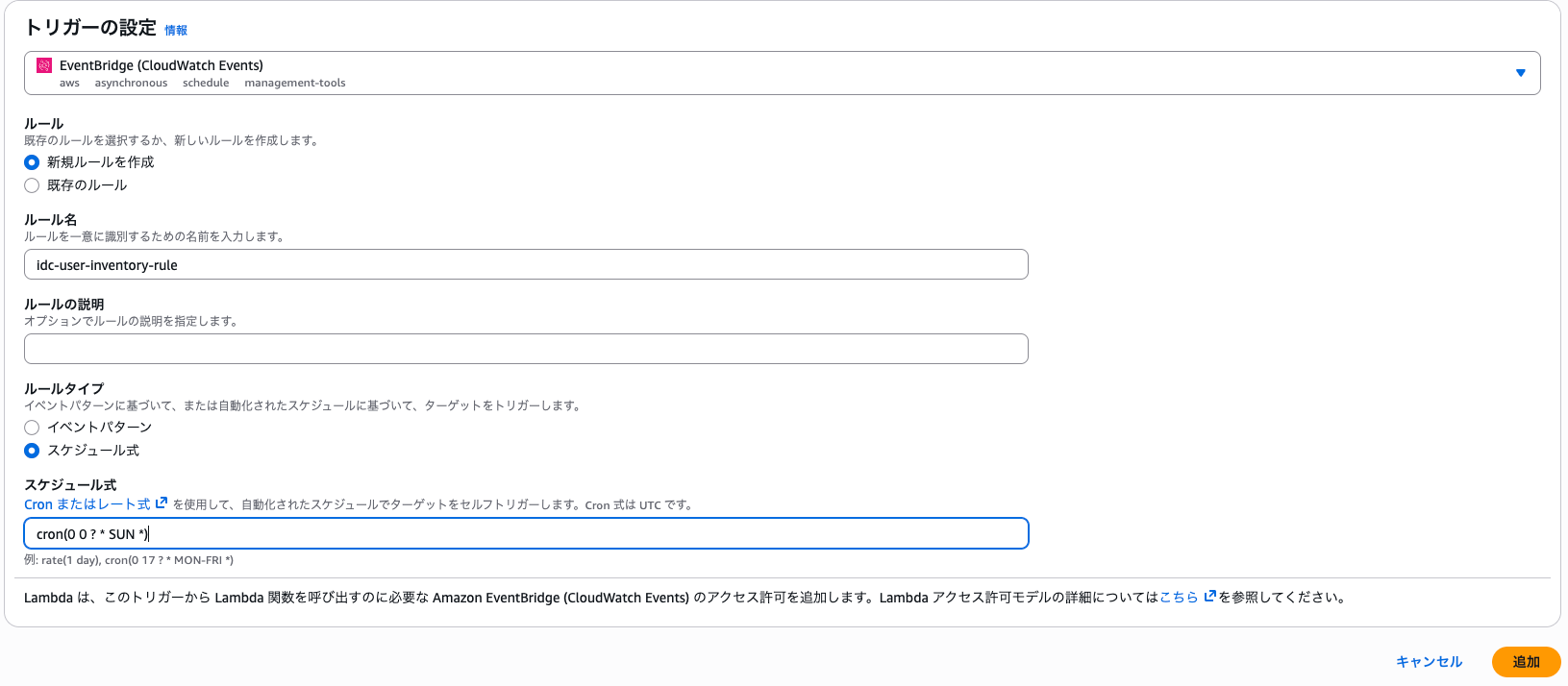
Lambdaを定時実行できるように、EventBridgeを設定します。
以下では日曜日の9時に実行される様に設定しています。こちらも任意の実行タイミングを設定いただければと思います。
データセットを作成する
続いてここまで作成した情報をダッシュボードで表示するためのデータを取り込みます。
今回はそのまま表示できるようにLambda側で調整しておりますので、S3に配置しているファイルを読み取るようにするだけになります。
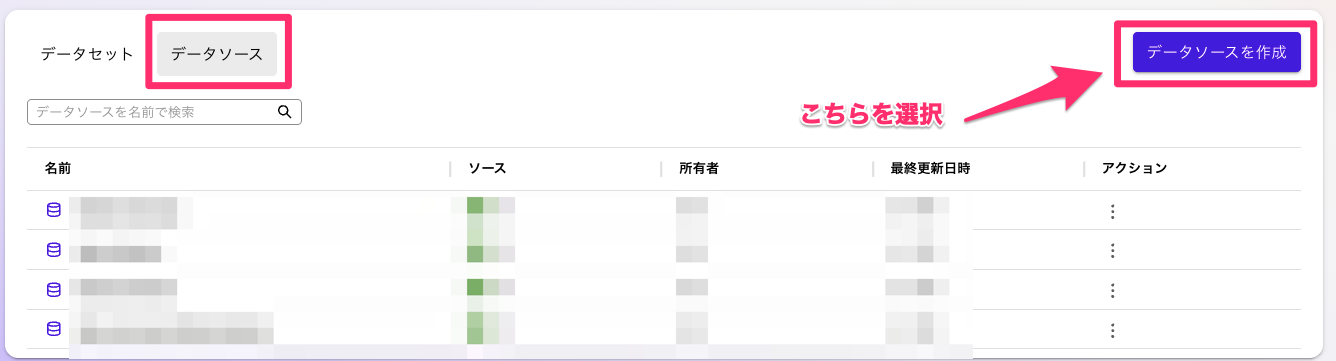
Quick Suiteの画面から「データセット」を選択して、データソースのタブから「データソースを作成」を選択してください。
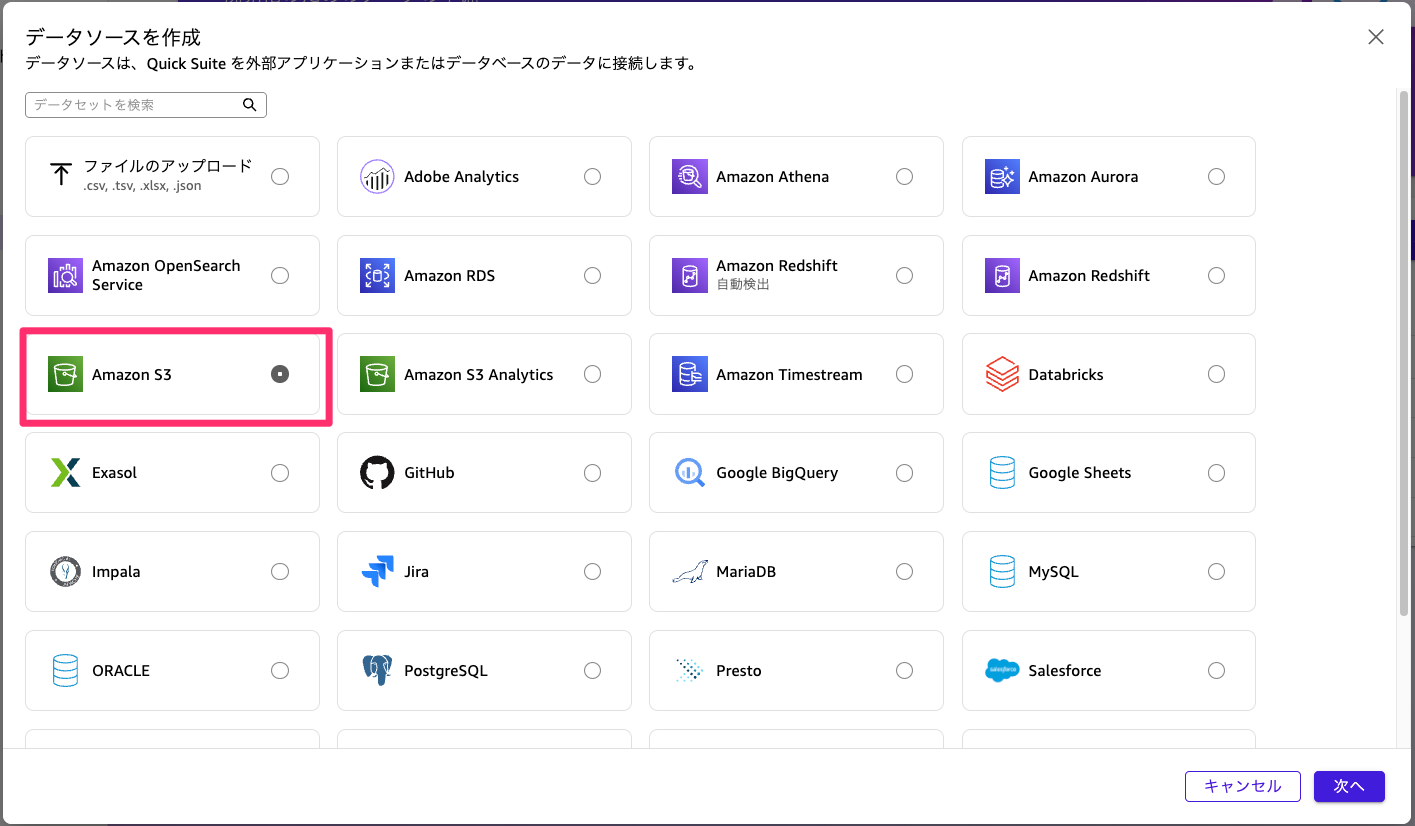
データソースとしてS3を選択します。
特定のS3バケットに格納しているファイルを読み取るようにマニュフェストファイルを以下のように作成してアップロードします。
{
  "fileLocations": [
    {
      "URIs": [
        "s3://{実行結果格納先バケット}/idc-users/latest.csv"
      ]
    }
  ],
  "globalUploadSettings": {
    "format": "CSV",
    "delimiter": ",",
    "textqualifier": "\"",
    "containsHeader": "true"
  }
}
こちらもバケット名を適宜置き換えてください。(プレフィックス等をデフォルトから変更している場合はそちらも書き換えてください)
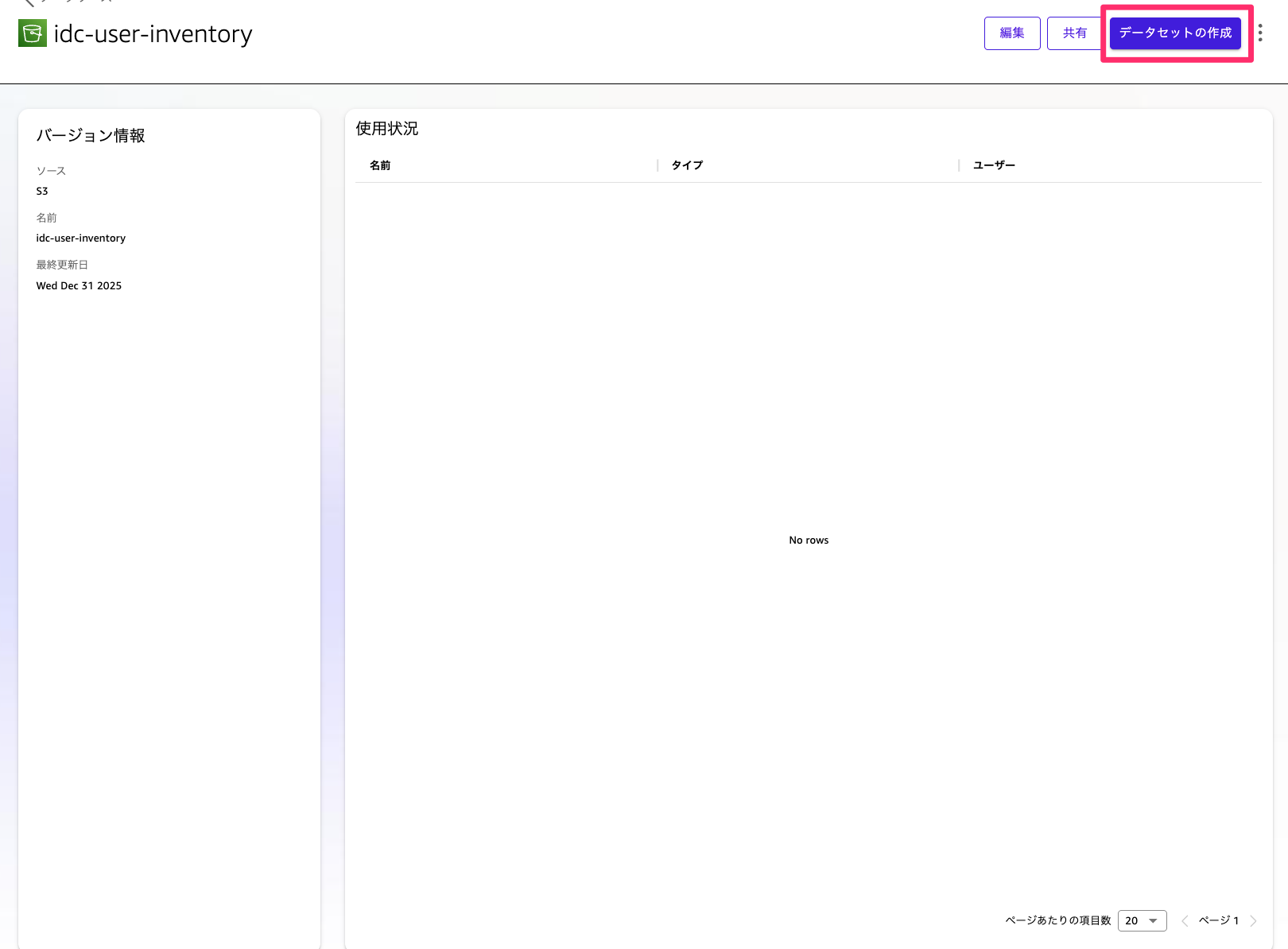
成功すると以下のようにデータセットが追加されます。続いて「データセットの作成」を選択してください。
データ編集を選択して、取り込んでいる内容が問題なければ「視覚化して保存」を選択してください。
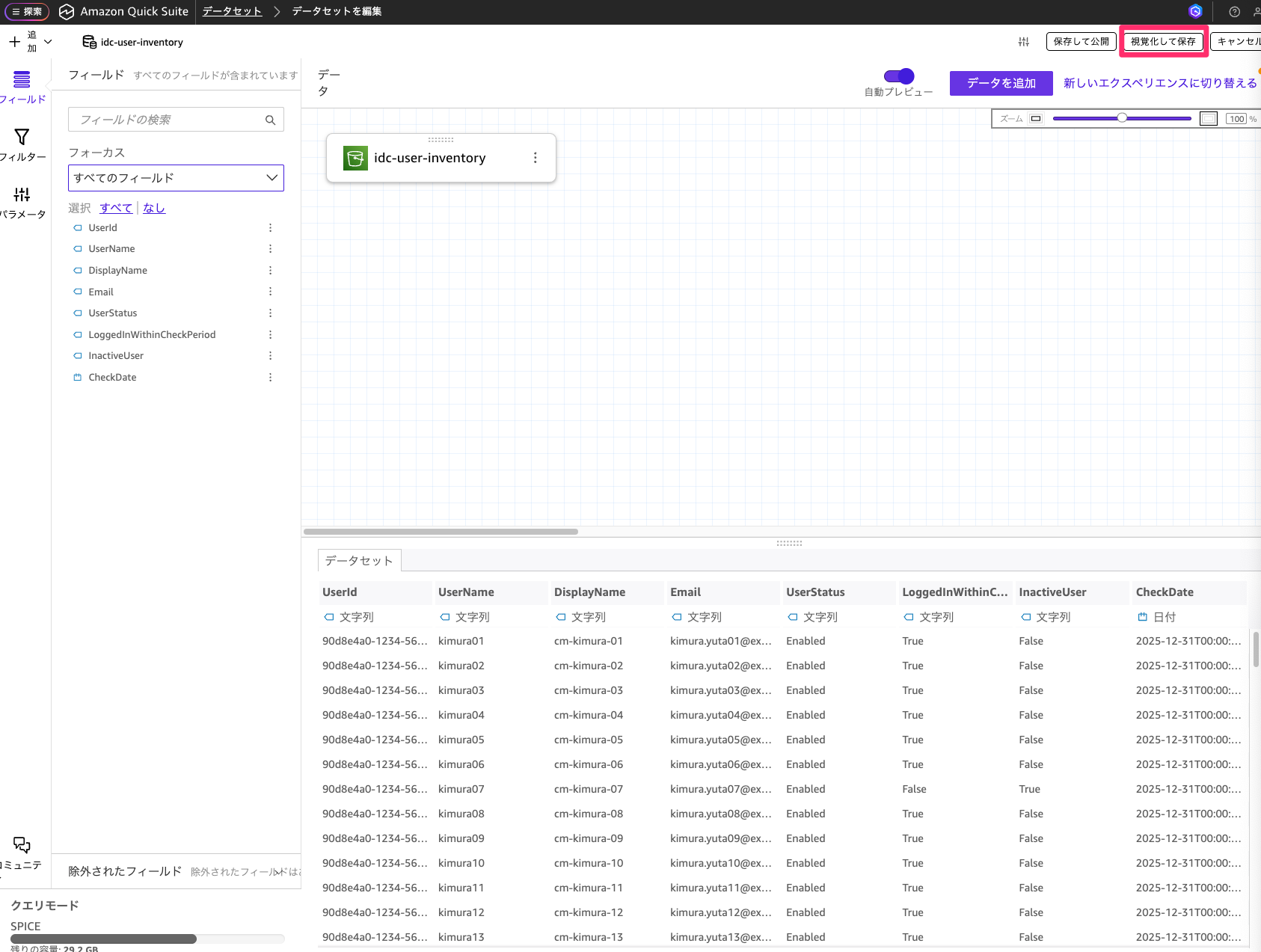
📝 注意
今回キャプチャ取得にあたって検証環境で取得したデータでは数が少ないため、ダッシュボードの表示内容を確認していただきやすいようにダミーで作成したデータを使用しています。
データセットを更新するように設定する
ここまででデータセットの取り込みができました。ただこのままでは作成時のデータの内容を取得し続けることになってしまいます。
ですのでLambdaの実行された後のタイミングのデータを取り込む様に自動更新を設定していきます。
作成したデータセットを選択して、更新のタブを選択し新しいスケジュールの追加を選択してください。
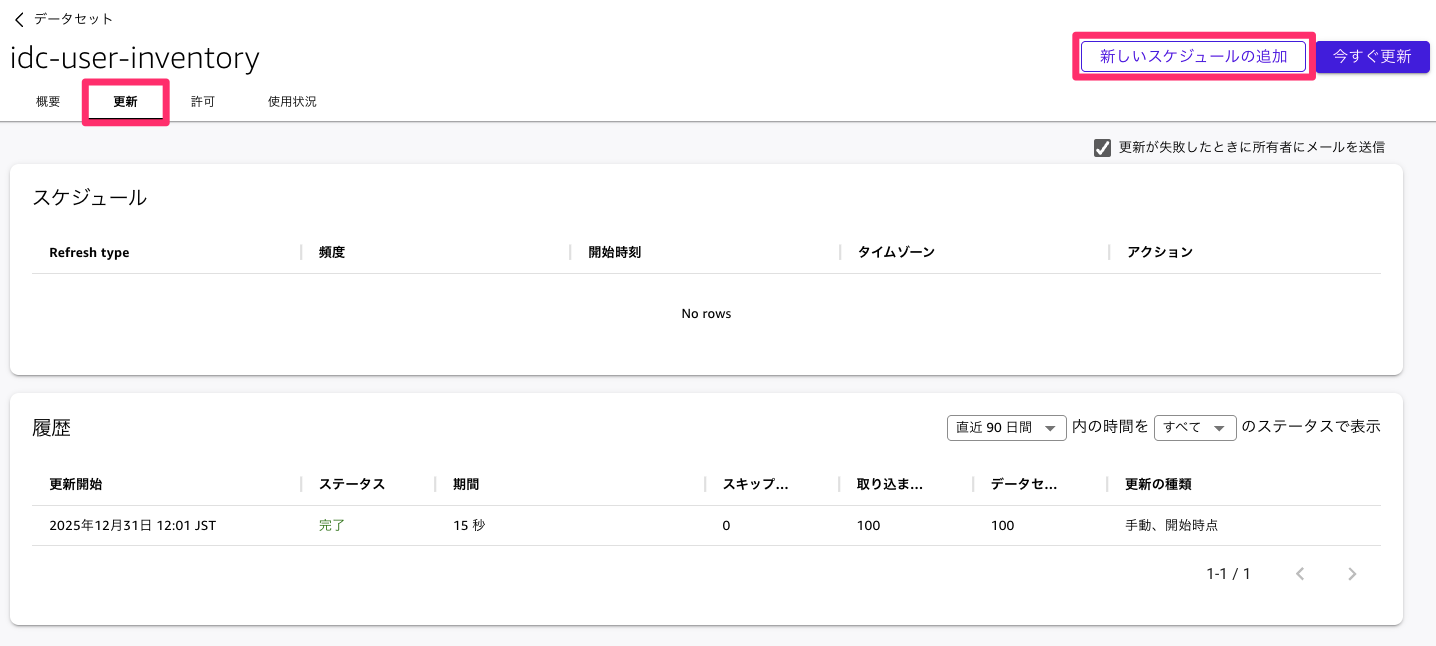
Lambdaの処理が終わるタイミングで更新されるようにスケジュールを設定します。こちらはLambdaの実行完了後のタイミングに合わせて時刻を設定してください。

このようにスケジュールを設定しておくと、取り込むデータが自動で更新されその時の最新のデータを取り込むことが可能です。
ダッシュボードを整備する
ダッシュボードを整備してユーザー全員の情報、XX日以内にログインしていないユーザー数、XX日以内にログインしていないユーザー一覧を表示するように設定していきます。今回はLambda側でデータを整えているので対応する内容としてはかなり簡単です。
まずユーザー全員の情報を表示します。表形式で表示したいので以下の順序で選択してテーブルを追加してください。
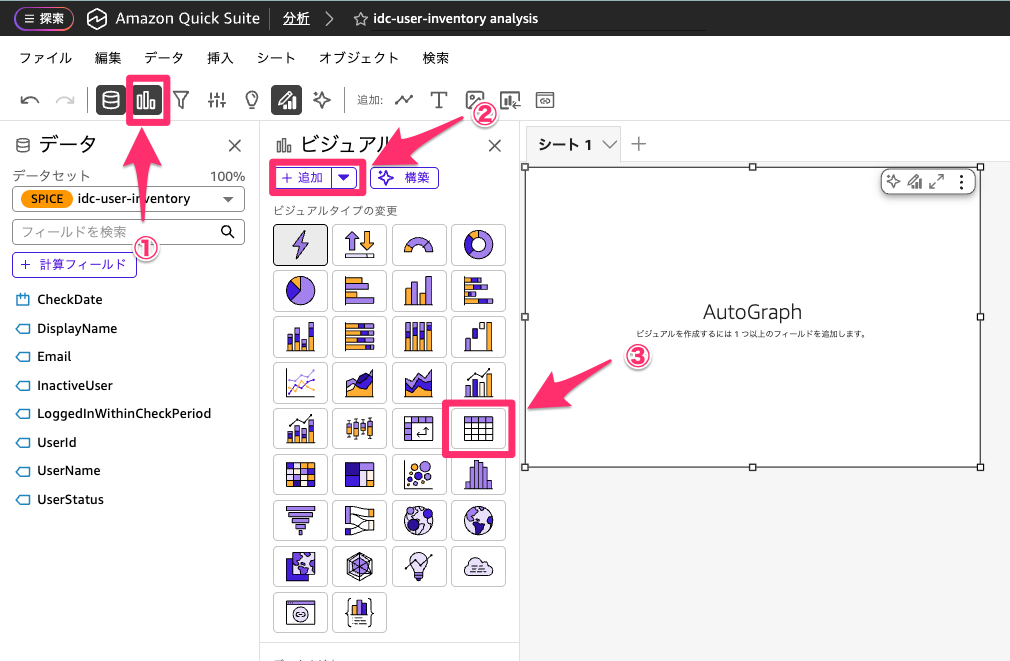
テーブルが追加できたら値に行の項目を全て追加してください。

列を追加すると以下のようにLambdaで取得した内容を全て表示させることができます。

続いてXX日以内にログインしていないユーザー数を表示させます。
まずInactiveUserがTrueとなっている件数をカウントする必要がありますので。計算フィールドを作成します。
データから計算フィールドを選択してください。

以下の様に計算式を設定して保存します。
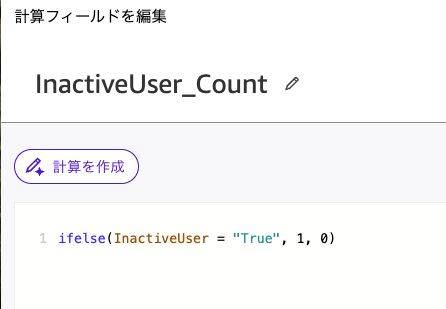
ifelse(InactiveUser = "True", 1, 0)
計算フィールドが作成できたら先ほどと同様にビジュアルを追加します。今度はデフォルトのビジュアルタイプのままで先ほど作成した計算フィールドを追加されたフィールドにドラッグアンドドロップします。
すると先ほどのカウントされた数を表示することができます。
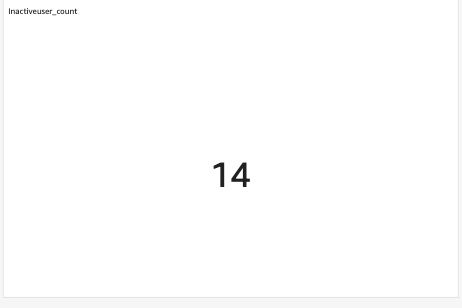
最後にXX日以内にログインしていないユーザー一覧を表示するように設定します。
まず先ほど作ったテーブルを複製します。
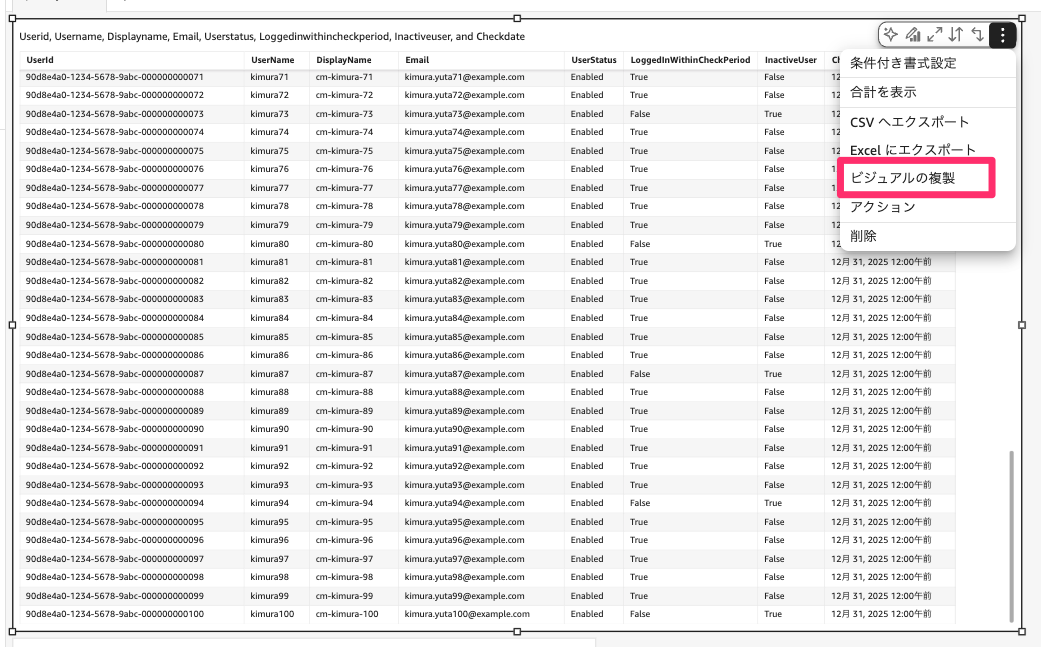
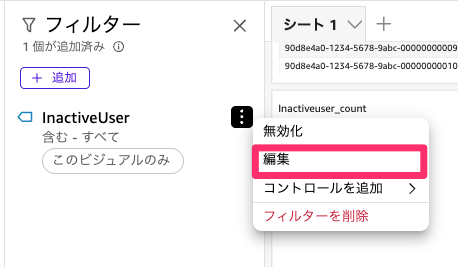
複製ができたら、テーブルに対してフィルターを設定します。テーブルを選択したままフィルターを選択して追加からInactiveUserを選択してください。


続いて編集を選択して、Trueのみにチェックして適用を選択します。
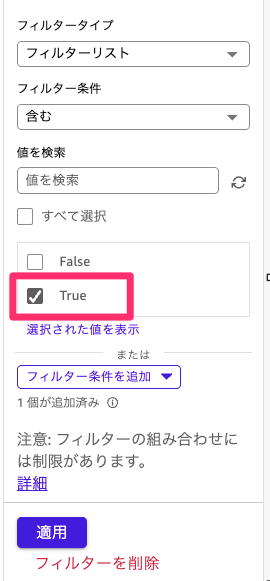
このようにフィルターを適用することで、ログインされていないユーザーのみ絞り込むことが可能です。
上記の設定ができたら、画面右上の公開ボタンからダッシュボードとして公開することでダッシュボードの作成が完了します。

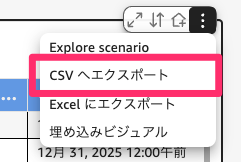
この内容をダッシュボードからでもcsvで出力することもできますので棚卸し対象をこちらで取得して共有することができます。
まとめ
今回はIAM Identity Centerの利用されていないユーザーをQuick Suiteで表示して取得できるようにしてみました。
継続してIAM Identity Center棚卸しが必要な場合には今回のような自動化をしておくと棚卸しが楽になりそうです。Quick Suiteを利用していない場合にはLambdaのところまで整備するという形が良いかと思います。
今回の記事が参考になれば幸いです。
以上、クラウド事業本部の木村がお届けしました。