
AWS Lambda durable functionsで並列操作mapをためしてみた

はじめに
データ事業本部のkobayashiです。
前回の記事ではAWS Durable Execution SDK for Pythonのparallel()機能を使って複数の異なるAPIを並列で呼び出す方法を紹介しました。
今回は同じSDKのmap()機能について試してみます。parallel()との違いを明確にしながら、同じようなシナリオでどのように使い分けるかを解説します。
- aws/aws-durable-execution-sdk-python
- aws-durable-execution-sdk-python/docs/core/map.md at main · aws/aws-durable-execution-sdk-python
parallel()とmap()の違い
まず、parallel()とmap()の違いを整理します。
| 観点 | parallel() | map() |
|---|---|---|
| 用途 | 異なる処理を並列実行 | 同じ処理を複数アイテムに適用 |
| 入力 | 関数のリスト | アイテムのリスト + 1つの関数 |
| 典型例 | ユーザーAPI、注文API、在庫APIを同時に呼ぶ | 複数のユーザーIDに対して同じAPIを呼ぶ |
| 関数定義 | 各処理ごとに個別の関数を定義 | 1つの関数を定義し、アイテムを引数で受け取る |
簡単に言うと以下のような使用方法の違いになります。
- parallel(): 「AとBとCを同時にやる」
- map(): 「Aを1, 2, 3それぞれに対してやる」
map()の概要
map()メソッドは、コレクション内の各アイテムに対して同じ処理を並列実行し、それぞれの結果を独立して保存します。処理が中断された場合、完了したアイテムは再処理されません。
メソッドシグネチャ
def map(
    inputs: Sequence[U],
    func: Callable,
    name: str | None = None,
    config: MapConfig | None = None,
) -> BatchResult[T]
パラメータ:
| パラメータ | 型 | 説明 |
|---|---|---|
inputs |
Sequence[U] |
処理対象のアイテムのシーケンス(リスト、タプル等) |
func |
Callable |
各アイテムを処理する関数 |
name |
str | None |
操作名(デバッグ用、省略可) |
config |
MapConfig | None |
同時実行数や完了条件を設定するオブジェクト(省略可) |
マップ関数のシグネチャ
map()に渡す関数は以下のシグネチャを持ちます。
def process_item(
    context: DurableContext,
    item: U,
    index: int,
    items: Sequence[U]
) -> T:
    # 処理ロジック
    return result
引数:
| 引数 | 説明 |
|---|---|
context |
DurableContext(ステップ操作等に使用) |
item |
現在処理中のアイテム |
index |
アイテムのインデックス(0始まり) |
items |
入力アイテム全体のシーケンス |
parallel()との大きな違いは、関数がitemとindexを受け取る点です。これにより、同じ関数を複数のアイテムに対して適用できます。
結果の順序について
公式ドキュメントのFAQによると、アイテムの処理順序は並列実行のため非決定的ですが、BatchResult内の結果は入力順序を維持するので、入力に対する処理結果を取得したい場合はindexでのアクセスを行えば良いです。
Items execute in parallel, so processing order is non-deterministic. However, results maintain the same order as inputs in the BatchResult.
MapConfigパラメータ
map()の設定はMapConfigで行います。ParallelConfigと似ていますが、バッチ処理の設定が追加されています。
from aws_durable_execution_sdk_python.config import (
    MapConfig,
    CompletionConfig,
    ItemBatcher,
)

config = MapConfig(
    max_concurrency=10,  # 同時処理数
    item_batcher=ItemBatcher(max_items_per_batch=5),  # バッチサイズ
    completion_config=CompletionConfig.all_successful(),  # 成功基準
)
MapConfigのパラメータ一覧
| パラメータ | 説明 |
|---|---|
max_concurrency |
同時処理アイテムの最大数。Noneで無制限 |
item_batcher |
複数アイテムをまとめて処理するための設定 |
completion_config |
成功/失敗の判定基準を定義 |
serdes |
BatchResult全体のカスタムシリアライゼーション |
item_serdes |
個別アイテム結果のカスタムシリアライゼーション |
completion_configによる失敗許容
デフォルトでは全アイテムの成功が必要ですが、CompletionConfigを使うことで一部の失敗を許容できます。
from aws_durable_execution_sdk_python import (
    BatchResult,
    DurableContext,
    durable_execution,
)
from aws_durable_execution_sdk_python.config import MapConfig, CompletionConfig

@durable_execution
def lambda_handler(event: dict, context: DurableContext) -> dict:
    """失敗許容の設定例"""

    product_ids = event.get("product_ids", ["P001", "P002", "P003"])

    def check_inventory(ctx: DurableContext, product_id: str, index: int, items: list) -> dict:
        def call_api(_):
            return {"product_id": product_id, "stock": 100}
        return ctx.step(call_api, name=f"check_{product_id}")

    # 80%以上成功すればOK(大量処理で一部失敗を許容する場合)
    config = MapConfig(
        max_concurrency=5,
        completion_config=CompletionConfig(tolerated_failure_percentage=20),
    )

    results: BatchResult[dict] = context.map(product_ids, check_inventory, config=config)

    # 結果を表示
    for res in results.all:
        print(res)

    return {
        "success_count": results.success_count,
        "failure_count": results.failure_count,
    }
CompletionConfigの主なオプション:
| 設定 | 説明 |
|---|---|
CompletionConfig.all_successful() |
すべて成功で完了(デフォルト) |
CompletionConfig(min_successful=N) |
N個以上成功すれば完了 |
CompletionConfig(tolerated_failure_count=N) |
N回失敗したら中止 |
CompletionConfig(tolerated_failure_percentage=X) |
X%失敗で失敗判定 |
max_concurrencyとitem_batcherの違い
max_concurrencyとitem_batcherは似ているようで異なる概念です。
max_concurrency(同時実行数の制限)
「同時に何個の処理を走らせるか」 を制御します。
アイテム: [1, 2, 3, 4, 5, 6, 7, 8, 9, 10]
max_concurrency=3 の場合:

step1: [1] [2] [3]  ← 3つ同時実行
step2: [4] [5] [6]  ← 1〜3が終わったら次の3つ
step3: [7] [8] [9]
step4: [10]
各アイテムは個別に処理されますが、同時に実行される数を制限します。外部APIのレート制限対策やリソース消費の抑制に使います。
item_batcher(バッチ処理)
「複数アイテムをまとめて1回の処理で扱う」 ための設定です。
アイテム: [1, 2, 3, 4, 5, 6, 7, 8, 9, 10]
ItemBatcher(max_items_per_batch=5) の場合:

バッチ1: [1, 2, 3, 4, 5]  ← 5個まとめて1回の関数呼び出し
バッチ2: [6, 7, 8, 9, 10] ← 残り5個をまとめて1回
関数に渡されるitemがBatchedInput型になり、複数アイテムを一度に処理できます。小さい処理をまとめることでチェックポイントのオーバーヘッドを削減できます。
組み合わせた場合
両方を設定すると、バッチ化されたグループに対して同時実行数の制限が適用されます。
from aws_durable_execution_sdk_python import (
    BatchResult,
    DurableContext,
    durable_execution,
)
from aws_durable_execution_sdk_python.config import MapConfig, ItemBatcher, BatchedInput

@durable_execution
def lambda_handler(event: dict, context: DurableContext) -> dict:
    """item_batcherの使用例"""

    item_ids = ["item1", "item2", "item3", "item4", "item5",
                "item6", "item7", "item8", "item9", "item10"]

    def process_batch(ctx: DurableContext, item: BatchedInput[None, str], index: int, items: list) -> list:
        def call_api(_):
            return [{"id": item, "processed": True}]
        return ctx.step(call_api, name=f"batch_{index}")

    # 5個ずつバッチ化して処理
    config = MapConfig(
    max_concurrency=2,
    item_batcher=ItemBatcher(max_items_per_batch=5),
    )

    # 戻り値はバッチ内アイテム数と同数の結果リストを返す
    results: BatchResult[list] = context.map(item_ids, process_batch, config=config)

    # 結果を表示
    for res in results.all:
        print(res)

    return {"processed_count": results.success_count}
アイテム: [1, 2, 3, 4, 5, 6, 7, 8, 9, 10]

Step1 バッチ化: [[1,3,,5,7,9], [2,4,6,8,10]]  ← 2つのバッチに分割
Step2 同時実行: 2つのバッチを同時に処理      ← max_concurrency=2
使い分けの指針
| 設定 | 用途 | 例 |
|---|---|---|
max_concurrency |
外部APIのレート制限対策、リソース消費の抑制 | APIが秒間10リクエストまでの場合 |
item_batcher |
小さい処理をまとめて効率化 | 各処理が100ms未満の場合は5〜10個のバッチ化を推奨 |
ドキュメントでは、各アイテムの処理が100ms未満の場合は5〜10個のバッチ化が推奨されています。
parallel()とmap()の使い分けシナリオ
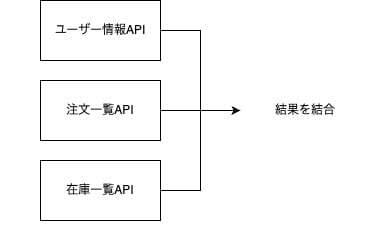
前回のparallel()の記事では、ECサイトのダッシュボード表示を想定し、以下の3つのAPIから情報を取得して統合しました。
- ユーザー情報API
- 注文一覧API
- 在庫一覧API
これは「異なる3つのAPI」を同時に呼ぶシナリオなので、parallel()が適切でした。
parallel()が適切なパターン(前回)
map()が適切なパターン
一方、map()は「同じ処理を複数のアイテムに適用する」場合に適しています。
例えば、1人のユーザーに対して
- 複数の注文詳細を取得: 注文IDリスト [O001, O002, O003] に対して同じ「注文詳細API」を呼ぶ
- 複数商品の在庫を確認: 商品IDリスト [P001, P002, P003] に対して同じ「在庫確認API」を呼ぶ
のような処理を行う場合です。
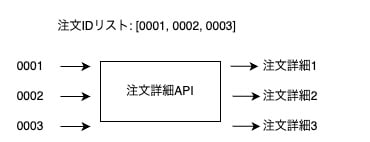
ポイントは以下です。
- アイテム数が動的: 注文数はユーザーによって異なる
- 処理内容は同じ: 各注文IDに対して同じAPIを呼ぶ
map()を使った実装例
1人のユーザーに対して、複数の注文詳細と、それに含まれる商品の在庫状況を取得するシナリオを実装してみます。
シナリオの流れ
1. ユーザー情報を取得(1回)
2. そのユーザーの注文一覧を取得 → 注文IDリスト [O001, O002, O003]
3. 各注文の詳細を並列取得(map)
4. 全注文に含まれる商品IDを抽出 → 商品IDリスト [P001, P002, P003, P004]
5. 各商品の在庫を並列確認(map)
6. 結果を統合して返却
実装コード
import time

from aws_durable_execution_sdk_python import (
    BatchResult,
    DurableContext,
    durable_execution,
)
from aws_durable_execution_sdk_python.config import MapConfig

@durable_execution
def lambda_handler(event: dict, context: DurableContext) -> dict:
    """1ユーザーの注文詳細と在庫状況を取得"""

    user_id = event.get("user_id", "U001")

    # 1. ユーザー情報を取得
    def fetch_user(_):
        time.sleep(1)
        return {"user_id": user_id, "name": "Taro Yamada", "email": "taro@example.com"}

    user = context.step(fetch_user, name="fetch_user")

    # 2. 注文一覧を取得(注文IDのリストを返す)
    def fetch_order_list(_):
        time.sleep(1)
        return ["O001", "O002", "O003"]  # 動的な注文IDリスト

    order_ids = context.step(fetch_order_list, name="fetch_order_list")

    # 3. 各注文の詳細を並列取得(map)
    def fetch_order_detail(ctx: DurableContext, order_id: str, index: int, items: list) -> dict:
        def call_api(_):
            time.sleep(2)  # 各APIは2秒かかる
            # 注文詳細のモックデータ
            return {
                "order_id": order_id,
                "items": [f"P00{index * 2 + 1}", f"P00{index * 2 + 2}"],
                "total": 1000 * (index + 1),
            }
        return ctx.step(call_api, name=f"fetch_order_{order_id}")

    order_results: BatchResult[dict] = context.map(order_ids, fetch_order_detail)

    # 4. 全注文から商品IDを抽出
    product_ids = []
    for order_result in order_results.all:
        if order_result.result:
            product_ids.extend(order_result.result["items"])
    product_ids = list(set(product_ids))  # 重複除去

    # 5. 各商品の在庫を並列確認(map)
    def check_inventory(ctx: DurableContext, product_id: str, index: int, items: list) -> dict:
        def call_api(_):
            time.sleep(1)  # 各APIは1秒かかる
            return {"product_id": product_id, "stock": 100 - index * 10, "available": True}
        return ctx.step(call_api, name=f"check_inventory_{product_id}")

    # 同時実行数を制限(在庫APIの負荷を考慮)
    inventory_config = MapConfig(max_concurrency=3)
    inventory_results: BatchResult[dict] = context.map(
        product_ids, check_inventory, config=inventory_config
    )

    # 6. 結果を統合して返却
    return {
        "user": user,
        "orders": [r.result for r in order_results.all if r.result],
        "inventory": [r.result for r in inventory_results.all if r.result],
        "summary": {
            "order_count": order_results.success_count,
            "product_count": inventory_results.success_count,
        },
    }
実装のポイント
- 注文詳細の取得に
map()を使用: 注文IDリストに対して同じ「注文詳細API」を並列実行 - 在庫確認にも
map()を使用: 商品IDリストに対して同じ「在庫確認API」を並列実行 - アイテム数が動的: 注文数や商品数はユーザーによって異なる
max_concurrencyで負荷制御: 在庫APIへの同時アクセスを3件に制限
実行時間の比較
順次実行の場合:
  ユーザー情報(1秒) + 注文一覧(1秒) + 注文詳細×3(6秒) + 在庫確認×6(6秒) = 14秒

map()による並列実行の場合:
  ユーザー情報(1秒) + 注文一覧(1秒) + 注文詳細(2秒) + 在庫確認(2秒) = 6秒
  ※在庫確認はmax_concurrency=3なので、6件を2回に分けて実行
map()を使うことで、約57%の時間短縮が実現できます。
parallel()とmap()の使い分け
parallel()が適しているケース
- 処理内容が根本的に異なる場合
- ユーザー情報取得、注文一覧取得、在庫一覧取得など、異なるAPIを同時に呼ぶ
- アイテム数が固定の場合
- 常に決まった数の処理を並列実行
# parallel()向き:異なる処理を同時実行
context.parallel([
    fetch_user,       # ユーザー情報API
    fetch_orders,     # 注文一覧API
    fetch_inventory,  # 在庫一覧API
])
map()が適しているケース
- 同じ処理を複数のアイテムに適用する場合
- 複数の注文IDに対して同じ「注文詳細API」を呼ぶ
- 複数の商品IDに対して同じ「在庫確認API」を呼ぶ
- アイテム数が動的に変わる場合
- 注文数や商品数がユーザーによって異なる
- バッチ処理が必要な場合
ItemBatcherを使って複数アイテムをまとめて処理
# map()向き:同じ処理を複数アイテムに適用
order_ids = ["O001", "O002", "O003"]  # 動的なリスト

def fetch_order_detail(ctx, order_id, index, items):
    return ctx.step(lambda _: call_order_api(order_id), name=f"fetch_{order_id}")

context.map(order_ids, fetch_order_detail)
parallel()とmap()を組み合わせる
実際のアプリケーションでは、parallel()とmap()を組み合わせることも有効です。
@durable_execution
def lambda_handler(event: dict, context: DurableContext) -> dict:
    """parallel()とmap()を組み合わせた例"""

    # Step 1: parallel()で異なる情報を同時取得
    def fetch_user(ctx):
        return ctx.step(lambda _: call_user_api(), name="fetch_user")

    def fetch_order_ids(ctx):
        return ctx.step(lambda _: call_order_list_api(), name="fetch_order_ids")

    initial_data = context.parallel([fetch_user, fetch_order_ids])

    user = initial_data.all[0].result
    order_ids = initial_data.all[1].result

    # Step 2: map()で注文詳細を並列取得
    def fetch_order_detail(ctx, order_id, index, items):
        return ctx.step(lambda _: call_order_detail_api(order_id), name=f"order_{order_id}")

    orders = context.map(order_ids, fetch_order_detail)

    return {"user": user, "orders": [r.result for r in orders.all]}
このように、parallel()で「異なる種類のデータ」を同時取得し、map()で「同じ種類のデータを複数」取得するという組み合わせが効果的です
まとめ
AWS Durable Execution SDK for Pythonのmap()機能を、前回のparallel()と比較しながら試してみました。
parallel()は「ユーザーAPI、注文一覧API、在庫一覧API」のように異なる処理を同時に実行する場合に適しています。一方、map()は「複数の注文IDに対して同じ注文詳細APIを呼ぶ」のように、同じ処理を複数のアイテムに適用する場合に適しています。
特にmap()は、アイテム数が動的に変わるケースや、ItemBatcherを使ったバッチ処理が必要なケースで真価を発揮します。また、max_concurrencyで同時実行数を制限したり、CompletionConfigで失敗許容を設定したりと、柔軟な制御が可能です。
実際のアプリケーションでは、parallel()で異なる種類のデータを同時取得し、map()で同じ種類のデータを複数取得するという組み合わせが効果的です。処理の性質に応じて使い分けることで、より読みやすく保守しやすいコードになります。
最後まで読んで頂いてありがとうございました。