
[アップデート]AWS SAM CLIのローカルLambdaエンドポイント(start-lambda)が非同期タイプの実行をサポートするようになりました
初めに
本日AWS SAM CLI v1.154.0がリリースされました。
https://github.com/aws/aws-sam-cli/releases/tag/v1.154.0
SAM CLIにはlocal start-lambdaというコマンドがあり、これを利用することでローカルにLambda関数のAWS APIエンドポイントを立てて起動や実行をエミュレートすることができます。
関数単体で直接実行したい場合はlocal invokeが選択肢となりますが、local start-lambdaはLambda向けのAWS APIを受け付けるエンドポイント自体を提供し、AWS CLIやSDKでLambda関数を呼び出すようなケースに利用されます。
さて、Lambda関数では実行してから結果を待つ同期実行(RequestResponse)と非同期実行(Event)の2種類があります。
https://dev.classmethod.jp/articles/lambda-idempotency/
以前ではlocal start-lambdaは同期実行のみに対応しており非同期実行には対応していなかったためローカル実行時には指定を変える、もしくは諦めてAWS環境上で実行するしかないという形でしたが、本バージョンではこれが解消された形となります。
以前の挙動
この同期タイプにしか対応していないというのはバグではなく組み込み当初からの仕様(というよりまだ対応していない)という形となっていました。
https://github.com/aws/aws-sam-cli/issues/510#issuecomment-401244818
なのでAWS CLIで実行タイプをEventにしてローカルのエンドポイントを指定の上実行するとNotImplementedエラーが発生します。
% sam --version
SAM CLI, version 1.149.0

% aws lambda invoke --function-name HelloWorldFunction --endpoint-url http://127.0.0.1:3001 --invocation-type Event /dev/stdout
...
2026-02-12 18:56:05,946 - MainThread - botocore.endpoint - DEBUG - Sending http request: <AWSPreparedRequest stream_output=True, method=POST, url=http://127.0.0.1:3001/2015-03-31/functions/HelloWorldFunction/invocations, headers={'X-Amz-Invocation-Type': b'Event', 'User-Agent': b'aws-cli/2.32.10 md/awscrt#0.29.1 ua/2.1 os/macos#25.2.0 md/arch#arm64 lang/python#3.13.9 md/pyimpl#CPython m/N,Z,g,E,b cfg/retry-mode#standard md/installer#exe sid/dbc23cea9051 md/prompt#off md/command#lambda.invoke', 'X-Amz-Date': b'20260212T095605Z', 'Authorization': b'AWS4-HMAC-SHA256 Credential=xxxxxxxx/20260212/ap-northeast-1/lambda/aws4_request, SignedHeaders=host;x-amz-date;x-amz-invocation-type, Signature=xxxxxxx', 'Content-Length': '0'}>
2026-02-12 18:56:05,946 - MainThread - urllib3.connectionpool - DEBUG - Starting new HTTP connection (1): 127.0.0.1:3001
2026-02-12 18:56:05,950 - MainThread - urllib3.connectionpool - DEBUG - http://127.0.0.1:3001 "POST /2015-03-31/functions/HelloWorldFunction/invocations HTTP/1.1" 501 114
2026-02-12 18:56:05,950 - MainThread - botocore.parsers - DEBUG - Response headers: {'Server': 'Werkzeug/3.1.4 Python/3.13.9', 'Date': 'Thu, 12 Feb 2026 09:56:05 GMT', 'x-amzn-errortype': 'NotImplemented', 'Content-Type': 'application/json', 'Content-Length': '114', 'Connection': 'close'}
2026-02-12 18:56:05,950 - MainThread - botocore.parsers - DEBUG - Response body:
b'{"Type": "LocalService", "Message": "invocation-type: Event is not supported. RequestResponse is only supported."}'
...
An error occurred (NotImplemented) when calling the Invoke operation: invocation-type: Event is not supported. RequestResponse is only supported.
利用するケースはそれなりにある印象で、実際今回のPRに記載のURLを追ってみると2019年くらいから対応を求める声はあったようです(このPRでは以降進まずクローズしてしまったようです)。
https://github.com/aws/aws-sam-cli/pull/749
ありがたいことに今回開発してくださった方がいらっしゃり、めでたくサポートとなりました。
実行してみる
非同期タイプのイベントでの実行はSAM側としては今回のバージョン(1.151.0)以上をインストールするのみでよく、SAM側では実行時に追加で必要なオプション等はありません(呼び出し側で指定)。
こちらでsam initで生成されるHelloWorldFunctionをlocal start-lambdaで実行してみます。
% /tmp/venv/bin/sam --version
SAM CLI, version 1.151.0

% sam local start-lambda
Initializing the lambda functions containers.                                                     Local image is up-to-date                                                                         Using local image: public.ecr.aws/lambda/python:3.14-rapid-x86_64.

Mounting /Users/xxxxx/sam-app/hello_world as /var/task:ro,delegated, inside runtime container     SAM_CONTAINER_ID: 2a3f80b73a3b723c187181f0f44c32233cdb026d2c0a0222769904efc9f8cae7               Containers created. Waiting for readiness...                                                     Waiting for 1 containers to be running...                                                         All 1 containers running after 0.0 seconds                                                       All containers are ready.                                                                         Starting the Local Lambda Service. You can now invoke your Lambda Functions defined in your template through the endpoint.                                                                   2026-02-12 19:20:03 WARNING: This is a development server. Do not use it in a production deployment. Use a production WSGI server instead.
 * Running on http://127.0.0.1:3001
2026-02-12 19:20:03 Press CTRL+C to quit
HelloWorldFunctionのコードの内容は以下のような形です(行数が多くなるのでコメントは除去済)。
import json

def lambda_handler(event, context):
    return {
        "statusCode": 200,
        "body": json.dumps({
            "message": "hello world",
        }),
    }
この状態で別画面でAWS CLIを利用してLambda関数を実行してみると、エラーではなくステータス202が返ってくることが確認できます。
## 非同期実行
% aws lambda invoke --function-name HelloWorldFunction --endpoint-url http://127.0.0.1:3001 --invocation-type Event  /dev/stdout
{
    "StatusCode": 202
}

## 未指定(同期実行)の場合
% aws lambda invoke --function-name HelloWorldFunction --endpoint-url http://127.0.0.1:3001  /dev/stdout
{"statusCode": 200, "body": "{\"message\": \"hello world\"}"}
    "StatusCode": 200
}
ステータスコード 202はLambdaのInvoke APIの仕様で非同期で実行した時のレスポンスになり、無事に非同期で呼び出しが成功していることがわかります。
https://docs.aws.amazon.com/ja_jp/lambda/latest/api/API_Invoke.html#API_Invoke_ResponseSyntax
非同期であることがわかりづらいのである程度時間のかかる処理にしてみます。
import json
import time
from datetime import datetime
def lambda_handler(event, context):
    for i in range(120):
        print(f"ループ回数{i}")
        time.sleep(1)

    return {
        "statusCode": 200,
        "body": json.dumps({
            "message": "hello world"
        }),
    }
これをAWS CLIで呼び出してみると、呼び出しているAWS CLI側は非同期のためすぐにレスポンスが返されて終了していますが、その後もSAM側では処理が続いていることが確認できます。
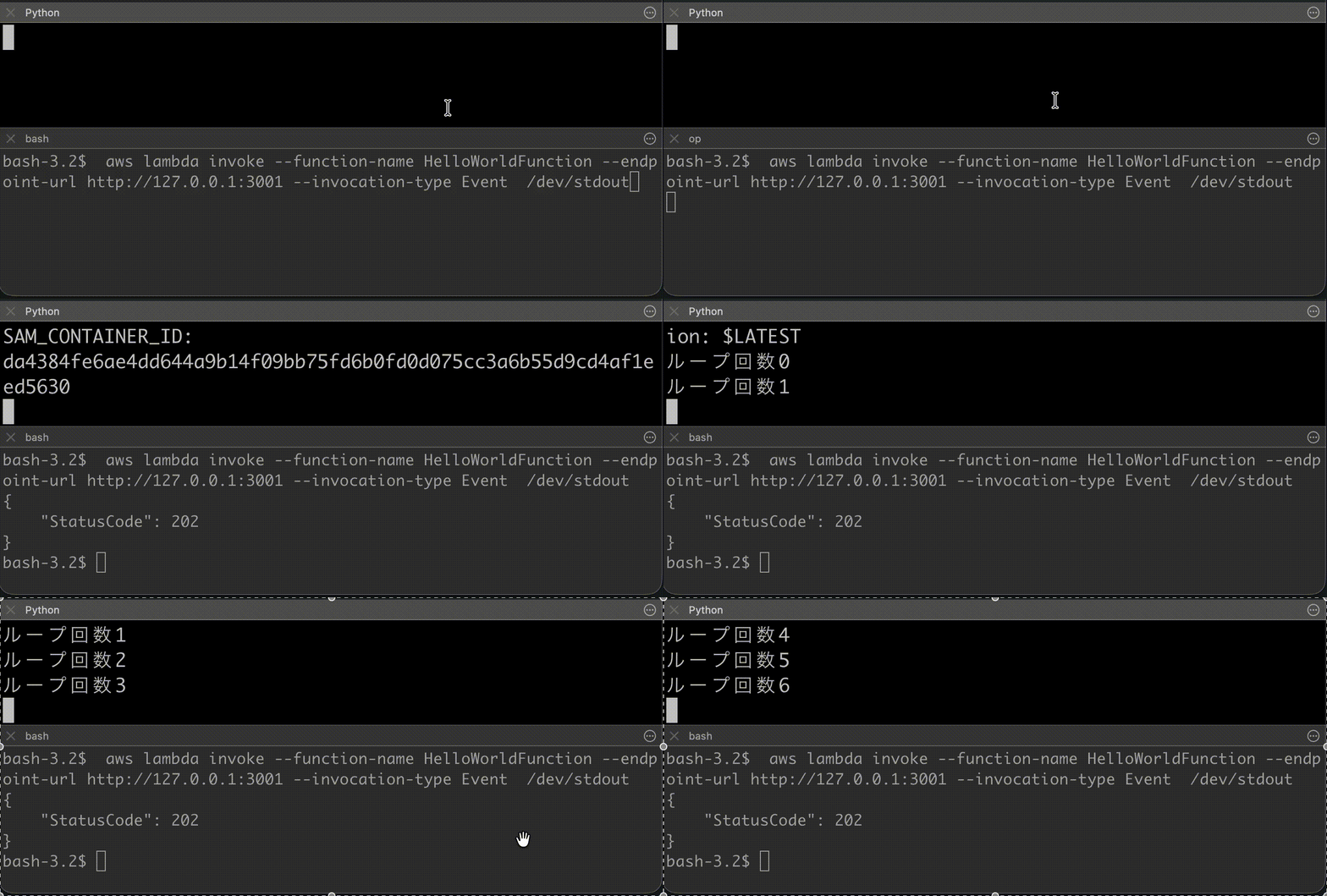
※ GIFのため環境によってはうまく再生されないかもしれません。
終わりに
今回リリースされたlocal start-lambdaの非同期実行対応の実際の動作を確認してみました。
今回はAWS CLIから実行してみましたが、Lambda関数から別のLambda関数を非同期で呼び出し分散処理をするというのは割とよくあるケースとは思いますので、かなり嬉しいアップデートではないでしょうか。
エミュレートですがローカルで動かせることでやはり料金を気にせずに気軽に動かせるようになりますし、CI/CDでのテストの選択肢も広くなりますので、Lambda関数からLambda関数を非同期で呼び出すというようなものを利用していた方は是非利用を検討してみてください。