AWSサイト間VPNのカスタマーゲートウェイデバイス向けのサンプル設定ファイルを確認してみた

コンバンハ、千葉(幸)です。
AWSサイト間VPN(Site-to-Site VPN) ではカスタマーゲートウェイデバイス向けのサンプル設定ファイルをダウンロードできます。
今回は、サンプル設定ファイルについておさらいしつつ、簡易的なAWSサイト間VPNを構築して実際のサンプル設定ファイルの内訳を確認してみました。
なぜサイト間VPNのサンプル設定ファイルが気になったのか
少し背景を記載します。
AWSサイト間VPNを構成する際には大きく分けて2種類のゲートウェイを意識します。
- AWS側:ターゲットゲートウェイ
- サイト間VPNのAWS側のエンドポイントの総称
- Virtual private gateway(仮想プライベートゲートウェイ/VGW)
- Transit gateway(トランジットゲートウェイ/TGW)
- VPNコンセントレーター
- CloudWAN
- サイト間VPNのAWS側のエンドポイントの総称
- オンプレミス側:カスタマーゲートウェイ(Customer gateway/CGW)
- カスタマーゲートウェイデバイスの情報を定義するAWSリソース
カスタマーゲートウェイとカスタマーゲートウェイデバイスは別の概念です。
カスタマーゲートウェイデバイスはオンプレミス側に位置する物理デバイスやソフトウェアアプリケーションのことを指します。機器/アプリケーションに応じた設定(Config) を投入する必要があります。このConfigファイルのサンプルは、サイト間VPNを構成したのちにAWSマネジメントコンソールやEC2 APIを用いてダウンロードできます。
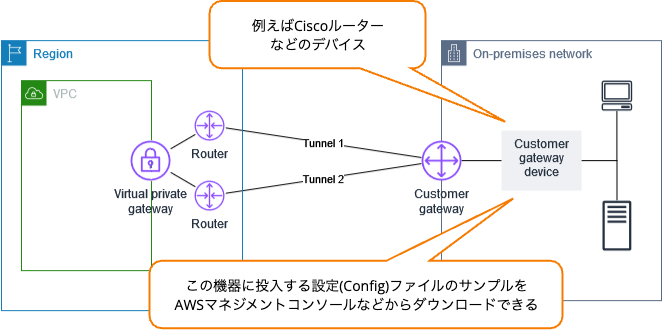
https://docs.aws.amazon.com/ja_jp/vpn/latest/s2svpn/your-cgw.html より引用した画像に吹き出しを追加して作成
サンプルConfigファイルにはVPNトンネル終端のIPアドレスやPre-Shared Key、動的の場合はBGP情報などが含まれています。
ここで、サイト間VPNの構築作業の場面を考えます。 AWS側の設定作業を行う主体とオンプレミス側の設定作業を行う主体が異なることはよくあります。AWS側で必要な設定を実施した上でサンプルConfigファイルをダウンロードし、それをオンプレミス側に引き渡して後続作業を行う、というイメージです。
わたしはAWS側担当の立場として作業する機会が多く、サンプルConfigファイルの内訳を深く意識したことがありませんでした。今回はオンプレミス側担当/AWS側担当の認識をなるべく合わせることを目的に、サンプルConfigファイルについてまとめてみます。
カスタマーゲートウェイデバイスの要件とベストプラクティス
まずカスタマーゲートウェイデバイスについて考えます。
カスタマーゲートウェイデバイスとして使用できるデバイスは多々あります。満たすべき要件は下記にまとめられています。
詳細は上記のドキュメントを直接ご確認いただくとして、おおまかには以下内容が記載されています。
| No. | 要件 | 動的ルーティングの場合 | 概要 |
|---|---|---|---|
| 1 | IKE セキュリティアソシエーションの確立 | IKE を使って AWS 側とカスタマーゲートウェイ間で最初の安全な通信路を確立する。サポートされているバージョンはv1とv2。 | |
| 2 | IPsec セキュリティアソシエーションの確立(トンネルモード) | IKE で生成した鍵を使い、IPsec トンネルを確立して通信を暗号化する。 | |
| 3 | AES による暗号化 | IKE / IPsec の両方で AES 128ビット暗号化または AES 256ビット暗号化を行う。 | |
| 4 | SHA による認証 | IKE / IPsec の両方で SHA-1 または SHA-2(256)ハッシュ関数を使用する。 | |
| 5 | Diffie-Hellman(PFS)の使用 | Diffie-Hellman により一時鍵を生成し通信の秘匿性を確保する。サポートされるグループはフェーズ1の場合は「2、14~24」、フェーズ2の場合は「2、5、14~24」。 | |
| 6 | Dead Peer Detection | ⚫︎ | トンネルの死活監視を行い障害時に再接続を行う。 |
| 7 | トンネルを論理インターフェイスにバインド(ルートベース VPN) | ⚫︎ | IPsec トンネルを論理インターフェイス(VTI)として扱いIP アドレスを割り当ててルーティングできること。追加のカプセル化(GRE など)は行わない。インターフェースの最大転送単位(MTU)は 1399 バイトに設定する必要あり。 |
| 8 | BGP ピア接続の確立 | ⚫︎ | BGP を使ってルートを動的に交換する。 |
また、カスタマーゲートウェイデバイスのベストプラクティスもまとめられています。
こちらも実際の内容は原文をご確認ください。概要としては以下が記されています。
| No. | 項目 | 概要 |
|---|---|---|
| 1 | IKEv2 を使用する | Site-to-Site VPN では IKEv2 の使用を強く推奨する。カスタマーゲートウェイが IKEv2 をサポートしていない場合のみ IKEv1 を使用する。 |
| 2 | パケットの[フラグメント化しない]フラグをリセットする | DF フラグをオーバーライドできる場合は有効にしMTU 超過時でもパケットをフラグメント化できるようにする。 |
| 3 | 暗号化前に IP パケットをフラグメント化する | パケットは暗号化前にフラグメント化することでパフォーマンス低下を防ぐ。 |
| 4 | 送信先ネットワークのパケットサイズが MTU を超えないようにする | VPN で再アセンブルされたパケットが次に転送されるネットワークの MTU 制約を超えないよう考慮する。 |
| 5 | 使用中のアルゴリズムに従って MTU および MSS サイズを調整する | 使用する暗号化アルゴリズムや NAT トラバーサルの有無に応じて、MTU / MSS を適切に設定し、フラグメンテーションを回避する。 |
| 6 | IKE の一意の ID を無効にする | トンネルごとに Phase1 SA を 1 つに制限する設定がある場合は無効化し、Phase2 の不整合を防ぐ。 |
特に、IKEについてはv2の利用が強く推奨されていることに注目です。(No.1)
カスタマーゲートウェイデバイス向けのサンプルConfigファイルの位置付け
次いでサンプルConfigファイルについて考えます。以下ページを参考にします。
飽くまでサンプルであり、そのまま使えることが前提ではないということを押さえておきましょう。
- 必要最小限の情報しか含まれていない
- デバイス固有のサンプルConfigファイルはAWSによるベストエフォートで作成されている
サンプルConfigファイルに含まれる情報
サンプルConfigファイルには大きく以下の情報が含まれます。
- サイト間VPN接続固有の情報
- VPN 接続 ID
- ゲートウェイ ID(VGW / CGWなど)
- トンネルごとの AWS 側エンドポイント IP
- トンネルインターフェースの IP アドレス(リンクローカル)
- 事前共有キー(PSK)
- BGP 関連情報(ASN・ピア IP)
- など
- 最小要件のセキュリティ設定
- AES128
- SHA1(AWS GovCloudリージョンではSHA2)
- Diffie-Hellmanグループ2(AWS GovCloudリージョンではグループ14)
あくまで最小要件を満たすような設定が入っており、追加のセキュリティ設定等は独自に追加する必要があります。
デバイス固有のサンプルConfigファイル
AWSがテスト済みのデバイス向けのサンプルConfigファイルが用意されています。(デバイス固有でない汎用的なサンプルもあります。)デバイス固有のサンプルConfigファイルはAWSのベストエフォートで提供されており、そのまま動くことが保証されているわけではないことに注意しましょう。
IKEv2サポートに対応したサンプルConfigファイルが用意されているデバイス一覧はドキュメントに記載されています。2026/01現在記載があるデバイスは以下の通りです。
| Vendor | Platform | Software |
|---|---|---|
| Checkpoint | Gaia | R80.10+ |
| Cisco Meraki | MX Series | 15.12+ (WebUI) |
| Cisco Systems, Inc. | ASA 5500 Series | ASA 9.7+ VTI |
| Cisco Systems, Inc. | CSRv AMI | IOS 12.4+ |
| Fortinet | Fortigate 40+ Series | FortiOS 6.4.4+ (GUI) |
| Juniper Networks, Inc. | J-Series Routers | JunOS 9.5+ |
| Juniper Networks, Inc. | SRX Routers | JunOS 11.0+ |
| Mikrotik | RouterOS | 6.44.3 |
| Palo Alto Networks | PA Series | PANOS 7.0+ |
| SonicWall | NSA, TZ | OS 6.5 |
| Sophos | Sophos Firewall | v19+ |
| Strongswan | Ubuntu 16.04 | Strongswan 5.5.1+ |
| Yamaha | RTX Routers | Rev.10.01.16+ |
これらの一覧は随時更新されていくとのことですので、最新の情報は先述のドキュメントを確認してください。また、この一覧以外にもデバイス固有のサンプルConfigファイルは提供されています。
サイト間VPN接続を構成してサンプルConfigファイルをダウンロードしてみた
おさらいが終わったところで、実際にサンプルConfigファイルを眺めてみます。簡易的なVPN接続の構成を作成してからダウンロードします。
簡易的なサイト間VPN接続の構成
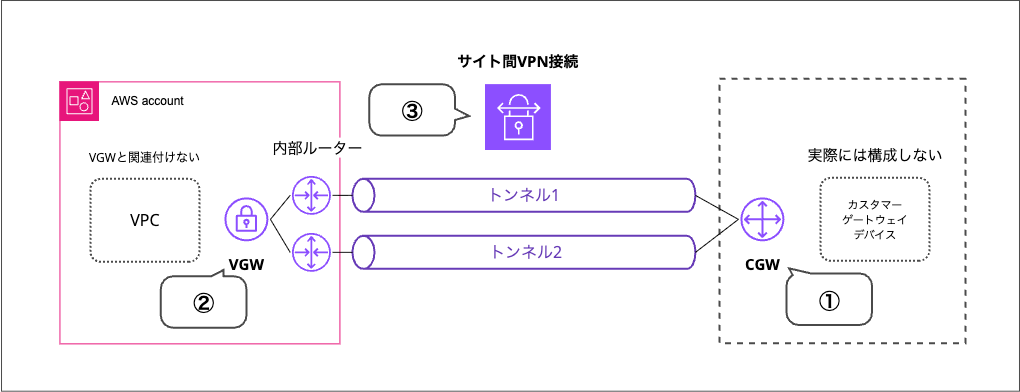
今回は最低限サンプルConfigファイルをダウンロードできる状態として以下を構成します。
- ①CGWを作成する(カスタマーゲートウェイデバイスは存在しない)
- ②VGWを作成する(どのVPCにも関連づけない)
- ③上記のCGWとVGWを指定しサイト間VPN接続を作成する
①カスタマーゲートウェイ(CGW)を作成する
まずはCGWです。AWSマネジメントコンソールの「VPC」→「カスタマーゲートウェイ」から作成します
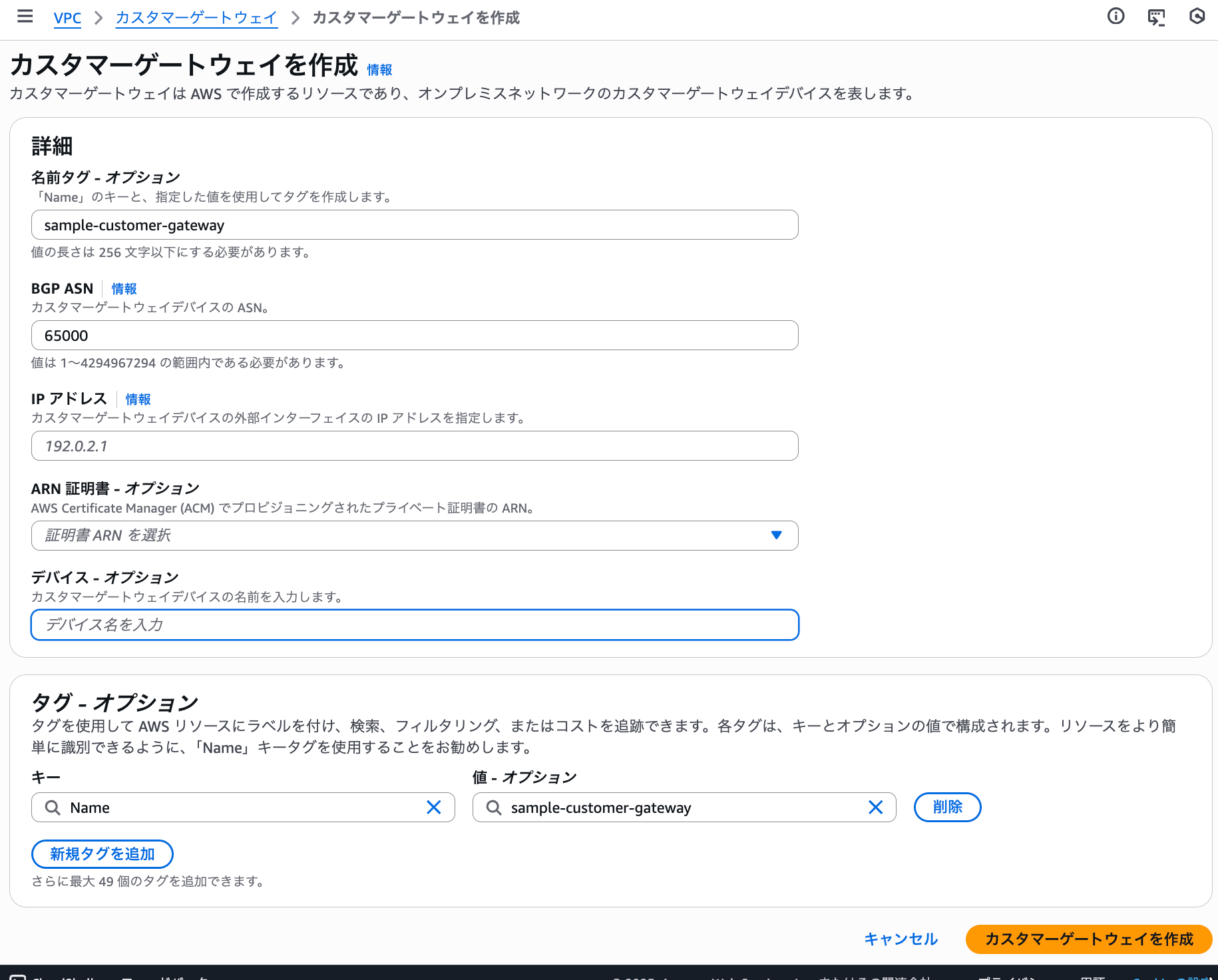
設定値は以下の通り。
-
名前タグ※:CGW用の名前タグ
-
BGP ASN:デバイスのASN
-
IPアドレス(※):デバイス側のグローバルIPアドレス
- 今回は例示用IPアドレスである
203.0.113.5を指定しました
- 今回は例示用IPアドレスである
-
ARN証明書(※):プライベート証明書認証を行う場合に指定
- デバイス側で固定のグローバルIPアドレスを用意できない場合に使用
- こちらを選択する場合は上の「IPアドレス」の指定は不要
-
デバイス※:デバイス名を必要に応じて入れる(判別用途のみであり、特に作用はしない)
作成されたCGWをAWS CLIで参照するとこのような結果になります。
$ aws ec2 describe-customer-gateways --customer-gateway-ids cgw-0fedbc5323ae741b4

{
    "CustomerGateways": [
        {
            "Tags": [
                {
                    "Key": "Name",
                    "Value": "sample-customer-gateway"
                }
            ],
            "CustomerGatewayId": "cgw-0fedbc5323ae741b4",
            "State": "available",
            "Type": "ipsec.1",
            "IpAddress": "203.0.113.5",
            "BgpAsn": "65000"
        }
    ]
}
②仮想プライベートゲートウェイ(VGW)を作成する
続いてVGWです。AWSマネジメントコンソールの「VPC」→「仮想プライベートゲートウェイ」から作成します。
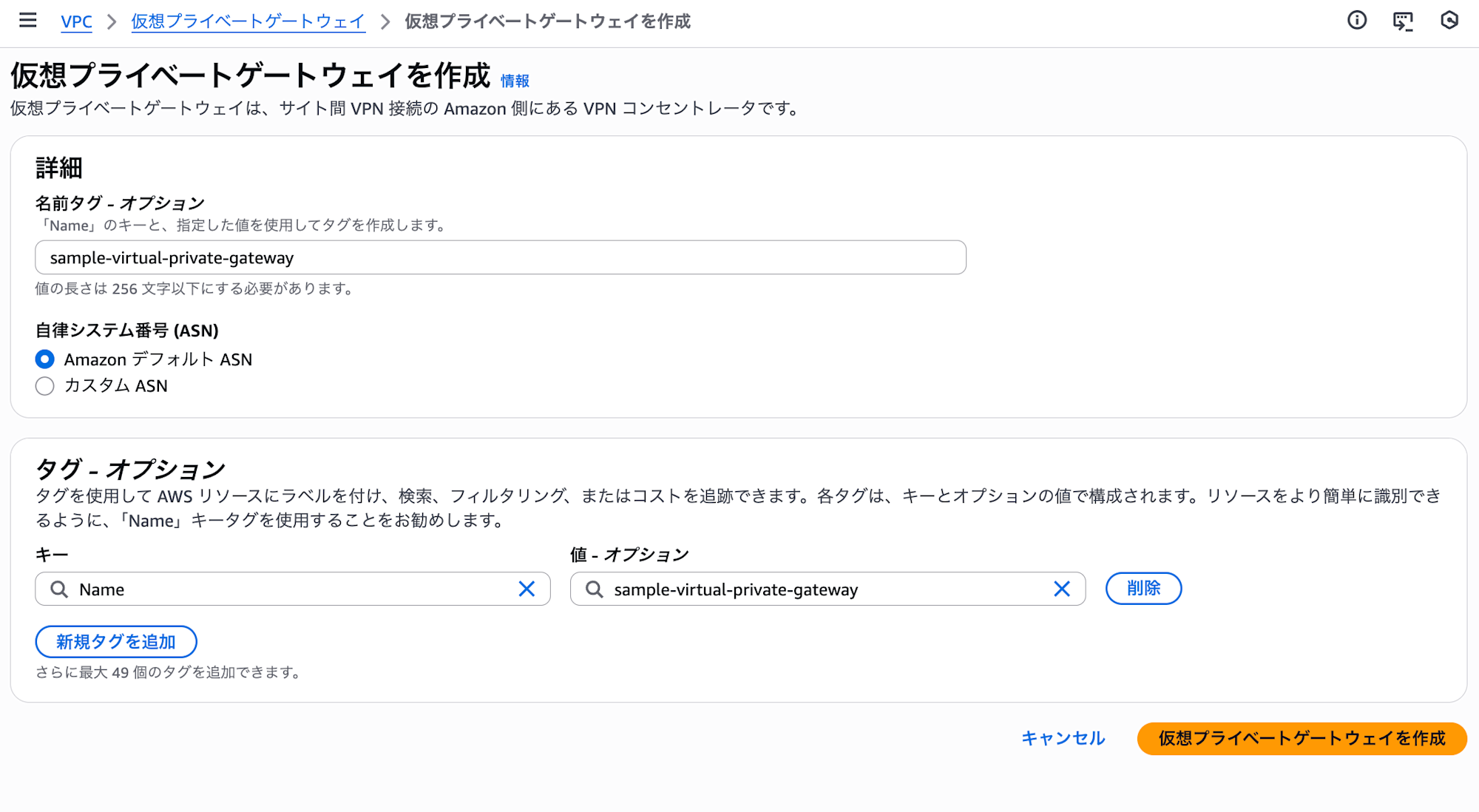
設定値はごくシンプルです。ASNをCGWと重複しない(同じ値にしない)よう気をつけてください。
- 名前タグ※:VGW用の名前タグ
- 自律システム番号(ASN):AWS側のASN。デフォルトで64512
作成されたVGWをAWS CLIで参照するとこのような結果に。VPCと関連づけていないためVpcAttachmentsがブランクになっています。
~ $ aws ec2 describe-vpn-gateways --vpn-gateway-ids vgw-0f29ca4ed62c39d06

{
    "VpnGateways": [
        {
            "AmazonSideAsn": 64512,
            "Tags": [
                {
                    "Key": "Name",
                    "Value": "sample-virtual-private-gateway"
                }
            ],
            "VpnGatewayId": "vgw-0f29ca4ed62c39d06",
            "State": "available",
            "Type": "ipsec.1",
            "VpcAttachments": []
        }
    ]
}
③サイト間VPN接続を作成する
最後にサイト間VPNの作成です。AWSマネジメントコンソールの「VPC」→「VPN 接続」から作成します。作成すると1時間ごとに0.048 USDの料金(2026/01現在、東京リージョンの場合)が発生するので気をつけてください。
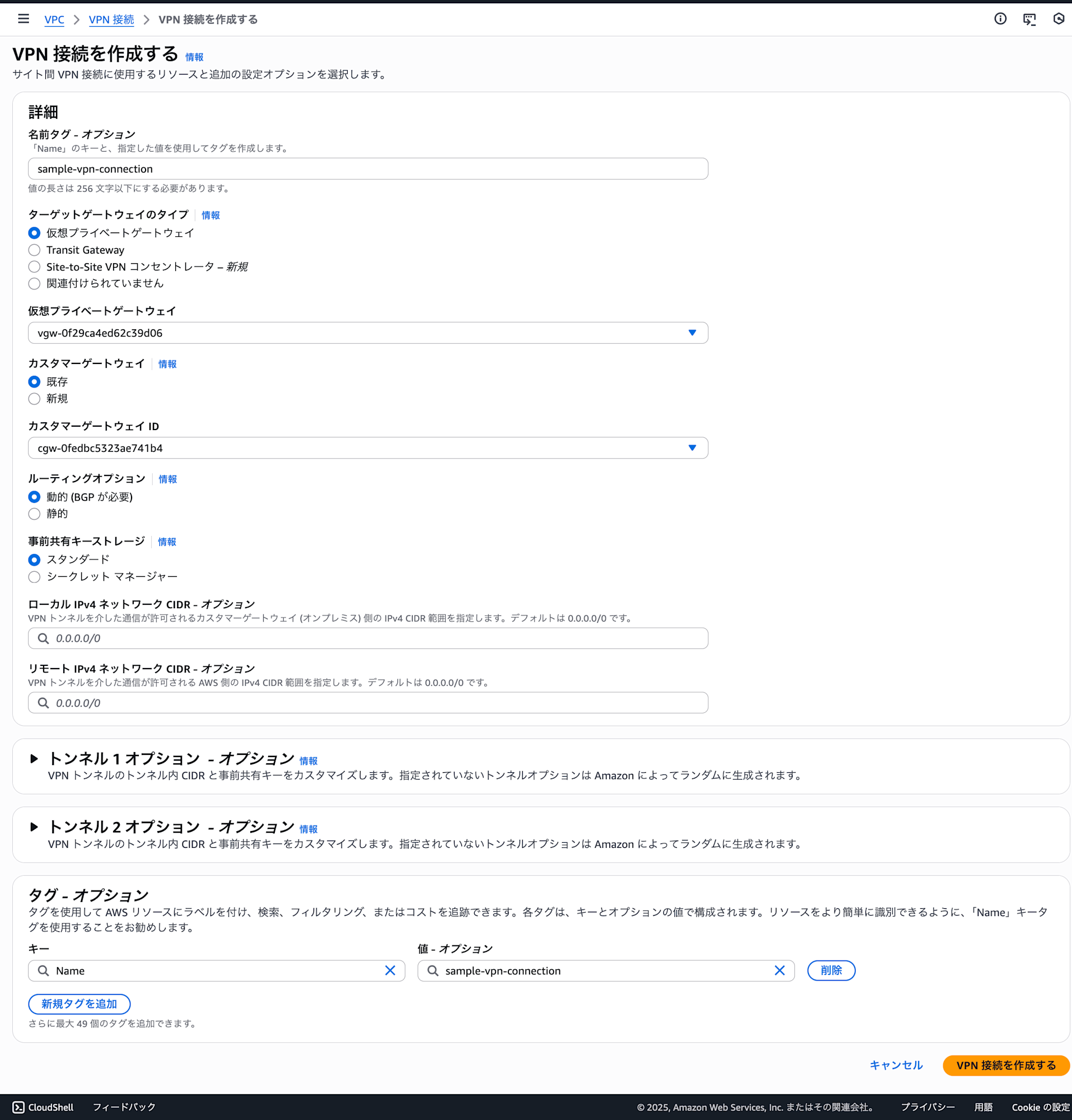
主な設定項目は以下です。(ターゲットゲートウェイのタイプにより設定可能な項目が異なる場合があります。今回はVGWを選択した前提での記載です。)
-
名前タグ※:VPN接続用の名前タグ
-
ターゲットゲートウェイ:ターゲットゲートウェイのタイプを選択
- 今回はタイプとしてVGWを選択し、先ほど作成したVGWを指定
-
カスタマーゲートウェイ:CGWを選択
-
ルーティングオプション:動的か静的か。カスタマーデバイスが対応しているなら動的を推奨
-
事前共有キーストレージ:事前共有キーの保存先がサイト間VPNサービスかSecrets Managerか
-
ローカル IPv4 ネットワーク CIDR※:VPNトンネル経由の通信を許可するオンプレミス側のIPv4 CIDR
-
リモート IPv4 ネットワーク CIDR※:VPN トンネル経由の通信を許可するAWS側のIPv4 CIDR
トンネルごとのオプションについて
今回はデフォルトのまま進めますが、トンネルごとに設定をカスタマイズできます。
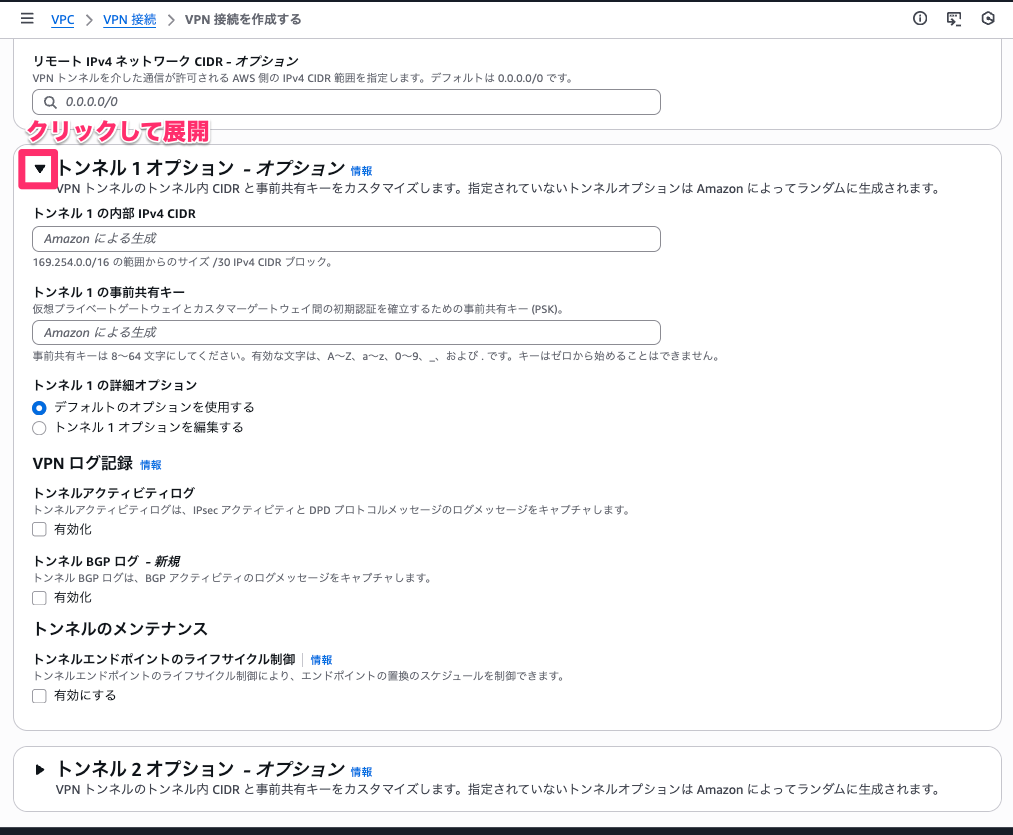
さらにトンネルの詳細オプションを編集することもできます。
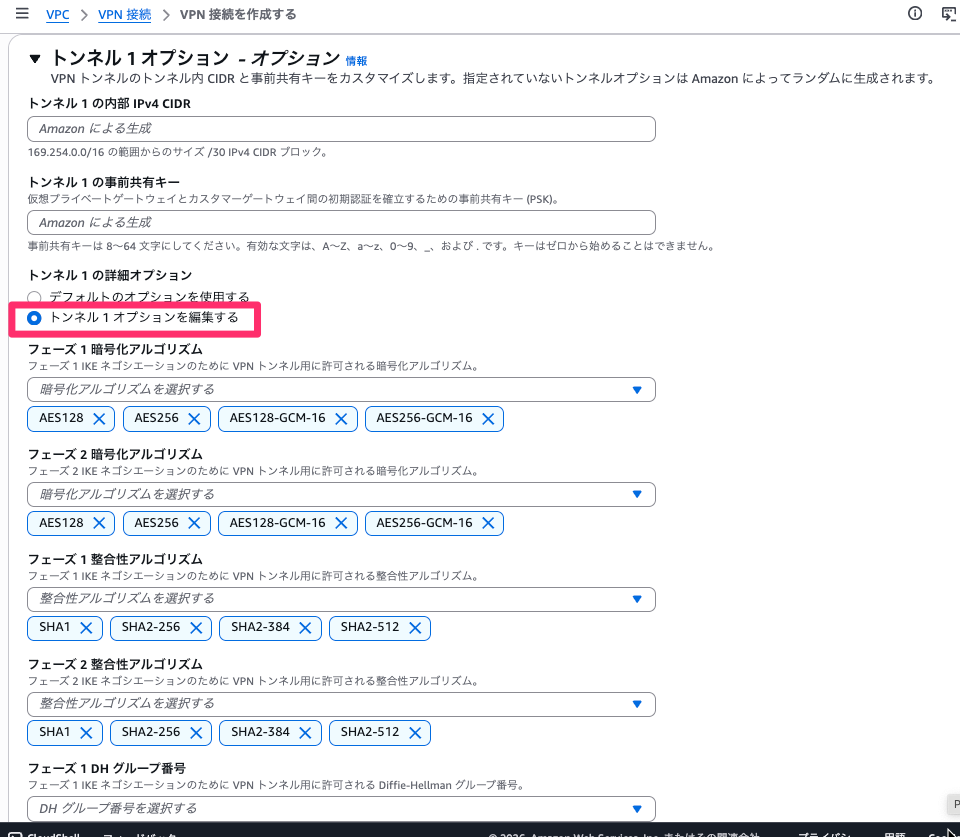
画面の下にさらに追加で表示される設定値が続く
詳細オプションで設定可能な項目は以下の通りです。
- フェーズ 1 暗号化アルゴリズム
- フェーズ 2 暗号化アルゴリズム
- フェーズ 1 整合性アルゴリズム
- フェーズ 2 整合性アルゴリズム
- フェーズ 1 DH グループ番号
- フェーズ 2 DH グループ番号
- IKE バージョン
- フェーズ 1 の有効期間 (秒)
- フェーズ 2 の有効期間 (秒)
- リキーマージン時間 (秒)
- リキーファズ (パーセント)
- リキーウィンドウサイズ (パケット)
- DPD タイムアウト (秒)
- DPD タイムアウトアクション
- スタートアップアクション
この辺りの詳細は以下ドキュメントをご参考ください。
作成されたサイト間VPN接続の状態はこのような形。当たり前ですが両方のトンネルがダウンしています。
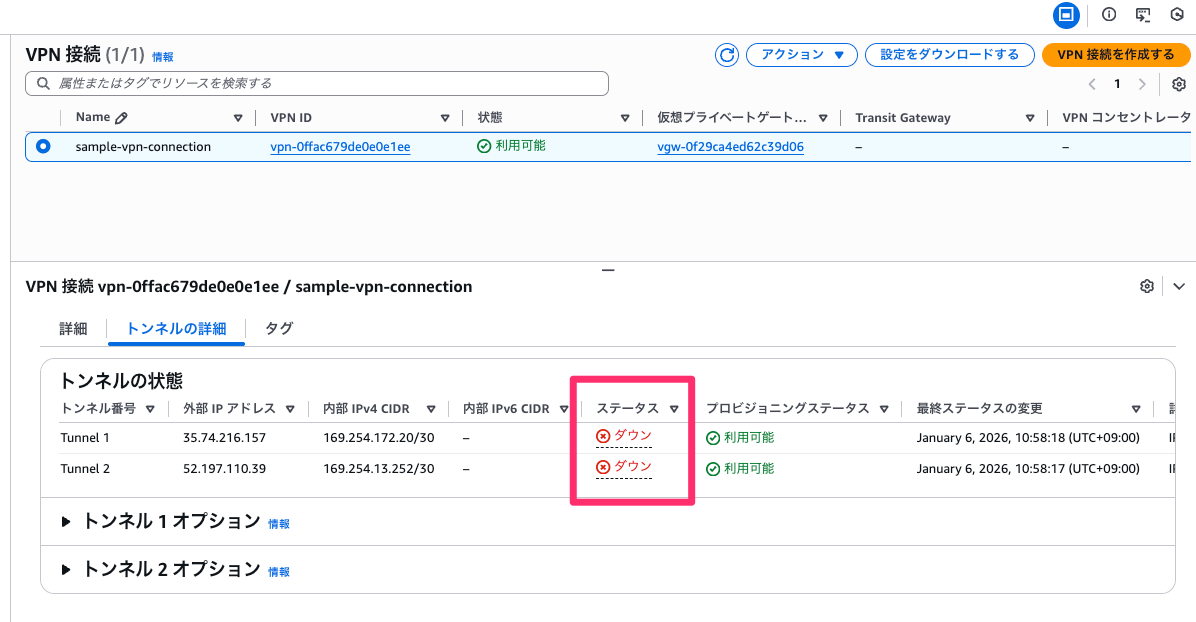
AWS CLIで主要な設定項目を参照するとこうなっています。
aws ec2 describe-vpn-connections \
  --vpn-connection-ids vpn-0ffac679de0e0e1ee | \
  jq '.VpnConnections[0] | del(.Options.TunnelOptions, .CustomerGatewayConfiguration)'

{
  "Category": "VPN",
  "GatewayAssociationState": "associated",
  "Options": {
    "EnableAcceleration": false,
    "StaticRoutesOnly": false,
    "LocalIpv4NetworkCidr": "0.0.0.0/0",
    "RemoteIpv4NetworkCidr": "0.0.0.0/0",
    "OutsideIpAddressType": "PublicIpv4",
    "TunnelInsideIpVersion": "ipv4",
    "TunnelBandwidth": "standard"
  },
  "Routes": [],
  "Tags": [
    {
      "Key": "Name",
      "Value": "sample-vpn-connection"
    }
  ],
  "VgwTelemetry": [
    {
      "AcceptedRouteCount": 0,
      "LastStatusChange": "2026-01-06T01:58:18+00:00",
      "OutsideIpAddress": "35.74.216.157",
      "Status": "DOWN",
      "StatusMessage": "IPSEC IS DOWN"
    },
    {
      "AcceptedRouteCount": 0,
      "LastStatusChange": "2026-01-06T01:58:17+00:00",
      "OutsideIpAddress": "52.197.110.39",
      "Status": "DOWN",
      "StatusMessage": "IPSEC IS DOWN"
    }
  ],
  "VpnConnectionId": "vpn-0ffac679de0e0e1ee",
  "State": "available",
  "Type": "ipsec.1",
  "CustomerGatewayId": "cgw-0fedbc5323ae741b4",
  "VpnGatewayId": "vgw-0f29ca4ed62c39d06"
}
AWS CLIでの全量の出力イメージ
先ほどはTunnelOptionsとCustomerGatewayConfigurationを削って表示しましたが、全量を出力するとこのようになります。ここでは事前共有キーが含まれるため、扱いには注意してください。(このブログではマスクしています。)
~ $ aws ec2 describe-vpn-connections --vpn-connection-ids vpn-0ffac679de0e0e1ee
{
"VpnConnections": [
{
"Category": "VPN",
"GatewayAssociationState": "associated",
"Options": {
"EnableAcceleration": false,
"StaticRoutesOnly": false,
"LocalIpv4NetworkCidr": "0.0.0.0/0",
"RemoteIpv4NetworkCidr": "0.0.0.0/0",
"OutsideIpAddressType": "PublicIpv4",
"TunnelInsideIpVersion": "ipv4",
"TunnelOptions": [
{
"OutsideIpAddress": "35.74.216.157",
"TunnelInsideCidr": "169.254.172.20/30",
"PreSharedKey": "ORtbD5SU********************",
"Phase1LifetimeSeconds": 28800,
"Phase2LifetimeSeconds": 3600,
"RekeyMarginTimeSeconds": 270,
"RekeyFuzzPercentage": 100,
"ReplayWindowSize": 1024,
"DpdTimeoutSeconds": 30,
"DpdTimeoutAction": "clear",
"Phase1EncryptionAlgorithms": [
{
"Value": "AES128"
},
{
"Value": "AES256"
},
{
"Value": "AES128-GCM-16"
},
{
"Value": "AES256-GCM-16"
}
],
"Phase2EncryptionAlgorithms": [
{
"Value": "AES128"
},
{
"Value": "AES256"
},
{
"Value": "AES128-GCM-16"
},
{
"Value": "AES256-GCM-16"
}
],
"Phase1IntegrityAlgorithms": [
{
"Value": "SHA1"
},
{
"Value": "SHA2-256"
},
{
"Value": "SHA2-384"
},
{
"Value": "SHA2-512"
}
],
"Phase2IntegrityAlgorithms": [
{
"Value": "SHA1"
},
{
"Value": "SHA2-256"
},
{
"Value": "SHA2-384"
},
{
"Value": "SHA2-512"
}
],
"Phase1DHGroupNumbers": [
{
"Value": 2
},
{
"Value": 14
},
{
"Value": 15
},
{
"Value": 16
},
{
"Value": 17
},
{
"Value": 18
},
{
"Value": 19
},
{
"Value": 20
},
{
"Value": 21
},
{
"Value": 22
},
{
"Value": 23
},
{
"Value": 24
}
],
"Phase2DHGroupNumbers": [
{
"Value": 2
},
{
"Value": 5
},
{
"Value": 14
},
{
"Value": 15
},
{
"Value": 16
},
{
"Value": 17
},
{
"Value": 18
},
{
"Value": 19
},
{
"Value": 20
},
{
"Value": 21
},
{
"Value": 22
},
{
"Value": 23
},
{
"Value": 24
}
],
"IkeVersions": [
{
"Value": "ikev1"
},
{
"Value": "ikev2"
}
],
"StartupAction": "add",
"LogOptions": {
"CloudWatchLogOptions": {
"LogEnabled": false,
"BgpLogEnabled": false
}
},
"EnableTunnelLifecycleControl": false
},
{
"OutsideIpAddress": "52.197.110.39",
"TunnelInsideCidr": "169.254.13.252/30",
"PreSharedKey": "6lXmsydj********************",
"LogOptions": {
"CloudWatchLogOptions": {
"LogEnabled": false,
"BgpLogEnabled": false
}
},
"EnableTunnelLifecycleControl": false
}
],
"TunnelBandwidth": "standard"
},
"Routes": [],
"Tags": [
{
"Key": "Name",
"Value": "sample-vpn-connection"
}
],
"VgwTelemetry": [
{
"AcceptedRouteCount": 0,
"LastStatusChange": "2026-01-06T01:58:18+00:00",
"OutsideIpAddress": "35.74.216.157",
"Status": "DOWN",
"StatusMessage": "IPSEC IS DOWN"
},
{
"AcceptedRouteCount": 0,
"LastStatusChange": "2026-01-06T01:58:17+00:00",
"OutsideIpAddress": "52.197.110.39",
"Status": "DOWN",
"StatusMessage": "IPSEC IS DOWN"
}
],
"VpnConnectionId": "vpn-0ffac679de0e0e1ee",
"State": "available",
"CustomerGatewayConfiguration": "<?xml version=\"1.0\" encoding=\"UTF-8\"?>\n<vpn_connection id=\"vpn-0ffac679de0e0e1ee\">\n <customer_gateway_id>cgw-0fedbc5323ae741b4</customer_gateway_id>\n <vpn_gateway_id>vgw-0f29ca4ed62c39d06</vpn_gateway_id>\n <vpn_connection_type>ipsec.1</vpn_connection_type>\n <ipsec_tunnel>\n <customer_gateway>\n <tunnel_outside_address>\n <ip_address>203.0.113.5</ip_address>\n </tunnel_outside_address>\n <tunnel_inside_address>\n <ip_address>169.254.172.22</ip_address>\n <network_mask>255.255.255.252</network_mask>\n <network_cidr>30</network_cidr>\n </tunnel_inside_address>\n <bgp>\n <asn>65000</asn>\n <hold_time>30</hold_time>\n </bgp>\n </customer_gateway>\n <vpn_gateway>\n <tunnel_outside_address>\n <ip_address>35.74.216.157</ip_address>\n </tunnel_outside_address>\n <tunnel_inside_address>\n <ip_address>169.254.172.21</ip_address>\n <network_mask>255.255.255.252</network_mask>\n <network_cidr>30</network_cidr>\n </tunnel_inside_address>\n <bgp>\n <asn>64512</asn>\n <hold_time>30</hold_time>\n </bgp>\n </vpn_gateway>\n <ike>\n <authentication_protocol>sha1</authentication_protocol>\n <encryption_protocol>aes-128-cbc</encryption_protocol>\n <lifetime>28800</lifetime>\n <perfect_forward_secrecy>group2</perfect_forward_secrecy>\n <mode>main</mode>\n <pre_shared_key>ORtbD5SU********************</pre_shared_key>\n </ike>\n <ipsec>\n <protocol>esp</protocol>\n <authentication_protocol>hmac-sha1-96</authentication_protocol>\n <encryption_protocol>aes-128-cbc</encryption_protocol>\n <lifetime>3600</lifetime>\n <perfect_forward_secrecy>group2</perfect_forward_secrecy>\n <mode>tunnel</mode>\n <clear_df_bit>true</clear_df_bit>\n <fragmentation_before_encryption>true</fragmentation_before_encryption>\n <tcp_mss_adjustment>1379</tcp_mss_adjustment>\n <dead_peer_detection>\n <interval>10</interval>\n <retries>3</retries>\n </dead_peer_detection>\n </ipsec>\n </ipsec_tunnel>\n <ipsec_tunnel>\n <customer_gateway>\n <tunnel_outside_address>\n <ip_address>203.0.113.5</ip_address>\n </tunnel_outside_address>\n <tunnel_inside_address>\n <ip_address>169.254.13.254</ip_address>\n <network_mask>255.255.255.252</network_mask>\n <network_cidr>30</network_cidr>\n </tunnel_inside_address>\n <bgp>\n <asn>65000</asn>\n <hold_time>30</hold_time>\n </bgp>\n </customer_gateway>\n <vpn_gateway>\n <tunnel_outside_address>\n <ip_address>52.197.110.39</ip_address>\n </tunnel_outside_address>\n <tunnel_inside_address>\n <ip_address>169.254.13.253</ip_address>\n <network_mask>255.255.255.252</network_mask>\n <network_cidr>30</network_cidr>\n </tunnel_inside_address>\n <bgp>\n <asn>64512</asn>\n <hold_time>30</hold_time>\n </bgp>\n </vpn_gateway>\n <ike>\n <authentication_protocol>sha1</authentication_protocol>\n <encryption_protocol>aes-128-cbc</encryption_protocol>\n <lifetime>28800</lifetime>\n <perfect_forward_secrecy>group2</perfect_forward_secrecy>\n <mode>main</mode>\n <pre_shared_key>6lXmsydj********************</pre_shared_key>\n </ike>\n <ipsec>\n <protocol>esp</protocol>\n <authentication_protocol>hmac-sha1-96</authentication_protocol>\n <encryption_protocol>aes-128-cbc</encryption_protocol>\n <lifetime>3600</lifetime>\n <perfect_forward_secrecy>group2</perfect_forward_secrecy>\n <mode>tunnel</mode>\n <clear_df_bit>true</clear_df_bit>\n <fragmentation_before_encryption>true</fragmentation_before_encryption>\n <tcp_mss_adjustment>1379</tcp_mss_adjustment>\n <dead_peer_detection>\n <interval>10</interval>\n <retries>3</retries>\n </dead_peer_detection>\n </ipsec>\n </ipsec_tunnel>\n</vpn_connection>\n",
"Type": "ipsec.1",
"CustomerGatewayId": "cgw-0fedbc5323ae741b4",
"VpnGatewayId": "vgw-0f29ca4ed62c39d06"
}
]
}
CustomerGatewayConfigurationの改行を反映するとこのようになっています。
<?xml version="1.0" encoding="UTF-8"?>
<vpn_connection id="vpn-0ffac679de0e0e1ee">
  <customer_gateway_id>cgw-0fedbc5323ae741b4</customer_gateway_id>
  <vpn_gateway_id>vgw-0f29ca4ed62c39d06</vpn_gateway_id>
  <vpn_connection_type>ipsec.1</vpn_connection_type>

  <ipsec_tunnel>
    <customer_gateway>
      <tunnel_outside_address>
        <ip_address>203.0.113.5</ip_address>
      </tunnel_outside_address>
      <tunnel_inside_address>
        <ip_address>169.254.172.22</ip_address>
        <network_mask>255.255.255.252</network_mask>
        <network_cidr>30</network_cidr>
      </tunnel_inside_address>
      <bgp>
        <asn>65000</asn>
        <hold_time>30</hold_time>
      </bgp>
    </customer_gateway>

    <vpn_gateway>
      <tunnel_outside_address>
        <ip_address>35.74.216.157</ip_address>
      </tunnel_outside_address>
      <tunnel_inside_address>
        <ip_address>169.254.172.21</ip_address>
        <network_mask>255.255.255.252</network_mask>
        <network_cidr>30</network_cidr>
      </tunnel_inside_address>
      <bgp>
        <asn>64512</asn>
        <hold_time>30</hold_time>
      </bgp>
    </vpn_gateway>

    <ike>
      <authentication_protocol>sha1</authentication_protocol>
      <encryption_protocol>aes-128-cbc</encryption_protocol>
      <lifetime>28800</lifetime>
      <perfect_forward_secrecy>group2</perfect_forward_secrecy>
      <mode>main</mode>
      <pre_shared_key>ORtbD5SU********************</pre_shared_key>
    </ike>

    <ipsec>
      <protocol>esp</protocol>
      <authentication_protocol>hmac-sha1-96</authentication_protocol>
      <encryption_protocol>aes-128-cbc</encryption_protocol>
      <lifetime>3600</lifetime>
      <perfect_forward_secrecy>group2</perfect_forward_secrecy>
      <mode>tunnel</mode>
      <clear_df_bit>true</clear_df_bit>
      <fragmentation_before_encryption>true</fragmentation_before_encryption>
      <tcp_mss_adjustment>1379</tcp_mss_adjustment>
      <dead_peer_detection>
        <interval>10</interval>
        <retries>3</retries>
      </dead_peer_detection>
    </ipsec>
  </ipsec_tunnel>

  <ipsec_tunnel>
    <customer_gateway>
      <tunnel_outside_address>
        <ip_address>203.0.113.5</ip_address>
      </tunnel_outside_address>
      <tunnel_inside_address>
        <ip_address>169.254.13.254</ip_address>
        <network_mask>255.255.255.252</network_mask>
        <network_cidr>30</network_cidr>
      </tunnel_inside_address>
      <bgp>
        <asn>65000</asn>
        <hold_time>30</hold_time>
      </bgp>
    </customer_gateway>

    <vpn_gateway>
      <tunnel_outside_address>
        <ip_address>52.197.110.39</ip_address>
      </tunnel_outside_address>
      <tunnel_inside_address>
        <ip_address>169.254.13.253</ip_address>
        <network_mask>255.255.255.252</network_mask>
        <network_cidr>30</network_cidr>
      </tunnel_inside_address>
      <bgp>
        <asn>64512</asn>
        <hold_time>30</hold_time>
      </bgp>
    </vpn_gateway>

    <ike>
      <authentication_protocol>sha1</authentication_protocol>
      <encryption_protocol>aes-128-cbc</encryption_protocol>
      <lifetime>28800</lifetime>
      <perfect_forward_secrecy>group2</perfect_forward_secrecy>
      <mode>main</mode>
      <pre_shared_key>6lXmsydj********************</pre_shared_key>
    </ike>

    <ipsec>
      <protocol>esp</protocol>
      <authentication_protocol>hmac-sha1-96</authentication_protocol>
      <encryption_protocol>aes-128-cbc</encryption_protocol>
      <lifetime>3600</lifetime>
      <perfect_forward_secrecy>group2</perfect_forward_secrecy>
      <mode>tunnel</mode>
      <clear_df_bit>true</clear_df_bit>
      <fragmentation_before_encryption>true</fragmentation_before_encryption>
      <tcp_mss_adjustment>1379</tcp_mss_adjustment>
      <dead_peer_detection>
        <interval>10</interval>
        <retries>3</retries>
      </dead_peer_detection>
    </ipsec>
  </ipsec_tunnel>
</vpn_connection>
サンプルConfigファイルをダウンロードする
作成したサイト間VPN接続に関するサンプルConfigファイルを、AWSマネジメントコンソールからダウンロードできます。アクティブ(利用可能)な状態のサイト間VPN接続を選択し、「設定をダウンロードする」をクリックします。
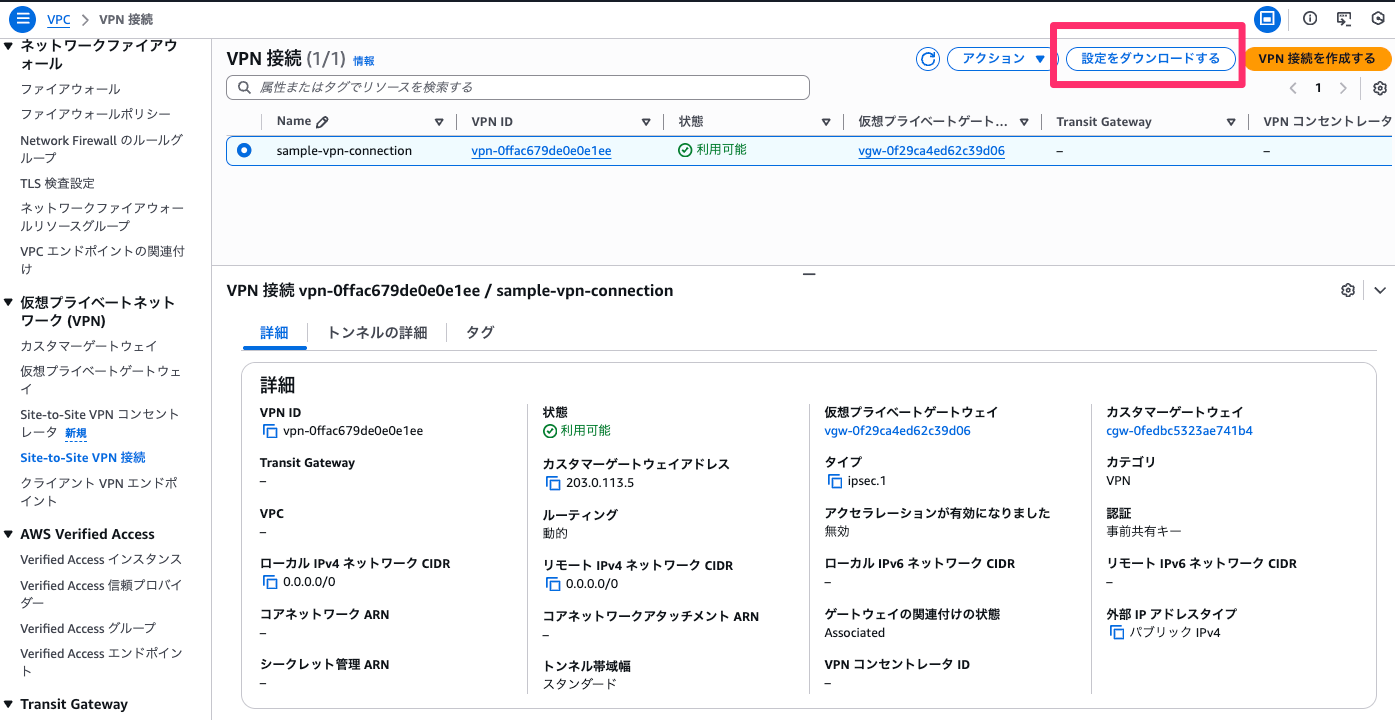
設定ダウンロードの詳細画面が開くため、適宜選択します。
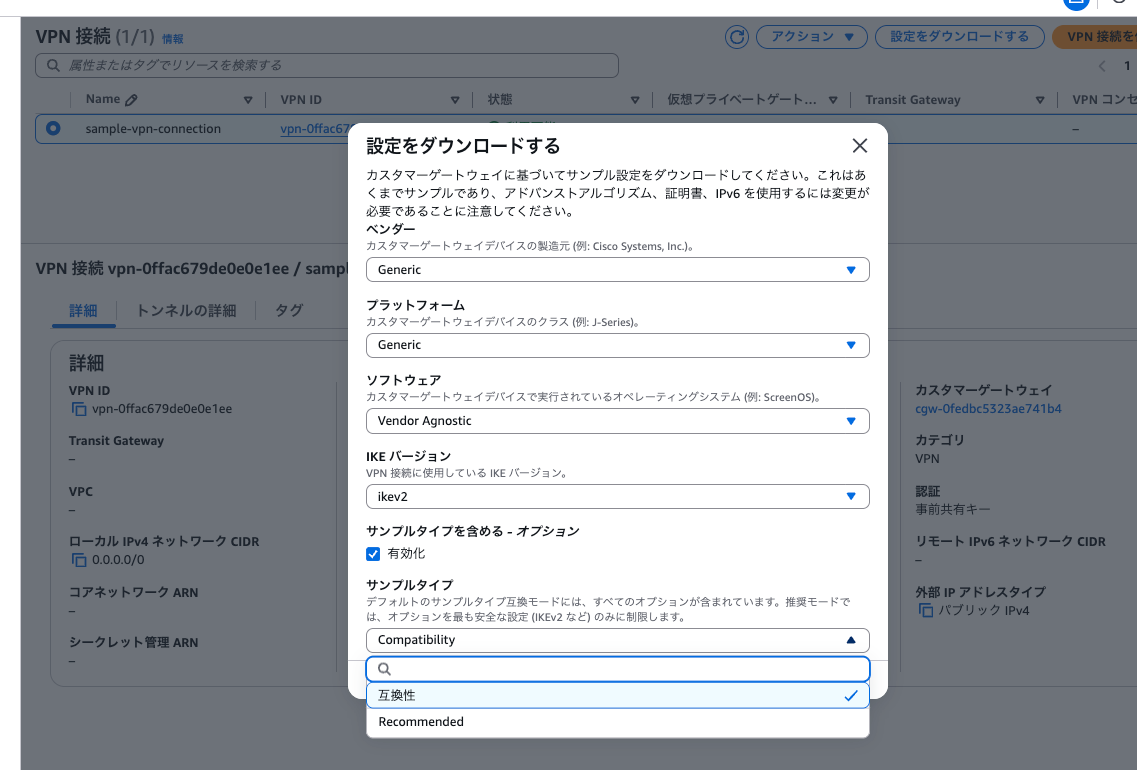
- ベンダー カスタマーゲートウェイデバイスの製造元(例: Cisco Systems, Inc.)
- プラットフォーム カスタマーゲートウェイデバイスのクラス(例: J-Series)
- ソフトウェア カスタマーゲートウェイデバイスで実行されているオペレーティングシステム(例: ScreenOS)
- IKE バージョン VPN 接続に使用している IKE バージョン
- v1かv2。v2が選択できない組み合わせもある
- サンプルタイプを含める
- サンプルタイプ
- Compatibility(互換性)すべてのオプションが含まれる
- Recommended(推奨)最も安全な設定のみに制限。選択できない場合もある
- サンプルタイプ
2026/01/06時点で選択可能な組み合わせと、IKEバージョン(v1/v2)、サンプルタイプ(互換性/推奨)の対応状況をまとめてみました。(マネジメントコンソールから手動で確認しました……)[1][2]
| No | ベンダー | プラットフォーム | ソフトウェア | ikev1 | ikev2 | 互換性 | 推奨 |
|---|---|---|---|---|---|---|---|
| 1 | AXGate | NF | aos 3.2+ | ⚫︎ | ⚫︎ | ⚫︎ | ー |
| 2 | UTM | aos 2.1+ | ⚫︎ | ⚫︎ | ⚫︎ | ー | |
| 3 | Barracuda | NextGen Firewall F-Series | 6.2+ | ⚫︎ | ー | ⚫︎ | ー |
| 4 | CheckPoint | Gaia | R77.10+ | ⚫︎ | ー | ⚫︎ | ー |
| 5 | R80.10+ | ⚫︎ | ⚫︎ | ⚫︎ | ー | ||
| 6 | Cisco Systems, Inc. | ASA 5500 Series | ASA 9.7+ VTI | ⚫︎ | ⚫︎ | ⚫︎ | ⚫︎ |
| 7 | Cisco ASR 1000 | IOS 12.4+ | ⚫︎ | ー | ⚫︎ | ー | |
| 8 | CSRv AMI | IOS 12.4+ | ⚫︎ | ⚫︎ | ⚫︎ | ⚫︎ | |
| 9 | ISR Series Routers | IOS 12.4+ | ⚫︎ | ー | ⚫︎ | ー | |
| 10 | F5 Networks, Inc. | BIG-IP | v12.0.0+ | ⚫︎ | ー | ⚫︎ | ー |
| 11 | Fortinet | Fortigate 40+ Series | FortiOS 4.0+ (GUI) | ⚫︎ | ー | ⚫︎ | ー |
| 12 | FortiOS 5.0+ | ⚫︎ | ー | ⚫︎ | ー | ||
| 13 | FortiOS 5.0+ (GUI) | ⚫︎ | ー | ⚫︎ | ー | ||
| 14 | FortiOS 6.4.4+ (GUI) | ⚫︎ | ⚫︎ | ⚫︎ | ⚫︎ | ||
| 15 | Generic | Generic | Vendor Agnostic | ⚫︎ | ⚫︎ | ⚫︎ | ⚫︎ |
| 16 | H3C | MSR800 | Version 5.20 | ⚫︎ | ー | ⚫︎ | ー |
| 17 | IIJ | SEIL/B1 | SEIL/B1 3.70+ | ⚫︎ | ー | ⚫︎ | ー |
| 18 | SEIL/X1 and SEIL/X2 | SEIL/X 3.70+ | ⚫︎ | ー | ⚫︎ | ー | |
| 19 | SEIL/x86 | SEIL/x86 2.30+ | ⚫︎ | ー | ⚫︎ | ー | |
| 20 | Juniper Networks, Inc. | J-Series Routers | Junos 9.5+ | ⚫︎ | ⚫︎ | ⚫︎ | ー |
| 21 | SRX Routers | Junos 11.0+ | ⚫︎ | ⚫︎ | ⚫︎ | ー | |
| 22 | SSG and ISG Series Routers | ScreenOS 6.1 | ⚫︎ | ー | ⚫︎ | ー | |
| 23 | ScreenOS 6.2+ | ⚫︎ | ー | ⚫︎ | ー | ||
| 24 | ScreenOS 6.2+ (GUI) | ⚫︎ | ー | ⚫︎ | ー | ||
| 25 | Mikrotik | RouterOS | 6.36 | ⚫︎ | ⚫︎ | ⚫︎ | ー |
| 26 | 6.47 | ⚫︎ | ⚫︎ | ⚫︎ | ー | ||
| 27 | Palo Alto Networks | PA Series | PANOS 4.1.2+ | ⚫︎ | ー | ⚫︎ | ー |
| 28 | PANOS 4.1.2+ (GUI) | ⚫︎ | ー | ⚫︎ | ー | ||
| 29 | PANOS 7.0+ | ⚫︎ | ⚫︎ | ⚫︎ | ー | ||
| 30 | SonicWall | NSA, TZ | OS 5.9 | ⚫︎ | ー | ⚫︎ | ー |
| 31 | OS 6.2 | ⚫︎ | ー | ⚫︎ | ー | ||
| 32 | OS 6.5 | ⚫︎ | ⚫︎ | ⚫︎ | ー | ||
| 33 | Sophos | ASG | v8.300+ | ⚫︎ | ー | ⚫︎ | ー |
| 34 | Sophos Firewall | v19+ | ⚫︎ | ⚫︎ | ⚫︎ | ー | |
| 35 | UTM | V9 | ⚫︎ | ー | ⚫︎ | ー | |
| 36 | Vyatta | Vyatta Network OS | Vyatta Network OS 6.5+ | ⚫︎ | ー | ⚫︎ | ー |
| 37 | WatchGuard, Inc. | XTM, Firebox | Fireware OS 11.12.2+ (WebUI) | ⚫︎ | ー | ⚫︎ | ー |
| 38 | Yamaha | RTX Routers | Rev.10.01.16+ | ⚫︎ | ⚫︎ | ⚫︎ | ー |
| 39 | Zyxel | ZyWALL | ZLD 4.3+ | ⚫︎ | ー | ⚫︎ | ー |
(見づらいので同じ内容を画像でも貼っておきます。)
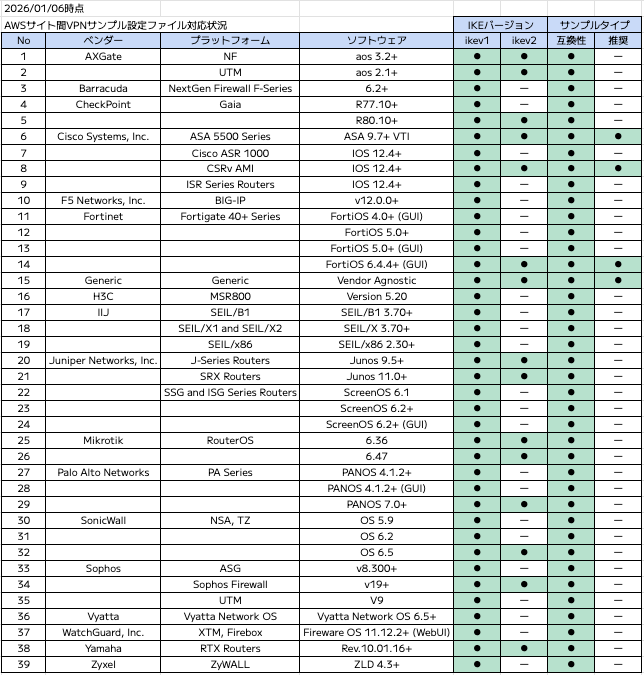
No.16のGenericが、デバイス固有ではなく汎用的なサンプルConfigファイルです。
必要な組み合わせを選択し、「ダウンロード」をクリックすることでダウンロードが開始されます。
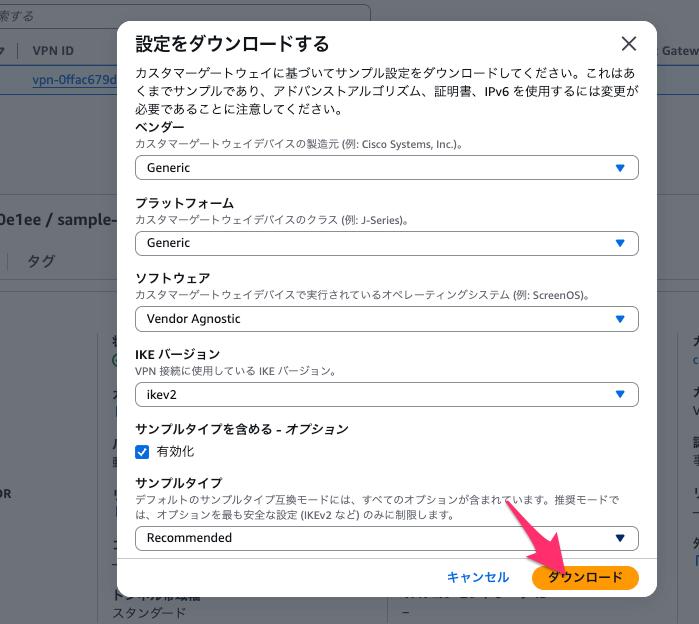
サンプルConfigファイルはvpn-0ffac679de0e0e1ee.txtといった形で、サイト間VPN接続のIDを名称にしたテキストファイルでダウンロードされます。複数の組み合わせをダウンロードしたいときは名称を別途変更してあげないと混乱しそうですね。
サンプルConfigファイルの内訳を確認してみる
最後にようやく本題としてダウンロードしたサンプルConfigファイルを確認してみます。
ちなみに、今回構成したサイト間VPN接続の各種情報は以下のようになっています。
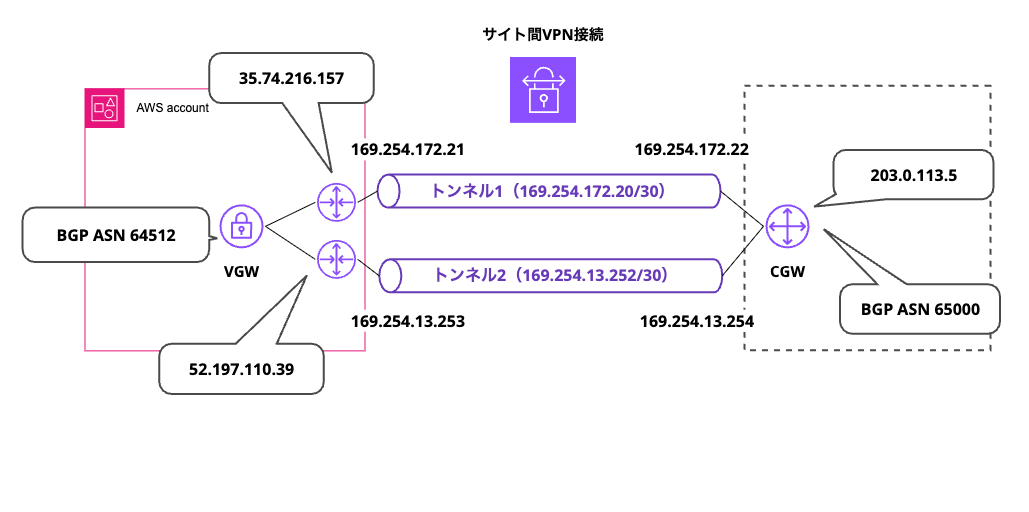
トンネルの内部アドレスとVGW側のエンドポイントのグローバルIPアドレスは自動割当されたもの
まずは以下の条件で指定した場合のサンプルConfigファイルです。
| 項目 | 値 |
|---|---|
| ベンダー | Generic |
| プラットフォーム | Generic |
| ソフトウェア | Vendor Agnostic |
| IKEバージョン | ikev2 |
| サンプルタイプ | 含めない |
全量はこのようになっています。
長い(231行)ので折りたたみ
Amazon Web Services
Virtual Private Cloud

VPN Connection Configuration
================================================================================
AWS utilizes unique identifiers to manipulate the configuration of
a VPN Connection. Each VPN Connection is assigned a VPN Connection Identifier
and is associated with two other identifiers, namely the
Customer Gateway Identifier and the Virtual Private Gateway Identifier.

Your VPN Connection ID		         : vpn-0ffac679de0e0e1ee
Your Virtual Private Gateway ID          : vgw-0f29ca4ed62c39d06
Your Customer Gateway ID    		 : cgw-0fedbc5323ae741b4

A VPN Connection consists of a pair of IPSec tunnel security associations (SAs).
It is important that both tunnel security associations be configured.

IPSec Tunnel #1
================================================================================
#1: Internet Key Exchange Configuration

Configure the IKE SA as follows:
Please note, these sample configurations are for the minimum requirement of AES128, SHA1, and DH Group 2.
Category "VPN" connections in the GovCloud region have a minimum requirement of AES128, SHA2, and DH Group 14.
You will need to modify these sample configuration files to take advantage of AES256, SHA256, or other DH groups like 2, 14-18, 22, 23, and 24.
NOTE: If you customized tunnel options when creating or modifying your VPN connection, you may need to modify these sample configurations to match the custom settings for your tunnels.

Higher parameters are only available for VPNs of category "VPN," and not for "VPN-Classic".
The address of the external interface for your customer gateway must be a static address.
Your customer gateway may reside behind a device performing network address translation (NAT).
To ensure that NAT traversal (NAT-T) can function, you must adjust your firewall !rules to unblock UDP port 4500.
If not behind NAT, and you are not using an Accelerated VPN, we recommend disabling NAT-T. If you are using an Accelerated VPN, make sure that NAT-T is enabled.
  - IKE version              : IKEv2
  - Authentication Method    : Pre-Shared Key
  - Pre-Shared Key           : ORtbD5SUxk1q3t********************
  - Authentication Algorithm : sha1
  - Encryption Algorithm     : aes-128-cbc
  - Lifetime                 : 28800 seconds
  - Phase 1 Negotiation Mode : main
  - Diffie-Hellman           : Group 2

#2: IPSec Configuration

Configure the IPSec SA as follows:
Category "VPN" connections in the GovCloud region have a minimum requirement of AES128, SHA2, and DH Group 14.
Please note, you may use these additionally supported IPSec parameters for encryption like AES256 and other DH groups like 2, 5, 14-18, 22, 23, and 24.
NOTE: If you customized tunnel options when creating or modifying your VPN connection, you may need to modify these sample configurations to match the custom settings for your tunnels.

Higher parameters are only available for VPNs of category "VPN," and not for "VPN-Classic".
  - Protocol                 : esp
  - Authentication Algorithm : hmac-sha1-96
  - Encryption Algorithm     : aes-128-cbc
  - Lifetime                 : 3600 seconds
  - Mode                     : tunnel
  - Perfect Forward Secrecy  : Diffie-Hellman Group 2

IPSec Dead Peer Detection (DPD) will be enabled on the AWS Endpoint. We
recommend configuring DPD on your endpoint as follows:
  - DPD Interval             : 10
  - DPD Retries              : 3

IPSec ESP (Encapsulating Security Payload) inserts additional
headers to transmit packets. These headers require additional space,
which reduces the amount of space available to transmit application data.
To limit the impact of this behavior, we recommend the following
configuration on your Customer Gateway:
  - TCP MSS Adjustment       : 1379 bytes
  - Clear Don't Fragment Bit : enabled
  - Fragmentation            : Before encryption

#3: Tunnel Interface Configuration

Your Customer Gateway must be configured with a tunnel interface that is
associated with the IPSec tunnel. All traffic transmitted to the tunnel
interface is encrypted and transmitted to the Virtual Private Gateway.

The Customer Gateway and Virtual Private Gateway each have two addresses that relate
to this IPSec tunnel. Each contains an outside address, upon which encrypted
traffic is exchanged. Each also contain an inside address associated with
the tunnel interface.

The Customer Gateway outside IP address was provided when the Customer Gateway
was created. Changing the IP address requires the creation of a new
Customer Gateway.

The Customer Gateway inside IP address should be configured on your tunnel
interface.

Outside IP Addresses:
  - Customer Gateway 		        : 203.0.113.5
  - Virtual Private Gateway	        : 35.74.216.157

Inside IP Addresses
  - Customer Gateway         		: 169.254.172.22/30
  - Virtual Private Gateway             : 169.254.172.21/30

Configure your tunnel to fragment at the optimal size:
  - Tunnel interface MTU     : 1436 bytes

#4: Border Gateway Protocol (BGP) Configuration:

The Border Gateway Protocol (BGPv4) is used within the tunnel, between the inside
IP addresses, to exchange routes from the VPC to your home network. Each
BGP router has an Autonomous System Number (ASN). Your ASN was provided
to AWS when the Customer Gateway was created.

BGP Configuration Options:
  - Customer Gateway ASN	          : 65000
  - Virtual Private  Gateway ASN          : 64512
  - Neighbor IP Address     		  : 169.254.172.21
  - Neighbor Hold Time       : 30

Configure BGP to announce routes to the Virtual Private Gateway. The gateway
will announce prefixes to your customer gateway based upon the prefix you
assigned to the VPC at creation time.

IPSec Tunnel #2
================================================================================
#1: Internet Key Exchange Configuration

Configure the IKE SA as follows:
Please note, these sample configurations are for the minimum requirement of AES128, SHA1, and DH Group 2.
Category "VPN" connections in the GovCloud region have a minimum requirement of AES128, SHA2, and DH Group 14.
You will need to modify these sample configuration files to take advantage of AES256, SHA256, or other DH groups like 2, 14-18, 22, 23, and 24.
NOTE: If you customized tunnel options when creating or modifying your VPN connection, you may need to modify these sample configurations to match the custom settings for your tunnels.

Higher parameters are only available for VPNs of category "VPN," and not for "VPN-Classic".
The address of the external interface for your customer gateway must be a static address.
Your customer gateway may reside behind a device performing network address translation (NAT).
To ensure that NAT traversal (NAT-T) can function, you must adjust your firewall !rules to unblock UDP port 4500.
If not behind NAT, and you are not using an Accelerated VPN, we recommend disabling NAT-T. If you are using an Accelerated VPN, make sure that NAT-T is enabled.
  - IKE version              : IKEv2
  - Authentication Method    : Pre-Shared Key
  - Pre-Shared Key           : 6lXmsydjU7j3Iz9***********************
  - Authentication Algorithm : sha1
  - Encryption Algorithm     : aes-128-cbc
  - Lifetime                 : 28800 seconds
  - Phase 1 Negotiation Mode : main
  - Diffie-Hellman           : Group 2

#2: IPSec Configuration

Configure the IPSec SA as follows:
Category "VPN" connections in the GovCloud region have a minimum requirement of AES128, SHA2, and DH Group 14.
Please note, you may use these additionally supported IPSec parameters for encryption like AES256 and other DH groups like 2, 5, 14-18, 22, 23, and 24.
NOTE: If you customized tunnel options when creating or modifying your VPN connection, you may need to modify these sample configurations to match the custom settings for your tunnels.

Higher parameters are only available for VPNs of category "VPN," and not for "VPN-Classic".
  - Protocol                 : esp
  - Authentication Algorithm : hmac-sha1-96
  - Encryption Algorithm     : aes-128-cbc
  - Lifetime                 : 3600 seconds
  - Mode                     : tunnel
  - Perfect Forward Secrecy  : Diffie-Hellman Group 2

IPSec Dead Peer Detection (DPD) will be enabled on the AWS Endpoint. We
recommend configuring DPD on your endpoint as follows:
  - DPD Interval             : 10
  - DPD Retries              : 3

IPSec ESP (Encapsulating Security Payload) inserts additional
headers to transmit packets. These headers require additional space,
which reduces the amount of space available to transmit application data.
To limit the impact of this behavior, we recommend the following
configuration on your Customer Gateway:
  - TCP MSS Adjustment       : 1379 bytes
  - Clear Don't Fragment Bit : enabled
  - Fragmentation            : Before encryption

#3: Tunnel Interface Configuration

Your Customer Gateway must be configured with a tunnel interface that is
associated with the IPSec tunnel. All traffic transmitted to the tunnel
interface is encrypted and transmitted to the Virtual Private Gateway.

The Customer Gateway and Virtual Private Gateway each have two addresses that relate
to this IPSec tunnel. Each contains an outside address, upon which encrypted
traffic is exchanged. Each also contain an inside address associated with
the tunnel interface.

The Customer Gateway outside IP address was provided when the Customer Gateway
was created. Changing the IP address requires the creation of a new
Customer Gateway.

The Customer Gateway inside IP address should be configured on your tunnel
interface.

Outside IP Addresses:
  - Customer Gateway 		        : 203.0.113.5
  - Virtual Private Gateway	        : 52.197.110.39

Inside IP Addresses
  - Customer Gateway         		: 169.254.13.254/30
  - Virtual Private Gateway             : 169.254.13.253/30

Configure your tunnel to fragment at the optimal size:
  - Tunnel interface MTU     : 1436 bytes

#4: Border Gateway Protocol (BGP) Configuration:

The Border Gateway Protocol (BGPv4) is used within the tunnel, between the inside
IP addresses, to exchange routes from the VPC to your home network. Each
BGP router has an Autonomous System Number (ASN). Your ASN was provided
to AWS when the Customer Gateway was created.

BGP Configuration Options:
  - Customer Gateway ASN	          : 65000
  - Virtual Private  Gateway ASN          : 64512
  - Neighbor IP Address     		  : 169.254.13.253
  - Neighbor Hold Time       : 30

Configure BGP to announce routes to the Virtual Private Gateway. The gateway
will announce prefixes to your customer gateway based upon the prefix you
assigned to the VPC at creation time.

Additional Notes and Questions
================================================================================

  - Amazon Virtual Private Cloud Getting Started Guide:
      http://docs.amazonwebservices.com/AmazonVPC/latest/GettingStartedGuide
  - Amazon Virtual Private Cloud Network Administrator Guide:
      http://docs.amazonwebservices.com/AmazonVPC/latest/NetworkAdminGuide
大まかに以下の構成となっています。
- VPN Connection Configuration
- VPN 接続全体の識別情報をまとめたセクション
- VPN Connection ID、VGW ID、CGW ID などが記載されている
- IPSec Tunnel #1 / IPSec Tunnel #2
- 冗長化のための 2 本の独立した VPN トンネルの設定が記載されている
- 各トンネルは同一構成だが、IP アドレスや鍵は別になっている
- 各トンネルでの設定内容
- Internet Key Exchange Configuration(#1)
- IKE(フェーズ1)の設定
- 認証方式、暗号方式、DH グループを定義し鍵交換を行う
- IPSec Configuration(#2)
- IPsec(フェーズ2)の設定
- 実通信の暗号化方式、PFS、SA ライフタイムを定義する
- Tunnel Interface Configuration(#3)
- トンネル内インターフェースの設定
- Outside / Inside IP を定義し、暗号化通信の経路とする
- Border Gateway Protocol (BGP) Configuration(#4)
- 動的ルーティングの設定
- トンネル内 IP を使って AWS と経路情報を交換する
- Internet Key Exchange Configuration(#1)
次に、サンプルタイプ:推奨にして確認してみます。(なお、「互換性」の場合は内容が変わりませんでした。)
各トンネルのInternet Key Exchange Configuration(#1)、IPSec Configuration(#2)の部分が変更されています。
前者(#1)はこのようなイメージ。「最小の定義のみあることに注意して」というコメントが消え、実際にいくつかの設定がより高いセキュリティレベルのものに変更されています。
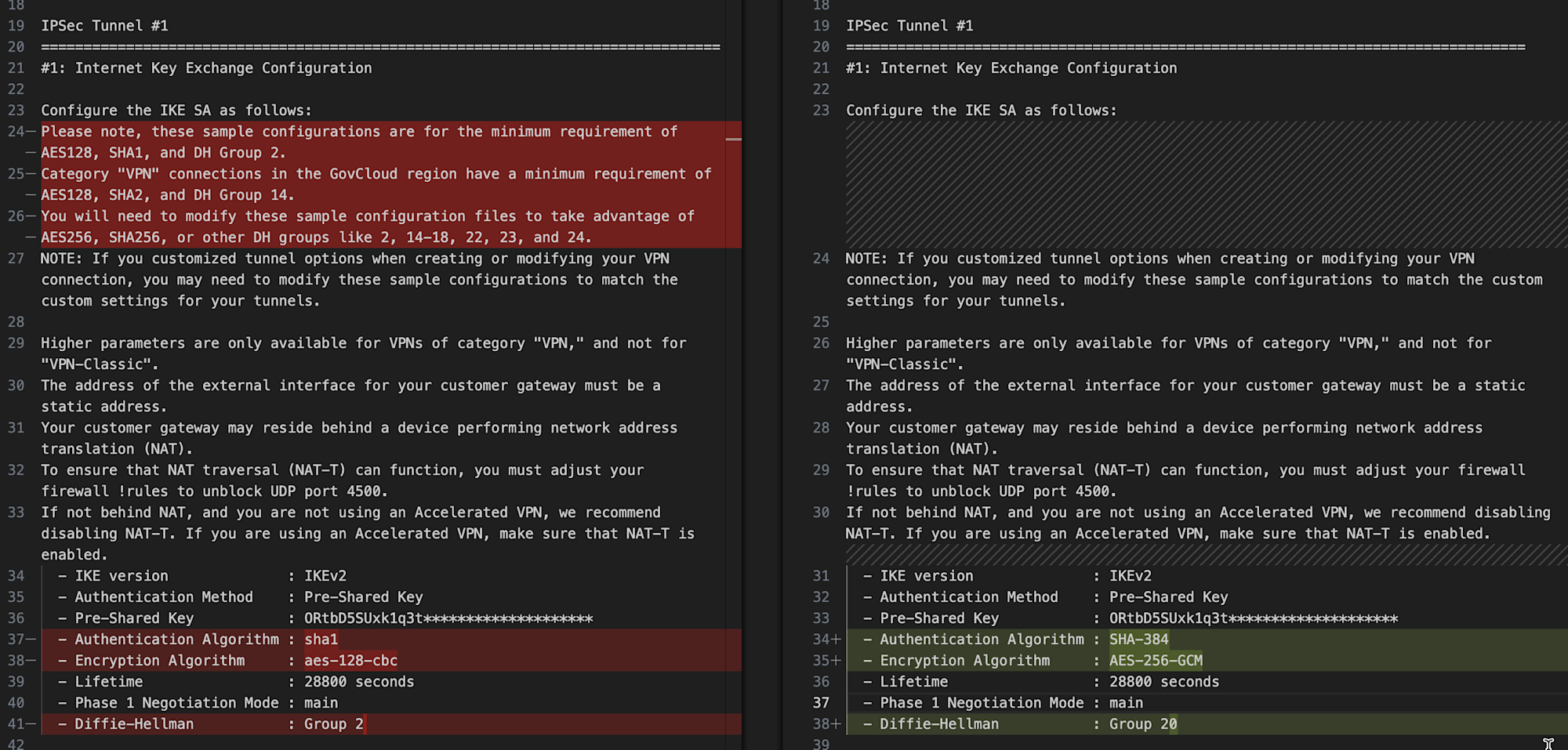
左がサンプルタイプなし、右がサンプルタイプ:推奨
後者(#2)も同様です。
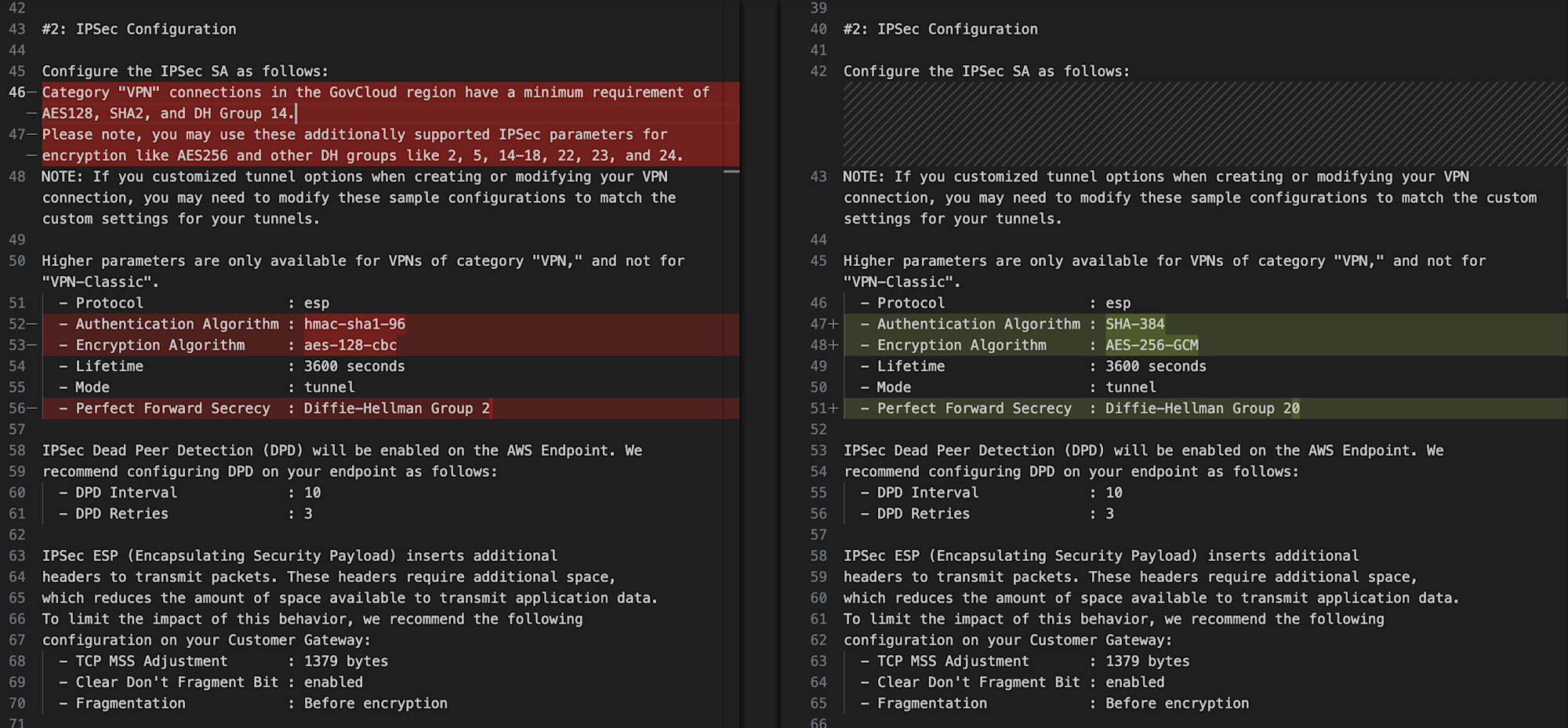
左がサンプルタイプなし、右がサンプルタイプ:推奨
もちろんサンプルタイプなしの状態から独自に設定を加えてもいいですが、「サンプルタイプ:推奨」が選択できるものはそちらをベースにカスタマイズするのがよいでしょう。
また、ここまで見てきたのはGeneric(汎用)のサンプルConfigファイルです。カスタマーゲートウェイデバイスとして利用予定のサンプルConfigファイルがあればそちらをベースとする方がよいでしょう。
ここまででサンプルConfigファイルには「サイト間VPN接続固有の情報」と「必要最小のセキュリティ設定」が含まれていることが確認できました。サイト間VPN接続の構成をAWS側/オンプレミス側の作業主体に分かれて実施する場合はこのイメージを事前にすり合わせておけると良さそうです。
終わりに
AWSサイト間VPNのカスタマーゲートウェイデバイス向けのサンプル設定ファイルを確認してみた、という内容でした。
実際のファイルの内訳を改めてじっくり眺められたこともありますし、ダウンロードするだけであればサイト間VPN接続の構成はかなり中途半端でも問題なく行えることもわかりました。サッとイメージを共有したい際に参考になれば幸いです。
以上、チバユキ (@batchicchi)がお送りしました。