Backlog ドキュメントのインポート機能とドキュメント追加・削除APIを使ってみた

はじめに
皆様こんにちは、あかいけです。
先日、Backlogドキュメントに関するアップデートがありました。
どうやらファイルのインポート機能と、ドキュメントの追加・削除APIが追加されたようです。
というわけで今回は、それぞれの機能を実際に触ってみた所感をまとめます。
インポート機能
今まではBacklog上でドキュメントを新規作成し、手元のファイルの内容をコピペする必要がありました。
今回のアップデートにより、マークダウンファイルなどを直接インポートできるようになったので、幾分かドキュメント作成が楽になりそうです。
ドキュメントを読んだ感じ、重要そうな仕様は以下の通りでした。
- インポートした内容は、新しいページとして、インポート時に開いていたドキュメントの下に追加される
- インポートしたファイルの名称がドキュメントの名称としてインポートされる
- 複数ファイルをまとめてインポートする場合、1ファイル1ページでインポートされる
- 最大10個のファイルを一度にインポートできる
- インポート可能なファイル形式
- .md
- .markdown
- .txt
- インポートできるファイルの最大サイズは、1MB
- Data URI形式など、特定の形式を含むファイルのインポートはできない
- Backlog記法には対応していない
インポートしてみる
では実際にインポートしてみます。
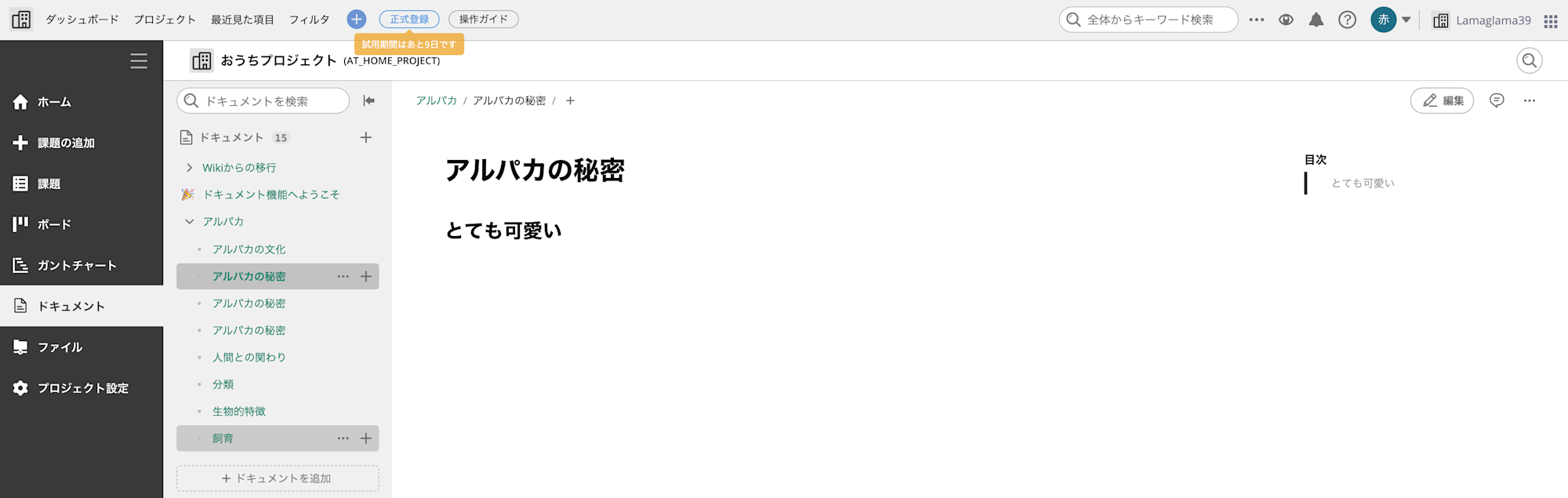
以前のブログで作成したアルパカフォルダに、新たなマークダウンファイルをインポートしてみます。
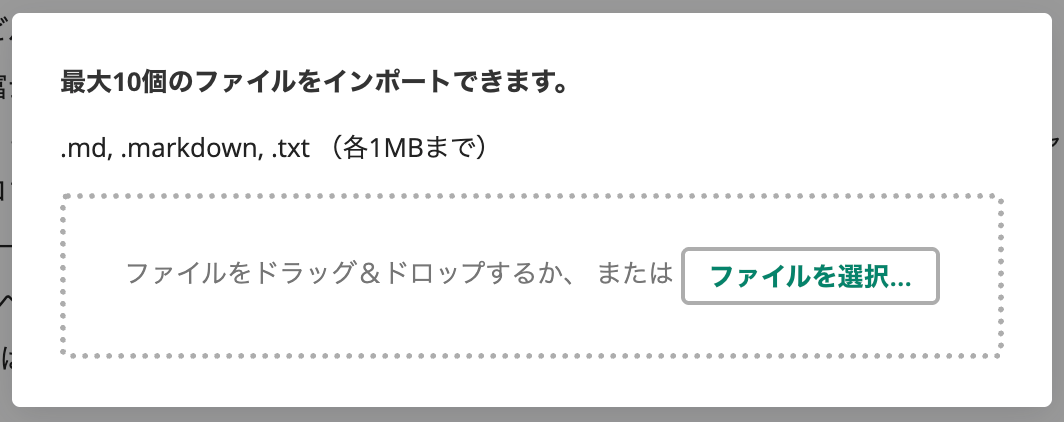
画面右側のメニューから「インポート」して、ファイルをドラッグ&ドロップします。
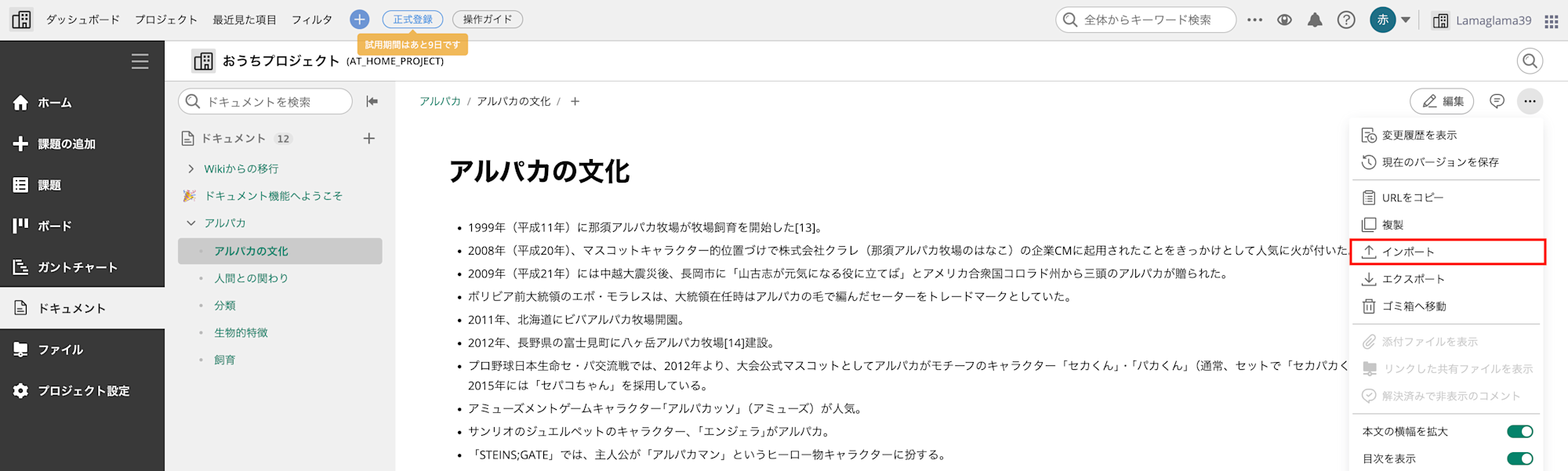
問題なくインポートできました。
ファイル名がそのままドキュメント名になり、内容もマークダウンとして正しくパースされています。
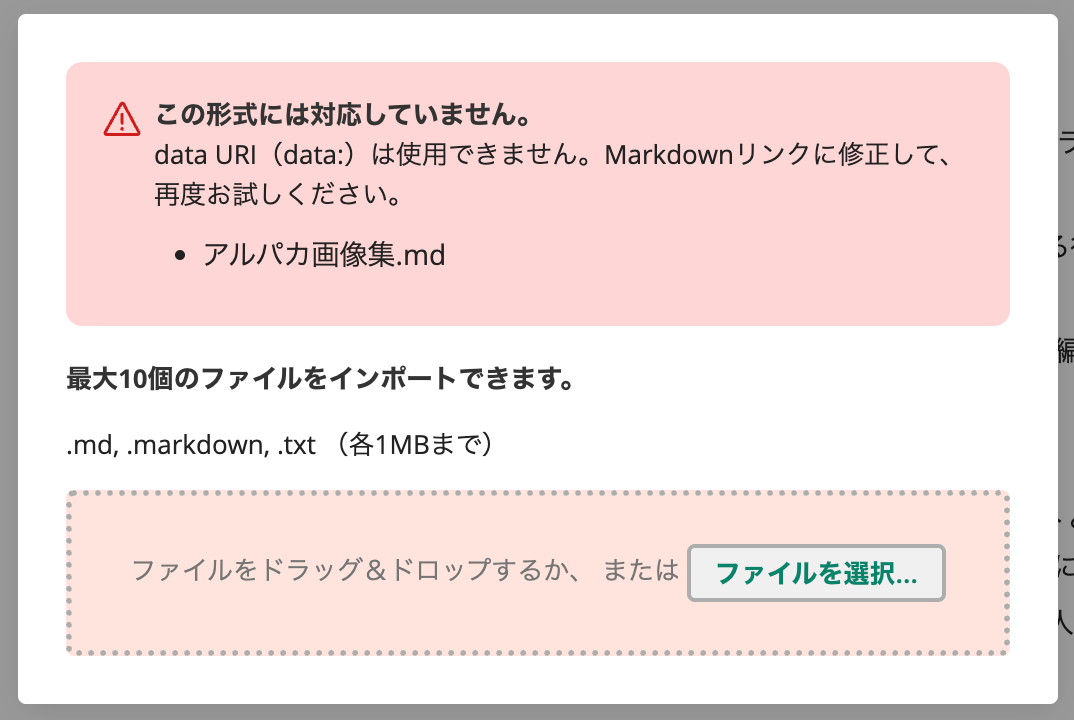
ちなみにサポート外のdata URIがファイル内に含まれる場合は、この時点でエラーで弾かれました。
画像ファイルの参照について
さて、一般的なテキストのみのマークダウンであれば問題なさそうですが、
画像ファイルなど外部のファイルを参照している場合はどのように扱われるのでしょうか?
気になったので、外部URL参照やローカルファイル参照など、さまざまな画像参照パターンを含むマークダウンファイルを作成して試してみました。
以下はテスト用に用意したマークダウンファイルです。
外部URLを参照するパターンと、ローカルファイルパスを参照するパターンでそれぞれ書いています。
テストファイル
---
## 外部URL参照
### URL記法(基本)

### プロトコル相対URL

---
## ローカルファイル参照
### 絶対パス指定

### 相対パス指定(カレントディレクトリ)

---
## 記法バリエーション
### タイトル付き(ローカル)

### タイトル付き(外部URL)

### alt省略(ローカル)

### alt省略(外部URL)

### 参照リンク形式(ローカル)
![アルパカ][alpaca-local]
[alpaca-local]: /Users/akaike.haruka/Downloads/alpaca.jpg
### 参照リンク形式(外部URL)
![アルパカ][alpaca-url]
[alpaca-url]: https://pbs.twimg.com/profile_images/1824438567474696193/bRIjpvwi_400x400.jpg
---
## HTML記法
### HTMLタグ(ローカル)
<img src="/Users/akaike.haruka/Downloads/alpaca.jpg" alt="アルパカ">
### HTMLタグ(外部URL)
<img src="https://pbs.twimg.com/profile_images/1824438567474696193/bRIjpvwi_400x400.jpg" alt="アルパカ">
### HTMLタグ サイズ指定付き(ローカル)
<img src="/Users/akaike.haruka/Downloads/alpaca.jpg" alt="アルパカ" width="300" height="200">
### HTMLタグ サイズ指定付き(外部URL)
<img src="https://pbs.twimg.com/profile_images/1824438567474696193/bRIjpvwi_400x400.jpg" alt="アルパカ" width="300" height="200">
---
結果として、外部URLで参照している画像はそのままインポートされましたが、
ローカルファイルパスで指定した画像はすべて表示できませんでした。
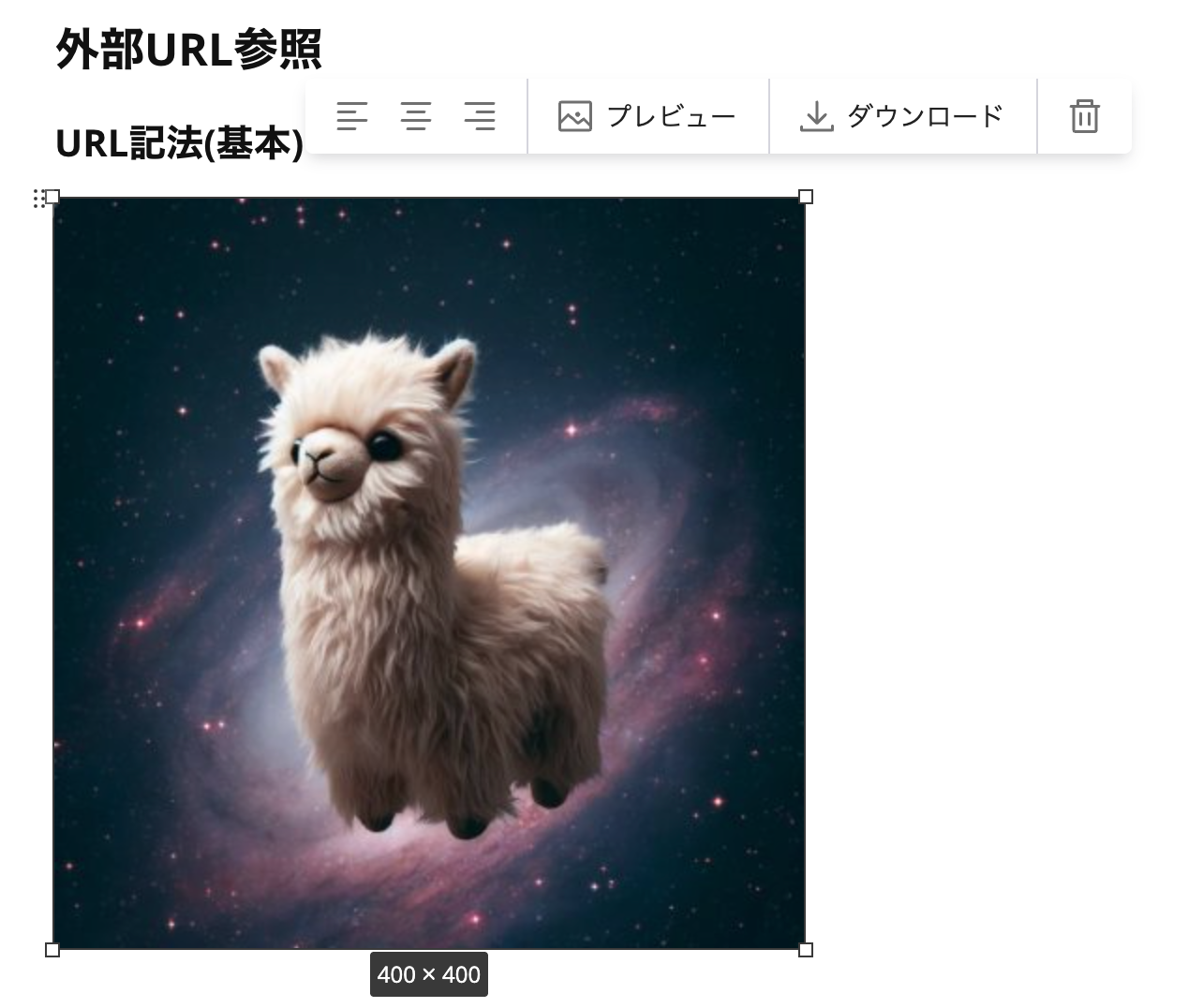
以下は外部URLの例ですが、そのままリンク先の画像が表示されています。
ダウンロードをクリックすると、外部URLのリンクに飛びます。
一方、ローカルファイルパスで指定した画像は参照先が見つからないため、壊れた画像アイコン?で表示されました。
またプレビュー画面からクリックすると、「添付ファイルは削除されてましたえ」というメッセージが表示されます。
おそらくローカルファイルのパスが解釈できないため、このような挙動になると思われます。
ドキュメント追加・削除API
次に、今回追加されたドキュメントの追加・削除APIを試してみます。
今回は各APIの挙動を確認することが目的なので、シンプルにcurlで実行します。
事前準備
環境変数の設定
# BacklogのスペースID(例: your-space.backlog.com の "your-space" 部分)
export BACKLOG_SPACE="your-space"

# APIキー(個人設定 > API から発行)
export BACKLOG_API_KEY="your-api-key"

# プロジェクトID(数値) (プロジェクト設定のURL末尾)
export BACKLOG_PROJECT_ID="12345"
ドキュメント追加API
最小パラメータ(projectIdのみ)
まずは最小構成で試してみます。
projectIdのみを指定した場合、無題の空のドキュメントが作成されます。
curl -s -X POST \
  "https://${BACKLOG_SPACE}.backlog.com/api/v2/documents?apiKey=${BACKLOG_API_KEY}" \
  -H "Content-Type: application/x-www-form-urlencoded" \
  -d "projectId=${BACKLOG_PROJECT_ID}" | jq .
{
  "id": "019c07d8c7057411865f739d0b2f44fc",
  "projectId": 727460,
  "title": "",
  "json": {
    "type": "doc",
    "content": []
  },
  "plain": "",
  "statusId": 1,
  "emoji": null,
  "createdUserId": 2274473,
  "created": "2026-01-29T03:42:53Z",
  "updatedUserId": 2274473,
  "updated": "2026-01-29T03:42:53Z"
}
タイトルと本文を指定
次に、titleとcontentパラメータを指定してドキュメントを作成してみます。
contentにはマークダウン形式のテキストを渡すことができます。
curl -s -X POST \
  "https://${BACKLOG_SPACE}.backlog.com/api/v2/documents?apiKey=${BACKLOG_API_KEY}" \
  -H "Content-Type: application/x-www-form-urlencoded" \
  -d "projectId=${BACKLOG_PROJECT_ID}" \
  -d "title=API検証テスト" \
  -d "content=# テスト見出し
本文のテストです。

- リスト1
- リスト2" | jq .
{
  "id": "019c07da3ddf78689a564760b908d9fc",
  "projectId": 727460,
  "title": "API検証テスト",
  "json": {
    "type": "doc",
    "content": [
      {
        "type": "heading",
        "attrs": {
          "id": "Vcl",
          "level": 1
        },
        "content": [
          {
            "type": "text",
            "text": "テスト見出し"
          }
        ]
      },
      {
        "type": "paragraph",
        "content": [
          {
            "type": "text",
            "text": "本文のテストです。"
          }
        ]
      },
      {
        "type": "bulletList",
        "content": [
          {
            "type": "listItem",
            "content": [
              {
                "type": "paragraph",
                "content": [
                  {
                    "type": "text",
                    "text": "リスト1"
                  }
                ]
              }
            ]
          },
          {
            "type": "listItem",
            "content": [
              {
                "type": "paragraph",
                "content": [
                  {
                    "type": "text",
                    "text": "リスト2"
                  }
                ]
              }
            ]
          }
        ]
      }
    ]
  },
  "plain": "# テスト見出し\n本文のテストです。\n\n- リスト1\n- リスト2",
  "statusId": 1,
  "emoji": null,
  "createdUserId": 2274473,
  "created": "2026-01-29T03:44:28Z",
  "updatedUserId": 2274473,
  "updated": "2026-01-29T03:44:28Z"
}
絵文字付き
emojiパラメータを指定して、ドキュメントに絵文字を付けてみます。
curl -s -X POST \
  "https://${BACKLOG_SPACE}.backlog.com/api/v2/documents?apiKey=${BACKLOG_API_KEY}" \
  -H "Content-Type: application/x-www-form-urlencoded" \
  -d "projectId=${BACKLOG_PROJECT_ID}" \
  -d "title=絵文字テスト" \
  -d "content=絵文字付きドキュメントのテスト" \
  -d "emoji=👍" | jq .
{
  "id": "019c07e241647e2cafcbbcaffd3e0ce6",
  "projectId": 727460,
  "title": "絵文字テスト",
  "json": {
    "type": "doc",
    "content": [
      {
        "type": "paragraph",
        "content": [
          {
            "type": "text",
            "text": "絵文字付きドキュメントのテスト"
          }
        ]
      }
    ]
  },
  "plain": "絵文字付きドキュメントのテスト",
  "statusId": 1,
  "emoji": "👍",
  "createdUserId": 2274473,
  "created": "2026-01-29T03:53:14Z",
  "updatedUserId": 2274473,
  "updated": "2026-01-29T03:53:14Z"
}
レスポンスのemojiフィールドには正しく値が入っているのですが、実際のBacklog画面上ではドキュメントに絵文字が反映されていませんでした。
タイミングの問題なのか、API側の不具合なのかは不明です。
マークダウンファイルの内容を送信
ローカルのマークダウンファイルの内容をそのままAPIで送信することもできます。
--data-urlencode "content@ファイルパス"の形式で指定します。
# 送信するマークダウンファイルのパスを指定
export MD_FILE_PATH="/Users/akaike.haruka/Downloads/アルパカ画像集.md"

curl -s -X POST \
  "https://${BACKLOG_SPACE}.backlog.com/api/v2/documents?apiKey=${BACKLOG_API_KEY}" \
  -H "Content-Type: application/x-www-form-urlencoded" \
  -d "projectId=${BACKLOG_PROJECT_ID}" \
  -d "title=マークダウンファイル取り込みテスト" \
  --data-urlencode "content@${MD_FILE_PATH}" | jq .
実行結果
{
"id": "019c07e0c99d724a8a7561b2bcd7349a",
"projectId": 727460,
"title": "マークダウンファイル取り込みテスト",
"json": {
"type": "doc",
"content": [
{
"type": "horizontalRule"
},
{
"type": "heading",
"attrs": {
"id": "CWG",
"level": 2
},
"content": [
{
"type": "text",
"text": "外部URL参照"
}
]
},
{
"type": "heading",
"attrs": {
"id": "XSM",
"level": 3
},
"content": [
{
"type": "text",
"text": "URL記法(基本)"
}
]
},
{
"type": "paragraph",
"content": [
{
"type": "image",
"attrs": {
"src": "https://pbs.twimg.com/profile_images/1824438567474696193/bRIjpvwi_400x400.jpg",
"width": "100%",
"height": "auto",
"textAlign": "left"
}
}
]
},
{
"type": "heading",
"attrs": {
"id": "ixp",
"level": 3
},
"content": [
{
"type": "text",
"text": "プロトコル相対URL"
}
]
},
{
"type": "paragraph",
"content": [
{
"type": "image",
"attrs": {
"src": "//pbs.twimg.com/profile_images/1824438567474696193/bRIjpvwi_400x400.jpg",
"width": "100%",
"height": "auto",
"textAlign": "left"
}
}
]
},
{
"type": "horizontalRule"
},
{
"type": "heading",
"attrs": {
"id": "gqR",
"level": 2
},
"content": [
{
"type": "text",
"text": "ローカルファイル参照"
}
]
},
{
"type": "heading",
"attrs": {
"id": "zZZ",
"level": 3
},
"content": [
{
"type": "text",
"text": "絶対パス指定"
}
]
},
{
"type": "paragraph",
"content": [
{
"type": "image",
"attrs": {
"src": "/Users/akaike.haruka/Downloads/alpaca.jpg",
"width": "100%",
"height": "auto",
"textAlign": "left"
}
}
]
},
{
"type": "heading",
"attrs": {
"id": "dlb",
"level": 3
},
"content": [
{
"type": "text",
"text": "相対パス指定(カレントディレクトリ)"
}
]
},
{
"type": "paragraph",
"content": [
{
"type": "image",
"attrs": {
"src": "./alpaca.jpg",
"width": "100%",
"height": "auto",
"textAlign": "left"
}
}
]
},
{
"type": "horizontalRule"
},
{
"type": "heading",
"attrs": {
"id": "UOt",
"level": 2
},
"content": [
{
"type": "text",
"text": "記法バリエーション"
}
]
},
{
"type": "heading",
"attrs": {
"id": "bDt",
"level": 3
},
"content": [
{
"type": "text",
"text": "タイトル付き(ローカル)"
}
]
},
{
"type": "paragraph",
"content": [
{
"type": "image",
"attrs": {
"src": "/Users/akaike.haruka/Downloads/alpaca.jpg",
"width": "100%",
"height": "auto",
"textAlign": "left"
}
}
]
},
{
"type": "heading",
"attrs": {
"id": "DZW",
"level": 3
},
"content": [
{
"type": "text",
"text": "タイトル付き(外部URL)"
}
]
},
{
"type": "paragraph",
"content": [
{
"type": "image",
"attrs": {
"src": "https://pbs.twimg.com/profile_images/1824438567474696193/bRIjpvwi_400x400.jpg",
"width": "100%",
"height": "auto",
"textAlign": "left"
}
}
]
},
{
"type": "heading",
"attrs": {
"id": "AKX",
"level": 3
},
"content": [
{
"type": "text",
"text": "alt省略(ローカル)"
}
]
},
{
"type": "paragraph",
"content": [
{
"type": "image",
"attrs": {
"src": "/Users/akaike.haruka/Downloads/alpaca.jpg",
"width": "100%",
"height": "auto",
"textAlign": "left"
}
}
]
},
{
"type": "heading",
"attrs": {
"id": "Mtb",
"level": 3
},
"content": [
{
"type": "text",
"text": "alt省略(外部URL)"
}
]
},
{
"type": "paragraph",
"content": [
{
"type": "image",
"attrs": {
"src": "https://pbs.twimg.com/profile_images/1824438567474696193/bRIjpvwi_400x400.jpg",
"width": "100%",
"height": "auto",
"textAlign": "left"
}
}
]
},
{
"type": "heading",
"attrs": {
"id": "pho",
"level": 3
},
"content": [
{
"type": "text",
"text": "参照リンク形式(ローカル)"
}
]
},
{
"type": "paragraph",
"content": [
{
"type": "text",
"text": "![アルパカ][alpaca-local]"
}
]
},
{
"type": "heading",
"attrs": {
"id": "MCJ",
"level": 3
},
"content": [
{
"type": "text",
"text": "参照リンク形式(外部URL)"
}
]
},
{
"type": "paragraph",
"content": [
{
"type": "text",
"text": "![アルパカ][alpaca-url]"
}
]
},
{
"type": "horizontalRule"
},
{
"type": "heading",
"attrs": {
"id": "xWi",
"level": 2
},
"content": [
{
"type": "text",
"text": "HTML記法"
}
]
},
{
"type": "heading",
"attrs": {
"id": "Uxn",
"level": 3
},
"content": [
{
"type": "text",
"text": "HTMLタグ(ローカル)"
}
]
},
{
"type": "paragraph",
"content": [
{
"type": "text",
"text": ""
}
]
},
{
"type": "heading",
"attrs": {
"id": "dHq",
"level": 3
},
"content": [
{
"type": "text",
"text": "HTMLタグ(外部URL)"
}
]
},
{
"type": "paragraph",
"content": [
{
"type": "text",
"text": ""
}
]
},
{
"type": "heading",
"attrs": {
"id": "Rwa",
"level": 3
},
"content": [
{
"type": "text",
"text": "HTMLタグ サイズ指定付き(ローカル)"
}
]
},
{
"type": "paragraph",
"content": [
{
"type": "text",
"text": ""
}
]
},
{
"type": "heading",
"attrs": {
"id": "LlH",
"level": 3
},
"content": [
{
"type": "text",
"text": "HTMLタグ サイズ指定付き(外部URL)"
}
]
},
{
"type": "paragraph",
"content": [
{
"type": "text",
"text": ""
}
]
},
{
"type": "horizontalRule"
}
]
},
"plain": "\n---\n\n## 外部URL参照\n\n### URL記法(基本)\n\n\n### プロトコル相対URL\n\n\n---\n\n## ローカルファイル参照\n\n### 絶対パス指定\n\n\n### 相対パス指定(カレントディレクトリ)\n\n\n---\n\n## 記法バリエーション\n\n### タイトル付き(ローカル)\n\n\n### タイトル付き(外部URL)\n\n\n### alt省略(ローカル)\n\n\n### alt省略(外部URL)\n\n\n### 参照リンク形式(ローカル)\n![アルパカ][alpaca-local]\n\n[alpaca-local]: /Users/akaike.haruka/Downloads/alpaca.jpg\n\n### 参照リンク形式(外部URL)\n![アルパカ][alpaca-url]\n\n[alpaca-url]: https://pbs.twimg.com/profile_images/1824438567474696193/bRIjpvwi_400x400.jpg\n\n---\n\n## HTML記法\n\n### HTMLタグ(ローカル)\n<img src=\"/Users/akaike.haruka/Downloads/alpaca.jpg\" alt=\"アルパカ\">\n\n### HTMLタグ(外部URL)\n<img src=\"https://pbs.twimg.com/profile_images/1824438567474696193/bRIjpvwi_400x400.jpg\" alt=\"アルパカ\">\n\n### HTMLタグ サイズ指定付き(ローカル)\n<img src=\"/Users/akaike.haruka/Downloads/alpaca.jpg\" alt=\"アルパカ\" width=\"300\" height=\"200\">\n\n### HTMLタグ サイズ指定付き(外部URL)\n<img src=\"https://pbs.twimg.com/profile_images/1824438567474696193/bRIjpvwi_400x400.jpg\" alt=\"アルパカ\" width=\"300\" height=\"200\">\n\n---\n",
"statusId": 1,
"emoji": null,
"createdUserId": 2274473,
"created": "2026-01-29T03:51:38Z",
"updatedUserId": 2274473,
"updated": "2026-01-29T03:51:38Z"
}
親ドキュメント配下に追加
parentIdパラメータを指定すると、既存のドキュメントの子ドキュメントとして追加できます。
デフォルトでは親ドキュメントの子要素の先頭に追加されます。
# PARENT_DOCUMENT_IDは先ほど作成したドキュメントのidを指定
export PARENT_DOCUMENT_ID="取得したドキュメントID"

curl -s -X POST \
  "https://${BACKLOG_SPACE}.backlog.com/api/v2/documents?apiKey=${BACKLOG_API_KEY}" \
  -H "Content-Type: application/x-www-form-urlencoded" \
  -d "projectId=${BACKLOG_PROJECT_ID}" \
  -d "title=子ドキュメント" \
  -d "content=親配下に追加されるドキュメント" \
  -d "parentId=${PARENT_DOCUMENT_ID}" | jq .
{
  "id": "019c09771562770980532c729200d7e2",
  "projectId": 727460,
  "title": "子ドキュメント",
  "json": {
    "type": "doc",
    "content": [
      {
        "type": "paragraph",
        "content": [
          {
            "type": "text",
            "text": "親配下に追加されるドキュメント"
          }
        ]
      }
    ]
  },
  "plain": "親配下に追加されるドキュメント",
  "statusId": 1,
  "emoji": null,
  "createdUserId": 2274473,
  "created": "2026-01-29T11:15:25Z",
  "updatedUserId": 2274473,
  "updated": "2026-01-29T11:15:25Z"
}
こちらもレスポンスは問題なさそうですが、実際のBacklog画面上では親ドキュメントの配下に配置されませんでした。
タイミングの問題なのか、API側の不具合なのかは不明です。
ドキュメント削除API
ドキュメント削除
DELETEメソッドでドキュメントIDを指定すると、対象のドキュメントを削除できます。
# 削除対象のドキュメントIDを指定
export DELETE_DOCUMENT_ID="削除対象のドキュメントID"

curl -s -X DELETE \
  "https://${BACKLOG_SPACE}.backlog.com/api/v2/documents/${DELETE_DOCUMENT_ID}?apiKey=${BACKLOG_API_KEY}" | jq .
{
  "id": "019c07da3ddf78689a564760b908d9fc",
  "projectId": 727460,
  "title": "API検証テスト",
  "json": null,
  "plain": null,
  "statusId": 1,
  "emoji": null,
  "createdUserId": 2274473,
  "created": "2026-01-29T03:44:28Z",
  "updatedUserId": 2274473,
  "updated": "2026-01-29T03:46:06Z"
}
問題なく削除できました。レスポンスとして削除されたドキュメントの情報が返却されます。なおjsonとplainはnullになっています。
さいごに
以上、Backlogドキュメントのインポート機能とドキュメント追加・削除APIを使ってみました。
インポート機能については、マークダウンファイルをそのまま取り込めるのでかなり便利です。
ただし、ローカルファイルパスで参照している画像はインポートできないため、画像を含むドキュメントの場合は外部URLで参照するか、インポート後に手動で画像を添付する必要がある点には注意が必要です。
APIについては、curlでシンプルに操作できることが確認できました。
私の環境では一部利用できない箇所もありましたが、ドキュメントの作成から親子関係の指定、削除まで一通りの操作が可能なので、各種ツールとの連携や自動化などにも活用できそうです。
Backlogドキュメントは最近GAされた機能ということもあり、これからもこういった便利機能がどんどん増えていくのが楽しみですね。
このブログが全国のBacklogユーザーの参考になれば幸いです。