Amazon Bedrock AgentCore Gateway の Request Interceptor でツール実行の認可制御を実装してみた

こんにちは、スーパーマーケットが大好きなコンサルティング部の神野です。
もう年の瀬ですね。こういった時期はスーパーで買いだめして家でのんびり過ごしたいこの頃です。
前回の記事では Response Interceptor を使って tools/list のレスポンスをフィルタリングする方法を紹介しました。今回はその続編として、Request Interceptor を使ったツール実行時の認可制御を試してみたので、その内容を記事にまとめました。
前回の記事でRequest/Response Interceptorそれぞれの違いなどを図を用いて説明しています。今回は割愛するので気になる方はぜひご覧ください。
Request Interceptor と Response Interceptor の違い
改めて Request Interceptor と Response Interceptor の違いを整理しておきます。
絵にするとざっと下記のようなイメージです。
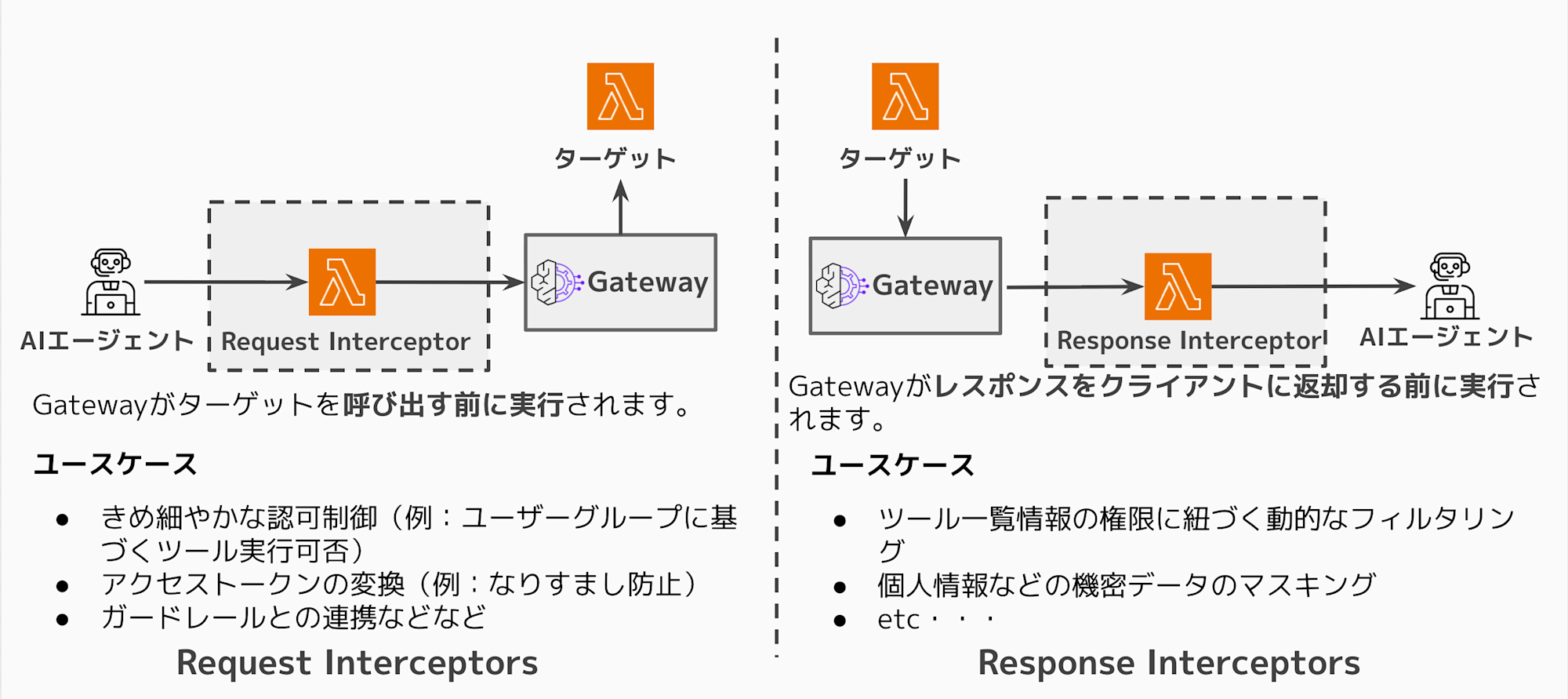
今回検証する Request Interceptor では権限がないユーザーがツールを呼び出そうとした場合、
ターゲット(Lambda)を呼び出さずに早期にエラーレスポンスを返却できます。
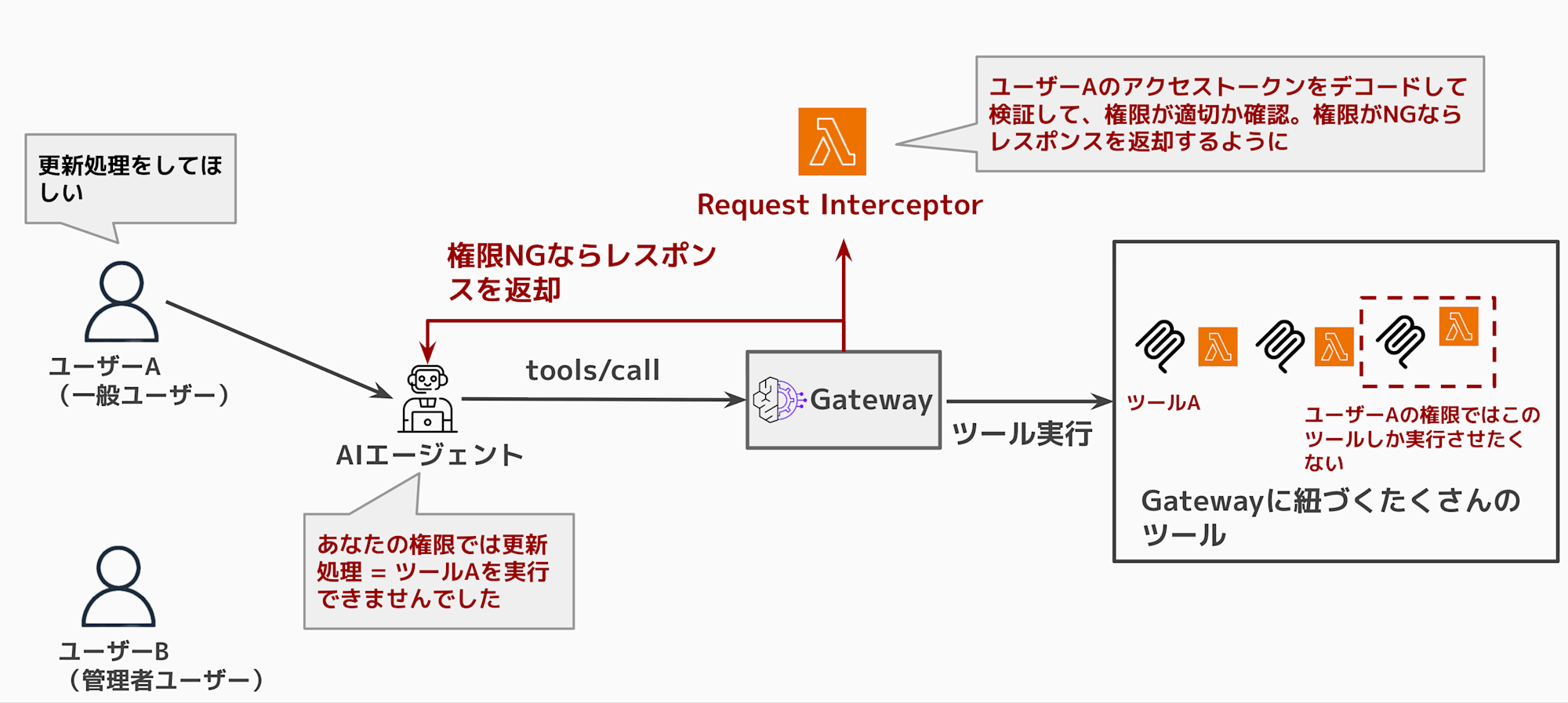
上記図のように一般ユーザーが管理者のみ実行できるツールを実行できるのは好ましくないケースがあると思います。
そこで Request Interceptor を活用して、アクセストークンから属性を抽出して、ユーザーの属性として権限が不十分の場合はツール実行させないといったユースケースを実際に検証環境を作って試してみました。
今回作成する検証環境
今回も Terraform を使用して環境を作ります。
ソースコードは下記レポジトリにアップロードしているので必要に応じてご参照ください。
Terraformで下記構成図の環境を作成します。
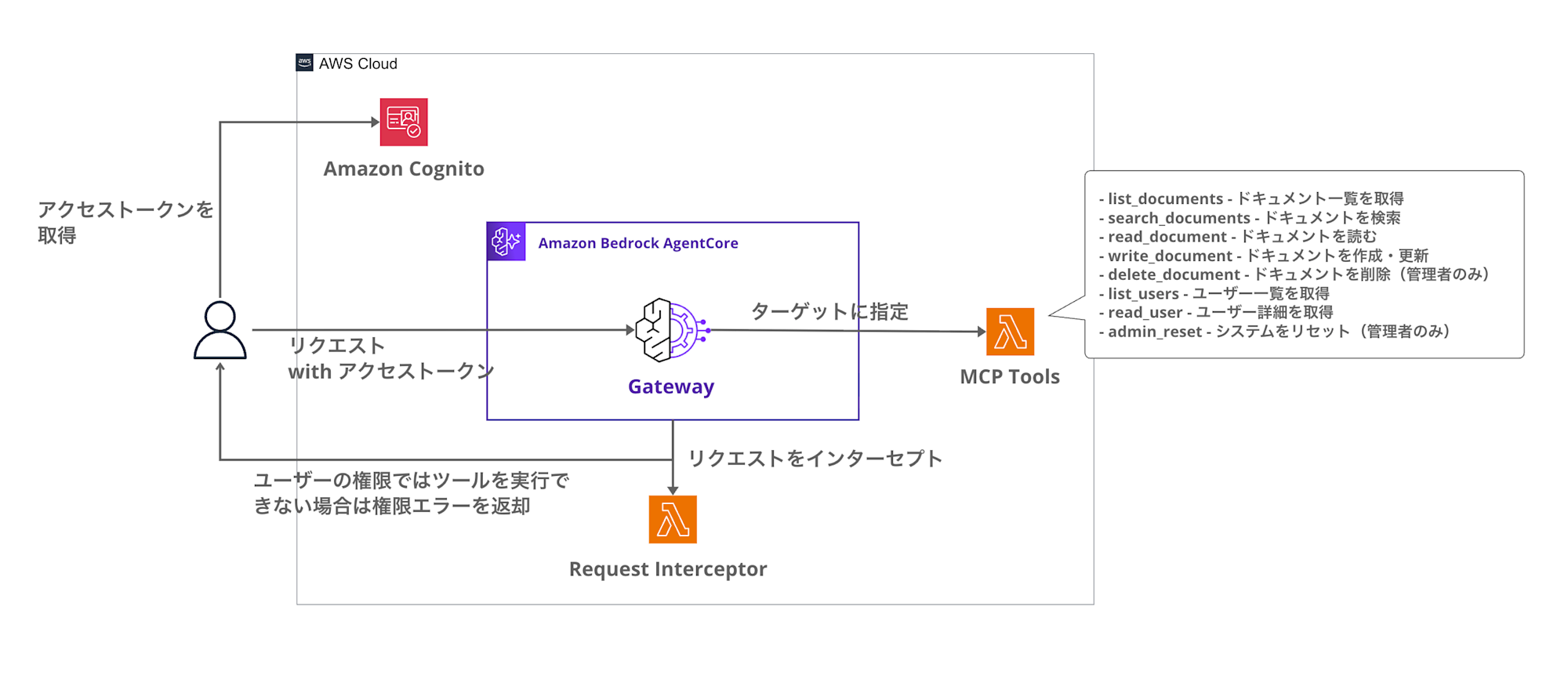
認証には Cognito、ツール実行の認可には Request Interceptor Lambdaという構成です。
Cognitoでアクセストークンを取得して、AgentCore GatewayがJWT認証でそのアクセストークンを検証します。
Request Interceptorはtools/callのリクエスト時に権限をチェックし、NGならターゲットを呼び出さずにエラーを返却します。
権限モデル
前回と同様に4つのグループを用意して、それぞれ異なる権限を付与します。
| グループ | 許可されるツール | 説明 |
|---|---|---|
| admin | 全ツール | システム管理者向け |
| power_user | search, read, write, list | 読み書き可能なユーザー |
| reader | search, read, list | 読み取り専用ユーザー |
| guest | list | リスト表示のみ |
今回は tools/call のリクエスト時に権限チェックを行い、許可されていないツールの実行を拒否します。
今回は admin と reader で比較して動作を確認します。
前提
今回使用する環境は下記となります。
| 項目 | バージョン |
|---|---|
| Terraform | >= 1.5.0 |
| AWS Provider | >= 6.25.0 |
| hashicorp/archive | >= 2.4.0 |
| hashicorp/random | >= 3.5.0 |
実装
ディレクトリ構成
今回のディレクトリ構成は下記のようになっています。
request-interceptor-demo/
├── gateway.tf           # AgentCore Gateway と Request Interceptor
├── lambda.tf            # Lambda 関数の定義
├── cognito.tf           # Cognito User Pool とグループ
├── variables.tf         # 変数定義
├── outputs.tf           # 出力値
├── versions.tf          # Provider 設定
└── lambda/
    ├── request_interceptor/  # Request Interceptor
    │   └── handler.py
    └── mcp_tools/            # MCP Tools Target
        └── handler.py
Request Interceptor の設定
Request Interceptor の設定をTerraformコードで確認してみます。
# Request Interceptor 設定
interceptor_configuration {
  # REQUEST インターセプターとして設定(ターゲット呼び出し前に実行)
  interception_points = ["REQUEST"]

  # Lambda インターセプター
  interceptor {
    lambda {
      arn = aws_lambda_function.request_interceptor.arn
    }
  }

  # リクエストヘッダーを渡す(Authorization ヘッダーから JWT を取得するため)
  input_configuration {
    pass_request_headers = true
  }
}
interception_points = ["REQUEST"] に設定することで、ターゲット呼び出し前に Interceptor Lambda が実行されます。
また、pass_request_headersをtrueにすることでInterceptorにリクエストヘッダーの転送を可能にして、今回のようにアクセストークンの検証が可能となります。
Request Interceptor の動作
Request Interceptor の処理フローは以下のように実装しました。
- Gateway から Interceptor Lambda が呼び出される
tools/callメソッドの場合のみ権限チェック処理を実行- JWT の
cognito:groupsクレームからユーザーのグループを取得 - リクエストからツール名を取得
- グループに応じた許可ツールと照合
- 権限あり → リクエストをそのまま通過(ターゲットを呼び出す)
- 権限なし → 拒否レスポンスを返却(ターゲット呼び出しをスキップ)
実装のポイントのみ確認していきます。
許可時のパススルー形式
Request Interceptor で権限チェックに合格した場合は、transformedGatewayRequest にリクエストボディをそのまま返却することで、Gateway はターゲット(Lambda)を呼び出します。
{
    "interceptorOutputVersion": "1.0",
    "mcp": {
        "transformedGatewayRequest": {
            "body": {
                "jsonrpc": "2.0",
                "id": 1,
                "method": "tools/call",
                "params": {
                    "name": "request-interceptor-demo-delete-document___delete_document",
                    "arguments": {"document_id": "doc1"}
                }
            }
        }
    }
}
このように transformedGatewayRequest を返却すると、Gateway はリクエストをターゲットに転送して、通常のツール実行フローが継続されます。
拒否レスポンスの形式
Request Interceptor で transformedGatewayResponse にステータスコード403、bodyにエラーフィールドを返却すると、
Gateway はターゲットを呼び出さずにそのレスポンスを返却します。
{
    "interceptorOutputVersion": "1.0",
    "mcp": {
        "transformedGatewayResponse": {
            "statusCode": 403,
            "body": {
                "jsonrpc": "2.0",
                "id": 1,
                "error": {
                    "code": -32000,
                    "message": "Permission denied: Tool 'delete_document' is not allowed for groups ['reader']"
                }
            }
        }
    }
}
このような実装で権限のないユーザーのリクエストは Lambda(ターゲット)を呼び出すことなく、エラーを返却できます。
Interceptor のソースコードは下記となります。長いので折りたたんでいます。
Request Interceptor のコード全体
"""
Request Interceptor Lambda for AgentCore Gateway

tools/call のリクエストをユーザーの権限に基づいて認可チェックし、
権限がない場合は早期に拒否レスポンスを返却する
"""

import json
import logging
import base64
import os
from typing import Any

logger = logging.getLogger()
logger.setLevel(logging.INFO)

# 環境変数からツール権限マッピングを取得
TOOL_PERMISSIONS = json.loads(os.environ.get('TOOL_PERMISSIONS', '{}'))

def decode_jwt_payload(token: str) -> dict:
    """JWTのペイロード部分をデコード(署名検証はGatewayが実施済み)"""
    try:
        # Bearer プレフィックスを除去
        if token.startswith('Bearer '):
            token = token[7:]

        # JWTのペイロード部分を取得(ヘッダー.ペイロード.署名)
        parts = token.split('.')
        if len(parts) != 3:
            return {}

        # Base64デコード(パディング調整)
        payload = parts[1]
        padding = 4 - len(payload) % 4
        if padding != 4:
            payload += '=' * padding

        decoded = base64.urlsafe_b64decode(payload)
        return json.loads(decoded)
    except Exception as e:
        logger.warning(f"Failed to decode JWT: {e}")
        return {}

def get_user_groups(event: dict) -> list[str]:
    """リクエストからユーザーのCognitoグループを取得"""
    try:
        gateway_request = event.get('mcp', {}).get('gatewayRequest', {})
        headers = gateway_request.get('headers', {})

        # Authorization ヘッダーから JWT を取得
        auth_header = headers.get('Authorization', '') or headers.get('authorization', '')
        if not auth_header:
            logger.info("No Authorization header found")
            return ['guest']

        payload = decode_jwt_payload(auth_header)

        # Cognito の cognito:groups クレームを取得
        groups = payload.get('cognito:groups', [])
        if not groups:
            # カスタム属性もチェック
            custom_groups = payload.get('custom:groups', '')
            if custom_groups:
                groups = custom_groups.split(',')

        logger.info(f"User groups: {groups}")
        return groups if groups else ['guest']

    except Exception as e:
        logger.error(f"Error getting user groups: {e}")
        return ['guest']

def get_allowed_tools(groups: list[str]) -> set[str]:
    """グループに基づいて許可されたツール名のセットを返す"""
    allowed = set()

    for group in groups:
        group_tools = TOOL_PERMISSIONS.get(group, [])
        if '*' in group_tools:
            # 全ツールアクセス可
            return {'*'}
        allowed.update(group_tools)

    # デフォルトでguestの権限
    if not allowed:
        allowed.update(TOOL_PERMISSIONS.get('guest', ['list']))

    return allowed

def get_tool_name_from_request(request_body: dict) -> str:
    """tools/call リクエストからツール名を取得"""
    params = request_body.get('params', {})
    full_tool_name = params.get('name', '')

    # AgentCore Gateway のツール名形式: {target-name}___{tool-name}
    if '___' in full_tool_name:
        return full_tool_name.split('___')[-1]
    return full_tool_name

def is_tool_allowed(tool_name: str, allowed_tools: set[str]) -> bool:
    """ツールが許可されているかチェック"""
    if '*' in allowed_tools:
        return True

    # ツール名のカテゴリでマッチング
    tool_category = tool_name.split('_')[0] if '_' in tool_name else tool_name

    return tool_name in allowed_tools or tool_category in allowed_tools

def passthrough_request(gateway_request: dict) -> dict:
    """リクエストをそのまま通過させる"""
    return {
        "interceptorOutputVersion": "1.0",
        "mcp": {
            "transformedGatewayRequest": {
                "body": gateway_request.get('body', {})
            }
        }
    }

def deny_response(request_body: dict, tool_name: str, user_groups: list[str]) -> dict:
    """権限なしの拒否レスポンスを返却(ターゲット呼び出しをスキップ)"""
    request_id = request_body.get('id', 1)

    return {
        "interceptorOutputVersion": "1.0",
        "mcp": {
            "transformedGatewayResponse": {
                "statusCode": 403,
                "body": {
                    "jsonrpc": "2.0",
                    "id": request_id,
                    "error": {
                        "code": -32000,
                        "message": f"Permission denied: Tool '{tool_name}' is not allowed for groups {user_groups}"
                    }
                }
            }
        }
    }

def lambda_handler(event: dict, context: Any) -> dict:
    """
    AgentCore Gateway Request Interceptor

    tools/call のリクエストをユーザーの権限に基づいて認可チェックする
    """
    logger.info(f"Request Interceptor invoked with event keys: {list(event.keys())}")

    mcp_data = event.get('mcp', {})
    gateway_request = mcp_data.get('gatewayRequest', {})
    request_body = gateway_request.get('body', {})

    # MCP メソッドを確認
    mcp_method = request_body.get('method', '')
    logger.info(f"MCP method: {mcp_method}")

    # tools/call 以外はパススルー
    if mcp_method != 'tools/call':
        logger.info(f"Method '{mcp_method}' - passing through unchanged")
        return passthrough_request(gateway_request)

    # tools/call の場合: 権限チェック
    logger.info("Processing tools/call - checking permissions")

    # ユーザーのグループを取得
    user_groups = get_user_groups(event)

    # 呼び出されるツール名を取得
    tool_name = get_tool_name_from_request(request_body)

    # 許可されたツールを取得
    allowed_tools = get_allowed_tools(user_groups)

    # 権限チェック
    if is_tool_allowed(tool_name, allowed_tools):
        logger.info(f"Permission granted: Tool '{tool_name}' is allowed")
        return passthrough_request(gateway_request)
    else:
        logger.warning(f"Permission denied: Tool '{tool_name}' is NOT allowed")
        return deny_response(request_body, tool_name, user_groups)
動作確認
実際にデプロイして動作を確認していきます。
環境のデプロイ
まずは Terraform で環境をデプロイします。
cd request-interceptor-demo
terraform init
terraform apply --auto-approve
デプロイが完了すると、下記のような出力が表示されます。
Apply complete! Resources: 30 added, 0 changed, 0 destroyed.

Outputs:

cognito_client_id = "xxxxxxxxxxxxxxxxxxxxxxxxxx"
cognito_user_pool_id = "us-east-1_XXXXXXXXX"
gateway_url = "https://xxxxxxxxxx.gateway.bedrock-agentcore.us-east-1.amazonaws.com/mcp"
gateway_id = "XXXXXXXXXX"
これで環境が整いました。出力された値を環境変数に設定しておきます。
# 環境変数に保存
export AWS_REGION=us-east-1
export GATEWAY_URL=$(terraform output -raw gateway_url)
export USER_POOL_ID=$(terraform output -raw cognito_user_pool_id)
export CLIENT_ID=$(terraform output -raw cognito_client_id)
テストユーザーの作成
次に Cognito にテストユーザーを作成します。
今回は admin グループと reader グループのユーザーを作成して比較してみます。
# Admin ユーザーの作成
aws cognito-idp admin-create-user \
  --user-pool-id ${USER_POOL_ID} \
  --username admin-user \
  --user-attributes Name=email,Value=admin@example.com \
  --temporary-password 'TempPass123!'

# Admin グループに追加
aws cognito-idp admin-add-user-to-group \
  --user-pool-id ${USER_POOL_ID} \
  --username admin-user \
  --group-name admin

# Reader ユーザーの作成
aws cognito-idp admin-create-user \
  --user-pool-id ${USER_POOL_ID} \
  --username reader-user \
  --user-attributes Name=email,Value=reader@example.com \
  --temporary-password 'TempPass123!'

# Reader グループに追加
aws cognito-idp admin-add-user-to-group \
  --user-pool-id ${USER_POOL_ID} \
  --username reader-user \
  --group-name reader
パスワードの変更
admin-create-user で作成したユーザーは FORCE_CHANGE_PASSWORD 状態になっているため、パスワードを変更する必要があります。
# Admin ユーザーのパスワード変更
aws cognito-idp admin-set-user-password \
  --user-pool-id ${USER_POOL_ID} \
  --username admin-user \
  --password 'NewPass123!' \
  --permanent

# Reader ユーザーのパスワード変更
aws cognito-idp admin-set-user-password \
  --user-pool-id ${USER_POOL_ID} \
  --username reader-user \
  --password 'NewPass123!' \
  --permanent
アクセストークンの取得
各ユーザーで認証して アクセストークンを取得します。
# Admin ユーザーのトークン取得
ADMIN_TOKEN=$(aws cognito-idp admin-initiate-auth \
  --user-pool-id ${USER_POOL_ID} \
  --client-id ${CLIENT_ID} \
  --auth-flow ADMIN_USER_PASSWORD_AUTH \
  --auth-parameters USERNAME=admin-user,PASSWORD='NewPass123!' \
  --query 'AuthenticationResult.AccessToken' \
  --output text)

# Reader ユーザーのトークン取得
READER_TOKEN=$(aws cognito-idp admin-initiate-auth \
  --user-pool-id ${USER_POOL_ID} \
  --client-id ${CLIENT_ID} \
  --auth-flow ADMIN_USER_PASSWORD_AUTH \
  --auth-parameters USERNAME=reader-user,PASSWORD='NewPass123!' \
  --query 'AuthenticationResult.AccessToken' \
  --output text)
tools/call の実行比較
各ユーザーで tools/call を実行して、権限に応じた動作の違いを確認してみます。
今回は delete_document ツールを呼び出してみます。
このツールは admin カテゴリなので、reader グループのユーザーには許可されていません。
Interceptorによって適切にエラーを返却されるかを確認してみます。
Admin ユーザーの場合(成功)
curl -s -X POST ${GATEWAY_URL} \
  -H "Content-Type: application/json" \
  -H "Authorization: Bearer ${ADMIN_TOKEN}" \
  -d '{
    "jsonrpc": "2.0",
    "id": 1,
    "method": "tools/call",
    "params": {
      "name": "request-interceptor-demo-delete-document___delete_document",
      "arguments": {"document_id": "doc1"}
    }
  }' | jq .
{
  "jsonrpc": "2.0",
  "id": 1,
  "result": {
    "content": [
      {
        "type": "text",
        "text": "{\"success\": true, \"id\": \"doc1\", \"message\": \"Document doc1 has been deleted.\"}"
      }
    ]
  }
}
Admin ユーザーは delete_document の実行が許可されているので、正常にツールが実行されました!次にReader ユーザーの実行が拒否されるか確認してみましょう。
Reader ユーザーの場合(拒否)
curl -s -X POST ${GATEWAY_URL} \
  -H "Content-Type: application/json" \
  -H "Authorization: Bearer ${READER_TOKEN}" \
  -d '{
    "jsonrpc": "2.0",
    "id": 1,
    "method": "tools/call",
    "params": {
      "name": "request-interceptor-demo-delete-document___delete_document",
      "arguments": {"document_id": "doc1"}
    }
  }' | jq .
{
  "jsonrpc": "2.0",
  "id": 1,
  "error": {
    "code": -32000,
    "message": "Permission denied: Tool 'delete_document' is not allowed for groups ['reader']"
  }
}
Reader ユーザーでは Permission denied エラーが意図通り返却されましたね!!
Request Interceptor が tools/call のリクエストをインターセプトし、権限チェックの結果、ターゲット(Lambda)を呼び出さずに特定のツール実行を拒否しています。
MCPツールのCloudWatchのログも念の為に確認してみると、Admin ユーザーの実行記録はありましたが、Reader ユーザーの実行ログは存在しませんでした。
MCP Tool Lambda のログ
INIT_START Runtime Version: python:3.12.v101
START RequestId: 92eac701-cada-40c2-84eb-666add709e92 Version: $LATEST
[INFO] Tool invocation received: {"document_id": "doc1"}
[INFO] Original tool name from context: request-interceptor-demo-delete-document___delete_document
[INFO] Extracted tool name: delete_document
[INFO] Tool name resolved: delete_document
[INFO] Tool delete_document executed successfully
END RequestId: 92eac701-cada-40c2-84eb-666add709e92
REPORT RequestId: 92eac701-cada-40c2-84eb-666add709e92 Duration: 2.35 ms Billed Duration: 94 ms
逆に Request Interceptor Lambda のログを見ると2回とも実行されていて、reader の場合は拒否しているログがあるので期待通りですね。
Request Interceptor Lambda のログ
START RequestId: 3fc525b4-7755-49fb-9af1-cd3e03950546 Version: $LATEST
[INFO] Request Interceptor invoked with event keys: ['interceptorInputVersion', 'mcp']
[INFO] MCP method: tools/call
[INFO] Processing tools/call - checking permissions
[INFO] User groups: ['admin']
[INFO] Tool name from request: delete_document
[INFO] Allowed tools for groups ['admin']: {'*'}
[INFO] Permission granted: Tool 'delete_document' is allowed for groups ['admin']
END RequestId: 3fc525b4-7755-49fb-9af1-cd3e03950546
REPORT RequestId: 3fc525b4-7755-49fb-9af1-cd3e03950546 Duration: 2.48 ms Billed Duration: 95 ms
START RequestId: 5f520523-373d-4684-ab2d-bc8976d5c0f7 Version: $LATEST
[INFO] Request Interceptor invoked with event keys: ['interceptorInputVersion', 'mcp']
[INFO] MCP method: tools/call
[INFO] Processing tools/call - checking permissions
[INFO] User groups: ['reader']
[INFO] Tool name from request: delete_document
[INFO] Allowed tools for groups ['reader']: {'read', 'list', 'search'}
[INFO] Checking tool: delete_document -> category: delete
[INFO] Allowed tools: {'read', 'list', 'search'}
[WARNING] Permission denied: Tool 'delete_document' is NOT allowed for groups ['reader']
END RequestId: 5f520523-373d-4684-ab2d-bc8976d5c0f7
REPORT RequestId: 5f520523-373d-4684-ab2d-bc8976d5c0f7 Duration: 2.00 ms Billed Duration: 3 ms
結果の比較
| グループ | delete_document 実行 | 結果 |
|---|---|---|
| admin | 許可 | 成功(ドキュメント削除) |
| reader | 拒否 | Permission denied エラー |
期待通り Request Interceptor による認可制御が動作していることが確認できました!
おわりに
今回は Request Interceptor を使ったツール実行の認可制御を試してみました!!
前回の Response Interceptor と組み合わせることで、よりツールの実行や一覧の取得に対してきめ細かい認可制御が実現できますね。
両方の Interceptor を組み合わせた環境も試したり、今回試した以外のユースケースも試してご紹介していきたいと思っています!
本記事が少しでも参考になりましたら幸いです。最後までご覧いただきありがとうございました!
補足
カスタム属性を使った認可制御
今回はグループベースの認可制御を実装しましたが、より細かい制御が必要な場合はカスタム属性を使う方法もあります。
ただし、Gateway に送信するのはアクセストークンで、カスタム属性をアクセストークンに含めるにはトークン生成前トリガーが必要になります。
より詳細な制御が必要な場合は、Cognito の Lambda トリガー機能と組み合わせて検討してみてください。
仮にM2M認証でトークン生成前トリガーをする場合はイベントバージョンv3を使用する必要があり、 Cognito のプランが Essentials もしくは Plus ではないと使用できないため注意が必要です。
参考記事
Gateway Interceptors の仕組みについてより詳しく知りたい場合は下記記事が参考になります・・・!!今回も参考にしております・・・!!