![[アップデート] Amazon Bedrock AgentCore Runtime に Amazon S3 Files をネイティブマウントできるようになりました](https://images.ctfassets.net/ct0aopd36mqt/7M0d5bjsd0K4Et30cVFvB6/5b2095750cc8bf73f04f63ed0d4b3546/AgentCore2.png?w=3840&fm=webp)
[アップデート] Amazon Bedrock AgentCore Runtime に Amazon S3 Files をネイティブマウントできるようになりました

はじめに
コンサルティング部の神野です。
少し前に Amazon S3 Files が GA になりました。S3 バケットをファイルシステムとしてマウントできるサービスで、登場したときにいつかAgentCore Runtimeにマウントできる機能出てきそうだなと感じていました。
そう思っていた矢先、Bedrock AgentCore Control API のアップデートをチェックしていたら、関連するパラメータが追加されていました。
中身を見ると、s3FilesAccessPointという文字が見えますね・・・!!期待・・・!
これまでAgentCore Runtime から S3 Files を使うには、Dockerイメージに amazon-efs-utils を仕込んで、エントリーポイントスクリプトでマウントして・・・と、自前で工夫する箇所もありました。下記ふくちさんの記事がとても参考になります。
これが今回のアップデートで、Runtime のリソース定義としてマネージドに設定できるようになりました。
実際に s3FilesAccessPoint で S3 Files をマウントして、書き込んだファイルが S3 バケットに同期されるところまで試してみたいと思います!
前提
検証時の環境です。
| 項目 | 値 |
|---|---|
| リージョン | us-east-1 |
| AWS CLI | v2.34.44 |
| Python パッケージ管理 | uv |
| boto3 / botocore | 1.43.5 以降 |
| Docker | buildx で linux/arm64 ビルドできること(AgentCore Runtime のコンテナは ARM64 必須) |
ちなみに検証時点(2026年5月7日)では、AWS マネジメントコンソールの AgentCore Runtime 作成画面には filesystemConfigurations 周りの項目がまだ反映されていなさそうでした。コンソールから S3 Files / EFS をマウントするUIが見つけられなかったので、本記事は CLI / SDK ベースで進めています。
何が追加されたか
改めて公式 API リファレンスを確認すると、FilesystemConfiguration は今回のアップデートで下記の3種類の設定をサポートしています。
| キー | 用途 | ストレージの粒度 | ネットワーク |
|---|---|---|---|
sessionStorage |
AgentCore マネージドな永続ストレージ | セッション単位 | VPC 不要 |
s3FilesAccessPoint |
Amazon S3 Files のアクセスポイント | ランタイム全体で共有 | 要 VPC |
efsAccessPoint |
Amazon EFS のアクセスポイント | ランタイム全体で共有 | 要 VPC |
ストレージの粒度が違うのが面白いですね。sessionStorage は session 単位で隔離された個別ボリュームですが、s3FilesAccessPoint / efsAccessPoint は1つのファイルシステムを Runtime の全 session が共有してマウントする、という挙動になります。
セッションストレージは以前にブログを書いたので必要に応じてご参照ください。
S3 Files / EFS の場合、共通で accessPointArn と mountPath を指定します。
| 設定項目 | 設定値 | 説明 |
|---|---|---|
accessPointArn |
アクセスポイントの ARN | S3 Files なら S3 Files アクセスポイントの ARN |
mountPath |
コンテナ内のマウントパス | /mnt 直下に1階層のサブディレクトリ(例:/mnt/data) |
mountPath の制約として /mnt の直下1階層だけみたいです。気になったので、いくつかパターンを変えて CreateAgentRuntime を実行してみました。
| mountPath | 結果 |
|---|---|
/mnt/data |
OK(CREATING に進む) |
/mnt/data/ |
OK(末尾スラッシュは正規表現の /? 部分でオプショナル扱い) |
/mnt/data/sub |
NG(ValidationException、正規表現 /mnt/[a-zA-Z0-9._-]+/? 違反) |
/var/data |
NG(同上) |
/data |
NG(boto3 のクライアント側で min length 6 で弾かれる) |
/mnt |
NG(同上) |
/mnt 直下に1階層はそのままで、深い階層や /mnt 配下でないパスは API 側の正規表現で、4〜5文字以下は SDK 側の長さチェックで、それぞれ弾かれる、という挙動でした。
気になったポイント
検証中に気になったポイントを先にまとめます。
プライベートサブネット + NAT Gateway が必要
公式ドキュメントにはっきり書いてあるのですが、AgentCore Runtime の VPC モードは ENI にプライベートIPしか割り当てられないので、パブリックサブネットに置いても外向き通信ができません。
Important: AgentCore creates a network interface in your account with a private IP address. Using a public subnet does not provide internet connectivity. To enable internet access, place it in private subnets with a route to a NAT Gateway.
今回はシンプルさ優先でプライベートサブネット + NAT Gatewayで外向きの経路を用意し、ECRからイメージをPullするのは無料の S3 Gateway VPC Endpoint で、という構成にしました。
| 役割 | 構成 |
|---|---|
| AgentCore Runtime ENI / S3 Files Mount Target | プライベートサブネット x 2(AZ違い) |
| インターネット側出口 | パブリックサブネット x 2 + IGW + NAT Gateway |
| ECR レイヤー pull | S3 Gateway VPC Endpoint(プライベートのルートテーブルに紐付け) |
インフラ構築(CFn)
VPC、サブネット(プライベート x 2 / パブリック x 2)、IGW、NAT Gateway、ルートテーブル、S3 Gateway VPC Endpoint、SG、S3 バケット、S3 Files(FileSystem / MountTarget / AccessPoint)、S3 Files 用サービスロールまで CloudFormation でまとめて作ります。
infra/s3files-stack.yaml(全体)
AWSTemplateFormatVersion: "2010-09-09"
Description: VPC + S3 Files (FileSystem + MountTargets + AccessPoint) for AgentCore Runtime verification

Parameters:
  Suffix:
    Type: String
    Default: fsverify

Resources:
  # ---- VPC ----
  Vpc:
    Type: AWS::EC2::VPC
    Properties:
      CidrBlock: 10.20.0.0/16
      EnableDnsSupport: true
      EnableDnsHostnames: true
      Tags: [{Key: Name, Value: !Sub "${Suffix}-vpc"}]

  Igw:
    Type: AWS::EC2::InternetGateway
    Properties:
      Tags: [{Key: Name, Value: !Sub "${Suffix}-igw"}]

  IgwAttach:
    Type: AWS::EC2::VPCGatewayAttachment
    Properties:
      VpcId: !Ref Vpc
      InternetGatewayId: !Ref Igw

  # ---- Private subnets (AgentCore Runtime ENI + S3 Files Mount Target) ----
  SubnetA:
    Type: AWS::EC2::Subnet
    Properties:
      VpcId: !Ref Vpc
      CidrBlock: 10.20.1.0/24
      AvailabilityZone: !Select [0, !GetAZs ""]
      MapPublicIpOnLaunch: false
      Tags: [{Key: Name, Value: !Sub "${Suffix}-private-a"}]

  SubnetB:
    Type: AWS::EC2::Subnet
    Properties:
      VpcId: !Ref Vpc
      CidrBlock: 10.20.2.0/24
      AvailabilityZone: !Select [1, !GetAZs ""]
      MapPublicIpOnLaunch: false
      Tags: [{Key: Name, Value: !Sub "${Suffix}-private-b"}]

  # ---- Public subnets (for NAT Gateway) ----
  PublicSubnetA:
    Type: AWS::EC2::Subnet
    Properties:
      VpcId: !Ref Vpc
      CidrBlock: 10.20.101.0/24
      AvailabilityZone: !Select [0, !GetAZs ""]
      MapPublicIpOnLaunch: true
      Tags: [{Key: Name, Value: !Sub "${Suffix}-public-a"}]

  PublicSubnetB:
    Type: AWS::EC2::Subnet
    Properties:
      VpcId: !Ref Vpc
      CidrBlock: 10.20.102.0/24
      AvailabilityZone: !Select [1, !GetAZs ""]
      MapPublicIpOnLaunch: true
      Tags: [{Key: Name, Value: !Sub "${Suffix}-public-b"}]

  # ---- NAT Gateway (in PublicSubnetA) ----
  EipNat:
    Type: AWS::EC2::EIP
    Properties:
      Domain: vpc
      Tags: [{Key: Name, Value: !Sub "${Suffix}-eip-nat"}]

  NatGateway:
    Type: AWS::EC2::NatGateway
    DependsOn: IgwAttach
    Properties:
      AllocationId: !GetAtt EipNat.AllocationId
      SubnetId: !Ref PublicSubnetA
      Tags: [{Key: Name, Value: !Sub "${Suffix}-nat"}]

  # ---- Public route table ----
  PublicRt:
    Type: AWS::EC2::RouteTable
    Properties:
      VpcId: !Ref Vpc
      Tags: [{Key: Name, Value: !Sub "${Suffix}-public-rt"}]

  PublicRtIgwRoute:
    Type: AWS::EC2::Route
    DependsOn: IgwAttach
    Properties:
      RouteTableId: !Ref PublicRt
      DestinationCidrBlock: 0.0.0.0/0
      GatewayId: !Ref Igw

  PublicRtAssocA:
    Type: AWS::EC2::SubnetRouteTableAssociation
    Properties:
      SubnetId: !Ref PublicSubnetA
      RouteTableId: !Ref PublicRt

  PublicRtAssocB:
    Type: AWS::EC2::SubnetRouteTableAssociation
    Properties:
      SubnetId: !Ref PublicSubnetB
      RouteTableId: !Ref PublicRt

  # ---- Private route table (NAT + S3 Gateway Endpoint) ----
  Rt:
    Type: AWS::EC2::RouteTable
    Properties:
      VpcId: !Ref Vpc
      Tags: [{Key: Name, Value: !Sub "${Suffix}-private-rt"}]

  RtDefault:
    Type: AWS::EC2::Route
    Properties:
      RouteTableId: !Ref Rt
      DestinationCidrBlock: 0.0.0.0/0
      NatGatewayId: !Ref NatGateway

  RtAssocA:
    Type: AWS::EC2::SubnetRouteTableAssociation
    Properties:
      SubnetId: !Ref SubnetA
      RouteTableId: !Ref Rt

  RtAssocB:
    Type: AWS::EC2::SubnetRouteTableAssociation
    Properties:
      SubnetId: !Ref SubnetB
      RouteTableId: !Ref Rt

  # ---- Security Group (self-referenced NFS 2049) ----
  Sg:
    Type: AWS::EC2::SecurityGroup
    Properties:
      GroupDescription: !Sub "${Suffix} S3 Files NFS"
      VpcId: !Ref Vpc
      Tags: [{Key: Name, Value: !Sub "${Suffix}-sg"}]

  SgIngressNfsSelf:
    Type: AWS::EC2::SecurityGroupIngress
    Properties:
      GroupId: !Ref Sg
      IpProtocol: tcp
      FromPort: 2049
      ToPort: 2049
      SourceSecurityGroupId: !Ref Sg

  # ---- S3 Gateway VPC Endpoint (free, used for ECR layer pulls) ----
  EndpointS3:
    Type: AWS::EC2::VPCEndpoint
    Properties:
      VpcId: !Ref Vpc
      ServiceName: !Sub "com.amazonaws.${AWS::Region}.s3"
      VpcEndpointType: Gateway
      RouteTableIds: [!Ref Rt]

  # ---- S3 bucket (versioning + SSE-S3) ----
  Bucket:
    Type: AWS::S3::Bucket
    DeletionPolicy: Delete
    UpdateReplacePolicy: Delete
    Properties:
      BucketName: !Sub "${Suffix}-${AWS::AccountId}-${AWS::Region}"
      VersioningConfiguration:
        Status: Enabled
      BucketEncryption:
        ServerSideEncryptionConfiguration:
          - ServerSideEncryptionByDefault:
              SSEAlgorithm: AES256

  # ---- IAM role assumed by S3 Files service ----
  S3FilesServiceRole:
    Type: AWS::IAM::Role
    Properties:
      RoleName: !Sub "${Suffix}-s3files-service-role"
      AssumeRolePolicyDocument:
        Version: "2012-10-17"
        Statement:
          - Effect: Allow
            Principal: {Service: elasticfilesystem.amazonaws.com}
            Action: sts:AssumeRole
            Condition:
              StringEquals: {aws:SourceAccount: !Ref AWS::AccountId}
              ArnLike: {aws:SourceArn: !Sub "arn:aws:s3files:${AWS::Region}:${AWS::AccountId}:file-system/*"}
      Policies:
        - PolicyName: s3files-bucket-access
          PolicyDocument:
            Version: "2012-10-17"
            Statement:
              - Sid: S3BucketPermissions
                Effect: Allow
                Action: [s3:ListBucket, s3:ListBucketVersions]
                Resource: !GetAtt Bucket.Arn
                Condition:
                  StringEquals: {aws:ResourceAccount: !Ref AWS::AccountId}
              - Sid: S3ObjectPermissions
                Effect: Allow
                Action:
                  - s3:AbortMultipartUpload
                  - s3:DeleteObject*
                  - s3:GetObject*
                  - s3:List*
                  - s3:PutObject*
                Resource: !Sub "${Bucket.Arn}/*"
                Condition:
                  StringEquals: {aws:ResourceAccount: !Ref AWS::AccountId}
              - Sid: EventBridgeManage
                Effect: Allow
                Action: [events:DeleteRule, events:DisableRule, events:EnableRule, events:PutRule, events:PutTargets, events:RemoveTargets]
                Condition:
                  StringEquals: {events:ManagedBy: elasticfilesystem.amazonaws.com}
                Resource: arn:aws:events:*:*:rule/DO-NOT-DELETE-S3-Files*
              - Sid: EventBridgeRead
                Effect: Allow
                Action: [events:DescribeRule, events:ListRuleNamesByTarget, events:ListRules, events:ListTargetsByRule]
                Resource: arn:aws:events:*:*:rule/*

  # ---- S3 Files: FileSystem ----
  FileSystem:
    Type: AWS::S3Files::FileSystem
    DependsOn: S3FilesServiceRole
    Properties:
      Bucket: !GetAtt Bucket.Arn
      RoleArn: !GetAtt S3FilesServiceRole.Arn
      AcceptBucketWarning: true
      Tags:
        - Key: Name
          Value: !Sub "${Suffix}-fs"

  # ---- S3 Files: Mount Targets (one per private subnet) ----
  MountTargetA:
    Type: AWS::S3Files::MountTarget
    Properties:
      FileSystemId: !Ref FileSystem
      SubnetId: !Ref SubnetA
      SecurityGroups: [!Ref Sg]

  MountTargetB:
    Type: AWS::S3Files::MountTarget
    Properties:
      FileSystemId: !Ref FileSystem
      SubnetId: !Ref SubnetB
      SecurityGroups: [!Ref Sg]

  # ---- S3 Files: Access Point ----
  AccessPoint:
    Type: AWS::S3Files::AccessPoint
    Properties:
      FileSystemId: !Ref FileSystem
      PosixUser:
        Uid: 1000
        Gid: 1000
      RootDirectory:
        Path: /agent
        CreationPermissions:
          OwnerUid: 1000
          OwnerGid: 1000
          Permissions: "0755"
      Tags:
        - Key: Name
          Value: !Sub "${Suffix}-ap"

  # ---- AgentCore Runtime role ----
  RuntimeRole:
    Type: AWS::IAM::Role
    Properties:
      RoleName: !Sub "${Suffix}-runtime-role"
      AssumeRolePolicyDocument:
        Version: "2012-10-17"
        Statement:
          - Effect: Allow
            Principal: {Service: bedrock-agentcore.amazonaws.com}
            Action: sts:AssumeRole
            Condition:
              StringEquals: {aws:SourceAccount: !Ref AWS::AccountId}
              ArnLike: {aws:SourceArn: !Sub "arn:aws:bedrock-agentcore:${AWS::Region}:${AWS::AccountId}:*"}
      Policies:
        - PolicyName: ecr-pull
          PolicyDocument:
            Version: "2012-10-17"
            Statement:
              - Effect: Allow
                Action: [ecr:BatchGetImage, ecr:GetDownloadUrlForLayer, ecr:GetAuthorizationToken]
                Resource: "*"
        - PolicyName: cloudwatch-logs
          PolicyDocument:
            Version: "2012-10-17"
            Statement:
              - Effect: Allow
                Action: [logs:CreateLogGroup, logs:CreateLogStream, logs:PutLogEvents, logs:DescribeLogStreams]
                Resource: !Sub "arn:aws:logs:*:${AWS::AccountId}:log-group:/aws/bedrock-agentcore/*"
        - PolicyName: workload-identity
          PolicyDocument:
            Version: "2012-10-17"
            Statement:
              - Effect: Allow
                Action:
                  - bedrock-agentcore:GetWorkloadAccessToken
                  - bedrock-agentcore:GetWorkloadAccessTokenForJWT
                  - bedrock-agentcore:GetWorkloadAccessTokenForUserId
                Resource: "*"
        - PolicyName: s3files-client
          PolicyDocument:
            Version: "2012-10-17"
            Statement:
              - Effect: Allow
                Action: [s3files:*, elasticfilesystem:*]
                Resource: "*"

Outputs:
  VpcId: {Value: !Ref Vpc}
  SubnetIds: {Value: !Sub "${SubnetA},${SubnetB}"}
  SecurityGroupId: {Value: !Ref Sg}
  BucketName: {Value: !Ref Bucket}
  FileSystemId: {Value: !Ref FileSystem}
  AccessPointArn: {Value: !GetAtt AccessPoint.AccessPointArn}
  RuntimeRoleArn: {Value: !GetAtt RuntimeRole.Arn}
実装できたら早速デプロイします。
aws cloudformation deploy \
  --template-file infra/s3files-stack.yaml \
  --stack-name fsverify-s3files \
  --capabilities CAPABILITY_NAMED_IAM \
  --region us-east-1
スタック完了後、Outputs を取得します。
aws cloudformation describe-stacks --stack-name fsverify-s3files \
  --region us-east-1 --query 'Stacks[0].Outputs'
ここで取れた AccessPointArn SubnetIds SecurityGroupId RuntimeRoleArn を、後ほどの CreateAgentRuntime 呼び出しで使います。
コンテナイメージ
/ping で200、/invocations を POST で受けるシンプルな HTTP サーバを書きました。
リクエスト本文を /mnt/data/req-<ts>.json として書き出して、現在のファイル一覧をレスポンスで返します。
from http.server import BaseHTTPRequestHandler, HTTPServer
import json, os, time

MOUNT = "/mnt/data"

class H(BaseHTTPRequestHandler):
    def do_GET(self):
        if self.path == "/ping":
            self.send_response(200); self.end_headers(); self.wfile.write(b"OK")
        else:
            self.send_response(404); self.end_headers()

    def do_POST(self):
        if self.path == "/invocations":
            length = int(self.headers.get("Content-Length", 0))
            body = self.rfile.read(length).decode("utf-8") or "{}"
            os.makedirs(MOUNT, exist_ok=True)
            path = os.path.join(MOUNT, f"req-{int(time.time()*1000)}.json")
            with open(path, "w") as f:
                f.write(body)
            files = sorted(os.listdir(MOUNT))
            self.send_response(200); self.send_header("Content-Type","application/json"); self.end_headers()
            self.wfile.write(json.dumps({"wrote": path, "files_in_mount": files, "received": body}).encode())
        else:
            self.send_response(404); self.end_headers()

HTTPServer(("0.0.0.0", 8080), H).serve_forever()
FROM --platform=linux/arm64 public.ecr.aws/docker/library/python:3.12-slim
WORKDIR /app
COPY server.py /app/server.py
EXPOSE 8080
CMD ["python","/app/server.py"]
ECR にプッシュします。
aws ecr create-repository --repository-name fsverify-img
aws ecr get-login-password \
  | docker login --username AWS --password-stdin <AccountId>.dkr.ecr.us-east-1.amazonaws.com
docker buildx build --platform linux/arm64 \
  -t <AccountId>.dkr.ecr.us-east-1.amazonaws.com/fsverify-img:latest --push .
uv セットアップ(boto3 1.43.5)
API を叩く側の準備です。boto3>=1.43.5 が必要なので、プロジェクト直下に uv で仮想環境を作成します。
uv init --python 3.13 .
uv add 'boto3>=1.43.5'
CreateAgentRuntimeでRuntimeを作成する
networkConfiguration に VPC モード + サブネット2つ + SG、filesystemConfigurations に s3FilesAccessPoint、そして roleArn に CFn が作った Runtime 用 IAM ロール(RuntimeRoleArn)を指定します。
CFn の Outputs と create_agent_runtime のパラメータ対応はこんな感じです。
create_agent_runtime 側 |
CFn Outputs キー |
|---|---|
roleArn |
RuntimeRoleArn |
networkConfiguration.networkModeConfig.subnets |
SubnetIds(カンマ区切りで2つ) |
networkConfiguration.networkModeConfig.securityGroups |
SecurityGroupId |
filesystemConfigurations[0].s3FilesAccessPoint.accessPointArn |
AccessPointArn |
agentRuntimeArtifact.containerConfiguration.containerUri |
(ECR push したイメージ。前セクション参照) |
下のスクリプトでは記述を簡潔にするため、ベタ書きにしています。実際は aws cloudformation describe-stacks の結果から拾うか、os.environ で渡すなど、お好みで。
import boto3
c = boto3.client("bedrock-agentcore-control", region_name="us-east-1")

r = c.create_agent_runtime(
    agentRuntimeName="fsverify_s3files",
    agentRuntimeArtifact={"containerConfiguration": {
        "containerUri": "<AccountId>.dkr.ecr.us-east-1.amazonaws.com/fsverify-img:latest"
    }},
    roleArn="arn:aws:iam::<AccountId>:role/fsverify-runtime-role",
    networkConfiguration={
        "networkMode": "VPC",
        "networkModeConfig": {
            "subnets": ["subnet-aaaa", "subnet-bbbb"],
            "securityGroups": ["sg-xxxx"],
        },
    },
    filesystemConfigurations=[{
        "s3FilesAccessPoint": {
            "accessPointArn": "arn:aws:s3files:us-east-1:<AccountId>:file-system/fs-xxxx/access-point/fsap-xxxx",
            "mountPath": "/mnt/data",
        }
    }],
)
print(r["agentRuntimeArn"], r["status"])
uv run create_runtime.py
arn:aws:bedrock-agentcore:us-east-1:<AccountId>:runtime/fsverify_s3files-XXXXXXXXXX CREATING
HTTP 202 で CREATING が返ってきました!数秒待って get_agent_runtime で確認します。
import boto3, json

REGION = "us-east-1"
RUNTIME_ID = "fsverify_s3files-XXXXXXXXXX"

c = boto3.client("bedrock-agentcore-control", region_name=REGION)
d = c.get_agent_runtime(agentRuntimeId=RUNTIME_ID)

print(json.dumps({
    "status": d["status"],
    "role": d["roleArn"],
    "network": d["networkConfiguration"],
    "fs": d["filesystemConfigurations"],
}, default=str, indent=2))
uv run python get_runtime.py
{
  "status": "READY",
  "role": "arn:aws:iam::<AccountId>:role/fsverify-runtime-role",
  "network": {
    "networkMode": "VPC",
    "networkModeConfig": {
      "securityGroups": ["sg-xxxx"],
      "subnets": ["subnet-aaaa", "subnet-bbbb"]
    }
  },
  "fs": [
    {
      "s3FilesAccessPoint": {
        "accessPointArn": "arn:aws:s3files:us-east-1:<AccountId>:file-system/fs-xxxx/access-point/fsap-xxxx",
        "mountPath": "/mnt/data"
      }
    }
  ]
}
おお、status: READY で filesystemConfigurations も指定通りに反映されていますね!!
動作確認:マウント+S3同期
invoke して /mnt/data に書き込めるかを試します。
import boto3, json, uuid
c = boto3.client("bedrock-agentcore", region_name="us-east-1")
arn = "arn:aws:bedrock-agentcore:us-east-1:<AccountId>:runtime/fsverify_s3files-XXXXXXXXXX"
sid = ("s3f-" + uuid.uuid4().hex + uuid.uuid4().hex)[:60]

r = c.invoke_agent_runtime(agentRuntimeArn=arn, runtimeSessionId=sid,
                           payload=json.dumps({"hello":"s3files","msg":"first"}).encode())
print(r["response"].read().decode())
uv run invoke_first.py
{"wrote": "/mnt/data/req-1778113318672.json", "files_in_mount": ["req-1778113318672.json"], "received": "{\"hello\": \"s3files\", \"msg\": \"first\"}"}
問題なくマウントされて、書き込みできていますね!
別 session でも同じファイルが見える
sessionStorage との大きな違いとして、s3FilesAccessPoint は Runtime 全体で1つのファイルシステムを共有する挙動になります。別の runtimeSessionId で invoke してもストレージが同じです。
sid2 = ("s3f-other-" + uuid.uuid4().hex + uuid.uuid4().hex)[:60]
r = c.invoke_agent_runtime(agentRuntimeArn=arn, runtimeSessionId=sid2,
                           payload=json.dumps({"hello":"s3files","msg":"different-session"}).encode())
print(r["response"].read().decode())
{"wrote": "/mnt/data/req-1778113335326.json",
 "files_in_mount": ["req-1778113318672.json", "req-1778113335326.json"],
 "received": "{\"hello\": \"s3files\", \"msg\": \"different-session\"}"}
files_in_mount に1回目の session で書いた req-1778113318672.json も入っていますね!ファイルシステムが Runtime 全体で共有されている挙動が確認できました。
S3 バケット側への同期
/mnt/data に書いたファイルが、しばらくすると S3 バケットに同期されてオブジェクトとして現れます。
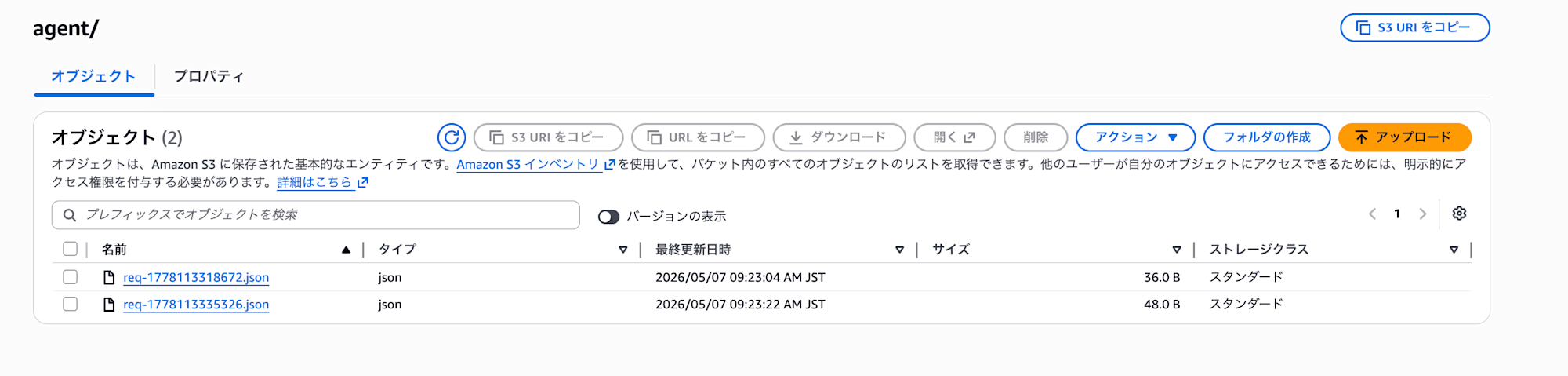
問題なく同期されていますね!!中身も確認してみます。


中身もしっかり反映されていますね!
これまでとの比較
実装面で並べて見ると、コンテナ側の責務がだいぶ軽くなっていますね。
| 項目 | 自前マウント方式 | filesystemConfigurations 方式(今回) |
|---|---|---|
| Dockerfile | amazon-efs-utils をマルチステージビルドで導入 |
不要 |
| エントリーポイント | root マウント → 非root実行 の3段構成 | 不要(Runtime 側でマウント) |
| 環境変数 | NFS_FS_ID / NFS_MOUNT_IP / NFS_MOUNT_POINT を渡す |
不要 |
| コンテナ権限 | マウントのため一時的に root が必要 | アプリ実行ユーザーのままでOK |
| 設定の場所 | コンテナイメージ内に閉じる | Runtime のリソース定義に集約 |
| マウントパス | 任意 | /mnt/<dir> の1階層のみ |
| ネットワーク | VPC モード + 必要な VPC エンドポイント | VPC モード + 必要な VPC エンドポイント |
コンテナはアプリのことだけ考える状態に戻せるのが一番嬉しいですよね。マウント周りはAWS側の設定に任せられるので、イメージ自体はかなりスッキリします。
おわりに
エージェント開発ではAIエージェントの実装に注力したいので、こういったインフラ面もマネージドに連携できるようになって嬉しいアップデートですね。
今回はシンプルにアップデートに注目した実装だったので、ファイル探索するAIエージェントもこれで作ってみたいです。
VPCにAgentCore ENIを配置するところが、ちょっと手間かな・・・・と感じましたが、ここも将来、AWSバックボーンで簡単に繋がるようになるとより嬉しいですね。
本記事が少しでも参考になりましたら幸いです。最後までご覧いただきありがとうございました!