Bodygramの身体計測データでサイズレコメンドエンジンを実装する

概要
Bodygram Platform × Gemini APIでバーチャル試着を試してみたでは、Bodygram Platformで身体計測値を取得し、Gemini APIでバーチャル試着画像を生成しました。今回は画像生成を使わず、計測値と服の寸法表を照合してサイズをレコメンドする機能を実装してみようと思います。
今回作るもの
- 服の寸法表データを管理する仕組み
- Bodygramの計測値と寸法表を照合するアルゴリズム
- フィット感(タイト/ジャスト/ゆったり)の判定処理
- レコメンド結果を表示するUI
サイズレコメンドのロジック設計
アイテム種別ごとの必要計測値
アイテムの種類によって、以下の計測値をレコメンドに使用します。
トップス(シャツ、ジャケットなど)
| 計測項目 | Bodygram レスポンス項目名 | 服の寸法値 |
|---|---|---|
| 胸囲 | bustGirth | 身幅 × 2 |
| 肩幅 | acrossBackShoulderWidth | 肩幅 |
| 着丈 | backNeckHeight - hipHeight | 着丈 |
| 腕の長さ(右) | outerArmLengthR | 袖丈 |
着丈との比較は backNeckHeight(後頸点〜地面の直線距離)から hipHeight(ヒップの高さ)を引いた長さを対象とします。
袖丈との比較は outerArmLengthR(肩〜手首の腕の長さ)と服の袖丈を直接比較します。
ボトムス(パンツ、スカートなど)
| 計測項目 | Bodygram レスポンス項目名 | 服の寸法値 |
|---|---|---|
| ウエスト | waistGirth | ウエスト |
| ヒップ | hipGirth | ヒップ |
| 股下 | insideLegHeight | 股下 |
| もも周り | thighGirthR | わたり幅 × 2 |
計測値の詳細はBodygram Platform Docsを参照してください。
フィット感の定義
計測値と服の寸法の差分から、フィット感を5段階で判定します。
type FitLevel =
  | "tight"
  | "slightly_tight"
  | "just"
  | "slightly_loose"
  | "loose";

interface FitRange {
  tight: [number, number]; // [min, max] cm
  slightly_tight: [number, number];
  just: [number, number];
  slightly_loose: [number, number];
  loose: [number, number];
}
胸囲の場合の例です。
| フィット感 | ゆとり範囲 | 説明 |
|---|---|---|
| tight | 0〜2cm | 体にフィット、動きにくい場合あり |
| slightly_tight | 2〜4cm | やや小さめ |
| just | 4〜8cm | 標準的なフィット感 |
| slightly_loose | 8〜12cm | やや大きめ |
| loose | 12cm以上 | ゆったり、オーバーサイズ |
実装
寸法表のデータモデル
服の寸法表を表現するデータモデルを定義します。
// types/size-chart.ts

/** サイズ名 */
type SizeName = "XS" | "S" | "M" | "L" | "XL";

/** 寸法値(単位: cm) */
/** トップス */
interface TopsMeasurements {
  bodyWidth: number; // 身幅
  shoulderWidth: number; // 肩幅
  length: number; // 着丈
  sleeveLength: number; // 袖丈
}

/** ボトムス */
interface BottomsMeasurements {
  waist: number; // ウエスト
  hip: number; // ヒップ
  inseam: number; // 股下
  thighWidth: number; // わたり幅
}

/** サイズチャートのエントリ */
interface SizeChartEntry<T> {
  size: SizeName;
  measurements: T;
}

/** 商品の寸法表 */
interface ProductSizeChart {
  productId: string;
  productName: string;
  category: "tops" | "bottoms";
  sizeChart: SizeChartEntry<TopsMeasurements | BottomsMeasurements>[];
}
サンプルの寸法表データ
実際のブランドの寸法表を参考にしたサンプルデータです。
// data/size-charts.ts

export const sampleShirtSizeChart: ProductSizeChart = {
  productId: "shirt-001",
  productName: "オックスフォードシャツ",
  category: "tops",
  sizeChart: [
    {
      size: "XS",
      measurements: {
        bodyWidth: 46,
        shoulderWidth: 40,
        length: 68,
        sleeveLength: 58, // 長袖
      },
    },
    {
      size: "S",
      measurements: {
        bodyWidth: 49,
        shoulderWidth: 42,
        length: 70,
        sleeveLength: 60,
      },
    },
    {
      size: "M",
      measurements: {
        bodyWidth: 52,
        shoulderWidth: 44,
        length: 72,
        sleeveLength: 62,
      },
    },
    {
      size: "L",
      measurements: {
        bodyWidth: 55,
        shoulderWidth: 46,
        length: 74,
        sleeveLength: 64,
      },
    },
    {
      size: "XL",
      measurements: {
        bodyWidth: 58,
        shoulderWidth: 48,
        length: 76,
        sleeveLength: 66,
      },
    },
  ],
};

export const samplePantsSizeChart: ProductSizeChart = {
  productId: "pants-001",
  productName: "スリムフィットパンツ",
  category: "bottoms",
  sizeChart: [
    {
      size: "XS",
      measurements: { waist: 68, hip: 88, inseam: 76, thighWidth: 26 },
    },
    {
      size: "S",
      measurements: { waist: 72, hip: 92, inseam: 76, thighWidth: 28 },
    },
    {
      size: "M",
      measurements: { waist: 76, hip: 96, inseam: 76, thighWidth: 30 },
    },
    {
      size: "L",
      measurements: { waist: 80, hip: 100, inseam: 76, thighWidth: 32 },
    },
    {
      size: "XL",
      measurements: { waist: 84, hip: 104, inseam: 76, thighWidth: 34 },
    },
  ],
};
フィット感判定の設定
アイテムカテゴリごとのフィット感判定基準を定義します。
// lib/size-recommend/fit-config.ts

/** フィット感の判定基準(ゆとり値: cm) */
interface FitCriteria {
  tight: { min: number; max: number };
  slightly_tight: { min: number; max: number };
  just: { min: number; max: number };
  slightly_loose: { min: number; max: number };
  loose: { min: number; max: number };
}

/** トップスのフィット基準 */
export const topsFitCriteria: Record<keyof TopsMeasurements, FitCriteria> = {
  bodyWidth: {
    tight: { min: -Infinity, max: 2 },
    slightly_tight: { min: 2, max: 4 },
    just: { min: 4, max: 8 },
    slightly_loose: { min: 8, max: 12 },
    loose: { min: 12, max: Infinity },
  },
  shoulderWidth: {
    tight: { min: -Infinity, max: 0 },
    slightly_tight: { min: 0, max: 2 },
    just: { min: 2, max: 5 },
    slightly_loose: { min: 5, max: 8 },
    loose: { min: 8, max: Infinity },
  },
  length: {
    // 着丈の差分 = 服の着丈 - (首〜ヒップの長さ) = ヒップより下に出る長さ
    tight: { min: -Infinity, max: 5 },
    slightly_tight: { min: 5, max: 8 },
    just: { min: 8, max: 15 },
    slightly_loose: { min: 15, max: 20 },
    loose: { min: 20, max: Infinity },
  },
  sleeveLength: {
    // 袖丈の差分 = 服の袖丈 - ユーザーの腕の長さ
    tight: { min: -Infinity, max: -3 },
    slightly_tight: { min: -3, max: 0 },
    just: { min: 0, max: 4 },
    slightly_loose: { min: 4, max: 8 },
    loose: { min: 8, max: Infinity },
  },
};

/** ボトムスのフィット基準 */
export const bottomsFitCriteria: Record<
  keyof BottomsMeasurements,
  FitCriteria
> = {
  waist: {
    tight: { min: -Infinity, max: 1 },
    slightly_tight: { min: 1, max: 2 },
    just: { min: 2, max: 5 },
    slightly_loose: { min: 5, max: 8 },
    loose: { min: 8, max: Infinity },
  },
  hip: {
    tight: { min: -Infinity, max: 2 },
    slightly_tight: { min: 2, max: 4 },
    just: { min: 4, max: 8 },
    slightly_loose: { min: 8, max: 12 },
    loose: { min: 12, max: Infinity },
  },
  inseam: {
    tight: { min: -Infinity, max: -4 },
    slightly_tight: { min: -4, max: -2 },
    just: { min: -2, max: 2 },
    slightly_loose: { min: 2, max: 5 },
    loose: { min: 5, max: Infinity },
  },
  thighWidth: {
    tight: { min: -Infinity, max: 1 },
    slightly_tight: { min: 1, max: 2 },
    just: { min: 2, max: 4 },
    slightly_loose: { min: 4, max: 6 },
    loose: { min: 6, max: Infinity },
  },
};
マッチングアルゴリズムの実装
Bodygramの計測値と寸法表を照合し、各サイズのフィット感を判定するクラスを実装します。
// lib/size-recommend/engine.ts

import { topsFitCriteria, bottomsFitCriteria } from "./fit-config";

/** Bodygramから取得した計測値(cm単位に変換済み) */
interface UserMeasurements {
  // トップス用
  bustGirth: number; // 胸囲
  shoulderWidth: number; // 肩幅
  torsoLength: number; // 首〜ヒップの長さ(backNeckHeight - hipHeight)
  outerArmLength: number; // 腕の長さ(outerArmLengthR)
  // ボトムス用
  waistGirth: number; // ウエスト囲
  hipGirth: number; // ヒップ囲
  insideLegHeight: number; // 股下
  thighGirth: number; // 太もも囲
}

/** 各部位のフィット判定結果 */
interface FitDetail {
  part: string;
  userValue: number;
  garmentValue: number;
  difference: number;
  fitLevel: FitLevel;
}

/** サイズごとのレコメンド結果 */
interface SizeRecommendation {
  size: SizeName;
  overallFit: FitLevel;
  fitScore: number; // 0-100
  details: FitDetail[];
  isRecommended: boolean;
}

export class SizeRecommendEngine {
  /**
   * トップスのサイズレコメンドを計算
   */
  recommendTopsSize(
    userMeasurements: UserMeasurements,
    sizeChart: SizeChartEntry<TopsMeasurements>[],
  ): SizeRecommendation[] {
    return sizeChart
      .map((entry) => {
        const details = this.calculateTopsFitDetails(
          userMeasurements,
          entry.measurements,
        );
        const fitScore = this.calculateFitScore(details);
        const overallFit = this.determineOverallFit(details);

        return {
          size: entry.size,
          overallFit,
          fitScore,
          details,
          isRecommended: false, // 後で設定
        };
      })
      .map((rec, _, all) => ({
        ...rec,
        isRecommended: rec.fitScore === Math.max(...all.map((r) => r.fitScore)),
      }));
  }

  /**
   * ボトムスのサイズレコメンドを計算
   */
  recommendBottomsSize(
    userMeasurements: UserMeasurements,
    sizeChart: SizeChartEntry<BottomsMeasurements>[],
  ): SizeRecommendation[] {
    return sizeChart
      .map((entry) => {
        const details = this.calculateBottomsFitDetails(
          userMeasurements,
          entry.measurements,
        );
        const fitScore = this.calculateFitScore(details);
        const overallFit = this.determineOverallFit(details);

        return {
          size: entry.size,
          overallFit,
          fitScore,
          details,
          isRecommended: false,
        };
      })
      .map((rec, _, all) => ({
        ...rec,
        isRecommended: rec.fitScore === Math.max(...all.map((r) => r.fitScore)),
      }));
  }

  /**
   * トップスの各部位のフィット感を計算
   */
  private calculateTopsFitDetails(
    user: UserMeasurements,
    garment: TopsMeasurements,
  ): FitDetail[] {
    const details: FitDetail[] = [];

    // 胸囲/身幅: 身幅は片面の値なので×2で比較
    const bustDiff = garment.bodyWidth * 2 - user.bustGirth;
    details.push({
      part: "胸囲/身幅",
      userValue: user.bustGirth,
      garmentValue: garment.bodyWidth * 2,
      difference: bustDiff,
      fitLevel: this.determineFitLevel(bustDiff, topsFitCriteria.bodyWidth),
    });

    // 肩幅
    const shoulderDiff = garment.shoulderWidth - user.shoulderWidth;
    details.push({
      part: "肩幅",
      userValue: user.shoulderWidth,
      garmentValue: garment.shoulderWidth,
      difference: shoulderDiff,
      fitLevel: this.determineFitLevel(
        shoulderDiff,
        topsFitCriteria.shoulderWidth,
      ),
    });

    // 着丈: 服の着丈 - ユーザーの首〜ヒップ = ヒップより下に出る長さ
    const lengthDiff = garment.length - user.torsoLength;
    details.push({
      part: "着丈",
      userValue: user.torsoLength,
      garmentValue: garment.length,
      difference: lengthDiff,
      fitLevel: this.determineFitLevel(lengthDiff, topsFitCriteria.length),
    });

    // 袖丈: 服の袖丈とユーザーの腕の長さを直接比較
    const sleeveDiff = garment.sleeveLength - user.outerArmLength;
    details.push({
      part: "袖丈",
      userValue: user.outerArmLength,
      garmentValue: garment.sleeveLength,
      difference: sleeveDiff,
      fitLevel: this.determineFitLevel(
        sleeveDiff,
        topsFitCriteria.sleeveLength,
      ),
    });

    return details;
  }

  /**
   * ボトムスの各部位のフィット感を計算
   */
  private calculateBottomsFitDetails(
    user: UserMeasurements,
    garment: BottomsMeasurements,
  ): FitDetail[] {
    const details: FitDetail[] = [];

    // ウエスト
    const waistDiff = garment.waist - user.waistGirth;
    details.push({
      part: "ウエスト",
      userValue: user.waistGirth,
      garmentValue: garment.waist,
      difference: waistDiff,
      fitLevel: this.determineFitLevel(waistDiff, bottomsFitCriteria.waist),
    });

    // ヒップ
    const hipDiff = garment.hip - user.hipGirth;
    details.push({
      part: "ヒップ",
      userValue: user.hipGirth,
      garmentValue: garment.hip,
      difference: hipDiff,
      fitLevel: this.determineFitLevel(hipDiff, bottomsFitCriteria.hip),
    });

    // 股下
    const inseamDiff = garment.inseam - user.insideLegHeight;
    details.push({
      part: "股下",
      userValue: user.insideLegHeight,
      garmentValue: garment.inseam,
      difference: inseamDiff,
      fitLevel: this.determineFitLevel(inseamDiff, bottomsFitCriteria.inseam),
    });

    // もも周り: わたり幅は片足分なので×2で比較
    const thighDiff = garment.thighWidth * 2 - user.thighGirth;
    details.push({
      part: "もも周り",
      userValue: user.thighGirth,
      garmentValue: garment.thighWidth * 2,
      difference: thighDiff,
      fitLevel: this.determineFitLevel(
        thighDiff,
        bottomsFitCriteria.thighWidth,
      ),
    });

    return details;
  }

  /**
   * ゆとり値からフィットレベルを判定
   */
  private determineFitLevel(
    difference: number,
    criteria: FitCriteria,
  ): FitLevel {
    if (difference >= criteria.just.min && difference < criteria.just.max) {
      return "just";
    } else if (
      difference >= criteria.slightly_tight.min &&
      difference < criteria.slightly_tight.max
    ) {
      return "slightly_tight";
    } else if (
      difference >= criteria.slightly_loose.min &&
      difference < criteria.slightly_loose.max
    ) {
      return "slightly_loose";
    } else if (difference < criteria.slightly_tight.min) {
      return "tight";
    } else {
      return "loose";
    }
  }

  /**
   * フィットスコアを計算(0-100)
   * justが最も高く、slight系は中程度、tight/looseは低い
   */
  private calculateFitScore(details: FitDetail[]): number {
    const scores = details.map((d) => {
      switch (d.fitLevel) {
        case "just":
          return 100;
        case "slightly_tight":
        case "slightly_loose":
          return 70;
        case "tight":
        case "loose":
          return 40;
      }
    });
    return Math.round(scores.reduce((a, b) => a + b, 0) / scores.length);
  }

  /**
   * 総合的なフィット感を判定
   */
  private determineOverallFit(details: FitDetail[]): FitLevel {
    const counts = {
      tight: 0,
      slightly_tight: 0,
      just: 0,
      slightly_loose: 0,
      loose: 0,
    };
    details.forEach((d) => counts[d.fitLevel]++);

    if (counts.just >= details.length / 2) return "just";
    if (counts.slightly_tight + counts.slightly_loose >= details.length / 2) {
      return counts.slightly_tight > counts.slightly_loose
        ? "slightly_tight"
        : "slightly_loose";
    }
    if (counts.tight > counts.loose) return "tight";
    if (counts.loose > counts.tight) return "loose";
    return "just";
  }
}
Bodygramの計測値を変換するユーティリティ
Bodygramから取得した計測値(mm単位)をレコメンドエンジンで使える形式に変換します。
// lib/size-recommend/utils.ts

import type { Measurement } from "@/types/bodygram";

/**
 * Bodygramの計測結果をUserMeasurements形式に変換
 * @param measurements Bodygram APIから取得した計測値配列
 * @returns UserMeasurements(cm単位)
 */
export function convertBodygramMeasurements(
  measurements: Measurement[],
): UserMeasurements {
  const getValue = (name: string): number => {
    const m = measurements.find((m) => m.name === name);
    return m ? m.value / 10 : 0; // mm → cm
  };

  const backNeckHeight = getValue("backNeckHeight");
  const hipHeight = getValue("hipHeight");

  return {
    // トップス用
    bustGirth: getValue("bustGirth"),
    shoulderWidth: getValue("acrossBackShoulderWidth"),
    torsoLength: backNeckHeight - hipHeight, // 首〜ヒップの長さ
    outerArmLength: getValue("outerArmLengthR"), // 腕の長さ
    // ボトムス用
    waistGirth: getValue("waistGirth"),
    hipGirth: getValue("hipGirth"),
    insideLegHeight: getValue("insideLegHeight"),
    thighGirth: getValue("thighGirthR"),
  };
}
Server Actionsでの呼び出し
// app/size-recommend/actions.ts
"use server";

import { SizeRecommendEngine } from "@/lib/size-recommend/engine";
import { convertBodygramMeasurements } from "@/lib/size-recommend/utils";
import { sampleShirtSizeChart, samplePantsSizeChart } from "@/data/size-charts";

export async function getSizeRecommendation(
  bodygramMeasurements: Measurement[],
  productId: string,
): Promise<SizeRecommendation[]> {
  const engine = new SizeRecommendEngine();
  const userMeasurements = convertBodygramMeasurements(bodygramMeasurements);

  // 商品IDから寸法表を取得(実際はDBから取得)
  const sizeChart =
    productId === "shirt-001" ? sampleShirtSizeChart : samplePantsSizeChart;

  if (sizeChart.category === "tops") {
    return engine.recommendTopsSize(
      userMeasurements,
      sizeChart.sizeChart as SizeChartEntry<TopsMeasurements>[],
    );
  } else {
    return engine.recommendBottomsSize(
      userMeasurements,
      sizeChart.sizeChart as SizeChartEntry<BottomsMeasurements>[],
    );
  }
}
レコメンド結果
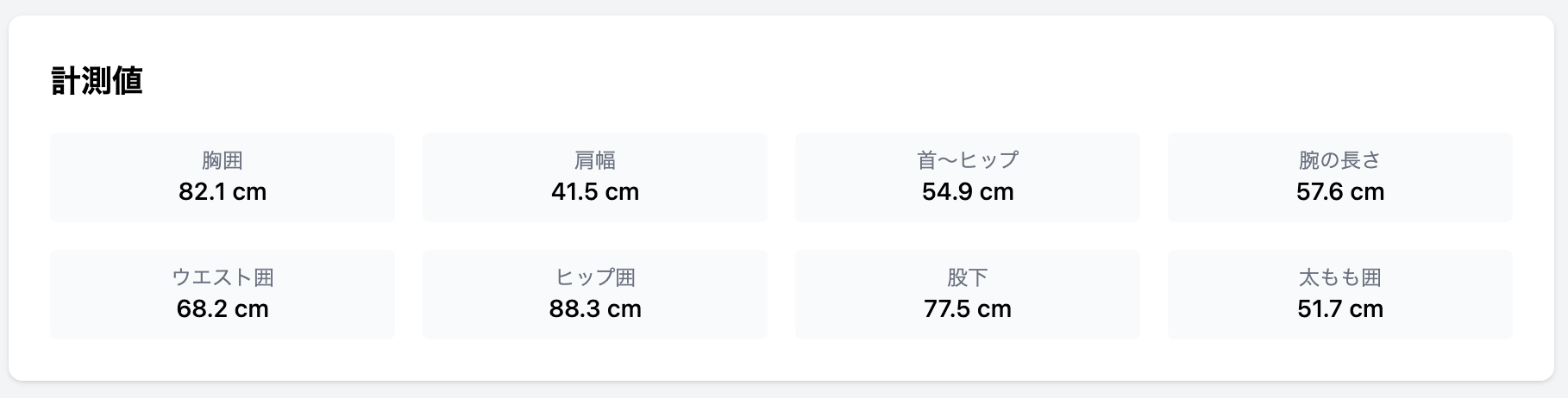
ちなみに計測結果は前回と同様Nano Banana Proで生成した女性モデルの写真で計測したデータを利用します。
Bodygram計測値
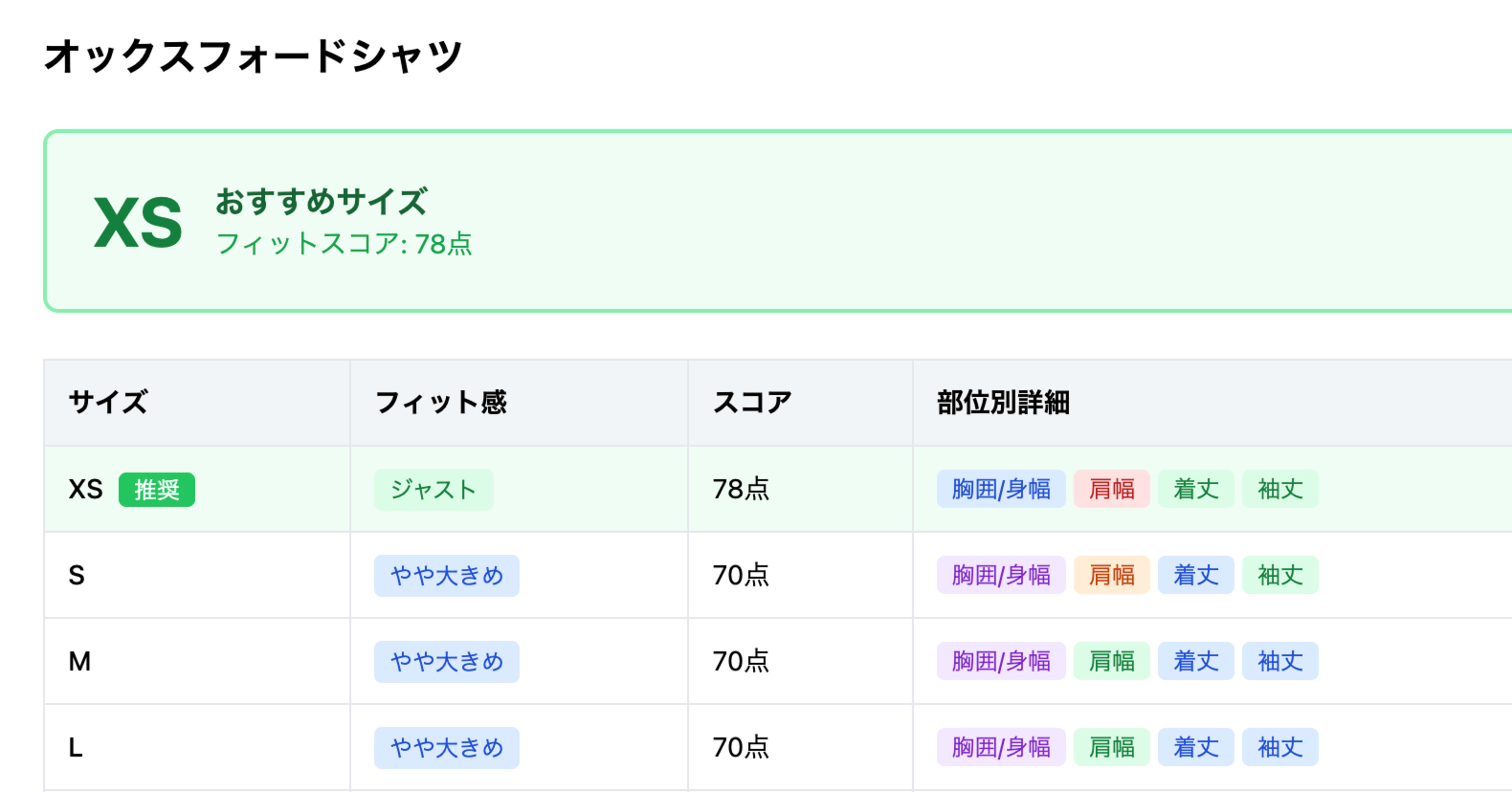
トップスのレコメンド結果
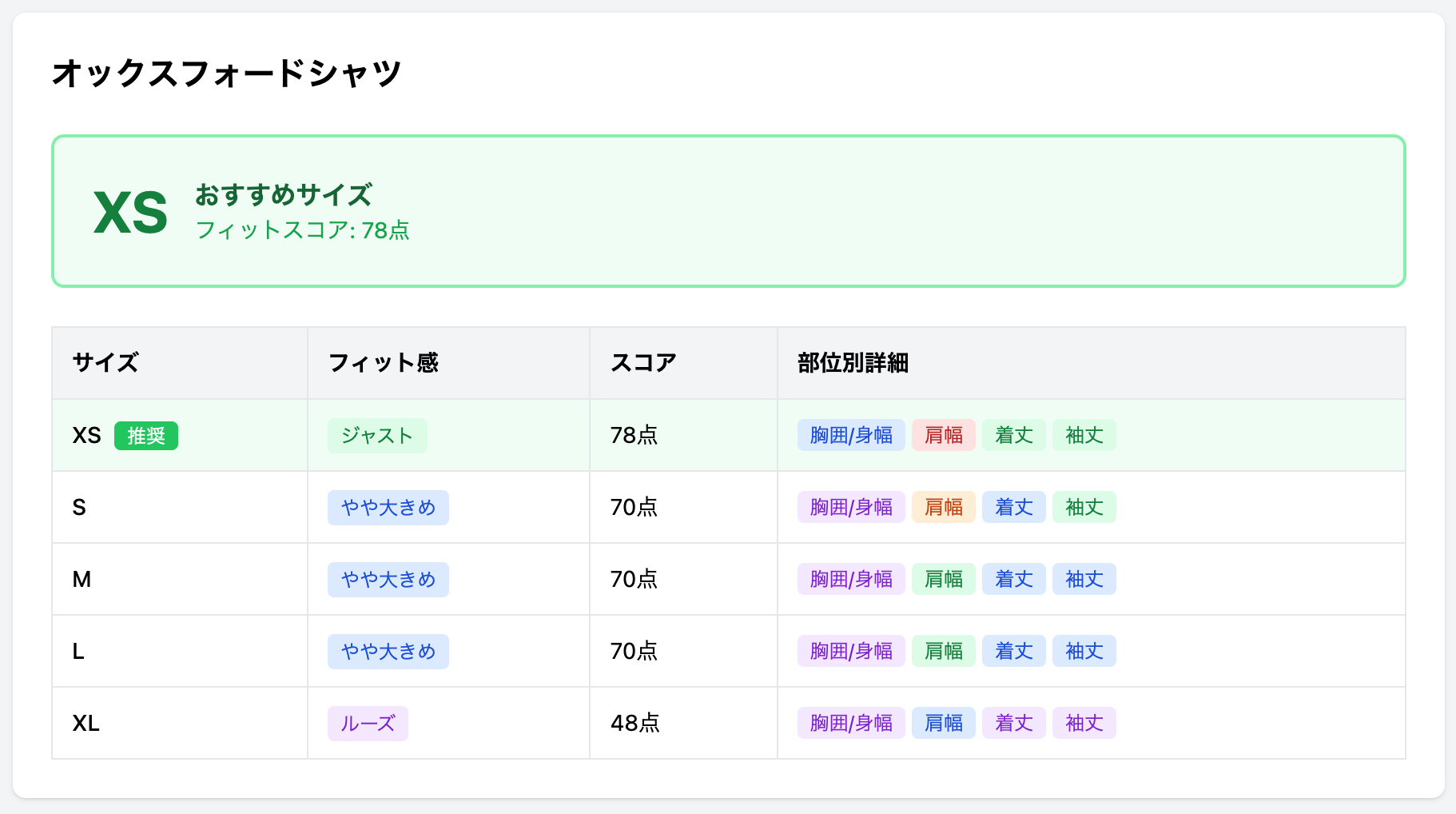
ボトムスのレコメンド結果
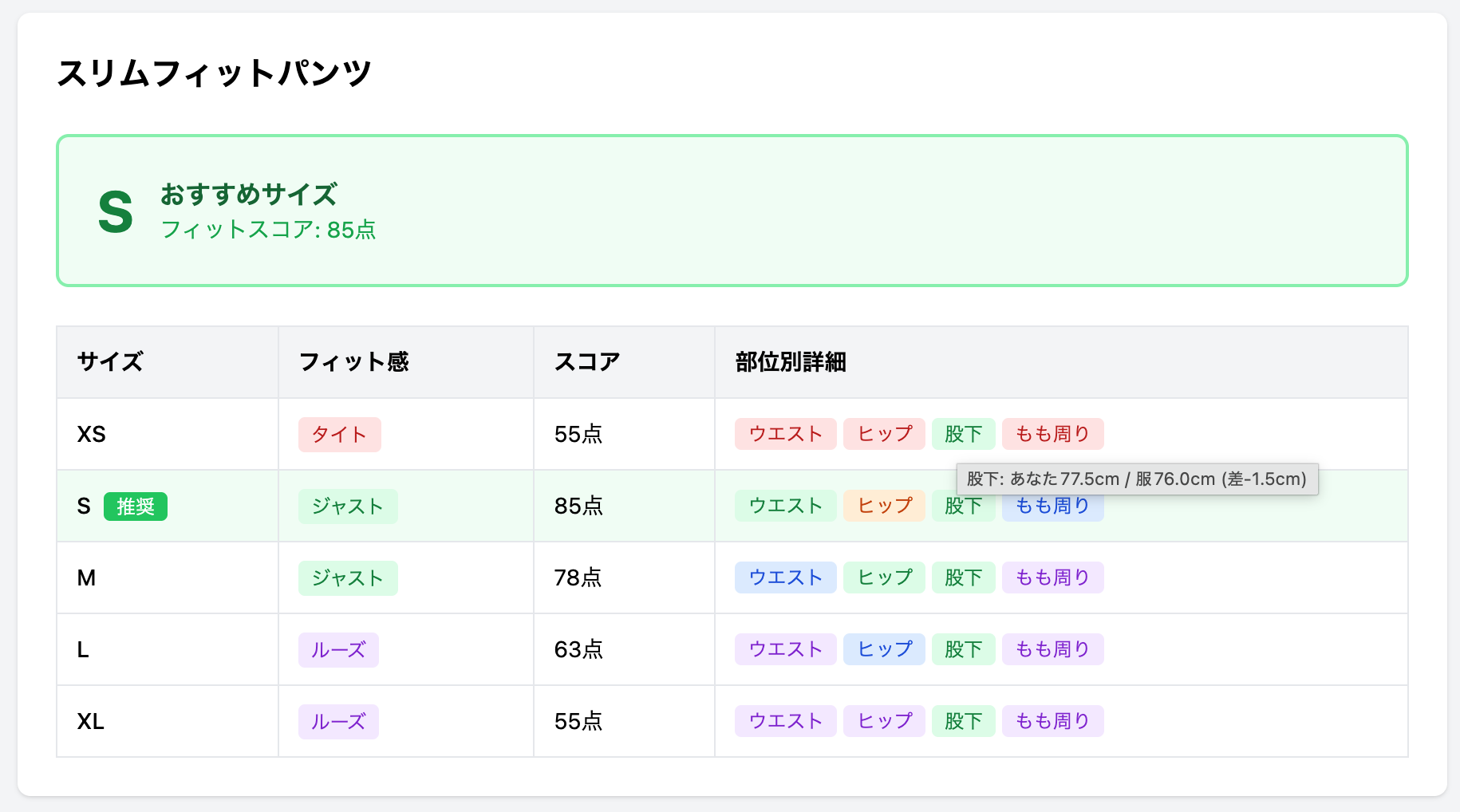
精度向上のための工夫
ブランドごとのサイズ傾向補正
ブランドによってサイズ感が異なるため、補正係数を設定できるようにします。
// lib/size-recommend/brand-adjustment.ts

interface BrandAdjustment {
  brandId: string;
  brandName: string;
  /** 各部位の補正値(正: 大きめ、負: 小さめ) */
  adjustments: {
    tops: Partial<Record<keyof TopsMeasurements, number>>;
    bottoms: Partial<Record<keyof BottomsMeasurements, number>>;
  };
}

export const brandAdjustments: BrandAdjustment[] = [
  {
    brandId: "brand-a",
    brandName: "ブランドA(大きめ)",
    adjustments: {
      tops: { bodyWidth: -2, shoulderWidth: -1 },
      bottoms: { waist: -2, hip: -2 },
    },
  },
  {
    brandId: "brand-b",
    brandName: "ブランドB(小さめ)",
    adjustments: {
      tops: { bodyWidth: 2, shoulderWidth: 1 },
      bottoms: { waist: 2, hip: 2 },
    },
  },
];

/**
 * ブランド補正を適用した寸法値を計算
 */
export function applyBrandAdjustment<T extends Record<string, number>>(
  measurements: T,
  adjustments: Partial<Record<keyof T, number>>,
): T {
  const adjusted = { ...measurements };
  for (const [key, value] of Object.entries(adjustments)) {
    if (key in adjusted && typeof value === "number") {
      (adjusted as Record<string, number>)[key] += value;
    }
  }
  return adjusted;
}
素材の伸縮性を考慮
素材によってフィット感が変わるため、伸縮性に応じて判定基準を調整します。
// lib/size-recommend/material-adjustment.ts

type MaterialStretch = "none" | "low" | "medium" | "high";

interface MaterialInfo {
  stretch: MaterialStretch;
  /** フィット基準の緩和係数(1.0 = 変更なし) */
  fitToleranceMultiplier: number;
}

export const materialStretchConfig: Record<MaterialStretch, MaterialInfo> = {
  none: { stretch: "none", fitToleranceMultiplier: 1.0 },
  low: { stretch: "low", fitToleranceMultiplier: 1.1 },
  medium: { stretch: "medium", fitToleranceMultiplier: 1.3 },
  high: { stretch: "high", fitToleranceMultiplier: 1.5 },
};

/**
 * 素材の伸縮性を考慮してフィット基準を調整
 */
export function adjustFitCriteriaForMaterial(
  criteria: FitCriteria,
  materialStretch: MaterialStretch,
): FitCriteria {
  const multiplier =
    materialStretchConfig[materialStretch].fitToleranceMultiplier;

  return {
    tight: {
      min: criteria.tight.min * multiplier,
      max: criteria.tight.max * multiplier,
    },
    slightly_tight: {
      min: criteria.slightly_tight.min * multiplier,
      max: criteria.slightly_tight.max * multiplier,
    },
    just: {
      min: criteria.just.min * multiplier,
      max: criteria.just.max * multiplier,
    },
    slightly_loose: {
      min: criteria.slightly_loose.min * multiplier,
      max: criteria.slightly_loose.max * multiplier,
    },
    loose: {
      min: criteria.loose.min * multiplier,
      max: criteria.loose.max * multiplier,
    },
  };
}
ユーザーの好みを反映
ユーザーが「ゆったり派」か「ぴったり派」かを選択できるようにし、スコア計算に反映します。
// lib/size-recommend/preference.ts

type FitPreference = "tight" | "standard" | "loose";

interface PreferenceWeights {
  tight: number;
  slightly_tight: number;
  just: number;
  slightly_loose: number;
  loose: number;
}

export const preferenceWeights: Record<FitPreference, PreferenceWeights> = {
  tight: {
    tight: 70,
    slightly_tight: 100,
    just: 90,
    slightly_loose: 50,
    loose: 30,
  },
  standard: {
    tight: 40,
    slightly_tight: 70,
    just: 100,
    slightly_loose: 70,
    loose: 40,
  },
  loose: {
    tight: 30,
    slightly_tight: 50,
    just: 90,
    slightly_loose: 100,
    loose: 70,
  },
};

/**
 * ユーザーの好みを考慮したフィットスコアを計算
 */
export function calculateScoreWithPreference(
  details: FitDetail[],
  preference: FitPreference,
): number {
  const weights = preferenceWeights[preference];
  const scores = details.map((d) => weights[d.fitLevel]);
  return Math.round(scores.reduce((a, b) => a + b, 0) / scores.length);
}
所感
Bodygramの身体計測データを活用したサイズレコメンドエンジンを実装しました。
服のデザインなどによって袖にゆとりを持たせたりハイウエストだったりがあるので服のデザインに合わせての調整やフィット感の判定はまだ改善の余地があると思いますが、バーチャル試着よりもお手軽に試せるはメリットになるかと思います。
活用シーンとしては、例えば以下のようなものが考えられます。
- ECサイトのサイズ選び支援: 商品ページに「あなたへのおすすめサイズ」を表示し、サイズ違いによる返品を減らす。アパレルECでは返品理由の多くがサイズ不一致と言われており、レコメンドによる改善効果が期待できると考えられる。
- 店舗×ECの横断体験: 前回の記事で検討したポップアップ店舗のように、店頭で一度計測すれば、以降はECでもサイズレコメンドを受けられる。計測データを会員情報に紐づけておくことで、店舗とECの体験がつながる。
- ブランド横断のサイズカルテ: 同じ身体計測データでもブランドごとにサイズ感が異なるため、ブランド補正を入れることで「このブランドならM、あのブランドならL」といったブランド横断のレコメンドができる。
バーチャル試着(画像生成)は視覚的なインパクトがある一方、生成に時間がかかり、結果の安定性にも課題があります。サイズレコメンドは計算ベースなので即座に結果が返り、根拠も数値で説明できます。用途に応じて使い分ける、あるいは両方を組み合わせるのが現実的かなと感じました。