Claude CodeでETLジョブ実行テストを自動化してみた

はじめに
データ事業本部のkasamaです。
今回は AWS の簡易的な ETL パイプラインを題材に、Step Functions のジョブ実行から Athena でのデータ検証、エビデンス記録までの一連のテストを Claude Code の Skills と Hooks で自動化してみたいと思います。
前提
- AWS CLI v2、Python 3.9+、Node.js 18+、pnpm
- MFA デバイスが設定された IAM ユーザー
- AWS CLI の
credential_processに対応した認証手段(aws ... --profile <your-profile>で認証が完了する状態)。今回は aws-vault + 1Password CLI を使用しています
ETL パイプラインの概要
テスト対象は EventBridge + Step Functions + Lambda(DuckDB)で構成する簡易的な ETL パイプラインです。
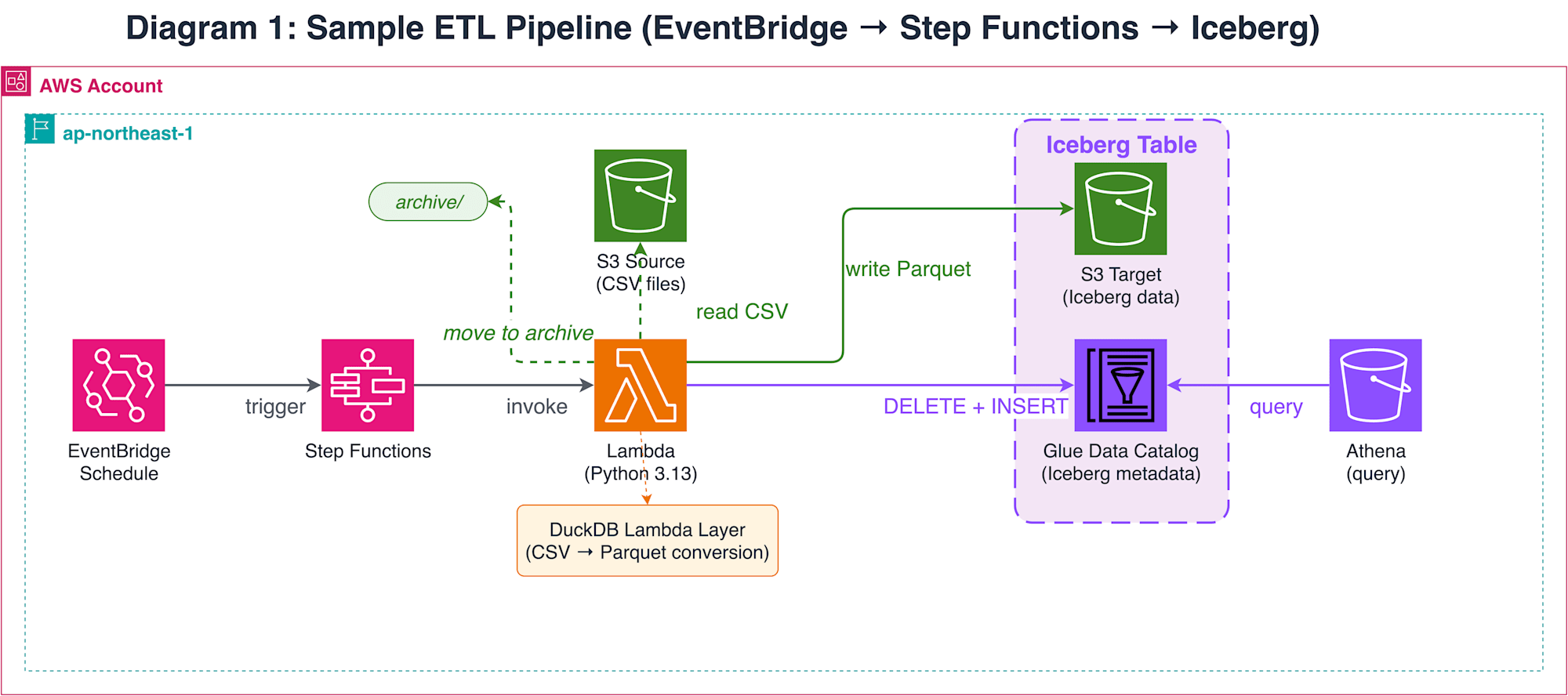
S3 に配置された CSV ファイルを Lambda が読み込み、DuckDB の Iceberg Write 機能で Glue Data Catalog 上の Iceberg テーブルに書き込みます。処理済みの CSV はアーカイブパスに移動します。このパイプライン自体はシンプルですが、テストでは Step Functions のジョブ起動から Iceberg テーブルへの書き込み、S3 上のファイル移動まで、AWS リソースをまたいだ一連の動作を実際に実行して検証する必要があります。
テスト自動化のアプローチ
このパイプラインのテストでは、Step Functions のジョブ起動 → ポーリング → Athena クエリ → S3 ファイル確認といった複数の AWS 操作を順に実行する必要があります。Claude Code のインタラクティブセッションでも可能ですが、AWS CLI の呼び出しごとにパーミッション確認のプロンプトが表示されるため、テスト中ずっと承認操作を行うのは現実的ではありません。
パーミッション確認を自動化する方法は主に2つあります。1つ目は claude -p(パイプモード)+ --allowedTools です。Ralph Loop と呼ばれるパターンで、シェルスクリプトから claude -p をループで繰り返し呼び出します。--allowedTools で許可するツールをグロブパターンで指定でき(例: Bash(aws *))、パターンに一致しないツール呼び出しはブロックされます。Anthropic 公式リポジトリにも ralph-wiggum プラグインとして提供されています。
2つ目は --dangerously-skip-permissions + PreToolUse hooks です。パーミッション確認をすべてスキップする代わりに、hooks スクリプトでコマンドを検証します。
どちらもパーミッション確認をバイパスする点は同じで、違いは「何がガードするか」です。
| 方式 | パーミッション制御 | ガード機構 | コマンド検証の粒度 |
|---|---|---|---|
claude -p+--allowedTools |
グロブパターンで許可 | パターンマッチング | ツール名 + 引数の前方一致 |
--dangerously-skip-permissions + hooks |
すべてスキップ | PreToolUse hook スクリプト | コマンド文字列の任意のパース |
今回は hooks パターンを採用しました。理由は、--allowedTools のglobマッチングではシェル演算子の検証が難しいためです。検証中に以下のようなコマンドが Bash(aws *) にマッチして通過するケースに遭遇しました。
aws s3 ls && rm -rf /
公式ドキュメントの Permissions ページでも、Bash のパーミッションパターンについて以下の記載があります。
Bash permission patterns that try to constrain command arguments are fragile.
一方、--dangerously-skip-permissions も名前の通りリスクがあります。公式ドキュメントではコンテナや VM などの隔離環境での使用が推奨されています。今回はローカル環境で使用するため、以下の多層防御でリスクを緩和しています。
- PreToolUse hooks(
validate_commands.py)が default-deny ポリシーでコマンドを検証。shlex.shlex(punctuation_chars=True)でトークナイズ後、演算子トークン単位で分割し、各セグメントを個別に allow-list と照合。per-skill hooks により/run-integration-testスキル実行時のみ自動的に有効化 - IAM ロール側でも破壊的な AWS 操作を拒否
なお、公式ドキュメントでは --dangerously-skip-permissions の安全な代替として /sandbox(OS レベルのファイルシステム・ネットワーク制限)が提供されています。より安全に運用したい場合は /sandbox の利用を検討してください。今回はローカル環境での簡易的な検証を目的としているため --dangerously-skip-permissions を使用しています。
--allowedTools のみで安全性を確保したい場合は、Ralph Loop + PreToolUse hooks の組み合わせも選択肢です。--dangerously-skip-permissions を使わずに二重ガード(globマッチング + hooks)で防御できますが、シェルスクリプトでのワークフロー管理が必要になります。今回は skill ベースの宣言的なワークフロー管理と、単一セッションでのコンテキスト維持を重視して hooks パターンを採用しました。
アーキテクチャ
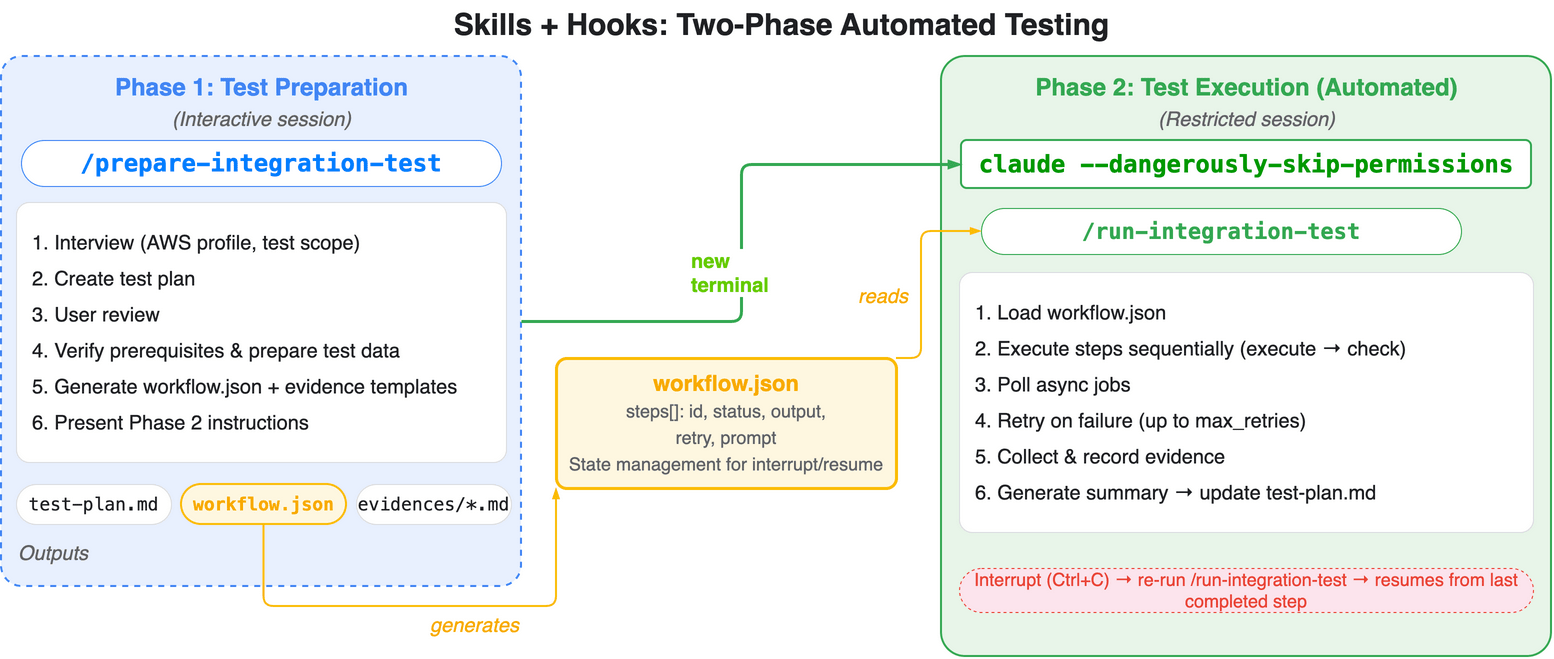
全体は2つのフェーズで構成しました。
| フェーズ | 起動方法 | 担当 | 内容 |
|---|---|---|---|
| Phase 1(準備) | claude |
/prepare-integration-test |
テスト計画生成 + 前提条件確認 + workflow.json 生成 |
| Phase 2(実行) | claude --dangerously-skip-permissions |
/run-integration-test |
ステップ実行 + エビデンス記録 + サマリ作成 |
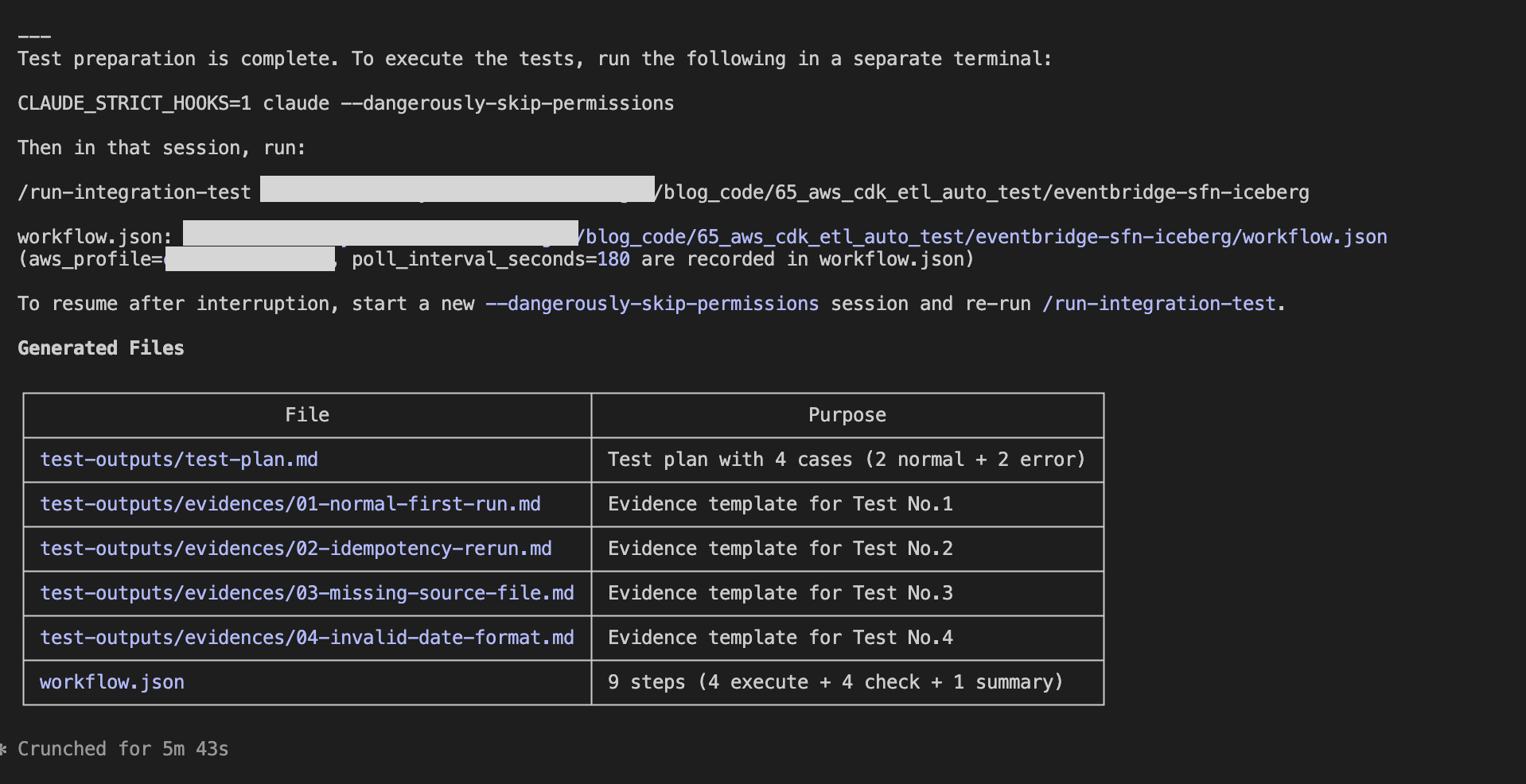
Phase 1 は Claude Code のスキル(/prepare-integration-test)が担当します。CDK コードと設計書を分析してテスト計画(test-outputs/test-plan.md)を生成し、ユーザーのレビュー・承認を経て、前提条件(認証、インフラ存在確認、テストデータ配置)を検証します。すべて通過したら test-outputs/workflow.json とエビデンステンプレート(test-outputs/evidences/)を出力し、Phase 2 の起動コマンドを提示します。ユーザーとの対話(テスト範囲の確認、プロファイル選択等)はこのフェーズで完結します。
Phase 2 はユーザーが別のターミナルタブから claude --dangerously-skip-permissions でセッションを起動し、/run-integration-test スキルを実行します。スキルが workflow.json を読み込み、単一セッション内で全ステップを順に処理します。非同期ジョブ(Step Functions 等)の待機は sleep で行い、ステータスをポーリングします。各ステップの実行結果は test-outputs/evidences/ 配下にテストケースごとのエビデンスファイルとして記録されます。全ステップが完了すると最後のサマリステップが test-plan.md に結果を記録します。テストで問題が検出された場合は、コードを修正して再度 /prepare-integration-test を実行するとリテストモードに切り替わり、対象ステップだけの workflow.json を再生成します。--dangerously-skip-permissions によりツール呼び出しのパーミッション確認はスキップされますが、SKILL.md の per-skill hooks で定義された PreToolUse hooks(validate_commands.py)がスキル実行時に自動適用され、default-deny ポリシーでコマンドを検証するため、許可リスト外のコマンドはブロックされます。
Claude Code での AWS 操作について
Claude Code から AWS を操作する場合、意図しないリソースの変更や削除を防ぐ多層防御が重要です。今回は以下の3層で安全性を確保しています。
- IAM ロール(
cfn/claude-code-resources.yaml):ReadOnlyAccessをベースに、テスト実行に必要な最小限の書き込み権限(Step Functions 起動、Athena クエリ実行、S3 テストデータ配置等)だけを追加。MFA 必須かつセッション時間は最大1時間 - PreToolUse hooks(
validate_commands.py):shlex.shlex(punctuation_chars=True)でトークナイズ後、演算子単位で分割し、各セグメントを allow-list で検証。AWS CLI のサブコマンドは read 系プレフィックス(describe-、list-、get-等)と明示的な write 許可(start-execution、start-query-execution等)のみ通過。per-skill hooks により/run-integration-testスキル実行時のみ自動適用
Hooks でのコマンド制限については以下の記事を参考にしました。
実装
実装コードはGitHubに格納しています。
65_aws_cdk_etl_auto_test/
├── .claude/
│   ├── skills/
│   │   ├── prepare-integration-test/
│   │   │   ├── references/
│   │   │   │   ├── INSTRUCTIONS.md
│   │   │   │   └── test-cases-template.md
│   │   │   └── SKILL.md
│   │   └── run-integration-test/
│   │       ├── references/
│   │       │   └── INSTRUCTIONS.md
│   │       └── SKILL.md
│   ├── settings.local.json.example
│   └── validate_commands.py
├── cfn/
│   └── claude-code-resources.yaml
├── drawio/
│   ├── etl_pipeline.drawio
│   └── skills_hooks_automation.drawio
└── eventbridge-sfn-iceberg/
    ├── cdk/
    │   ├── bin/
    │   │   └── app.ts
    │   ├── layers/
    │   │   └── requirements.txt
    │   ├── lib/
    │   │   ├── data-pipeline-stack.ts
    │   │   └── parameter.ts
    │   ├── test/
    │   │   └── data-pipeline-stack.test.ts
    │   └── package.json
    ├── resources/
    │   ├── data/
    │   │   ├── orders_2025-12-01.csv
    │   │   ├── orders_2025-12-02.csv
    │   │   ├── orders_2025-12-03.csv
    │   │   └── orders_2025-12-10.csv
    │   └── lambda/
    │       └── process_and_load.py
    └── test-outputs/
        ├── evidences/
        │   ├── 01-xx.md
        │   └── 0x-xx.md
        └── test-plan.md
CDK(ETL パイプライン)と Lambda 関数
今回の主題は Claude Code によるテスト自動化のため、ETL パイプライン自体の実装は省略します。CDK スタック定義と Lambda 関数のコードは GitHub を参照してください。
CDK では S3 バケット(ソース・ターゲット)、Glue Database と Iceberg テーブル、DuckDB の Lambda Layer、Lambda 関数、Step Functions ステートマシン、EventBridge スケジュールルールを1つのスタックで管理しています。Lambda 関数は DuckDB の Iceberg Write 機能で Glue Data Catalog 上の Iceberg テーブルに DELETE + INSERT を行い、冪等性を担保しています。
CloudFormation(IAM ロール)
AWSTemplateFormatVersion: "2010-09-09"
Description: Claude Code operator IAM role and shared resources

Parameters:
  ProjectName:
    Type: String
    Description: Project name in kebab-case (e.g. my-project). Used for resource names like Athena WorkGroup.
  RoleNamePrefix:
    Type: String
    Description: Project name in PascalCase (e.g. MyProject). Used for IAM role name.
  TrustedPrincipalArns:
    Type: CommaDelimitedList
    Description: Comma-separated IAM ARNs (e.g. arn:aws:iam::123456789012:user/alice,arn:aws:iam::123456789012:user/bob)

Resources:
  ClaudeCodeOperatorRole:
    Type: AWS::IAM::Role
    Properties:
      RoleName: !Sub ${RoleNamePrefix}ClaudeCodeOperatorRole
      MaxSessionDuration: 3600
      AssumeRolePolicyDocument:
        Version: "2012-10-17"
        Statement:
          - Effect: Allow
            Principal:
              AWS: !Ref TrustedPrincipalArns
            Action: sts:AssumeRole
            Condition:
              Bool:
                aws:MultiFactorAuthPresent: "true"
      ManagedPolicyArns:
        - arn:aws:iam::aws:policy/ReadOnlyAccess
      Policies:
        - PolicyName: ClaudeCodeJobExecution
          PolicyDocument:
            Version: "2012-10-17"
            Statement:
              - Sid: StepFunctionsExecution
                Effect: Allow
                Action:
                  - states:StartExecution
                Resource: "*"
              - Sid: GlueJobExecution
                Effect: Allow
                Action:
                  - glue:StartJobRun
                Resource: "*"
              - Sid: EventBridgePutEvents
                Effect: Allow
                Action:
                  - events:PutEvents
                Resource: "*"
              - Sid: AthenaQueryExecution
                Effect: Allow
                Action:
                  - athena:StartQueryExecution
                  - athena:StopQueryExecution
                  - athena:GetQueryExecution
                  - athena:GetQueryResults
                Resource: "*"
              - Sid: S3TestDataSetup
                Effect: Allow
                Action:
                  - s3:PutObject
                Resource: "arn:aws:s3:::*/*"

  ClaudeCodeAthenaWorkGroup:
    Type: AWS::Athena::WorkGroup
    Properties:
      Name: !Sub ${ProjectName}-claude-code
      Description: Athena workgroup for Claude Code with managed query results
      State: ENABLED
      WorkGroupConfiguration:
        EnforceWorkGroupConfiguration: true
        ManagedQueryResultsConfiguration:
          Enabled: true
claude-code-resources.yaml では、ベースポリシーとして ReadOnlyAccess を付与し、テスト実行に必要な最小限の書き込み権限(Step Functions 起動、Glue ジョブ起動、EventBridge イベント発行、Athena クエリ実行、S3 テストデータ配置)を追加しています。aws:MultiFactorAuthPresent: "true" 条件により MFA なしの assume-role は拒否されます。セッション時間は最大1時間に制限しています。Athena WorkGroup は ManagedQueryResultsConfiguration を有効にしており、クエリ結果の保存先を WorkGroup が自動管理します。
PreToolUse Hook
#!/usr/bin/env python3
"""PreToolUse hook: validate Bash tool commands (default-deny policy).

Receives a JSON object on stdin:
  {"tool_name":"Bash","tool_input":{"command":"..."}}

Called via per-skill hooks defined in SKILL.md frontmatter.
Only active during /run-integration-test skill execution.

Outputs a Claude Code hook response on stdout when denying.
Exits 0 silently when the command is allowed.
"""

import json
import re
import shlex
import sys
from typing import NoReturn

SHELL_COMMANDS = {
    # File inspection
    "ls", "cat", "head", "tail", "wc", "diff", "find", "tree",
    # Shell basics
    "echo", "pwd", "date", "sleep",
    # Data processing
    "jq", "python", "grep",
    # Directory/file operations (non-destructive)
    "mkdir", "cp",
}

AWS_WRITE_COMMANDS = {
    "start-execution",        # Step Functions
    "start-job-run",          # Glue
    "start-query-execution",  # Athena
    "stop-query-execution",   # Athena
    "put-events",             # EventBridge
    "put-object",             # S3
    "copy-object",            # S3
    # S3 high-level commands
    "ls", "cp",
}

AWS_READ_PREFIXES = ("describe-", "list-", "get-", "head-", "filter-")

# shlex returns && and || as single tokens
OPERATORS = {"|", "||", "&", "&&", ";"}

def deny(message: str) -> NoReturn:
    print(json.dumps({"decision": "block", "reason": message}))
    sys.exit(0)

def check_aws(tokens: list) -> None:
    """Validate AWS CLI subcommand against the allow-list."""
    # Skip global flags (--flag or --flag value) to find: aws <service> <subcommand>
    non_flags = []
    skip_next = False
    for token in tokens:
        if skip_next:
            skip_next = False
            continue
        if token.startswith("--"):
            if "=" not in token:
                skip_next = True  # next token is the flag value
            continue
        non_flags.append(token)

    # non_flags: ["aws", "<service>", "<subcommand>", ...]
    if len(non_flags) < 3:
        return

    subcommand = non_flags[2]
    if any(subcommand.startswith(p) for p in AWS_READ_PREFIXES):
        return
    if subcommand in AWS_WRITE_COMMANDS:
        return

    deny(
        f"AWS subcommand '{subcommand}' is not in the allow-list. "
        f"Permitted: read prefixes {list(AWS_READ_PREFIXES)} "
        f"and write commands {sorted(AWS_WRITE_COMMANDS)}."
    )

def split_segments(tokens: list) -> list:
    """Split token list into command segments at shell operators."""
    segments = []
    current = []
    for token in tokens:
        if token in OPERATORS:
            if current:
                segments.append(current)
                current = []
        else:
            current.append(token)
    if current:
        segments.append(current)
    return segments

def validate_segment(tokens: list) -> None:
    """Validate a single command segment."""
    # Strip leading variable assignments (KEY=value)
    while tokens and re.match(r"^[A-Za-z_][A-Za-z0-9_]*=", tokens[0]):
        tokens = tokens[1:]

    if not tokens:
        return

    # Strip path prefix (e.g. /usr/bin/jq -> jq)
    cmd = tokens[0].rsplit("/", 1)[-1]

    if not cmd or cmd.startswith("#"):
        return

    if cmd == "aws":
        check_aws(tokens)
    elif cmd not in SHELL_COMMANDS:
        deny(
            f"Command '{cmd}' is not in the allow-list. "
            f"Permitted commands: {sorted(SHELL_COMMANDS)}"
        )

def main() -> None:
    data = json.load(sys.stdin)

    if data.get("tool_name") != "Bash":
        sys.exit(0)

    command = data.get("tool_input", {}).get("command", "")
    if not command:
        sys.exit(0)

    try:
        lex = shlex.shlex(command, posix=True, punctuation_chars=True)
        tokens = list(lex)
    except ValueError as e:
        deny(f"Could not parse command: {e}")

    for segment in split_segments(tokens):
        validate_segment(segment)

if __name__ == "__main__":
    main()
validate_commands.py は PreToolUse hook として動作し、Bash ツールのコマンドを default-deny ポリシーで検証します。per-skill hooks により /run-integration-test スキル実行時のみ呼び出されるため、通常セッションには影響しません。
コマンド文字列は shlex でトークンに分解し、; や && などのシェル演算子で区切って個々のコマンドを取り出します。各コマンドの検証ルールは以下のとおりです。
- シェルコマンド:
SHELL_COMMANDS(ls、cat、jq、sleep等)に含まれるもののみ許可 - AWS CLI: サブコマンドが read 系プレフィックス(
describe-、list-、get-等)または明示的な write 許可リスト(start-execution、start-query-execution等)に一致する場合のみ許可 - 上記いずれにも該当しないコマンドはブロック
この hooks スクリプトは per-skill hooks として SKILL.md の frontmatter に定義します。スキル実行時のみ自動的に有効になるため、settings.local.json への hooks 設定は不要です。
Skills
テスト準備とテスト実行の2つのスキルを定義しています。
まずテスト準備スキルです。
---
name: prepare-integration-test
description: Integration test preparation. Create test specs, verify prerequisites, upload test data, generate workflow.json.
argument-hint: "[project-path]"
model: sonnet
allowed-tools: Read, Write, Edit, Bash, Glob, Grep, AskUserQuestion
disable-model-invocation: true
---

The project directory path is: $ARGUMENTS
Use this path as the `(project)` placeholder in all steps described in INSTRUCTIONS.md.

See [INSTRUCTIONS.md](references/INSTRUCTIONS.md) for detailed steps.
prepare-integration-test はテスト準備を担当するスキルです。allowed-tools でスキルが使えるツールを制限しています。
INSTRUCTIONS.md は Phase 1 の6つのステップ(事前ヒアリング → テスト計画作成 → レビュー → 前提条件確認 → workflow.json 生成 → 次のステップ提示)と、再テスト時の3ステップ(リテスト対象確認 → データ準備 → workflow.json 再生成)を定義しています。
test-cases-template.md はテスト計画とエビデンスの標準テンプレートです。テストデータ管理(ETL パイプラインで処理後にデータが消える問題への対策)、テスト分類ガイド(正常系/異常系/境界値/競合)、ETL 検証チェックリスト、test-plan.md と個別エビデンスファイルのフォーマットを定義しています。INSTRUCTIONS.md の Step 2(テスト計画作成)と Step 5(エビデンスファイル生成)でこのテンプレートが参照されます。
次にテスト実行スキルです。
---
name: run-integration-test
description: Execute integration tests from workflow.json. Must run in --dangerously-skip-permissions session. PreToolUse hooks enforce safety via default-deny policy.
argument-hint: "[project-path]"
model: sonnet
allowed-tools: Read, Write, Edit, Bash, Glob, Grep
disable-model-invocation: true
hooks:
  PreToolUse:
    - matcher: Bash
      hooks:
        - type: command
          command: python3 .claude/validate_commands.py
---

The project directory path is: $ARGUMENTS
Use this path to locate workflow.json at `(project)/workflow.json`.

See [INSTRUCTIONS.md](references/INSTRUCTIONS.md) for detailed steps.
run-integration-test はテスト実行を担当するスキルです。このスキルは --dangerously-skip-permissions セッションで実行されますが、frontmatter の hooks フィールドで定義された per-skill hooks がスキル実行時に自動適用され、PreToolUse hooks がコマンドを検証します。
run-integration-test スキルの INSTRUCTIONS.md はテスト実行のオーケストレーション手順を定義しています。非同期ジョブの待機は sleep コマンドでポーリングします。
デプロイ
CloudFormation テンプレートのデプロイ
まず IAM ロールと Athena WorkGroup を作成します。
aws cloudformation deploy \
  --template-file cfn/claude-code-resources.yaml \
  --stack-name claude-code-resources \
  --capabilities CAPABILITY_NAMED_IAM \
  --parameter-overrides \
    ProjectName=<your-project-name> \
    RoleNamePrefix=<YourPrefix> \
    TrustedPrincipalArns=<arn:aws:iam::123456789012:user/alice> \
  --profile <your-profile>
ProjectName は kebab-case(例: my-project)、RoleNamePrefix は PascalCase(例: MyProject)で指定します。TrustedPrincipalArns には Claude Code を実行する IAM ユーザーの ARN を指定してください。
CDK のデプロイ
parameter.ts の projectName を編集してから CDK をデプロイします。
cd eventbridge-sfn-iceberg/cdk
pnpm install
pnpm cdk deploy --all --profile <your-profile>
Skillsの配置
.claude/ ディレクトリごと対象リポジトリのルートにコピーします。Claude Code は .claude/skills/ からスキルを自動的に読み込みます。
cp -r 65_aws_cdk_etl_auto_test/.claude/ <your-repo>/.claude/
試してみた
テスト計画の作成(Phase 1)
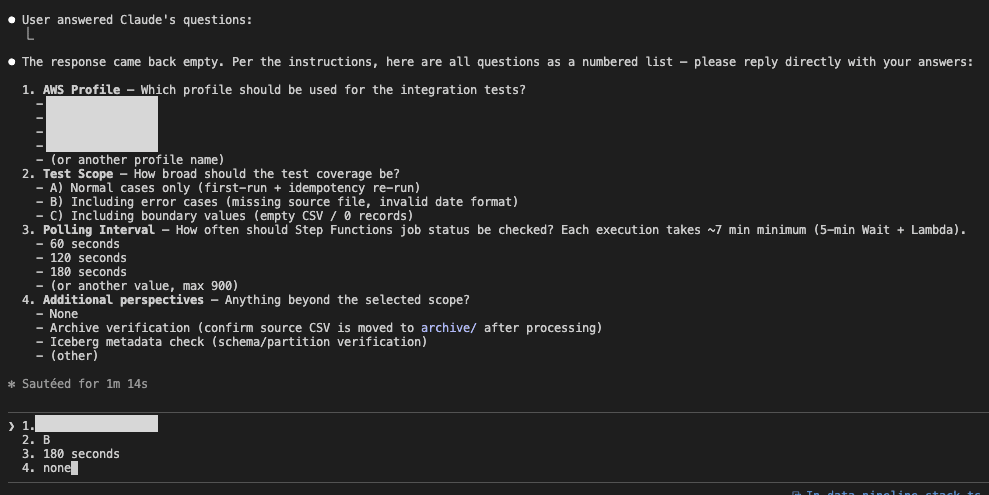
Claude Code のセッションで /prepare-integration-test を実行します。

途中でClaude CodeのAskUserQuestionToolでtab形式で回答するpromptにしたのですが、なぜか2.1.63あたりのversion up後からクエスチョンを聞いてくれないことがあり、一時的にテキストで入力する形式をとっています。使用するprofileやinterval間隔を設定しています。
テスト計画書の作成やテストデータ準備が完了したらPhase 2で実行するためのコマンドが提示されます。ここでPhase 1が完了です。
テストの実行(Phase 2)
Phase 1 で提示された手順に従い、別のターミナルタブで --dangerously-skip-permissions セッションを起動します。
claude --dangerously-skip-permissions
セッション内で /run-integration-test スキルを実行します。
/run-integration-test <project-path>
スキルが workflow.json を読み込み、各ステップを順に処理します。非同期ジョブの待機は sleep で行い、全ステップが completed になるとサマリを生成して完了します。
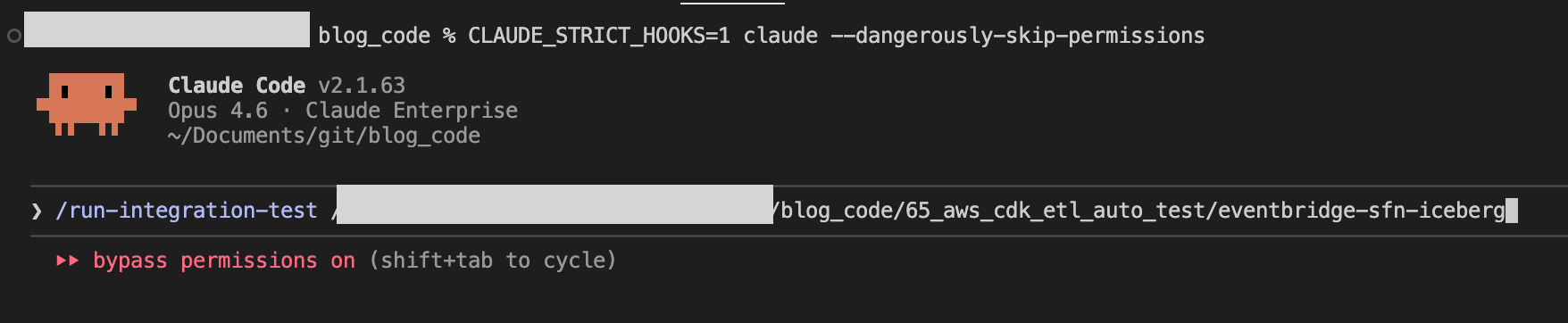
途中でhooksでコマンドが失敗しているので、ちゃんと機能していることは確認できました。

テスト結果の確認
テスト完了後、test-outputs/test-plan.md のサマリセクションに結果が自動記録されます。
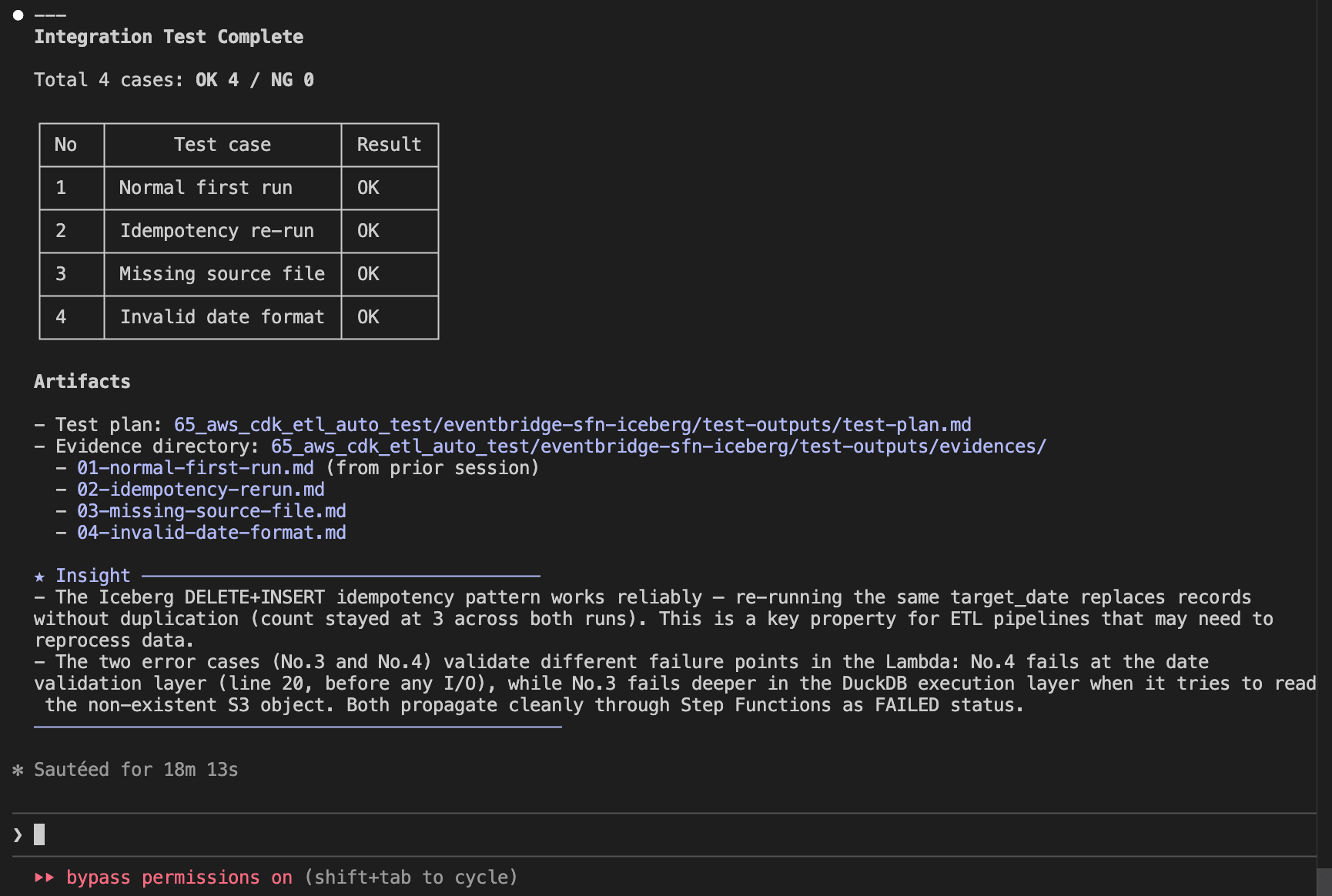
各テストケースのエビデンスは test-outputs/evidences/ に個別ファイルとして記録されます。
test-plan.md(テスト計画書・サマリ)
# Test Plan

## Test Case List

| No  | Test case           | Category | Result | Date       | Result (retest) | Date (retest) |
| --- | ------------------- | -------- | ------ | ---------- | --------------- | ------------- |
| 1   | Normal first run    | normal   | OK     | 2026-03-02 | -               | -             |
| 2   | Idempotency re-run  | normal   | OK     | 2026-03-02 | -               | -             |
| 3   | Missing source file | error    | OK     | 2026-03-02 | -               | -             |
| 4   | Invalid date format | error    | OK     | 2026-03-02 | -               | -             |

## Summary

### Test Result Summary

Date: 2026-03-02

Total: 4 cases / OK: 4 / NG: 0

All test cases passed.

### Results by Test Case

| No  | Test case           | Result | Notes                                                                                                        |
| --- | ------------------- | ------ | ------------------------------------------------------------------------------------------------------------ |
| 1   | Normal first run    | OK     | SUCCEEDED, 3 records inserted, source deleted, archive created, 0 errors                                     |
| 2   | Idempotency re-run  | OK     | SUCCEEDED, record count remained 3 (not doubled), source deleted, archive updated, 0 errors                  |
| 3   | Missing source file | OK     | FAILED as expected (DuckDB IO error), Iceberg table unaffected, 0 unexpected errors                          |
| 4   | Invalid date format | OK     | FAILED as expected (ValueError: Invalid date format: 20251201), Lambda raised error before DuckDB processing |

### Issues Detected

None. All checks passed in all test cases.

### Observations

- The archive path uses the current run date (`archive/YYYY/MM/DD/`). When No.1 and No.2 ran on the same day, No.2 overwrote the archive created by No.1. Functionally correct but two runs on the same day produce only one archive entry per day rather than two. This is expected behavior for a date-partitioned archive design.
- Execution duration was approximately 68 seconds for normal cases (No.1, No.2). Error cases (No.3, No.4) completed in approximately 5 minutes due to Step Functions lifecycle overhead.
- No.3 fails with a DuckDB IO error (`No files found that match the pattern`) rather than a graceful application-level error. Consider adding an S3 existence check before `read_csv_auto` for better error messages.

### Improvement Suggestions

- Consider appending a timestamp suffix to the archive file name (e.g., `archive/2026/03/02/orders_2025-12-01_195254.csv`) to preserve both No.1 and No.2 archive entries when re-running on the same day. This would make the archive a complete audit trail.
- Add an S3 existence check before `read_csv_auto` in the Lambda function to return a clearer error message for missing source files (No.3).
- Add a test case for a different `target_date` to verify multi-date isolation in the Iceberg table.
01-normal-first-run.md(エビデンスサンプル)
# No.1 Normal first run

## Data Preparation

- Source data upload:
  `aws s3 cp resources/data/orders_2025-12-01.csv s3://<source-bucket>/data/orders_2025-12-01.csv --profile <your-profile>`

## Check Items

| #   | Check item                        | Expected value   | Actual value                                    | Judgment |
| --- | --------------------------------- | ---------------- | ----------------------------------------------- | -------- |
| 1   | SFN execution status              | SUCCEEDED        | SUCCEEDED                                       | OK       |
| 2   | rows_inserted (Lambda response)   | 3                | 3                                               | OK       |
| 3   | Iceberg record count (2025-12-01) | 3 records        | 3 records                                       | OK       |
| 4   | Source file deleted               | null (not found) | null                                            | OK       |
| 5   | Archive file created              | file exists      | archive/2026/03/02/orders_2025-12-01.csv exists | OK       |
| 6   | No ERROR logs in CloudWatch       | 0 errors         | 0 errors                                        | OK       |

## Evidence

### #1 SFN execution status

```text
Command:
aws stepfunctions describe-execution \
  --execution-arn arn:aws:states:ap-northeast-1:123456789012:execution:<project-name>-pipeline:<execution-id> \
  --profile <your-profile> --output json

Result:
{
    "executionArn": "arn:aws:states:ap-northeast-1:123456789012:execution:<project-name>-pipeline:<execution-id>",
    "stateMachineArn": "arn:aws:states:ap-northeast-1:123456789012:stateMachine:<project-name>-pipeline",
    "name": "<execution-id>",
    "status": "SUCCEEDED",
    "startDate": "2026-03-02T15:22:14.002000+09:00",
    "stopDate": "2026-03-02T15:27:23.792000+09:00",
    "input": "{\"target_date\":\"2025-12-01\"}",
    "output": "{\"statusCode\":200,\"body\":\"{\\\"rows_inserted\\\": 3, \\\"target_date\\\": \\\"2025-12-01\\\"}\"}",
    "redriveCount": 0
}
```

### #2 rows_inserted (Lambda response)

From the SFN output above:
`{"statusCode":200,"body":"{\"rows_inserted\": 3, \"target_date\": \"2025-12-01\"}"}`

rows_inserted = 3

### #3 Iceberg record count

```text
Query:
SELECT order_date, COUNT(*) as cnt
FROM <glue_database>.orders_iceberg
WHERE order_date = DATE '2025-12-01'
GROUP BY order_date

Status: SUCCEEDED

Result:
order_date   | cnt
-------------|----
2025-12-01   | 3

Data content:
order_id | customer_id | product_name | quantity | unit_price | order_date
---------|-------------|--------------|----------|------------|------------
ORD-001  | CUST-101    | Widget A     | 5        | 1200.0     | 2025-12-01
ORD-002  | CUST-102    | Widget B     | 3        | 800.5      | 2025-12-01
ORD-003  | CUST-103    | Widget C     | 10       | 450.0      | 2025-12-01
```

### #4 Source file deletion

```text
Command:
aws s3api list-objects-v2 --bucket <source-bucket> \
  --prefix "data/orders_2025-12-01.csv" \
  --query "Contents[?Key=='data/orders_2025-12-01.csv']" \
  --profile <your-profile>

Result: null
```

Source file confirmed deleted after ETL execution.

### #5 Archive file creation

```text
Command:
aws s3api list-objects-v2 --bucket <source-bucket> \
  --prefix "archive/" \
  --query "Contents[?contains(Key, 'orders_2025-12-01.csv')]" \
  --profile <your-profile>

Result:
[
    {
        "Key": "archive/2026/03/02/orders_2025-12-01.csv",
        "LastModified": "2026-03-02T06:27:23+00:00",
        "Size": 205
    }
]
```

### #6 CloudWatch Logs

```text
Command:
aws logs filter-log-events \
  --log-group-name /aws/lambda/<project-name>-process-and-load \
  --filter-pattern "ERROR" \
  --start-time 1772434934000 \
  --profile <your-profile>

Result:
{
    "events": [],
    "searchedLogStreams": []
}
```

No ERROR logs detected during execution.
最後に
Claude Code の Skills と Hooks を組み合わせることで、ETL パイプラインの AWS ジョブ実行からデータ検証・エビデンス記録までのテストを自動化してみました。テスト計画の生成からジョブの実行、エビデンスの記録、サマリの作成までを一貫して自動化でき、改善提案まで自動的に検出・記録される点はAIで実現できるメリットだと思います。どなたかの参考になれば幸いです。