S3 + EventBridge + CodePipelineを利用した手動承認付きCloudFormationのCI/CDパイプラインを構築してみる

はじめに
かつまたです。
今回は、S3バケットをソースとしたCI/CDパイプラインを構築します。S3のイベント通知からEventBridgeを経由してCodePipelineを起動し、CloudFormationテンプレートを自動デプロイする構成です。
また、テストステージと本番ステージの段階的なデプロイを実現するため、SNS通知による手動承認アクションも組み込みました。
アーキテクチャ概要
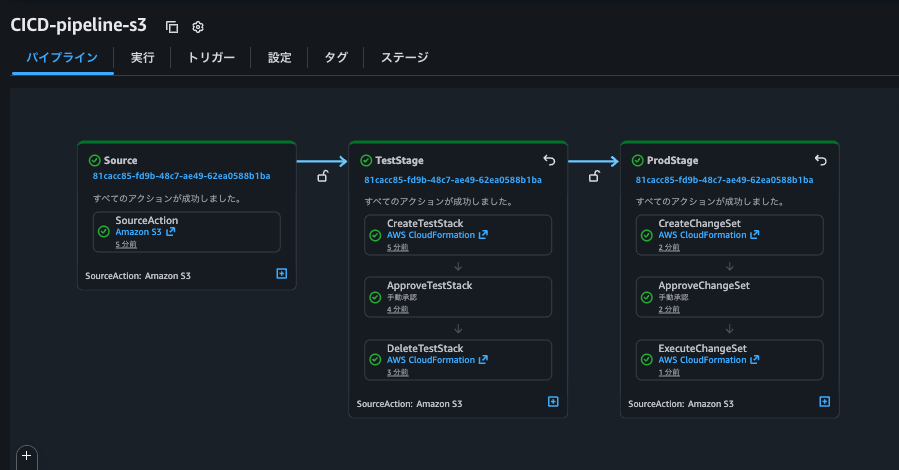
今回構築するパイプラインのフローは以下のとおりです。検証用として、S3バケットのみを作成するシンプルなCloudFormationテンプレートを使用します。
Source Stage
    │
    ├─ S3からソースアーティファクトを取得
    │
    ▼
TestStage
    │
    ├─ [1] CreateTestStack
    │   └─ CloudFormationでテスト環境作成
    │
    ├─ [2] ApproveTestStack (手動承認)
    │   └─ SNSメール通知 → レビュー → 承認/却下
    │
    ├─ [3] DeleteTestStack
    │   └─ テスト環境を削除
    │
    ▼
ProdStage
    │
    ├─ [1] CreateChangeSet
    │   └─ 本番環境用の変更セット作成
    │
    ├─ [2] ApproveChangeSet(手動承認)
    │   └─ SNSメール通知 → 変更セット内容を確認 → 承認/却下
    │
    └─ [3] ExecuteChangeSet
        └─ 本番環境にデプロイ
やってみる
環境準備
- まず、構築に必要な環境変数を設定します。これらの変数は後続のすべての手順で使用されます。
export AWS_REGION="使用するリージョン"
export AWS_ACCOUNT_ID=$(aws sts get-caller-identity --query Account --output text)
export PIPELINE_NAME="CodePipeline名"
export SOURCE_BUCKET="S3バケット名"
export EMAIL_ADDRESS="承認通知を受け取るメールアドレス"
- 以下の設定ファイル、テンプレートファイルを用意しました。
- pipeline-template-simple.yaml(CI/CDパイプライン構築用テンプレート)
テンプレート
AWSTemplateFormatVersion: '2010-09-09'
Description: 'Simple CodePipeline for Testing - Deploys only S3 bucket'

Parameters:
  PipelineName:
    Type: String
    Description: Name of the pipeline
  S3Bucket:
    Type: String
    Description: S3 bucket containing the source artifact
  SourceS3Key:
    Type: String
    Description: S3 key of the source artifact
  Email:
    Type: String
    Description: Email address for manual approval notifications

Resources:
  # SNS Topic for approval notifications
  CodePipelineSNSTopic:
    Type: AWS::SNS::Topic
    Properties:
      Subscription:
        - Endpoint: !Ref Email
          Protocol: email

  # CloudFormation Service Role - S3 only permissions
  CFNRole:
    Type: AWS::IAM::Role
    Properties:
      AssumeRolePolicyDocument:
        Statement:
          - Effect: Allow
            Principal:
              Service: cloudformation.amazonaws.com
            Action: sts:AssumeRole
      Policies:
        - PolicyName: CloudFormationExecutionPolicy
          PolicyDocument:
            Statement:
              # S3バケット作成権限のみ(シンプルなテスト用)
              - Effect: Allow
                Action:
                  - s3:CreateBucket
                  - s3:DeleteBucket
                  - s3:PutBucketVersioning
                  - s3:GetBucketVersioning
                  - s3:ListBucket
                  - s3:PutBucketTagging
                  - s3:GetBucketTagging
                  - s3:DeleteBucketTagging
                Resource: '*'
              # CloudFormation自体の操作権限
              - Effect: Allow
                Action:
                  - cloudformation:CreateStack
                  - cloudformation:UpdateStack
                  - cloudformation:DeleteStack
                  - cloudformation:DescribeStacks
                  - cloudformation:DescribeStackEvents
                  - cloudformation:DescribeStackResource
                  - cloudformation:DescribeStackResources
                  - cloudformation:GetTemplate
                  - cloudformation:ValidateTemplate
                Resource: '*'

  # CodePipeline Service Role
  PipelineRole:
    Type: AWS::IAM::Role
    Properties:
      AssumeRolePolicyDocument:
        Statement:
          - Effect: Allow
            Principal:
              Service: codepipeline.amazonaws.com
            Action: sts:AssumeRole
      Policies:
        - PolicyName: ArtifactBucketAccess
          PolicyDocument:
            Statement:
              - Effect: Allow
                Action:
                  - s3:GetBucketVersioning
                  - s3:GetBucketAcl
                  - s3:GetBucketLocation
                Resource: !GetAtt ArtifactStoreBucket.Arn
              - Effect: Allow
                Action:
                  - s3:PutObject
                  - s3:PutObjectAcl
                  - s3:GetObject
                  - s3:GetObjectVersion
                Resource: !Sub '${ArtifactStoreBucket.Arn}/*'

        - PolicyName: SourceS3BucketAccess
          PolicyDocument:
            Statement:
              - Effect: Allow
                Action:
                  - s3:GetObject
                  - s3:GetObjectVersion
                  - s3:GetBucketVersioning
                Resource:
                  - !Sub 'arn:aws:s3:::${S3Bucket}'
                  - !Sub 'arn:aws:s3:::${S3Bucket}/*'

        - PolicyName: CloudFormationAccess
          PolicyDocument:
            Statement:
              - Effect: Allow
                Action:
                  - cloudformation:CreateStack
                  - cloudformation:UpdateStack
                  - cloudformation:DeleteStack
                  - cloudformation:DescribeStacks
                  - cloudformation:DescribeStackEvents
                  - cloudformation:DescribeChangeSet
                  - cloudformation:CreateChangeSet
                  - cloudformation:DeleteChangeSet
                  - cloudformation:ExecuteChangeSet
                Resource:
                  - !Sub 'arn:aws:cloudformation:${AWS::Region}:${AWS::AccountId}:stack/テストスタック名/*'
                  - !Sub 'arn:aws:cloudformation:${AWS::Region}:${AWS::AccountId}:stack/本番スタック名/*'
              - Effect: Allow
                Action:
                  - iam:PassRole
                Resource: !GetAtt CFNRole.Arn

        - PolicyName: SNSPublishAccess
          PolicyDocument:
            Statement:
              - Effect: Allow
                Action:
                  - sns:Publish
                Resource: !Ref CodePipelineSNSTopic

  # S3 Bucket for Pipeline Artifacts
  ArtifactStoreBucket:
    Type: AWS::S3::Bucket
    Properties:
      VersioningConfiguration:
        Status: Enabled
      BucketEncryption:
        ServerSideEncryptionConfiguration:
          - ServerSideEncryptionByDefault:
              SSEAlgorithm: AES256
      PublicAccessBlockConfiguration:
        BlockPublicAcls: true
        BlockPublicPolicy: true
        IgnorePublicAcls: true
        RestrictPublicBuckets: true

  # EventBridge Role
  EventBridgeRole:
    Type: AWS::IAM::Role
    Properties:
      AssumeRolePolicyDocument:
        Statement:
          - Effect: Allow
            Principal:
              Service: events.amazonaws.com
            Action: sts:AssumeRole
      Policies:
        - PolicyName: StartPipelineExecution
          PolicyDocument:
            Statement:
              - Effect: Allow
                Action: codepipeline:StartPipelineExecution
                Resource: !Sub 'arn:aws:codepipeline:${AWS::Region}:${AWS::AccountId}:${Pipeline}'

  # CloudTrail Bucket
  CloudTrailBucket:
    Type: AWS::S3::Bucket
    Properties:
      BucketEncryption:
        ServerSideEncryptionConfiguration:
          - ServerSideEncryptionByDefault:
              SSEAlgorithm: AES256
      PublicAccessBlockConfiguration:
        BlockPublicAcls: true
        BlockPublicPolicy: true
        IgnorePublicAcls: true
        RestrictPublicBuckets: true

  # CloudTrail Bucket Policy
  CloudTrailBucketPolicy:
    Type: AWS::S3::BucketPolicy
    Properties:
      Bucket: !Ref CloudTrailBucket
      PolicyDocument:
        Statement:
          - Sid: AWSCloudTrailAclCheck
            Effect: Allow
            Principal:
              Service: cloudtrail.amazonaws.com
            Action: s3:GetBucketAcl
            Resource: !GetAtt CloudTrailBucket.Arn
          - Sid: AWSCloudTrailWrite
            Effect: Allow
            Principal:
              Service: cloudtrail.amazonaws.com
            Action: s3:PutObject
            Resource: !Sub '${CloudTrailBucket.Arn}/*'
            Condition:
              StringEquals:
                s3:x-amz-acl: bucket-owner-full-control

  # CloudTrail
  S3EventTrail:
    Type: AWS::CloudTrail::Trail
    DependsOn: CloudTrailBucketPolicy
    Properties:
      TrailName: !Sub '${PipelineName}-s3-events'
      S3BucketName: !Ref CloudTrailBucket
      IsLogging: true
      IsMultiRegionTrail: false
      IncludeGlobalServiceEvents: false
      EventSelectors:
        - ReadWriteType: WriteOnly
          IncludeManagementEvents: false
          DataResources:
            - Type: AWS::S3::Object
              Values:
                - !Sub 'arn:aws:s3:::${S3Bucket}/${SourceS3Key}'

  # EventBridge Rule
  SourceEventRule:
    Type: AWS::Events::Rule
    Properties:
      Description: !Sub 'Rule to trigger ${PipelineName} when source artifact changes'
      EventPattern:
        source:
          - aws.s3
        detail-type:
          - Object Created
        detail:
          bucket:
            name:
              - !Ref S3Bucket
          object:
            key:
              - !Ref SourceS3Key
      State: ENABLED
      Targets:
        - Arn: !Sub 'arn:aws:codepipeline:${AWS::Region}:${AWS::AccountId}:${Pipeline}'
          RoleArn: !GetAtt EventBridgeRole.Arn
          Id: codepipeline-target

  # CodePipeline
  Pipeline:
    Type: AWS::CodePipeline::Pipeline
    Properties:
      Name: !Ref PipelineName
      RoleArn: !GetAtt PipelineRole.Arn
      ArtifactStore:
        Type: S3
        Location: !Ref ArtifactStoreBucket
      Stages:
        - Name: Source
          Actions:
            - Name: SourceAction
              ActionTypeId:
                Category: Source
                Owner: AWS
                Provider: S3
                Version: '1'
              Configuration:
                S3Bucket: !Ref S3Bucket
                S3ObjectKey: !Ref SourceS3Key
                PollForSourceChanges: false
              OutputArtifacts:
                - Name: TemplateSource

        - Name: TestStage
          Actions:
            - Name: CreateTestStack
              ActionTypeId:
                Category: Deploy
                Owner: AWS
                Provider: CloudFormation
                Version: '1'
              InputArtifacts:
                - Name: TemplateSource
              Configuration:
                ActionMode: REPLACE_ON_FAILURE
                RoleArn: !GetAtt CFNRole.Arn
                StackName: Test-MyStack
                TemplateConfiguration: 'TemplateSource::test-stack-configuration.json'
                TemplatePath: 'TemplateSource::simple-template.yaml'
              RunOrder: 1

            - Name: ApproveTestStack
              ActionTypeId:
                Category: Approval
                Owner: AWS
                Provider: Manual
                Version: '1'
              Configuration:
                NotificationArn: !Ref CodePipelineSNSTopic
                CustomData: 'Please review the test stack and approve to continue'
              RunOrder: 2

            - Name: DeleteTestStack
              ActionTypeId:
                Category: Deploy
                Owner: AWS
                Provider: CloudFormation
                Version: '1'
              Configuration:
                ActionMode: DELETE_ONLY
                RoleArn: !GetAtt CFNRole.Arn
                StackName: Test-MyStack
              RunOrder: 3

        - Name: ProdStage
          Actions:
            - Name: CreateChangeSet
              ActionTypeId:
                Category: Deploy
                Owner: AWS
                Provider: CloudFormation
                Version: '1'
              InputArtifacts:
                - Name: TemplateSource
              Configuration:
                ActionMode: CHANGE_SET_REPLACE
                RoleArn: !GetAtt CFNRole.Arn
                StackName: 本番スタック名
                ChangeSetName: ProdStackChangeSet
                TemplateConfiguration: 'TemplateSource::prod-stack-configuration.json'
                TemplatePath: 'TemplateSource::simple-template.yaml'
              RunOrder: 1

            - Name: ApproveChangeSet
              ActionTypeId:
                Category: Approval
                Owner: AWS
                Provider: Manual
                Version: '1'
              Configuration:
                NotificationArn: !Ref CodePipelineSNSTopic
                CustomData: 'Review the change set for production stack and approve to execute'
              RunOrder: 2

            - Name: ExecuteChangeSet
              ActionTypeId:
                Category: Deploy
                Owner: AWS
                Provider: CloudFormation
                Version: '1'
              Configuration:
                ActionMode: CHANGE_SET_EXECUTE
                ChangeSetName: ProdStackChangeSet
                RoleArn: !GetAtt CFNRole.Arn
                StackName: 本番スタック名
              RunOrder: 3

Outputs:
  PipelineUrl:
    Description: CodePipeline URL
    Value: !Sub 'https://console.aws.amazon.com/codesuite/codepipeline/pipelines/${Pipeline}/view'
  ArtifactBucketName:
    Description: S3 bucket for pipeline artifacts
    Value: !Ref ArtifactStoreBucket
  CloudTrailBucketName:
    Description: S3 bucket for CloudTrail logs
    Value: !Ref CloudTrailBucket
- simple-template.yaml(パイプラインでデプロイするテンプレート)
テンプレート例
AWSTemplateFormatVersion: '2010-09-09'
Description: 'Minimal template for pipeline testing - Creates only an S3 bucket'

Parameters:
  BucketPrefix:
    Type: String
    Default: test-deployment
    Description: Prefix for the S3 bucket name

Resources:
  TestBucket:
    Type: AWS::S3::Bucket
    Properties:
      BucketName: !Sub '${BucketPrefix}-${AWS::AccountId}-${AWS::Region}'
      VersioningConfiguration:
        Status: Enabled

Outputs:
  BucketName:
    Description: Name of the created S3 bucket
    Value: !Ref TestBucket
  BucketArn:
    Description: ARN of the created S3 bucket
    Value: !GetAtt TestBucket.Arn
- test-stack-configuration.json(テストスタックでのS3バケット用パラメータ設定ファイル)
設定ファイル例
{
  "Parameters": {
    "BucketPrefix": "test-deployment"
  }
}
- prod-stack-configuration.json(本番スタックでのS3バケット用パラメータ設定ファイル)
設定ファイル例
{
  "Parameters": {
    "BucketPrefix": "prod-deployment"
  }
}
S3バケットを作成
aws s3 mb s3://${SOURCE_BUCKET} --region ${AWS_REGION}
EventBridge通知を有効化
S3バケットでEventBridge通知を有効化することで、オブジェクトの作成・削除などのイベントがEventBridgeに送信されるようになります。
aws s3api put-bucket-notification-configuration \
  --bucket ${SOURCE_BUCKET} \
  --notification-configuration='{ "EventBridgeConfiguration": {} }' \
  --region ${AWS_REGION}
バージョニングを有効化(CodePipelineのS3ソースで必要)
aws s3api put-bucket-versioning \
  --bucket ${SOURCE_BUCKET} \
  --versioning-configuration Status=Enabled \
  --region ${AWS_REGION}
ソースアーティファクトの作成
- パイプラインで使用するCloudFormationテンプレートと設定ファイルをソースバケットに配置していきます。S3ソースアクションのソースアーティファクトはZIPファイルにパッケージ化する必要があるため、以下コマンドでファイル3つをZIP化します。
zip source-artifact.zip \
    simple-template.yaml \
    test-stack-configuration.json \
    prod-stack-configuration.json
- ZIPファイルをS3にアップロードします。
aws s3 cp source-artifact.zip s3://${SOURCE_BUCKET}/source-artifact.zip \
  --region ${AWS_REGION}
CloudFormationスタックをデプロイ
パイプラインでデプロイするリソースのテンプレート、pipeline-template-simple.yaml(S3バケット作成)をデプロイします。
aws cloudformation deploy \
  --template-file pipeline-template-simple.yaml \
  --stack-name codepipeline-stack \
  --parameter-overrides \
      PipelineName=${PIPELINE_NAME} \
      S3Bucket=${SOURCE_BUCKET} \
      SourceS3Key=source-artifact.zip \
      Email=${EMAIL_ADDRESS} \
  --capabilities CAPABILITY_IAM \
  --region ${AWS_REGION}
完了すると以下のメッセージが表示されます
Successfully created/updated stack - codepipeline-stack
SNS通知の確認
CloudFormationスタックのデプロイが完了すると、指定したメールアドレスにSNSサブスクリプションの確認メールが届きます。メール内の「Confirm subscription」リンクをクリックして、サブスクリプションを承認してください。
パイプラインを手動で開始
EventBridgeルールは作成後に発生するイベントのみを検知します。確認のために手動でパイプラインを動かしてみます。
aws codepipeline start-pipeline-execution \
  --name ${PIPELINE_NAME} \
  --region ${AWS_REGION}
TestStageの手動承認
パイプラインがApproveTestStackステージに到達すると、登録したメールアドレスに以下のような通知が届きます。パイプライン側は承認待ちの保留状態になります。
- 件名: APPROVAL NEEDED: AWS CodePipeline MyCodePipeline
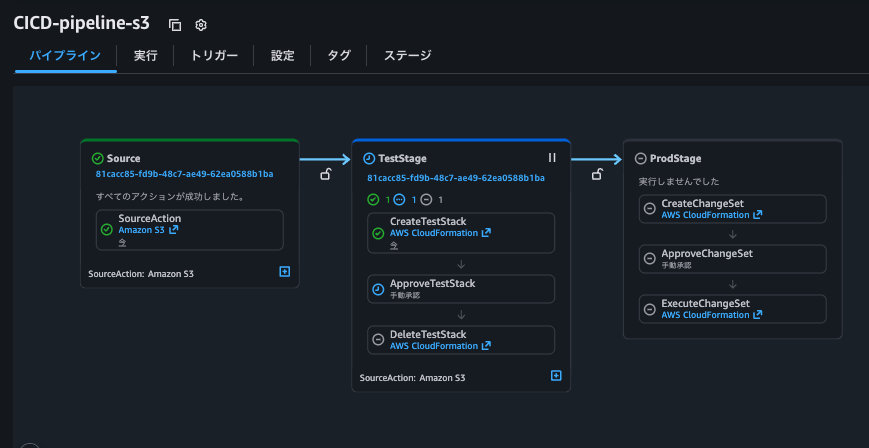
メール内のリンクからコンソールに移動し、承認を実行します。承認後、テストスタックが自動的に削除され、続いて本番スタックの変更セットが作成されます。
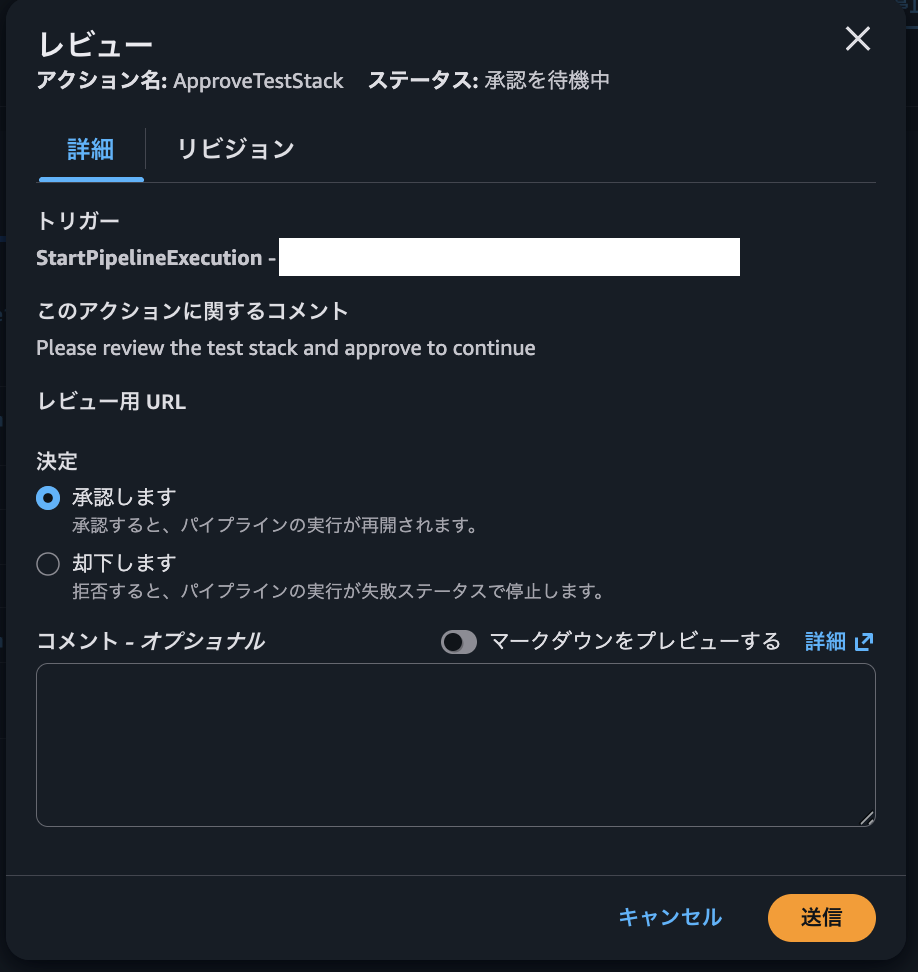
変更セットの内容を確認
aws cloudformation describe-change-set \
  --change-set-name ProdStackChangeSet \
  --stack-name 本番スタック名 \
  --region ${AWS_REGION}
SNSから承認
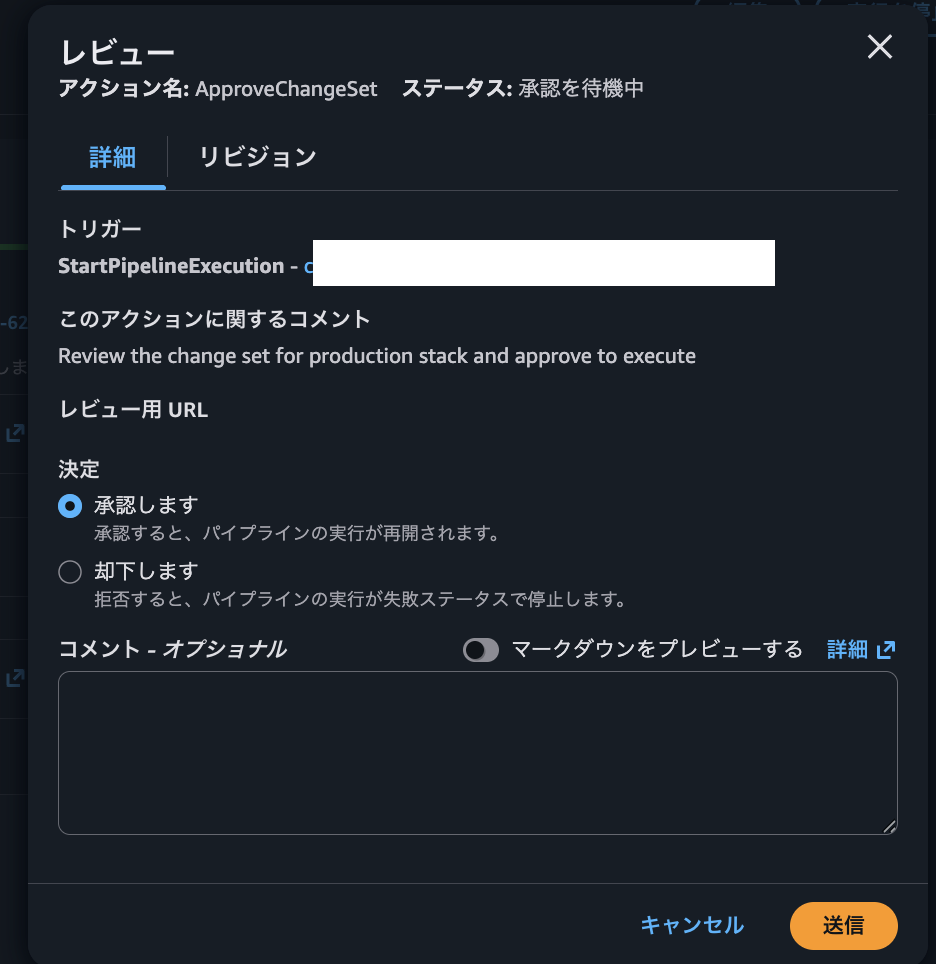
再度、メールに承認通知が飛ぶので、承認を実行し、本番スタックをデプロイします。
作成されたスタックの確認
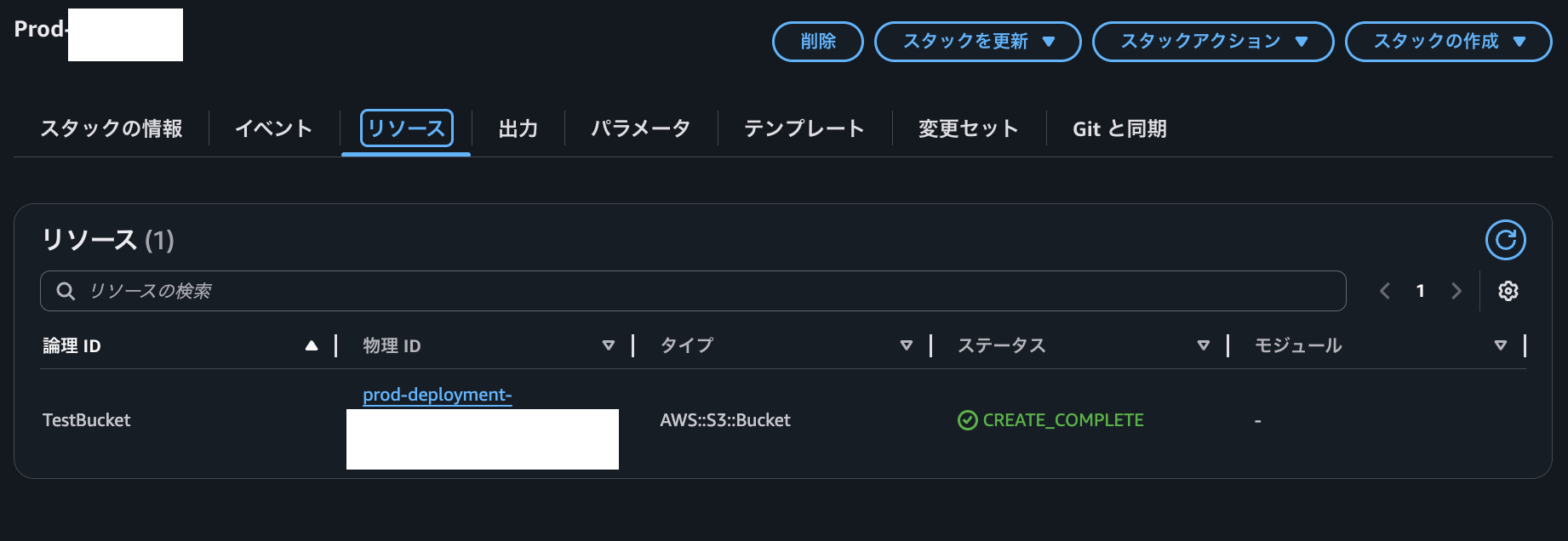
コンソール上からパイプラインの完了とスタックの作成完了を確認できました。
おわりに
ご覧いただきありがとうございました。
本記事では、S3とEventBridgeを使用したイベント駆動型のCodePipelineの構築方法を解説しました。
今回のポイントをまとめると以下のとおりです。
- S3バケットのEventBridge通知を有効化することで、オブジェクトの変更をトリガーにパイプラインを起動できる
- CloudTrailと連携することで、S3イベントをEventBridgeで検知可能になる
- 手動承認アクションとSNS通知を組み合わせることで、安全なデプロイフローを実現できる
- テスト環境と本番環境で異なるパラメータファイルを使用することで、環境ごとの設定を管理できる
この構成は、GitHubやCodeCommitを使用しない環境や、外部システムからテンプレートファイルを受け取るユースケースで有効です。
どなたかの参考になれば幸いです。
参考資料
クラスメソッドオペレーションズ株式会社について
クラスメソッドグループのオペレーション企業です。
運用・保守開発・サポート・情シス・バックオフィスの専門チームが、IT・AIをフル活用した「しくみ」を通じて、お客様の業務代行から課題解決や高付加価値サービスまでを提供するエキスパート集団です。
当社は様々な職種でメンバーを募集しています。
「オペレーション・エクセレンス」と「らしく働く、らしく生きる」を共に実現するカルチャー・しくみ・働き方にご興味がある方は、クラスメソッドオペレーションズ株式会社 コーポレートサイト をぜひご覧ください。※2026年1月 アノテーション㈱から社名変更しました