
Amazon Linux 2023 の EC2 インスタンスで systemd-journald のデフォルト設定を確認してみた

はじめに
テクニカルサポートの 片方 です。
今回は、Amazon Linux 2023 の EC2 インスタンスを起動させて、systemd-journald のデフォルト設定を確認してみました。
AL2023 では、ロギングシステムパッケージが AL2 から変更されました。AL2023 はデフォルトでは rsyslog をインストールしないため、/var/log/messages のような AL2 にあったテキストベースのログファイルはデフォルトでは使用できません。AL2023 のデフォルト設定は systemd-journal です。
先に結論から
Amazon Linux 2023(systemd 252)では、systemd‑journald の設定はデフォルトのまま有効になっており、明示的な設定変更は行われていませんでした。
そのため、ログ管理は systemd 252 のコンパイル時デフォルト値に従って動作します。
特に押さえておきたいポイントは以下の通りです。
- ログはサイズベースで管理される(SystemMaxUse=10% 上限 4G)
- 保持期間はデフォルトでは無制限(MaxRetentionSec=0)
- 1 ファイルあたりの上限は SystemMaxUse の 1/8(最大 128M)
- /var/log/messages はデフォルトでは生成されない
確認してみた
それでは、Amazon Linux 2023 における systemd‑journald のデフォルト設定を確認していきます。
検証環境
まずは OS および systemd のバージョンを確認します。
本検証に使用した AMI は Amazon 提供のものを利用してます。
- AMI ID: ami-088b486f20fab3f0e
- AMI 名: al2023-ami-2023.10.20260302.1-kernel-6.1-x86_64
まずは OS および systemd のバージョンを確認します。
sh-5.2$ cat /etc/os-release
NAME="Amazon Linux"
VERSION="2023"
ID="amzn"
ID_LIKE="fedora"
VERSION_ID="2023"
PLATFORM_ID="platform:al2023"
PRETTY_NAME="Amazon Linux 2023.10.20260302"
ANSI_COLOR="0;33"
CPE_NAME="cpe:2.3:o:amazon:amazon_linux:2023"
HOME_URL="https://aws.amazon.com/linux/amazon-linux-2023/"
DOCUMENTATION_URL="https://docs.aws.amazon.com/linux/"
SUPPORT_URL="https://aws.amazon.com/premiumsupport/"
BUG_REPORT_URL="https://github.com/amazonlinux/amazon-linux-2023"
VENDOR_NAME="AWS"
VENDOR_URL="https://aws.amazon.com/"
SUPPORT_END="2029-06-30"
sh-5.2$ uname -r
6.1.163-186.299.amzn2023.x86_64
sh-5.2$ systemctl --version
systemd 252 (252.23-11.amzn2023)
+PAM +AUDIT +SELINUX -APPARMOR +IMA +SMACK +SECCOMP -GCRYPT -GNUTLS +OPENSSL +ACL +BLKID +CURL +ELFUTILS +FIDO2 +IDN2 -IDN -IPTC +KMOD +LIBCRYPTSETUP +LIBFDISK +PCRE2 +PWQUALITY +P11KIT +QRENCODE +TPM2 -BZIP2 -LZ4 +XZ +ZLIB -ZSTD +BPF_FRAMEWORK +XKBCOMMON +UTMP +SYSVINIT default-hierarchy=unified
sh-5.2$
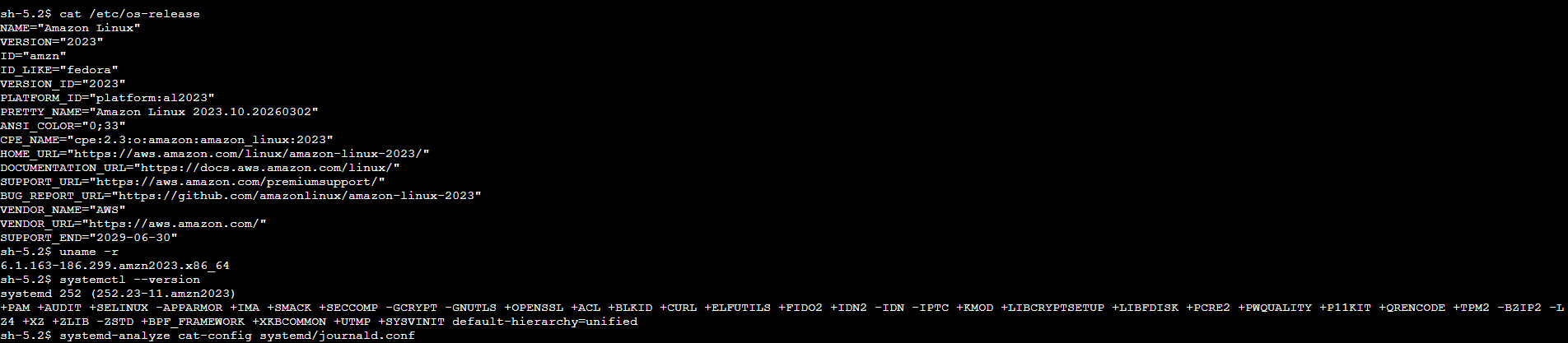
今回の検証環境では、以下の情報が確認できました。
- OS: Amazon Linux 2023
- Kernel: 6.1.163-186.299.amzn2023.x86_64
- systemd: systemd 252 (252.23-11.amzn2023)
設定確認
次に、現在有効になっている journald の設定を確認します。
$ systemd-analyze cat-config systemd/journald.conf
sh-5.2$ systemd-analyze cat-config systemd/journald.conf
# /etc/systemd/journald.conf
#  This file is part of systemd.
#
#  systemd is free software; you can redistribute it and/or modify it under the
#  terms of the GNU Lesser General Public License as published by the Free
#  Software Foundation; either version 2.1 of the License, or (at your option)
#  any later version.
#
# Entries in this file show the compile time defaults. Local configuration
# should be created by either modifying this file, or by creating "drop-ins" in
# the journald.conf.d/ subdirectory. The latter is generally recommended.
# Defaults can be restored by simply deleting this file and all drop-ins.
#
# Use 'systemd-analyze cat-config systemd/journald.conf' to display the full config.
#
# See journald.conf(5) for details.

[Journal]
#Storage=auto
#Compress=yes
#Seal=yes
#SplitMode=uid
#SyncIntervalSec=5m
#RateLimitIntervalSec=30s
#RateLimitBurst=10000
#SystemMaxUse=
#SystemKeepFree=
#SystemMaxFileSize=
#SystemMaxFiles=100
#RuntimeMaxUse=
#RuntimeKeepFree=
#RuntimeMaxFileSize=
#RuntimeMaxFiles=100
#MaxRetentionSec=
#MaxFileSec=1month
#ForwardToSyslog=no
#ForwardToKMsg=no
#ForwardToConsole=no
#ForwardToWall=yes
#TTYPath=/dev/console
#MaxLevelStore=debug
#MaxLevelSyslog=debug
#MaxLevelKMsg=notice
#MaxLevelConsole=info
#MaxLevelWall=emerg
#LineMax=48K
#ReadKMsg=yes
#Audit=yes
sh-5.2$
デフォルトではすべての項目がコメントアウトされているため、明示的な設定は行われていないことになります。
このため、デフォルトでは明示的な設定がなく 「Entries in this file show the compile time defaults.」 と記載されていることからも、コンパイル時のデフォルト値が適用されることが確認できました。
drop‑in 設定の確認
念のため、drop‑in 設定の有無も確認します。
$ ls -l /etc/systemd/journald.conf
$ ls -ld /etc/systemd/journald.conf.d
$ ls -ld /run/systemd/journald.conf.d
$ ls -ld /usr/lib/systemd/journald.conf.d
sh-5.2$ ls -l /etc/systemd/journald.conf
-rw-r--r--. 1 root root 1282 Feb 28  2024 /etc/systemd/journald.conf
sh-5.2$ ls -ld /etc/systemd/journald.conf.d
ls: cannot access '/etc/systemd/journald.conf.d': No such file or directory
sh-5.2$ ls -ld /run/systemd/journald.conf.d
ls: cannot access '/run/systemd/journald.conf.d': No such file or directory
sh-5.2$ ls -ld /usr/lib/systemd/journald.conf.d
ls: cannot access '/usr/lib/systemd/journald.conf.d': No such file or directory
sh-5.2$
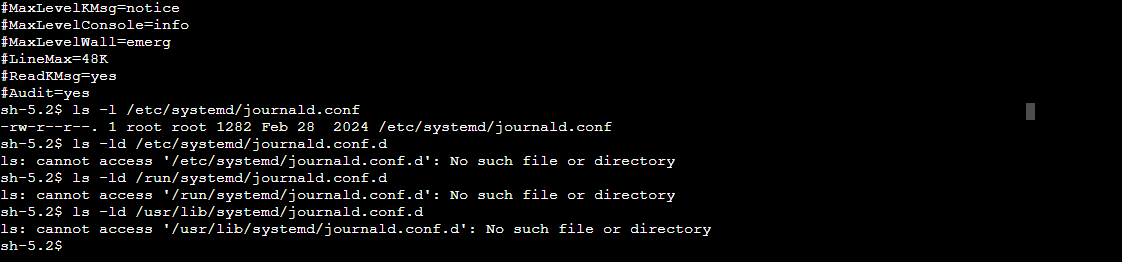
調査の結果、デフォルトではこれらのディレクトリ配下に .conf ファイルが存在しないことを確認しました。
man ページからデフォルト値を確認
man ページから各項目のデフォルト値を確認します。(systemd 252)
出力結果
JOURNALD.CONF(5)                                                                                journald.conf                                                                                JOURNALD.CONF(5)

NAME
       journald.conf, journald.conf.d, journald@.conf - Journal service configuration files

SYNOPSIS
       /etc/systemd/journald.conf

       /etc/systemd/journald.conf.d/*.conf

       /run/systemd/journald.conf.d/*.conf

       /usr/lib/systemd/journald.conf.d/*.conf

       /etc/systemd/journald@NAMESPACE.conf

       /etc/systemd/journald@NAMESPACE.conf.d/*.conf

       /run/systemd/journald@NAMESPACE.conf.d/*.conf

       /usr/lib/systemd/journald@NAMESPACE.conf.d/*.conf

DESCRIPTION
       These files configure various parameters of the systemd journal service, systemd-journald.service(8). See systemd.syntax(7) for a general description of the syntax.

       The systemd-journald instance managing the default namespace is configured by /etc/systemd/journald.conf and associated drop-ins. Instances managing other namespaces read
       /etc/systemd/journald@NAMESPACE.conf and associated drop-ins with the namespace identifier filled in. This allows each namespace to carry a distinct configuration. See systemd-journald.service(8)
       for details about journal namespaces.

CONFIGURATION DIRECTORIES AND PRECEDENCE
       The default configuration is set during compilation, so configuration is only needed when it is necessary to deviate from those defaults. Initially, the main configuration file in /etc/systemd/
       contains commented out entries showing the defaults as a guide to the administrator. Local overrides can be created by editing this file or by creating drop-ins, as described below. Using drop-ins
       for local configuration is recommended over modifications to the main configuration file.

       In addition to the "main" configuration file, drop-in configuration snippets are read from /usr/lib/systemd/*.conf.d/, /usr/local/lib/systemd/*.conf.d/, and /etc/systemd/*.conf.d/. Those drop-ins
       have higher precedence and override the main configuration file. Files in the *.conf.d/ configuration subdirectories are sorted by their filename in lexicographic order, regardless of in which of
       the subdirectories they reside. When multiple files specify the same option, for options which accept just a single value, the entry in the file sorted last takes precedence, and for options which
       accept a list of values, entries are collected as they occur in the sorted files.

       When packages need to customize the configuration, they can install drop-ins under /usr/. Files in /etc/ are reserved for the local administrator, who may use this logic to override the
       configuration files installed by vendor packages. Drop-ins have to be used to override package drop-ins, since the main configuration file has lower precedence. It is recommended to prefix all
       filenames in those subdirectories with a two-digit number and a dash, to simplify the ordering of the files.

       To disable a configuration file supplied by the vendor, the recommended way is to place a symlink to /dev/null in the configuration directory in /etc/, with the same filename as the vendor
       configuration file.

OPTIONS
       All options are configured in the [Journal] section:

       Storage=
           Controls where to store journal data. One of "volatile", "persistent", "auto" and "none". If "volatile", journal log data will be stored only in memory, i.e. below the /run/log/journal hierarchy
           (which is created if needed). If "persistent", data will be stored preferably on disk, i.e. below the /var/log/journal hierarchy (which is created if needed), with a fallback to /run/log/journal
           (which is created if needed), during early boot and if the disk is not writable.  "auto" behaves like "persistent" if the /var/log/journal directory exists, and "volatile" otherwise (the
           existence of the directory controls the storage mode).  "none" turns off all storage, all log data received will be dropped (but forwarding to other targets, such as the console, the kernel log
           buffer, or a syslog socket will still work). Defaults to "auto" in the default journal namespace, and "persistent" in all others.

           Note that journald will initially use volatile storage, until a call to journalctl --flush (or sending SIGUSR1 to journald) will cause it to switch to persistent logging (under the conditions
           mentioned above). This is done automatically on boot via "systemd-journal-flush.service".

           Note that when this option is changed to "volatile", existing persistent data is not removed. In the other direction, journalctl(1) with the --flush option may be used to move volatile data to
           persistent storage.

           When journal namespacing (see LogNamespace= in systemd.exec(5)) is used, setting Storage= to "volatile" or "auto" will not have an effect on the creation of the per-namespace logs directory in
           /var/log/journal/, as the systemd-journald@.service service file by default carries LogsDirectory=. To turn that off, add a unit file drop-in file that sets LogsDirectory= to an empty string.

       Compress=
           Can take a boolean value. If enabled (the default), data objects that shall be stored in the journal and are larger than the default threshold of 512 bytes are compressed before they are written
           to the file system. It can also be set to a number of bytes to specify the compression threshold directly. Suffixes like K, M, and G can be used to specify larger units.

       Seal=
           Takes a boolean value. If enabled (the default), and a sealing key is available (as created by journalctl(1)'s --setup-keys command), Forward Secure Sealing (FSS) for all persistent journal
           files is enabled. FSS is based on Seekable Sequential Key Generators[1] by G. A. Marson and B. Poettering (doi:10.1007/978-3-642-40203-6_7) and may be used to protect journal files from
           unnoticed alteration.

       SplitMode=
           Controls whether to split up journal files per user, either "uid" or "none". Split journal files are primarily useful for access control: on UNIX/Linux access control is managed per file, and
           the journal daemon will assign users read access to their journal files. If "uid", all regular users (with UID outside the range of system users, dynamic service users, and the nobody user) will
           each get their own journal files, and system users will log to the system journal. See Users, Groups, UIDs and GIDs on systemd systems[2] for more details about UID ranges. If "none", journal
           files are not split up by user and all messages are instead stored in the single system journal. In this mode unprivileged users generally do not have access to their own log data. Note that
           splitting up journal files by user is only available for journals stored persistently. If journals are stored on volatile storage (see Storage= above), only a single journal file is used.
           Defaults to "uid".

       RateLimitIntervalSec=, RateLimitBurst=
           Configures the rate limiting that is applied to all messages generated on the system. If, in the time interval defined by RateLimitIntervalSec=, more messages than specified in RateLimitBurst=
           are logged by a service, all further messages within the interval are dropped until the interval is over. A message about the number of dropped messages is generated. This rate limiting is
           applied per-service, so that two services which log do not interfere with each other's limits. Defaults to 10000 messages in 30s. The time specification for RateLimitIntervalSec= may be
           specified in the following units: "s", "min", "h", "ms", "us". To turn off any kind of rate limiting, set either value to 0.

           Note that the effective rate limit is multiplied by a factor derived from the available free disk space for the journal. Currently, this factor is calculated using the base 2 logarithm.

           Table 1. Example RateLimitBurst= rate modifications by the available disk space
           ┌─────────────────────┬──────────────────┐
           │Available Disk Space │ Burst Multiplier │
           ├─────────────────────┼──────────────────┤
           │<= 1MB               │ 1                │
           ├─────────────────────┼──────────────────┤
           │<= 16MB              │ 2                │
           ├─────────────────────┼──────────────────┤
           │<= 256MB             │ 3                │
           ├─────────────────────┼──────────────────┤
           │<= 4GB               │ 4                │
           ├─────────────────────┼──────────────────┤
           │<= 64GB              │ 5                │
           ├─────────────────────┼──────────────────┤
           │<= 1TB               │ 6                │
           └─────────────────────┴──────────────────┘

(中略)
systemd 252                                                                                                                                                                                  JOURNALD.CONF(5)
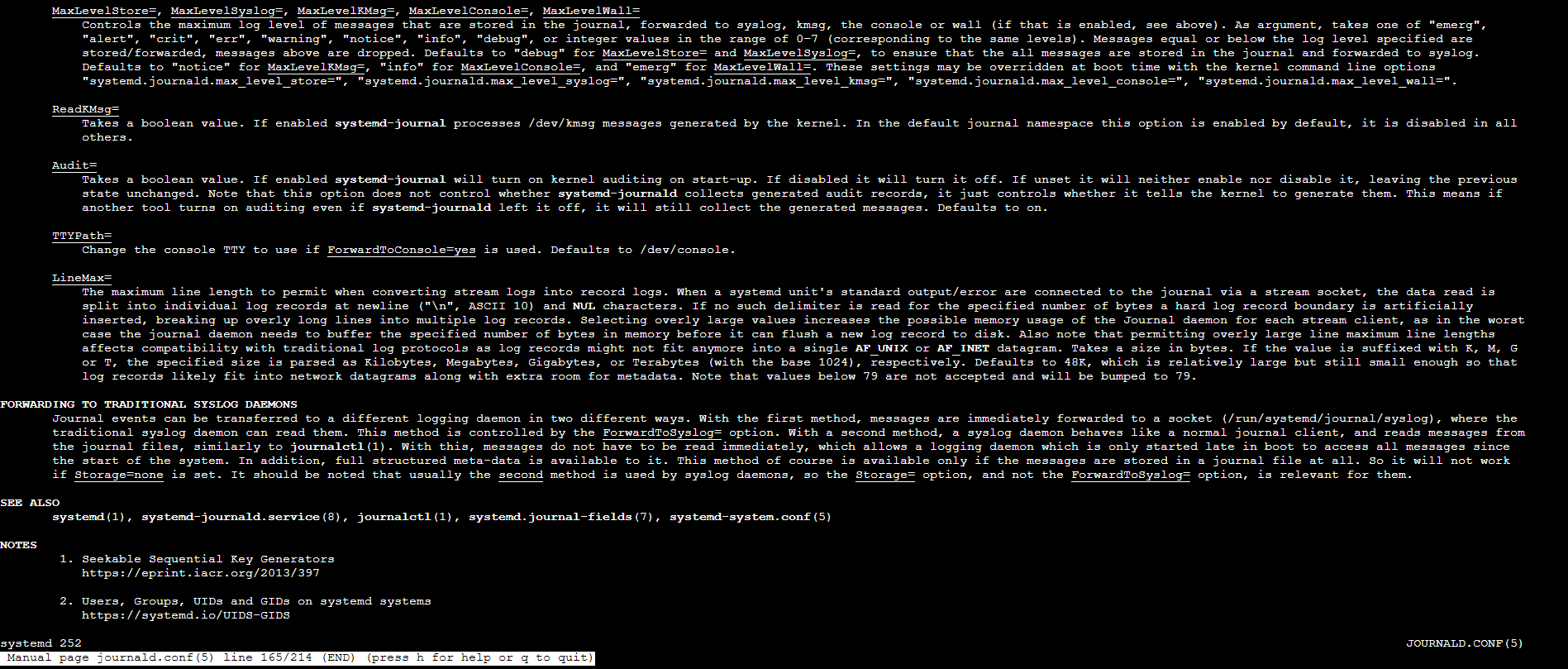
man journald.conf を確認し、「Defaults to ...」が記載されている箇所を抜粋しました。
| 項目 | デフォルト値 |
|---|---|
| Storage | auto |
| SystemMaxUse | 10%(上限 4G) |
| SystemKeepFree | 15%(上限 4G) |
| SystemMaxFileSize | SystemMaxUse の 1/8(最大 128M) |
| SystemMaxFiles | 100 |
| MaxFileSec | 1month |
| MaxRetentionSec | 0 |
| Compress | yes |
| Seal | yes |
| SplitMode | uid |
| RateLimitIntervalSec | 30s |
| RateLimitBurst | 10000 |
※ systemd 252 の man ページに基づく内容です。
まとめ
Amazon Linux 2023 の EC2 インスタンスを使用し、systemd-journald のデフォルト設定を確認しました。
検証の結果、以下のことが分かりました。
- /etc/systemd/journald.conf はすべてコメントアウトされており、明示的な設定は行われていない
- journald.conf.d 配下の drop-in 設定も存在しない
- そのため、systemd 252 におけるコンパイル時のデフォルト値が適用されている
- ログ管理は主にサイズベース(SystemMaxUse や SystemMaxFileSize など)で制御される
- 保持期間の制御(MaxRetentionSec)はデフォルトでは無効(0)
Amazon Linux 2023 では rsyslog がデフォルトでインストールされていないため、従来の /var/log/messages のようなテキストログは作成されません。
たとえば、ログが「消えたように見える」場合は、サイズ制限により古いジャーナルファイルが削除されたことが原因である可能性があります。デフォルト値を把握しておくことで、ログ保持ポリシーの設計やトラブルシューティング時の切り分けに役立ちます。
必要に応じて SystemMaxUse や MaxRetentionSec を明示的に設定することで、保持容量や保持期間を制御できますのでご検討ください。
本ブログが誰かの参考になれば幸いです。
参考資料
クラスメソッドオペレーションズ株式会社について
クラスメソッドグループのオペレーション企業です。
運用・保守開発・サポート・情シス・バックオフィスの専門チームが、IT・AIをフル活用した「しくみ」を通じて、お客様の業務代行から課題解決や高付加価値サービスまでを提供するエキスパート集団です。
当社は様々な職種でメンバーを募集しています。
「オペレーション・エクセレンス」と「らしく働く、らしく生きる」を共に実現するカルチャー・しくみ・働き方にご興味がある方は、クラスメソッドオペレーションズ株式会社 コーポレートサイト をぜひご覧ください。※2026年1月 アノテーション㈱から社名変更しました