EC2 Image Builder の自動バージョニングを Terraform で使う際の注意点

EC2 Image Builder の自動バージョニングを Terraform で使う際の注意点
どうも、ちゃだいん(@chazuke4649)です。
2025 年 11 月に EC2 Image Builder が自動バージョニングをサポートするアップデートがありました。今回はこのアップデートを Terraform で使う際にいくつかハマりどころがあったので、検証結果と注意点をまとめます。
EC2 Image Builder による自動バージョニングのサポートの開始と Infrastructure as Code (IaC) エクスペリエンスの強化 - AWS
アップデート概要
2025 年 11 月のアップデートにより、以下のような機能が追加されました。
- レシピバージョンのワイルドカードサポート
- EC2 Image Builder でイメージレシピのバージョン指定に
xを使ったワイルドカードが利用できるようになりました。例えばversion = "1.0.x"と指定すると、レシピ更新時にパッチバージョンが自動的にインクリメントされます。
- EC2 Image Builder でイメージレシピのバージョン指定に
- コンポーネントのビルドバージョン自動増分サポート
- コンポーネントのバージョン指定に
xを使ったワイルドカードが利用できるようになりました。例えばversion = "1.0.x"と指定すると、コンポーネント更新時にパッチバージョンが自動的にインクリメントされます。
- コンポーネントのバージョン指定に
- レシピからコンポーネント ARN のワイルドカードサポート
- コンポーネント ARN にワイルドカードを指定可能になりました。例えば
component_arn = "arn:aws:imagebuilder:ap-northeast-1:123456789012:component/example-sample-build-component/1.0.x"と指定すると、コンポーネント更新時にパッチバージョンが自動的にインクリメントされます。
- コンポーネント ARN にワイルドカードを指定可能になりました。例えば
これにより、IaC でレシピを更新する際にバージョン番号を手動で管理する必要がなくなります。
やってみた
1.レシピバージョンのワイルドカードサポート
まず、version = "1.0.x" を指定してレシピを新規作成します。
resource "aws_imagebuilder_image_recipe" "example_windows_recipe_version_wildcard" {
  name              = "example-windows-recipe-version-wildcard"
  parent_image      = data.aws_ami.windows_2022.id
  version           = "1.0.x"
  description       = "Windows Server 2022 Golden Image Recipe for PoC with Version Wildcard"
  working_directory = "C:/"

  lifecycle {
    ignore_changes = [
      parent_image
    ]
    create_before_destroy = true
  }

  component {
    component_arn = "arn:aws:imagebuilder:ap-northeast-1:aws:component/hello-world-windows/1.0.x"
  }
}
apply すると、バージョン 1.0.0 としてレシピが作成されます。
aws_imagebuilder_image_recipe.windows_golden_version_wildcard: Creation complete after 2s [id=arn:aws:imagebuilder:ap-northeast-1:123456789012:image-recipe/example-windows-recipe-version-wildcard/1.0.0]

Apply complete! Resources: 1 added, 0 changed, 0 destroyed.
続いて、description を変更して再度 apply します。レシピは設定変更すると update ではなく replace(削除して再作成)される点がポイントです。
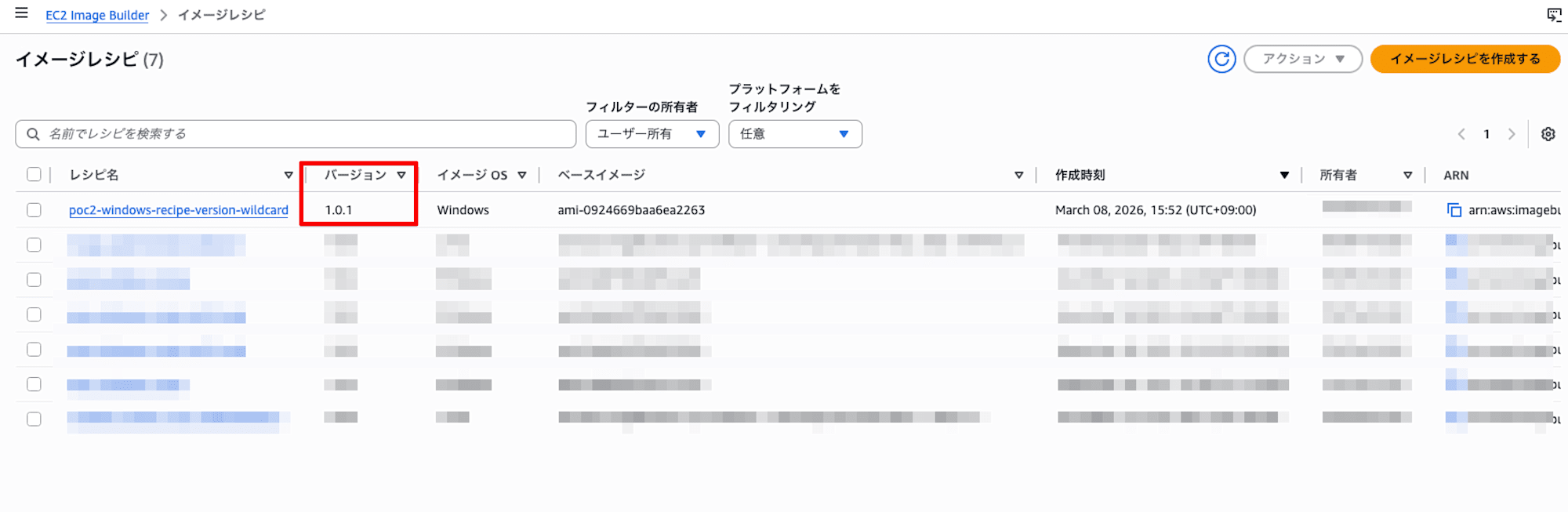
aws_imagebuilder_image_recipe.windows_golden_version_wildcard: Creation complete after 3s [id=arn:aws:imagebuilder:ap-northeast-1:123456789012:image-recipe/example-windows-recipe-version-wildcard/1.0.1]
aws_imagebuilder_image_recipe.windows_golden_version_wildcard (deposed object d9c1d913): Destroying...
aws_imagebuilder_image_recipe.windows_golden_version_wildcard: Destruction complete after 1s

Apply complete! Resources: 1 added, 0 changed, 1 destroyed.
バージョンが 1.0.0 → 1.0.1 に自動インクリメントされました。コンソールでも確認できます。
2.コンポーネントのビルドバージョン自動増分サポート
コンポーネントも同様にバージョン管理が必要です。ただし、コンポーネントの version には x のワイルドカードは使用できません。代わりに「ビルドバージョン」という仕組みで自動インクリメントに対応します。
resource "aws_imagebuilder_component" "sample_build_component" {
  name        = "example-sample-build-component"
  platform    = "Windows"
  version     = "1.0.0"
  description = "take 1"

  data = file("${path.module}/sample_build_component_01.yaml")
}
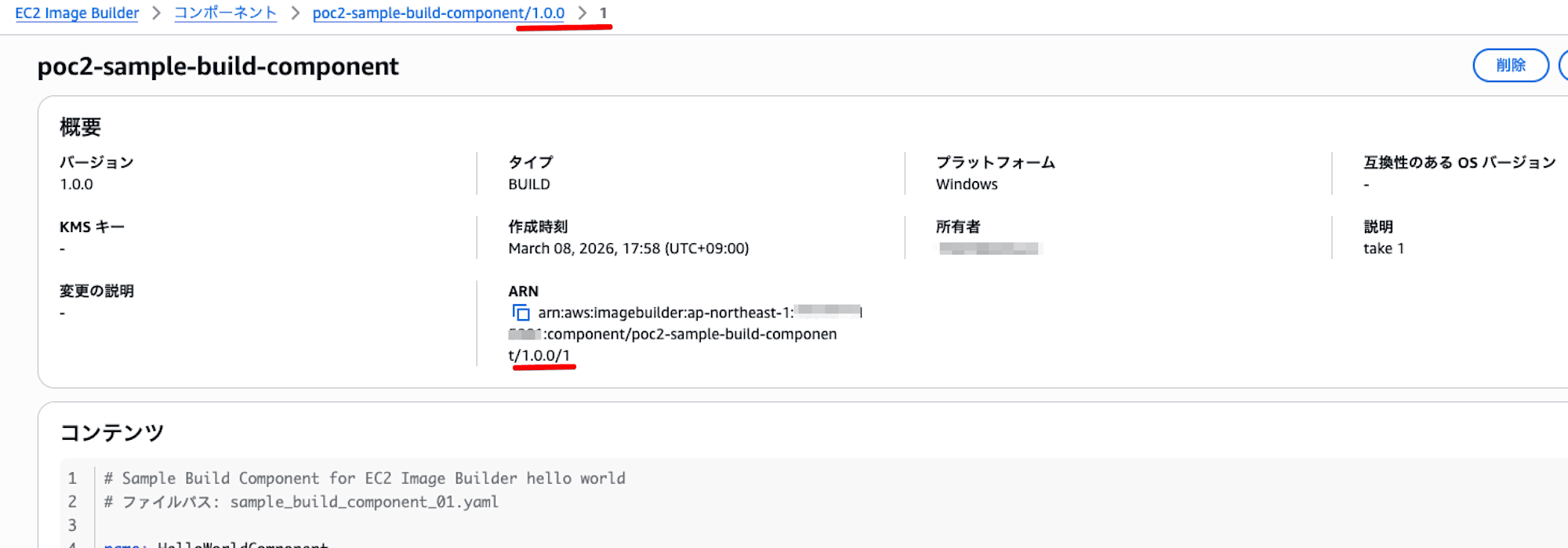
このコンポーネントを作成すると、ARN に /1.0.0/1 のようにセマンティックバージョンに加えてビルドバージョンが付与されます。
3.レシピからコンポーネント ARN のワイルドカードサポート
レシピからコンポーネントを参照する際、component_arn に 1.0.x のようなワイルドカードを指定できます。
ただし、aws_imagebuilder_component.arn 属性は完全修飾 ARN(ビルドバージョンまで含む)を返すため、ワイルドカード付きの ARN を渡したい場合はあえて直書きする必要があります。
component {
  component_arn = "arn:aws:imagebuilder:ap-northeast-1:123456789012:component/example-sample-build-component/1.0.x"
}
現時点では、CloudFormation の Fn::GetAtt MyComponent.LatestVersion.* に相当する Terraform の機能は確認できていません。
何にハマったか
1. (凡ミス)1.2.* じゃなくて 1.2.x だよ
当初、ワイルドカードを * で指定してしまいました。terraform plan は通りますが、terraform apply で以下のエラーになります。
│ Error: creating Image Builder Image Recipe: operation error imagebuilder: CreateImageRecipe,
│ https response error StatusCode: 400, RequestID: b98a6762-...,
│ api error InvalidParameterValueException: The value supplied for parameter 'semanticVersion'
│ is not valid. semanticVersion must match pattern (?:[0-9]+|x)\.(?:[0-9]+|x)\.(?:[0-9]+|x)$
エラーメッセージにある通り、正しい書式は x です。* ではありません。
2. version の ignore_changes 未設定
ignore_changes = [version] を設定していない場合、2 回目以降の更新で以下のエラーが発生します。
│ Error: creating Image Builder Image Recipe: operation error imagebuilder: CreateImageRecipe,
│ https response error StatusCode: 400, RequestID: ed0baa7d-...,
│ ResourceAlreadyExistsException: The following resource 'ImageRecipe' already exists:
│ 'arn:aws:imagebuilder:ap-northeast-1:123456789012:image-recipe/example-windows-recipe-version-wildcard/1.0.1'.
これは、Terraform の state 上のバージョン(例: 1.0.1)と API に渡すバージョン(1.0.x)の差分で replace が発生しますが、旧バージョンの削除前に新バージョンを作ろうとして同名リソースが衝突するためです。ignore_changes = [version] を追加すると、state 上のバージョン差分が無視され、正しくインクリメントが機能します。
3. コンポーネントの skip_destroy 未設定
skip_destroy が未設定(デフォルト false)の場合、コンポーネント更新時に旧バージョンが削除されてから再作成されます。この場合、ビルドバージョンはインクリメントされず、同じ /1.0.0/1 のままになります。
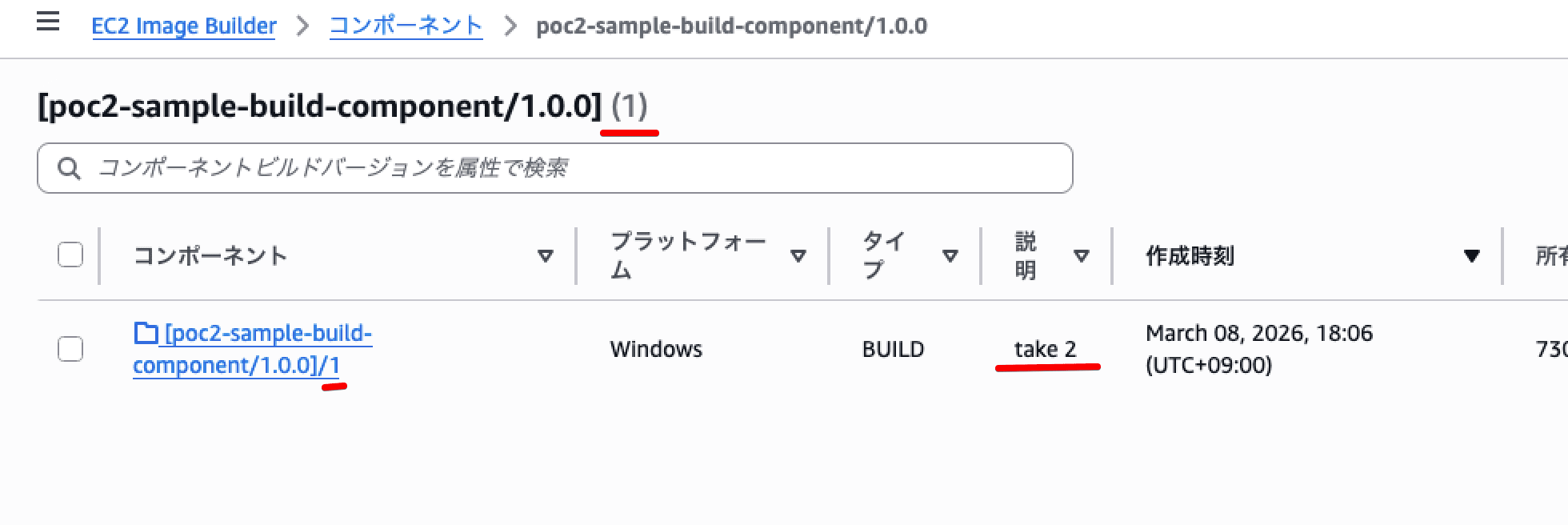
skip_destroy = true を設定すると、旧バージョンが残った状態で新規作成されるため、ビルドバージョンが正しくインクリメントされます。
修正後の確認
修正後のレシピ
resource "aws_imagebuilder_image_recipe" "example_windows_recipe_version_wildcard" {
  name              = "example-windows-recipe-version-wildcard"
  parent_image      = data.aws_ami.windows_2022.id
  version           = "1.0.x"
  description       = "updated description again"
  working_directory = "C:/"

  lifecycle {
    ignore_changes = [
      version
    ]
    create_before_destroy = true
  }

  component {
    component_arn = "arn:aws:imagebuilder:ap-northeast-1:123456789012:component/example-sample-build-component/1.0.x"
  }
}
修正後のコンポーネント
resource "aws_imagebuilder_component" "sample_build_component" {
  name         = "example-sample-build-component"
  platform     = "Windows"
  version      = "1.0.0"
  skip_destroy = true
  description  = "take 6 from Terraform"

  lifecycle {
    ignore_changes = [
      version
    ]
  }

  data = file("${path.module}/sample_build_component_01.yaml")
}
apply の確認
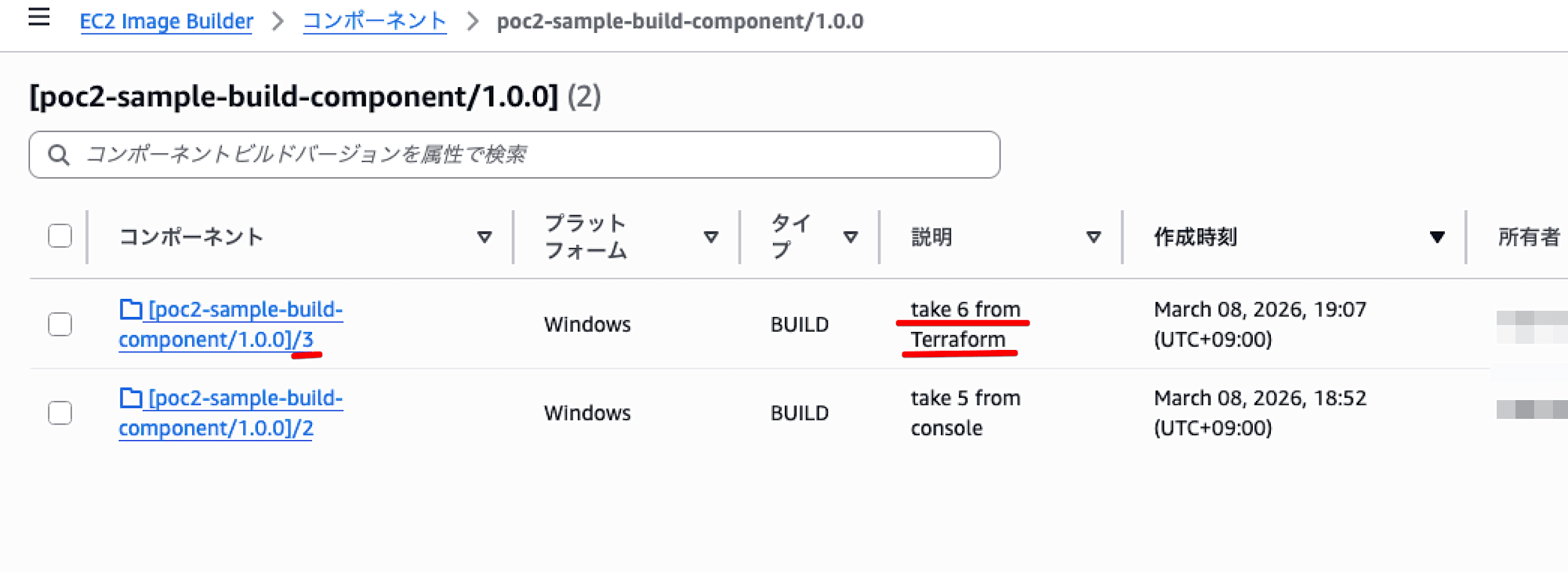
skip_destroy = true を設定した状態で apply すると、ビルドバージョンが /1.0.0/1 → /1.0.0/3 にインクリメントされたことが確認できます。
aws_imagebuilder_component.sample_build_component: Creating...
aws_imagebuilder_component.sample_build_component: Creation complete after 3s [id=arn:aws:imagebuilder:ap-northeast-1:123456789012:component/example-sample-build-component/1.0.0/3]

Apply complete! Resources: 1 added, 0 changed, 1 destroyed.
注意点
- レシピは update ではなく、必ず replace(削除 → 再作成)される
- レシピが replace されると、パイプラインの
image_recipe_arnも更新対象になる - コンポーネントの version には
xのワイルドカードは使用不可(^[0-9]+\.[0-9]+\.[0-9]+$のみ) aws_imagebuilder_component.arnは完全修飾 ARN を返すため、レシピの component_arn にワイルドカード付きバージョンを渡したい場合は直書きが必要- CloudFormation の
Fn::GetAtt相当の Terraform 機能は現時点で未確認
まとめ
EC2 Image Builder の自動バージョニングのアップデートにより、レシピとコンポーネントのバージョン管理が容易になりました。
ただし、Terraform で使うには、レシピとコンポーネントそれぞれで lifecycle の設定が必要かと思われます。
- レシピバージョンのワイルドカードサポート
- Terraform では、レシピは
ignore_changes = [version]+create_before_destroy = trueの設定が必要
- Terraform では、レシピは
- コンポーネントのビルドバージョン自動増分サポート
- Terraform では、コンポーネントは
skip_destroy = true+ignore_changes = [version]の設定が必要
- Terraform では、コンポーネントは
- レシピからコンポーネント ARN のワイルドカードサポート
- レシピの component_arn にワイルドカード(
1.0.x)を指定可能。ただし Terraform では、aws_imagebuilder_component.arnは完全修飾 ARN を返すため、現時点では直書きが必要
- レシピの component_arn にワイルドカード(
EC2 Image Builder を Terraform で管理する際は、参考にしてみてください。
それでは今日はこの辺で。ちゃだいん(@chazuke4649)でした。