![[アップデート] EKS が CloudShell を介したワンクリッククラスターアクセスをサポートしました](https://images.ctfassets.net/ct0aopd36mqt/wp-thumbnail-909b0303176e85a702b92f68e9d7ecba/67a829aa0886839b83f973e123190bd0/amazon-elastic_kubernetes_service?w=3840&fm=webp)
[アップデート] EKS が CloudShell を介したワンクリッククラスターアクセスをサポートしました

概要
Amazon EKS において、CloudShell を介したワンクリッククラスターアクセスがサポートされました。
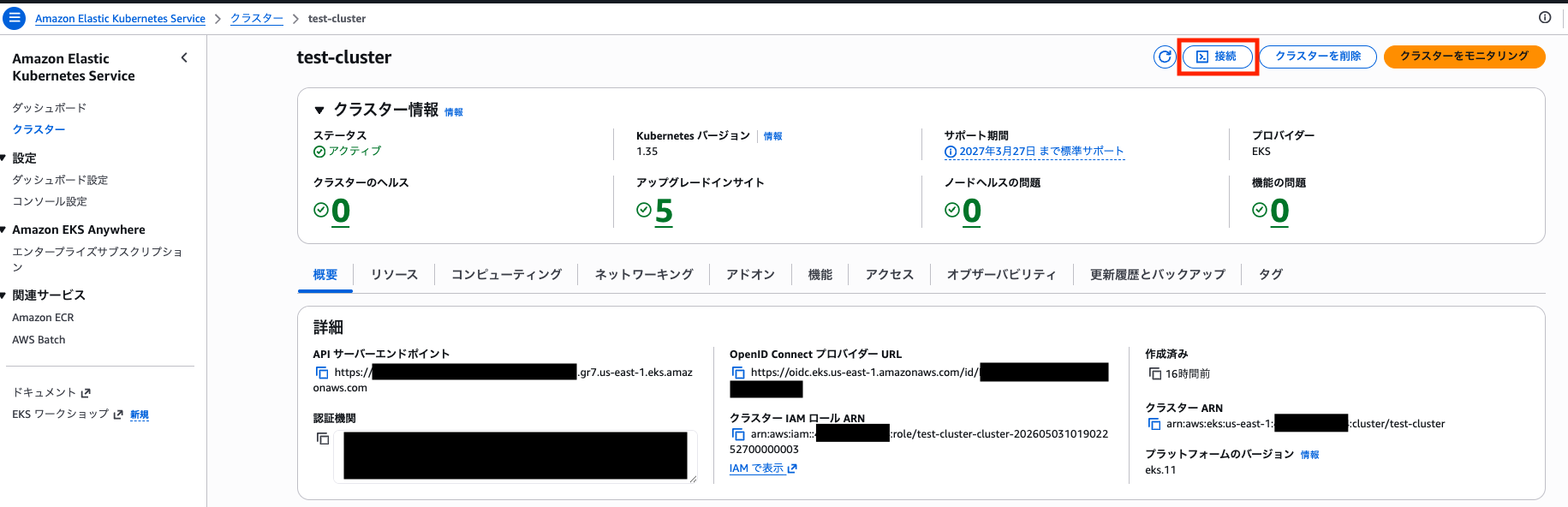
マネジメントコンソールで「接続」をクリックすることで、認証情報がセットされた状態で kubectl コマンドを実行できるようになります。
マネジメントコンソールから ECS Exec を利用して接続できる機能の EKS 版をイメージいただければ合ってると思います。
やってみる
クラスター詳細ページから「接続」をクリックします。
「実行」をクリックします。
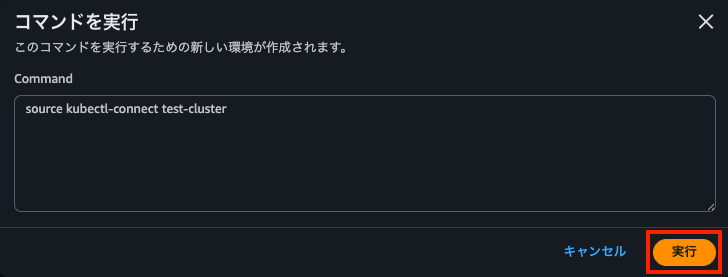
CloudShell が起動されて、source kubectl-connect コマンドが実行されます。
~ $ source kubectl-connect test-cluster
Cluster test-cluster already configured, switching to existing configuration
Successfully configured kubectl for cluster: test-cluster
Environment configured. KUBECONFIG is set to: /home/cloudshell-user/.kube/config-test-cluster
✅ Successfully connected to cluster test-cluster

🎯 Quick Tips:
  • Switch clusters: source kubectl-connect OTHER-CLUSTER
  • List clusters that are currently configured: kubectl-connect list
  • Get help: kubectl-connect --help

[k8s: test-cluster] ~ $
kubectl コマンドを実行できるようになりました。
[k8s: test-cluster] ~ $ kubectl get node
No resources found
裏側の仕組みに関して
EKS の場合、AWS 権限をセットした環境で aws eks update-kubeconfig コマンドを実行して ~/.kube/config を設定することが多いと思います。
aws eks update-kubeconfig --name $CLUSTER_NAME
この際、下記のような設定が ~/.kube/config に追加されます。
apiVersion: v1
kind: Config
preferences: {}

clusters:
  - cluster:
      certificate-authority-data: (クラスターのCA証明書)
      server: (クラスターのAPIエンドポイントURI)
    name: arn:aws:eks:us-east-1:123456789012:cluster/test-cluster
users:
  - name: arn:aws:eks:us-east-1:123456789012:cluster/test-cluster
    user:
      exec:
        apiVersion: client.authentication.k8s.io/v1beta1
        args:
          - --region
          - us-east-1
          - eks
          - get-token
          - --cluster-name
          - test-cluster
          - --output
          - json
        command: aws
contexts:
  - context:
      cluster: arn:aws:eks:us-east-1:123456789012:cluster/test-cluster
      user: arn:aws:eks:us-east-1:123456789012:cluster/test-cluster
    name: test-cluster
current-context: test-cluster
クレデンシャルプラグインを利用しており、kubectl 実行時に aws eks get-token コマンドを実行して認証情報を取得しています。
一回 ~/.kube/config に追加してしまえば、kubectx コマンド等で適宜コンテキストを切り替えながらクラスターに接続できます。
EKS のワンクリックアクセスも aws eks update-kubeconfig コマンドで ~/.kube/config を設定する点は同じですが、独自のシェルスクリプト (kubectl-connect) を介して実行される形になっています。
kubectl-connect の中身
[k8s: test-cluster] ~ $ cat /usr/local/bin/kubectl-connect
#!/usr/bin/env bash
# kubectl-connect

VERSION="1.0.0"

# Exit codes
E_USAGE=2 E_CLUSTER=3 E_DEPEND=4

# Command name - hardcoded to avoid $0 being "bash" when sourced
CMD_NAME="kubectl-connect"

# Note: Strict mode (set -euo pipefail) not used to prevent shell exit when sourced
# Error handling is done explicitly throughout the script instead

# Defaults
AWS_CLI_TIMEOUT="${AWS_CLI_TIMEOUT:-10}"

# Logging - Reset debug flag for each script run to prevent persistence when sourced
KUBECTL_CONNECT_DEBUG=false
_kc_log()   { printf '%s\n' "$*" >&2; }
_kc_debug() {
  if [ "$KUBECTL_CONNECT_DEBUG" = "true" ]; then
    _kc_log "[DEBUG] $*"
  fi
}
_kc_error() { _kc_log "$*"; }

# Detect if script is being sourced or executed
_is_sourced() {
  [[ "${BASH_SOURCE[0]}" != "${0}" ]]
}

# Help
usage() {
  echo "Usage: $CMD_NAME [options] [COMMAND|CLUSTER_NAME]"
  echo ""
  echo "Configure kubectl to connect to an Amazon EKS cluster."
  echo ""
  echo "Commands:"
  echo "  list                      List all configured clusters"
  echo ""
  echo "Arguments:"
  echo "  CLUSTER_NAME              Name of the EKS cluster to connect to"
  echo ""
  echo "Options:"
  echo "  --region REGION           AWS region where the cluster is located"
  echo "  --role-arn ARN            ARN of IAM role to assume for cluster access"
  echo "  --alias ALIAS             Alias for the kubeconfig context"
  echo "  --debug                   Enable verbose logging"
  echo "  --help                    Show this help message"
  echo "  --version                 Show version information"
  echo ""
  echo "Examples:"
  echo "  $CMD_NAME list"
  echo "  $CMD_NAME my-cluster"
  echo "  $CMD_NAME --region us-west-2 my-cluster"
  echo "  $CMD_NAME --role-arn arn:aws:iam::123456789012:role/EksRole my-cluster"
}

# Helper functions
show_version() {
  echo "$CMD_NAME version $VERSION";
}

get_configured_clusters() {
  [ -d ~/.kube ] || return 1

  local configs=()
  local _orig_nullglob
  _orig_nullglob=$(shopt -p nullglob)
  shopt -s nullglob
  configs=(~/.kube/config-*)
  eval "$_orig_nullglob"  # restore

  (( ${#configs[@]} )) || return 1
  printf '%s\n' "${configs[@]}"
}

list_clusters() {
  local all_configs
  if ! all_configs=$(get_configured_clusters); then
    echo "No clusters configured yet."
    echo ""
    echo "To configure a cluster, run:"
    echo "  source $CMD_NAME CLUSTER_NAME"
    return 0
  fi

  echo "Configured clusters:"
  while IFS= read -r config_file; do
    if [ -n "$config_file" ]; then
      local cluster_name
      cluster_name=$(basename "$config_file" | sed 's/^config-//')
      # Check if this is the currently active cluster
      if [ "${KUBECONFIG:-}" = "$config_file" ]; then
        echo "  • $cluster_name [CURRENT]"
      else
        echo "  • $cluster_name"
      fi
    fi
  done <<< "$all_configs"
  echo ""
  echo "To switch to a cluster, run:"
  echo "  source $CMD_NAME CLUSTER_NAME"
}

aws_cli() {
  if command -v timeout >/dev/null 2>&1; then
    AWS_MAX_ATTEMPTS=1 timeout "${AWS_CLI_TIMEOUT}s" aws --no-cli-pager "$@"
  else
    AWS_MAX_ATTEMPTS=1 aws --no-cli-pager \
      --cli-connect-timeout "$AWS_CLI_TIMEOUT" \
      --cli-read-timeout "$AWS_CLI_TIMEOUT" "$@"
  fi
}

show_first_cluster_tips() {
  echo "🎯 Quick Tips:"
  echo "  • Switch clusters: source $CMD_NAME OTHER-CLUSTER"
  echo "  • List clusters that are currently configured: $CMD_NAME list"
  echo "  • Get help: $CMD_NAME --help"
  echo ""
}

check_dependencies() {
  local missing_deps=""

  if ! command -v kubectl >/dev/null 2>&1; then
    missing_deps="kubectl"
  fi

  if ! command -v aws >/dev/null 2>&1; then
    missing_deps="${missing_deps:+$missing_deps }aws"
  fi

  if [ -n "$missing_deps" ]; then
    _kc_error "Missing required dependencies: $missing_deps"
    _kc_error "Please install the missing tools and ensure they are in your PATH."
    return $E_DEPEND
  fi
}

# Main function - contains all the main logic
main() {
  # Parse arguments
  local CLUSTER_NAME=""
  local REGION=""
  local ROLE_ARN=""
  local ALIAS=""
  local COMMAND=""

  while [ $# -gt 0 ]; do
    case "$1" in
      --help|-h)    usage; return 0 ;;
      --version|-V) show_version; return 0 ;;
      --debug)      KUBECTL_CONNECT_DEBUG=true; shift ;;
      --region)
        if [ $# -lt 2 ]; then
          _kc_error "--region requires a value"
          return $E_USAGE
        fi
        REGION="$2"; shift 2 ;;
      --role-arn)
        if [ $# -lt 2 ]; then
          _kc_error "--role-arn requires a value"
          return $E_USAGE
        fi
        ROLE_ARN="$2"; shift 2 ;;
      --alias)
        if [ $# -lt 2 ]; then
          _kc_error "--alias requires a value"
          return $E_USAGE
        fi
        ALIAS="$2"; shift 2 ;;
      list)         COMMAND="list"; shift ;;
      -*)           _kc_error "Unknown option: $1"; usage; return $E_USAGE ;;
      *)
        if [ -z "$CLUSTER_NAME" ]; then
          CLUSTER_NAME="$1"
          shift
        else
          _kc_error "Multiple cluster names specified. Only one cluster name is allowed."
          return $E_USAGE
        fi
        ;;
    esac
  done

  # Reject conflicting command + cluster name
  if [ "$COMMAND" = "list" ] && [ -n "$CLUSTER_NAME" ]; then
    _kc_error "Cannot specify both 'list' command and a cluster name."
    return $E_USAGE
  fi

  # Handle list command
  if [ "$COMMAND" = "list" ]; then
    list_clusters
    return 0
  fi

  # Validate required arguments for cluster connection
  if [ -z "$CLUSTER_NAME" ]; then
    _kc_error "Cluster name is required."
    usage
    return $E_USAGE
  fi

  if ! [[ "$CLUSTER_NAME" =~ ^[a-zA-Z0-9][a-zA-Z0-9_-]*$ ]]; then
    _kc_error "Invalid cluster name format: $CLUSTER_NAME (only alphanumeric, hyphens, and underscores allowed)"
    return $E_USAGE
  fi

  # Basic input validation
  if [ -n "$REGION" ]; then
    if ! [[ "$REGION" =~ ^[a-z]{2}(-[a-z0-9]+)+-[0-9]+$ ]]; then
      _kc_error "Invalid region format: $REGION (expected e.g. us-west-2, us-gov-west-1)"
      return $E_USAGE
    fi
  fi

  if [ -n "$ROLE_ARN" ]; then
    if ! [[ "$ROLE_ARN" =~ ^arn: ]]; then
      _kc_error "Invalid role ARN format: $ROLE_ARN (expected arn:...)"
      return $E_USAGE
    fi
  fi

  # Set alias if not provided
  if [ -z "$ALIAS" ]; then
    ALIAS="$CLUSTER_NAME"
  elif ! [[ "$ALIAS" =~ ^[a-zA-Z0-9][a-zA-Z0-9_-]*$ ]]; then
    _kc_error "Invalid alias format: $ALIAS (only alphanumeric, hyphens, and underscores allowed)"
    return $E_USAGE
  fi

  # Check dependencies for cluster operations
  check_dependencies || return $?

  # Create .kube directory if it doesn't exist
  mkdir -p ~/.kube

  local KUBECONFIG_PATH="$HOME/.kube/config-$CLUSTER_NAME"

  # Check if cluster is already configured
  local AWS_SUCCESS
  if [ -f "$KUBECONFIG_PATH" ]; then
    echo "Cluster $CLUSTER_NAME already configured, switching to existing configuration"
    _kc_debug "Using existing kubeconfig: $KUBECONFIG_PATH"
    AWS_SUCCESS=true
  else
    # Build the AWS EKS update-kubeconfig command
    echo "Configuring kubectl for EKS cluster: $CLUSTER_NAME"

    # Build command arguments as an array
    local EKS_ARGS=(eks update-kubeconfig --name "$CLUSTER_NAME" --kubeconfig ~/.kube/config-"$CLUSTER_NAME" --alias "$ALIAS")

    if [ -n "$REGION" ]; then
      EKS_ARGS+=(--region "$REGION")
      _kc_debug "Using region: $REGION"
    fi

    if [ -n "$ROLE_ARN" ]; then
      EKS_ARGS+=(--role-arn "$ROLE_ARN")
      _kc_debug "Using role ARN: $ROLE_ARN"
    fi

    # Execute the AWS CLI command
    if aws_cli "${EKS_ARGS[@]}"; then
      AWS_SUCCESS=true
    else
      AWS_SUCCESS=false
      rm -f "$KUBECONFIG_PATH"
    fi
  fi

  if [ "$AWS_SUCCESS" = "true" ]; then
    echo "Successfully configured kubectl for cluster: $CLUSTER_NAME"

    # Save current KUBECONFIG so we can restore on error
    local OLD_KUBECONFIG="${KUBECONFIG:-}"

    # Set the KUBECONFIG environment variable before testing connectivity
    export KUBECONFIG="$KUBECONFIG_PATH"
    echo "Environment configured. KUBECONFIG is set to: $KUBECONFIG_PATH"

    # Warn if not sourced — exports won't persist in the caller's shell
    if ! _is_sourced; then
      _kc_log "⚠️  Script was executed, not sourced. KUBECONFIG and PS1 changes will not persist."
      _kc_log "To activate in your current shell, run:"
      _kc_log "  source $CMD_NAME $CLUSTER_NAME"
      _kc_log "Or manually export:"
      _kc_log "  export KUBECONFIG=$KUBECONFIG_PATH"
    fi

    # Get current context for use throughout the validation process
    local CURRENT_CONTEXT
    CURRENT_CONTEXT=$(kubectl config current-context 2>/dev/null || echo "")

    # Test cluster connectivity
    _kc_debug "Testing cluster connectivity with: kubectl cluster-info --request-timeout=10s"
    local cluster_output
    if ! cluster_output=$(kubectl cluster-info --request-timeout=10s 2>&1); then
      _kc_error "⚠️  Configuration complete, but unable to connect to cluster $CLUSTER_NAME"
      _kc_error "Current context: $CURRENT_CONTEXT"
      echo "$cluster_output" >&2  # Show kubectl output for troubleshooting
      _kc_error "This may be due to:"
      _kc_error "  • Network connectivity issues"
      _kc_error "  • Invalid cluster credentials or permissions"
      _kc_error "  • Cluster does not exist or is not accessible"
      _kc_error "  • AWS credentials are incorrect or expired"
      if [ -n "$OLD_KUBECONFIG" ]; then export KUBECONFIG="$OLD_KUBECONFIG"; else unset KUBECONFIG; fi
      return $E_CLUSTER
    fi

    echo "✅ Successfully connected to cluster $CLUSTER_NAME"
    echo ""

    # Verify we're connected to the correct cluster
    if [ -z "$CURRENT_CONTEXT" ]; then
      _kc_error "Failed to get current kubectl context"
      if [ -n "$OLD_KUBECONFIG" ]; then export KUBECONFIG="$OLD_KUBECONFIG"; else unset KUBECONFIG; fi
      return $E_CLUSTER
    fi

    # Check if current context matches our expected alias (warn, don't fail)
    if [ "$CURRENT_CONTEXT" != "$ALIAS" ]; then
      _kc_log "⚠️  Context name mismatch: expected '$ALIAS' but current context is '$CURRENT_CONTEXT'"
      _kc_log "This can happen if the kubeconfig was previously created with a different alias."
    fi

    # Update the shell prompt to indicate the current cluster.
    # Strip any previous kubectl-connect PS1 prefix to prevent stacking.
    local clean_ps1="${PS1:-\$ }"
    # Shortest-prefix match removes "[k8s: <anything>] " prefix
    clean_ps1="${clean_ps1#\[k8s: *\] }"
    export PS1="[k8s: $ALIAS] $clean_ps1"

    # Check if this is the first cluster being configured
    local all_configs
    if all_configs=$(get_configured_clusters); then
      local existing_configs=""
      while IFS= read -r config_file; do
        if [ -n "$config_file" ] && [ "$config_file" != "$KUBECONFIG_PATH" ]; then
          existing_configs="${existing_configs}${config_file}"
        fi
      done <<< "$all_configs"

      if [ -z "$existing_configs" ]; then
        # This is the first cluster - show quick tips
        show_first_cluster_tips
      fi
    else
      # No other clusters configured - this is definitely the first one
      show_first_cluster_tips
    fi
  else
    _kc_error "Failed to configure kubectl for cluster: $CLUSTER_NAME"
    _kc_error "Please check your AWS credentials, cluster name, and permissions."
    return $E_CLUSTER
  fi
}

# Execute main function with all arguments
main "$@"
コマンド実行時に受け取ったクラスター名を指定して aws eks update-kubeconfig コマンドを実行しつつ、シェルの PS1 にクラスター名を表示するようにしているくらいの軽いスクリプトです。
ただし、kubectl-connect list コマンドを実行して接続できるクラスター一覧を表示するなど、ちょっとした便利機能も備わっています。
例えば 2 つ目のクラスター (test-cluster2) を作成して、「接続」をクリックすると先程の設定が残っているので下記のような出力が得られます。
[k8s: test-cluster2] ~ $ kubectl-connect list
Configured clusters:
  • test-cluster
  • test-cluster2 [CURRENT]

To switch to a cluster, run:
  source kubectl-connect CLUSTER_NAME
source コマンドを実行すると、接続先のクラスターを切り替えることができます。
[k8s: test-cluster2] ~ $ source kubectl-connect test-cluster
Cluster test-cluster already configured, switching to existing configuration
Successfully configured kubectl for cluster: test-cluster
Environment configured. KUBECONFIG is set to: /home/cloudshell-user/.kube/config-test-cluster
✅ Successfully connected to cluster test-cluster
再度 kubectl-connect list コマンドを実行すると、接続先が test-cluster に切り替わっていることがわかります。
[k8s: test-cluster] ~ $ kubectl-connect list
Configured clusters:
  • test-cluster [CURRENT]
  • test-cluster2

To switch to a cluster, run:
  source kubectl-connect CLUSTER_NAME
CloudShell に kubectx をインストールせずに接続先クラスターを簡単に切り替えられるのは良いですね。
また、現状は list で接続先を表示してからクラスター切り替えくらいしかできないですが、help はサブコマンドが複数存在することを想定した作りになっており、今後 list 以外のコマンドが追加されてもおかしく無さそうな雰囲気もあります。
~ $ kubectl-connect --help
Usage: kubectl-connect [options] [COMMAND|CLUSTER_NAME]

Configure kubectl to connect to an Amazon EKS cluster.

Commands:
  list                      List all configured clusters

Arguments:
  CLUSTER_NAME              Name of the EKS cluster to connect to

Options:
  --region REGION           AWS region where the cluster is located
  --role-arn ARN            ARN of IAM role to assume for cluster access
  --alias ALIAS             Alias for the kubeconfig context
  --debug                   Enable verbose logging
  --help                    Show this help message
  --version                 Show version information

Examples:
  kubectl-connect list
  kubectl-connect my-cluster
  kubectl-connect --region us-west-2 my-cluster
  kubectl-connect --role-arn arn:aws:iam::123456789012:role/EksRole my-cluster
kubens 相当の名前空間指定用のコマンドが追加されると嬉しい場面もありそうです。
また、kubectl を打つこと前提の環境なら alias k='kubectl' のエイリアスを設定してくれても嬉しいなと思ったりしました。
最後に
ワンクリッククラスターアクセスがサポートされ、マネジメントコンソールから簡単に EKS クラスターへ接続できるようになりました。
ローカル開発環境を置き換えるものでは無いと思いますが、環境セットアップ無しでサクッとクラスターに接続したい場面があれば便利に使えそうです!